drive select AUDI Q5 2021 Owner´s Manual
[x] Cancel search | Manufacturer: AUDI, Model Year: 2021, Model line: Q5, Model: AUDI Q5 2021Pages: 332, PDF Size: 118.86 MB
Page 57 of 332
![AUDI Q5 2021 Owner´s Manual 80B012721BA
Lights and Vision
aa atta are]
Fig. 46 Light switch: instrument illumination
%, - You can adjust the background brightness of
the instruments and display illumination.
> Pre](/img/6/40263/w960_40263-56.png "AUDI Q5 2021 Owner´s Manual 80B012721BA
Lights and Vision
aa atta are]
Fig. 46 Light switch: instrument illumination
%, - You can adjust the background brightness of
the instruments and display illumination.
> Pre")
80B012721BA
Lights and Vision
aa atta are]
Fig. 46 Light switch: instrument illumination
%, - You can adjust the background brightness of
the instruments and display illumination.
> Press the knob (@ to release it.
> Turn the knob toward "-" or "+"
crease the brightness.
> Press the knob again to return it to its original
Position.
@) Tips
Depending on vehicle equipment, the instru-
ment illumination (needles and gauges) may
turn on when the lights are off and the igni-
tion is switched on. The illumination for the
gauges reduces automatically and eventually
turns off as brightness outside increases. This
function reminds the driver to turn the low
beams on at the appropriate time.
to reduce or in-
Vision
Adjusting exterior mirrors
RAZ-0150
Fig. 47 Driver's door: knob for the exterior mirrors
> Turn the knob in the driver's door to the desired
position:
0 - Deactivates all adjustment functions.
Q/ ®- Selects the left or right exterior mirror.
To adjust the mirror glass in a mirror, press the
knob in the desired direction.
GA - Heats the mirror glass depending on the
outside temperature.
©) - Folds the exterior mirrors*. To fold the mir-
rors out, turn the knob to one of the other posi-
tions. In the MMI, you can select if the mirrors
fold in automatically when you lock the vehicle
=> page 35.
Front passenger's exterior mirror tilt
function*
Requirement: the knob must be in the position
for the front passenger’s exterior mirror.
The mirror surfaces tilt slightly when reverse
gear is selected to provide a better view, for ex-
ample of the edge of the curb.
You can adjust the mirror surface by turning the
knob in the desired direction.
The mirror moves from the reversing position
back to the original position:
— When you switch the ignition off
— When you drive forward at speeds faster than 9
mph (15 km/h).
— When the knob is no longer in the position for
the front passenger exterior mirror
Z\ WARNING
Curved mirror surfaces (for example convex)
enlarge the field of vision. However, they
make objects in the mirror appear smaller and
farther away. When using these mirrors to es-
timate your distance to vehicles behind you
when changing lanes, you could estimate in-
correctly, which increases the risk of an acci-
dent.
@) Note
— Applies to: vehicles with power folding exte-
rior mirrors: If the mirror housing was
moved by outside forces (such as an impact
when maneuvering), you must use the pow-
er folding function to fold the mirror all the
55
>
Page 60 of 332
Lights and Vision
results from the wiping process from the edge of
the windshield. The function is available when
driving at speeds up to 75 mph (120 km/h).
The headlight washer system” operates only
when the low beam headlights are on. If you
move the lever into position ©, the headlights
will be cleaned at fixed intervals.
@ Wipe the rear window W. The number of
wipes depends on the windshield wiper move-
ment.
The rear wiper automatically switches on when
the reverse gear is selected and the front wind-
shield wipers are on and running.
Clean the rear window @. The number of
wipes depends on how long the lever is held in
position (@).
This may also clean the rearview camera, depend-
ing on the vehicle equipment.
ZA\ WARNING
— The rain sensor is only intended to assist the
driver. The driver may still be responsible for
manually switching the wipers on based on
visibility
conditions.
— The windshield must not be treated with
water-repelling windshield coating agents.
Under unfavorable conditions, such as wet-
ness, darkness, and when the sun is low,
these coatings can cause increased glare,
which increases the risk of an accident. They
can also cause wiper blade chatter.
— Properly functioning windshield wiper
blades are required for a clear view and safe
driving > page 58, Cleaning/changing wip-
er blades.
@) Note
— If there is frost, make sure the windshield
wiper blades are not frozen to the wind-
shield. Switching on the windshield wipers
when the blades are frozen to the wind-
shield can damage the wiper blades.
— Prior to using a car wash, the windshield
wiper system must be switched off (lever in
position @). This prevents the wipers from
58
switching on unintentionally and causing
damage to the windshield wiper system.
G) Tips
— The windshield wipers switch off when the
ignition is switched off. You can activate the
windshield wipers after the ignition is
switched on again by moving the windshield
wiper lever to any position. The single wipe
function (lever in position @) also functions
when the ignition is switched off.
— Worn or dirty windshield wiper blades result
in streaking. This can affect the rain sensor
function. Check your windshield wiper
blades regularly.
— The washer fluid nozzles for the windshield
washer system are heated when the ignition
is on if the outside temperature is low.
— When stopping temporarily, such as at a
traffic light, the speed of the windshield
wipers automatically reduces by one level.
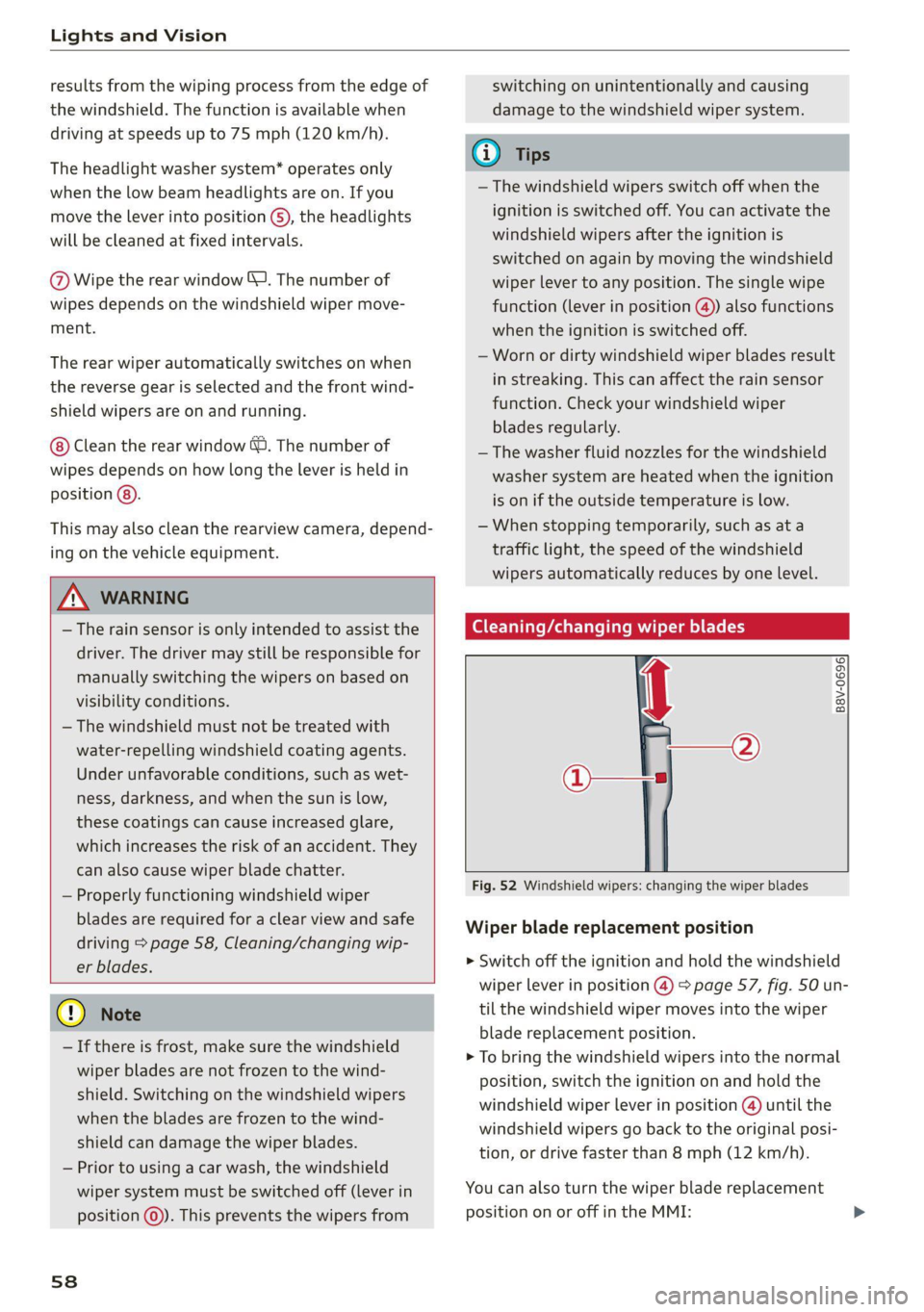
(eG cue a Re ct wiper blades
Fig. 52 Windshield wipers: changing the wiper blades
B8V-0696)
Wiper blade replacement position
>» Switch off the ignition and hold the windshield
wiper lever in position @) > page 57, fig. 50 un-
til the windshield wiper moves into the wiper
blade replacement position.
> To bring the windshield wipers into the normal
position, switch the ignition on and hold the
windshield wiper lever in position @ until the
windshield wipers go back to the original posi-
tion, or drive faster than 8 mph (12 km/h).
You can also turn the wiper blade replacement
position on or off in the MMI:
Page 61 of 332
80B012721BA
Lights and Vision
> Switch the windshield wipers off (position @
=> page 57, fig. 50).
> Applies to MMI: Select on the home screen: VE-
HICLE > Settings & Service > Wiper change po-
sition.
Cleaning the wiper blades
Requirement: the windshield wipers must be in
the wiper blade replacement position.
> Fold the windshield wiper arm away from the
windshield.
> For information on cleaning, see > table on
page 283.
Replacing the wiper blades
Requirement: the windshield wipers must be in
the wiper blade replacement position.
> Fold the windshield wiper arm away from the
windshield.
> Press the locking knob (@) on the wiper blade.
Hold the wiper blade firmly.
> Remove the wiper blade from the windshield
wiper arm mount (2).
> Insert the new wiper blade into the mount on
the wiper arm until it clicks into place.
> Place the wiper arm back on the windshield.
> Exit the wiper blade replacement position.
ZA\ WARNING
— For safety reasons, the windshield wiper
blades should be replaced once or twice
each year.
— Dirty windshield wiper blades can impair vi-
sion, which increases the risk of an accident.
@) Note
— The windshield wipers must only be lifted
up when in the wiper blade replacement po-
sition. Otherwise, you risk damaging the
paint on the hood or the windshield wiper
motor.
— You should not move your vehicle or press
the windshield wiper lever when the wiper
arms are folded up from the windshield. The
windshield wipers would move back into
their original position and could damage the
hood and windshield.
@) Tips
— You can also use the wiper blade replace-
ment position for other reasons, for exam-
ple if you want to protect the windshield
from icing by using a cover.
— You cannot activate the wiper blade replace-
ment position when the hood is open.
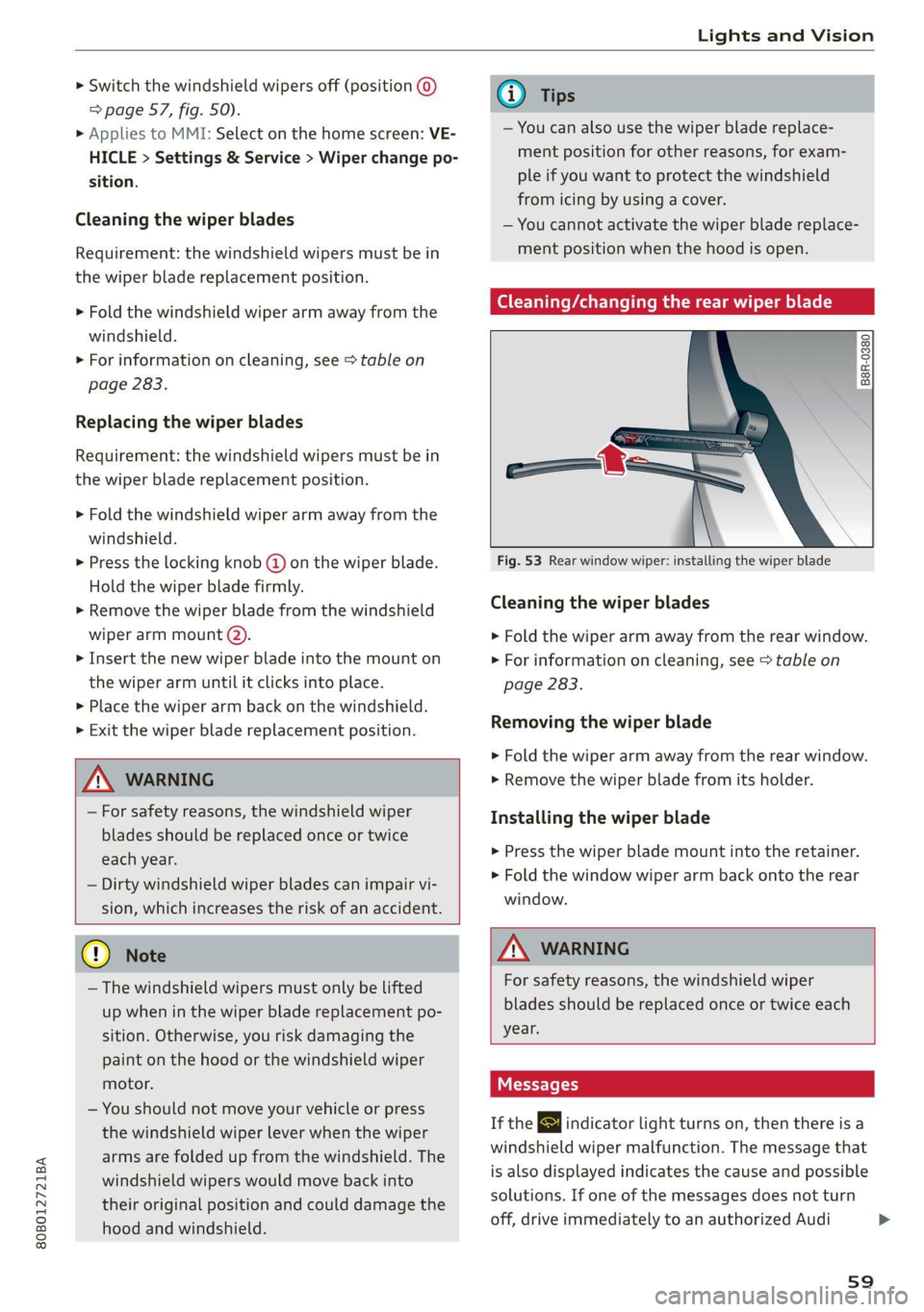
Cleaning/changing the rear wiper blade
B8R-0380
Fig. 53 Rear window wiper: installing the wiper blade
Cleaning the wiper blades
> Fold the wiper arm away from the rear window.
> For information on cleaning, see > table on
page 283.
Removing the wiper blade
> Fold the wiper arm away from the rear window.
> Remove the wiper blade from its holder.
Installing the wiper blade
> Press the wiper blade mount into the retainer.
> Fold the window wiper arm back onto the rear
window.
Z\ WARNING
For safety reasons, the windshield wiper
blades should be replaced once or twice each
year.
Messages
If the & indicator light turns on, then there is a
windshield wiper malfunction. The message that
is also displayed indicates the cause and possible
solutions. If one of the messages does not turn
off, drive immediately to an authorized Audi
59
Page 63 of 332
80B012721BA
Lights and Vision
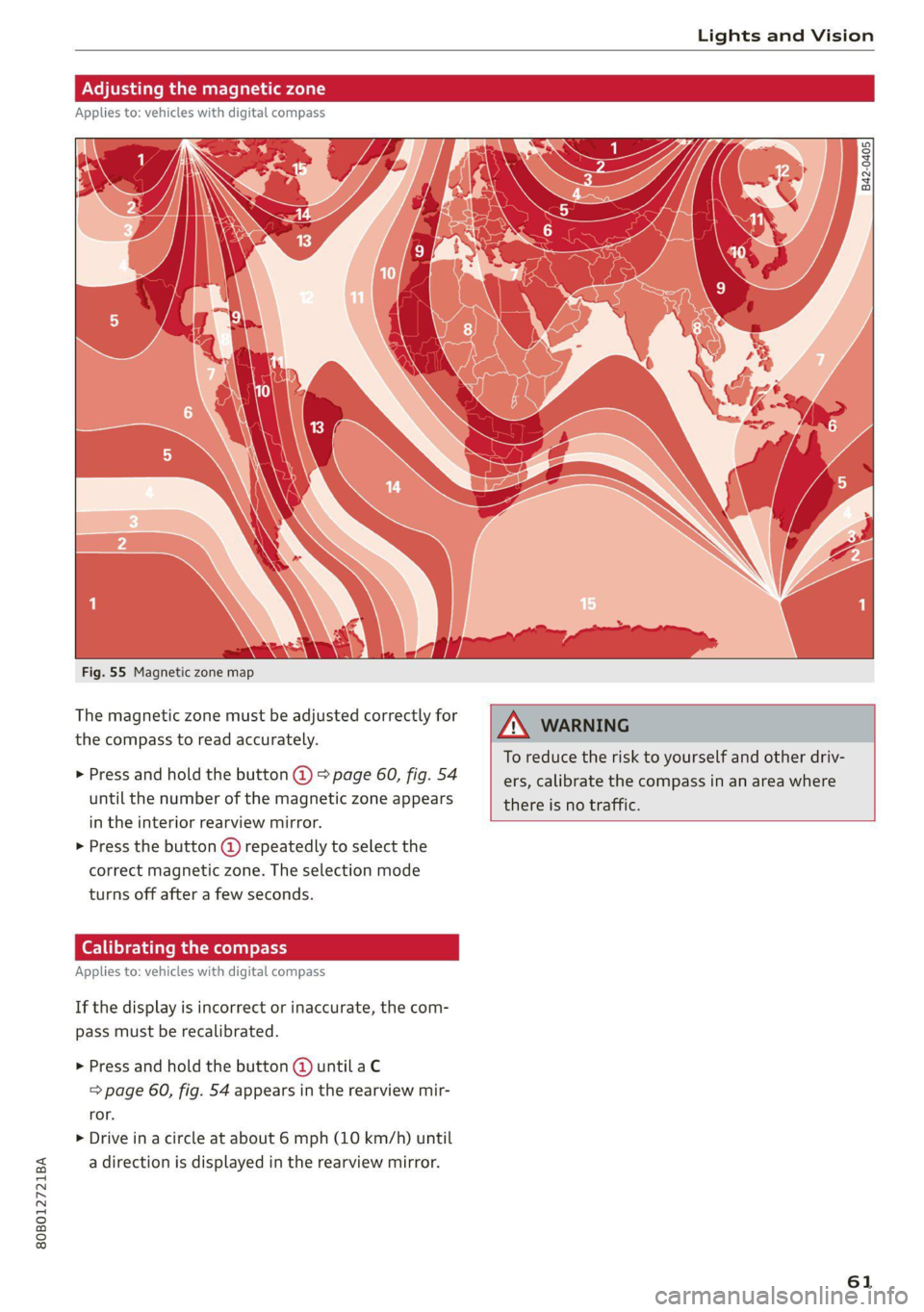
Fig. 55 Magnetic zone map
The magnetic zone must be adjusted correctly for
the compass to read accurately.
> Press and hold the button @ > page 60, fig. 54
until the number of the magnetic zone appears
in the interior rearview mirror.
> Press the button () repeatedly to select the
correct magnetic zone. The selection mode
turns off after a few seconds.
Calibrating the co
Applies to: vehicles with digital compass
If the display is incorrect or inaccurate, the com-
pass must be recalibrated.
> Press and hold the button @ until a C
=> page 60, fig. 54 appears in the rearview mir-
ror.
> Drive in a circle at about 6 mph (10 km/h) until
a direction is displayed in the rearview mirror.
B42-0405
To reduce the risk to yourself and other driv-
ers, calibrate the compass in an area where
there is no traffic.
61
Page 66 of 332
Sitting correctly and safely
Massage function
> To switch the massage function on or off, press
the button ©) > fig. 56.
ZA WARNING
—To reduce the risk of an accident, only adjust
the driver's seat when the vehicle is station-
ary.
— The power front seats can also be adjusted
when the ignition is switched off. To reduce
the risk of injury, children should never be
left unattended in the vehicle for this rea-
son.
— Exercise caution when adjusting the seat
height. Unsupervised or careless seat adjust-
ment could cause parts of the body to get
pinched, which increases the risk of injury.
— The front seat backrests must not be re-
clined too far back when driving, because
this impairs the effectiveness of the safety
belts and airbag system, which increases the
risk of injury.
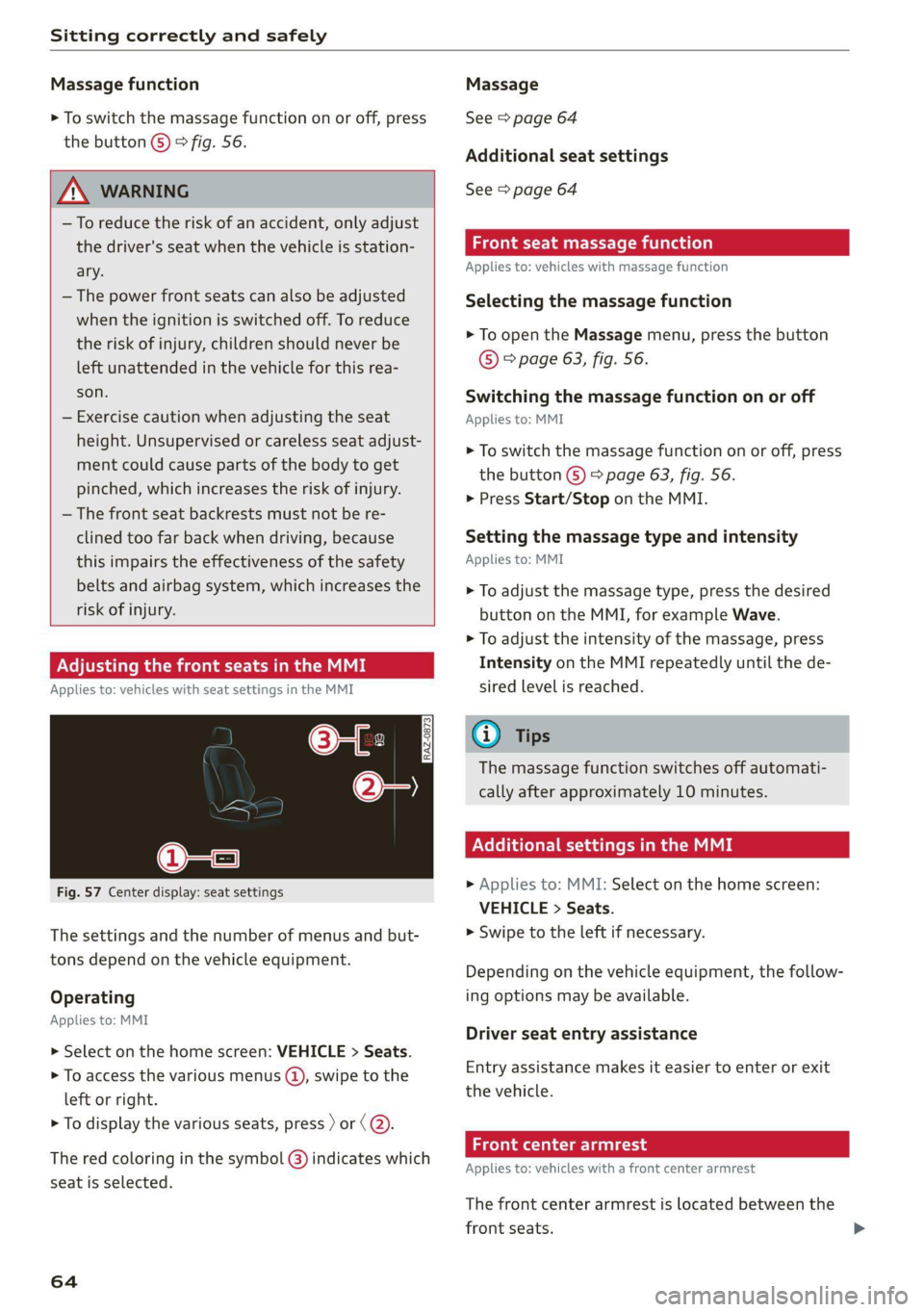
Adjusting the front seats in the MMI
Applies to: vehicles with seat settings in the MMI
3a
RAZ-0873
@-—S
Fig. 57 Center display: seat settings
The settings and the number of menus and but-
tons depend on the vehicle equipment.
Operating
Applies to: MMI
> Select on the home screen: VEHICLE > Seats.
> To access the various menus (@), swipe to the
left or right.
> To display the various seats, press ) or (@).
The red coloring in the symbol @) indicates which
seat is selected.
64
Massage
See > page 64
Additional seat settings
See > page 64
Front seat massage function
Applies to: vehicles with massage function
Selecting the massage function
> To open the Massage menu, press the button
© > page 63, fig. 56.
Switching the massage function on or off
Applies to: MMI
> To switch the massage function on or off, press
the button ©) > page 63, fig. 56.
> Press Start/Stop on the MMI.
Setting the massage type and intensity
Applies to: MMI
> To adjust the massage type, press the desired
button on the MMI, for example Wave.
> To adjust the intensity of the massage, press
Intensity on the MMI repeatedly until the de-
sired level is reached.
G@) Tips
The massage function switches off automati-
cally after approximately 10 minutes.
Xe Tie Cea etal MME
> Applies to: MMI: Select on the home screen:
VEHICLE > Seats.
> Swipe to the left if necessary.
Depending on the vehicle equipment, the follow-
ing options may be available.
Driver seat entry assistance
Entry assistance makes it easier to enter or exit
the vehicle.
Front center armrest
Applies to: vehicles with a front center armrest
The front center armrest is located between the
front seats.
Page 87 of 332
80B012721BA
Storage and convenience
bench seat to protect the backrest from
damage.
— If you move the front seat back when the
rear seat backrest is folded forward, you
could damage the head restraints on the
rear seat.
— Make sure that the heating grid strips for
the rear window defogger are not damaged
by abrasive objects.
— Applies to: vehicles with manual luggage
compartment cover: Let the luggage com-
partment cover roll up slowly to reduce the
risk of damage.
—The tire pressure must be adapted to the
load > page 271.
— You can purchase straps at specialty stores.
Luggage compartment cover
Applies to: vehicles with luggage compartment cover
2
S|
2 = +
ao
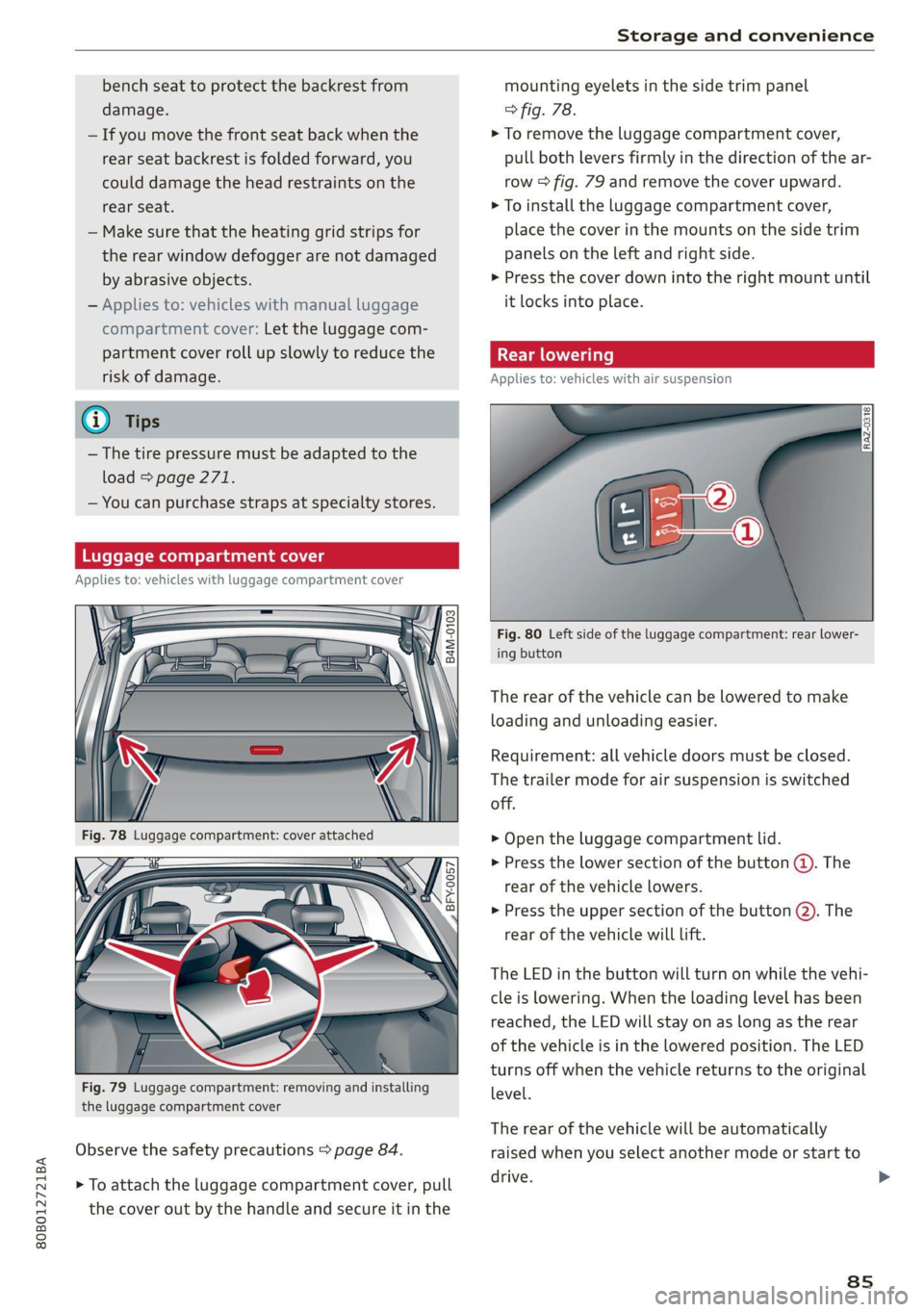
Fig. 79 Luggage compartment: removing and installing
the luggage compartment cover
Observe the safety precautions > page 84.
> To attach the luggage compartment cover, pull
the cover out by the handle and secure it in the
mounting eyelets in the side trim panel
> fig. 78.
> To remove the luggage compartment cover,
pull both levers firmly in the direction of the ar-
row > fig. 79 and remove the cover upward.
> To install the luggage compartment cover,
place the cover in the mounts on the side trim
panels on the left and right side.
> Press the cover down into the right mount until
it locks into place.
Applies to: vehicles with air suspension
Fig. 80 Left side of the luggage compartment: rear lower-
ing button
The rear of the vehicle can be lowered to make
loading and unloading easier.
Requirement: all vehicle doors must be closed.
The trailer mode for air suspension is switched
off.
> Open the luggage compartment lid.
> Press the lower section of the button (@). The
rear of the vehicle lowers.
> Press the upper section of the button @. The
rear of the vehicle will Lift.
The LED in the button will turn on while the vehi-
cle is lowering. When the loading level has been
reached, the LED will stay on as long as the rear
of the vehicle is in the lowered position. The LED
turns off when the vehicle returns to the original
level.
The rear of the vehicle will be automatically
raised when you select another mode or start to
drive.
ss
>
Page 95 of 332
80B012721BA
Warm and cold
The cooling mode only functions with the blower
turned on. The air is not cooled and humidity is
not reduced when cooling mode is switched off.
This can cause fog on the windows. The cooling
mode switches off automatically at low outside
temperatures.
If you activate A/C ON, the cooling mode will be
automatically regulated. A/C OFF switches cool-
ing mode off.
If you activate A/C MAX*, the cooling mode will
operate with maximum output. To reduce unnec-
essary energy usage, only use this function brief-
ly.
= Recirculation mode
In recirculation mode, the air inside the vehicle is
circulated and filtered. This prevents the unfil-
tered air outside the vehicle from entering the
vehicle interior A\ in Description on page 91.
Pressing the <> button switches recirculation
mode on or off manually. You can also switch the
recirculation mode off by pressing the knob (@ or
the §& button.
AUTO Automatic mode
Automatic mode maintains a constant tempera-
ture inside the vehicle. Air temperature, airflow
and air distribution are controlled automatically.
You can switch automatic mode on or off by
pressing the knob (@).
Temperature
You can adjust the temperature between 60°F
(+16°C) and 84°F (+28°C) by turning the knob
©. If outside of this range, LO or HI will appear
in the climate control system display. In both set-
tings, the climate control runs constantly at the
maximum cooling or heating level. The tempera-
ture is not regulated.
The temperature can be adjusted in the rear us-
ing
the rear controls > fig. 92.
=z Blower
You can adjust the volume of air generated by the
blower to your preference using the rocker switch
@. The blower should always run at a low setting
to prevent the windows from fogging and to en-
sure a continuous exchange of air inside the vehi-
cle. To have the blower regulated automatically,
press one of the knobs ().
Air distribution
You can use the rocker switches @) to adjust the
vents where the air will flow out of. Press the
rocker switches (2) repeatedly until the desired
air distribution setting is displayed in the climate
control system controls. To have the air distribu-
tion regulated automatically, press one of the
knobs (a).
SYNC Synchronization
Use the rocker switch (5) to select the function.
When synchronization is switched on, the set-
tings for the driver's side are applied to the front
passenger's side and the rear (except for seat
heating/ventilation*). If the settings on the front
passenger's side or in the rear are changed, the
synchronization will automatically switch off and
3-ZONE will appear in the display.
SET REAR Function
Use the rocker switch (5) to select the function.
When the function is switched on, you can adjust
all settings for the rear using the climate control
system controls in the cockpit. The rear climate
control system controls cannot be operated at
the same time. This function switches off auto-
matically after a certain period of time or after
leaving the menu.
a Seat heating*
The seat heating temperature can be set at mul-
tiple levels. Press the w button once to switch on
the highest level. Press the #/ button again to de-
crease the temperature one level at a time. The
seat heating is off when all of the LEDs are off.
#4 Seat ventilation*
The seat ventilation intensity can be set to multi-
ple levels. Press the &J button once to switch on
the highest level. Press the £4 button again to
decrease the intensity one level at a time. The
seat ventilation is off when all of the LEDs are off. >
93
Page 96 of 332
Warm and cold
& Defrosting
The windshield and side windows are defrosted
or cleared of condensation as quickly as possible.
Align the outer air vents with the side windows.
The maximum amount of air flows mainly from
the vents below the windshield. Recirculation
mode switches off. The temperature should be
set at 72 °F (+22 °C) or higher. The temperature
is controlled automatically.
You can switch the defroster on or off using the
& button. You can switch the function off by
pressing a knob @).
@ Rear window defogger
The rear window defogger only operates when
the engine is running. It switches off automati-
cally after 10 to 20 minutes, depending on the
outside temperature.
To prevent the rear window defogger from
switching off automatically, press and hold the
® button for more than three seconds. This is
stored until the ignition is switched off.
Vents
You can open or close the center and rear vents in
the cockpit and the vents in the rear center con-
sole using the ridged thumbwheels. The levers
adjust the direction of the airflow from the vents.
Residual heat
You can activate the residual heat function when
the ignition is switched off by pressing the knob
@ (left side). The residual heat from the coolant
is used to heat the vehicle interior. The residual
heat function switches off automatically after
about 15 minutes.
ONC eeiaeiile hy
You can adjust additional settings.
» Applies to MMI: Select on the home screen: VE-
HICLE > Air conditioning.
Auto recirculation
When switched on, automatic recirculation con-
trols the recirculation mode automatically. You
94
must press the §& button if fog forms on the win-
dows.
Steering wheel heating
Sica Le molal
Applies to: vehicles with steering wheel heating
> Press the @ button on the multifunction steer-
ing wheel to switch the steering wheel heating
on and off.
Messages
Applies to: vehicles with steering wheel heating
@& Steering wheel heating: on / Steering wheel
heating: off
This message appears if you switched the steer-
ing wheel heating on or off by pressing the but-
ton on the multifunction steering wheel.
Steering wheel heating: malfunction! See own:
er's manual
If this message appears, there is a malfunction.
Drive immediately to an authorized Audi dealer
or authorized Audi Service Facility to have the
malfunction repaired.
Auxiliary climate control
Applies to: vehicles with auxiliary climate control
The auxiliary climate control system warms or
cools the vehicle interior. The vehicle will turn on
the auxiliary climate control system if needed,
depending on the last temperature that was set
with the climate control system controls. This
function can be used when the drive system is
switched off.
You can turn the auxiliary climate control system
on and off immediately in the MMI or set a timer.
Requirement: the charge level of the high-volt-
age battery must be sufficient.
Page 100 of 332
Driving
usual may increase the risk of accidents and
serious injuries.
— Secure the vehicle against rolling before ex-
iting the vehicle > page 98.
@) Note
— Avoid high engine speed, full throttle, and
heavy engine load if the engine has not
reached operating temperature yet. You
could damage the engine.
— If the engine has been under heavy load for
an extended period of time, heat builds up
in the engine compartment after the engine
is switched off and there is a risk of damag-
ing the engine. For this reason, let the en-
gine run at idle for approximately two mi-
nutes before shutting it off.
@ Tips
— Brief noises are normal when starting and
stopping the vehicle and are no cause for
concern.
— For up to 10 minutes after stopping the en-
gine, the radiator fan may turn on again au-
tomatically or it may continue to run, even if
the ignition is switched off.
— It may not be possible to start the vehicle in
extremely low temperatures.
— Power will be fully available once the engine
is at operating temperature.
Messages
FJ Engine start system: malfunction! Please
contact Service
There is a malfunction in the engine start system.
Drive immediately to an authorized Audi dealer
or authorized Audi Service Facility to have the
malfunction repaired.
>| Remote control key: key not detected. Is the
key
still in the vehicle?
The vehicle key was removed from the vehicle
while the engine is running. If the vehicle key is
no longer in the vehicle, you cannot switch the ig-
nition on or start the engine once you stop it. You
also cannot lock the vehicle from the outside.
98
Remote control key: hold back of key
against the designated area. See owner's man-
ual
The battery in the vehicle key may be drained or
there may be a malfunction. To start the vehicle,
you must also hold the vehicle key against the lo-
cation shown ?) > page 97, fig. 93.
If the malfunction remains, drive immediately to
an authorized Audi dealer or authorized Audi
Service Facility to have the malfunction correct-
ed.
When driving
Starting to drive, stopping, and parking
Starting from a stop
> Press and hold the brake pedal.
> Start the engine.
> Select a gear.
>» Release the parking brake.
> Release the brake pedal. The vehicle may roll.
> Press the accelerator pedal to accelerate.
Securing the vehicle against rolling
Secure your vehicle to prevent it from rolling be-
fore exiting the vehicle.
> Set the parking brake.
> Select the “P” selector lever position.
> If parking on a steep road, turn the steering
wheel so that your vehicle will roll against the
curb in case it should start to move.
If one of these measures is not possible, for ex-
ample because there is no vehicle power, you
must secure your vehicle against rolling using ad-
ditional measures.
> Only park the vehicle on a level surface.
> Use suitable objects to block the front and rear
wheels.
Set the parking brake before selecting the “P” se-
lector lever position. This prevents too much
stress from being placed on the locking mecha-
nism when parking on a steep surface.
Page 101 of 332
80B012721BA
Driving
ZA WARNING
— Always set the parking brake when leaving
your vehicle, even if for a short period of
time. If the parking brake is not set, the ve-
hicle could roll away, increasing the risk of
an accident.
— Do not leave your vehicle unattended while
the engine is running, because this increases
the risk of an accident.
— If the parking brake is set, it can release au-
tomatically when the accelerator pedal is
pressed. To reduce the risk of an accident,
do not inadvertently press the accelerator
pedal and always shift into “P” when the ve-
hicle is stopped.
— If you leave the vehicle, switch the ignition
off and take the key with you. This is espe-
cially important when leaving persons or an-
imals in the vehicle. Otherwise, the vehicle
could start unintentionally, the parking
brake could release, or electronic equipment
could activate, which increases the risk of an
accident.
— No persons or animals should be left in a
locked vehicle. Locked doors make it more
difficult for emergency workers to enter the
vehicle, which puts lives at risk.
— If you do not begin driving immediately af-
ter releasing the brake pedal, your vehicle
may begin to roll backward. Press the brake
pedal or set the parking brake immediately.
@ Note
If you have to stop on an incline, always press
the brake pedal to hold the vehicle in place to
reduce the risk of the vehicle rolling back-
ward. Do not try to hold the vehicle in place
by pressing and holding the accelerator pedal.
The transmission can overheat, which increas-
es the risk of damage.
Hill hold assist
If you take your foot off of the brake pedal when
driving on hills, the braking force will be held for
several seconds. At that time, you can start driv-
ing without the vehicle rolling backward.
Requirement: the driver's door must be closed,
the engine must be on, and the vehicle must be
traveling uphill.
> To activate hill hold assist, press and hold the
brake pedal for several seconds while the vehi-
cle is stationary.
Z\ WARNING
—If you do not begin driving immediately af-
ter releasing the brake pedal, your vehicle
may begin to roll backward. Press the brake
pedal
or set the parking brake immediately.
—The hill hold assist cannot hold the vehicle
on inclines in every scenario (for example,
on slippery or icy ground).
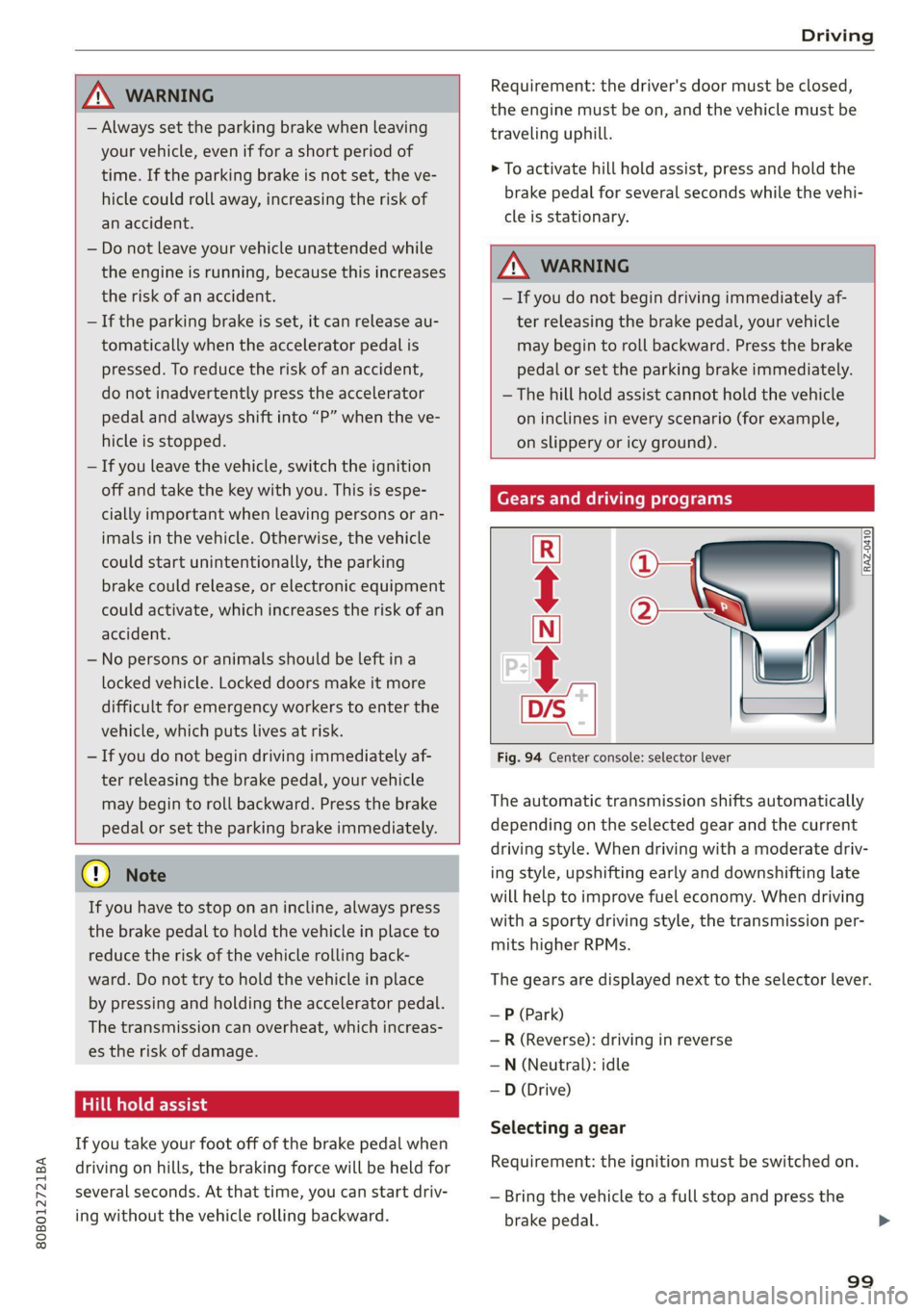
Gears and driving programs
Q)—
(2—*S
[RAZ-0410
R
N
tt
D/S
7 I
Fig. 94 Center console: selector lever
The automatic transmission shifts automatically
depending on the selected gear and the current
driving style. When driving with a moderate driv-
ing style, upshifting early and downshifting late
will help to improve fuel economy. When driving
with a sporty driving style, the transmission per-
mits higher RPMs.
The gears are displayed next to the selector lever.
— P (Park)
— R (Reverse): driving in reverse
—N (Neutral): idle
—D (Drive)
Selecting a gear
Requirement: the ignition must be switched on.
— Bring the vehicle to a full stop and press the
brake pedal.
99