parking brake AUDI Q7 2009 Owner´s Manual
[x] Cancel search | Manufacturer: AUDI, Model Year: 2009, Model line: Q7, Model: AUDI Q7 2009Pages: 426, PDF Size: 97.13 MB
Page 186 of 426

• ..__A_ u_t _o _m_ a_ t_ i_c _ t _r_ a_ n_ s_m _ is_ s_ io_ n ___________________________________________ _
Automatic transmission
tiptronic® (6-speed automatic
transmission)
General information
Your vehic le is equipped with an e lectronica lly controlled automatic
transmission. Upshifting and downshifting takes place
automati
cally.
The transmission is also equipped with tiptronic®. It allows the driver to shift gears
manually if desired => page 188. •
Driving the automatic transmission
Start ing th e engin e
- T he selector lever must be in
N or P.
Start in g off
- Press and hold the bra ke pedal.
Fi g. 197 Sh ift gate o n
t h e ce nter c onsole :
selec tor le v er wit h
re lease butto n
- Press and hold the release button in the se lector lever
hand le and move the selector lever from
P or N to D and
release the button
=:> & .
- Wait br iefly u ntil the transm ission has shifted (you will
feel a sligh t movement).
- Remove your foot from t he brake pedal and accelerate .
Rocking back and forth to be com e unstu ck
- Sh ift only between
D and R when the ve hicle is at a fu ll
stop and the engine is running at idle speed.
Stopping
- Press and h old the brake pedal unti l the vehicle has come
to a comp lete stop.
Keep the brake pedal depressed so that the vehic le
cannot ro ll forward or backward while it is idling =:>& .
- Once stopped,
do not depress the acce lerator pedal to
rev up the engine=:>&.
Par king
- Press and h old the brake pedal unti l the vehicle has come
to a comp lete stop.
- Set the parking brake firmly=:>
page 147, "Parking" .
- Press and hold the release button in the selector lever
handle, m ove the selector lever i nto
P and then let go of
the release button =:> & . ._
Page 187 of 426

_______________________________________________ A-- u_t :..:o _ m_ a-- ti _c __ t_r _a _n_ s-- m.,;,,;_: is:..s::.. i :..:o:.. n ---""
T he selector lever must be in Nor P. If one of the driving positions
is engaged a safety switch w ill preven t the eng ine from being
started. See also=>
page 143.
Before you move the selector lever from the P position, you must
a lways apply the brake pedal before and while depressing the
button in the hand le of the se lector lever .
_& WARNING
• Unintended v ehicle movement c an cause serious injury .
- When the selector lever i s in a driving po sition , the vehicle
ma y creep, even at idle speed . Therefore do not release the
parking brake or foot brake until you are ready to move ,
be cau se power is tran smitted to the wheel s as soon as a
driving po sition i s engaged.
- Do not accelerate while selecting a driving pos ition . At this
time the engine must be at idle speed so that undue stress is
not placed on the clut che s in the t ransmi ssion .
-Remember : - even when stopped briefly with the automatic
transmi ssion in "D ", "S " or "R ", eng ine power is being trans
mitted to the wheels. Your vehicle could "creep " forward or
b ac kwa rd . When stopped , keep the brake pedal fully depre ssed
and u se the parking brake if nece ssary to keep the veh icle from
rolling .
• If the selector lever i s unintentionally moved into N while you
are dr iving , take your foot off the ac cele rator pedal and wait for
the engine to return to idle speed before selecting a driving posi
tion .
• Never shift into "R " or "P " when the vehicle i s in motion .
• Never get out of the driver 's seat when the engine is running .
• If you mu st get out of the vehi cle , move the selector le ver
s ecurel y into the P po sition and apply the park ing brake firmly.
• If the engine must rem ain runn ing , neve r have any dr iving p osi
tion engaged when che cking under the hood . M ake sure the
s elector le ver ha s securel y engaged and i s loc ked in "P " with the
Controls and equip
ment
& W ARNING (continued )
park ing brake firmly set=> page 324 , "Engine compartment ".
Otherwi se , any increa se in engine speed may set the vehi cle in
motion , even with the parking b rake appl ied . •
Selector lever positions
T his secti on describes t he select or lever positions an d
driving ranges.
F ig . 198 D ispla y in th e
instrument clu ste r:
sele ctor lev er in pos i
ti on D
The instrument cluster display shows the current selector lever
position and current gear .
P -Park
In this selector lever pos it ion the transmission is mechanica lly
locked . Engage
P on ly when the vehicle is completely stopped=> &
in "Driving the automatic transm ission" on page 184 .
To shift in or out of position P, you must first press and hold the
brake peda l
and then press the re lease bu tton in t he se lecto r leve r
handle while moving the selector lever to or from
P . You can shift
out of this position only with the ignit ion on.
R -Re ver se
The transmission wi ll au tomatically select the lowest gear ratio
when you shift into reverse .
I • •
Page 216 of 426

111....__H_ o_ m _ e _L_i _ n _k _® ____________________________________________________ _
Homelink®
Universal remote control
Applies to vehic les: w ith Home link ® universal remote cont ro l
General information
The HomeLink® fe ature can le arn up to th ree r adio
fre quency codes for m ost c urrent transmitters used for
operating garage doors, es tate gates , home or outdoor
ligh ting sy stems, and other devices .
You m ust first pro gram the H omel in k® trans mitter befor e you can
use the system=>
page 215, "Programm ing th e Homelink® trans
m itter".
In order to pro gram t he Homelink® transmitter fo r devices utilizing
ro lling code, a second person on a ladder who can safe ly reach the
ga rage door o pene r m oto r is rec omm ended . It is also necessa ry to
locate the "learn" button on your garage door opener motor. Refer
to t he op era ting instructions for the opene r, as the loca tion and
co lor of this button may vary by manufacturer .
Y ou can still use the o rigina l remote c ontrol fo r th e dev ice at any
time.
& WARNING
• Never use the Homelinkl1JI transmitter with any garage door
opener that does have not the safety stop and reverse feature as
requ ired by federal safety standards . This in cludes any garage
door opener model manufactured before April 1, 1982.
• A garage door opener which cannot detect an object , signaling
the door to stop and reverse does not meet current federal safety
standards . Using a garage door opener without these features
increases risk of serious injury or death .
& WARNING (continued)
• For safety reasons never release the parking brake or start the
engine while anyone is standing in front of the vehicle.
• A garage door or an estate gate may sometimes be set in
motion when the Homelink ® remote control is being
programmed . If the devi ce is repeatedly activated , this can over
strain motor and damage its electrical components -an over
heated motor is a fire hazard!
• To avoid possible injuries or property damage , please always
make absolutely certain that no persons or objects are located
in
the range of motion of any equipment being operated.
[ i ] Tips
• I f you wou ld l ik e mor e infor mation o n Hom elink®, w here to
purchase the Homelink ® compatib le products, or wou ld li k e to
pu rchase the Homeli nk® Home Ligh ting Package, please call t oll
free: 1 -8 0 0 -355 -3515.
• F or Dec lara tion of Compliance to U nite d Sta tes FCC an d Indu stry
C anada regulations=>
page 404 . •
Page 217 of 426
HomeLink® -_______________ ___.
Applies to vehicles: with Homelin k® un iversal remote contro l
Programming the Homelink ® transmitter
The transmitter is programmed in two phases. For rolling
code transmitters, a third phase is also necessary.
111111 111111
-
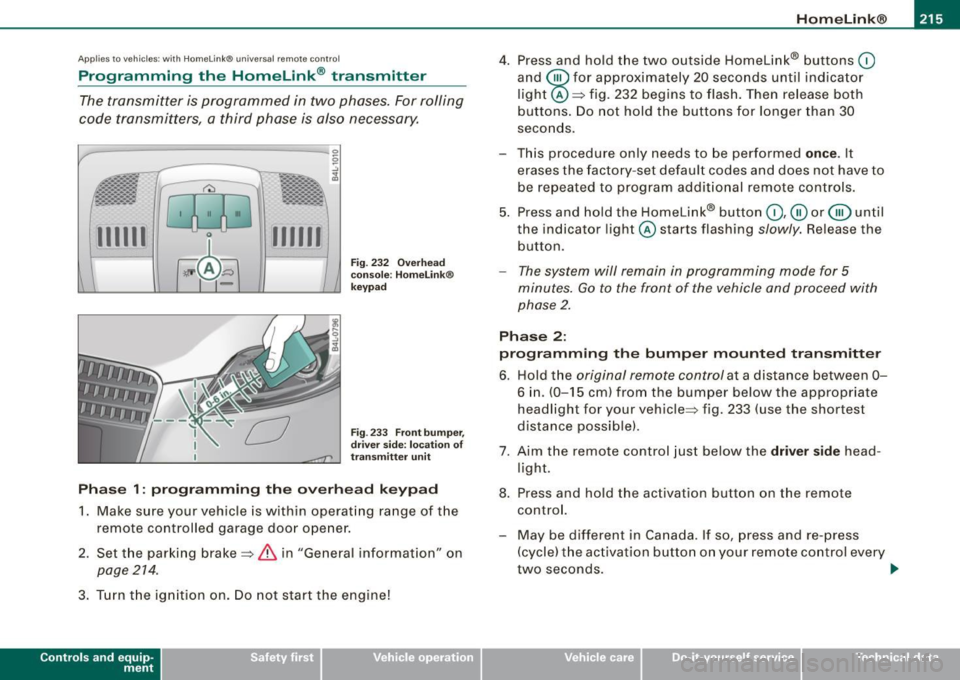
Fig . 232 Overhead
console : Homelink®
keypad
Fig . 233 Front bumper,
driver side: location of
transmitter unit
Phase 1: programming the overhead keypad
1. Make sure your vehicle is with in operating range of the
remote controlled garage door opener.
2. Set the parking brake=>
& in "General informat ion" on
page 214 .
3. Turn the ignition on . Do not start the engine!
Contro ls and eq uip
ment
4. Press and hold the two outside Homelink® buttons 0
and @for approximately 20 seconds until indicator
light @=> fig. 232 begins to flash. Then release both
buttons. Do not hold the buttons for longer than 30
seconds.
- This procedure only needs to be performed
once . It
erases the factory-set default codes and does not have to
be repeated to program additional remote controls.
5. Press and hold the Homelink® button
0,@ or @ until
the indicator light @starts flashing
slowly. Release the
button.
- The system will remain in programming mode for 5
minutes.
Go to the front of the vehicle and proceed with
phase 2.
Phase 2:
programming the bumper mounted transmitter
6. Hold the original remote control at a distance between 0-
6 in . (0-15 cm) from the bumper below the appropriate
headlight for your vehicle => fig . 233 (use the shortest
distance possible).
7. Aim the remote control just below the driver side head
light.
8. Press and hold the activation button on the remote control.
- May be different in Canada. If so, press and re-press
(cycle) the activation button on your remote control every
two seconds. .,_
Vehicle care I I irechnical data
Page 310 of 426
ll'I __ T_ r _a_ il_e _r_ t_ o_ vv_ in__... g,_ __________________________________________________ _
& WARNING
Anyone not properly restrained in a moving vehicle is at a much
greater risk
in an accident. Never let anyone ride in your car who
is not properly wearing the restraints provided by Audi .
c:
Trailer towing tips
Important to know
Your vehicle handles differently when towing a trailer because of
the additional weight and different weight distribution. Safety,
performance and economy will greatly depend on how carefully you
load your trailer and operate your rig.
Before you actually tow your trailer, practice turning, stopping and
backing up in an area away from traffic. Keep practicing until you
have become completely familiar with the way your vehicle -trailer
combination behaves and responds.
Backing up is difficult and requires practice. Backing up with a
trailer generally requires steering action opposite to that when
backing up your vehicle without a trailer.
Maintain a greater distance between your vehicle and the one in
front of you. You will need more room to stop. To compensate for
the trailer, you will need a larger than normal turning radius.
When passing, remember that you cannot accelerate as fast as you normally would because of the added load. Make sure you have
enough room to pass. After passing, allow plenty of room for your
trailer before changing lanes again.
Avoid jerky starts, sharp turns or rapid lane changes.
[ i] Tips
• Do not tow a trailer during the break-in period of your vehicle. • If you tow
a trailer, your Audi may require more frequent mainte
nance due to the extra load~
page 401. •
Parking on a s1ope
Do not park on a slope with a trailer. If it cannot be
avoided , do so only after doing the following:
When parking:
-Apply the foot brake.
- Have someone place chocks under both the vehicle and
the trailer wheels.
- With chocks in place, slowly release the brakes until the
wheel chocks absorb the load.
- Turn the wheels towards the curb.
- Apply the parking brake.
- Move the selector lever to
P.
When restarting after parking:
- Apply the foot brake.
- Start the engine.
- Move the selector lever to
D.
-Release the parking brake and slowly pull out and away
from the wheel chocks.
- Stop and have someone retrieve the wheel chocks.
[ i] Tips
I f you move the selector lever of the automatic transmission to P
before applying the parking brake and before blocking the wheels, II-
Page 333 of 426
_____________________________________________ C_ h_ e .=....= c..:..k :..:.in :....:..:= g:.....= a..:..n .:....:d::......:. f.:..:il .:..:li ..:..n ::.:g:!....- __
•
Closing the engine hood
- Pull the hood down until the pressure from the struts is
reduced .
- Let the hood
drop down and latch in place. Do not try to
push it shut;
it may fail to engage => &.
& WARNING
A hood that is not completely latched could fly up and block your
view while driving.
• When you close the engine hood, check it to make sure the
safety catch has properly engaged. The hood should be flush with
the surrounding vehicle body parts.
• If you notice while driving that the hood is not secured prop
erly, stop at once and close it. •
Working in the engine compartment
Be especially careful whenever you work in the engine
compartment.
Whenever you must perform any work in the engine compartment,
for example checking and filling different fluids, there is a risk of injury, burns and accidents. To prevent personal injury always
observe the following WARNINGS. The engine compartment of any
vehicle is a hazardous area
~ & .
& WARNING
To help avoid injury, before you check anything under the hood :
• Turn off the engine.
• Remove the ignition key.
• Apply the parking brake .
& WARNING (continued)
• Move selector lever to "P" (Park).
• Always let the engine cool down. Hot components will burn
skin on contact.
• To reduce the risk of being burned, never open the hood if you
see or hear steam or coolant escaping from the engine compart
ment. Wait until no steam or coolant can be seen or heard before
carefully opening the hood.
• Keep children away from the engine compartment .
• Never spill fluids on hot engine components. They can cause a
fire.
• Never touch the radiator fan. The auxiliary electric fan is
temperature controlled and can switch on suddenly.
• Never open the coolant reservoir cap when the engine is still
warm . The coolant system is pressurized and hot coolant could
spray out.
• Protect your face, hands and arm from steam or hot engine
coolant by placing a thick rag over the cap when you open the
coolant reservoir.
• If work on the fuel system or the electrical system is necessary :
- Always disconnect the battery.
- Never smoke or work near heaters or open flames . Fluids in
the engine compartment could start a fire.
- Keep an approved fire extinguisher immediately available.
• To avoid electrical shock and personal injury while the engine
is running or being started, never touch:
- Ignition cables
- Other components of the high voltage electronic ignition system.
• If you must perform a check or repair with the engine running: -First, fully apply the parking brake, move selector lever to "P"
(Park). .,
Vehicle care
I t •
Page 375 of 426
What do I do now? -
---------------~.;______
•
& WARNING (continued)
• Loose items in the passenger compartment can cause serious
personal injury during hard braking or in an accident .
- Never store the inflatable spare tire or jack and tools in the
passenger compartment.
- Always store all jacking equipment, tools, and the inflatable
spare tire in the luggage compartment.
- Tighten the knurled retaining screw for the inflatable spare
tire securely.
0 Note
• Th e inflatable spare tire has been developed specifically for this
vehicle model. It must not be exchanged or used for other vehicle
models. Similarly, inflatable tires from other vehicle models must
not be used.
• Normal summer or winter tires must not be installed on the
inflatable tire rim.•
Changing a wheel
Before changing a wheel
Observe the following precautions for your own and your
passenger's safety when changing a wheel.
-After you experience a tire failure, pull the car well away
from moving traffic and try to reach
level ground before
you stop => & .
- All passengers should
leave the car and move to a safe
location (for instance, behind the guardrail)=> &.
- Engage the
parking brake to prevent your vehicle from
rolling unintentionally=> &. -
Move
selector lever to position P =:> & .
- If you are towing a trailer: unhitch the trailer from your
vehicle.
- Block the diagonally opposite wheel with the folding
chocks or other objects.
- Take the
jack and the inflatable spare tire out of the
luggage compartment=>
page 370.
& WARNING
You or your passengers could be injured while changing a wheel if
you do not follow these safety precautions:
• If you have a flat tire, move a safe distance off the road. Turn off
the engine, turn the emergency flashers on and use other warning
devices to alert other motorists.
• Make sure that passengers wait in a safe place away from the
vehicle and well away from the road and traffic.
• To help prevent the vehicle from moving suddenly and possibly
slipping off the jack , always fully set the parking brake and block
the wheel diagonally opposite the wheel being changed with the
folding chocks or other objects. When one front wheel is lifted off
the ground, placing the Automatic Transmission in "P" (Park) will
not prevent the vehicle from moving.
• Before you change a wheel, be sure the ground is level and firm .
If necessary, use a sturdy board under the jack.
• After installing the inflatable spare tire, make sure that you
replace the flat tire/wheel in its storage area properly and tighten
the knurled retaining screw securely. •
Do-it -yourself service
Page 390 of 426
IIIII.___E_ m_ e_r -=g "-e_ n _ c-=y _ s_ i_t _u _a _t_ i_o _n_ s _______________________________________________ _
& WARN ING (c ontinu ed )
• Bef ore you chec k anything in the engin e compartment , always
re ad and h eed all W ARNINGS =>
page 324, "Engine compa rtment".
0 Note
• Applying a higher voltage booster battery wil l cause expensive
damage to sensitive electronic components, such as contro l units,
relays, radio, e tc.
• There must be no electrical contact between the vehicles as
otherwise current could already start to flow as soon as the positive
( + ) terminals are connected .
[ i ] Tip s
• The discharged battery must be properly connected to the
vehic le's e lectrical system. When jump starting or charging the
battery, never connect the negative ground cable to the battery
negative pos t because the battery manager system must be ab le to
detect the battery's state of charge . Always connect the negative
ground cable to the negat ive ground post of the battery manager
control unit. •
Use of jumper cables
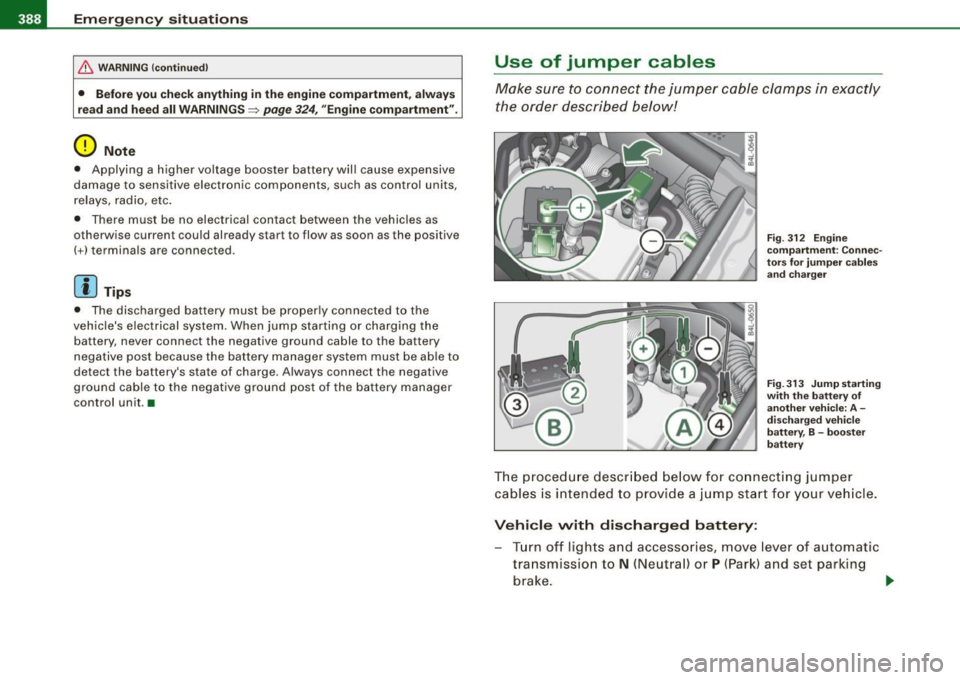
Make sure to connect the jumper c able clamps in exac tly
the order described below!
F ig . 3 12 E ngin e
co mpartm ent : Co nnec
to rs for ju mp er ca ble s
and cha rger
F ig . 3 13 Ju mp st artin g
w it h th e batte ry o f
ano ther v eh icle : A -
d isc harg ed ve h icle
b att ery, B -boo ster
b att ery
The procedure descr ibed below for co nnect ing jumper
cables is intended to provide a j ump star t for your vehi cle .
Vehi cle with discharged battery :
-Turn off lights and accessories, move lever of automatic
tra nsmissio n to
N (Neutral) or P (Par k) and set parking
brake .
~
Page 412 of 426
___ A_l.:,. p _h_ a_ b_e _t _ic _ a_l _in _ d_e _x ____________________________________________ _
Brake fluid
Changing the brake fluid ... ... ... .
341
Checking the brake fluid level . . . . . . 341
Reservoir ...... .. .... .... ....... 341
What is the correct brake f luid level? 341
What should I do if the brake fluid warning
light comes on? ........ .... ....
341
Brake light
Defective . . . . . . . . . . . . . . . . . . . . . . . .
27
Brake system ....................... 341
Anti-lock brake system . . . . . . . . . . . . . 22
Brake fluid . . . . . . . . . . . . . . . . . . . . . . 341
Brake f luid specifications for refill and
replacement ...... ...... ...... .
341
Brake pads ..................... . 298
General information . . . . . . . . . . . . . . 291
How does moisture or road salt affect the
brakes? ..... .... ....... .... ...
291
Malfunction ........ ... .. .... .... . 32
Park ing brake . . . . . . . . . . . . . . . . . . . . 147
Warning/indicator lights ... ...... .. 23
Worn brake pads symbol . . . . . . . . . . . 37
Braking guard
See Audi braking guard ... ... .... . 168
Break-in period . . . . . . . . . . . . . . . . . . . . . 297
Brake pads .... .................. 298
Tires .... ... .. .... .... ......... . 297
Breakover angle . . . . . . . . . . . . . . . . . . . . 302
Bulbs ..... ....... .. .... .... ...... . 385
Bumper cover
Caution when parking near a parking bar -
rier or curb .. ... ..... ........ ..
147
C
Ca lifornia Proposition 65 Warning 332
Battery specific .... .... .... .... .. 344
Capac,t,es ... .............. ...... .. 399
Car -Systems
Background lighting . ...... .... ....
79
Lighting profiles . . . . . . . . . . . . . . . . . . 79
Car care ........................... 312
Interior .... .... .... .... ....... .. 319
Plastic and vinyl ........... ... ... 316
Weatherstrips ... .. .... .... ...... 317
Care of exterior ..................... 312
Cargo area
See Loading the luggage compartment . .
227
Cargo floor ......... .... ........ ... 109
Cargo net . . . . . . . . . . . . . . . . . . . . . . . . . .
107
Catalytic converter .. ....... ........ . 298
Center conso le in rear
Central locking 103
Emergency locking ............ .... 57
Panoramic s liding sunroof ...... .... 69
Certification . . . . . . . . . . . . . . . . . . . . . . . . 404
Changing a flat tire .... .... ....... ... 373
Changing a wheel ................... 373
Changing engine oil ... ........ ...... 336
Chassis
Undercoating ... .. .... .... .... ...
318
See also Adaptive Air Suspension . .. 206
CHECK button . . . . . . . . . . . . . . . . . . . . . . . 16
Checking
Engine coolant level
338
Checking tire pressure ............. .. 353
Child restraints
Danger of using ch ild restra ints in the
front seat . . . . . . . . . . . . . . . . . . . . . .
243
What types of child restraint anchors are
available? ... ......... ......... .
276
Where can I get additional information
about child restraints? .... .... .. .
277
Child safety .................... 263, 268
Additional information .. ... .... ... 282
Booster seats . . . . . . . . . . . . . . . . . . . . 271
Convertible child safety seats ... ... 269
Convertible locking retractor .... ... 273
Guidance fixtures for lower anchorages ..
279
Important safety instructions for using
chi ld safety seats ...............
266
Important things to know when driving
with children .. .... ... ..... .....
263
Infant seats ......... ........ .... 268
Install ing a child restraint using the
LATCH system .. ...... ....... ...
281
Lower anchorages ... .. .... .... ... 278
Mounting and releasing the anchorage
hook ..... ........ .... ....... ..
282
Older children and safety belts 272
Safety belts and older children ..... 272
Tether anchors .. ...... .... ...... 282
Tether strap ... .... .... ...... .... 283
Which restraint system should my older
chi ld wear? ... ....... .... .... ..
272
Page 419 of 426

______________________________________________ A_ l_,_ p _h_ a_ b_e _t_ic _ a _ l _in _ d_e _ x __ ffllll
s liding open ..... ........ ...... ... 68
Sunshade ... .... .... ....... .... .. 69
tilting .... .... .... .... ... .... .... . 68
Parking ............................ 147
Automatic transmission ... ... .... . 184
Caution when parking near a parking bar -
rier or curb ...... .... ........... 147
Low bumper cover, spoi lers and
suspension .... .... .... ...... .. 147
Parking brake ..... ...... .... ..... .. . 147
Parking ...... .... .... ... .... .... 147
Warning/indicator lights .. .... .... .. 23
Parking on a decline (downhill) .. ...... 147
Parking on an incline (uphill) .. ... .... . 147
Parts replacement ... .... .... ...... .. 403
PASSENGER AIR BAG OFF light ... .. ... 253
Passenger's seat ..... .... ... .... .. 93, 96
Passive safety system .. .............. 220
Pedals ... ......... ... ........ .... .. 226
Perimeter lighting ... .... .... .... .... . 76
Physical principles of a frontal collision 232
Polishing ...... .... .... .... ... .... . 315
Po llen filter
Climate controls ...... ....... .... . 123
Power locking switch ... .... .... .... .. 55
Power locking system ... .... .... .... .. 52
Convenience close/open feature .... . 66
Locking and unlocking the vehicle from inside . ... .. .... .... ............ 55
Opening and c losing the windows ... 66
Rear lid/trunk lid .... .... .......... 57
Remote control key ................ 49
Se lective unlock feature ............ 55
Controls and equip
ment Safety first
Settings ...
... .... ........ .. . .. .. . 55
Unlocking and locking vehicle ... ... . 53
Power outlets ........... ............ 118
Power seat
Contro ls ... .. .... ........ ....... . 93
Seat adjustment ..... ....... .. .... . 94
Power steering ......... .... .... ... .. 293
Power window switches .... ....... .... 64
In the driver's door .. ......... .... . 65
In the front passenger 's door ... .... . 66
Reactivating the system .. .... .... .. 67
Pregnant women Special considerations when wearing a safety belt ....... .... ....... ... 237
Programming the Homelink® universal re-
mote control .... .... .... .... ... 214
Proper occupant seatiing positions .. ... 222
Proper safety belt position ...... .. .... 236
Proper seating position
Front passenger ... .... .... .... ... 223
Occupants .... .... .... ... .... .... 222
Rear passengers .. ... .... .... .... 224
Protective tray 109
a
Quartz clock .... .... ... .... .... .... .. 14
quattro®
See All Wheel Drive ............... 294
Question What happens to unbelted occupants? .
233
Why safety belts? . .... .... .... .... 23 1
R
Radiator fan .... .... .... .... .... .... 340
Rain sensor ...... .... ..... .. .... ... . 81
Rain sensor defective . .... ... .... .... . 36
Reading lights
Front ... ... ........ ... .... .... ... 78
Rear . .... ..... .. .... .... .... ... .. 79
Rear ashtray ... .. .... .... ... ... ... .. 116
Rear fog lights .. .... ........ .... .... . 75
Rear lid
Automatic operation .... ..... ...... 58
Emergency unlocking . .... ... .... .. 60
Opening and closing ... ... .... ..... 57
Valet key function .... .... .... ... .. 51
Rear light
Defective . ........ .... .... ...... ..
27
Rear operation
Four -zone automatic comfort air
conditioning ... .. ....... .... .... 135
Rear seats Adjusting seat .................... 99
Entry assist ... .... .... ... .... ..... 99
Fo lding seat back up and down . .... 100
Rear view
See Rear-view camera ............. 191
Rear view mirror Inside rear view mirror ..... .... . 86, 87
Rear window defogger ... .... ... .... . 129
Rear -view camera .. ... .. .... .... 191, 194
Parking mode 1 .... .... ........ .. 196
Parking mode 2 .... ...... .... .... 198
Red symbols ...... ....... .... ... ..... 31
Vehicle operation Vehicle care Do-it-yourself service Technical data