suspension AUDI Q7 2009 Owner´s Manual
[x] Cancel search | Manufacturer: AUDI, Model Year: 2009, Model line: Q7, Model: AUDI Q7 2009Pages: 426, PDF Size: 97.13 MB
Page 209 of 426
____________________________________________ A_ d_a--' p=-- t_iv _e_ A_ ir_ S_u_ s-=- p_e _ n_ s _ io_ n __ lll
Ap plies to vehicl es: with Adap tive Air Su sp ension
Chassis controls
Fi ve differen t driving modes can be set by the driver.
The automatic contro l processes are speed -and time -dependent.
For example, it is not possible to raise the suspension to a high level
above certain speeds.
When a speed of about 75 mph (120 km/hl is exceeded for more than 30 seconds, the vehicle is automatically lowered to
low level when
in com fort and automatic mode . Ground clearance is about 0 .6 inch
(15 mm) less, compared to the
normal level.
When a speed of about 100 mph (160 km/h) is exceeded for more
than 20 seconds, the vehicle is automatically lowered to
highway
/eve/when in automatic and dynamic mode. Ground clearance is
about 1.4 inches (35 mm) less, compared to the
normal level. Road
holding is optimized as a resu lt of the lower center of gravity, and
fue l consumpt ion is reduced as a result of reduced wind resistance .
Level adjustment
high level 2
normal level
highway level
Ground clearance
about 9 .4 inches (240 mml
a bout 8 inches (205 mm)
about 7 inches (180 mm)
about 6.5 inches ( 165 mml
a bou t 5.3 inches (135 mm)
The segment display
G) ~ page 208, fig. 225 in the MMI Display
~ page 208 or in the instrument cluster display~ page 209 shows
the current vehicle level.
a ut omati c
Select the automatic mode if you prefer a ba lanced, comfortable
suspension se tt ing. The damp ing characteristics are adjusted
accordingly.
Controls and equip
ment •
Aut omatic l ower ing :
When a speed of about 75 mph (120 km/h)
is exceeded for more than 30 seconds, the vehicle is automatica lly
lowered by about 0 .6 inch (15 mm) to the
low level, which is more
suitable for highway speeds . Road holding is opt im ized as a result
of the lower center of gravity and fuel consumption is reduced as a
result of reduced wind resistance. When a speed of about 100 mph
(160 km/h) is exceeded for more than 20 seconds, the vehicle is
automatically lowered by an additional 0 .8 inch (20 mm) to
highway
level.
• Automatic rai sing: When the vehicle is at highway level and the
speed fa lls be low about 80 mph (130 km/h) for more than 20
seconds, the vehic le is automatica lly raised to
low level. The vehicle
is automatically raised again to
normal level if the speed fa lls be low
about 44 mph (70 km/h) for a period of 2 minutes. The vehicle is
ra ised immediate ly when speed fa lls below about 22 mph (35 km/h).
dynamic
Select the dynamic mode if you prefer a sporty suspension sett ing.
I n this mode, the vehic le is lowered to
/ow level while it is sti ll
stationary and sporty damping characteristics are selected . The
warning light~ in the instrument cluster will come on for a few
seconds jus t to remi nd you of the reduced ground clearance .
I f you switch off the engine while the vehicle is in the dynamic mode
and then switch on the ignition once again, the~ warning light
wi ll also come on again for a few seconds as a reminder.
• Automatic lowering : When a speed of about 100 mph (160 km/h)
is exceeded for more than 20 seconds, the ve hicle is auto matica lly
lowered by 0.8 inch (20 mm) to
highway level.
• Automatic rai sing: The vehic le is automatically raised to low level
again, if the speed falls below about 80 mph (130 km/h) for a period
o f 20 secon ds. The ve hicle is ra ised i mmediately whe n speed falls
below about 22 mph (35 km/h). .,_
I • •
Page 210 of 426
IIIII..__A_ d_ a--=- p_t _iv _ e_ A_ i _r_ S _ u_ s_ p ,.._ e_ n_ s _ io_ n _____________________________________________ _
comfort
Select the comfort mode if you desire a suspension setting with a
special emphasis on comfort . Damping characteristics with a clear
emphasis on comfort are selected in this mode .
• Automatic lowering: When a speed of about 75 mph (120 km/h)
is exceeded for more than 30 seconds , the vehicle is automatically
lowered by 0.6 inch (15 mm) to /ow level.
• Automatic raising: The vehicle is automatically raised to normal
level again, if the speed falls below about 44 mph (70 km/h) for a
period of 2 minutes . The vehicl e is raised immediately when speed
falls below about 22 mph (35 km/h).
offroad
Select the offroad mode when you have to travel over poor quality
sections of road (e.g . trails). In this mode, th e vehicle is rais ed to
high level 1, and damping characteristics for poor road stretches are
selected. When switching to offroad mode, th e Adaptive Air Suspen
sion indicator appears automatically in the instrument cluster
display => page 209 .
• Automatic lowering: When a speed of about 62 mph (100 km/h)
is exceeded , the vehicle is lowered by 1 inch (25 mm) to normal level.
• Automatic raising: The vehicle is ra ised to high level 1 again
when the speed falls below about 43 mph (70 km/h).
lift
Select the lift mode when exceptionally high ground clearance is
needed at a reduced speed. In this mode, the vehicle is raised to
high level 2 . When switching to lift mode, the Adaptive Air Suspen
sion indicator appears automatically in the instrument cluster
display=> page 209.
The lift mode can be activated only a t spe eds b elow 12 mph (20
km/h). When a speed of about 25 mph (40 km/h) is exceeded, the
system automatically leaves lift mode and the offroad mode is acti
vated. The instrument cluster display automatically switches the
display to Adaptive Air Suspension to indicate reduced ground
clearance.
[ i] Tips
Please note that driving at high speeds on paved roads while in
offroad mode for extended periods of time leads to increased tire
wear. •
App lies to vehicles : with Adap tive Air Su spens io n
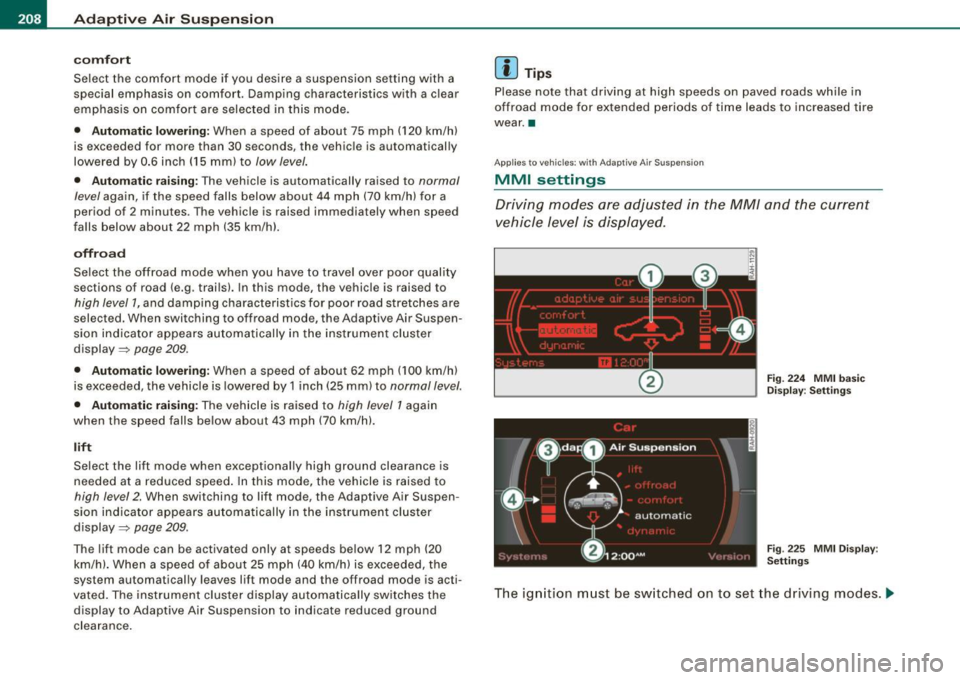
MMI settings
Driving modes ore adjusted in the MM/ and the current
vehicle level is displayed.
Fig. 224 MMI basic
Display : Settings
Fig . 225 MMI Display :
Settings
The ignition must be switched on to set the driving modes . .,,,
Page 211 of 426
______________________________________________ A_ d_a ""' p'-- t_iv _ e_ A_ i_r _S_ u_s _,p_ e _ n_s_ i_ o _ n _ ___.9I
- Press the I CARI f unction button . The main menu
Adaptive Air Su spe nsion appears~
page 208, fig. 224 or
~ page 208, fig . 225 .
Select the desired mode by rotating and pressing the
control knob .
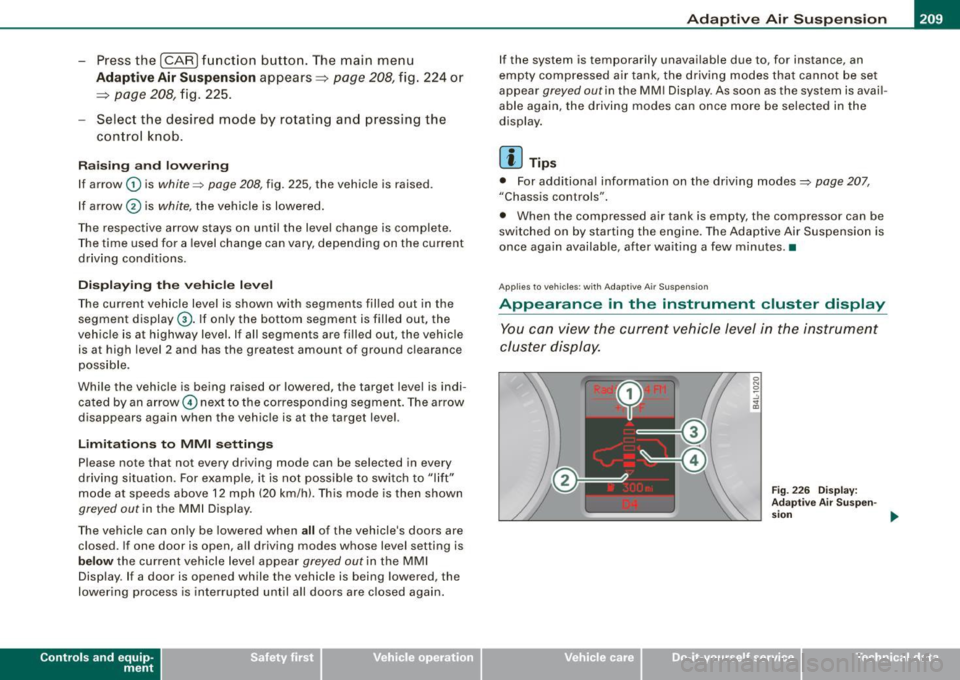
Rai sing and l owerin g
If arrow
G) is white :::::, page 208, fig. 225, the vehicle is raised.
If arrow @ is
white, the vehicle is lowered .
The respective arrow stays on until the !eve.I change is complete.
The time used for a level change can vary, depending on the current
driving conditions.
Di sp la yin g th e ve hicle l eve l
The current vehicle level is shown with segments filled out in the
segment display@. If only the bottom segment is filled out, the
vehicle is at highway level. If all segments are filled out, the vehicle
is at high level 2 and has the greatest amount of ground clearance
poss ible.
While the vehic le is being raised or lowered, the target level is indi
cated by an arrow © next to the corresponding segmen t. The arrow
disappears again when the vehic le is at the target level.
Limita tion s to MMI setting s
Please note that not every driving mode can be selected in every
driving si tuation. For example, it is not possib le to switch to "lift"
mode at speeds above 12 mph (20 km/h). This mode is then shown
greyed out in the MMI Display.
The vehicle can on ly be lowered when all of the vehicle's doors are
closed. If one door is open, a ll driving modes whose level setting is
below the current vehicle leve l appear greyed out in the MMI
Display. If a door is opened while the vehicle is being lowered, the
lowering process is interrupted until all doors are closed again .
Contro ls and eq uip
ment
I f the system is temporarily unavailable due to, for instance, an
empty compressed air tank, the driving modes that cannot be se t
appear
greyed out in the MM I Display. As soon as the system is avai l
able again, the driving modes can once more be selected in the
display.
[ i ] Tips
• For additiona l information on the driving modes:::::, page 207,
"Chassis controls".
• When the compressed air tank is empty, the compressor can be
sw itched on by starting the engine. The Adaptive Air Suspension is
once again availab le, after waiting a few minutes. •
Applies to veh icles: with Adapt ive A ir Suspens ion
Appearance in the instrument cluster display
You can view the current vehicle level in the instrument
cluster display.
Fig . 2 26 D ispla y:
A dap tive Air Sus pen-
s ion
~
Vehicle care I I irechnical data
Page 212 of 426
llffl..__A_ d_ a--=- p_t _iv _ e_ A_ i_ r _ S_ u_ s....; p=--- e_n_ s_ io_ n _____________________________________________ _
Fig . 227 D isp lay:
Ad apti ve Air Suspen
s io n
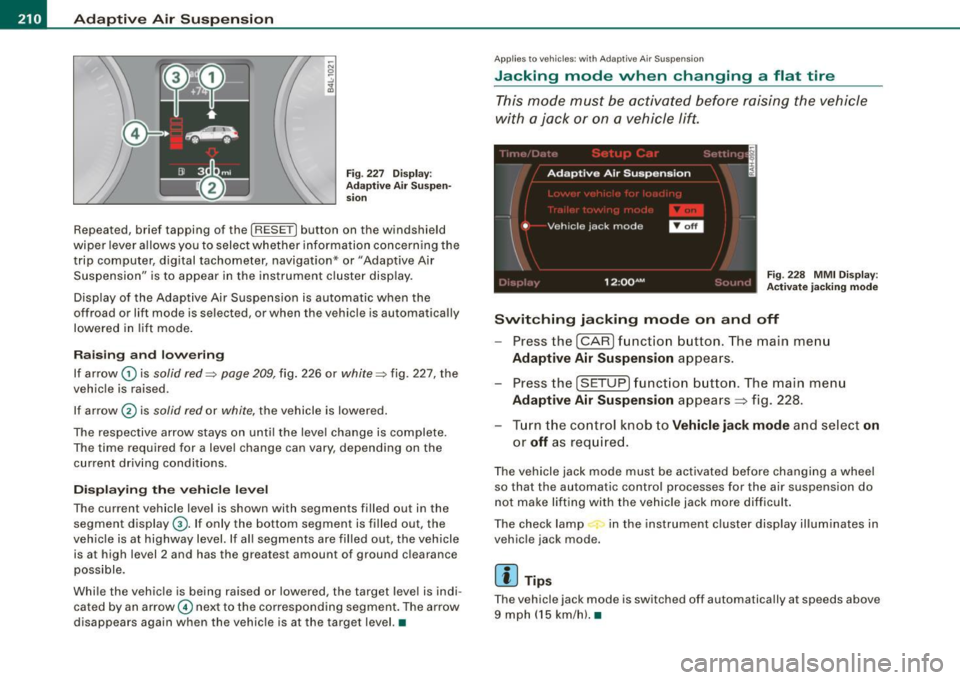
Repeated, brief tapping of the [R ESET] button on the windshield
wiper lever allows you to select whether information concerning the
trip computer, digital tachometer , navigation* or "Adaptive Air
Suspension" is to appear in the instrument c lu ste r disp lay.
Disp lay of the Adapt ive Air Suspension is automatic when the
off road or lift mode is sel ected, or when the v ehicle is automatically
lowered in lif t mode .
Raising and low ering
If arrow G) is solid red=> page 209, fig. 226 or white => fig. 227, the
vehic le is raised .
If ar row
0 is solid red or white, the vehicle is lowered .
The respective arrow stays on unti l the leve l change is complete.
The time required for a leve l change can vary, depend ing on the
current driv ing cond it ions .
Displ aying the vehicle level
The current vehicle level is shown with segments filled out in the
segment display@. If only the bottom segment is filled out, the
veh ic le is at highway level. If al l segments are filled out, the vehicle
is at high level 2 and has the grea test amount of ground c learance
possible .
Whi le the veh icle is being raised or lowered, the target level is indi
cated by an arrow© nex t to the co rresponding segment . The arrow
d isappears again when the vehic le is at the targe t level. •
Applies to vehi cle s: wi th A daptive Air S uspens ion
Jacking mode when changing a flat tire
T his mode must be activated before raising the vehicle
with a jack or on a vehicle lift.
Fig . 228 MMI Di splay:
A ctivat e jacking mod e
Switching jacking mode on and off
Press the (CAR ) funct ion b utton. The main me nu
Adaptive Air Suspension appears.
Press the (SETUP ) funct ion b utton. The main menu
Adaptive Air Suspension appea rs ~ fig . 228.
- Tur n the control k nob to
Vehicle jack mode and select on
or off as req uired.
The vehicle jack mode must be activated before changing a wheel
so that the au tomatic control processes for the air suspens ion do
not make lifting with the vehic le jack m ore diff icult .
The check lamp in the instrument c luster display illum inates in
vehic le jack mode.
[ i ] Tip s
The vehicl e jack mode is sw itched off automa tically at sp eeds above
9 mph ( 15 km/h). •
Page 213 of 426
___________________________________________ ___:A~d~ a~p~t~iv~ e=-.:A~ir~ S~u~ s ~p~ e~n~ s~io~n ~_ffllll
Applies to vehicles : w it h towi ng h itch and Adapt ive Air Su spens io n
Towing a trailer
Automatic lowering is not desirable when towing a trailer.
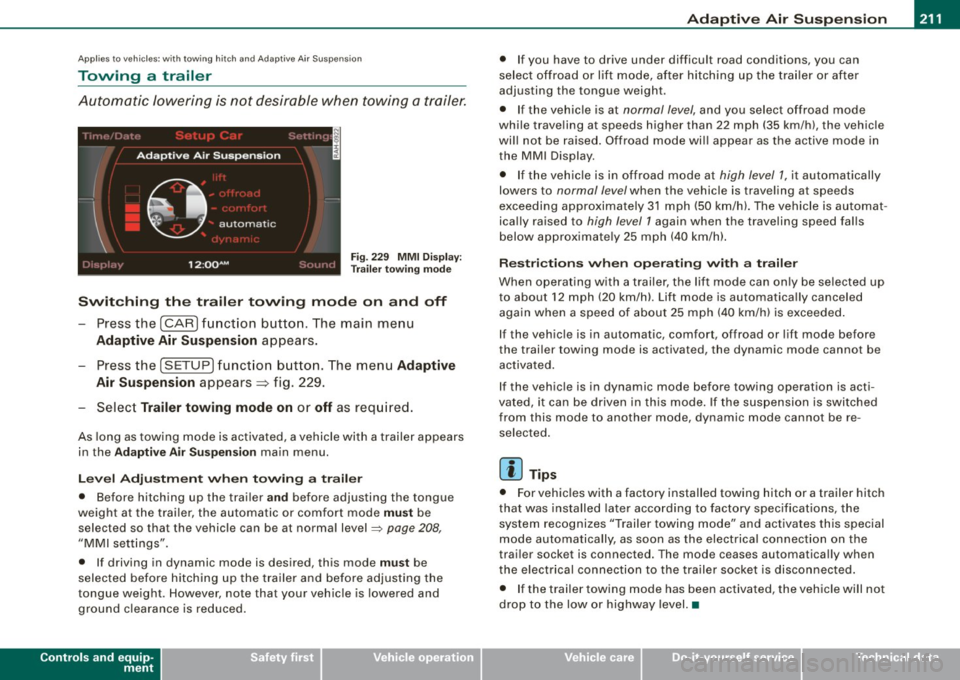
Fig . 22 9 MMI D isplay:
T rai le r t ow ing mode
Swi tching th e trail er towing mode on and off
Press the (CARI function button. The main menu
Adaptive Air Su spension appears .
-Press the (SETUP I funct ion button. The menu Adaptiv e
Air Susp ension
appears~ fig. 229.
- Select
Trailer towing mod e on or off as req uired .
As long as towing mode is activated, a vehicle with a trailer appears
in the
Ad apti ve Air Sus pension main menu.
Le ve l Ad jus tm ent w hen t owing a tra ile r
• Before hitching up the trai ler a nd before adjusting the tongue
weight at the trai ler, the automatic or comfort mode
mu st be
selected so that the vehicle can be at normal level
=> page 208 ,
"MMI settings".
• If driving in dynamic mode is desired, this mode
mus t be
selected before hitching up the trailer and before adjusting the
tongue weight . However , note that your vehicle is lowered and
ground clearance is reduced.
Controls and equip
ment
• If you have to drive under difficult road conditions, you can
se lect offroad or lift mode, af ter hitching up the trai ler or after
adjusting the tongue weigh t.
• If the vehic le is at
normal level, and you select offroad mode
while trave ling a t speeds higher than 22 mph (35 km /h) , t he vehicle
wi ll not be raised . Offroad mode wi ll appear as the active mode in
the MMI Display .
• If the vehic le is in offroad mode at
high level 1 , it automatically
lowers to
normal level when the vehicle is trave ling a t speeds
exceeding approxima tely 31 mph (50 km/h). The vehicle is automat
ica lly raised to
high level 1 again when the t raveling speed falls
below approximate ly 25 mph (40 km/h).
R es tric tions when ope ra ti ng w ith a tra iler
When opera ting with a trailer, the lift mode can on ly be se lected up
to about 12 mph (20 km/h). Lift mode is au tomatica lly canceled
again when a speed of about 25 mph (40 km/h) is exceeded .
If the vehicle is in automatic, comfort, offroad or lift mode before
the trai ler towing mode is act iv a te d , the dynamic mod e cannot b e
activated.
If the vehicle is in dynamic mode before tow ing operation is acti
vated, it can be driven in this mode. If the suspension is switched
from this mode to another mode , dynamic mode canno t be re
selected .
[ i ] Tips
• For vehicles with a factory installed towing hitch or a trailer hitch
that was installed later acco rding to factory specificat ions , the
system recognizes "Trailer towing mode" and activates this special
mode automatically, as soon as the electrica l connection on the
trai le r sock et is connected. The mode c eases au tomat ica lly wh en
the electrical connection to the trailer socket is disconnected.
• I f the trailer tow ing mode has been activated, the vehicle w ill not
drop to the low or highway level. •
I • •
Page 214 of 426
-Adaptiv
e Air Suspension "----=-------=--------------
Ap plies to vehicles : wi th Ad aptiv e Air Suspe nsi on
Cargo mode
Th e rear of the vehicle can be lowered to make it easier to
load.
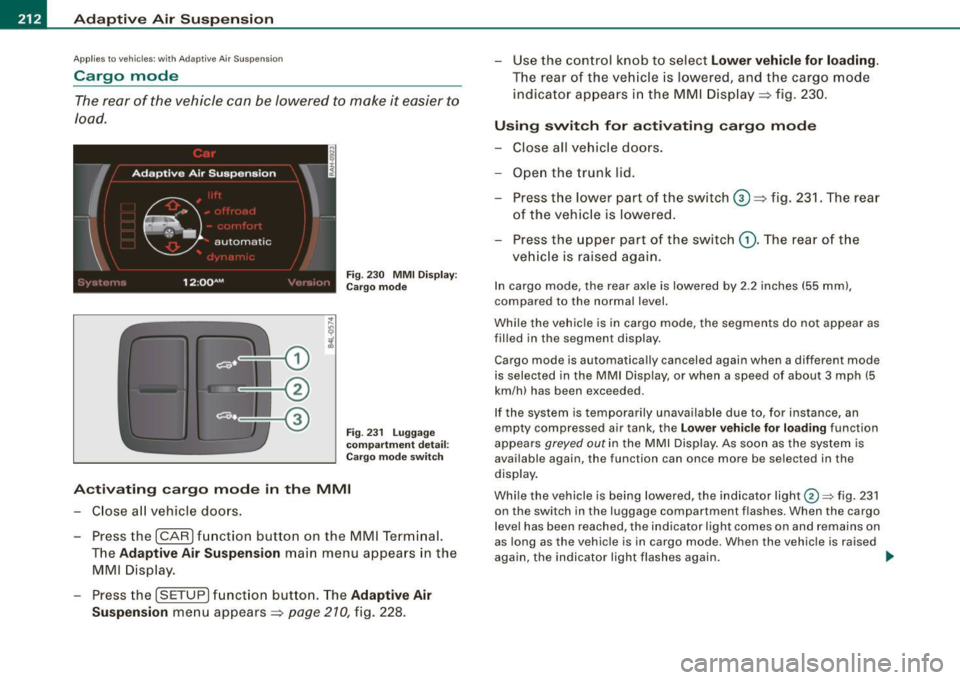
Fig . 23 0 MMI Disp lay:
C ar go mod e
F ig. 23 1 Lugga ge
c omp artmen t detai l:
Cargo m ode sw itch
A ctivating cargo mode in the MMI
- Close a ll vehicle doors .
- Press the !CAR) fun ction button on the MM I Term inal.
T he
Adaptive A ir Suspension main menu appea rs in the
MMI Disp lay.
- Press the !SETUP) f unct ion button . The
Adaptive Air
Suspension
men u appears => page 210, fig. 228. - Use the con
trol knob t o select
Lower vehicle for loading.
The rear o f th e veh icle is lower ed, and the cargo mode
indicator appears i n th e MMI Disp lay => fig. 230 .
Using swit ch for a ctiv ating cargo mode
- Close all vehicle doors .
- Open the trunk lid.
- Press the low er par t of th e switch
G) => fig. 231. The r ear
of the veh ic le is lowered.
- Press the upper p art of the switch
(D . The rear of t he
veh icle is raised again.
In cargo mode, the rear axle is lowered by 2 .2 inches (55 mm) ,
compared to the normal level.
Whi le the vehicle is in cargo mode, the segments do not appear as
filled in the segmen t display .
Cargo mode is automatically canceled again when a different mode
is selected in the MMI Display, or when a speed of about 3 mph (5
km/h) has been exceeded.
If the system is te mpo rarily unavailable due to, for instance, an
empty compressed air tank , the
Lo w er vehi cle fo r loading function
appears
greyed out in the MMI Display . As soon as the sys tem is
available again, the function can once more be se lected in the
display .
Whi le the vehicle is being lowered, the indicator light@=> fig . 231
on the switch in the luggage compartment f lashes. When the cargo
l evel has been reached, the indicator light comes on and remains on
as long as the vehicle is in cargo mode . When the vehicle is raised
aga in, the indicator light flashes again.
~
Page 258 of 426
-L~A:::..:,: ir:....: b:!..::: a~g L.:: s:1y :...:s::..: t~ e:.: m:...:...:.. ________________________________________________ _
& WARN ING (continued )
cellular telephones and CB radios , et c.) must be performed by a
qualified technician who has the training and spec ial equipment
ne cessary .
• For any work on the airbag system , we strongly recommend
that you see your author ized Audi dealer or qual ified workshop .
• Never modify the front bumper or parts of the vehicle body.
• Always make sure that the side airbag can inflate without inter
ference :
- Never install seat covers or replacement upholstery over the
front seatba cks that have not been spe cific ally approved by
Audi.
- Never use additional seat cushions that cover the areas
where the side airbags inflate.
- Damage to the original seat covers or to the seam in the area
of the side airbag module must always be repaired immedi
ately by an authorized Audi dealer .
• The airbag system can be activated only once. Afte r an airbag
has inflated , it must be replaced by an authorized Audi dealer or
qualified technician who has the te chnical information , training
and spe cial equipment necessary.
• The airbag sy stem can be deployed only once. After an airbag
has been deployed , it must be repla ced with new repla cement
parts designed and approved especially for your Audi model
version . Replacement of complete airbag systems or airbag
components must be performed by qualified workshops only .
Make sure that any airbag service action is entered in your Audi
Warranty
& Maintenan ce booklet under AIRBAG REPLACEMENT
RECORD .
• For safety reasons in severe accidents , the alternator and
starter are separated from the vehicle battery with a pyrotechni c
c ircuit interrupter.
- Work on the pyrotechni c circuit interrupter must only be
performed by a qualified dealer -risk of an accident!
& WAR NING (continued )
-If the vehicle or the circuit interrupter is s crapped , all appli
cable safety precautions must be followed.
ffi For the sake of the environment
Undeployed airbag modules and pretensioners might be c lassified
as Pe rchlorate Material -special handling may apply, see
www .dtsc.ca .gov/hazardouswaste/perc hlo ra te . When t he veh icle or
parts of the restraint system inc luding airbag mod ules and safety
be lts wi th pre tensio ners are sc rapp ed, all ap plicab le laws a nd regu
l ations must be observed . Your authorized Audi dealer is fam iliar
wit h these requir ements an d we re co mmen d t hat yo u have your
dea ler perform this service for you. •
Other things that can affect Advanced Airbag
performance
Changing the veh ic le 's su spension system can change the way that
th e Advanced Air bag Syste m performs in a c rash. Fo r example,
using tire-rim combinations not approved by Audi, lowering the
v eh ic le, c hang ing the stif fness of th e suspe nsio n, in cl ud in g the
springs, suspension struts, shoc k absorbers etc . can change the
fo rces that a re m eas ure d b y the air bag senso rs and se nt to the elec
tronic control unit. Some suspension changes can, for example,
increa se the fo rce level s measured by the sen so rs and ma ke the
a irbag syste m dep loy in crash es in which it wou ld not dep loy if the
changes ha d not been made . Othe r kinds of change s may red uce
t he fo rce lev els measu red by the se nso rs a nd preve nt the airba g
from deploying when it should.
T he sens ors i n th e safe ty bel t buc kle for th e driver a nd fr ont
passenger seat tell the electronic control modu le if the safety belt is
l a tc h ed or not. I f th e safe ty belt is being used, the fron t airbag wi ll
deploy at a slight ly h igher rate of vehic le dece leration than if the
sa fe ty be lt is n ot b ein g use d. Therefore, i n a partic ular c ollisi on, it i s -.,
Page 259 of 426
possible that an airbag will not deploy at a seating position where
the safety belt is being used but will inflate at the position where the
safety belt is not being used . It is important that nothing interfere
with the safety belt buckles so that the sensors can send the correct
information about safety belt use to the electronic control unit .
& WARNING
Changing the vehicle's suspension including use of unapproved
tire -rim combinations can change Advanced Airbag performance
and increase the risk of serious personal injury in a crash.
• Never install suspension components that do not have the
same performance characteristics as the components originally
installed on your vehicle.
• Never use tire-rim combinations that have not been approved
by Audi.
& WARNING
Items stored between the safety belt buckle and the center
console can cause the sensors in the buckle to send the wrong
information to the electronic control module and prevent the
Advanced Airbag System from working properly.
• Always make sure that nothing can interfere with the safety
belt buckles and that they are not obstructed.
as Perchlorate Material -special handling may apply, see
www.dtsc .ca.gov/ha zardouswaste/perchlorat e. When the vehicle or
parts of the restraint system including airbag modules and safety
belts with pretensioners are scrapped, all applicable laws and regu
lations must be observed. Your authorized Audi dealer is familiar
with these requiremen ts and we recommend that you have your
dealer perform this service for you.•
Safety first
Side airbags
Description of side airbags Airbag
system
The airbag system
can provide supplemental protection
to properly restrained occupants.
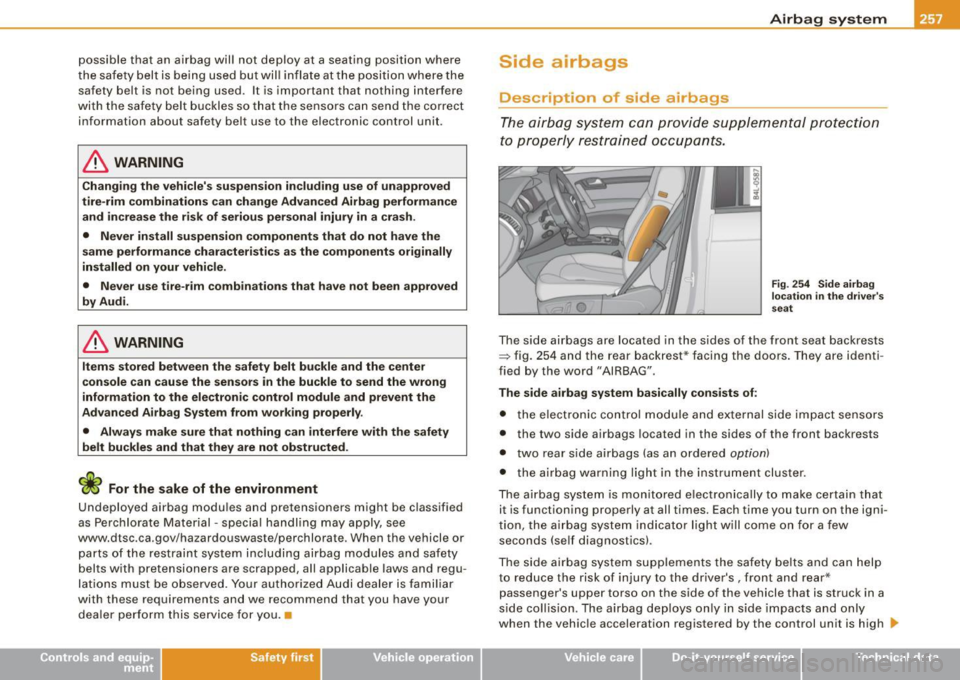
Fig . 254 Side airbag
location in the driver's
sea t
The side airbags are located in the sides of the front seat backrests
~ fig. 254 and the rear backrest * facing the doors . They are identi
fied by the word "AIRBAG" .
The side airbag system basically consists of:
• the electronic control module and external side i mpact sensors
• the two side airbags located in the sides of the front backrests
• two rear side airbags (as an ordered
option)
• the airbag warning light in the instrument cluster.
The airbag system is mon itored e lectronica lly to make certain that
it is functioning prop erly at all times. Each time you turn on the igni
tion, the airbag system indicator light will come on for a few
seconds (se lf diagnostics) .
The side airbag system supplements the safety belts and can help
to reduce the risk of injury to the driver's , front and rea r*
passenger's upper torso on the side of the vehicle that is struck in a
s ide collision . The airbag dep loys on ly in side impacts and only
when the vehicle acceleration registered by the control unit is high
~
Vehicle care I I irechnical data
Page 305 of 426

vary. It is the driver's responsibility to decide whether a vehicle can
overcome a specific situation
=> &.
Fording depth
Distance between the point touched by the tires (surface of ground)
and the engine air intake or induction system. Maximum fording
depth in standing water.
• Vehicles without air springs: 19.7 in (500 mm)
• Vehicles with adaptive air suspension*: 18.7 in (475 mm) at
normal level, 21.1 in (535 mm) at high level 2
Gradient angle
The number of meters in altitude gained over a distance of 109.4
yards or 100 meters (grade) are given as a percentage or degrees.
Information about the gradient the vehicle can climb under its own
power (depends in part on the road surface and engine power).
Maximum permitted grade: 31°
Lateral angle (slope of vehicle)
Indicates the angle up to which the vehicle can be driven diagonally
or across the fall line on a slope without the vehicle tipping over
sideways (depends on center of gravity) . Maximum permitted lateral
angle: 35°
Breakover angle
Indicates the angle up to which the vehicle can drive over a ramp at
low speed without the underside of the vehicle hitting the edge of
the ramp.
• Vehicles without air springs: maximum breakover angle: 21,1°
• Vehicles with adaptive air suspension*: maximum breakover
angle: 19.1 ° (at normal level), 23.8° (at high level 2)
Approach/departure angle
Transition from the horizontal plane to a gradient or from a grade
back to level ground. Indicates the angle up to which the vehicle can
Controls and equip
ment Safety first Vehicle operation
Driving off road
drive onto or off a slope at low speed without striking the bumper
or
the underbody.
• Vehicles without air springs: maximum approach/departure
angle: 21.9° (front), 23.4° (rear)
• Vehicles with adaptive air suspension*: maximum
approach/departure angle at normal level 20° (front), 21.9° (rear).
Maximum approach/departure angle at high level 2 (front) 24°, (rear)
25.4°
Ground clearance
The distance between the road surface and the lowest point of the
vehicle underbody .
• Vehicles without air springs: Ground clearance 8.1 in (204.8 mm)
• Vehicles with adaptive air suspension*: minimum ground clear
ance 7.1 in (179.8 mm) at normal level, maximum ground clearance
9.4 in (239.8 mm) at high level 2
& WARNING
Exceeding the stated maximum figures can result in severe inju
ries or vehicle damage.
• All the information was gathered on level, firm and non-slip
pery road surfaces, and under dry weather conditions.
• Ideal conditions do not prevail offroad. Never utilize the
maximum readings to their fullest, always leave a safety reserve. •
Driving tips
On poor road and off road, there is always only one motto:
Plan ahead and drive slowly!
Please observe the following when driving away from paved
roads:
Vehicle care Do-it-yourself service Technical data
Page 306 of 426

lffll __ D_ r_ iv _i_ n-' g"'""'- o_ ff_ r_ o _ a_ d __________________________________________________ _
-Drive only on roads and offroad sections which match
the design of your vehicle and your abilities as a driver .
Never take risks!
Drive slowly and plan ahead!
Take into consideration the
ground clearance of your
vehicle.
- Activate the
ESP offroad mode=:> page 288 as needed.
- Use t he
hill descent control=:> page 289 when driving
down steep sections on hills.
Unpaved roads and offroad
Drive slowly on unfamiliar roads and unknown offroad sections, and
look out for unexpected obstac les (e.g . potholes, rocks, tree stumps,
etc.).
To prevent the vehicle from bottoming and avoid damage to the
underbody, you should drive straight across severe bumps in the
ground with on ly one side of the vehicle so that on ly two of your
whee ls cross the bumps .
Dr ive briskly through sandy or marshy offroad sections and do not
stop, if at all possible.
Driving through water
Your vehicle can drive through standing water if the ground is firm
enough . The
maximum fording depth is 19 .7 in or 500 mm (vehic les
without air springs) or 21.1 in or 535 mm (vehicles with adaptive air
suspension*, at high level 2).
Check the depth of the water before driving through water .
Cross water only at walking speed, do not stop and do not turn the
engine off .
If you drive fast through the water, you wi ll create a bow wave in
front of the vehic le. This bow wave can get into the engine air intake
and severe ly damage the engine. Avoid driving through salt water (corrosion)
.
Driving on a slope
If you ever find yourself not able to climb a slope, do not try to turn
around, drive back down in
reverse. Otherwise, you run the risk of
tipping over.
If the vehicle threatens to tip over when driving across a slope, you
must immediately steer downhill in the direction of the slope.
Do not park your vehicle on steep slopes or grades.
To reduce the risk of tipping over, drive on slopes in the direction of
the downward slope (fall line) -
not crosswise .
Driving on snow-covered ground
The standard tires fitted to your vehicle are not snow tires. So you
should mount wheels with snow tires in good time where winter
road conditions prevail. Before driving on unploughed stretches of
deep snow, install tire chains. For technical reasons, tire chains may
only be installed on the rear whee ls -never on the front wheels .
L1}. WARNING
After driving through water, mud, slush, etc. the brakes may be
slow to take effect because of wet brake rotors and pads . The
brakes must first be carefully dried by braking so that full braking
effect is restored. •