trailer AUDI Q7 2009 Owner´s Manual
[x] Cancel search | Manufacturer: AUDI, Model Year: 2009, Model line: Q7, Model: AUDI Q7 2009Pages: 426, PDF Size: 97.13 MB
Page 199 of 426
__________________________________________ A___;_ d_v _a_ n___;_ c __ e _d _ P_a_ r_ k_ i_n -=g ~ S_,y:... s_ t_ e_ m ___ !II
- With the ve hicle stationary, select the proper s teering
whee l ang le for the parking spo t wit h the aid of t he
orange o rienta tion l ines.
- Wh ile driving in reve rse gear, ad just the stee ring wheel
angle to fit t he parking space with the a id of t he orange
ori entati on lines ~
0.
- Align your vehicle correspo nding to t he blue surface. The
blue su rfa ce s hould be parallel to the par kin g spot lines
~ page 196, fig . 213 .
G) Blue surfa ce
The surface beh ind the vehicle, identified by various shades of blue,
represents an ex tension of the outer vehic le outline by approxi
mately 16 ft (5 ml to the rear. The transitions of the blue surfaces are
distanced approxima te ly 3 ft (1 ml, 6 ft (2 m), and 16 ft (5 m) away
from the vehicle .
@ and 0 Orange orientation lines
The orientation lines change direction with the steering wheel
ang le . These lines identi fy t he direction of travel the rear o f the
vehicle would be taking, driving in reverse gear with the current
steering whee l ang le .
The dynamic orientation lines are provided with markers@. These
markers are each placed at a distance of approx. 3 ft ( 1 ml from one
another. Through these markers, the distance to an obstacle can be
estimated .
©Redline
The distance between your rear bumper© and the red line is
approximately 16 inches (40 cm):::::,&. Here, at the latest, you
should stop backing up:::::,
page 200.
© Rear bumper
The rear bumper of your vehic le also appears in the MMI Display, for
better orientation .
Controls and equip
ment
& WARNING
Plea se note that objects not to uching the grou nd can appe ar to be
further away than they really are (for ex ample , the bumper of a
par ked veh icle, a trailer h itch , or the rear of a tru ck). In this ca se ,
you should not u se the guide h elp lines to mea sure distan ce -
d anger of accident !
0 Note
In the MM I Disp lay, the direct ion of travel of the vehicle rear is
shown depending on the steering whee l angle . The vehicle front
sw ings out more than the vehic le rear.
[ i ] Tips
• I n order for the rear -view camera to funct ion properly, the
camera lens:::::,
page 191, fig. 205 must be kept clean, and free of
snow and ice. Please foll ow the additional no tes on :::::,
page 204 .
• The positions of the orientation lines/ surfaces are displaced up
or down if the parking process is carried out with the rear -view
camera in Adaptive Air Suspension*:::::,
page 21 dynamic, offroad, or
lift mode. Therefore, the accuracy is reduced .•
I • •
Page 201 of 426

__________________________________________ A_ d_v _a_ n_ c_e _d _ P_a_ r_ k_ i_n ..:g =-- S...:y:- s_ t_ e_ m ___ JIII
When the turn signal is switched on, only the necessary surfaces
and curves are shown . To change the s ide that is shown, simp ly
change the turn signa l.
The displayed light b lue
0 or dark blue © curved line identifies the
turn-around point when maneuvering to park. If the curved line
touches the curb, the steering wheel turn -around point has been
reached => page 198, fig. 215.
T he distance from the rear bumper © to the red line © is approxi
mate ly 1.3 ft (40 cm). Here, at the latest, you shou ld s top bac king up
=> page
200 .
& WARNING
Please note that objects not tou ching the g round ca n appear to be
further away than they really are (for example , the bumper of a
parked vehi cle , a trailer hitch , or the re ar of a truck ). In th is case ,
you should not u se the guide h elp lines to mea sure distance -
danger of a ccident !
0 Note
In the MMI Display, the direction of travel of the vehicle rear is repre
sented depending on the steering w heel angle. The veh ic le front
swings out more than the veh icle rear.
[ i ] Tips
• I n order for the rear -v iew camera to function properly, the
camera lens=> page 191, fig. 205 must be kept clean, and free of
snow and ice . P lease follow the additional notes on => page
204 .
• T he positions of the orientation lines/ surfaces are disp laced up
or down if the pa rk ing process is carried out with the rear-view
camera in Adaptive Air Suspension*=> page 21 dynamic, off road, or
l if t m ode. Therefore, the accuracy is reduced. •
Controls and equip
ment
Special parking situations
A pplies to veh ic les : wit h Advance d Pa rk in g S yste m w it h rear view c amera
Parking next to obstacles
When parking next to an obstacle, enough distance mus t
left on the side.
Fig . 216 Top view:
P arki ng ne xt t o a brick
wall
With "parking mode 2", you can park very c losely to a sidewalk curb
with your vehicle=> page 194, fig. 209.
However, when parking next to an obstacle, such as a brick wall , a
larger side distance must be selected in order to prevent col lisio n
damage to the vehicle. Position the long side of the marked blue
s u rface so that there is enoug h distance from the curb; the surface
must not touch the curb=> fig. 216.
A lso, the turning process has to occur considerab ly sooner . This
means that the corresponding blue curved line=> page 198, fig. 215
must not touch the curb, but shou ld rather be at a distance far
enough from the curb=>& .
& WARNING
• Keep plenty of di sta nce from an obstacle , so that your out side
mirror or a corner of your vehi cle does not collide with any obsta-
cle s -danger of accident!
~
I • •
Page 202 of 426
IIIII..__A_ d_v _ a_ n_c _e _ d_ P_ a_r _k _in ---== g'-- S...:y _ s_ t_ e_ m ___________________________________________ _
& WARNING (continued )
• The Audi parking system is not a substitute for being careful
and alert when backing up. Be especially careful during parking
and similar maneuvers . Always watch where you are driving and
make sure that nothing is in the way.
• When maneuvering or parking, do not only use the MMI Display
for orientation . Certain objects • depending on the screen resolu
tion -may not , or not entirely , be displayed ; for example trailer
hitches , chains , narrow posts , or fence s.
• Improper reliance on the Audi parking system can cause colli
sions and serious personal injury.
- Never rely only on parking assist when changing backing up .
- Always check rear view mirrors to make sure it is safe to ba ck
up. •
Applies to veh icles : wit h Ad vanced Pa rk ing System w ith rea r view c ame ra
Notes on distance information
Fig . 21 7 MMI Displ ay:
di splayed red l ine
touche s the bumpe r F
ig . 218 Actu al
distan ce from bumpe r
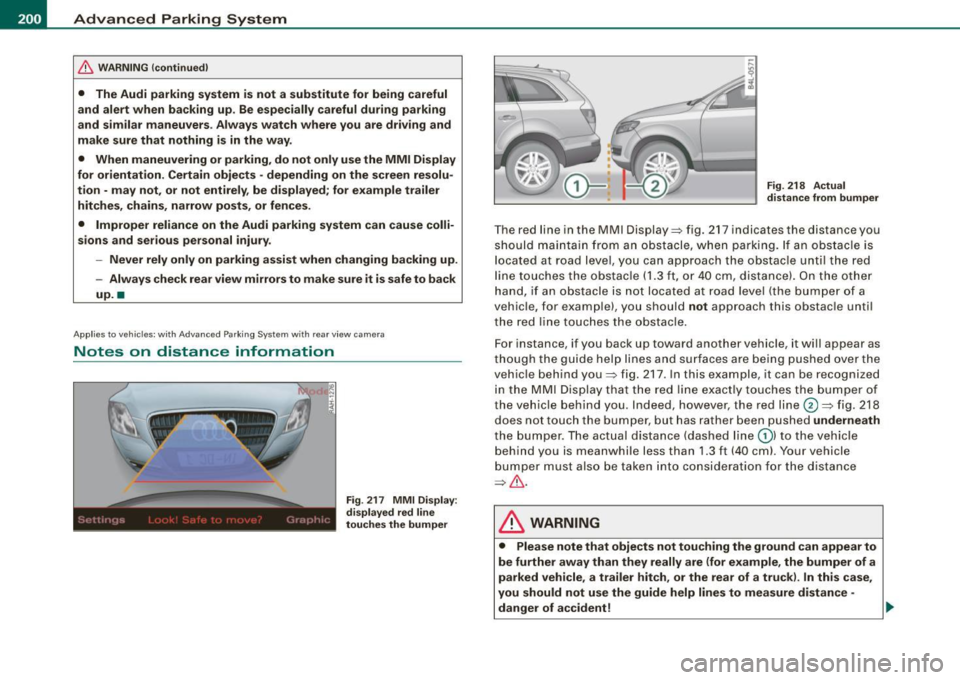
The red line in the MMI Display~ fig. 217 indicates the distance you
should maintain from an obstacle, when parking. If an obs tac le is
l ocated at road l eve l, you can approach the obstacle unti l the red
l ine to uche s the obstac le ( 1.3
ft, or 4 0 cm , distance). On the o the r
h a n d, if an obstacle is no t locat ed a t road level (the bu mpe r of a
vehic le, for examp le), you should not approach this obstac le unti l
t h e red line touc hes the obstacle.
F or instance, if you back u p toward another vehicle, it will a ppear as
thou gh the gui de help line s and s urface s are be ing pushed over the
vehic le behind you~ fig. 217. In this example, it can be reco gnized
in the M MI Display that t he re d l in e exac tly touc hes the bum per o f
th e ve hicle behind you . Ind eed, however, the red line@~ fig. 218
does not touch the bumper, b ut has rather been pushed underneath
t h e b umpe r. T h e actual d istance (dashed line G) l to the vehicle
behind you is meanwhile less than 1.3 ft ( 40 cm). Your vehicle
bu mper must als o be taken into co nsiderat ion for the d istance
~&. .
& WARNING
• Please note that objects not touch ing the ground can appear to
be further away than they really are (for example , the bumper of a
parked vehicle , a trailer hitch, or the rear of a truck) . In this case ,
you should not use the guide help lines to measure distance -
danger of accident ! .,_
Page 203 of 426
____________________________________________ A_d_ v_ a_n_ c_ e_d _ P_a_ r_ k_ i_ n ..::g==-- S_ y=- s_t _e _m __ lJII
& WARNING (continued)
• Maintain plenty of distance from an obstacle, so that your
outside mirror or a corner of your vehicle does not collide with any
obstacles -danger of accident!
• The Audi parking system is not a substitute for being careful
and alert when backing up. Be especially careful during parking
and similar maneuvers. Always watch where you are driving and
make sure that nothing is in the way.
• When maneuvering or parking , do not only use the MMI Display
for orientation. Certain objects -depending on the screen resolu
tion -may not, or not entirely, be displayed; for example trailer
hitches , chains, narrow posts, or fences . •
Appl ies to vehic les : with Audi Pa rk ing System and factory insta lled tow ing h itch
Towing hitch
For vehicles with a factory installed towing hitch, or a trailer hitch
installed according to factory specifications , the rear acoustic
parking sensors are not activated when the vehicle is put in reverse
gear while an electrical connection to the trailer socket* is estab
lished. No distance alert occurs in the rear =:>
page 191. The rear
view camera picture=:>
page 194 is displayed without orientation
lines and without blue surfaces. •
Controls and equip
ment
Settings in the MMI
A pplies to v ehicles: with A dvanc ed Park ing System with rear view camera
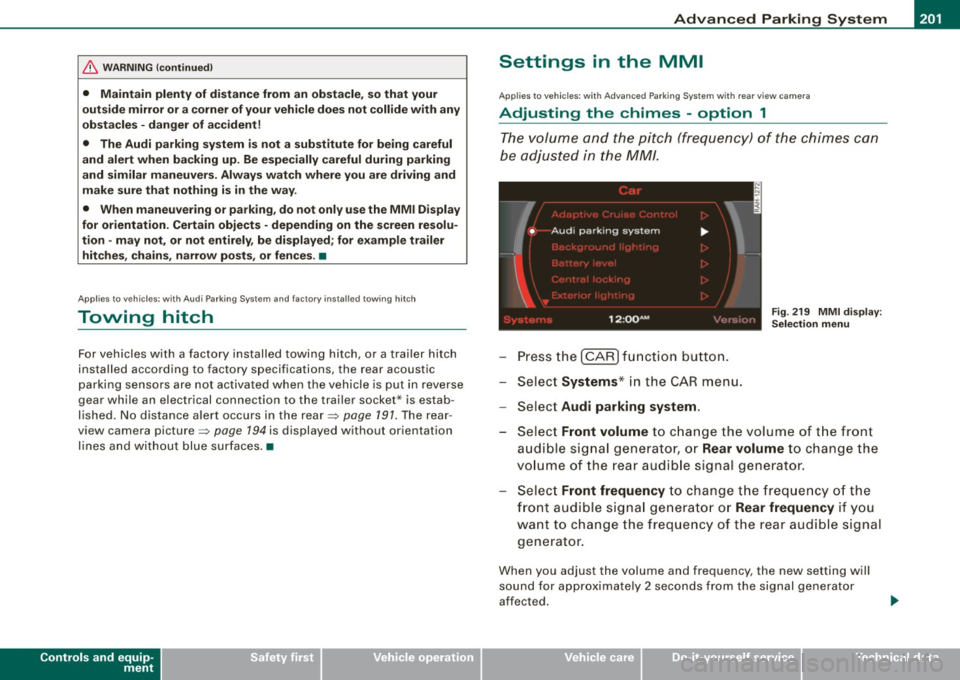
Adjusting the chimes -option 1
The volume and the pitch (frequency) of the chimes can
be adjusted in the MM!.
Press the [CAR] function button.
Select
Systems* in the CAR menu.
- Select
Audi parking system .
Fig. 219 MMI display :
Selection menu
- Select Front volume to change the volume of the front
audible signal generator, or
Rear volume to change the
volume of the rear audible signal generator.
Select
Front frequency to change the frequency of the
front audible signal generator or
Rear frequency if you
want to change the frequency of the rear audible signal
generator.
When you adjust the volume and frequency, the new setting will
sound for approximately 2 seconds from the signal generator
affected.
I • •
Page 207 of 426

____________________________________________ A_d_ v_ a_n_ c_ e_d _ P_a_ r_ k_ i_ n ..::g==-- S_ y=- s_t _e _m __ flll
& WARNING (continued )
Be especially careful to check for small children and animals
before backing up . Small children and animals will not always be
shown in the rear-view display .
• The Audi parking system is not a substitute for being careful
and alert when backing up . Be especially careful during parking
and similar maneuvers . Always watch where you are driving and
make sure that nothing is in the way .
• Do not allow yourself to be distracted from traffic by the rear
v iew camera pictures.
• When maneuvering or parking , do not only use the MMI Display
for or ientation . Certa in objects -depending on the screen resolu
tion -may not , or not entirely , be di splayed; for example trailer
hitches , chains , narrow posts , or fences .
• Only use the rear -view camera for aid if it shows a good, clear
picture . The image may be obscured , for example , by the sun
shining into the lens, dirt on the lens , or as the result of a defect ·
danger of accident!
• If the image is hazy when the MMI Display is switched on or the
area behind the vehicle is not visible (for example , as the result of
a dirty or defective lens ), the rear -view camera must not be used
for aid in maneuvering -danger of ac cident!
• The rear -view camera generates two -dimensional images . For
this reason, please note that recesses in the ground and
protruding parts on another vehicle , or protruding objects fixed to
the ground , will be more difficult or impossible to recognize on the
MMI Display, due to the missing spacial depth.
• If the position and the installation angle of the camera has
changed , for example, after a rear end collision, do not continue to
use the system for safety reasons . Have it checked by an autho
rized Audi dealer or qualified workshop .
• Only use the rear-v iew camera when the rear lid is fully closed.
Make sure that objects mounted on the rear are not obscuring the
camera v iew .
Controls and equip
ment
& WARNING (continued )
• Remove ice, preferably with de-icing spray .
0 Note
• Never use warm or hot water to remove snow or ice from the
rear -view camera lens -danger of crack format ion on t he lens!
• Whe n cleani ng t he le ns, neve r use care p ro d uc ts wi th a n abr a
s ive effect.
[ i ] Tips
The positio ns of t he orientation lines/ surfaces are disp laced up or
down if the par king p rocess is car ried out with the rear -view camera
i n Adap tive A ir Suspen sio n*:::::>
page 21 dy namic, o ffro ad , or lift
mode. Therefo re, the accuracy is reduced. •
I • •
Page 208 of 426
1111 ...... _A_ d_ a --=- p_t_ i_v _e_ A_ ir_ S_u_ s__,_ p_e_ n_ s_io _ n _____________________________________________ _
Adaptive Air Suspension
Air suspension and damping
Applies to vehicles: with Adaptive A ir Suspens ion
Description
Air suspension and damping can be regulated as desired
by driver, and they adapt automatically to the driving situ
ation at the time.
Adaptive Air Suspension is an electronica lly contro lled springing
and damping system. This chassis system makes it easier on the
driver by adapting to the particular situation through imperceptible
control processes.
The
Adaptive Air Suspension component regulates ground clear
ance depending on vehic le speed and driver inpu t. It functions inde
pendently from the load condition. Accelerating to a speed above a
predetermined limit will make the vehic le lower itself . On the other
hand, driving more slowly results in the vehicle raising again at
specific speeds.
The
damping component provides individual control of the
damping forces. For example, with damping characteristics set to
provide greater comfort, damping is set somewhat harder for a brief
period only as required, for example, when going around a curve or
when braking.
Settings
Adaptive Air Suspension prov ides the driver with the opportunity to
set the chassis characteristics a lso to their individual preference.
With the driving modes
comfort, automatic and dynamic the driver
has three chassis settings available, ranging from comfort to sporty.
The
offroad mode can be selected for driving on poor qua lity
stretches of road. In addition, lift provides a fifth mode, which can
be selected when exceptionally high ground clearance is needed
=> page 207, "Chassis controls". The modes are set in
MMI:::::,
page 208.
& WARNING
The height of the parked vehicle can change due to temperature
fluctuations or changes in load.
0 Note
• Whenever you park your vehicle, always make sure there is
adequate clearance above and below the vehic le. The height of the
parked vehicle can change as the result of temperature fluctuations,
changes in load condition and changes in the driving mode (ground
clearance!.
• If the vehicle is being transported (e.g. by tow truck, train, ship,
etc.), mount the tie -down chains/cables over the running surface
(circumference) of the tires . Never secure the veh icle by the axle, the
suspension struts or the front or rear towline eye. For technical
reasons, the pressure in the suspension struts may change during
the transport, which could result in the vehic le no longer being
secured properly.
• If you are going to tow a trailer with a trailer hitch that was
not
installed according to factory specifications, you must activate the
trailer operation mode manually:::::,
page 211.
[ i ] Tips
• Before you can raise your vehic le using the vehicle jack (for
example, when changing a flat tire) or a vehicle lift, you must acti
vate the jacking mode:::::,
page 210.
• On some models, the vehicle can reach its maximum speed only
in the
automatic and dynamic modes. •
Page 213 of 426
___________________________________________ ___:A~d~ a~p~t~iv~ e=-.:A~ir~ S~u~ s ~p~ e~n~ s~io~n ~_ffllll
Applies to vehicles : w it h towi ng h itch and Adapt ive Air Su spens io n
Towing a trailer
Automatic lowering is not desirable when towing a trailer.
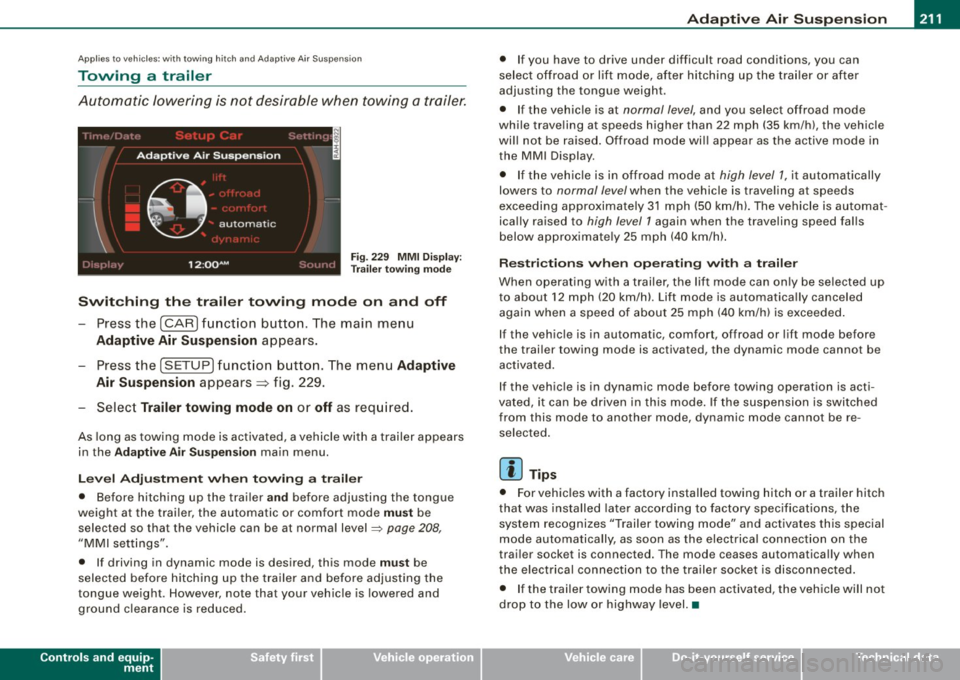
Fig . 22 9 MMI D isplay:
T rai le r t ow ing mode
Swi tching th e trail er towing mode on and off
Press the (CARI function button. The main menu
Adaptive Air Su spension appears .
-Press the (SETUP I funct ion button. The menu Adaptiv e
Air Susp ension
appears~ fig. 229.
- Select
Trailer towing mod e on or off as req uired .
As long as towing mode is activated, a vehicle with a trailer appears
in the
Ad apti ve Air Sus pension main menu.
Le ve l Ad jus tm ent w hen t owing a tra ile r
• Before hitching up the trai ler a nd before adjusting the tongue
weight at the trai ler, the automatic or comfort mode
mu st be
selected so that the vehicle can be at normal level
=> page 208 ,
"MMI settings".
• If driving in dynamic mode is desired, this mode
mus t be
selected before hitching up the trailer and before adjusting the
tongue weight . However , note that your vehicle is lowered and
ground clearance is reduced.
Controls and equip
ment
• If you have to drive under difficult road conditions, you can
se lect offroad or lift mode, af ter hitching up the trai ler or after
adjusting the tongue weigh t.
• If the vehic le is at
normal level, and you select offroad mode
while trave ling a t speeds higher than 22 mph (35 km /h) , t he vehicle
wi ll not be raised . Offroad mode wi ll appear as the active mode in
the MMI Display .
• If the vehic le is in offroad mode at
high level 1 , it automatically
lowers to
normal level when the vehicle is trave ling a t speeds
exceeding approxima tely 31 mph (50 km/h). The vehicle is automat
ica lly raised to
high level 1 again when the t raveling speed falls
below approximate ly 25 mph (40 km/h).
R es tric tions when ope ra ti ng w ith a tra iler
When opera ting with a trailer, the lift mode can on ly be se lected up
to about 12 mph (20 km/h). Lift mode is au tomatica lly canceled
again when a speed of about 25 mph (40 km/h) is exceeded .
If the vehicle is in automatic, comfort, offroad or lift mode before
the trai ler towing mode is act iv a te d , the dynamic mod e cannot b e
activated.
If the vehicle is in dynamic mode before tow ing operation is acti
vated, it can be driven in this mode. If the suspension is switched
from this mode to another mode , dynamic mode canno t be re
selected .
[ i ] Tips
• For vehicles with a factory installed towing hitch or a trailer hitch
that was installed later acco rding to factory specificat ions , the
system recognizes "Trailer towing mode" and activates this special
mode automatically, as soon as the electrica l connection on the
trai le r sock et is connected. The mode c eases au tomat ica lly wh en
the electrical connection to the trailer socket is disconnected.
• I f the trailer tow ing mode has been activated, the vehicle w ill not
drop to the low or highway level. •
I • •
Page 307 of 426

Trailer towing
Driving with a trailer
Genera l information
Your Audi was designed primarily for passenger transpor
ta tion.
If you plan to tow a trailer, please remember that the add itional load
wi ll affect durability, economy and performance.
Trai ler towing no t only places more s tress on the vehicle, it a lso ca lls
for more concentration from the driver.
F or this reaso n, always fol low the operating and driving instructions
prov ided and use common sense.
(D Note
If you are going to tow a tra iler, you must activate the trailer opera
tion mode =>
page 211, "Towing a trailer".
Technical requirements
Trailer hitch
Use a we ight-carry ing hitch conforming to the gross tra iler weig ht.
T he hitch must be suitable for your vehic le and trailer and must be
m ounted secure ly on the veh icle's chassis at a
technically sound
location. Use only a trailer hitch with a removable ball mount.
Always check with the trai ler hitch ma nufacturer to make sure that
you are using the correct hitch .
Do not use a bumper hitch.
The hitch must be instal led in such a way that it does not in terfere
with the impact-absorbing bumper system. No modifications shou ld be made to the vehicle exhaust and b rake systems . Fro m
Controls and equip
ment Safety first Vehicle operation
Tr
aile r t owing
time to time, check that all hitch mounting bolts remain securely
fastened .
When you are not towing a trai ler, rem ove the t railer hi tch bal l
mount. This prevents the hitch from causing damage should your
vehicle be struck from behind =>
&.
Trailer bra kes
If your trai ler is equipped with a b raking system, check to be sure
that it conforms to all regulations.
The tra iler hydraul ic bra ke system must not be directly co nnecte d to
the veh icle's hydrau lic brake system=> &.
Safety chains
Always use safety chains between your vehicle and the trailer.
Trail er lights
Trai ler lights must meet a ll regulations. Be sure to check with your
au thorized Audi dea ler for correct wiring, switches, an d relays.
Mirrors
If you are unab le to see the traff ic behind you using the regular
outside mirrors, then you
must instal l extended mirrors. It is impor
t ant that you
always have clear v isi on to the rear.
& WARNING
• If a trailer has electrical brake s please note that the se brakes
are not act ivated by the fa ctory-fitted control unit -ris k of acci
dent!
• After removing the trailer hitch , do not store it in your vehicle.
In case of sudden braking , the hitch could fly forward and injure
you or your passengers .
Vehicle care Do-it-yourself service Technical data
Page 308 of 426
llffl!I Trailer towing
------=---------------------------------
& W ARN ING (continued )
• The Gros s Vehicle Weight Rating for your Audi 07 vehicle ,
found on the safety compliance l abel on the driver's side B -pillar ,
must never be ex ceeded under any cir cumstances . E xceeding the
Gross Vehi cle Weight Rating of your vehicle is likely to damage
your vehicle , and such damage w ill not be covered by your Limited
New Vehicle Warranty. Exceeding the Gro ss Vehicle Weight Rating
will also change the performan ce and handling characteristics of
your vehicle , which could cause a crash resulting in serious injury
or death .
• The Gros s Vehicle Weight Rating for your Audi 0 7 would be
e xc eeded if your veh icle is simultaneously equipped with
Panoramic sliding sunroof ; third -row seating ; trailer towing equip
ment (factory or dealer -installed) , and running boards (dealer
installedl. UNDER NO CIRCUMSTANCES MAY ALL SUCH ITEMS BE
INSTALLED ON THE SAME VEHICLE .
a
Operating instructions
---------~--~-------
MAX 6.9"
MAX 175mm
Trailer towing weights
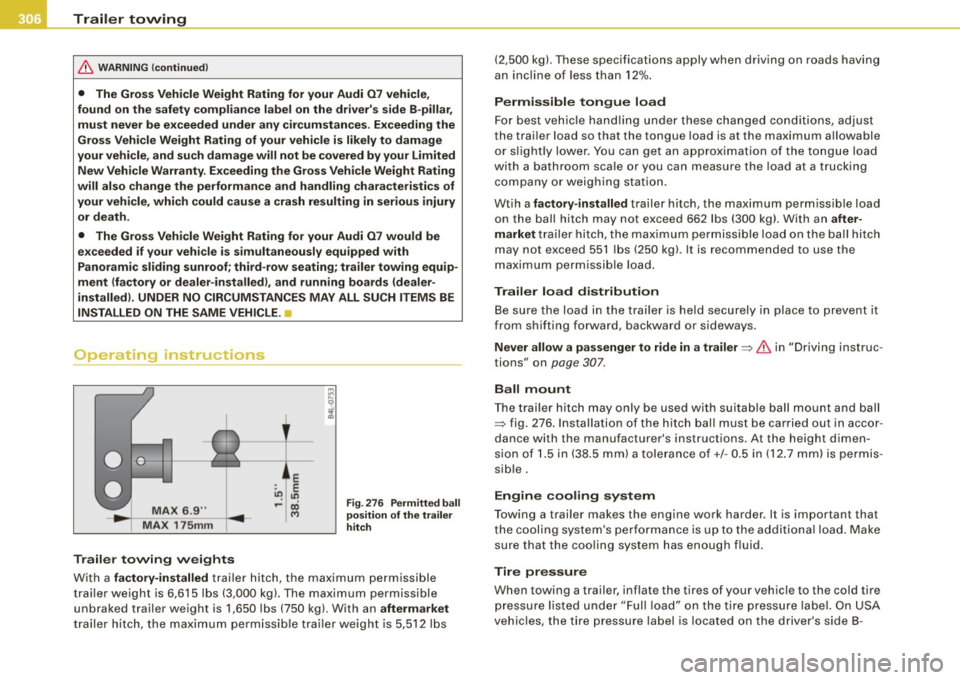
Fi g. 2 76 P erm itted ball
po sition of the trailer
hitch
With a factory-installed trai ler hitch, the maximum permissible
trai ler weight is 6,615 lbs (3,000 kg). The maximum permissible
unbraked trailer weight is 1,650 lbs (750 kgl. With an
aftermarket
tr ailer h itch , the maxi mum pe rm iss ib le tra iler weigh t is 5,51 2 lb s (2,500
kg). These specifications apply when driv ing on roads having
an in cli ne of less t han 12% .
Permissible tongue load
Fo r best v ehicle ha ndling under th es e changed con ditio ns, a dju st
the trai ler load so that the tongue load is at the maximum allowable
or s lightly lower. Y ou ca n ge t an ap proxi mati on of the tong ue load
with a bathroom sca le or you can measure the load at a trucking
company or weig hing s tati on.
Wtih a
factory -installed trailer hi tch, the max imum perm issib le load
on the ball hitch may not exceed 66 2 lbs (300 kg) . With an
after
market
t ra iler hitc h, the max imum pe rmi ssible loa d on the ball h itch
may not exceed 55 1 lbs (250 kg). It is recommended to use the
m aximum p ermi ssi ble l oad.
Trailer load distribution B e sure the load in the trai ler is he ld securel y in place to prevent it
from shifting forward, backward or sideways.
Never allow a passenger to ride in a trailer=> & in "D riving ins truc
tions" on page 307.
Ball mount
T he trai ler hitch may only be used with suitab le ball mount and ball
=> fig. 276 . In sta llati on of t he hitch ball must be ca rr ie d o ut i n a ccor
dance with the manufacturer's instructions. At the height dimen
s io n of 1 .5 in (38 .5 mm) a tole ran ce o f+/- 0 .5 in (12 .7 mm) is pe rmis
sib le.
Engine cooling system
T owing a trai ler makes the engine work harder. It is important that
th e c ooli ng system 's per forman ce is u p to the a ddi tiona l loa d. Ma ke
sure that the coo ling s ystem has enough f luid.
Tire pressure
When towing a trailer, inflate the tires of your vehic le to the cold tire
p re ssure l is ted unde r "Full load" on th e tire press ure l abe l. On USA
vehic les, the tire pressure label is located on the driver's side 8 -
Page 309 of 426
pillar. On Canada vehicles, the tire pressure label is located either on
t he driver's side 8 -pillar or inside the fuel fil ler flap. Inflate trailer
tires to trailer and tire manufacturers' specifications.
L ight s
The head light settings should be checked with the trailer attached
before driving off . Check to make sure both vehicle and trai ler lights
are working properly.
Sa fety c hain s
Be sure trailer safety chains are properly connected from the trailer
to the hitch on the vehicle . Leave enough slack in the chains to
permit turning corners. When you insta ll safety chains, make sure
they will not drag on the road when you are driving .
The chains should cross under the tra iler tongue to prevent it from
dropping in case of separation from the hitch.
0 Note
If you are going to tow a traile r, you must activate the trailer opera
tion mode =>
page 211, "Towing a trailer" .
Driving instructions
Driving with a trailer always requires extra care and
consideration.
To obtain the best possible handling of vehicle and trailer,
please note the fo llow ing:
- Do not tow a loaded trailer when your car i tse lf is not
loaded .
- Be especia lly careful when passing other vehicles .
- Observe speed l imits.
- Do not drive at the maximum permiss ible speed .
Controls and equip
ment Safety first Vehicle operation
Tr
aile r t owing
Always apply brakes early .
- Monitor the temperature gauge .
Weigh t dis tr ibution
Towing a loaded trailer wi th an empty car results in a highly
unstable dis tribution of weight . If this cannot be avoided , drive at
very low speeds only to avoid the risk of losing steering control.
A "balanced" rig is easier to operate and control. This means that
the tow vehicle should be loaded to the extent possible and permis
sib le, while keeping the trailer as light as possib le under the circum
stances . Whenever possible, transfer some cargo to the luggage
compartment of the tow vehicle whi le observing tongue load
requirements and vehicle loading considerations .
Speed
The higher th e speed, the more difficu lt it becomes for the driver to
control the rig . Do not drive at t he maximum pe rmissible speed.
Reduce your speed even more
if load, weather or wind conditions
a re unfavorable -particularly when going downhil l.
Reduce vehicle speed
i mmedi ate ly if the trailer shows the slightest
sign of swaying.
Do not tr y to s top the swaying by accelerating .
Observe speed limits . In some areas, speeds for vehicles towing
trailers are lower than for regular vehicles .
Always apply brakes early. When driving downhill, shift into a lower gear to use the engine braking effect to slow the vehicle. Use of the
brakes alone can cause them to overheat and fa il.
Coo lant t emperatu re
The coolant temperature gauge=> page 13 must be obse rved care
ful ly. If the need le moves close to the upper end of the sca le , reduce
speed immediately and/or turn off the air conditioner .
If the coolant temperature warning light in the instrument cluster
starts f lashing
- f- , pul l off the road, stop and let the engine idle for
about two minutes t o prevent heat build -up.
Vehicle care Do-it-yourself service Technical data