door lock AUDI Q7 2009 Owner´s Manual
[x] Cancel search | Manufacturer: AUDI, Model Year: 2009, Model line: Q7, Model: AUDI Q7 2009Pages: 426, PDF Size: 97.13 MB
Page 69 of 426
-Make s ure that the w indows a re no t blocked ~,& .
- Tu rn and hold the key in the lock position ®~
page 66,
fig. 51 until the windows and the Panoramic sliding
sunroof* with the power sun blind are completely c losed .
Opening windows
- Insert the key into the lock of the driver's door.
- Tur n and ho ld the key in the o pen positi on
@ .
The automatic c lose/open function wi ll cease if the key is returned
to its origina l position .
& WARNING
• Be ca re ful when closing t he windo ws. Ch eck to see th at no one
i s in th e way , or se riou s injury could r esult !
• Alw ays read and he ed WARNING =>
& in "G ene ral d escription "
on
pag e 52. •
Reactivating the system after battery
disconnection
If t he vehic le battery is disco nnected a nd then reconnected,
the automat ic closing and opening function will not w ork
unt il it i s reac tivated. To reactivate t his fea tur e, perform th e
following steps:
Re activating close /open feature
- Pull and hold the power window sw itch until the window
is complete ly closed.
- Release the sw itch .
Controls and equip
ment
Opening and clo sing
- Pul l the switch again for one sec ond. The au tomat ic
cl osin g/opening is now reactivated .•
Panoramic sliding sunroof
Ap plies to vehi cles: w it h P ano ramic sliding sunroof
Description
The Panoramic s liding sunroof of two individual glass roof
segments, which can be adjusted electrica lly independently of each
other .
The front segment can be tilted and slid open . The rear segment can
be tilted, bu t it cannot be slid open .
The Panoramic slid ing sunroof is operated by the driver or
passenger when the ignition is on with a rotary switch (for the front
roof segment) and a rocker switch (rear roof segment) .
After the igni tion has been switched off, the Panoramic sliding
sunroof ca n sti ll be opened or closed for about 10 minutes .
However , as soon as the driver's or passenger's door is opened, the
switches for the Panoramic sliding sunroof are inoperative.
0 Note
You shou ld always close the Panoramic sliding sunroof when you
leave your vehic le. Sudden ra in can drench the inter ior equipment
and damage th e electron ic convenience features in your v ehicle.
[ i ] Tip s
If you park your vehicle in the sun, we recommend that you close
both sun blinds =>
page 69. •
I • •
Page 71 of 426
Closing front roof segment when slid open
-Rotate switch => page 68, fi~ . 52 © to position @ to
close the roof segment=>
&-To move to an interme
diate position, rotate the switch to the corresponding
c lick-stop.
Closing tilted rear roof segment
- Tap the rocker switch => page 68, fig. 52 @ or=> page 68,
fig . 53
© in the front area~ briefly to close the roof
segment completely =>,& .
- To set an intermediate position manually , press the
rocker switch in the front area~
until the roof segment
has reached the desired tilt position:::;,,& .
& WARNING
Improper use of the Panoramic sliding sunroof can cause serious
personal injury.
• Be careful when closing the Panoramic sliding sunroof. Not
paying attention could cause you or others to be trapped and
injured as the Panoramic sliding sunroof closes.
• Always take the key with you when you leave the vehicle to
prevent injuries caused by the Panoramic sliding sunroof closing
• Never leave children or persons requiring assistance alone in
the vehicle, especially when they could access the vehicle keys.
Unsupervised use of the keys can result in the engine being
started or use of vehicle systems such as the power windows, etc.
which could result in serious injury. The doors could be locked
with the remote key, delaying help in an emergency.
• The Panoramic sliding sunroof will continue to operate until the
ignition key has been removed and one of the front doors has been
opened. •
Contro ls and eq uip
ment
Opening and closing
A pp lies to ve hicles: w it h P an oram ic slid in g su nroof
Convenience closing feature
The Panoramic sliding sunroof can be closed from outside
with the key in the driver's door lock.
Insert the key into the driver's door lock.
Turn and hold the key in the lock position ®=> page
54,
fig. 35 until the Panoramic sliding sunroof is completely
closed =>
& in "Closing Panoramic sliding sunroof" on
page 68. The power sun blind is also closed.
& WARNING
• Be careful when closing the Panoramic sliding sunroof. Not
paying attention could cause you or others to be trapped and
injured as the Panoramic sliding sunroof closes. •
Applies to ve hicles : w it h Pa noram ic slidin g su nroof
Opening and closing sunshade
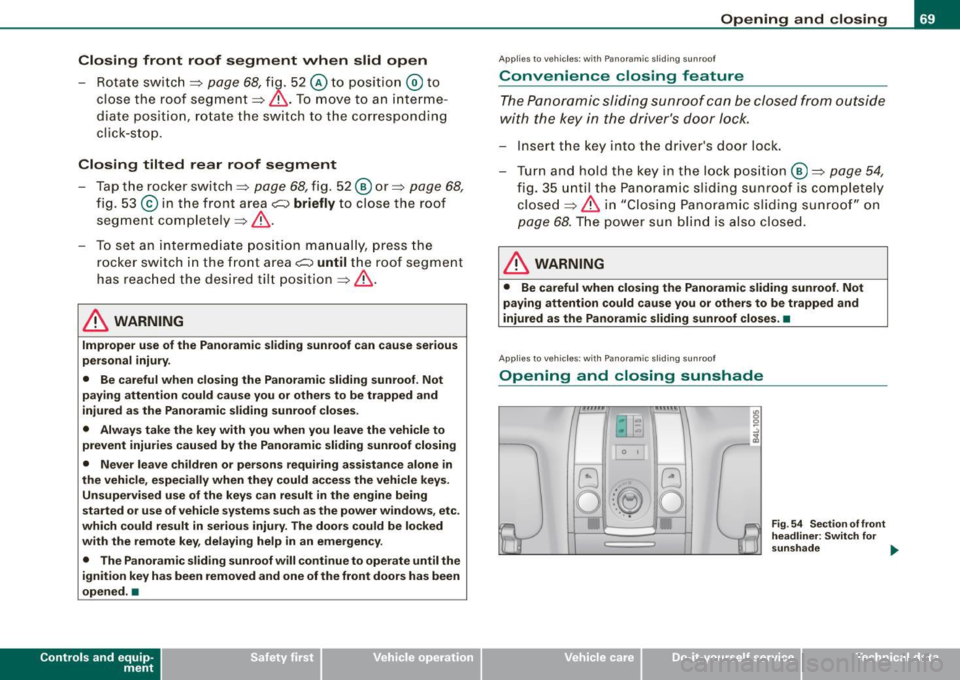
0 t
Vehicle care I I
Fig . 54 Section of front
headliner: Switch for
sunshade .,.
irechnical data
Page 73 of 426
& WARNING !continued)
• Never leave children or persons requiring assistance alone in
the vehicle, especially when they could access the vehicle keys.
Unsupervised use of the keys can result in the engine being
started or use of vehicle systems such as the power windows, etc.
which could result in serious injury. The doors could be locked
with the remote key, delaying help in an emergency.
• The Panoramic sliding sunroof will continue to operate until the
ignition key has been removed and one of the front doors has been
opened .•
Appl ies to vehicles: with Panoramic sli ding sunroof
Mechanical emergency closing for front roof
segment (Step 1 )
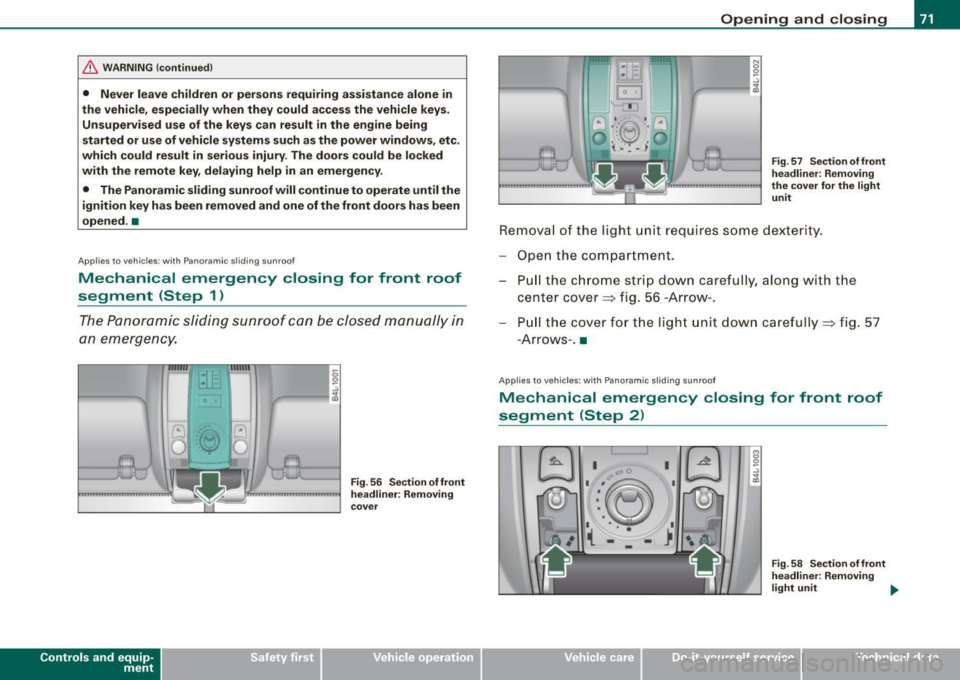
The Panoramic sliding sunroof can be closed manually in
an emergency.
Con tro ls and eq uip
ment
Fig . 56 Sect ion of front
headliner: Removing
cover
Opening and closing
Fig . 57 Section of front
headliner : Removing
the cover for the light unit
Removal of the light unit requires some dexterity.
Open the compartment. Pull the chrome strip down carefully, along with th e
center cover=> fig. 56 -Arrow -.
Pu ll the cover for the lig ht un it down carefully=> fig. 57
-A rro ws- .•
App lies to veh icles: with Panoramic sliding sunroof
Mechanical emergency closing for front roof
segment (Step 2)
a;. I
Vehicle care I I
Fig . 58 Section of front
headliner: Removing
light unit .,,_
irechnical data
Page 76 of 426

Clear vision
ambient brightness increases again, the low beams are turned off
again automatica lly => & .
In the
AUTO pos ition the low beams are switched off automatically
when the ignition is turned off .
L ight S ensor M alfu nction *
In the event of a ligh t sensor mal func tion, the drive r is notified in the
ins trument cluster display :
e. Automatic headlights /autom ati c w ipers defe ctive
For safety reasons the low beams are turned on permanently with
the switch in
AUTO . However , you can continue to turn the lights on
and off using the light switch . Have the light sensor checked as soon
as possible at an authorized Audi dealer or qualified workshop.
& WARNING
• Never use d ayt ime running lights to see where you are going.
The y are no t bright enough and will not let you see far enough
ahead for safety , espe cially at du sk or when it is d ark . Al way s
switch on the low beams at du sk or when it is dark .
• Automati c he adlights* are onl y intended to assist the driver .
They do not relieve the driver of his re sponsibility to check the
headlight s and to turn them on manually a ccording t o th e cur rent
light and visibility condit ion s. For example , fog and ra in cannot be
dete cted by the l ight sen sor s. S o alwa ys sw itch on the headlight s
under th ese weather condition s and wh en driv ing in the dark
t D .
• Cras hes c an happen when y ou cannot see th e road ahead and
when you cannot be seen by other motori sts.
- Alway s turn on the headlights s o that you can see ahead a nd
s o that others can see your c ar from the ba ck.
[ i ] Tips
• With the switch in AUTO front fog lights and rear f og lights
cannot be turned on in addition . • T
he light sensor * for headlight control is located in the rear view
mirror mount . Do no t apply any stickers to the windshie ld in this
area to prevent malfunctions or failures .
• I f you remove the ign itio n from the ign ition lock while the head
lights are still on, a bu zzer will sound as long as the driver's door is
open to remind you to turn off the lig hts.
• Always observe the specific local regulations for your ar ea as to
when to use you r lights .•
Adjusting exterior lighting
The functions are set in the MM/ .
Fig . 61 MM I display :
E x te rior lighting
- Press the [ CAR ] fu nct io n butto n.
- Selec t
Exterior lighting . The menu Exterior lighting
appears=> fig. 61.
C oming h om e*
T he
Com ing home function ensures that after turn ing off the igni
tion and op ening the driver's doo r
the vehicle periphery is il lumi
nated in the dark. In addition , the front fog lights, the tail lights and
the license plate light are turned on . On- time can be set fo r a period
from
O (off) to 60 seconds. .,,_
Page 80 of 426
Clear vision
0 Note
Do not use the h igh beam or headlight flasher if you know that these
could blind oncoming traffic. •
Interior lights
Front interior lights
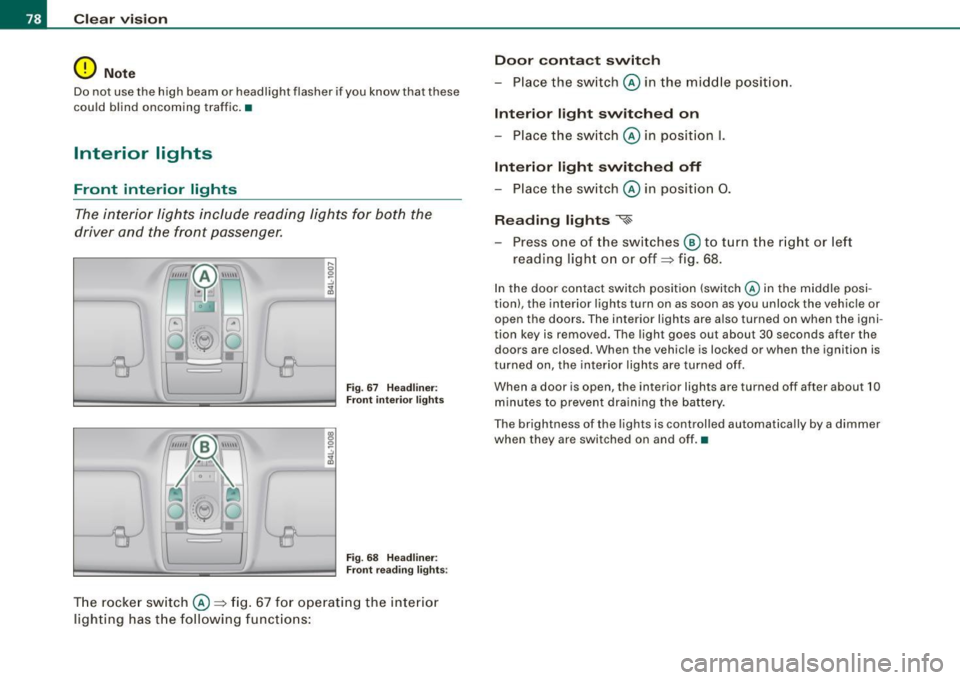
The interior lights inclu de rea ding lights for both the
driver and the front passenger.
I;
S? ..!I ... m
r
~-
~
Fig . 6 7 H eadlin er:
F ron t int erior light s
18 S? ..:.,
~
(
"--8
Fig. 68 H eadlin er:
Front r eadin g li ghts :
T he rocker sw itch ©:::::, fig. 67 for operating the int erior
li gh ting has the following funct ions: Door
conta ct swit ch
- Place the sw itch © in the midd le position.
Interior l ight switched on
- Place the sw itch © in posi tion
I.
Int erior light switch ed off
- Place the switch © in position 0.
Reading lights
«~
- Press one of the switches ® to tu rn the r ig ht or left
reading light on or off:::::, fig. 68.
In the door contact switch position (switch @ in the middle po si
tion) , the interior lights turn on as soon as you unlock the vehicle or
open the doors. The interior lights are a lso turned on when the igni
tion key is removed. The light goes out about 30 seconds after the
doors are closed. When th e vehic le is locked or when the igni tion is
turned on, the interior lights are turned o ff.
When a door is open, the interio r ligh ts are turned off after about 10
minutes to prevent d raining the battery.
The brightness of the l ights is controlled automatically by a dimmer
when they are switched on and off. •
Page 99 of 426
Seat memory
Applies to vehicles: w ith seat memory
Driver's seat memory
The seat adjustment settings for two drivers con be stored
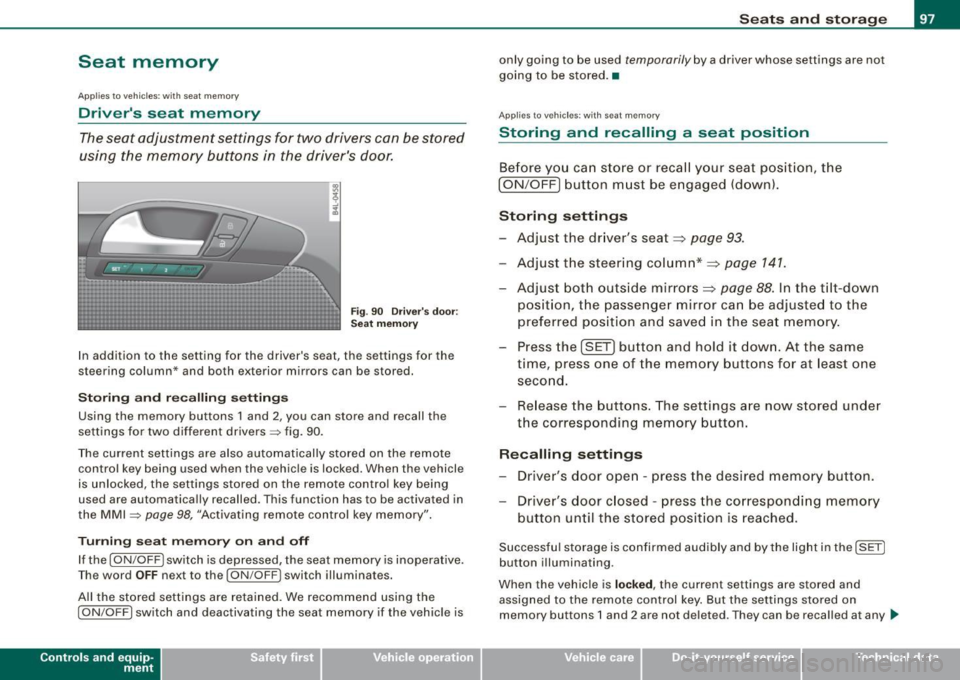
using the memory buttons in the driver's door.
Fig . 90 Driver's door :
Seat memory
In addition to the setting for the driver's seat, the settings for the
steering column* and both exterior mirrors can be stored.
Storing and recalling settings
Using the memory buttons 1 and 2, you can store and recall the
settings for two different drivers=> fig. 90.
The current settings are also automatically stored on the remote control key being used when the vehicle is locked. When the vehicle
is unlocked, the settings stored on the remote control key being
used are automatically recalled. This function has to be activated in
the MMI =>
page 98, "Activating remote control key memory".
Turning seat memory on and off
If the [ ON/OFF ! switch is depressed, the seat memory is inoperative.
Th e word OFF next to the [ON/OFF) switch illuminates.
All the stored settings are retained. We recommend using the
I ON/OFF] switch and deactivating the seat memory if the vehicle is
Con tro ls and eq uip
ment
Seats and storage
only going to be used temporarily by a driver whose settings are not
going to be stored. •
Applies to veh icles: w ith seat memory
Storing and recalling a seat position
Before you can store or recall your seat position, the
I ON/OFF] button must be engaged (down).
Storing settings
- Adjust the driver's seat~
page 93.
-Adjust the steering column*~ page 141.
Adjust both outside mirrors~ page 88. In the tilt-down
position, the passenger mirror can be adjusted to the
preferred position and saved in the seat memory.
- Press the
!SET) button and hold it down. At the same
time, press one of the memory buttons for at least one
second.
- Release the buttons. The settings are now stored under
the corresponding memory button.
Recalling settings
- Driver's door open -press the desired memory button.
- Driver's door closed -press the corresponding memory
button until the stored position is reached.
Successful storage is confirmed audibly and by the light in the [ SET]
button illuminating.
When the vehicle is
locked , the current settings are stored and
assigned to the remote control key. But the settings stored on
memory buttons 1 and 2 are not deleted. They can be recalled at any
~
Vehicle care I I irechnical data
Page 121 of 426
________________________________________________ S_ e_ a _ t_ s _a_ n_d _ s_t _o _ r_ a...: g==-- e __ llll
Storage
General overview
There are numerous places to store items in your vehicle.
Glove compartment
Cooling box in glove compartment
Storage compartment in roof
Storage in the door panels
Storage net in footwell
Storage net in the front seat backs
Storage net in luggage compartment
Storage compartment beneath cargo
floor
& WARNING
=> page 119
=> page 120
=> page 121
=> page 121
=> page 122
=> page 122
=> page 109
• Always remove objects from the instrument panel. Any items
not stored could slide around inside the vehicle while driving or
when accelerating or when applying the brakes or when driving
around a corner.
• When you are driving make sure that anything you may have
placed in the center console or other storage locations cannot fall
out into the footwells. In case of sudden braking you would not be
able to brake or accelerate.
• Any articles of clothing that you have hung up must not inter
fere with the driver's view. The coat hooks are designed only for
lightweight clothing. Never hang any clothing with hard, pointed
or heavy objects in the pockets on the coat hooks. During sudden
braking or in an accident -especially if the airbag is deployed -
these objects could injure any passengers inside the vehicle. •
Controls and equip
ment
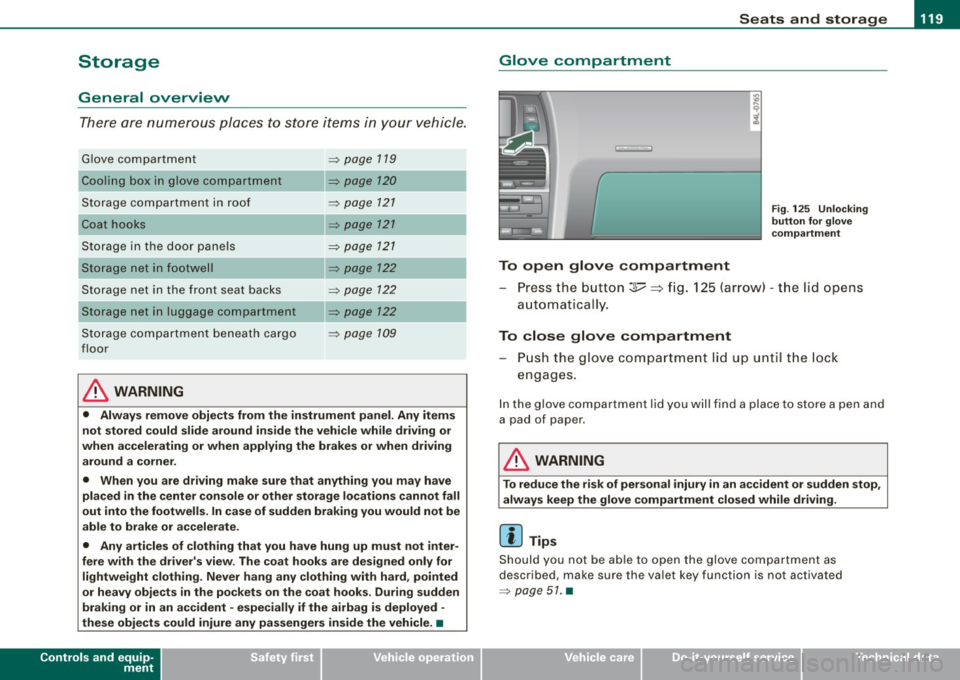
Glove compartment
To open glove compartment
Fig . 125 Unlocking
button for glove
compartment
Press the button :];,, ~ fig. 125 (arrow) -the lid opens
automatica I ly.
To close glove compartment
- Push the glove compartment lid up until the lock
engages.
In the glove compartment lid you will find a place to store a pen and
a pad of paper .
& WARNING
To reduce the risk of personal injury in an accident or sudden stop,
always keep the glove compartment closed while driving.
[ i] Tips
Should you not be able to open the glove compartment as
described, make sure the valet key function is not activated
=> page 51. •
I • •
Page 145 of 426
___________________________________________________ O_ n_ t_h _e_ r_o _a_ d _ ___.11111
& WARNING
• Ne ver re m ove the ke y from the ignition lo ck wh ile th e ve hicl e is
movin g. The steering wh eel will l ock , cau sing l oss of contr ol.
• I f yo u have t o le ave y our veh icle, e ven for ju st a mi nute , always
r e m ove the ign ition ke y and t ake it with you. T his is es pe ciall y
import ant if y ou are going t o leave c hildren unatt end ed in the
vehic le. The children could start the engin e or use other ve hicle
c ontr ols. Un sup erv is ed u se of veh icle c ontrol s (for e xam ple, pow er
w indow s) can cause se rious per sonal injurie s.
0 Note
• I f the ~ symbol in the display blinks, there is a malfunction in the
e lectronic steering column lock . Follow the instructions in
~ page 34 , "Steering malfunction i".
• If the ~ symbol in the display blinks , there is a malfunction in
the electronic ignition lock . Follow the instructions in~ page
34,
"Ignition lock malfunction ~"-
[ i ] Tip s
• If you release the ignition key in posit ion @, the key automati
cally r eturns to posit ion
G) .
• If you open the driver's door when the ignition is swi tched on , a
buzzer sounds and the message Ignition is on appears in the instru
ment cluster display. P lease switch the ignition off. •
Ignition key safety lock
The ignition key can only be removed when the selector
lever is in the "P" (Park) position.
After turning off the ignition, the ignition key can only be removed
from the ignition lock when the selec tor lever is in the "P" (Park)
Con tro ls and eq uip
ment position. Af
ter you have removed the key , the sele ctor lever is locked
and cannot be moved. •
Starting and stopping the engine
Starting the engine
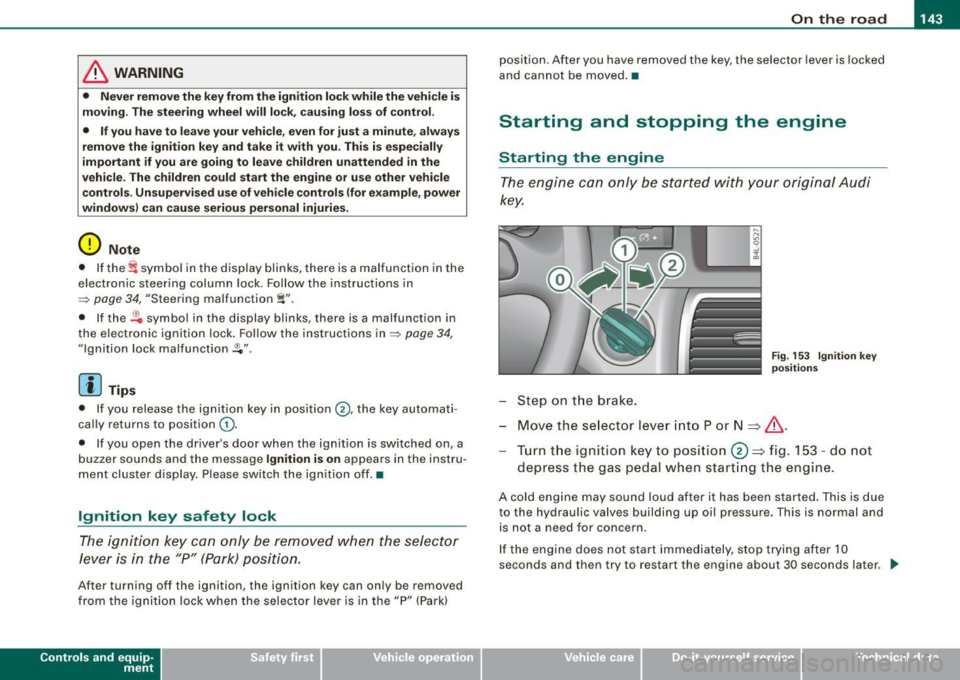
The engine can only be started with your original Audi
key.
Step on t he brake.
Fig . 153 Ig ni tio n k ey
p osit io n s
Move the selector lever into P or N => &,.
Tu rn the ignition key to pos ition 0 => fig . 153 - do not
depress the gas peda l when start ing the engine.
A co ld engine may sound loud after it has been started . This is due
to the hydrau lic valves building up oi l pressure. This is normal and
is not a n eed for concern .
If the engine does not start immediately, stop trying after 10
seconds and th en try to restart the engine about 30 seconds later . _.,
Vehicle care
I I irechnical data
Page 147 of 426
![AUDI Q7 2009 Owner´s Manual On th e road 11111 _________________________________ __::..:....:.......;,;_;_;_ _ __;____,J
Switching the ignition on
- Press t he [ S TART] button once to the first stage to switch
on](/img/6/40274/w960_40274-146.png "AUDI Q7 2009 Owner´s Manual On th e road 11111 _________________________________ __::..:....:.......;,;_;_;_ _ __;____,J
Switching the ignition on
- Press t he [ S TART] button once to the first stage to switch
on")
On th e road 11111 _________________________________ __::..:....:.......;,;_;_;_ _ __;____,J
Switching the ignition on
- Press t he [ S TART] button once to the first stage to switch
on on ly the ignition.
Starting the engine
- Step on t he brake.
- Move the se lector leve r to t he P or N posit ion
~ & .
- Press the [ STA RT ] button to t he second s tage to star t the
engine.
After a cold engine is started, there may be a brief period of
increased noise because oil pressure must first bui ld up in the
hydraulic valve adjusters . This is norma l and not a cause for
concern.
If the engine does not start immed iately, stop trying after 10
seconds and then try to restart the engine about 30 seconds later.
& WARNING
Nev er allow the engine to run in confined spa ce s · danger of
asphyxi atio n.
0 Note
• Avo id high engi ne rp m, full throttle and heavy engine loads unti l
the engine has reached operating temperature · otherwise you risk
engine damage .
• T he engin e cannot be started by pushing or towing the vehic le.
c£> For the sake of the environment
Do not allow the engine to warm up with the vehicl e stationary . Star t
driving right away . In this way you avo id unnecessary emissions .
Contro ls and eq uip
ment
[ i ] Tip s
If you open the driver's door when t he ign itio n is switched on, a
buzzer sounds and the message
Ign ition i s on appears in the instru
ment cluster display. P lease switch the ignition off. •
Applies to vehic les : w ith C onv en ien ce key
Switching engine off with the [STOP] button
Bring yo ur vehicle to a comp le te sto p.
Fig. 155 Convenien ce
key: E NGIN E STO P
button
Move the se lector lever to the P o r N position .
Press the [
STOP I button ~ fig. 15 5.
Pressing the ( STO P] but ton once switches off the engine and the
ignition . If you press the ( S T O P! button again for more than 1
second, the steering is locked, provided that the selector leve r is in
the P position
~ & .
Emergency OFF function
If necessary , the engine can be switched off with the selector leve r
in the R, Dor S positions. To do so, step on the brake peda l and
press and hold the ( STOP] button (vehicle speed must be less than
6 mph/ 10 km /h. .,,_
Vehicle care I I irechnical data
Page 148 of 426

• .___O_ n_ t_h _e _ r_o _a_ d __________________________________________________ _
& WARNING
• Never turn off the engine until the vehicle has come to a
complete stop.
• The brake booster and servotronic only work when the engine
is running. With the ignition turned off, you have to apply more
force when steering or braking. Since you cannot steer and stop
normally, this can lead to accidents and serious injuries.
• For safety reasons, you should always park your vehicle with
the selector lever in P. Otherwise, the vehicle could inadvertently roll away.
• After the engine has been switched off, the radiator fan can
continue to run for up to 10 minutes -even with the ignition
switched off. It can also switch on again after some time if the
coolant temperature rises as the result of a heat buildup or if the
engine is hot and the engine compartment is additionally heated
by the sun's rays.
0 Note
If the engine has been under heavy load for an extended period,
heat builds up in the engine compartment after the engine is
switched off -there is a risk of damaging the engine. Allow the
engine to run at idle for about 2 minutes before switching it off. •
Applies to vehicles: w ith Conven ience key
Driver messages in the instrument cluster
display
If a function is not present, a driver message appears.
No key identified
This message appears when the [STAR T) button is pressed if there
is no master key inside the vehicle or if the system does not recog
nize it . For example, the master key cannot be recognized if it is
covered by an object (e.g. aluminum brief case) which
screens the radio signal. Electronic devices such as cell phones can also inter
fere with the radio signal.
Press brake pedal to start engine
This message appears if you press the [ START) button to start the
engine and do not depress the brake pedal. The engine can only be
started if the brake pedal is depressed.
Engage N or P to start engine
This message appears when the engine is started if the selector
lever for the automatic transmission is not in the P or N position.
The engine can only be started with the selector in these positions.
? Key not in vehicle
This message appears along with the symbol if the master key is
removed from the vehicle with the engine running. It is intended to
remind you (e.g. when changing drivers) not to continue the journey
without the master key.
If the master key is no longer in the vehicle, you cannot switch off
the ignition after stopping the engine and you also cannot start the engine again. Moreover, you cannot lock the vehicle from the
outside with the key.
Shift to P, otherwise vehicle can roll away. Doors do not lock if lever
is not in
P.
This message appears for safety reasons along with a warning
buzzer if the selector lever for the automatic transmission is not in
the P position when the ignition is switched off with the
[STOP)
button and the driver's door is opened. Move the selector lever to
the P position, otherwise the vehicle is not secured against rolling
away. You also cannot lock the vehicle using the locking button on
the door handle or using the remote key.
To engage steering lock, press and hold STOP button
This message appears for safety reasons if the engine and the igni
tion have been switched off by pressing the [
STOP) button once, .,,_