engine AUDI Q7 2009 Owner´s Manual
[x] Cancel search | Manufacturer: AUDI, Model Year: 2009, Model line: Q7, Model: AUDI Q7 2009Pages: 426, PDF Size: 97.13 MB
Page 39 of 426

Driver message appears and does not go out again
If this driver notification appears after the ignition is turned on or
while driving and does not go out again , the battery's state of
charge is not in the optimal range . Starting capability is restricted.
Have the battery checked by an authorized Audi dealer as soon as
possible .•
Worn brake pads )
Brake pads!
If the warning light illuminates, immediately contact your autho
ri zed Audi dealer or qualified workshop to have all brak e pads
inspected. On USA models the warning light .,...,,. comes on together
with the warning light
BRAKE. Both sets of brak e pads on an axl e must
always be replaced at the same time.
& WARNING
Driving with bad brakes can cause a collision and serious personal
injury.
• If the warning light and the warning light
BRAKE21 with the
message Brake pads! comes on in the instrument cluster display,
immediately contact your authorized Audi dealer or qualified
workshop to have all brake pads checked or replaced if
necessary. •
Headlight range control defective )
' Headlight range control defective !
If the symbol illuminates , the dynamic headlight range control is no
longer working properly. Have the system checked and repaired at
your authorized Audi dealer. •
21 BRAKE: USA models only
Controls and equip
ment
Driver information display
Engine oil level ~
~ Please check oil level
When the symbol illuminates, check the engine oil level as soon as
possible=>
page 335. Top off the oil at your earliest opportunity
=>
page 336. •
Engine oil sensor defective -
Oil level! Sensor defective
If the symbol illuminates, contact your authorized Audi dealer and
have the oil sensor inspected. Until you have this done, check the oil
level each time you refuel just to be on the safe side=>
page 335. •
Applies to vehi cles : wit h engi ne spee d lim itation
Engine speed limitation f,,.
Engine speed maximum XXXX RPM
The I symbol illuminates when there is an engine control malfunc
tion . The indicator light in the instrument cluster also illumi
nates. The engine speed is limited to the speed displayed in the
driver information system. Keep in mind that the engine speed will
not exceed the value displayed in the driver information system, for
example when downshifting .
Please go to an authorized Audi dealer or other qualified workshop
to have the malfunction repaired. •
Applies to vehic les : with Ada ptive ligh t
Adaptive Light defective ~l
' Adaptive Light defective
I • •
Page 50 of 426
Opening and closing
Opening and closing
Keys
Key set
C !
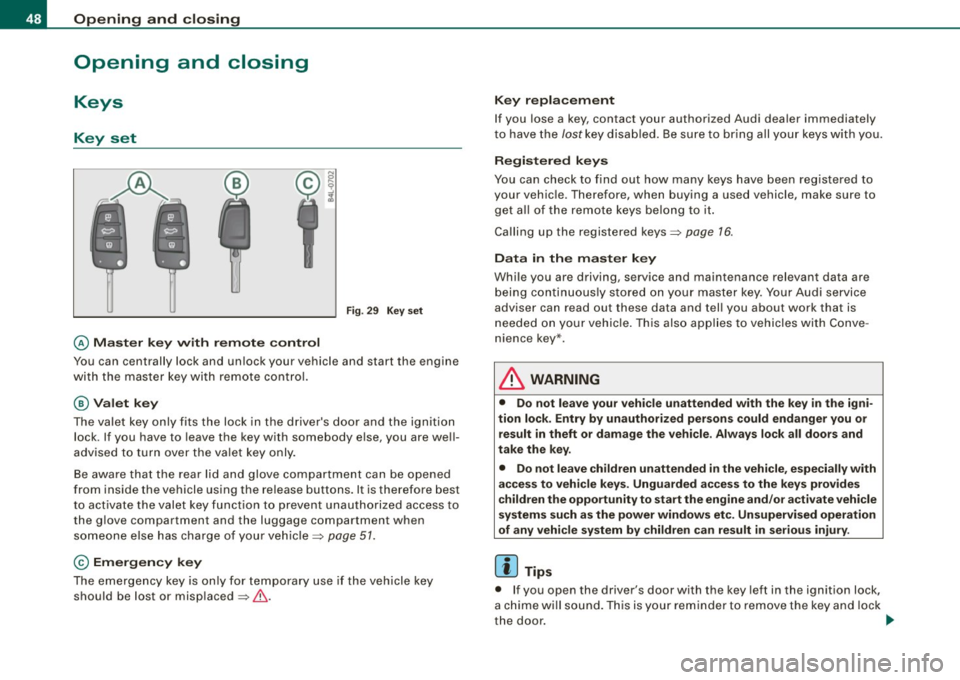
@ Master key with remote control
Fig. 29 Key set
You can centrally lock and unlock your vehicle and start the engine
with the master key with remote control.
@Valet key
The valet key only fits the lock in the driver's door and the ignition
lock . If you have to leave the key with somebody else, you are well
advised to turn over the valet key only.
Be aware that the rear lid and glove compartment can be opened
from inside the vehicle using the release buttons. It is therefore best
to activate the valet key function to prevent unauthorized access to
the glove compartment and the luggage compartment when
someone else has charge of your vehicle~
page 51.
© Emergency key
The emergency key is only for temporary use if the vehicle key
should be lost or misplaced ~& .
Key replacement
If you lose a key, contact your authorized Audi dealer immediately
to have the
lost key disabled. Be sure to bring all your keys with you.
Registered keys
You can check to find out how many keys have been registered to
your vehicle. Therefore, when buying a used vehicle, make sure to
get all of the remote keys belong to it.
Calling up the registered keys~
page 76.
Data in the master key
While you are driving, service and maintenance relevant data are
being continuously stored on your master key. Your Audi service
adviser can read out these data and tell you about work that is
needed on your vehicle. This also applies to vehicles with Conve
nience key*.
L1}. WARNING
• Do not leave your vehicle unattended with the key in the igni
tion lock. Entry by unauthorized persons could endanger you or result in theft or damage the vehicle. Always lock all doors and
take the key.
• Do not leave children unattended
in the vehicle, especially with
access to vehicle keys. Unguarded access to the keys provides
children the opportunity to start the engine and/or activate vehicle
systems such as the power windows etc. Unsupervised operation
of any vehicle system by children can result in serious injury.
[ i] Tips
• If you open the driver's door with the key left in the ignition lock,
a chime will sound. This is your reminder to remove the key and lock
the door.
~
Page 53 of 426
-Place the cover w ith the new battery on the key base and
press both parts together .
<£> For the sake of the environment
Dispose of dead batteries proper ly so as not to pol lute the environ
ment.
[ i ] Tips
The rep lacement battery must be the same specificat ion as the
original. •
Electronic immobilizer
The immobilizer helps to prevent unauthorized use of
your vehicle.
A computer chip inside your key automatically deact ivates the e lec
tronic immobilizer when you insert the key in the ignition lock, or on
veh ic les with Convenience key *, when the key is inside the vehicle.
When you remove the key from the ignition lock, or on vehicles with
Convenience key, when you remove the key from the vehic le, the
e lectronic immobilizer is automatica lly activated once again.
I f an unauthorized key was used, SAFE is disp layed continuously in
the odomete r disp lay field .
& WARNING
Always take the key wi th you when you leave the v ehicle. The ke y
ca n dis arm the ele ctro nic engine im mob iliz er and permit an unau
t hori zed per son to start the engine and enable operati on of the
v ehi cle sys tem s such a s pow er win dow o r Panor ami c s liding
sunroof * leading t o serious personal injury.
Controls and equip
ment
Opening and clo sing
[ i ] Tip s
• Your engine can on ly be started using the factory -equipped key.
• You may not be ab le to start your vehicle if an ignition key of a
different vehicle make is also located on your set of keys.
• For Dec laration of Compliance to Uni ted States FCC and Industry
Canada regulations~
page 404. •
Valet key function
The valet key fun ction prevents unauthorized persons
from opening the glove compartment or rear lid.
Fi g. 33 Ce nter
co nso le: butto n fo r
v ale t key f unction
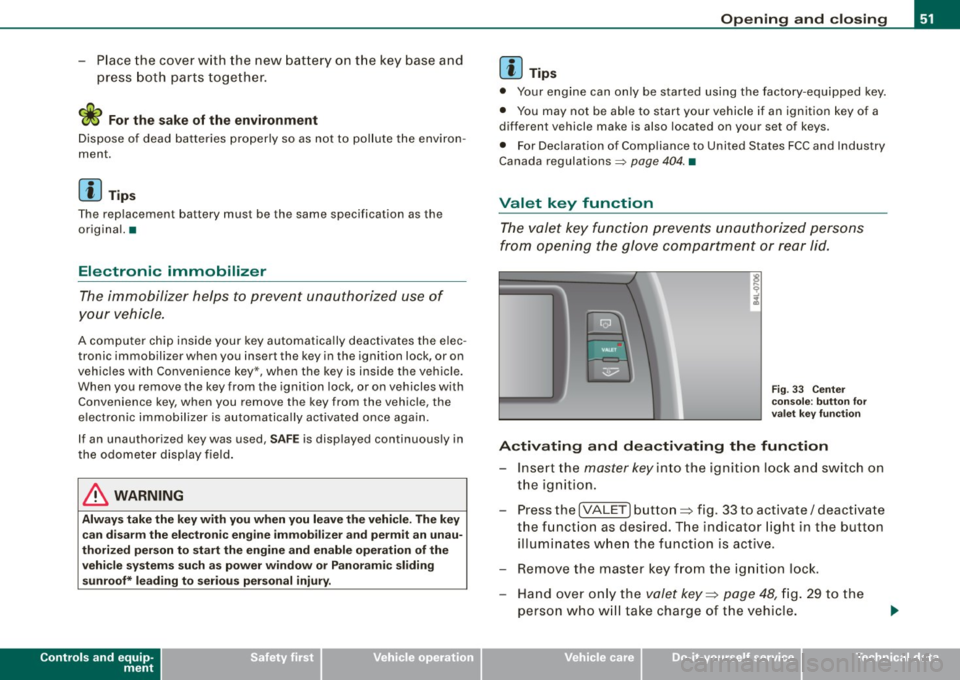
Activating and dea ctivating the fun ction
- Insert the master key in to the ignition lock and switch on
the ignition.
- Press the
[VALE T] button ~ fig. 33 to activate/ deactivate
the funct ion as desired. T he indicator light in the button
illumi nates w hen the function is active.
- Remove the master key f rom the ign ition lock.
- Hand over on ly the
valet key~ page 48, fig. 29 to the
person who w ill tak e charge of the vehicle.
I • •
Page 56 of 426
Opening and closing
- Press button @
two times within tw o secon ds to unlock
all doors and the rear lid .
To lock the vehicl e 6
Press button @ ~ & in "General description" on
page 52.
Watch that all turn signal lights flash once .
To unlock re ar lid only
C:J
- Press button @for approx im ate ly one seco nd.
PANIC Button Pu sh the red b utto n@ to act ivate the panic f unction. The
horn sounds and the turn signals flash .
- Pu sh the button @ again to deactiva te the panic f unc
t ion.
On vehicles wi th Convenience key* , the selector lever must be in the
P position , otherwise the vehicle cannot be locked .
& WARNING
Read and foll ow a ll WARNING S => & in "General de scription " on
page 52.
[ i ] Tips
• In o rder to make sure the locking function is working , you should
a lways keep your eye on the vehicle to make sure it is properly
locked .
• Do not use the remote control if you are inside the car, otherwise
you may unintentionally lock the vehic le, and then you would set off
the anti-theft alarm when you try to start the engine or open a door.
In case this happens anyhow, push the unlock button
0 .
• Use the panic function only if you are in an emergency
situation. •
Operating locks with the key
To lock and unlock the vehicle from the outside, turn the
key in the lock of the driver's door.
To unlock the vehicle
Fi g. 3 5 Key turn s for
o pening and clo sing .
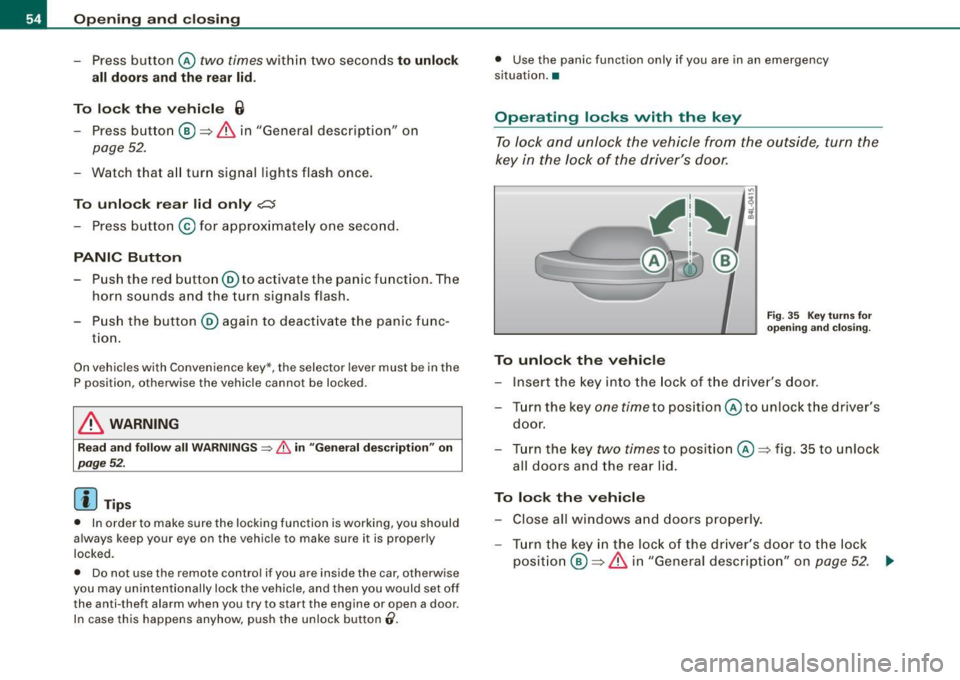
-Ins ert the k ey into the lock of the drive r's door.
- T urn th e key
one time to pos iti on @ to unlock the d river's
do or.
- Tur n the key
two times to positio n @ ~fig . 35 to unlock
all doors and the rea r lid .
To lock the vehicle - Close all windows and doors properly.
- Tur n the key in the l ock of the driver's door t o th e lo ck
p o sit io n @ ~
& in "Gen eral d escri ption" on p age 52. ..,
Page 63 of 426
Child safety lock
Power child safety lock for the rear doors t
The power child safety lock prevents the rear doors from
being opened from the inside.
Fi g. 46 Sectio n fro m
dr ive r's door: co ntrols
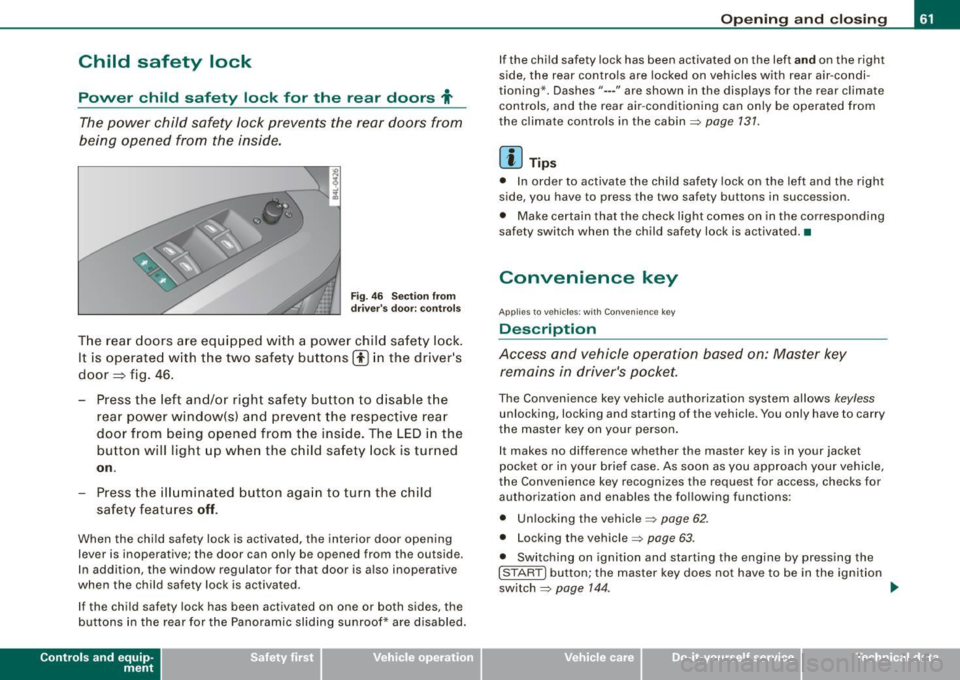
T he rear doors ar e equip ped with a power child safe ty lock .
It is operated with t he two safety buttons(!) in the driver's
door=} fig. 46.
- Press the left and/or right safety button to disable t he
rear p ower window(sl and preve nt the respective rear
door from being opened from t he inside. The LED in the
button will light up when the chi ld safety lock is tur ned
on .
- Press the ill umina ted butt on aga in t o turn the child
safety f eatures
off .
When the chi ld safe ty lock is activated, the interior door opening
lever is inoperative; the door can only be opened from the ou tside .
In addi tion, the window regulator for that door is a lso inoperative
when the child safety lock is activated.
If the child safety lock has been activated on one or both sides, the
buttons in the rear for the Panoramic slid ing sunroof* are disabled.
Con tro ls and eq uip
ment
Op ening and clo sing
If the child safety lock has been activated on the left and on the right
s ide, the rear controls are locked on vehicles with rear air -condi
tioning *. Dashes"--- " are shown in the disp lays for the rear c limate
controls, and the rear air -conditioning can only be operated fro m
the climate controls in the cabin=>
page 131.
[ i ] Tips
• In order to activate the child safety lock on the left and the rig ·h t
side, you have to press the two safety buttons in succession .
• Make certain that the check l ight comes on in the corresponding
safety switch when the child safety lock is activated. •
Convenience key
Applies to veh ic les: wit h Convenie nce key
Description
Access and vehicle operation based on: Master key remains in driver's p ocket.
The Convenience key veh icle authorization system allows keyless
unlocking, locking and starting of the vehicle . You only have to carry
t he master key on your person .
It makes no difference whether the master key is in your jacket
pocket or in you r brief case . As soon as you app roach your vehicle,
the Convenience key recognizes the request for access , checks for
authori zation and enables the following functions :
• Unlocking the vehicle=>
page 62.
• Locking th e vehicle => page 63.
• Switching on ignition and star ting the engine by pressing the
[ S TAR T] button; the master key does not have to be in the ignition
switch =>
page 144 . ~
Vehicle care I I irechnical data
Page 66 of 426
Opening and closing
H ow is th e a nti-th eft alarm s yste m swi tched off ?
The anti -theft alarm sys tem is switched off only whe n you un lock
your vehicle. If you do not open a door within 60 seconds after you have un locked with the remote control , the vehicle will lock itself
again automatically.
When will the anti -th eft alarm syst em be trigg ered ?
When the vehicle is locked, the alarm system monitors and protects
the following parts of the vehic le:
• engine compartment
• luggage compartment
• doors
• ignition
When the system is activated, the alarm will be triggered if one of
the doors, the engine hood or the rear lid are opened, or if the igni
tion is turned on. The anti-theft alarm system will also go off when
the battery is disconnected.
You can also trigger the alarm by pressing the PANIC button on your remote control. This will alert other peop le in case of emergency .
Press the
PANIC button again to turn off the alarm.
How i s the anti-theft ala rm switched off w hen
triggered ?
The alarm system is switched off when you unlock the vehicle or
when the ignition is swi tched on . The alarm w ill a lso switch itself off
when it comes to the end of its cycle.
Emergen cy flasher and h orn
The emergency flasher will blink briefly and the horn sounds when
the doors, engine hood and rear lid are properly closed .
If the emergency flashers do not b link, or the horn does not sound,
check the doors, engine hood and rear lid to make sure they are
properly closed . If you close a door, the hood or the rear lid with the
anti -t heft a larm switched on, the e mergency flashers wi ll blink and
the horn will sound only after you have closed the door or lid .
[ i ] Tips
Fo r the anti-theft a larm system to function proper ly, make sure a ll
vehic le doors and windows are closed before leaving the vehicle. •
Power windows
Controls
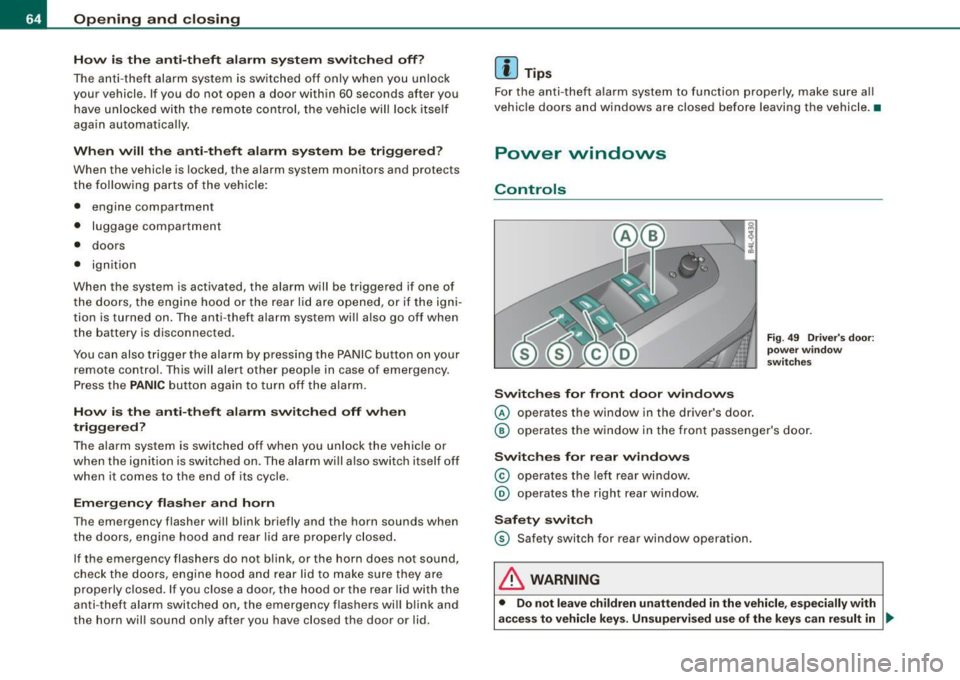
Switch es for fr ont do or wind ows
© operates the window in the driver 's door .
Fig . 4 9 Driv er's do or:
po we r win dow
sw itch es
@ operates the window in the front passe nger's door .
Swit c hes for r ear win dows
© operates the left rear window .
@ operates the righ t rear w indow.
Safet y switch
© Safety switch for rear window operation .
& WARNING
• Do not le ave children un attended i n the vehicle , e speci ally with
ac ces s to vehicle key s. Un sup ervi sed use of the key s ca n re sult in .,_
Page 71 of 426
Closing front roof segment when slid open
-Rotate switch => page 68, fi~ . 52 © to position @ to
close the roof segment=>
&-To move to an interme
diate position, rotate the switch to the corresponding
c lick-stop.
Closing tilted rear roof segment
- Tap the rocker switch => page 68, fig. 52 @ or=> page 68,
fig . 53
© in the front area~ briefly to close the roof
segment completely =>,& .
- To set an intermediate position manually , press the
rocker switch in the front area~
until the roof segment
has reached the desired tilt position:::;,,& .
& WARNING
Improper use of the Panoramic sliding sunroof can cause serious
personal injury.
• Be careful when closing the Panoramic sliding sunroof. Not
paying attention could cause you or others to be trapped and
injured as the Panoramic sliding sunroof closes.
• Always take the key with you when you leave the vehicle to
prevent injuries caused by the Panoramic sliding sunroof closing
• Never leave children or persons requiring assistance alone in
the vehicle, especially when they could access the vehicle keys.
Unsupervised use of the keys can result in the engine being
started or use of vehicle systems such as the power windows, etc.
which could result in serious injury. The doors could be locked
with the remote key, delaying help in an emergency.
• The Panoramic sliding sunroof will continue to operate until the
ignition key has been removed and one of the front doors has been
opened. •
Contro ls and eq uip
ment
Opening and closing
A pp lies to ve hicles: w it h P an oram ic slid in g su nroof
Convenience closing feature
The Panoramic sliding sunroof can be closed from outside
with the key in the driver's door lock.
Insert the key into the driver's door lock.
Turn and hold the key in the lock position ®=> page
54,
fig. 35 until the Panoramic sliding sunroof is completely
closed =>
& in "Closing Panoramic sliding sunroof" on
page 68. The power sun blind is also closed.
& WARNING
• Be careful when closing the Panoramic sliding sunroof. Not
paying attention could cause you or others to be trapped and
injured as the Panoramic sliding sunroof closes. •
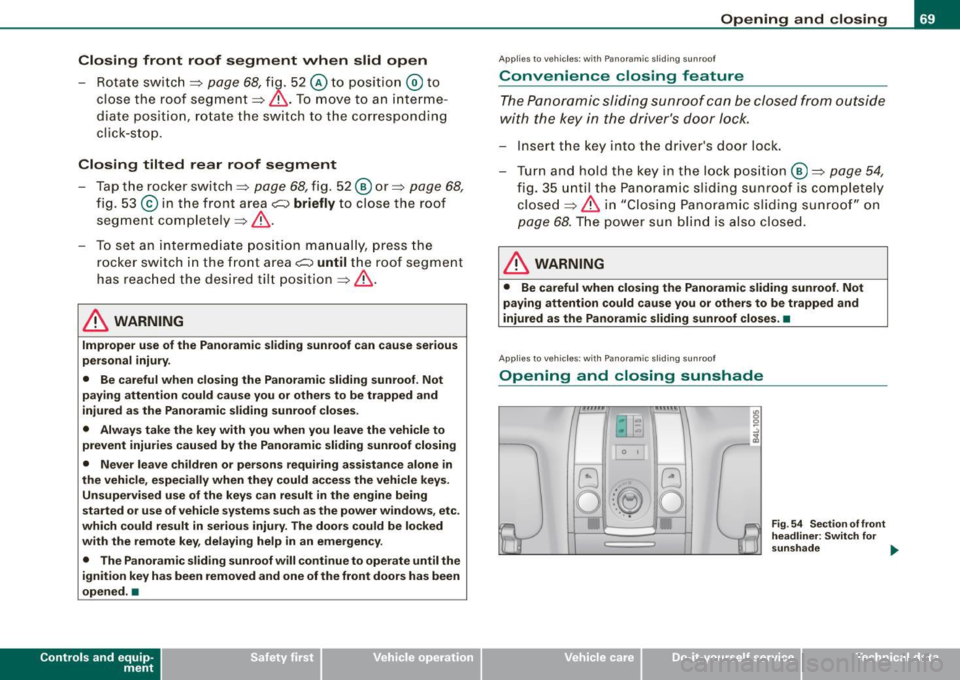
Applies to ve hicles : w it h Pa noram ic slidin g su nroof
Opening and closing sunshade
0 t
Vehicle care I I
Fig . 54 Section of front
headliner: Switch for
sunshade .,.
irechnical data
Page 73 of 426
& WARNING !continued)
• Never leave children or persons requiring assistance alone in
the vehicle, especially when they could access the vehicle keys.
Unsupervised use of the keys can result in the engine being
started or use of vehicle systems such as the power windows, etc.
which could result in serious injury. The doors could be locked
with the remote key, delaying help in an emergency.
• The Panoramic sliding sunroof will continue to operate until the
ignition key has been removed and one of the front doors has been
opened .•
Appl ies to vehicles: with Panoramic sli ding sunroof
Mechanical emergency closing for front roof
segment (Step 1 )
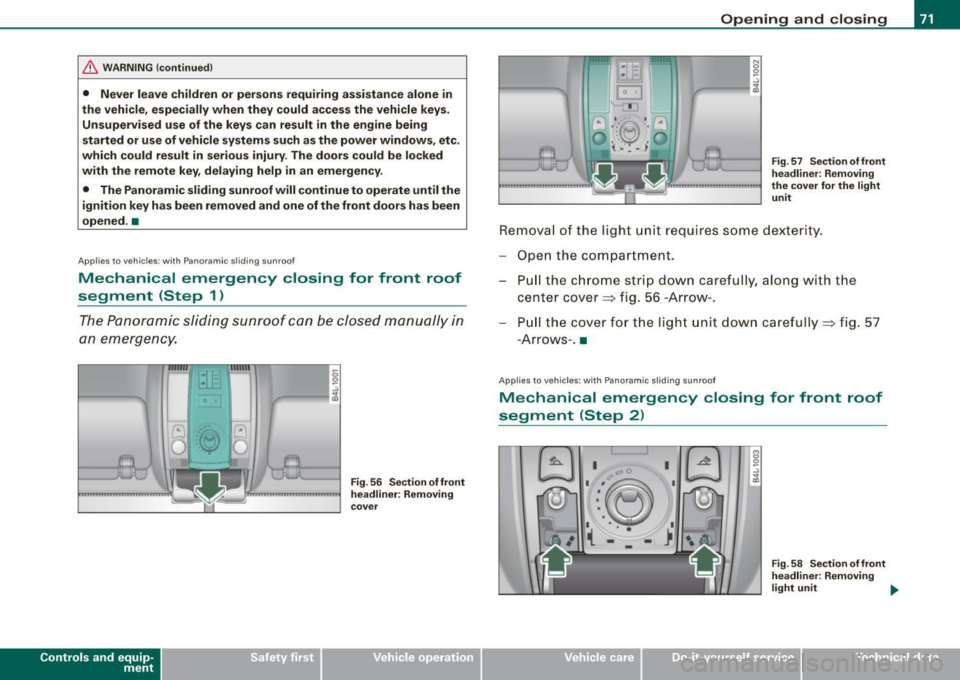
The Panoramic sliding sunroof can be closed manually in
an emergency.
Con tro ls and eq uip
ment
Fig . 56 Sect ion of front
headliner: Removing
cover
Opening and closing
Fig . 57 Section of front
headliner : Removing
the cover for the light unit
Removal of the light unit requires some dexterity.
Open the compartment. Pull the chrome strip down carefully, along with th e
center cover=> fig. 56 -Arrow -.
Pu ll the cover for the lig ht un it down carefully=> fig. 57
-A rro ws- .•
App lies to veh icles: with Panoramic sliding sunroof
Mechanical emergency closing for front roof
segment (Step 2)
a;. I
Vehicle care I I
Fig . 58 Section of front
headliner: Removing
light unit .,,_
irechnical data
Page 75 of 426

Clear vision
Lights
Switching the headlights on and off ·'t!-·
In the "AUTO" position, a light sensor* automatically
switches the head- and taillights on and off in response to
light conditions.
Fig. 60 Instrument
panel : light switch
The light switch must not be overturned past the stops in
either direction.
Switching on automatic headlight control
-Turn the light switch to AUTO=> fig. 60.
Switching on the side marker lights
-Turn the light switch to ~oo:.
Switching on the headlights and high beam
-Turn the light switch to ~D.
- Push the high beam lever forward towards the instru-
ment panel=>
page 77.
Contro ls and eq uip
ment
Switching off the lights
- Turn the light switch to 0. Clear vision
The headlights only work when the
ignition is switched on . While
starting the engine or when switching off the ignition, the head
lights will go off and only the side marker lights will be on.
After starting the engine, the headlights are automatically adjusted* to the load and angle of the vehicle (for example, during
acceleration, braking). This prevents oncoming traffic from experi
encing unnecessary headlight glare from your headlights.
If the system is not operating properly, a warning symbol in the
Auto -Check Control is displayed
=> page 37.
With the side marker lights or headlights switched on, the symbol
next to the light switch illuminates
coo:.
Daytime running lights
• USA models:
On vehicles with xenon lights the daytime running
lights will come on automatically when the ignition is turned on and
the light switch=> fig. 60 is in the
O position or the AUTO position
(only in daylight conditions). The
Daytime running lights function
can be turned on and off in the MMI menu
Exterior lighting
=> page 74. On vehicles with halogen fights, daytime running lights
can be activated by your authorized Audi dealer=>
f.1.
• Canada models: The daytime running lights will come on auto
matically when the ignition is turned on and the light switch
=> fig. 60 is in the O position or the AUTO position (only in daylight
conditions)
=> /.1 .
Automatic headlight control*
In the switch position AUTO the automatic headlight control is
turned on . The low beams and tail lights are turned on automatically
through a light sensor as soon as ambient brightness (e.g . when
driving into a tunnel) falls below a value preset at the factory. When ..,_
Vehicle care I I irechnical data
Page 84 of 426
Clear vision
Wint er p osition
To speed up de -icing of the windshie ld w ipers, they move to the
winter position when the ignition is switched off and at an outside
temperature below 39 °F (4 °C). In this position, the windshie ld
w ipers are in an area on the glass which is reached by the air vents
below the glass . It is a lso easier to remove snow and ice from the
windshield wipers in this position .
The wipers leave the winter position, when the ignition is switched on, if the wi ndshield wiper lever is ope rated or the active rain
sensor* reacts to moisture.
Rain sen sor*
The rain sensor operates only in the interval wiper position. When it
s tarts to rai n, the interval wiper m ode is ac tivated aut omatically.
If the windshield wiper lever is in the interval wipe position with the
igni tion switched off, the rain sensor is not activated unti l vehic le
speed is above 4 mph (6 km/h).
To reduce the sensitivity of the rain sensor, the switch@ must be
moved down . T o in crease the se nsitivity of the rain sens or, the
switch must be moved up .
The higher the sensi tiv ity se tting, the so oner the w indshield wipe rs
react to mo isture on the windsh ield. Increased sensitivity is
signa led by the windshie ld wipers making a single pass over the
windsh ield.
The rain sensor wiper intervals depend on the sensitivity setting as
we ll as veh icle speed . D uring b rie f stops, wiper m otio n will adjust in
relation to the amount of rain on the windshield .
& WARNING
• Wiper blades are cru cial for safe driving! Only when they are in
good condition are they able to clear the window s proper ly to
p rovide un comp romised visibil ity . Worn or damaged wiper blades
are a safety hazard =>
page 84, "In stalling new wiper blades "!
& WARNING (continued )
• The rain sensor* is only designed to assist and support the
driver . It remain s entirely the dr iver' s re spon sibility to monitor
out side weather conditions and to manually activate the wipers as
s oon a s rain or driz zle reduce s vi sibility through the wind sh ield .
0 Note
In freezing o r near freez ing conditions:
• Always check that the wiper blades are not frozen to the glass
before you turn the wipers on. Loosen a wiper blade which is frozen
in place before operating the wipers to prevent damage to the wiper
blade or the wipe r motor.
• Do not use the wipers to clear a frosted window. Using the
wipers as a convenient ice scraper wi ll destroy the wiper blades .
• Before you ta ke you r vehicle to an automatic car was h, ma ke s ure
you have the windshield wiper system switched off (lever in position
0), otherwise the windshield wiper system could get damaged in the
car wash if it should sudden ly come on .
[ i ] Tips
• The rain senso r* is part of the interva l wiping syste m. Turning o ff
the ignition will also deactivate the rain sensor. To reactivate the
s en sor, switch o ff the interval wip ing funct ion, then sw itch it bac k
on again.
• Worn or dirty winds hield wiper b lades cause smearing which
can affect the operation of the rain sensor *. Check the condition of
your windshield wiper blades regularly .
• Make sure the washer fluid reservoir in the engine compartment
is topped o ff be fore go ing on a long trip. Look up=>
page 346 for
check ing and filling the washer container. •