airbag AUDI Q7 2009 Owner´s Manual
[x] Cancel search | Manufacturer: AUDI, Model Year: 2009, Model line: Q7, Model: AUDI Q7 2009Pages: 426, PDF Size: 97.13 MB
Page 5 of 426
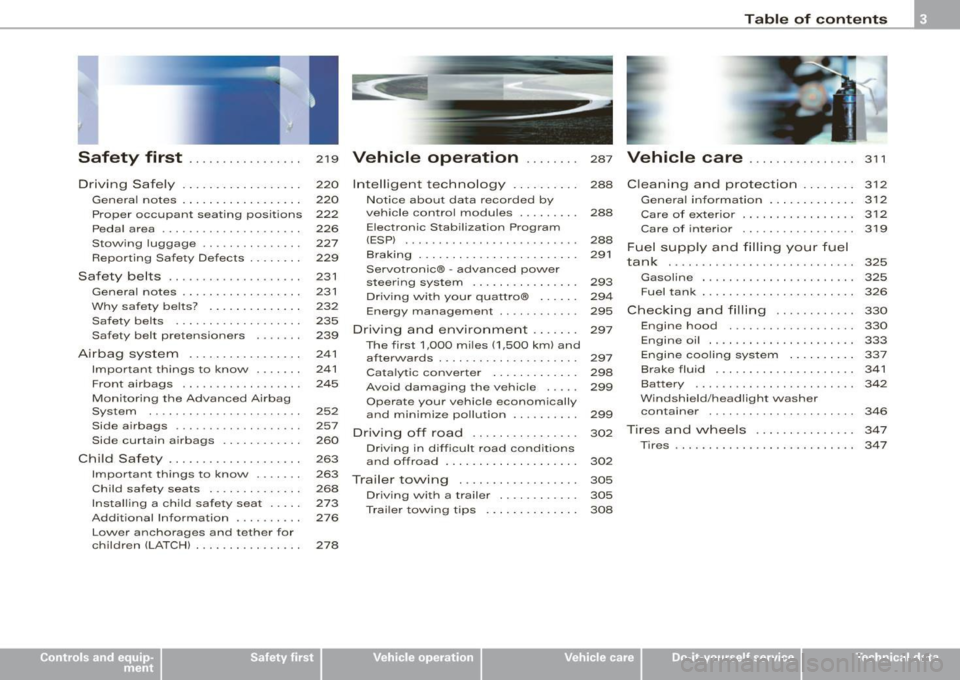
Safety first ........ ... ... .. .
Driving Safely ........... ...... .
Genera l notes . .... ....... ... .. .
Proper occ upant sea ting positions
Peda l area ... ................. .
Sto\Ning luggage . .... .... .... . .
Reporting Sa fety Defects ....... .
Safety belts ................... .
General notes ...... ........... .
W hy safe ty belts? .. ... .. ... ... .
Safety belts ..... ........ ... .. .
Safety belt pretensioners ...... .
Airbag sy stem ..... ...... ..... .
Important t hings to kno\N ...... .
Front airbags . ... ... .......... .
Monitoring the Advanced Airbag
System .... ......... ......... .
Side airbags ......... .... .. ... .
Side curtain a irbags ...... ..... .
Child Safety .............. ..... .
Impo rtant things to kno\N ...... .
Child safety seats . ....... ... .. .
Insta lling a ch ild safe ty seat . ... .
Add it ional Information ......... .
219
220
220
222
226
227
229
231
231
232
235
239
241
241
245
252
257
260
263
263
268
2 73
276
Lo\Ner anchorages and tether for
ch ildren (LA TC H) . . . . . . . . . . . . . . . .
278
Vehicle operation . . . . . . . . 287
Inte lligent technology . . . . . . . . . . 288
Not ice about d ata reco rded by
ve hicle contro l modules . . . . . . . . .
288
Elect ronic S tabilizat ion Program
(ESP) . . . . . . . . . . . . . . . . . . . . . . . . . .
288
B raking . . . . . . . . . . . . . . . . . . . . . . . . 291
Servotronic® -advanced po\Ner
s teer ing syst em . . . . . . . . . . . . . . . .
293
Driv ing \Nit h your quatt ro® . . . . . . 294
Energy management . . . . . . . . . . . . 295
Driving a nd enviro nment . . . . . . . 297
The first 1,000 m iles (1 ,500 km) and
after\Na rds . . . . . . . . . . . . . . . . . . . . .
297
Cata lytic converter . . . . . . . . . . . . . 298
Avo id damaging the vehic le . . . . . 299
Opera te your vehicle economically
and minimize pollution . . . . . . . . . .
299
Dri ving off road . . . . . . . . . . . . . . . . 302
Driving in diffic ult roa d co nd it ions
a nd o ffro ad . . . . . . . . . . . . . . . . . . . .
302
Trailer towing ............. .... .
Driv ing \Nit h a trailer ...... ..... .
T rai le r to\Ning tips .. .... ..... .. .
305
305
308
Table of contents
Vehicle care ....... ... ... ... 311
C leaning and protection ........ 312
Ge ner al in fo rm atio n . . . . . . . . . . . . . 3 12
Care of exterior . . . . . . . . . . . . . . . . . 3 12
Care of inte rior . . . . . . . . . . . . . . . . . 3 19
F u el su pp ly and fillin g your fuel
ta nk . . . . . . . . . . . . . . . . . . . . . . . . . . . . 325
Gaso line . . . . . . . . • . . . . • . . . . . . . . . 325
Fuel tank . . . . . . . . . . . . . . . . . . . . . . . 326
C heck in g and filling . . . . . . . . . . . . 330
Engine hood . . . . . . . . . . . . . . . . . . . 330
Engine oil . . . . . . . . . . . . . . . . . . . . . . 333
Engi ne cooling sys te1 T1 . . . . . . . . . . 33 7
Brake fluid . . . . . . . . . . . . . . . . . . . . . 341
Batt ery . . . . . . . . . . . . . . . . . . . . . . . . 342
W indshield/headlight \Nasher
containe r . . . . . . . . . . . . . . . . . . . . . .
346
T ires a nd w hee ls . . . . . . . . . . . . . . . 34 7
Tires . . . . . . . . . . . . . . . . . . . . . . . . . . . 347
Vehicle care I I irechnical data
Page 13 of 426
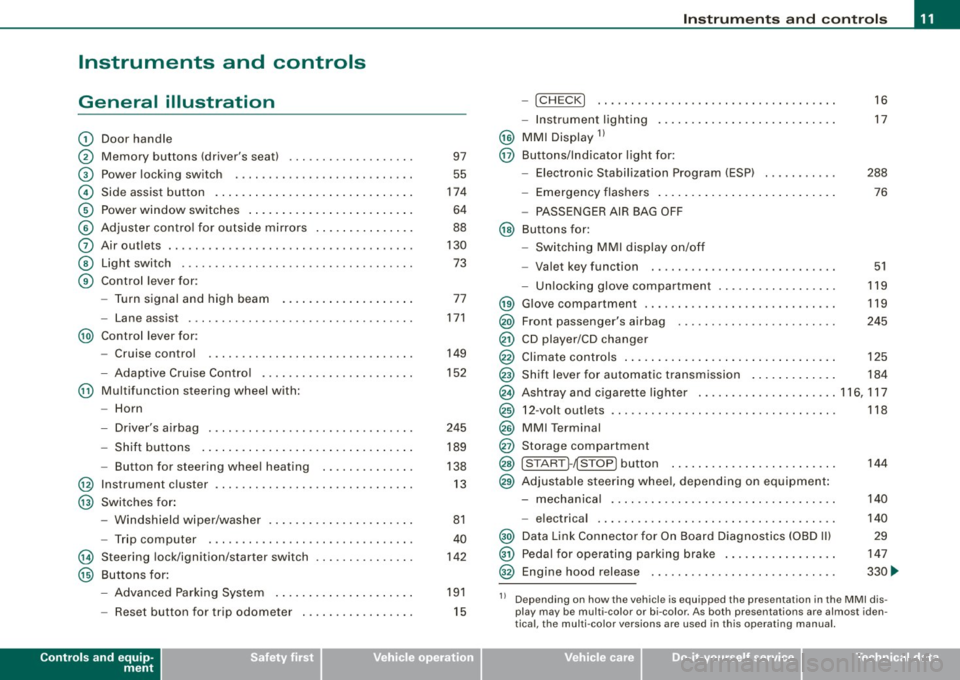
Instruments and controls
General illustration
G)
0
©
©
©
©
0
©
©
Door handle
Memory buttons (driver's seat)
Power locking switch
Side assist button .. ....... .. .... .... .... ... ... .
Power window switches .......... ..... .. .... ... .
Adjuster control for outside mirrors ...... .... .... .
Air outlets .. ...... ..... ........ .... .... .. ..... .
Light switch ...... .. ... ... . .. .. ..... ... .... ... .
Control lever for:
- Turn signal and high beam
- Lane assist ................. ........... ..... .
@) Control lever for:
-Cruise control
- Adaptive Cruise Contro l .... ... ..... .... .... .. .
@ Multifunction steering wheel with:
- Horn
- Driver's airbag .............................. .
- Shift buttons ............. ........ ... .... ... .
- Button for steering wheel heating
@ Instrument cluster ... .... ....... ...... ......... .
@ Switches for :
@
@
-Windshield wiper/washer ... .... .... .... ... ... .
- Trip computer ..... .. .... ......... ... ....... .
Steering lock/ignition /starter switch
Buttons for:
- Advanced Parking System .......... .......... .
- Reset button for trip odometer . .... .... .... ... .
Controls and equip
ment 97
55
174
64
88
130 73
77
171
149
152
245 189
138 13
81
40
142
191
15
Instruments and controls
-!CHECK] .......... ........ ... .... .... ..... . .
- Instrument lighting ......... .... ....... .... .. .
@ MMI Display 11
@ Buttons/Indicator light for:
- Elec tronic Stabilization Program (ESP) .. ..... .. . .
- Emergency flashers ............. ....... ...... .
- PASSENGER AIR BAG OFF
@ Buttons for:
- Switching MMI display on/off
- Valet key function . ........ .... .... .......... .
- Unlocking glove compartment .............. ... . 16
17
288 76
51
119
@ Glove compartment . . . . . . . . . . . . . . . . . . . . . . . . . . . . . 119
@) Front passenger's airbag . . . . . . . . . . . . . . . . . . . . . . . . 245
@ CD player/CD changer
@ Climate controls . . . . . . . . . . . . . . . . . . . . . . . . . . . . . . . . 125
@ Shift lever for automatic transmission . . . . . . . . . . . . . 184
@ Ashtray and cigarette lighter .. .... ............... 116, 117
@ 12-volt outlets . . . . . . . . . . . . . . . . . . . . . . . . . . . . . . . . . . 118
@ MMI Terminal
@ Storage compartment
@ [START ]-~STOP ] button . . . . . . . . . . . . . . . . . . . . . . . . . 144
@ Adjustable steering whee l, depending on equipment :
- mechanical . . . . . . . . . . . . . . . . . . . . . . . . . . . . . . . . . . 140
- electrical . ........ .... ... .. .... .... ...... ... .
@) Data Link Connector for On Board Diagnostics (OBD Ill
@ Pedal for operating parking brake ...... .... ...... .
@ Engine hood release ...... .... .... .... ...... ... . 140
29
147
330 ...
11 Depending on how the vehicle is equipped the presentation in the MMI dis
play may be multi -color or bi-co lor. As both presentations are almost iden
tical , the multi -color versions are used in this operating manual.
I • •
Page 19 of 426

Instrument cluster illumination
The basic brightness of the illumination for the instru
ments, the center console and the display can be
adjusted.
F ig . 6 Inst rume nt
c lu st er ill um inatio n
-Press the"+" button to increase the brightness during the
hours of darkness.
- Press the" -" button to decrease the brightness during the
hou rs of darkness.
A light sensor in the instrument cluster controls the il lumination for
the instrument cluster, the center conso le and the displays. In a
bright environment, using the buttons to change the brightness has
no effect .
[ i J Tip s
The illumination for the instrument cluster lights up whenever you
switch on the ignition with the vehicle headlights off. As the
daylight fades, the instrument cluster illumination likewise dims
automatically and wil l go out complete ly when the outside light is
very low. This feature is meant to remind you to switch on the head
lights when outside l ight conditions become poor. •
Contro ls and eq uip
ment
In st ru m ents a nd w arnin g/indi cator li ght s
Warning /indicator lights
Overview
The warning/indicator lights indicate different functions
or a p ossible malfunction .
Fig. 7 Instru me nt clu ste r wi th warnin g/in dic at or l igh ts
Your vehicle is equipped with severa l important warning and indi
cator lights to he lp you monitor the continued reliable operation of
your vehicle ::::;>& .
AIR
BAG
E lectronic power cont rol ::::;> page 19
Electronic Stabilization Program (ESP) => page 19
U SA model s: => page 19
Airbag system
Vehicle care I I irechnical data
Page 20 of 426
Instruments and warning/indicator lights
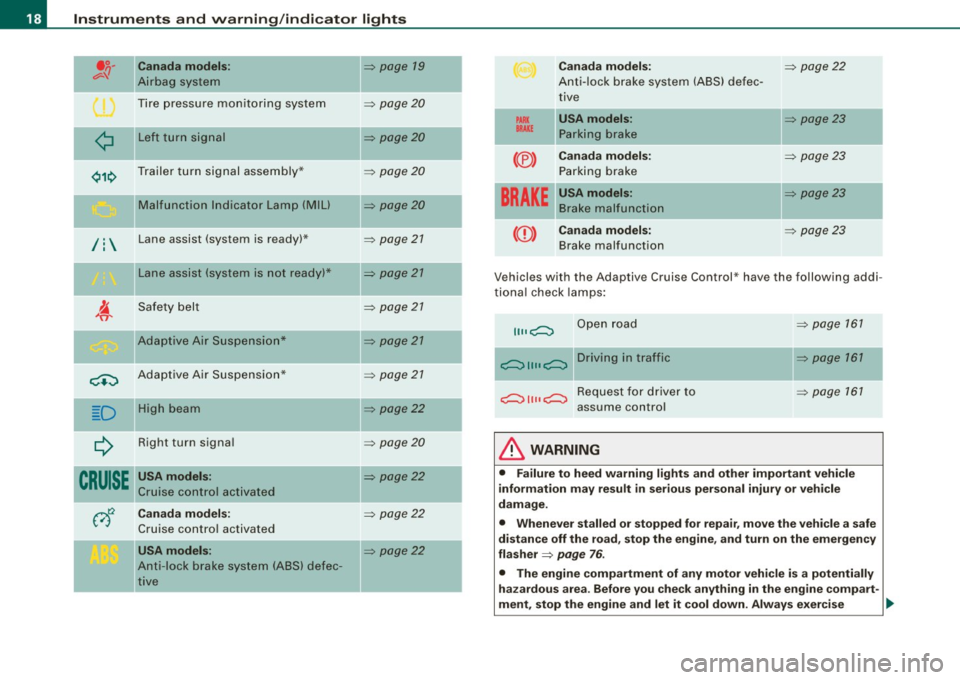
" Canada models:
Airbag system
Tire pressure monitoring system
¢ Left turn signal
Trailer turn signal assembly* Malfunction Indicator Lamp
(Mill
/: Lane assist (system is ready) *
Lane assist (system is not ready)*
Safety belt
Adaptive Air Suspension*
c.::, Adaptive Air Suspension*
-
D II
High beam
Right turn signal
CRUISE " USA models:
Cruise control activated
-Canada models:
Cruise control activated
USA models:
Anti -lock brake system (ABS) defec
tive
=> page 19
=> page20
=> page20
=> page20
=> page 20
=> page 21
=> page 21
=> page 21
=> page 21
=> page 21
=> page22
=> page20
=> page22
=> page 22
=> page22
-
-
-
PARK
BRAKE
(® )
Canada models:
Anti-lock brake system (ABS) defec
tive
USA models: Parking brake
Canada models: Parking brake
----·--USA models: Brake malfunction
BRAKE
((D ) Canada models:
Brake malfunction
=> page 22
=> page23
=> page 23
-=> page23
=> page 23
Vehicles with the Adaptive Cruise Control * have the following addi
tional check lamps:
II II c;::::::::::, Open road
--c;::::::::::, 11 11 c;::::::::::, D r i v i n g i n t raff i c
c;::::::::::, 11 11 c;::::::::::, R e q u e st f o r d r i v e r to
assume control
& WARNING
=> page 161
=> page 161
=> page 161
• Failure to heed warning lights and other important vehicle
information may result in serious personal injury or vehicle
damage.
• Whenever stalled or stopped for repair, move the vehicle a safe
distance off the road, stop the engine, and turn on the emergency
flasher
=> page 76 .
• The engine compartment of any motor vehicle is a potentially
hazardous area. Before you check anything in the engine compart-
ment, stop the engine and let it cool down. Always exercise
~
Page 21 of 426

& WARNING (con tinued)
ext reme caution when worki ng un der th e hood => pa ge 32 4,
"Engin e comp artm ent ".
[ i ) Tips
Many functions are monitored by the Auto -Check system
=>
page 30. Malfunctions or faults wil l be identified either with a red
symbo l (pr ior ity 1 -Danger!) or with a yellow symbol (priority 2 -
Warning). •
Electronic power control r
This warning/indicator light monitors the electr oni c
power control.
The warning/indicator light (E lectronic Power Control) illumi -
nates when you turn on the ignition as a function check .
[ i ) Tips
If this warning/indicator light illumi nates whi le you are driving, then
there is a malfunction in the engine electronics . Have the malfunc
tion corrected as soon as possible by your authorized Audi dealer or
qualified workshop .•
Electronic stabilization program (ESP) ~
This warning/indicator light monitors the electronic stabi
lization program .
The warning/indicator light has the following functions:
• It blinks while you are dr iving when the ESP is working.
• It illuminates when you switch on the ignition for approximately
2 seconds as a function check.
Controls and equip
ment
In st rum ent s a nd w arnin g/indi cato r ligh ts
• It illuminates when there is a malfunction in the ESP .
• It illumina tes when ESP or ASR (Anti -Sl ip Regulat ion) is deact i
vated .
• It illuminates if there is a malfunction in the ABS, since the ESP
is part of the ABS system.
If the battery termina ls were disconnected and re -connected, the
vehicle was jump started or the battery is
very weak, the ESP senso r
system goes through a learn ing process for the first few yards . The
warning/indicator light i lluminates . The warning/indicator light
goes out as soon as the learning process is complete.
If the ESP warning/indicator light i lluminates and stays on after you
have started the engine, this may mean that the control system has
temporarily switched off the ESP. If this is case, you can reactivate
the ESP by turning the ignition off and then on again. The
warning/indicator light should go out to show that the system is
fully functional again.
For more information about the ESP=>
page 288. •
Airbag system
~i (USA models) / !_~-(Canada models)
This warning/indicator light monitors the airbag and the
tensioner systems .
The i (USA models) f! lt (Canada models) warning light i lluminates
for a few seconds each time you switch on the ignition.
I f the
ffl (USA mode ls) l!
then there is a malfunction somewhere in the system. If the light
does not illum inate when you switch on the ignition, this also
means there is a malfunction. ..,_
I • •
Page 22 of 426
Instruments and warning/indicator lights
& WARNING
If you have a malfunct ion in the airbag system, contact your autho
rized Audi dealer immediately. Otherwise the airbag or the belt
tensioner may not work properly in an accident. •
Tire pressure monitoring system -telltale
indicator lamp '-)
The warning/indicator light appears in the event of a
significant loss of air pressure .
The ( warning/indicator light il luminates for a few seconds after
the ignition is turned on as function check and then goes out.
If the symbo l appears, pressure is too low in at least one tire.
When the system detects a malfunction, the warning/indicator light
will flash for approximately one minute and then remain continu ously i lluminated . This sequence wi ll continue upon subsequent
vehic le starts up as long as the malfunction exists. Contact your
authorized Audi dealer and have the malfunction corrected .
For more information
=> page 44. •
Turn signals ¢ Q
The indicator light blinks when you use either turn signal.
Whenever you use the left ¢i or the right¢ turn signal, the ind icator
light blinks. When you use the emergency flashers, both indicator
lights flash .
If one of the turn signal light bulbs burn out, the turn signal will
blink twice as fast as normal.
This does not apply, however, in towing mode . The indicator light
does not flash if a turn signal is out on the trailer or the towing
vehic le. Additional information on the turn signa ls=>
page 77 . •
App lies to vehicles: wi th tow ing h itch
Trailer turn signal assembly ¢ 19
The indicator light also blinks if the turn signal is operated
when towing a trailer.
The indicator light ¢1i> bl inks when the turn signal is used, if a trailer
has been properly connected to the vehicle.
If one of the turn signa l bu lbs on the trailer is burned out or defec
tive, the indicator light will not b link when you use the turn signals.
[ i ] Tips
For vehicles with a factory installed towing hitch or a trailer hitch
that was installed later according to factory specifications, the
trailer turn signa l assembly is actuated. •
Malfunction Indicator Lamp (MIL) :,
The Malfunction Indicator Lamp (MIU is part of the On-Board Diag
nostic (OBD II) system. The symbo l lights up when the ignition is
turned on and will turn off after the engine has started and has
settled at a constant idle speed . This indicates that the MIL is
working properly.
The warning light il luminates when there is a malfunction in the
engine electronic system. Contact your authorized Audi dealer and
have the malfunction corrected.
An improperly closed fuel filler cap may also cause the MIL light to
illuminate
=> page 327.
For more information => page 29. •
Page 55 of 426
Unl ocking and lo cking with Conve nien ce k ey *
On vehicles wh ich are equipped with the Co nven ienc e key* authori
zation system, the doors are unlocked
without a key by means of a
proximity sensor in the door hand le . The doors are simi lar ly locked
without a key using the locking button. Each door has a proximity
sensor and a locking button .
Autom atic lock ing
The automatic locking feature locks all the vehicle doors and the
rear lid when you drive faster than 9 mph (15 km/h). This function
can be tu rned on and off in the
MMI Central lock ing Menu
=>
page 55.
You can unlock the vehicle from the inside by :
• removing the key from the ignition switch (the vehicle will auto
matically unlock itself) or
• pressing the unlock part of the power lock switch@ or
• pul ling the door handle (twice to open the rear doors).
& WARNING
• When you lock your vehi cle from outside , nobody -especially
c hildren -should rem ain in side the vehi cle. Remember , when you
lock the vehicle from the outs ide the windows cannot b e opened
from the in side.
• Wh en you leav e the vehicle , alw ays r emove the ignition key and
t a ke it with you . This will prevent p assengers (children , for
example ) from ac cidentall y being locked in the veh icle sh ould the y
ac cident ally pre ss the power lock ing swit ch in th e front door s.
• Do not le ave child ren inside the vehicle un supervi sed. In an
emergency it would be impo ssible to open the door s from the
out side without the key.
Con tro ls and eq uip
ment
Op ening and clo sing
[ i ] Tip s
• In the event of a crash with airbag deployment all locked doors
wi ll be automatically unlocked to give access to the vehicle occu
pants from the ou tside.
• I f the power locking system should malfunction, you can lock
each door individually using the vehicle key=>
page 57.
• If the power locking system should fail, you can still open the
fue l tank flap in an emergency=>
page 329.
• You are well advised not to keep va luables inside an unattended
vehicle, visible or not . Even a properly locked vehic le cannot provide
t he security of a safe. •
Unlocking and locking the vehicle with the
remote control
How the remote control works.
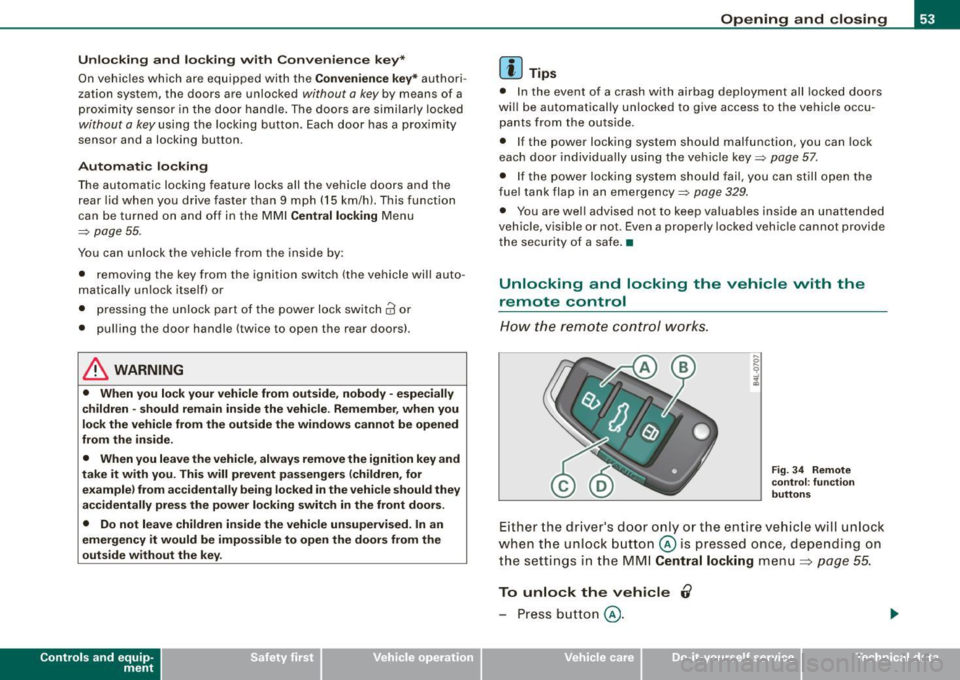
F ig . 3 4 Rem ote
c o ntr ol: fu nc tio n
b utt ons
Either the driver's door only or the entire vehic le will unlock
when the unlock button@ is pressed once, depending on
the settings in the MM I
Central locking menu=> page 55.
To unlock the vehicle 0
- Press button @.
Vehicle care I I irechnical data
Page 58 of 426
Opening and closing
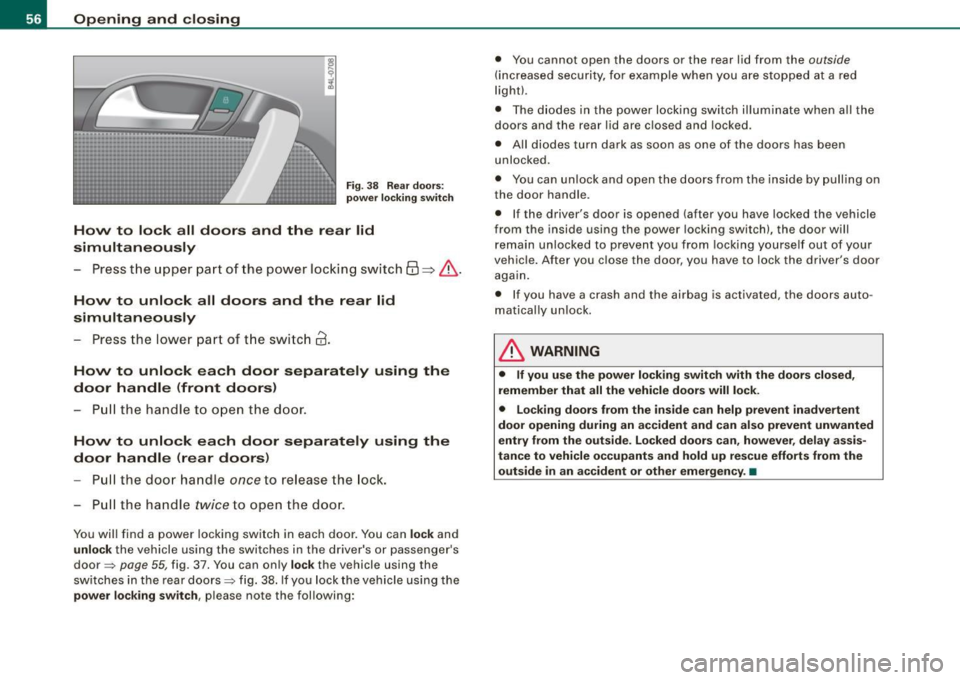
Fig. 3 8 Rear doo rs:
p owe r lo ckin g switch
How to lo ck all doors and the re ar lid
simultaneously
- Press the upper pa rt of the power locking switch@=>&.
How to unlock all doors and the rear lid
simultaneously
-Press the lower part of t he switc h 63.
How to unlock ea ch door separately using the
door handle (front doors )
-Pu ll the handle to open the d oor .
How to unlock ea ch door sep arately using the
door handl e (rear doors )
Pull the door handle once to release the lock.
- Pu ll the handle
twice to open the door.
You wil l find a power locking switch in each door. You can lock and
unlock the vehicle using the switches in the driver's or passenger 's
door ~
page 55, fig. 37. You can on ly lock the vehicle using the
switches in the rear doors~ fig. 38 . If you lock the vehicle using the
power lo cking switch , please note the following: •
You cannot open the doors or the rear lid from the
outside
(increased security, for examp le when you are stopped at a red
l ight).
• The d iodes in the powe r locki ng switch il luminate when all the
doors and the rear lid are c losed and locked .
• All diodes turn dark as soon as one of the doors has been
unlocked.
• You can unlock and open the doors from the inside by pull ing on
the door handle.
• If the driver's door is opened (after you have locked the vehicle
from the inside using the power locking switch), the door will
remain unlocked to prevent you from locking yourse lf out of your
vehic le. After you close the door, you have to lock the driver's door
again.
• I f you have a crash and the airbag is activated, the doors auto
matically un lock.
& WARNING
• If you use the po wer lock ing switch w ith the doors clo sed ,
remember that all the vehicle doors will lo ck .
• Locking doors from the inside c an help prevent in adverte nt
door openin g dur ing an a ccident and can al so prevent unw ant ed
entry from the o uts ide . Locked door s ca n, howev er, del ay ass is
tan ce to vehicle o ccupants and hold up rescue efforts from the
outsid e in an ac cide nt o r other emergen cy. •
Page 78 of 426
Clear vision
[ i J Tips
With the switch in AUTO front fog lights and rear fog lights cannot
be turned on in addition.•
App lies to veh icles: with Adaptive Ligh t
Adaptive Light
When driving around bends, the relevant area of the road
is better illuminated.
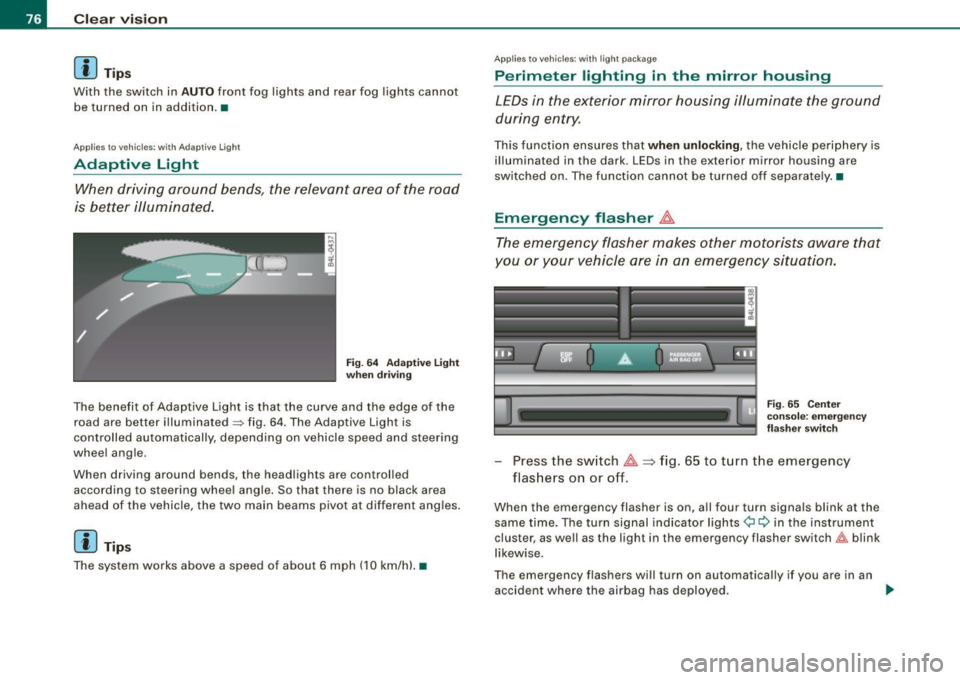
Fig. 64 Adaptive light
when driving
The benefit of Adaptive Light is that the curve and the edge of the
road are better illuminated~ fig. 64. The Adaptive Light is
controlled automatically, depending on vehicle speed and steering
wheel angle.
When driving around bends, the headlights are controlled
according to steering wheel angle. So that there is no black area
ahead of the vehicle, the two main beams pivot at different angles.
[ i J Tip s
The system works above a speed of about 6 mph (10 km/h) .•
Appl ies to vehicles: with light package
Perimeter lighting in the mirror housing
LEDs in the exterior mirror housing illuminate the ground
during entry.
This function ensures that when unlocking, the vehicle periphery is
illuminated in the dark. LEDs in the exterior mirror housing are
switched on. The function cannot be turned off separate ly .•
Emergency flasher J1.
The emergency flasher makes other motorists aware that
you or your vehicle are in an emergency situation.
Fig. 65 Center
console: emergency
flasher switch
-Press the switch J1. => fig. 65 to turn the emergency
flashers on or off.
When the emergency flasher is on, all four turn signals blink at the
same time. The turn signal indicator lights¢ Q in the instrument
cluster, as well as the light in the emergency flasher switch&:, blink
likewise.
The emergency flashers will turn on automatically if you are in an
accident where the airbag has deployed.
~
Page 94 of 426
Seats and storage
Seats and storage
General recommendations
Why is your seat adjustment so important?
The safety belts and the airbag system can only provide
maximum protection if the front seats are correctly
adjusted.
There are various ways of adjusting the front seats to provide safe
and comfortable support for the driver and the front passenger.
Adjust your seat properly so that :
• you can easily and quickly reach all the switches and controls in
the instrument panel
• your body is properly supported thus reducing physical stress
and fatigue
• the safety belts and airbag system can offer maximum protec
tion=>
page 241.
In the following sections , you will see exactly how you can best
adjust your seats.
There are special regulations and instructions for installing a child safety seat on the front passenger's seat. Always follow the informa
tion regarding child safety provided in=>
page 263, "Child Safety".
L1}. WARNING
Incorrect seating position of the driver and all other passengers
can result in serious personal injury.
• Always keep your feet on the floor when the vehicle is in motion
- never put your feet on top of the instrument panel, out of the
window or on top of the seat cushion. This applies especially to
the passengers. If your seating position is incorrect, you increase
the risk of injury in the case of sudden braking or an accident. If
& WARNING (continued)
the airbag inflates and the seating position is incorrect, this could
result in personal injury or even death.
• It is important for both the driver and front passenger to keep
a distance of at least 10 inches (25 cm) between themselves and
the steering wheel and/or instrument panel. If you're sitting any closer than this, the airbag system cannot protect you properly. In
addition, the front seats and head restraints must be adjusted to
your body height so that they can give you maximum protection.
• Always try to keep as much distance as possible between your
self and the steering wheel or instrument panel.
• Do not adjust the driver's or front passenger's seat while the
vehicle is moving. Your seat may move unexpectedly, causing
sudden loss of vehicle control and personal injury.
If you adjust
your seat while the vehicle is moving, you are out of position. •
Driver's seat
The correct seat position is important for safe and relaxed
driving.
We recommend that you adjust the driver's seat in the
following manner:
- Adjust the seat in fore and aft direction so that you can
easily push the pedals to the floor while keeping your
knees slightly bent=>&, in "Why is your seat adjustment
so important?".
Adjust the seatback so that when you sit with your back
against the seatback, you can still grasp the top of the
steering wheel. _..