warning AUDI Q7 2009 Owner´s Manual
[x] Cancel search | Manufacturer: AUDI, Model Year: 2009, Model line: Q7, Model: AUDI Q7 2009Pages: 426, PDF Size: 97.13 MB
Page 76 of 426

Clear vision
ambient brightness increases again, the low beams are turned off
again automatica lly => & .
In the
AUTO pos ition the low beams are switched off automatically
when the ignition is turned off .
L ight S ensor M alfu nction *
In the event of a ligh t sensor mal func tion, the drive r is notified in the
ins trument cluster display :
e. Automatic headlights /autom ati c w ipers defe ctive
For safety reasons the low beams are turned on permanently with
the switch in
AUTO . However , you can continue to turn the lights on
and off using the light switch . Have the light sensor checked as soon
as possible at an authorized Audi dealer or qualified workshop.
& WARNING
• Never use d ayt ime running lights to see where you are going.
The y are no t bright enough and will not let you see far enough
ahead for safety , espe cially at du sk or when it is d ark . Al way s
switch on the low beams at du sk or when it is dark .
• Automati c he adlights* are onl y intended to assist the driver .
They do not relieve the driver of his re sponsibility to check the
headlight s and to turn them on manually a ccording t o th e cur rent
light and visibility condit ion s. For example , fog and ra in cannot be
dete cted by the l ight sen sor s. S o alwa ys sw itch on the headlight s
under th ese weather condition s and wh en driv ing in the dark
t D .
• Cras hes c an happen when y ou cannot see th e road ahead and
when you cannot be seen by other motori sts.
- Alway s turn on the headlights s o that you can see ahead a nd
s o that others can see your c ar from the ba ck.
[ i ] Tips
• With the switch in AUTO front fog lights and rear f og lights
cannot be turned on in addition . • T
he light sensor * for headlight control is located in the rear view
mirror mount . Do no t apply any stickers to the windshie ld in this
area to prevent malfunctions or failures .
• I f you remove the ign itio n from the ign ition lock while the head
lights are still on, a bu zzer will sound as long as the driver's door is
open to remind you to turn off the lig hts.
• Always observe the specific local regulations for your ar ea as to
when to use you r lights .•
Adjusting exterior lighting
The functions are set in the MM/ .
Fig . 61 MM I display :
E x te rior lighting
- Press the [ CAR ] fu nct io n butto n.
- Selec t
Exterior lighting . The menu Exterior lighting
appears=> fig. 61.
C oming h om e*
T he
Com ing home function ensures that after turn ing off the igni
tion and op ening the driver's doo r
the vehicle periphery is il lumi
nated in the dark. In addition , the front fog lights, the tail lights and
the license plate light are turned on . On- time can be set fo r a period
from
O (off) to 60 seconds. .,,_
Page 84 of 426
Clear vision
Wint er p osition
To speed up de -icing of the windshie ld w ipers, they move to the
winter position when the ignition is switched off and at an outside
temperature below 39 °F (4 °C). In this position, the windshie ld
w ipers are in an area on the glass which is reached by the air vents
below the glass . It is a lso easier to remove snow and ice from the
windshield wipers in this position .
The wipers leave the winter position, when the ignition is switched on, if the wi ndshield wiper lever is ope rated or the active rain
sensor* reacts to moisture.
Rain sen sor*
The rain sensor operates only in the interval wiper position. When it
s tarts to rai n, the interval wiper m ode is ac tivated aut omatically.
If the windshield wiper lever is in the interval wipe position with the
igni tion switched off, the rain sensor is not activated unti l vehic le
speed is above 4 mph (6 km/h).
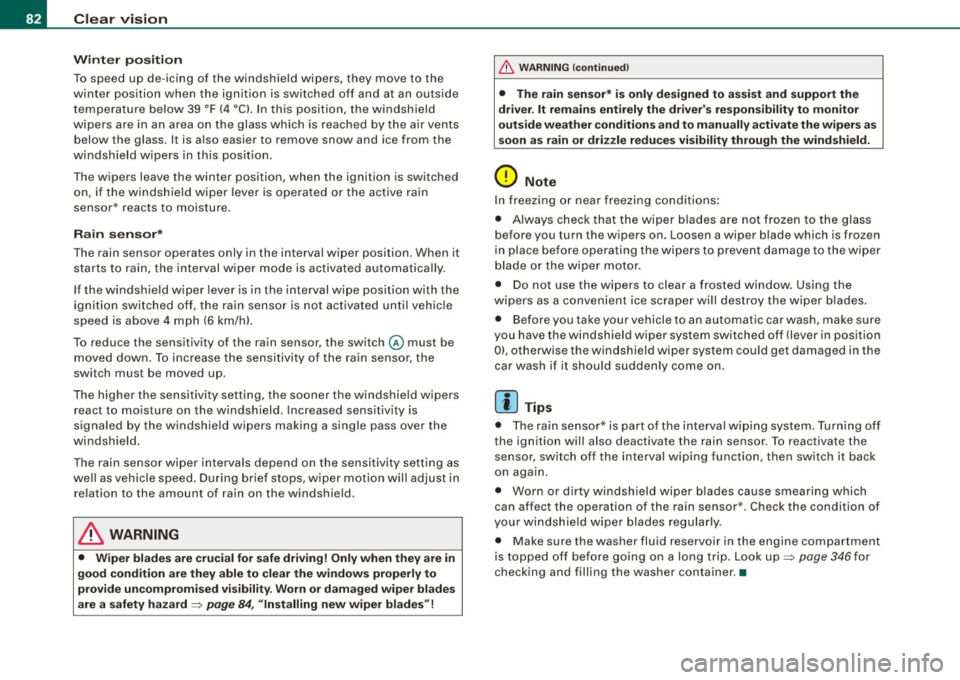
To reduce the sensitivity of the rain sensor, the switch@ must be
moved down . T o in crease the se nsitivity of the rain sens or, the
switch must be moved up .
The higher the sensi tiv ity se tting, the so oner the w indshield wipe rs
react to mo isture on the windsh ield. Increased sensitivity is
signa led by the windshie ld wipers making a single pass over the
windsh ield.
The rain sensor wiper intervals depend on the sensitivity setting as
we ll as veh icle speed . D uring b rie f stops, wiper m otio n will adjust in
relation to the amount of rain on the windshield .
& WARNING
• Wiper blades are cru cial for safe driving! Only when they are in
good condition are they able to clear the window s proper ly to
p rovide un comp romised visibil ity . Worn or damaged wiper blades
are a safety hazard =>
page 84, "In stalling new wiper blades "!
& WARNING (continued )
• The rain sensor* is only designed to assist and support the
driver . It remain s entirely the dr iver' s re spon sibility to monitor
out side weather conditions and to manually activate the wipers as
s oon a s rain or driz zle reduce s vi sibility through the wind sh ield .
0 Note
In freezing o r near freez ing conditions:
• Always check that the wiper blades are not frozen to the glass
before you turn the wipers on. Loosen a wiper blade which is frozen
in place before operating the wipers to prevent damage to the wiper
blade or the wipe r motor.
• Do not use the wipers to clear a frosted window. Using the
wipers as a convenient ice scraper wi ll destroy the wiper blades .
• Before you ta ke you r vehicle to an automatic car was h, ma ke s ure
you have the windshield wiper system switched off (lever in position
0), otherwise the windshield wiper system could get damaged in the
car wash if it should sudden ly come on .
[ i ] Tips
• The rain senso r* is part of the interva l wiping syste m. Turning o ff
the ignition will also deactivate the rain sensor. To reactivate the
s en sor, switch o ff the interval wip ing funct ion, then sw itch it bac k
on again.
• Worn or dirty winds hield wiper b lades cause smearing which
can affect the operation of the rain sensor *. Check the condition of
your windshield wiper blades regularly .
• Make sure the washer fluid reservoir in the engine compartment
is topped o ff be fore go ing on a long trip. Look up=>
page 346 for
check ing and filling the washer container. •
Page 85 of 426

Rear window wiper iitJ
The wiper lever is also used to operate the rear window
wiper and the automatic wiper/washer function.
Fig. 76 Wipe r leve r:
activating the rear
wi ndo w wiper and
washer
The rear window wiper and the automa tic wiper/washer
functions are activated as follows:
Intermittent wiping
- Push the wiper lever forward to the first position ©
=> fig. 76. The rear window wiper will wipe the window
approx. every fou r seconds.
Automatic wiper/washer function
- Push the wiper lever forward to the second stop, position
G), and hold it there for as long as you want the rear
wiper/washer to operate.
- Release the lever again. t he wiper will keep running for
approx . four seconds.
Switching intermittent wiper action off
-Pull the lever all the way back to the original posit ion.
Con tro ls and eq uip
ment
Clear vision
As soon as the reverse gear is engaged and the front wipers are
turned on and operating at the same time, the rear wiper a lso turns
on automatically.
& WARNING
Wiper blades are crucial for safe driving! Only in good condition
are they able to clear the windows properly to provide unre
stricted visibility. Worn or frayed wiper blades are a safety hazard!
~ page 84, "Installing new wiper blades"
0 Note
In freezing or near freezing conditions:
• Always check that the wiper blades are not frozen to the glass
before you turn the wiper on. Loosen a wiper blade which is frozen
in place before operating the wiper to prevent damage to the wiper
blade or the wiper motor.
• Do not use the wiper to clear a frosted window. Using the wipers
as a convenient ice scraper will destroy the wiper blades. •
Applies to vehicles : with headlight washer system
Headlight washer system
The headlight washer system cleans the headlights .
- Operate the winds hield wiper/washer system::::;, page 81,
fig. 75 G) with the headlights turned on by holding t he
lever for longer than one second .
The washer jets extend forward out of the front bumper driven by
water pressure to spray the front headlights with water .
You should inspect the headlights regularly (for examp le when refu
eling) and clean off any solid dirt or insects from the lenses.
To ensure the system works properly in winter, keep the washer jets
free of snow and remove any ice using a de-icing spray.•
Vehicle care I I Technical data
Page 87 of 426
Removing a wiper blade
Fig. 79 Installing
wiper blades
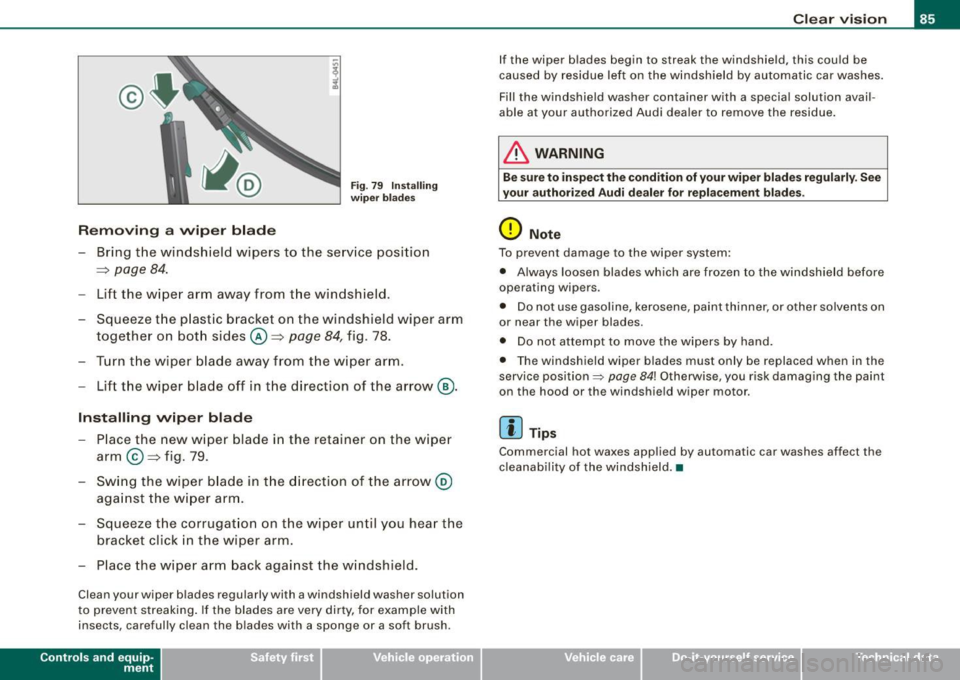
-Bring the windshield wipers to the service position
=> page
84.
- Lift the wiper arm away from the windshield .
- Squeeze the plastic bracket on the windshield wiper arm
together on both sides©=> page
84, fig . 78.
- Turn the wiper blade away from the wiper arm.
- Lift the wiper blade off in the direction of the arrow ®·
Installing wiper blade
- Place the new wiper blade in the retainer on the wiper
arm ©=> fig. 79 .
- Swing the wiper blade in the direction of the arrow @
against the wiper arm.
- Squeeze the corrugation on the wiper until you hear the
bracket click in the wiper arm.
- Place the wiper arm back against the windshield.
Clean your wiper blades regularly with a windshield washer solution
to prevent streaking. If the blades are very dirty, for example with
insects, carefully clean the blades with a sponge or a soft brush .
Contro ls and eq uip
ment
Clear vision
If the wiper blades begin to streak the windshield, this could be
caused by residue left on the windshield by automatic car washes.
Fill the windshield washer con tainer with a special solution avail
able at your authorized Audi dealer to remove the residue.
& WARNING
Be sure to inspect the condition of your wiper blades regularly. See
your authorized Audi dealer for replacement blades .
0 Note
To prevent damage to the wiper system:
• Always loosen blades which are frozen to the windshield before
operating wipers .
• Do not use gasoline, kerosene, paint thinner, or other solvents on
or near the wiper blades .
• Do not attempt to move the wipers by hand.
• The windshield wiper blades must only be replaced when in the
service position~
page 84! Otherwise, you risk damaging the paint
on the hood or the windshield wiper motor.
[ i] Tips
Commercial hot waxes applied by automatic car washes affect the
cleanability of the windshield. •
Vehicle care I I irechnical data
Page 88 of 426
Clear vision
Changing the rear wiper blade
Removing the wiper blade
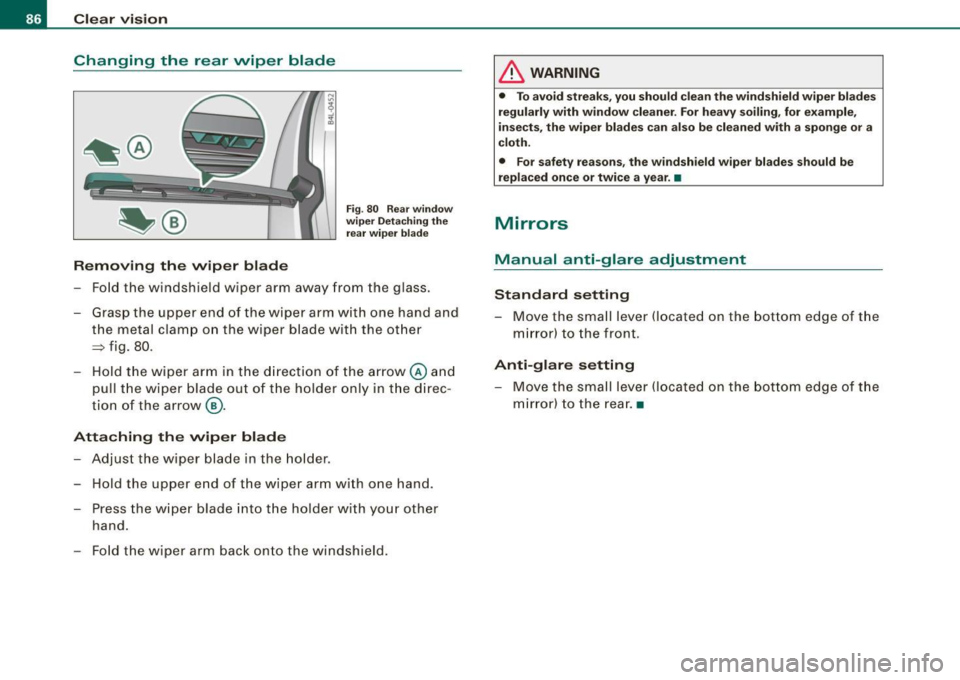
Fig. 80 Rear window
wiper Detaching the
rear wiper blade
-Fold the windshield wiper arm away from the glass.
- Grasp the upper end of the wiper arm with one hand and
the metal clamp on the wiper blade with the other
~ fig. 80.
-Hold the wiper arm in the direction of the arrow @ and
pull the wiper blade out of the holder only in the direc
tion of the arrow @.
Attaching the wiper blade
- Adjust the wiper blade in the holder .
- Hold the upper end of the wiper arm with one hand .
- Press the wiper blade into the holder with your other hand .
- Fold the wiper arm back onto the windshield.
& WARNING
• To avoid streaks, you should clean the windshield wiper blades
regularly with window cleaner. For heavy soiling, for example,
insects, the wiper blades can also be cleaned with a sponge or a
cloth.
• For safety reasons, the windshield wiper blades should be
replaced once or twice a year. •
Mirrors
Manual anti-glare adjustment
Standard setting Move the small lever (located on the bottom edge of the
mirror) to the front.
Anti-glare setting
- Move the small lever (located on the bottom edge of the
mirror) to the rear. •
Page 89 of 426

Applies to vehicles : wit h automat ically di mmi ng in side mirr or
Automatically dimming inside mirror
The automatic dimming function can be turned on and off
if required.
Disabling auto dimming
Fi g. 8 1 In side r ear
v iew mirror
- Press butto n @ ~ fig. 8 1 briefly, -th e gree n indicator
light @ goes out .
A ctivating /re activ ating auto dimming
- Press button@
briefly, -the green indicato r light @
goes on.
Automa tic dimming func tio n
The automatic dimming function is activated every time the ignition
is turned on . The green indicator light is lit to indicate auto dimming
is active.
When dim ming is activated, the inside m irror will darken
automati
cally
in response to the amount of light striking the mirror (such as
headlights from rearwa rd approaching vehicles). Even in dimm ing
mode, the mirror surface turns bright when :
• the interior light is switched on
• reverse gear is engaged .
Controls and equip
ment
Cl ea r vision
& WARNING
The glas s of the in side re ar vie w mirror i s layered and cont ain s an
electrolyte to a chieve it s properties. Be aware of liquid electrolyte
leaking from a bro ken mirror gl ass. Thi s liquid can cause irrit ation
to skin , eyes , and re spir atory sy ste m . If you get el ectrolyte in your
e ye s or on your skin , immed iatel y rinse w ith plenty of w ater.
If irri
t a tion per sists, s eek medical attention .
0 Note
Liquid electrolyte leaked from a broken mirror glass wil l damage any
p lastic surfaces it comes in contact with . C lean up sp illed e lectrolyte
immediately with clear water and a sponge .
[ i ] Tip s
• If you sw it c h off the automati c di m mi ng function on the in side
mirror , autom atic dimming of the out side mirrors* will likewise be
dis abled .
• Check to make sure there are no objects preven ting light from
reaching the inside mirror.
• Do not attach any stickers to the windshie ld in front of the light
sensor*, as this would interfere with the automatic operation of the
headlig hts and the automatic d imming of the inside mirror.
• Be aware that automatic dimming of the inside mirror can only
operate properly if the rear window sun b lind* is retracted. •
I • •
Page 91 of 426

farther away than when seen in a flat mirror. If you use this mirror to
estimate distances of fol lowing ve hicles when chang ing lanes, you
cou ld estimate incorrect ly and cause an accident .
• I f the mirro r housing is moved uninten tio nal ly ( for example,
while parking your vehicle), then you must first fo ld the mirror elec
tr ically. D o not readj ust the mirro r ho us ing manua lly . You could
damage the motor which contro ls the mirror .
• I f you take the veh ic le to an automatic car wash, y ou mus t fold
the exterior mirrors flat to prevent damaging them . Power folding
ex terior mirr ors* must no t be folded in or out by hand . Use the
power function!
[ i ] Tips
If there shou ld be a malfunction in the electrica l system, you can
sti ll adj ust the outside mi rrors by pressing the edge of the mirro r.•
Appl ie s to v ehicl es: with au tomat ic d imm ing for outs id e m irro rs
Automatic dimming for outside mirrors
The outside mirrors are dimmed together with the automatic
dimming o f the inside mir ror . When the ignition is switched on, the
mirrors dar ken au tomat ical ly dependin g on the light strik ing them
(e .g. head lights from the rear).
When t he in ter ior lig hting is switched on and when reverse gear is
engaged, the m irrors are switched back to the ir original brightness
(n ot di mmed).
& WARNING
The glass of the inside rear view mirror is layered and contain s an
ele ctrolyte to a chieve its propert ies . Be aware of liquid ele ctrolyte
leaking from a broken mirror gla ss. This liquid can cau se irritation
to skin , eyes , and re spiratory system . If you get elect rolyte in your
Controls and equip
ment
Cl ea r vision
& WARNING (continued )
eyes or on your s kin , immed iately rinse with plenty of water . If irri
tation per sists , seek medical attent ion .
0 Note
Electrolyte leak ing fro m a broken mirror g lass attacks the vehic le
paint and plastic surfaces . C lean up spilled electro lyte immediately
with c lear water and a sponge .
[ i ] Tips
• If automatic dimming for the inside mirror i s swit ched off, the
o uts ide mirror s are also not dimmed automatically .
• Automatic di mming for the mirr or only opera tes prop erly if the
sunshade * for the rear window is retracted, or the light striking the
inside mirror is not h inde red by o ther o bjec ts. •
Digital compass
Ap plies t o vehicles : with d ig ita l com pass
Activating or deactivating the compass
The direction is displayed on the interior rear vie w mirror.
I • •
Fig . 8 3 Inside re ar
view mirror : digital
co mp ass ac tivat ed
Page 93 of 426

Applies to vehicles: with digita l compass
Calibrating the compass
The compass has to be recalibrated if the display is wrong
or inaccurate.
- Hold the @button down until the letter C is displayed on
the interior rear view mirror.
- Dr ive in a circle at a speed of about 5 mph (10 km/h) until
a direction is shown on the interior rear view mirror.
& WARNING
The digital compass is to be used as a directional aid only. Even
though you may want to look at it while you are driving, you must
still pay attention to traffic, road and weather conditions as well
as other possible hazards. •
Controls and equip
ment
Clear vision
I • •
Page 94 of 426
Seats and storage
Seats and storage
General recommendations
Why is your seat adjustment so important?
The safety belts and the airbag system can only provide
maximum protection if the front seats are correctly
adjusted.
There are various ways of adjusting the front seats to provide safe
and comfortable support for the driver and the front passenger.
Adjust your seat properly so that :
• you can easily and quickly reach all the switches and controls in
the instrument panel
• your body is properly supported thus reducing physical stress
and fatigue
• the safety belts and airbag system can offer maximum protec
tion=>
page 241.
In the following sections , you will see exactly how you can best
adjust your seats.
There are special regulations and instructions for installing a child safety seat on the front passenger's seat. Always follow the informa
tion regarding child safety provided in=>
page 263, "Child Safety".
L1}. WARNING
Incorrect seating position of the driver and all other passengers
can result in serious personal injury.
• Always keep your feet on the floor when the vehicle is in motion
- never put your feet on top of the instrument panel, out of the
window or on top of the seat cushion. This applies especially to
the passengers. If your seating position is incorrect, you increase
the risk of injury in the case of sudden braking or an accident. If
& WARNING (continued)
the airbag inflates and the seating position is incorrect, this could
result in personal injury or even death.
• It is important for both the driver and front passenger to keep
a distance of at least 10 inches (25 cm) between themselves and
the steering wheel and/or instrument panel. If you're sitting any closer than this, the airbag system cannot protect you properly. In
addition, the front seats and head restraints must be adjusted to
your body height so that they can give you maximum protection.
• Always try to keep as much distance as possible between your
self and the steering wheel or instrument panel.
• Do not adjust the driver's or front passenger's seat while the
vehicle is moving. Your seat may move unexpectedly, causing
sudden loss of vehicle control and personal injury.
If you adjust
your seat while the vehicle is moving, you are out of position. •
Driver's seat
The correct seat position is important for safe and relaxed
driving.
We recommend that you adjust the driver's seat in the
following manner:
- Adjust the seat in fore and aft direction so that you can
easily push the pedals to the floor while keeping your
knees slightly bent=>&, in "Why is your seat adjustment
so important?".
Adjust the seatback so that when you sit with your back
against the seatback, you can still grasp the top of the
steering wheel. _..
Page 95 of 426
-Position the head restraint according to the occupant's
height==>
page 701. For maximum protection, the top of
the head restraint should be at least at eye level, prefer
ably higher and ideally level with the top of the head
==> page 225, fig. 237.
& WARNING
Never place any objects in the driver's footwell. An object could
get into the pedal area and interfere with pedal function . In case
of sudden braking or an accident, you would not be able to brake
or accelerate. •
Front passenger's seat
Always move the front passenger seat into the rearmost
position.
To avoid contact with the airbag while it is deploying, do not
sit any closer to the instrument panel than necessary and
always wear the three-point safety belt provided adjusted
correctly. We recommend that you adjust the passenger's
seat in the following manner:
- Move the front passenger seat into the rearmost position
of the fore and aft adjustment range==>
& in "Why is
your seat adjustment so important?" on
page 92.
-Bring the backrest up to an (almost) upright position. Do
not ride with the seat reclined.
- The ideal posit io n for the head restraint is with the upper
edge of the restraint level with the top of your head
==> page 101. You should not lower the top of the restraint
below the level of your eyes.
Controls and equip
ment
Seats and storage
- Place your feet on the floor in front of the passenger's
seat. •
Power seat
Controls
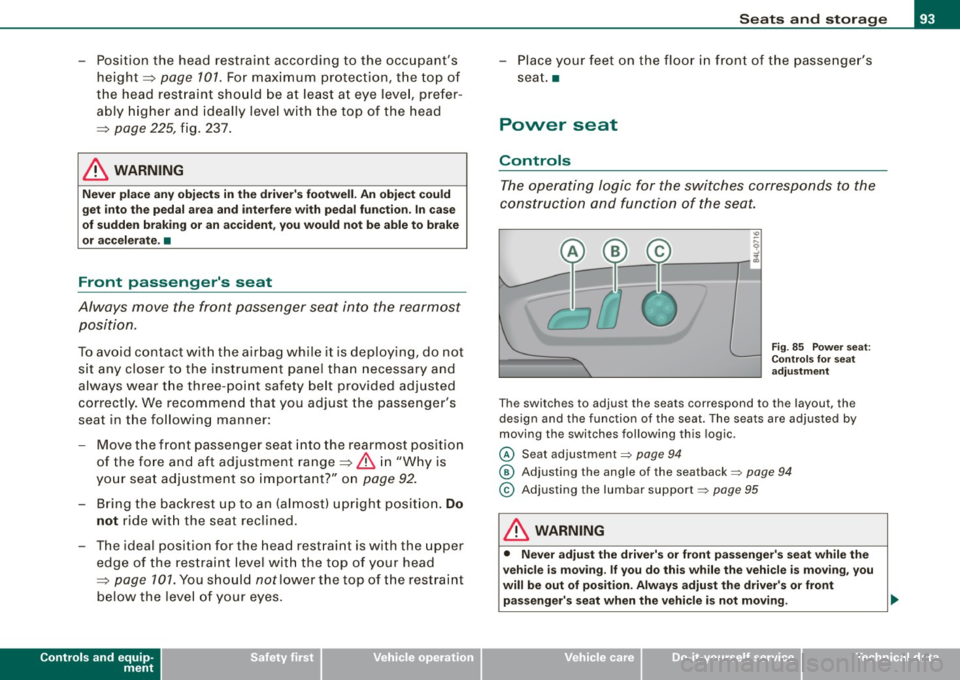
The operating logic for the switches corresponds to the
construction and function of the seat.
Fig. 85 Power seat:
Controls for seat
adjustment
Th e switches to adjust the seats correspond to the layout, the
design and the function of the seat. The seats are adjusted by
moving the switches following this logic.
@ Seat adjustment=> page 94
@ Adjusting the angle of the seatback => page 94
© Adjusting the lumbar support=> page 95
& WARNING
• Never adjust the driver's or front passenger's seat while the
vehicle is moving. If you do this while the vehicle is moving, you
will be out of position . Always adjust the driver's or front
passenger's seat when the vehicle is not moving. .,,
I • •