warning light AUDI Q7 2009 Owner´s Manual
[x] Cancel search | Manufacturer: AUDI, Model Year: 2009, Model line: Q7, Model: AUDI Q7 2009Pages: 426, PDF Size: 97.13 MB
Page 163 of 426

_____________________________________________ A_ d_a ...: p_ t_ i_ v _e_ C_ ru_ is_ e_ C_ o_n _ t_ r_o _ l _ __._
Certain pieces of information in the bottom part of the display are
not shown permanent ly . Informa tion is displayed on ly if you set or
change the speed set ting, change the time interval , when messages
are displayed or if the Adaptive C ruise Co ntrol is turned off for safety
reasons. •
Applies to vehicles: with Ada ptive C rui se Cont rol
Display in the speedometer
Desired speed
Fig. 16 8 Displa y in th e
s p ee do mete r
The desired speed set by the driver is displayed by a red LED .
If the desired speed was set between two lines on the speedomete r
using the
[SET I button, the two closest light emitting diodes will
come on
=> fig . 168.
T he system allows on ly speeds to be set between 20 to 95 mph (30
to 150 km/h) to be set . This speed range is faintly illuminated in the
speedometer (LED l ights).
Indi cator light s (sy mbols )
• ""c:::::> Open road : The indicator light ""c:::::> shows that ACC is active
and that no moving vehic le has been detected with in range of the
radar sensor up ahead in your lane of trave l. The set speed is main
tained.
Con tro ls and eq uip
ment
• c:::::>1n ,c:::::> Dri ving in traffi c: The indicator light c:::::>11, ,c::::, shows that a
ve hicle moving in your lane of travel has been detec ted up front in
your lane of travel. Your speed is adjusted according to the speed of
t he vehicle up front . ACC accelerates and brakes automa tically
within the system's capabilities.
• c:::::>11 "c:::::> Driver intervention prompt : The red flash ing warning
light
~11 .. .::::::, means Reque st for driver to a ssume control . You as the
driver mus t slow the vehic le with the foot b rake . The symbol
.::::::,11 .. c:::::>
tells you that the Adaptive Cruise Con trol is not able to s low the
vehic le down enough to keep a enough distance to the vehic le in
front of you. A warn ing tone wi ll also sound when the symbo l
appears . For more information about the driver intervention prompt
=> page 764.
& WARNING
Improper u se of the Adap tive Cr uise Contr ol features and inat ten
tion can lead to a crash and serious person al injury .
• Never allow t he clo sing speed between you and other vehi cle s
to be so high that the Adapt ive Cruise Control may not be able to
s lo w your vehi cle safely .
If clos ing speed is too h igh , you must
apply the brakes your self to reduce the risk of a rear-end crash .
• Alway s s ele ct a greater follo wing di stance to the veh icle up
ahead on wet ro ads than on dry road s.
• Always re ad and heed the information and WARNINGS=>
& in
" Description " on
pag e 152.
[ i ] Tips
• I f you use the accelerator to go faster than the speed of the
vehicle ahead of you, the driver intervention p rompt wil l not be
accompanied by a wa rning tone .
• I f the speed you previously set is exceeded, the indicator light in
the speedometer wi ll swi tch off .•
Vehicle care I I Technical data
Page 166 of 426
• ..__A_ d_a...: p:,..._ ti_v _ e_ C_ ru_ is_ e_ C_ o_n_ t_ r_ o _ l ___________________________________________ _
tained. The ACC system is not switched off, and increased attention
to the traffic situation is absolutely necessary. The following may be
reasons why the message
ACC functionality limited appears:
• The ACC sensor is dirty . The ACC system is not reacting, or is not
reacting correctly, to moving vehicles up ahead in your lane of
travel.
• There may be very light traffic on and there is nothing that marks
the side of the road (for example, guard rails, traffic signs, trees). As
soon as a moving vehicle up ahead is detected again, ACC becomes
active again and the message disappears .
The ACC sensor is located behind the area to the right of the front
license pla te . If the ACC sensor is dirty or blocked, clean the area to
restore system operation.
Parking brake !
The text message Parking brake ! appears, when the parking brake
is applied. ACC is turned off. A warning tone sounds as a reminder.
Stationary object ahead
The text messag e Stationary object ahead appears, when you want
to activate the system and there is a stationary vehicle or an object
immediately in front of you.
Gradient too steep
The text message Gradient too steep appears when the maximum
gradient for proper ACC operation has been exceeded. Adaptive
Cruise Control is turned off. A warning tone also sounds as a
reminder.
ACC off: manual control!
The text message ACC off: manual control! appears after the vehicle
has been brought to a standstill by the Adaptive Cruise Control. In
this case you must depress the brake pedal to prevent the vehicle
from rolling. A warning tone sounds as a reminder .
Selector lever position!
The text message Selector lever position! appears when the
selector lever is moved to position
N. In this position, Adaptive
Cruise Control is not available. •
Applies to vehi cles : wi th Ad aptive Cr uise Co ntro l
Driver intervention prompt
The driver intervention prompt calls on the driver to take
over the situation.
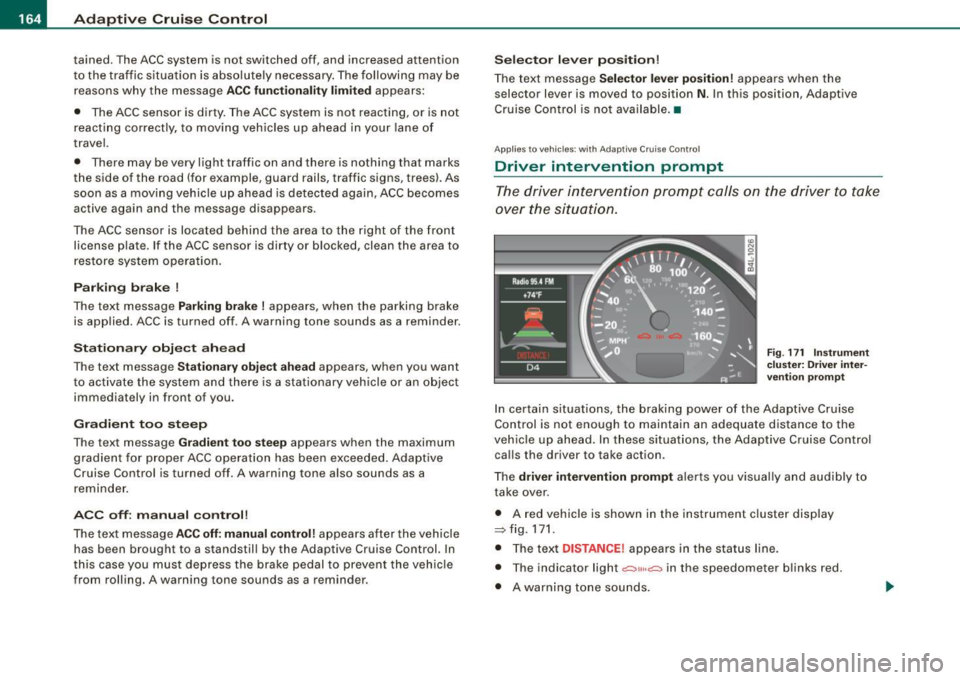
Fig. 171 Instrument
cluster: Driver inter
vention prompt
In certain situations , the braking power of the Adaptive Cruise
Control is not enough to maintain an adequate distance to the
vehicle up ahead. In these situations, the Adaptive Cruise Control
calls the driver to take action .
The
driver intervention prompt alerts you visually and audibly to
take over .
• A red vehicle is shown in the instrument cluster display
::::::,fig.171.
• The text DISTANCE! appears in the status line .
• The indicator light
.:=:,1,, ,.:=:> in the speedometer blinks red.
• A warning tone sounds.
Page 167 of 426
![AUDI Q7 2009 Owner´s Manual _____________________________________________ A_ d_a ...: pc.. t _i_ v _e_ C_ ru_ is_ e_ C_ o_n_ t_ r_ o _ l __ lllll
[ i ] Tip s
• Adaptive Cruise Contro l is switched off after pressing t](/img/6/40274/w960_40274-166.png "AUDI Q7 2009 Owner´s Manual _____________________________________________ A_ d_a ...: pc.. t _i_ v _e_ C_ ru_ is_ e_ C_ o_n_ t_ r_ o _ l __ lllll
[ i ] Tip s
• Adaptive Cruise Contro l is switched off after pressing t")
_____________________________________________ A_ d_a ...: pc.. t _i_ v _e_ C_ ru_ is_ e_ C_ o_n_ t_ r_ o _ l __ lllll
[ i ] Tip s
• Adaptive Cruise Contro l is switched off after pressing the foot
brake . The speed saved up this point can be resumed.
• To resume the saved speed, release the brake pedal and press
the control lever=>
page 157, "Turning Adaptive Cruise Control off
temporarily".
• If you use the accelerator to go faster than the speed of the
vehicle ahead of you , the
dr iver i nterve ntion pr ompt will not be
accompanied by a warning signal.
• If the speed you previously set is exceeded , the indica tor light in
the speedometer wi ll switch off. •
Applies to v ehi cles: with Ad aptive Crui se Co nt rol
MMI settings
Individual settings for Adaptive Cruise Control can be
selected in the MM/ .
Fig. 172 M MI Display:
A dapti ve C ruise
Co ntrol
Settings for the driving program can be adjusted indiv idu
ally to the particular user and saved in the MMI. This can
only be done with the eng ine running.
- Press the
I CAR] funct ion button.
Controls and equip
ment
Select Sy stem s* in the CAR menu.
- Select
Adaptive Crui se Control . The Adaptive C ruise
Control
menu appears.
Select
driving program .
Select the desired driv ing program .
Sett in g t he d riving p rogram
In the driving progr am menu you can adjust the characteristics of
Adaptive Cruise Contro l to your own preferences using
d yn ami c,
s ta nd ard
or comfort .
Sav ing sett ing s
Your individua l settings are automatical ly saved and assigned to the
remote control key being used (remote key storage). If the key is
given to another person, the saved settings remain as they are. •
System limitations
Applies to veh ic les : w ith Ada ptiv e Crui se Cont ro l
General information
The radar sensor has limits that the driver must know to
be able to use ACC properly.
The Adaptive Cruise Control works within limits that ar e also related
to radar sensor range and sight distance . In some situations ACC
may react unusually or late from the driver's point of view . There
fore, always be attentive to what is happening around you and always be ready to intervene, if necessary :
• when driving around curves=>
page 166
• when vehicles up front are not in line with your vehicle
=>
page 166
• when other vehic le s are changing lanes=> page 167
I • •
Page 173 of 426
Audi lane ass is t -
-------------------------
Audi lane assist
Lane assist
Applies to veh icles : with lane assist
Description
Lane a ssist helps you keep y our vehicle in your lane .
Lane assist uses a camera to detect lane boundary lines. If the
system detects that your vehicle is about to leave a lane boundary
line, the steering wheel
vibrates to alert the driver. If lane assist
detects boundary lines on both sides of the vehicle's lane, the
system enters active standby mode, which is indicated by the green
indica tor light /: on the instrument cluster .
I f the system is in active standby mode and the turn signal is acti
vated before driving ov er the boundary line, the warning does not
occur since the sys tem allows for intenti onal lane changes.
The system is designed for driving on freeways and expanded high
ways and t hus works on ly at speeds of 40 mph (65 km/h) or mo re .
& WARNING
• Lane ass ist will not k eep your vehicle in your lane. The sy stem
only warns the d riv er w hen t he vehicle i s le av ing the lan e. The
driv er is alway s re spon sible for keeping the vehicle in the lane.
• The camera is not able to d ete ct all lane boundary lines and in
s o me cases might al so dete ct lane str ucture s or objects as
boundary lines . This c an le ad to in corre ct wa rning s or warnings
that fa il to go off at all .
• The camer a's visibili ty ca n be i mpaired by vehi cle s ahe ad of
you , for instan ce, or by rain , snow , h eavy spray or li ght shining into
th e cam era lens . Thi s can ca use lane as sis t to f ail to d ete ct
boundary line s. •
Con tro ls and eq uip
ment
Ap plies to vehi cles : wi th la ne assi st
Activating and deactivating
Fig . 1 82 Turn signal
l ev er: La ne assis t
butt on
F ig . 1 83 Win dshie ld:
L ane assist ca mera
v iewing win dow
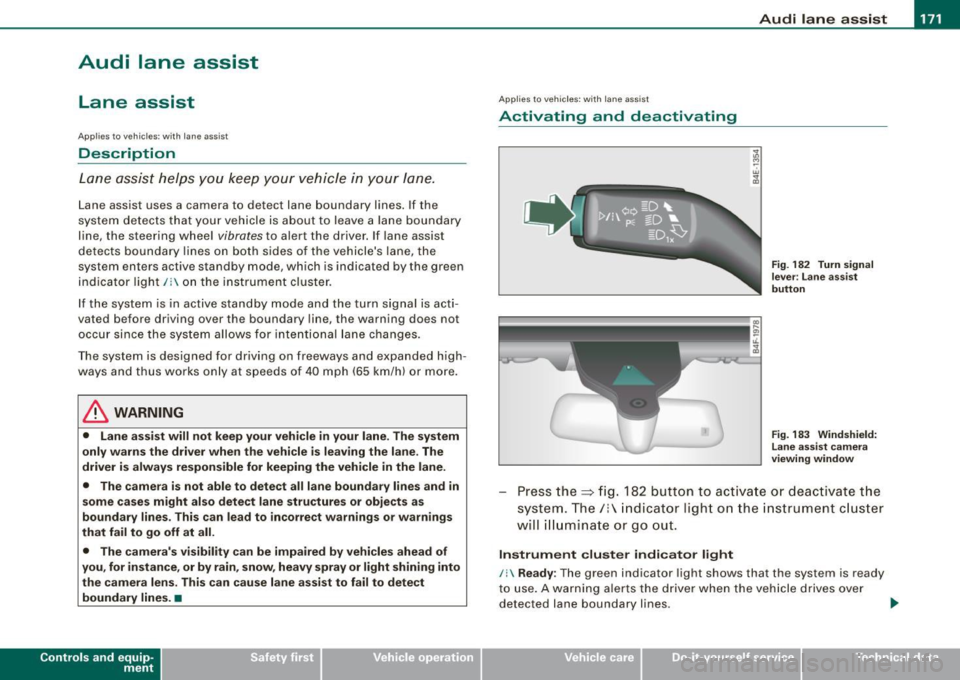
Press the :::> fig. 182 button to activa te or deactivate the
syst em . T he/ : in dica tor ligh t on t he i nstrument c luster
will illuminate or go out.
Instrument c lu ster indi ca tor light
/: Ready:
The green indicator light shows that the system is ready
to use . A warning a lerts the drive r when the veh icle drives over
dete cted lane boundary l ines. .,.
Vehicle care I I irechnical data
Page 174 of 426
-Audi lane
assist --------------------
I Not ready: The yellow indicator light shows that the system is
turned on but unable to send a warn ing. This can be due to the
following:
• There are no boundary lines, or there is on ly one boundary line
present .
• The boundary lines are not detected (e.g. due to snow, dirt, wet
conditions or light shining into the camera lens).
• More than two boundary lines (such as at construction sites) are
located in the vehicle's lane.
• The vehicle's speed is below the speed needed to activate it,
which is about 40 mph (65 km/h).
• The lane is narrower than about 8 ft . (2.5 ml, or wider than about
16 ft. (5 ml.
• The curve is too sharp.
Notes on the instrument cluster display
When the lane assist turns off automatically, the instrument cluster
indicator goes out and one of the following messages appears on
the display:
Audi lane assist not available: Currently no sensor vision
This message appears when the camera can no longer function
because it cannot detect the boundary lines. This may be due to the
following :
• The exterior s ide of the camera viewing window=>
page 171,
fig. 183 is covered with dirt or ice. Clean this part of the windshield.
• The camera v iewing window is fogged up on the inside. In this
case, wait until the fog disappears before turning lane assist on
again.
• The system was unable to detect boundary lines over an
extended period of time due to road conditions (such as snow
covered lanes). Do not turn lane assist on again until the lines can
be more easily detected.
Audi lane assist not available
A temporary malfunction is preventing lane assist from operating .
Try turning on lane assist again a t a later time.
Audi lane assist: system fault
The system should be checked by an authorized Audi dealer or other
qualified workshop .
[ i ] Tips
• Make sure that the camera viewing window:::> page 171, fig. 183
is not covered by stickers or similar objects .
• Always keep the camera viewing window clean. This can usually
be done by operating the windshield wipers. •
Applies to vehicles: with lane assist
MMI settings
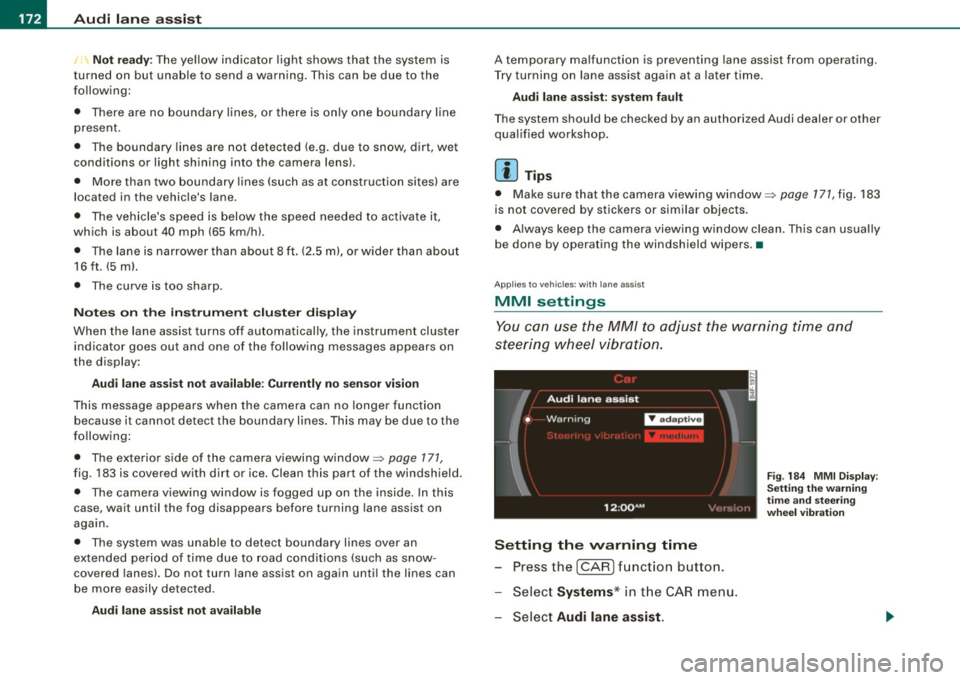
You can use the MM/ to adjust the warning time and
steering wheel vibration.
Setting the warning time
Press the I CAR] function button.
- Select
Systems * in the CAR menu .
- Select
Audi lane assist.
Fig. 184 MMI Display :
Setting the warning
time and stee ring
wheel vibration
Page 177 of 426

________________________________________________ ....:..A.:.:u=- d =-=- i ..:S:.: i.=d :.:e::....: a:.: S::.: S:::: i:.:: S :.:t:....__1111
Deactivating
- Press t he button again . T he ind icato r light on the butto n
goes out.
T he system works at speeds faster than 19 mph (30 km/h) .
& WARNING
• Improper reliance on the side assist system can cause colli
sions and seriou s per sonal injury:
- Never rely only on side assist when changing lanes .
- Always check rear view mirrors to make sure that it is safe to
c hange lanes.
• Side assist cannot detect all vehicles under all conditions
danger of accident!
• Side assist cannot detect vehicles in time to alert you when
they approach from behind at very high speed , or fall drop back
very quickly.
• The radar sensor's
vision can be reduced or entirely blocked by
rain , snow, and heavy spray . This can result in side assist not
adequately detecting veh icles or , in some cases, not detecting
them at all . Always keep an eye on the direction you are traveling
and the relevant area around the vehicle.
• Please note that side assi st indicates there are approaching
vehicles, or vehicles in your bl ind spot , only after your vehicle has
reached a driving speed of at lea st 19 mph (30 km /h).
• Side assist signal does not work around tight corners (turning
radiu s less than 328 feet , or 100 m l.
• Side assist is no replacement for the driver's full attention . The
d river alone is responsible for lane changes and similar driv ing
maneuvers. Always keep an eye on the d ire ction you are travel ing
and the relevant area around the vehicle .
Controls and equip
ment
0 Note
• To e nsu re t hat you do not adverse ly a ffect s ide assist, do not
b lock the area on the rear bumper where the radar sensors are
located w it h f oreign objects (s uch as st ickers or bicycle rac ks).
• M ake su re that the signal light on the o utside mi rror is not
b loc ked by st ic ke rs or ot her items.
[ i ] Tips
• Side ass ist automaticall y deact ivates i f it detects t hat t he ra dar
sensors are blocked=>
page 181. The indicator light on the button
goes out.
• The area on the bumper whe re the rada r sen so rs a re loca ted
must cons iste ntly re mai n fr ee o f snow, ice, and heavy so iling so t hat
side assist can function properly. Follow the additiona l notes on
=>
page 182.
• F or vehicle s with a factory insta lled towing hitch* or a t railer
hi tc h* th at was installed later accordi ng to factory speci ficat ions,
side assist is automatically deactivated as soon as the electrical
co nnect ion to the tra iler elec trical socket is m ade =>
page 181 .
• For vehicle s with a t raile r hitch that was not insta lled acco rding
t o factory speci ficat io ns, sw itch off t he side assis t w hen towi ng a
trai le r.
• Add itiona l tin ting on the front side w indows can make it harder
to see and co rrect ly understand the signal light on the outside
mi rror.
• Fo r Decla ration of Comp liance to Uni ted States FCC and Ind ust ry
Canada regula tions=>
page 404. •
I • •
Page 182 of 426
• ..__A_ u_ d_ i _s _i_d _e_ a_ s_ s _ is_ t __________________________________________________ _
G) Signal on outside mirror does not light up
If you activate your turn signal in driving situation@, the signal still
does not ligh t up on the outside mirror::::;,
& in "Safety tips" on
page 782 . •
A pplies t o vehi cles : w it h side assist
MMI settings
The basic brightness setting of the signal on the outside
mirror can be adjusted via the MM/.
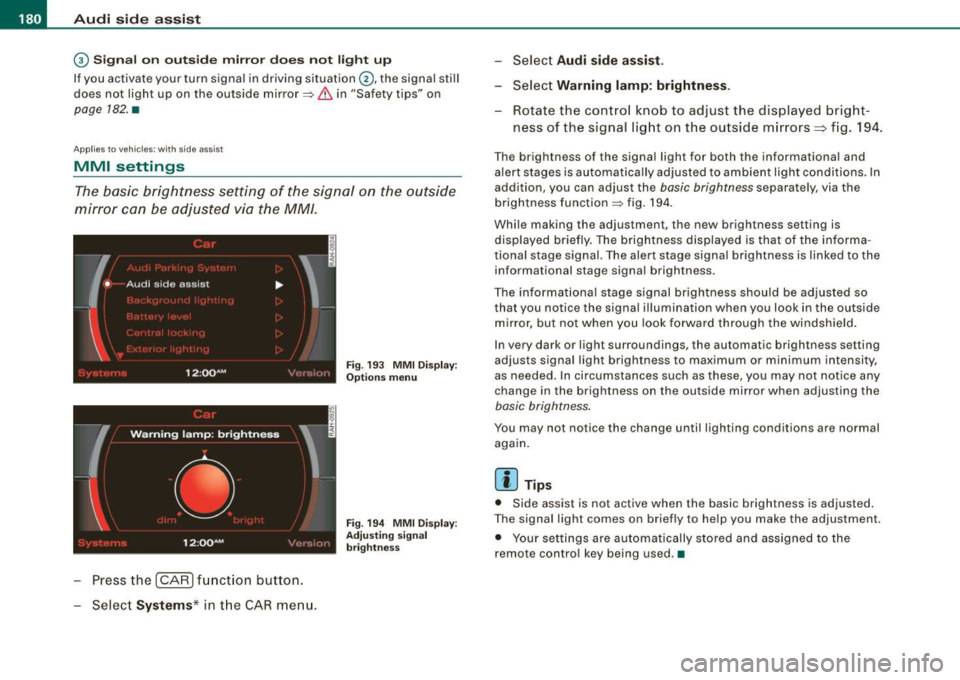
- Pressthe!CAR)function button.
Select Systems* in the
CAR menu.
Fig. 193 MMI Display:
Options menu
Fig . 194 MMI Display :
Adjusting signal
brightness
Select Audi side assist.
- Select Warning lamp: brightness .
Rotate the control knob to adjust the displayed bright
ness of the signal light on the outside mirrors:::::, fig. 194 .
The brightness of the signal light for both the informational and
alert stages is automatically adjusted to ambient light conditions . In
addition, you can adjust the
basic brightness separat ely, via th e
brightness function::::;, fig. 194.
While making the adjustment, the new brightness setting is displayed briefly. The brightness displayed is that of the informa
tional stage signal. The alert stage signal brightness is linked to the
informational stage signal brightness.
The informational stage signal brightness should be adjusted so
that you notice the signal illumination wh en you look in the outside
mirror, but not when you look forward through the windshield.
In very dark or light surroundings, the automatic brightness setting
adjusts signal light brightness to maximum or minimum intensity,
as needed . In circumstances such as these, you may not notice any
change in the brightness on the outside mirror when adjusting the
basic brightness.
You may not notice the change until lighting conditions are normal
again.
[ i ] Tips
• Side assist is not active when the basic brightness is adjusted.
The signal light comes on briefly to help you make the adjustment .
• Your settings are automatically stored and assigned to the
remote con trol key being used .•
Page 183 of 426
___________________________________________________ A_u_ d_i_ s_ id_e_ a_ s_s _i_s _t _ __._
Ap plies to vehicle s: with side assist
General information
Side assist has lim its and cannot detect vehic les under all road and
weather conditions. P lease remember system limitations and
never
rely on the system, especially when:
• driving through curves=>
page 181,
• lanes are of different widths=> page 181. •
Ap plie s to vehicles: with side ass ist
When driving through curves
Side assist cannot detect vehicles in curves with a turning radius of
less than 328 feet (100 m).
When driving through a curve , it is possible that side assist may
register a vehicle two lanes
over, and the signal on the outside
m irror will ligh t up .•
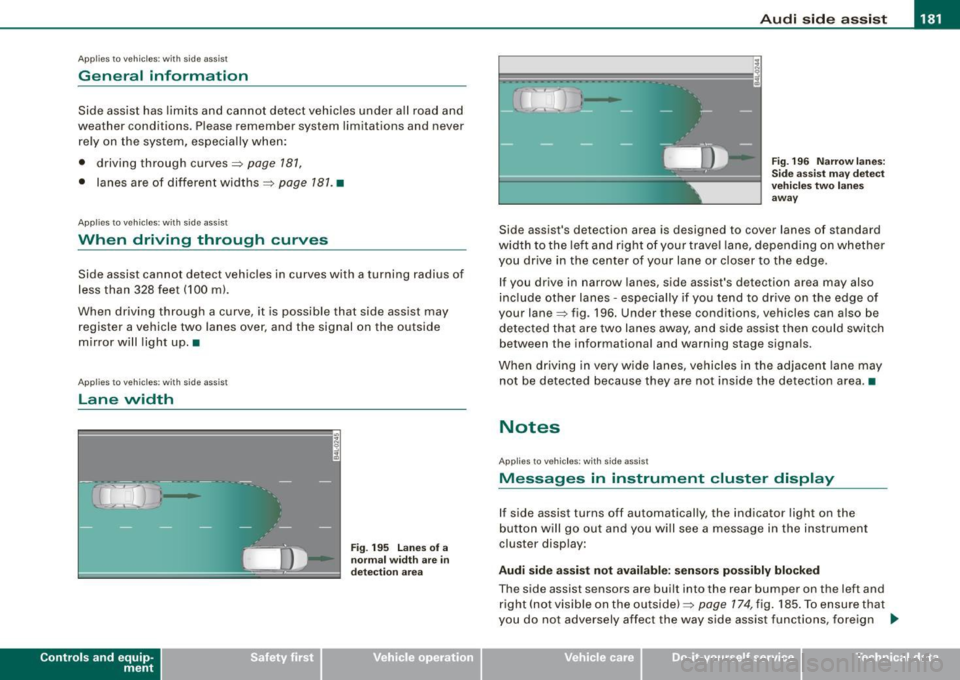
A pplies to vehicle s: with side ass is t
Lane width
Controls and eq uip
ment
,
' ' ' '
• •
Fi g. 19 5 Lanes o f a
n orm al w idth are in
d etec tion a re a
Fig . 19 6 Narrow l anes:
Si de ass is t m ay d etec t
v ehicle s tw o la n es
a w ay
Side assist's detection area is designed to cover lanes of standard
width to the le ft and right o f your trave l lane, depending on whethe r
you drive in the center of your lane or c loser to the edge.
If you drive in narrow lanes, side assist's detection area may also
inc lude other lanes -especially if you tend to dr ive on the edge o f
your lane=> fig . 196. Under these conditions, vehicles can also be
de tected tha t are two lanes away, and s ide assist then could switch
between the informational and warning stage signa ls.
When d riving in very wide lanes, vehicles in the adjacent lane may
not be detected because they are not inside the detection area. •
Notes
Applies to veh ic les : with side assist
Messages in instrument cluster display
If side assist turns off automatically, the indicator light on the
button will go out and you will see a message in the instr ument
cluster display:
Audi side a ssist not available : sensors po ssibly blocked
The side assist sensors are built into the rear bumper on the left and
right ( not visible on the outside) =>
page 174, fig. 185 . To ensure that
you do not adversely affect the way side assist functions, foreign .,_
Vehicle care I I irechnical data
Page 188 of 426
• ..__A_ u_ t _o_ m_ a_ t_ i_ c _ t_r _a _n_ s_ m_ is_ s_io _ n ________________________________________________ _
Select R only when the vehicle is at a full stop and the engine is
running at idle speed=>
& in "Driving the automatic transmission"
on
page 184.
Before you move the selector lever to R, press both the button in the
handle of the selector lever
and the brake pedal at the same time.
When the ignition is on, the backup lights illuminate when the
selector lever is moved into R.
N -Neutral
The transmission is in neutral in this position. Shift to this position
for standing with the brakes applied =>
page 186 .
When the vehicle is stationary or at speeds below 3 mph (5 km/h),
you must always apply the footbrake before and while moving the
lever out of
N.
D -Normal position for driving forward
Position Dis for normal city and highway driving. It ranges from zero
to top speed and all gears shift automatically, depending on engine
load, driving speed and automatically selected shift programs.
When the vehicle is stationary or at speeds below 3 mph (5 km/h),
you must always apply the foot brake before and while moving the lever to
D out of N.
In certain circumstances it may be advantageous to temporarily
switch to the manual shift program to manually select gear ratios to
match specific driving conditions=>
page 788.
S -Sport position
Select this position for sportier performance. In this position, the
transmission will not upshift as soon, allowing the vehicle to use the
increased power available at higher engine speeds to achieve live
lier acceleration.
When the vehicle is stationary or at speeds below 3 mph (5 km/h),
you must always apply the foot brake before and while moving the lever to
S out of N.
& WARNING
Read and follow all WARNINGS => & in "Driving the automatic
transmission" on
page 184.
0 Note
Coasting downhill with the transmission in N and the engine not
running will result in damage to the automatic transmission and
possibly the catalytic converter. •
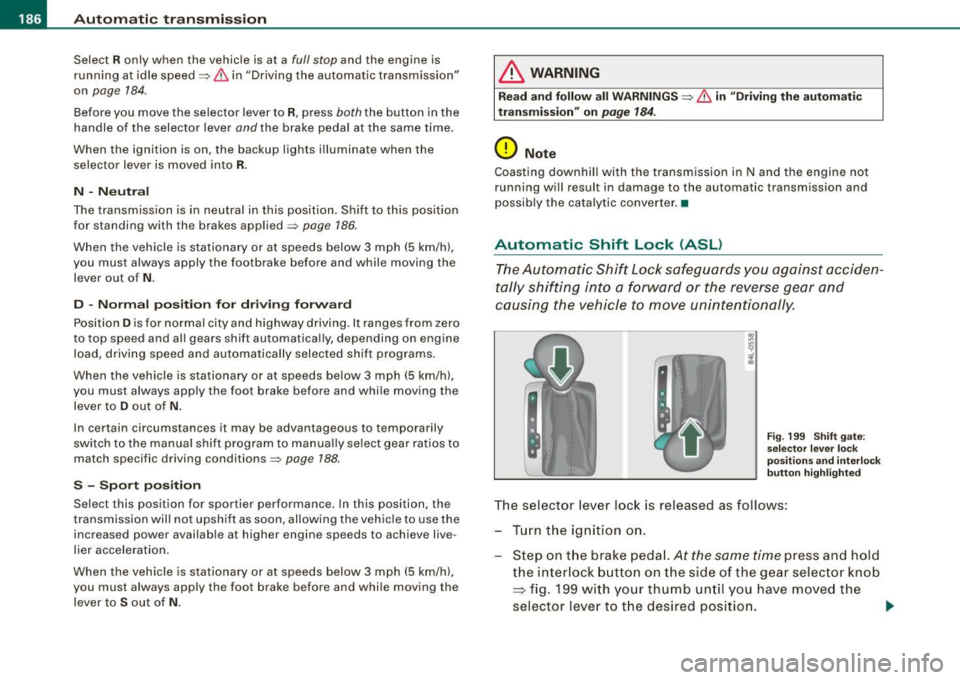
Automatic Shift Lock (ASL)
The Automatic Shift Lock safeguards you against acciden
tally shifting into a forward or the reverse gear and
causing the vehicle to move unintentionally.
Fig. 199 Shift gate:
selector lever lock
positions and interlock
button highlighted
The selector lever lock is released as follows:
- Turn the ignition on.
Step on the brake pedal.
At the same time press and hold
the interlock button on the side of the gear selector knob
=> fig. 199 with your thumb until you have moved the
selector lever to the desired position.
~
Page 194 of 426
• .___A_ d_v_ a_ n_c_ e_ d_ P _a_r_k _i_ n -=g,_ S-=y"- s_ t_ e_ m __________________________________________ _
-Press the sw itch PJJJ! in the cente r console ~ page 191,
fig. 206 t o activate the A udi pa rking system m anually .
Activation of the acoustic parking system is confirmed by
a brief acknowledgement sound . The indicator light in
the switch lights up.
D ea ctivation
If you drive forwards faster tha n approx. 6 mph (10 km/h),
or
- if you switch the ign ition off, the entire acoustic parking
assist is automatically deactivated, or
- you can press the sw itch
P111! i n the center console
=> page 191, fig. 206 to deact ivate the Audi parking
system. The indicator light in the switch goes out.
You have to turn on the acoustic parking assist m anuall y if you wish
to park the vehicle forwards or if you w ish to approach an obstacle
forwards and want a distance warning .
The range at which the sensors start to measu re is
about:
Front
Rear
W arning ton es side
cen
te r
side
cen ter 3 ft (0
.90 ml
4ft (1.20 ml
2 ft (0.60 ml
5 .2 ft (1.60 ml
Distance warning is given by chimes which are generated by a
signal generator . The volume and the pitch of the chimes can be
adjusted in the MMI => page 201.
Mute In the case of vehic les with automa tic transmission, an acoustic
distance warning is discontinued when the transmission selector lever is moved to the P position. However, the system remains
active
. As soon as the selector lever is moved from the
P posi tion
and the vehicle approaches an obstacle, the acoustic distance
warning resumes .
Dri ving fo rward/ba ckvv ard
Distance warning when driving forward/backward is based o n
detection of an obstacle in the range of the parking assist . As the
distance dec reases, the time interval between the audible tones
becomes shorter.
When the distance is less than approx . 1 ft (0.30 m), the tone
becomes continuous. At this point you shou ld s top backing up or
driving forward .
If the distance to an obstac le remains the same, the vo lume of the
distance warning is gradually reduced after about
4 seconds (does
not app ly to the zone for the cont inuous tone). If you sta rt to
approach the detected obstacle again, the distance warning will
sound at the normal volume again .
P a rk ing
When you selec t ano ther gear when parki ng (e .g . reverse/forward),
the warning tones are temporarily suppressed, but the visual display remains on the MMI display . If you start approaching a
detected obstacle again, the distance warning wi ll sound at the
normal vo lume again .
Vi sual disp lay
T he segments on the MMI display indicate a change in the distance
between the vehicle and an obstacle . The number of segments
displayed depends on the obstacles in front of or behind the
vehic le. The c loser the vehic le comes to the obstacle, the closer the
segments approach the vehic le => page 191, fig. 207. When the
segment before last is disp layed, the veh icle has reached the colli
sion zone. At this point you should stop backing up or driving
forward =>
&,. ..,.