warning light AUDI Q7 2009 Owner´s Manual
[x] Cancel search | Manufacturer: AUDI, Model Year: 2009, Model line: Q7, Model: AUDI Q7 2009Pages: 426, PDF Size: 97.13 MB
Page 201 of 426

__________________________________________ A_ d_v _a_ n_ c_e _d _ P_a_ r_ k_ i_n ..:g =-- S...:y:- s_ t_ e_ m ___ JIII
When the turn signal is switched on, only the necessary surfaces
and curves are shown . To change the s ide that is shown, simp ly
change the turn signa l.
The displayed light b lue
0 or dark blue © curved line identifies the
turn-around point when maneuvering to park. If the curved line
touches the curb, the steering wheel turn -around point has been
reached => page 198, fig. 215.
T he distance from the rear bumper © to the red line © is approxi
mate ly 1.3 ft (40 cm). Here, at the latest, you shou ld s top bac king up
=> page
200 .
& WARNING
Please note that objects not tou ching the g round ca n appear to be
further away than they really are (for example , the bumper of a
parked vehi cle , a trailer hitch , or the re ar of a truck ). In th is case ,
you should not u se the guide h elp lines to mea sure distance -
danger of a ccident !
0 Note
In the MMI Display, the direction of travel of the vehicle rear is repre
sented depending on the steering w heel angle. The veh ic le front
swings out more than the veh icle rear.
[ i ] Tips
• I n order for the rear -v iew camera to function properly, the
camera lens=> page 191, fig. 205 must be kept clean, and free of
snow and ice . P lease follow the additional notes on => page
204 .
• T he positions of the orientation lines/ surfaces are disp laced up
or down if the pa rk ing process is carried out with the rear-view
camera in Adaptive Air Suspension*=> page 21 dynamic, off road, or
l if t m ode. Therefore, the accuracy is reduced. •
Controls and equip
ment
Special parking situations
A pplies to veh ic les : wit h Advance d Pa rk in g S yste m w it h rear view c amera
Parking next to obstacles
When parking next to an obstacle, enough distance mus t
left on the side.
Fig . 216 Top view:
P arki ng ne xt t o a brick
wall
With "parking mode 2", you can park very c losely to a sidewalk curb
with your vehicle=> page 194, fig. 209.
However, when parking next to an obstacle, such as a brick wall , a
larger side distance must be selected in order to prevent col lisio n
damage to the vehicle. Position the long side of the marked blue
s u rface so that there is enoug h distance from the curb; the surface
must not touch the curb=> fig. 216.
A lso, the turning process has to occur considerab ly sooner . This
means that the corresponding blue curved line=> page 198, fig. 215
must not touch the curb, but shou ld rather be at a distance far
enough from the curb=>& .
& WARNING
• Keep plenty of di sta nce from an obstacle , so that your out side
mirror or a corner of your vehi cle does not collide with any obsta-
cle s -danger of accident!
~
I • •
Page 206 of 426
IIII.___A_ d_v_ a_ n_c_ e_ d_ P _a_r_k _i_ n -=g ,_ S-=y"- s_ t_ e_ m __________________________________________ _
"Off" sett ing
If you have set the off function, both the rear -view camera and the
visual display will be deac tiva ted . The acous tic pa rking assist
remains active .
[ i J Tip s
If you change the sett ings in the MM I, the new settings do not
become active unti l the parking assist is switched on aga in. •
Safety tips
Applie s to ve hic le s: wit h Advance d Par king Sy ste m wit h re ar vie w ca me ra
Acoustic parking system error message
If you hear a continuous tone for several seconds while the front
and back parking assist with visual display is activated and the LED
in the switch
P wA flashes when you engage the reverse gear , there is
a malfunction in the acoustic parking assist .
This system error is immediately output after: • Every manual activation via the switch
P wA ~ pag e 191,
• Reverse gear is engaged for the first time during an ign ition
cycle, or
• An error is detected during operation.
[ i J Tips
If the system reports an error, have an Audi dea ler or an authorized
dea le rship corr ect this system error. •
Applies to vehicles: w it h A dvanced Par king S ystem w it h rea r view ca mera
Rear-view camera tips
We recommend that you practice park ing with the rear -view camera
in a traffic -free location , or parking lot , to become familiar with the
system, the orientation lines, and their function . When doing this,
there should be good light and weather conditions .
I n the MM I Display, objects or vehicles appea r c loser or further away
if :
• you are driving in reverse g ear from a level surface onto an
incline, or a downward slope,
• you are driv ing in reverse gear toward protruding objects,
• the vehic le is carrying too much load in the rear.
T he accuracy of the orientation lines and b lue surfaces diminishes
if :
• the Adaptive Air Suspension * is defective, or the dynamic,
off road, o r lift mode is sw itched on,
• the rear -view camera does not provide a reliable image, for
example, in poor visibility condit ions or if the lens is d irty,
• the image on the screen is not visible due to sun glare and reflec
tion .
Car ing for the rear- vie w c amera l en s:
• Damp en the lens with a hous ehold a lcohol -based glass cleaner,
and c lean the lens w ith a dry cloth.
• Remove snow with a hand brush.
• Remove ice , preferably with de -icing spray~
0.
ln. WARNING
• The rear-view ca m era doe s not replace the view to the rear and
the rear view mirror s.
• The rea r-view camer a - be cause of t echni cal limit ation s - does
not show the ent ire area behind the vehicle~
page 196 , fig. 211. ~
Page 209 of 426
____________________________________________ A_ d_a--' p=-- t_iv _e_ A_ ir_ S_u_ s-=- p_e _ n_ s _ io_ n __ lll
Ap plies to vehicl es: with Adap tive Air Su sp ension
Chassis controls
Fi ve differen t driving modes can be set by the driver.
The automatic contro l processes are speed -and time -dependent.
For example, it is not possible to raise the suspension to a high level
above certain speeds.
When a speed of about 75 mph (120 km/hl is exceeded for more than 30 seconds, the vehicle is automatically lowered to
low level when
in com fort and automatic mode . Ground clearance is about 0 .6 inch
(15 mm) less, compared to the
normal level.
When a speed of about 100 mph (160 km/h) is exceeded for more
than 20 seconds, the vehicle is automatically lowered to
highway
/eve/when in automatic and dynamic mode. Ground clearance is
about 1.4 inches (35 mm) less, compared to the
normal level. Road
holding is optimized as a resu lt of the lower center of gravity, and
fue l consumpt ion is reduced as a result of reduced wind resistance .
Level adjustment
high level 2
normal level
highway level
Ground clearance
about 9 .4 inches (240 mml
a bout 8 inches (205 mm)
about 7 inches (180 mm)
about 6.5 inches ( 165 mml
a bou t 5.3 inches (135 mm)
The segment display
G) ~ page 208, fig. 225 in the MMI Display
~ page 208 or in the instrument cluster display~ page 209 shows
the current vehicle level.
a ut omati c
Select the automatic mode if you prefer a ba lanced, comfortable
suspension se tt ing. The damp ing characteristics are adjusted
accordingly.
Controls and equip
ment •
Aut omatic l ower ing :
When a speed of about 75 mph (120 km/h)
is exceeded for more than 30 seconds, the vehicle is automatica lly
lowered by about 0 .6 inch (15 mm) to the
low level, which is more
suitable for highway speeds . Road holding is opt im ized as a result
of the lower center of gravity and fuel consumption is reduced as a
result of reduced wind resistance. When a speed of about 100 mph
(160 km/h) is exceeded for more than 20 seconds, the vehicle is
automatically lowered by an additional 0 .8 inch (20 mm) to
highway
level.
• Automatic rai sing: When the vehicle is at highway level and the
speed fa lls be low about 80 mph (130 km/h) for more than 20
seconds, the vehic le is automatica lly raised to
low level. The vehicle
is automatically raised again to
normal level if the speed fa lls be low
about 44 mph (70 km/h) for a period of 2 minutes. The vehicle is
ra ised immediate ly when speed fa lls below about 22 mph (35 km/h).
dynamic
Select the dynamic mode if you prefer a sporty suspension sett ing.
I n this mode, the vehic le is lowered to
/ow level while it is sti ll
stationary and sporty damping characteristics are selected . The
warning light~ in the instrument cluster will come on for a few
seconds jus t to remi nd you of the reduced ground clearance .
I f you switch off the engine while the vehicle is in the dynamic mode
and then switch on the ignition once again, the~ warning light
wi ll also come on again for a few seconds as a reminder.
• Automatic lowering : When a speed of about 100 mph (160 km/h)
is exceeded for more than 20 seconds, the ve hicle is auto matica lly
lowered by 0.8 inch (20 mm) to
highway level.
• Automatic rai sing: The vehic le is automatically raised to low level
again, if the speed falls below about 80 mph (130 km/h) for a period
o f 20 secon ds. The ve hicle is ra ised i mmediately whe n speed falls
below about 22 mph (35 km/h). .,_
I • •
Page 223 of 426

Driving Safely -
----------------
Safety is everybody's responsibility! •
Important things to do before driv ing
Safety is everybody's job! Vehicle and occupant safety
always depends on the informed and careful driver.
For your safety and the safety of your passengers, before
driving always:
- Make sure that al l lights and signals are operat ing
correctly.
- Make sure that the tire pressure is correct.
- Make sure that all windows are clean and afford good
visibility to the outside.
- Secure all luggage and other items carefully :::>
page 119.
-Make sure that noth ing can interf ere w ith the pedals.
Adjust fro nt seat, head restraint and mirrors correctly for
your height .
Instruct passengers to adjust the head restraints
according to their height.
- Make sure to use the right ch ild restraint correctly to
protect children :::>
page 263, "Child Safety".
- Sit properly in your seat and make sure that your passen
gers do the same :::>
page 92, "General recommenda
tions".
- Fasten your safety belt and wear it p roperly. Also instruct
your passengers to fasten their safety belts properly
~ page 231. •
Controls and equip
ment Safety first Vehicle operation
What impa
irs driving safety?
Safe driving is directly related to the condition of the
vehicle, the driver as well as the driver's ability to concen
trate on the road without being distracted.
The driver is responsible for the safety of the vehicle and all
of its occupants. If your ability to drive is impaired, safety
risks for everybody in the vehicle increase and you also
become a hazard to everyone else on the road :::>& .There
fore:
- Do not let yourself be distracted by passengers or by
using a cellula r telephone .
NEVER drive when your driving ability is impaired (by
medications, alcohol, drugs, etc.).
Observe all traffic laws, rules of the road and speed limits
and plain common sense .
- ALWAYS adjust your speed to road, traffic and weather
conditions.
- Take frequent breaks on long trips. Do not drive for more
than two hours at a stretch.
- Do NOT drive when you are tired, under pressure or when
you are stressed .
& WARNING
Impaired driving safety increases the risk of serious personal
injury and death whenever a vehicle is being used. •
Vehicle care Do-it-yourself service Technical data
Page 224 of 426
-Driving Safely
Pll:1------=---------------
Proper occupant seating positi ·ons
Proper seating position for the driver
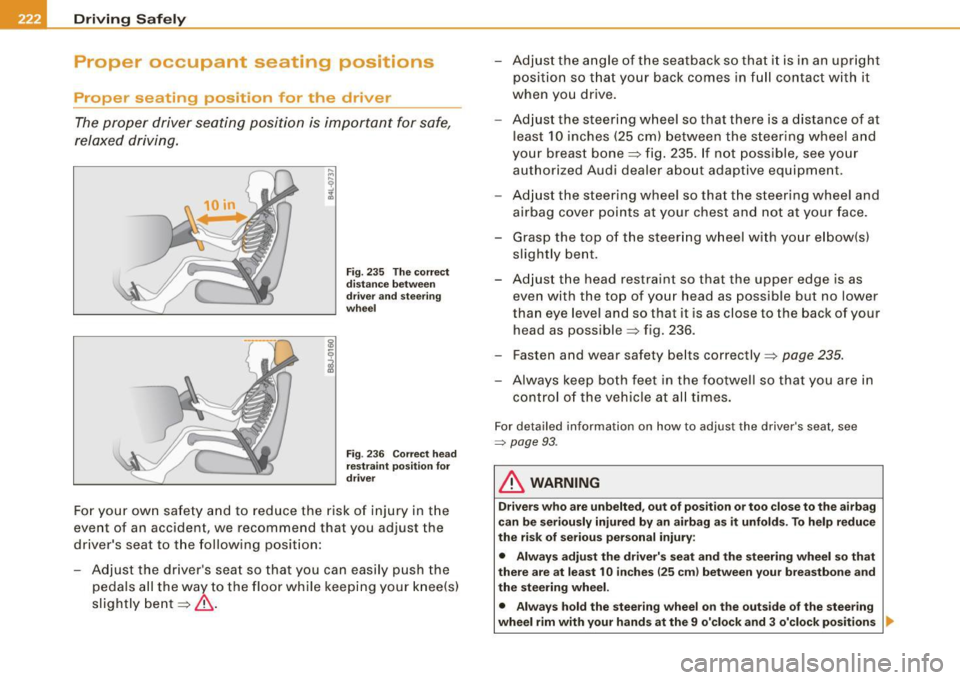
The proper driver seating position is important for safe,
relaxed driving.
Fig. 235 The correct
distance between
driver and steering
wheel
Fig. 236 Correct head
restraint position for
driver
For your own safety and to reduce the risk of injury in the
event of an accident, we recommend that you adjust the
driver's seat to the following position:
- Adjust the driver's seat so that you can easily push the
pedals all the way to the floor while keeping your knee(s)
slightly bent=:>& . - Adjust the angle of the seatback so that
it is in an upright
position so that your back comes in full contact with it
when you drive.
- Adjust the steering wheel so that there is a distance of at
least 10 inches (25 cm) between the steering wheel and
your breast bone=:> fig. 235. If not possible, see your
authorized Audi dealer about adaptive equipment.
- Adjust the steering wheel so that the steering wheel and
airbag cover points at your chest and not at your face.
- Grasp the top of the steering wheel with your elbow(s)
slightly bent.
- Adjust the head restraint so that the upper edge is as
even with the top of your head as possible but no lower
than eye level and so that it is as close to the back of your
head as possible =:> fig . 236.
- Fasten and wear safety belts correctly=:>
page 235.
-Always keep both feet in the footwell so that you are in
control of the vehicle at all times.
For detailed information on how to adjust the driver's seat, see
=> page 93 .
& WARNING
Drivers who are unbelted, out of position or too close to the airbag
can be seriously injured by an airbag as it unfolds. To help reduce
the risk of serious personal injury:
• Always adjust the driver's seat and the steering wheel so that
there are at least 10 inches
125 cm) between your breastbone and
the steering wheel.
• Always hold the steering wheel on the outside of the steering
wheel rim with your hands at the 9 o'clock and 3 o'clock positions ..
Page 233 of 426

Safety belts -----------------=------
Safety belts
General notes
Always wear safety belts!
Wearing safety belts correctly saves lives!
This chapter explains why safety belts are necessary, how
they work and how to adjust and wear them correctly.
- Read all the information that follows and heed all of the
instruct ions and WARNINGS.
& WARNING
Not wearing safety belts or wearing them improperly increases
the risk of serious personal injury and death.
• Safety belts are the single most effective means available to
reduce the risk of serious injury and death in automobile acci
dents . For your protection and that of your passengers, always
correctly wear safety belts when the vehicle is moving.
• Pregnant women, injured, or physically impaired persons must
also use safety belts . Like all vehicle occupants, they are more
likely to be seriously injured if they do not wear safety belts . The
best way to protect a fetus is to protect the mother -throughout
the entire pregnancy. •
Number of seats
Vehicles with five seats: Your vehicle has two front seats and three
rear seats. Each seating position has a safety belt.
Vehicles with six seats:* Your vehicle has two front seats, two seats
in the second row and two seats in the third row. Each seating posi
tion has a safety belt.
Controls and equip ment Safety first
Vehicle operation Vehicles
with seven seats:* Your vehicles has two front seats, three
seats in the second row and two seats in the third row. Each seating
position has a safety belt.
& WARNING
Not wearing safety belts or wearing them improperly increases
the risk of serious personal injury and death.
• Never strap more than one person, including small children,
into any belt. It is especially dangerous to place a safety belt over
a child sitting on your lap.
• Never let more people ride in the vehicle than there are safety
belts available.
• Be sure everyone riding in the vehicle is properly restrained
with a separate safety belt or child restraint. •
Safety belt warning light 4,.
Your vehicle has a warning system for the driver and front
seat passenger (on USA models only) to remind you about
the importance of buckling-up.
Vehicle care
Fig . 239 Safety belt
warning light in the
instrument cluster -
enlarged ...
Do-it-yourself service Technical data
Page 234 of 426
-Safety belts ----=-----------------
Before driving off
, always:
Fasten your safety belt and make sure you are wearing it
properly.
Make sure that your passengers also buckle up and prop
erly wear their safety belts.
- Protect children with a child restraint sys tem appropriate
for the size and age.
The warning light .ft in the instrument cluster lights up when the
ignition is switched on as a reminder to fasten the safety belts. In
addition, you will hear a warning tone.
After the ignition is switched on, the warning light in the instrument
cluster will a lways come on for about 6 seconds and if the driver has
not fastened the safety belt, a warning tone will also sound for
about 6 seconds. As soon as the driver has fastened the safety belt,
the warning tone will stop and the warning light will go out.
If the driver or front seat passenger have not buckled-up within
about 10 seconds after the warning tone has stopped and the
vehicle is moving faster than about 15 mph, the warning tone will
sound again for about 6 seconds and then stop for 24 seconds and
then repeat this reminder sequence for a maximum of 2 minutes. At
speeds be low 5 mph, the warning tone will not sound .
Fasten your safety belt and make sure that your passengers also
properly put on their safety belts.
& WARNING
• Safety belts are the single most effective means available to
reduce the risk of serious injury and death in automobile acci
dents . For your protection and that of your passengers , always
correctly wear safety belts when the vehicle is moving.
• Failure to pay attention to the warning light that come on,
could lead to personal injury.
a
Why safety belts?
Frontal co11isions and the law of physics
Frontal crashes create very strong forces for people riding
in vehicles.
Fig. 240 Unbelted
occupants in a vehicle
heading for a wall
Fig. 241 The vehicle
crashes into the wall
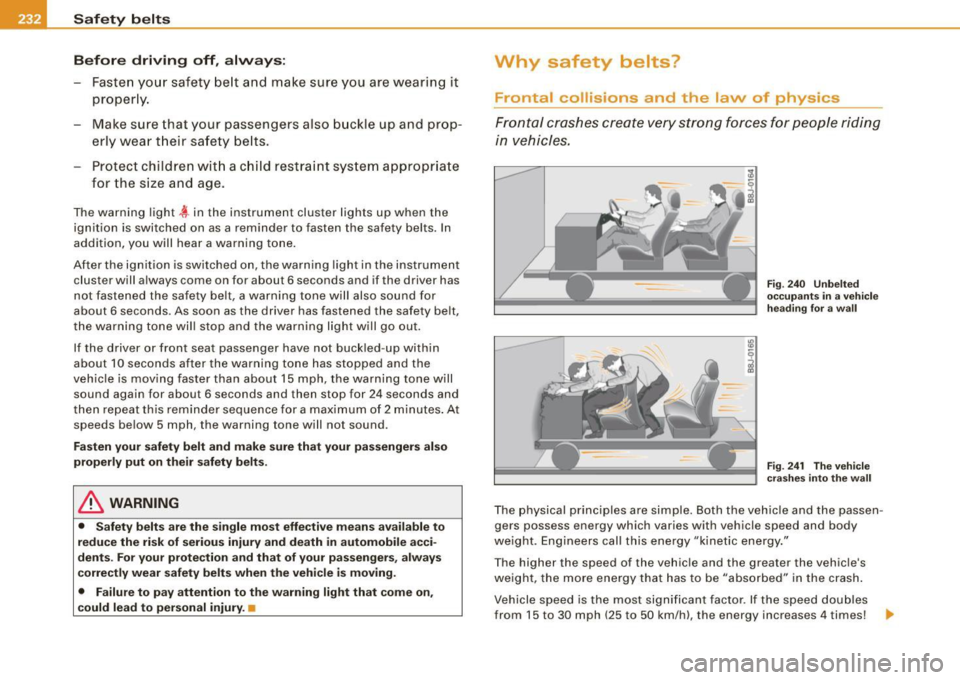
The physical principles are simple. Both the vehicle and the passen
gers possess energy which varies with vehicle speed and body
we ight . Engineers call this energy "kinetic energy."
T he higher the speed of the vehicle and the greater the vehic le's
we ight, the more energy that has to be "absorbed" in the crash .
Vehicle speed is the most significan t factor . If the speed doubles
from 15 to 30 mph (25 to 50 km /h), the energy increases 4 times! .,
Page 238 of 426
___ S_a_ f_ e_ t-= y_ b_e_ l_ t _s _______________________________________________ _
-Insert the tongue into the correct buckle of your seat
until you hear it latch securely~ fig. 245.
Pull on the belt to make sure that it is securely latched in
the buckle.
Automatic safety belt retractors
Every safety belt is equipped with an automatic belt retractor on the
shoulder belt. This feature locks the belt when the belt is pulled out
fast, during hard braking and in an accident. The belt may also lock
when you drive up or down a steep hill or through a sharp curve. During normal driving the belt lets you move freely.
Safety belt pretensioners
The safety belts are equipped with a belt pretensioner that helps to
tighten the safety belt and remove slack when the pretensioner is
activated. The function of the pretensioner is monitored by a
warning light=>
page 19.
Switchable locking feature
Every safety belt except the one on the driver seat is equipped with
a switchable locking feature that
must be used when the safety belt
is used to attach a child safety seat. Be sure to read the important
information about this feature=>
page 273.
& WARNING
Improperly positioned safety belts can cause serious injury in an
accident =>
page 236, "Safety belt position".
• Safety belts offer optimum protection only when the seat back
is upright and belts are properly positioned on the body.
• Always make sure that the rear seat backrest to which the
center rear safety belt is attached is securely latched whenever
the rear center safety belt is being used. If the backrest is not
securely latched, the passenger will move forward with the back
rest during sudden braking, in a sudden maneuver and especially
in a crash.
& WARNING (continued)
• Never attach the safety belt to the buckle for another seat.
Attaching the belt to the wrong buckle will reduce safety belt
effectiveness and can cause serious personal injury.
• A passenger who is not properly restrained can be seriously
injured by the safety belt itself when it moves from the stronger
parts of the body into critical areas like the abdomen.
• Always lock the convertible locking retractor when you are
securing a child safety seat in the vehicle
=> page 275. •
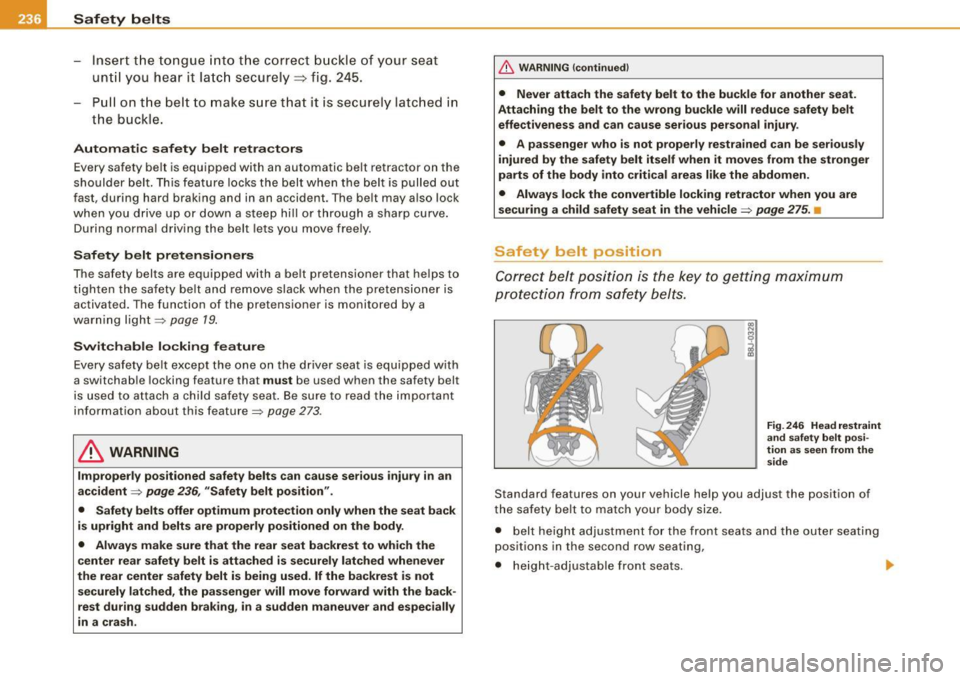
Safety belt position
Correct belt position is the key to getting maximum
protection from safety belts.
Fig. 246 Head restraint
and safety belt posi
tion as seen from the
side
Standard features on your vehicle help you adjust the position of
the safety belt to match your body size .
• belt height adjustment for the front seats and the outer seating
positions in the second row seating,
• height-adjustable front seats. .,
Page 245 of 426

__________________________________________________ A_ i_ r _b _a...; g::- s_ y=--- s_t _e _m __ fflll
Child restraints on the front seat -some
important things to know
- Be sure to read the important information and heed the
WARNINGS for important details about children and
Advanced Airbags :=>
page 263.
Even though your vehicle is equipped with an Advanced Airbag
System, make certain that all children, especially those 12 years and
younger, always ride in the back seat properly restrained for their age and size . The airbag on the passenger side makes the front seat
a potentially dangerous place for a child to ride . The front seat is not
the safest place for a child in a forward -facing child safety seat. It
can be a very dangerous place for an infant or a child in a rearward
facing seat.
The Advanced Airbag System in your vehicle has been certified to
comply with the requirements of United States Federal Motor
Vehicle Safety Standard 208 as applicable at the time your vehicle
was manufactured.
The Standard requires the front airbag on the passenger side to be
turned off ("suppressed") if a child up to about one year of age
restrained in one of the rear-facing or forward-facing infant
restraints listed in Federal Motor Vehicle Safety Standard 208 with
which the Advanced Airbag System in your vehicle was certified has been installed on the front passenger seat. For a listing of the child
restraints that were used to certify compliance with the US Safety
Standard =>
page 265.
The PASSENGER AIR BAG OFF light in the instrument panel tells you
when the front Advanced Airbag on the passenger side has been
turned off by the electronic control unit.
Each time you turn on the ignition, the
PASSENGER AIR BAG OFF
light will come on for a few seconds and:
• will stay on if the front passenger seat is not occupied
Controls and equip
ment Safety first Vehicle operation
•
will stay on if there is a small child or child restraint on the front
passenger seat
• will go off if the front passenger seat is occupied by an adult as
registered by the weight-sensing mat=>
page 252, "Monitoring the
Advanced Airbag System" .
The
PASSENGER AIR BAG OFF light comes on when the control unit
detects a total weight on the front passenger seat that requires the
front airbag to be turned off.
If the total weight on the front passenger seat is more than that of
a typical 1 year-old child but less than the weight of a small adult,
the front airbag on the passenger side can deploy (the
PASSENGER
AIR BAG OFF
light does not come on). If the PASSENGER AIR BAG
OFF
light does not come on, the front airbag on the passenger side
has not been turned off by the electronic control unit and can
deploy if the control unit senses an impact that meets the condi
tions stored in its memory.
For example, the airbag may deploy if:
• a small child that is heavier than a typical 1 year -old child is on
the front passenger seat (regardless of whether the child is in one
of the child safety seats listed=>
page 265), or
• a child who has outgrown child restraints is on the front
passenger seat.
If the front passenger airbag is turned off, the
PASSENGER AIR BAG
OFF
light comes on in the instrument cluster and stays on.
The front airbag on the passenger side may
not deploy (the
PASSENGER AIR BAG OFF light does not illuminate and stay lit) even
if a small adult or teenager, or a passenger who is not sitting upright
with their back against a non-reclined backrest with their feet on the
vehicle floor in front of the seat is on the front passenger seat
=>
page 222, "Proper seating position for the driver".
If the front passenger airbag deploys, the Federal Standard requires
the airbag to meet the "low risk" deployment criteria to reduce the risk of injury through interaction with the airbag . "Low risk" deploy
ment occurs in those crashes that take place at lower decelerations
I),
Vehicle care Do-it-yourself service Technical data
Page 246 of 426
___ A_ ir_ b_ a-g _ s_y _s_ t_ e_ m _________________________________________________ _
as defin ed i n th e el ectron ic contro l u n it=> page 253, "PASSE NGER
AI R BAG OFF lig ht".
A lwa ys rem em ber, a c hild safet y se at or infant carr ier installe d on
the front seat may be str uck and k nocked o ut of po sition by t he
rap id ly in fla ting passe nger's air bag in a fron tal colli sion . The airb ag
cou ld great ly re duce the effectivene ss of the ch ild restrain t and
e ve n seri ous ly injure the chi ld dur ing in flatio n.
For th is reason, and beca use the bac k seat is the safest plac e for
chi ldren -wh en prop erly rest rained acc ording to th eir age and size
- we strong ly recommend that ch ildren a lways sit in the bac k se at
=> p age 263, "Ch ild Safe ty ".
& WARNING
A child in a rearward -facing child safety seat installed on the front
passenger seat will be ser iously injured and can be killed if the
front airbag inflates - even with an Advanced Airbag System .
• The inflating airbag will hit the child safety seat or infant
carrier with great force and will smash the child safety seat and
child against the backrest , center arm rest , door or roof .
• Always install rear -facing child safety seats on the rear seat .
• If you must install a rearward facing child safety seat on the
front passenger seat because of exceptional circumstances and
the PASSENGER AIR BAG OFF light does not come on and stay on ,
immediately install the rear-facing child safety seat in a rear
seating position and have the airbag system inspected by your
authorized Audi dealer.
• Forward-facing child safety seats installed on the front
passenger's seat may interfere with the deployment of the airbag
and cause serious personal injury to the child .
& WARNING
If, in exceptional circumstances, you must install a forward-facing
child restraint on the front passenger's seat:
& WARNING (continued)
• Always make sure the forward-facing seat has been designed
and certified by its manufacturer for use on a front seat with a
passenger front and side airbag .
• Never put the forward-facing child restraint up against or very
near the instrument panel.
• Always move the passenger seat into its rearmost position in
the seat's fore and aft adjustment range, as far away from the
airbag as possible before installing the forward-facing child
restraint. The backrest must be adjusted to an upright position .
• Make sure that the PASSENGER AIR BAG OFF light comes on
and stays on all the time whenever the ignition is switched on.
& WARNING
To reduce the risk of serious injury , make sure that the PASSENGER
AIR BAG OFF light will be displayed whenever a child restraint is
installed on the front passenger seat and the ignition is switched
on.
• If the PASSENGER AIR BAG OFF light does not stay on , perform
the checks described
=> page 252 , "Monitoring the Advanced
Airbag System" .
• Take the child restraint off the front passenger seat and install
it properly at one of the rear seat positions if the PASSENGER AIR
BAG OFF light does not stay on.
• Have the airbag system inspected by your authorized Audi
dealer immediately.
• Always carefully follow instructions from child restraint manu
facturers when installing child restraints .
& WARNING
If, in exceptional circumstances, you must install a forward or
rearward-facing child restraint on the front passenger's seat :