warning light AUDI Q7 2009 Owner´s Manual
[x] Cancel search | Manufacturer: AUDI, Model Year: 2009, Model line: Q7, Model: AUDI Q7 2009Pages: 426, PDF Size: 97.13 MB
Page 39 of 426

Driver message appears and does not go out again
If this driver notification appears after the ignition is turned on or
while driving and does not go out again , the battery's state of
charge is not in the optimal range . Starting capability is restricted.
Have the battery checked by an authorized Audi dealer as soon as
possible .•
Worn brake pads )
Brake pads!
If the warning light illuminates, immediately contact your autho
ri zed Audi dealer or qualified workshop to have all brak e pads
inspected. On USA models the warning light .,...,,. comes on together
with the warning light
BRAKE. Both sets of brak e pads on an axl e must
always be replaced at the same time.
& WARNING
Driving with bad brakes can cause a collision and serious personal
injury.
• If the warning light and the warning light
BRAKE21 with the
message Brake pads! comes on in the instrument cluster display,
immediately contact your authorized Audi dealer or qualified
workshop to have all brake pads checked or replaced if
necessary. •
Headlight range control defective )
' Headlight range control defective !
If the symbol illuminates , the dynamic headlight range control is no
longer working properly. Have the system checked and repaired at
your authorized Audi dealer. •
21 BRAKE: USA models only
Controls and equip
ment
Driver information display
Engine oil level ~
~ Please check oil level
When the symbol illuminates, check the engine oil level as soon as
possible=>
page 335. Top off the oil at your earliest opportunity
=>
page 336. •
Engine oil sensor defective -
Oil level! Sensor defective
If the symbol illuminates, contact your authorized Audi dealer and
have the oil sensor inspected. Until you have this done, check the oil
level each time you refuel just to be on the safe side=>
page 335. •
Applies to vehi cles : wit h engi ne spee d lim itation
Engine speed limitation f,,.
Engine speed maximum XXXX RPM
The I symbol illuminates when there is an engine control malfunc
tion . The indicator light in the instrument cluster also illumi
nates. The engine speed is limited to the speed displayed in the
driver information system. Keep in mind that the engine speed will
not exceed the value displayed in the driver information system, for
example when downshifting .
Please go to an authorized Audi dealer or other qualified workshop
to have the malfunction repaired. •
Applies to vehic les : with Ada ptive ligh t
Adaptive Light defective ~l
' Adaptive Light defective
I • •
Page 40 of 426

Driver information display
When this symbol illuminates, it means that Adaptive Light is
defective . Go to an authorized Audi dealer to have the headlights or
the control unit for the Adaptive Light repaired.•
Ignition lock malfunction ~
If the symbol in the display comes on, there is a malfunc-
tion in the e lectronic ignition lock. An additional driver
message can be displayed by pressing the [ CHECK) button:
Ignition lock defective
-Drive to an authorized Audi dealer or qualified workshop
at your earliest convenience to have the malfunction
corrected. •
Windshield wipers faulty --->
....... Windscreen wiper defective !
When this symbol ' illuminates, it means that the electronics for
the windshield wipers are defective. P lease go to an authorized Audi
dea ler or qua lified workshop to have the windshield wiper system
repaired .•
Speed warning system
Overview
The speed warning system helps you to keep your driving
speed below a set speed limit.
The speed warning system warns the driver if he exceeds a previ
ously stored maximum speed. A warning tone wi ll sound as soon as the vehicle speed exceeds the set speed by about 3 mph (3 km/h). At
th
e same time, a warning symbol appears in the display.
The speed warning system has
two warning thresholds that func
tion independently of each other and that have somewhat different
purposes:
Speed warning 1
You can use speed warning 1 to set the maximum speed while you
are driving. This setting will remain in effect until you turn off the
ignition, assuming that you have not changed or reset the setting.
Th e speed warning symbol
9 (USA models)/ 8 (Canada models) in
the warning 1 display appears when you exceed the maximum
speed . It goes out when the speed falls below the stored maximum
speed.
The speed warning symbol will also go out if the speed
exceeds the
stored maximum speed by more than about 25 mph ( 40 km/h) for at
least 10 seconds. The stored maximum speed is deleted.
Setting speed warning 1
~ page 39 .
Speed warning 2
Storing warning 2 is recommended if you always want to be
reminded of a certain speed, for example when you are traveling in
a country that has a general maximum speed limit, or if you do not
want to exceed a specified speed for winter tires.
The speed warning 2 symbol,
8, (USA modelsl/ 8, (Canada models)
appears in the display when you exceed the stored speed limit.
Un like warning 1, it wil l not go out unti l the vehicle speed drops
below the stored speed limit.
Setting speed warning 2
~ page 39.
[ i ] Tips
Even though your vehicle is equipped with a speed warning system,
you should still watch the speedometer to make sure you are not
driving faster than the speed limit. •
Page 45 of 426
pressure, even if under-inflation has not reached the level to trigger
illumination of the TPMS low tire pressure tellta le .
Your vehicle has also been equipped with a TPMS malfunction indi cator to indicate when the system is not operating properly . The
TPMS malfunction indicator is combined with the low t ire pressure
telltale . When the system detects a ma lfunction, the telltale wil l
fl ash for approximately one minu te and then remain continuously
illuminated . T his sequence will continue upon subsequent vehicle
start-ups as long as the ma lfunction exists.
When the malfunction indicator is illuminated, the system may not be ab le to detect or signal low tire pressure as intended. TPMS
malfunctions may occur for a variety of reasons, including the
installation of replacement or alternate tires or wheels on the
veh icle that prevent the TPMS from functioning properly. Always
check the TPMS malfunction telltale after replacing one or more
tires or whee ls on your vehicle to ensure that the replacement or
a lternate tires and wheels allow the TPMS to continue to function
properly .•
Introduction
The tire pressure monitoring system monitors air pressure
in all four road wheels while the vehicle is moving.
As soon as the tire pressure mon itoring system senses a s ignificant
loss of air pressure in one or severa l tires, text messages and yellow
symbo ls appear in the instrument cluster display to a lert the driver .
T he ~ warning light in the instrument cluster comes on when the
t ire is significant ly underinflated ;;:,
page 20.
The warning light ' also illuminates in the case of a system
malfunction.
Be aware that tire pressure is also dependent on the temperature of
the tire. For every 18 °F (10 °Cl increase in tire temperature, tire pres
sure increases by about 1 .5 psi (0 .1 bar). The tire warms up while the
vehic le is moving and tire pressure rises. So you should adjust tire
Controls and equip
ment
Dr ive r informat ion di spl ay
pressure only when they are cold, when the temperature of the tires
is roughly the same as the ambien t air temperature .
In order to keep the tire pressure monitoring system properly cali
brated, tire pressure on all four tires should be checked at regular
intervals, adjusted if necessary and saved in the proper setting
(recommended pressure) ;;:,
page 45.
The tire pressure is shown on the tire pressure label. On USA vehi
cles, the tire pressure labe l is located on the driver's side 8-pi llar . On
Canada vehicles, the tire pressure labe l is located eithe r on the
driver's side 8 -p illar or inside the fuel fi ller flap. The tire pressure
label lists the recommended cold tire inflation p ressu res for the
vehic le at its maximum capacity weight and the tires that were on
your vehicle at the time it was manufactured. For recommended tire
pressures for normal load conditions, please see chapter
;;:, page 351.
& WARNING
• When the tire pre ssure monitoring sy stem warning light i s lit ,
one o r mor e of your tires i s signifi ca ntl y under -infl ated . You should
stop and che ck your tire s as soon as possible , and inflate th em to
th e prop er pre ssure a s indicated on the v ehicle' s tir e pr ess ure
l a bel ;;:,
pa ge 351. Driving on a signifi cant ly under-infl ated tire
ca use s the tire to overhe at and can lead t o tire f ailure. Und er-infla
tio n a lso is likely to imp air th e vehicle' s handling and stoppi ng
ability .
• Do not adju st tire pre ssure whe n tire temp erature is exc essiv e.
Thi s could le ad to serious tire damage and even cause the ti re to
burst , with the additi onal d ange r of an acc ident .
tread life.
I • •
Page 48 of 426

Driver inf ormati on displ ay
• The tire pressure monitoring system helps the driver to keep an
eye on tire pressures. But the driver stil l has the responsibility for
maintaining the correct tire pressure .•
Wheel change
If a wheel is changed, the wheels that were exchanged
have to be re-programmed.
Turn on the ignit ion.
- Pressthe!CARlfunction button.
- Select
Systems in the CAR menu.
- Selec t
Tire pre ssure monitoring .
Select Initialize wheel s.
Programming is necessary:
• after the tires have been rotated on the vehicle,
• if tires with new wheel sensors are used .
A ll pressure warning and system malfunction indicators in the
display will be canceled .
If a wheel change has been made, it is necessary to complete the
I niti alize w hee ls function. Afte r you have selected the function, the
new wheels are programmed and the actual pressures are stored .
This learning phase can take up to 20 minutes driving time.
During the learning process the tire pressure monitoring system is
not avai lable. •
Malfunctions =-r,,11~
A malfunction can have various causes.
Fig. 28 Displ ay :
Syste m malfu nc tion
If the warning light in the instrument cluster flashes for approxi
mately one minute and then remains continuously illuminated and
additionally the
JIS => fig . 28 symbol appears in the display , the
tire pressure monitoring system is not available. This can have
various causes.
• If the message appears at the end of the learning process, the
system cannot recognize the wheels installed on the vehicle. This
can be because one or more wheels without a whee l sensor were
insta lled .
• A wheel sensor or other component may have failed .
• During initialization the system has detected more than 4 whee ls
on the vehicle, for examp le while driving next to another car with a
tire pressure monitoring system .
• A wheel change was made but the
Initi alize wheel s function
=> page 46was not activated.
• Audi replacement parts were not used .
• If snow chains are being used , system function can be compro
m ised due to the shielding properties of the cha ins .
• T he tire pressure monitoring system may not be available
because of a radio ma lfunction. _,.,
Page 49 of 426
• Transmitters with the same frequency, such as radio head
phones in the veh ic le or radio equipment, can cause a temporary
disruption of the system through excessive electromagnetic fields.
• Eliminate the interference if possib le/if you can and then re-start
the
Init ialize wh eels function . If the warning light comes on again,
you shou ld contact your authorized Audi dealer immediate ly to have
the problem corrected.
• Do not use commercially available tire sealants. Otherwise, the
e lectrical components of the tire pressure monitoring system will
no longer work properly and the sensor for the tire pressure moni
toring system wi ll have to be replaced by a qua lified workshop .•
Controls and equip
ment
Dr ive r informat ion di spl ay
I • •
Page 53 of 426
-Place the cover w ith the new battery on the key base and
press both parts together .
<£> For the sake of the environment
Dispose of dead batteries proper ly so as not to pol lute the environ
ment.
[ i ] Tips
The rep lacement battery must be the same specificat ion as the
original. •
Electronic immobilizer
The immobilizer helps to prevent unauthorized use of
your vehicle.
A computer chip inside your key automatically deact ivates the e lec
tronic immobilizer when you insert the key in the ignition lock, or on
veh ic les with Convenience key *, when the key is inside the vehicle.
When you remove the key from the ignition lock, or on vehicles with
Convenience key, when you remove the key from the vehic le, the
e lectronic immobilizer is automatica lly activated once again.
I f an unauthorized key was used, SAFE is disp layed continuously in
the odomete r disp lay field .
& WARNING
Always take the key wi th you when you leave the v ehicle. The ke y
ca n dis arm the ele ctro nic engine im mob iliz er and permit an unau
t hori zed per son to start the engine and enable operati on of the
v ehi cle sys tem s such a s pow er win dow o r Panor ami c s liding
sunroof * leading t o serious personal injury.
Controls and equip
ment
Opening and clo sing
[ i ] Tip s
• Your engine can on ly be started using the factory -equipped key.
• You may not be ab le to start your vehicle if an ignition key of a
different vehicle make is also located on your set of keys.
• For Dec laration of Compliance to Uni ted States FCC and Industry
Canada regulations~
page 404. •
Valet key function
The valet key fun ction prevents unauthorized persons
from opening the glove compartment or rear lid.
Fi g. 33 Ce nter
co nso le: butto n fo r
v ale t key f unction
Activating and dea ctivating the fun ction
- Insert the master key in to the ignition lock and switch on
the ignition.
- Press the
[VALE T] button ~ fig. 33 to activate/ deactivate
the funct ion as desired. T he indicator light in the button
illumi nates w hen the function is active.
- Remove the master key f rom the ign ition lock.
- Hand over on ly the
valet key~ page 48, fig. 29 to the
person who w ill tak e charge of the vehicle.
I • •
Page 56 of 426
Opening and closing
- Press button @
two times within tw o secon ds to unlock
all doors and the rear lid .
To lock the vehicl e 6
Press button @ ~ & in "General description" on
page 52.
Watch that all turn signal lights flash once .
To unlock re ar lid only
C:J
- Press button @for approx im ate ly one seco nd.
PANIC Button Pu sh the red b utto n@ to act ivate the panic f unction. The
horn sounds and the turn signals flash .
- Pu sh the button @ again to deactiva te the panic f unc
t ion.
On vehicles wi th Convenience key* , the selector lever must be in the
P position , otherwise the vehicle cannot be locked .
& WARNING
Read and foll ow a ll WARNING S => & in "General de scription " on
page 52.
[ i ] Tips
• In o rder to make sure the locking function is working , you should
a lways keep your eye on the vehicle to make sure it is properly
locked .
• Do not use the remote control if you are inside the car, otherwise
you may unintentionally lock the vehic le, and then you would set off
the anti-theft alarm when you try to start the engine or open a door.
In case this happens anyhow, push the unlock button
0 .
• Use the panic function only if you are in an emergency
situation. •
Operating locks with the key
To lock and unlock the vehicle from the outside, turn the
key in the lock of the driver's door.
To unlock the vehicle
Fi g. 3 5 Key turn s for
o pening and clo sing .
-Ins ert the k ey into the lock of the drive r's door.
- T urn th e key
one time to pos iti on @ to unlock the d river's
do or.
- Tur n the key
two times to positio n @ ~fig . 35 to unlock
all doors and the rea r lid .
To lock the vehicle - Close all windows and doors properly.
- Tur n the key in the l ock of the driver's door t o th e lo ck
p o sit io n @ ~
& in "Gen eral d escri ption" on p age 52. ..,
Page 60 of 426
Opening and closing
- The rear lid unlocks automatically and opens slightly .
- Lift the rear lid .
Closing the rear lid
Pull the rear lid down and allow it to drop gently . The lid
is then closed automatically=>& .
& WARNING
• After closing the rear lid, always pull up on it to make sure that
it is properly closed. Otherwise it could open suddenly when the
vehicle is moving .
• To help prevent poisonous exhaust gas from being drawn into
the vehicle, always keep the rear lid closed while driving. Never
transport objects larger than those which fit completely into the
luggage area, because then the rear lid cannot be fully closed .
• Never leave your vehicle unattended especially with the rear lid
left open. A child could crawl into the car through the luggage
compartment and pull the lid shut, becoming trapped and unable
to get out . To reduce the risk of personal injury, never let children
play in or around your vehicle. Always keep the rear lid as well as
the vehicle doors closed when not in use.
• Always ensure that no one is within range of the rear lid when
it is moving, in particular close to the hinges -fingers or hands can
be pinched.
[ i ] Tips
• If the rea r lid is open or not properly clo sed when the ignition is
turned on , th e door and r ear l id warn ing~
pag e 27 appears in th e
instrument cluster display.
• Should y ou no t be abl e to open th e re a r lid as d esc ribed , mak e
sure the valet key function is not activated~
page 51. •
App lies 10 vehic les: w ith automatic rear lid/trun k lid ope rat ion
Automatic rear lid /trunk lid operation
The trunk lid can be opened and closed automatically.
Opening rear lid
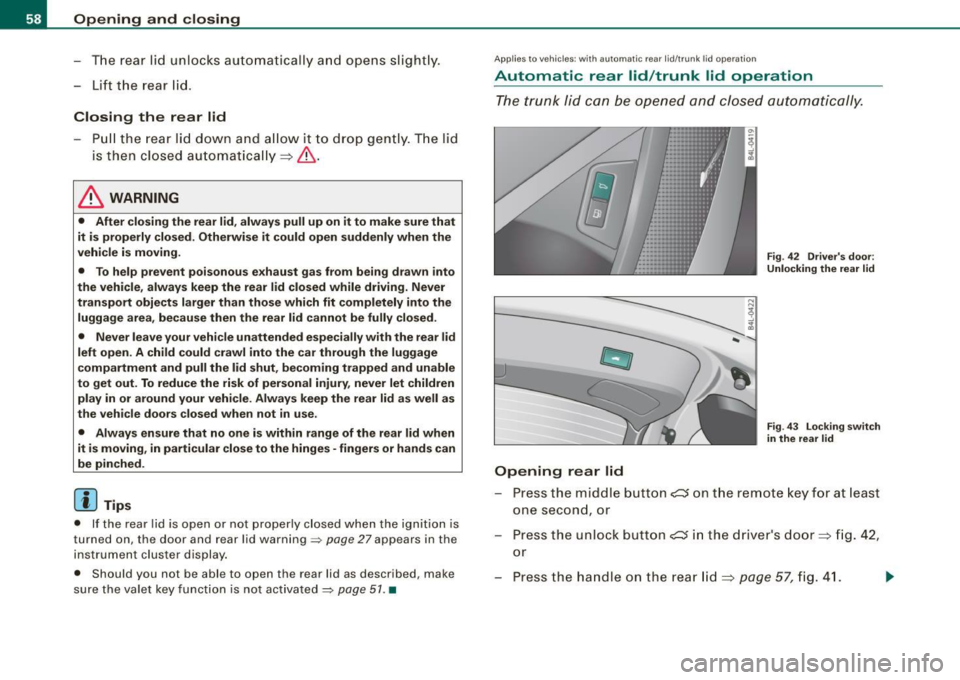
Fig. 42 Driver's door:
Unlocking the rear lid
Fig. 43 Locking switch
in the rear lid
Press the m iddle button c:s o n the remote key for at least
one second, or
- Press the unlock button
e::5 in the driver's door=> fig. 42,
or
Press t he handle on the rear lid=>
page 57, fig. 41.
Page 61 of 426
-The opening process is stopped immediately if the
middle button
,c:::J on the remote key is pressed again for
at least one second or the unlock button
,c:::J in the
driver's door is pressed again or the handle in the rear lid
is pressed again.
- Middle button in the remote key and unlock button in the
driver's door:
The opening process is continued by
pressing one of the buttons again.
- Handle in the rear lid: the rear lid is closed again by
pressing the handle again=>,& .
Closing rear lid/trunk lid
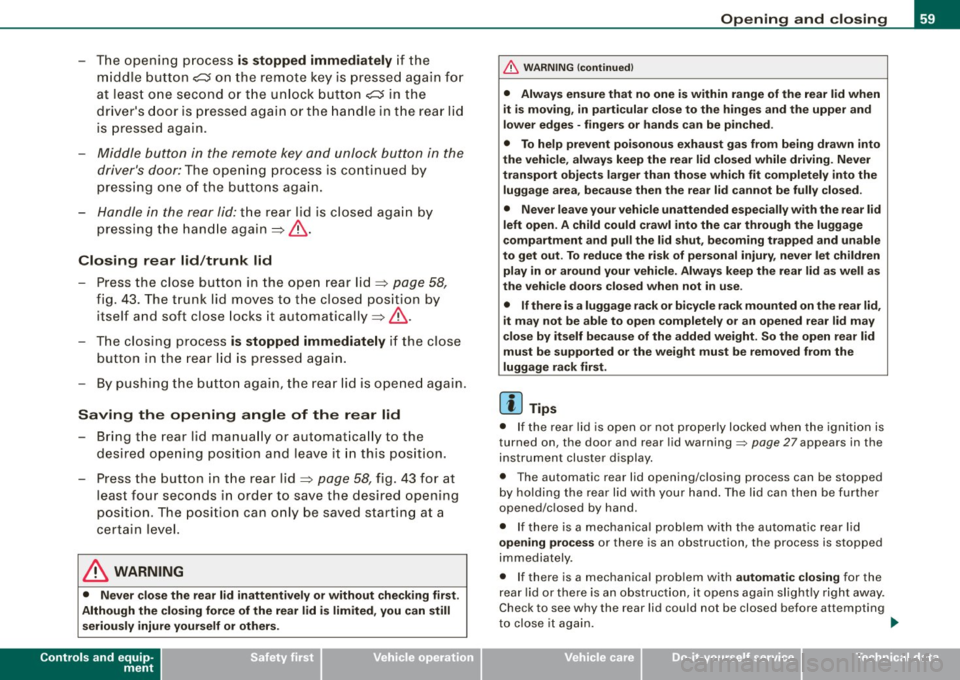
-Press the close button in the open rear lid=> page 58,
fig. 43. The trunk lid moves to the closed position by
itself and soft close locks it automatically=> ,&.
-The closing process is stopped immediately if the close
button in the rear lid is pressed again.
- By pushing the button again, the rear lid is opened again.
Saving the opening angle of the rear lid
-Bring the rear lid manually or automatically to the
desired opening position and leave it in this position.
- Press the button in the rear lid=>
page 58, fig. 43 for at
least four seconds in order to save the desired opening
position . The position can only be saved starting at a
certain level.
& WARNING
• Never close the rear lid inattentively or without checking first.
Although the closing force of the rear lid is limited, you can still
seriously injure yourself or others.
Controls and equip
ment
Opening and closing
& WARNING (continued)
• Always ensure that no one is within range of the rear lid when
it is moving, in particular close to the hinges and the upper and
lower edges -fingers or hands can be pinched.
• To help prevent poisonous exhaust gas from being drawn into
the vehicle, always keep the rear lid closed while driving. Never
transport objects larger than those which fit completely into the
luggage area, because then the rear lid cannot be fully closed.
• Never leave your vehicle unattended especially with the rear lid
left open. A child could crawl into the car through the luggage
compartment and pull the lid shut, becoming trapped and unable
to get out . To reduce the risk of personal injury, never let children
play in or around your vehicle. Always keep the rear lid as well as
the vehicle doors closed when not in use.
• If there is a luggage rack or bicycle rack mounted on the rear lid,
it may not be able to open completely or an opened rear lid may
close by itself because of the added weight. So the open rear lid
must be supported or the weight must be removed from the
luggage rack first.
[ i] Tips
• If the rear lid is open or not properly locked when the ignition is
turned on, the door and rear lid warning::::;,
page 27 appears in the
instrument cluster display.
• The automatic rear lid opening/closing process can be stopped
by holding the rear lid with your hand. The lid can then be further
opened/closed by hand.
• If there is a mechanical problem with the automatic rear lid
opening process or there is an obstruction, the process is stopped
immediately.
• If there is a mechanical problem with
automatic closing for the
rear lid or there is an obstruction, it opens again slightly right away.
Check to see why the rear lid could not be closed before attempting
to close it again. ..,_
I • •
Page 65 of 426
• The proximity sensors are deactivated after a few days to save
power. You then have to pull on the door handle once to unlock the
vehicle and a second time to open the vehicle .
• To prevent the ba ttery from being discharged and to preserve
your vehicle's ability to start for as long as possible , the energy
management system gradual ly swi tches off unnecessa ry conve
nience functions. It is possib le that you will not be ab le to un lock
your vehicle using these convenience functions .•
Ap plie s to v ehicl es: with Co nven ie nce key
Locking the vehicle
The vehicle can be locke d wi thout operati ng the master
key.
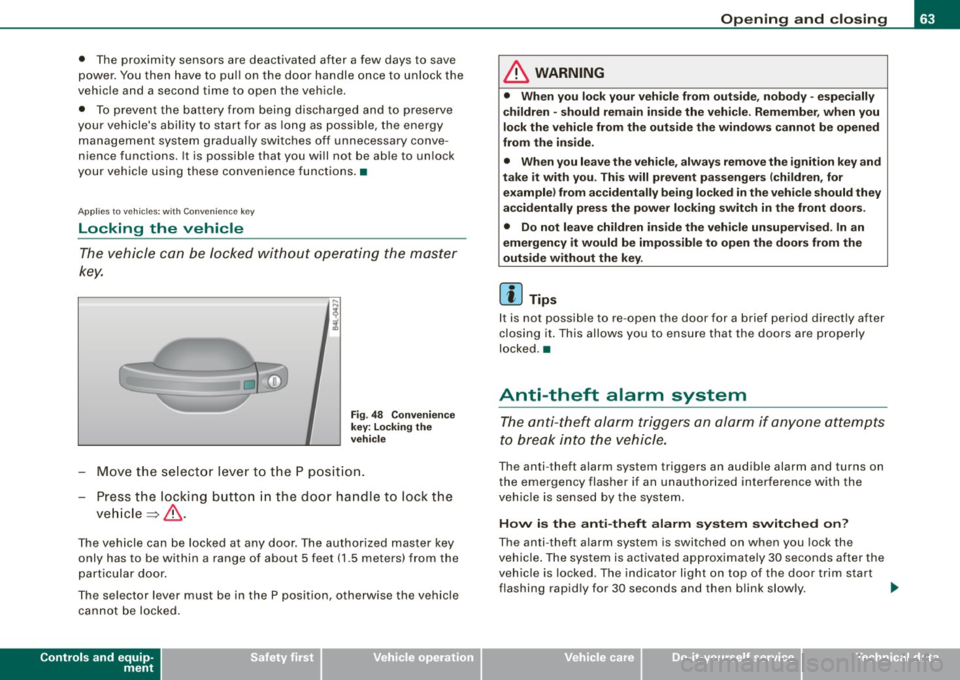
F ig . 4 8 Co nve nien ce
k ey : Lo cking t he
ve hicle
- Move th e se lect or lever to t he P posit ion.
- Press the locking butto n in the doo r handle to lock the
ve hicle ~ & -
The vehicle can be locked at any door. The authorized master key
only has to be within a range of about 5 feet (1 .5 meters) from the
part icular door.
The se lector lever must be in the P position, otherwise the vehicle
can not be locked.
Controls and equip
ment
Opening and clo sing
& WARNING
• When you lock your vehicle from out side , nobody -espe cially
children -should remain inside the vehicle . Remember , when you
lock the vehicle from the out side the windo ws ca nnot be opened
from the in side .
• When you leave the vehi cle , al wa ys remo ve the ignition key and
t ak e it with you. Thi s will prevent pa ssenger s (children , for
e x ample ) from a ccident ally b ein g locked in the vehic le should they
accidentally pre ss the power locking swit ch in the front door s.
• Do n ot lea ve ch ildren in side the vehi cle un supe rvis ed . In an
emergency it would be impo ss ible to open the doors from the
out side w ithout the key .
[ i ] Tips
It is not possib le to re -open the door for a brief period directly after
c losing it. This allows you to ensu re that the doo rs are properly
locked .•
Anti-theft alarm system
The anti- theft al arm triggers an alarm if anyone at tempts
to break i nto the vehicle.
The anti -theft a larm system triggers an audible alarm and turns on
the emergency flasher if an unauthorized interference w ith the
vehic le is sensed by the system.
How i s the anti -theft alarm system switched on ?
The anti-theft alarm system is switched on when you lock the
vehicle . The system is activated approximately 30 seconds after the
vehic le is locked. The indicator light on top of the door trim start
flashing rapid ly for 30 seconds and then b link slowly. .,..
I • •