park assist AUDI Q7 2009 Owner´s Manual
[x] Cancel search | Manufacturer: AUDI, Model Year: 2009, Model line: Q7, Model: AUDI Q7 2009Pages: 426, PDF Size: 97.13 MB
Page 4 of 426

Table of contents
Table of contents
Vehicle literature ... ..... .
About this Owner's Manual .............. ...... . .
Controls and
equipment .. .. .... ..... ... . .
Inst rumen ts and con trols ..... .
Genera l ill ustration ............. .
Instruments and
warning/indica tor lig hts ....... .
Instruments .............. ..... .
Warning/indicator lights ... ..... .
Driver in forma tio n d isplay ..... .
Introduct ion ..... ...... ... ..... .
On-Board Diagnostic system (OBD)
Auto Check Control ............ .
Speed warning system ... ...... .
Trip computer ................. .
Tire pressure monitoring system ..
Op ening and closing .......... .
Keys ... ......... ... .. .... .. ... .
Powe r locking system .......... .
Rear lid ....................... .
Ch ild safe ty lock . ... ..... ... ... .
5
6
9
11
11
1 3
1 3
1 7
25
25
29
30
38
40
42
48
48 52
57
61
Convenience key .... ... .... ... .
Ant i-theft a larm system ........ .
Power w indows
Panoram ic s lid in g sunroof ..... .
Clear vision ... .... .. ... .. ... .. .
Lights ................ ... ... .. .
Interior lights ...... .. ... .... .. .
V is ion ... .. ............. ... .. . .
W iper and washer system ...... .
Mirrors .... ... ......... ..... . . .
Digital compass ............... .
Seats and sto rage .. ... ..... .. .
Genera l recommendat ions ..... .
Power seat ...... . .. ......... . .
Adjusting front passenger 's seat
manually .......... ........... .
Seat memory ...... ........... .
Rear seats .. ............... ... .
H ead res train ts ... ......... ... .
Arm res t .......... ........... .
Long center console ... ... .... . .
Luggage compartment .. ... .. . .
Roof rack ..................... .
Cup holder . ... ... ... ... ... .... .
As htray .... ... ............ ... .
Cigarette lighter/socket ....... . .
Storage .... ............... ... .
Warm and cold ............ .. . .
Climate control .. .. ....... .• ...
Rear A ir Condition ing ....... ... .
Basic settings . ... ... ... ... ... . .
Hea ted Sea ts ......... ... .... . .
On the road . ... ............ ... .
Stee ring ... .. .......... ..... .. .
Ignition lock and ignition sw itch .
61
63
64
67
73
7 3
78
80
81
86
89
92
92
93
96
97
98
101
103
103
10 4
1 12
1 14
1 16
1 17
119
123
123
131
134
136
140
140
142 Starting and stopping the engine
Sta rting and stopping the eng ine
w ith Convenience key .... ..... . .
Parking brake ................. .
S ta rt ing on h ills ..... .. ... ... .. .
Cruise control .......... ... ... . .
A dap tive Cruise Control ....... .
Speed and dis tance con trol system
Driver information ............. .
System limitations .. ...... .... . .
Audi brak ing guard ........... . .
A udi lane assist ............... .
Lane assist ...... ... ... ...... . .
Audi side ass is t .. .. ... .... .... .
Lane Change Assistant .. ..... .. .
Notes ..... ........ .... ...... . .
Automatic transmission ....... .
tiptronic® (6 -speed automatic
transm ission) .......... ....... .
Advanced Pa rking System .... .
Advanced Parking System with rea r
view camera .................. .
Specia l par king sit uations ..... . .
Towing hitch .. ..... .... ... ... . .
Settings in the MMI .. ... .. ..... .
Safety t ips ................... . .
Adaptive Air Suspension ... .. . .
Air suspension and damping
Home link® .... .... ... .. ...... . .
Universa l remote control ... .... .
143
144
147
148
149
152
152
160
165
168
171
171
174
17 4
181
18 4
184
191
191
199
201 201
20 4
206 206
2 14
2 14
Page 13 of 426
Instruments and controls
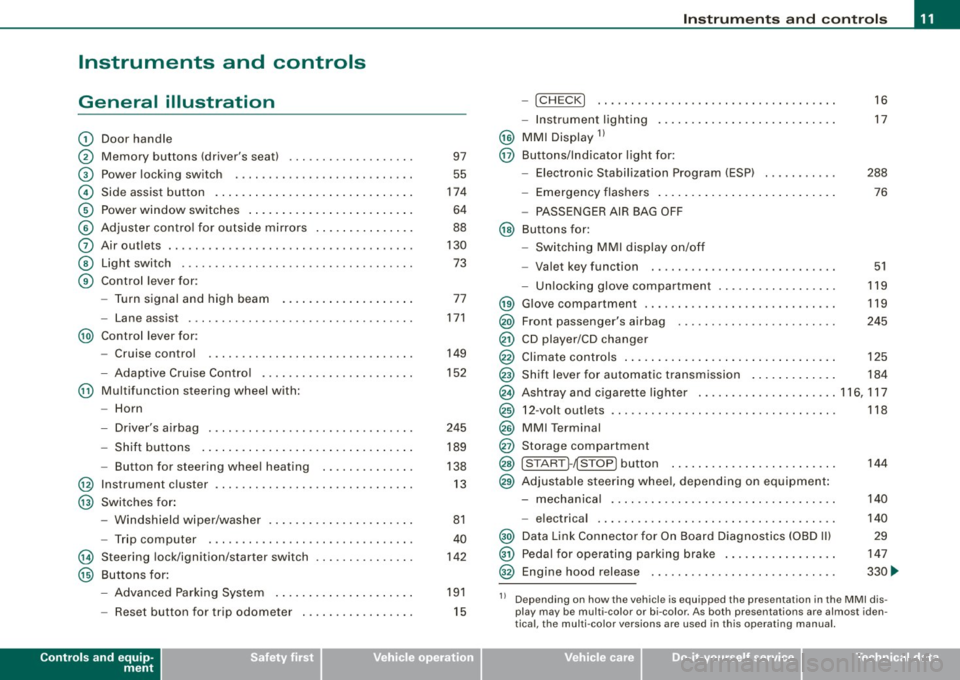
General illustration
G)
0
©
©
©
©
0
©
©
Door handle
Memory buttons (driver's seat)
Power locking switch
Side assist button .. ....... .. .... .... .... ... ... .
Power window switches .......... ..... .. .... ... .
Adjuster control for outside mirrors ...... .... .... .
Air outlets .. ...... ..... ........ .... .... .. ..... .
Light switch ...... .. ... ... . .. .. ..... ... .... ... .
Control lever for:
- Turn signal and high beam
- Lane assist ................. ........... ..... .
@) Control lever for:
-Cruise control
- Adaptive Cruise Contro l .... ... ..... .... .... .. .
@ Multifunction steering wheel with:
- Horn
- Driver's airbag .............................. .
- Shift buttons ............. ........ ... .... ... .
- Button for steering wheel heating
@ Instrument cluster ... .... ....... ...... ......... .
@ Switches for :
@
@
-Windshield wiper/washer ... .... .... .... ... ... .
- Trip computer ..... .. .... ......... ... ....... .
Steering lock/ignition /starter switch
Buttons for:
- Advanced Parking System .......... .......... .
- Reset button for trip odometer . .... .... .... ... .
Controls and equip
ment 97
55
174
64
88
130 73
77
171
149
152
245 189
138 13
81
40
142
191
15
Instruments and controls
-!CHECK] .......... ........ ... .... .... ..... . .
- Instrument lighting ......... .... ....... .... .. .
@ MMI Display 11
@ Buttons/Indicator light for:
- Elec tronic Stabilization Program (ESP) .. ..... .. . .
- Emergency flashers ............. ....... ...... .
- PASSENGER AIR BAG OFF
@ Buttons for:
- Switching MMI display on/off
- Valet key function . ........ .... .... .......... .
- Unlocking glove compartment .............. ... . 16
17
288 76
51
119
@ Glove compartment . . . . . . . . . . . . . . . . . . . . . . . . . . . . . 119
@) Front passenger's airbag . . . . . . . . . . . . . . . . . . . . . . . . 245
@ CD player/CD changer
@ Climate controls . . . . . . . . . . . . . . . . . . . . . . . . . . . . . . . . 125
@ Shift lever for automatic transmission . . . . . . . . . . . . . 184
@ Ashtray and cigarette lighter .. .... ............... 116, 117
@ 12-volt outlets . . . . . . . . . . . . . . . . . . . . . . . . . . . . . . . . . . 118
@ MMI Terminal
@ Storage compartment
@ [START ]-~STOP ] button . . . . . . . . . . . . . . . . . . . . . . . . . 144
@ Adjustable steering whee l, depending on equipment :
- mechanical . . . . . . . . . . . . . . . . . . . . . . . . . . . . . . . . . . 140
- electrical . ........ .... ... .. .... .... ...... ... .
@) Data Link Connector for On Board Diagnostics (OBD Ill
@ Pedal for operating parking brake ...... .... ...... .
@ Engine hood release ...... .... .... .... ...... ... . 140
29
147
330 ...
11 Depending on how the vehicle is equipped the presentation in the MMI dis
play may be multi -color or bi-co lor. As both presentations are almost iden
tical , the multi -color versions are used in this operating manual.
I • •
Page 20 of 426
Instruments and warning/indicator lights
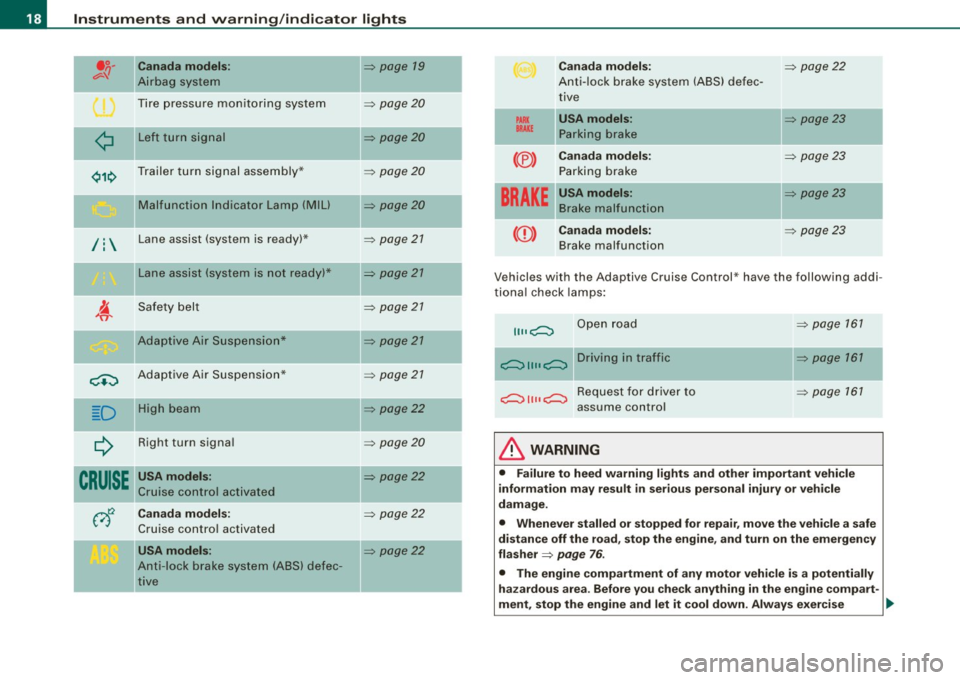
" Canada models:
Airbag system
Tire pressure monitoring system
¢ Left turn signal
Trailer turn signal assembly* Malfunction Indicator Lamp
(Mill
/: Lane assist (system is ready) *
Lane assist (system is not ready)*
Safety belt
Adaptive Air Suspension*
c.::, Adaptive Air Suspension*
-
D II
High beam
Right turn signal
CRUISE " USA models:
Cruise control activated
-Canada models:
Cruise control activated
USA models:
Anti -lock brake system (ABS) defec
tive
=> page 19
=> page20
=> page20
=> page20
=> page 20
=> page 21
=> page 21
=> page 21
=> page 21
=> page 21
=> page22
=> page20
=> page22
=> page 22
=> page22
-
-
-
PARK
BRAKE
(® )
Canada models:
Anti-lock brake system (ABS) defec
tive
USA models: Parking brake
Canada models: Parking brake
----·--USA models: Brake malfunction
BRAKE
((D ) Canada models:
Brake malfunction
=> page 22
=> page23
=> page 23
-=> page23
=> page 23
Vehicles with the Adaptive Cruise Control * have the following addi
tional check lamps:
II II c;::::::::::, Open road
--c;::::::::::, 11 11 c;::::::::::, D r i v i n g i n t raff i c
c;::::::::::, 11 11 c;::::::::::, R e q u e st f o r d r i v e r to
assume control
& WARNING
=> page 161
=> page 161
=> page 161
• Failure to heed warning lights and other important vehicle
information may result in serious personal injury or vehicle
damage.
• Whenever stalled or stopped for repair, move the vehicle a safe
distance off the road, stop the engine, and turn on the emergency
flasher
=> page 76 .
• The engine compartment of any motor vehicle is a potentially
hazardous area. Before you check anything in the engine compart-
ment, stop the engine and let it cool down. Always exercise
~
Page 35 of 426
& WARNING (continued)
vehicle control and an accident. Have your vehicle repaired immediately by your authorized Audi dealer or a qualified workshop.
Drive slowly and avoid sudden, hard brake applications. •
Engine cooling system malfunction -L
A mo/function in the engine cooling system must be
repaired as soon as possible.
When the _ t symbol in the display blinks, then either the
engine coolant temperature is too high, or the coolant level
is too low. An additional driver message can also be
displayed by pressing the [ CHECK] button:
Switch off engine and check coolant level
- Pull off the road .
- Stop the vehicle.
- Turn off the engine.
- Check coolant level => page 338.
- Add coolant if necessary => page 339.
- Continue driving only after the engine coolant
warning/indicator light goes out.
- Contact your authorized Audi dealer for assistance if
necessary.
If the engine coolant level is correct, then the radiator fan may be
the cause of the malfunction.
If the O warning symbol (alternator malfunction) also lights up on
the instrument panel~
page 32, then the fan belt may be damaged .
Controls and equip
ment
Driver information display
& WARNING
• If your vehicle should break down for mechanical or other
reasons, park at a safe distance from moving traffic, turn off the
engine and turn on the hazard warning lights
~ page 76, "Emer
gency flasher
A".
• Never open the hood if you see or hear steam or coolant
escaping from the engine compartment -you risk being scalded.
Wait until you can no longer see or hear steam or coolant
escaping.
• The engine compartment of any vehicle is a dangerous area.
Before you perform any work in the engine compartment, turn of
the engine and allow it to cool. Follow the warning stickers
~ page 324, "Engine compartment".
0 Note
Do not continue driving if the _f_ symbol illuminates. There is a
malfunction in the engine cooling system -you could damage your
engine. •
Engine oil pressure malfunction "l::;r.
The red engine oil pressure warning symbol requires
immediate service or repair. Driving with a low-oil -pres
sure indication is likely to inflict severe damage to the
engine.
If the 'l::::11 symbol appears in the display and blinks, the oil
pressure is too low. An additional driver message can also
be displayed by pressing the [CHECK] button:
Switch off engine and check oil level
Immediate actions
- Pull off the road.
I • •
Page 51 of 426
• For security reasons, replacement keys are only available from
Audi dea lers. •
Master key with remote control
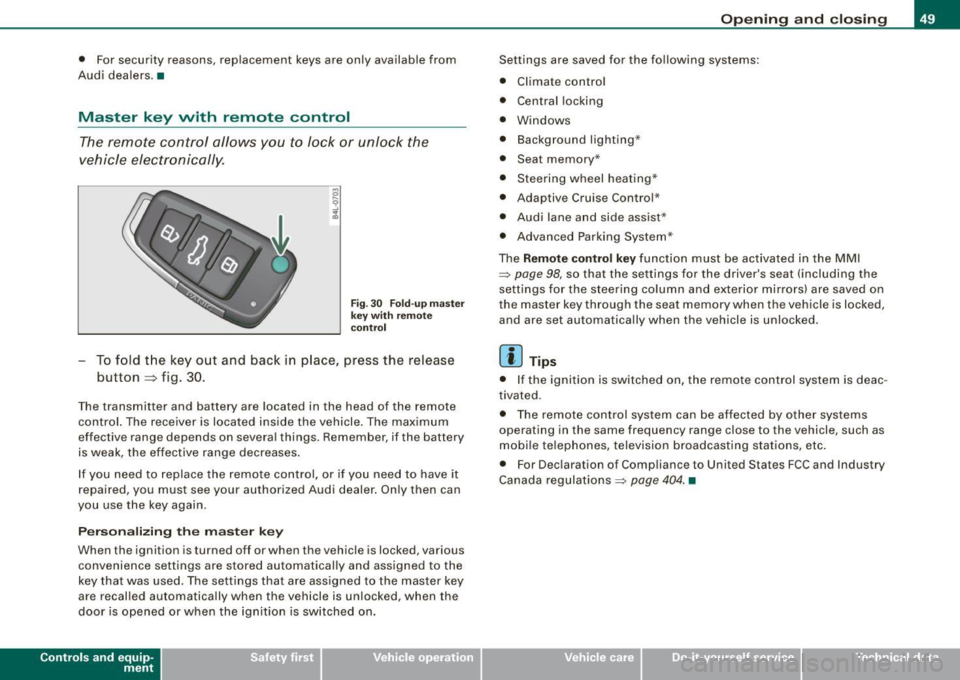
The remote control allows you to lock or unlock the
vehicle electr onically .
Fig . 3 0 F old -u p mas ter
ke y w ith re mo te
co ntro l
To fold the key out and back in place, press the release
button
~ f ig . 30 .
The transmitter and battery are located in the head of the remote
control. The receiver is loca ted inside the vehicle. The maximum
effective range depends on several things. Remember, if the battery
is weak, the effective range decreases .
I f you need to replace the remote contro l, or if you need to have it
repaired, you must see your authorized Audi dealer . Only then can
you use the key again.
P erson alizing the master key
When the ignition is turned off or when the vehicle is locked, various
convenience settings are stored automatically and assigned to the
key that was used. The se tti ngs that are assigned to the master key
are recalled automatically when the vehicle is unlocked, when the
door is opened or when the ignition is sw itched on .
Contro ls and eq uip
ment
Op ening and clo sing
Settings are saved for the fo llowing systems:
• Climate contro l
• Central locking
• Windows
• Background lighting·"
• Seat memory *
• Steering wheel heating*
• Adaptiv e Cruise Control *
• Audi lane and side assist*
• Advanced Parking System *
The
Remote control key function must be activa ted in the MMI
~ page 98, so that the settings for the driver's seat (including the
settings for the steering column and exterio r mirro rs) are saved on
the master key through the seat m emory when the vehicl e is locked,
and are set automatically whe n the vehicle is unlocked.
[ i ] Tips
• I f the igni tion is switched on, the remote cont rol system is deac
tivated .
• The remote control system can be affected by other sys tems
operating in the same frequency range close to the vehicle, such as
mobi le te lephones, television broadcasting stations, etc .
• For Dec laration o f Compliance to United States FCC and Industry
Canada regulations ~
page 404. •
Vehicle care I I irechnical data
Page 126 of 426
• .___w_ a_ rm __ a_ n_ d_ c_o _l_d ________________________________________________ _
Energ y man ag em ent
To prevent the battery from being discharged and to restore the
balance of energy, components which require large amounts of
energy are temporarily cut back or switched off=>
page 295.
Heating systems in particular require a great deal of energy. If you
notice, for example, that the seat * or rear window heating is not
heating, they have been temporarily cut back or switched off by
ene rg y m anage ment. These systems are available again as soon as
the energy balance has been res tored .
& WARNING
Reduced visi bilit y is da ng ero us a nd can cau se a ccidents.
• For sa fe driving it i s very imp orta nt that all window s be fr ee of
ic e, s now a nd conde nsation .
• Completely familiarize your self with the proper use and fun c
tion of the heat ing and ventilat ion system and e spe cia lly how to
defog and defrost the windows .
• Neve r use the wind shield wipe r/w asher syste m in free zing
weather until y ou have warmed the wind shield first , usi ng the
heat ing and ventil ation system . The wash er solution m ay freeze
on the wind shield and r educe vi sibilit y.
0 Note
• If you suspect that the air conditioner has been damaged, turn
on ECON and contact an authorized Audi dealer to have the system
inspected.
• Repairs to the Audi air conditioner require special technical
know ledge and special to ols. Contact an authorized Audi dea ler for
assistance.
[ i ] T ip s
• Keep the air intake slots (in front of the windsh ie ld) free from ice,
snow and debris in order to maintain the proper function of the
climate contro l system.
• Air inside the vehicle escapes through air vents located in the
s ide tr im panels beneath the rear side windows. Make sure that the
out let slots are not covered by clothing, etc.
• Climate control works most effectively if the windows and the
Panoramic s liding sunroof* are c losed. However, if the interior of a
parked vehic le is extreme ly hot from the sun's rays, briefly opening
the windows can speed up the cooling process. •
Page 150 of 426
• .___O_ n_ t_h _e _ r_o _a_ d __________________________________________________ _
When you park your vehicle on hills , do the
following
- Sto p th e vehicle usi ng the brake pe dal.
- App ly the parkin g brake firml y.
- If you ar e park ing head ed
downhill , turn the fr ont w heels
t o wa rd the curb.
- I f yo u are parkin g hea ded
uphill , turn the fro nt wh ee ls
a way fro m t he c urb.
M ove t he selecto r leve r into the
P p osition .
- Swi tch off the e ngine a nd re move th e igni tio n k ey fro m
t he ignition loc k.
& WARNING
This is how you can reduce the risk of injury when leaving your
vehicle.
• Never park the vehicle where it can come in contact with dry
grass, spilled fuel or any other flammable materials.
• When parking on hills , always turn the wheels so that the front
wheels will first roll into the curb, if the vehicle should start to roll .
• Never allow anyone -especially small children -to remain in the
vehicle when it is locked. Locked doors make it more difficult for
rescuers to access the passenger compartment in the event of an
emergency. Danger to life!
• Never leave children unsupervised in the vehicle. Children
could release the parking brake or move the gearsh ift lever out of
gear . The vehicle could start to roll away and cause an acc ident.
• No matter what the season is, the temperature in a parked
vehicle can reach dangerous levels .
0 Note
• Please e xercise care whe n you pa rk your ve hicle i n par king areas
with parking barrie rs or curbs . Parking barriers and curbs vary in
hei ght a nd could damage you r bum per a nd rela ted componen ts as
the front of your vehicle moves over a barrier or curb that is too
high , as you park o r as y ou bac k out o f a par king s pot. In o rde r to b e
sure that no such damage can occur, you may wish to stop short of
h av ing the fr ont tir es of you r car touch th e parkin g bar rier or cu rb.
• Pl ease a lso exercise exceptional care when you drive up o r down
s tee p ra mp s or drive over curbs o r other ob stacl es, for wh ich th e
vehic le is not designed, because com ponents of the vehicle c lose to
th e gr oun d, suc h as bump er cove rs, s poile rs and suspens io n an d
e x haust syst em compon ents, may become damaged. •
Starting on hills
Hill hold assist ma kes it eas ier to start on hil ls.
T he system is activated when the b ra ke peda l is depressed
for a few
seconds .
Fo r thi s, the veh icle must be stand ing in uphill d riv in g
di rection.
A ft er r elea sin g the bra ke ped al, t he br ake po wer i s held f or a
brief
moment to prevent the vehicle from rolling back when startin g. At
t hi s t ime, yo u ca n ea sily begi n to move yo ur vehicle.
& WARNING
• If you did not begin moving immediately after relea sing the
brake pedal , under certain c ircumstances , the vehicle would begin
to roll backward . Depress the brake pedal immediately or engage
the parking brake .
• Should the engine stall , depress the brake pedal immediately
or engage the parking brake . .,_
Page 193 of 426

___________________________________________ A_ d_ v_ a_n _ c_ e_ d_ P_a _ r_ k_ i_n -=g=-- S_ yc..,_ s_t _ e _m _ __._
Advanced Parking System
Advanced Parking System with rear
view camera
Applies to veh icles : with Advanced Pa rking System with rear view camera
General information
Fig. 205 Trunk lid:
Location of the rear
view camera
In the case of Advanced Parking System with rear view camera, the
visual display is installed in combination with the front and back acoustic parking assist and the rear-view camera.
The rear -view camera is located in the rear lid~ fig. 205 and assists
the driver when parking in reverse . The picture from the rear-view
camera on the MMI display shows a mirror view of a section of the
area behind the vehicle~
page 196, fig. 211.
[ i J Tips
The visual image or rear-view camera picture is available as soon as
the MMI display or the MMI is switched on or the start -up phase is
completed. •
Contro ls and eq uip
ment
App lies to vehicles: with Advanced Parking System w ith re ar view came ra
Front and rear acoustic parking assist with
visual display and rear-view camera
The acoustic parking assist gives an acoustic and visual
signal when obstacles are detected, and the rear-view
camera provides further aid when parking.
Activation
Fig. 206 Section from
center console: switch
for acoustic parking
assist
Fig . 207 MMI display :
visual display of
distance to a detected
obstacle
When you engage reverse gear, the Audi parking system
is activated automatically, or .,.
Vehicle care I I irechnical data
Page 194 of 426
• .___A_ d_v_ a_ n_c_ e_ d_ P _a_r_k _i_ n -=g,_ S-=y"- s_ t_ e_ m __________________________________________ _
-Press the sw itch PJJJ! in the cente r console ~ page 191,
fig. 206 t o activate the A udi pa rking system m anually .
Activation of the acoustic parking system is confirmed by
a brief acknowledgement sound . The indicator light in
the switch lights up.
D ea ctivation
If you drive forwards faster tha n approx. 6 mph (10 km/h),
or
- if you switch the ign ition off, the entire acoustic parking
assist is automatically deactivated, or
- you can press the sw itch
P111! i n the center console
=> page 191, fig. 206 to deact ivate the Audi parking
system. The indicator light in the switch goes out.
You have to turn on the acoustic parking assist m anuall y if you wish
to park the vehicle forwards or if you w ish to approach an obstacle
forwards and want a distance warning .
The range at which the sensors start to measu re is
about:
Front
Rear
W arning ton es side
cen
te r
side
cen ter 3 ft (0
.90 ml
4ft (1.20 ml
2 ft (0.60 ml
5 .2 ft (1.60 ml
Distance warning is given by chimes which are generated by a
signal generator . The volume and the pitch of the chimes can be
adjusted in the MMI => page 201.
Mute In the case of vehic les with automa tic transmission, an acoustic
distance warning is discontinued when the transmission selector lever is moved to the P position. However, the system remains
active
. As soon as the selector lever is moved from the
P posi tion
and the vehicle approaches an obstacle, the acoustic distance
warning resumes .
Dri ving fo rward/ba ckvv ard
Distance warning when driving forward/backward is based o n
detection of an obstacle in the range of the parking assist . As the
distance dec reases, the time interval between the audible tones
becomes shorter.
When the distance is less than approx . 1 ft (0.30 m), the tone
becomes continuous. At this point you shou ld s top backing up or
driving forward .
If the distance to an obstac le remains the same, the vo lume of the
distance warning is gradually reduced after about
4 seconds (does
not app ly to the zone for the cont inuous tone). If you sta rt to
approach the detected obstacle again, the distance warning will
sound at the normal volume again .
P a rk ing
When you selec t ano ther gear when parki ng (e .g . reverse/forward),
the warning tones are temporarily suppressed, but the visual display remains on the MMI display . If you start approaching a
detected obstacle again, the distance warning wi ll sound at the
normal vo lume again .
Vi sual disp lay
T he segments on the MMI display indicate a change in the distance
between the vehicle and an obstacle . The number of segments
displayed depends on the obstacles in front of or behind the
vehic le. The c loser the vehic le comes to the obstacle, the closer the
segments approach the vehic le => page 191, fig. 207. When the
segment before last is disp layed, the veh icle has reached the colli
sion zone. At this point you should stop backing up or driving
forward =>
&,. ..,.
Page 195 of 426

____________________________________________ A_d_ v_ a_n_ c_ e_d _ P_a_ r_ k_ i_ n ..::g==-- S_ y=- s_t _e _m __ lllll
T he image in the visua l display can be switched off on the MMI
display ::::> page
203. The acoustic distance warning remains active.
If you press a function button on the MMI termina l, the visual
display disappears . Manually switching the parking assist on again
via the
p ,y 1 switch shows the visual image on the MM I display aga in.
Further information regarding the MMI terminal is included in the
MMI user's manual.
R ear-view camera (rear view )
The rear-view camera picture::::> page 196, fig. 2 12 appears on the
MM I display as a mirror image. The rear -view camera picture has
orientation lines and marked s urfaces projected into it as an aid to
the parking process ::::> page
194. The red line in the picture
::::> pag e
194, fig. 208 or ::::, page 194, fig. 209 indicates th e collis ion
area . You shou ld stop backing up, preferably before you reach this
point ::::>
&.
If your vehicle is close to an obstacle, the visual distance display
a lso appears in the picture from the rear -view camera . This superim
posed display is intended to help d isplay the relevan t critica l vehicle
area.
I f the visual d isplay is shown on the MMI display and you press the
control button with the Rear view function::::> page
191, fig. 207, the
pictu re from the rear -v iew came ra is displayed.
If the picture from the rear -view camera is s hown a nd you press the
control button w ith the Graphic function ::::, page
196, fig. 212, the
visual display is shown.
T he picture from the rear -view camera can be switched off on the
M MI display ::::, page
203 . The acoustic distance warn ing re mains
active.
I f you press a function button on the MMI te rmina l, the rear-view
camera p icture disappears. The rear -v iew came ra picture reappears
the next time you park. But the picture from the rear -view camera
can also be shown aga in on the MM I display by manually switching
off and on with the
P •1A switch . Further information regarding the
MMI terminal is included in the MM I user's ma nual.
Controls and equip
ment
& WARNING
• Sensor s have dead space s in which obje cts cannot be
detected. Be e spe cially careful to check for small children and
an imals before ba cking up . Small children and animals will not
always be detected by the sensors.
• The Audi parking system is not a substitute for being careful
and alert when backing up. Be e spe cially careful during parking
and similar maneuver s. A lways watch where you are dri ving and
make sure that nothing is in the way.
• Remember that low ob sta cles which have already been
s ignaled may pass below the system' s sen sing zone when the
v ehi cle is ba cking up . The fa ct that the signal stop s doe s not mean
that you have cleared the obstacle . When the signal stops , impact
is imminent . Obje cts su ch as trailer hit che s, chain s, narrow posts
or fences covered by a thin l ayer of paint may not always be
detected by the sy stem. They can still damage your vehicle
without warning .
• Alway s make sure that the volume and frequency of the chime s
is adjusted so that you can eas ily hear the acoustic distance signal
even if the radio is playing , the air -conditioner blower is on High or
there is a high level of out side noise .
- Check the setting s whenever someone else has dri ven the
vehicle before you.
• Improper relian ce on the Aud i parking sy stem can cau se colli
sions and serious per sonal injury .
- Never rely only on parking assi st when ba cking up .
- Always check rear view mirrors to make sure it is safe to back
up .
[ i ] Tips
• The rear -view camera picture is available as soon as the MMI
Disp lay or the MMI is swi tch ed o n, or the start -up phase is
completed.
I • •