Ami AUDI Q7 2010 Owner´s Manual
[x] Cancel search | Manufacturer: AUDI, Model Year: 2010, Model line: Q7, Model: AUDI Q7 2010Pages: 390, PDF Size: 93.04 MB
Page 64 of 390

Opening and closing
from heating up, you should close both sunshades when you
park your vehicle in the sun.
Opening and closing front sunshade
Tap the rear -:c;"J" of the rocker switch~ page 61, fig. 47 or
the rocker switch for rear-seat passengers~
page 61,
fig. 48 briefly to open the sunshade fully.
- Tap the front
·'J.rT of the rocker switch briefly to close the
sunshade fully~& .
- To set an intermediate position manually, press the front or rear of the rocker switch (depending on the position of
the shade)
until the desired position is reached ~ & .
Opening and closing rear sunshade
-Hold the sunshade by the grip and push it to the desired
position.
& WARNING
Never close the sunshade without paying attention or checking -
danger of injury! •
Applies to veh icles : w ith Panoram ic sliding sunroof
Emergency closing
In an emergency, the Panoramic sliding sunroof can be
closed electrically.
If the Panoramic sliding sunroof detects an object in its path
when it is closing, it will open again automatically. In this
case, you can close the roof with the power emergency
closing function .
Emergency closing of front roof segment
- Turn the switch~ page 59, fig . 45 @ to the normal posi
tion @.
- Within five seconds after the sunroof opens automati
cally, pull the switch until the roof segment closes.~&.
The driver's and front passenger's doors must be closed.
- If the power emergency closing function is not possible, you must close the roof manually~
page 63.
Emergency closing of rear roof segment
-Within five seconds after the sunroof opens automati
cally, press the front
e:> of the rocker switch~ page 59,
fig. 45 ® until the roof segment closes~&. The driver's
and front passenger's doors must be closed.
- If the power emergency closing function is not possible,
you must close the roof manually ~
page 64.
& WARNING
Improper use of the Panoramic sliding sunroof can cause serious
personal injury.
• Be careful when closing the Panoramic sliding sunroof. Not
paying attention could cause you or others to be trapped and
injured as the Panoramic sliding sunroof closes.
• Always take the key with you when you leave the vehicle to
prevent injuries caused by the Panoramic sliding sunroof closing
• Never leave children or persons requiring assistance alone in
the vehicle, especially when they could access the vehicle keys.
Unsupervised use of the keys can result in the engine being started
or use of vehicle systems such as the power windows, etc. which
could result in serious injury. The doors could be locked with the
remote key, delaying help in an emergency. .,,.
Page 65 of 390
& WARNING (continued)
• The Panoramic sliding sunroof will continue to operate until
the ignition key has been removed and one of the front doors has
been opened .•
A pp lies to vehicles : w ith Panoram ic sl iding sunroof
Mechanical emergency closing for front
roof segment (Step 1)
The Panoramic sliding sunroof can be closed manually in
an emergency.
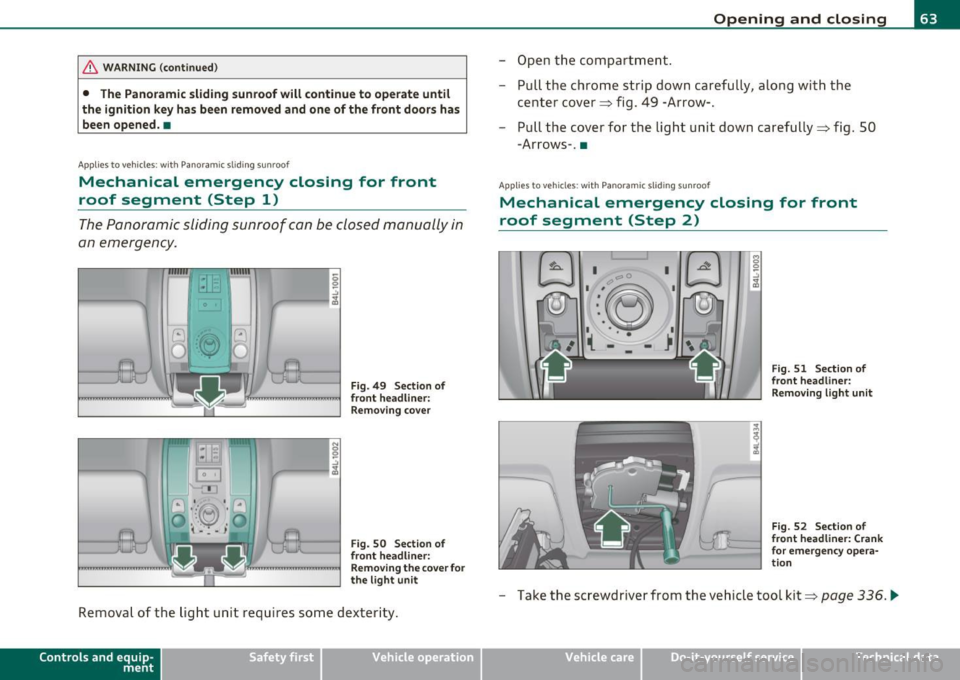
Fig. 49 Section of
front headliner: Removing cover
Fig. 50 Section of
front headliner:
Removing the cover for
the light unit
Removal of the light unit requires some dexterity.
Contro ls a nd e quip
m en t Vehicle
OP-eration
Opening and closing
-Open the compartment.
- Pull the chrome strip down carefully, along with the
center cover~ fig. 49 -Arrow-.
- Pull the cover for the light unit down carefully~ fig. 50
-Arrows-. •
Applies to v ehicles: w ith Pano ramic slid ing sun roof
Mechanical emergency closing for front
roof segment (Step 2)
I 0
'-:'~
-~ •-- 1 I • • •
( -
I
I I
Fig. 51 Section of
front headliner:
Removing light unit
Fig. 52 Section of
front headliner: Crank
for emergency opera
tion
- Take the screwdriver from the vehicle tool kit~ page 336 . .,_
Vehicle care Do-it-yourselt service iTechnical data
Page 66 of 390

Open ing and closing
- R emove the two screws=> fig . 5 1 - Arrows- from the light
unit.
- Carefully remove the light unit .
- Remove the crank from the bracket on the fuse cover on
the left front of the instrument panel=>
page 346,
fig . 258 ® ·
- Push the crank into the hexagonal hole as far as it can go
=>
page 63, fig. 52.
- Hold the crank down and turn it to close the roof .
- Re-install the light unit . For installation, reverse the
removal sequence.
- Return the crank to its location in the fuse box cover
=>
page 346, fig. 258 and install the cover.
- Have the problem corrected.
[I] Tips
To turn the crank for emergency closing more easily, you should use
the screwdriver handle as an aid~
page 63, fig. 52. First, remove the
screwdriver from the handle, then push the handle onto the crank. •
Applies to v ehic les: with P anor amic s lidin g sunroof
Mechanical emergency closing for rear roof
segment
- Carefully remove the cover for the rear roof segment drive
in the rear area of the headliner .
- Remove the crank from the bracket on the fuse cover on the left front of the instrument panel=>
page 346,
fig. 258 ® ·
- Press the crank into the hexagona l hole in the drive as far
as it wi ll go (bas ica lly, as shown in=>
page 63, fig . 52) .
- Ho ld the crank down and turn it to close the roof.
- Re-install the cover.
- Return the crank to its locat ion in the fuse box cover
=> page 346, fig. 258 and install the cover .
- Have the problem co rrected .
[I] Tips
To turn the crank for emergency closing more easily, you should use
the screwdriver handle from the tool kit~
page 336 as an aid. First,
remove the screwdriver from the handle, then push the handl e onto
the c rank .•
Page 70 of 390
Clear vision
Applies to vehicles : with Adaptive Light
Adaptive Light
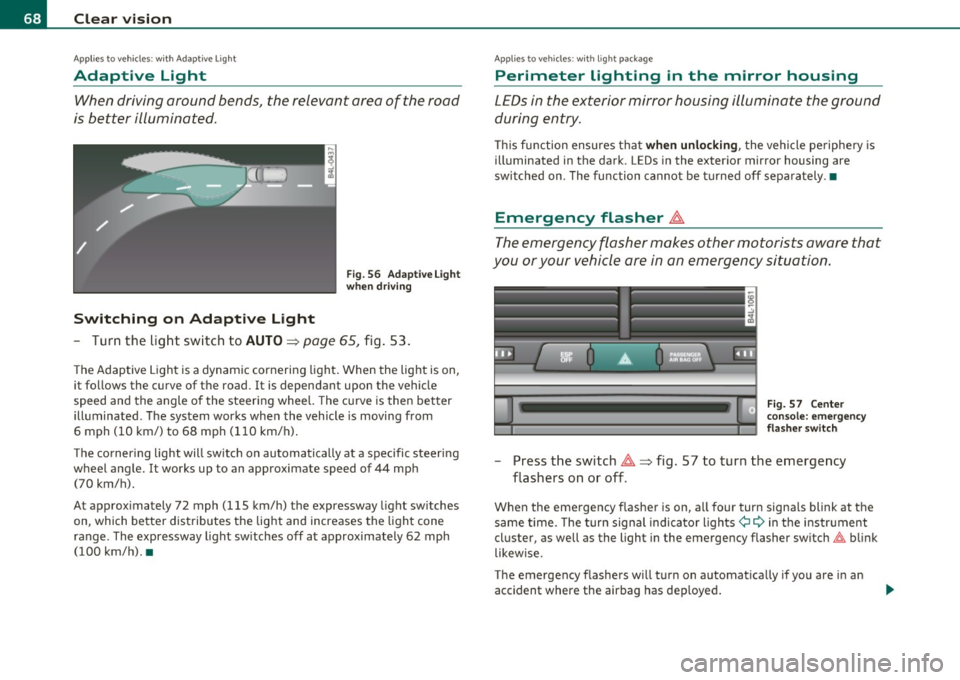
When driving around bends, the relevant area of the road
is better illuminated.
Switching on Adaptive Light
Fig . 56 Adaptive Light
when driving
- Turn the light switch to AUTO~ page 65, fig. 53.
The Adaptive Light is a dynamic cornering light. When the light is on,
it follows the curve of the road. It is dependant upon the vehicle
speed and the angle of the steering wheel. The curve is then better
illuminated. The system works when the vehicle is moving from
6 mph (10 km/) to 68 mph (110 km/h).
The cornering light will switch on automatically at a specific steering
wheel angle. It works up to an approximate speed of 44 mph
(70 km/h).
At approximately 72 mph (115 km/h) the expressway light switches
on, which better distributes the light and increases the light cone
range . The expressway light switches off at approximately 62 mph
(100 km/h). •
Applies to vehicles : w ith light package
Perimeter lighting in the mirror housing
LEDs in the exterior mirror housing illuminate the ground
during entry.
This function ensures that when unlocking, the vehicle periphery is
illuminated in the dark. LEDs in the exterior mirror housing are
switched on. The function cannot be turned off separately .•
Emergency flasher ~
The emergency flasher makes other motorists aware that
you or your vehicle are in an emergency situation.
Fig. 57 Center
console: emergency
flasher switch
-Press the switch~~ fig. 57 to turn the emergency
flashers on or off .
When the emergency flasher is on, all fou r turn signals blink at the
same time. The turn signal indicator lights¢
9 in the instrument
cluster, as well as the light in the emergency flasher switch~ blink
likewise.
The emergency flashers will turn on automatically if you are in an
accident where the airbag has deployed.
Page 102 of 390
llffl!I.___S_ e_a _t_ s_ a_ n_ d_ s_t _o _r_ a...: g,,._ e ______________________________________________ _
Roof rack
First things first
A roof rack can be fitted to carry additional luggage on
the roof.
- A lways read and follow the instruct io ns prov ided by the
roof rack manufacturer when the roof rack system m ust
be installed .
If you are tra nspo rting l uggage or other objects on the roof, please
note the following:
• Your vehicle has specially designed aerodynamic roof rails. Only
install a roof rack specifica lly designed fo r you r model. Contact the
nearest authorized Audi dea ler for information on approved mod ular
roof rac ks for your vehicle .
• T hese approved roof racks a re the basis for a complete roof rack
system. Add itiona l attachments for the basic roof rack are necessary
to safe ly transport luggage, bicycles, surf boa rds, skis or sma ll boats .
All necessary hardwa re for these systems is ava ilable at yo ur a utho
r ized Audi dealer .
• We recommend that you keep t he installat ion inst ruct ions for
your roof rack system together with your Owner's literature in the
vehicle.
When should the roof rack be remo ved?
• Before going through an automat ic car wash (it is best to ask the
car wash operator for advice) .
• When not in use, to reduce fuel consumption, wind noise and to
guard against theft .
& WARNING
• Use of an unapproved roof rack or incorrect mounting of an
approved roof r ack can cau se the roof rack or the items atta ched
to it to fall off the roof onto the road.
• Object s falling from the roof of a v ehicle can cau se a crash and
personal injury .
• Only mount the system b etween the markings shown in
=> page 101, fig. 96.
• The roof rack sy stem must be in stall ed e xactly ac cording to the
instructions provided.
0 Note
• Your vehicle warranty does not cover any damages to the vehicle
caused by using roof ra ck s or mounting s truc tures not appr oved by
Audi for your veh icle . The same applies to damage result ing from
incor re ct roof rac k ins tallat io n.
• Always check the roof rack mountings and hardware before each
t rip and dur ing a trip to ma ke sure everyth ing is sec urely tig htened. If
necessary, ret ighten the mountings and check the entire system from
t ime to time.
• After mounting a roof rack system, or when yo u transport objects
on the roof of your veh icle, t he heigh t of the vehicle is natura lly
increased . Be careful whe n driving under low br idges or in park ing
g ar ages for ex ample . This could ca use damage to the lo ad and even
the vehicle itself .•
Page 103 of 390
_______________________________________________ S_ e_ a_t _s_ a_n_ d_ s_ t_ o _ r_a """g::;. e _ __._
Roof rack mounting locations
Roof racks must be installed only at the locations marked
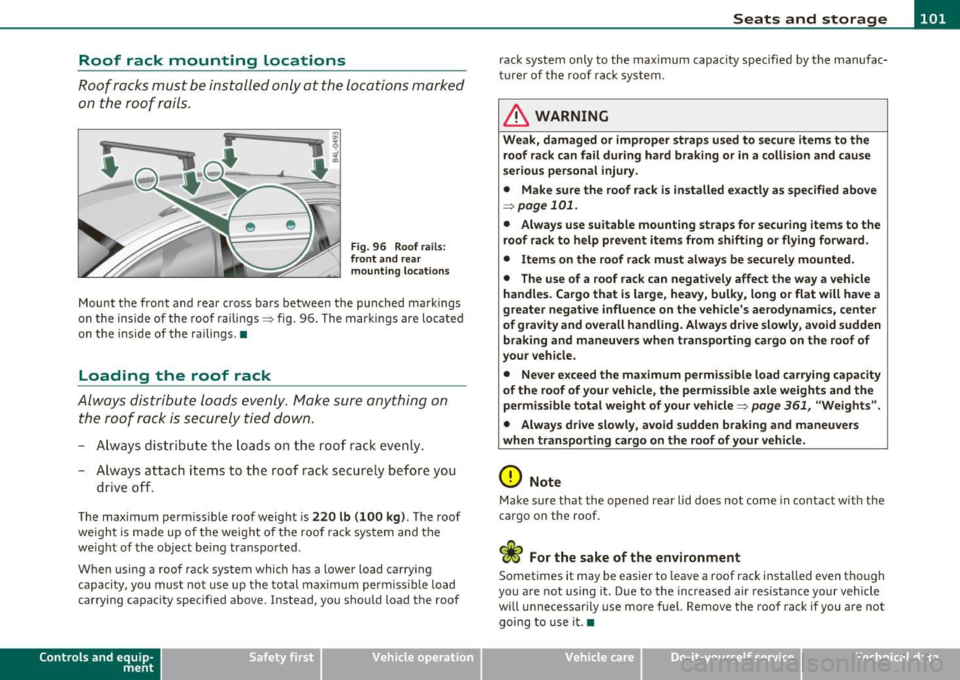
on the roof rails .
Fig. 96 Roof ra ils :
fr ont and rear
m ounting l ocations
Mount the front and rear cross bars betwee n the punched markings
on the inside of the roof railings :::> fig. 96. The marki ngs are lo cate d
on t he inside of the railings .•
Loading the roof rack
Always dist ribu te loads evenly . Make sure anything on
the roof rack is securely tied down.
- A lways distr ibu te the loads o n the roof rack even ly.
- A lways attach items to the roof rack secure ly before you
drive o ff.
The maximum permiss ible roof weight is 220 lb (100 kg ). The roof
we ight is made up o f the weight of the roof rack system and the
we ight of the object being transported .
When using a roof rack system which has a lower load carry ing
capacity, you must not use up th e total max imum permiss ible load
carrying capac ity specified above. Instead, you should load the roof
Con tro ls a nd e quip
m en t Vehicle
OP-eration
rack system only to the max imum capacity specified by the manufac
tu rer of the roof ra ck system.
& WARNING
Weak, damaged or improper straps u sed to secure item s to the
roof rack can fail during hard braking or in a colli sion and cause
s e riou s personal injury .
• Make sure the roof rack is i nstalled e xactly as spe cified abo ve
~ page 101 .
• Always u se suitable mounting strap s fo r se curing items to the
roof rack to help pre vent items from shifting or fl ying forward .
• Item s on the roof rack mu st alwa ys be secu rel y mounted.
• The use of a roof rac k can negati vely affect the way a vehicle
handle s. Cargo that i s large , he avy , bulky, long or flat will have a
greater negative influence on the vehicle 's a erodynami cs, center
of gr avit y and overall h andling . Alway s drive slowl y, avoid sudden
braking and maneuvers when tran sporting cargo on the roof of
your veh icle .
• Never e xceed the maximum permi ssible load carr ying capacity
of the r oof of your vehicle , the permi ssible a xle weight s and the
permis sible tot al weight of your v ehicl e=>
page 361, "W eights ".
• Alway s drive slowly , avoid sudden braking and maneuver s
when t ran sport ing cargo on th e ro of of y our veh icle.
0 Note
Make sure that the opened rear lid does not come in contact with the
cargo on the roof .
c£> For the sake of the environment
Sometimes it may be easier to leave a roof rack installed even tho ugh
you a re not using i t. Due to the inc reased air res istance your vehicle
will unnecessarily use more fuel. Remove the roof rack if you are not
going to use it. •
Vehicle care Do-it-yourselt service iTechnical data
Page 112 of 390

ffl..__w __ a _r _m __ a_n _ d_ c_ o_ ld ________________________________________________ _
Energy management
To prevent the battery from being discharge d and to res tore the
balance o f energy, compone nts wh ich require large amo unts o f
energy a re tempora rily cut back or sw itched off=>
page 259. Heating
systems in part icular requ ire a grea t dea l of energy . If you notice, for
example, that the seat* or rear w indow heating is not heating, they
have been t empo rar ily c ut b ack o r switched off by
energy manage
ment .
These systems are available aga in as soon as the energy
b ala nce has been resto red.
& WARNING
Reduced visibility is dangerous and can cause accidents.
• For safe driving it is very important that all windows be free of
ice, snow and condensation.
• Completely familiarize yourself with the proper use and func
tion of the heating and ventilation system and especially how to
defog and defrost the windows.
• Never use the windshield wiper /washe r system
in freezing
weather until you have warmed the windshield first , using the
heating and ventilation system . The washer solut ion may freeze
on the windshield and reduce vi sibility.
0 Note
• If you suspe ct that the clima te co ntro l system has been damaged,
switch the system off to avoid furt her damages, and have it inspected
by a qua lified deale rs h ip.
• Repa irs to the A udi a ir conditioner require special technica l know l
edge and special tools . Contac t an au thor ized A udi d ealer for assis
tance .
[I] Tips
• Keep the air inta ke s lot s (in front of the w in d shield) free from ice,
snow and debris in or der to maintain the proper function of the
cl ima te control sys tem .
• Air ins ide the veh icle escapes through air vents located in the si de
t rim panels be neat h the rea r side wi ndows . M ake sure that the outlet
slots are not covered by clothing, etc.
• Climate control works most effective ly i f the windows and the
Panoram ic sliding sunroof * are closed. However, if the interio r of a
pa rked vehi cle is ex tremely hot from the sun 's rays, br iefly ope ning
the windows can speed up the coo ling process .•
Controls
Thi s overvi ew will h elp y ou to fa miliari ze yours elf with the
air conditioning controls .
a • •
Fig. 113 Air co nd iti oning contr ol element s
Page 117 of 390
Warm and cold Ill
----------------
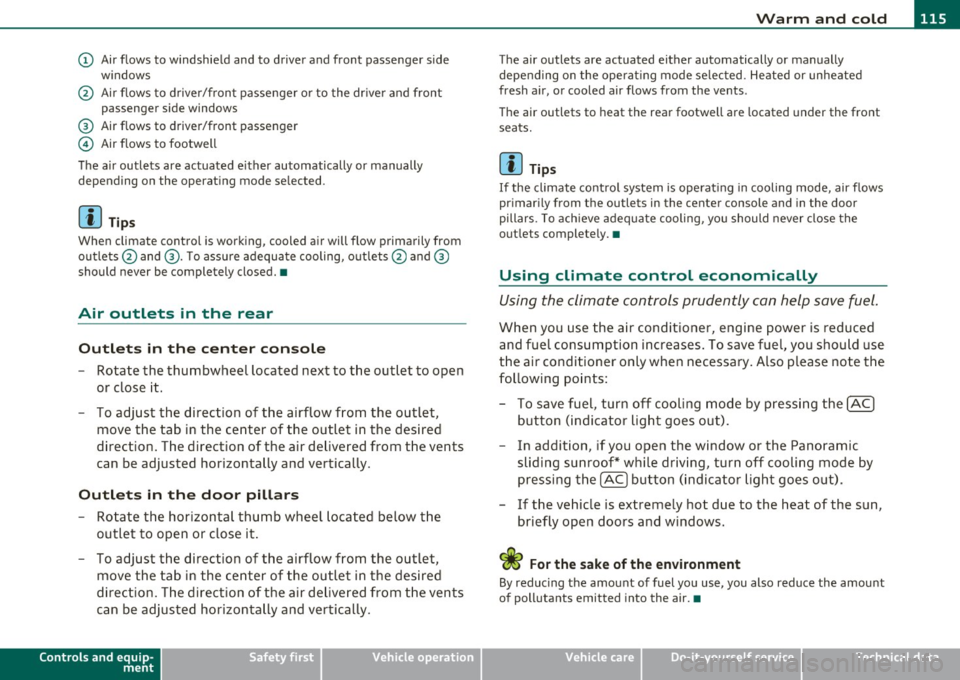
(D Air flows to windshield and to driver and front passenger side
w indows
@ Air flows to driver/front passenger or to the dr iver and front
passenger side windows
® Air flows to driver/front passenger
© Air flows to footwell
The air outlets are actuated e ither automatically or manually
depending on the operating mode selected.
[ i ] Tips
When climate control is working, cooled air will flow primarily from
outlets @and ®· T o assure adequate cooling, outlets @and ®
should never be completely closed. •
Air outlets in the rear
Outlets in the center console
-Rotate the thumbwheel located next to the outlet to open
or close it.
- To adjust the direction of the airflow from the outlet,
move the tab in the center of the outlet in the desired
direction. The direction of the air delivered from the vents
can be adjusted horizontally and vertically .
Outlets in the door pill ars
- Rotate the horizontal thumb wheel located below the
outlet to open or close it .
- To adjust the direction of the airflow from the outlet,
move the tab in the center of the outlet in the desired
direction. The direction of the air delivered from the vents
can be adjusted horizontally and vertically.
Controls and equip
ment Safety first
The air
outlets are actuated either automatically or manually
depending on the operat ing mode se lected. Heated or unheated
fresh air, or cooled air flows from the vents.
T he air outlets to heat the rear footwell are located under the front
seats.
[I) Tip s
If the climate cont rol system is operat ing in cooling mode, air flows
primarily from the outlets in the center console and in the door
pillars . To ach ieve adequate cooling, you should never close the
outlets completely. •
Using climate control economically
Using the climate controls prudently can help save fuel.
When you use the air conditioner, engine power is reduced
and fuel consumption increases . To save fuel, you should use
the air conditioner only when necessary . Also p lease note the
following points:
- To save fuel, turn off cooling mode by pressing the
[AC)
button (indicator light goes out).
- In addition, if you open the window or the Panoramic
sliding sunroof* while driving, turn off cooling mode by
pressing the
[AC] button (indicator light goes o ut).
- If the vehic le is extremely hot due to the heat of the sun,
briefly open doors and windows.
<£' For the sake of the environment
By reducing the amount of fuel you use, you also reduce the amount
of pollutants emitted into the air.•
Vehicle care Technical data
Page 118 of 390

lffll..__w __ a _r _m __ a_n _ d_ c_ o_ ld ________________________________________________ _
Rear Air Conditioning
Applies to vehicles: with four-zone automat ic co mfort air conditioning
Rear air conditioning -controls
This overview is to assist you in familiarizing yourself with
the rear air conditioning controls.
F ig. 1 15 R ear air
c o nditi oni ng con trol s
The left display indicates the temperature selected for the rear left
passenger, the right display indicates the tempe rature selected fo r
the rear right passenger. If the settings for seat heat ing *, air distr i
bu tion or the a ir conditioni ng fan are changed, the relev ant indicator
w ill appear briefly on the d isp lay.
Func tions are set by rotating the contro l o r are swi tched o n and
off by
tapping the butto ns. The indicator light in the button illuminates
when the function is active .
Button(s)
Function Page
[ON/OFF) Climate control on/off => page 116
(AU TO ) Automa tic mode => page 117
Regulatora> G T emper ature se lec tion => page 11 7
Button(s) Function
~ Seat heating*
-
Fan
Air dis tribution
Page
::!> page 120
-
=> page 117
::!> page 117
al T he regulator is also used to set the fan speed, a ir d istr ibution and seat
heating.
-
Synchronizing r ear air conditioning: By pressing and holding the
regu lator on the rear left side, the temperature setting of the rear
left side can be switched to the rear right s ide a nd v ice versa. The new
temperature is shown in the display. •
Applies to vehicles: with four -zone auto matic comfo rt air con ditioning
Turning on and off [ ON/OFF ]
Turning on rear air conditioning
-Press th e I ON/OFF) butt on, o r
- Press the !A UTO] b utton .
Turning off rear air conditioning
- Press the [ O N/OFF] but ton to sw itch the air condition ing
off and to bloc k th e air supply from the outs ide .
The air conditioner turns back on when yo u press the temperature
regu lator
or one of t he buttons .
[ i ] Tips
If the power child safety loc k is o n, the rear ai r cond it ion ing contro l
element will not operate. In this case, dashes" ••• " will appear in the
a ir conditioning con trol element display. •
Page 139 of 390
__________________________________________ A_ d_ a_,_ p_t _iv _ e_C_ r_u _i _ s _e _C_ o_n_ t_ r_ o_ l __ ffl'II
preparation. Th is function does not p erfo rm any e mergency braki ng
man eu ver s by its elf; th e dr iver m ust alway s app ly the b ra kes .
& WARNING
If ACC initiates a braking maneuver, the brake pedal will be
retracted . Interference with the brake pedal can prevent ACC from
slowing the vehicle down and cause a crash and serious personal
injury .
• Never put anything
in the driver's footwell or let anything fall
into it. An object in the driver 's footwell can interfere with the
pedals and prevent the accelerator from being used to override
ACC or prevent ACC from being switched off when the brake pedal
is depressed and also prevent the vehicle from being slowed down
or stopped.
• Only use floor mats that keep the area around the pedals free
and that can be securely fastened to the footwell.
• Never drive with your foot underneath the brake pedal.
• Always read and heed the information and WARNINGS~
& in
" Description " on
page 134.
& WARNING
• Never rely on the distance control feature of ACC alone to
prevent rear-end collisions. Always be prepared to brake and take
evasive action to avoid collisions and other accident situations.
• Never allow the closing speed between you and other vehicles
to be so high that the Adaptive Cruise Control may not be able to slow your vehicle safely. If closing speed is too high , you must
apply the brakes yourself to reduce the risk of a rear-end crash.
[I] Tips
Please note tha t the amount of accelerat ion the Adaptive Cr uise
Control uses depends on t he D istance sett ing se lected. DIS TA NCE 1
give s yo u acc eler ation th at is dy namic and sport y. DI STANC E 4, on th e
Controls and equip
ment Safety first
o
ther hand , gives more moderate acce lera tion . For more info rmation
a b out t he tim e inte rvals ~
page 14 0, "Ho w is the di stanc e (tim e
interval) se t?".
• P lease no te th at if the A dapt ive Cruis e Con trol has b egun braking
t he vehicle a nd the dr ive r ch oos es to brake the vehicle addit io nally,
th e bra kes m ay feel "h ard". Thi s is s imply due to th e p res sur e buil d
up of th e initia l braking.
• Adaptive Cr uise C ontr ol is sw itche d off aft e r p ressing the foot
bra ke. T he speed saved up this poin t can be resumed . To resume the
s aved s peed, rele ase the b rake ped al and pull th e control lever
t oward you~
page 139, "Turning Adaptive Cr uise Contro l off
tempora rily" .•
A pp lies to ve hicle s: with Ad apti ve Cru ise Con tro l
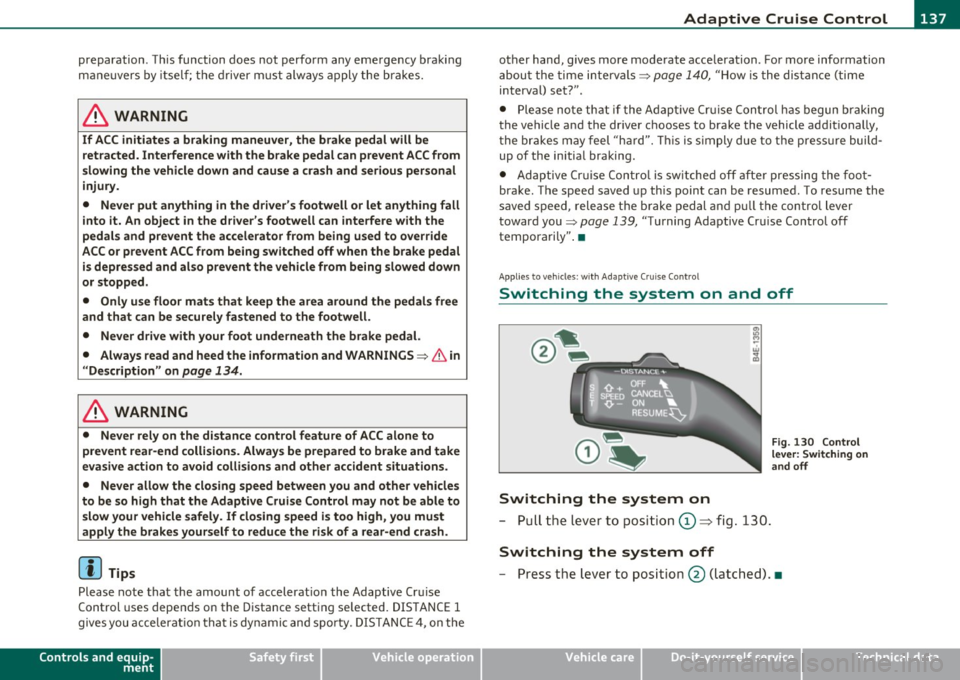
Switching the system on and off
Switching the system on
- P ull th e lever t o posit ion © => fig . 130.
Switching the system off
Fig . 130 Control
lever: Switch ing on
an d off
- P ress t he lever to posit io n @ (latc hed). •
Vehicle care Technical data