Ami AUDI Q7 2010 Owner´s Manual
[x] Cancel search | Manufacturer: AUDI, Model Year: 2010, Model line: Q7, Model: AUDI Q7 2010Pages: 390, PDF Size: 93.04 MB
Page 20 of 390
Instruments and warning /indicator lights
Applies to veh icles : with Adapt ive Air Suspens ion
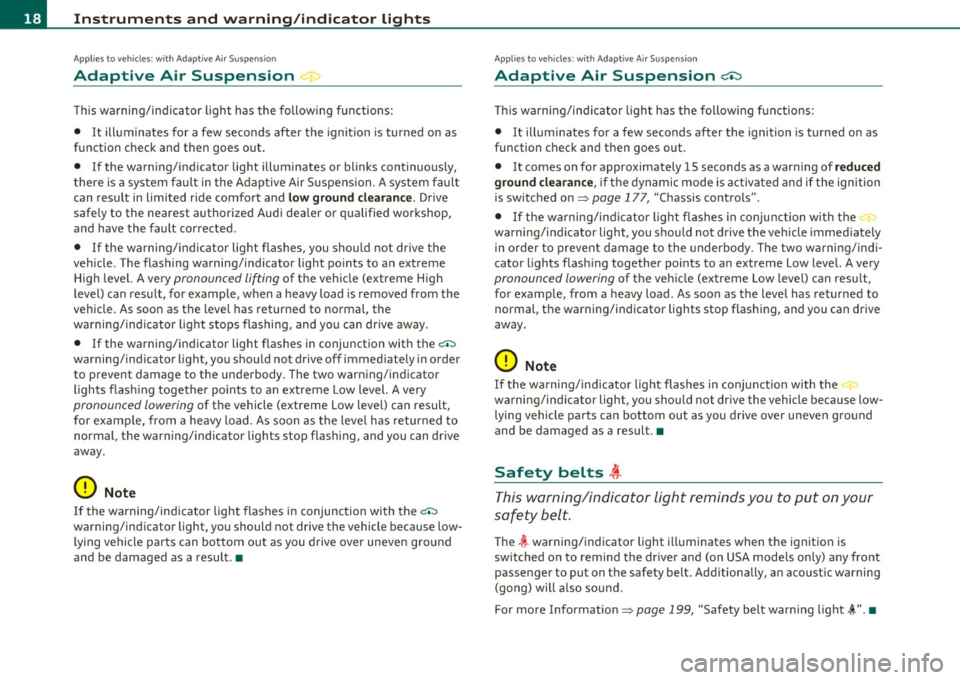
Adaptive Air Suspension ~
T his warning/indicator light has the following functions:
• It illuminates for a few seconds after the ignition is turned on as
function check and then goes out.
• If the warning/indicator light illuminates or blinks continuously,
there is a system fau lt in the Adaptive Air Suspens ion. A system fault
can result in limited ride comfort and
low gro und clea ra nce . Drive
safe ly to the nearest authorized Audi dealer or qualified workshop,
and have the fault corrected.
• If the warning/ ind icator light flashes, you should not dr ive the
vehicle. The flashing warning/indicator light po ints to an extreme
High level. A very
pronounced lifting of the vehicle (extreme High
level) can result, for example, when a heavy load is removed from the
vehicle . As soon as the level has returned to norma l, the
warning/ind icator light stops flashing, and you can dr ive away.
• If the warning/indicator light flashes in conjunction with the
c.:,
warning/ind icator l ight, you should not drive off immediately in order
to prevent damage to the underbody. The two warning/indicator
lights flas hing together points to an extreme Low level. A very
pronounced lowering of the vehicle (extreme Low leve l) can result,
for examp le, from a heavy load . As soon as the leve l has returned to
normal, the warning/indicator lights stop flashing, and you can drive
away.
0 Note
If the warning/indicator light flashes in conjunction with the c.:,
warning/indicator light, you should not drive the vehicle because low
lying vehicle parts can bottom out as you drive over uneven ground
and be damaged as a result. •
Applies to vehic les: wi th Adapt ive A ir Suspension
Adaptive Air Suspension ci:)
T his warning/ind icator light has the following functions:
• It illuminates for a few seconds after the ignition is turned on as
function check and then goes out.
• It comes on for approximately 15 seconds as a warning of
re du ced
gr oun d clea ranc e,
if the dynamic mode is activated and if the ignition
is switched on=>
page 177, "Chassis controls" .
• If the warning/ind icator light flashes in conjunction with the
warning/ind icator light, you should not drive the vehicle immed iately
in orde r to prevent damage to the underbody. The two wa rning/ind i
cator lights flash ing together po ints to an extreme Low level. A very
pronounced lowering of the vehicle (extreme Low leve l) can result,
for example, from a heavy load . As soon as the leve l has returned to
normal, the warning/indicator lights stop flashing, and you can drive
away.
0 Note
If the wa rning/ind icator light flashes in conjunction with the 'I,_
warning/ind icator light, you should not drive the vehicle because low
lying vehicle parts ca n bottom out as you drive over uneven gro und
and be damaged as a result. •
Safety belts ~
This warning/indicator light reminds you to put on your
safety belt.
T he ~ warning/indicator light i lluminates when the ignition is
switched on to remind the dr ive r and (on USA mode ls on ly) any front
passenger to put on the safety belt. Additionally, an acoustic warning
(gong) will a lso sound.
For more Information =>
page 199, "Safety belt warn ing light~" . •
Page 34 of 390
Driver information displ ay
If there is a malfunction in the electronic ignition lock, the ign ition
cannot be turned off. Drive immediately to an authorized Aud i dealer
to have the cause of the malfunction corrected.
On vehicles with Convenience key*, the engine should not be switched
off using the
I STOP] button because the eng ine can not be started
again after the ignition is switched off. •
Yellow symbols
Ayellow symbol means WARNING.
Fig. 18 Display: low
f ue l leve l warn ing
(pr iority 2)
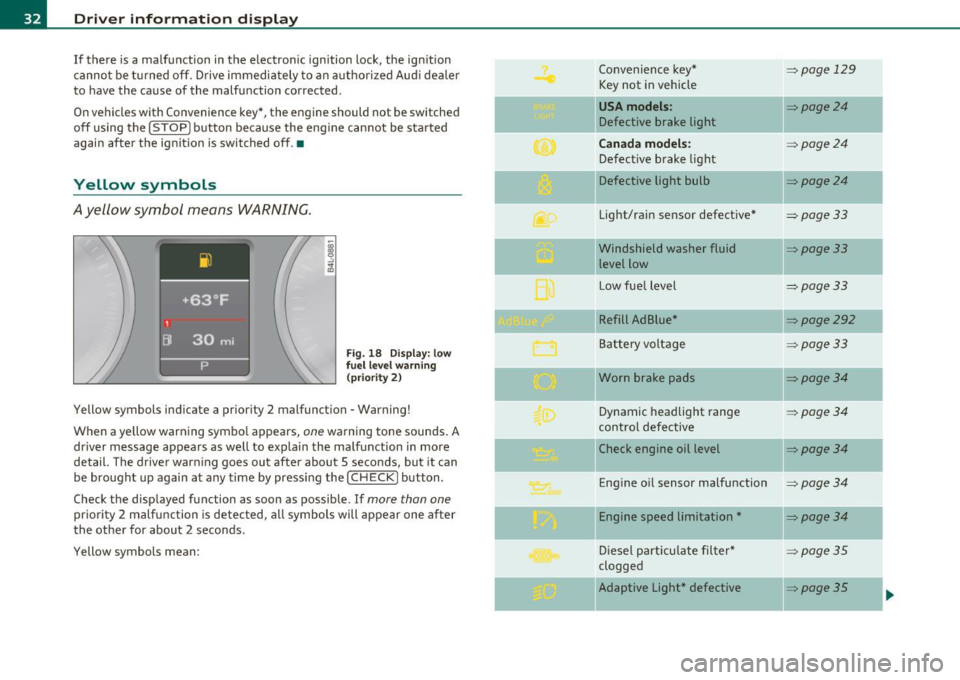
Yellow symbols indicate a priority 2 malfunction - Warning!
When a ye llow warning symbol appears,
one warning tone sounds. A
dr iver message appears as well to explain the ma lfunction in more
detail. The driver warning goes out after about 5 seconds, but it can
be brought up again at any time by pressing the
I CHECK] button .
Check the displayed function as soon as possible. If
more than one
priority 2 malfunction is detected, all symbo ls will appear one after
the other for about 2 seconds.
Yellow symbols mean: Convenience key*
=>page
129
Key not in vehicle
USA models : =>page24
Defective brake light
Can ada mod els: => page24
Defect ive b rake light
Defective light bulb
=>poge24
Light/rain sensor defective* =>page33
Windshield washer fluid =>page33
level low
L ow fue l level
=>page33
Refill Ad Blue* =>page292
Battery voltage =>page33
Worn brake pads =>page34
Dynamic headlight range = page34
contro l defective
II Check engine oil level
=>poge34
-
Engine o il sensor malfunction =>page 34
II Engine speed limitation* =page34
-
Diesel part icu late filter* =>page35
clogged
-Adaptive Light* defective => poge35 ..
Page 36 of 390
Driver information display
Driver message appears and goes out again
If this dr iver message appears af ter the ignition is t urned on or w hile
dr iving and it goes out aga in afte r a while , the battery has been
adeq uate ly recharged.
Driver message appears and does not go out again
If t his dr iver no tifica tion appears after the ignition is turned on or
w hile dr iv in g and does not go out again , the battery's state of charge
is not in t he optima l range. Starting ca pability is restricte d. Have the
ba ttery checked by a n author ized A udi deale r as soon as possible .•
Worn brake pads U
J Brake pads !
If the warn ing light illum inates, immediate ly contact your a uthorized
Aud i dealer or qualified workshop to have all b rake pads inspe cted.
On USA mode ls the warn ing light
.:l comes on together w ith the
w ar ning light
BRAKE . Both sets of b rake pad s on an ax le mus t alway s
be rep laced at the same time.
& WARNING
Driving with bad brakes can c ause a collision and serious personal
injury.
• If the warning light and the warning light BRAKE1> with the
mes sage Brak e pads! comes on in the instrument cluster di splay,
immediately contact your authorized Audi dealer or qualified
workshop to have all brake pads checked or replaced if necessary. •
ll BRAKE: USA mo dels only
Headlight range control ~[)
, Headlight range control defective !
If the sym bo l i llum inat es , the dyn ami c he adlig ht range co nt rol is no
longer wo rking properly . H ave t he system ch ecked and repaired at
your aut horize d Au di dea ler. •
Engine oil level
W hen th e symbo l illuminates, check th e eng ine o il level as soo n as
possible =>
page 301. Top off the oil at yo ur earliest o pportunity
=>page 3 02. •
Engine oil sensor defective
Oil level ! Sensor defective
C
-
If the symbo l illuminates, contact your author ized Audi dealer and
h ave the o il sensor inspec ted . Unti l y ou have this d one, check t he oil
level each time you refue l just to be on the safe side=>
page 301 . •
A pplie s to v eh icl es: w ith eng in e s peed l imitat io n
Engine speed limitation .?i
!'"') Do not exceed max . engine speed of XXXX rpm
T he ; symbol illuminates when there is an engine con trol malfunc
tion. The indicator light • in t he instrument cl uster also illuminates.
T he eng ine speed is limi ted to the speed displaye d in the d river info r
mation system . Keep in m ind that t he engine s peed will not exceed
th e v alu e disp laye d in th e d river infor mati on sy ste m, for examp le
w hen downshift ing. .,_
Page 45 of 390
- Place the cov er w ith t he new battery on t he k ey bas e and
press bot h parts together .
For the sake of the environment
Dispose of dead batter ies proper ly so as not to po llute the envi ron
ment.
(I) Tips
Th e replaceme nt ba ttery mus t be the same spec ifica tion as the
orig inal. •
Electronic immobilizer
The immo bili zer helps t o prevent unauth ori zed use of
your v ehicl e.
A compu ter chip ins ide you r key au toma tically deac tiva tes the elec
tr on ic immob ilizer whe n you inse rt the key in the ignition lock, o r on
vehicles with Convenience key *, when the key is inside the ve hicle.
W hen you remove the key from the ignition lock, or on vehicles with
Conven ience key, when you remove the key from the vehicle, the elec
tr on ic immo biliz er is a utomat ic al ly activa ted once aga in.
& WARNING
Always take the key with you when you leave the vehicle . The key
can di sarm the elect ronic engine immobilizer and permit an unau
thor ized per son to start the engine and enable operation of the
vehicle systems such a s power w indow or Panoramic sliding
s unroof* leading to serious personal injur y.
(I) Tips
• Th e immobi lize r prevent s unauthori zed use of t he ve hicle. The
vehicle cannot be started if an unauthorized key is used. The vehicle
Controls and equip
ment Safety first
Opening and closing
may not start if another rad
io dev ice such as a key for another vehicle
or a transponder is loc ated on t he key ring.
• For Declaration of Compliance to United States FCC and Industry
Ca nad a regulat ions :::>
page 369. •
Valet key function
The val et key function prevents unauthorized persons
from opening the glove compartment or rear lid.
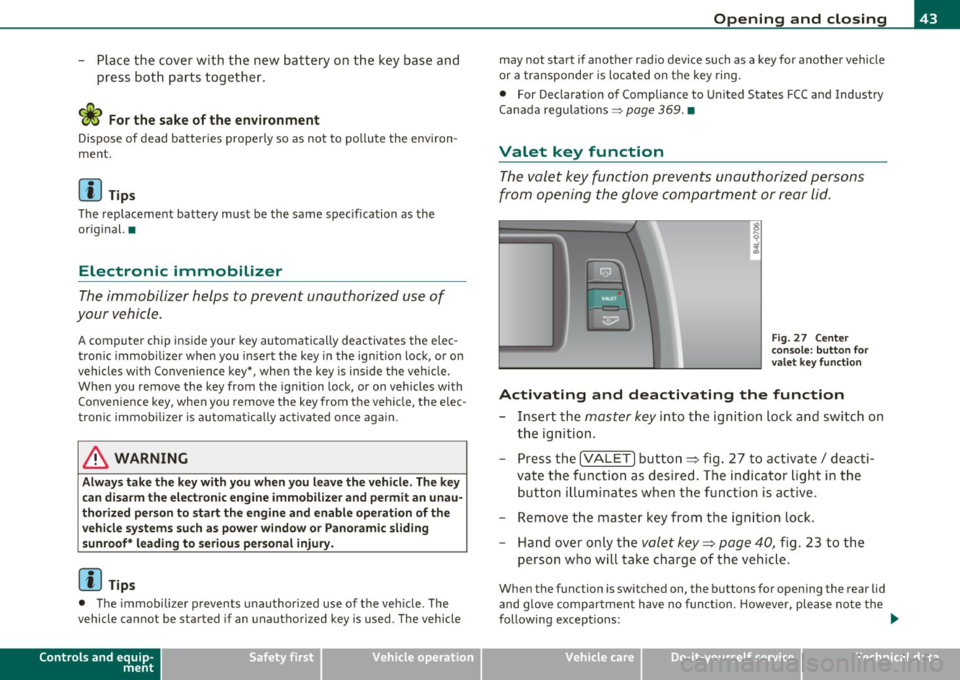
Fig. 27 Center
cons ole : butt on for
v a le t key functio n
Activating and deactivating the function
- Insert t he master key into the ignition lock a nd switch on
t h e ign it ion .
- Press th e
[VA LET] button~ fig . 27 to activate/ deac ti
va te the fu nction a s desired. The indicato r light in t he
butto n illum inates when the f uncti on is ac tive.
- Remove the mas ter key f rom t he ign ition lock.
- Hand ove r on ly t he
valet key~ page 40, fig. 23 to t he
person w ho will take charge of the vehi cle.
Whe n the function is switched on, the b uttons fo r open ing the rear lid
and glove comp artment have no funct ion. However, please note the
following exceptions:
~
Vehicle care Technical data
Page 54 of 390
Open ing and closing
Rear lid emergency unlocking
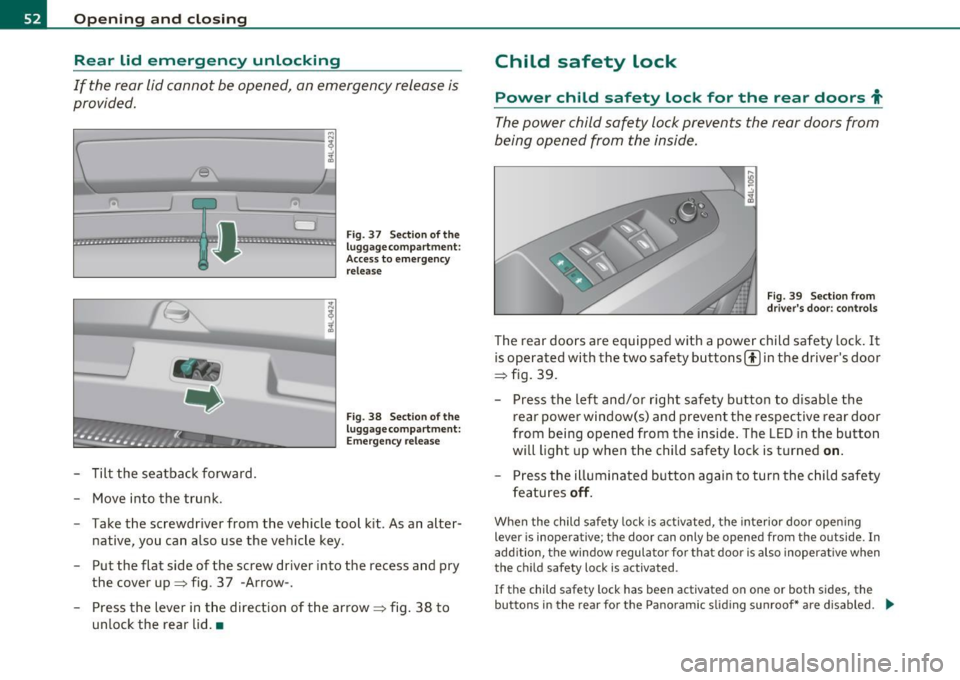
If the rear lid cannot be opened, an emergency release is
provided.
-------------------! ~ ~ -;[,
D
~ ................... -.. -.. -
- Tilt the seatback forward.
- Move into the trunk.
Fig. 37 Sect ion of the
luggage compartment:
Access to eme rgency
release
Fig. 38 Section of the
luggage compartment :
Emergency re lease
- Take the screwdriver from the vehicle tool kit. As an alter-
native, you can also use the vehicle key.
- Put the flat side of the screw driver into the recess and pry
the cover up=> fig. 37 -Arrow-.
- Press the lever in the direction of the arrow~ fig. 38 to
unlock the rear lid .•
Child safety lock
Power child safety lock for the rear doors t
The power child safety lock prevents the rear doors from
being opened from the inside .
Fig. 39 Sect ion from
drive r's door: controls
The rear doors are equipped with a power child safety lock . It
is operated with the two safety buttons(!) in the driver's door
~ fig. 39.
- Press the left and/or r ight safety button to d isable the
rear power window(s) and prevent the respective rear door
from being opened from the inside . The LED in the button
will light up when the child safety lock is turned
on.
Press the illuminated button again to turn the child safety
features
off.
When the child safety lock is activated, the interior door open ing
lever is inoperative; the door can only be opened from the outside. In
add ition, the window regulator fo r that door is also inoperative when
the child safety lock is activated.
If the child safety lock has been activated on one or both sides, the
buttons in the rear for the Pa noramic slid ing sunroof* are disabled. .,
Page 59 of 390

Opening the windows
-Push the s witch to the first stop and hold it t here u ntil t he
win dow has lowered to the desired posi tio n.
- Push t he switch briefly to the
second stop : the window
w ill automa tically o pen all t he way .
Closing the windows
-Pull t he swi tch up to the first stop and h old it th ere until
the wi ndow has risen to th e desired pos it ion .
- P ull the swit ch quickly to the
second position: the window
wi ll auto matically c lose all th e way ~
& in "Co ntrols" .
Activating/deactivating the rear windows
- P ress the left (!) switch ~ page 56, fig . 42 to deactivate
on ly the window regulator in the left door. The indicator
light in t he switch illu minates .
-Press t he r ight ff) switch~ page 56, fig . 42 to deactivate
only t he window reg ulator in the right door. The ind icator
li ght in the switch illuminates.
- Press the
ff) sw itch again to reac tivate t he win dow reg u-
lator. The indicator lig ht in the switch goes ou t.
If you press both(!) switches ® in succession, the fo llowing func
t ions are switc hed off in the rea r of the ve hicle:
• The window reg ulator sw itches in the rear doors.
• The buttons fo r th e Pano ram ic s liding su nroof *.
• On vehicles with rear climate cont rol *, ope ration from the rear is
blocked . Dashes" ---" are shown in the displays fo r the rear climate
controls, a nd the rear air -conditioning can only be operate d from the
cl ima te contro ls in th e cabin:::::,
page 116 .
Controls and equip
ment Safety first
Opening and closing
•
If only the left (!)switc h was pressed, t he window regulator in the
left rear door an d t he buttons in the re ar for the Panoramic sli ding
sunroof* are deactivated. In addition, the door is locked.
• If
only the right(!) switch wa s presse d, the win dow regu lator in
the
right rear door and the buttons in the rear for the Pa noramic
sliding s unroof * are dea ctiva ted. In addi tion, the door is locked .
T hi s fea ture has been provided for the safety of sma ll chi ldren r iding
in the rear of the vehicle .
[ i ] Tips
• T he windows can st ill be opened and closed for about ten minutes
after the ign ition has been tu rned off. The power w indows are no t
shut off unt il one of the front doors is opened.
• In order to ac tivate the child safe ty lock on the left and the rig ht
side, you have to p ress the two safety switches in succession. Make
c ertain that t he check light comes on the co rrespond ing safe ty sw itch
when the child safety lock is activated. •
Switch in the front passenger's door and on
the rear doors
Fig. 43 Swit ch loc a
t ion fr ont pa ssenge rs
door
The pow er window switc h has a two-position function:
Vehicle care Technical data
Page 60 of 390
Opening and closing
Opening the windows
-Press the switch to the first position and hold it until you
have opened the window as far as you want.
- Press the switch quickly to the
second position and the
window will automatically open all the way.
Closing the windows
Pull the switch to the first position and hold it until you
have closed the window as far as you want .
- Pull the switch quickly to the
second position and the
window will automatically close all the way .
[ i ] Tips
The windows can still be opened and closed for about ten minutes
after the ignition has been turned off . The power windows are not
shut off until one of the front doors is opened .•
Convenience close/open feature with the
lock in the driver 's door
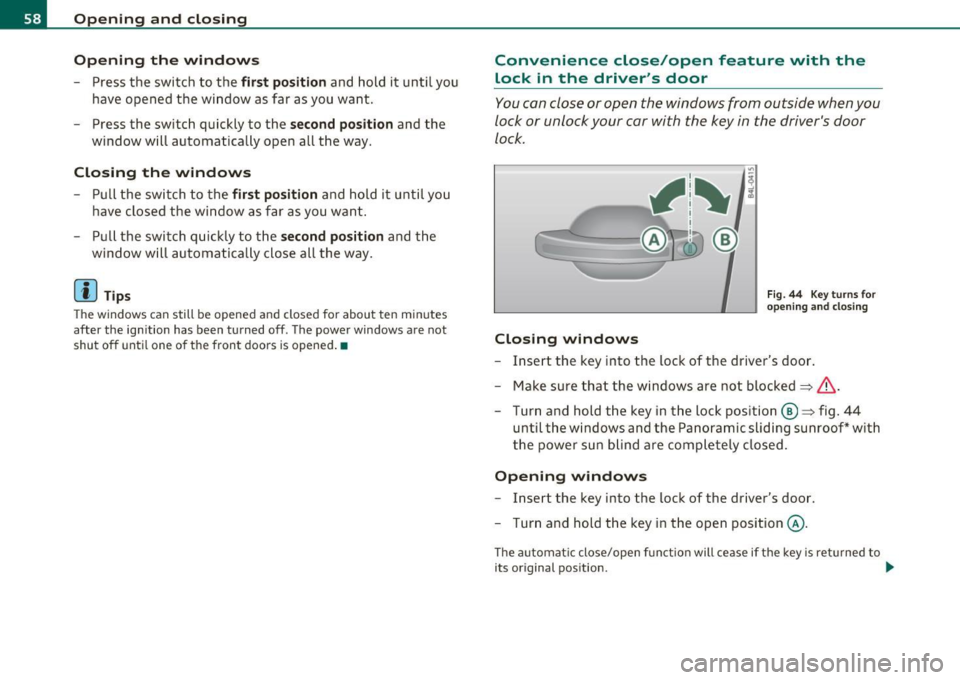
You can close or open the windows from outside when you
lock or unlock your car with the key in the driver's door
lock.
Closing windows
Fig . 44 Key turns for
opening and closing
-Insert the key into the lock of the driver's door .
- Make sure that the windows are not blocked
=> &.
- Turn and hold the key in the lock position @=> fig. 44
until the windows and the Panoramic sliding sunroof* with
the power sun blind are completely closed .
Opening windows
-Insert the key into the lock of the driver's door.
- Turn and hold the key in the open position @.
The automat ic close/open function will cease if the key is returned to
its original position . .._
Page 61 of 390
& WARNING
• Be careful when closing the windows . Check to see that no one
is in the way , or seriou s injury could re sult!
• Always read and heed WARNING~
& in "General description "
on
page 44. •
Reactivating the system after battery
disconnection
If the vehicle batt ery is disco nnec ted and then reconnec ted,
the automat ic closing and open ing f unction will not wor k
unt il it is react ivated . To reactivate th is feature , perform the
fo llow ing steps :
Reactivating close/open feature
-Pu ll an d ho ld t he power window switc h until t he window is
com pletely clo sed .
- Release the swi tch.
- Pull t he switch again for one second . The a utomat ic
closi ng/opening is now reactivated .•
Panoramic sliding sunroof
Ap plies to ve hicle s: w ith Panor am ic s lidin g sunr oof
Description
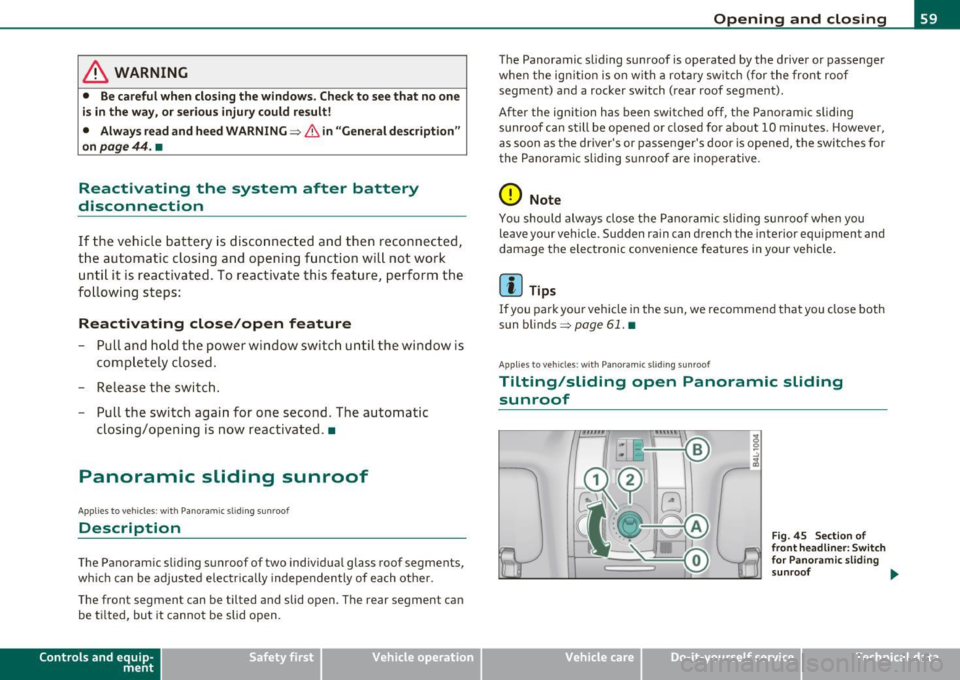
The Pano ram ic sli ding sunroof of two individual glas s roof segments,
w hich can be adjusted e lec trically independen tly of each ot he r.
T he front segmen t can be tilted and s lid open . The rear segmen t ca n
be tilted, but it cannot be slid open .
Contro ls a nd e quip
m en t Vehicle
OP-eration
Opening and closing
The Panoramic slid ing sunroof is operated by the driver or pa ssen ger
w hen the ig nitio n is o n with a rot ary switch ( for the fro nt roof
segment) and a rocker switch (rear roof segment) .
After the ignition has b een switch ed off , the Panoramic slid ing
s u nroof can still be ope ned o r closed for abo ut 10 minu tes. Howeve r,
as soon as the d rive r's o r pa ssenger's door is opened, the sw itches for
t he Panoram ic sliding s unroof are i noperative .
0 Note
You should always close the Pa n oramic slid ing su nroo f whe n you
leave your vehicle. Sudden ra in can drench the in terior equ ipmen t and
damage the electronic conven ience feat ures in your vehicle .
[ i ] Tips
If you park your ve hicle in the s un, we recommen d that you clo se both
s u n blinds ~
page 61. •
App lies to v ehicl es: w ith P anoramic sl id in g sun roof
Tilting/sliding open Panoramic sliding
sunroof
Vehicle care
F ig . 45 Se ction of
fr ont headliner : Switch
for Pa no ram ic sl id ing
sunroof ...
Do-it-yourselt service iTechnical data
Page 62 of 390
Opening and closing
C ,
. ,, . . ,,
~~~
~ 80 ~- OB
. ' . ,.:, . :,
Tilting front roof segment
...
"' ...
;
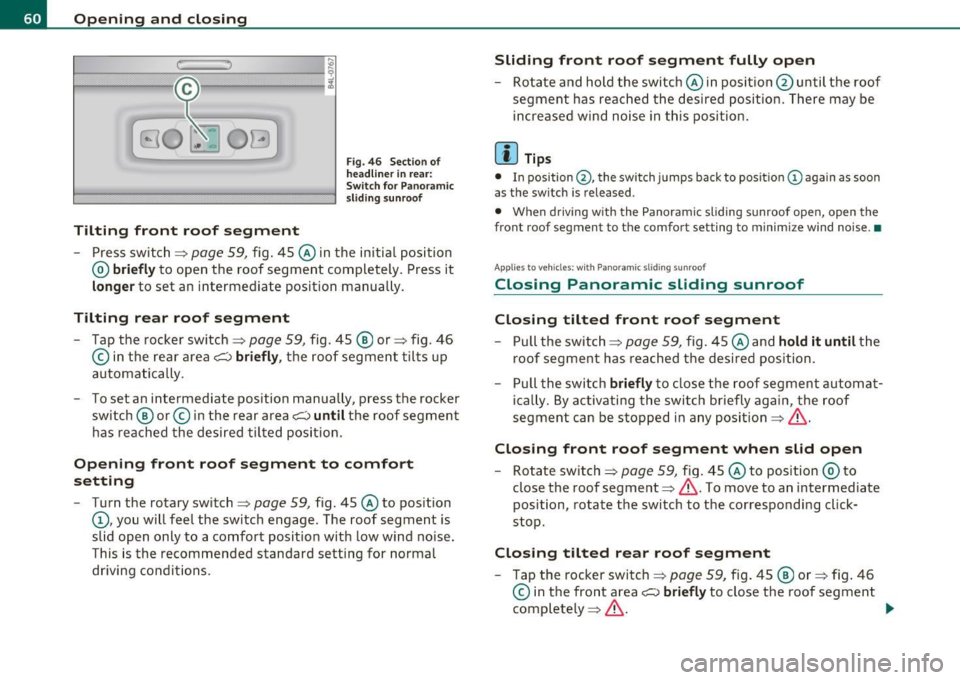
Fig. 46 Section of
headliner in rear:
Switch for Panoramic
sliding sunroof
- Press switch==> page 59, fig. 45 @in the initial position
@ briefly to open the roof segment completely . Press it
longer to set an intermediate position manually.
Tilting rear roof segment
-Tap the rocker switch==> page 59, fig. 45 ®or==> fig. 46
© in the rear area~ briefly, the roof segment tilts up
automatically.
- To set an intermediate position manually, press the rocker
switch @ or© in the rear area~ until the roof segment
has reached the desired tilted position .
Opening front roof segment to comfort
setting
-Turn the rotary switch:::;, page 59, fig. 45 @to position
(D, you will feel the switch engage. The roof segment is
slid open only to a comfort position with low wind noise.
This is the recommended standard setting for normal
driving conditions.
Sliding front roof segment fully open
-Rotate and hold the switch @in position @until the roof
segment has reached the desired position. There may be
increased wind noise in this position.
[I) Tips
• In position @, the switch jumps back to posit ion (D again as soon
as the switch is released .
• When driving w ith the Panoramic sliding sunroof open, open the
front roof segment to the comfort set ting to minimize wind noise .•
A pp lies to veh icles: w ith Panoramic sliding sunroof
Closing Panoramic sliding sunroof
Closing tilted front roof segment
-Pull the switch==> page 59, fig. 45 @and hold it until the
roof segment has reached the desired position.
- Pull the switch briefly to close the roof segment automat
ically . By activating the switch briefly again , the roof
segment can be stopped in any position ==>& .
Closing front roof segment when slid open
-Rotate switch:::;, page 59, fig. 45 @to position @ to
close the roof segment==>& . To move to an intermediate
position , rotate the switch to the corresponding cl ick
stop.
Closing tilted rear roof segment
- Tap the rocker switch==> page 59, fig. 45@ or:::;, fig . 46
© in the front area~ briefly to close the roof segment
completely :::;,& .
1))-
Page 63 of 390

-To set an intermediate position manually, press the rocker
switch in the front area
e:> until the roof segment has
reached the desired tilt position==>& .
& WARNING
Improper use of the Panoramic sliding sunroof can cause serious
personal injury.
• Be careful when closing the Panoramic sliding sunroof. Not
paying attention could cause you or others to be trapped and
injured as the Panoramic sliding sunroof closes.
• Always take the key with you when you leave the vehicle to
prevent injuries caused by the Panoramic sliding sunroof closing
• Never leave children or persons requiring assistance alone in
the vehicle, especially when they could access the vehicle keys.
Unsupervised use of the keys can result in the engine being started
or use of vehicle systems such as the power windows, etc. which
could result in serious injury. The doors could be locked with the
remote key, delaying help in an emergency.
• The Panoramic sliding sunroof will continue to operate until
the ignition key has been removed a nd one of the front doors has
been opened. •
Applies to vehicles : w ith Panoram ic sliding sunroof
Convenience closing feature
The Panoramic sliding sunroof can be closed from outside
with the key in the driver's door lock .
-Insert the key into the driver's door lock.
- Turn and hold the key in the lock position ®==>
page 46,
fig. 29 until the Panoramic sliding sunroof is completely
closed ==> & in "Closing Panoramic sliding sunroof" on
page 60. The power sun blind is also closed.
Con tro ls a nd e quip
m en t Vehicle
OP-eration
Opening and closing
& WARNING
Be careful when closing the Panoramic sliding sunroof. Not paying
attention could cause you or others to be trapped and injured as
the Panoramic sliding sunroof closes. •
Applies to v ehicl es: w ith Panoramic slid in g sunroof
Opening and closing sunshade
I .~ "'
r~ 1~· I
0 g
"I ..!J
"' a,
' ~
G
{(e)
B
0
0 ..
~ ~ ffl ""'
[f 'd 11 -I
t _, $
b l•,:,,,;; =·:::"' == ;'·== ··.••,:::-= ·•,::: ::::= ·•=·· = ·=· ======· •=··•·•-,· =,~=·,., .. c":::'• .. ·= '·"•' :::· ,=••,•s ::::::::: j ~
Fig. 47 Section of
front headliner: Switch
for sunshade
Fig. 48 Section of
headliner in rear:
I>· .. ,.:._::;::-_·;r .,;:;, :::;>:,: -:-·. _::: ;:::'·;-}.- .::,.:.-: ::::: :~ ,.:.·-:- -":-· Switch for sunshade
The two segments of the Panoramic sliding sunroof are each
equipped with a sunshade for protection against the sun's
rays. The front shade is power operated, the rear shade is
opened and closed manually . To prevent the vehicle interior _.,
Vehicle care Do-it-yourselt service iTechnical data