fuel display AUDI Q7 2010 Owner´s Manual
[x] Cancel search | Manufacturer: AUDI, Model Year: 2010, Model line: Q7, Model: AUDI Q7 2010Pages: 390, PDF Size: 93.04 MB
Page 166 of 390

1111....__A_ u_ t_o _m_ a_ t_ic _ t_ r_ a_ n_s _m_ i _s_ s_ i_ o_ n ____________________________________________ _
Automatic selector lever lock
The selector lever is locked in the P and N positions when the ignition
is turned on . To move the lever from these positions the driver must
depress the brake pedal. As a reminder to the driver, the following
warning appears in the instrument cluster display when the selector
is in
P and N:
When stationary apply foot brake while selecting gear
A time delay element prevents the selector lever from locking when
it is moved through the
N position (going from R to D). The locking
element will lock the selector lever if the lever is left in N (Neutral) for
more than approximately 1 second, without the brake pedal being
pressed .
At speeds above about 3 mph (5 km/h) the Automatic Shift Lock is
automatically deactivated in the
N position.
Interlock button
The lock button on the selector lever prevents the lever from being
accidentally shifted into ce rtain positions. Pressing this button deac
tivates the selector lever lock. Depending on the direction of the
shift, the selector lever locks at different positions . The positions are
highlighted in the illustration ~
page 163, fig. 161.
Ignition key safety interlock
The key cannot be removed from the ignition unless the selector lever
is in the
P park position . When the ignition key is removed, the
selector lever will be locked in the
P position. •
Kick-down
The kick-down feature allows the vehicle to generate
maximum acceleration.
When you press the accelerator pedal beyond the resistance point
that is reached at full throttle, the transmission will select a lower
gear ratio based on vehicle speed and engine RPM. The engine RPM
will be controlled to produce maximum vehicle acceleration as long as you continue to press the accelerator pedal beyond this
resistance
point .
& WARNING
Be careful when using the kick-down feature on slippery roads.
Rapid acceleration may cause the vehicle to skid. •
Dynamic shift program (DSP)
The automatic transmission is electronically controlled.
The transmission is self adapting and will automatically select the
best shift program suited to the driving conditions and driving style.
The transmission will select one of the
economy programs when you
drive at a steady speed or a gradually changing speed without heavy
acceleration . This achieves optimum fuel efficiency, with early
upshifting and delayed downshifting.
The transmission will automatically select the
sporty shift programs
when you drive at higher speeds, or with heavy acceleration and
frequently changing speeds. Upshifts are delayed to make full use of
engine power . Downshifting takes place at higher engine speeds than
in the economy programs.
The selection of the most suitable shift program is a continuous ,
automatic process. The driver can also make the transmission switch
to a sporty program by
quickly pressing down the gas pedal.
This causes the transmission to shift down to a lower gear to achieve rapid acceleration, e .g. for quickly passing another vehicle. You do
not need to press the gas pedal into the kick -down range . After the
transmission has upshifted, the original program is selected
according to your driving style.
An additional shift program allows the automatic transmission to
select the proper gear for uphill and downhill gradients.
This keeps the transmission from shifting up and down unnecessarily
on hills. The transmission will shift down to a lower gear when the .,_
Page 167 of 390
______________________________________________ A_ u_ t_ o_ m_ a_ t_ ic_ t_r _a _n_ s_m _ i_s _s_ i_o _n _ ___.1111
driver presses the brake pedal on a downhill gradient . This makes use
of the braking effect of the engine without the need to shift down
manually .•
Manual shift program
Using the manual shift program you can manually select
gears.
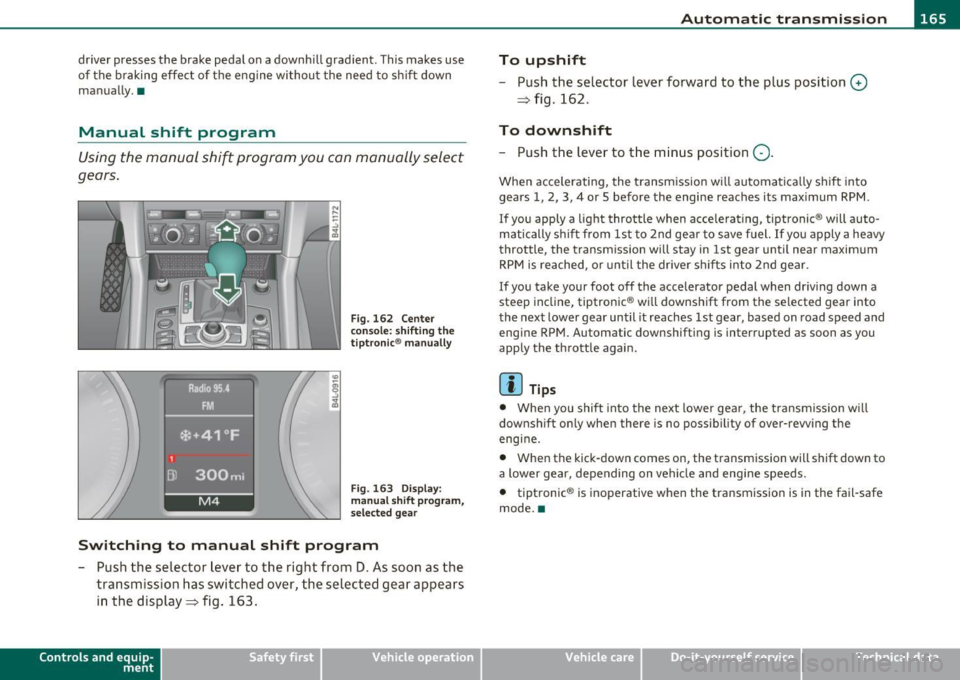
Fig. 162 Center
console : shifting the
tiptronic ® manually
Fig . 163 Display:
manual shift program,
selec ted gear
Switching to manual shift program
-Push the selector lever to the right from D. As soon as the
transmission has switched over, the selected gear appears
in the display => fig . 163.
Con tro ls a nd e quip
m en t Vehicle
OP-eration
To upshift
-Push the selector lever forward to the plus position 0
=> fig . 162.
To downshift
- Push the lever to the minus position Q.
When accelerating, the transm ission w ill automatically shift into
gears 1, 2, 3, 4 or 5 before the engine reaches its maximum RPM .
I f you apply a light throttle when accelerating, tiptronic ® will auto
matically shift from 1st to 2nd gea r to save fuel. If you apply a heavy
throttle, the transmission will stay in 1st gear until near maximum
RPM is reached, or until the driver shifts into 2nd gear.
If you take your foot off the accelerator pedal when driv ing down a
st eep incline, tiptronic ® will downshift from the selected gear into
the next lower gear until it reaches 1st gear, based on road speed and
e ngine RPM. Automatic downsh ifting is interrupted as soon as you
apply the throttle again.
[ i ] Tips
• When you shift into the next lower gear, the transmission will
downshift on ly when there is no possibility of over-rewing the
engine.
• When the kick -down comes on, the transmission will shift down to
a lower gear, depending on vehicle and engine speeds.
• tiptronic ® is inoperative when the transmission is in the fail-safe
mode. •
Vehicle care Do-it-yourselt service iTechnical data
Page 179 of 390
____________________________________________ A_ d_a_ p ,_ t_iv _ e_ A _ i_ r _ S_ u_s_, p __ e_n _ s_ i _o_ n __ ffllll
A pp lies to ve hicles : with A dap tive Air Su spen sion
Chassis controls
Five different driving modes can be set by the driver.
The automatic control processes are speed- and time-dependent. For
example, it is not possible to raise the suspension to a high level
above certain speeds.
When a speed of about 75 mph (120 km/h) is exceeded for more than
30 seconds, the vehicle is automatically lowered to
low level when in
comfort and automatic mode. Ground clearance is about 0.6 inch (15
mm) less, compared to the
normal level.
When a speed of about 100 mph (160 km/h) is exceeded for more
than 20 seconds, the vehicle is automatically lowered to
highway
level
when in automatic and dynamic mode . Ground clearance is
about 1.4 inches (35 mm) less, compared to the
normal level. Road
holding is optimized as a resu lt of the lower center of gravity, and fuel
consumption is reduced as a result of reduced wind resistance .
Level adjustment
high level 2
normal level
highway level
Ground clearance
about 9.4 inches (240 mm)
about 8 inches (205 mm)
about 7 inches (180 mm)
about 6.5 inches (165 mm)
about 5. 7 inches (145 mm)
The segment display @ in the MMI Display =>
page 178 or in the
instrument cluste r display =>
page 179 shows the current vehicle
level.
Automatic
Select the automatic mode if you prefer a balanced, comfortable
suspension setting. The damp ing characteristics are adjusted accord
ing ly .
Controls and equip
ment Safety first •
Automatic lowering: When a speed of about 75 mph (120 km/h)
is exceeded for more than 30 seconds, the veh icle is automatically
lowered by about 0 .6 inch (15 mm) to the
low level, which is more
suitable for highway speeds. Road holding is optimized as a result of
the lower center of gravity and fuel consumpt ion is reduced as a
result of reduced wind resistance . When a speed of about 100 mph
(160 km/h) is exceeded fo r more than 20 seconds, the vehicle is auto
matically lowered by an additional 0.8 inch (20 mm) to
highway level.
• Automatic raising: When the vehicle is at highway level and the
speed falls below about 80 mph (130 km/h) for more than 20
seconds, the vehicle is automat ically raised to
low level. The vehicle is
automatically raised again to
normal level if the speed falls below
about 44 mph (70 km/h) for a period of 2 minutes. The vehicle is
raised immediately when speed falls below about 22 mph (35 km/h).
Dynamic
Select the dynamic mode if you prefer a sporty suspension setting . In
this mode, the vehi cle is lowe red to
low level wh ile it is still stationary
and sporty damp ing characteristics a re selected . The warning light
c.:> in the instrument cluster wi ll come on for a few seconds just to
remind you of the reduced ground clearance.
If you switch off the engine whi le the vehicle is in the dynamic mode
and then switch on the ignition once again, the
c.:> warning light will
also come on again for a few seconds as a reminder .
• Automatic lowering : When a speed of about 100 mph (160 km/h)
is exceeded fo r more than 20 seconds, the vehicle is automatically
lowered by 0.8 inch (20 mm) to
highway level.
• Automatic raising: The vehicle is automatically raised to low level
again, if the speed falls below about 80 mph (1 30 km/h) for a per iod
of 20 seconds. The vehicle is raised immediately when speed falls
below about 22 mph (35 km/h).
Comfort
Select the comfort mode if you desire a suspension setting with a
special emphasis on comfort. Damping characteristics with a clear
emphasis on comfort are selected in this mode.
~
Vehicle care Technical data
Page 295 of 390
If Ad Blue usage increases due to individual driving style, the driver
must add AdBlue between scheduled maintenance intervals
=>page 294 .
& WARNING
Failure to heed Ad Blue refill information in the instrument cluster
can prevent the vehicle from being started and driven . If the
vehicle cannot be driven and an emergency arises, personal injury
can occur.
• Always have the Ad Blue tank refilled well before the tank runs
dry.
[ i J Tips
• If the Ad Blue tank is completely empty, the engine w ill not start
agai n after the igni tion is sw itched off. The instrument cluster display
indicates the distance remaining that can be driven=>
page 293.
• Ad Blue is required by law to operate this vehicle.
• AdBlue ® is a registered trademark of the Registered Automob ile
Association (Verband der Automobilindustrie e . V. -VOA). •
Safety first
Fuel supply and filling your fuel tank
App lies to ve hicles : w ith d iese l eng ine
Indicator in the instrument cluster display
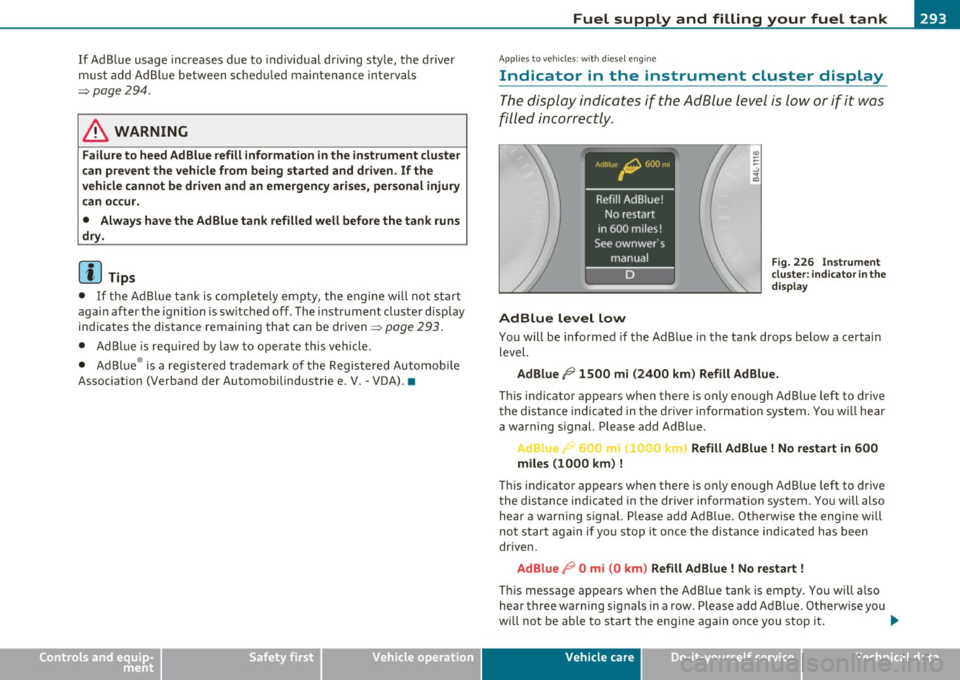
The display indicates if the Ad Blue level is low or if it was
filled incorrectly .
AdBlue level low
Fig. 226 Instrument
cluster: indicator in the
display
You will be informed if the Ad Blue in the tank drops below a certain
level.
Ad Blue /9 1500 mi (2400 km) Refill AdBlue.
This indicator appears when there is only enough Ad Blue left to drive
the distance indicated in the driver information system. You will hear
a warning s ignal. Please add Ad Blue.
... 0C_ .c Refill Ad Blue ! No restart in 600
miles (1000 km)
!
Th is indicator appears when there is only enough Ad Blue left to drive
the distance indicated in the driver informat ion system . You will also
hear a warning signal. Please add Ad Blue . Otherw ise the engine w ill
not start again if you stop it once the distance indicated has been
dr iven .
AdBlue 19 0 mi (0 km) Refill Ad Blue ! No restart !
Thi s message appears when the Ad Blue tank is empty. You will also
hear three warning signals in a row. Please add Ad Blue. Otherwise you
wi ll not be able to start the engine again once you stop it . ._
Vehicle care Technical data
Page 297 of 390
- Remove the cap from the refill bott le.
- Position t he refill bott le on the filler tube a nd turn the
bottle clockwise u ntil it stops turning~
page 294,
fig. 228 © -
- Press lightly against the bottom of the bottle@to em pty
it. Contin ue pressing the bottom o f the bott le until it is
empty or until fluid stops flowing into the tank.
- Turn the bottle to the left without pressing on the
bottom .
Closing the filler tube
- Turn t he cap clockw ise on t he fi ller t ube with t he lug
wrench un til you hear it t ighte n comp letely.
- Then press on the le ft side of the filler fla p un til yo u hear
i t lock.
& WARNING
• Ad B lu e can irritat e the skin, eye s and respiratory sy stem. If
the re is contact with the fluid , flush immed iately with plenty of
water. Con sult a phy sician if ne ce ss ary .
• Do not allow Ad Blue to come into contact with clothing. If
there is contact with the fluid , flush immediate ly with plenty of
water.
0 Note
• Only use Ad Blue that conforms to the standard ISO 22241-1. Do
no t m ix any addit ives wi th the Ad Blue an d do not dil ute it wi th water.
• Ad Blue is not a diesel add it ive. Do not add it to the diese l tank. If
Ad Blue is mixed w it h diesel f ue l, it can lead to damage to the engine
and the Ad Blue tank system. The L imited New Vehicle Warranty does
no t cover su ch damage.
Safety first
Fuel supply and filling your fuel tank
• Ad Blue attacks surfaces such as pai nted vehicle components,
plast ic and carpet. Remove the fluid as q uickly as poss ible wi th a
damp cloth and plenty of cold wate r. If the Ad Blue has already crys
tallized, use wa rm water and a sponge. Ad Bl ue residue that is not
removed will crystallize and can damage the affected s urface.
• Do not store the refi ll bott le in the veh icle . If it leaks, the esc aping
Ad Blue could damage the vehicle interior .
(I) Tips
• The fue l fil ler flap of your vehicle is not locked whe n you lock the
vehicle from the inside.
• The refill bottle ho lds approximate ly 0.5 gallon (1.9 liters) .
Always add two bottles of Ad Blue (1 gallon/3.8 liters) as soon as a
message appears in the instrument cluster display~
page 293. The
ignition must be switched off when filling the Ad B lue.
• The veh icle must be d riven after the Ad Blue has been fi lled. The
system may take up to two minutes to detect when Ad B lue is added .
Whe n there is no more Ad Blue in the ta nk and
O mi (0 km) appears in
the instrument cluster display, switch the ignition on for approxi
mately 15 seco nds and then sta rt the eng ine.
• You can obtain refill bottles from any a uthorized Audi dealer or
other qualified workshop .
• F ollow t he Ad Blue manufacturer 's inst ru ct io ns for usage and
storage .•
Vehicle care Technical data
Page 377 of 390
Alphabetical index -________________ fWI
Plastic and vinyl .............. ... . 278
Plast ic parts ........... .......... 282
Safety belts ..................... 285
Trim strips ...................... 277
trim strips ... ...... .. ... ........ 278
Cleaning and protection .............. 274
Climate control ........ ........ .. .. . 109
Synchroniz ing ... .. .......... .... 110
Warm and co ld .............. .... 109
Climate controls
Air conditioner on/off .......... .. .
112
Air distr ibution .................. 113
Air outlets ........ ... .. .. .. ..... 114
Air outlets (rear) ........ .... .. .. . 115
Air recirculation .............. ... . 113
AUTO (standard setting) ... ... ..... 112
Basic settings ............. .. ..... 118
Controls ..................... .. . 110
Defrosting/defogging ... .......... 113
Description ............. .. ....... 109
Energy management .............. 109
Fan .. .. ... ....... .. ... .. .. .. .. . 112
Front seat ventilat ion ... .......... 119
Heated seats, front ............ .. . 119
Key coded setting ................ 109
Recirculation mode (automatic) ..... 118
Recommended settings ... ... .. .. . 109
Residual heat ...... ... .. .. .. ..... 111
Setting the temperature ... ... .. .. . 112
Supplementary heater .......... ... 119
Synchronization .................. 118
Turning on and off ................ 111
Using climate control economically .. 115
Clock .................... .......... 11
Controls and equip
ment Safety first
Closing
Panoramic sliding sunroof ..........
60
Coat hooks .. .................... ... 107
Cold tire inflation pressure ... ......... 318
Compass mirror ..................... 81
Compliance ........................ 369
Consumer Information ... .. .. .. . 197, 366
Contacting NH TSA .................. 197
Convenience key ....... ....... .. .. .. . 53
Dr iver messages ................. 129
Locking vehicle .. ............. .... . 54
START button ................. ... 127
Starting engine .. .. . .. ........... 127
STOP button ..................... 128
Switching engine off ... .. ..... .... 128
Switching on ignition ........ .. ... 127
Unlocking vehicle .................. 54
Convertible child safety seats ....... ..
23 7
Convertible locking retractor
Activating .......... .. .. .........
243
Deactivating ..................... 244
Using to secure a chi ld safety seat .. 241,
243
Coolant system .................. ... 304
Cooling box in glove compartment ... .. 106
Cooling System
Expansion tank ..... .. .. .........
305
Cornering light ...................... 68
Cruise control
Changing speed ..... .. .. .. .. .....
132
Presetting your speed ............. 133
Switching off .................... 133
Switching on . ........... ........ 132
Warning/indicator lights ... .. .. .. .. 19
See also Adaptive Cruise Control .... 134
Cruising range ... .... ................ 37
(upholder ............... .. 93, 102, 103
D
Damp ing
See Adapt ive A ir Suspens ion ........ 176
Data ........ .... ... ... ... ...... ... 363
Data recorder .. .. .... ............ .. 252
Date display .... .................... 11
Daytime running lights . . . . . . . . . . . . 65, 66
Declaration of compl iance
Adaptive Cru ise Control ............
369
Audi side assist ................ .. 369
Cell phone package ............... 369
Convenience key ................ . 369
Electronic immobilizer .... ........ 369
Homelink ® universal remote control . 369
Remote control key .. .. .. .. .. . ... . 369
def
What does this mean when it appears in the trip odometer display? .........
12
Defective light bulb warning ........... 24
Defrosting/defogging the windows .. .. . 113
Defrosting/defogging windows ........ 114
Determining correct load limit ....... .. 323
Diesel fuel ...... ........... ... .. .. . 288
Diesel particulate filter . . . . . . . . . . 35, 263
Digital clock ......... ............... 11
Digital compass ..................... 81
Digital speedometer .................. 24
Vehicle operation Vehicle care Do-it-yourself service Technical data
Page 385 of 390
_____________________________________________ A_ L .... p_ h _ a_b_ e_ t_ ic_a_ l_ in_ d_e _ x __ _
Side curtain airbags
Description ............ ... ... .... 228
How they work ............... .... 229
Safety instructions .. .......... .. . 230
Side curtain airbags) .......... ... ... . 228
Side marke r lights ................ ... . 65
Sk i sack ......... ... ... ... .. .. ... ... 99
Snow chains .... ................ ... . 331
Sockets ..................... ... ... 104
Sound sys tem display
Driver information display .......... 23
Sources of information about child restraints
and their use ........... ... .. .. . 251
Speed control system
See Adaptive Cruise Control ........ 134
Speed rating letter code ........... .. . 327
Speed warning system ........... ... .. 35
Speedometer ... ... ............. ..... 12
Starting on hills
H ill hold ...... ...... ... ... ..... . 131
Starting the engine ........... .. 124, 125
What should I do if the engine does not start? ...... .. .... .. .... .. .... . 125
Steering . ............ .... ... ... .... 122
Easy entry feature . .. .. ........... 124
Electrically adjusting the steering whee l .
123
Locking the steering .... .. ... ..... 124
Malfunction .............. .. .. .. .. 31
Manually adjusting the steering wheel
122
Controls and equip ment Safety first
Steering wheel colum
n Symbols
Adjusting electrically ............ .. 123 Red ..... ........................ 28
Adjusting manually ............... 122 Yellow ................... .... ... 32
Steering wheel heating ........ ..... .. 121 Synchronization
Steps for determining correct load limit . 323 Climate controls ...
.............. 118
Stopping the engine .... .. .. .. .. .. .. . 126
Storage ...... .. ... ... ... .......... 105
(upholder .. . .. .... ... .......... 102 Four-
zone automatic comfort air
conditioning ............ .... .. . 118
Synchronizing climate control . ... .. .. . 110
(upholder door pockets ........... 103
(upholder in the rear center console . . 93
T
(upholder rear center armrest .... .. 102
Glove compartment ...... ...... .. 105
Storage compartment
Expanding ... ..... ............... 94
TOI clean diesel
See Ad Blue .. .. .. .. ............. . 292
Storage net
Footwell . .. .. .... ............... 108 Tachometer
.................. .... ... 11
T ank flap
Unlocking the fuel filler flap by hand . 292
Luggage compartment . .. .. .. ..... 108 Technical modifications
, , , .. , ..... ... 369
Seatbacks .... .. .... ............. 108 T
emperature
Sun shade .. ................ ... .. ... 72 Climate controls
................. 112
Sun visors . ................ .. .... ... 71
Sunroof
See Panoramic sliding sunroof .. .. .. . 59 Four-zone automatic comfort air
conditioning ............ .. .. .. . 117
Setting fo r the driver's and front passen-
ger's side .. .. .. .. .............. 112
Sunshade Tethe r anchors ... ................ .. 249
Panoramic sliding sunroof ......... . 61
Supplementary heater
Climate controls . ..... ........... 119 Tether strap
... .. ... ... ........ .... 249
The first
1,000 miles (1,500 km) and
afterwards ... ......... .. ... ... . 261
Suspension
See Adaptive A ir Suspension ...... .. 176 Tie-down rings
... .. .. .... ........... 95
T ie-downs ......................... 197
Switches
Emergency flashers ... ......... ... . 68
Rear window defogger . ...... ..... 113 Tips for the environment
Saving fuel .. .. .. ................
101
Using the air conditioner on ly when
necessary ............... ...... .
115
Vehicle operation Vehicle care Do-it-yourself service Technical data
Page 386 of 390
___ A_ l_. p_ h _ a_b_ e_ t_ic _a_ l_ in_ d_e _ x ____________________________________________ _
tiptronic ® . .... .... ..... ... .. ... . .. 161 T ires and vehicle load limits . .. .. .. . 322
Automatic Sh ift Lock (ASL) ...... ... 163 W heel bolts ................... .. 332
Dr iv ing .................. .... ... 161 Winte r tires ............... ... .. . 330
Dynamic shift program . .. .. ... . ... 164 T ires/Wheels
Fai l-safe mode . .. ............. ..
166 Low aspect ratio tires .. .. .. .. .. ... 332
Ki ck-down ... .. .. .. .. .. .... ..... 1 64 T ire pressure monitoring system . 19,333
Ma nual shift program .... ......... 1 6 5 Tools ............ .. .. .. .... .. .. ... 336
Selector lever .. .. ... . ..... .. . ... 162 Torn or frayed safety be lts .......... .. 202
Ti re pressure ........ ... ... ..... .... 320 Touch-up paint ... .. .... .. .. .. .... .. 278
Ti re pressure monitoring system . ... .. . 333
Loss of air press ure . .... ... ... . 19, 334
Ma lf u nct ion ................... .. 334
Resetting t ire pressures ......... .. 335
T ow ing
Front eye le t .............. ...... .
355
Rear eye let .............. .. .. .. . 356
T ow tr uck procedures .. .... .. ..... 355
Ti re service life .... .. .. .. .... ... .. .. 32 4 Tow ing a tra ile r
T ires ...... .............. ...... ...
3 14 Par king system . .. .... .... .. .... . 175
Service life ... .. .. .. .. ... .... .... 324 TPMS
speed rat ing let ter code ......... ..
3 27
Tir e m anufactur ing da te ..... ...... 3 2 7
Tir e spe cifica tions . .. ........... .. 3 27
Tr ead depth . ... .. .. ... ... .... ... 3 24
Uniform t ire quali ty g rading ... .. .. . 329
Winter tires . ... .... .. .. .. .. .. . .. 330
Tir es and vehicle load limits . .. .... ... 322
Tires and wheels T
ire pressure monitoring system . ... 334
Tr ailer towi ng .. .. ................. .
269
Ope rating instruc tions ...... .... .. 2 70
Tech nica l requirements ... .. .. 269,271
T ong ue load .... ... ...... .. .. ... 270
T railer towing tips . ... ...... .. ... . 272
Tr ailer turn sign al assembly
Wa rning/indicator l igh ts ... .. .... ..
1 7
Checking tire pressure ............ 320
Cold tire inflation pressure .. .... ... 318
Dimensions .. ............ .... ... 326
General notes ..... ...... .... .... 314
Gl f t.
d l d" t . l Tread We ar Indic a tor (lfWI) ... .... .. . 32 4 ossa ry o ,re an oa mg ermmo ogy .
315
Transm ission
t . t
. ® ,p ronic ............ ...... ... .
T ransport Cana da ...... ..... ... .. .. . 16 1
198
Trip computer
New tires and wheels .... .........
326 Fuel co nsump tion ........ ...... .. . 37
Rep lacing .. .. .. .. ...... ......... 326 Mileage ............ ... .. ... ..... 37
Snow chains .. ..... ....... .... . .. 331 Single-trip memory ................ 38
T otal -t rip me mory ........ .... .. .. 38
Trip odometer . . . . . . . . . . . . . . . . . . . . . . 12
What does it mean when dEF appears in
t he trip o dome ter display? . . . . . . . .
12
Trunk
See Rea r lid .. ... ... ........... 49 , 50
Turn s ignals .... ....... ...... .. .... . 69
Warning/indicator lights . .......... 17
T urning re ar air condit io ni ng on/off
F our -zone automatic comfort air
conditioning .. ................ .
116
u
Undercoating ... .. .. .. ... ..... .. .. . 280
Unfastening safety be lts ...... ... .. .. 206
Unidire ct io nal tires .. .. .. .. .... .. ... 314
Un iform t ire quali ty grading .......... 329
Unlocking
Power locking switch . ... ... ... .. ..
47
Rear lid/trun k lid ... .. .. .. ...... .. 49
Remote control key .. ............. . 45
Using the key .............. .... .. . 46
V
Valet key function
Activat ing and deact ivat ing ........ .
43
Vanity mirror ... .. .. .. ... .... ..... .. 71
Vehicle Identificat ion Numbe r (V IN) ... 360
Vehicle jack . .. .. ....... ...... .. 336, 342
Vehicle lite ratu re . . . . . . . . . . . . . . . . . . . . . 5
Vehicle-care products ...............
274