steering AUDI Q7 2010 Owner´s Manual
[x] Cancel search | Manufacturer: AUDI, Model Year: 2010, Model line: Q7, Model: AUDI Q7 2010Pages: 390, PDF Size: 93.04 MB
Page 123 of 390

Warm and cold -_______________ __.
Applies to veh icles: w ith stee ring whee l hea ting
Steering wheel heat ing (j)
The steering wheel can be heated electrically .
Fig. 118 Multifunc
tion steering wheel:
Button for steering
wheel heating
-Press the I~] button to turn the steering wheel heating on
and off =>fig. 118. The message
Steering wheel heating on ! or
Steering wheel heating off! appears in the instrument
cluster display .
When the steering wheel heating is switched on, the steering wheel
is heated to about 82 °F (+28 °C) and held there .
The last sett ing se lected for the steer ing wheel heating (on or off) is
automatically saved when the vehicle is shut off and is assigned to the
remote key. •
Contro ls a nd e quip
m en t Vehicle
OP-eration Vehicle care Do-it-yourselt service iTechnical data
Page 124 of 390

-On the road .Ml..___ ______________ _
On the road
Steering
Applies to vehicles: w ith man uall y ad justable steering whee l
Manually adjustable steering wheel
The heig ht and r ea ch of t he steering wheel c an be
adjusted.
Firs t, adjust t he driv er's s eat corre ctly.
Fig. 119 Le ver un der
the stee ring colu mn
-Pull t he le ve r~ fig . 1 19 -Arrow-~ & -
- Move the stee ring w hee l to t he des ired pos ition.
- Push t he leve r agai nst t he steeri ng col umn until i t loc ks.
T he re m ust be at le ast 1 0 inc hes (25 cm) be tween you r che st and the
center of the steering whee l. If you cannot sit more than 10 inches
( 2 5 cm) from the s teering wheel, see if ada ptive equipmen t is avai l
able to help you reach the pedals and increase the d istance from the
steeri ng wheel.
For detailed info rmation on how to adju st the dr ive r's seat, see
=> page 84 .
& WARNING
Improper use of steering wheel adjustment and improper seating
position can cause serious personal injury.
• Adjust the steering wheel column only when the vehicle is not
moving to prevent loss of vehicle control.
• Adjust the driver's seat or steering wheel so that there is a
minimum of 10 inches (25 cm ) between your chest and the
s teering wheel=>
page 190, fig. 183. If you cannot maintain this
minimum distance , the airbag system cannot protect you prop
erly .
• If physical limitations prevent you from sitting 10 inches (25
cm ) or more from the steering wheel, check with your authorized
Audi dealer to see if adaptive equipment is available.
• If the steering wheel is aligned with your face , the supple
mental driver's airbag cannot provide as much protection in an
accident. Always make sure that the steering wheel i s al igned with
your chest.
• Always hold the ste ering wheel with your hands at the 9 o'clock
and 3 o'clock positions to reduce the risk of personal injury if the
driver' s airbag deploys .
• Never hold the steering wheel at the 12 o 'clock position or with
your hands inside the steering wheel rim or on the steering whe el
hub. Holding the steering wheel the wrong way can cause serious
injuries to the hands, arms and head if the driver's airbag
deploys .•
Page 125 of 390

On the road Ill _______________ __.
Applies to veh icles : w ith electrically adju stab le steer ing wheel
Electrically adjustable steering wheel
The height and reach of the stee ring wheel ca n be ele ctri
c ally adj usted to sui t th e d river.
Firs t, a djust t he dr iver's se at correct ly.
Height adjustment
Fig . 120 Sw itch for
s teering whee l ad ju st
ment
- Push t he s witch © up or down=> fig. 12 0. The st ee ring
w he el heig ht chang es f or as long as you press t he swi tch .
Reach adjustment
- Push t he switc h© forward or backward=> fig . 120 . T he
ste ering w hee l reac h changes for as long as yo u press the
swi tch .
The re m ust be at least 10 inches (25 cm) between you r chest and the
cen ter of the steering whee l. If you cannot sit more than 10 inches
(25 cm) from the steer ing wheel, see if adapt ive equ ipment is ava il
able to h elp you reach the pedals and increase the distance from the
steeri ng wheel.
For detailed information on how to adjust the dr iver 's seat , see
~ page 84.
Con tro ls a nd e quip
m en t Vehicle
OP-eration
The steering wheel ca n be adjusted even when the ign ition is turned
O ff. For veh icles with sea t memory, the individu al pos it io ns for the
steer ing wheel can be sto red along with t he seat pos it ion.
& WARNING
Improper use of steering wheel adjustment and imprope r seating
position can cau se seriou s per sonal injury.
• Adjust the steering wheel column only when the vehicle i s not
moving to prevent loss of vehicle control.
• Adjust the driver 's seat or steering wheel so that there is a
minimum of 10 in ches (25 cm) between your chest and the
steering wheel~
page 190, fig. 183. If you cannot maintain this
minimum distance , the airbag system cannot prote ct you prop
erly.
• If phy sical limitations prevent you from sitting 10 inches (25
cm ) or more from the steering wheel, check with you r authorized
Audi dealer to see if adaptive equipment is available .
• If the steering wheel is aligned with your face , the supple·
mental driver 's airbag cannot provide as much protection in an
accident. Always make sure that the steering wheel is aligned with
your che st.
• Always hold the steering wheel with your hands at the 9 o'clock
and 3 o'clock po sition s to reduce the risk of personal injury if the
drive r's airbag deploys.
• Never hold the steering wheel at the 12 o'clock po sition or with
your hands inside the steering wheel rim or on the steering wheel
hub. Holding the steering wheel the wrong way can cause serious
injuries to the hands, arms and head if the driver's airbag
deploy s.•
Vehicle care Do-it-yourselt service iTechnical data
Page 126 of 390
1111..__0_ n_ t_h _e_ r_o _ a_ d _________________________________________________ _
Easy entry feature
The easy entry feature makes it easier to enter and e xit
the vehicle by automatically adjusting the steering
wheel.
Press the button®~ page 123, fig. 120 to turn the easy
entry feature on or off .
When the easy entry feature is turned on (button depressed), the
steering wheel moves up to the parked position when the ignition is
t urned off . After you enter the vehicle, the steer ing wheel moves to
the stored pos ition as soon as you t urn on the ig nition .
Easy entry feature on vehi cles with memory seat *
For the stored steering whee l position to be recalled, t he driver's seat
memory must be switched on ( ( ON/OFFI switch in depressed posi
tion) .
If the easy e ntry feature i s sw itched off, the steer ing wheel mov es to
the stored pos ition as soon as you press the seat memory button. •
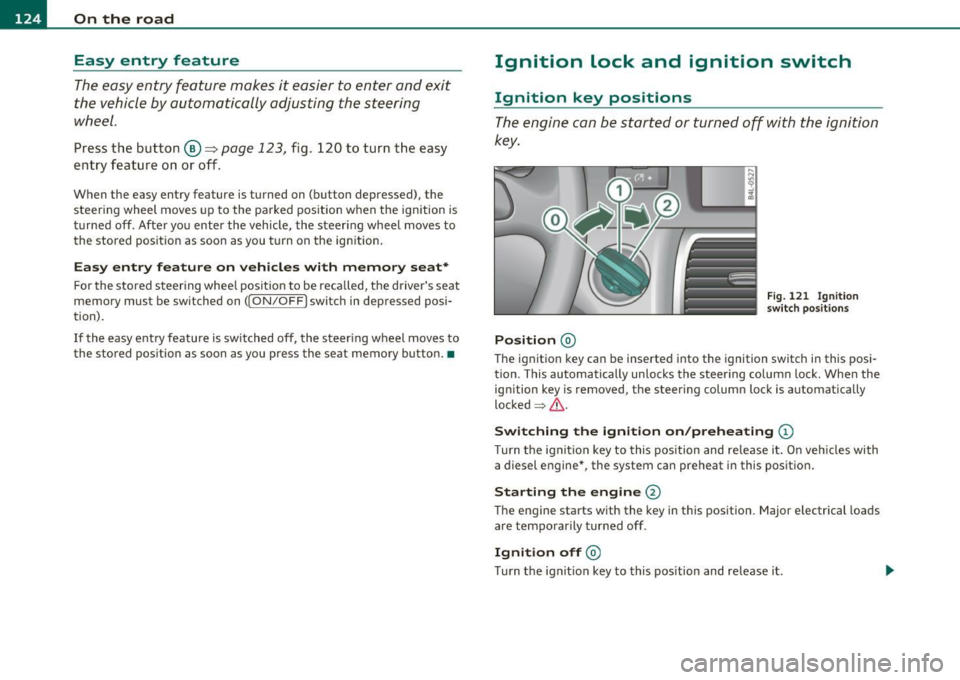
Ignition Lock and ignition switch
Ignition key positions
The engine can be st arted or turned off with the ign ition
key .
Position @
Fig. 121 I gn ition
sw itch position s
The ig nition key can be inserted into the ignition switch i n this posi
tion. This automatically unlo cks the steering co lumn lo ck. When the
ign ition key is removed, the steer ing colum n lock is automat ically
lo ck ed
~ & .
Switching the ignition on /preheating (D
Tu rn the ignit ion key to this position and re lease i t. On veh icles wi th
a diesel engine *, the system can preheat in this position.
Starting the engine@
The engine starts with the key in this position. Major e lectrical loads
are tempo rar ily tur ned off .
Ignition off@
Turn t he ign it ion key to this pos ition and re lease i t.
Page 127 of 390

On the road Ill _______________ __.
& WARNING
• Never remove the key from the ignition lock while the vehicle
is moving. The steering wheel will lock , cau sing loss of control.
• If you ha ve to leave your vehicle, even for ju st a minute, alw ays
remove the ignition key and take it with you. This i s especially
important if you are going to leave children unattended in the
vehicle. The children could start the engine or use other vehicle c ontrols . Unsupervised us e of vehicle controls (for example, power
windows) can cause serious personal inju ries.
0 Note
• If the ~ symbol in the display blinks, there is a malfunction in the
electronic stee ring column lock. Follow the instr uctions in
~ page 31, "Steering malfu nction i" .
• If the ~ symbol in the display blinks, there is a malfunction in the
electronic ignition lock . Follow the instr uctions in~
page 31, "Igni
t ion lock malfunct ion ~" .
(I] Tips
• If you release the ignit ion key i n pos it io n @ , the key automati cally
returns to pos ition
(D .
• If you open the driver 's doo r whe n the ignition is sw itched on, a
buzze r sounds and the message
Ignition is on appears in the instru
ment cl uster d isplay. Please swi tch the ignition off. •
Ignition key safety lock
The ignition key con on ly be removed when the selector
lever is in the "P" (Pork) positi on.
After turning off the ignition, the ign ition key can only be removed
from the ignition lock when the se lector lever is in the "P " (Park) posi-
Con tro ls a nd e quip
m en t Vehicle
OP-eration
tion. After you have removed the key, the selector lever is locked and
canno t be move d.•
Starting and stopping the engine
Starting the engine
The engine can only be started with your original A udi
key.
Fig . 12 2 Ignitio n key
posit io ns
Vehicles with gasoline engine:
- Step on the brake .
- Move the se lec tor lever into P or N
~ &.
- T urn th e ig niti on key to posit io n @ ~ fig. 122 -do not
d epress th e gas pedal wh en sta rting th e engine .
Vehicles with diesel engine:
-Step on the brake .
- Move the se lec tor lever into P or N
~ &.
Vehicle care Do-it-yourselt service iTechnical data
Page 128 of 390

-L~O~n~t:_!h~e=....!:r~o~a~d~ --------------------------------------------
- Turn the ig nition key to position (D -the glow plu g i nd i
cator lig ht
~ ill um inates when t he g low plug system is
act ive.
- When the indica tor light
'1.., swi tches off, turn the ignition
k e y to position @ but do not p ress the acce lerator pe dal.
- Re lease the ignition key once the e ngi ne starts. The
s ta rter m ust not conti nue r unning .
A cold engine may sound loud after it has been started . This is due to
t he hydra ulic valves building up o il pressure . This is norma l an d is not
a need for concern .
If the engine does not start immediately, stop trying after 10 seconds
and then try to rest art the engi ne about 30 seco nds la ter.
Glow plug system*
Diesel engines are eq uipped with a glow p lug system whose
preheating t ime is controlled
by the coo lant and outs ide tempera
ture. Sta rt the engi ne
immediat ely after the glow pl ug ind icator lig ht
switches off.
Th e g low pl ug indica tor light w ill on ly ill uminate fo r approximately 1
second when the engine is warm or the outside temperature is higher
t han 46 ° F (8 °C). That means you can sta rt the eng ine
immediately .
& WARNING
Never start or let the engine run in a confined or enclosed area.
Exhaust fumes from the engine contain carbon mono xide, a color
le ss and odorless gas. Carbon monoxide can be fatal if inhaled .
• Never leave the engine idling unattended. An unattended
vehicle with a running engine poses a danger of person al injury or
theft.
0 Note
• Avoid high e ng ine speeds, fast a cce le ration or heavy eng ine loads
w hile the engine is still co ld. This co uld damage the engine .
• The eng ine ca nnot be sta rted by p ush ing or tow ing the veh icle.
'ii? For the sake of the environment
T o avoid unnecessa ry engine w ea r and to reduce exhaust em iss ions,
do not let your vehicle stand and warm up . Be ready to drive off imme
diately after sta rting yo ur vehicle . M aintain mode rate speed u ntil the
eng ine is complete ly warm . Remember, the engine performs best at
operat ing temper ature. •
Stopping the engine
- Tur n the ign it ion key to position @ ==> page 125, fig. 12 2.
& WARNING
• Never turn off the engine until the vehicle has come to a
complete stop .
• The brake booster and servotronic only work when the engine
i s running . With the ignition turned off, you have to apply more
force when steering or b raking. Since you cannot stee r and stop
normally, this can lead to accidents and serious injuries.
• The radi ator fan can continue to run for up to 10 minute s even
after you have turned off the engine and removed the ignition key.
The radiator fan can also turn on again if the engine coolant heats up because of intense sunlight or heat build-up in the engine
compartment. ..,,
Page 130 of 390

1111..__0_ n_ t_h _e_ r_o _ a_ d _________________________________________________ _
0 Note
• Avoid high eng ine rpm, full thrott le and heavy engine loads unt il
the eng ine has reached operating tempe ratur e -othe rwise you risk
eng ine damage.
• T he engine cannot be started by p ushing or tow ing the vehicle.
dr iving right away. In this way yo u avoid unnecessary emiss io ns.
(I] Tips
If you open the drive r's door when the ignition is switched on, a
bu zzer sounds and the message
Ignit ion is on appears in the instru
me nt cl uste r display. Please swi tch t he ig nition off. •
Applies to ve hicle s: with Co nve nie n ce ke y
Switching engine off with the !STOP] button
-Bring your vehicle to a comp lete stop .
Fig. 124 C onv enience
k ey:
ENGINE STO P
bu tt on
- Move the se lector lever to the P or N position.
- P ress the [S T OP] button ~ fig . 12 4.
Pressing the (S T OP] button once switches off the engine and the igni
t ion .
If you press the I ST OP I bu tto n ag ain for more tha n 1 second,
the steering is loc ked, provided that the selector lever is in the P posi
tion =>& .
Emergency OFF function
If necessary, the en gine can be sw itched off w ith the se lec tor lever in
the
R, Dor S positions . To do so, step on the brake pedal and press
and hold t he [STOP) but ton (veh icle speed mus t be less than
6 mph
/ 10 km/h .
& WARNING
• Never turn off the engine until the vehicle has come to a
c omplete stop.
• The brake booster and servotronic only work when the engine
i s running. With the ignition turned off , you have to apply more
force when steering or b raking. Since you cannot steer and stop
normally, this can lead to accident s and seriou s injuries.
• For safety rea sons , you should always park your vehicle with
the selector lever in P. Otherwi se, the vehicle could inadvertently
roll away.
• After the engine has been switched off, the radiator fan can
continue to
run for up to 10 minutes -even with the ignition
switched off . It can al so swit ch on again after some time if the
coolant temperature r ises as the result of a heat buildup or if the
engine i s hot and the engine compartment is additionally he ated
by the sun's rays.
0 Note
If the eng ine has bee n under heavy load for an extended period, heat
builds up in the engine compartment after the engine is switched off
- there is a risk of damaging the eng ine. Allow the engine to run at idle
for abo ut 2 min utes befo re switching it off .•
Page 131 of 390
_________________________________________________ O_ n_ t_ h_ e_ r _o_ a_d _ __.ffl'I
A ppli es to veh icl es: wi th Conven ie nc e key
Driver messages in the instrument cluster
display
If a function is not present, a driver message appears.
No key identified
This message appears when the [START] button is pressed if there is
no master key inside the vehicle or if the system does not recognize
it. For example, the master key cannot be recognized if it is covered
by an object (e.g. aluminum brief case) which
screens the radio
signal. Electronic devices such as cell phones can also interfere with
the radio signal.
Press brake pedal to start engine
This message appears if you press the I ST ART ] button to start the
engine and do not depress the brake pedal. The engine can only be
started if the brake pedal is depressed.
Engage Nor P to start engine
This message appears when the engine is started if the selector lever
for the automatic transmission is not in the P or N position . The
engine can only be started with the selector in these positions.
Key not in vehicle
This message appears along with the ' symbol if the master key is
removed from the vehicle with the engine running . It is intended to
remind you (e.g. when changing drivers) not to continue the journey
without the master key.
If the master key is no longer in the vehicle, you cannot switch off the
ignition after stopping the engine and you also cannot start the
engine again. Moreover, you cannot lock the vehicle from the outside
with the key.
Con tro ls a nd e quip
m en t Vehicle
OP-eration
Shift to P otherwise vehicle can roll away. Doors do not lock if you
are not in P.
This message appears for safety reasons along with a warning buzzer
if the selector lever for the automatic transmission is not in the P
position when the ignition is switched off with the
[STOP] button and
the driver's door is opened. Move the selector lever to the P position,
otherwise the vehicle is not secured against rolling away. You also
cannot lock the vehicle using the locking button on the door handle
or using the remote key.
To engage steering lock, press and hold STOP button
This message appears for safety reasons if the engine and the ignition
have been switched off by pressing the
[STOP] button once, and then
the driver's door is opened. In this instance, the steering is not
locked. The steering is locked:
• If you press the
[STOP] button again for more than 1 second.
• If you close the driver's door and lock your vehicle from the
outside. •
Parking brake
Operation
The parking brake replaces the handbrake.
Vehicle care
Fig. 125 Section of
instrument cluster:
Parking brake
~
Do-it-yourselt service iTechnical data
Page 152 of 390
1111....__A_ d_ a_,_ p_t _i_ v _e _ C_r_ u_ i_ s_ e_ C_ o_ n_ t_ r_ o_ l __________________________________________ _
The Audi braking guard is active from a speed of approx. 20 mph
(30 km/h) and works within the system limits=>
page 147 even when
the Adaptive Cruise Control is deactivated.
A radar sensor is built into the front of the vehicle=>
page 136,
fig. 129. The system is intended to measure the distance to reflective
surfaces. If a measurement is not possible, the system does not
respond.
When the measurement has been taken, the system can recognize a
possibly hazardous situation, for example, when a vehicle up ahead in
your lane of travel suddenly brakes or when your own vehicle is moving at high speed towards a much s lower vehicle up ahead . As
soon as the system senses that a possible collision w ith the vehicle up
ahead can only be avoided by immediate full brake application or by
an avoidance maneuver, a warning appears.
The system has a default response time to be able to signal before a
collision occurs. This system response time is automatically reduced
if you accelerate actively, for example to join a highway . Braking,
transverse acceleration and the steering ang le can lead to a reduced
system response time . The warning is deactivated if you begin to
overtake with full acceleration.
Th e system can make you aware of two different hazardous situa
tions:
Distance
T he distance warning is given if the system calculates that there is not
enough distance to the vehicle up ahead a period of more than 5
seconds. If the distance is less than 30 feet (9 meters) at 50 mph (80
km/h) , fo r example, an optical disp lay comes on in the inst rument
cluster=> fig. 148.
If the vehicle ahead brakes sharply, Audi braking guard cannot he lp
you to avoid a coll is ion, even in the case of an immed iate response.
T ake immediate action to avoid the collision and increase the
distance to the vehicle up ahead.
Speed
If there is a much s lower vehicle moving up ahead in your lane, or if
the vehicle a head brakes sharply, the Audi braking guard calculates
the point from which a collision can only be avo ided by full braking or
by an avo idance maneuver. If a warn ing does sound, a possible colli
sion with the vehicle in front can only be avoided through an evasive
maneuver or by braking.
The warn ing is given in two stages:
• Pre-warning : A visual display appears in the instrument cluste r
and a warning tone sounds .
• Acute warning: If you do not respond to the pre-warning, the
second stage warni ng is given . A quick brake application helps to
direct your attention to the road and traffic situation .
Under heavy braking, the brake assistant=>
page 136 also helps you
benefit from maximum braking effic iency.
& WARNING
Inattention can cause collisions, other accidents and serious
personal injuries.
• Always pay close attention to the traffic , even when the Audi
braking guard is switched on. The Audi braking guard provides a
warning but does not brake the car for you. You must apply the
brakes yourself!
• Always keep the safe and legal distance between your vehicle
and vehicles up ahead.
• Audi braking guard works within limits and will not respond
outside the system limits, for example when approaching a
stopped vehicle or stationary obstacle (end of a traffic jam or
vehicle that has broken down in traffic).
• Always remember that the radar sensor for the Audi braking
guard works within defined detection and range limits that may
prevent the proper detection of other vehicles. _,.,
Page 168 of 390
llffl..__A_ u_ t_ o_ m_ a_ t _ ic_ t_r_a _ n_ s_m _ i_ s _s_ i_ o _ n _____________________________________________ _
Applie s to veh icles : wi th tip tron ic -s te eri ng whe el
Steering wheel with tiptronic ®
The shift buttons on the steering wheel allow the driver to
shift gears manually.
Fig. 164 Steering
wheel: Shift buttons
- To downshift, touch the button on the left Q.
- To upshift, touch the button on the right G).
The shift buttons a re activated when the selector lever is in D, Sor in
the manual shift program (t iptronic).
Of course, you can continue to use the manual shift program with the
selector lever on the center console. •
Automatic transmission malfunction I
In the event of a system malfunction, the automat ic transmission
switches to emergency operation mode .
., Gearbox malfunction: you can continue driving
You can continue to drive the vehicle. See an authorized Audi dealer
or other qualified workshop at the next opportunity .
Gearbox malfunction: you can continue driving (limited
functionality )
There is a serious system malfunction:
• The program shifts only into certain gears.
• The engine may stall.
• It is not poss ible to restart the engine if it has been switched off.
• Continuing to drive could result in subsequent damage .
0 Note
If the transmission switches to fail-safe mode, you should take the
vehicle to an authorized Audi dealership as soon as poss ible to have
the condition corrected. •
Emergency release for selector lever
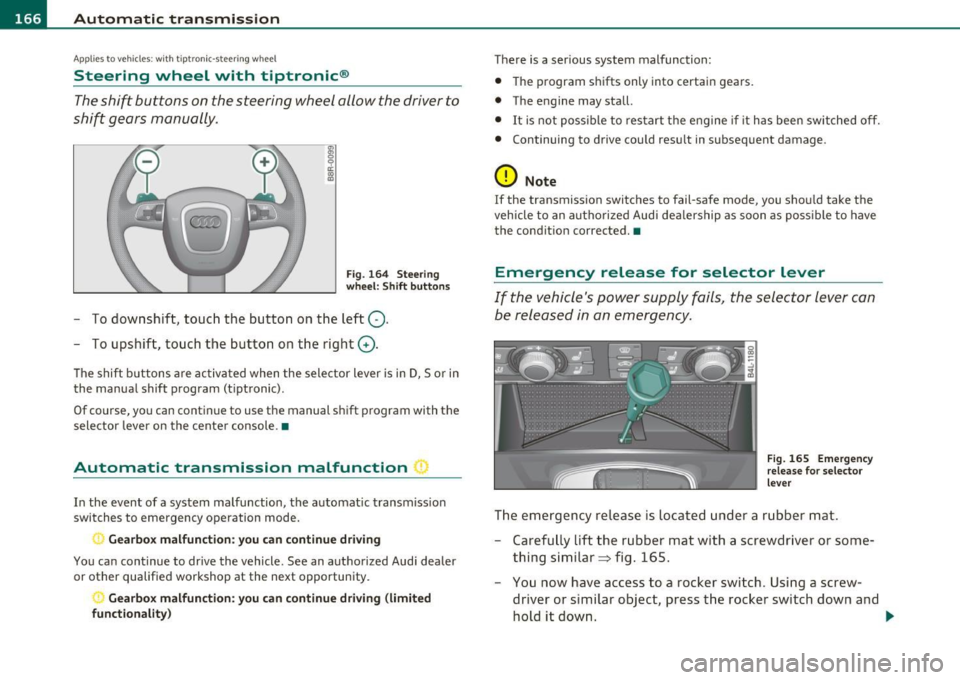
If the vehicle's power supply fails, the selector lever can
be released in an emergency.
Fig. 165 Emergency
release for selector
lever
The emergency release is located under a rubber mat.
- Carefully lift the rubber mat with a screwdriver or some
thing similar => fig. 165.
- You now have access to a rocker switch . Using a screw
dr iver or similar object, press the rocker switch down and
hold it down. ._