turn signal AUDI Q7 2010 Owner´s Manual
[x] Cancel search | Manufacturer: AUDI, Model Year: 2010, Model line: Q7, Model: AUDI Q7 2010Pages: 390, PDF Size: 93.04 MB
Page 156 of 390
1111....__A_ u_ d_i_ s_id _e_ a_s _s_ i_ s _t _________________________________________________ _
Applie s to veh icle s: w ith si de assist
Sensor detection area
Fig . 1 52 Sc hem ati c
i ll us tra tion: Se nsor
d ete cti on area
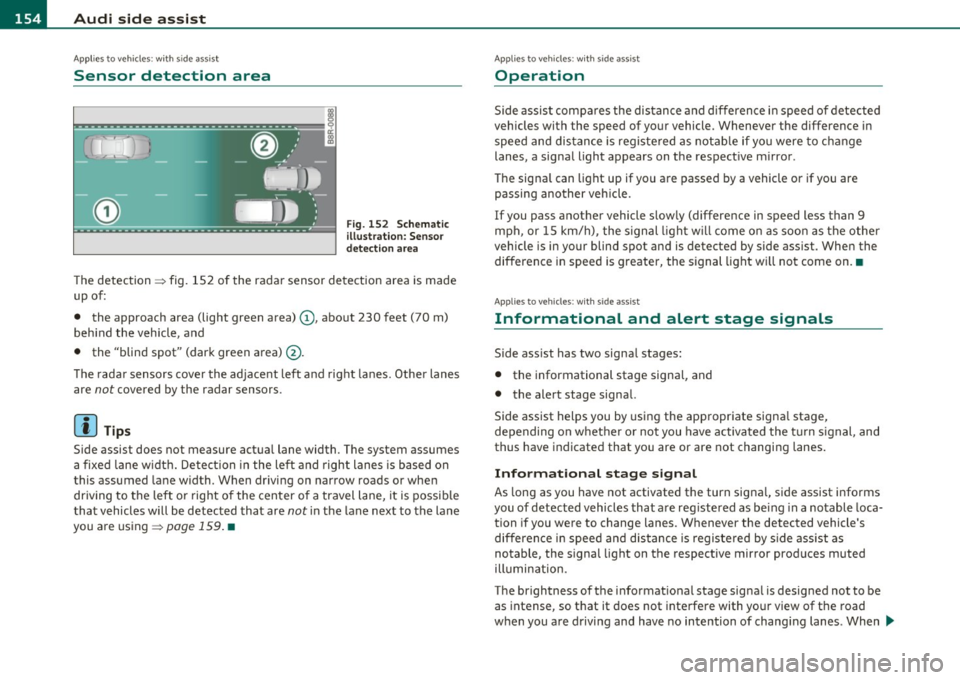
Th e detection => fig. 152 of the ra dar sensor de tection area is made
up of:
• the approach area (light green area)
(D, abo ut 230 feet (70 m)
beh ind the veh icle, and
• the "blind spot" (dark green area) @.
T he rada r sensors cove r the ad jace nt left a nd right la nes. O the r lanes
are
not covered by the radar sensors.
[I) Tips
S ide assist does not measure actua l lane width. The system assumes
a fixe d lane w idt h. Detect ion in the le ft and right lanes is based on
this assumed lane width. When driving on narrow roads or whe n
dr iving to the left o r right o f the center of a travel lane, it is possi ble
tha t vehicles will be detected that are
not in the lane next to the lane
you a re us ing =>
page 159 . •
A pplie s to ve hicl es: wi th si de assist
Operation
Side assis t comp ares the di stance and differen ce i n s peed of dete cted
vehicles with the speed of your vehicle. Whenever the difference in
speed and dis tance is registe red as not able if you were to c hange
lanes, a signa l light appears on the respect ive m irror .
Th e signa l can light up if you are passed by a vehicle or if you are
passing ano ther veh icle.
If you pass anot her vehicle slow ly (difference in speed less than 9
m ph, or 15 km/h), the signal ligh t w ill c ome o n as soo n as the other
vehicle is in your blind spot and is detected by side ass ist . When the
difference i n spee d is greater, the signal light w ill not come on .•
A ppli es to ve h icles : w it h sid e ass ist
Informational and alert stage signals
Side ass ist has two signa l stages:
• the informational stage signa l, and
• the alert stage signal.
Side assist helps you by using the appropr iate signa l stage,
depending on w het her o r no t you have activated the turn signal, and
thus have indicated that you are or are not changing lanes.
Informational stage signal
As long as you have not activated the turn signa l, s ide assist informs
you of detected vehicles that a re reg istered as be ing in a no table loca
tion if you we re to change lanes. Whenever the detected vehicle's
differen ce i n spee d and dis tance is registe red by s ide ass ist as
notable, the signal light on the respective mir ror produces muted
ill umin ation.
T he br ightness of the i nfo rmat iona l stage sig na l is desig ned not to be
as intense, so t hat it does not inte rfe re with yo ur v iew of the road
w hen you are d rivi ng and have no intention of chang ing lanes . When .,,,
Page 157 of 390
Audi side assist Ill _______________ ____.
you look in the outside ·mirror, you can clearly see the informational
stage signal.
Alert stage signal
When you act ivate the turn signal , and side assist has detected a
vehicle in a notable location on that part icular side, the signal light on
this side mirror flashes brightly. The repeated brief and bright
flashing of the alert stage signal reminds you to carefully check
traff ic to the rear in the outside mirror and over your shoulder, so that
you can safely complete the lane change~
& in "Safety tips" on
pag e 160.
[ i ] Tips
The brightness of the signal light on the outside mirrors can be
adjusted with the MMI
~ page 158. •
Con tro ls a nd e quip
m en t Vehicle
OP-eration
Applies to vehicles : with side assist
Driving situation: Fast approaching
vehicles
Fig . 153 Side assist: Fast approaching vehicles
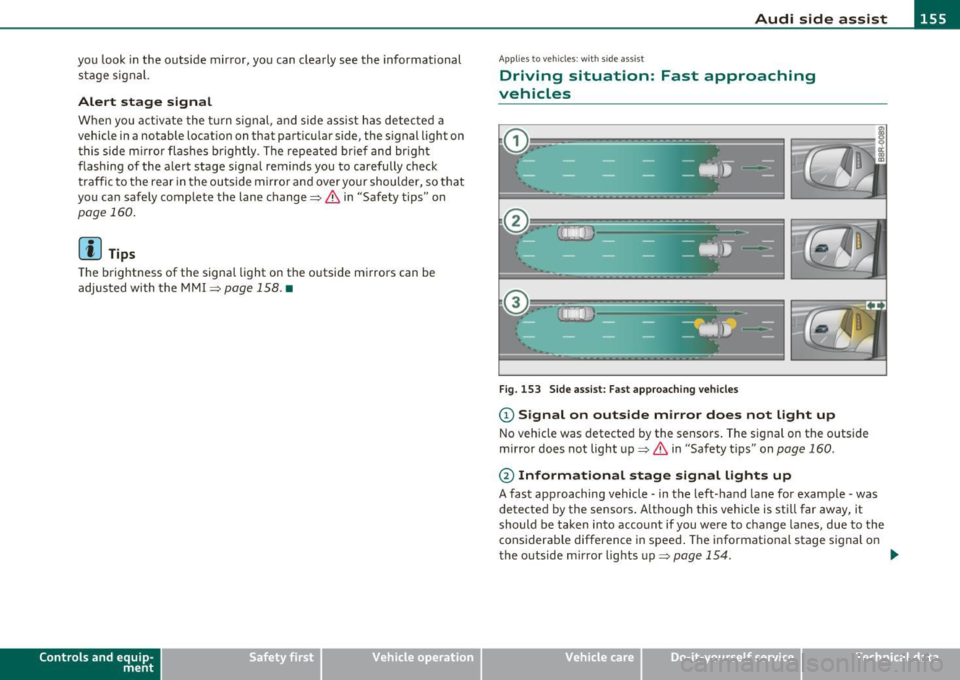
(D Signal on outside mirror does not light up
No vehicle was detected by the sensors. The signal on the outside
mirror does not light up~
& in "Safety tips" on page 160 .
@ Informational stage signal lights up
A fast approaching vehicle -in the left-hand lane for example -was
de tected by the sensors. A lthough this vehicle is still far away, it
should be taken into account if you were to change lanes, due to the
considerable difference in speed . The informational stage signal on
the outside mirror lights up~
page 154. _,,,
Vehicle care Do-it-yourselt service iTechnical data
Page 158 of 390
1111..__A_ u_d_ i _s _id _ e_ a_s _ s_ i_ s _t _______________________________________________ _
@ Alert stage signal flashes
If you activate your turn signal in driving situation @, the signal
briefly flashes repeatedly. Side assist is alerting you to a veh icle that
you may not have noticed .
l i] Tips
• The faster a vehicle approaches from the rear, the sooner the
signal on the outs ide mirror lights up. S ide assist will signa l, at the
latest, when a detected vehicle enters your "blind spot" .
• When vehicles approach very quickly, changing lanes can be
dangerous even if the signal on the outside mirror does not light up.•
Applies to vehicles : w ith side a ssist
Driving situation: Slowly approaching
vehicles
Fig. 154 Side assist: Slowly approaching vehicles and vehicles in your blind
spot
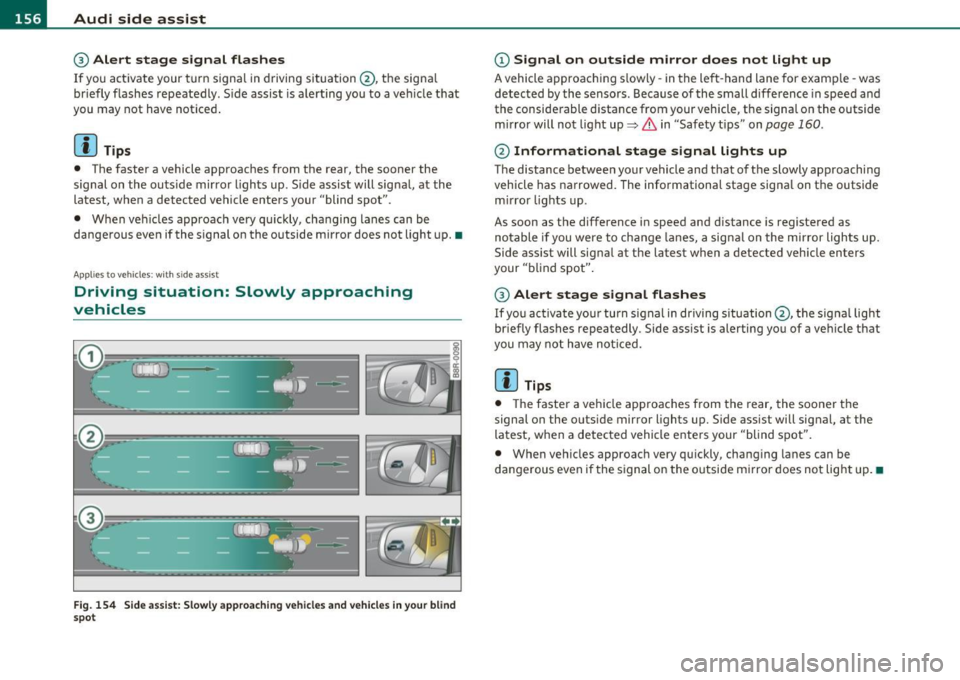
(D Signal on outside mirror does not light up
A vehicle approaching s lowly -in the left-hand lane for examp le -was
detected by the sensors . Because of the small difference in speed and
the considerable distance from your vehicle, the signa l on the outside
mirror will not light up:::::,
& in "Safety t ips" on page 160 .
@ Informational stage signal lights up
The distance between your vehicle and that of the slowly approaching
vehicle has narrowed. The informational stage signal on the outside
m irror lights up.
As soon as the difference in speed and distance is registered as
notable if you were to change lanes, a signal on the mirror lights up.
Side assist will signal at the latest when a detected vehicle enters
your "blind spot".
@ Alert stage signal flashes
If you activate your turn signal in driving situation@, the signal light
briefly flashes repeatedly . Side assist is alerting you of a vehicle that
you may not have noticed.
[ i ] Tips
• Th e faste r a vehicle approaches from the rear, the sooner the
signal on the outside mirror lights up. Side assist will signal, at the
latest, when a detected vehicle enters your "blind spot".
• When vehicles approach very quickly, changing lanes can be
dangerous even if the s ignal on the outside m irror does not light up.•
Page 159 of 390
_________________________________________________ A_ u _ d_ i_ s_ id_ e_ a _ s_s _ i_s _t _ __.fflll
A ppli es to vehicles : w ith side assist
Driving situation: Vehicles dropping back
slowly
Fig . 155 Side assist : Vehicles dropping back slowly
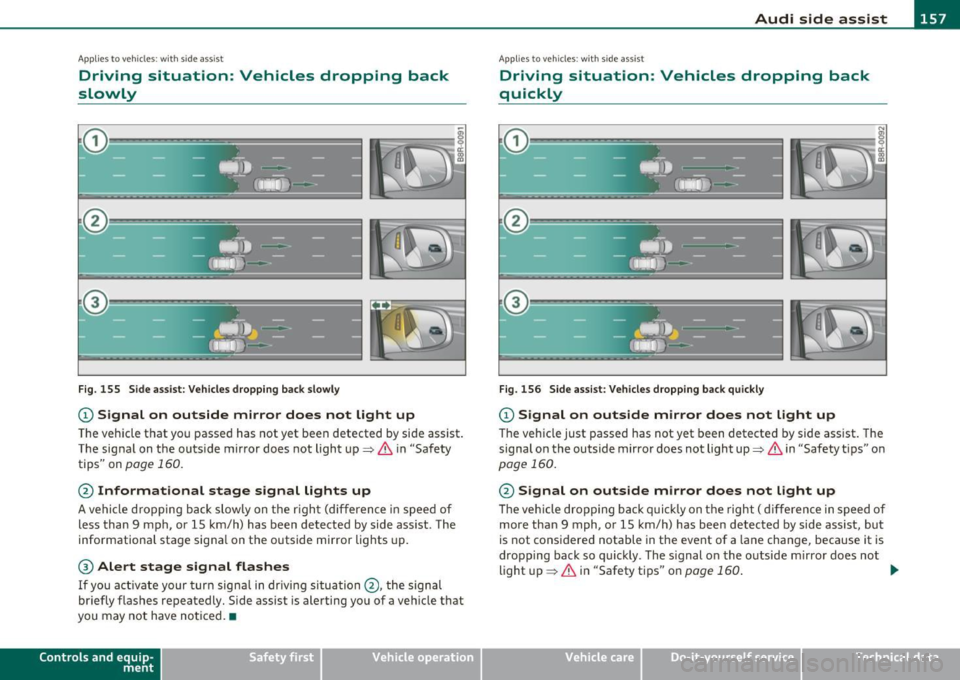
CD Signal on outside mirror does not light up
The vehicle that you passed has not yet been detected by side assist .
The signal on the outside mirror does not light up~
& in "Safety
tips" on
page 160.
@ Informational stage signal lights up
A vehicle dropping back slowly on the rig ht (difference in speed of
less than 9 mph, or 15 km/h) has been detected by side ass ist. The
informationa l stage signa l on the outside mirror lights up.
® Alert stage signal flashes
If you activate your turn signal in driving situation @, the signal
briefly flashes repeatedly. Side assist is alerting you of a vehicle that
you may not have noticed. •
Contro ls a nd e quip
m en t Vehicle
OP-eration
App lies to vehicles : w it h sid e assist
Driving situation: Vehicles dropping back
quickly
Fig . 156 Side assist: Vehicles dropping back quickly
CD Signal on outside mirror does not light up
The vehicle just passed has not yet been detected by side assist. The
signal on the outside mirror does not light up~
& in "Safety tips" on
page 160.
@ Signal on outside mirror does not light up
The veh icle dropping back quickly on the right ( difference in speed of
more than 9 mph, or 15 km/h) has been detected by side assist, but
is not cons idered notable in the event of a lane change , because it is
dropping back so quickly . The s ignal on the outside m irror does not
light up~
& in "Safety tips" on page 160 . tJ,,,
Vehicle care Do-it-yourselt service iTechnical data
Page 160 of 390
1111....__A_ u_ d_i_ s_ id_ e_ a_s _s_ i_ s _t _________________________________________________ _
@ Signal on outside mirror does not light up
If you activate your turn signa l in driving situation @, the signal still
does not light up on the outside mirror~
& in "Safety tips" on
page 160. •
Applies to vehicles : w ith side assist
MMI settings
The basic brightness setting of the signal on the outside
mirror can be adjusted via the MMI.
-Select: Function button ( CAR j > Systems * > Audi side
assist .
The brightness of the signal l ight for both the info rmationa l and alert
stages is automatically adjusted to ambient light conditions . In addi
tion , you can adjust the
basic brightness separate ly, via the bright
ness function.
Whi le mak ing the adjustment, the new brightness setting is
displayed briefly . The br ightness d isplayed is that of the informa
tional stage signal. The alert stage signal br ightness is linked to the
info rmational stage signal brightness.
The informational stage signal brightness should be adjusted so that
you notice the signal illumination when you look in the outside
mirror, but not when you look forward through the windshield.
In very dark or light surroundings, the automatic brightness setting
adjusts signal light brightness to maximum or minimum intensity, as
needed. In circumstances such as these, you may not notice any
change in the brightness on the outside mirror when adjusting the
basic brightness.
You may not notice the change until lighting conditions are normal
again.
W Tips
• Side assist is not active when the basic br ightness is adjusted. The
signal light comes on brief ly to help you make the adjustment.
• Your settings are automatically stored and ass igned to the remote
control key being used. •
Appli es to vehicles: w it h si de assis t
General information
Side ass ist has limits and cannot detect vehicles under all road and
weather conditions . Please remember system limitations and never
rely on the system, especially when:
• driving through curves~
page 158,
• lanes a re of different width s~ page 159 . •
Ap plies to vehicles: w ith side ass ist
When driving through curves
Side assist cannot detect vehicles in curves with a turning radius of
less than 328 feet (100 m).
When driving through a curve, it is poss ible that side assist may
registe r a vehicle two lanes over, and the signal on the outside mir ror
will light up.•
Page 161 of 390
_________________________________________________ A_ u_d _ i_ s_id _ e_ a_s _s_ i_s _t __ _
App lies to vehicles : with sid e assist
Lane width
Fig. 157 Lanes of a
normal width are
in
detection area
Fig. 158 Narrow
lanes: Side assist may
detect vehicles two
lanes away
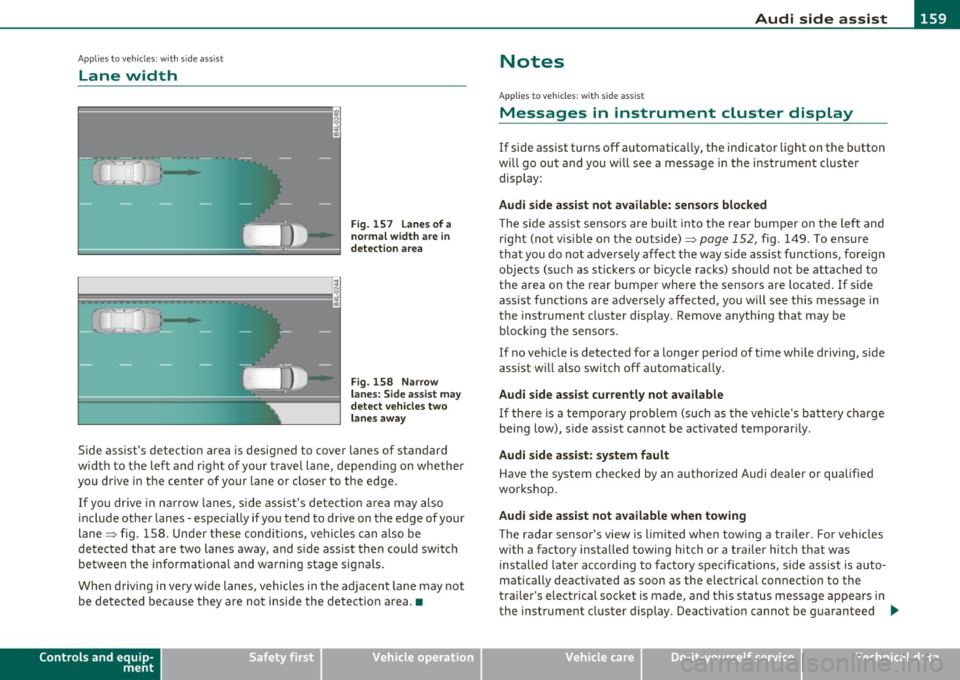
Side assist's detection area is designed to cover lanes of standard
width to the left and right of your travel lane, depending on whether
you drive in the center of your lane or closer to the edge.
If you drive in narrow lanes, side assist's detection area may also
include other lanes - especially if you tend to drive on the edge of your
lane => fig . 158. Under these conditions, vehicles can also be
detected that are two lanes away, and side assist then could switch
between the informational and warning stage signals.
When driving in very wide lanes, vehicles in the adjacent lane may not
be detected because they are not inside the detection area .•
Controls and equip
ment Safety first
Notes
Ap
plies to veh icles: with s ide ass ist
Messages in instrument cluster display
If side assist turns off automatically, the indicator light on the button
will go out and you will see a message in the instrument cluster
display :
Audi side assist not available: sensors blocked
The side assist sensors are built into the rear bumper on the left and
right (not visible on the outside)=>
page 152, fig. 149 . To ensure
that you do not adversely affect the way side assist functions, foreign
objects (such as stickers or bicycle racks) should not be attached to
the area on the rear bumper where the sensors are located. If side
assist functions are adversely affected, you will see this message in
the instrument cluster display . Remove anything that may be
blocking the sensors.
If no vehicle is detected for a longer period of time while driving, side
assist will also switch off automatically.
Audi side assist currently not available
If there is a temporary problem (such as the vehicle's battery charge
being low), side assist cannot be activated temporarily .
Audi side assist: system fault
Have the system checked by an authorized Audi dealer or qualified
workshop.
Audi side assist not available when towing
The radar sensor's view is limited when towing a trailer. For vehicles
with a factory installed towing hitch or a trailer hitch that was
installed later according to factory specifications, side assist is auto
matically deactivated as soon as the electrical connection to the
trailer's electrical socket is made, and this status message appears in
the instrument cluster display . Deactivation cannot be guaranteed .,,_
Vehicle care Technical data
Page 162 of 390
lffl!I.___A_ u_ d_ i_s_ i_d _e_ a_ s_ s_ is_t _______________________________________________ _
when usin g a retrofitted tow ing hitc h that was not installed
acc ording to factory speci ficati ons. •
Applies to vehicles: w ith sid e assis t
Safety tips
T he s ide assist detect ion may be limited w hen driving aro und narrow
st reet corners, on hilly st ree ts, and un der poo r wea the r condit ions.
It is possible that the radar sensors may also detect o ther objects,
such as high or staggered g ua rdrails .
S ide assi st does not me asure actual lane wid th. The sy stem assume s
a fixed lane w idt h. Detection in the left and right lanes is based on
t his assumed lane wid th. W hen drivi ng o n nar row ro ads o r whe n
dr iving to the left o r right of the center of a travel lane, it is possib le
that vehicles will be detected that are
not i n the lane next to the lane
you a re us ing.
& WARNING
• Improper reliance on the side assist system can cause collisions
and serious personal injury:
-Never rely only on side assist when changing lanes.
- Always che ck rear view mirrors to make sure that it is safe to
change lanes.
• Side as sist cannot detect all vehicles under all conditions
danger of accident!
• Side assi st cannot detect vehicle s in time to alert you when
they approach from behind at very high speed, or fall drop back
very quickly.
• The radar sensor's
vision can be reduced or entirely blocked by
rain , snow , and heavy spray. This can result in side assi st not
adequately detecting vehicles or , in some cases, not detecting
them at all. Alway s keep an eye on the direction you are traveling
and the relevant area around the vehicle .
& WARNING (co ntinued )
• Please note that side assist indicates there are approaching
vehicles, or vehicles in your blind spot, only after your vehicle has reached a driving speed of at least 19 mph (30 km/h).
• Side assist signal does not work around tight corners (turning
radius less than 328 feet , or 100 m).
• Side assist is no replacement for the driver's full attention. The
driver alone i s responsible for lane changes and similar driving
maneuvers . Always keep an eye on the direction you are traveling
and the relevant area around the vehicle.
0 Note
T o ensure that s ide ass ist is not a dversely affected, yo u should not
bloc k the ar ea on the rear bumper w he re the radar sensors are
locate d w it h foreign objects (such as w it h sticke rs or b icycle racks).
[ i ] Tips
If the positions o f the radar sensors have been c hanged as a result of
a r ear end -colli sion, fo r instan ce, h ave side assis t che cked b y an
author ized Audi dea ler for safety reasons. •
Page 174 of 390
Ill Parking system
"---~--------------
& WARNING (continued)
• Use the rear view camera only with the rear lid completely
closed. Make sure any objects you may have mounted on the rear
lid do not block the rear view camera.
[ i ) Tips
• The sensors must be kept clean and free of snow and ice for the
park assist to operate.
• The visual display is shown in the illustration of the rear view
camera . This display shows where the sensors have detected an
obstacle.
• You can change the volume and pitch of the signals as well as the
display =>poge
174.
• Please follow the instructions for towing a trailer=> page 175 .
• What appears in the display is time-delayed. •
Applies to veh icles: wit h pa rking sy ste m adv anc ed
Reverse Parking
Parking mode 1 can be used when parking in a garage or
into a parking space.
Fig. 172 MMI display:
aiming at a parking
spot Fig. 173
MMI display:
aligning the vehicle
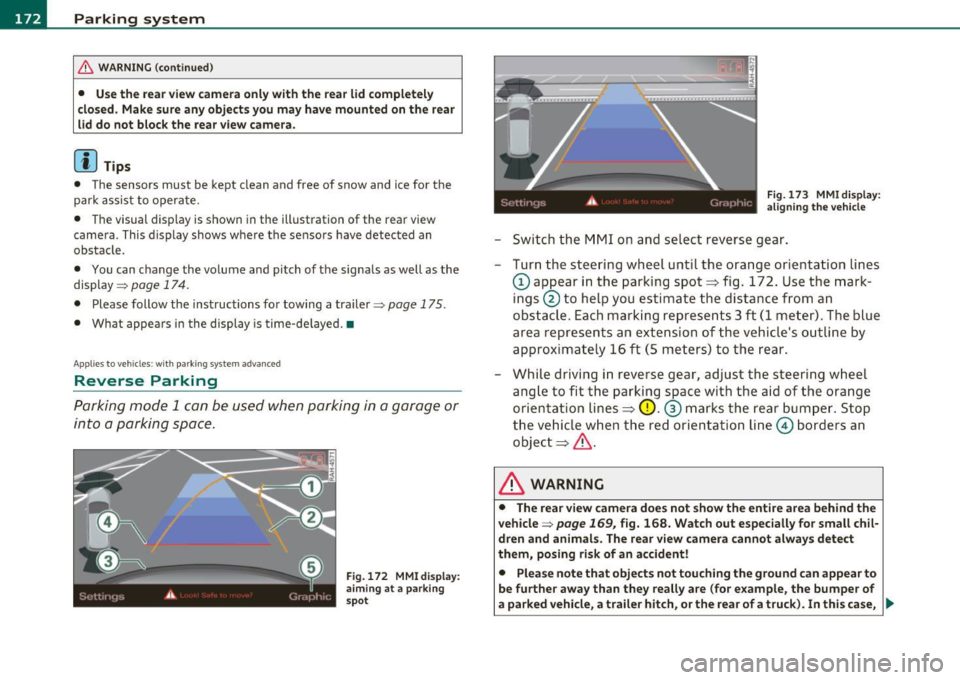
-Switch the MMI on and select reverse gear.
- Turn the steering wheel until the orange orientation lines
(D appear in the parking spot=> fig. 172. Use the mark
ings @to help you estimate the distance from an
obstacle. Each marking represents 3
ft (1 meter) . The blue
area represents an extension of the vehicle's outline by
approximately 16 ft (5 meters) to the rear.
- While driving in reverse gear, adjust the steering wheel
angle to fit the parking space with the aid of the orange
orientation lines=>
0. ® marks the rear bumper. Stop
the vehicle when the red orientation line© borders an
object=> &.
& WARNING
• The rear view camera does not show the entire area behind the
vehicle =>
page 169, fig. 168. Watch out especially for small chil·
dren and animals . The rear view camera cannot always detect
them, posing risk of an accident!
• Please note that objects not touching the ground can appear to
be further away than they really are (for example, the bumper of
a parked vehicle, a trailer hitch, or the rear of a truck). In this case, .,
Page 175 of 390
Parking system -
----------------=-------'
& WARNING (continued )
you should not use the help lines to help with parking, which
poses danger of an accident!
0 Note
In the MMI display , the direction of travel of the vehicle rear is repre
sen te d dependin g on the s teering wheel ang le . The vehicle fron t
swings out more than the vehicle rear. Maintain plenty of distance so
that your outside mirror or a corner of your vehicle does not collide
with any obstacles. This can damage to your vehicle. •
Applies to ve hicles : w ith pa rk ing system advanced
Parallel Parking
Use parking mode 2 to help you parallel pork along the
side of a street.
Con tro ls a nd e quip
m en t
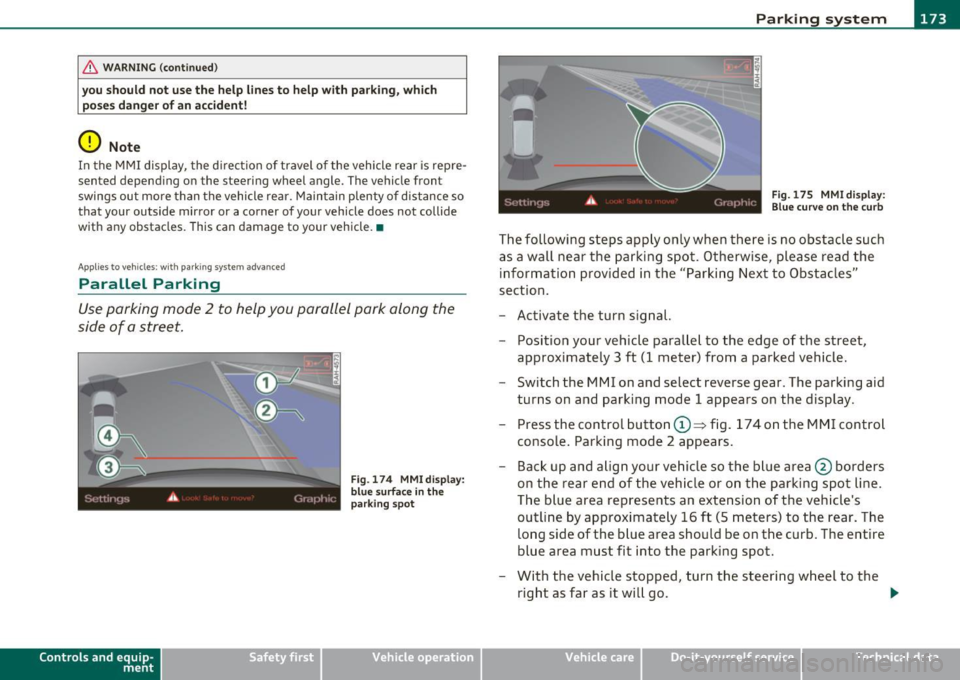
Fig . 174 MMI display:
blue surface in the
parking spot
Vehicle OP-eration
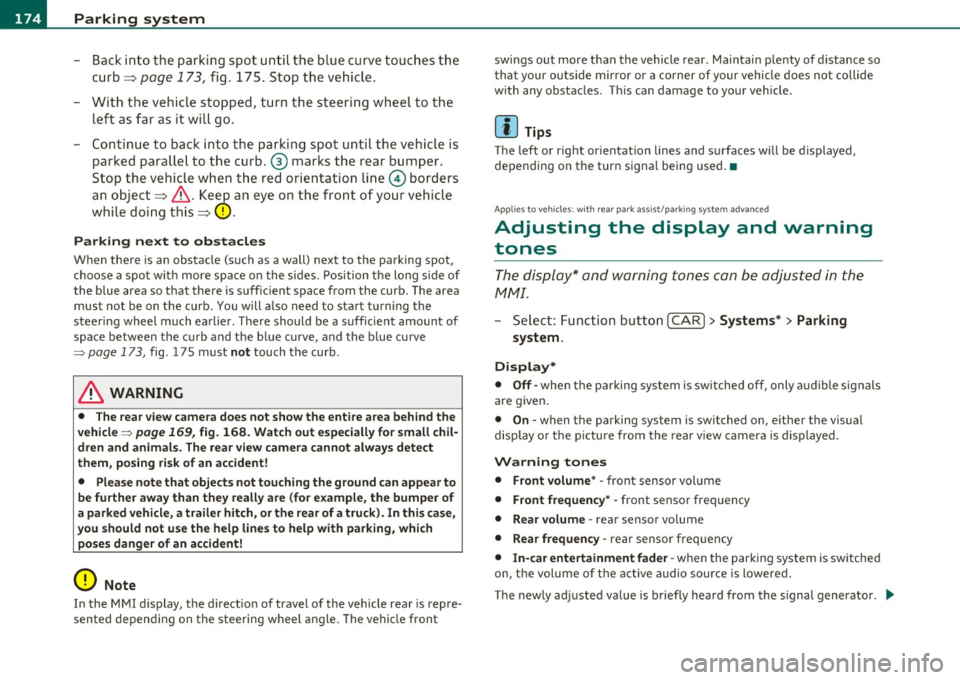
Fig. 175 MMI display:
Blue curve on the curb
The following steps apply only when there is no obstacle such
as a wall near the parking spot. Otherwise, please read the information provided in the "Parking Next to Obstacles"
section.
- Activate the turn signal.
- Position your vehicle parallel to the edge of the street,
approximately 3 ft (1 meter) from a parked vehicle.
- Switch the MMI on and select reverse gear . The parking aid
turns on and parking mode 1 appears on the display .
Press the control button©~ fig. 174 on the MMI control
console. Parking mode 2 appears.
- Back up and align your vehicle so the blue area @ borders
on the rear end of the vehicle or on the parking spot line.
The blue area represents an extension of the vehicle's
outline by approximately 16 ft (5 meters) to the rear. The
long side of the blue area should be on the curb. The entire
blue area must fit into the parking spot.
- With the vehicle stopped, turn the steering wheel to the
right as far as it will go. _.,
Vehicle care Do-it-yourselt service iTechnical data
Page 176 of 390
IIII.___P_ a_r_k _ i_n ...::g::- s_, y...._ s_t _e _m ________________________________________________ _
- Back into the parking spot until the blue c urve touches t he
curb==>
page 173, fig. 175 . Stop the vehicle .
- With t he vehicle stopped, turn the steeri ng whee l to the
left as far as it wi ll go.
- Continue to back into the parking spot until the vehicle is
parked paralle l to the curb.@ marks the rear bumper .
Stop the vehic le w hen t he re d orientation line© borders
an object ==>& . Ke ~ an eye on the fro nt o f your ve hicle
whi le doing this==><.!).
Parking next to ob stacles
When there is an obstacle (such as a wall) next to the parking spot,
choose a spo t w it h more space on the sides. Position t he long side of
the blue area so that there is sufficient space from the curb. The area
must not be on the curb. You will also need to star t turning the
steer ing wheel much earlier. There should be a suff icie nt amount of
space between the c urb and the b lue c urve, and t he b lue c urve
=> page 173, fig . 175 must not touch the curb .
& WARNING
• The rear view camer a does not show the entire area beh ind the
vehicle =>
page 169, fig. 168 . Watch out e specially for small chil
dr en and animals. The rear view camera cannot always detect
them, p osing ri sk of an ac cident!
• Please note that object s not touching the g round can appear to
be further away than th ey r eally are (for example, the bumper of
a parked vehicle, a trailer hitch, or th e rear of a t ruck) . In this case,
you should not us e the help line s to h elp with parking , which
po se s danger of an accid ent !
0 Note
In the MMI display, the direct io n of travel of the vehicle rea r is rep re
sented depending on the steering wheel angle . The vehicle front sw
ings out more than the vehicle rear . Maintain plenty of d istance so
t ha t your ou tside mirror or a corner of your vehicle does no t collide
w ith any obstacles . This can damage to you r vehicle.
(I] Tips
The left or right or ientation lines and surfaces w ill be displayed,
depending on the turn signa l being used. •
Applies to vehicles: w it h rear park ass ist/pa rking sys tem advance d
Adjusting the display and warning
tones
T he display * and warning tones can be adjusted in the
fv1 fv1I.
- Select: Function but ton [CAR ]> System s*> Parking
system.
Displ ay*
• Off -when the parking system is switched off, only audible signals
are g iven .
• On -when the parking system is switched on, either the visual
display o r the picture from the rear v iew c amera is displayed.
Warning tones
• Front volume * -front sensor vol ume
• Front frequen cy * -front sensor frequency
• Rear volume -rear sensor vo lume
• Rear frequenc y-rear senso r freq uency
• In-car entertainment fader -when the parking system is switched
on, the vol ume of t he active audio source is lowered.
The newly adjusted va lue is briefly heard from the signal generator . .,