turn signal AUDI Q7 2010 Owner´s Manual
[x] Cancel search | Manufacturer: AUDI, Model Year: 2010, Model line: Q7, Model: AUDI Q7 2010Pages: 390, PDF Size: 93.04 MB
Page 17 of 390
-
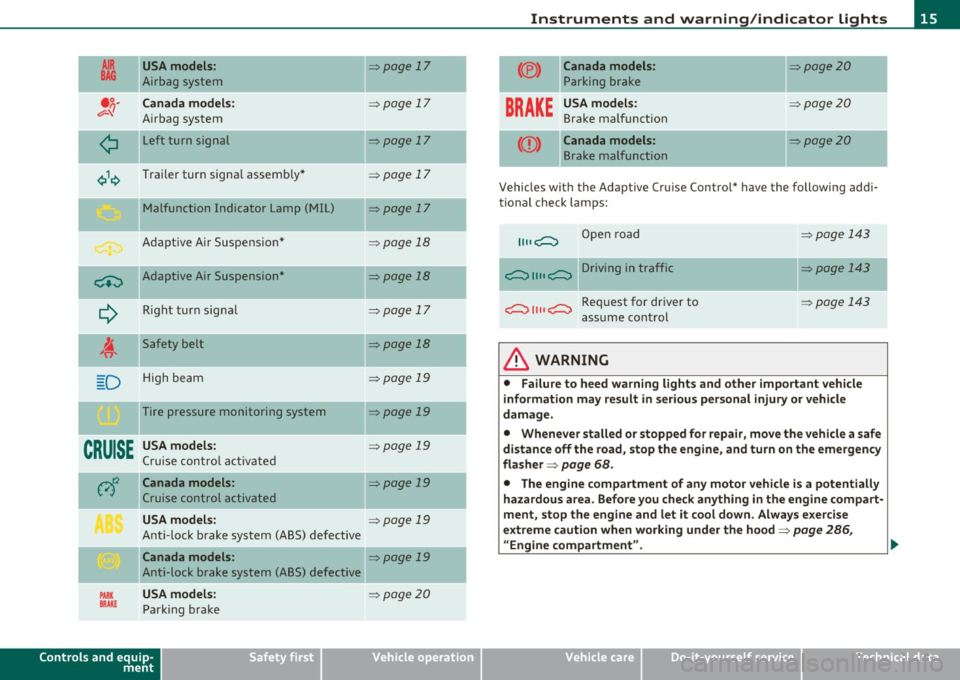
AIR
BAG
-
USA models:
Airbag system
Canada model s:
Airbag system
L eft turn signal
Trailer turn signa l assemb ly*
M alfunction Indicator Lamp (MIL)
Adapt ive Air Suspens ion*
ci::) Adaptive Air Suspension*
--
¢ Right turn sig na l
i Sa fety belt
D H igh beam
Tire pressure monitoring system
CRUISE
USA models:
C rui se contro l a ct ivate d
-
PARK
BRAKE
-
Canada models :
Cruise control activated
USA models:
Anti-lock brake system (ABS) defective
Canada models :
Anti-lock brake system (ABS) defective
USA models:
Park ing brake
Controls and equip
ment Safety first
=:>page 17
=:> page 17
=:>page 17
=:>
page 17
=:>page 17
=:>page 18
=> page 18
=:> page 17
=> page 18
=:> page 19
=> page 19
=> page 19
=:> page 19
=> page 19
=:> page 19
=> page 20
-
-
-
-
Instruments and warning /indicator lights
(® ) Canada models:
Parking br ake
=:>page20
---
BRAKE USA model s:
Brake ma lf u nct ion
:::::,page2 0
-- -
<
CD >
Canada models :
Brake malfunction
=:> page 20
Vehicles with the Adaptive Cru ise Control* have the following addi
ti onal check lamp s:
Open road
~ 1111 ~ Driving in traffic
~ 1111 ~ Request for dr iver to
assume con trol
& WARNING
=:> page 1 43
=:> page 143
=> page 143
• Failure to heed warning lights and other important vehicle
information may result in serious personal injury or vehicle
damage.
• Whenever stalled or stopped for repair, move the vehicle a safe
distan ce off the road, st op the engine, and turn on the emergency
flasher =:>
page 68.
• The engine compartment of any motor vehicle i s a potentially
hazardous area . Before you check anyth ing in the engine compart
ment, stop the engine and let it cool down. Always exercise
extreme caution when working under the hood=:>
page 286,
"Engine compartment".
Vehicle care Technical data
Page 19 of 390
For more informat io n about the ESP~ page 252. •
Airbag system
~ (USA models) J !,'q· (Canada models)
This warning/indicator light monitors the airbag and the
tensioner systems.
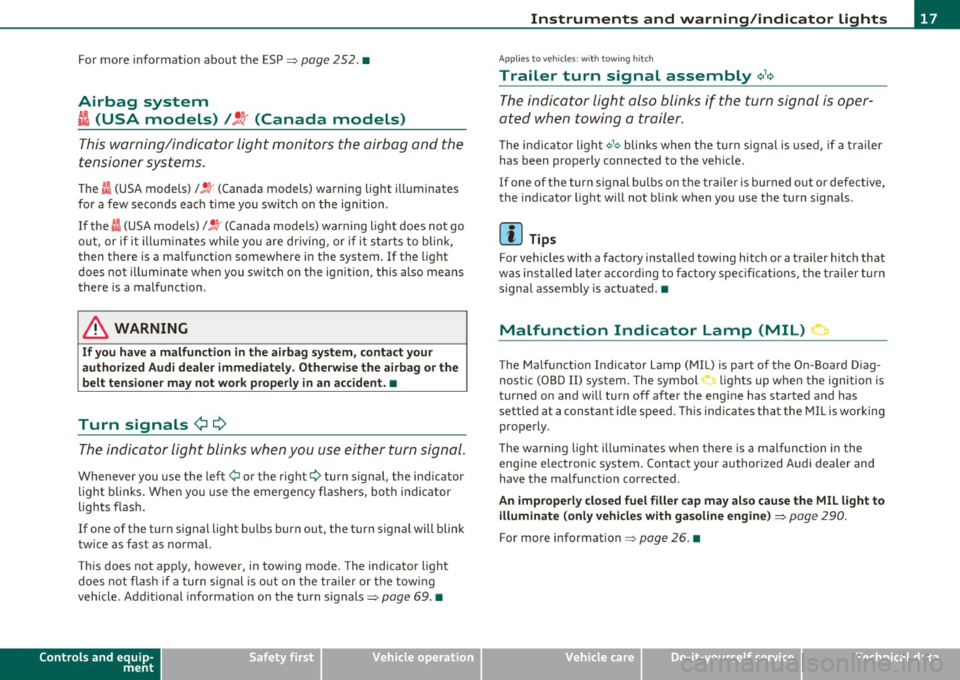
T he I (USA models) /Jl (Canada models) warning light illuminates
for a few seconds each time you switch on the ignition .
If the
I (USA models)/ Jl (Canada mode ls) warning light does not go
o ut , or if it illum ina tes while you are d riving, o r if it starts to blink,
then there is a malfunct io n somewhere i n the system. If the light
does no t illum inate whe n you sw itch on t he igni tion, this also me ans
there is a malfunction.
& WARNING
If you have a malfunction in the ai rbag system , cont act your
authorized Audi dealer immediately . Otherwise the airbag or th e
belt tensioner may not work properly in an accident. •
Turn signals ¢ ¢
The indicator light blinks when you use either tur n signal .
Whenever you use the left ¢ or the right ¢ turn signal, the indicator
ligh t bl inks. W he n you use the eme rgency flashers, both indicator
lights flash .
If one of the turn signa l light bu lbs burn out, the tu rn s ignal will blink
t wice as fast as no rmal.
Th is does not app ly, however, in towing mode. The indicator light
does not fl ash i f a turn s ignal is o ut on t he tra ile r or the tow ing
vehicle . Addi tional informat ion on the turn signals~
page 69. •
Controls and equip
ment Safety first
Instruments and warning
/indicator lights
Applies to vehicles : with towing hitch
Trailer turn signal assembly ~,1<>
The indicator light also blinks if the turn signal is oper
ated when towin g a trailer.
Th e ind icator light ¢ 1¢ blinks when t
he turn signa l is used, if a trail er
has been prope rly connected to the vehicle.
If o ne of the turn sign al b u lbs o n th e trail er is burned out o r defe ct ive,
t he indicato r light will not bli nk when you use the turn signa ls.
(I) Tips
For vehicles w ith a factory installed towi ng hitch or a trailer hitch that
was insta lled later according to factory s pec ifications, the trailer tu rn
signa l assembly is act uated. •
Malfunction Indicator Lamp (MIL) 1:1
The Ma lf u nct io n Indicato r Lamp (MIL) is part of the On-Board D iag
nostic (OBD II) system. The symbol -.. lights up when the ignition is
t ur ned on and w ill tur n off after the eng ine has sta rted a nd has
sett le d at a constant idle speed . This indicates that the MIL is wo rking
prope rly.
T he warning lig ht illuminates whe n there is a malfunction in the
engine e lec tron ic system . Contact your author ize d Audi dealer and
have the malfunction corrected.
An improperly closed fuel filler cap may also cause the MIL light to
illuminate (only vehicles with gasoline engine )
~ page 290.
For more informat ion~ page 26. •
Vehicle care Technical data
Page 26 of 390
Driver information display
Digital speedometer
Fig. 11 Display:
Digita l speedomet er
Current speed appears in the display. Speed is shown in 1 mph
measures (USA models) or 1 km/h measures (Canada models) .
You ca n sw itch the display from miles to kilometers and vice versa via
the MMI. •
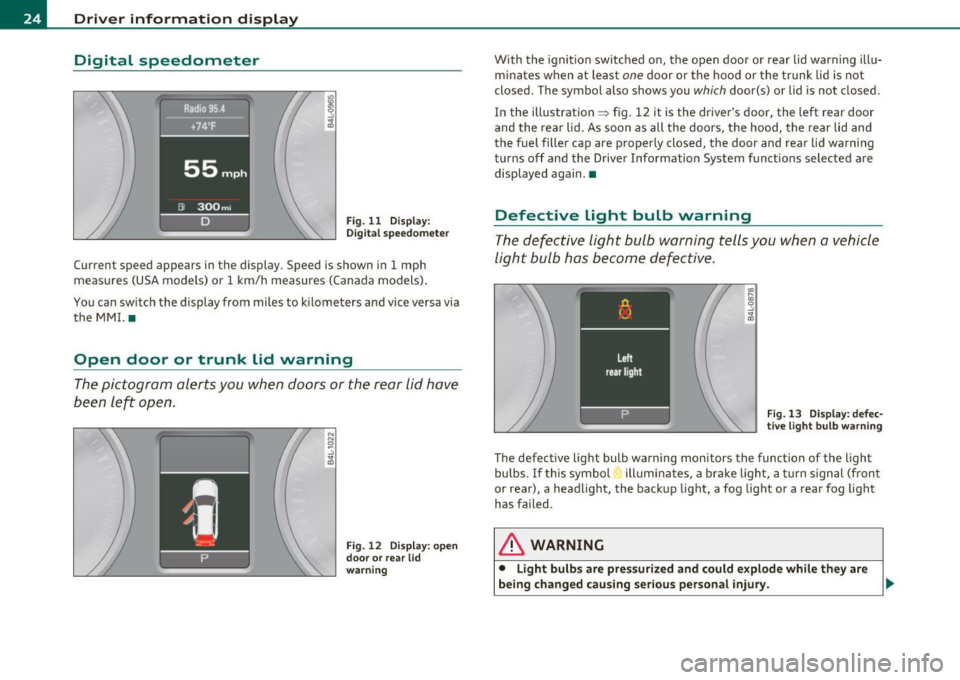
Open door or trunk lid warning
The pictogram alerts you when doors or the rear lid have
been left open.
Fig. 12 Display: open
d oo r or rear lid
warning
With the ignition switched on, the open door or rear lid warning illu
minates when at least one door or the hood or the trunk lid is not
closed. The symbol also shows you
which door(s) or lid is not closed.
In the illustration ~ fig. 12 it is the driver's door, the left rear door
and the rear lid. As soon as all the doors, the hood, the rear lid and
the fuel filler cap are properly closed, the door and rear lid warning
turns off and the Driver Information System functions selected are
displayed again. •
Defective light bulb warning
The defective light bulb warning tells you when a vehicle
light bulb has become defective .
Fig. 13 Display : defec
tive light bulb warning
The defective light bulb warning monitors the function of the light
bulbs. If this symbol illuminates, a brake light, a turn signal (front
or rear), a headlight, the backup light, a fog light or a rear fog light
has failed .
& WARNING
• Light bulb s are pressurized and could explode while they are
being changed causing serious personal injury. .,._
Page 46 of 390
Opening and closing
Exceptions
If the ignition has been switched on using the master key, you can
st ill open the glove compartment and the rear lid.
As long as the ignit ion is switched off, you can still open the rear lid
using the rear lid button on the
master key c:5 . The same holds true
for using the rear lid release handle in conjunction with the Conve
nience key* .
For this reason, be sure to only hand over the
valet key to the person
who wi ll take charge of your vehicle.
[ i J Tips
Be sure to activate the function before handing over the valet key to
someone else . The valet key only fits the lock in the driver 's door and
the ignition lock. •
Power locking system
General description
The power locking system locks or unlocks all doors and
the rear lid simultaneously .
The power locking system in your vehicle incorporates the following
functions :
• Central locking function
• Selective unlock feature=>
page 47
• Remote contro l feature => page 41
• Convenience key*=> page 53
• Anti -theft alarm system=> page 55
All the doors and the rear lid are locked by the central locking system
when you lock the vehicle. You can set whether generally only the
dr iver's door or all doors and the rear lid should be unlocked when yo u open the vehicle in
the MMI menu
Central locking to suit your indi
vidual desires =>
page 47.
Unlocking the vehicle
You can unlo ck the vehicle from outside e ither by using the remote
control
or by insert ing and turning the key in the driver 's door lock.
When you
unlock yo ur vehicle:
• The anti-theft alarm system is deactivated briefly.
• Th e vehicle inter ior lights illuminate for approximately 30
seconds.
• All turn signal lights will flash twice when the car is unlocked .
• After unlocking the vehicle, you have 60 seconds to open a door or
the rear lid. Afte r 60 seconds , the ve hicle automatically locks and the
anti-theft alarm system activates again.
Th e rear lid can be locked or unlocked eithe r by using the remote
control
or by insert ing and turning the key in the driver's door lock.
Unlocking the vehicle with the remote control will on ly
unlock the
rear lid, to
open it, the lid hand le needs to be pressed.
Locking the vehicle
You can lock the vehicle from outside e ither by using the remote
control
or by inserting and turning the key in the drivers's door lock.
When you
lock the veh icle:
• All doors and the rear lid are locked.
• All turn signal lights will flash once when the car is locked.
• The anti-theft alarm system is activated . The horn of the anti
theft alarm system w ill sound and the anti -theft alarm system readi
ness light, located in the upper part of the driver's door panel, will
start to blink .
• The vehicle interior lights turn off .
Unlocking and lock ing with Convenience key*
On vehicles which are equipped with the Convenience key* authoriza
tion system, the doors are unlocked
without a key by means of a prox-
im ity sensor in the door handle. The doors are similarly locked ....
Page 48 of 390
Open ing and closing
- Watch that all turn signal lights flash once .
To unlock rear lid only ~
-Press button © for approximately one second.
PANIC Button
Push the red button @to activate the panic function . The
horn sounds and the turn signals flash.
Push the button @ again to deactivate the panic function.
On vehicles with Convenience key*, the selector lever must be in the P
position, otherwise the vehicle cannot be locked.
& WARNING
R ead and f ollo w all W ARNING S~ & in "G eneral de scription " on
page 44 .
(I] Tips
• In order to make sure the locking function is work ing, you should
always keep your eye on the vehicle to make sure it is properly locked.
• Do not use the remote control if you are ins ide the car, otherwise
you may uninten tionally lock the vehicle, and then you wo uld se t off
the ant i- theft alarm when you try to start the eng ine or open a door .
In case this happens anyhow, push the unlock button@.
• Use the panic function only if you are in an emergency situation .•
Operating tocks with the key
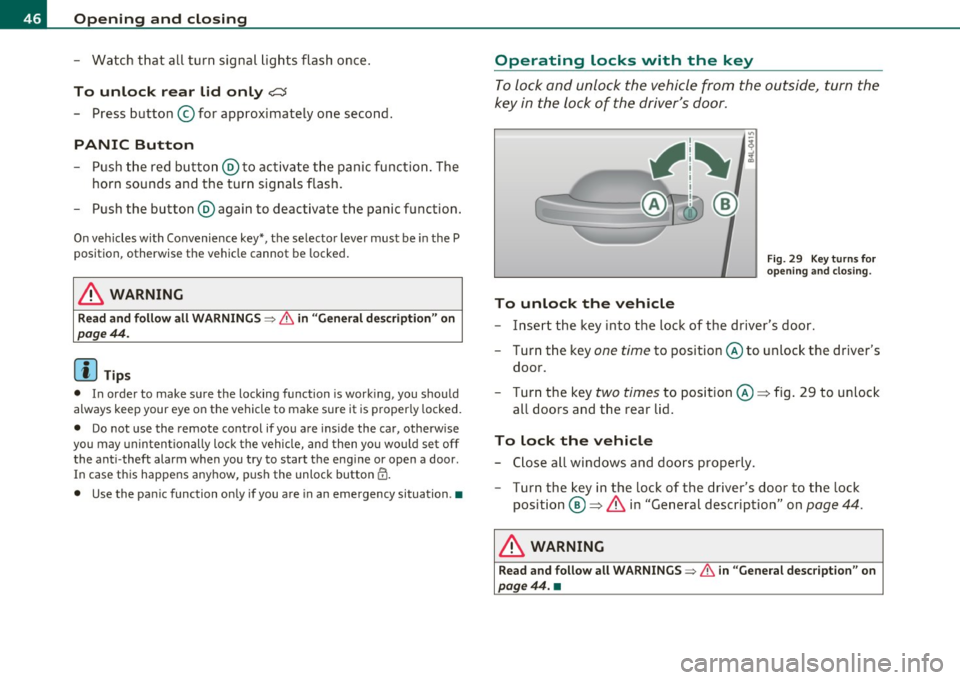
To lock and unlock the vehicle from the outside, turn the
key in the lock of the driver's door .
To unlock the vehicle
Fig. 2 9 K ey turn s fo r
openi ng an d closi ng .
- Insert the key into the lock of the driver's door.
- Turn the key one
time to position @to unlock the driver's
door .
- Turn the key
two times to posit ion @ => fig. 29 to unlock
al l doors and the rear lid.
To lock the vehicle
- Close all windows and doors properly.
- Turn the key in the lock of the driver's door to the lock
position @=>
& in "General description" on page 44.
& WARNING
Read and foll ow all WARNING S~ & in "General de sc ription " on
pag e 44. •
Page 70 of 390
Clear vision
Applies to vehicles : with Adaptive Light
Adaptive Light
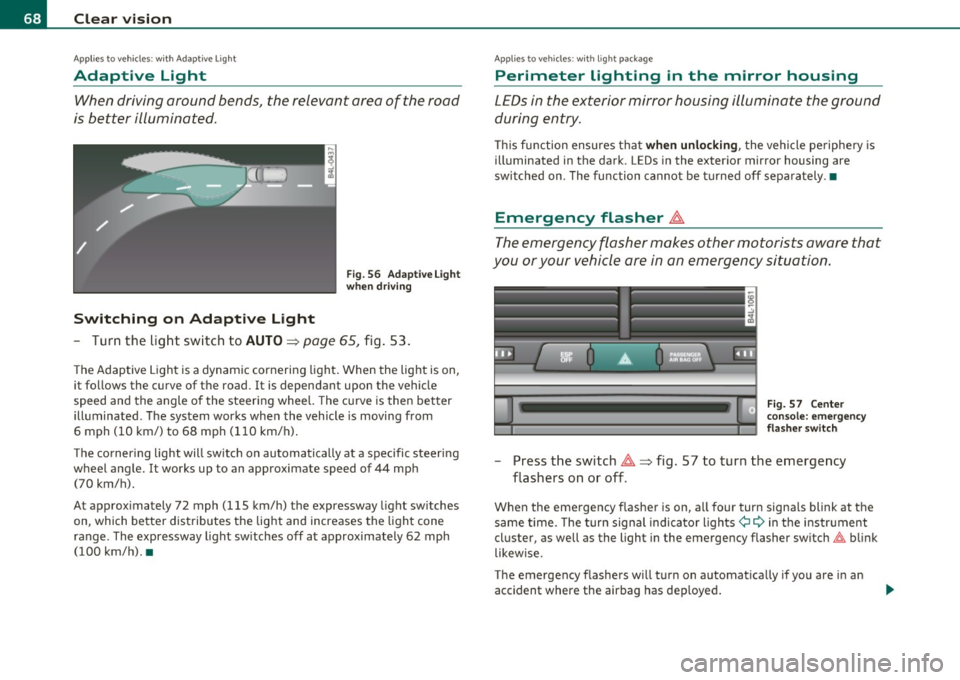
When driving around bends, the relevant area of the road
is better illuminated.
Switching on Adaptive Light
Fig . 56 Adaptive Light
when driving
- Turn the light switch to AUTO~ page 65, fig. 53.
The Adaptive Light is a dynamic cornering light. When the light is on,
it follows the curve of the road. It is dependant upon the vehicle
speed and the angle of the steering wheel. The curve is then better
illuminated. The system works when the vehicle is moving from
6 mph (10 km/) to 68 mph (110 km/h).
The cornering light will switch on automatically at a specific steering
wheel angle. It works up to an approximate speed of 44 mph
(70 km/h).
At approximately 72 mph (115 km/h) the expressway light switches
on, which better distributes the light and increases the light cone
range . The expressway light switches off at approximately 62 mph
(100 km/h). •
Applies to vehicles : w ith light package
Perimeter lighting in the mirror housing
LEDs in the exterior mirror housing illuminate the ground
during entry.
This function ensures that when unlocking, the vehicle periphery is
illuminated in the dark. LEDs in the exterior mirror housing are
switched on. The function cannot be turned off separately .•
Emergency flasher ~
The emergency flasher makes other motorists aware that
you or your vehicle are in an emergency situation.
Fig. 57 Center
console: emergency
flasher switch
-Press the switch~~ fig. 57 to turn the emergency
flashers on or off .
When the emergency flasher is on, all fou r turn signals blink at the
same time. The turn signal indicator lights¢
9 in the instrument
cluster, as well as the light in the emergency flasher switch~ blink
likewise.
The emergency flashers will turn on automatically if you are in an
accident where the airbag has deployed.
Page 71 of 390
![AUDI Q7 2010 Owner´s Manual (]] Tips
You shou ld turn on t he emergency flashers when :
• you are the last vehicle stand ing in a traffic jam so that any other
vehicles com ing can see you , or w hen](/img/6/40275/w960_40275-70.png "AUDI Q7 2010 Owner´s Manual (]] Tips
You shou ld turn on t he emergency flashers when :
• you are the last vehicle stand ing in a traffic jam so that any other
vehicles com ing can see you , or w hen")
(]] Tips
You shou ld turn on t he emergency flashers when :
• you are the last vehicle stand ing in a traffic jam so that any other
vehicles com ing can see you , or w hen
• your vehicle has broken down o r yo u are in an eme rgency s itua
tion, or when
• your vehicle is be ing towed by a tow tr uck o r if you are tow ing
another vehicle behind you .•
Turn signal ¢¢ and high beam ~D Lever
The lever on the le~ side of the s teering column is used to
operate the turn signals and the high beam as well a s the
headlight flasher .
-"' M
-w ... m
Fig. 5 8 Tu rn sig nal
and hi gh bea m l ever
The tu rn s ignal and high beam lever has the follow ing func
tions:
Turn signals ¢ ¢
- Lift the lever up all the way~ fig. 58 (D to use the right
turn signals, or push the lever down all the way@ to use
the left turn signals.
Con tro ls a nd e quip
m en t Vehicle
OP-eration
Clear vision
Auto -blink
- Move the lever (up or down) just to the point of resistance
to use the turn signa ls for as long as you need them, for
examp le when chang ing lanes.
- M ove the lever (up or down) just to the poi nt of res istance
and t hen re lease it right away to make the turn signa ls
blink
three times . You can use this feature for examp le
w hen changing lanes on highways.
High beam ~D
- Push the lever forward @ to switch on the high beam .
- Pull the lever back towa rds you to switc h off the high
beam .
Headlight flasher ~D
Pull the lever toward the steering wheel© to use the
head light flasher .
Notes on these features
• The turn signals only work with the ignition t urned on. The indi
cato r lights ¢ or¢ in the instrument cluster=>
page 14 a lso blink.
• After you have t urned a co rner, the tu rn signal switches off auto
matically .
• Th e
high beam works only when the hea dlights are o n. Th e ind i
ca tor light
aD in the instrument cluster illuminates when the high
beams are on.
• The
headligh t flasher works only as long as you ho ld the lever -
even if there are no l igh ts turned o n. Th e indic ator lig ht
aD in the
instrument clus ter illuminates when you use the headlight flasher. .,,_
Vehicle care Do-it-yourselt service iTechnical data
Page 149 of 390

__________________________________________ A_ d_ a_,_ p_t _iv _ e_C_ r_u _i _ s _e _C_ o_n_ t_ r_ o_ l __ l!'II
[I) Tips
• Adaptive Cru ise Control is sw itched off after pressing the foo t
brake . The speed saved up this poi nt can be resumed.
• T o resume the saved speed, release the brake pedal and p ress the
control lever~
page 139, "Turning Adaptive Cruise Control off
temporar ily ".
• If you use the accelerato r to go faster than the speed of the
vehicle ahead of you, the driver intervention prompt will not be
accompanied by a warning signal.
• If the speed you prev iously set is exceeded, the indicator light in
the speedometer will switch off. •
Appli es to vehi cles : w ith A dap tive Cru ise Cont rol
MMI settings
Individual settings for Adaptive Cruise Control c an be
selected in the MMI.
Settings for t he Driving program ca n be adjusted ind ividually
to the par ticu lar user and save d in the MMI. Th is can only be
done with the engi ne r unning .
- Sele ct : F unc tion b utt on
I C A R]> Systems* > adaptive
cruise control
> Driving program .
Setting the driving program
In the Driving program menu you can ad just the characteristics o f
Ad aptive Crui se Con trol to yo ur own preferences u sing Dynamic ,
Standard or Comfort .
Saving settings
Your individ ual sett ings are automatica lly saved and ass igned to the
remote con trol key being used (remote key sto rage) . If the key is
given to anothe r person, t he saved sett ings rema in as they are. •
Controls and equip
ment Safety first
System Limitations
App
lies to ve hicle s: with Adap tive C ru ise Co ntro l
General information
The radar sensor has limits that the driver must kno w to
be a ble t o use ACC proper ly.
Th e Ad apt ive Cr uise Con trol works wi thin limi ts th at a re also rela ted
to radar sensor range and sight distance. In some situations ACC may react unus ually or late from the drive r's point of view. Therefore,
always be atte ntive to what is happe ning around you and always be
ready to interve ne, if necessary:
• when driving aro und curves ~
page 148
• when ve hicles up front are not in line wit h your vehicle
~ page 148
• when other ve hicles are changing lanes~ page 148
• when other vehicles are difficult to detect~ page 149
• when ve hicles up ahe ad are not mov ing o r o bst acle s ar e in you r
trave l lane ~
page 149
& WARNING
The radar sensor 's function and range can be reduced by rain , snow
and heavy spray . Moving vehicles up ahead may not be promptly
detected or may not be detected at all.
• Always pay careful attention to the traffic situation and be
ready to intervene and be ready to take complete control when
ever necessary .•
Vehicle care Technical data
Page 154 of 390
-Audi side assist .n,..__ ______________ _
Audi side assist
Lane Change Assistant
Applies to vehicles : w ith s ide ass ist
Description
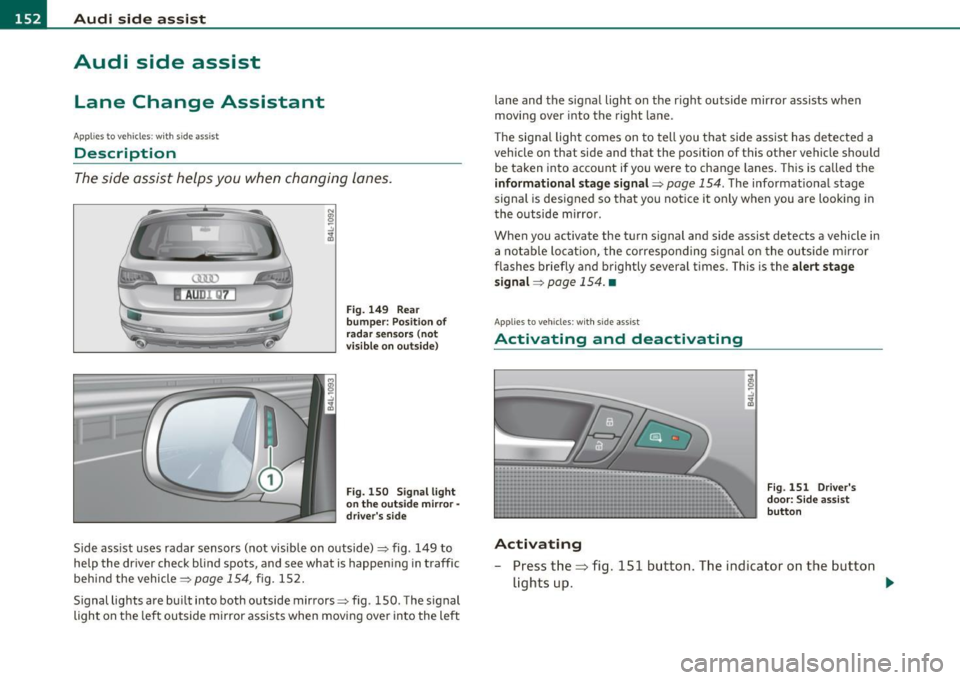
The side assist helps you when changing lanes.
AUDr Q7
Fig . 149 Rear
bumper: Position of
radar sensors (not
visible on outside)
Fig . 150 Signal light
on the outside mirror -
driver's side
Side ass ist uses radar sensors (not visible on outside)=> fig. 149 to
help the driver check blind spots, and see what is happening in traffic
behind the vehicle=>
page 154, fig. 152.
Signal lights are built into both outside mirrors=> fig. 150. The s ignal
light on the left outside mirror assists when moving ove r into the left lane and
the signal light on the r ight outside mirror assists when
moving over into the right lane.
Th e sig nal light comes on to tell you that side assist has detected a
vehicle on that side and that the position of this other vehicle should
be taken into account if you were to change lanes. Thi s is called the
informational stage signal =>
page 154. The informationa l stage
signal is designed so that you not ice it only when you are looking in
the outside m irror.
When you activate the turn s ignal and side assist detects a vehicle in
a notable location, the correspo nding signal on the outside mirror
flashes briefly and brightly several times. This is the alert stage
signal =>
page 154. •
Applies to veh icles: w ith side ass ist
Activating and deactivating
Activating
Fig . 151 Driver's
door: Side assist
button
- Press the=> fig. 151 button. The indicator on the button
lights up. ..,
Page 155 of 390
Audi side assist Ill
----------------
Deactivating
-Pre ss th e b utton again . Th e ind icator light on the button
goes o ut.
The system works at speeds faster than 19 mph (30 km/h) .
& WARNING
• Improper reliance on the side assist system can cause collisions
and seriou s per sonal injury:
- Never rely only on side assist when changing lanes.
- Alway s check rear view mirrors to make sure that it is safe to
change lanes.
• Side assist cannot detect all vehicles under all condition s
danger of accident!
• Side a ssist cannot detect vehicle s in time to alert you when
they approach from behind at very high speed , or fall drop bac;k
very quickly .
• The radar sensor's
vision can be reduced o r entirely blocked by
rain, snow, and heavy spray . Thi s can result in side a ssist not
adequately detecting vehicles o r, in some cases , not detecting
them at all. Always keep an eye on the direction you are traveling
and the relevant area around the vehicle.
• Plea se note that side assi st indi cates there are approaching
veh icles, or vehicles in your blind spot, only after your vehicle has
reached a driving speed of at lea st 19 mph (30 km/h).
• Side assist signal does not work around tight corners (turning
radius le ss than 328 feet, or 100 m ).
• Side assist is no replacement for the driver's full attention. The
driver alone is respon sible for lane changes and similar driving
maneuvers. Always keep an eye on the direction you are traveling
and the relevant area around the vehicle .
Controls and equip
ment Safety first
0 Note
• T
o ens ure t hat you do not adve rsely affec t side assist, do not blo ck
the area on the rear bumper where the radar sensors are located with
foreign obje cts (s uch as stickers or bicy cle ra cks).
• Make s ure that the s ignal light on the outside mirror is not
blo cked by st ickers or o ther ite ms.
W Tips
• Side assist a utoma tically deact iva tes if it de tects that the rada r
sensors are blocked=>
page 159. The indicator light on the button
goe s out.
• Th e area on the bumpe r w here the ra dar sensors are located must
c o nsistent ly remain free of snow, i ce, a nd heavy soiling so tha t side
assist can funct ion p roper ly. Follow the add itiona l notes on
=>
page 160 .
• F or vehicles with a factory installed towing hitc h* or a tra ile r
hi tc h* that was i nstalled late r according to f actory specifications,
side ass ist is automat ically deact ivated as soon as the electrical
c o nne ct io n to the tra ile r electr ical socket is made=>
page 15 9.
• For vehicles with a trai le r h itch that was not installed accor ding to
fac tory spe cifica tions, sw itch off the s ide ass ist whe n tow ing a tra iler.
• Additiona l t int ing on the front si de windows can make it ha rder to
se e and co rrectly unde rs tand t he signa l light o n the outs ide m irro r.
• For Declaration of Compliance to United States FCC an d Industry
Canada regulations=>
page 369 . •
Vehicle care Technical data