service AUDI Q7 2010 Owner´s Manual
[x] Cancel search | Manufacturer: AUDI, Model Year: 2010, Model line: Q7, Model: AUDI Q7 2010Pages: 390, PDF Size: 93.04 MB
Page 73 of 390
r ,:le,
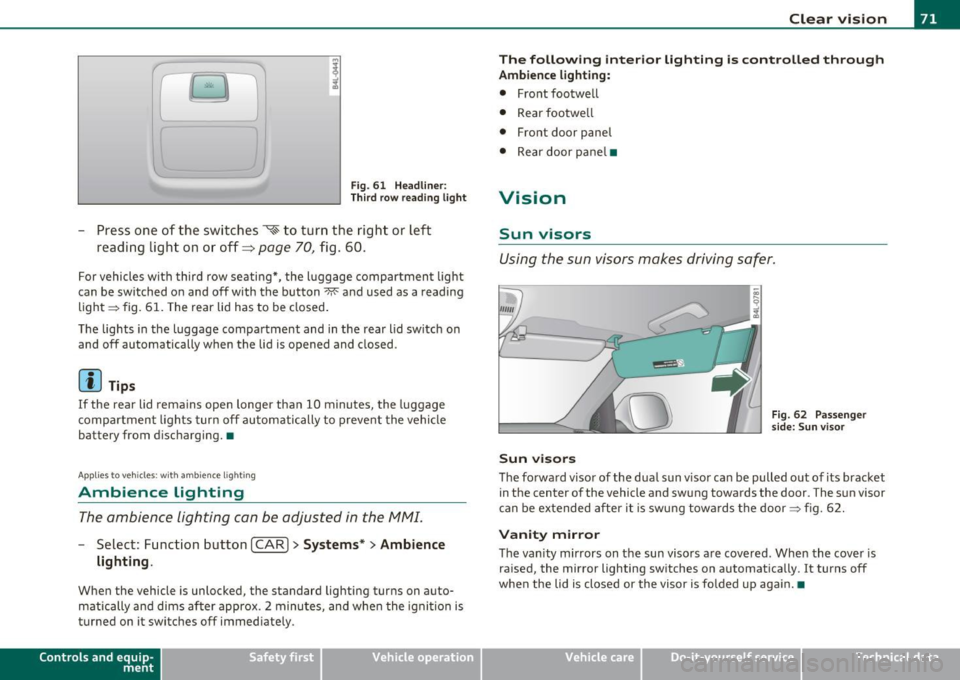
Fig. 61 Headliner :
Third row reading light
-Press one of the switches ~ to turn the right or left
reading light on or off~
page 70, fig . 60.
For vehicles with third row seating*, the l uggage compartmen t light
can be switched on and off with the button~ and used as a reading
light => fig. 61. The rear lid has to be closed.
The lights in the luggage compartment and in the rear lid switch on
and off automatically when the lid is opened and closed.
[ i ) Tips
If the rear lid remain s open longer than 10 minutes, the luggage
compartment lights turn off automatically to prevent the vehicle
battery from discharging. •
Applies to veh icles: with ambience light ing
Ambience Lighting
The ambience lighting can be adjusted in the MMI.
-Select: Function button I CAR]> Systems *> Ambience
lighting .
When the vehicle is unlocked, the standard lighting turns on auto
matically and dims after approx. 2 minutes, and when the ignition is
turned on it switches off immediately.
Con tro ls a nd e quip
m en t Vehicle
OP-eration
Clear vision
The following interior lighting is controlled through
Ambience lighting:
• Front footwell
• Rear footwe ll
• Front door panel
• Rear door pane l•
Vision
Sun visors
Using the sun visors makes driving safer.
Sun visors
Fig. 62 Passenge r
side: Sun v isor
The forward visor of the dua l sun v isor can be pulled out of its bracket
in the center of the vehicle and swung towards the door. The sun visor
can be extended after it is swung towards the door => fig. 62.
Vanity mirror
The vanity mirrors on the sun visors are covered. When the cover is
ra ised, the mirror lighting switches on automatically . It turns off
when the lid is closed or the visor is fo lded up aga in.•
Vehicle care Do-it-yourselt service iTechnical data
Page 77 of 390

As soon as the reverse gear is engaged and the front w ipers are
turned on and operat ing at the same time, the rear wiper a lso tu rns
on automatically.
& WARNING
Wiper bla des ar e c rucia l for safe driv ing ! Onl y in good c ond ition
are the y able to cl ear the wi ndow s pr operl y to prov ide unr estricted
vi sib ilit y. W orn or fra yed wi per bl ad es are a safety hazard !
=> page 76, "In stalling n ew wip er b lades"
0 Note
In freez ing or near freezing conditions:
• Always check that the w iper blades are not frozen to the glass
befo re you turn the wiper on. Loosen a w iper b lade w hich is frozen in
place before operat ing the w iper to prevent damage to the wiper
blade or the wiper motor.
• Do not use the wiper to clear a frosted window. Using the wipers
as a convenient ice scraper will dest roy the w iper blades. •
Applies to veh icles: with head light washer sys tem
Headlight washer system
The headlight washer system cleans the headlights.
- Operate the windsh ie ld wiper/washer system:::::, page 72,
fig. 65 ® with the headlights turned on by ho lding the
lever for longer than one second .
The washer jets extend forward o ut of the front bumper dr iven by
water pressure to spray the front headlights w ith water .
You shou ld inspect the headlights regularly (for example when refu
eling) and clean off any solid dirt o r insects from the lenses .
To ensure the system works properly in winter, keep the washer jets
free of snow and remove any ic e using a de-ic ing sp ray .•
Controls and equip
ment Safety first
Clear v
ision
Service position
The wiper blades can only be changed in the service posi
tion.
- I f the wiper blades are not frozen to the windshie ld, bring
the windsh ield wiper l ever to the basic position ®
=:, page 72, fig. 65.
- Select: Function button
I CAR]> System s*> Windshield
wipers > Serv ice positio n.
• On -chang ing the windsh ield wiper blades can only be done if you
bring the wiper arms to the service position. You will also avoid paint
damage to the hood when working on the wipers in this position .
• Off -the w indshield wipers are moved to their initial position
again.
0 Note
Never maneuver yo ur vehicle w ith the front windshie ld wiper arms
ra ised since they will automatically be moved back to their basic posi
tion above a speed of 3 mph (6 km/h) and can scratch the hood .
[ i ] Tips
• You can also use the service posi tion, for example, if you want to
protect the windshield from icing by using a cover .
• T he serv ice position automa tically switches to
Off when you
operate the windsh ield w iper lever, or speed exceeds 3 mph (6
km/h) .•
Vehicle care Technical data
Page 78 of 390
Clear vision
Installing new wiper blades Wiper blades in good condition help keep the windshield
clear.
@
Removing a wiper blade
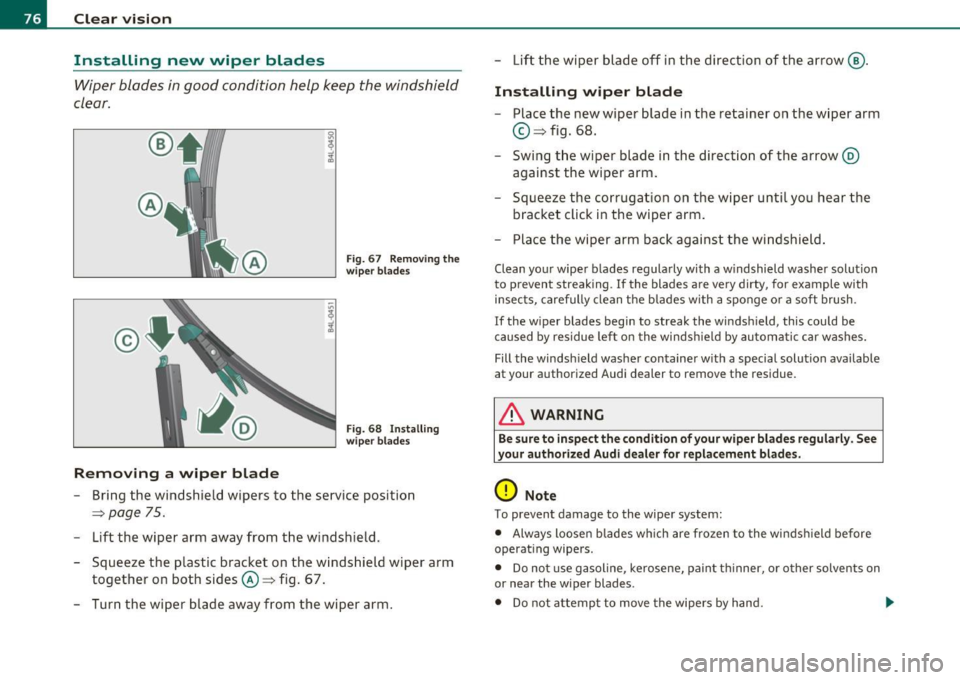
Fig. 67 Remov ing the
wiper blades
Fig. 68 Installing
w iper blades
- Bring the windshield wipers to the service position
~ page 75.
- Lift the wiper arm away from the windshield.
- Squeeze the plastic bracket on the windshield wiper arm
together on both sides©~ fig. 67.
- Turn the wiper blade away from the wiper arm. -
Lift the wiper blade off in the direction of the arrow @.
Installing wiper blade
- Place the new wiper blade in the retainer on the wiper arm
© ~fig. 68.
Swing the wiper blade in the direction of the arrow @
against the wiper arm.
- Squeeze the corrugation on the wiper until you hear the
bracket click in the wiper arm.
- Place the wiper arm back against the windshield.
Clean your wiper blades regularly with a windshield washer solution
to prevent streaking . If the blades are very dirty, for example with
insects, carefully clean the blades with a sponge or a soft brush .
If the wiper blades begin to streak the windshield, this could be
caused by residue left on the windshield by automatic car washes.
Fill the windshield washer container with a special solution available
at your authorized Audi dealer to remove the residue.
& WARNING
Be sure to inspect the condition of your wiper blades regularly. See
your authorized Audi dealer for replacement blades.
0 Note
To prevent damage to the wiper system:
• Always loosen blades which are frozen to the windshield before
operating wipers.
• Do not use gasoline, kerosene, paint thinner, or other solvents on
or near the wiper blades .
• Do not attempt to move the wipers by hand.
Page 79 of 390
• The w indshield wiper blades must only be replaced when in the
service position ~
page 75! Otherwise, you risk d amaging the paint
on t he hood or the windshield w iper motor.
[I) Tips
Commercial hot waxes applied by automatic car washes affect the
cleanability of the windshield .•
Changing the rear wiper blade
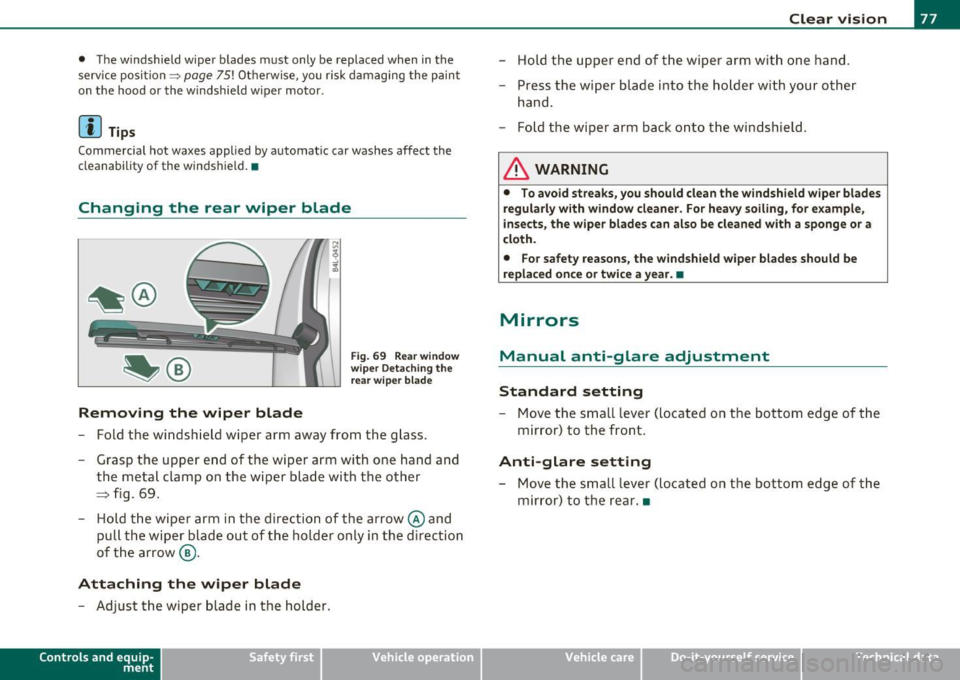
Removing the wiper blade
F ig . 69 Rear wind ow
w ip er Detachin g the
rear wiper bla d e
- Fold the windsh ie ld wiper arm away from the glass.
- Grasp the upper e nd of the wiper arm with one han d and
the meta l clamp on t he wiper blade w ith the other
==> fig. 69 .
- Hold the wiper arm in t he d irection of the arrow @and
pull the w iper blade out of the holder only in the d irec tion
of the arrow ®·
Attaching the wiper blade
- Adjust the wiper blade in the holder .
Contro ls a nd e quip
m en t Vehicle
OP-eration
Clear vision
- Hold the up per end of t he wi per arm with one hand.
- Press the wiper blade into the holder with your other
hand.
- F old the wiper arm back onto the windshield.
& WARNING
• To a void streaks, you should clean the windshield wipe r bl ades
regularly with window cleaner. For heavy soiling, for example ,
i nsects, the wiper blades c an also be cleaned with a spong e or a
cloth.
• For safet y reasons , the windshield wiper blades should be
replaced once or twice a year. •
Mirrors
Manual anti-glare adjustment
Standard setting
-Move the small lever (located on the bottom edge of the
m irror) to the front .
Anti-glare setting
-Move the small lever (located on t he bottom edge of the
mirro r) to the rear .•
Vehicle care Do-it-yourselt service iTechnical data
Page 81 of 390
• Do not attach any st ickers to the w indshield in front of the light
sensor*, as t his wou ld interfere with the au toma tic ope ra tion of the
headlights and the automat ic dimming of the ins ide mirror.
• Be aware that automatic dimming o f the ins ide mir ror can on ly
operate proper ly if the rear w indow sun b lin d* is retracted . •
Outside mirrors
The outside mirrors are electrically adjusted.
Adjusting the outside mirrors
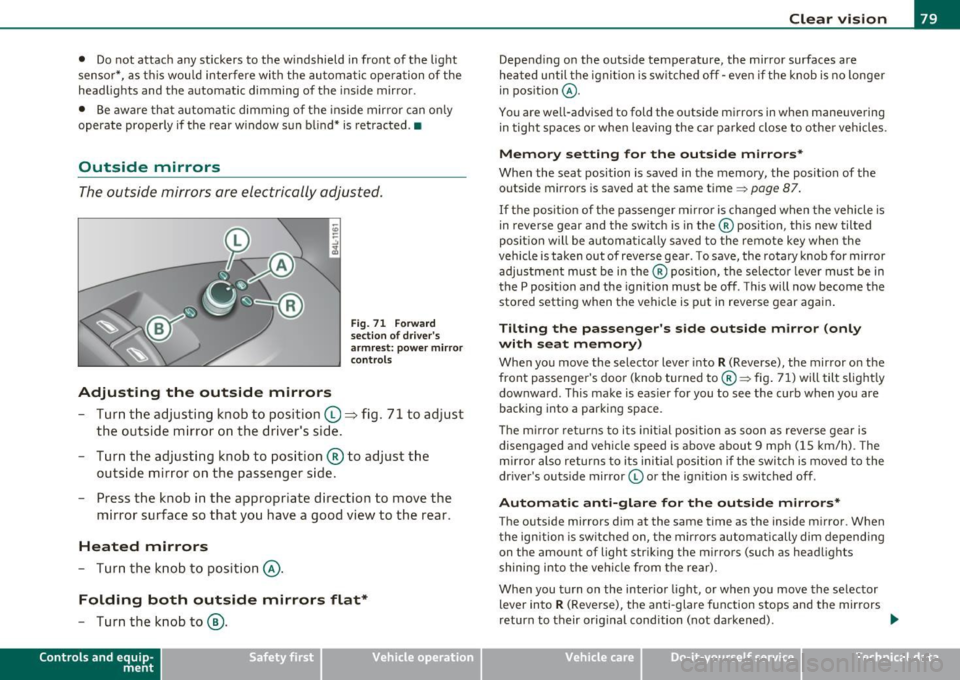
F ig . 7 1 Forward
sec tion of d riv e r's
a rmr est: po wer mirr or
con trols
- Tur n the adjus ting k nob to position (0 ~ fig. 71 to ad just
the outside mi rror on the driver's sid e.
- Turn the adjusting knob to position ® to adjust the
outside mirror on the passenger side .
- Press the knob in the appropriate direction to move the
mirror surface so that you have a good view to the rear .
Heated mirrors
-Turn the knob to position @.
Folding both outside mirrors flat*
-Turn the knob to@ .
Con tro ls a nd e quip
m en t Vehicle
OP-eration
Clear vision
Depend ing on the outs ide temperature, the mirror surfaces are
heated until t he ignit ion is sw itched off -eve n if the knob is no longe r
in pos ition
@ .
You are well-advised to fold the o utside mirrors in when maneuver ing
in tight spaces or w hen leaving the ca r pa rked close to othe r veh icles .
Memor y setting for the out side mirrors*
When the seat position is saved in the memory, the posit ion of the
outside mirrors is saved at the same time~
page 87.
If the pos it io n of t he passe nger m irror is changed when the vehicle is
in reverse gear and the switch is in the ® position, this new tilted
posit ion w ill be a utoma tica lly saved to the remote key when the
vehicle is taken out of reverse gear . To save, the rotary knob for mirror
adjus tment mus t be in the ® position, the se lec to r l ever must be in
the P position and the ignition must be off . T hi s will now become the
stored setti ng when the vehicle is put in reve rse gear agai n.
Tilting the passenger 's side outside mirror (only
with seat memory)
Whe n you move the selector lever into
R (Reverse), the mir ror o n the
front passenger 's doo r (knob tur ned to® ~ fig . 71) will tilt s light ly
dow nward. This make is eas ier for you to see the curb when you are
backing into a parking space.
Th e m irro r returns to its in it ial posi tion as soon as rever se gear is
disengaged and veh icle speed is above about 9 mph (15 km/h) . T he
mirror also returns to i ts initia l position i f the swit ch is moved to the
dr iver 's outs ide mirror © or the ign it ion is switched off .
Automatic anti-glare for the out side mirror s*
The outside mirrors dim at the same time as the inside m irror. When
t he ign ition is sw itched on, the mir rors automatic ally dim depending
on the amount of light str ik ing the m irrors (such as headlights
shining into the veh icle from t he rear) .
When you t urn on the interio r light, or when you move the selector
lever into R (Reve rse), the anti -glare f unction stops and the mirrors
return to their orig inal condition (not darkened) . -.,
Vehicle care Do-it-yourselt service iTechnical data
Page 83 of 390
Digital compass
Applies to veh icles: wit h digita l co mp ass
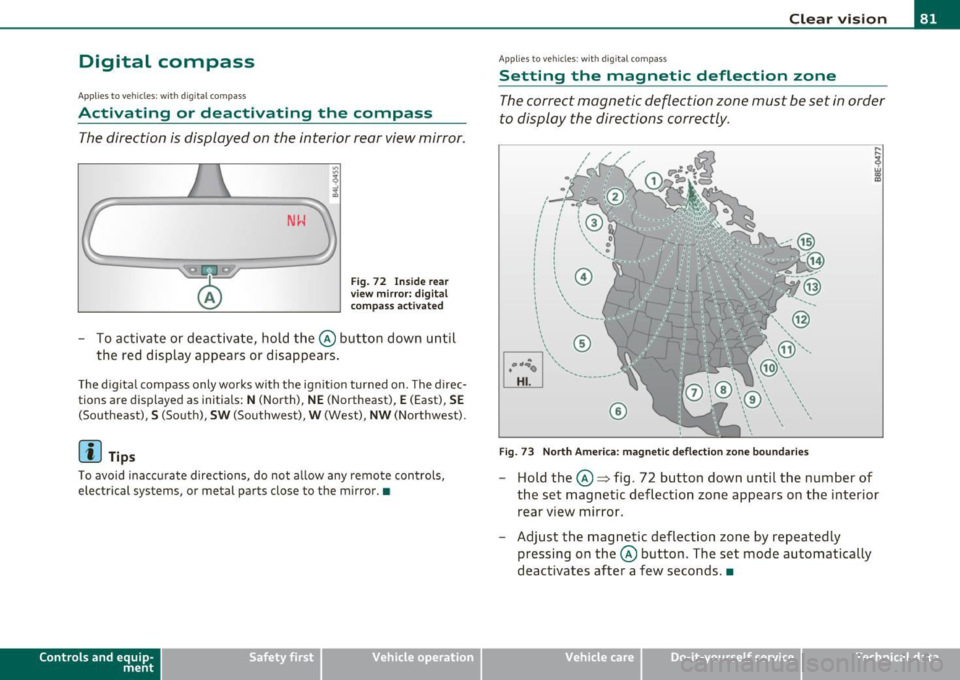
Activating or deactivating the compass
The direction is displayed on the interior rear view mirror.
Fig. 72 Inside rear
view mirror: digital
compass activated
To activate or deactivate, hold the@ button down until
the red display appears or disappears .
The digital compass only works with the ignition turned on. The direc
tions are displayed as initials:
N (North), NE (Northeast), E (East), SE
(Southeast), S (South) , SW (Southwest), W (West), NW (Northwest).
(I) Tips
To avoid inaccurate directions, do not allow any remote controls ,
electr ical systems, or metal parts close to the mirr or.•
Con tro ls a nd e quip
m en t Vehicle
OP-eration
Clear vision
Applies to veh icles : w ith d ig ita l compass
Setting the magnetic deflection zone
The correct magnetic deflection zone must be set in order
to display the directions correctly .
.
,_ ,;=.~a,, I I
I I
I I
I ' I I
I I
1 ! ©
l 4
l
l
I ' I ,,
l ----
'
'
'
®
\, ,, ...... _______ ,.,.
©
@
Fig. 73 North America: magnetic deflection zone boundaries
-Hold the@=> fig . 72 button down until the number of
the set magnetic deflection zone appears on the interior rear view mirror .
- Adjust the magnetic deflection zone by repeatedly pressing on the@ button . The set mode automatically
deactivates after a few seconds. •
Vehicle care Do-it-yourselt service iTechnical data
Page 89 of 390
Seat memory
Applies to veh icles: with seat memory
Driver's seat memory
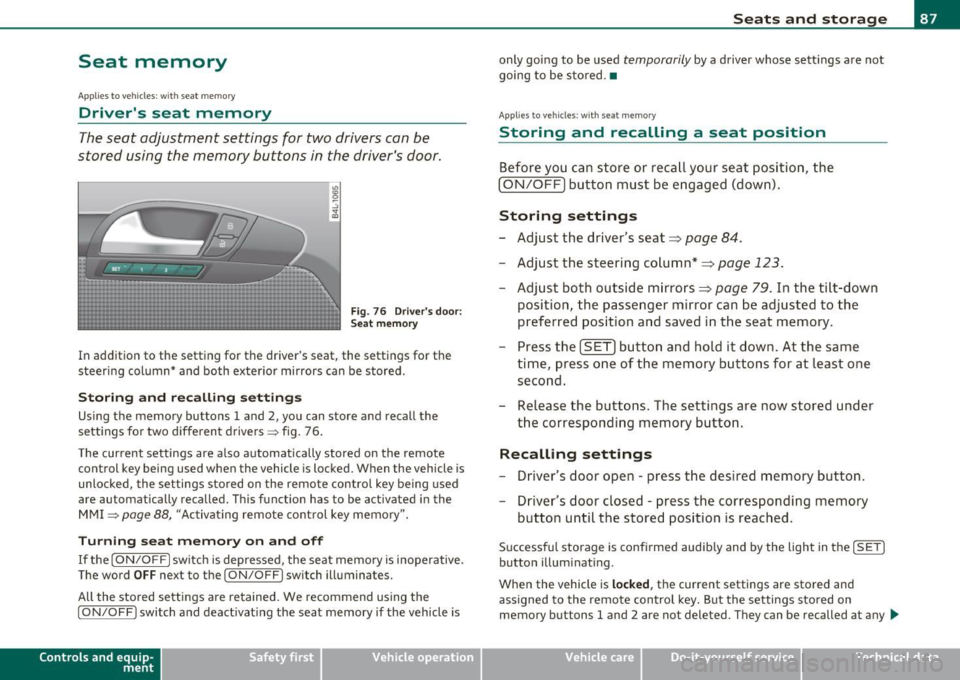
The seat adjustment settings for two drivers can be
stored using the memory buttons in the driver's door.
Fig . 76 Driver's door:
Seat memory
In addition to the setting for the driver's seat, the settings for the
steering column* and both exterior mirrors can be stored.
Storing and re calli ng setting s
Using the memory buttons 1 and 2, you can store and recall the
settings for two different drivers => fig . 76 .
T he current settings are also automatically stored on the remote
control key being used when the vehicle is locked. When the vehicle is
unlocked, the settings stored on the remote contro l key being used
a re automatically recalled. This function has to be activated in the
MMI
=> page 88, "Activat ing remote control key memory ".
T urning se at m em ory on and off
If the [ ON/OFF] switch is depressed , the seat memory is inoperative .
The word
OFF next to the [ ON/OFF] switch illuminates.
All the stored settings are retained. We recommend using the
[ ON/OFF ] switch and deact ivat ing the seat memory if the vehicle is
Con tro ls a nd e quip
m en t Vehicle
OP-eration
Seats and storage
only going to be used temporarily by a driver whose settings are not
going to be stored .•
App lies to vehi cles : w it h seat memo ry
Storing and recalling a seat position
Before you can store or recall your seat position, the
(ON/OFF) button must be engaged (down) .
Storing settings
-Adjust the driver 's seat => page 84.
- Adjust the steering column*=> page 123.
Adjust both outside mirrors=> page 79. In the tilt -down
position, the passenger mirror can be adjusted to the
preferred position and saved in the seat memory.
- Press the
(SET) button and hold it down. At the same
time, press one of the memory buttons for at least one second.
- Release the buttons. The settings are now stored under
the corresponding memory button.
Rec alling settings
- Driver's door open -press the desired memory button.
- Driver's door closed -press the corresponding memory
button until the stored position is reached .
Successful storage is confirmed audib ly and by the light in the [ SET]
button illuminating.
When the vehicle is
loc ked , the current settings are stored and
assigned to the remote control key. But the settings stored on
memory buttons 1 and 2 are not deleted. They can be recalled at any
~
Vehicle care Do-it-yourselt service iTechnical data
Page 91 of 390
....
~....-'""-~_3-:>--.....,__~~ :
······--... __ ;::::.:_ :::--~
Adjusting seat back angle
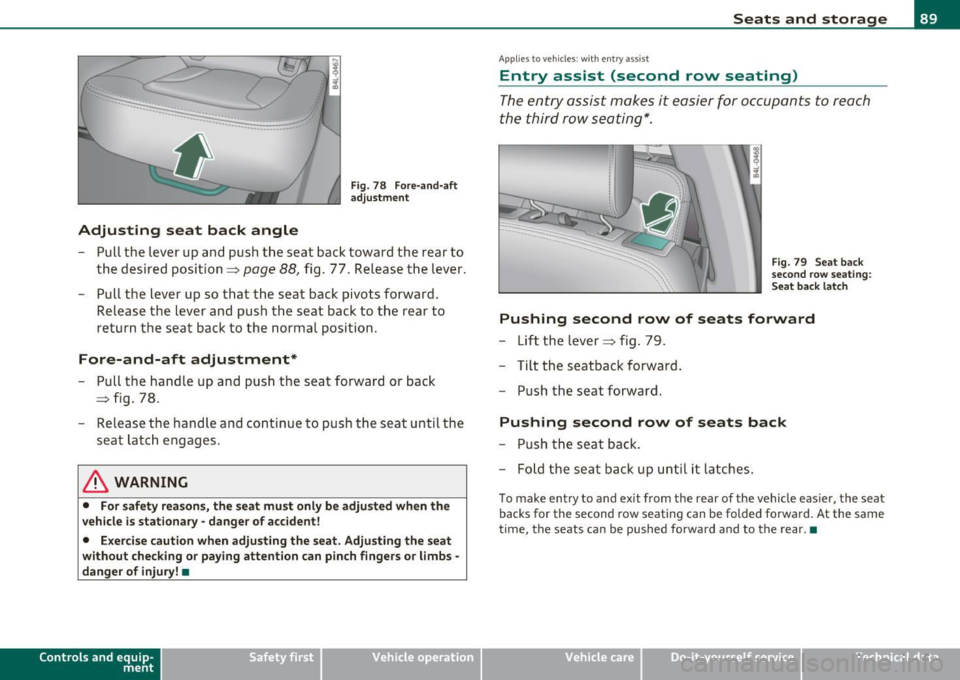
Fig . 78 Fore -and -af t
adju stme nt
- Pull the lever up an d push the seat bac k toward t he rear to
t h e desi red position ==>
page 88, fig. 77. Release the lever.
- Pull t he lever up so that the seat back pivots forward.
Release t he lever and pus h the seat back to the rear to
retu rn t he sea t bac k to the norma l position.
Fore-and-aft adjustment*
- Pull t he ha ndle up and push the seat forward or back
==> fig. 78.
- Releas e the handle a nd cont inue to p ush th e seat u ntil the
sea t latc h engages.
& WARNING
• For safety rea son s, the seat mu st only be adjusted when the
vehicle is stationary · danger of accident!
• Exerci se caution when adjusting the seat . Adju sting the seat
without checking or paying attention c an pinch finge rs or limbs·
danger of injury! •
Con trol s and equ ip
m ent Vehicle
OP-eration
Seats and storage
Applies to ve hicles : with e ntry assist
Entry assist (second row seating)
The entry assist makes it easier for occupants to reach
the third row seating*.
Fig. 79 Seat back
s e co nd r ow sea ting :
S eat back lat ch
Pushing second row of seats forward
- Lift the lever==> fig . 79.
- Tilt the s eatback forwa rd .
- Pu sh the seat forward.
Pushing second row of seats back
-Push the seat back.
- Fo ld the seat back u p un til it latches.
T o make en try to and ex it from the rear of the vehi cle eas ie r, the seat
backs for th e se cond row seating can be folded fo rwa rd. At the sam e
time, the seats ca n be pushed forwa rd and to the rear. •
Vehicle care Do-it-yourselt service iTechnical data
Page 93 of 390
The head restraints on the front seats can be adjusted to
provide safe support to head and neck at the optimum
height. When optimally adjusted, the top of the restraint
should be level with the top of the head~
page 193, "Proper
adjustment of head restraints".
Raising head restraint
- Grasp the side of the head restraint with both hands.
- Adjust the head restraints so that the top of the head
restraint is
at least level with your eyes or higher
~ page 90, fig. 82.
Lowering head restraint
-Grasp the sides of the head restraint with both hands.
Press the button~
page 90, fig. 82 and adjust the head
restraint.
- Adjust the head restraints so that the top of the head
restraint is
at least level with your eyes or higher
~ page 90, fig. 82.
Refer to::::;, page 193, ''Proper adjustment of head restraints" for
guidelines on how to adjust the height of the front head restraints to
suit the occupant's body size.
& WARNING
• Driving without head restraints or with head restraints that are
not properly adjusted increases the risk of serious or fatal neck
injury dramatically.
• Read and heed all WARNINGS:::::>
page 193.
Contro ls a nd e quip
m en t Vehicle
OP-eration
Seats and storage
(I) Tips
Correctly adjusted head restraints and safety belts are an extremely
effective combination of safety features.•
Outer rear head restraints
Passengers may only be carried in the outer rear seats
when the head restraint is raised.
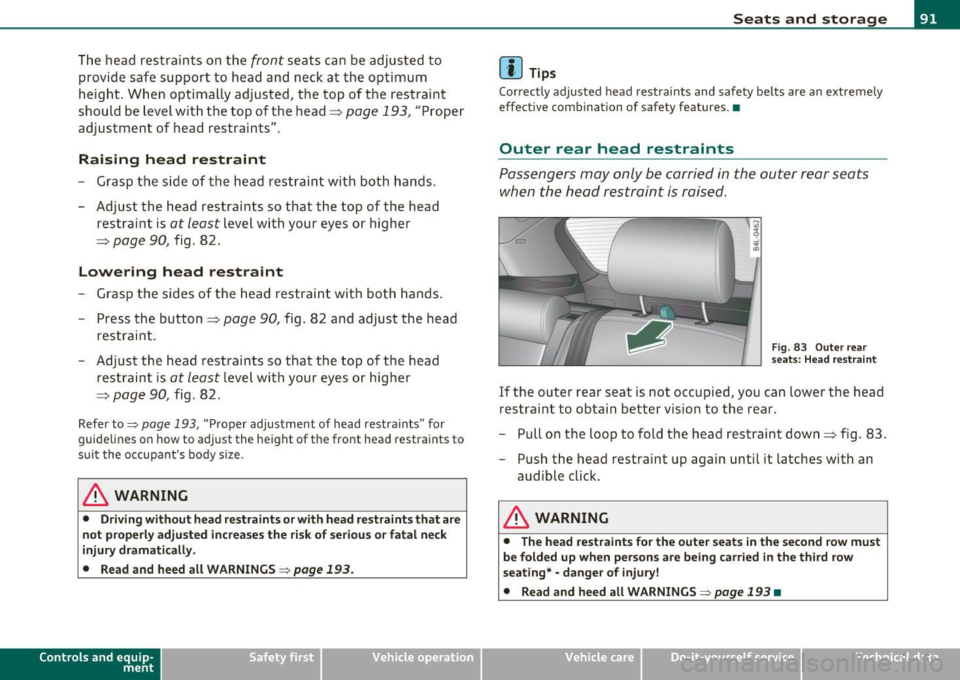
Fig . 83 Outer rear
seats: Head restraint
If the outer rear seat is not occupied, you can lower the head
restraint to obtain better vision to the rear.
- Pull on the loop to fold the head restraint down~ fig. 83.
- Push the head restraint up again until it latches with an
audible click.
& WARNING
• The head restraints for the outer seats in the second row must
be folded up when persons are being carried in the third row
seating*· danger of injury!
• Read and heed all WARNINGS:::::>
page 193 •
Vehicle care Do-it-yourselt service iTechnical data
Page 95 of 390
& WARNING (cont inued )
an accident, sudden braking or other vehicle movement , hot liquid
c ould spill, cau sing scalding burn s. Spilled hot liquid can also
cause an accident and personal injury .
• Use only soft cups in the cupholder. Hard cups and glasses can
cause inju ry in an accident.
0 Note
Only drink conta iners with lids should be carr ied in the c upholder.
L iquid could spill ou t a nd d amage your vehicle 's e lec tron ic eq uipment
or sta in the upho lstery, etc. •
Applie s to veh icle s: w ith lo ng cent er conso le
Long center console
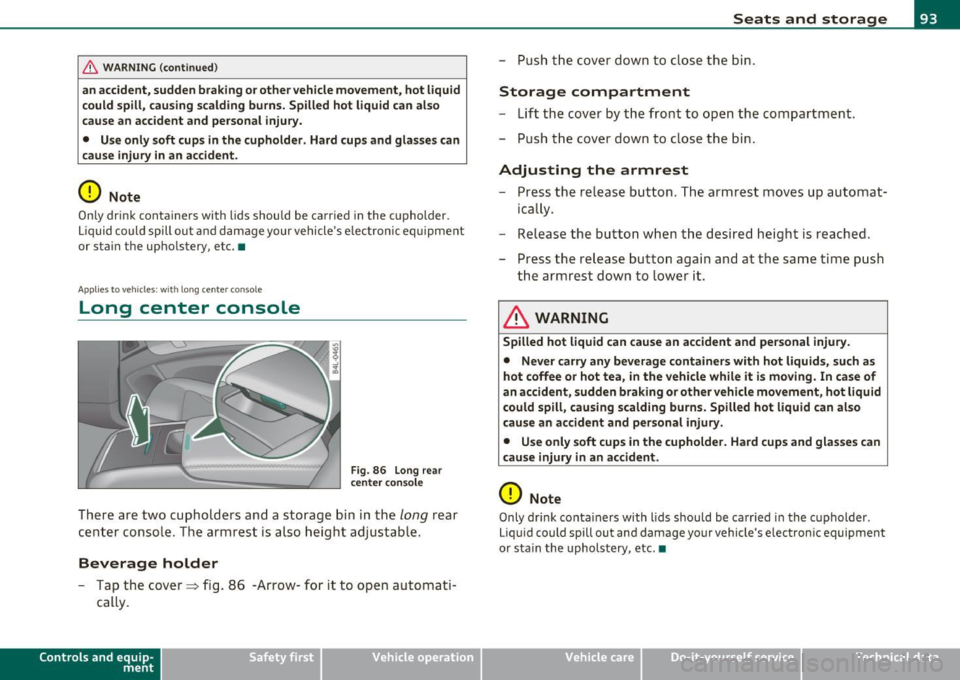
Fig. 86 Long rea r
ce nte r con sole
There are two cupholders an d a storage bin i n the long rear
cen ter conso le. The ar mrest is also height a djustable.
Beverage holder
- Tap the cover==> fig. 8 6 -Arrow- for it to open a utom ati
cally .
Contro ls a nd e quip
m en t Vehicle
OP-eration
Seats and storage
-Push the cover down to clo se th e b in.
Storage compartment
- Lift the cover by t he front to open the com partment .
- Push the cover down to close the bin .
Adjusting the armrest
-Press t he re lease but ton. The armrest moves u p au toma t
ica lly .
- Release the b utto n w hen t he desi re d heigh t is reac hed .
- Press the re lease butto n aga in and at t he sa me tim e push
the armrest down to lower it .
& WARNING
Spilled hot liquid can cause an accident and personal injury.
• Never carry any beverage containers with hot liquids, such as
hot coffee or hot tea, in the vehicle while it is moving . In case of
an accident, sudden braking or other vehicle movement, hot liquid
could spill, causing scalding burn s. Spilled hot liquid can al so
cause an accident and personal injury.
• Use only soft cups in the cupholder . H ard cups and glasses can
cause injury in an accident .
0 Note
Only drink conta iners with l ids should be ca rr ied in t he c upholder .
L iq uid could spill out and damage your vehicle 's e le ctron ic equipment
or sta in the upholstery, etc. •
Vehicle care Do-it-yourselt service iTechnical data