service AUDI Q7 2010 Owner´s Manual
[x] Cancel search | Manufacturer: AUDI, Model Year: 2010, Model line: Q7, Model: AUDI Q7 2010Pages: 390, PDF Size: 93.04 MB
Page 171 of 390
______________________________________________ _:P_ a=.:... r:.:k ;.:in :..:.;;; g!.....:: s.,?.y .=s :..:t :.:e :.: m...:..:.._..J_
Parking system advanced
App lies to veh icles: wit h pa rk ing syste m advanced
Introduction
0, g ~ ..!J
~================- i
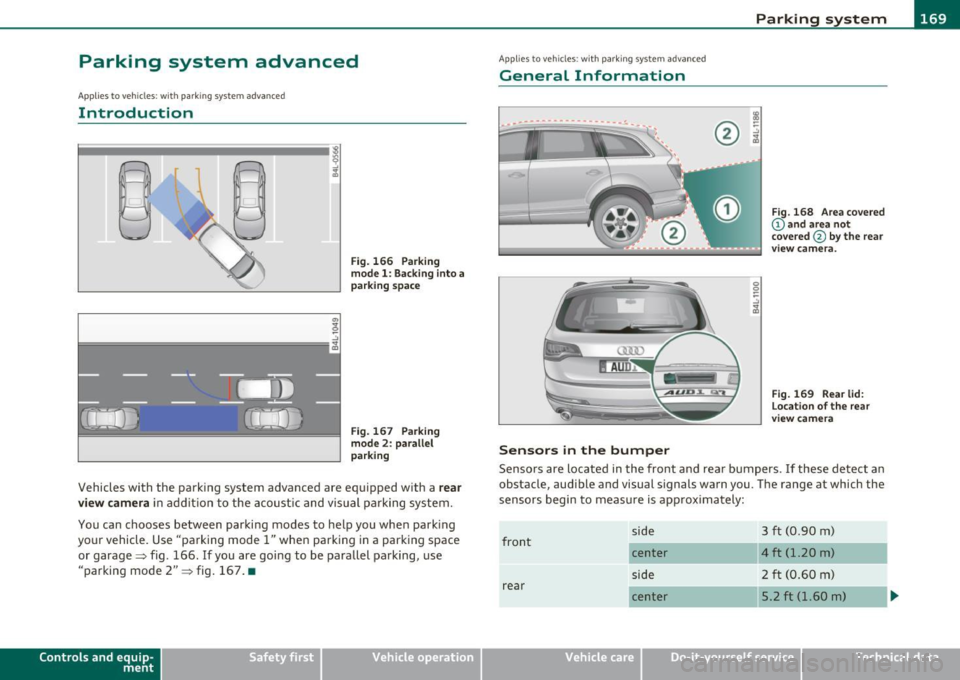
Fig. 166 Parking
model: Backing into a
parking space
Fig. 167 Parking
mode 2: parallel
parking
Vehicles with the parking system advanced are equipped with a rear
view camera
in addition to the acoustic and visual parking system.
You can chooses between parking modes to help you when parking
your vehicle. Use "parking mode
1" when parking in a parking space
or garage~ fig. 166 .
If you are going to be parallel parking, use
"parking mode
2" ~ fig. 167. •
Contro ls a nd e quip
m en t Vehicle
OP-eration
Applies to vehicles : w ith par kin g system advanced
General Information
Sensors in the bumper
Fig. 168 Area covered
@ and area not
covered @
by the rear
v iew camera.
Fig. 169 Rear lid:
Location of the rear
view camera
Sensors are located in the front and rear bumpers . If these detect an
obstacle, audible and visual signals warn you. The range at which the
sensors begin to measure is approximately:
front
rear side
center
side
center
Vehicle care
3 ft (0
.90 m)
4 ft (1.20 m)
2 ft (0.60 m)
5.2 ft (1.60 m)
Do-it-yourselt service iTechnical data
Page 173 of 390

Parking system -
----------------=-------'
Applies to veh icles : w ith par king system advanced
Switching on and off
Th e rear view camera switches on automatically together
with the acoustic and visual park assist when you put the
vehicle in reverse.
Switching on
F ig. 170 Cente r
c on sole: Pa rki ng
sys tem swi tch
Fig . 171 MMI display:
v is ual d istance disp la y
- Switch the MMI on and select reverse gear.
- Switch on the Adaptive Air Suspension * comfort or auto-
matic mode .
Contro ls a nd e quip
m en t Vehicle
OP-eration
-To use the front parking system , press the switch P11.1A in the
center console ~ fig . 170 . A short confirmat ion tone
sou nds an d the indicator light in the sw itch lights up.
Switching between the rear view camera and
visual display
- Press the Graphic control button~ page 172, fig. 172 ®
to see the visual dis pla y.
- P ress the
Rear view control button to see the rear view
camera image~ fig . 171.
Switching off
Drive faster than 6 mph ( 10 km/h), or
- press th e swi tch
P111 A or
- switch off the ignition .
Segments in the visual display
The red segments i n front of and behind the vehicle=> fig . 171 help
you to determine the distan ce between you and an obstacle . As your
vehicle comes closer to the obstacle, the segm ents move closer to the
veh icle . The co llision area has been reached when t he next to last
segmen t is displayed . Do not cont inue dr iv ing farthe r=>
& in
"Ge neral Information " on
page 169!
& WARNING
• The MMI display cannot show , or cannot adequately show ,
c ertain objects (such a s small posts or grating ), reces ses in the
ground and protruding parts on another car.
• Onl y use the rear view camera to a ssist you if it show s a good ,
clear picture. For e xample, the image may be affected by the sun
shining into the lens , dirt on the len s or if there is a defect. .,_
Vehicle care Do-it-yourselt service iTechnical data
Page 175 of 390
Parking system -
----------------=-------'
& WARNING (continued )
you should not use the help lines to help with parking, which
poses danger of an accident!
0 Note
In the MMI display , the direction of travel of the vehicle rear is repre
sen te d dependin g on the s teering wheel ang le . The vehicle fron t
swings out more than the vehicle rear. Maintain plenty of distance so
that your outside mirror or a corner of your vehicle does not collide
with any obstacles. This can damage to your vehicle. •
Applies to ve hicles : w ith pa rk ing system advanced
Parallel Parking
Use parking mode 2 to help you parallel pork along the
side of a street.
Con tro ls a nd e quip
m en t
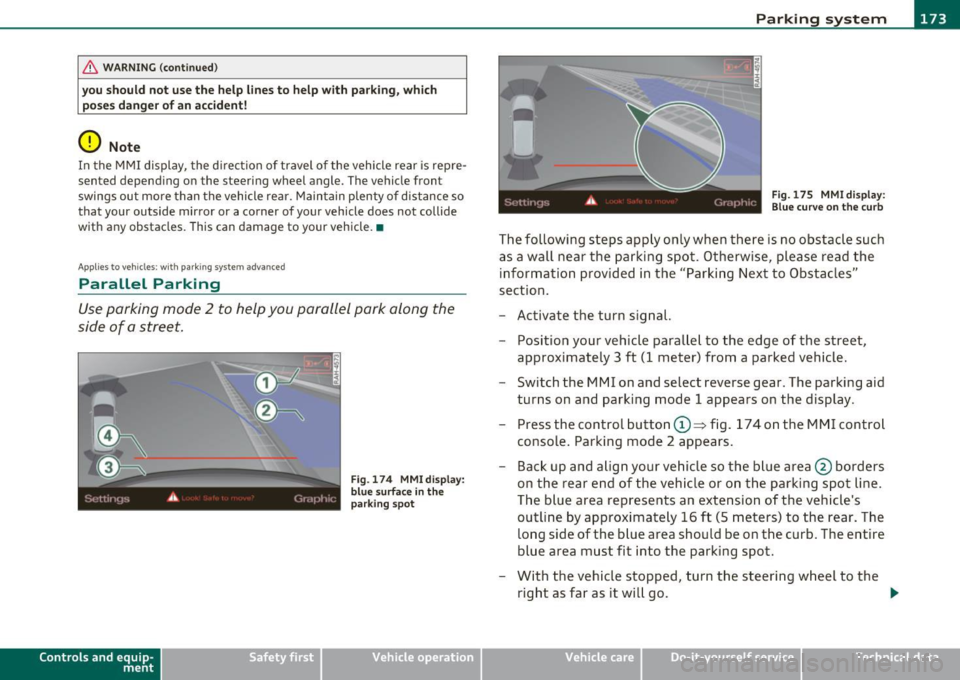
Fig . 174 MMI display:
blue surface in the
parking spot
Vehicle OP-eration
Fig. 175 MMI display:
Blue curve on the curb
The following steps apply only when there is no obstacle such
as a wall near the parking spot. Otherwise, please read the information provided in the "Parking Next to Obstacles"
section.
- Activate the turn signal.
- Position your vehicle parallel to the edge of the street,
approximately 3 ft (1 meter) from a parked vehicle.
- Switch the MMI on and select reverse gear . The parking aid
turns on and parking mode 1 appears on the display .
Press the control button©~ fig. 174 on the MMI control
console. Parking mode 2 appears.
- Back up and align your vehicle so the blue area @ borders
on the rear end of the vehicle or on the parking spot line.
The blue area represents an extension of the vehicle's
outline by approximately 16 ft (5 meters) to the rear. The
long side of the blue area should be on the curb. The entire
blue area must fit into the parking spot.
- With the vehicle stopped, turn the steering wheel to the
right as far as it will go. _.,
Vehicle care Do-it-yourselt service iTechnical data
Page 181 of 390
____________________________________________ A_ d_a ..... p,__ t_iv _ e_ A_ i_r _ S_ u_s__, p_ e_n _ s_ i_ o _ n _ __.ffl'I
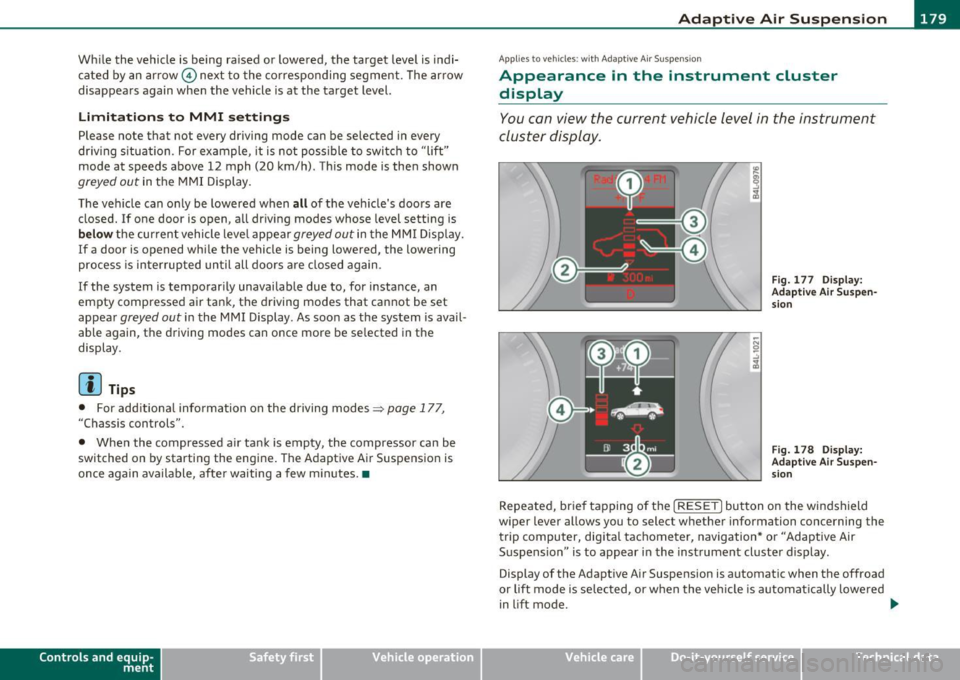
While the vehicle is being raised or lowered, the target level is indi
cated by an arrow © next to the corresponding segment. The arrow
disappears again when the vehicle is at the target level.
Limitations to MMI settings
Please note that not every driving mode can be selected in every
dr iving s ituation . For example , it is not poss ible to switch to "lift"
mode at speeds above 12 mph (20 km/h) . This mode is then shown
greyed out in the MMI Display .
The vehicle can on ly be lowered when
all of the veh icle's doors are
closed.
If one doo r is open, all driving modes whose level setting is
below the current vehicle level appear greyed out in the MMI Display.
If a door is opened whi le the vehicle is being lowered , the lowering
process is interrupted until all doo rs are closed again.
I f the system is temporarily unavailable due to, for instance, an
empty compressed air tank, the driving modes that cannot be set
appear
greyed out in the MMI Display . As soon as the system is avail
able aga in, the driv ing modes can once more be selected in the
display .
(I] Tips
• For additional information on the driving modes=> page 177,
"Chassis controls".
• When the compressed air tank is empty , the compressor can be
switched on by starting the engine. The Adaptive Air Suspension is
once again available, after waiting a few minutes. •
Contro ls a nd e quip
m en t Vehicle
OP-eration
Applies to vehicles : w ith Adapt ive A ir Sus pens ion
Appearance in the instrument cluster
display
You can view the current vehicle level in the instrument
cluster display.
Fig. 177 Display:
Adaptive Air Suspen sion
Fig. 178 Display:
Adaptive Air Suspen
s ion
Repeated, br ief tapping of the [ RESET] button on the windshield
wiper lever allows you to selec t whether information concerning the
trip computer, digita l tachometer, navigation* or "Adaptive Air
Suspension " is to appear in the instrument cluster display .
Display of the Adaptive Air Suspension is automatic when the offroad
or lift mode is se lected, or when the vehicle is automat ically lowered
i n lift mode.
~
Vehicle care Do-it-yourselt service iTechnical data
Page 187 of 390
___________________________________________________ H_ o_ m __ e_L_ i_n _k_ ®_ R _ __.fflll
9. The emergency flashers will flash thr ee time s (after about
15-60 seconds) when the programming is successful.
Release the button on the remote control.
- To program more devices, repeat steps 4 to 9.
10. Press and hold the trained Homelink ® button and
observe the indicator light©~
page 184, fig. 180.
- If the indicator light is solid/continuous, programming is
complete and your device should activate when you press
and release the trained Homelink ® button.
- If the indicator light blinks rapidly for 2 seconds and is then a solid/continuous light, proceed with phase 3 to program a rolling code device.
Ph ase 3: r olling cod e programming
- A second person on a ladder who can safely reach the
garage door opener motor is recommended.
11 . Locate the "learn" button on the garage door opener
motor (refer to the operating instructions for the opener,
as the location of this button may vary by manufacturer) .
12. Press and release the learn button on the garage door opener motor.
-Not e: once the button is pressed, there are 30 second s in
which to initiate the next step.
13. On the Homelink® keypad inside the vehicle, firmly press and hold the Homelink ® button previously programmed
in phases 1 and 2 for two seconds and release. Repeat this
sequence
twi ce .
Con tro ls a nd e quip
m en t Vehicle
OP-eration
-Some vehicles may require the press/hold/release
sequence up to three times to complete the training
process.
-Homelink ® should now activate your rolling code
equipped device.
If the 5 minute time limit is exceeded, the em erge ncy fla s h ers w ill
fl ash o ne ti me
to indicate that the process has been terminated. In
this case, repeat steps 4 through 9.
If the emergency flashers do not flash three times (after about 15 -
60 seconds), programming was not successful. In this case, repeat
steps 4 through 9.
Remote control units for garage door openers in Canada are set to
stop transmitt ing radio frequency signals after two seconds. This
time may not be sufficient for the Home link® system to learn the
radio frequency signal. Perform all other steps as described above. •
Applies to vehicles : with Homelink® un iversal remote control
Operating the Homelink ® transmitter
The HomeLink ® transmitter works in the same manner as
the original hand held remote control that came with the
system.
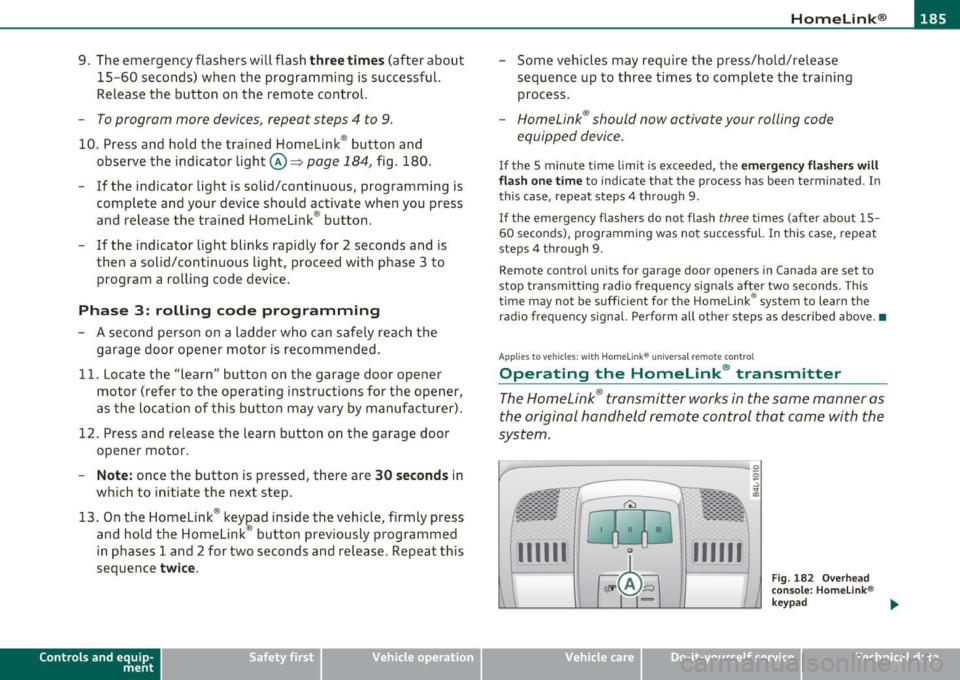
-
Vehicle care
Fig. 182 Overhead
conso le : Homeli nk®
key pad
Do-it-yourselt service iTechnical data
Page 191 of 390
______________________________________________ D_ ri_v _ i_n _,,g ,c.._ S_a_ f_ e_ l..:: y __ _
Important things to do before driving
Safety is everybody's job! Vehicle and occupant safety always depends on the informed and careful driver.
For your safety and the safety of your passengers, before
driving always:
- Make sure that all lights and signals are operating
correctly.
- Make sure that the tire pressure is correct.
- Make sure that all windows are clean and afford good visi-
bility to the outside.
- Secure all luggage and other items carefully::::>
page 105.
-Make sure that nothing can interfere with the pedals.
- Adjust front seat, head restraint and mirrors correctly for your height .
- Instruct passengers to adjust the head restraints according to their height.
- Make sure to use the right child restraint correctly to
protect children ::::,
page 231, "Child Safety".
- Sit properly in your seat and make sure that your passen gers do the same::::,
page 83, "General recommenda
tions".
- Fasten your safety belt and wear it properly. Also instruct
your passengers to fasten their safety belts properly
=:> page 199. •
Controls and equip
ment Safety first Vehicle operation
What impairs driving safety?
Safe driving is directly related to the condition of the
vehicle, the driver as well as the driver's ability to concen
trate on the road without being distracted .
The driver is responsible for the safety of the vehicle and all
of its occupants. If your ability to drive is impaired, safety
risks for everybody in the vehicle increase and you also
become a hazard to everyone else on the road::::,,& . There
fore:
Do not let yourself be distracted by passengers or by using
a cellular telephone.
NEVER drive when your driving ability is impaired (by
medications, alcohol, drugs, etc.).
- Observe all traffic laws, rules of the road and speed limits
and plain common sense .
- ALWAYS adjust your speed to road, traffic and weather
conditions.
- Take frequent breaks on long trips. Do not drive for more than two hours at a stretch.
- Do NOT drive when you are tired, under pressure or when
you are stressed .
& WARNING
Impaired driving safety increases the risk of serious personal
injury and death whenever a vehicle is being used.•
Vehicle care Do-it-yourself service Technical data
Page 193 of 390

________________________________________________ D_ r_ i_ v _i_n ""'g "-- S_a_ f_ e_ l _,,y'-- __
& WARNING (continued)
to help reduce the risk of personal injury if the driver's airbag
inflates.
• Never hold the steering wheel at the 12 o'clock position or with
your hands at other positions inside the steering wheel rim or on
the steering wheel hub. Holding the steering wheel the wrong way can cause serious injuries to the hands, arms and head if the
driver's airbag deploys.
• Pointing the steering wheel toward your face decreases the
ability of the supplemental driver's airbag to protect you in a colli·
sion.
• Always sit in an upright position and never lean against or
place any part of your body too close to the area where the airbags
are located.
• Before driving, always adjust the front seats and head
restraints properly and make sure that all passengers are properly
restrained.
• Never adjust the seats while the vehicle is moving. Your seat
may move unexpectedly and you could lose control of the vehicle.
• Never drive with the backrest reclined or tilted far back! The
farther the backrests are tilted back, the greater the risk of injury due to incorrect positioning of the safety belt and improper
seating position.
• Children must always ride in child safety seats =>
page 231.
Special precautions apply when installing a child safety seat on
the front passenger seat =>
page 209. •
Controls and equip
ment Safety first Vehicle operation
Proper seating position for the front
passenger
The
proper front passenger seating position is important
for safe, relaxed driving.
For your own safety and to reduce the risk of injury in the
event of an accident, we recommend that you adjust the seat
for the front passenger to the following position:
- Adjust the angle of the seatback so that it is in an upright
position and your back comes in full contact with it when
ever the vehicle is moving.
- Adjust the head restraint so that the upper edge is as even
with the top of your head as possible but not lower than
eye level and so that it is as close to the back of your head
as possible=>
page 193.
- Keep both feet flat on the floor in front of the front
passenger seat.
- Fasten and wear safety belts correctly=>
page 203.
For detailed information on how to adjust the front passenger's seat,
see
=> page 83 .
& WARNING
Front seat passengers who are unbelted, out of position or too
close to the airbag can be seriously injured or killed by the airbag
as it unfolds. To help reduce the risk of serious personal injury:
• Passengers must always sit in an upright position and never
lean against or place any part of their body too close to the area
where the airbags are located.
• Passengers who are unbelted, out of position or too close to
the airbag can be seriously injured by an airbag as it unfolds with
great force in the blink of an eye. ..
Vehicle care Do-it-yourself service Technical data
Page 195 of 390
______________________________________________ D_ ri_v _ i_n _,,g ~ S_a_ f_ e_ l_,, y '--- __
Proper adjustment of head restraints
Correctly adjusted head restraints are an important part
of your vehicle 's occupant restraint system and can help
to reduce the risk of injuries in accident situations .
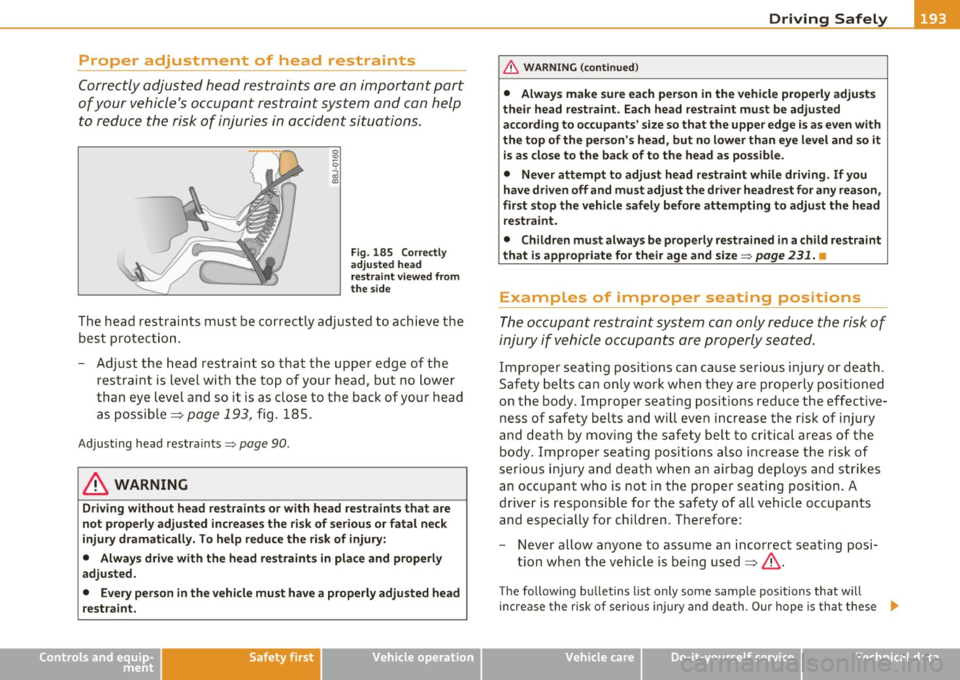
Fig. 185 Correctly
adjusted head
restraint viewed from
the side
The head restra ints must be correctly adjusted to achieve the
best protection.
- Adjust the head restraint so that the upper edge of the
restraint is level with the top of your head, but no lower
than eye level and so it is as close to the back of your head
as possible =>
page 193, fig. 185.
Adjusting head restraints=> page 90.
& WARNING
Driving without head restraints or with head restraints that are
not properly adjusted increases the risk of serious or fatal neck
injury dramatically. To help reduce the risk of injury:
• Always drive with the head restraints in place and properly
adjusted.
• Every person in the vehicle must have a properly adjusted head
restraint.
Controls and equip ment Safety first Vehicle operation
& WARNING (continued)
•
Always make sure each person in the vehicle properly adjusts
their head restraint. Each head restraint must be adjusted
according to occupants' size so that the upper edge is as even with
the top of the person's head, but no lower than eye level and so it
is as close to the back of to the head as possible.
• Never attempt to adjust head restraint while driving. If you
have driven off and must adjust the driver headrest for any reason,
first stop the vehicle safely before attempting to adjust the head
restraint.
• Children must always be properly restrained in a child restraint
that is appropriate for their age and size =>
page 231. •
Examples of improper seating positions
The occupant restraint system can only reduce the risk of
injury if vehicle occupants are properly seated.
Improper seat ing positions can cause serious injury or death.
Safety belts can only work when they are properly positioned
on the body . Improper seating positions reduce the effective
ness of safety belts and will even increase the risk of injury
and death by moving the safety belt to critical areas of the body. Improper seating positions also increase the risk of
serious injury and death when an airbag deploys and strikes
an occupant who is not in the proper seating position. A
driver is responsible for the safety of all vehicle occupants
and especially for children. Therefore:
- Never allow anyone to assume an incorrect seating posi
tion when the vehicle is being used:=>& .
The following bulletins list only some sample positions that will
i ncrease the risk of ser iou s injury and death . Our hope is that these .,_
Vehicle care Do-it-yourself service Technical data
Page 197 of 390
________________________________________________ D_ r_ i_ v _i_n ""'g "-- S_a_ f_ e_ l _,,y'-- __
Use only floor mats that leave the pedal area unobstructed and that
are firmly secured so that they cannot slip out of position . You can
obtain suitable floor mats from your authorized Audi dealer.
Floor mat fasteners are installed in your Audi.
Floor mats used in your vehicle must be attached to these fasteners.
Properly securing the floor mats will prevent them from sliding into
positions that could interfere with the pedals or impair safe opera
tion of your vehicle in other ways .
& WARNING
Pedals that cannot move freely can result in a loss of vehicle
control and increase the risk of serious personal injury.
• Always make sure that floor mats are properly secured.
• Never place or install floor mats or other floor coverings in the
vehicle that cannot be properly secured in place to prevent them
from slipping and interfering with the pedals or the ability to
control the vehicle.
• Never place or install floor mats or other floor coverings on top
of already installed floor mats. Additional floor mats and other
coverings will reduce the size of the pedal area and interfere with
the pedals.
• Always properly reinstall and secure floor mats that have been
taken out for cleaning.
• Always make sure that objects cannot fall into the driver foot
well while the vehicle is moving. Objects can become trapped under the brake pedal and accelerator pedal causing a loss of
vehicle control. •
Controls and equip ment Safety first Vehicle operation
Stowing luggage
Loading the luggage compartment
All
luggage and other objects must be properly stowed
and secured in the luggage compartment.
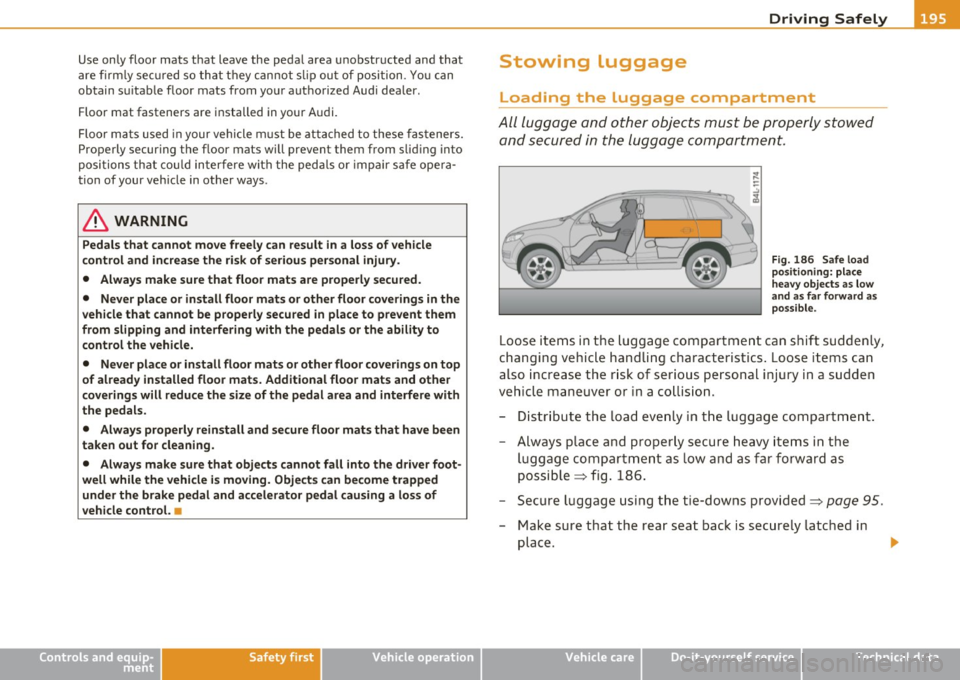
Fig . 186 Safe load
positioning: place
heavy objects as low
and as far forward as
possible.
Loose items in the luggage compartment can shift suddenly,
changing vehicle handling characteristics. Loose items can
also increase the risk of serious personal injury in a sudden
vehicle maneuver or in a collision.
- Distribute the load evenly in the luggage compartment.
- Always place and properly secure heavy items in the
luggage compartment as low and as far forward as
possible => fig. 186.
- Secure luggage using the tie-downs provided=>
page 95.
- Make sure that the rear seat back is securely latched in
place .
Vehicle care Do-it-yourself service Technical data
Page 199 of 390
______________________________________________ D_ ri _v _ i_n _,,g ,c.._ S_a_ f_ e_ l..:: y __ l!'II
the driver's s ide B-pillar. The tire pressure label lists the recom
mended co ld tire in flatio n press ures fo r th e ve hicle at its max imum
capacity weight and the tires that were on your vehicle at the time it
was manufactured . For recommended tire press ures for normal loa d
conditions, p lease see chapte r=>
page 318. •
Tie-downs
The luggage compartment is equippe d with four tie
do wns to sec ure lu gga ge a nd oth er items.
Use the t ie-downs to sec ure yo ur cargo properly=> page 195,
"Lo ad ing t he lugg age comp artmen t".
In a co llision, the laws of physics mean that even sma ller it ems that
are loose in the vehicle will become heavy missiles that can cause
ser iou s injury. Ite ms i n t he vehi cle pos se ss e ne rgy w hich va ry w it h
vehicle speed and the we ight of the item. Vehicle speed is t he most
s ig nifi ca nt f acto r.
For examp le, in a frontal coll is io n at a speed of 30 mph (48 km/h),
the forces acting on a 1 0-lb (4. 5 kg) object are a bout 20 times t he
normal weig ht o f the item. T his means that t he weight o f the ite m
wou ld s uddenly be a bo ut 200 lbs. (90 kg) . You can imagine the inju
r ies tha t a 200 lbs . (9 0 kg) item fly ing free ly throug h the p ass enge r
compartment cou ld cause i n a collision lik e this .
& WARNING
Weak , damaged or improper straps used to secure item s to tie
downs can fail during hard braking or in a collision and cause
serious personal injury.
• Always use suitable mounting straps and properly secure items
to the tie-downs in the luggage compartment to help prevent
items from shifting or flying forward as dangerous missiles.
• When the rear seat backre st is folded down, always use suit
able mounting straps and properly secure items to the tie-downs
Controls and equip ment Safety first Vehicle operation
& WARNING
(co ntinued )
in the luggage compartment to help prevent items from flying
forward as dangerous missiles into the passenger compartment.
• Never attach a child safety seat tether strap to a tie -down. •
Reporting Safety Defects
Applicable to U.S.A.
If you believe that your vehi cle has a defect
which could cause a crash or could cause injury
or death , you should immediately inform the
National Highway Traffic Safety Administration
(NHTSA) in addition to notifying Audi of
America, Inc.
If NHTSA receives similar complaints, it may
open an investigation, and if it find s that a
safety defe cts exist s in a group of vehicles, it
may o rder a recall and remedy campaign.
However , NHTSA cannot become involved in
individual problems between you, your dealer,
or Audi of America, Inc.
To contact NHTSA, you may call the Vehicle
Safety Hotline toll-free at:
Tel.: 1-888-327-4236 (TTY: 1-800-424-9153)
or write to:
Administrator
Vehicle care Do-it-yourself service Technical data