Automatic AUDI Q7 2010 Owner´s Manual
[x] Cancel search | Manufacturer: AUDI, Model Year: 2010, Model line: Q7, Model: AUDI Q7 2010Pages: 390, PDF Size: 93.04 MB
Page 117 of 390
Warm and cold Ill
----------------
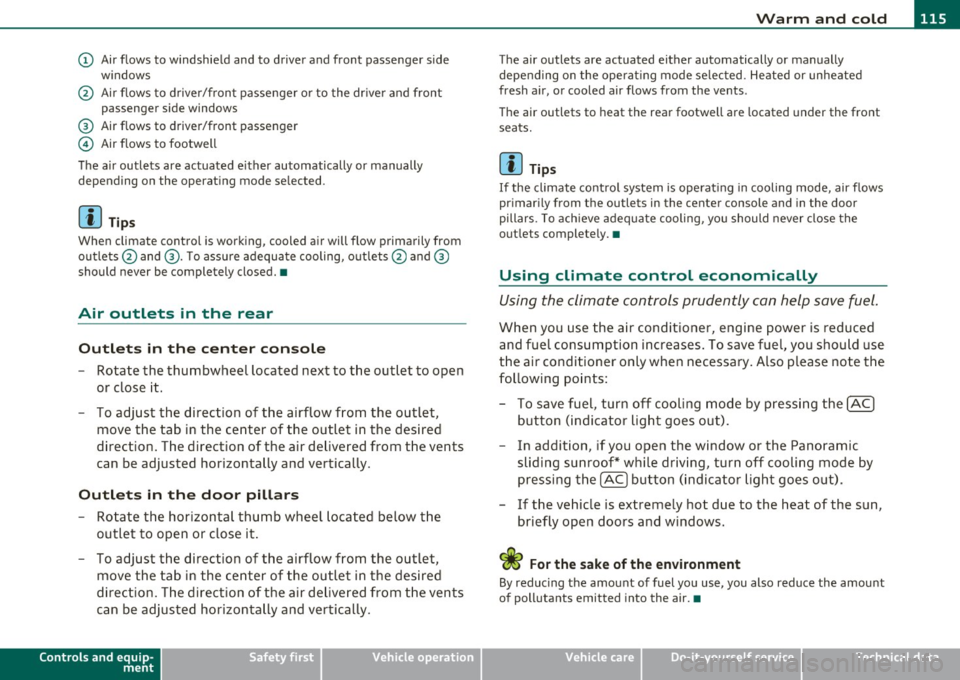
(D Air flows to windshield and to driver and front passenger side
w indows
@ Air flows to driver/front passenger or to the dr iver and front
passenger side windows
® Air flows to driver/front passenger
© Air flows to footwell
The air outlets are actuated e ither automatically or manually
depending on the operating mode selected.
[ i ] Tips
When climate control is working, cooled air will flow primarily from
outlets @and ®· T o assure adequate cooling, outlets @and ®
should never be completely closed. •
Air outlets in the rear
Outlets in the center console
-Rotate the thumbwheel located next to the outlet to open
or close it.
- To adjust the direction of the airflow from the outlet,
move the tab in the center of the outlet in the desired
direction. The direction of the air delivered from the vents
can be adjusted horizontally and vertically .
Outlets in the door pill ars
- Rotate the horizontal thumb wheel located below the
outlet to open or close it .
- To adjust the direction of the airflow from the outlet,
move the tab in the center of the outlet in the desired
direction. The direction of the air delivered from the vents
can be adjusted horizontally and vertically.
Controls and equip
ment Safety first
The air
outlets are actuated either automatically or manually
depending on the operat ing mode se lected. Heated or unheated
fresh air, or cooled air flows from the vents.
T he air outlets to heat the rear footwell are located under the front
seats.
[I) Tip s
If the climate cont rol system is operat ing in cooling mode, air flows
primarily from the outlets in the center console and in the door
pillars . To ach ieve adequate cooling, you should never close the
outlets completely. •
Using climate control economically
Using the climate controls prudently can help save fuel.
When you use the air conditioner, engine power is reduced
and fuel consumption increases . To save fuel, you should use
the air conditioner only when necessary . Also p lease note the
following points:
- To save fuel, turn off cooling mode by pressing the
[AC)
button (indicator light goes out).
- In addition, if you open the window or the Panoramic
sliding sunroof* while driving, turn off cooling mode by
pressing the
[AC] button (indicator light goes o ut).
- If the vehic le is extremely hot due to the heat of the sun,
briefly open doors and windows.
<£' For the sake of the environment
By reducing the amount of fuel you use, you also reduce the amount
of pollutants emitted into the air.•
Vehicle care Technical data
Page 119 of 390
_______________________________________________ w __ a _r _m _ a_ n_d _ c_o _ l_ d __ ffl'II
Applies to vehicles : with four-zone automatic comfort ai r cond ition ing
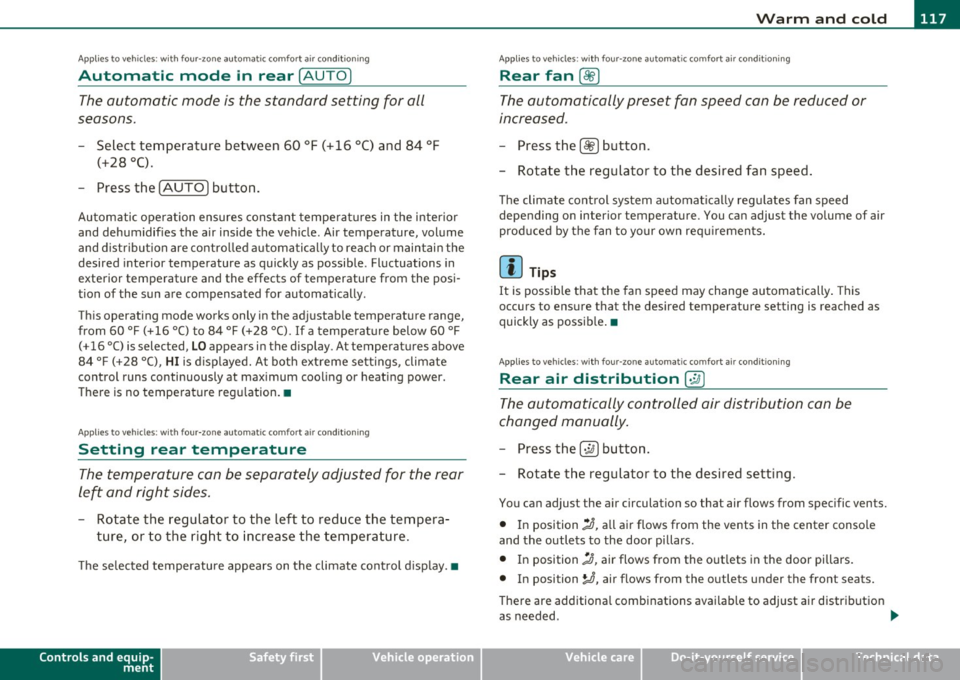
Automatic mode in rear [AUTO )
The automatic mode is the standard setting for all
seasons.
- Select temperature between 60 °F (+16 °() and 84 °F
(+28 °().
-Press the [AUTO] button.
Automatic operation ensures constant tempe ratures in the interior
and dehumidifies the air inside the vehicle. Air temperature, volume
and distribution are controlled automatically to reach or maintain the
desired interior temperature as quickly as possible. Fluctuations in
exterior temperature and the effects of temperature from the posi
tion of the sun are compensated for automatically.
This operating mode works only in the adjustable temperature range,
from
60 °F (+16 °() to 84 °F (+28 °C). If a temperat ure below 60 °F
(+16 °() is selected, LO appears in the display. At temperatures above
84 °F (+ 28 °C), HI is displayed. At both extreme settings, climate
control runs continuously at maximum cooling or heating power.
There is no temperature regu lation. •
Applies to vehicles : w ith four -zone automat ic comfort air condition ing
Setting rear temperature
The temperature can be separately adjusted for the rear
left and right sides .
-Rotate the regulator to the left to reduce the tempera
ture, or to the r ight to increase the temperature.
T he selected temperature appears on the climate control disp lay. •
Controls and equip
ment Safety first
Applies
to vehicles : with four-zone automatic comfort air cond itio ning
Rear fan[~ )
The automatically preset fan speed can be reduced or
increased_
- Press the[~] button.
- Rotate the regulator to the desired fan speed .
The climate co ntrol system a utomatically regu lates fan speed
depending on interior temperature. You can adjust the volume of air
produced by the fan to your own requirements.
[ i ] Tips
It is possible that the fan speed may change automatically . This
occurs to ensure that the desired temperature setting is reached as
quickly as possib le .•
Applies to vehicles : w ith four -zone automat ic co mfort air cond itio ning
Rear air distribution [..Y ]
The automatically controlled air distribution can be
changed manually .
-Press the [·JAi button .
- Rotate the regulator to the desired setting.
You can adjust the air circulation so that air flows from specific vents.
• In position
;J, all air flows from the vents in the center console
and the outlets to the door pi llars .
• In position
:,J, air flows from the outlets in the door pillars.
• In position
}O, air flows from the outlets under the front seats.
There are additional combinations available to adjust air distribut ion
as needed. .,_
Vehicle care Technical data
Page 120 of 390
![AUDI Q7 2010 Owner´s Manual lffll.___w __ a _r_ m __ a_n_ d_ c_ o _ l_d _______________________________________________ _
To regulate air distribution automatically, switch to [AUTO].•
Basic settings
General
The bas](/img/6/40275/w960_40275-119.png "AUDI Q7 2010 Owner´s Manual lffll.___w __ a _r_ m __ a_n_ d_ c_ o _ l_d _______________________________________________ _
To regulate air distribution automatically, switch to [AUTO].•
Basic settings
General
The bas")
lffll.___w __ a _r_ m __ a_n_ d_ c_ o _ l_d _______________________________________________ _
To regulate air distribution automatically, switch to [AUTO].•
Basic settings
General
The basic climate control settings can be adjusted in the
fv1fv1I.
-Select: Function button I CAR]> Control button AC.
The following functions can be selected:
• Auto recirculate=>
page 118
• Synchronization :::::, page 118
• Supply. heater*=> page 119
• Rear operation*=> page 119•
Automatic recirculation mode
An air quality sensor detects increased concentrations of
pollutants in the outside air and automatically switches
to recirculation mode.
We recommend that you always keep automatic air recirculation ON
to prevent polluted outside air from entering the vehicle inter io r.
If the
air quality sensor located in the air cond it ion ing system detects
polluted outside air, the sensor decides whether the air pollution can
be reduced by the factory-installed pollutant filter or whether it is
necessary to switch to air recirculation. With heavy concentrations of
pollutants, the a ir cond it ion ing system is switched automat ically to
recircu lation mode and the supply of outside air is b locked . As soon
as the concentration of pollutants in the outside air drops , fresh air is
supplied to the vehicle interior again. In the event that the windows fog up during automatic air recircula
tion, you must press the® button immediately.
Under certa in operating conditions, automatic a ir recirculation is
switched off automatically. With outside temperatures below about
SO °F
(+10 °C), automatic air recirculation is lim ited to 30 seconds.
With outside temperatures below about
30 °F (-1 °() and with the air
conditioner switched off, the automatic air recirculation is limited to
15 seconds. •
Synchronization
One climate control setting for the driver and front
passenger seats.
With synchronization active, the driver's settings are adopted for the
passenger or vic e versa. All the other sett ings that were made are
transferred to the other seat. Th is includes a ll the climate control
settings , except fo r the seat heating/ventilation* .
If a different setting is selected at a "synchronized seat", synchroni
zation is cancelled. •
Applies to veh icles : with four -zone a uto ma tic c om fo rt air co nd itionin g
Synchronization
One climate control setting for all seats.
With synchron izat ion act ive, the driver's settings are adopted for the
front passenger and the rear left and right seats . All the other
sett ings that were made are transferred to the other seats . This
includes a ll the climate control settings, except for the seat
heating/ventilation*.
If a different setting is selected at a "synchronized seat", synchroni
zation is cancelled .•
Page 121 of 390
![AUDI Q7 2010 Owner´s Manual _______________________________________________ w __ a _r _m _ a_ n_d _ c_o _ l_ d __ _
App lies to veh icles : with di esel e ngine
Supplementary heater
- Select: Function button !CAR]> C](/img/6/40275/w960_40275-120.png "AUDI Q7 2010 Owner´s Manual _______________________________________________ w __ a _r _m _ a_ n_d _ c_o _ l_ d __ _
App lies to veh icles : with di esel e ngine
Supplementary heater
- Select: Function button !CAR]> C")
_______________________________________________ w __ a _r _m _ a_ n_d _ c_o _ l_ d __ _
App lies to veh icles : with di esel e ngine
Supplementary heater
- Select: Function button !CAR]> Control button AC>
Suppl. heater .
Vehicles with diesel engines are equipped with a supplementary
heater to warm the inte rior of the veh icle more qu ickly. The supple
mentary heater switches itself on and off automatically when the
outs ide temperature is below SO
°F (10 °() and the engine is running,
depending on the coolant temperature, interior temperature and the
selected temperature. •
Applies to veh icles: w ith four -zone automat ic co mfort air co nditioning
Rear operation
The air conditioning in the rear of the vehicle can be
controlled from the cockpit.
-Select: Function button I CAR]> Control button AC> Rear
operation.
Th e d river or front passenger can contro l the air conditioning in the
rea r of the vehicle using
his/her own controls. •
Heated Seats
Applies to vehicles: with ele ctrica lly heated front seats
Heated front seats ~
The seat cushion and the seat back of the front seats can
be heated electrically.
- Press the~ button.
- Rotate the regulator to the desired setting.
Controls and equip
ment Safety first
I
n position O the heating for the seats is turned off. The range of
adjustment is between 1 and 6.
The heater for the front seats can be turned on when the weight of
the particular seat's occupant is detected. However, the front seats
can be pre -heated for about 10 minutes using the activated seat
heater. After this time has e lapsed, the seat heater automatic ally
turns off if it does not detect an occupant's weight for the particular
seat.
0 Note
To avoid damage to the heating elements in the seats, do not kneel
on the seats or p lace heavy loads on a small area of the seat.
[I] Tips
Please note that the weight of objects placed on the seat wi ll also be
detected. This weight may be enough to cause the seat heater to turn
on. •
Applies to vehicles: w it h front seat ventilat ion
Front seat ventilation [~]
The seat cushion and the seat backrest on the front seats
can be ventilated .
-Press the Iv] button .
- Rotate the regulator to the desired setting.
When the regulator is in the O position, the seat ventilat ion is
switched off . The range of adjustment is between 1 and 6. •
Vehicle care Technical data
Page 122 of 390
1111..__w __ a _r _m __ a_n _ d_ c_ o_ ld ________________________________________________ _
Applie s to vehicles : wi th heated rear seats
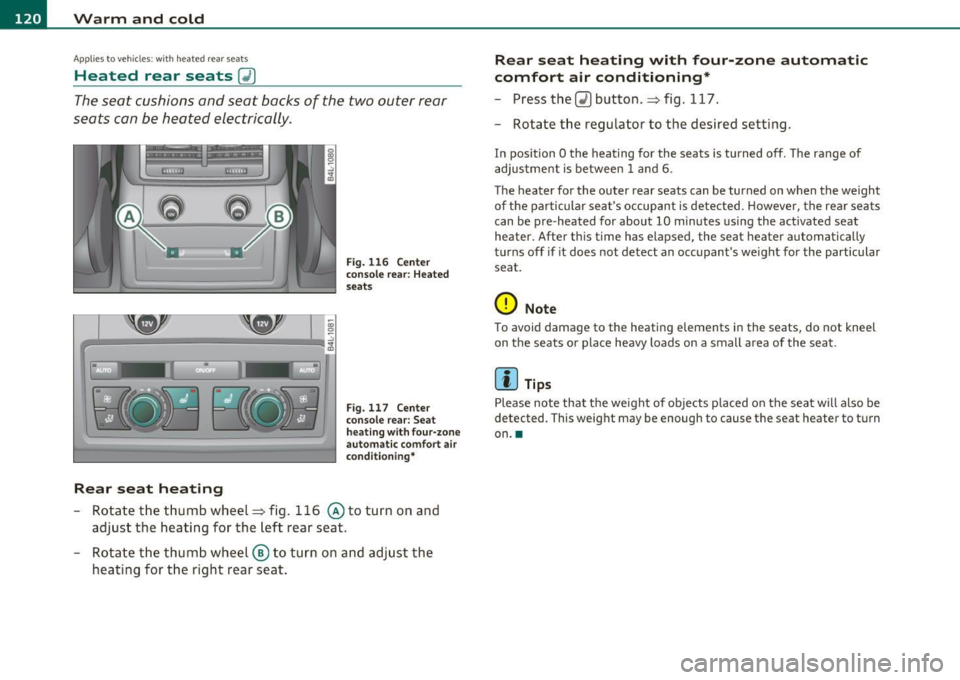
Heated rear seats [JI
The seat cushions and seat backs of the two outer rear
seats can be heated electrically.
Re ar seat heating
Fig. 116 Ce nter
conso le rear: Heated
seats
Fig. 117 Ce nter
console rear: Seat
h eat ing wit h fo ur-zone
automa tic comfort air
condi tion ing *
-Rotate the thumb wheel~ fig. 116 @to turn on and
adjust the heating for the left rear seat.
- Rotate the thumb wheel ® to turn on and adjust the
heating for the right rear seat.
Rear seat heating w ith four -zone autom atic
comfo rt air conditioning *
-Press the Q) button .~ fig. 117.
- Rotate the regulator to the desired setting.
In position O the heating for the seats is turned off. The range of
adjustment is between
1 and 6.
The heater for the outer rear seats can be turned on when the weight
of the particular seat's occupant is detected. However, the rear seats
can be pre-heated for about
10 minutes using the activated seat
heater. After this time has elapsed, the seat heater automatically
turns off if it does not detect an occupant's weight for the particular
seat.
0 Note
To avoid damage to the heating elements in the seats, do not kneel
on the seats or place heavy loads on a small area of the seat.
[I] Tips
Please note that the weight of objects placed on the seat will also be
detected . This weight may be enough to cause the seat heater to turn
on .•
Page 123 of 390

Warm and cold -_______________ __.
Applies to veh icles: w ith stee ring whee l hea ting
Steering wheel heat ing (j)
The steering wheel can be heated electrically .
Fig. 118 Multifunc
tion steering wheel:
Button for steering
wheel heating
-Press the I~] button to turn the steering wheel heating on
and off =>fig. 118. The message
Steering wheel heating on ! or
Steering wheel heating off! appears in the instrument
cluster display .
When the steering wheel heating is switched on, the steering wheel
is heated to about 82 °F (+28 °C) and held there .
The last sett ing se lected for the steer ing wheel heating (on or off) is
automatically saved when the vehicle is shut off and is assigned to the
remote key. •
Contro ls a nd e quip
m en t Vehicle
OP-eration Vehicle care Do-it-yourselt service iTechnical data
Page 126 of 390
1111..__0_ n_ t_h _e_ r_o _ a_ d _________________________________________________ _
Easy entry feature
The easy entry feature makes it easier to enter and e xit
the vehicle by automatically adjusting the steering
wheel.
Press the button®~ page 123, fig. 120 to turn the easy
entry feature on or off .
When the easy entry feature is turned on (button depressed), the
steering wheel moves up to the parked position when the ignition is
t urned off . After you enter the vehicle, the steer ing wheel moves to
the stored pos ition as soon as you t urn on the ig nition .
Easy entry feature on vehi cles with memory seat *
For the stored steering whee l position to be recalled, t he driver's seat
memory must be switched on ( ( ON/OFFI switch in depressed posi
tion) .
If the easy e ntry feature i s sw itched off, the steer ing wheel mov es to
the stored pos ition as soon as you press the seat memory button. •
Ignition Lock and ignition switch
Ignition key positions
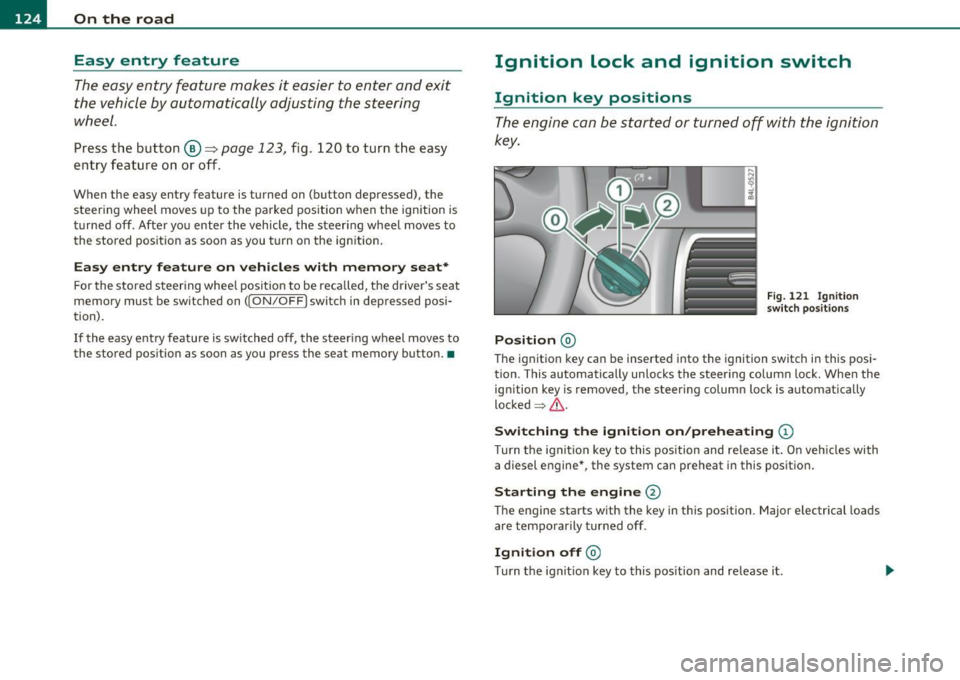
The engine can be st arted or turned off with the ign ition
key .
Position @
Fig. 121 I gn ition
sw itch position s
The ig nition key can be inserted into the ignition switch i n this posi
tion. This automatically unlo cks the steering co lumn lo ck. When the
ign ition key is removed, the steer ing colum n lock is automat ically
lo ck ed
~ & .
Switching the ignition on /preheating (D
Tu rn the ignit ion key to this position and re lease i t. On veh icles wi th
a diesel engine *, the system can preheat in this position.
Starting the engine@
The engine starts with the key in this position. Major e lectrical loads
are tempo rar ily tur ned off .
Ignition off@
Turn t he ign it ion key to this pos ition and re lease i t.
Page 131 of 390
_________________________________________________ O_ n_ t_ h_ e_ r _o_ a_d _ __.ffl'I
A ppli es to veh icl es: wi th Conven ie nc e key
Driver messages in the instrument cluster
display
If a function is not present, a driver message appears.
No key identified
This message appears when the [START] button is pressed if there is
no master key inside the vehicle or if the system does not recognize
it. For example, the master key cannot be recognized if it is covered
by an object (e.g. aluminum brief case) which
screens the radio
signal. Electronic devices such as cell phones can also interfere with
the radio signal.
Press brake pedal to start engine
This message appears if you press the I ST ART ] button to start the
engine and do not depress the brake pedal. The engine can only be
started if the brake pedal is depressed.
Engage Nor P to start engine
This message appears when the engine is started if the selector lever
for the automatic transmission is not in the P or N position . The
engine can only be started with the selector in these positions.
Key not in vehicle
This message appears along with the ' symbol if the master key is
removed from the vehicle with the engine running . It is intended to
remind you (e.g. when changing drivers) not to continue the journey
without the master key.
If the master key is no longer in the vehicle, you cannot switch off the
ignition after stopping the engine and you also cannot start the
engine again. Moreover, you cannot lock the vehicle from the outside
with the key.
Con tro ls a nd e quip
m en t Vehicle
OP-eration
Shift to P otherwise vehicle can roll away. Doors do not lock if you
are not in P.
This message appears for safety reasons along with a warning buzzer
if the selector lever for the automatic transmission is not in the P
position when the ignition is switched off with the
[STOP] button and
the driver's door is opened. Move the selector lever to the P position,
otherwise the vehicle is not secured against rolling away. You also
cannot lock the vehicle using the locking button on the door handle
or using the remote key.
To engage steering lock, press and hold STOP button
This message appears for safety reasons if the engine and the ignition
have been switched off by pressing the
[STOP] button once, and then
the driver's door is opened. In this instance, the steering is not
locked. The steering is locked:
• If you press the
[STOP] button again for more than 1 second.
• If you close the driver's door and lock your vehicle from the
outside. •
Parking brake
Operation
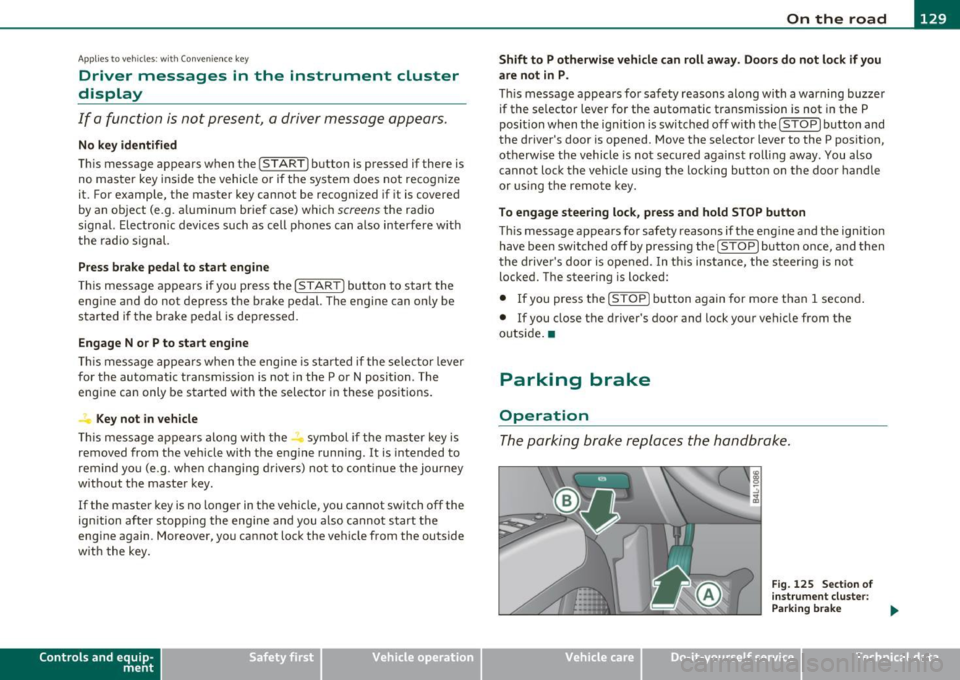
The parking brake replaces the handbrake.
Vehicle care
Fig. 125 Section of
instrument cluster:
Parking brake
~
Do-it-yourselt service iTechnical data
Page 137 of 390

________________________________________ ...:.A...:..;:. d...:.a ...!.p_ t_ i_ v _e _ C_r_ u _ i_s _e _ C_o _n_ t_ r_ o_ l __ _
& WARNING (continued)
the veh icle s afely when you follow another vehicle too closely.
Alway s rem ember that the Adaptive Cruise Control has a braking
powe r that is only about 30 % of the vehicle's maximum braking
ability. The automatic braking function cannot bring th e ve hicle to
a sudden or emergency stop . Always be prepared to brake and take
evasive action to avoid collisions and other accident situations .
• Never allow the closing speed between you and other vehicles
to be so high that the Adaptive Cruise Control may not be able to
slow your vehicle safely. If closing speed is too h igh, you must
apply the brake s your self to reduce the ri sk of a rear-end cra sh .
• Never rest your foot on the accelerator pedal , especially when
the Adaptive Crui se Control is being used. Pressure on the acceler
ator will overr ide the ACC braking function and prevent the brakes
from being applied when ACC detects a situation when the brake s
must be applied .
• Never u se Adaptive Cruise Control when you cannot drive safely
at a steady speed, including on city streets , on winding roads or
when road conditions are poor (for example , on ice, gravel, in fog ,
heavy rain or on wet roads that increase the risk of hydroplaning ).
• The radar sensor's
vi sion can be redu ced by rain, snow and
heavy road spray. These and similar conditions can prevent vehi
cle s up ahead from being accurately detected and in some cases
they may not be detected at all. Do not use ACC when the radar
sensors cannot accurately detect vehicles mo ving ahead of you in
traffic .
• Always turn off Adaptive Crui se Control when entering turn
lanes, exit lanes and con struction zones or in similar situat ions
because the vehicle will automatically accelerate to the stored
speed when the road ahead i s clear .
• To prevent unintended operation , always switch ACC off when
it is not being used .
Controls and equip
ment Safety first
(I] Tips
•
For safety reaso ns, t he stored speed is deleted when the igni tion
is turned off .
• T he Elect ronic Stabilization Program (ESP) and the Ant i- Slip Regu
lat ion (ASR) cannot be deactivated when the Adaptive Cruise Contro l
is sw itched on . If the ES P and t he Anti -S li p Reg ula tio n (ASR) has been
deactivated and you then switch on the Adaptive Cruise Control, the
E S P fu nction will also be a ctivated au toma tically.
• Damage cause d by accidents and some minor coll is ions can affect
t he radar se nsor se ttings and cause the syste m to malfunction o r
switch off completely .
• Th e radar sensor cover is heated. In win ter conditions, you should
st ill chec k befo re dr iv ing to make sure it is free of ice and snow. If
ne cessa ry, clean the area nea r the rada r sensor carefully ::}
page 134,
fig . 128.
• T o ensure tha t the radar sensor is not block ed, fore ign objects
(e.g. stickers, la rger license plate mo unts, add·on parts) must not
cove r th e ar ea nea r the radar senso r::} page 13 4, fig. 12 8. T he area
near the ra dar senso r must not be painted, e ither.
• For Declaration o f Compliance to United Sta tes FCC and Indus try
Cana da regulat ions ::}
page 369. •
Vehicle care Technical data
Page 138 of 390
1111....__A_ d_ a_,_ p_t _i_ v _e _ C_r_ u_ i_ s_ e_ C_ o_ n_ t_ r_ o_ l __________________________________________ _
Applie s to veh icles : wi th Adap tiv e Crui se Con tro l
How does Adaptive Cruise Control work?
Vehicles traveling ahead ore detected with the aid of a
radar sensor.
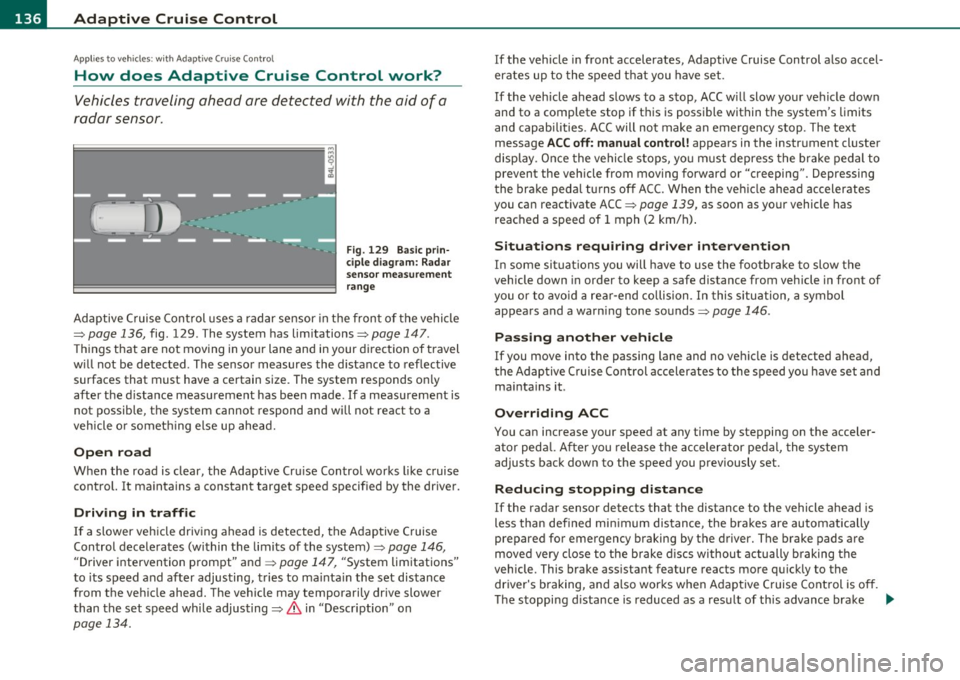
Fig. 129 Basic prin
ciple diagram: Radar
sensor measurement
range
Adaptive Cruise Control uses a radar sensor in the front of the vehicle
=>
page 136, fig. 129 . The system has limitations=> page 147.
Things that are not moving in your lane and in your direction of travel
w ill not be detected. The sensor measures the distance to reflective
surfaces that must have a certain size. The system responds only
after the distance measurement has been made . If a measurement is
not possible, the system cannot respond and will not react to a
vehicle or someth ing else up ahead.
Open road
When the road is clear, the Adaptive Cru ise Control works like cruise
control. It maintains a constant target speed specified by the driver .
Driving in traffic
If a slower veh icle driv ing ahead is detected, the Adaptive Cruise
Control decelerates (within the limits of the system)=>
page 146,
"Driver intervention prompt" and => page 147, "System limitations"
to its speed and after adjusting, tries to ma inta in the set distance
from the vehicle ahead. The vehicle may temporarily drive slower
than the set speed whi le adjusting=>
& in "Descr iption" on
page 134.
If the vehicle in front accelerates, Adaptive Cruise Control also accel
erates up to the speed that you have set.
If the vehicle ahead slows to a stop, ACC w ill slow your vehicle down
and to a complete stop if this is possible within the system's limits
and capabilities . ACC will not make an emergency stop. The text
message
ACC off: manual control! appears in the instrument cluster
display . Once the vehicle stops, you must depress the brake pedal to
prevent the veh icle from moving forward or "creeping" . Depressing
the brake pedal turns off ACC. When the vehicle ahead accelerates
you can reactivate ACC =>
page 139, as soon as your vehicle has
reached a speed of 1 mph (2 km/h) .
Situations requiring driver intervention
In some situations you will have to use the footbrake to slow the
vehicle down in order to keep a safe distance from vehicle in front of
you or to avoid a rear-end collision. In this situation, a symbol
appears and a warning tone sounds=>
page 146.
Passing another vehicle
If you move into the passing lane and no vehicle is detected ahead,
the Adaptive Cruise Control accelerates to the speed you have set and
maintains it.
Overriding ACC
You can increase your speed at any time by stepping on the acceler
ator pedal. After you release the accelerator pedal, the system
adjusts back down to the speed you previously set.
Reduc ing stopping distance
If the radar sensor detects that the distance to the vehicle ahead is
less than defined minimum distance, the brakes are automatically
prepared for emergency braking by the drive r. The brake pads are
moved very close to the brake discs withou t actually bra king the
vehicle. This brake assistant feature reacts more quickly to the driver's braking, and also works when Adaptive Cruise Control is off.
The stopping d istance is reduced as a result of this advance brake .,_