Automatic AUDI Q7 2010 Owner´s Manual
[x] Cancel search | Manufacturer: AUDI, Model Year: 2010, Model line: Q7, Model: AUDI Q7 2010Pages: 390, PDF Size: 93.04 MB
Page 168 of 390
llffl..__A_ u_ t_ o_ m_ a_ t _ ic_ t_r_a _ n_ s_m _ i_ s _s_ i_ o _ n _____________________________________________ _
Applie s to veh icles : wi th tip tron ic -s te eri ng whe el
Steering wheel with tiptronic ®
The shift buttons on the steering wheel allow the driver to
shift gears manually.
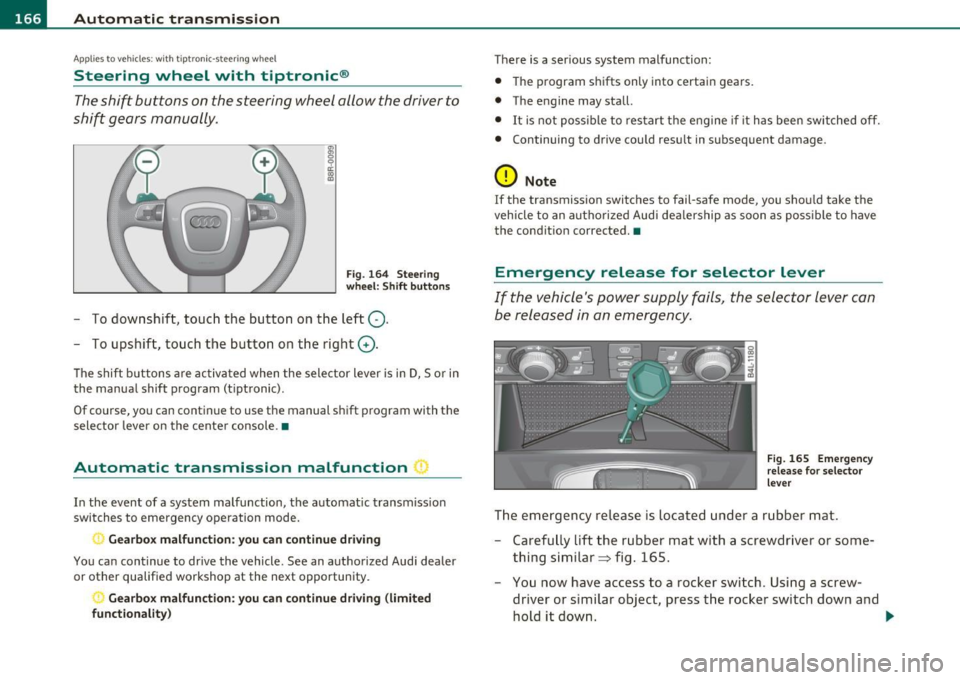
Fig. 164 Steering
wheel: Shift buttons
- To downshift, touch the button on the left Q.
- To upshift, touch the button on the right G).
The shift buttons a re activated when the selector lever is in D, Sor in
the manual shift program (t iptronic).
Of course, you can continue to use the manual shift program with the
selector lever on the center console. •
Automatic transmission malfunction I
In the event of a system malfunction, the automat ic transmission
switches to emergency operation mode .
., Gearbox malfunction: you can continue driving
You can continue to drive the vehicle. See an authorized Audi dealer
or other qualified workshop at the next opportunity .
Gearbox malfunction: you can continue driving (limited
functionality )
There is a serious system malfunction:
• The program shifts only into certain gears.
• The engine may stall.
• It is not poss ible to restart the engine if it has been switched off.
• Continuing to drive could result in subsequent damage .
0 Note
If the transmission switches to fail-safe mode, you should take the
vehicle to an authorized Audi dealership as soon as poss ible to have
the condition corrected. •
Emergency release for selector lever
If the vehicle's power supply fails, the selector lever can
be released in an emergency.
Fig. 165 Emergency
release for selector
lever
The emergency release is located under a rubber mat.
- Carefully lift the rubber mat with a screwdriver or some
thing similar => fig. 165.
- You now have access to a rocker switch . Using a screw
dr iver or similar object, press the rocker switch down and
hold it down. ._
Page 173 of 390

Parking system -
----------------=-------'
Applies to veh icles : w ith par king system advanced
Switching on and off
Th e rear view camera switches on automatically together
with the acoustic and visual park assist when you put the
vehicle in reverse.
Switching on
F ig. 170 Cente r
c on sole: Pa rki ng
sys tem swi tch
Fig . 171 MMI display:
v is ual d istance disp la y
- Switch the MMI on and select reverse gear.
- Switch on the Adaptive Air Suspension * comfort or auto-
matic mode .
Contro ls a nd e quip
m en t Vehicle
OP-eration
-To use the front parking system , press the switch P11.1A in the
center console ~ fig . 170 . A short confirmat ion tone
sou nds an d the indicator light in the sw itch lights up.
Switching between the rear view camera and
visual display
- Press the Graphic control button~ page 172, fig. 172 ®
to see the visual dis pla y.
- P ress the
Rear view control button to see the rear view
camera image~ fig . 171.
Switching off
Drive faster than 6 mph ( 10 km/h), or
- press th e swi tch
P111 A or
- switch off the ignition .
Segments in the visual display
The red segments i n front of and behind the vehicle=> fig . 171 help
you to determine the distan ce between you and an obstacle . As your
vehicle comes closer to the obstacle, the segm ents move closer to the
veh icle . The co llision area has been reached when t he next to last
segmen t is displayed . Do not cont inue dr iv ing farthe r=>
& in
"Ge neral Information " on
page 169!
& WARNING
• The MMI display cannot show , or cannot adequately show ,
c ertain objects (such a s small posts or grating ), reces ses in the
ground and protruding parts on another car.
• Onl y use the rear view camera to a ssist you if it show s a good ,
clear picture. For e xample, the image may be affected by the sun
shining into the lens , dirt on the len s or if there is a defect. .,_
Vehicle care Do-it-yourselt service iTechnical data
Page 177 of 390

Parking system -
--------------=--=---
[I) Tips
• The warn ing tones can also be adjusted d irectly by the v isua l
display* or the picture from the rear view camera* . Simply press t he
S ettings * control butto n.
• Changed settings are activated when park ing system is switched
on again.
• T he settings are automatically stored and assigned to the remote
control key. •
Applies to veh icles: w ith rear park assist/park ing system advanced and t ra iler h itch
Trailer hitch
For vehicles with a factory installed trailer hitch, or a trailer hitch
ins talled a cco rding to factory specifica tions, the p arking sys tem rear
sensors do not come on whenever you shift into reverse gear or when
you p ress the
P,.,1~ swit ch*. If yo u install a hitch yourse lf, this f unction
may not work. In genera l the follow limitations may come up:
Rear park assist*
There is no warning for distances to the rear.
Parking system advanced *
There is no warning for d istances to the rear. The front sensors
remain act ivated. The v isua l display sw itches to the trailer tow ing
mode. The p icture from the rear v iew camera will not show the orien
tat ion li nes nor the bl ue surfaces. •
Applies to veh icles: with rear park ass ist/park ing sys tem advanced
Error messages
There is an erro r in the system if the LED on the Pwi switc h* is blink ing
and you he ar a continuous alarm for a few se con ds afte r swi tching on
Controls and equip
ment Safety first
the parking system or when the parking system
is a lready activated.
Have your au thor ize d Aud i deale r co rrec t th e error.
[I) Tips
If the er ror is not corrected befo re yo u switch off the ignition, when
you sw itch on the parking system again, the LED in the
P'#A sw itch * will
blink. •
Vehicle care Technical data
Page 178 of 390
lfflJ.___A_ d_ a__,__ p_t_ i_v _e _ A_ i_ r_ S _ u_ s__. p ,_ e_n_ s _ io_ n __________________________________________ _
Adaptive Air Suspension
Air suspension and damping
Applies to veh icles : w ith Adap tive Air Suspens ion
Description
Air suspensi on and damping can be regulated as desired
by driver, and they adapt automatically to the driving
situation at the time.
Adaptive Air Suspens ion is an e lectro nically controlled springing and
damping system . This chass is system makes it eas ie r on the d river by
adapting to the particular situation through imperceptible contro l
processes .
The
Adapt ive Air Suspension component regu lates ground clearance
depending on vehi cle speed and driver input .
It fu nc tions in depen
dently from the load cond itio n. Accele rating to a speed above a
predetermined limi t will ma ke the vehicle lower itse lf . On the other
hand, driv ing more slowly res ults in the vehicle ra is ing again at
specific s peeds.
T he
damping component provides individua l control of the damping
forces. For example, with damping characterist ics set to provide
greater comfort, damp ing is se t somewh at harder for a br ief period
only as req uired, for example, whe n going aro und a curve or when
bra king.
Settings
Ad aptive Air Suspension provides the drive r wi th the opportu nity to
set the chass is characterist ics also to their individual preference.
With the driving modes
Comfort, Au tomatic an d Dynamic the dr ive r
has three chassis sett ings available, ranging from comfort to spo rty.
Th e
Offroad mode c an be selected for dr iv ing on poor qu ality
st retches of road . In addition,
Li~ provides a f ifth mode, w hich can be
selecte d when exceptionally high ground clearance is needed
:::;, page 177, "C hass is controls" . The modes are set
in MM I:::;,
page 178.
& WARNING
The height of the parked vehicle can change due to temperature
fluctuation s or changes in load .
0 Note
• Whenever you park yo ur vehicle, always make sure there is
adeq uate clearance above and below the ve hicle . T he heig ht of the
parked vehicle can change as the res ult of temperature fluctuations,
changes in load condition and changes in the dr iv ing mode (ground
clearance).
• If the veh icle is be ing transported (e .g. by tow truck, train, ship,
etc.) , mount the tie-down cha ins/cables over the r unning s urface
(c ircumfere nce) of the tires. Never sec ure the vehicle by the ax le, the
suspension struts or the front or rear tow line eye. For technical
reaso ns, the p ressure in t he suspension st ru ts m ay change dur ing the
transport, w hic h could result in the vehicle no longer being secured
pro perly.
• If you are going to tow a trailer w ith a tra iler hitch that was
not
ins talled accor ding t o fac tory spe cifica tion s, you mus t activa te t he
trai ler operation mode manually :::;,
page 180.
[ i ] Tips
• Before you ca n raise your vehicle using the vehicle jack (for
examp le, when changi ng a flat tire) o r a veh icle lift , yo u m us t a ct iv a te
the jacki ng mode:::;,
page 180.
• O n some mo dels, the vehicle can reac h its m aximum spee d on ly in
the
Automatic and Dynamic modes .•
Page 179 of 390
____________________________________________ A_ d_a_ p ,_ t_iv _ e_ A _ i_ r _ S_ u_s_, p __ e_n _ s_ i _o_ n __ ffllll
A pp lies to ve hicles : with A dap tive Air Su spen sion
Chassis controls
Five different driving modes can be set by the driver.
The automatic control processes are speed- and time-dependent. For
example, it is not possible to raise the suspension to a high level
above certain speeds.
When a speed of about 75 mph (120 km/h) is exceeded for more than
30 seconds, the vehicle is automatically lowered to
low level when in
comfort and automatic mode. Ground clearance is about 0.6 inch (15
mm) less, compared to the
normal level.
When a speed of about 100 mph (160 km/h) is exceeded for more
than 20 seconds, the vehicle is automatically lowered to
highway
level
when in automatic and dynamic mode . Ground clearance is
about 1.4 inches (35 mm) less, compared to the
normal level. Road
holding is optimized as a resu lt of the lower center of gravity, and fuel
consumption is reduced as a result of reduced wind resistance .
Level adjustment
high level 2
normal level
highway level
Ground clearance
about 9.4 inches (240 mm)
about 8 inches (205 mm)
about 7 inches (180 mm)
about 6.5 inches (165 mm)
about 5. 7 inches (145 mm)
The segment display @ in the MMI Display =>
page 178 or in the
instrument cluste r display =>
page 179 shows the current vehicle
level.
Automatic
Select the automatic mode if you prefer a balanced, comfortable
suspension setting. The damp ing characteristics are adjusted accord
ing ly .
Controls and equip
ment Safety first •
Automatic lowering: When a speed of about 75 mph (120 km/h)
is exceeded for more than 30 seconds, the veh icle is automatically
lowered by about 0 .6 inch (15 mm) to the
low level, which is more
suitable for highway speeds. Road holding is optimized as a result of
the lower center of gravity and fuel consumpt ion is reduced as a
result of reduced wind resistance . When a speed of about 100 mph
(160 km/h) is exceeded fo r more than 20 seconds, the vehicle is auto
matically lowered by an additional 0.8 inch (20 mm) to
highway level.
• Automatic raising: When the vehicle is at highway level and the
speed falls below about 80 mph (130 km/h) for more than 20
seconds, the vehicle is automat ically raised to
low level. The vehicle is
automatically raised again to
normal level if the speed falls below
about 44 mph (70 km/h) for a period of 2 minutes. The vehicle is
raised immediately when speed falls below about 22 mph (35 km/h).
Dynamic
Select the dynamic mode if you prefer a sporty suspension setting . In
this mode, the vehi cle is lowe red to
low level wh ile it is still stationary
and sporty damp ing characteristics a re selected . The warning light
c.:> in the instrument cluster wi ll come on for a few seconds just to
remind you of the reduced ground clearance.
If you switch off the engine whi le the vehicle is in the dynamic mode
and then switch on the ignition once again, the
c.:> warning light will
also come on again for a few seconds as a reminder .
• Automatic lowering : When a speed of about 100 mph (160 km/h)
is exceeded fo r more than 20 seconds, the vehicle is automatically
lowered by 0.8 inch (20 mm) to
highway level.
• Automatic raising: The vehicle is automatically raised to low level
again, if the speed falls below about 80 mph (1 30 km/h) for a per iod
of 20 seconds. The vehicle is raised immediately when speed falls
below about 22 mph (35 km/h).
Comfort
Select the comfort mode if you desire a suspension setting with a
special emphasis on comfort. Damping characteristics with a clear
emphasis on comfort are selected in this mode.
~
Vehicle care Technical data
Page 180 of 390
llffl..__A_ d_a_ p,__ t_iv _ e_ A_ i_r _ S_ u_s _, p'--- e_n _ s_ i_ o _ n ___________________________________________ _
• Automatic lowering: When a speed of about 75 mph ( 120 km/h)
is exceeded for more than 30 seconds, the vehicle is automatically
lowered by 0 .6 inch (15 mm) to
low level .
• Automatic raising: The vehicle is automatically raised to normal
level
again, if the speed falls below about 44 mph (70 km/h) for a
period of 2 minutes . The vehicle is raised immediately when speed
falls below about 22 mph (35 km/h) .
Offroad
Select the offroad mode when you have to travel over poor quality
sections of road (e.g. trails) . In this mode, the vehicle is raised to
high
level 1, and damping characteristics for poor road stretches are
selected. When switching to offroad mode, the Adaptive Air Suspen
sion indicator appears automatically in the instrument cluster display
=>page 179.
The offroad mode can only be activated at speeds below 37 mph
(60 km/h). Offroad mode ends automatically and the automatic
mode is activated when a speed of approximately 50 mph (80 km/h)
is exceeded.
Lift
Select the lift mode when exceptionally high ground clearance is
needed at a reduced speed. In this mode, the vehicle is raised to
high
level 2 . When switching to lift mode , the Adaptive Air Suspension
indicator appears automatically in the instrument cluster display
=:>page 179 .
The lift mode can be activated only at speeds below 12 mph (20
km/h) . When a speed of about 25 mph (40 km/h) is exceeded, the
system automatically leaves
lift mode and the offroad mode is acti
vated . The instrument cluster display automatically switches the
display to Adaptive Air Suspension to indicate reduced ground
clearance. •
Appli es to veh icles : with Adapt ive Air Su spens ion
MMI se ttings
Driving modes are adjusted in the MMI and the current
vehicle level is displayed.
Fig.176 MMI Display:
Settings
The ignition must be switched on to set the driving modes.
- Select: Function button
(CAR].
Raising and lowering
If arrow (Dis white => fig. 176, the vehicle is raised.
If arrow @ is
white, the vehicle is lowered .
The respective arrow stays on until the level change is complete. The
time used for a level change can vary, depending on the current
driving conditions.
Displaying the vehicle level
The current vehicle level is shown with segments filled out in the
segment display ®·
If only the bottom segment is filled out, the
vehicle is at highway level. If all segments are filled out, the vehicle is
at high level 2 and has the greatest amount of ground clearance
possible. .,_
Page 181 of 390
____________________________________________ A_ d_a ..... p,__ t_iv _ e_ A_ i_r _ S_ u_s__, p_ e_n _ s_ i_ o _ n _ __.ffl'I
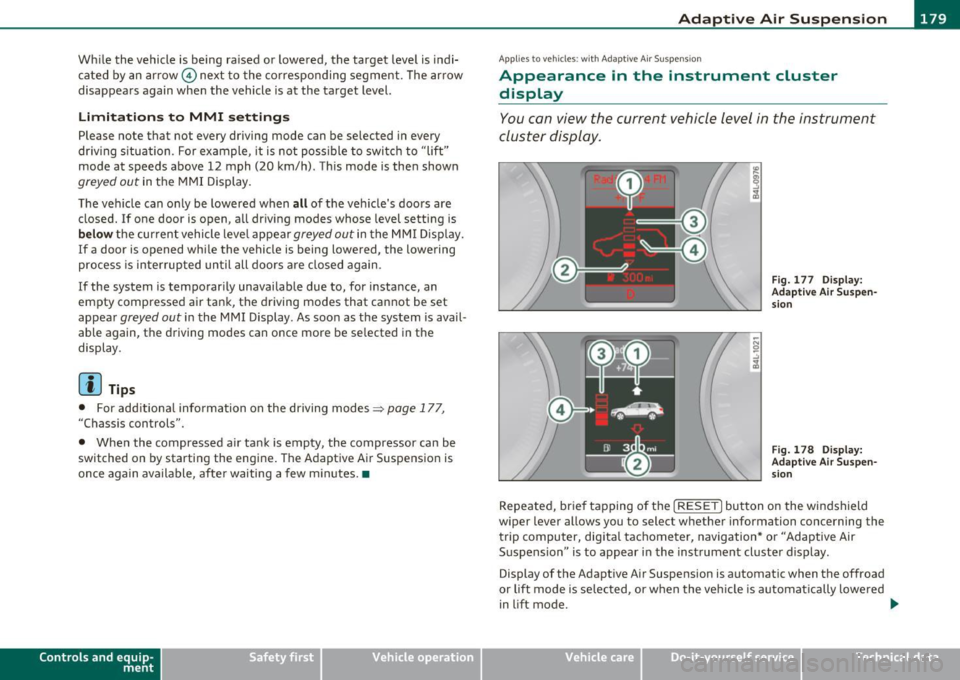
While the vehicle is being raised or lowered, the target level is indi
cated by an arrow © next to the corresponding segment. The arrow
disappears again when the vehicle is at the target level.
Limitations to MMI settings
Please note that not every driving mode can be selected in every
dr iving s ituation . For example , it is not poss ible to switch to "lift"
mode at speeds above 12 mph (20 km/h) . This mode is then shown
greyed out in the MMI Display .
The vehicle can on ly be lowered when
all of the veh icle's doors are
closed.
If one doo r is open, all driving modes whose level setting is
below the current vehicle level appear greyed out in the MMI Display.
If a door is opened whi le the vehicle is being lowered , the lowering
process is interrupted until all doo rs are closed again.
I f the system is temporarily unavailable due to, for instance, an
empty compressed air tank, the driving modes that cannot be set
appear
greyed out in the MMI Display . As soon as the system is avail
able aga in, the driv ing modes can once more be selected in the
display .
(I] Tips
• For additional information on the driving modes=> page 177,
"Chassis controls".
• When the compressed air tank is empty , the compressor can be
switched on by starting the engine. The Adaptive Air Suspension is
once again available, after waiting a few minutes. •
Contro ls a nd e quip
m en t Vehicle
OP-eration
Applies to vehicles : w ith Adapt ive A ir Sus pens ion
Appearance in the instrument cluster
display
You can view the current vehicle level in the instrument
cluster display.
Fig. 177 Display:
Adaptive Air Suspen sion
Fig. 178 Display:
Adaptive Air Suspen
s ion
Repeated, br ief tapping of the [ RESET] button on the windshield
wiper lever allows you to selec t whether information concerning the
trip computer, digita l tachometer, navigation* or "Adaptive Air
Suspension " is to appear in the instrument cluster display .
Display of the Adaptive Air Suspension is automatic when the offroad
or lift mode is se lected, or when the vehicle is automat ically lowered
i n lift mode.
~
Vehicle care Do-it-yourselt service iTechnical data
Page 182 of 390
1111....__A_ d_ a_,_ p_t _i_ v _e _ A_i_ r_ S_ u_ s ... p,_ e_n_ s_ io_ n __________________________________________ _
Raising and l owering
If a rrow (Dis solid re d => pag e 179 , fig. 177 or whit e=> pag e 179,
fig . 178, the veh icle is raised .
I f arrow
0 is solid red or white, the vehicle is lowered .
T he respective arrow stays on until the level change is complete . The
time required for a level change can vary, depending on the current
dr iving cond it ions .
Displ aying the vehicle le vel
The current vehicle leve l is show n wit h segments fi lled ou t in the
segment display@. If only the bot tom segment is filled out, the
vehicle is at highway leve l. If all segments a re filled o ut, the vehicle is
at high level 2 and has the greatest amount o f ground clearance
possible.
W hile the vehicle is being ra ised or lowe red, t he target leve l is ind i
cated by an arrow © next to the correspond ing segment . The arrow
disappe ars aga in whe n the vehicle is a t the target level. •
Applies to vehicles: w it h Ad ap tiv e Ai r Suspens ion
Jacking mode when changing a flat tire
This mod e must be activated in the MMI bef ore raising
the vehicle with a jack or on a vehicle
li~ .
-Select: Fu nction button [CAR)> function butto n [SETUP ]
> Jacking mode .
The veh icle jack mode must be activated before c hanging a whee l so
that the automatic contro l processes for t he air s uspensio n do not
make lifting w ith the vehicle jack more difficult .
The check lamp in the instr ument cluster display illuminates in
vehicle jac k mode.
W Tips
Th e veh icle ja ck mode is switc hed off automat ica lly at speeds above 9
mph (15 km/h). •
App lies to veh icles: with towing hitch and Adaptive Air Suspe nsion
Towing a trailer
Automatic lowering is not desirable when towing a
trailer.
- Selec t: Fu nct ion button [CARI > fun ction but ton [S ETUP I
> Towing mode .
As long as towing mode is activated, a ve hicl e w ith a t railer appears
in the
adaptive air suspension main menu .
Level Adjustment when towing a trailer
• Before h itching up the trailer and befo re adjust ing the tongue
we igh t at the trailer, the automatic or com fort mode mu st be
selected so that the vehicle can be at normal leve l=>
page 178, "MMI
se ttings" .
• If dr iv ing in dynamic mode is desired, this mode
must be selected
befo re hitc hing up the tra iler and before adjus ting the tongue
we ight. However, note that yo ur vehicle is lowered and ground clear
ance is reduced.
• If you have to drive under diff icu lt road conditions, you can selec t
offroad or li ft mode, aft er hitching up the trai le r or after adjust ing
the tongue weight .
• If the vehicle is at
normal level, an d you se lec t offro ad mode wh ile
traveling a t speeds higher than 22 mph (35 km/h), the vehicle will
no t b e raised. O ffroad mode will a ppear as t he active mode in the
MMI D isplay.
• If the veh icle is in o ffro ad mode at
high level 1, it automatic a lly
lowers to
normal level when the vehicle is traveling at speeds
exceeding approximate ly 31 mph ( SO km/h). The vehicle is automat -...
Page 183 of 390

____________________________________________ A_ d_a_ p ,_ t_iv _ e_ A _ i_ r _ S_ u_s_, p __ e_n _ s_ i _o_ n __ _
ically raised to high level 1 again when the traveling speed falls below
approximately 25 mph (40 km/h) .
Restrictions when operating with a trailer
When operating with a trailer, the lift mode can only be selected up
to about 12 mph (20 km/h). Lift mode is automatically canceled
agai n when a speed of about 25 mph (40 km/h) is exceeded.
If the vehicle is in automatic , comfort, offroad or lift mode before the
trailer towing mode is activated, the dynamic mode cannot be acti
vated .
If the vehicle is in dynam ic mode before towing operation is acti
vated, it can be driven in this mode. If the suspension is switched
from th is mode to another mode, dynamic mode cannot be re
selected.
[I) Tips
• For vehicles with a factory installed towing hitch or a trai ler hitch
that was installed later according to factory specifications, the
system recognizes "Trailer towing mode" and activates this specia l
mode automat ically , as soon as the electr ical connection on the
trailer socket is connected. The mode ceases automatically when the
electrical connection to the trailer socket is disconnected.
• If the trai ler towing mode has been activated, the vehicle will not
drop to the low o r highway level. •
Controls and equip
ment Safety first
A
pp lies to vehicles : w ith Adapt ive Air Sus pens ion
Cargo mode
The rear of the vehicle can be lowered to make it easier to
load .
Fig. 179 Luggage
compartment detail:
Cargo mode switch
Activating cargo mode in the MMI
-Select: Function button [CARI> function button [SETUP)
> Lower for loading.
Using switch for activating cargo mode
- Close all vehicle doors.
- Open the trunk lid.
- Press the lower part of the switch ®~ fig. 179. The rear
of the vehicle is lowered.
- Press the upper part of the switch
(D. The rear of the
veh icle is raised again.
In cargo mode, the rear axle is lowered by 2.2 inches (55 mm),
compa red to the normal level.
While the vehicle is in cargo mode, the segments do not appear as
filled in the segment d isplay. .,,
Vehicle care Technical data
Page 184 of 390
1111....__A_ d_ a_,_ p_t _i_ v _e _ A_i_ r_ S_ u_ s ... p,_ e_n_ s_ io_ n __________________________________________ _
Cargo mode is automatically canceled again when a different mode is
selected in the MMI Display, or when a speed of about 3 mph (5 km/h)
has been exceeded .
If the system is temporarily unavailable due to, for instance, an
empty compressed air tank, the
Lower for loading function appears
greyed out in the MMI Display. As soon as the system is available
again, the function can once more be selected in the display.
While the vehicle is being lowered, the indicator light®
~ page 181, fig. 179 on the switch in the luggage compartment
flashes . When the cargo level has been reached, the indicator light
comes on and remains on as long as the vehicle is in cargo mode.
When the veh icle is ra ised again, the indicator light flashes again .
0 Note
Make sure before ca nceling cargo mode that there is sufficient clear
ance above the vehicle and around the trunk lid, if open.
(I) Tips
• The vehicle will not be lowered if one of the vehicle doors is open,
or if the compressed air tank is empty. The ind icator light on the
switch flashes three times.
• When the compressed air tank is empty, it will refill when you
drive at speeds over 25 mph (40 km/h). The vehicle can be lowered to
cargo level when the compressed air tank is adequately filled.
• If the vehicle is in lift or offroad mode when you activate cargo
mode, the vehicle will first drop down to normal level.•