buttons AUDI Q7 2011 Owner´s Manual
[x] Cancel search | Manufacturer: AUDI, Model Year: 2011, Model line: Q7, Model: AUDI Q7 2011Pages: 392, PDF Size: 93.29 MB
Page 115 of 392
Warm and cold -
----------------
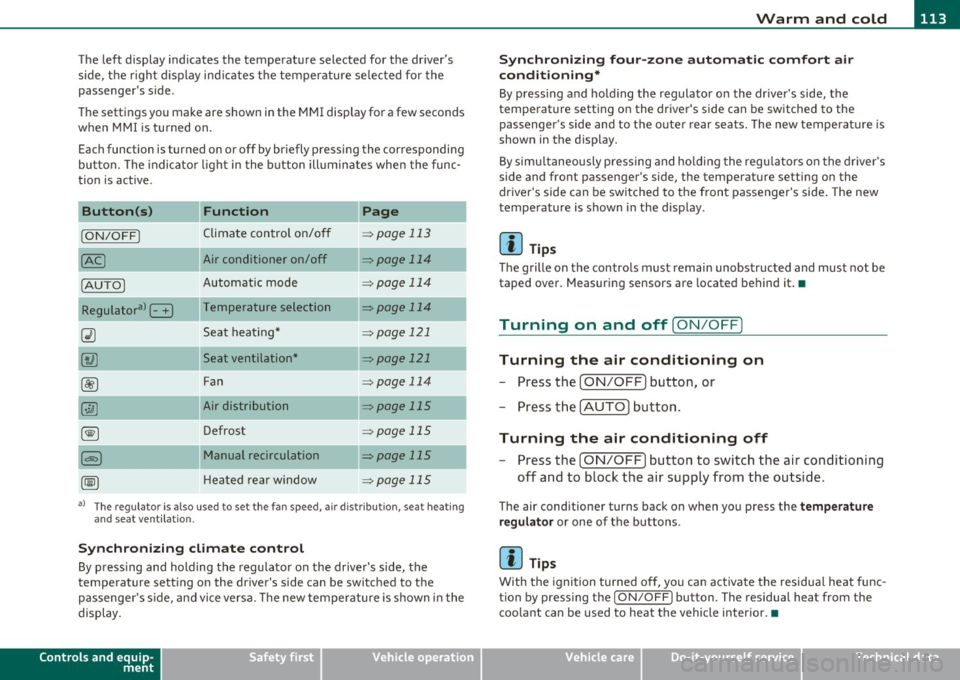
The left display indicates the temperature selected for the driver's
side, the r ight d isplay ind icates the temperature se lected for the
passenger's side.
T he settings you make are shown in the MMI display for a few seconds
when MMI is tu rned on.
Each function is turned on or off by briefly pressing the corresponding
button. The indicator l ight in the b utton ill uminates when the func
tion is act ive.
Button (s)
Function Page
ION/OFFI Climate control on/off => page 113
Air conditioner on/off =:;,page 114
Automatic mode => page 114
Temperature selection => page 114
Seat heating* => page 121
Seat ventilation* -::::;, page 121
Fan => page 114
Air distribution => page 115
Defrost => page 115
Manual recirculation -::::;, page 115
Heated rear window ::::> page 115
a) The regulator is also used to set the fan speed, air dis tr ibution, seat heating
and seat ventilation.
Synch ro nizing clim ate co ntr ol
By pressing and holding the regulator on the driver's side, the
temperature setting on the driver's side can be sw itched to the
passenge r's s ide, and vice ve rsa. T he new temperature is shown in the
display.
Controls and equip
ment Safety first
S
ynchr onizing four-z one a utom ati c c omfor t air
c ondi tioning *
By press ing and ho ld ing the regulator on the dr iver's side, the
temperature sett ing on the driver 's side can be switched to the
passenger 's side and to the outer rear seats . The new temperature is
shown in the display.
By simu ltaneously pressing and ho lding the regu lators o n the driver 's
side and front passenger's side, the temperature setting on the
driver's side can be switched to the front passenger's side . The new
temperature is shown in the display .
[I] Tips
The grille on the controls must remain unobstructed and must not be
taped over. Measuring sensors are located behind it.•
Turning on and off [ ON/OFF]
Turning the air conditioning on
-Press the [ ON/OFF] button , or
- Press the [AUTO] button.
Turning the air conditioning off
-Press the [ ON/OFF] button to switch the air conditioning
off and to block the air supply from the outside.
The air conditioner turns back on when you press the te mper ature
reg ulato r
or one of the buttons.
[I] Tips
With the ignition turned off, you can activate the residua l heat func
tion by pressing the
I ON/OFF) button. The residual heat from the
coo lant can be used to heat the vehicle interior.•
Vehicle care Technical data
Page 120 of 392
llffl..__w __ a _r _m __ a_n _ d_ c_ o_ ld ________________________________________________ _
Rear Air Conditioning
Applies to veh icles: with fou r-zone automat ic co mfort air condit ioning
Rear air conditioning -controls
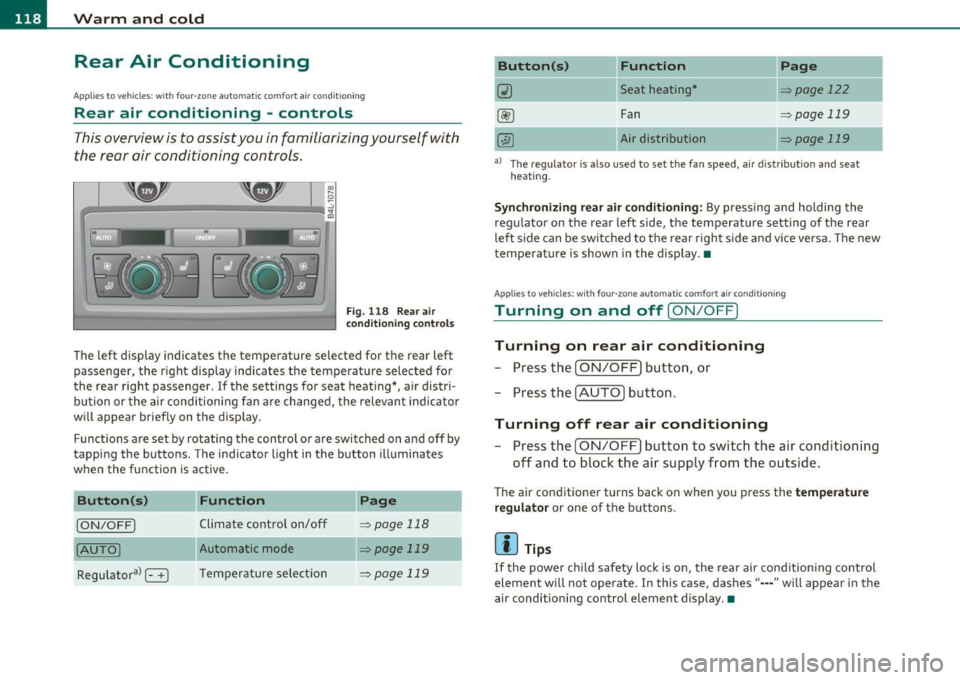
This overview is to assist you in familiarizing yourself with
the rear air conditioning controls.
F ig. 1 18 Rear air
con diti on in g con trol s
The left display indicates the temperature selected for the rear left
passenger, the right display indicates the tempe rature selected fo r
the rear right passenger. If the settings for seat heat ing *, air distr i
bu tion or the a ir conditioni ng fan are changed, the relev ant indicator
w ill appear briefly on the disp lay.
Func tions are set by rotating the contro l o r are swi tched o n and
off by
tapping the butto ns. The indicator light in the button illuminates
when the function is active .
Button(s)
Function Page
[ON/OFF) Climate control on/off => page 118
(AU TO ) Automa tic mode => page 119
Regulatora> G T emper ature se lec tion => page 119
Button(s) Function
~ Seat heating*
-
Fan
Air dis tribution
Page
::!> page 122
-
=> page 119
::!> page 119
al T he regulator is also used to set the fan speed, a ir d istr ibut ion and seat
heating.
-
Synchronizing r ear air conditioning: By pressing and holding the
regu lator on the rear left side, the temperature setting of the rear
left side can be switched to the rear right s ide a nd v ice versa. The new
temperature is shown in the display. •
Appli es to vehicles : with four -zone auto matic co mfort air condition ing
Turning on and off [ ON/OFF ]
Turning on rear air conditioning
-Press th e I ON/OFF) butt on, o r
- Press the !A UTO] button .
Turning off rear air conditioning
- Press the [ O N/OFF] but ton to sw itch the air condition ing
off and to bloc k th e air supply from the outs ide .
The air conditioner turns back on when yo u press the temperature
regu lator
or one of t he buttons .
[ i ] Tips
If the power child safety loc k is o n, the rear ai r cond ition ing contro l
element wi ll not operate. In this case, dashes" ••• " will appear in the
a ir conditioning con trol element display. •
Page 170 of 392
ffl..__A_ u_ t_ o_ m_ a_ t _ ic_ t_r_a _ n_ s_m _ i_ s _s_ i_ o _ n _____________________________________________ _
Applie s to veh icles : wi th tip tron ic -s te eri ng whe el
Steering wheel with tiptronic ®
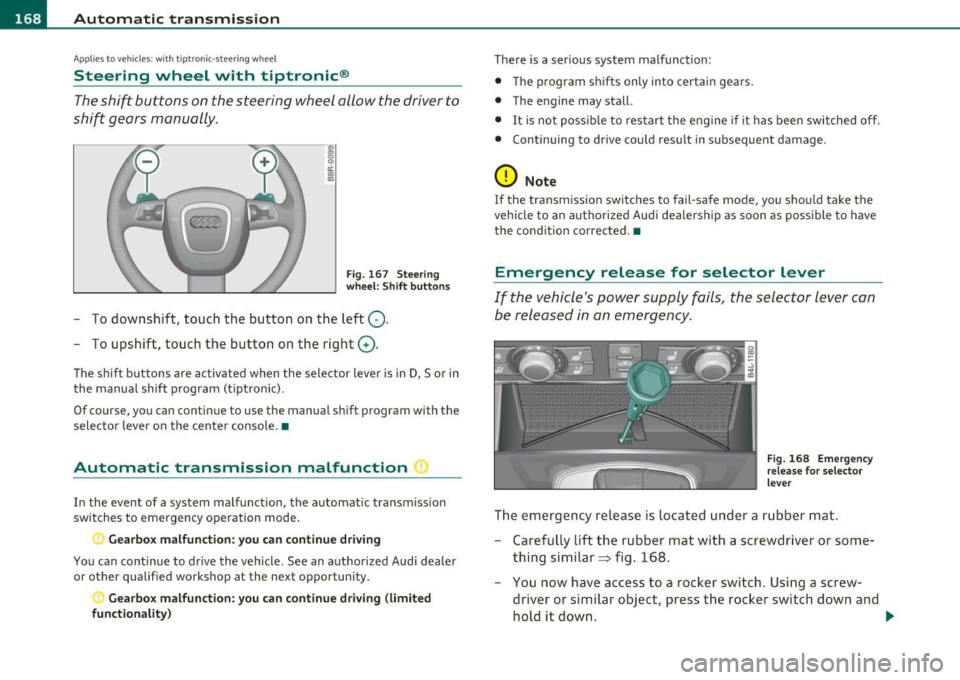
The shift buttons on the steering wheel allow the driver to
shift gears manually.
Fig. 167 Steering
wheel: Shift buttons
- To downshift, touch the button on the left Q.
- To upshift, touch the button on the right G).
The shift buttons a re activated when the selector lever is in D, Sor in
the manual shift program (t iptronic).
Of course, you can continue to use the manual shift program with the
selector lever on the center console. •
Automatic transmission malfunction I
In the event of a system malfunction, the automat ic transmission
switches to emergency operation mode .
., Gearbox malfunction: you can continue driving
You can continue to drive the vehicle. See an authorized Audi dealer
or other qualified workshop at the next opportunity .
Gearbox malfunction: you can continue driving (limited
functionality )
There is a serious system malfunction:
• The program shifts only into certain gears.
• The engine may stall.
• It is not poss ible to restart the engine if it has been switched off.
• Continuing to drive could result in subsequent damage .
0 Note
If the transmission switches to fail-safe mode, you should take the
vehicle to an authorized Audi dealership as soon as poss ible to have
the condition corrected. •
Emergency release for selector lever
If the vehicle's power supply fails, the selector lever can
be released in an emergency.
Fig. 168 Emergency
release for selector
lever
The emergency release is located under a rubber mat.
- Carefully lift the rubber mat with a screwdriver or some
thing similar=> fig. 168.
- You now have access to a rocker switch . Using a screw
dr iver or similar object, press the rocker switch down and
hold it down. ._
Page 188 of 392
ffl..__H_ o_m_ e_ L_ i _n_ k_ ® _______________________________________________ _
Applies to veh icles : w ith Homelin k® un iversa l remote control
Programming the Homel ink ® transmitter
The transmitter is programmed in two phases . For rolling
code transmitters, a third phase is also necessary .
111111
-
1111111
Fig. 183 Over head
console: Homelink ®
keypad
Fig. 184 F ront
bumper, dri ver side:
locat ion of transmitter
unit
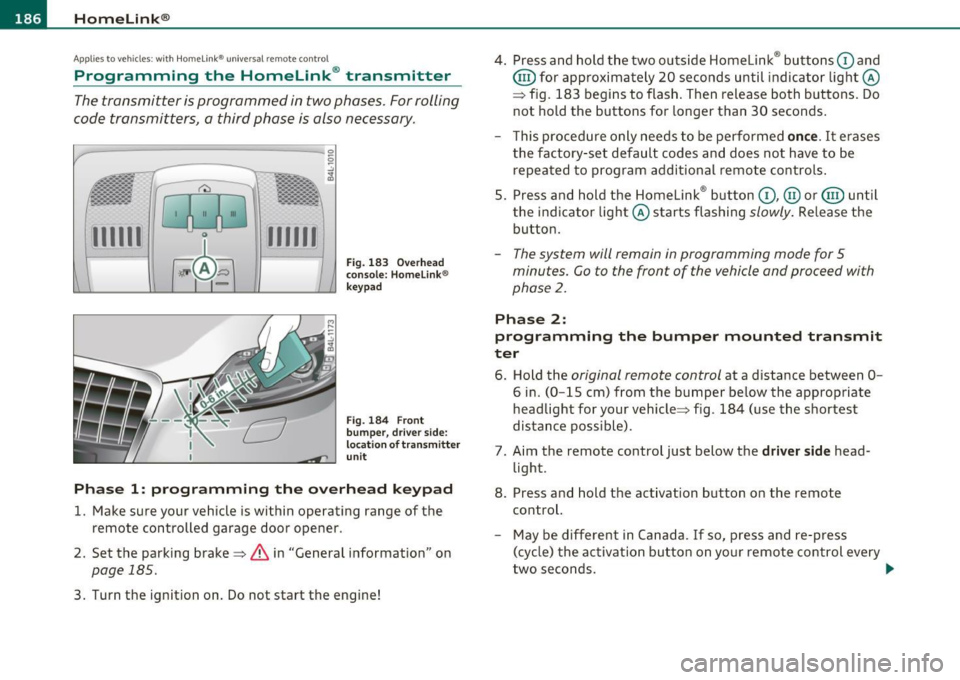
Phase 1: progr amming th e overhead k eypad
1. Make sure your vehicle is within operating range of the
remote controlled garage door opener .
2. Set the parking brake~
& in "General information " on
page 185 .
3. Turn the ignition on . Do not start the engine! 4
. Press and hold the two outside Homelink ® buttons
G) and
@ for approximately 20 seconds until indicator light@
=> fig. 183 begins to flash . Then release both buttons. Do
not hold the buttons for longer than 30 seconds .
- This procedure only needs to be performed
once. It erases
the factory-set default codes and does not have to be repeated to program additional remote controls .
5. Press and hold the Homelink ® button
G) , @ or@ until
the indicator light@ starts flashing
slowly . Release the
button .
-The system will remain in programming mode for 5
minutes. Co to the front of the vehicle and proceed with
phase
2 .
Phase 2:
programming the bumper mounted transmit
ter
6. Hold the original remote control at a distance between 0-
6 in. (0 -15 cm) from the bumper below the appropriate
headlight for your vehicle => fig . 184 (use the shortest
distance possible) .
7. Aim the remote control just below the
driver side head
light .
8. Press and hold the activation button on the remote control.
- May be different in Canada . If so, press and re-press
(cycle) the activation button on yo ur remote control every
two seconds. .-,,
Page 190 of 392
lffll.___H_ o_ m __ e_L_ i_n _k_ ®_ • _________________________________________________ _
-Press th e ap pro priate programmed button G) , @ or@
to activate the desired remote control function ::::>
& in
"Genera l informat io n" on
page 185. •
Applies to ve hicles : w ith Hom eli nk® univer sa l rem ote c ont rol
Reprogramming a single button
A Homelink ® button can be reprogrammed individually
without affecting the other button allocations.
Programming the ov erh ead keypad
- Press the appropriate Homelink ® button until the indi-
cator light begins flashing slowly .
Programming the bumper mounted transmit
ter
1. Hold the original remote control at a distance between 0 -
6
in . (0 -15 cm) from the bumper below the appropriate
headlight for your vehicle (use the shortest distance
possible).
2. Aim the remote control just below the
driver side head
light .
3 . Press and hold the ac tivation button on the remote
control.
4 . The emergency flashers will flash
three times (after about
15 -60 seconds) when the programm ing is successful.
N ow release the b utton on the remote control.
- If the device utilizes a rolling code , please follow phase 3
of =>
page 186 , "Programming the Homelink ® trans
mitter" for rolling code programming.
This pro cedur e will caus e th e ex is ting pr ogramming on th e
Homelink ® button to be era sed !•
Ap plies to veh icles: w ith Ho meli nk® un ive rsa l rem ote c ont rol
Erasing the programming of the
Homelink ® tr ansmitter
When you erase the programming, the programming on
all three of the transmitter channels with be lost!
- Perform steps 1 to 4 as described on ::::> page 186, "Phase
1 : programming the overhead keypad".
When completed , the Homel ink ® system will be in the programm ing
mode and is then ready to learn the codes for remote controlled
devices .
[I) Tips
• Programmed buttons cannot be erased individually.
• For security reasons you are advised to erase the programming of
the Homelink ® system before you sell your veh icle .•
Page 250 of 392
___ C_h _i_ld _ S_ a_ f_ e_ t_,, y'-----------------------------------------------
Description
The lower anchorage positions are marked for quick
locating.
Fig . 213 Second row
of seats: lower
anchorage bracket
locations
Fig . 214 Third row of
seats: locator buttons
for lower anchorages
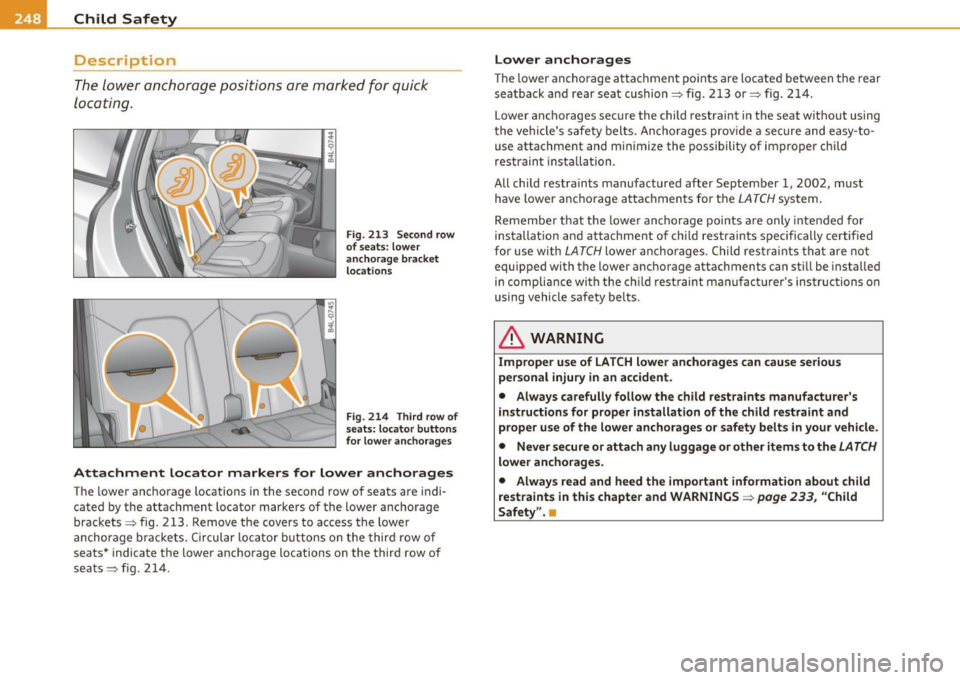
Attachment locator markers for lower anchorages
The lower anchorage locations in the second row of seats are indi
cated by the attachment locator marke rs of the lower a nchorage
brackets => fig . 213. Remove the covers to access the lower
anchorage brackets. Circular locator buttons on the third row of
seats * indicate the lower anchorage locations on the third row of
seats => fig. 214.
Lower anchorages
The lower anchorage attachment po ints are located between the rear
seatback and rear seat cushion=> fig. 213 or=> fig. 214 .
Lower anchorages secure the child restraint in the seat without using
the vehicle 's safety belts. Ancho rages prov ide a secure and easy -to
use attachment and minimize the possibility of improper child
restrain t insta lla tion .
All child restraints manufactured after September 1, 2002, must
have lower anchorage attachments for the
LATCH system.
Remembe r that the lower anchorage points are only intended for
installation and attachment of ch ild restraints spec ifically certif ied
for use with
LATCH lower anchorages . Child restraints that are not
equipped with the lower anchorage attachments can st ill be insta lled
in compliance with the child r estraint manu facturer's ins truc tions on
using vehicle safety belts .
& WARNING
Improper use of LATCH lower anchorages can cause serious
personal injury in an accident.
• Always carefully follow the child restraints manufacturer's
instructions for proper installation of the child restraint and
proper use of the lower anchorages or safety belts in your vehicle.
• Never secure or attach any luggage or other items to the
LATCH
lower anchorages.
• Always read and heed the important information about child
restraints in this chapter and WARNINGS =>
page 233, "Child
Safety". •
Page 287 of 392

____________________________________________ C_l_e _a_ n_ i n--= g=--- a_n_ d----' p,__ r_o _t_ e_ c_ t_ i _o_ n __ _
& WARNING (co ntinued )
• Do not apply additional underco ating or rustproofing on or
near th e exhaust manifold, exhaust pipes, catalytic converter or
heat shields. While driv ing, the substance us ed for undercoating
could overheat and cause a fire .
• Always read and heed all WARNINGS and other information
:::>page 278. •
Exhaust tail pipes
Road salt and other co rrosive materials w ill damage the mate rial in
t he exhaus t tai l pipes if they a re not cleaned regula rly. Do no t clean
t he ta il pipes wi th whee l cleaner, pain t po lish , chrome polish o r ot her
abras ive cleaners. C lean the ta il pipes w it h car care products that are
suitable for sta in less stee l.
Your authori zed Audi dealer can provide clean ing products that have
bee n teste d an d a pproved for your ve hicle.•
Care of interior
MMI display
- Clean th e MM I dis pla y w ith a so ft clean clot h and an LCD
cleane r.
T he MM I display ca n be cleaned with a professiona lly available "LCD
cl eaner". The cloth sho uld be sligh tly dampened with the cleaning
fluid to clean t he d isp lay.
0 Note
T o avoid scra tch ing the MMI display, you should never clean it dry .•
Safety first
MMI control console
- First clean t he MMI co ntrol console w it h a bru sh to
r e mov e dust from th e h ousin g.
- Then wi pe the MMI co ntrol co nsole w ith a clea n, soft,
slightly da mp c loth .
The MMI control conso le sho uld be clea ned with a brush first so that
no dirt is trapped betwee n the buttons and the ho usin g. We re com
mend g iv ing t he M MI co ntro l co nsole a final w ipe wi th a cloth mo ist
ened w ith wate r and dish washing detergent .
0 Note
To prevent damage, make s ure that no fluid ever gets into the MMI
contr ol console. •
Aluminum trim
Use only neutral-pH products to remov e spo ts and deposits from
al uminum surfaces . Chrome care pro ducts and al ka line cleaners w ill
a tta ck al umi num su rfaces and c an damage them ove r time .
& WARNING
Always read and heed all WARNINGS and other information
=>page 278. •
Fabrics and fabric coverings
Fabrics and fabr ic coverings (e.g . seats , d oor trim p anels, et c.) s hou ld
be cleaned at regular interva ls with a vacuu m cleaner . T hi s removes
s u rface di rt part icles which co uld become embedded in the fabr ic _,,,
Vehicle care Technical data
Page 377 of 392

Alphabetical index -________________ fWI
Alternator Auto-Check Control ..... .. .. .... ...... 32 State of charge ......... ..... .... 263
Malfunction ............. ........ . 34 Automatic belt retractor ............. 205 Voltage
......................... . 39
Ambience lighting Lighting profiles ................. . 73
Anti -freeze
See Engine coolant system ......... 308
Anti-glare inside day-night mirror . . . 79, 80
Anti -lock brake system
How the ABS system works ......... 260
Warning/indicator lights ... .. .... .. 19
Anti-S lip Regulation System (ASR)
How the system works ... .... .. .. . 258
Anti-theft systems
Anti-theft alarm system ........ .. .. 57
Electronic immobilizer ............. 45
Approach/departure angle ............ 270
Ashtray . ............. .. .. .. .. .... . 105
ASR How the Anti-Slip Regulation System works . ..... ... ... .. .. ......... 258
Asterisk What does it mean when something is
marked with an asterisk? ........... 6
Audi braking guard .................. 151
Error messages ............... ... 153
Settings ................ ..... ... 153
Status messages ................. 153
Switching on and off .............. 153
Audi Service Repair Manuals and Literature
368
AU TO mode
AC climate contro ls ...... .... .. .. . 114
Auto Safety Hotline .... .... ......... 199
Controls and equip
ment Safety first
Automatic car wash
See Washing
.................... 279
Automatic mode Four-zone automatic comfort air
conditioning ........... ...... .. 119
Automatic Sh ift Lock (ASL) ............ 165
Automatic transmission ... .. ......... 163
Automatic Shift Lock (ASL) ......... 165
Driving ......................... 163
Dynamic shift program ... .. .. ..... 166
Emergency release for selector lever . 168
Fail-safe mode ................ ... 168
Ignition key safety lock ............ 127
K ick-down .. ... .... .. .. .. ... .... 166
Manual shift program .. .. .. .. .. ... 167
Selector lever ............ ...... .. 164
Shift buttons . .. ................. 168
Steering wheel with tiptronic ® .... .. 168
Average speed ......... .. .. .......... 26
Avoid damaging the vehicle ........... 267
B
Bass box ... .. .. .... ............... 341
Battery . .. .... .. ... ....... ......... 312
Batte ry location ..... .. .. .... ..... 313
Charging ................ .. ... ... 315
Important warnings when working on the battery . .................... ... 313
Jump start ing ... ....... ....... ... 355
Low .... ........ ............. ... 263
Replacing the battery .... .. .. .. ... 316 Winter operation
................. 312
Working on the battery .. .......... 313
Before driving .. ................... . 191
Blended gasoline . .. .. ...... ....... . 291
Body cavity seal ing .................. 284
Booster seats .................... .. 241
Brake assistant . .. .................. 261
Brake booster ...................... 260
Brake fluid
Changing the b rake fluid .......... . 312
Checking the brake fluid level ....... 311
Reservoir ..... ................ .. 311
What is the correct brake fluid level? . 311
What should I do if the brake fluid warning
light comes on? . .. .... .......... 311
Brake light
Defective ... .. ................... 24
Brake system ..... .......... ...... .. 311
Anti-lock brake system ... .......... 19
Brake fluid .. .. ................ .. 311
Brake fluid spec ificat ions for refill and
replacement . .. .. ...... ....... . 312
Brake pads . ... ................ .. 265
General information ............ .. 259
How does moisture or road salt affect the brakes? . .... .. .. ..... ..... ... . 259
Ma lfunction .............. ...... .. 34
Parking brake .................... 132
Wa rning/indicator lights ... .... .. .. 20
Worn brake pads symbol ........... 39
Vehicle operation Vehicle care Do-it-yourself service Technical data
Page 386 of 392
___ A_ l_. p_ h _ a_b_ e_ t_ic _a_ l_ in_ d_e _ x ____________________________________________ _
Retractor ... .. .. .... .. .. .. ... ... . .. 205
Rims Cast a lloy . ... ... ... ... ... .... ... 284
Roof rack . .. .. .................. ... 102
Loading ..... ................. .. 103
Mounting locat ions . .. .. .. .. .. .. .. 103
Roof we ight ....... ... ............. 103
Rule of behavior offroad 270
s
Safe driving habits ... .. .. .. .. .. .. ... 190
Safety belt he ight ad justment .. .. .. .. . 208
Safety belt position .. .. .... ......... 206
Safety belt he ight adjustment ...... 208
Safety belts worn by pregnant women ...
2 07
Safety belt p retensioner ............. 209
Service and disposal ........ .... .. 210
Safety belt warn ing light .... .. .. .. 18, 201
Safety bel ts ... ................... .. 20S
cleaning ...................... .. 28 9
Dange r to passengers who do no t wear a
safety belt ............ ... ... ... 203
Fasten ing ... ...... .............. 205
Improperly worn .. .... .. ......... 209
N ot wo rn .... ................. .. 203
Safety bel t position ....... .. .. .. .. 206
Sa fety ins truc tions . .... ... .... . .. 204
Sec uring child sa fety seats ...... .. . 243
Special considerations fo r pregnant Why YOU MUST wear them .
.. .. .. . 201
Worn properly ............... ... . 204
Safety compliance sticker . ... .... ... . 362
Safety equipment ................... 190
Safety features for occupant restraint and protection . . . . . . . . . . . . . . . . . . . . . 19 0
Safety guidelines Seat adjustment ................ .. 85
Safety instructions Engine compartme nrt ...... .. .. .. . 301
for side curtain airbags ........... . 232
for using child safety seats .. .. .... . 236
for using safety be lt s ... .. ... .. .. . 204
Monitor ing the Advanced Airbag System
224
Safety lock
Igni tion key, au tomatic transmission 1 27
Seat ad justment
Adjusting the seat height manually ... 88
Adjusting the seatback ma nua lly . .. .. 88
Dr iver's seat .......... .... ....... 85
Dr ive r's seat memory ............ .. 89
Front passenger's seat .. .. .. ... .... 86
Front sea ts . . . . . . . . . . . . . . . . . . . . . . 85
Head res trai nts ......... .. .. .. 92, 19 4
M anu al con trols . ................. 88
Moving the seat forward o r bac kward
manua lly ....... ..... ........ ... 88
Powe r .. .. .. .. .. ... .... .. .. ... ... 86
Seat be lts
See Safety be lts ................ . 201
women .. ..... ........ ...... .. 207 Seat memory ...... .... ... . ... .... . . 8 9
Unfasten ing ·· ············ ···· ··· 208 Seat vent ilat ion .. ..... .... . ... .. .. . 121
Wa rning/ind icator light .. ......... 201 Seat
ing capac ity . ... ... .. . .. .. .. .. .. 201
Seat ing pos it ion
Driver ... .. .. .. ... ... ... .. .. . ... 192
Front passenger ... ... ... .. .. . ... 193
How to adjust the front seats ...... 193
Incorrect seat position ... ......... 195
Occupants . .. .. .... ............. 192
Rear passengers
Seats Numbe r of seats 194
201
Selective un lo ck feat ure .. .. ..... .. ... 49
Selector lever . .. .... .. ........... .. 164
Service and disposal Safety belt pretensioner . .... ... ... 2 10
Serv ice in terva l disp lay . ........... .. . 25
Service posit ion
Windshield wipers .. .... .......... 77
Servo tro n ic
Powe r stee ring . ..... .. .. .. .... .. 2 61
Shift buttons ..................... . 168
Side airbags Description ........ ............. 227
How they work ............ .... .. 228
Side ass ist
Act ivat ing and deact ivat ing . .. .. ... 154
Description . ... .. .. ..... ..... .. . 154
Informational and a lert stage signals 156
Messages in instrument cluster disp lay ..
16 1
MM I setti ngs ........ .. .... .... .. 160
Ope ra tion ..... .. .. ... .... .. . ... 156
Safety tips ..... .. .. .. .. ... .. . ... 162
Sensor detect ion area . ... ... ... ... 1 56