center console AUDI Q7 2011 Owner´s Manual
[x] Cancel search | Manufacturer: AUDI, Model Year: 2011, Model line: Q7, Model: AUDI Q7 2011Pages: 392, PDF Size: 93.29 MB
Page 169 of 392

______________________________________________ A_ u_ t_ o_ m_ a_ t_ ic_ t_r _a _n_ s_m _ i_s _s_ i_o _n _ ___.fflll
of the braking effect of the engine without the need to shift down
manually .•
Manual shift program
Using the manual shift program you con manually select
gears.
Fig. 165 Center
console: shifting the
tiptroni c® manually
Fig. 166 Display:
manual shift program,
selec ted gear
Switching to manual shift program
-Push the selector lever to the right from D. As soon as the
transmission has switched over , the selected gear appears
in the display => fig. 166.
Con tro ls a nd e quip
m en t Vehicle
OP-eration
To upshift
-Push the selector lever forward to the plus position 0
=> fig. 165.
To downshift
- Push the lever to the minus position Q.
When accelerating, the transmission will a utomatica lly shift into the
next gear before the engine reaches its maximum RPM .
I f you apply a light throttle when accelerating, tiptronic ® will auto
matically shift from 1st to 2nd gea r to save fuel. If you apply a heavy
throttle, the transmission will stay in 1st gear until near maximum
RPM is reached, or until the driver sh ifts into 2nd gear.
I f you take your foot off the accelerator pedal when driv ing down a
st eep incline, tiptronic ® will downshift from the selected gear into
the next lower gear until it reaches 1st gear, based on road speed and
e ngine RPM . Automatic downsh ifting is interrupted as soon as you
apply the throttle again.
[ i ] Tips
• When you shift into the next lower gear, the transmission will
downshift on ly when there is no possibility of over-rewing the
engine.
• When the kick -down comes on, the transmission will shift down to
a lower gear, depending on vehicle and engine speeds.
• tiptronic ® is inoperative when the transmission is in the fail-safe
mode. •
Vehicle care Do-it-yourselt service iTechnical data
Page 170 of 392
ffl..__A_ u_ t_ o_ m_ a_ t _ ic_ t_r_a _ n_ s_m _ i_ s _s_ i_ o _ n _____________________________________________ _
Applie s to veh icles : wi th tip tron ic -s te eri ng whe el
Steering wheel with tiptronic ®
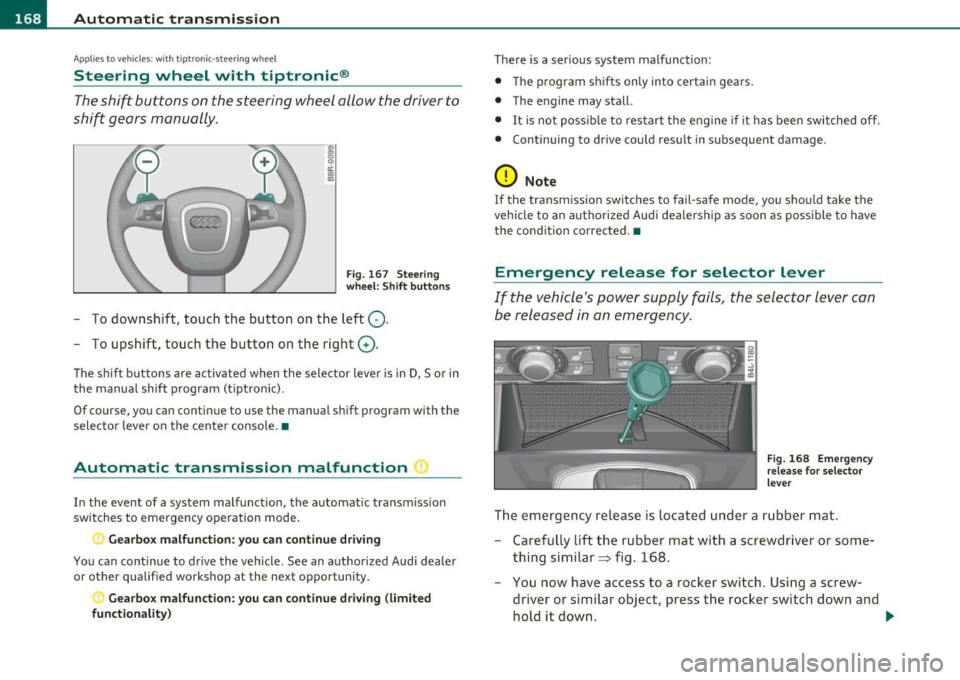
The shift buttons on the steering wheel allow the driver to
shift gears manually.
Fig. 167 Steering
wheel: Shift buttons
- To downshift, touch the button on the left Q.
- To upshift, touch the button on the right G).
The shift buttons a re activated when the selector lever is in D, Sor in
the manual shift program (t iptronic).
Of course, you can continue to use the manual shift program with the
selector lever on the center console. •
Automatic transmission malfunction I
In the event of a system malfunction, the automat ic transmission
switches to emergency operation mode .
., Gearbox malfunction: you can continue driving
You can continue to drive the vehicle. See an authorized Audi dealer
or other qualified workshop at the next opportunity .
Gearbox malfunction: you can continue driving (limited
functionality )
There is a serious system malfunction:
• The program shifts only into certain gears.
• The engine may stall.
• It is not poss ible to restart the engine if it has been switched off.
• Continuing to drive could result in subsequent damage .
0 Note
If the transmission switches to fail-safe mode, you should take the
vehicle to an authorized Audi dealership as soon as poss ible to have
the condition corrected. •
Emergency release for selector lever
If the vehicle's power supply fails, the selector lever can
be released in an emergency.
Fig. 168 Emergency
release for selector
lever
The emergency release is located under a rubber mat.
- Carefully lift the rubber mat with a screwdriver or some
thing similar=> fig. 168.
- You now have access to a rocker switch . Using a screw
dr iver or similar object, press the rocker switch down and
hold it down. ._
Page 175 of 392
Parking system -
----------------=-------'
Applies to veh icles : w ith par king system advanced
Switching on and off
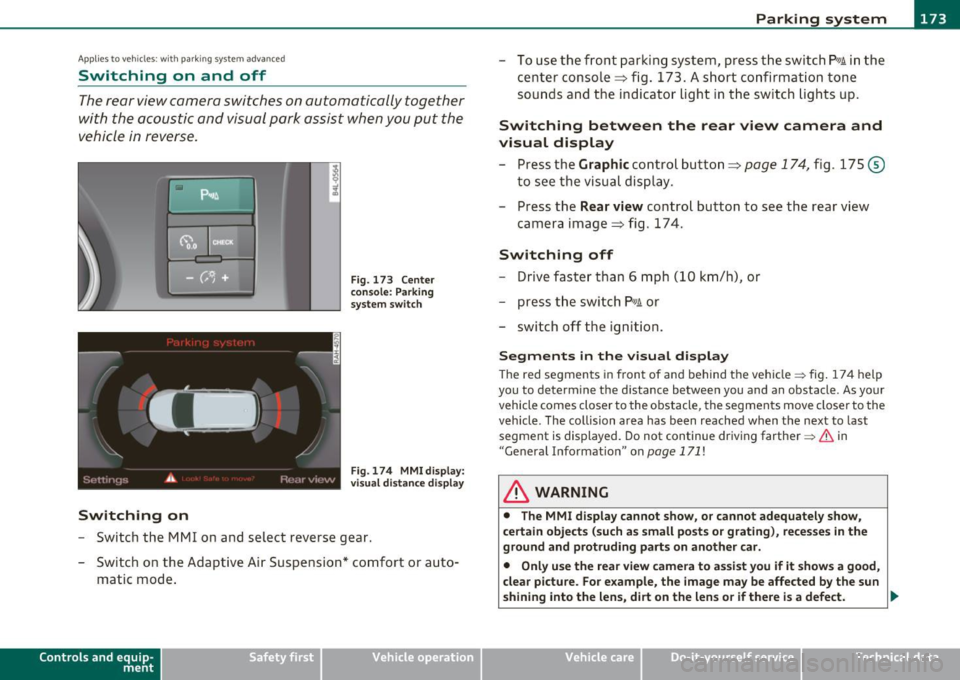
Th e rear view camera switches on automatically together
with the acoustic and visual park assist when you put the
vehicle in reverse.
Switching on
F ig. 173 Cente r
c on sole: Pa rki ng
sys tem swi tch
Fig . 174 MMI display:
v is ual d istance disp la y
- Switch the MMI on and select reverse gear.
- Switch on the Adaptive Air Suspension * comfort or auto-
matic mode .
Contro ls a nd e quip
m en t Vehicle
OP-eration
-To use the front parking system , press the switch P11.1A in the
center console ~ fig . 173 . A short confirmat ion tone
sou nds an d the indicator light in the sw itch lights up.
Switching between the rear view camera and
visual display
- Press the Graphic control button~ page 174, fig. 175 @
to see the visual dis pla y.
- P ress the
Rear view control button to see the rear view
camera image~ fig . 174.
Switching off
Drive faster than 6 mph ( 10 km/h), or
- press th e swi tch
P111 A or
- switch off the ignition .
Segments in the visual display
The red segments i n front of and behind the vehicle=> fig . 174 help
you to determine the distan ce between you and an obstacle . As your
vehicle comes closer to the obstacle, the segm ents move closer to the
veh icle . The co llision area has been reached when t he next to last
segmen t is displayed . Do not cont inue dr iv ing farthe r=>
& in
"Ge neral Information " on
page 171 !
& WARNING
• The MMI display cannot show , or cannot adequately show ,
c ertain objects (such a s small posts or grating ), reces ses in the
ground and protruding parts on another car.
• Onl y use the rear view camera to a ssist you if it show s a good ,
clear picture. For e xample, the image may be affected by the sun
shining into the lens , dirt on the len s or if there is a defect. .,_
Vehicle care Do-it-yourselt service Technical data
Page 229 of 392

safety belt is being used but will inflate at the position where the
safety belt is not being used. It is impo rtant that nothing in terfere
with the safety belt buckles so that the sensors can send the correct information about safety belt use to the electronic control unit.
& WARNING
Changing the vehicle's suspension including use of unapproved
tire-rim combinations can change Advanced Airbag performance
and increase the risk of serious personal injury in a crash.
• Never install suspension components that do not have the
same performance characteristics as the components originally
installed on your vehicle.
• Never use tire-rim combinations that have not been approved
by Audi.
& WARNING
Items stored between the safety belt buckle and the center
console can cause the sensors in the buckle to send the wrong
information to the electronic control module and prevent the
Advanced Airbag System from working properly.
• Always make sure that nothing can interfere with the safety
belt buckles and that they are not obstructed .
W For the sake of the environment
Undeployed airbag modules and pretensioners might be classified as
Perchlorate Material -special handling may apply, see
www.dtsc.ca.gov/hazardouswas te/perchlorate . When the vehicle or
parts of the restraint system including airbag modules and safety
belts with pretensioners are scrapped, all applicable laws and regu la
tions mus t be observed. Your authorized Audi dealer is familiar w ith
these requirements and we recommend that you have your dealer
perform th is service for you .•
Safety first Vehicle OP-eration
Airbag system
Side airbags
Description of side airbags
The airbag system can provide supplemental protection
to properly restrained occupants.
Fig. 204 Side airbag
location in the driver's
seat
The side airbags are located in the sides of the front seat backrests
~ fig. 204 and the rear backrest* facing the doors . They are identi
fied by the word "AIRBAG" .
The side airbag system basically consists of:
• the electronic control module and external side impact se nsors
• the two side airbags located in the sides of the front backrests
• two rear side airbags (as an ordered
option)
• the airbag warning light in the instrument cluster.
Th e airbag system is monitored elect ronically to make certain that it
is functioning properly at all times. Each time you turn on the igni
tion, the airbag system indicator light will come on for a few seconds
(self d iagnostics).
The side airbag system supp lements the safety belts and can he lp to
reduce the risk of injury to the dr iver 's, front and rear* passenger 's
upper torso on the side of the vehicle that is struck in a side collision.
The airbag deploys on ly in s ide impacts and only when the vehicle
acceleration registered by the control unit is high enough. If this rate
~
Vehicle care Do-it-yourselt service iTechnical data
Page 258 of 392

lillill.a._...:I:..: n~ t .::.e::::..::.: ll~igent technology ,_ _______________________________________ _
Intelligent technology
Notice about data recorded by
vehicle control modules
Your vehicle is not equipped with an Event Data Recorder (EDR),
installed by some manufacturers for the express purpose of
capturing data for retrieval after an accident or crash event. ED Rs are
sometimes called "crash recorders".
Some state laws restrict the retrieval or downloading of data stored
by ED Rs that were installed in a vehicle for the express purpose of
retrieving data after an accident or crash event without the owner's
consent.
Although your vehicle is not equipped with an EDR, it is equipped w ith
a number of electronic control modu les for various vehicle systems
such as, for example, engine function, emission control, as well as for
the airbags and safety belts.
T hese electronic control modules also record vehicle-re lated data
during normal vehicle operation for diagnostic and repair purposes .
Th e recording capacity of the e lectronic control modu les is limited to
data (no sound is recorded) and only a sma ll amount of data is actu
ally recorded over a very limited period of time and stored when a
system fault or other condition is sensed by a control unit. Some of
the data then stored may relate to vehicle speed, direction, braking
as well as restraint system use and performance in the event of a
crash or other condition. Stored data can only be read and down
loaded with special equipment.
Electronic Stabilization Program
(ESP)
General information
The ESP improves the vehicle stability.
Fig. 222 Center
console with ESP
switch
ESP is des igned to help you maintain vehicle control in situations
where the car approaches the limits of "grip", especia lly when accel
erating and cornering. ESP reduces the risk of skidd ing and imp roves
stability under all road conditions.
Th e system operates across the entire speed range in combination
with the ABS system. If the Anti-Lock Brake System (ABS) malfunc
tions, the ESP will also shut down.
How the system works
The Anti-Lock Brake System (ABS), Electronic Differential Lock (EDL)
and the Anti-Slip Regulation System (ASR) are integrated in the elec
tronic stabilization program. In addition to the data provided by
these funct ions, the ESP control unit requires additional measure
ment data provided by high performance sensors. The rotational
speed of the vehicle about its vertical axis, veh icle acceleration in the ...
Page 378 of 392
___ A_ l_. p_ h _ a_b_ e_ t_ic _a_ l_ in_ d_e _ x ____________________________________________ _
Braking guard
See Audi braking guard ............ 151
Break-in period .... .. .. .. .. ...... ... 265
Brake pads ..... .. .... .. ..... .... 265
T ires .. .... .. ................... 265
Brea kove r angle . .. .. ...... ....... .. 270
Bulbs ...................... .... ... 354
B umper cover
Caution when parking near a parking barri-
er or curb ............. .. .... .. 132
C
Ca lifo rnia Proposition 65 Warn ing ... .. 30 2
Batte ry spe cific . .... ........... .. 314
Capacities ................. ...... .. 365
Car -Systems
Ambience lighting ... .. .. ...... .. .. 73
Lighting profiles . ... .. .. ... .... ... 73
Car care .. .. .. .. .. .. ............. .. 2 78
Interior ................ .. .... .. 285
Plastic and vi ny l .. .. .. .. ..... .... 282
Weatherstrips . ... .. ...... ... . .. . 283
Care of exterior .. ......... ... ....... 278
Cargo area
See Loading the luggage compartment ..
197
Cargo floor ................ .. .... .. . 99
Cargo net . ... .. ...... .. . ... ... .. .. . 98
Catalyt ic converter ........ ....... ... 266
Center armrest Cup holder ... .... .... .. .......... 94
Storage compartment . .. .......... 94 Center console
in rear .... ..... .... ... 95
Centra l loc king
Emergency locking ... ... . ... .. .. .. SO
Panoramic sliding sunroof . ... .... .. 63
Central loc king system
Filler flap .......... .... .. .. .. .. . 298
Cert ificat ion ........... ... ... .... ..
3 71
Changing a flat tire ..... ...... .. ... . 343
Cha ng ing a wheel ............. ... .. . 343
Changing engine oil
Chassis 307
Under coati ng ....... ... . ... .. .. . 28 4
See also Adaptive Air S uspension . .. 178
CHECK button .. .................. ... 13
Checking Engine coo lant level ....... .. .. .. . 309
C hecking tire press ure . ..... .. .. .... . 324
Chi ld restra int system anchors ..... .. . 246
Child restraints Danger of us ing child restraints in the front
seat .. .... .. ........... .. .. .. . 213
Whe re can I get add itiona l information
about child restra ints and their use? .. .
2 54
Ch ild safety ... ... ... ... ... .. .. .. .. . 233
Convert ible lock ing retractor .. ... .. 243
Guidance fixtures fo r lower anchorages
249
Important safety instructions for using child s afety seats .... .... .. .. .. . 236
Important things to know whe n dr iving
with children ............... ... . 233 Installing a child restrai
nt us ing the LA TCH
syste m ....... .... .. .. .. .. .. .. 250
M ounting and re leasing the anchorage
hook ............ .. . ... ... .. .. 250
T ethe r anchors ........... ... .... 251
T ethe r str aps . ....... ...... .. .. .. 251
Chi ld safety lock
rear doo rs (power) .. .............. 54
Chi ld safety seats . ....... ... .. .... .. 238
Booster seats . ... .. .. ... .. .. .. .. 241
Convert ible chi ld seats ... ......... 239
Convert ible lock ing retractor ....... 243
Danger of us ing child restraints in the front
sea t ... ........... ...... ... ... 213
How do I properly ins tall a child s afe ty se at
in my vehicle? .... ... .... ... .. .. 236
Infant seats ...... ............... 238
Insta lling ............ ... .. .. .... 243
LA TC H system ..... .. .. .. .... .. .. 250
Safety inst ruct ions .. ....... .... .. 236
Child seats Lower anchorages . .. ............. 248
Clean diesel
See Ad B lue . ... .. .. ..... ..... . .. 296
Cleaning Alcanta ra (synthe tic suede) .. .. .. .. 289
E ngine comp artmen t ....... .. . ... 29 0
Exha ust ta il pipes ... .. .. .. ...... . 285
Fabrics and fab ric coverings . ... .... 285
Instrument pane l ... .. .. ... ..... . 286
Interior . ........... .. .. .. .. . ... 285
Leather ........ .. .. .. .. .. .. .. .. 288
M MI control console . ............. 285
MMI display .. .. ... ....... ... . ... 285
Page 387 of 392

_____________________________________________ A_ L .... p_ h _ a_b_ e_ t_ ic_a_ l_ in_ d_e _ x __ _
Side curtain airbags Description ............ ... ... ....
230
How they work ............... .... 231
Safety instructions .. .......... .. . 232
Side curtain airbags) .......... ... ... . 230
Side marke r lights ................ ... . 67
Sk i sack ...... ... ... .. . ............ 101
Snow chains .... ................ ... . 335
Sockets ..................... ... ... 106
Sound sys tem display
Driver information display .......... 23
Sources of information about child restraints
and their use ........... ... .. .. .
254
Speed control system
See Adaptive Cruise Control ........ 136
Speed rating letter code ........... .. . 331
Speed warning system ........... ... .. 31
Speedometer ... ... ............. ..... 12
Starting on hills
H ill hold ...... ...... ... ... ..... .
133
Starting the engine ........... .. 126, 127
What should I do if the engine does not
start? ...... .. .... .. .... .. .... .
127
Steering . ............ .... ... ... .... 124
Easy entry feature . .. .. ........... 126
Electrically adjusting the steering whee l .
125
Locking the steering .... .. ... ..... 126
Malfunction .............. .. .. .. .. 36
Manually adjusting the steering wheel
124
Controls and equip
ment Safety first
Steering wheel colum
n Symbols
Adjusting electrically ............ ..
125 Red ..... ........................ 33
Adjusting manually ...............
124 Yellow ................... .... ... 37
Steering wheel heating ........ ..... ..
123 Synchronization
Steps for determining correct load limit . 327 Climate controls ...
..............
120
Stopping the engine .... .. .. .. .. .. .. . 128
Storage ...... .. ... ... ... .......... 107
(upholder .. . .. .... ... .......... 104
Four- zone automatic comfort air
conditioning ............ .... .. .
120
Synchronizing climate control . ... .. .. . 112
(upholder door pockets ........... 105
(upholder in the rear center console . . 95 T
(upholder rear center armrest .... .. 104
Glove compartment ...... ...... .. 107
Storage compartment
Expanding ... ..... ...............
96
TOI clean diesel
See Ad Blue .. .. .. .. ............. . 296
Storage net
Footwell . .. .. .... ...............
1 10
Tachometer .................. .... ... 11
T ank flap
Unlocking the fuel filler flap by hand .
296
Luggage compartment . .. .. .. ..... 110 Technical modifications
, , , .. , ..... ... 371
Seatbacks .... .. .... .............
110 Temperature
Sun shade .. ................ ... .. ...
74 Climate controls ................. 114
Sun visors . ................ .. .... ... 73
Sunroof
See Panoramic sliding sunroof .. .. .. . 61
Four-zone automatic comfort air
conditioning ............ .. .. .. .
119
Setting fo r the driver's and front passen-
ger's side .. .. .. .. ..............
114
Sunshade
Tethe r anchors ... ................ .. 251
Panoramic sliding sunroof ......... . 63
Supplementary heater
Climate controls . ..... ...........
121
Tether strap ... .. ... ... ........ .... 251
The first 1,000 miles (1,500 km) and
afterwards ... ......... .. ... ... .
265
Suspension
See Adaptive A ir Suspension ...... .. 178
Tie-down rings ... .. .. .... ........... 97
T ie-downs ......................... 198
Switches
Emergency flashers ... ......... ... .
70
Rear window defogger . ...... ..... 115
Tips for the environment
Saving fuel .. .. .. ................
103
Using the air conditioner on ly when
necessary ............... ...... .
117
Vehicle operation Vehicle care Do-it-yourself service Technical data