change time AUDI Q7 2011 Owner´s Manual
[x] Cancel search | Manufacturer: AUDI, Model Year: 2011, Model line: Q7, Model: AUDI Q7 2011Pages: 392, PDF Size: 93.29 MB
Page 156 of 392

ffl..__A_ u_ d_ i_ s_ i_ d_ e _ a_ s_s _i_s _t _________________________________________________ _
Audi side assist
Lane Change Assistant
Applies to vehicles : w ith s ide ass ist
Description
The side assist helps you when changing lanes.
AUDr Q7
Fig . 152 Rear
bumper: Position of
radar sensors (not
visible on outside)
Fig . 153 Signal light
on the outside mirror -
driver's side
Side ass ist uses radar sensors (not visible on outside)=> fig. 152 to
help the driver check blind spots, and see what is happening in traffic
behind the vehicle=>
page 156, fig. 155.
Signal lights are built into both outside mirrors=> fig. 153. The s ignal
light on the left outside mirror assists when moving ove r into the left lane and
the signal light on the r ight outside mirror assists when
moving over into the right lane.
Th e sig nal light comes on to tell you that side assist has detected a
vehicle on that side and that the position of this other vehicle should
be taken into account if you were to change lanes. Thi s is called the
informational stage signal =>
page 156. The informationa l stage
signal is designed so that you not ice it only when you are looking in
the outside m irror.
When you activate the turn s ignal and side assist detects a vehicle in
a notable location, the correspo nding signal on the outside mirror
flashes briefly and brightly several times. This is the alert stage
signal =>
page 156. •
Applies to veh icles: w ith side ass ist
Activating and deactivating
Activating
Fig . 154 Driver's
door: Side assist
button
- Press the=> fig. 154 button. The indicator on the button
lights up. ..,
Page 157 of 392

Audi side assist Ill
----------------
Deactivating
-Pre ss th e b utton again . Th e ind icator light on the button
goes o ut.
The system works at speeds faster than 19 mph (30 km/h) .
& WARNING
• Improper reliance on the side assist system can cause collisions
and seriou s per sonal injury:
- Never rely only on side assist when changing lanes.
- Alway s check rear view mirrors to make sure that it is safe to
change lanes.
• Side assist cannot detect all vehicles under all condition s
danger of accident!
• Side a ssist cannot detect vehicle s in time to alert you when
they approach from behind at very high speed , or fall drop bac;k
very quickly .
• The radar sensor's
vision can be reduced o r entirely blocked by
rain, snow, and heavy spray . Thi s can result in side a ssist not
adequately detecting vehicles o r, in some cases , not detecting
them at all. Always keep an eye on the direction you are traveling
and the relevant area around the vehicle.
• Plea se note that side assi st indi cates there are approaching
veh icles, or vehicles in your blind spot, only after your vehicle has
reached a driving speed of at lea st 19 mph (30 km/h).
• Side assist signal does not work around tight corners (turning
radius le ss than 328 feet, or 100 m ).
• Side assist is no replacement for the driver's full attention. The
driver alone is respon sible for lane changes and similar driving
maneuvers. Always keep an eye on the direction you are traveling
and the relevant area around the vehicle .
Controls and equip
ment Safety first
0 Note
• T
o ens ure t hat you do not adve rsely affec t side assist, do not blo ck
the area on the rear bumper where the radar sensors are located with
foreign obje cts (s uch as stickers or bicy cle ra cks).
• Make s ure that the s ignal light on the outside mirror is not
blo cked by st ickers or o ther ite ms.
W Tips
• Side assist a utoma tically deact iva tes if it de tects that the rada r
sensors are blocked =>
page 161. The indicator light on the button
goe s out.
• Th e area on the bumpe r w here the ra dar sensors are located must
c o nsistent ly remain free of snow, i ce, a nd heavy soiling so tha t side
assist can funct ion p roper ly. Follow the add itiona l notes on
=>
page 162.
• F or vehicles with a factory installed towing hitc h* or a tra ile r
hi tc h* that was i nstalled late r according to f actory specifications,
side ass ist is automat ically deact ivated as soon as the electrical
c o nne ct io n to the tra ile r electr ical socket is made =>
page 161.
• For vehicles with a trai le r h itch that was not installed accor ding to
fac tory spe cifica tions, sw itch off the s ide ass ist whe n tow ing a tra iler.
• Additiona l t int ing on the front si de windows can make it ha rder to
se e and co rrectly unde rs tand t he signa l light o n the outs ide m irro r.
• For Declaration of Compliance to United States FCC an d Industry
Canada regulations=>
page 371 . •
Vehicle care Technical data
Page 164 of 392

1111....__A_ u_ d_ i_s_ i_d _e_ a_ s_ s_ is_t _______________________________________________ _
when usin g a retrofitted tow ing hitc h that was not installed
acc ording to factory speci ficati ons. •
Applies to vehicles: w ith sid e assis t
Safety tips
T he s ide assist detect ion may be limited w hen driving aro und narrow
st reet corners, on hilly st ree ts, and un der poo r wea the r condit ions.
It is possible that the radar sensors may also detect o ther objects,
such as high or staggered g ua rdrails .
S ide assi st does not me asure actual lane wid th. The sy stem assume s
a fixed lane w idt h. Detection in the left and right lanes is based on
t his assumed lane wid th. W hen drivi ng o n nar row ro ads o r whe n
dr iving to the left o r right of the center of a travel lane, it is possib le
that vehicles will be detected that are
not i n the lane next to the lane
you a re us ing.
& WARNING
• Improper reliance on the side assist system can cause collisions
and serious personal injury:
-Never rely only on side assist when changing lanes.
- Always che ck rear view mirrors to make sure that it is safe to
change lanes.
• Side as sist cannot detect all vehicles under all conditions
danger of accident!
• Side assi st cannot detect vehicle s in time to alert you when
they approach from behind at very high speed, or fall drop back
very quickly.
• The radar sensor's
vision can be reduced or entirely blocked by
rain , snow , and heavy spray. This can result in side assi st not
adequately detecting vehicles or , in some cases, not detecting
them at all. Alway s keep an eye on the direction you are traveling
and the relevant area around the vehicle .
& WARNING (co ntinued )
• Please note that side assist indicates there are approaching
vehicles, or vehicles in your blind spot, only after your vehicle has reached a driving speed of at least 19 mph (30 km/h).
• Side assist signal does not work around tight corners (turning
radius less than 328 feet , or 100 m).
• Side assist is no replacement for the driver's full attention. The
driver alone i s responsible for lane changes and similar driving
maneuvers . Always keep an eye on the direction you are traveling
and the relevant area around the vehicle.
0 Note
T o ensure that s ide ass ist is not a dversely affected, yo u should not
bloc k the ar ea on the rear bumper w he re the radar sensors are
locate d w it h foreign objects (such as w it h sticke rs or b icycle racks).
[ i ] Tips
If the positions o f the radar sensors have been c hanged as a result of
a r ear end -colli sion, fo r instan ce, h ave side assis t che cked b y an
author ized Audi dea ler for safety reasons. •
Page 176 of 392

llffl..__P_ a_r _k _i_n -=g ::...._ s..:y ;... s_ t_ e_ m ________________________________________________ _
& WARNING (continued)
• Use the rear view camera only with the rear lid completely
closed. Make sure any objects you may have mounted on the rear
lid do not block the rear view camera.
[ i ) Tips
• The sensors must be kept clean and free of snow and ice for the
park assist to operate.
• The visual display is shown in the illustration of the rear view
camera . This display shows where the sensors have detected an
obstacle.
• You can change the volume and pitch of the signals as well as the
display =>
page 176.
• Please follow the instructions for towing a trailer=> page 177 .
• What appears in the display is time-delayed. •
Applies to veh icles: wit h pa rking sy ste m adv anc ed
Reverse Parking
Parking mode 1 can be used when parking in a garage or
into a parking space.
Fig.175 MMidisplay:
aiming at a parking
spot Fig. 176
MMI display:
aligning the vehicle
-Switch the MMI on and select reverse gear.
- Turn the steering wheel until the orange orientation lines
(D appear in the parking spot=> fig. 175. Use the mark
ings @to help you estimate the distance from an
obstacle. Each marking represents 3
ft (1 meter) . The blue
area represents an extension of the vehicle's outline by
approximately 16 ft (5 meters) to the rear.
- While driving in reverse gear, adjust the steering wheel
angle to fit the parking space with the aid of the orange
orientation lines=>
0. ® marks the rear bumper. Stop
the vehicle when the red orientation line© borders an
object=> &.
& WARNING
• The rear view camera does not show the entire area behind the
vehicle =>
page 171, fig. 171. Watch out especially for small chil·
dren and animals . The rear view camera cannot always detect
them, posing risk of an accident!
• Please note that objects not touching the ground can appear to
be further away than they really are (for example, the bumper of
a parked vehicle, a trailer hitch, or the rear of a truck). In this case, .,
Page 182 of 392
ffl..__A_ d_a_ p,__ t_iv _ e_ A_ i_r _ S_ u_s _, p'--- e_n _ s_ i_ o _ n ___________________________________________ _
• Automatic lowering: When a speed of about 75 mph ( 120 km/h)
is exceeded for more than 30 seconds, the vehicle is automatically
lowered by 0 .6 inch (15 mm) to
low level .
• Automatic raising: The vehicle is automatically raised to normal
level
again, if the speed falls below about 44 mph (70 km/h) for a
period of 2 minutes . The vehicle is raised immediately when speed
falls below about 22 mph (35 km/h) .
Offroad
Select the offroad mode when you have to travel over poor quality
sections of road (e.g. trails) . In this mode, the vehicle is raised to
high
level 1,
and damping characteristics for poor road stretches are
selected. When switching to offroad mode, the Adaptive Air Suspen
sion indicator appears automatically in the instrument cluster display
~page 181 .
The offroad mode can only be activated at speeds below 37 mph
(60 km/h). Offroad mode ends automatically and the automatic
mode is activated when a speed of approximately 50 mph (80 km/h)
is exceeded.
Lift
Select the lift mode when exceptionally high ground clearance is
needed at a reduced speed. In this mode, the vehicle is raised to
high
level
2 . When switching to lift mode , the Adaptive Air Suspension
indicator appears automatically in the instrument cluster display
~page 181 .
The lift mode can be activated only at speeds below 12 mph (20
km/h) . When a speed of about 25 mph (40 km/h) is exceeded, the
system automatically leaves
lift mode and the offroad mode is acti
vated . The instrument cluster display automatically switches the
display to Adaptive Air Suspension to indicate reduced ground
clearance. •
Appli es to veh icles : with Adapt ive Air Su spens ion
MMI se ttings
Driving modes are adjusted in the MMI and the current
vehicle level is displayed.
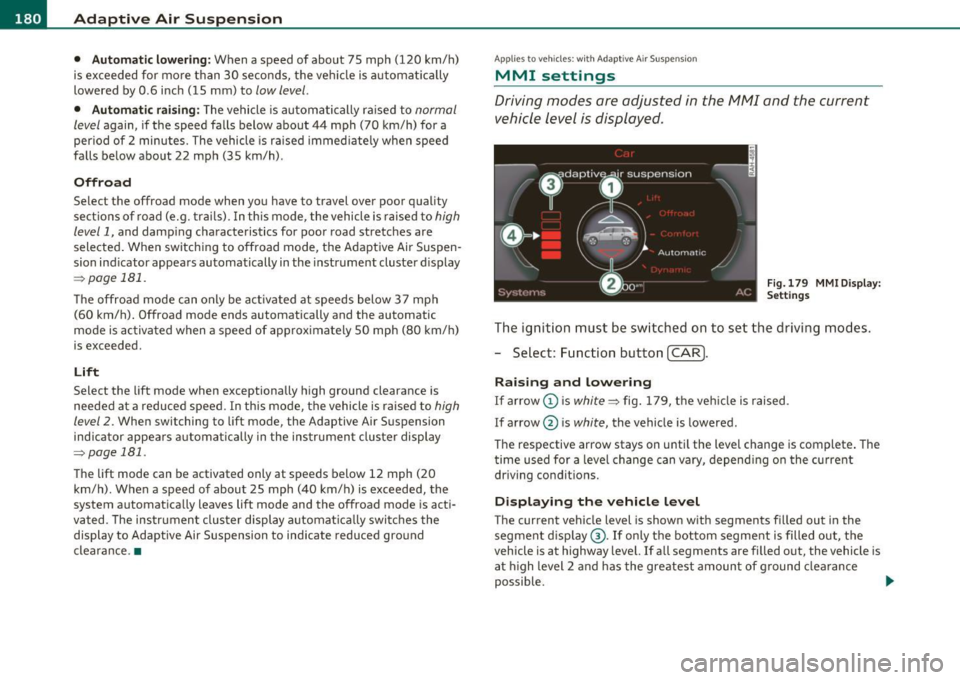
Fig.179 MMI Display:
Settings
The ignition must be switched on to set the driving modes.
- Select: Function button
(CAR].
Raising and lowering
If arrow (Dis white ~ fig. 179, the vehicle is raised.
If arrow @ is
white, the vehicle is lowered .
The respective arrow stays on until the level change is complete. The
time used for a level change can vary, depending on the current
driving conditions.
Displaying the vehicle level
The current vehicle level is shown with segments filled out in the
segment display ®·
If only the bottom segment is filled out, the
vehicle is at highway level. If all segments are filled out, the vehicle is
at high level 2 and has the greatest amount of ground clearance
possible. .,_
Page 184 of 392

1111....__A_ d_ a_,_ p_t _i_ v _e _ A_i_ r_ S_ u_ s ... p,_ e_n_ s_ io_ n __________________________________________ _
Raising and l owering
If a rrow (Dis solid red=> page 181, fig. 180 or white => page 181,
fig. 181, the veh icle is raised .
If arrow
0 is solid red or white, the vehicle is lowered .
T he respective arrow stays on until the level change is complete . The
time required for a level change can vary, depending on the current
dr iving cond it ions .
Displ aying the vehicle le vel
The current vehicle leve l is show n wit h segments fi lled ou t in the
segment display@. If only the bottom segment is filled out, the
vehicle is at highway leve l. If all segments a re filled o ut, the vehicle is
at high level 2 and has the greatest amount of ground clearance
possible.
W hile the vehicle is being ra ised or lowe red, t he target leve l is ind i
cated by an arrow © next to the correspond ing segment. The arrow
disappe ars aga in whe n the vehicle is a t the target level. •
Applies to veh icles: w ith Ad ap tiv e A ir Suspens ion
Jacking mode when changing a flat tire
This mod e must be activated in the MMI bef ore raising
the vehicle with a jack or on a vehicle
li~ .
-Select: Fu nction button [CAR)> function butto n [SETUP ]
> Jacking mode .
The veh icle jack mode must be activated before c hanging a whee l so
that the automatic contro l processes for t he air s uspensio n do not
make lifting w ith the vehicle jack more difficult.
The check lamp in the instr ument cluster display illuminates in
vehicle jac k mode.
W Tips
Th e veh icle ja ck mode is switc hed off automat ica lly at speeds above 9
mph (15 km/h). •
Appli es to veh icles : with tow ing h itc h and Adaptive Air Sus pen sion
Towing a trailer
Automatic lowering is not desirable when towing a
trailer.
- Selec t: Fu nct ion button [CARI > fun ction but ton [S ETUP I
> Towing mode .
As long as towing mode is activated, a ve hicl e w ith a t railer appears
in the
adaptive air suspension main menu.
Level Adjustment when towing a trailer
• Before h itching up the trailer and befo re adjust ing the tongue
we igh t at the trailer, the automatic or com fort mode mu st be
selected so that the vehicle can be at normal leve l=>
page 180, "MMI
se ttings" .
• If dr iv ing in dynamic mode is desired, this mode
must be selected
befo re hitc hing up the tra iler and before adjus ting the tongue
we ight. However, note that yo ur vehicle is lowered and ground clear
ance is reduced.
• If you have to drive under diff icu lt road conditions, you can select
offroad or li ft mode, aft er hitching up the trai le r or after adjust ing
the tongue weight .
• If the vehicle is at
normal level, an d you se lec t offro ad mode wh ile
traveling at speeds higher than 22 mph (35 km/h), the vehicle will
no t b e raised. O ffroad mode will a ppear as t he active mode in the
MMI D isplay.
• If the veh icle is in o ffro ad mode at
high level 1, it automatic a lly
lowers to
normal level when the vehicle is traveling at speeds
exceeding approximate ly 31 mph ( SO km/h). The vehicle is automat -...
Page 227 of 392
Airbag system Ill
----------------=--=---
& WARNING (co ntinued )
• Always install forward or rear-facing child safety seats on the
rear seat - even with an Advanced Airbag System .
• If you must install a rearward-facing child safety seat on the
front passenger seat because of exceptional circum stances and
the PASSENGER AIR BAG OFF light does not appear and stay on ,
immediately install the rear-facing child safety seat in a rear
seating pos ition and have the airbag system inspected by your
authorized Audi dealer.
• A tight tether or other strap on a rearward-facing child
restraint attached to the front passenger seat can put too much
pressure on the weight-sensing mat in the seat and register more
weight than is actually on the seat. The heavier weight registered can make the system work as though an adult were on the seat
and deploy the Advan ced Airbag when it must be suppres sed
caus ing serious or e ven fatal injury to the child.
• If, in exceptional circumstances, you must install a forward
facing child restraint on the front passenger seat, always move
the seat into its rearmost position in the seat' s fore and aft adju st
ment range , as far away from the airbag as possible . The backrest
must be adjusted to an upright position. Make sure that the PASSENGER AIR BAG OFF light comes on and stays on all the time
whenever the ignition is switched on.
& WARNING
• If the PASSENGER AIR BAG OFF light doe s not go out when an
adult is sitting on the front passenger seat after taking the steps
described above, make sure the adult is properly seated and
restrained at one of the rear seating posit ions.
• Have the airbag system inspected by your authorized Audi
dealer before transporting anyone on the front passenger seat.
Controls and equip ment Safety first Vehicle operation
(I] Tips
If the we
ight-se nsin g mat in the fro nt passenge r seat detec ts a n
empty seat , the front airbag on the passenger s ide will be t urned off,
a nd the PASSENGER AIR BAG OFF light will sta y on .
a
Repair, care and disposal of the airbags
Parts of the ai rbag syste m are inst alled a t many diffe re nt pla ces on
your Audi. Installing, removing, serv ic ing o r repairing a part in a n
area of t he vehicle c an damage a par t of an a irbag sys tem and preve nt
that system from working proper ly in a coll is ion.
Th ere are some importa nt things you have to know to ma ke sure t hat
t he effectiv eness of the system will not be impai red and that
discarde d components do not cause injury or pollute t he env iron
m en t.
& WARNING
Improper care , servicing and repair procedures can increase the
risk of personal injury and death by preventing an airbag from
deploying when needed or deploying an airbag unexpectedly:
• Never cover, obstru ct, or change the steering wheel horn pad or
a irbag cover or the instrument panel or modify them in any way .
• Never atta ch any objects such as cupholders or telephone
mountings to the surfaces covering the airbag units .
• For cleaning the horn pad or instrument panel, use only a soft,
dry cloth or one moistened with plain wate r. Solvents or cleaners
c ould damage the airbag cover or change the stiffne ss or strength
of the mater ial so that the airbag cannot deploy and protect prop
erly.
• Never repair, adjust , or change any parts of the airbag system .
• All work on the steering wheel, instrument panel, front seats
or electrical system (including the installation of audio equip -
~
Vehicle care Do-it-yourself service Technical data
Page 229 of 392

safety belt is being used but will inflate at the position where the
safety belt is not being used. It is impo rtant that nothing in terfere
with the safety belt buckles so that the sensors can send the correct information about safety belt use to the electronic control unit.
& WARNING
Changing the vehicle's suspension including use of unapproved
tire-rim combinations can change Advanced Airbag performance
and increase the risk of serious personal injury in a crash.
• Never install suspension components that do not have the
same performance characteristics as the components originally
installed on your vehicle.
• Never use tire-rim combinations that have not been approved
by Audi.
& WARNING
Items stored between the safety belt buckle and the center
console can cause the sensors in the buckle to send the wrong
information to the electronic control module and prevent the
Advanced Airbag System from working properly.
• Always make sure that nothing can interfere with the safety
belt buckles and that they are not obstructed .
W For the sake of the environment
Undeployed airbag modules and pretensioners might be classified as
Perchlorate Material -special handling may apply, see
www.dtsc.ca.gov/hazardouswas te/perchlorate . When the vehicle or
parts of the restraint system including airbag modules and safety
belts with pretensioners are scrapped, all applicable laws and regu la
tions mus t be observed. Your authorized Audi dealer is familiar w ith
these requirements and we recommend that you have your dealer
perform th is service for you .•
Safety first Vehicle OP-eration
Airbag system
Side airbags
Description of side airbags
The airbag system can provide supplemental protection
to properly restrained occupants.
Fig. 204 Side airbag
location in the driver's
seat
The side airbags are located in the sides of the front seat backrests
~ fig. 204 and the rear backrest* facing the doors . They are identi
fied by the word "AIRBAG" .
The side airbag system basically consists of:
• the electronic control module and external side impact se nsors
• the two side airbags located in the sides of the front backrests
• two rear side airbags (as an ordered
option)
• the airbag warning light in the instrument cluster.
Th e airbag system is monitored elect ronically to make certain that it
is functioning properly at all times. Each time you turn on the igni
tion, the airbag system indicator light will come on for a few seconds
(self d iagnostics).
The side airbag system supp lements the safety belts and can he lp to
reduce the risk of injury to the dr iver 's, front and rear* passenger 's
upper torso on the side of the vehicle that is struck in a side collision.
The airbag deploys on ly in s ide impacts and only when the vehicle
acceleration registered by the control unit is high enough. If this rate
~
Vehicle care Do-it-yourselt service iTechnical data
Page 294 of 392
Fuel supply and filling your fuel tank
Blend of g asoline and ethanol (grain alcohol or ethyl alcohol )
• Anti-knock index must be 8 7 AKI o r higher .
• Blend must not conta in more than 10% ethanol.
Blend of gasoline and M TBE
• Anti-knoc k index must be 87 AKI o r highe r.
• Blend must conta in not more than 15% MTB E.
Sea sonally adjusted ga soline
Many gasoline grades are b lended to perform especially well for
w inte r or summer d riving. Duri ng seasonal change-ove r, we s uggest
that you fill up at busy gas stat ions where the seasonal adjus tment is
mor e likely to be made in time.
0 Note
• Methano l fuels which do not meet these requirements may cause
co rrosion and damage to plast ic and rubber component s in the fue l
system .
• Do not use fuels that fail to meet the specified c riteria in this
chapter.
• If you are unable to dete rm ine whether or not a part icu lar fuel
blend meets the specifications, ask your service stat ion or its fuel
supplier .
• Do not use f uel fo r which t he con tents cannot be iden tifie d.
• Fuel system damage and performance problems result ing from
t he use o f fuels differe nt from t hose s pecifie d are not t he responsi
bility of Aud i and are not covered u nder the New Ve hicle o r th e Em is
sion Cont ro l System Warranties .
• If you experience a loss of fuel economy or drivea b i lity and perfor
m ance problems d ue to the use o f one of these fue l blends , we
recommend that you switch to unblended fuel. •
App lies to veh ic les: with gaso line eng ine
Gasoline additives
A m ajor concer n amo ng many a uto m anufa ctu rers i s ca rb o n deposi t
build-up caused by the type of gasoline you use .
Altho ugh gaso line g rades differ from one manufacturer to another,
they have certain t hings in common . All gaso line grades contai n
substances that can cause deposits to collect on vita l engine pa rts,
su ch as fue l injecto rs an d inta ke valves. A lthough mos t gaso line
brands include additives to keep eng ine and fue l systems clean, they
are not equ ally effec tive.
Audi recommends us ing TOP TIER Detergent Gasoline . Fo r more
info rmation on TOP TI ER Detergent Gasoline, p lease go to t he off ic ia l
webs ite (www .toptiergas .com) .
After an extended period of using inadequate f uels, ca rbon deposit
build -ups ca n rob your e ngine of peak perfo rma nce .
0 Note
Damage o r malfunct ion d ue to p oo r fu e l quali ty is not covered by the
Audi New Vehicle Lim ited Warranty. •
Appli es to veh icles : with diesel e ngine
Diesel fuel
A lw ays us e ULS D (U ltra Low Sulfur Di esel) sulfur content
1 5 ppm or less .
The U LSD (Ul tra Low Sulfu r Die sel) meets t he AS TM- D-97S (grade 2) .
Diesel fuel w ith a higher concentration than ULSD-Diesel No. 2
ASTM D975 and Bio-die sel with a higher concentration than 5
%
like B11, B20 or B100 are strictly prohibited .
Serv ice station fue l pumps are labe led w it h the co rrect fuel informa
ti on fo r easy recogni tion by the user. If the diese l fuel pump is not ..,_
Page 305 of 392

__________________________________________ ....:C:::..:..: h:,.::e ~c:.:: k~ i..:.. n ~g~ a~ n~ d~ f~ i~ll ~i~n '.1:g L __
& WARNING
Before you check anything in the engine compartment , always
read and heed all WARNINGS~
& in "Working in the engine
compartment " on
page 301. •
Engine oil
Engine oil specifications
The engin e oil used in your Audi needs the right kind of oil.
Th e e ng ine in your Aud i is a sophis ticated powerplant that was bui lt
to exacting spec ificat ions. This engine needs the r ight kind of engine
oil t hat meets spec ifi cat ions regarding qu ality a nd viscosity so t hat it
can run smooth ly and re liably. Choosing the right o il and changing oil
with in the time and mileage intervals pr in ted in your veh icle 's
Warranty & Maintena nce book let matters a lot more today than it did
years ago . Audi has developed a specia l quality standard for engine oil
that w ill help assure that your veh icle's engine will get t he lubr ication
it needs fo r prope r operation.
M ode rn engine lubr ication has taken a quan tum leap in the last few
years. Many synthet ic oils available today provide better engine lubri
c at ion th at c an outlast tradit ional petro le u m-based o ils, making
them a smart choice for use throughout the life of your Aud i.
Whethe r you use synthetic or petroleum -based engine oi l, the o il th at
yo u use must confo rm to A ud i's o il quality sta ndard VW 502 00 (vehi
cles with gasoline engine) or VW 507 00 (vehicles with d iese l eng ine)
to he lp keep you r vehi cle's e ngine run ning smoothly and help p revent
the format ion of harmfu l deposits, somet imes called "sludge," that
over time can lea d to expens ive rep airs.
At the time of pr int ing, engine o ils avai lab le in the U .S . and Ca nada
t ha t meet the exacting spec ificat ions o f Audi o il standar d VW 502 00
(vehicles w it h gasoline eng ine) or VW 507 00 (vehicles w ith d iese l
eng ine) are synthetic engine oils . This does not mean, howeve r, that
Safety first
every synthetic engine oil w ill meet Audi o il standard VW 502 00
(vehicles wit h gasoline eng ine) or VW 507 00 (vehicles wi th di esel
engi ne). So a lways be sure that you use an approved oil.
T o help preve nt the format io n of harmfu l deposits use only oi l with
t he follow ing s peci fica tions p rin ted on the oil con tainer:
• Audi oil standard VW 502 00 (gasoline engine)
• Audi oil standard VW 507 00 (diesel engine )
Oil container labe ls may carry the specification s ingly or in comb ina
t ion wi th ot he r designa tions a nd o il quali ty stand ards.
Viscosity
Engine oils are g raded acco rding to the ir viscosity. The proper
vis cos ity gra de oi l for your engi ne depends o n clim actic or se ason al
conditions where you drive . You can use oil with a v iscosity grade of
SA E S W40 across a ll tempe rature ranges fo r norma l driv ing con di
tions .
However, if en gine oi l v iscosity grade SAE SW 40 is not avai lab le, you
c an a lso use viscos ity grade SA E SW-30 or SA E OW -40 as long as it
meets Audi o il quality standa rd VW 502 00 (vehicles w ith gasoline
engi ne) or VW 5 07 00 (vehicles w it h diese l engine) speci fications .
Beca use engine o il that meets the Aud i oil standard may not be avail
able everywhere when yo u nee d it, we strongly recommend t hat you
always carry w it h you an extra quart (liter) of o il that e xpress ly
conforms to the VW 502 00 (vehicles w ith gasoli ne engine) or VW
507 00 (vehicles w ith diesel engin e) specification, in case you have to
to p off t he oil while on the roa d.
Applies to vehicles with gasoline engine only: Only if th e leve l of the
oil is at or below the minimum mark on the o il dipstick -and no oil
t ha t expressly conforms to Aud i oil st anda rd VW 5 02 00 specifica
tions is ava ilab le -may you top off w ith a high quality engine o il, pref
era bly syn the tic -b ase d, tha t mee ts AC EA A3 or A PI SM specificat ions,
bu t even the n, only in viscosity g rades SA E SW- 40, SA E SW-30, or
SAE OW -40. Howeve r, dur ing the entire time between o il change
in terva ls, never top off wi th m ore than a total of 0 .5 qt/ lite r engine
oil that does not conform to A udi oil spec ificat io n VW 502 00. ..,
Vehicle care Technical data