service AUDI Q7 2011 Owner´s Manual
[x] Cancel search | Manufacturer: AUDI, Model Year: 2011, Model line: Q7, Model: AUDI Q7 2011Pages: 392, PDF Size: 93.29 MB
Page 131 of 392

_________________________________________________ O_ n_ t_ h_ e_ r _o_ a_d _ __.ffl'I
& WARN ING (conti nued)
up be cause of intense s unlig ht or h eat build -up in the engin e
co mp artmen t.
0 Note
Do not stop the engine immediate ly after hard or extended driving .
Keep the engine running for approximately two minutes to prevent
excessive heat build -up. •
Starting and stopping the engine
with Convenience key
A ppli es to veh icles : w it h Con venien ce ke y
Starting the engine with the (START ) button
This button switches on the ignition and starts the
engine.
Fig. 126 C onven ience
k ey : E N GI NE STA RT
but ton
The [S TART] button is provided with two -stag e op eration
=:> fig. 126 .
Con tro ls a nd e quip
m en t Vehicle
OP-eration
Switching the ignition on
-Press the I ST ART] button once to the first stage to switch
on only the ignition.
Gasoline engine: Starting the engine
- Step on the brake.
- Move the selector lever to the P or N position:::::,.
&-
- Press the I START ] button to the second stage to start the
engine.
Diesel engine : Starting the engine
- Step on the brake.
- Move the selector lever to the P or N position::::;,
&-
- Press the [START] button down to the first level to begin
the preheating process. The glow p lug indicator light
~
illuminates when the glow plug system is active .
- When the indicator light switches off, press the
[START] button down to the sec ond level to start the
engine.
After a cold engine is started, there may be a brief period of increased
noise because oil pressure must first build up in the hydraulic valve
adjusters . This is normal and not a cause for concern.
If the engine does not start immed iately, stop trying after 10 seconds
and then try to restart the engine about 30 seconds later.
Glow plu g syste m *
Diese l en gin es are equipped with a glow p lug system whose
preheating time is controlled by the coolant and outside tempera
ture . Start the engine
immediately after the glow plug indicator light
switches off. .,,_
Vehicle care Do-it-yourselt service iTechnical data
Page 143 of 392

__________________________________________ A_ d_a""" p:....- t_iv _ e_ C_ r_ u _is _ e_C_ o_n_ t_ r_ o_ l_....J_
- Press the lev er downwards Q and hold it. As long as you
hold the control switch down, the li ght diode d isplay in the
speedo meter LED d isplay moves bac kward and the speed
is reduced .
After releasing t he co ntro l switch, the system regulates the speed to
the val ue just set .
After each adjustment, the new ly-set speed is shown for a short time
in the Information line=>
page 147.
& WARNING
Improper use of th e Adaptive Cruis e Control features and inatten
tion can lead to an accident causing serious personal injury.
• It is dangerous to use the "RESUM E" feature when the previ
ously set speed is too high fo r existing road, traffic or weather
c onditions .
• Alway s read and he ed the information and WARNINGS=>
& in
" Description " on
page 13 6.
[I] Tips
You ca n increase your speed at any time by steppi ng on the acceler
ator pedal. After you release the accelerator peda l, the sys tem
adjusts back down to the speed you previously set . A new desired
sp eed can b e stored at any time by press ing t he [SET ] button
=> page 1 4 0, fig . 134 . •
Con tro ls a nd e quip
m en t Vehicle
OP-eration
Applies to vehicles : w ith A dapt ive Cruise Cont rol
Turning Adaptive Cruise Control off
temporarily
In some situations it makes sense to turn Adaptive Cruise
Control off temporarily.
Turning control off temporarily
Fi g. 13 6 C ontrol
le ver: Turni ng Adap
ti ve Cruise Con trol off
te mp orar ily
Fig. 137 Display in
the speedo meter
-To sh ut off the cont rol w ith the save function, either
depress t he brake pedal, or
- Press t he lever in the directio n of t he arrow @=> fig . 136 . ._
Vehicle care Do-it-yourselt service iTechnical data
Page 147 of 392
__________________________________________ A_ d_a""" p:....- t_iv _ e_ C_ r_ u _is _ e_C_ o_n_ t_ r_ o_ L_....J_
Certa in pieces of information in the bottom part of the display are not
shown permanent ly. Information is displayed only if you set or
change the speed setting, change the t ime interval, when messages
are displayed or if the Adapt ive Cruise Control is turned off for safety
reasons. •
Applies to veh icles: with Adaptiv e Cruise Contro l
Display in the speedometer
Desired speed
Fig . 140 Display in
the speedometer
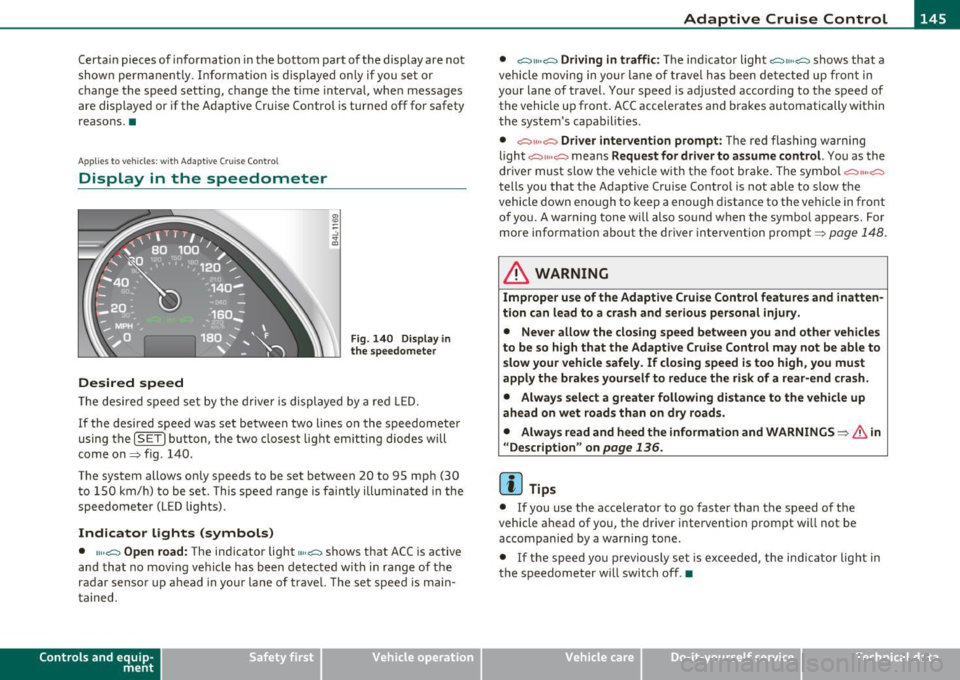
Th e desired speed set by the driver is displayed by a red LED.
If the desired speed was set between two lines on the speedometer
using the
[SET) bu tton, the two closest light emitting diodes w ill
come on=> fig. 140.
The system allows only speeds to be set between 20 to 95 mph (30 t o 150 km/h) to be set. This speed range is fa int ly illumina ted in the
speedometer (LED lights).
Indicator lights (symbols)
• ""~ Open road: The indicator light""~ shows that ACC is active
and that no mov ing vehicle has been detected with in range of the
radar sensor up ahead in your lane of travel. The set speed is main
ta ined.
Con tro ls a nd e quip
m en t Vehicle
OP-eration •
~" "~ Driving in traffic:
The indicator light ~11 .. c::::., shows that a
vehicle moving in yo ur lane of travel has been detected up front in
your lane of travel. Your speed is adjusted accord ing to the speed of
the vehicle up front. ACC accelerates and brakes automatically within
the system's capabilit ies .
• ~" "~ Driver intervention prompt: The red flashing warning
light
c::::., 11 .. o::::::) means Request for driver to assume control. You as the
driver must slow the veh icle with the foot brake . T he symbol
~""o::::::)
tells you that the Adaptive Cruise Control is not able to slow the
vehicle down enough to keep a enough distance to the vehicle in front
of you. A warning tone will also sound when the symbol appears. For
more information about the driver intervention prompt=>
page 148.
& WARNING
Improper use of the Adaptive Cruise Control features and inatten
tion can lead to a crash and serious personal injury.
• Never allow the closing speed between you and other vehicles
to be so high that the Adaptive Cruise Control may not be able to
slow your vehicle safely. If closing speed is too high, you must
apply the brakes yourself to reduce the risk of a rear-end crash.
• Always select a greater following distance to the vehicle up
ahead on wet roads than on dry roads.
• Alway s read and heed the information and WARNINGS=>
& in
" Description" on
page 136.
[ i ] Tips
• If you use the accelerator to go faster than the speed of the
vehicle ahead of you, the driver intervention prompt will not be
accompanied by a warn ing to ne.
• If the speed yo u previously set is exceeded, the indica tor light in
the speedometer will switch off .•
Vehicle care Do-it-yourselt service iTechnical data
Page 153 of 392

Adaptive Cruise Control -____________ ___,__ __ ____.
App lies to veh icles : with Adapt ive C ru ise C ontro l
Vehicles that are difficult to detect
------------------1
Fig .1 48 T wo-wheele d
ve hicle driv in g ahea d
Some vehicles moving up ahead in your lane of travel are difficu lt to
detect, for example two-wheeled vehicles, veh icles with high ground
clearance, loads sticking out the back. Vehicles like this are often
detected late or in some s ituations not at all. •
Applies to v ehicles: with Adap tiv e Cruis e Contro l
Stationary vehicles
Contro ls a nd e quip
m en t
Fig. 149 Turning and
stat iona ry v ehi cle
Vehicle OP-eration
Fig. 1 50 Shee ring out
a nd s tation ary ve hicl e
If a vehicle that has been detected by ACC ex its the highway or sheers
out into the neighboring travel lane, and there is a stat ionary vehicle
ahead of that vehicle, ACC will not detect or react to that stationary
vehicle =>
page 151, fig. 149 and=> fig. 150. •
Audi braking guard
Applies to ve hicles: w ith Adaptive Cru is e Cont rol
Description
Audi braking guard warns you of a possible collision with
a moving vehicle up ahead.
Fig. 151 Disp lay i n
th e in st rum ent cl ust er ...
Vehicle care Do-it-yourselt service iTechnical data
Page 159 of 392
_________________________________________________ A_ u _ d_ i_ s_ id_ e_ a _ s_s _ i_s _t _ __.fflll
you look in the outside ·mirror, you can clearly see the informational
stage signal.
Alert stage signal
When you act ivate the turn signal , and side assist has detected a
vehicle in a notable location on that part icular side, the signal light on
this side mirror flashes brightly. The repeated brief and bright
flashing of the alert stage signal reminds you to carefully check
traffic to the rear in the outside mirror and over your shoulder, so that
you can safely complete the lane change~
& in "Safety tips" on
pag e 162.
[ i ] Tips
The brightness of the signal light on the outside mirrors can be
adjusted with the MMI
~ page 160. •
Contro ls a nd e quip
m en t Vehicle
OP-eration
Applies to vehicles : with side assist
Driving situation: Fast approaching
vehicles
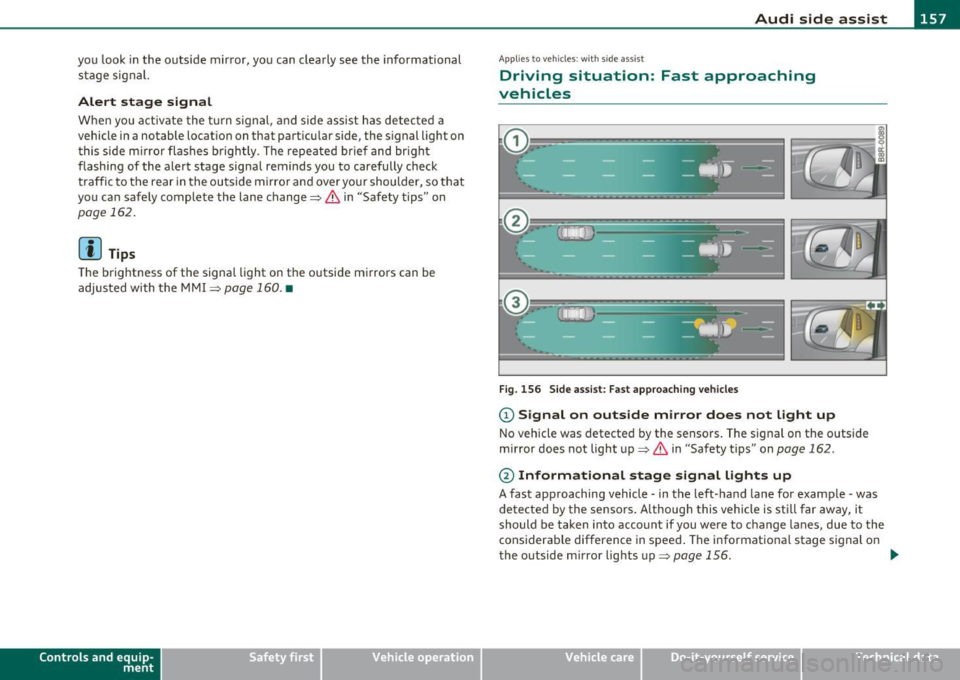
Fig . 156 Side assist: Fast approaching vehicles
(D Signal on outside mirror does not light up
No vehicle was detected by the sensors. The signal on the outside
mirror does not light up~
& in "Safety tips" on page 162.
@ Informational stage signal lights up
A fast approaching vehicle -in the left-hand lane for example -was
de tected by the sensors. A lthough this vehicle is still far away, it
should be taken into account if you were to change lanes, due to the
considerable difference in speed . The informational stage signal on
the outside mirror lights up~
page 156. _,,,
Vehicle care Do-it-yourselt service iTechnical data
Page 161 of 392

_________________________________________________ A_ u _ d_ i_ s_ id_ e_ a _ s_s _ i_s _t _ __._
Appli es to vehicles : w ith side assist
Driving situation: Vehicles dropping back
slowly
Fig . 158 Side assist : Vehicles dropping back slowly
CD Signal on outside mirror does not light up
The vehicle that you passed has not yet been detected by side assist .
The signal on the outside mirror does not light up~
& in "Safety
tips" on
page 162.
@ Informational stage signal lights up
A vehicle dropping back slowly on the rig ht (difference in speed of
less than 9 mph, or 15 km/h) has been detected by side ass ist. The
informationa l stage signa l on the outside mirror lights up.
® Alert stage signal flashes
If you activate your turn signal in driving situation @, the signal
briefly flashes repeatedly. Side assist is alerting you of a vehicle that
you may not have noticed. •
Contro ls a nd e quip
m en t Vehicle
OP-eration
App lies to vehicles : w it h sid e assist
Driving situation: Vehicles dropping back
quickly
Fig . 159 Side assist: Vehicles dropping back quickly
CD Signal on outside mirror does not light up
The vehicle just passed has not yet been detected by side assist. The
signal on the outside mirror does not light up~
& in "Safety tips" on
page 162.
@ Signal on outside mirror does not light up
The veh icle dropping back quickly on the right ( difference in speed of
more than 9 mph, or 15 km/h) has been detected by side assist, but
is not cons idered notable in the event of a lane change , because it is
dropping back so quickly . The s ignal on the outside m irror does not
light up~
& in "Safety tips" on page 162 . tJ,,,
Vehicle care Do-it-yourselt service iTechnical data
Page 165 of 392

____________________________________________ A_ u_ t_ o_ m_ a_ t_ i_ c _ t_ra _ n_s_ m __ is_s_ i_ o _ n _ __.lJII
Automatic transmission
• • ®
t1ptron1c
General information
Your vehicle is equipped with an e lectron ically contro lled automatic
transmission. Upshifting and downshifting takes place
automati
cally.
The transmiss ion is also equipped with tiptronic ®. It allows the driver
to shift gears
manually if desired => page 167. •
Driving the automatic transmission
Starting the engine
-The selector lever must be in Nor P.
Starting off
- Press a nd hold the brake pedal.
Fig. 162 Shift gate on
th e ce nte r co nso le :
selec tor lever w it h
r ele ase bu tton
-Press and hold the release button in the selector lever
handle and move the selector lever from
P or N to D and
release the button => & .
Con tro ls a nd e quip
m en t Vehicle
OP-eration
- Wait briefly until the transmission has shifted (you will
feel a slight movement).
- Remove your foot from the brake pedal and accelerate .
Rocking back and forth to become unstuck
-Shift only between D and R when the vehicle is at a full
stop and the engine is running at idle speed .
Stopping
-Press and ho ld the brake pedal until the vehicle has come
to a complete stop .
- Keep the b rak e pedal depr essed so that the vehicle ca nnot
roll forward or backward while it is idling => & .
- Once stopped,
do not depress the accelerator pedal to rev
up the engine=> &.
Parking
-Press and hold the brake pedal until the vehicle has come
to a complete stop.
- Set the park ing brake firmly=>
page 132, "Park ing".
- Press and hold the release button in the selector lever
hand le, move the se lector l ever int o
P and the n let go of
the release button => & .
The selecto r lever must be in Nor P. If one of the dr iv ing positions is
engaged a safety switch will prevent the engine from being started.
See also =>
page 127. _,.
Vehicle care Do-it-yourselt service iTechnical data
Page 167 of 392

______________________________________________ A_ u_ t.:.. o_;__ m_ a_ t_;__ ic.......; t_r_a _ n_:.. s_m _:_: i.:: s ..:s:....: i..:o :....: n_;____,J-
When the ignition is on, the backup lights illuminate when the
selector lever is moved into
R.
N -Neutral
The transmission is in neutral in th is posi tion . Sh ift to this posit ion
for standing with the brakes applied~
page 165.
When the vehicle is stationary or at speeds below 3 mph (5 km/h),
you must always apply the footbrake before and wh ile moving the
lever out of
N .
D -Normal position for driving forward
Position D is for normal city and highway driving. It ranges from zero
to top speed and all gears shift automatically, depending on engine
load, driving speed and automatically selected shift programs.
When the vehicle is stat ionary or at speeds below 3 mph (5 km/h),
you must always app ly the foot brake before and while moving the
lever to
D out of N.
In certain circumstances it may be advantageous to temporarily
switch to the manual shift program to manua lly select gear rat ios to
match specific driving conditions~
page 167.
S -Sport position
Select this position for sportier performance. In this position, the
transmission will not upshift as soon, allowing the vehicle to use the
increased power available at higher engine speeds to ach ieve livelier
acceleration.
When the vehicle is stat ionary or at speeds below 3 mph (5 km/h),
you must always apply the foot brake before and while moving the
lever to
S out of N.
& WARNING
Read and follow all WARNINGS ~ & in "Driving the automatic
transmission " on page
163 .
Contro ls a nd e quip
m en t Vehicle
OP-eration
0 Note
Coasting downh ill with the transmission in N and the engine not
running will result in damage to the automatic transmission and
poss ibly the catalytic converter .•
Automatic Shift Lock (ASL)
The Automatic Shift Lock safeguards you against acci
dentally shifting into a forward or the reverse gear and
causing the vehicle to move unintentionally .
Fig. 164 Shift gate:
selector lever lock posi
tions and interlock
button highlighted
The selector lever lock is released as follows:
- Turn the ignition on.
- Step on the brake pedal.
At the same time press and hold
the interlock button on the side of the gear selector knob
=> fig . 164 with your thumb un til you have moved the
selector lever to the desired position.
Automatic selector lever lock
The selector lever is locked in the P and N positions when the ignition
is turned on. To move the lever from these positions the driver must
depress the brake pedal. As a reminder to the driver, the following
~
Vehicle care Do-it-yourselt service iTechnical data
Page 169 of 392

______________________________________________ A_ u_ t_ o_ m_ a_ t_ ic_ t_r _a _n_ s_m _ i_s _s_ i_o _n _ ___.fflll
of the braking effect of the engine without the need to shift down
manually .•
Manual shift program
Using the manual shift program you con manually select
gears.
Fig. 165 Center
console: shifting the
tiptroni c® manually
Fig. 166 Display:
manual shift program,
selec ted gear
Switching to manual shift program
-Push the selector lever to the right from D. As soon as the
transmission has switched over , the selected gear appears
in the display => fig. 166.
Con tro ls a nd e quip
m en t Vehicle
OP-eration
To upshift
-Push the selector lever forward to the plus position 0
=> fig. 165.
To downshift
- Push the lever to the minus position Q.
When accelerating, the transmission will a utomatica lly shift into the
next gear before the engine reaches its maximum RPM .
I f you apply a light throttle when accelerating, tiptronic ® will auto
matically shift from 1st to 2nd gea r to save fuel. If you apply a heavy
throttle, the transmission will stay in 1st gear until near maximum
RPM is reached, or until the driver sh ifts into 2nd gear.
I f you take your foot off the accelerator pedal when driv ing down a
st eep incline, tiptronic ® will downshift from the selected gear into
the next lower gear until it reaches 1st gear, based on road speed and
e ngine RPM . Automatic downsh ifting is interrupted as soon as you
apply the throttle again.
[ i ] Tips
• When you shift into the next lower gear, the transmission will
downshift on ly when there is no possibility of over-rewing the
engine.
• When the kick -down comes on, the transmission will shift down to
a lower gear, depending on vehicle and engine speeds.
• tiptronic ® is inoperative when the transmission is in the fail-safe
mode. •
Vehicle care Do-it-yourselt service iTechnical data
Page 173 of 392

________________________________________________ ..:P..: a=.:... r:.:k :.:.i n :..:..: g!.....: s::!y :..: s:.. t::: e::.:.: m:..:____J-
Parking system advanced
Ap plies to vehicles : wit h pa rk in g s yst e m advan ced
Introduction
0, g ~ ..!J
~================- i
Fig . 169 Par king
m odel: Backi ng into a
p arki ng spac e
F ig . 1 70 Parkin g
m ode 2: parall el
p ark in g
Vehicles with the parking system advanced are eq uipped with a rear
vi ew camera
in ad dit ion to the acoust ic and vis ual pa rking system.
You can chooses between parki ng modes to help you whe n park ing
your vehicle. Use "parking mode
1 " when parking in a park ing space
or garage~ fig. 169 .
If you are going to be parallel parking, use
"parking mode
2" ~ fig. 170. •
Con tro ls a nd e quip
m en t Vehicle
OP-eration
Applies to veh icles : w ith par king sys tem advanced
General Information
Sensors in the bumper
F ig . 171 Area cov ere d
@ and ar ea no t
cov ered @
by the re ar
v ie w cam era .
Fig. 17 2 R ear lid:
Loca tion of th e r ea r
vi ew came ra
Sensors are located in the fro nt an d rea r bumpers . If these detect a n
obstacle, audible and visual signals wa rn you. The range at which the
sensors begin to meas ure is app rox ima tely:
front
rear side
center
side
center
Vehicle care
3 ft (0
.90 m)
4 ft (1.20 m)
2 ft (0 .6 0 m)
5.2 ft (1.60 m)
Do-it-yourselt service iTechnical data