warning AUDI Q7 2012 Owner´s Manual
[x] Cancel search | Manufacturer: AUDI, Model Year: 2012, Model line: Q7, Model: AUDI Q7 2012Pages: 342, PDF Size: 86.42 MB
Page 127 of 342

System limitations
General information
Applies to vehicles: with adaptive cruise control
The radar sensor has limits that the driver
must know to be able to use ACC properly.
The adaptive cruise control works within lim
its that are also related to radar sensor range
and s ight distance . In some situations ACC
may react unusually or late from the driver's
point of v iew. Therefore, a lways be attent ive
to what is happening around you and always be ready to intervene, if necessary:
- when driving around curves ¢page 125
- when vehicles up front are not in line with
you r vehicle ¢ page 125
- when other vehicles are changing lanes
¢ page 126
- when other vehicles are difficult to detect
¢ page 126
- when vehicles up ahead are not moving or
obstacles are in your travel lane ¢page 126
A WARNING
The radar sensor's function and ra nge can
be reduced by rain , snow and heavy spray.
Moving veh icles up ahead may not be
prompt ly detected or may not be detected
at all.
- Always pay ca reful attention to the traf
fic s ituation and be ready to intervene
and be rea dy to take comp lete cont rol
whenever necessary.
When driving around curves
Applies to vehicles: with adaptive cruise co ntrol
Fig. 1 39 Vehicle enter ing a cu rve
Ad apti ve crui se control 125
Fig. 140 Vehicle leaving a curve
Entering a curve
When enter ing a curve, the adaptive cruise
control may react to a vehicle in the next lane
and apply the brakes in your vehicle
¢ fig. 139. The braking action ca n be over rid
den by depressing the ac ce lera tor pedal.
Leaving a curv e
At the end of very long curves, ACC's predic
tive lane reading can cause ACC to react to an
other vehicle in the next lane and apply the
brakes on your vehicle~ fig . 140. The braking
action can be overr idden by depressing the ac
ce le rator pedal.
Vehicles offset to one side
App lies to vehicles: with adaptive cruise control
Fig. 141 Vehicle traveling ah ead outside the detect ion
r ange of the radar sensor
Vehicles moving up ahead but offset in the
lane ca nnot be detected by ACC until they are
in sensor range.
Page 129 of 342

The Audi braking guard is active from a speed
of approx. 20 mph (30 km/h) and works with
in the system limits
¢ page 125 even when
the adaptive cruise contro l is deact ivated.
A radar senso r is bui lt into the front of the ve
hicle
¢ page 114, fig. 127. The system is in
tended to measure the distance to reflect ive
surfaces. If a measurement is not possible,
the system does not respond .
When the measurement has been taken, the
system can recognize a poss ibly hazardous sit
uation, for example, when a vehicle up ahead
in your lane of travel suddenly brakes or when
your ow n ve hicle is moving at high speed to
wards a much s lowe r vehicle up ahead . As
soon as the system senses that a possible co l
l ision with the vehicle up ahead can only be
avoided by immediate full brake appl ication or
by an avoidance maneuver, a warning appears .
The system has a defau lt response time to be
ab le to sig na l befo re a col lision occu rs. This
system response time is a utomat ica lly re
d uced if you acce lerate actively, for example
to join a highway. Braking, transverse acce ler
ation and the steering ang le can lead to a re
duced system response time. The warning is
deactivated if you begin to overtake with full
acceleration.
The system can make yo u aware of two differ
ent hazardo us situations:
Distance
The distance warn ing is g iven if the sys tem
calc ulates that the re is not enough d istance
to the vehicle up ahead a period of more than 5 seconds. If the distance is less than 30 feet
(9 meters) at SO mph (80 km/h), for example,
an optical d isplay comes on in the instrument
cluster
c> fig . 146.
If the vehicle ahead brakes sharply, A udi brak
ing guard cannot help you to avoid a co llision,
even in the case of an immediate response.
Take immediate act ion to avoid the collision
and increase the distance to the vehicle up
ahead .
Adapti ve crui se control 127
Speed
If there is a much slowe r vehicle mov ing up
ahead in your lane, or if the vehicle ahead brakes sharply, the Audi brak ing guard calcu
lates the point from which a collision can only
be avoided by f ull braking or by an avo idance
maneuver . If a warning does sound, a possible
collision with the veh icle in front can only be
avo ided through an evas ive maneuver or by
braking.
The warning is given in two stages:
- Pre-warnin g: A visua l display appears in the
instrument cluster and a warning tone
sounds.
- Acute w arning : If you do not respond to the
pre-warning, the second stage warning is
given. A quick brake application helps to di
rect your attention to the road and traffic
situat ion.
Under heavy braking, the brake assistant
i=> page 114 also helps you benefit from maxi
mum brak ing eff ic iency.
_& WARNING
Inattention can cause collisions, other ac
cidents and ser ious personal inju ries.
- Always pay close attent ion to the traffic,
even when the Audi braking guard is
sw itched on. The Audi braking guard pro
vides a wa rning but does not brake the
car for you. You must app ly the brakes
yourse lf!
- Always keep the safe and lega l distance
between yo ur vehicle and vehicles up
ahead.
- Aud i brak ing g uard wor ks within lim its
and will no t respond outside the system
limits, fo r example when approach ing a
stopped vehicle or stationary obstacle (end of a traffic jam or vehicle that has
broken down in traffic).
- Always remember that the radar sensor
for the Audi braking guard works within
defined detect ion and range limits that
may prevent the proper detection of oth
er vehicles .
Page 130 of 342

128 Adapti ve crui se co ntrol
-The radar sensor's function and range
can be reduced by rain, snow and heavy
spray. Moving vehicles up ahead may not be promptly detected or may not be de
tected at all.
- Always pay careful attention to the traf
fic s ituation and be ready to intervene
and be ready to take complete control
whenever necessary.
- Reflective surfaces includ ing crash barri
ers or tunnel entrances may impair the
function of the radar sensor.
Settings in the MMI
Applies to vehicles: with adaptive cruise control
T he settings of the Audi braking guard are
performed in the MMI.
._ Select : Funct ion button ICARI > Control but
ton Systems * > Audi brak ing guard . Or
._ Select : Funct ion button
ICARI > Control but
ton Car system s* > Driver as sist> Audi
braking guard .
- System -the Audi braking guard system can
be switched
On and Off .
-Earl y warning - the acoustic warning and
the messages can be switched
On and Off .
(D) Tips
When handing over the keys to another pe rson, the prev ious settings are adopted
if the Audi braking guard is act ivated
~ page 43.
Driver's information in the instrument
cluster display
Applies to vehicles: with adaptive cruise co ntrol
braking gua rd activated
This message appears whe n the Audi braking
guard applies the b rakes during a second
stage (acute) warning .
braking gua rd off
This message appears whe n the system has
been deact ivated v ia the MMI. This message also appears briefly at each beginning of a trip
if the system is switched off.
T his message a lso appears when the system is
not availab le because of a ma lf u nct ion or if
E SC is switched to the Off road
mode ~
page 219. The system can no longer
warn of an impending coll is ion .
Page 131 of 342

Audi side assist Lane Change Assistant
Description
App lies to vehicles: with side assist
The side assist helps you when changing
lanes .
AUDT U7
Fig. 147 Rear b umper: Pos it ion of radar sensors (not
v isib le on outside)
Fig . 148 Signal light on the outside mirror -driver 's
s ide
,.._ en ;! ..:, .. (D
Side assist uses radar sensors (not visib le on
outside) ¢
fig. 147 to help the driver check
b lind spots, and see what is happen ing in traf
fic beh ind the veh icle
¢ page 130, fig. 150.
Signal lights are bu ilt into both outside m ir
r ors ¢
fig. 148. The signal light on the left
outside mirror assists when moving over into
the left lane and the signal light on the r igh t
ou tside mirror assists when moving over in to
the right lane .
The s ignal light comes on to tell you that side
assis t has detec ted a vehicle on tha t side and
that t he position of this othe r vehicle should
be taken into account if yo u were to change
lanes . This is called the
informatio nal st age
sign al¢
page 131. The informat ional stage
Aud i side assist 129
signal is designed so that you notice it on ly
when you are looking in the outside mirror.
When yo u activate the turn signal and side as
s ist de tects a vehicle in a no table location, the
corresponding signal on the outside mi rror
flashes briefly and brightly several times. This
is the
a lert stage signal ¢ page 131 .
Activating and deactivating
Applies to vehicles: wit h side assist
Fi g. 14 9 Drive r's doo r: Side assist button
Activating
.,. Press the ¢
fig. 149 button. The ind icator
on the b utton lights up.
Deactivating
.,. Press the button again. The indicator light
on the button goes out .
The system works at speeds faster than
19 mph (30 km/h) .
A WARNING
-Imp roper reliance on the side assist sys
tem can cause collis ions and serio us pe r
sonal injury:
- Never rely on ly on side assist when
changing lanes.
- Always check rear view mirrors to make
su re that it is safe to change lanes.
- Side assist canno t detect all veh icles un
de r all conditions- danger of accident!
- Side assist cannot detect vehicles in time
to a lert you w hen they app roac h from
behind at very hig h speed, or fall drop
back very qu ickly.
~
Page 138 of 342

136 Audi side a ssis t
Safety tips
App lies to vehicles: wit h side ass ist
The s ide ass ist detect ion may be lim ited when
d riving around narrow street corners , on hilly
streets, and under poor weathe r cond itions.
It is poss ible that the radar sensors may also
detect other objects , such as high or stag
gered guardra ils .
Side assist does not measure actual lane
width . The system assumes a fixed lane w idth .
Detection in the left and r ight lanes is based
on this assumed lane width . When driving on
na rrow roads or when driving to the left or
right of the center of a travel lane , it is possi
b le that vehicles will be detected that are
not
in the lane next to the lane you are using.
A WARNING
- Improper reliance on the s ide assist sys
tem can cause collisions and serious per
sonal injury :
- Never rely only on side assist when
changing lanes .
- Always check rear view mirrors to make
sure that it is safe to change lanes.
- Side ass ist cannot detect a ll vehicles un
der all cond itions- danger of accident!
- Side ass ist cannot detect vehicles in time
to alert you when they approach from beh ind at very h igh speed, or fall d rop
back very quickly.
- T he radar sensor's
vision can be reduced
or entirely blocked by rain, snow, and
heavy spray. This can result in side assist
not adequately detecting vehicles or, in
some cases, not detecting them at a ll.
Always keep an eye on the direction you are traveling and the relevant area
around the vehicle .
- Please note that side assist indicates
there are approaching vehicles, or vehi
cles in your blind spot, only after your ve
hicle has reached a driving speed of at
least 19 mph (30 km/h). -
Side assist signa l does not work around
tight corners (turning radius less than
328 feet, or 100 m).
- Side assist is no replacement for the driv
er 's full attention. The driver alone is re
sponsible for lane changes and sim ilar
driving maneuvers. Always keep an eye
on the d irect ion you are traveling and the
re levant area around the vehicle.
(D Note
To ensure that side assist is not adversely
affected, you should not block the area on
the rear bumper where the radar sensors
are located with foreign objects (such as
with stickers or bi cycle racks).
(D Tips
If the pos itions of the radar sensors have
been changed as a result of a rear end-co l
lision, for instance, have s ide assist
checked by an autho rized Aud i dealer for
safety reasons.
Page 139 of 342
Automatic transmission
tiptronic ®
General information
Your vehicle is equipped with an electronically
controlled automatic transmission. Upshifting
and downshifting takes p lace
automatically.
The transmission is also equipped with tip
tronic ®. It allows the driver to shift gears
manually if desired ¢ page 140.
Driving the automatic transmission
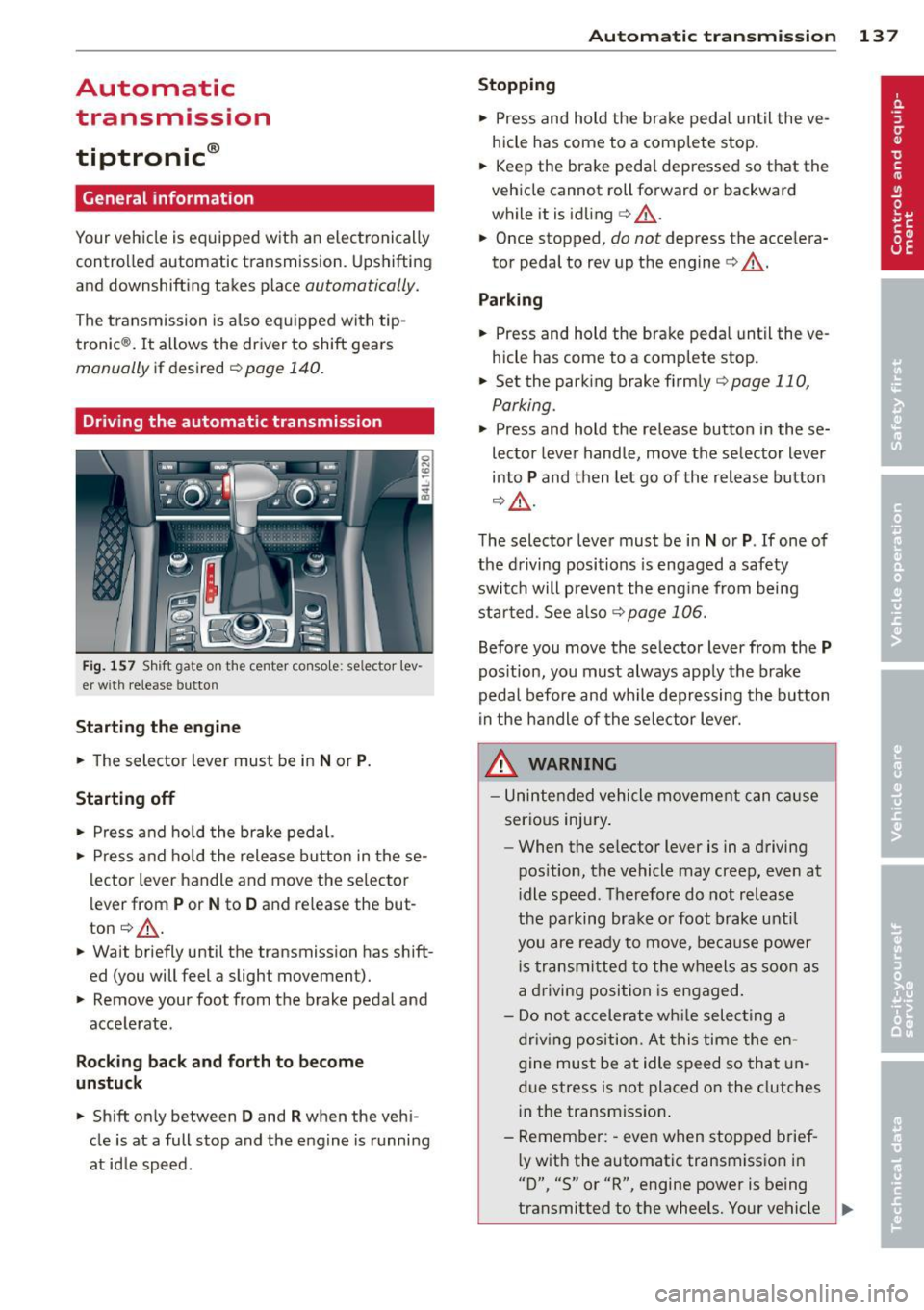
Fig. 157 Shift gate o n the center console : se lector lev
er with release button
Starting the engine
.. The selector lever must be in Nor P.
Starting off
.. Press and hold the brake pedal.
.. Press and hold the release button in these
lector lever handle and move the selector
lever from
P or N to D and release the but
ton ¢.&,. .
.. Wait briefly until the transmission has shift
ed (you will feet a slight movement).
.. Remove your foot from the brake pedal and
accelerate.
Rocking back and forth to become
unstuck
.. Shift only between D and R when the vehi
cle is at a full stop and the engine is running
at id le speed.
Autom atic transm ission 13 7
Stopping
.. Press and hold the brake pedal until the ve
hicle has come to a complete stop.
.. Keep the brake pedal depressed so that the
vehicle cannot roll forward or backward
while it is idling
c> .&,. .
.. Once stopped,
do not depress the accelera
tor pedal to rev up the engine
c> .&, .
Parking
.. Press and hold the brake peda l until the ve
hicle has come to a comp lete stop.
.. Set the parking brake firmly
¢page 110,
Parking .
.. Press and hold the release button in these
lector lever handle, move the selector lever
into
P and then let go of the release button
¢ .&,.
The selector lever must be in Nor P. If one of
the driving positions is engaged a safety
switch will p revent the eng ine from being
started . See also
<=>page 106.
Before you move the selector lever from the P
position, you must always apply the brake
pedal before and while depressing the button
in the handle of the selector lever.
A WARNING
-Unintended vehicle movement can cause
serious injury .
- When the se lector lever is in a driving
pos ition, the vehicle may creep, even at
i dle speed . Therefore do not release
the parking brake o r foot brake until
you are ready to move, because power
i s transmitted to the wheels as soon as
a driving position is engaged .
- Do not accelerate while selecting a
driving position. At this time the en
gine must be at idle speed so that un
due stress is not placed on the clutches
in the transmission .
- Remember: -even when stopped brief-
l y with the automatic transmission in
"D", "S" or "R", engine power is being
transmitted to the wheels. Your vehicle
~
Page 141 of 342
the foot brake before and while moving the lever to
D o ut of N .
In ce rt a in circumst ances i t may be advan ta
geous to tempor arily swi tch to the manu al
shift p ro g ram to manually se lect gear ratios
to matc h specif ic dr iving conditions
r::!) page 140.
S - Sport position
Select this pos ition for sport ie r perfo rmance.
I n t his posi tion , the transm iss ion w ill not up
shift as soon, allowing the vehicle to use the increased power avai lab le at higher engine
speeds to achieve live lier acce lerat ion.
W hen the ve hicle is st ationary o r at speeds
be low 3 mph (5 km/h), you must a lways a pply
the foot brake before and while moving t he
l ever to
S out of N .
A WARNING
Read and follow a ll WARNI NGS <=> & in
Driving th e automatic transmission on
page 137.
(D Note
-
Coast ing downh ill with the transmission in
N and the engine not running w ill result in
damage to the automatic transmiss io n
and possibly t he catalytic converte r.
Automatic Shift Lock (ASL)
The Automa tic Shift Lock safeguards you
against accidentally shifting into a forward or
the reverse gear and causing th e vehicle to
move unintentionally .
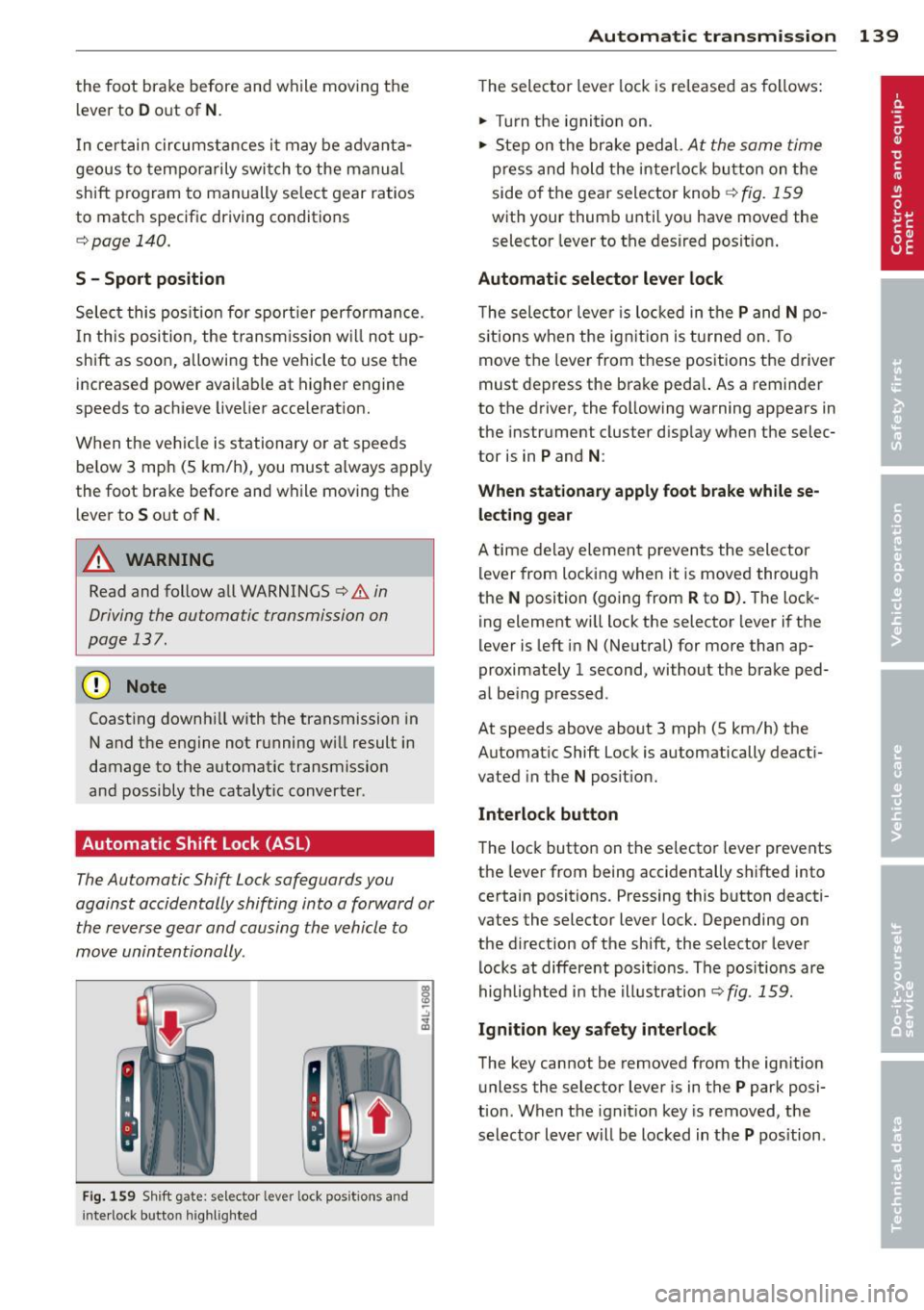
Fig. 159 Shift gate: s elec tor lever lock pos itions and
i n te rl ock bu tt on highli ght ed
Autom atic transm ission 139
T he selector lever lock is re leased as follows:
.. Turn t he igni tion on .
.. Ste p on the bra ke pedal.
At the same time
press and hold the inte rlock bu tton on the
side o f the gea r sele ctor knob
r::!) fig . 159
w ith your thum b until yo u have moved the
selector leve r to the desired posit ion .
Automatic selector lever lock
The selecto r leve r is lo cked in the P and N po
s itions w hen the ig nitio n is tu rned on. To
move t he lever from these posit ions the driver
must de press the brake peda l. As a remin der
to the d river, the following warning appears in
the instr ument cluster d isp lay w hen the selec
tor is in
P and N :
When stationary apply foot brake while se
lecting gear
A time de lay eleme nt preven ts the sele ctor
l ever from locking when it is moved through
the
N position (going from R to D ). T he lock
ing element wi ll lock the selector lever i f the
lever is left i n N (Ne utral) for more than ap
proximately 1 second, without the brake ped
al be ing pressed .
At speeds above about 3 mph (5 km/h) the
Automat ic Shift Lock is automatically deact i
vated in the
N posit ion.
Interlock button
The loc k button on t he selecto r lever prevents
the lever from being accidentally s hifted into
certain positions. Pressing this b utton deacti
vates the selector lever lock. Depending on
the d irection of the shift, the selector lever
l ocks at differe nt pos it io ns. Th e pos itions are
highlig hted i n the i llustration
r::!) fig . 159.
Ignition key safety interlock
The key cannot be removed from the ign ition
u nless the selector lever is in t he
P park posi
tion . When the ignit ion key is removed, t he
selector lever w ill be locked in t he
P pos ition.
Page 142 of 342
140 Automatic transmission
Kick-down
The kick-down feature allows the vehicle to
generate maximum acceleration.
When you press the accelerator pedal beyond
the resistance point that is reached at full
throttle, the transmission will select a lower
gear ratio based on vehicle speed and eng ine
RPM. The engine RPM will be controlled to
produce maximum vehicle accelerat ion as
long as you continue to press the accelerator
pedal beyond this resistance point .
& WARNING ,--
Be careful when using the kick-down fea
ture on slippery roads. Rapid acceleration may cause the vehicle to skid.
Dynamic shift program (DSP)
The automatic transmission is electronically
controlled .
The transmission is self adapting and will au
tomatically
select the best shift program suit
ed to the driving conditions and driving style.
The transmission will select one of the
econo
my
programs when you drive at a steady
speed or a gradually changing speed without
heavy acceleration. This achieves optimum
fuel efficiency, with early upshifting and de
layed downshifting.
The transmission will automatically select the
sporty shift programs when you drive at high
er speeds, or with heavy acceleration and fre
quent ly changing speeds. Upshifts are delayed
to make full use of engine power. Oownshift
ing takes place at higher engine speeds than
in the economy programs.
The selection of the most suitable shift pro
gram is a continuous, automatic process. The
driver can also make the transmission switch
to a sporty program by
quickly pressing down
the gas pedal.
This causes the transmission to shift down to
a lower gear to achieve rap id acceleration, e.g .
for quickly passing another veh icle. You do not need to press the gas pedal into the
kick-down
range. After the transmission has upshifted,
the or iginal program is selected according to
your driving style.
An additional shift program allows the automatic transmission to select the proper gear
for uphill and downhill gradients.
This keeps the transmission from shifting up
and down unnecessarily on hills . The trans
mission will shift down to a lower gear when
the driver presses the brake pedal on a down
hill gradient. This makes use of the braking ef
fect of the engine without the need to shift
down manually.
Manual shift program
Using the manual shift program you can
manually select gears.
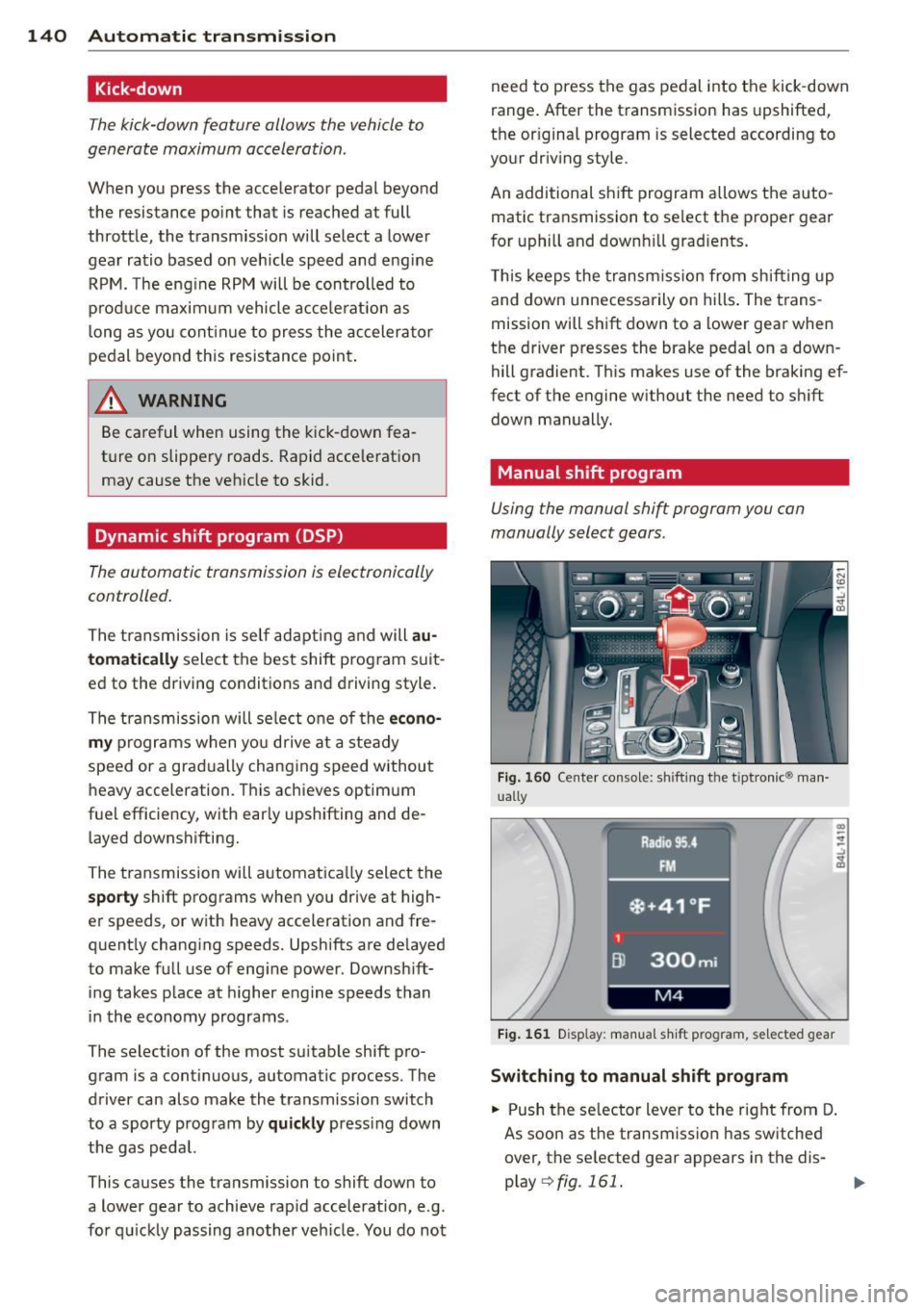
Fig. 160 Cente r conso le: shifting the t iptronic® man
ually
Fig. 161 D isplay: manual shift program, selected gear
Switching to manual shift program
.. Push the selector lever to the right from D.
As soon as the transmission has switched
over, the selected gear appears in the dis
play
Q fig . 161.
Page 145 of 342

Parking system
General information
App lies to vehicles: with rea r park assis t/Audi park ing sys
tem plus w ith rearview camera
There are two different park assist systems
avai lab le depending on your vehicle's equip
ment leve l.
The
r ea r p ark ass is t is an acoustic park assist
system that will give you a sound warning to let you know there is something
behind the
veh icle
¢ page 143.
The Aud i p arki ng sys te m p lus with rea rvie w
ca mera
audibly and visually tells you there is
something
in front of and behind the veh icle.
A rearview camera also shows you what is be
hind the veh icle. This image he lps you when
parallel parking or reverse parking
¢ page 144.
@ Tips
The sensors must be kept clean and free of
snow and ice for the park assist to operate.
Rear park assist
Description
App lies to vehicles: with rear park assist
The rear pork assist is on audible system.
Sensors are located in the rear bumpers. If
these detect an obstacle, audible signals warn
you. The range at which the sensors begin to measure is approximately:
side 2 ft (0.60 m)
rear center
5.2 ft (1.60 m)
T he closer you get to the obstacle, the shorter
the interval between the audible signals. A continuous tone sounds when the obstacle is
less than approximately 1 foot (0 .30 meters)
away . Do not cont inue driving farther .
If the d istance to an obstacle remains con
stant, the volume of the d istance warning
gradually drops after about four seconds (th is
does not apply in the continuous tone range) .
Parking system 143
The park assist is activated automatica lly
when reverse gear is engaged. A short confir
mation tone sounds.
_& WARNING
- The parking system cannot replace the driver's attention. The driver alone is re
sponsible for parking and similar driving maneuvers .
- Sensors have blind spots in wh ich objects
cannot be detected. Pay spec ial attent ion
to small children and an imals because
the sensors cannot always detect them.
- Always keep your eyes on the vehicle 's
surroundings, us ing the rea r view mirror
as well.
(D) Note
Low obstacles already signaled by a warn
i ng can d isappear from the system's detec
tion range as they are approached and w ill
not cont inue to be signaled. Objects such
as barrier chains, trailer d raw bars, th in
painted vertica l poles or fences may not be
detected by the system, posing risk of
damage.
(D Tips
- Please follow the instructions for tow ing
a trailer
¢page 149.
-Yo u can change the vo lume and pi tch of
the signals
¢ page 148.
-
Page 146 of 342

144 Parking system
Audi parking system
plus with rearview
camera
Introduction
Appl ies to vehicles: with Audi parking system plus w ith
rearview camera
Fig. 164 Pa rking mo de 1 : Backing into a parkin g space
Fig. 165 Parking mode 2: parallel parking
Vehicles with the Audi park ing system plus
with rearview camera a re equipped w ith a
r ea rvie w ca mera in addition to the acoust ic
and v isual park ing system.
You can chooses between park ing modes to
he lp you when parking your vehicle. Use
"park ing mode
1" when parking in a parking
space or garage
r=;, fig. 164. If you are going to
be paralle l parking, use "park ing mode 2"
r::;:, fig. 165.
General Information
Applies to vehicles: w ith Audi park ing system plus with
rearview camera
F ig . 1 66 Area covered © and area not covered @by
the rea rview came ra.
F ig. 167 Rea r lid : Location of the rearview camera
Sen so rs in the bumper
Sensors are located in the front and rear
bumpers. If these detect an obstacle, audible
and visual signals warn you. The range at
which the sensors begin to measure is approx
imately:
fro nt side
3 ft (0.90
m)
center 4 ft (1.20 m)
side 2 ft (0.60 m)
rea
r
center 5.2 ft (1.60 m)
The closer you get to the obstacle, the shorter
the interval between the aud ible signals. A
continuous tone sounds when the obstacle is
less than approximately 1 foot (0.30 meters)
away . Do not continue dr iv ing farther .
If the distance to an obstacle remains con
sta nt, the volume of the distance warning
gradually drops after about four seconds (this
doe s not apply in the cont inuo us tone range). .,._