AMI AUDI Q7 2012 Owner´s Manual
[x] Cancel search | Manufacturer: AUDI, Model Year: 2012, Model line: Q7, Model: AUDI Q7 2012Pages: 342, PDF Size: 86.42 MB
Page 58 of 342
56 Openin g and clo sing
& WARNING
Be careful when closing the Panoramic
sliding sunroof. Not pay ing attention cou ld
cause you or others to be trapped and in
jured as the Pa noramic s lid ing sunroof
closes.
Opening and closing sunshade
App lies to vehicles: with Pa norami c sli di ng sunroo f
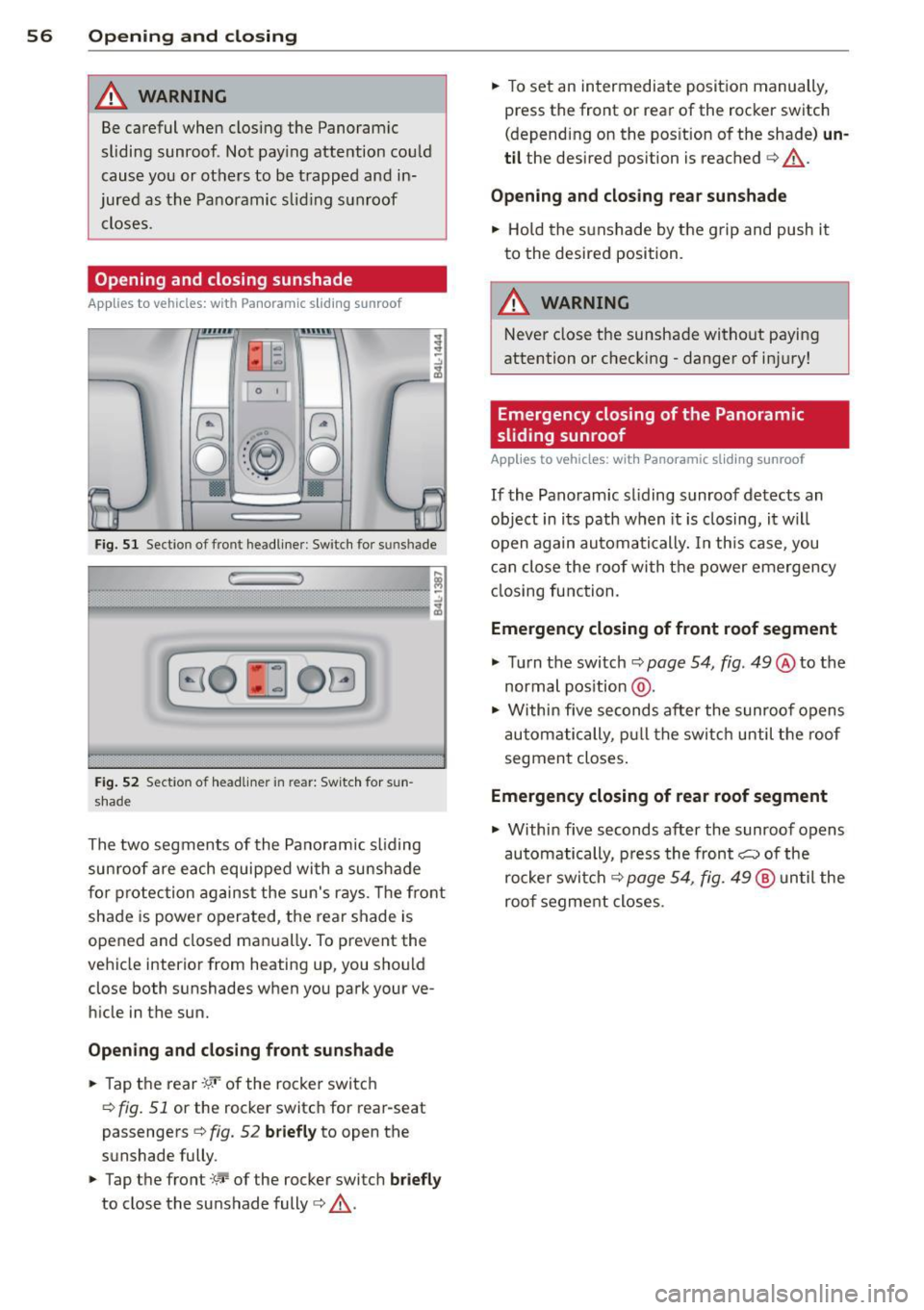
s [:)
o::~ o ..
Fig. S l Section of front head liner : Sw itch fo r su nshade
r: ,
B O ~ OG
Fig. 5 2 Section of headliner in rear: Switc h for sun
shade
The two segments of the Pano ramic sliding
sun roof are each equipped with a suns hade
for protection against the sun's r ays. The fro nt
shade is power opera ted, the rear shade is
opened and closed ma nually . To prevent the
vehicle interior from heating up, you should
close both sunshades when you park your ve
hicle in the sun.
Opening and clo sing front sunshade
.,. Tap t he rear -:9.•· of the rocker switc h
<=> fig. 51 or the rocker switc h for rear-seat
passengers
c:> fig. 52 briefly to open the
sunshade fully .
.,. Tap the front
:'c'r-of the rocker switch briefl y
to close the sunshade fully c:> &.-
.,. To set an intermediate position manually,
press the front or rear of the rocker switch
(depending on the pos ition of the shade)
un
til the desired position is reached c:> &.-
Opening and clo sing rea r sun shade
.,. Hold the sunshade by the g rip and push it
to the desired position.
A WARNING
Never close the sunshade without paying
attention or checking - danger of in jury!
· Emergency closing of the Panoramic
sliding sunroof
App lies to vehicles: wit h Pano ramic sli ding su nroof
If the Panoramic sl iding sunroof detects an
object in i ts path when it is closing, it w ill
open again automa tically. In th is case, you
c an close the roof with t he power emergency
cl osing function.
Emergency closing of f ront roof segment
.,. Turn the switch c:> page 54, fig . 49 @to the
normal pos ition @ .
.,. Within five seconds after the sunroo f opens
a utomatically, pu ll the switc h until the roof
segmen t closes .
Emergency closing of rear roof segment
.,. Within five seconds after the sunroof opens
automatically, p ress the front~ of the
rocke r swi tch
c:> page 54, fig. 49 @ until the
roof segme nt closes.
Page 61 of 342
The light switch must not be overturned past
the stops in
either d irectio n.
Switching on the front fog lights }0
~ Turn the light swit ch to :oo: or to io.
~ P ull t he ligh t sw itch to the first stop @.
When the front fog lights are on, the symbol
}O n ext to the lig ht switch will illum inate.
@ Tips
W ith the switch in AUTO front fog lights
and rear fog lights cannot be turned o n in
add it io n.
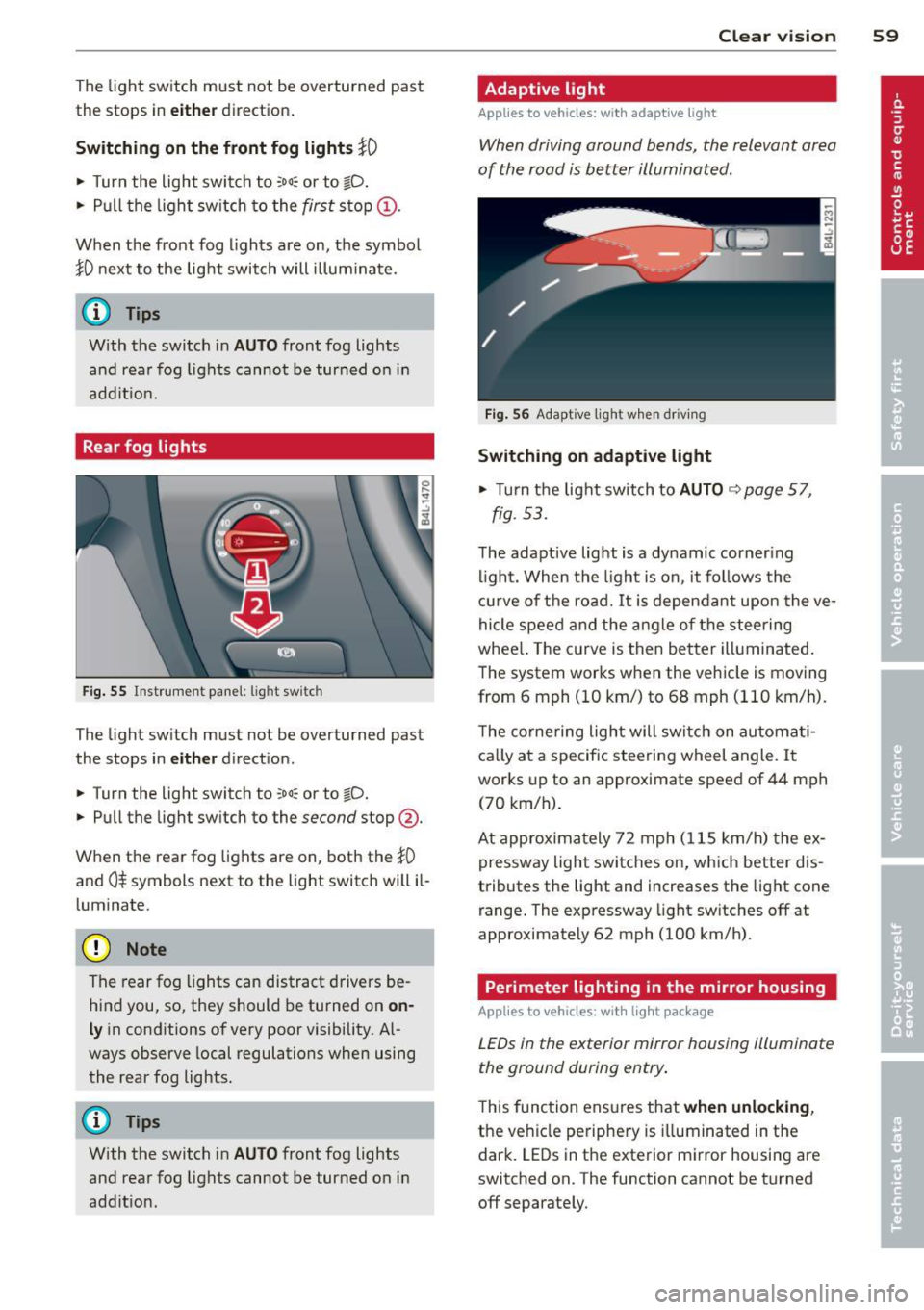
Rear fog lights
Fig. 55 Inst rument pa ne l: lig ht sw itc h
The light sw itch must not be overturned past
the stops in
either d irect ion.
~ Turn the light switch to :oo: or to io.
~ Pu ll the light sw itch to the second stop @.
When the rear fog lights are on, both the
}0
and 0$ symbols next to the light switch will il
l um inate.
(D Note
The rear fog lights can distract d rivers be
h ind you, so, they should be turned on
on
ly in cond itions of very poor visibility. Al
ways observe local regulations when using
the rear fog lights.
{D) Tips
With the switch in AUTO front fog lights
and rea r fog lights cannot be turned on in
add it io n.
Clear vi sion 59
Adaptive light
Applies to vehicles: wit h adaptive light
When driving around bends, the relevant area
of the road is better illuminated .
Fig. 56 Adapt ive light w hen driv ing
Switching on adaptive light
~ Turn the lig ht switch to AUTO ~ page 57,
fig . 5 3.
The adaptive lig ht is a dy namic corner ing
li ght. Wh en th e light is on, it fo llows th e
cur ve of t he road. It is depen dan t upon the ve
hi cle spee d and the a ngle of the stee ring
whee l. The c urve is then bette r illuminated .
The system wor ks when the vehicle is moving
from 6 mph (10 km/) to 68 mph (110 km/h).
T he co rne ring ligh t will swi tch on automa ti
ca lly a t a specif ic steering wheel angle. I t
wor ks up to an a pproximate speed of 44 mph
(70 km/h).
At approx im at ely 72 mph ( 115 km/h) t he ex
p ressway light swi tches on, which better dis
tributes the light and increases the light cone
r ange . The exp ressway light sw itches
off at
approximate ly 62 mph (100 km/h) .
Perimeter lighting in the mirror housing
Applies to vehicles: wit h lig ht pac kage
LEDs in the exterior mirror housing illuminate
the ground during entry .
This func tion ens ures that when unlocking ,
the vehicle pe riphe ry is illuminated in t he
dar k. LEDs in t he e xterior m irror housing are
switched on. The function cannot be turned
off separate ly.
Page 85 of 342
Lo adin g
"' Fo ld the center seatback forward
r=> page 79.
"' Remove the sack from the luggage com
partment and unfold it.
"' Place the empty sack over the lowered seat
back so that the end wi th the z ip fastener is
i n the luggage compartment.
"' Load objects from the luggage compart
ment into the sk i sack
r=> &, .
Securin g
"' Insert the ski sack strap @ r=> fig. 94 into
the center seat belt buckle @.
"' Pull the securing strap t ight by the free end
of the belt @.
"' Vehicles with 6 seats* : The ski sack has two
straps with hooks on the unders ide . Hang
the hooks into the luggage compartment by
the rear fastening eyes and pull the secur ing
strap tight by the free end @.
Storage
"' Re lease the securing strap for the sack .
"' Pull the sack to the rear over the folded
down seatback.
"' Raise the seatback unti l it is securely latch
ed .
"' Fo ld up the empty sack.
"' Stow the ski sack in the luggage compart
ment so that it cannot slide around.
_&. WARNING
-
- The ski sack is intended only for the
transportation of skis, snowboards and
other light objects. To reduce the risk of
serious persona l injury never transport
heavy or po inted ob jects in the ski sack .
- When bra king rapidly o r during an acci
dent the load cou ld be displaced and
ca use inj ury to occupants.
- Sharp edges on the load must be cove red
for protect ion. Always fas ten the belt
t igh tly around the sack and its contents
r=> fig. 94. S
eat s an d sto rage 8 3
(D Tips
Never stow the ski sack away if it's wet or
damp (for examp le, snow me lting from
skis). Let it dry complete ly before you stow
i t away.
Roof rack
First things first
A roof rack can be fitted to carry additional
luggage on the roof.
"' Always read and follow the instructions pro
vided by the roof rack manufacturer when the roof rack system must be installed .
If you are transporting luggage or other ob
jects on the roof, p lease note the following:
- Your vehicle has spec ially designed aerody-
namic roof rails. Only install a roof rack spe
cifically designed for your model. Contact
the nearest authorized Aud i dealer fo r infor
mation on approved modu lar roof racks for
your vehicle.
- These approved roof racks are the bas is for a
complete roof rack system. Additional at
t achments for the basic roof rack a re neces
sary to safely transpo rt luggage, bicycles,
surf boards, skis or sma ll boats. All necessa
ry hardware for these systems is available at
your authorized Audi dealer.
- We recommend that you keep the installa
tion instructions for your roof rack system
together with your Owner's literature in the
veh icle.
When sh ould the roof rac k be remov ed?
- Before going through an automatic car wash
(it is best to ask the car wash operator for
advice) .
- When not in use, to reduce fuel cons ump
tion, wind noise and to guard against theft.
_&. WARNING
- Use of an unapproved roof rack or incor
rect mounting of an approved roof rack
Page 86 of 342
84 Seats and storage
can cause the roof rack or the items at
tached to it to fall off the roof onto the
road.
- Objects falling from the roof of a vehicle
can cause a crash and personal injury.
- Only mount the system between the
markings shown in~
page 84, fig. 95 .
-The roof rack system must be installed
exactly according to the instructions pro
vided.
(D Note
- Your vehicle warranty does not cover any damages to the vehicle caused by using roof racks or mounting structures not
approved by Audi for your vehicle . The
same applies to damage resulting from incorrect roof rack installation .
- Always check the roof rack mountings
and hardware before each trip and dur
ing a trip to make sure everything is se
curely tightened . If necessary, retighten
the mountings and check the entire sys
tem from time to time.
- After mounting a roof rack system, or
when you transport objects on the roof
of your vehicle, the height of the vehicle
is naturally increased. Be careful when
driving under low bridges or in parking
garages for example. This could cause
damage to the load and even the vehicle
itself.
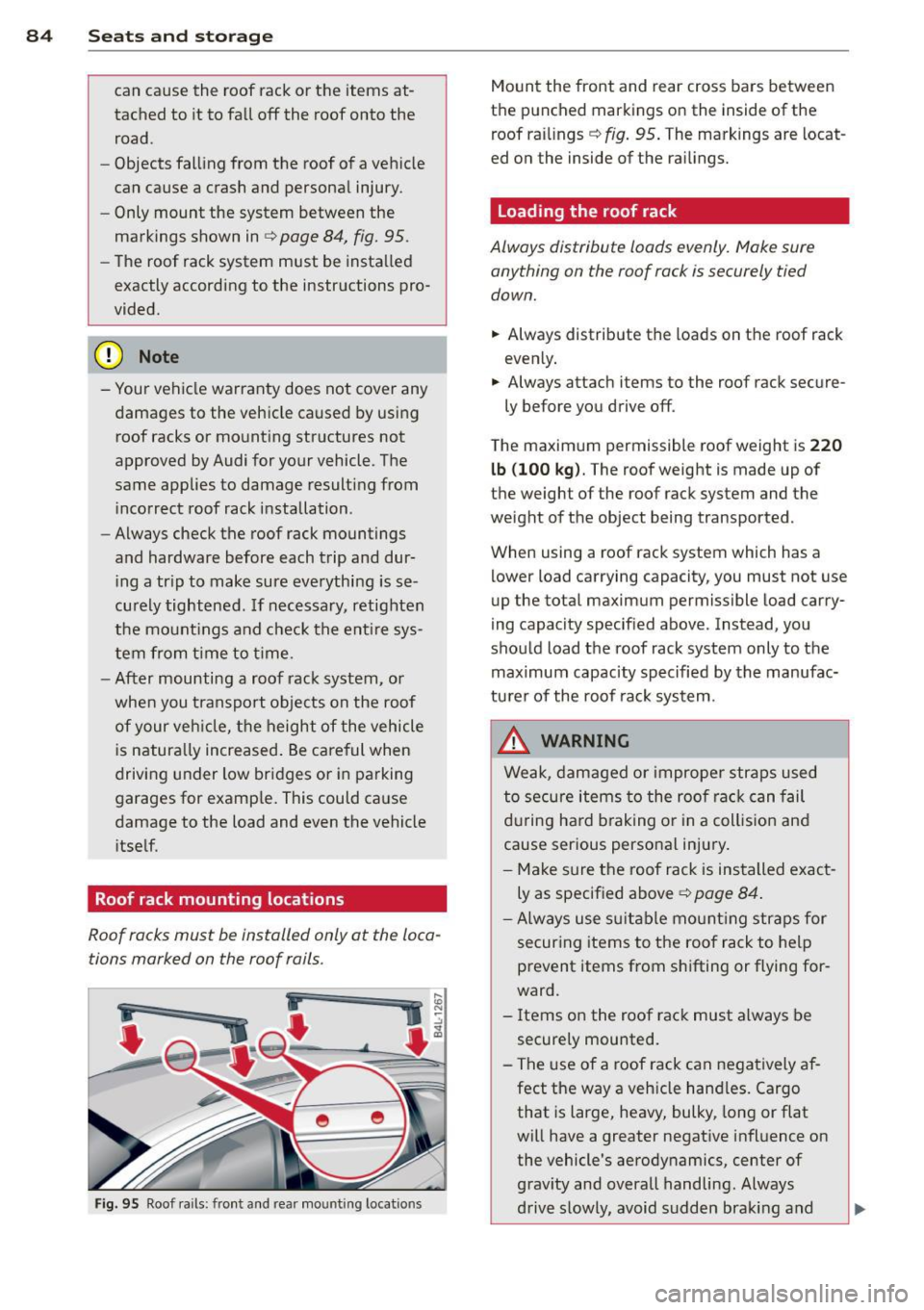
Roof rack mounting locations
Roof racks must be installed only at the loca
tions marked on the roof rails .
i
-
Fig. 95 Roof rails: front and rea r mo unting locatio ns
Mount the front and rear cross bars between
the punched markings on the inside of the
roof railings ~
fig. 95. The markings are locat
ed on the inside of the railings.
Loading the roof rack
Always distribute loads evenly. Make sure
anything on the roof rack is securely tied
down.
.,. Always distribute the loads on the roof rack
evenly .
.,. Always attach items to the roof rack secure -
ly before you drive off .
The max imum permissible roof weight is
220
lb (100 kg).
The roof weight is made up of
the weight of the roof rack system and the
weight of the object being transported .
When using a roof rack system wh ich has a
lower load carrying capacity, you must not use
up the total maximum permissible load carry
ing capacity specified above. Instead, you
should load the roof rack system only to the maximum capacity specified by the manufac
turer of the roof rack system .
.&_ WARNING
Weak, damaged or improper straps used
to secure items to the roof rack can fail
during hard braking or in a collision and
cause serious personal injury.
- Make sure the roof rack is installed exact
ly as specified above~
page 84.
-Always use suitable mounting straps for
securing items to the roof rack to help
prevent items from shifting or flying for
ward .
- Items on the roof rack must always be
securely mounted.
- The use of a roof rack can negatively af
fect the way a vehicle handles. Cargo that is large, heavy, bulky , long or flat
will have a greater negative influence on the vehicle's aerodynamics, center of
gravity and overall handling. Always
drive slowly, avoid sudden braking and .,,.
Page 94 of 342
92 Warm and cold
A WARNING
Reduced visibility is dangerous and can
cause acci dents.
-
- For safe dr iv ing it is very important that
all windows be free of ice, snow and con
densation.
- Completely fami liarize yourself with the
proper use and function of the heating
and ventilation system and especia lly
how to defog and defrost the windows.
- Never use the windshie ld wiper/washer
system in freezing weather until you
have warmed the windshield first, us ing
the heat ing and ventilat ion system. The
washe r solution may freeze on the wind
shield and reduce visibility.
(D Note
- If you suspect that the climate control
system has been damaged, switch the
system off to avo id further damages,
and have it inspected by a q ualified deal
ership.
Controls -
Repairs to the Audi air conditioner re
quire special technical know ledge and
special tools . Contact an authorized Aud i
dealer for ass istance.
@ Tips
- Keep the air intake s lots (in front of the
w indshield) free from ice, snow and de
br is in order to maintain the proper func
tion of the climate control system.
-Air inside the vehicle escapes through air vents located in t he side trim panels be
neath the rear side windows. Make sure
that the outlet slots are not cove red by
clothing, etc.
- Climate control works most effectively if
the windows and the Panoram ic sliding
sunroof* are closed. However, if the inte
r ior of a par ked vehicle is ext reme ly hot
from the s un's rays, briefly opening the
w indows can speed up the cooling p roc
ess .
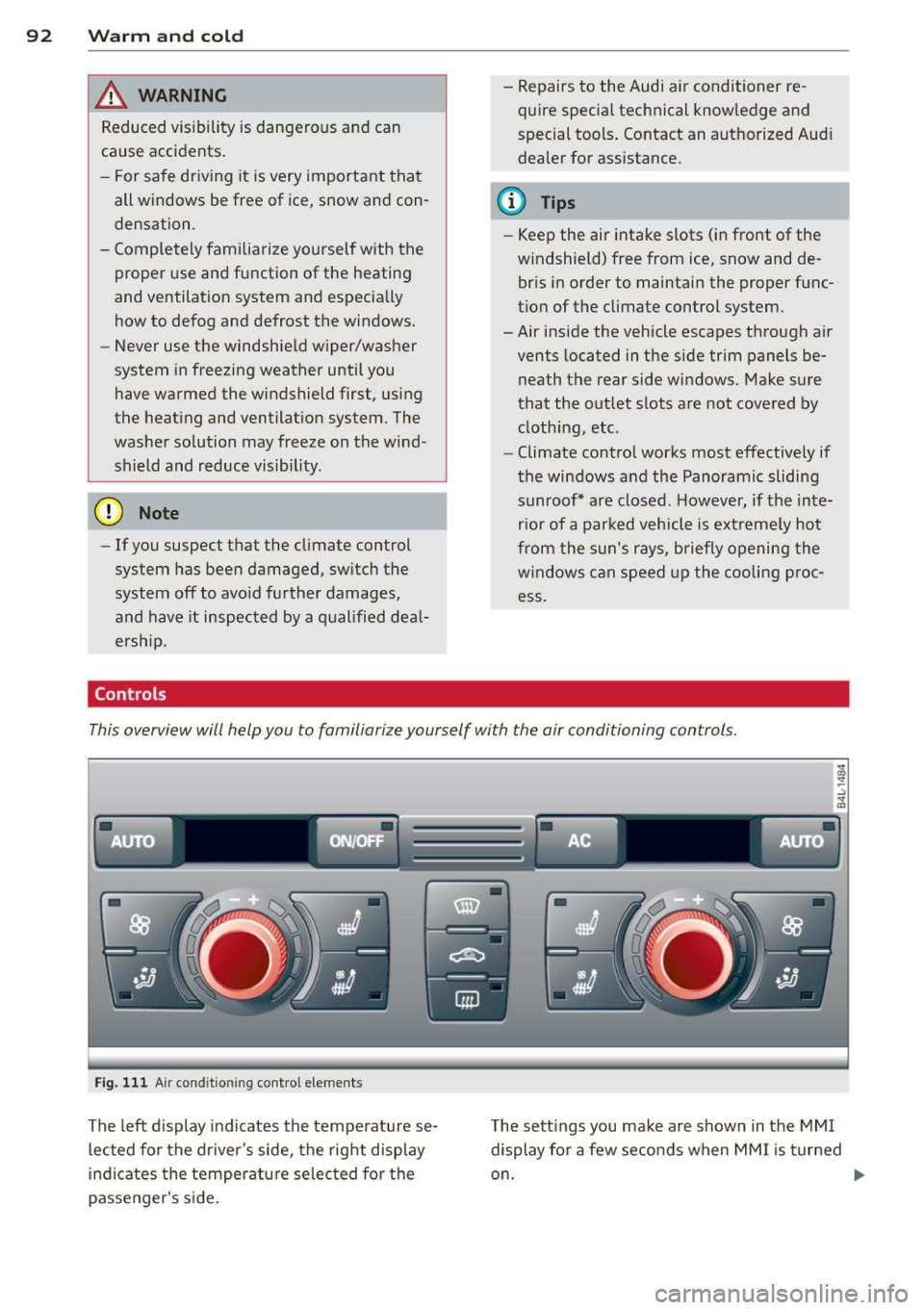
This overview will help you to familiarize yourself with the air conditioning controls .
Fig. 111 Air cond it ion ing co ntro l elements
Th e left display indicates the temperatu re se
l ected for the driver's side, the right display
i n dicates the temperatu re se lected for the
passenger's s ide. T
he sett ings you make are shown in the MMI
display for a few seconds when MM I is turned
o n.
Page 99 of 342

@ Tips
If the climate control system is operating
in cooling mode, a ir flows primarily from
the outlets in the center conso le and in the
door pillars. To achieve adequate cooling,
you should never close the outlets com
pletely .
Using climate control economically
Using the climate controls prudently can help
save fuel.
When you use the air conditioner, engine pow
er is reduced and fuel consumption increases.
To save fuel, you should use the air condition
e r only when necessary. Also please note the
following points :
.,. To save fuel, turn off cooling mode by press
ing the
I AC ! button (indicator light goes
out) .
.,. In add ition, if you open the window or the
Panoramic sliding sunroof* while driving,
turn off cooling mode by p ress ing the
IACI
button (indicator light goes out).
.,. If the vehicle is extremely hot due to the
heat of the sun, briefly open doors and win
dows.
@ For the sake of the environment
By reducing the amount of fue l you use,
you also reduce the amount of poll utants
emitted into the air. W
arm and cold 9 7
Rear Air Conditioning
Rear air conditioning - controls
Applies to vehicles: with four-zone automatic comfort air
conditio nin g
This overview is to assist you in familiarizing
yourself with the rear air conditioning con
trols.
lll ... :;
- --- ------------....... ~
Fig . 113 Rea r air conditioning controls
The left display indicates the temperature se
lected for the rear left passenger, the right
display indicates the temperature selected for
the rear right passenger . If the settings for
seat heating *, air distribution or the air condi
tioning fan are changed, the relevant indica
tor will appear br iefly on the display .
Funct io ns are set by ro tating the control or
are switched on and off by tapping the but
tons. The indicator light in the button illumi
nates when the function is active.
Button (s) Function
ION/OFFI Climate control on/off
¢ page98
-
IAUTOI Automatic mode
¢page98
Regulatoral El Temperature selection
¢page98
Qi Seat heating *
¢page 101
~
Fan
¢page98
~
Air distribution
¢page99
a) The regu lator is also u sed to set the fan sp ee d, air dis-
tribut ion and seat heating .
IIJ,
Page 118 of 342
116 Adapti ve crui se control
-Never drive with you r foot underneath
t h e brake pedal.
- Always read and heed the information
and WARNINGS
c:;, .&. in Description on
page 113.
A WARNING
- Never rely on the distance control fea
ture of ACC alone to prevent rear-end col
lisions . Always be prepared to brake and
take evasive action to avoid collisions and other acc ident situations.
- Never allow the clos ing speed between
yo u and other vehicles to be so h igh that
the adaptive c ruise control may not be
able to slow your vehi cle safe ly. If clos
ing speed is too high, you m ust app ly the
brakes yourself to reduce the risk of a
rear-end crash.
(D Tips
Please note that t he amo un t of a ccelera
tion the adapt ive cr uise control uses de
pends on the Distance setting selected .
DISTANCE 1 g ives you acce lerat ion that is
dynamic and sporty. DISTANCE 4, on the
other hand, gives more moderate acce lera
tion. For more information about the time
intervals
c:;, page 118 , How is the distance
(time interval) set? .
-Please note that if the adaptive cruise
control has begun braking the vehicle
and the d river chooses to brake the vehi
cle add itiona lly, t he b rakes may fee l
"h ard". This is simply due to the pressure
b uild- up of the initial b raking.
- Adaptive cruise control is sw itched off af
te r pressing the footbrake. The speed
saved u p this poin t can be resumed. To
res ume the saved speed, release the
b rake pedal and p ull th e control leve r to
ward you
c:;, page 118 , Turning adaptive
cruise control off temporarily .
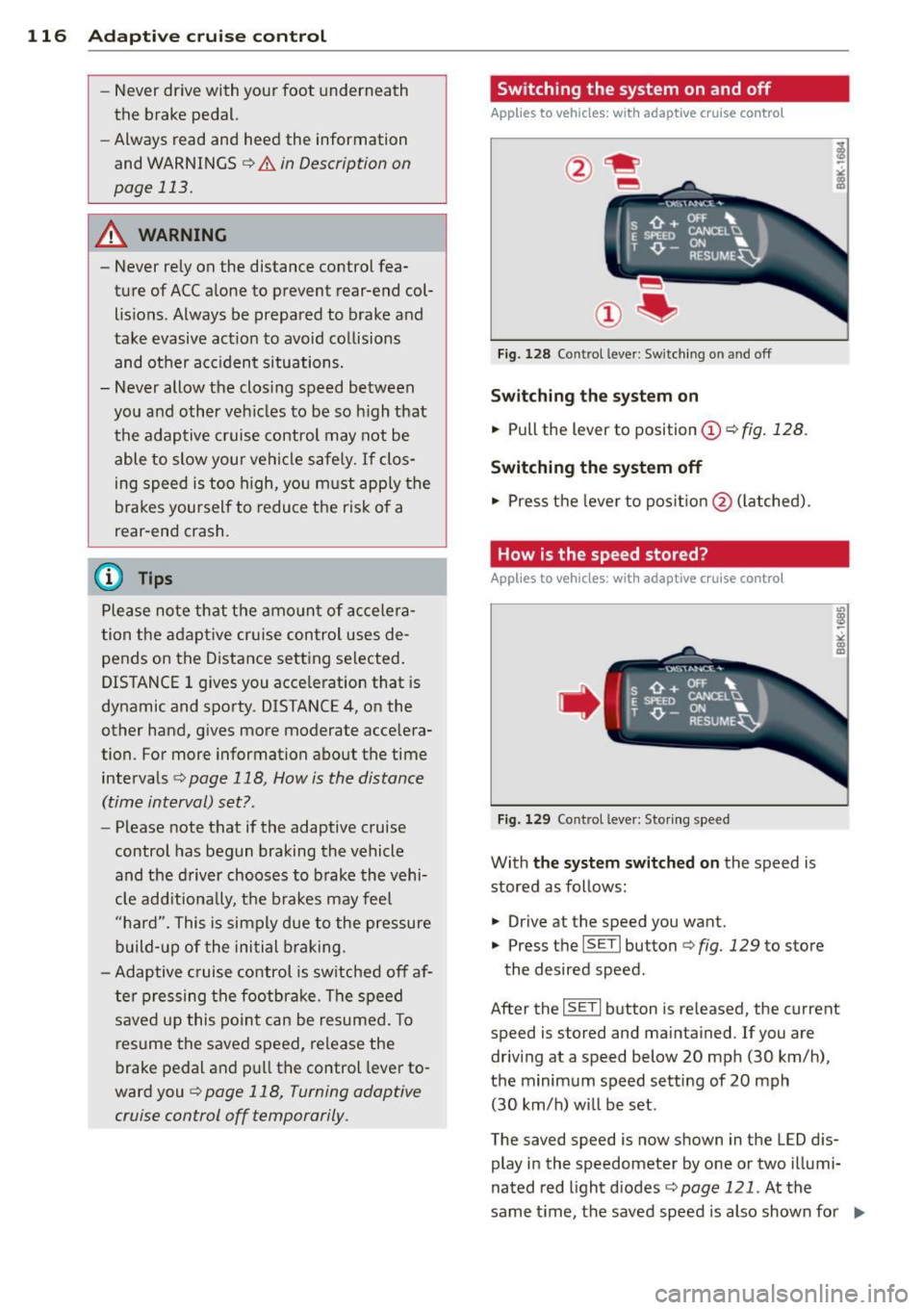
Switching the system on and off
Applies to vehicles: with adaptive cruise contro l
Fig. 128 Control lever: Sw itching on and off
S w itching the sy stem on
.,. Pull the lever to position (D c::> fig. 128 .
Switching the system off
.,. Pres s th e lever to pos it ion @ (latched).
How is the speed stored?
Applies to vehicles: wit h adaptive cruise contro l
,' ts ~:_" ';;;", ' , E Sl'EEO CANCELU
. T ,0. -ON ... . RESUME~
Fig. 1 29 Co ntrol lever: Storing s peed
With the sy stem switched on the speed is
stored as follows:
• Drive at the speed you want .
.,. Press the
ISET I button c:;, fig. 129 to store
the desired speed.
After the
ISE TI button is re leased, the current
speed is stored and maintained . If you are
driv ing at a speed below 20 mph (30 km/ h),
the minimum speed setting of 20 mph
(30 km/h) will be set .
The saved speed is now shown in the LED d is
play in the speedometer by one or two illumi
nated red light d iodes
c::> page 121. At the
same time, the saved speed is also shown for ..,.
Page 121 of 342

Redu cing distance
"' Push the slider sw itch onc e to the left Q.
The distance currently set is shown for 3
seconds in the instrument cluster display.
"' Push the slider switch
again to the left 0
to decrease the distance by one step.
The distance at which the adaptive cruise con trol follows a vehicle in front is determined by
time interva ls. A time interval to a vehicle in
front is estab lished and maintained. Th is pro
duces a speed-dependent interval. The higher
the speed, the greater the safety interva l in
feet (meters)
¢ ,&. .
DISTANCE 1 Ada
pti ve crui se control 119
For example, if the interval DISTANCE 3 is
set, a vehicle in front is fo llowed at a
time in
terval
of 1.8 seconds.
For a speed of
50 mph (80 km /h ) this wo uld
be equivalent to a distance of
131 feet
( 4 0 meter s)
to the vehicle in front.
T he distances given here are nom inal va lues .
T he vehicle speed may exceed or fall shor t of
these target speeds, depending on the driving situation and the driving style of the vehicle
ahead .
DISTANCE 2 DISTANCE 3 DISTANCE4
Symbol c;:::::::, _ c;:::::::,_ - - c;:::::::, _ - c;:::::::, _ - c;:::::::, _ - - c;:::::::, _ c;:::::::,_ - - _c;:::::::,
T ime interval
Dynamics
I Distance at 25 mph
(40 km /h )
Di st a nce at 50 mph
(80 km /h)
Distance at 75 mph
(120 km /h)
1 second 1.3 seconds
Sporting Standard
36 Feet (11 Me-
JI 46 Feet (14 Me-
ters) ters)
-.
72 Feet (2 2 Me- 95 Feet (29 Me-
t ers) ters)
108 Feet (33 144 Feet (44 Meters) Meters) 1.8 seconds
Standard
66 Feet (20 Me ters)
-
131 Feet (40 Me ters)
197 Feet (60 Meters) 2.3 seconds
Comfortab le
82 Feet (25 Me- ·
ters)
1 67 Feet (51
Meters)
249 Feet (76 ·
Meters)
H ow your vehicle responds when accelerating
and following other vehicles w ith ACC operat
i ng can be adapted to your personal wishes
through diffe rent driving programs. Depend
ing on w hich driving p rog ram and wh ic h dis- tance you choose, your vehicle will respond
more dynamically or more comfortably when
acce lerat ing and braking . The setting is se
lected through the MM I menu
adapt ive cruise
contro l¢ page 124, MMI settings.
Settings DISTANCE 1
Symbol for time inter·
val ~-
c;:::::::,_ -
Support fo r: Bumper-to-
Re sponse in "dynam
ic " driving program
Respon se in "stand
ard " driving program
Response in "comfort "
driving program
bumper traffic,
b risk driving
1
2
3
DIS TANCE 2
~ __ c;:::::::,_
Bumper-to-
bumper traffic,
"keep ing pace"
comfortably
2
3
4
(dynamic) 1 -- ---2 ----- 3 --- -- 4 ----- 5 (comfortable)
DISTANCE 3 DISTANCE4
- - -c;:::::::, ~----c;:::::::,
Bumper-to- Secondary roads,
bumper traffic, trailer operation
"keeping pace"
comfortably
2 3
3
4
4
5
Page 126 of 342
124 Adaptive cruise control
control is turned off . A warning tone also
sounds as a reminder.
ACC off: manual control !
The text message ACC off: manual control !
appears after the vehicle has been brought to
a standstill by the adaptive cruise control. In
this case you must depress the brake pedal to
prevent the vehicle from rolling . A warning
tone sounds as a reminder .
Selector lever position !
The text message Selector lever position ! ap
pears when the selector lever is moved to po
sition
N . In this position, adaptive cruise con
trol is not available .
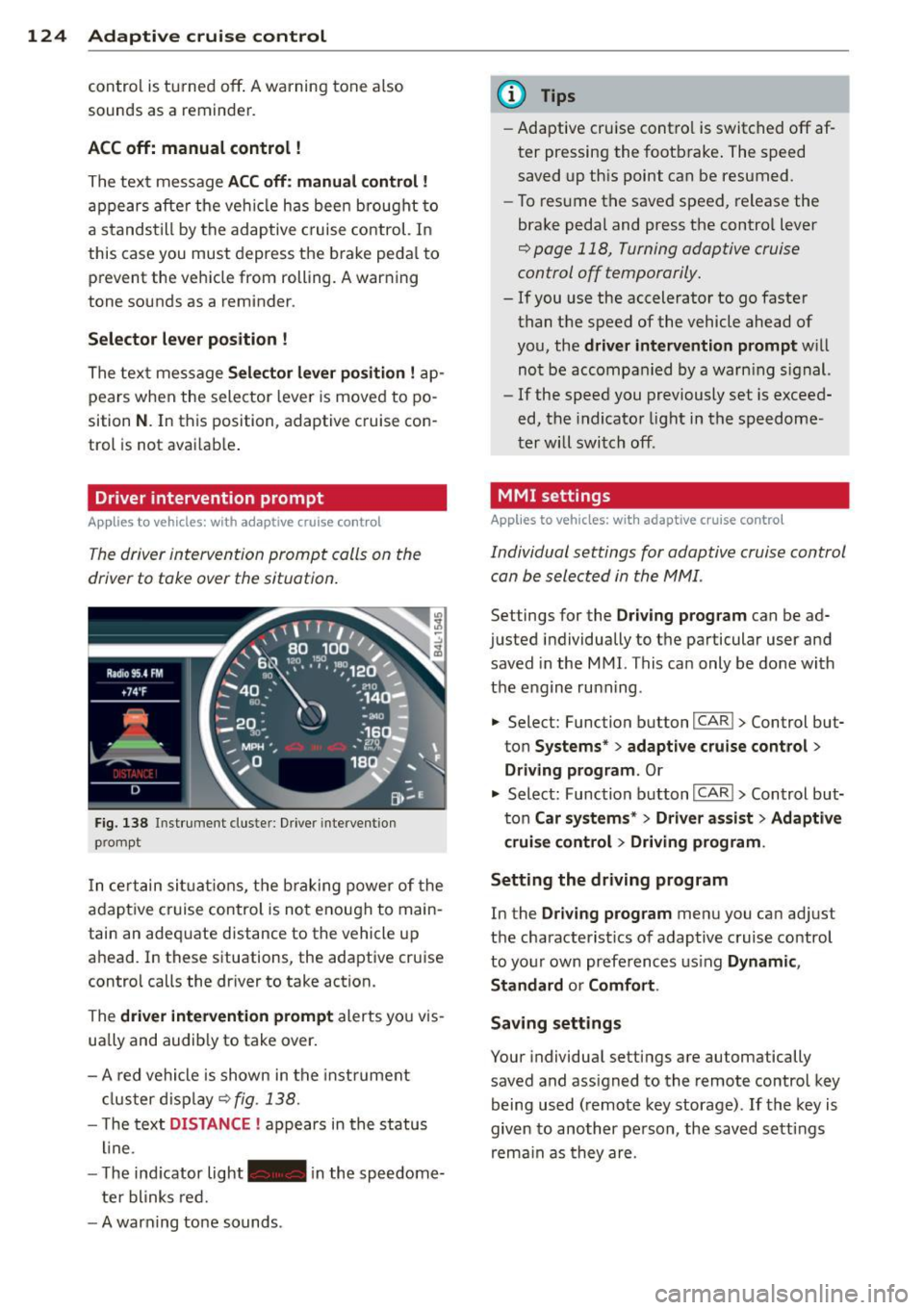
Driver intervention prompt
Applies to vehicles: with adaptive cruise co ntrol
The driver intervention prompt calls on the
driver to toke over the situation.
Fig. 138 Inst rument clus te r: Driv er in tervent ion
p romp t
In certain situations, the braking power of the
adapt ive cr uise control is not enough to main
tain an adequate distance to the vehicle up
ahead . In these situat ions, the adaptive cruise
contro l calls the dr iver to take action.
The
driver intervention prompt alerts you vis
ually and audib ly to take over.
- A red vehicle is shown in the instrument
cluster display ¢
fig. 138.
- T he text DISTANCE ! appears in the status
line .
- T he indicator light- in the speedome
ter blinks red.
- A warning tone sounds .
(D Tips
-Adaptive cruise contro l is switched off af
ter pressing the footbrake. The speed
saved up this point can be resumed.
- To resume the saved speed, release the
brake pedal and press the control lever
¢ page 118, Turning adaptive cruise
control off temporarily.
- If you use the accelerator to go faster
than the speed of the vehicle ahead of
you, the
driver intervention prompt w ill
not be accompanied by a warn ing s ign al.
- If the speed you previously set is exceed
ed, the indicator light in the speedome
ter will switch off.
MMI settings
Applies to vehicles: wit h adaptive cruise contro l
Individual settings for adaptive cruise control
can be selected in the MMI.
Settings for the Driving program can be ad
justed individually to the particular user and
saved in the MMI. This can only be done with
the engine ru nning .
• Select: Function button
I CAR !> Control but
ton
Systems * > adaptive cruise control >
Driving program . Or
.,. Select: Function b utton I CAR !> Control but
ton
Car systems* > Driver a .ssist > Adaptive
cruise control
> Driving program .
Setting the driving program
In the Driving program menu you can adjus t
the characterist ics of adaptive cruise control
to your own preferences using
Dynamic,
Standard
o r Comfort .
Saving settings
Your individual settings are automatically
saved and ass igned to the remote control key
being used (remote key storage) .
If the key is
given to another person , the saved settings
remain as they are .
Page 142 of 342
140 Automatic transmission
Kick-down
The kick-down feature allows the vehicle to
generate maximum acceleration.
When you press the accelerator pedal beyond
the resistance point that is reached at full
throttle, the transmission will select a lower
gear ratio based on vehicle speed and eng ine
RPM. The engine RPM will be controlled to
produce maximum vehicle accelerat ion as
long as you continue to press the accelerator
pedal beyond this resistance point .
& WARNING ,--
Be careful when using the kick-down fea
ture on slippery roads. Rapid acceleration may cause the vehicle to skid.
Dynamic shift program (DSP)
The automatic transmission is electronically
controlled .
The transmission is self adapting and will au
tomatically
select the best shift program suit
ed to the driving conditions and driving style.
The transmission will select one of the
econo
my
programs when you drive at a steady
speed or a gradually changing speed without
heavy acceleration. This achieves optimum
fuel efficiency, with early upshifting and de
layed downshifting.
The transmission will automatically select the
sporty shift programs when you drive at high
er speeds, or with heavy acceleration and fre
quent ly changing speeds. Upshifts are delayed
to make full use of engine power. Oownshift
ing takes place at higher engine speeds than
in the economy programs.
The selection of the most suitable shift pro
gram is a continuous, automatic process. The
driver can also make the transmission switch
to a sporty program by
quickly pressing down
the gas pedal.
This causes the transmission to shift down to
a lower gear to achieve rap id acceleration, e.g .
for quickly passing another veh icle. You do not need to press the gas pedal into the
kick-down
range. After the transmission has upshifted,
the or iginal program is selected according to
your driving style.
An additional shift program allows the automatic transmission to select the proper gear
for uphill and downhill gradients.
This keeps the transmission from shifting up
and down unnecessarily on hills . The trans
mission will shift down to a lower gear when
the driver presses the brake pedal on a down
hill gradient. This makes use of the braking ef
fect of the engine without the need to shift
down manually.
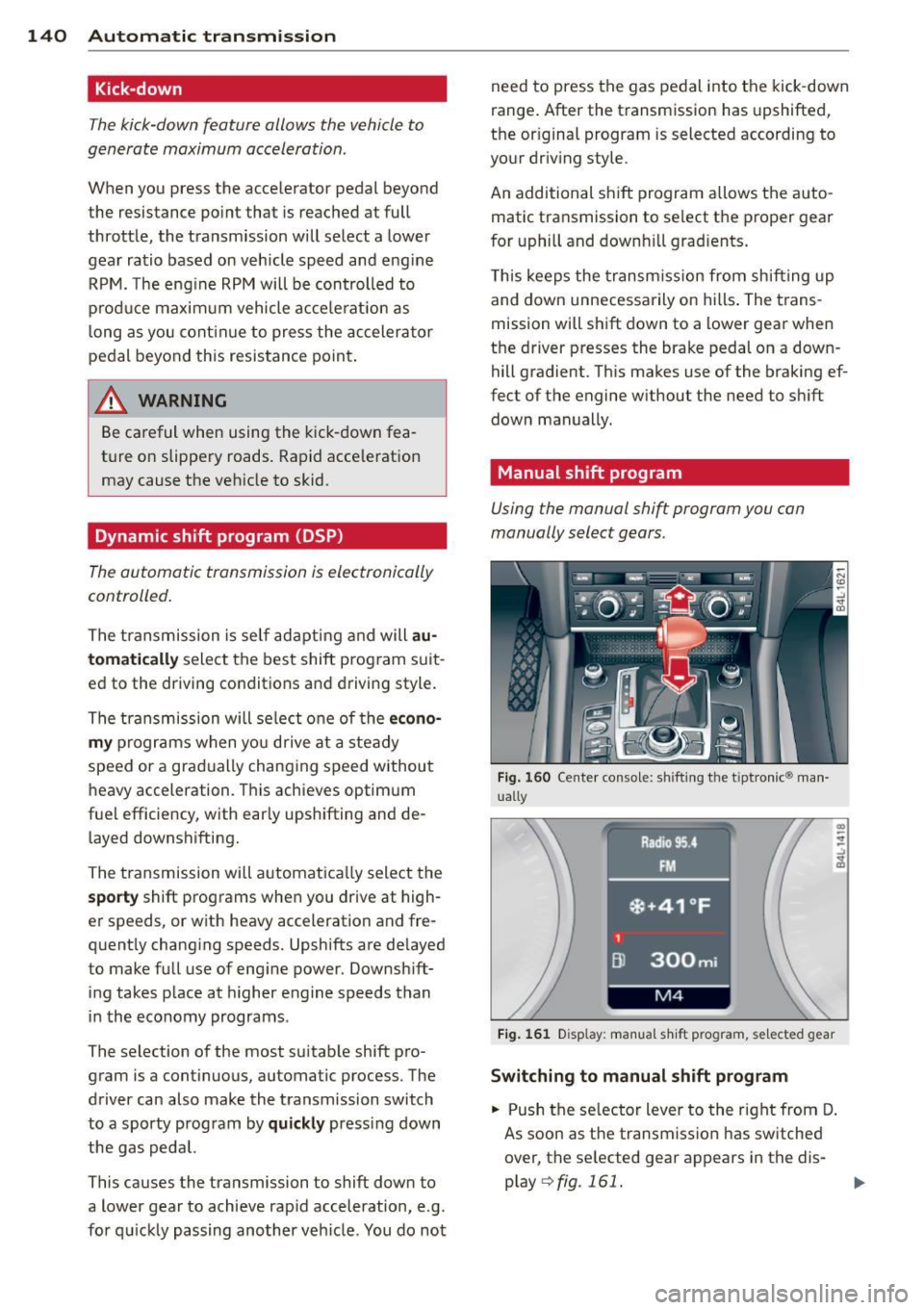
Manual shift program
Using the manual shift program you can
manually select gears.
Fig. 160 Cente r conso le: shifting the t iptronic® man
ually
Fig. 161 D isplay: manual shift program, selected gear
Switching to manual shift program
.. Push the selector lever to the right from D.
As soon as the transmission has switched
over, the selected gear appears in the dis
play
Q fig . 161.