mirror AUDI Q7 2012 Owner´s Manual
[x] Cancel search | Manufacturer: AUDI, Model Year: 2012, Model line: Q7, Model: AUDI Q7 2012Pages: 342, PDF Size: 86.42 MB
Page 133 of 342

next to the lane you are using
¢page 135.
Operation
Applies to vehicles: with side assist
Side assist compares the distance and differ
ence in speed of detected vehicles with the
speed of your vehicle . Whenever the differ
ence in speed and d istance is registered as no
table if you were to change lanes, a signal l ight appea rs on the respective mirror.
The signal can light up if you are passed by a
vehicle or if you are pass ing another vehicle.
If you pass another vehicle s lowly (difference
in speed less than 9 mph, or 15 km/h), the
signal light will come on as soon as the other
vehicle is in your blind spot and is detected by
side assist . When the difference in speed is
g reater, the signal light will not come on.
Informational and alert stage signals
Applies to vehicles: with side assist
Side assist has two signal stages:
- the informational stage signal, and
- the alert stage signal.
Side assist he lps you by using the appropriate
signal stage, depending on whether or not
you have activated the turn signal, and thus have indicated that you are or are not chang
in g lanes .
Informational stage signal
As long as you have not activated the turn sig
nal, side assist informs you of detected vehi
cles that are registered as being in a notable locat ion if you were to change lanes. Whenev
er the detected vehicle's difference i n speed
and distance is registered by side assist as no
table, the signal light on the respective m irror
produces muted illuminat ion.
The br ightness of the informat ional stage sig
nal is designed not to be as intense, so that it
does not interfere with your view of the road
when yo u are driving and have no intention of
changing lanes. When you look i n the outside
Aud i side assist 131
mirror, you can clearly see the informational
stage signal.
Alert stage signal
When you activate the turn signal, and s ide
ass ist has detected a vehicle in a notable loca
t ion on that part icular s ide, the signa l light on
this side mirror flashes brightly. The repeated
brief and bright flashing of the alert stage
signal reminds you to carefully check traffic to
the rear in the outside mirror and over your
shoulder, so that you can safely complete the lane change
¢ A in Safety tips on page 136 .
@ Tips
The brightness of the signal light on the
outside mirrors can be adjusted with the
MMI ¢page 134.
Driving situation: Fast approaching
vehicles
Applies to vehicles: with side assist
Fig. 151 Side assist : Fast app roaching vehicles
@ Signal on outside mirror does not light
up
No vehicle was detected by the sensors. The
signal on the outside mirror does not light up
¢ A in Safety tips on page 136. IJJ,,
Page 134 of 342
132 Audi side assist
@ Informational stage signal lights up
A fast approaching veh icle - in the left-hand
l ane for examp le - was detected by the sen
sors . Although this vehicle is sti ll far away, it
should be taken into account if you were to
change lanes, due to the considerable differ
ence in speed. The informational stage signal
on the outside m irror lights up
c::;, page 131.
@ Alert stage signal flashes
If you activate your turn signal in driving sit
uation @, the signal briefly f lashes repeated
ly. Side ass ist is alerting you to a veh icle that
you may not have noticed.
@ Tips
- The faster a vehicle approaches from the
rear, the sooner the signal on the outside
mirror lights up. Side assist will signa l,
at the latest, when a detected vehicle en
ters your "blind spot" .
- When vehicles approach very quickly,
changing lanes can be dangerous even if
the signal on the outside mirror does not
light up.
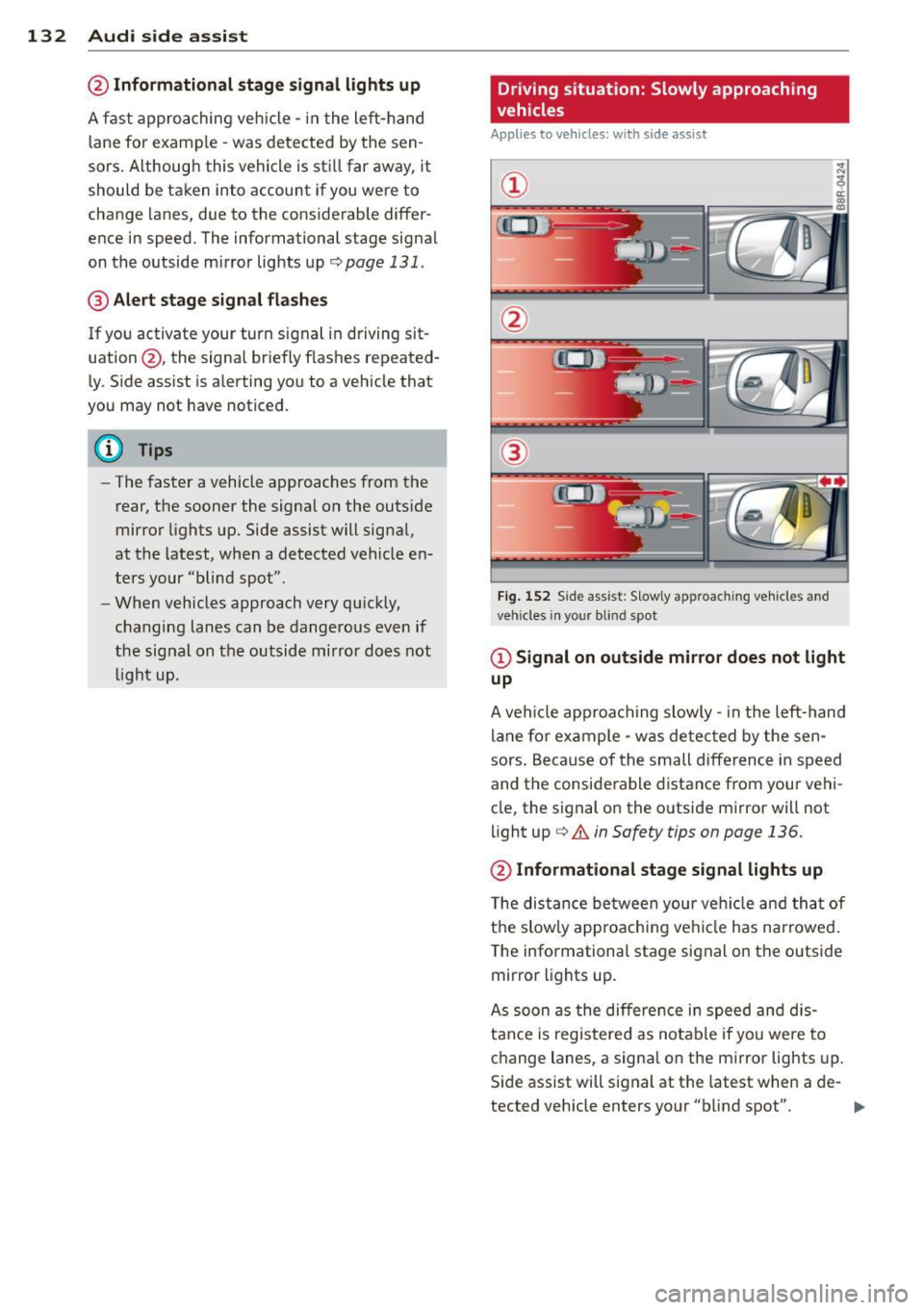
Driving situation: Slowly approaching
vehicles
Applies to vehicles : wi th side assist
@
Fig. 152 Side assist: S low ly approac hing veh icles and
veh icles in yo ur blind spot
@ Signal on outside mirror does not light
up
A vehicle approaching slowly -in the left-hand
lane for example - was detec ted by the sen
sors. Because of the small d ifference in speed
and the considerable distance from your vehi
cle, the signal on the outside mirror will not
light up
c::;, &. in Safety tips on page 136.
@ Informational stage signal lights up
The distance between your vehicle and that of
the slow ly approaching vehicle has narrowed .
The informationa l stage signal on the outside
mirror lights up.
As soon as the differe nce in speed and dis
tance is registered as notable if you were to
change lanes, a signa l on the mirror lights up.
Side assist will signal at the latest when a de-
tected vehicle enters your "b lind spot". .,,.
Page 135 of 342
@ Alert stage signal flashes
If you activate your turn signal in driving sit
uation @, the signa l light briefly flashes re
peatedly. Side assist is alerting you of a vehi
cle that you may not have noticed .
@ Tips
-The faster a vehicle approaches from the
rear, the sooner the signa l on the outside
mirror lights up. Side assist will signa l,
at the latest, when a detected vehicle en
ters your "blind spot".
- When vehicles approach very quickly,
changing lanes can be dangerous even if
the signal on the outside mirror does not
light up.
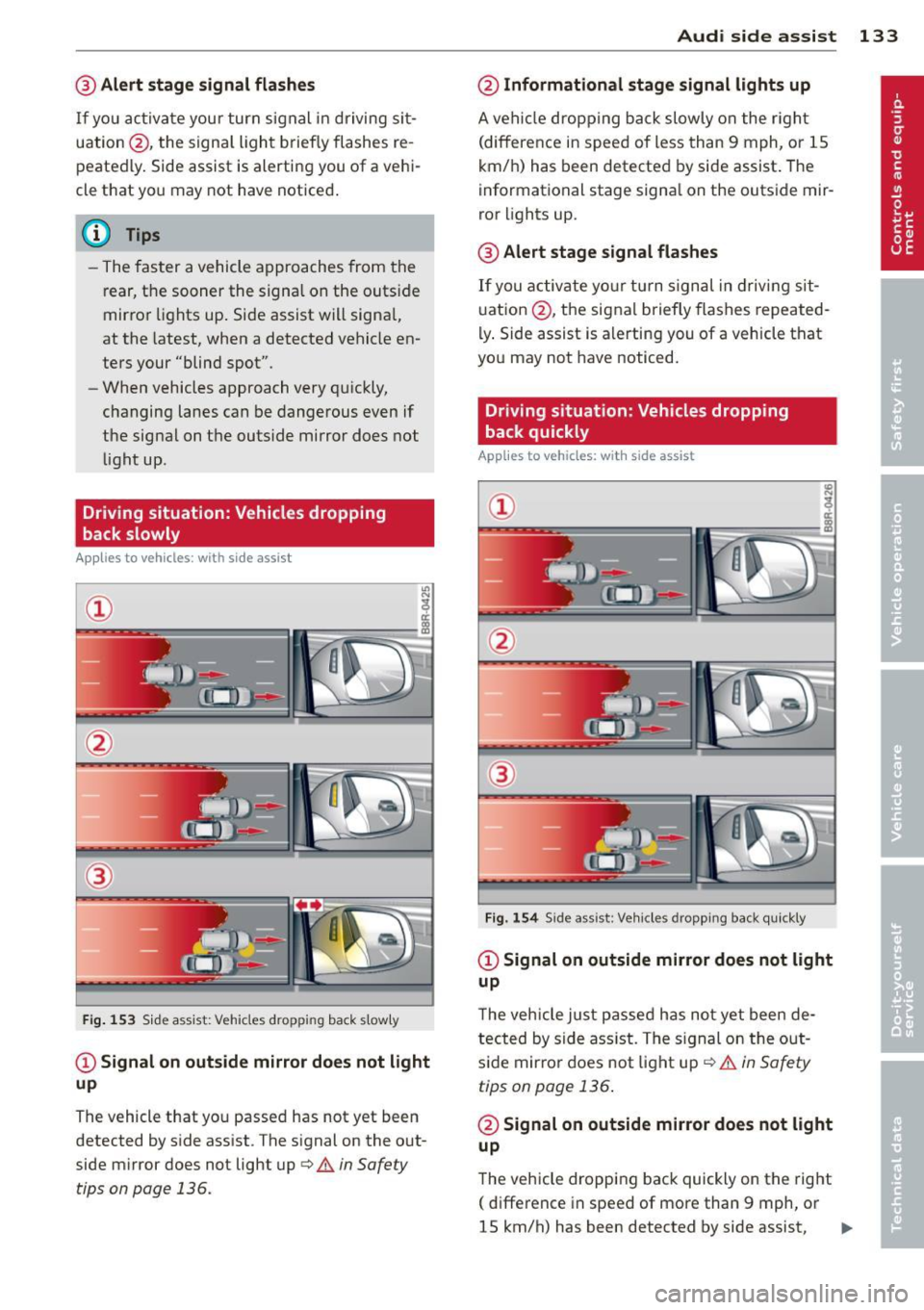
Driving situation: Vehicles dropping
back slowly
Applies to vehicles: with side assist
®
Fig . 153 Side assist: Vehicles dropp ing back s lowly
CD Signal on outs ide mirror does not light
up
The vehicle that you passed has not yet been
detected by side assist . The signal on the out
side mirror does not light up
q .& in Safety
tips on page 136.
Audi side assist 133
@ Informational stage signal lights up
A vehicle dropping back slowly on the r ight
(difference in speed of less than 9 mph, or lS
km/h) has been detected by side assist. The
informational stage signa l on the outside mir
ror lights up.
@ Alert stage signal flashes
If you activate yo ur turn signal in driving sit
uation @, the signal briefly flashes repeated
ly. Side assist is alerting you of a vehicle that
you may not have noticed.
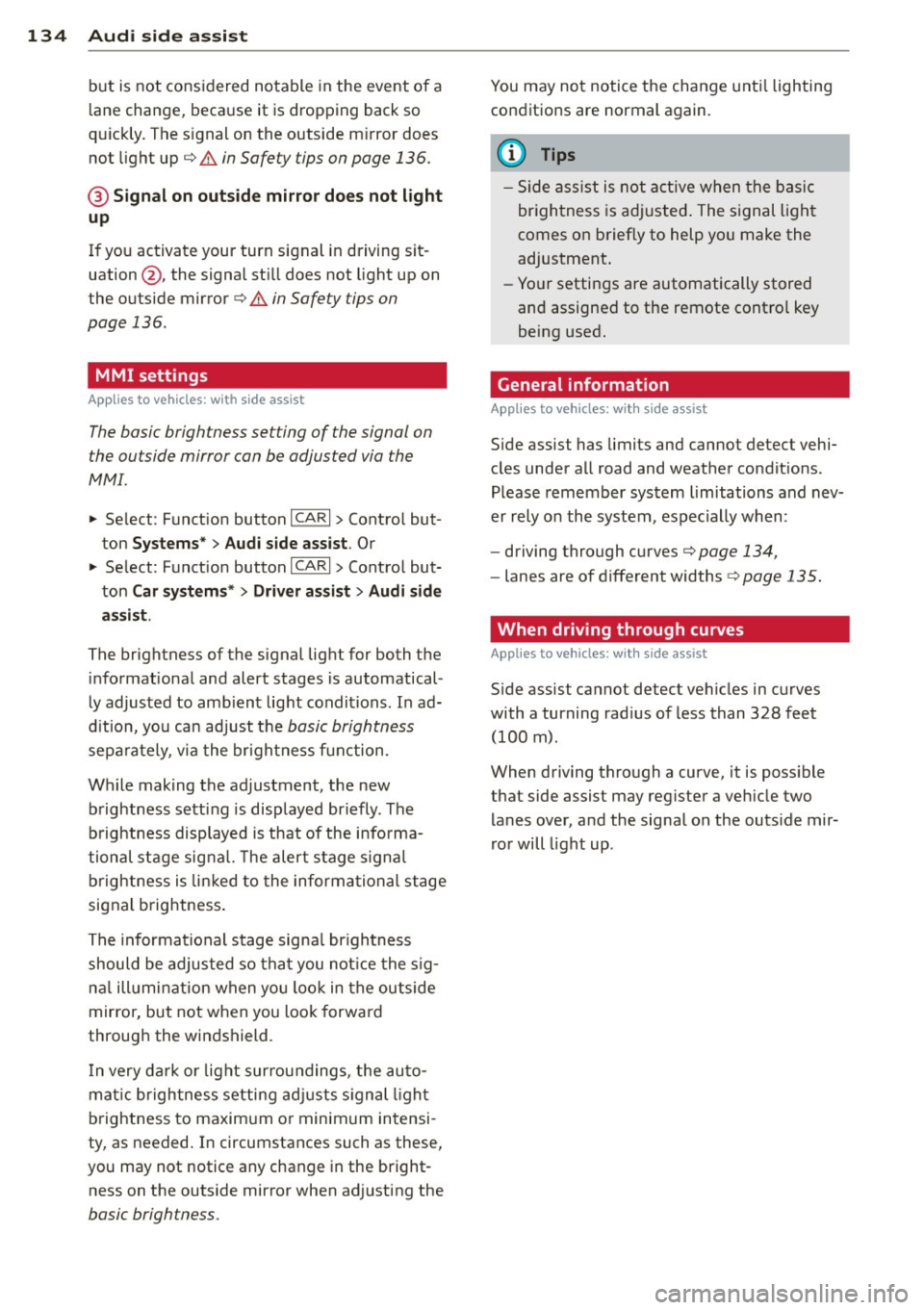
Driving situation: Vehicles dropping
back quickly
Applies to vehicles: with side assist
®
Fig. 154 Side assist: Veh icles dropp ing back quickly
CD Signal on outside mirror does not light
up
T he vehicle just passed has not yet been de
tected by side ass ist. The sign al on the out
side mirror does not light up
q .& in Safety
tips on page 136 .
@ Signal on outside mirror does not light
up
The vehicle dropping back quickly on the right
( difference in speed of more than 9 mph, or
lS km/h) has been detected by side assist,
1J1>
Page 136 of 342
134 Audi side assist
but is not considered notable in the event of a
l ane change, because it is dropping back so
qu ickly. The s ignal on the outside m irror does
not light up¢.&.
in Safe ty tips on page 136.
@ Signal on outs ide mirror does not light
up
If you activate your turn signal in driving sit
uation @, the signa l st ill does not light up on
the outside mirror¢.&.
in Safe ty tips on
page 136 .
MMI settings
Applies to vehicles: with side assist
The basic brightness se tting of the signal on
t he ou tside mirror can be adjusted via the
MMI .
.. Select : Function button ICARI > Contro l but
ton
Systems* > Audi side assist . Or
.. Select : Function button
ICARI > Control but
ton
Car systems* > Driver assist > Audi side
assist.
The brightne ss of the signal light for both the
in format ional and alert stages is automatical
ly adjusted to amb ient light conditions. In ad
d ition, you can adjust the
basic brightness
sepa rately, via the brigh tness function.
Wh ile making the adjustment, the new
brightness setting is displayed briefly . The
brightness displayed is that of the informa
tional stage signal. The alert stage signal
brightness is linked to the informational stage
signal brightness.
The informational stage signal br ightness
should be adjusted so that you not ice the sig
nal illuminat ion when yo u loo k in the outside
mirror, but not when you look forward
through the windshield.
I n very dark or l ight surroundings , the auto
mat ic brightness setting adjusts signal light
brightness to maximum or minimum intensi
ty, as needed. In circumstances such as these,
you may not notice any change in the bright
ness on the outside mirror when ad justing the
basic brightness .
You may not notice the change until lighting
conditions are normal again.
(D Tips
-Side ass ist is not active when the basic
brightness is adjusted . The s ignal light
comes on briefly to help you make the
adjustment .
- Yo ur settings are automatically stored
and assigned to the remote contro l key
being used.
· General information '
App lies to vehicles : wit h side assist
Side assist has limits and canno t detect vehi
cles under all road and weather condit ions .
Please remember system limitations and nev
er rely on the system , especially when :
- driving through curves¢
page 134,
-lanes are of different widths¢ page 135.
' When driving through curves
Applies to vehicles: wit h side assist
Side assist cannot detect vehicles in curves
with a turning rad ius of less than 328 feet
(100 m).
When driving through a curve, it is poss ible
that side assi st m ay reg ister a veh icle two
lanes over, and the signal on the outside mir
ror will light up.
Page 138 of 342

136 Audi side a ssis t
Safety tips
App lies to vehicles: wit h side ass ist
The s ide ass ist detect ion may be lim ited when
d riving around narrow street corners , on hilly
streets, and under poor weathe r cond itions.
It is poss ible that the radar sensors may also
detect other objects , such as high or stag
gered guardra ils .
Side assist does not measure actual lane
width . The system assumes a fixed lane w idth .
Detection in the left and r ight lanes is based
on this assumed lane width . When driving on
na rrow roads or when driving to the left or
right of the center of a travel lane , it is possi
b le that vehicles will be detected that are
not
in the lane next to the lane you are using.
A WARNING
- Improper reliance on the s ide assist sys
tem can cause collisions and serious per
sonal injury :
- Never rely only on side assist when
changing lanes .
- Always check rear view mirrors to make
sure that it is safe to change lanes.
- Side ass ist cannot detect a ll vehicles un
der all cond itions- danger of accident!
- Side ass ist cannot detect vehicles in time
to alert you when they approach from beh ind at very h igh speed, or fall d rop
back very quickly.
- T he radar sensor's
vision can be reduced
or entirely blocked by rain, snow, and
heavy spray. This can result in side assist
not adequately detecting vehicles or, in
some cases, not detecting them at a ll.
Always keep an eye on the direction you are traveling and the relevant area
around the vehicle .
- Please note that side assist indicates
there are approaching vehicles, or vehi
cles in your blind spot, only after your ve
hicle has reached a driving speed of at
least 19 mph (30 km/h). -
Side assist signa l does not work around
tight corners (turning radius less than
328 feet, or 100 m).
- Side assist is no replacement for the driv
er 's full attention. The driver alone is re
sponsible for lane changes and sim ilar
driving maneuvers. Always keep an eye
on the d irect ion you are traveling and the
re levant area around the vehicle.
(D Note
To ensure that side assist is not adversely
affected, you should not block the area on
the rear bumper where the radar sensors
are located with foreign objects (such as
with stickers or bi cycle racks).
(D Tips
If the pos itions of the radar sensors have
been changed as a result of a rear end-co l
lision, for instance, have s ide assist
checked by an autho rized Aud i dealer for
safety reasons.
Page 145 of 342

Parking system
General information
App lies to vehicles: with rea r park assis t/Audi park ing sys
tem plus w ith rearview camera
There are two different park assist systems
avai lab le depending on your vehicle's equip
ment leve l.
The
r ea r p ark ass is t is an acoustic park assist
system that will give you a sound warning to let you know there is something
behind the
veh icle
¢ page 143.
The Aud i p arki ng sys te m p lus with rea rvie w
ca mera
audibly and visually tells you there is
something
in front of and behind the veh icle.
A rearview camera also shows you what is be
hind the veh icle. This image he lps you when
parallel parking or reverse parking
¢ page 144.
@ Tips
The sensors must be kept clean and free of
snow and ice for the park assist to operate.
Rear park assist
Description
App lies to vehicles: with rear park assist
The rear pork assist is on audible system.
Sensors are located in the rear bumpers. If
these detect an obstacle, audible signals warn
you. The range at which the sensors begin to measure is approximately:
side 2 ft (0.60 m)
rear center
5.2 ft (1.60 m)
T he closer you get to the obstacle, the shorter
the interval between the audible signals. A continuous tone sounds when the obstacle is
less than approximately 1 foot (0 .30 meters)
away . Do not cont inue driving farther .
If the d istance to an obstacle remains con
stant, the volume of the d istance warning
gradually drops after about four seconds (th is
does not apply in the continuous tone range) .
Parking system 143
The park assist is activated automatica lly
when reverse gear is engaged. A short confir
mation tone sounds.
_& WARNING
- The parking system cannot replace the driver's attention. The driver alone is re
sponsible for parking and similar driving maneuvers .
- Sensors have blind spots in wh ich objects
cannot be detected. Pay spec ial attent ion
to small children and an imals because
the sensors cannot always detect them.
- Always keep your eyes on the vehicle 's
surroundings, us ing the rea r view mirror
as well.
(D) Note
Low obstacles already signaled by a warn
i ng can d isappear from the system's detec
tion range as they are approached and w ill
not cont inue to be signaled. Objects such
as barrier chains, trailer d raw bars, th in
painted vertica l poles or fences may not be
detected by the system, posing risk of
damage.
(D Tips
- Please follow the instructions for tow ing
a trailer
¢page 149.
-Yo u can change the vo lume and pi tch of
the signals
¢ page 148.
-
Page 147 of 342
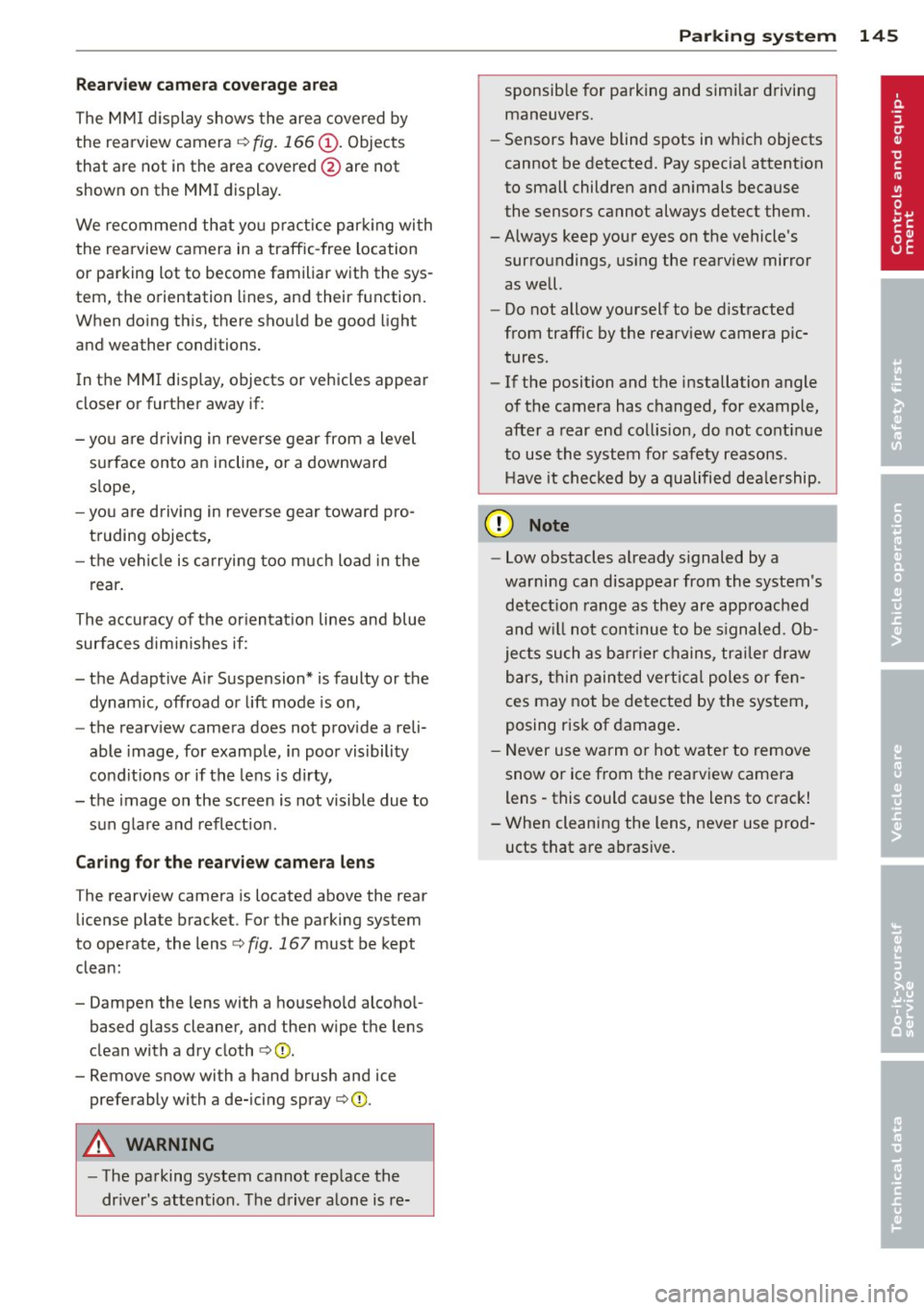
Rearv iew cam era c overage a rea
The MM I display shows the area covered by
the rearview camera c:>
fig. 166 (!). Objects
that are not in the area covered @are not
shown on the MMI display .
We recommend that yo u practice parking with
the rearview camera in a traffic-free location
or parking lot to become familiar with the sys
tem, the orientation lines, and their function.
When do ing th is, there should be good light
and weather conditions.
I n the MMI disp lay, objects or vehicles appear
closer or further away if:
- you are driving in reverse gear from a level
s u rface onto an incline, or a downward
s lope,
- you are driving in reverse gear toward pro
truding objects,
- the vehicle is carrying too much load in the
rear .
The accuracy of the or ientat ion lines and blue
surfaces dimin ishes if:
- the Adaptive A ir Suspension* is faulty or the
dynamic, offroad or lift mode is on,
- the rearv iew camera does not provide a reli
able image, for example, in poor visibility
cond it ions or if the lens is dirty,
- the image on the screen is not visible due to sun glare and reflection.
Ca ring for the rear view c amer a len s
The rearview camera is located above the rear
license plate bracket . For the parking system
to operate, the lens
c:> fig. 167 must be kept
clean:
- Dampen the lens with a househo ld alcoho l
based glass cleaner, and then wipe the lens
clean with a dry cloth c:>0 .
- Remove snow with a hand brush and ice
preferably with a de-icing spray
c:> ([).
A WARNING
-The parking system cannot rep lace the
dr iver's attention. The driver alone is re-
-
Par king system 145
sponsib le for parking and simi lar d riving
maneuvers.
- Sensors have blind spots in which objects
cannot be detected. Pay spec ia l attention
to small children and an imals because
the sensors cannot always detect them.
-Always keep your eyes on the vehicle's surroundings, us ing the rearview mirror
as well.
- Do not allow yourself to be distracted
from traffic by the rearv iew camera pic
tures .
- If the position and the installation angle
of the camera has changed, for example,
after a rear end collision, do not continue
to use the system for safety reasons.
H ave it checked by a qualified dea le rship.
(D Note
- Low obstacles a lready s ignaled by a
warning can disappear from the system's
detect ion range as they are approached
and w ill not continue to be s ignaled. Ob
jects such as ba rr ie r chains, trai le r d raw
bars, thin painted vert ica l poles or fen
ces may not be detected by the system,
posing r isk of damage .
- Never use warm or hot wate r to remove
snow or ice from the rearview camera
lens -this could cause the lens to crack!
- When cleaning the lens, never use prod
ucts that are ab rasive.
Page 149 of 342
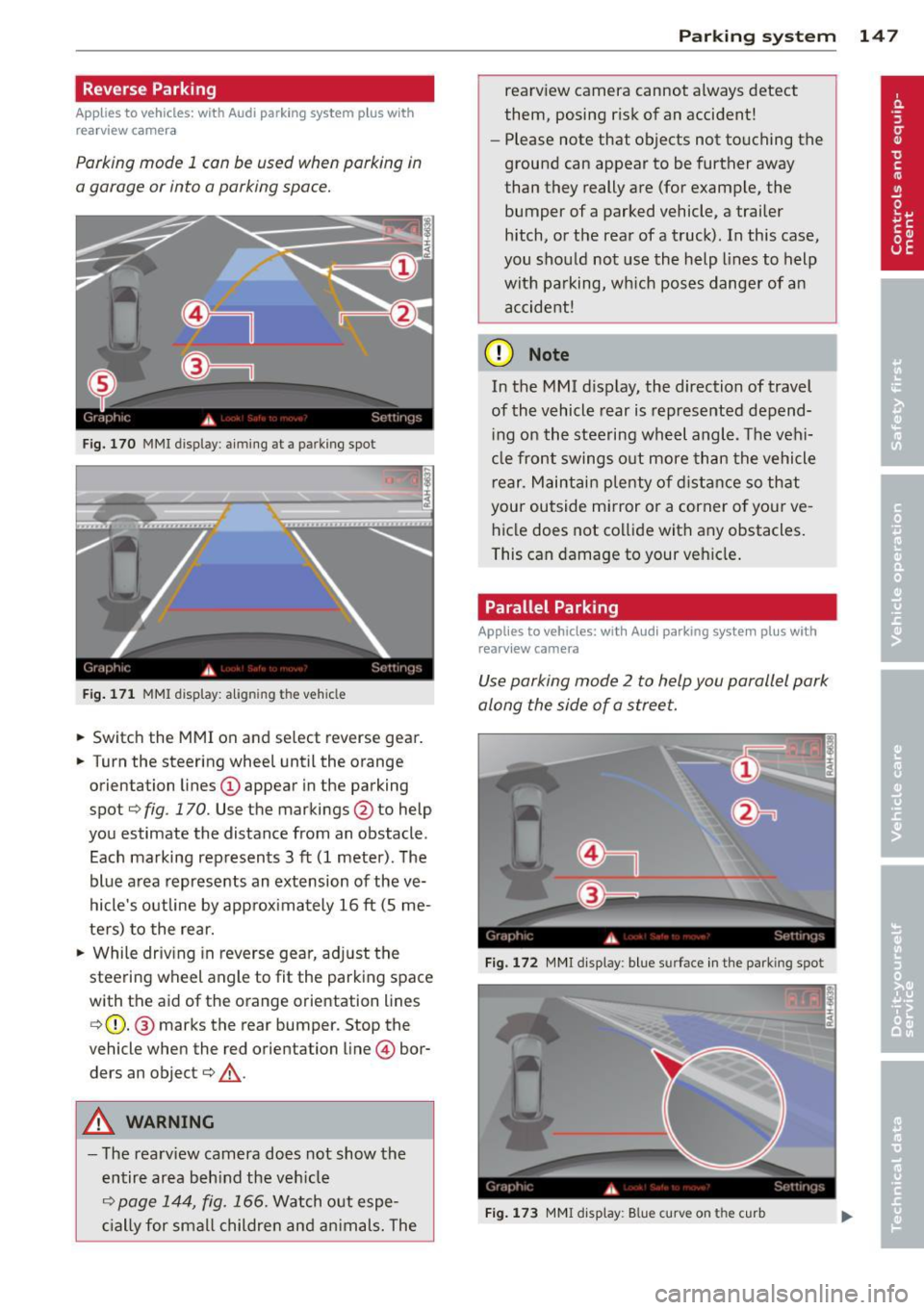
Reverse Parking
Applies to vehicles: with Audi parking system plus w ith
rea rview camera
Parking mode 1 can be used when parking in
a garage or into a parking space.
Fig. 170 MMI display: aiming at a park ing spot
Fig. 171 MMI display: aligning the vehicle
• Switch the MMI on and select reverse gear.
• Turn the steering wheel until the orange
orientation lines
(D appear in the parking
spot¢
fig. 170. Use the markings @to help
you estimate the distance from an obstacle .
Each marking represents 3
ft (1 meter). The
blue area represents an extension of the ve
hicle's outline by approximately 16
ft (5 me
ters) to the rear.
• While driving in reverse gear, adjust the
steering wheel angle to fit the parking space
with the aid of the orange orientation lines ¢ (D. @ marks the rear bumper. Stop the
vehicle when the red orientation line© bor
ders an object¢
,A.
A WARNING
-The rearv iew camera does not show the
entire area beh ind the veh icle
¢
page 144, fig. 166. Watch out espe
cially for smal l children and animals. The
Parking system 147
rearview camera cannot always detect
them, posing risk of an accident!
- Please note that objects not touching the
ground can appear to be further away
than they really are (for example, the bumper of a parked vehicle, a trailer
hitch, or the rear ofa truck). In this case,
you shou ld not use the help lines to help
with parking, which poses danger of an accident!
(D Note
In the MMI d isplay, the direction of travel
of the vehicle rear is represented depend
ing on the steering wheel angle. The vehi
cle front swings out more than the vehicle
r ear. Maintain plenty of distance so that
your outside mirror or a corner of your ve
hicle does not collide with any obstacles.
This can damage to your vehicle.
Parallel Parking
Applies to vehicles: wit h Aud i parking syste m plus with
rearv iew camera
Use parking mode 2 to help you parallel park
along the side of a street.
Fig. 172 MMI display: blue surface in the park ing spot
Fig. 173 MMI display: Blue curve on the curb
Page 237 of 342

Trailer towing Driving with a trailer
General information
Your Audi was designed primarily for passen
ger transportation .
If you plan to tow a trailer, p lease remember
that the additional load will affect durability,
economy and performance .
Trailer towing not on ly places more stress on
the vehicle, it also calls for more concentra
tion from the driver.
F or this reason, always fo llow the operating
and driving instructions provided and use
common sense.
(D Note
If you are going to tow a trai ler, you must
activate the trailer operation mode
q page 154, Towing a trailer.
Technical requirements
Traile r hitch
Use a weight-carrying hitch conforming to the
gross trailer weight. The hitch must be suita ble for your vehicle and trailer and must be
mounted securely on the vehicle's chassis at a
technically sound location. Use only a trailer
hitch with a removable ball mount. A lways
check with the trai ler hitch manufacturer to
make sure that you are using the correct
hitch.
Do not use a bumper hitch.
The hitch must be installed in such a way that
it does not interfere with the impact-absorb
i ng bumper system. No mod ifications should
be made to the vehicle exhaust and brake sys
tems . From time to time, check that all hitch
mounting bo lts remain securely fastened.
When you are not towing a trailer, remove the
trai ler hitch ball mount. This prevents the
hitch from causing damage should your veh i
cle be struck from behind~.&.
Trailer towing 235
Trailer brakes
If your trailer is equipped with a brak ing sys
tem, check to be sure that it conforms to all
regulations.
T he trailer hydraulic bra ke system must not be
directly connected to the vehicle's hydraulic
brake system
q .& .
Safety chains
Always use safety chains between your veh icle
and the trai le r.
Trailer lights
Trailer lights must meet all regulations. Be
sure to check with your authorized Audi dealer
for correct wiring, sw itches, and relays.
M irr ors
If you are unable to see the traffic behind you
using the regular outside mirrors, then you
must install extended mirrors.
It is important
that you always have clear v is ion to the rear.
_&. WARNING
- If a trailer has electrical brakes please
note that these brakes are not activated
by the factory-fitted control unit -risk of
accident!
- After removing the trailer hitch, do not
store it in you r vehicle. In case of sudden
brak ing, the hitch could fly forward and
injure you or your passengers.
- The Gross Vehicle Weight Rating for your
Audi Q7 vehicle, found on the safety
compliance labe l on the driver's side 8 -
pillar, must never be exceeded under any
circumstances. Exceeding the Gross Vehi
cle Weight Rating of your vehicle is likely
to damage your veh icle, and such dam
age will not be covered by your Limited New Vehicle Warranty. Exceeding the
Gross Vehicle Weight Rat ing will a lso
change the performance and handling
characteristics of your vehicle, which
could cause a crash resulting in serious
injury or death.
-
•
•
Page 242 of 342
24 0 Cl eaning and protec tio n
Automatic car wash
The vehicle can be washed in almost any
modern automatic car wash .
The vehicle paint is so durable that the vehicle
can normally be washed without problems in
an automatic car wash. However, the effect on
the paint depends to a large extent on the de
sign of the facility, the filte ring of the wash
water, the type of wash and care mater ial , etc.
I f the pa int has a dull appearance afte r going
through the car wash or is scratched, bring
this to the attention of the operator immedi
ately. If necessary, use a different car wash.
Before going through a car wash, be sure to
take the usual precautions such as closing the
windows and the Panoramic sliding s unroof.
Factory installed antennas must not be re
moved.
I f you have installed additional accessories on
the vehicle - such as spoilers, roof rack, etc. -
it is best to ask the car wash operator if these
should be removed.
A WARNING
Please take note of the following po ints
before going through an automatic car
wash with your vehicle, so that you can avoid damage to your vehicle .
- Compare the track of your vehicle with the distance between the gu ide rails of
the fac ility- there is a risk of damage to
the whee ls and t ires.
- Compare the height and w idth of your
vehicle with the height and width of the
t u nnel at the facility.
- Fold the exte rior mirrors flat - t here is a
risk of damag ing the exte rior m irrors.
Power folding exterior mirrors* mus t not
be folded in or out by hand. Use the pow
er function!
- Do not al low the wiper blade to fall onto
the windshield after the vehicle is dried -
there is a r isk of damag ing the paint on
the hood .
- Always read and heed all WARNI NGS and
other information ¢
page 239.
Washing the vehicle by hand
A lot of water is needed when washing a vehi
cle by hand .
.,. Before you start washing, make sure you
have read and understood the WARNINGS
¢ .&. in General information on page 239 .
.,. First soak all dried d irt unt il it is soft, then
r inse it off .
.,. As you clean you r vehicle , start w it h the
roof and work your way dow n to the bo ttom,
using a sponge, a sponge g love or a clean
brush.
.,. Rinse the sponge or the sponge glove often,
flushing it clean each time.
.,. Use spec ial car shampoo only for very per
sistent d irt .
.,. Rinse the car thoroughly wit h water .
.,. Use a chamo is leather to gently w ipe the ex-
ter io r d ry.
Use a separate sponge for cleaning the
wheels, door s ills and other regions exposed
to road dirt . In this way, you will not scratch
the pa int with coarse pa rticles imbedded in
the sponge the next time you wash the car.
A WARNING ~ -
- Do not clean the underside of the chas
sis, fenders, wheel covers , or other ha rd
to reach pa rts without protect ing your
hands and arms . You may cut yourself on
sharp-edged metal parts.
- Always read and heed a ll WARNINGS and
other information ¢
page 239.
(D Note
- Never try to remove dirt, mud or dust if
the surface of the ve hicle is dry . Never
use a dry cloth or sponge, s ince this
co uld scratch your vehicle's paint or win
dows .
- Never wash your car in bright s unlight.
Drops of water act as magn ifying lenses
and may damage your paint .
- When you wash your car in the winter: if you rinse your vehicle with a hose, be careful not to aim the stream of water