ESP AUDI Q7 2012 Owner´s Manual
[x] Cancel search | Manufacturer: AUDI, Model Year: 2012, Model line: Q7, Model: AUDI Q7 2012Pages: 342, PDF Size: 86.42 MB
Page 74 of 342
7 2 Seats and storage
Front passenger's seat
Always move the front passenger seat into
the rearmost position .
To avoid contact with the airbag while it is de
ploying, do not sit any closer to the instru
ment panel than necessa ry and always wear
the three-point safety belt provided adjusted correctly . We recommend that you adjust the
passenger's seat i n the fol low ing ma nner:
• Move the front passenger seat into the rea r
most position of the fore and aft adjustment
r ange
¢ A in Why is your seat adjustment
so important? on page 71.
• Bring the backrest up to an ( almost) uprigh t
pos it ion .
Do not ride w it h the seat reclined .
• Adjust the head restraint so the upper edge
is as even as possible with the top of your
head . If that is not possible, try to adjust
the head restraint so that it is as close to
t h is position as possible
c:> page 76 .
• Place your feet on the floor in front of the
passenger's seat .
Power front seat
adjustment
Seat adjustment controls
The operating logic for the switches corre
sponds to the construction and function of
the seat.
"' "' ~ ..,
,.._..---, 1,--~--,4 ;g
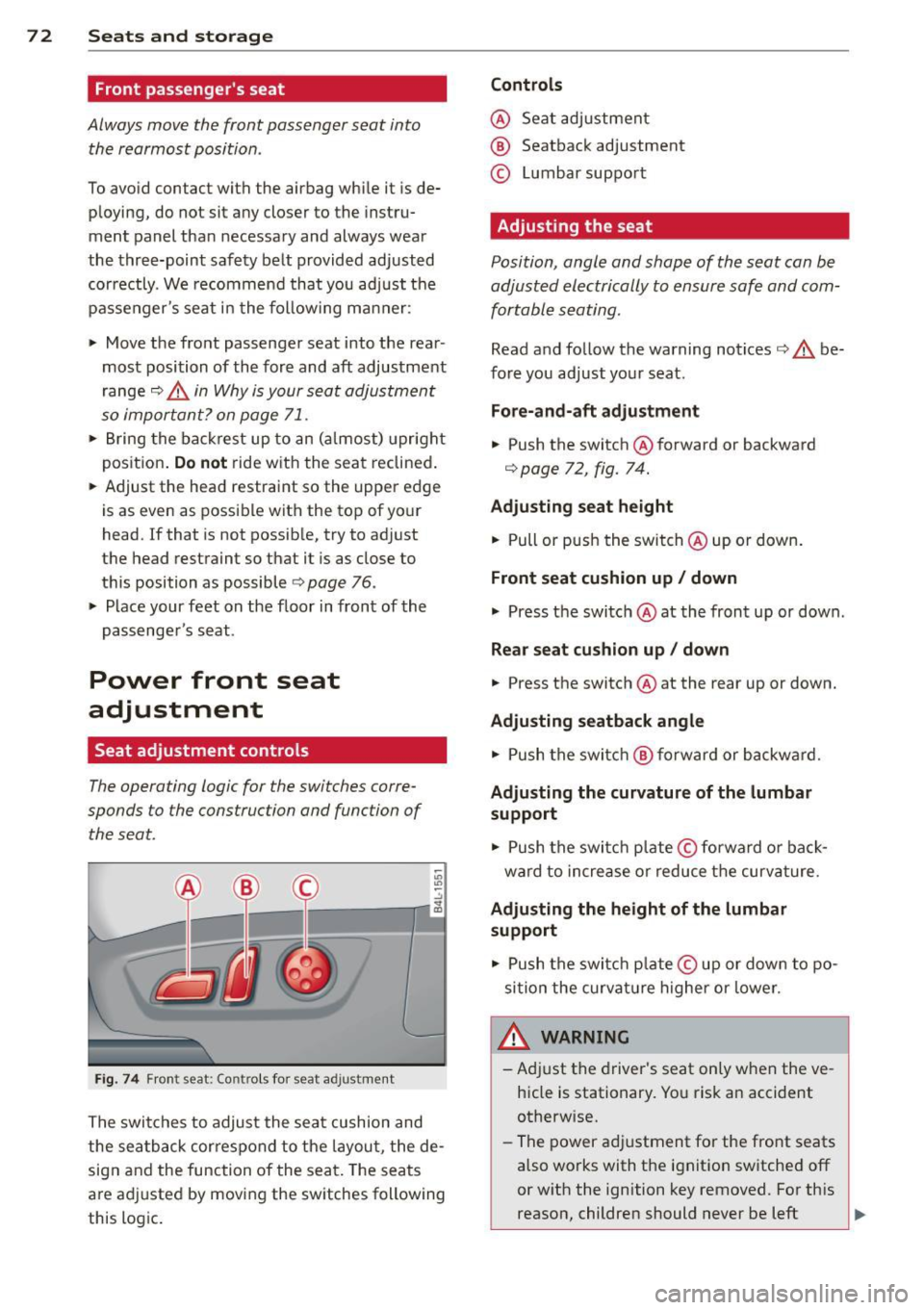
F ig . 74 Fron t seat : Co ntr ols for seat a djustment
The swi tches to adjust the sea t cushion and
the sea tback cor respond to the layou t, the de
sig n and the function of the seat. The seats
a re ad justed by movi ng the sw itches following
this logic .
Controls
@ Seat adjustmen t
® Seatback adjustment
© Lumbar suppo rt
Adjusting the seat
Position, angle and shape of the seat can be
adjusted electrically to ensure safe and
com
fortable seating .
Read and follow the warning notices c:> A be
fore you adjust yo ur seat.
Fore-and-aft adjustment
• Push the switch @forward or backward
c:> page 72 , fig. 74.
Adjusting seat height
• Pull or p ush the switch @up o r down .
Front seat cushion up/ down
• Press t he switch @at the front up or down .
Rear seat cu shion up / down
• Press the switch @at the rear up or down.
Adjusting seatback angle
• Push the switc h @ forward or backwa rd.
Ad justing the curvature of the lumbar
support
• Push the switc h plate © forward or bac k
ward to increase o r reduce t he curvature.
Adjusting the height of the lumbar
support
• Push the switc h plate © up or down to po
si tion the curva ture higher or lower.
WARNING
-Ad just the driver's seat only when the ve
h icle is stationary. Yo u risk an accident
otherwise.
- The power a djustment for the front seats
also works with the ignit ion sw itched off
or w ith the ignition key removed. For th is
reason, children should never be left ..,.
Page 75 of 342
unattended in the vehicle -they could be
injured!
- Exercise caution when adjusting the seat
height. Unsupervised or careless seat ad
justment can pinch fingers or hands
causing injur ies.
- While the vehicle is moving, the seat
backs of the front seats must not be in
clined too far to the rear because the ef
fectiveness of the safety belts and the
airbag system is severely compromised -
there is a risk of injury.
- To reduce the r isk of injury in the case of
sudden braking or accident, front pas
sengers must never ride in a moving ve
hicle wi th the seatback reclined. Safety
belts and the airbag system only offer
maximum protection when the seatback
is upright and the safety be lts are prop
erly positioned on the body. The more
the seatback is reclined, the greater the
risk of personal injury from an incorrect
seating pos ition and improperly posi
t ioned safety belts.
Seat memory
Driver's seat memory
Ap plies to vehicles: with seat memo ry
The seat adjustment settings for two drivers
can be stored using the memory buttons in
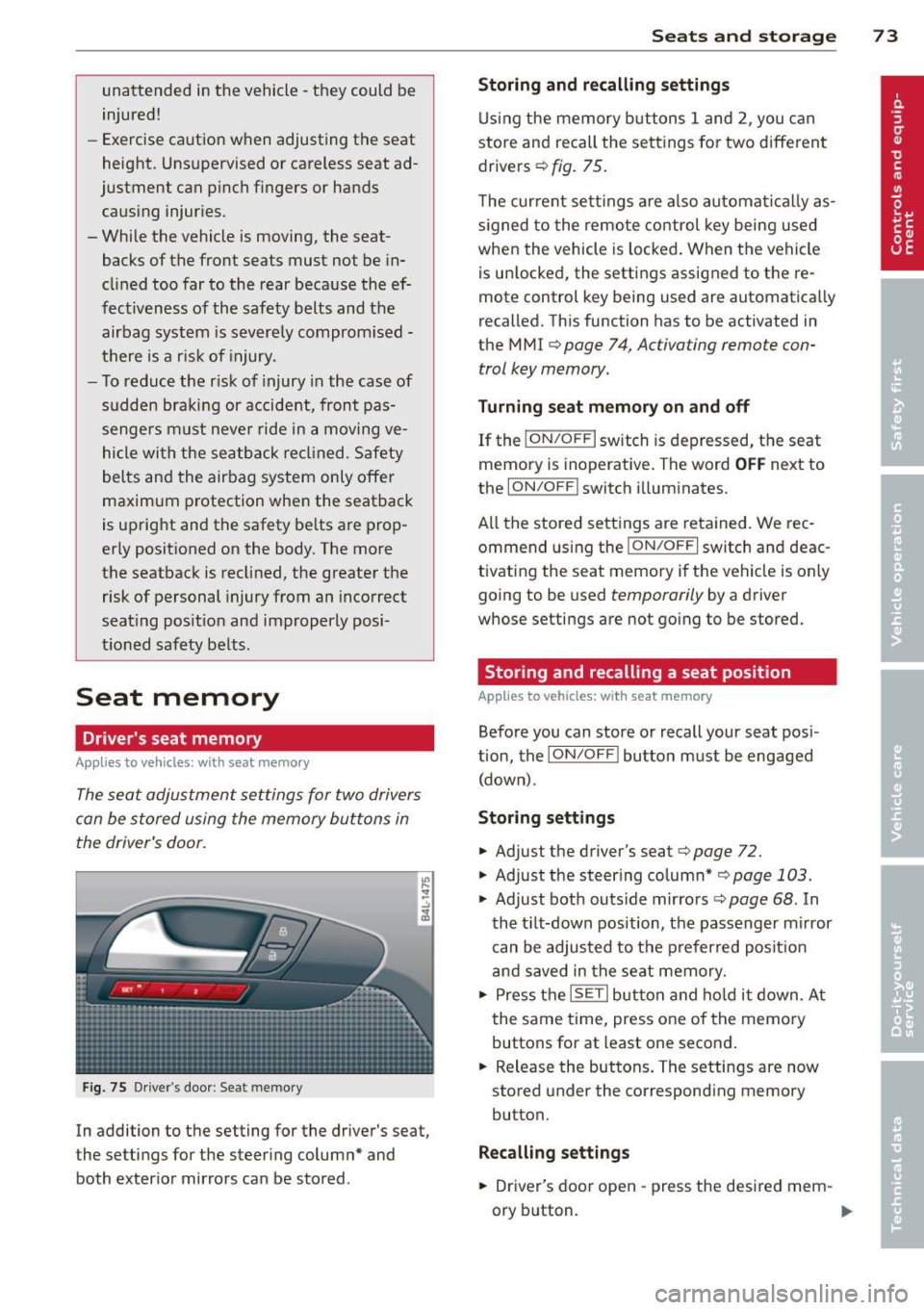
the driver's door.
F ig. 75 Driver's door : Seat memory
In addition to the setting for the driver's seat,
the settings for the steering column* and
both exterior mirrors can be stored .
Seats and storage 73
Storing and recalling settings
Using the memory buttons 1 and 2, you can
store and recall the settings for two different drivers ¢
fig. 75.
The current settings are also automatical ly as
s ig ned to the remote control key being used
when the vehicle is locked. When the vehicle
is un locked, the settings assigned to the re
mote control key being used are automatically
recalled. This function has to be activated in
the M MI ¢
page 7 4, Activating remote con
trol key memory.
Turning seat memory on and off
If the I ON/O FF I switch is depressed, the seat
memory is inoperative. The word
OFF next to
the
ION/O FF I switch illuminates.
All the stored settings are retained. We rec
ommend using the
ION/OF F I switch and deac
tivating the seat memory if the vehicle is only
going to be used
temporarily by a driver
whose settings are not going to be stored.
Storing and recalling a seat position
App lies to vehicles: wit h seat memory
Before you can store or recall your seat pos i
tion, the
ION /OFF! button must be engaged
(down) .
Storing settings
.,. Adjust the driver's seat¢ page 72 .
.,. Adjust the steer ing column* ,=;, page 103 .
.,. Adjust both outs ide mirro rs ¢ page 68 . In
the tilt-down position, the passenger mirror
can be adjusted to the preferred posit ion
and saved in the seat memory .
.,. Press the
ISETI button and hold it down . At
the same time, press one of the memory
buttons for at least one second .
... Release the buttons. The settings are now
stored under the corresponding memory
button.
Recalling settings
.,. Driver's door open -press the desired mem-
ory b utton.
ll-
Page 76 of 342
7 4 Seats and stor age
• Driver's door closed -press the correspond
ing memory button unti l the stored position
is reached.
Successf ul s torage is conf irmed a ud ibly and
by the l ight i n the
!SET ! button illuminating .
When the ve hicle is
locked , the cur rent set
tings are stored and ass igned to the remo te
control key. Bu t th e set tings stored on memo
ry buttons 1 and 2 are not deleted. They can
be reca lled at any time . When the vehicle is
unlocked , the settings assigned to the remote
control key are restored.
If you r vehicle is driven by other persons using
your remote control key, you should save yo ur
individua l seat position on one of the memory
buttons. You can reca ll your settings aga in
simply and conve niently by pressing the corre
spond ing memory butto n. When the vehicle is
l oc ked, these setti ngs are automatically re-as
signed to t he remote control key and stored.
.&_ WARNING
- F or safe ty re ason s, the sea t sett in g can
only be rec alled w hen the veh icle is st a
t ionary -othe rwise you r isk having an ac
cident.
- In an emergency, the recall operation
can be stoppe d by pressin g the
!ON/OFF I
button or by br iefly p ress ing any given
memory button.
Activating remote control key memory
App lies to vehicles: with seat memo ry
To assign the driver's seat settings to the re
mote contro l key when locking the vehicle, the
function must be activated in the MMI.
• Se lect: Funct ion button
ICARI > Cont ro l but
ton
Systems * > Seat adjustment > Driver 's
seat > Key mem. p rofile > On .
Or
• Se lect: Funct io n button
ICA RI > Cont ro l but
ton
Car system s* > Vehicle settings > Seats
> Driver's seat > Remote control key > On .
(D Tips
If you do not want anothe r driver's set
tings to be assigned to the remote control key, switch off the memory function using
the MMI or the
I ON/OF F! button
c> page 73.
Rear seats
General information
Safe transportation of passengers on the rear
seats requires proper safety pre cautions.
All passengers on the rear seats mus t be seat
ed in comp lian ce with the safety guide lines
exp lained in c>
page 170 and c> page 179 .
The co rrec t seating pos ition is cr it ic al f or the
sa fe ty of front
and rear seat passenge rs a like
c> page 163 .
A WARNING
--Occupants in the f ront and rear seats
m ust always be proper ly restrained.
- Do not let anyone ride in the ve hicle
witho ut the head restraints prov ided.
Head restraints help to reduce injuries .
- Loose items inside the passenge r com
pa rtment, can fly forward in a crash or
sudden maneuve r and injure occupants.
Always store a rticles i n the luggage com
pa rtment an d use the fastening eyes, es
pecially w he n the rea r seatbac ks hav e
been fo lded down.
- Read and heed all WARNI NGS
c> pag e 163, Prop er s eating positions
for passengers in rear sea ts.
Page 83 of 342
Retractable luggage compartment cover
The luggage compartment cover keeps lug
gage or other objects out of view .
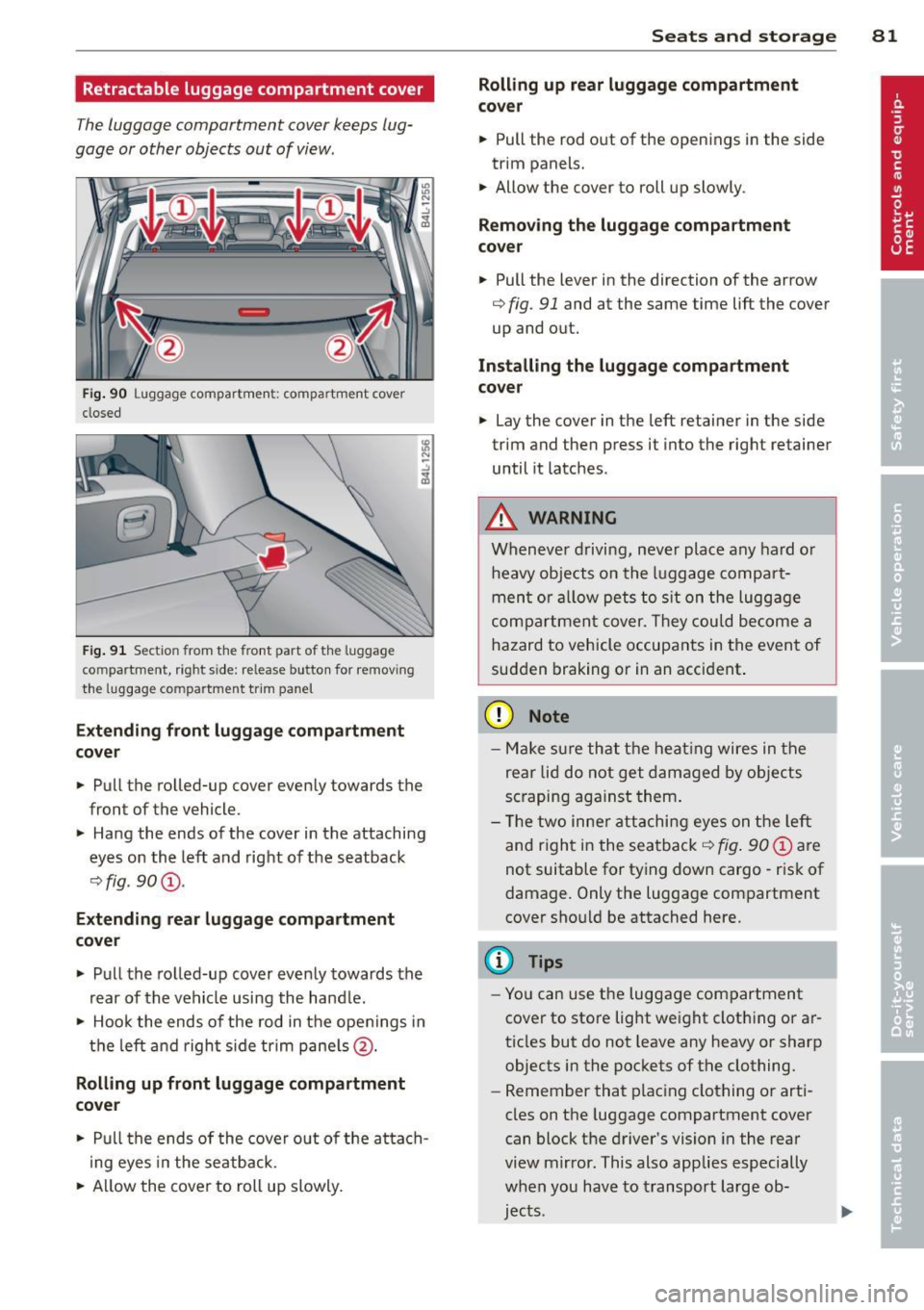
Fig. 90 Luggage compartmen t: compartment cove r
closed
Fig. 91 Sectio n from the front pa rt of the luggage
c o m partment , righ t side: release button for removing
the luggage compa rtment trim panel
Extending front luggage compartment
cover
"' Pull the rolled-up cover evenly towards the
front of the vehicle.
"' Hang the ends of the cover in the attaching
eyes on the left and right of the seatback
¢fig . 90 @.
Extending rear luggage compartment
cover
"' Pull the rolled-up cover evenly towards the
rear of the vehicle using the handle.
"' Hook the ends of the rod in the openings in
the left and right side trim panels@.
Rolling up front luggage compartment
cover
"' Pull the ends of the cover out of the attach
i ng eyes in the seatback.
"' Allow the cover to roll up slowly.
Seats and storage 81
Rolling up rear luggage compartment
cover
"' Pull the rod out of the openings in the side
trim panels.
"' Allow the cover to roll up slowly .
Removing the luggage compartment
cover
"' Pull the lever in the direction of the arrow
¢ fig. 91 and at the same time lift the cover
up and out.
Installing the luggage compartment
cover
"' Lay the cover in the left retainer in the side
trim and then press it into the right retainer
until it latches .
A WARNING
Whenever driving, never place any hard or
heavy objects on the luggage compart
ment or allow pets to sit on the luggage
compartment cover. They could become a
hazard to vehicle occupants in the event of
sudden braking or in an accident .
(D Note
-Make sure that the heat ing wires in the
rear lid do not get damaged by objects
scraping against them.
- Th e two inner attaching eyes on the left
and right in the seatback
¢ fig . 90 @ are
not suitable for tying down cargo - risk of
damage. Only the luggage compartment
cover should be attached here.
(D Tips
- You can use the luggage compartment
cover to store light weight clothing or ar
ticles but do not leave any heavy or sharp
objects in the pockets of the clothing.
- Remember that plac ing clothing or arti
cles on the luggage compartment cover
can block the driver's vision in the rear
view mirror . This also applies especially
when you have to transport large ob
jects .
Page 90 of 342
88 Seats and storage
-Any articles of clothing that you have
hung up must not interfere with the driv
er's view. The coat hooks are designed
only for lightweight clothing. Never hang any clothing with hard, pointed or heavy
objects in the pockets on the coat hooks .
Dur ing sudden braking or in an a ccident -
especi ally if the airbag is deployed -
these objects could injure a ny passe n
gers inside the vehicle.
Glove compartment
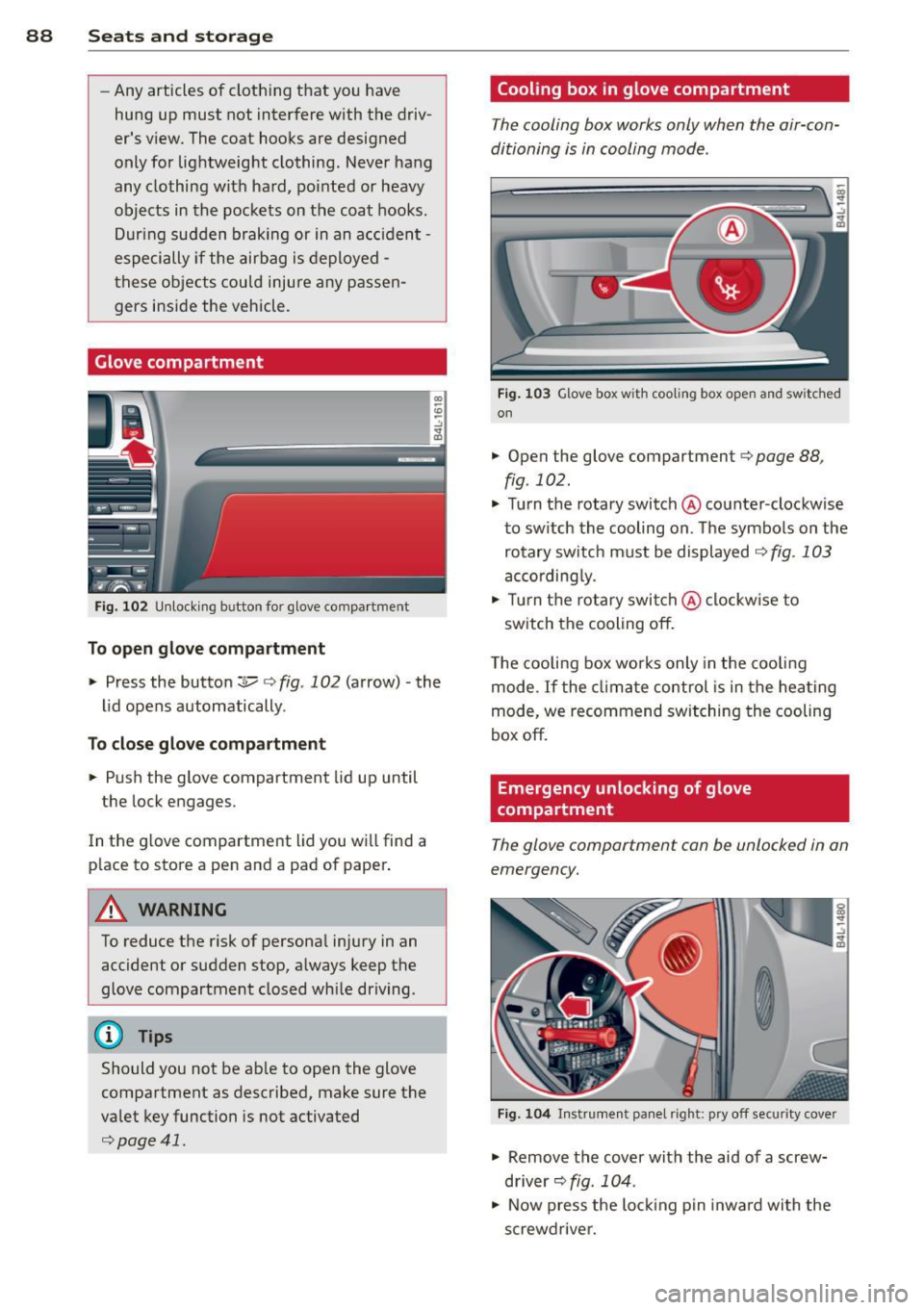
F ig . 102 U nlocki ng button for glove compa rtment
To open glove compartment
• Press the button :::!l.....-¢ fig . 102 (arrow) -the
lid opens automatically .
To close glove compartment
• Push the glove compartment lid up until
the lock engages.
In the g love compartment lid you wi ll find a
p lace to store a pen and a pad of paper .
A WARNING
To reduce the risk of personal injury in an
accident or sudden stop, a lways keep the
glove compartment closed wh ile driving.
@ Tips
Should you not be ab le to open the glove
compartment as described, make sure the
valet key function is not activated
¢page 41.
Cooling box in glove compartment
The cooling box works only when the air-con
ditioning is in cooling mode.
F ig . 1 03 Glove box with coo ling box open and sw itched
on
• Open the glove compartment¢ page 88,
fig. 102.
• Turn the rotary switch @counter-clockwise
to sw itch the cooling on. The symbo ls on the
rotary switch must be displayed
¢ fig . 103
according ly.
• Tur n the rotary swi tch@ clockw ise to
switch the cooling off.
T he cooling box wor ks only in the coo ling
mode. If the cl imate control is in the hea ting
mode, we recommend switching the cooling
box off.
Emergency unlocking of glove
compartment
The glove compartment can be unlocked in an
emergency.
F ig. 10 4 In strument panel right: pry off secur it y cover
• Remove the cover with the aid of a screw
driver~
fig . 104 .
• Now press the lo cking p in inwa rd with the
screwdrive r.
Page 94 of 342
92 Warm and cold
A WARNING
Reduced visibility is dangerous and can
cause acci dents.
-
- For safe dr iv ing it is very important that
all windows be free of ice, snow and con
densation.
- Completely fami liarize yourself with the
proper use and function of the heating
and ventilation system and especia lly
how to defog and defrost the windows.
- Never use the windshie ld wiper/washer
system in freezing weather until you
have warmed the windshield first, us ing
the heat ing and ventilat ion system. The
washe r solution may freeze on the wind
shield and reduce visibility.
(D Note
- If you suspect that the climate control
system has been damaged, switch the
system off to avo id further damages,
and have it inspected by a q ualified deal
ership.
Controls -
Repairs to the Audi air conditioner re
quire special technical know ledge and
special tools . Contact an authorized Aud i
dealer for ass istance.
@ Tips
- Keep the air intake s lots (in front of the
w indshield) free from ice, snow and de
br is in order to maintain the proper func
tion of the climate control system.
-Air inside the vehicle escapes through air vents located in t he side trim panels be
neath the rear side windows. Make sure
that the outlet slots are not cove red by
clothing, etc.
- Climate control works most effectively if
the windows and the Panoram ic sliding
sunroof* are closed. However, if the inte
r ior of a par ked vehicle is ext reme ly hot
from the s un's rays, briefly opening the
w indows can speed up the cooling p roc
ess .
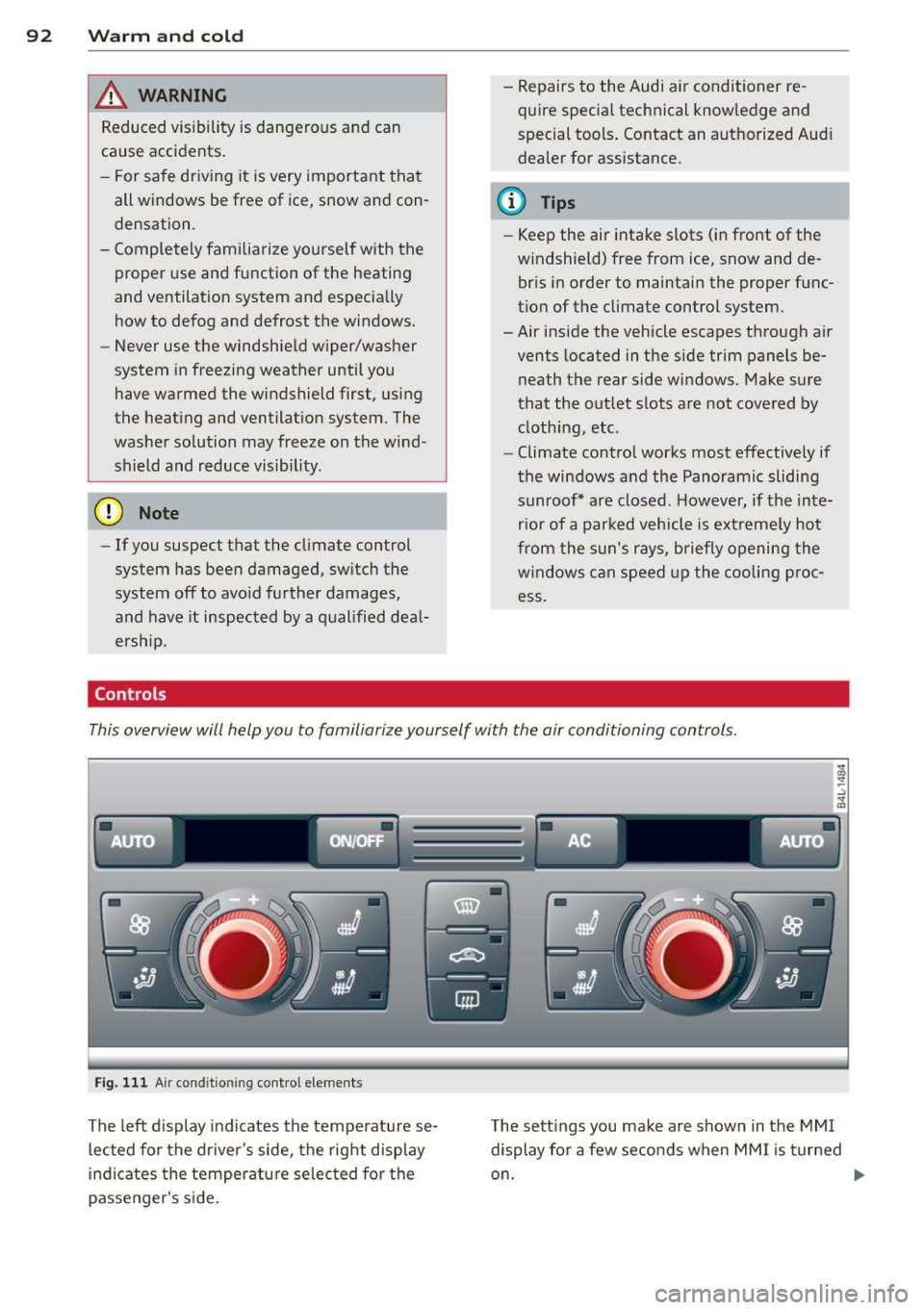
This overview will help you to familiarize yourself with the air conditioning controls .
Fig. 111 Air cond it ion ing co ntro l elements
Th e left display indicates the temperatu re se
l ected for the driver's side, the right display
i n dicates the temperatu re se lected for the
passenger's s ide. T
he sett ings you make are shown in the MMI
display for a few seconds when MM I is turned
o n.
Page 95 of 342
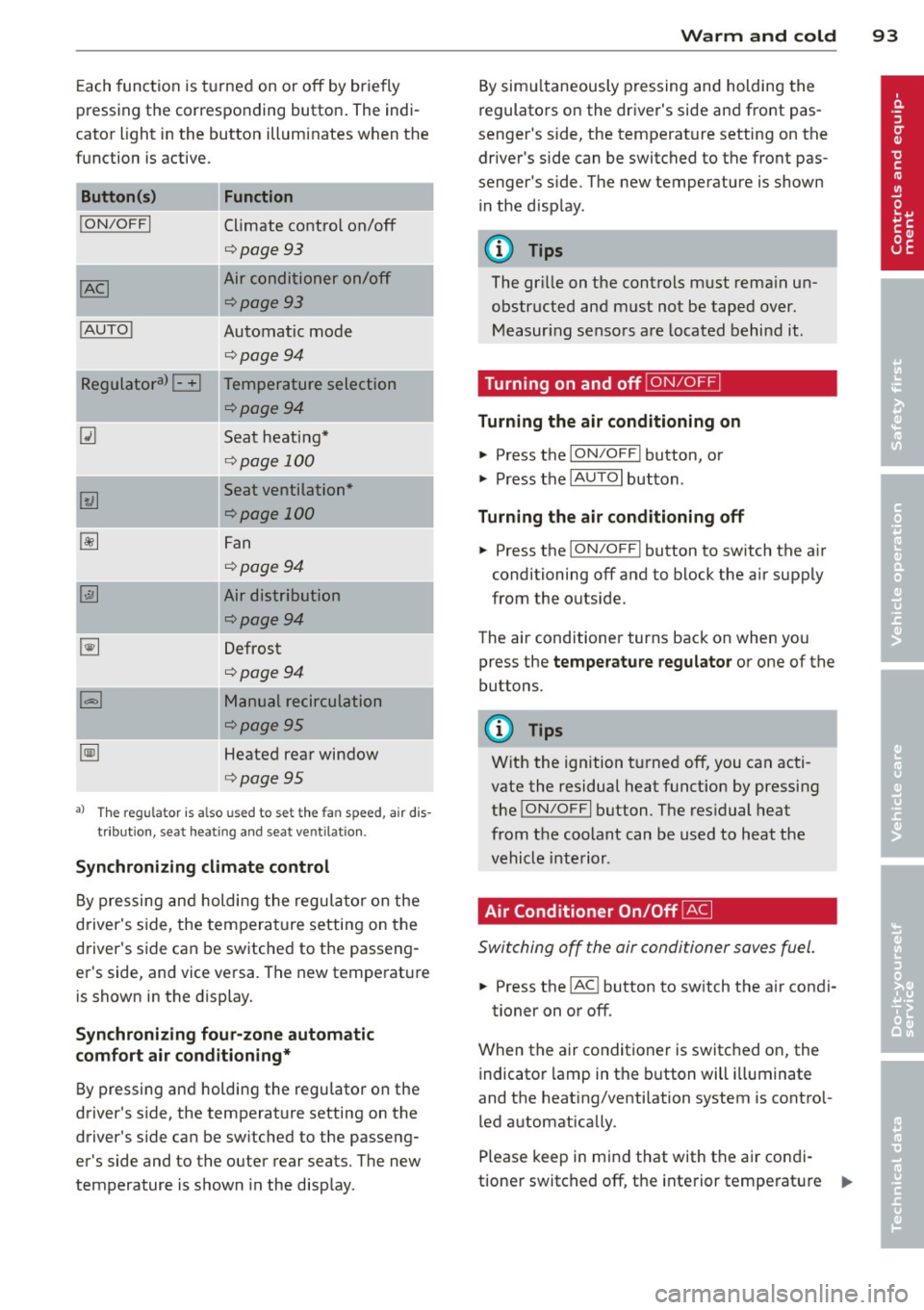
Each function is turned on or off by briefly
pr essing the corresponding button . The indi
cator light in the button illuminates when the
func tion is ac tive.
Button (s )
!ON/OFFI
! AUTO !
Function
Climate control on/off
<=>page 93
Air conditioner on/off
<=>page 93
Automatic mode
<=>page94
-~~~,--
Regulatora) G Temperature selection
~
I
<=>page94
Seat heating*
<=> page 100
Seat ventilation*
<=>page 100
Fan
<=> page94
Air distribution
<=>page94
Defrost
<=>page94
Manual recirculation
¢page95
Heated rear window
<=>page95
al Th e regulat or is also used to set t he fa n speed, air dis
tributio n, seat he ating and sea t ve ntilat io n.
Synchronizing climate control
By pressing and holding the regu lator on the
d river's side , the tempera ture setting on the
d river's side can be switched to the passeng
er's side, and vice versa . The new temperature
is shown in the display.
Synchroniz ing fou r-zone automatic
comf ort air c ond iti oning*
By pressing and holding the regu lator on the
drive r's side, the temperature setting on the
drive r's s ide can be sw itched to the passeng
er's side and to the ou ter rear seats. The new
temperature is shown in the display .
Warm and c old 93
By sim ultaneously pressing and holding the
regulators on the driver 's s ide and front pas
senger 's s ide, the temperat ure setting on the
driver's side can be switched to the front pas
senge r's s ide. T he new temperature is shown
in the d isp lay .
@ Tips
The gr ille on the controls must rema in un
obstructed and must not be taped over.
Measur ing senso rs are located behind it .
Turning on and off~
Turning the air conditioning on
"' Press the ION/O FF! button, or
"' Press the
IAUTO I button.
Turning the air conditioning off
"' Press the ION/O FF! button to sw itch the a ir
conditioning off and to block the air supply
from the ou tside.
The air conditioner turns back on when yo u
press the
temper atu re regulator or one of the
buttons.
(D Tips
Wit h the ignition t urned off, you can acti
vate the residual heat funct ion by pressing
the
! ON/O FF I button . The res idual heat
from the coolant can be used to heat the
vehicle interior .
Air Conditioner On/Off~
Switching off the air condi tioner saves fuel .
"' Press the IAC ! button to sw itch the a ir condi-
tioner on or off .
When the air conditioner is switc hed on, the
indicator lamp in the b utton will illuminate
and the heat ing/venti lation system is control
led automatically .
Please keep in mind that with the air condi
tione r switc hed off, the interior temperat ure
1JJ>
Page 107 of 342

Ignition lock and ignition switch
Ignition key positions
The engine con be started or turned off with
the ignition key.
Fig. 119 Igni tion switch pos it io n s
Position @
The ignition key can be inserted into the igni
tion switch in this position . This automatically
unlocks the steering column lock . When the
ignition key is removed, the steering column
lock is automatically locked
Q .&. .
Switching the ignition on/preheating (D
Turn the ignition key to this position and re
lease it. On vehicles with a d iesel engine*, the
system can preheat in this position .
Starting the engine@
The engine starts with the key in this position.
Major electrical loads are temporarily turned
off.
Ignition off@
Turn the ignition key to this position and re
lease it.
A WARNING ,~ ~
- Never remove the key from the ign ition
lock whi le the vehicle is moving. The
steering wheel will lock, causing loss of
control.
- If you have to leave your vehicle, even for
just a minute, always remove the ignition key and take it with you. This is especially
important if you are going to leave chil-
On the road 105
dren unattended in the vehicle. The chil
dren could start the engine or use other
vehicle controls. Unsupervised use of ve
hicle controls (for example, power win
dows) can cause ser ious personal inju
ries.
(D Note
- If the I symbol in the display blinks,
there is a malfunction in the electronic
steering column lock . Follow the instruc
tions in
Q page 33, i Steering malfunc
tion .
-If the . symbol in the display blinks,
there is a malfunction in the electronic
ignition lock . Fol low the instructions in
Q page 34, .Pe Ignition lock malfunction.
a) Tips
-If you release the ignition key in position
@, the key automatically returns to posi
tion (!).
- If you open the driver's door when the ig
nition is sw itched on, a buzzer sounds
and the message
Ignition is on appears
in the instrument cluster display. Please
switch the ignition off.
- T o prevent malfunctions in the ign ition
lock, remove any dirt or deposits from
the key bit so that they do not enter the
ignition lock.
Ignition key safety lock
The ignition key con only be removed when
the selector lever is in the "P" (Pork) position.
After turning off the ignition, the ignition key
can only be removed from the ignition lock
when the selector lever is in the "P" (Park) po
sition. After you have removed the key, these lector lever is locked and cannot be moved.
Page 112 of 342
110 On the road
The parking brake warning light. (USA)/ .
(CON) illuminates when the parking brake is
set and you switch on the ignition.
_& WARNING
-
Always release the parking brake com
pletely. A partially engaged brake will
overheat the rear brakes, reduce their ef
fectiveness and cause excessive wear. This could lead to brake failure and an accident .
(D Note
Only after the vehicle has come to com plete stop, should you firmly set the park
ing brake and move the selector lever into
"P".
Parking
To prevent a parked vehicle from rolling
away, there are a few things you should do .
When you park your vehicle, do the
following
• Stop the vehicle using the brake pedal.
• Apply the parking brake firmly .
• Move the selector lever into the
P position
~ &.
• Switch off the engine and remove the igni-
tion key from the ignition lock.
When you park your vehicle on hills, do
the following
• Stop the vehicle using the brake pedal.
• Apply the parking brake firmly.
• If you are parking headed downhill, turn
the front wheels
toward the curb.
• If you are parking headed uphill, turn the
front wheels
away from the curb.
• Move the selector lever into the
P position.
• Switch off the engine and remove the igni
tion key from the ignition lock.
_& WARNING
This is how you can reduce the risk of in
jury when leaving your vehicle. -
Never park the vehicle where it can come
in contact with dry grass, spilled fuel or
any other flammable materials.
- When parking on hills, always turn the
wheels so that the front wheels will first
roll into the curb, if the vehicle should
start to roll.
- Never allow anyone - especially small
children - to remain in the vehicle when
it is locked. locked doors make it more
difficult for rescuers to access the pas
senger compartment in the event of an
emergency. Danger to life!
- Never leave children unsupervised in the
vehicle. Children could release the park
ing brake or move the gearshift lever out
of gear. The vehicle could start to roll
away and cause an accident.
- No matter what the season is, the tem
perature in a parked vehicle can reach
dangerous levels.
@ Note
-Please exercise care when you park your
vehicle in parking areas with parking bar
riers or curbs. Parking barriers and curbs
vary in height and could damage your
bumper and related components as the
front of your vehicle moves over a barrier or curb that is too high, as you park or as
you back out of a parking spot. In order to be sure that no such damage can oc
cur, you may wish to stop short of having
the front tires of your car touch the park
ing barrier or curb.
- Please also exercise exceptional care
when you drive up or down steep ramps
or drive over curbs or other obstacles, for
which the vehicle is not designed, be
cause components of the vehicle close to
the ground, such as bumper covers, spoilers and suspension and exhaust sys
tem components, may become dam aged.
Starting on hills
Hill Hold makes it easier to start on hills.
Page 113 of 342

The system is activated when the brake pedal
is depressed
for a few seconds. For this, the
veh icle must be standing in uphill driving di
rection .
After releasing the brake pedal, the brake
power is held for a
brief moment to prevent
the vehicle from rolling back when starting. At
this time, you can easily begin to move your
vehicle.
A WARNING
- If you did not begin moving immediately
after releasing the brake pedal, under
certain circumstances, the vehicle would
begin to roll backward. Depress the
brake pedal immediately or engage the
parking brake.
- Should the engine stall, depress the
brake pedal immediately or engage the
parking brake.
- In order to prevent the vehicle from roll ing back unintentionally when starting in
stop-and -go traffic, keep the brake pedal
depressed for a few seconds before driv
ing
off.
- When you leave the vehicle -even if only
briefly -, switch
off the ignition and
make sure to remove the ignition key. Al
so engage the
parking brake to prevent
your vehicle from rolling unintentionally. This particularly applies if ch ildren are
left in the veh icle -danger of acc ident!
On the road 111
Cruise control
Switching the system on
The cruise control system makes it possible to
drive at a constant speed starting at 20 mph (30 km/h) .
®-
Fig. 124 Co ntro l l ever w ith set bu tton
Fig. 125 Disp lay : Se lected speed
.. Pull the lever to position @<=:> fig. 124 to
sw itch the system on .
.. Drive at the speed you wish to set.
.. Press button @to set that speed.
T he display
c::> fig . 125 will show the set speed.
The display may vary depending on the type of
display in your vehicle. The indicator light
tB;m~1~ (US model)/ . (Canadian model) will
also light up in the instrument cluster .
A WARNING
-Always pay attention to traffic even when
the cruise control is switched on . You are
always responsible for your speed and
the distance between your vehicle and
other veh icles.
- For safety reasons, the cruise control
should not be used in the city, in stop
and-go traffic, on twisting roads and
when road conditions are poor (such as