instrument cluster AUDI Q7 2012 Owner´s Manual
[x] Cancel search | Manufacturer: AUDI, Model Year: 2012, Model line: Q7, Model: AUDI Q7 2012Pages: 342, PDF Size: 86.42 MB
Page 122 of 342
120 Adapti ve crui se control
_&. WARNING
-
Following other vehicles too closely in
creases the risk of a crash and serious per
sonal injury .
- Following other vehicles too closely, par
ticu larly at higher speeds increases the
risk of coll is ions and serious personal in
jury.
- Setting short distances to the traffic
ahead reduces the time and distance
available to bring your vehicle to a safe
stop and makes it even more necessary
to pay close attention to traffic .
- Always select a speed and distance to
traffic ahead that is safe and appropriate
under the prevailing traff ic, road, weath
er and lighting conditions.
- Never rely on the distance control fea
ture of ACC a lone to prevent rear-end col
lis ions. Always be prepared to b rake and
take evasive act io n to avoid co llisions
and other ac cident situations.
- Never allow the clos ing speed between
yo u a nd other vehicles to be so h igh that
the adaptive cruise control may not be
able to slow your vehicle safe ly . If clos
ing speed is too high, yo u m ust app ly the
brakes yourself to reduce the risk of a
rear-end crash.
- Always select a greater following dis
tance to the veh icle ahead on wet roads
than on dry roads.
- Always read and heed the information
and WARNINGS
¢ &. in Description on
page 113.
(D Tips
The distance setting is reset to the factory
default
DIS TANCE 3 the next time the ig
nition is turned on.
Driver information
Displays in the instrument cluster
Applies to veh icles: w ith adaptive cruise contro l
Depending on the driving situation, driver in
formation is displayed in the instrument clus
ter .
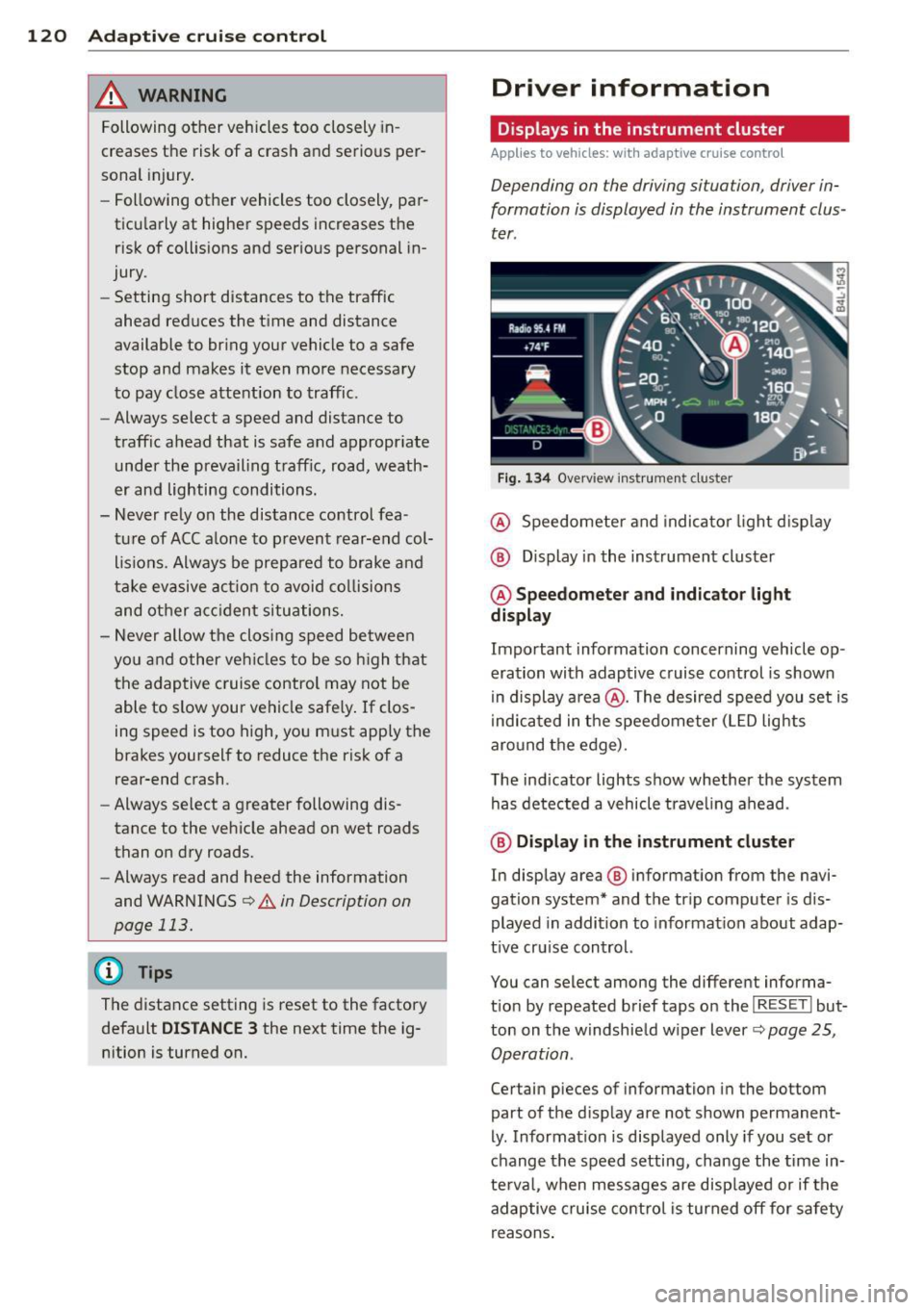
Fig . 1 34 Overview ins tr u me nt cluster
@ Speedometer and indica to r li ght d isp lay
@ Display in the instrument cluster
@ Speedometer and indi cato r light
display
Important information concerning vehicle op
eration with adaptive cruise control is shown
in display a rea @. The desired speed you set is
i ndica ted in the speedometer (L ED lights
aro und the edge).
T he ind icator lights show whether the system
has detected a vehicle trave ling ahead .
@ Display in the in strument cluster
In display area @ information from the navi
gation system* and the tr ip computer is dis
played in addition to informat ion about adap
t ive cru ise control.
You can select among the different informa
t io n by repeated brief taps on the
I RESET I but
ton on the w indshie ld w iper lever
c::> page 25,
Operation .
Certain pieces of information in the bottom
part of the d isplay are not shown permanent
ly . Information is displayed only if you set or
change the speed setting, change the time in
te rva l, when messages are disp layed or if the
adaptive cruise contro l is turned off for safety
reasons .
Page 123 of 342

Display in the speedometer
Applies to vehicles: with adaptive cruise control
Fig. 135 D isplay in t he s pee domete r
Des ired spe ed
The desired speed set by the driv er is dis
p layed by a red L ED.
If the desi red speed was set between two
lines on the speedometer using the
I SE TI but
ton, the two closest light emitting diodes will
come on <=>
fig. 135.
The system a llows only speeds to be set be
tween 20 to 95 mph (30 to 150 km/h) to be
set. This speed range is faint ly illuminated in
the speedometer (L ED lights).
Ind icator light s (symbol s)
-- Open road:
T he ind icator light _
shows that ACC is active and that no moving
veh icle has been detected with in range of
the radar sensor up ahead in your lane of
your lane of travel. Your speed is adjusted according to the speed of the vehicle up
front . ACC acce lerates and brakes automati
ca lly within the system's capab ilities .
-- Driver int ervention prompt : The
red flashing warning light- means
Request for dri ver to assum e co ntr ol. You
as the dr iver must s low the vehicle with the
f oot brake. The symbol - tells you
t h at the adaptive cruise control is not able
to slow the vehicle down enough to keep a
e nough distance to the vehicle in front of
you. A warning tone will also sound when
Ad apti ve crui se control 121
the symbol appears. For more information
about the driver intervention prompt
r::!) page 124.
_& WARNING
Improper use of the adaptive cruise con
trol features and inattent ion can lead to a
crash and serious personal injury.
- Never allow the closing speed between
you and othe r vehicles to be so high that
the adaptive cruise control may not be ab le to slow your vehicle safely . If clos
ing speed is too high, you must apply the
brakes yo urself to reduce the risk of a
rear-end crash.
- Always select a greater following d is
tance to the vehicle up ahead on wet
roads than on dry roads.
- Always read and heed the info rmation
and WARNINGS <=>
& in Description on
page 113 .
(D Tips
-If you use the accelerator to go faste r
t han t he speed of the vehicle ahead of
you , the dr iver intervention prompt will
not be accompan ied by a warn ing tone.
- If the speed you previously set is exceed
ed, the indicator light in the speedome
ter will switch off.
Display in the instrument cluster
Appl ies to vehicles: wit h adaptive cruise control
F ig. 136 D isp lay in the in strument clust er
-
Scroll through the available information dis
plays by br iefly tapp ing the
I RES ET! button at
the end of the windshield wipe r lever . You can ..,.
Page 126 of 342
124 Adaptive cruise control
control is turned off . A warning tone also
sounds as a reminder.
ACC off: manual control !
The text message ACC off: manual control !
appears after the vehicle has been brought to
a standstill by the adaptive cruise control. In
this case you must depress the brake pedal to
prevent the vehicle from rolling . A warning
tone sounds as a reminder .
Selector lever position !
The text message Selector lever position ! ap
pears when the selector lever is moved to po
sition
N . In this position, adaptive cruise con
trol is not available .
Driver intervention prompt
Applies to vehicles: with adaptive cruise co ntrol
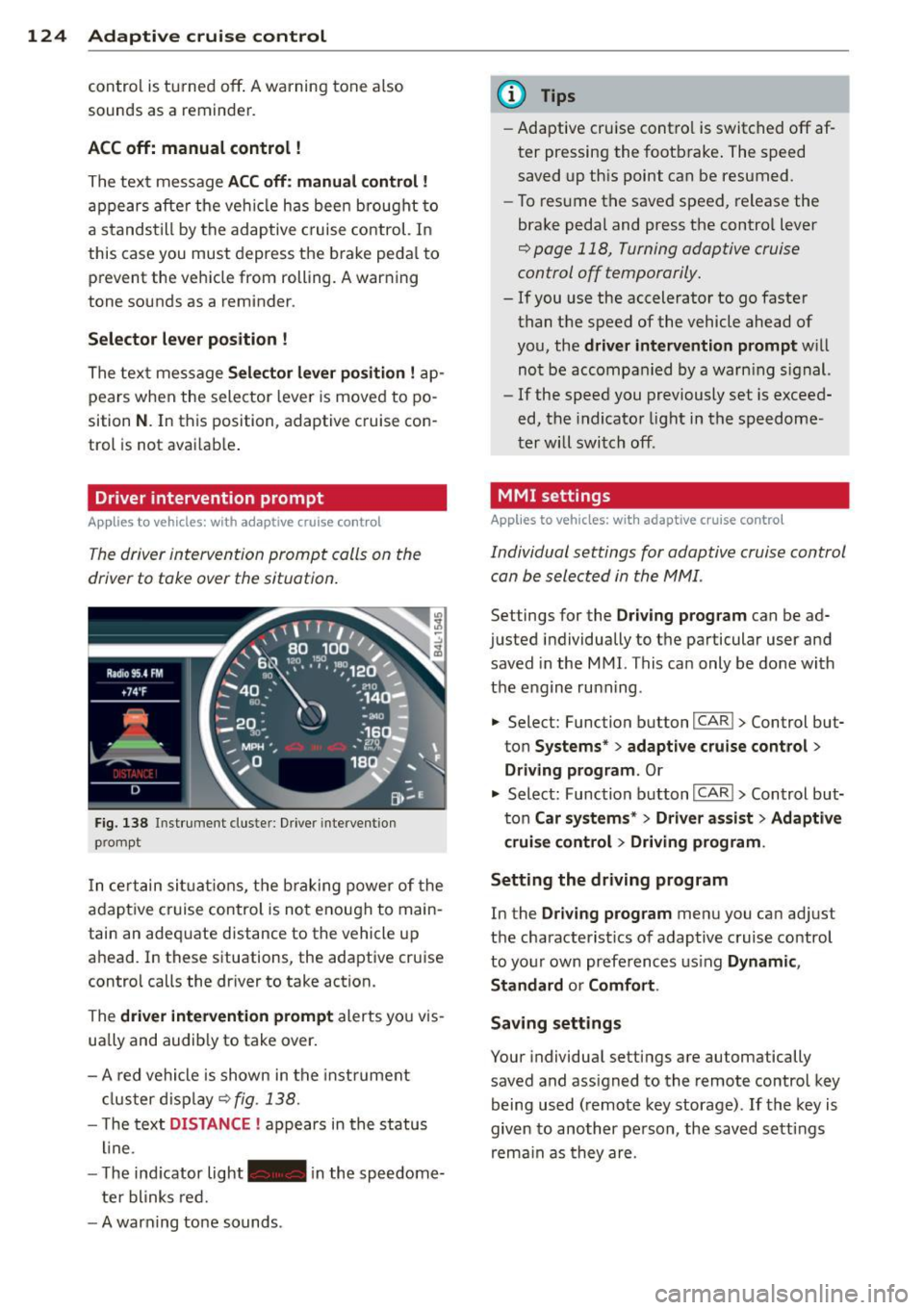
The driver intervention prompt calls on the
driver to toke over the situation.
Fig. 138 Inst rument clus te r: Driv er in tervent ion
p romp t
In certain situations, the braking power of the
adapt ive cr uise control is not enough to main
tain an adequate distance to the vehicle up
ahead . In these situat ions, the adaptive cruise
contro l calls the dr iver to take action.
The
driver intervention prompt alerts you vis
ually and audib ly to take over.
- A red vehicle is shown in the instrument
cluster display ¢
fig. 138.
- T he text DISTANCE ! appears in the status
line .
- T he indicator light- in the speedome
ter blinks red.
- A warning tone sounds .
(D Tips
-Adaptive cruise contro l is switched off af
ter pressing the footbrake. The speed
saved up this point can be resumed.
- To resume the saved speed, release the
brake pedal and press the control lever
¢ page 118, Turning adaptive cruise
control off temporarily.
- If you use the accelerator to go faster
than the speed of the vehicle ahead of
you, the
driver intervention prompt w ill
not be accompanied by a warn ing s ign al.
- If the speed you previously set is exceed
ed, the indicator light in the speedome
ter will switch off.
MMI settings
Applies to vehicles: wit h adaptive cruise contro l
Individual settings for adaptive cruise control
can be selected in the MMI.
Settings for the Driving program can be ad
justed individually to the particular user and
saved in the MMI. This can only be done with
the engine ru nning .
• Select: Function button
I CAR !> Control but
ton
Systems * > adaptive cruise control >
Driving program . Or
.,. Select: Function b utton I CAR !> Control but
ton
Car systems* > Driver a .ssist > Adaptive
cruise control
> Driving program .
Setting the driving program
In the Driving program menu you can adjus t
the characterist ics of adaptive cruise control
to your own preferences using
Dynamic,
Standard
o r Comfort .
Saving settings
Your individual settings are automatically
saved and ass igned to the remote control key
being used (remote key storage) .
If the key is
given to another person , the saved settings
remain as they are .
Page 129 of 342

The Audi braking guard is active from a speed
of approx. 20 mph (30 km/h) and works with
in the system limits
¢ page 125 even when
the adaptive cruise contro l is deact ivated.
A radar senso r is bui lt into the front of the ve
hicle
¢ page 114, fig. 127. The system is in
tended to measure the distance to reflect ive
surfaces. If a measurement is not possible,
the system does not respond .
When the measurement has been taken, the
system can recognize a poss ibly hazardous sit
uation, for example, when a vehicle up ahead
in your lane of travel suddenly brakes or when
your ow n ve hicle is moving at high speed to
wards a much s lowe r vehicle up ahead . As
soon as the system senses that a possible co l
l ision with the vehicle up ahead can only be
avoided by immediate full brake appl ication or
by an avoidance maneuver, a warning appears .
The system has a defau lt response time to be
ab le to sig na l befo re a col lision occu rs. This
system response time is a utomat ica lly re
d uced if you acce lerate actively, for example
to join a highway. Braking, transverse acce ler
ation and the steering ang le can lead to a re
duced system response time. The warning is
deactivated if you begin to overtake with full
acceleration.
The system can make yo u aware of two differ
ent hazardo us situations:
Distance
The distance warn ing is g iven if the sys tem
calc ulates that the re is not enough d istance
to the vehicle up ahead a period of more than 5 seconds. If the distance is less than 30 feet
(9 meters) at SO mph (80 km/h), for example,
an optical d isplay comes on in the instrument
cluster
c> fig . 146.
If the vehicle ahead brakes sharply, A udi brak
ing guard cannot help you to avoid a co llision,
even in the case of an immediate response.
Take immediate act ion to avoid the collision
and increase the distance to the vehicle up
ahead .
Adapti ve crui se control 127
Speed
If there is a much slowe r vehicle mov ing up
ahead in your lane, or if the vehicle ahead brakes sharply, the Audi brak ing guard calcu
lates the point from which a collision can only
be avoided by f ull braking or by an avo idance
maneuver . If a warning does sound, a possible
collision with the veh icle in front can only be
avo ided through an evas ive maneuver or by
braking.
The warning is given in two stages:
- Pre-warnin g: A visua l display appears in the
instrument cluster and a warning tone
sounds.
- Acute w arning : If you do not respond to the
pre-warning, the second stage warning is
given. A quick brake application helps to di
rect your attention to the road and traffic
situat ion.
Under heavy braking, the brake assistant
i=> page 114 also helps you benefit from maxi
mum brak ing eff ic iency.
_& WARNING
Inattention can cause collisions, other ac
cidents and ser ious personal inju ries.
- Always pay close attent ion to the traffic,
even when the Audi braking guard is
sw itched on. The Audi braking guard pro
vides a wa rning but does not brake the
car for you. You must app ly the brakes
yourse lf!
- Always keep the safe and lega l distance
between yo ur vehicle and vehicles up
ahead.
- Aud i brak ing g uard wor ks within lim its
and will no t respond outside the system
limits, fo r example when approach ing a
stopped vehicle or stationary obstacle (end of a traffic jam or vehicle that has
broken down in traffic).
- Always remember that the radar sensor
for the Audi braking guard works within
defined detect ion and range limits that
may prevent the proper detection of oth
er vehicles .
Page 130 of 342

128 Adapti ve crui se co ntrol
-The radar sensor's function and range
can be reduced by rain, snow and heavy
spray. Moving vehicles up ahead may not be promptly detected or may not be de
tected at all.
- Always pay careful attention to the traf
fic s ituation and be ready to intervene
and be ready to take complete control
whenever necessary.
- Reflective surfaces includ ing crash barri
ers or tunnel entrances may impair the
function of the radar sensor.
Settings in the MMI
Applies to vehicles: with adaptive cruise control
T he settings of the Audi braking guard are
performed in the MMI.
._ Select : Funct ion button ICARI > Control but
ton Systems * > Audi brak ing guard . Or
._ Select : Funct ion button
ICARI > Control but
ton Car system s* > Driver as sist> Audi
braking guard .
- System -the Audi braking guard system can
be switched
On and Off .
-Earl y warning - the acoustic warning and
the messages can be switched
On and Off .
(D) Tips
When handing over the keys to another pe rson, the prev ious settings are adopted
if the Audi braking guard is act ivated
~ page 43.
Driver's information in the instrument
cluster display
Applies to vehicles: with adaptive cruise co ntrol
braking gua rd activated
This message appears whe n the Audi braking
guard applies the b rakes during a second
stage (acute) warning .
braking gua rd off
This message appears whe n the system has
been deact ivated v ia the MMI. This message also appears briefly at each beginning of a trip
if the system is switched off.
T his message a lso appears when the system is
not availab le because of a ma lf u nct ion or if
E SC is switched to the Off road
mode ~
page 219. The system can no longer
warn of an impending coll is ion .
Page 137 of 342

Lane width
Applies to vehicles: with side assist
-· Fig. 155 Lan es o f a norma l wid th a re in detect ion area
Fig . 156 Narrow lanes: Side ass ist may detect vehicles
two la nes away
Side assist's detection area is designed to cov
e r l anes of standard w idth to the left and
r ight of your travel lane, depending on wheth
er you dr ive in the center of your lane or closer
to the edge.
I f you drive in narrow lanes, s ide ass ist's de
tec tion a rea may a lso incl ude other lanes -es
pec ia lly if you tend to drive on the edge of
your lane
c:::> fig. 156 . Under these cond it ions,
ve hicles can also be detected that are two
lanes away, and side assist then could switch
between the informat ional and warn ing stage
signals.
When driving in very wide lanes, vehicles in
the adjacent lane may not be detected be
cause they are not inside the detection area.
Notes
Messages in instrument cluster display
Applies to vehicles: with side assist
If s ide ass ist t urns off automa tically, the ind i
cator l igh t on the button wi ll go ou t and you
Aud i side assist 135
will see a message in the instrument cluster
display:
Audi side assist not available: sensors
bloc ked
The side assist sensors are built into the rear
bumper on the left and r ight (not visible on
the outside)
c:::> page 129, fig . 147. To ensure
that you do not adversely affect the way side
ass ist functions, foreign objects (such as stick
ers or bicycle racks) should not be attached to
the area on the rear bumper where the sen
sors a re located . If side ass ist functions are
adverse ly affec ted, you w ill see th is message
in the instrument cluster disp lay . Remove any
th ing t hat may be blocking the sensors.
If no vehicle is detected for a longer per iod of
t ime wh ile dr iv ing, s ide ass ist w ill also switch
off automatically.
Audi s ide as sist cu rrentl y not available
If there is a temporary problem (such as the
vehicle 's battery charge be ing low), side assist
cannot be act ivated temporar ily .
Audi side assis t: sy stem fault
Have the system checked by an author ized Au
di dealer or qualified workshop.
Audi side assist not availabl e when
towing
The radar sensor's view is limited when tow
ing a tra iler. For vehicles with a factory instal
led towing hitch or a trailer hitch that was in
stalled later according to facto ry specifica
tions, s ide ass ist is automatically deact ivated
as soon as the ele ctrical connection to the
trailer's e lectrical socke t is made, and this sta
tus message appears in the instrument clus
ter display. Deactivation cannot be guaran
teed when using a retrofitted towing hitch
that was
not installed according to factory
specifications.
Page 153 of 342
possible to raise the suspension to a high leve l
above certain speeds .
When a speed of about 75 mph (120 km/h) is
exceeded for more than 30 seconds, the vehi
cle is automatically lowe red to
low level when
in comfort and automatic mode. Ground
clearance is about 0.6 inch (15 mm) less,
compared to the
normal level.
When a speed of about 100 mph (160 km/h)
is exceeded for more than 20 seconds , the ve
h icle is automat ica lly lowered to
highway lev
el
when in automatic and dynamic mode.
Ground clearance is about 1.4 inches (35 mm)
less, compared to the
normal level. Road
holding is opt imized as a result of the lower
center of gravity, and fuel consumption is re
duced as a result of reduced wind resistance .
Level adjustment
high level 2
high level 1
normal leve l
low level
highway level
Ground clearance
about 9 .4 inches
(240 mm)
about
8 inches
(205 mm)
about 7 inches (180 mm)
about 6 .5 inches
(165 mm)
about 5.7 inches (145 mm)
The segment disp lay @ in the MMI Display
c:::> page 152 or in the instrument cluster dis
p lay
i:> page 153 shows the current vehicle
level.
Automatic
Select the automatic mode if you prefer a bal
anced, comfortable suspension setting . The
damping characteristics are adjusted accord
ingly.
- Automatic lowe ring: When a speed of
about 75 mph (120 km/h) is exceeded for
more than 30 seconds, the vehicle is auto
matically lowered by about 0.6 inch (15
mm) to the
low level, wh ich is more suitable
for highway speeds. Road hold ing is opti
mized as a result of the lower center of grav-
Ad aptive Air Su sp en sion 15 1
ity and fuel consumption is reduced as a re
sult of reduced wind resistance . When a
speed of about 100 mph (160 km/h) is ex
ceeded for more than 20 seconds, the veh i
cle is automatically lowered by an addit ional
0 .8 inch (20 mm) to
highway level.
- Automat ic raising: When the vehicle is at
highway level and the speed falls below
about 80 mph (130 km/h) for more than 20
seconds, the vehicle is automatically raised
to
low level. T he ve hicle is automat ica lly
ra ised aga in to
normal level if the speed
fa lls below abo ut 44 mph (70 km/h) for a
period of 2 minutes . The vehicle is raised im
mediately when speed fa lls below abo ut 22
mph (35 km/h).
Dynamic
Se lect the dynamic mode if you prefer a spo r
ty suspension setting. In t his mo de, the veh i
cle is lowered to
low level while it is still sta
tionary and sporty damping characteristics
are se lected . The warning light
Ill in the in
strument cl uster will come on for a few sec
onds just to rem ind you of the reduced ground
clearance .
If you switc h off the engine whi le the vehicle
is in the dynamic mode and then switch on the
ignition once aga in, the
Ill warning light will
also come on aga in for a few seconds as a re
minder .
-Automa tic lo weri ng : When a speed of
about 100 mph (160 km/h) is exceeded for
more than 20 seconds, the vehicle is auto
matically lowered by 0 .8 inch (20 mm) to
highway level .
-Automat ic ra is ing: The veh icle is automati
cally ra ised to
low level aga in, if the speed
fa lls below about 80 mph (130 km/h) fo r a
pe riod of 20 seconds. The veh icle is raised
immed iate ly w hen speed falls be low about
22 mph (35 km/h).
Comfort
Select the comfort mode if you desire a s us
pension setting with a special emp hasis on
comfort . Damp ing cha racte ristics w ith a clea r
Iii-
Page 154 of 342
152 Adaptive Air Suspension
emphasis on comfo rt are se lected in this
mode.
- Automatic lowering: When a speed of
about 75 mph (120 km/h) is exceeded for
more than 30 seconds, the vehicle is auto
matically lowered by 0.6 inch (15 mm) to
low level.
-Automatic raising: The vehicle is automati
ca lly raised to
normal level again, if the
speed falls below about 44 mph (70 km/h)
for a period of 2 minutes . The vehicle is
raised immediately when speed falls below
about 22 mph (35 km/h) .
Offroad
Select the offroad mode when you have to
travel over poor quality sections of road (e.g. trails). In th is mode, the vehicle is ra ised to
high level 1, and damping characteristics for
poor road stretches are selected . When
switch ing to offroad mode, the Adaptive Air
Suspension indicator appears automat ically in
the instrument cluster display ¢
page 153.
The offroad mode can only be activated at
speeds below 37 mph (60 km/h). Offroad mode ends automat ically and the automatic
mode is activated when a speed of approxi
mately SO mph (80 km/h) is exceeded.
Lift
Select the lift mode when except ionally high
ground clearance is needed at a reduced
speed. In thi s mode, the vehicle is ra ised to
high level 2. When switching to lift mode, the
Adaptive A ir Suspension indicator appears au
tomatically in the instrument cluster display
c!) page 153.
The lift mode can be activated only at speeds
below 12 mph (20 km/h) . When a speed of
about 25 mph (40 km/h) is exceeded , the sys
tem automatically leaves lift mode and the
offroad mode is activated. The instrument
cluster display automat ically switches the dis
p lay to Adaptive Air Suspension to indicate re
duced ground clearance.
MMI settings
Applies to vehicles: with Adaptive Air Suspension
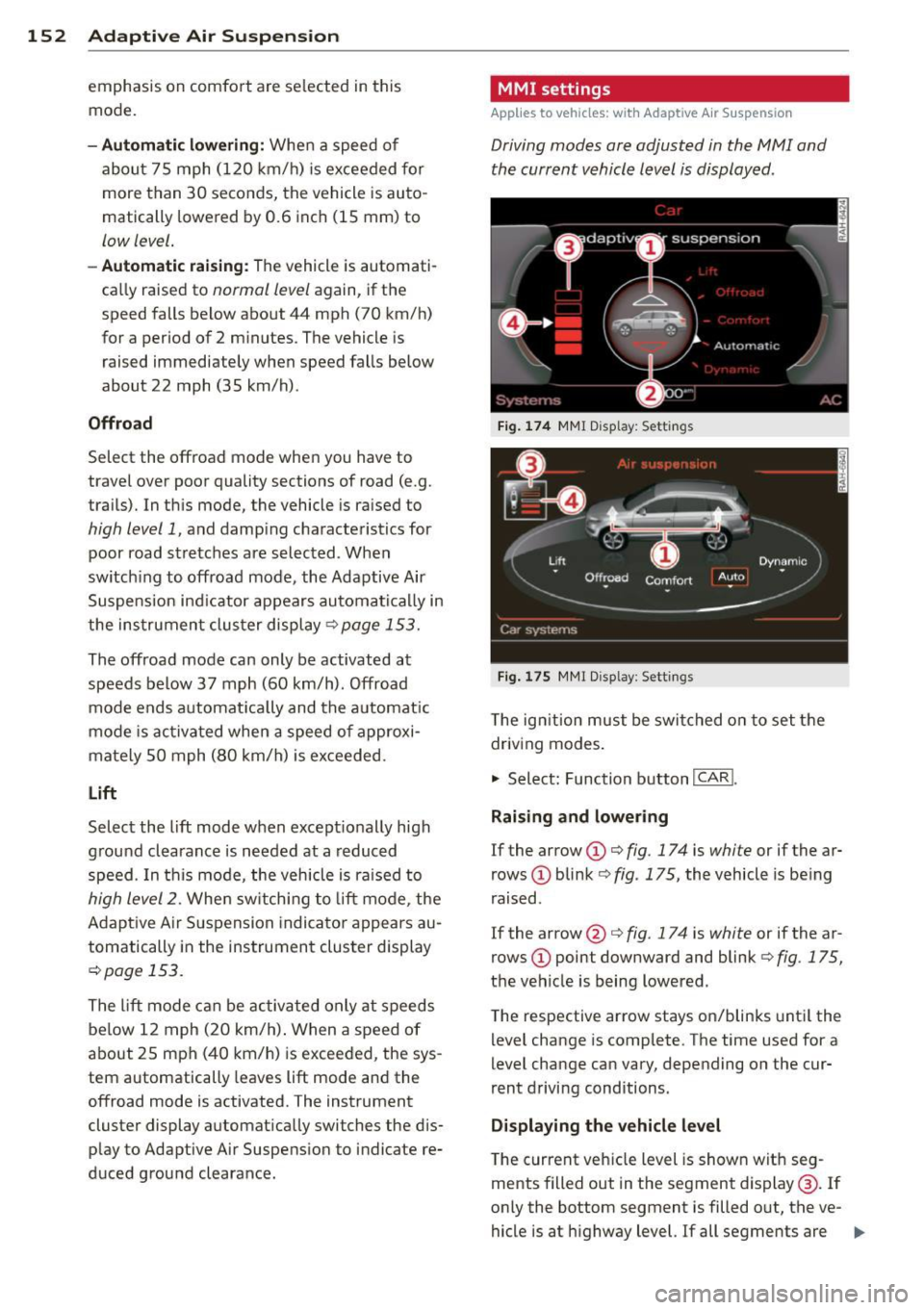
Driving modes are adjusted in the MMI and
the current vehicle level is displayed .
Fig. 174 MMI Display: Sett ings
Fig. 175 MMI Display: Settings
T he ign ition must be switched on to set the
driving modes .
.,. Select: Function button
I CAR!.
Raising and lowering
If the arrow (D Q fig. 174 is white or if the ar
rows
(D blink ¢ fig. 175, the vehicle is be ing
raised .
If the arrow @ Q fig. 17 4 is white or if the ar
rows
(D point downward and blink¢ fig. 175,
the vehicle is being lowered.
T he respective arrow stays on/blinks until the
level change is complete. The time used for a
level change can vary, depending on the cur
rent driving conditions.
Displaying the vehicle level
The current veh icle level is shown with seg
ments filled out in the segment display @. If
only the bottom segment is filled out, the ve-
hicle is at highway level.
If all segments are Ill>
Page 155 of 342
filled out, the vehicle is at high level 2 and has
the greatest amount of ground clearance pos
sib le.
Wh ile the vehicle is be ing raised or lowered,
the target level is indica ted by an arrow@
¢ fig. 174 or a white border @~ fig. 175 . The
arrow/border disappears aga in when the vehi
cle is at the target level.
Limitation s to MMI s ettin gs
Please note that not eve ry dr iving mode can
be selected in every driving situation . For ex
ample , it is not possible to switch to "lift"
mode at speeds above 12 mph (20 km/h) .
This mode is then shown
greyed out in the
MMI Display .
The vehicle can only be lowered when
a ll of
the vehicle's doors are closed. If one door is open, all driving modes whose level setting is
belo w the current vehicle level appear
greyed
out
in the MMI Display . If a door is opened
while the veh icle is being lowered , the lower
ing process is inte rrupted until all doors are
closed again.
If the system is temporarily unava ilable due
to, for instance, an empty compressed air
tank, the driving modes that cannot be set ap pear
greyed out in the MM I Disp lay. As soon
as the system is available again, the drivi ng
modes can once more be selected in the dis
p lay.
@ Tips
- For additional informat io n on the driving
modes ~
page 150, Chassis controls .
-When the compressed air tank is empty,
the comp ressor can be switched on by
starting the engine. The Adaptive Air
Suspension is once again available, after
waiting a few minutes.
- To prevent overload, the system switches off temporarily if several adjustments
are made in a row. The Adaptive Air Suspension is once again available, after
waiting a few m inutes.
Ad apti ve A ir Sus pension 15 3
Appearance in the instrument cluster
d isplay
Appl ies to vehicles: wi th Adaptive A ir Suspensio n
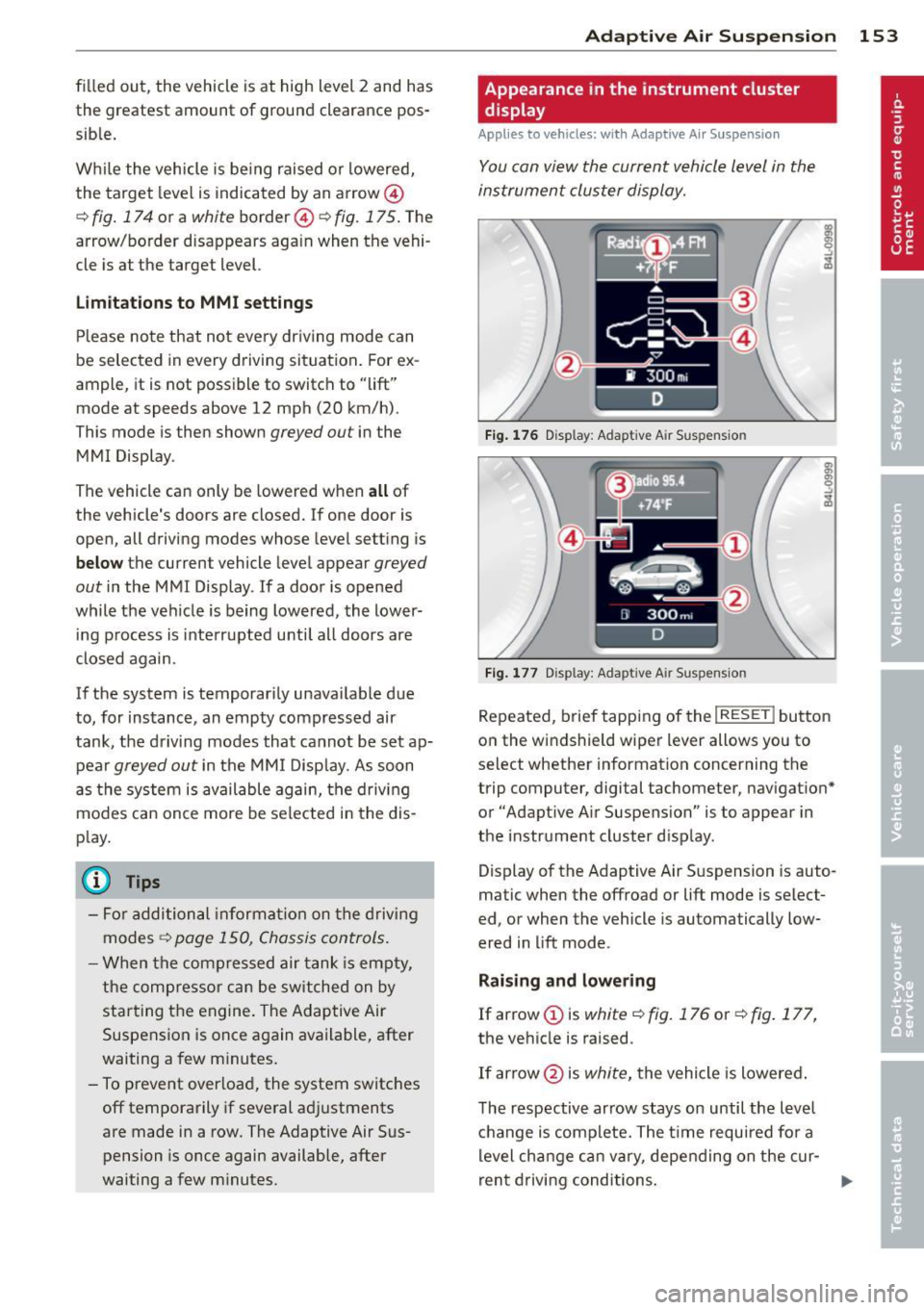
You can view the current vehicle level in the
instrument cluster display.
Fi g. 17 6 Disp lay: Adapt ive A ir Suspensio n
Fig. 177 Disp lay: Adapt ive A ir Suspension
Repeated, brief tapping of the I RESE T I button
on the windshield wiper lever allows you to
select whether information concerning the
trip computer, digital tachometer, navigat ion *
or "Adapt ive A ir Suspens ion" is to appear in
the instrument cluster d isp lay.
Display of the Adaptive Air S uspension is auto
matic when the offroad or lift mode is select
ed, or when the vehicle is automatically low
ered in lift mode.
Rai sing and lowe ring
If arrow (Dis
white¢ fig. 176 or~ fig. 177,
the vehicle is raised .
If arrow @is
white, the vehicle is lowered .
The respective arrow stays on until the level
c hange is complete. The time required for a
level cha nge can va ry, depending on the cur -
ren t driving conditions . .,..
Page 156 of 342

154 Adapti ve Air Susp en sion
Di spl ay ing the vehicl e lev el
The cu rrent vehicle level is shown w ith seg
ments fi lled out in the segment disp lay @ . If
only the bottom segment is filled out, the ve
hicle is at highway level. If all segments are
fi lled out, the vehicle is at high level 2 and has
the greatest amount of ground clearance pos
sible.
While the vehicle is being raised or lowered,
the target leve l is indicated by an arrow ©
¢
fig. 176 or a white border ©¢ fig. 177. The
arrow/border disappears aga in when the vehi
cle is at the target level.
Jacking mode when changing a flat tire
Appl ies to vehicles: with Adaptive Air Suspens ion
This mode must be activated in the MMI be
fore raising the vehicle with a jack or on a ve
hicle lift.
,. Select: Funct ion button ICARI > Function
button
! SETUP I> Jacking mode . Or
,. Select : Funct ion button
ICARI > Control but
ton
Car sy stem s* > Serv icing & ch eck s > Air
su sp .: tire ch ang e.
The vehicle jack mode must be activated be
fore changing a wheel so that the automatic
control processes for the a ir suspension do
not make lifting with the vehicle jack more dif
ficu lt.
The check lamp
II in the instrument cluster
d isplay illuminates in v ehicle jack mode.
(D) Tips
The vehicle jack mode is switched off auto
mat ically at speeds above 9 mph (15 km/
h).
Towing a trailer
Appl ies to vehicles: with towing hitch and Adapt ive Air
Suspension
Automatic lowering is not desirable when
towing a trailer.
,. Se lect: Function button ICARI > Function
button
! SE TUP I> Towi ng mod e. Or ,.
Select: Function b utton
I CAR !> Control but
ton
Car s ystem s* > Vehicle setting s > Air
su sp.: towing .
As long as towing mode is activated, a vehicle
with a trai ler appears in the
adap tiv e air su s
pen sion
main menu.
Level Ad ju stment when towing a t railer
- Before hitching up the tra ile r and before ad
jus ting the tongue weight at the trailer, the
automatic or comfo rt mode
mu st be se lect
ed so that the ve hicle can be at normal level
¢ page 152, MMI settings .
-If driving in dynamic mode is desired, this
mode
mu st be selected before hitching up
the trailer and before ad justing the tongue
weight. However, note that your vehicle is lowered and ground clearance is reduced.
- If you have to drive under difficult road con
ditions, you can select offroad or lift mode,
after hitching up the trailer or after adjust ing the tongue weight .
- If the veh icle is at
normal level, and you se
lect offroad mode wh ile traveling at speeds
higher than 22 mph (35 km/h), the veh icle
w ill not be ra ised . Offroad mode will appear
as the active mode in the MM I Disp lay.
- If the veh icle is in offroad mode at
high level
1 ,
it automa tically lowers to normal level
when the vehi cle is t ravel ing at speeds ex
ceed ing approximate ly 31 mph (SO km/h) .
The vehicle is automatically raised to
high
level 1
again when the traveling speed falls
be low approximately 25 mph (40 km/h).
Rest rictions when ope rating with a tr ailer
When operating w ith a trailer, the lift mode
can on ly be selected up to about 12 mph (20
km/h). Lift mode is automatically cance led
again w hen a speed of about 25 mph (40 km/
h) is exceeded.
If t he vehicle is in au toma tic , comfo rt, offroad
or lift mode before the trai ler towing mode is
activated, the dynamic mode cannot be acti
vated.
If t he vehicle is in dynamic mode before tow -
ing opera tion is activated, it can be driven in
11>-