towing AUDI Q7 2012 Owner´s Manual
[x] Cancel search | Manufacturer: AUDI, Model Year: 2012, Model line: Q7, Model: AUDI Q7 2012Pages: 342, PDF Size: 86.42 MB
Page 298 of 342
2 96 What do I do now ?
plate. If this happens, the vehicle may
start to move while a wheel is being changed.
- Never use the folding chocks if they are
damaged or if they have not been assem
bled correctly.
A WARNING
Improper use of the vehicle jack can cause
ser ious persona l injuries.
- Never use the jack supplied with your Au
di on anothe r vehicle, pa rticularly on a
heavier one. The jack is only suitable for
use on the vehicle it came w ith.
- Us ing a bumper jack to raise the vehicle
will damage the bump er system. The
jack may slip, causing in jury.
- Never support your veh icle on cinder
blocks, b ricks or other objec ts. These
may no t be ab le to suppor t the load and
c ou ld cau se injury whe n they fail.
- Never start o r run the engine while the
vehicle is supported by the j ack.
- If you must wo rk under the vehicle, al
ways use safety stands specifically de
signed for this purpose.
- Always make su re the inf latable spare
ti re and even a flat tire a re se cu red in
pla ce and not loose, otherwise t hey
c ou ld f ly forward, causing personal in jury
to passengers in the veh icle in an acc i
dent o r sudden mane uver.
Removing bass box
Applies to vehicles: with bass box
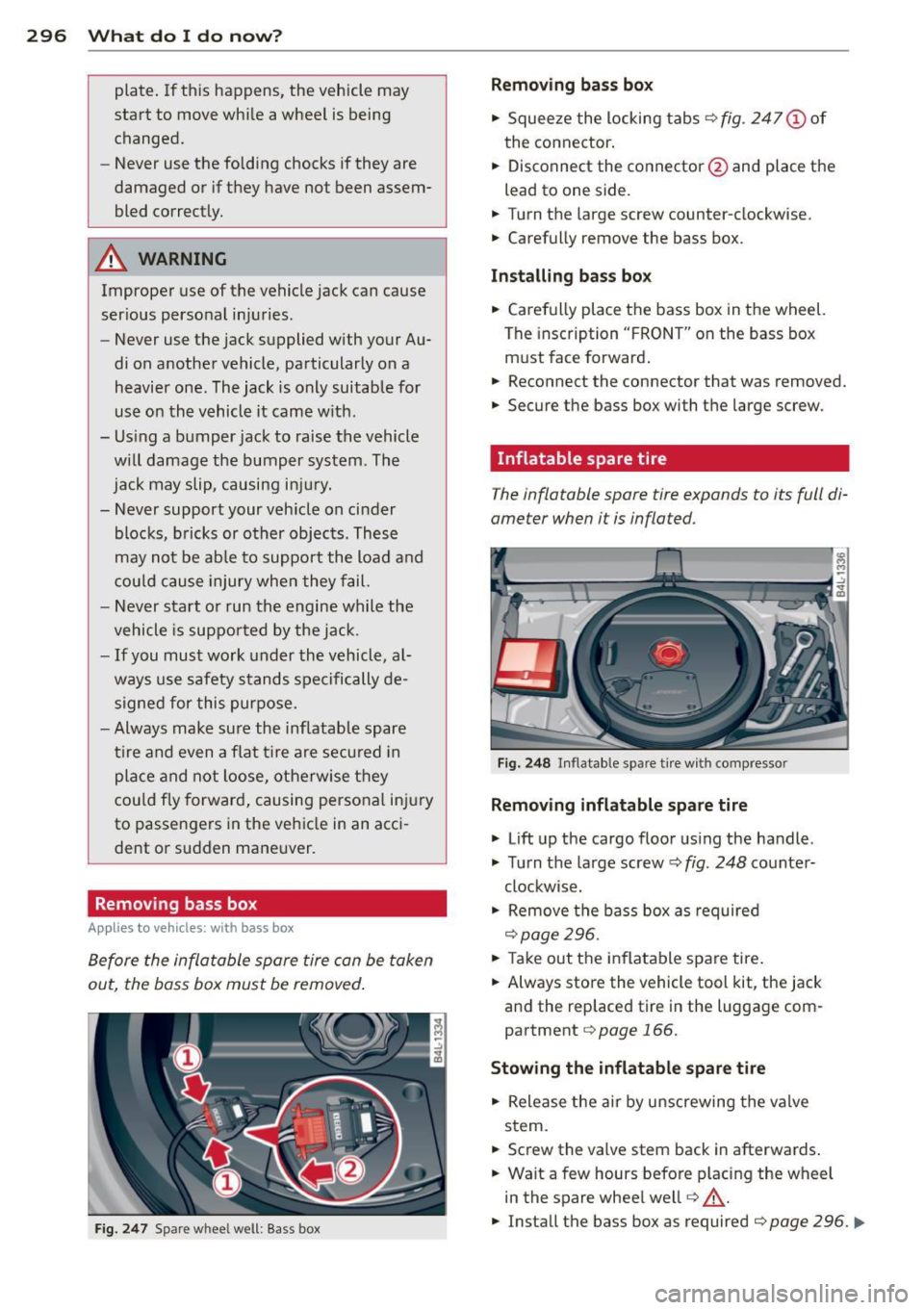
Before the inflatable spare tire can be taken
out, the bass box must be removed .
Fig. 247 Spare wheel well: Bass box
Removing bass box
" Squee ze the locking tabs ¢ fig. 247 (!) of
the connector .
" Disconnect the connector @and place the
lead to one side.
" Turn t he large screw counter-clockwise.
" Carefully
remove the bass box.
Installing bass bo x
" Carefully place the bass box in the wheel.
The insc ription " FRO NT" on the bass box
m ust face forward .
" Reconnect the connector that was removed.
" Secure the bass box with t he large screw.
· Inflatable spare tire
The inflatable spare tire expands to its full di
ameter when it is inflated.
Fi g. 2 48 In flatable spare t ire w ith compressor
Removing inflatable spare tire
" Lift up the cargo floor us ing the handle .
" Tu rn the large screw¢
fig. 248 co unter-
clockwise.
" Remove the bass box as required
¢page 296.
" Take out the inflatable spare tire .
" Always sto re the vehicle tool kit, the jack
and the replaced tire in the luggage com
partment
¢page 166.
Stowing the inflatable spar e tire
" Release the air by unscrewing the valve
stem.
" Screw the
valve stem back in afterwards .
" Wait a few hours befo re p lacing the wheel
in the spare whee l we ll
r=:, _.&.
" Install the bass box as required r=:, page 296 . ..,.
Page 300 of 342
2 98 What do I do now?
The compressor must not be connected to
the c igarette lighter socket, as this socket
does not provide the required power.
Changing a wheel
Before changing a wheel
Observe the following precautions for your
own and your passenger's safety when chang
ing a wheel.
• After you experience a tire failure, pull the
car well away from moving traffic and try to
reach
level ground before you stop r::::> /.1. .
• All passengers should leave the car and
move to a safe location (for instance, behind
the guardrai l)
r::::> /.1. .
• Engage th e parking brake to prevent your
vehicle from rolling unintentionally
r::::> /.1. .
• Move selector lever to position P r::::> /.1..
• If you are towing a trailer: unhitch the trail
er from your vehicle .
• Block the diagonally opposite wheel with
the fo ld ing chocks or other objects .
• Take the
jack and the inflatable spare tire
out of the luggage compartment
r::::>page 295.
& WARNING
You or your passengers cou ld be injured
while changing a whee l if yo u do not fol
low these safety precautions :
- If you have a flat tire, move a safe dis
tance
off the road. Turn off the engine,
turn the emergency flashers on and use other warning devices to alert other mo
torists .
- Make sure that passengers wait in a safe
place away from the vehicle and well
away from the road and traff ic .
- To help prevent the vehicle from moving
suddenly and possibly slipping off the
jack, always fully set the parking brake
and block the whee l diagonally opposite
the whee l being changed with the fold
ing chocks or other objects. When one front wheel is lifted
off the ground, plac
ing the Automatic Transmission in "P"
(Park) will
not prevent the vehicle from
moving .
- Before you change a wheel, be sure the
ground is level and firm. If necessary,
use a sturdy board under the jack.
- After installing the inflatable spare tire,
make sure that you replace the flat tire/
wheel in its storage area properly and
tighten the knurled retaining screw se
curely.
Changing a wheel
When you change a wheel , follow these
quence described below step-by-step and in
exactly that order.
1. Activate the vehicle jack mode (only vehi
cles w ith Adaptive Air Suspens ion)
r::::> page 154.
2. Remove the decorative wheel cover*. For
more details see also
r::::> page 299, Deco
rative wheel covers or r::::> page 299,
Wheels with wheel bolt caps.
3. Loosen the wheel bolts r::::>page 299 .
4. Locate the proper mounting point for the jack and align the jack below that point
r::::>page 300.
S. Lift the car with the jack r::::> page 300.
6. Remove the wheel with the flat tire and
then insta ll the
inflatable spare tire
r::::>page 301.
7. Tighten all wheel bolts lightly.
8.
Lower the vehicle with the jack.
9. Use the wheel bolt wrench and
firmly
tighten all wheel bolts r::::> page 299.
10. Rep lace the decorative wheel cover*.
11. De activate the vehicle jack mode (only ve
hicles wi th Adaptive Air Suspension)
r::::> page 154.
& WARNING
Always read and follow all WARNINGS and
in format ion
c:::> &. in Raising the vehicle on
page 301
and c:::> page 302.
Page 310 of 342
308 Emergency situations
Emergency situations
General
This chapter is intended for trained emer
gency crews and working personnel who
have the necessary tools and equipment to perform these operations.
Starting by pushing or
towing
Q;) Note
Your vehicle is equipped with an automatic
transmission. Consequently, the engine
cannot be started by pushing or towing.
Starting with jumper
cables
If necessary, the engine can be started by
connecting it to the battery of another vehi
cle.
If the engine should fail to start because of a
discharged or weak battery, the battery can be
connected to the battery of
another vehicle,
using a
pair of jumper cables to start the en
gine .
Jumper cables
Use only jumper cables of sufficiently large
cross section to carry the starter current safe
ly. Refer to the manufacturer's specifications.
Use only jumper cables with
insulated termi
nal clamps which are distinctly marked:
plus(+) cable in most cases colored red
minus(-) cable
in most cases colored black .
A WARNING
Batteries contain electricity, acid, and gas.
Any of these can cause very serious or fatal
injury. Follow the instructions below for
safe handling of your vehicle's battery.
- Always shield your eyes and avoid lean
ing over the battery whenever possible. -
A discharged battery can freeze at tem
peratures just below 32 °F (0 °C). Before
connecting a jumper cable, you must
thaw the frozen battery completely, oth
erwise it could explode.
- Do not allow battery acid to contact eyes
or skin . Flush any contacted area with
water immediately .
- Improper use of a booster battery to
start a vehicle may cause an explosion.
- Vehicle batteries generate explosive gas
es . Keep sparks, flame and lighted ciga
rettes away from batteries.
- Do not try to jump start any vehicle with
a low acid level in the battery .
- The voltage of the booster battery must
also have a 12-Volt rating. The capacity
(Ah) of the booster battery should not be
lower than that of the discharged bat
tery . Use of batteries of different voltage
or substantially different "Ah" rating
may cause an explosion and personal in
jury.
- Never charge a frozen battery. Gas trap
ped in the ice may cause an explosion.
- Never charge or use a battery that has
been frozen. The battery case may have
be weakened.
- Use of batteries of different voltage or
substantially different capacity (Ah) rat
ing may cause an explosion and injury.
The capacity (Ah) of the booster battery
should not be lower than that of the dis
charged battery.
- Before you check anything in the engine
compartment, always read and heed all
WARNINGS¢
page 248, Engine com
partment.
@ Note
- Applying a higher voltage booster bat
tery will cause expensive damage to sen
sitive electronic components, such as
control units, relays, radio, etc.
- There must be no electrical contact be
tween the vehicles as otherwise current
could already start to flow as soon as the
positive(+) terminals are connected. ..,.
Page 312 of 342
310 Emergency sit uat ions
-Jumper cables mus t be long enough so
that the vehicles do not touch.
- W hen connecting jumper ca bles, make
sure that they cannot get caught in any moving parts in the eng ine compart
ment.
- Before you check anything in the engine compartment, always read and heed all
WARNINGS
c> page 248, Engine com
partment.
({D Note
Improper hook-up of jumper cables can r u
in the generator.
- Always connect POSITIVE( +) to POSI
TIVE(+), and NEGATIVE( -) to NEGATIVE
( - ) ground post of the battery manager
control unit.
- Check that all screw plugs on the battery
ce lls are screwed in firmly. If not, tighten
plugs prior to connecting clamp on nega
tive battery terminal.
- Please note that the procedure for con
nec:t i ng a jumper cable as described
above applies spec ifically to the case of
you r vehicle being jump started. When
you are giving a jump st art t o anothe r ve
hicle, do
not connect the negat ive (-) ca
ble to the negat ive (-) terminal on the
discharged battery ©
c> fig. 261. In
stead, securely connect the negative(-)
cable to e ither a solid metal component
that is firmly bolted to the engine block
or to t he engine block itse lf. If the bat
te ry that is being charged does not vent
to t he outside, es caping batte ry gas
could ignite and explode!
Emergency towing
with commercial tow
truck
General hints
Your Audi requires special handling for tow
ing.
T he following information is to be used by
commercial tow truck operators who know
how to operate their equipment safely.
- Ne ver tow your Audi , towing will cau se
damage to the engine and tr an smi ssion .
- Ne ver wrap th e safet y chain s or winch ca
ble s around the brak e lines.
- To prevent unne ces sary damage, your Audi
must be tr an sp o rt ed with a flat bed tru ck.
- To load th e vehi cle on to the fl at bed, use
the towing l oop found in the ve hicle to ols
and att ach to th e front or rea r anchorage
i=> page 311 and i=>page 311 .
& WARNING
--==
A vehicle being towed is not safe for pas-
sengers. Never allow anyone to ride in a
vehicle be ing towed, for any reason.
-
Page 313 of 342
Front towing loop
Do not install the front towing loop until it is
needed.
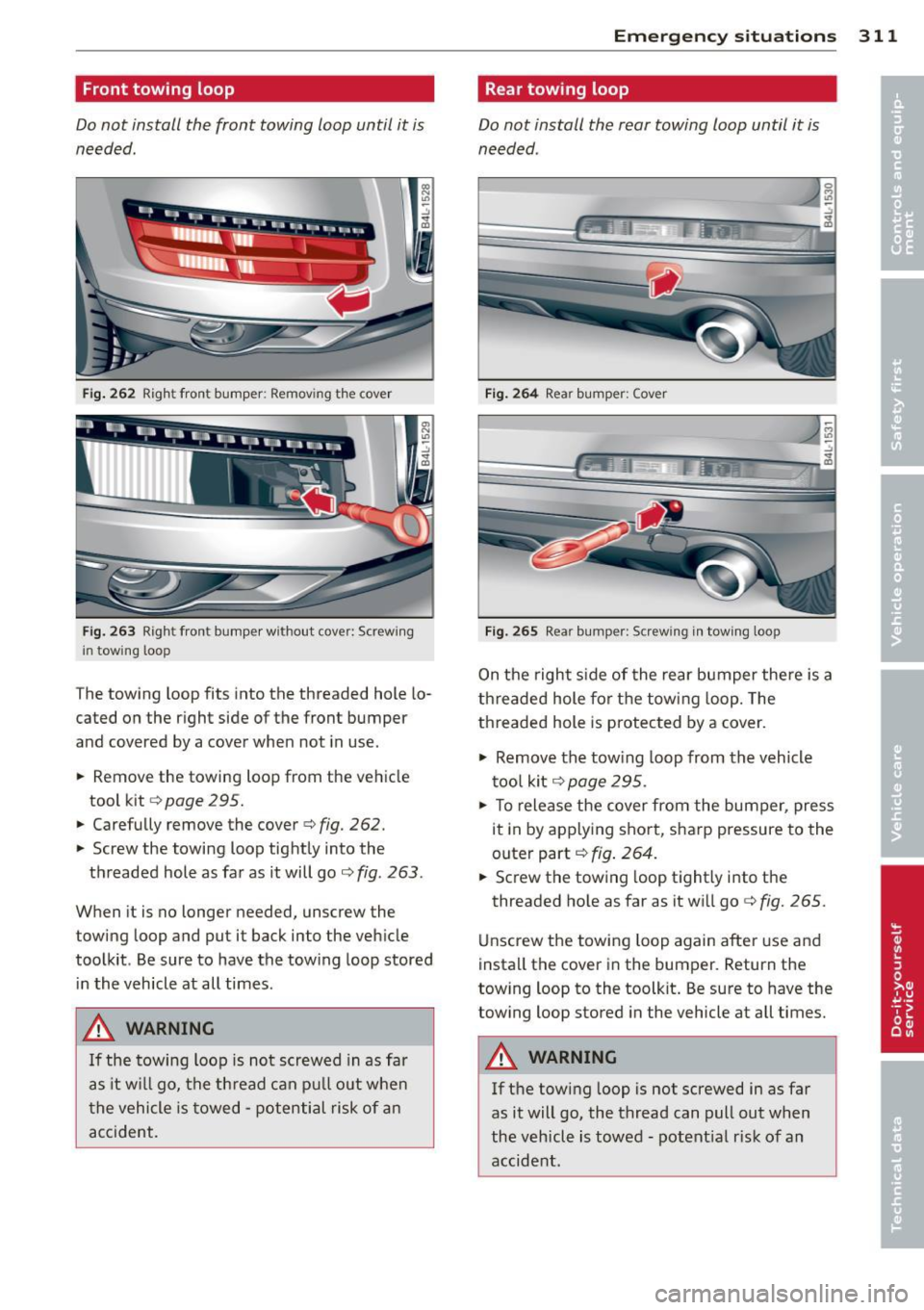
Fig. 262 Right front bumper: Removing the cover
Fig. 263 Righ t fron t bumper w ith out cover: Screwing
i n towing loop
The towing loop fits into the threaded hole lo
cated on the right side of the front bumper
and covered by a cover when not in use.
.. Remove the towing loop from the vehicle
tool kit
c:> page 295.
.. Carefully remove the cover c:> fig. 262.
.. Screw the towing loop tightly into the
threaded hole as far as it will go
c:> fig . 263 .
When it is no longer needed, unscrew the
towing loop and put it back into the vehicle
toolkit . Be sure to have the towing loop stored
in the vehicle at all times .
_&, WARNING
If the towing loop is not screwed in as far
as it w ill go, the th read can pull out when
t he vehicle is towed -potential risk of an
accident.
Emergenc y situ ation s 311
Rear towing loop
Do not install the rear towing loop until it is
needed .
Fig . 264 Rea r bumper: Cover
Fig. 265 Rea r bumper: Screw ing in tow ing loop
On the right s ide of the rear bumper there is a
th readed hole for the towing loop. The
threaded hole is protected by a cover.
.,. Remove the tow ing loop from the vehicle
too l kit
c:> page 295 .
.. To release the cover from the bumper, press
it in by applying sho rt, sharp pressure to the
outer part
c:> fig . 264.
.. Screw the tow ing loop t ightly i nto the
threaded ho le as far as it wi ll go
c:> fig. 265.
Unscrew the towing loop again afte r use and
install the cover in the bumper. Return the
towing loop to the toolkit . Be sure to have the
towing loop stored in the vehicle at all times.
_&, WARNING
If the tow ing loop is not screwed in as far
as it will go, the thread can pull out when
the vehicle is towed -potent ia l risk of an
accide nt.
Page 317 of 342

designated seating position) and luggage
weight~&. .
Gros s Axle W eight Rating
The G ross Axle Weight Rating is the maximum
l oad that can be applied at each axle of the
vehicle
q .&. .
Vehicle capacit y weight
The vehicle capac ity we ight (max. load) is list
ed on the driver 's side B-p illar.
Roof weight
The maximum permissible roof weight is 220
lb (100 kg ).
The roof weight is made up of
the we ight of the roof rack system and the
weight of the object be ing transported
q page 84, Loading the roof rack.
..&, WARNING
- The Gross Vehicle Weight Rat ing for yo ur
Audi Q7 vehicle, found on the safety compliance label on the driver's side B
pillar, must never be exceeded under any
circumstances. Exceed ing the Gross Vehi
cle Weight Rating of your vehicle is like ly
to damage your vehicle, and such dam
age will not be covered by your Limited
New Vehicle Warranty . Exceeding the
Gross Vehicle We ight Rating will also
change the performance and handling
characteristics of your vehicle, which
cou ld cause a crash result ing in serious
injury o r death.
- The Gross Vehicle Weight Rat ing for your
Audi Q7 wo uld be exceeded if your vehi
cle is s imultaneously equ ipped with Pan
oramic sliding sunroof; third-row seat
ing; trailer towing equipment (factory or
dealer-installed), and running boards
(dealer-installed). UNDER NO CIRCUM
STANCES MAY ALL SUCH ITEMS BE IN
STALLED ON T HE SAME VEHICLE .
- The actual Gross Axle Weight Rat ing at
the front and rear axles should not ex
ceed the perm iss ible weights, and their
c ombination must not exceed the Gross
Vehicle Weight Rat ing.
G ene ral in formation 315
-Exceeding perm iss ible weight ratings can
result in veh icle damage, acc idents and
personal injury.
([) Note
-The ve hicle capacity weight figures apply
when the load is d istr ibuted evenly in the
vehicle (passengers and luggage). When
transport ing a heavy load in the luggage
compartment, carry the load as near to
the rear axle as poss ible so that the vehi
cle's handling is not impaired.
- Do not exceed the maximum permissible
axle loads or the maximum gross veh icle
we ight. Always remember that the vehi
cle's handling w ill be affected by the ex
tra load. Therefore, ad just yo ur speed ac
co rding ly.
- Always observe local regulat ions .
Dimensions
T he specifications refer to the basic model.
D ifferences may occur depending on the mod
el type and op tions ordered, fo r example, tire
sizes .
Q) Note
When dr iv ing up steep ramps, on rough
r oads, over c urbs, etc. it is important to re
member that some parts of your vehicle,
such as spoi lers or exhaust system compo
nents, may be close to the ground. Be
careful not to damage them.
•
•
I
Page 321 of 342

Consumer Information
Warranty coverages
Your Audi is covered by the following war
ranties:
- New Vehicle Limited Warranty
- Limited Warranty Against Corrosion Perfo-
ration
- Emissions Control System Warranty
- Emissions Performance Warranty
- California Emissions Con trol Warranty (USA
vehicles only)
- California Emissions Performance Warranty
(USA vehicles only)
Detailed information regarding your warran
ties can be found in your
Warranty & Mainte
nance booklet .
Operating your vehicle
outside the U.S.A. or
Canada
Government regulations in the United States
and Canada require that automobiles meet
specific emission regulations and safety
standards. Therefore, veh icles built for the
U.S.A. and Canada differ from vehicles sold in
other countries .
If you p lan to take your vehicle outside the
continental limits of the United States or Can
ada, there is the possibility that
- unleaded fuels for vehicles with cata lytic
converter may not be available;
- fuel may have a considerably lower octane
rating . Improper fuel may cause engine
damage ;
- service may be inadequate due to lack of
proper service facilities, tools or testing
equipment ;
- replacement parts may not be readily availa
ble.
- Navigation systems for vehicles built for the
U.S.A. and Canada will not necessari ly work
in Europe, and may not work in other coun
tries outside North America .
Consumer Information 319
@ Note
Audi cannot be responsible for mechanical
damage that could result from inadequate
fuel, service or parts availability.
Audi Service Repair Manuals and Literature
Audi Offic ial Factory Service Manuals and Lit
erature are published as soon as possible after
model introduction. Service Manuals and liter
atu re are availabl e to order from the Audi
T echnical Literature Ordering Center at:
www.audi.techliterature.com
Maintenance
' General
Your vehicle has been designed to help keep
maintenance requirements to a minimum.
However, a certain amount of regular mainte
nance is still necessary to assure your vehicle's
safety, economy and reliability . For detailed
vehicle maintenance consult your Warranty
&
Maintenance booklet.
Under difficult operating conditions, for ex
ample at extremely low outside temperatures ,
in very dusty regions, when towing a tra iler
very frequently, etc., some serv ice work
shou ld be performed between the intervals
specified. This applies particularly to:
- oil changes, and
- cleaning or replacing the air filter .
® For the sake of the environment
By regularly maintaining your vehicle, you
help make sure that emission standards
are maintained, thus min imizi ng adverse
effects on the environment .
Important considerations for you and
your vehicle
The increasing use of electronics , sophisticat
ed fuel injection and emission control sys-
tems, and the generally increasing technica l ..,_
•
•
Page 326 of 342

324 Index
A
Accessories
Adaptive Air Suspension ....... .. .... .
Cargo mode in the MMI .... .. .. .. .. .
Controls .
..................... .. .
321
150
155
150
D .. escnpt1on ... ........... .. .. .... . 150
High level .................. ...... 150
Highway level ................ .... . 150
Instrument cluster display . . . . . . . . . . 153
Jacking mode when changing a flat tire 154
Low level ................ .... ..... 150
Normal level ............. .... .... . 150
Segment display ........... .. .. ... 152
Setting the driving modes .. .. .. .... . 152
Trailer towing mode ....... .... .... . 154
Using switch for cargo mode ...... ... 155
Warning/indicator lights ..... .. .... .. 17
Adaptive cruise control .......... .. .. . 113
Changing speed . . . . . . . . . . . . . . . . . . . 117
Driver information
Driver intervention prompt ..... .... .
Driving in traffic .......... .. .. .. .. .
Driving program .................. .
Error messages .................. .
Open road . ................. ..... .
Override
. .. ............. .. .. .. .. .
Request for driver to assume control . .
Save speed . ... ....... ... .... .. .. .
Setting distance . ............... .. .
Settings ... ... .... ...... .. .. .... .
Setting time interval ........ .. .. .. .
Special driving situations .. .... .... .
Status messages ......... .. .. .... .
Switching on and off ......... ..... .
System limits .................... .
120
124
114
124
122
114
114
114
116
118
124
118
125
122
116
125
Temporarily turning off . . . . . . . . . . . . . 118
warning/indicator lights ..... .. .. .. . 121
Adaptive light ... .......... .. .. .. .. .. 59
defective ................... ..... .. 37
AdBlue .. .. .. ..... ........... ... .. . 255
Filling ... .. ............. ........ . 256
Messages in the instrument cluster dis-
play ... .. .. ............. .. .. .. .. .
255
Adding
Engine coolant .............. ... ...
267
Engine oil .. ... .. ..... ... .. .. .. .. . 264
Windshield washer fluid ... .. .. .... . 273
Additional accessories
Additives
Engine oil ....... ............. ... .
Adjusting 321
264
Instrument cluster illumination .. .. .. . 13
Steering column electrically ...... ... 103
Steering column manually .......... 103
Adjusting front seats . . . . . . . . . . . . . . . . . 71
Airbag
Warning/indicator lights .............
16
Airbag system . . . . . . . . . . . . . . . . . 179, 196
Advanced Airbag System ........... . 183
Advanced Airbag System components . 186
Care ...... .... .. .. ........... .... 193
Children .. .. .... ................ . 201
Child restraints ... ............. .... 202
Components (front airbags) ......... 186
Danger of fitting a child safety seat on
the front passenger seat ........ ....
181
Disposal .. ...... ............. .... 193
Front airbags . . . . . . . . . . . . . . . . 183, 184
How do the front airbags work? .. .. .. 188
How many airbags does my vehicle
have? ........ ...................
186
How the Advanced Airbag System com-
ponents work together .............
187
Important things to know ....... .. .. 179
Indicator light ... ................ . 190
Monitoring .... .. ............. .... 190
PASSENGER AIR BAG OFF light ... .... 190
Repairs ... .... .. ............. .... 193
Safety instructions ................. 192
Side airbags ... .. ....... ...... .. .. 194
Side curtain airbags ............ .. .. 197
Weight-sensing mat ............. .. 201
When must the system be inspected? . 190
Air conditioning
refer to Climate controls ..... ... .. .. . 91
Air distribution
Climate controls .. ... .......... .... .
94
Four-zone automatic comfort air condi-
tioning ....... .. .. ... ....... ... .. .
99
Air pollutants filter
Climate controls .. ............. .... .
91
All-wheel drive .. .. ............. .... 225
Winter tires
Alloy wheels 289
243
Page 330 of 342
328 Index .:..:..:..::....::.....:..._ ___________________________ _
Declaration of compliance
Adaptive cruise control ............. 322
Audi side assist ................... 322
Cell phone package ....... .. .. .... . 322
Convenience key .......... .... .... . 322
Electronic immobilizer ......... .. ... 322
H omelink ® universal remote control .. 322
Remote control key ........... .. .. . 322
def What does this mean when it appears in
the trip odometer display? ..... .. .. .. 12
Defective light bulb warning . . . . . . . . . . . 23
Defrosting/defogging the windows . . . . . . 94
Defrosting/defogging windows ... .... .. 96
Determining correct load limit ... .. .. . 282
Diesel fuel . . . . . . . . . . . . . . . . . . . . . . . . . 2 5 1
Diesel particu late filter . . . . . . . . . . 37, 229
Digital clock . .. . ........ .. .. .. .. .. .. 11
Digital compass ........... .. .. .. .. .. 69
Digital speedometer ............ .... .. 22
Dimensions .. ................ ... ... 315
Dimming the rearview mirror .. .. ...... 69
Dipstick Reading the dipstick properly ..... .. . 263
Distance control system
refer to Adaptive cruise contro l .. .. .. . 113
Doors Power child safety lock .... .. .. .... .. 48
Driver information system ............. 21
Digital speedometer .............. . . 22
Driver information messages . . . . . . . . . 30
Open door or rear lid warning . . . . . . . . . 22
Outside temperature display .. .. .. .... 22
Sound system display ......... .. .. .. 21
Driver seat
refer to Seating position ... .. .. .... . 161
Driver's seat . . . . . . . . . . . . . . . . . . . . . . . . 72
Driver 's seat memory . . . . . . . . . . . . . . . . . 73
Activating remote control key ... .. .... 74
Recalling a seat posit ion . . . . . . . . . . . . . 73
Storing a seat position ....... .. .... .. 73
Driving message s . . . . . . . . . . . . . . . . . . . . 30
Driving mode
refer to Adaptive Air Suspension . 150, 152 Driving
offroad
Driving through water ............ .. 233
Driving tips . ... .. ... .......... .. .. 232
Ru les of behavior . ............. .... 232
Sand and mud ... ............. .... 233
Snow -covered g round ............. . 233
Unpaved roads ... ... ... .... ..... .. 233
Driving safe ly ... .. ... .......... .. .. 160
Driving through water ........... .... 233
Driving time . . . . . . . . . . . . . . . . . . . . . . . . 24
Duplicate key ..... .. ........... .. .. . 38
Dust filter Climate controls ............... .. .. . 91
E
Easy entry feature .. ... ... .... ..... .. 104
Efficiency program .............. .. .. . 26
Fuel economy messages ........ .. .. . 27
Memory levels . . . . . . . . . . . . . . . . . . . . . 25
Other equ ipment . .......... ...... .. 27
E lectric seat adj ustment
refer to Power seat . . . . . . . . . . . . . . . . . 72
El ectronic differential lock ( EDL )
How the system works .......... .... 221
Warning/indicator lights ........ .. .. . 18
Electronic immob ilizer ... ........... .. 40
E lectronic power contro l
(EPC) warning/indicator light . . . . . . . . . 15
Electronic speed limiter .......... .. .. . 28
Electronic Stability Control (ESC)
Hill descent control ............... . 219
How the system works .......... .. .. 219
Offroad mode .. .. ............. .. .. 219
Warning/indicator lights ........ .. .. . 16
Emergency flasher ........... ...... .. 60
Warning/indicator lights ........... .. 16
Emergency lock ing of doors ......... .. . 45
Emergency operation Rear lid ... .... .. .. ........... .. .. . 48
Emergency starting ..... .. ... ..... .. 308
Emergency towing .............. .... 310
En ergy management .............. .. 225
Battery power ... .. ........... .. .. 227
Driver notification . . . . . . . . . . . . . . . . . 22 7
Page 334 of 342
332 Index
Light Exterior lighting in the mirror housing ..
59
leaving home . . . . . . . . . . . . . . . . . . . . . . 59
also refer to Ambience lighting . . . . . . . 62
Lighting
refer to Ambience lighting ........... 62
Lighting in the mirror housing . . . . . . . . . .
59
Lights .. ...... ................... .. 57
Coming home ............ .. .. .. .. .. 58
Daytime running lights . . . . . . . . . . . . . . 58
Emergency flashers . . . . . . . . . . . . . . . . .
60
Exterior lights . . . . . . . . . . . . . . . . . . . . . 58
Front fog lights . . . . . . . . . . . . . . . . . . . . 58
Headlights ............ .. .. .. .. .. ..
57
High beam . . . . . . . . . . . . . . . . . . . . 57, 60
High beam warning/indicator light ... .. 18
Leaving home . . . . . . . . . . . . . . . . . . . . . . 58
Rear fog lights . . . . . . . . . . . . . . . . . . . . .
59
Side marker lights ........ .... .... .. 57
Turn signals ............. .. .. .. .. .. 60
Xenon headlights ..... .... .. .. .. .. .. 57
Light sensor defective ......... ... .. ..
35
Loading the luggage compartment .. ... 166
Loading the roof rack . . . . . . . . . . . . . . . . . 84
Locking
Power locking switch . . . . . . . . . . . . . . . .
44
Rear lid/trunk lid ............ ..... .. 45
Remote control key . . . . . . . . . . . . . . . . . 43
Using the key . . . . . . . . . . . . . . . . . . . . . . 43
Lower universal anchorage bars (Canada) 212
Lower universal anchorages (Canada) 212
Luggage Stowing . ................... .... . 166
luggage compartment Tie-down rings ............ ... .... .. 80
Luggage compartment ....... ..... .. .. 79
Cargo net . . . . . . . . . . . . . . . . . . . . . . . . . 80
Expanding . . . . . . . . . . . . . . . . . . . . . . . . 79
Retractable cover ........... .. .. .. .. 81
Ski sack . ... ................ ..... .. 82
also refer to Loading the luggage com-
partment . ................. ..... . 166
M
Maintenance ................. ..... . 319
Malfunction Indicator Lamp (MIL) . . 17, 27 Master key .
..... .. ................ .. 38
Battery replacement . . . . . . . . . . . . 39,
40
Check light . ... .. ................ .. 39
Mileage Average ... .... ................... . 24
Instantaneous ... ................ .. 24
Mirrors Activating the dig ital compass ..... .. .
69
Adjust ing the exterior mirrors .... .... . 68
dimming .. .. ................. .. .. .
69
Recalling position of outside mirrors . .. 73
Storing position of outside mirrors . ... . 73
Monitoring the Advanced Airbag System 190
N
Natural leather .. .. ... .. ..... ... .. .. 246
New tires and wheels
NHTSA 285
Contacting ...... ... .......... .... 167
Nitrogen oxide (NOx) catalytic converter
refer to Ad Blue ... ....... ...... .... 255
Number of seats .................... 170
0
Occupant seating positions ........... 161
Octane rating ... .. ... .. ..... ... .. .. 250
Odometer . . . . . . . . . . . . . . . . . . . . . . . . . . 12
Offroad mode . .. .. ... .......... .... 219
Oil
refer to Engine oil ....... ...... .... 260
On-Board Diagnostic System (OBD) Data Link Connector (DLC) ........... . 28
Electronic speed limiter ............. . 28
Malfunction Indicator Lamp (MIL) .. .. . 27
Open door or rear lid warning .......... 22
open sky system
refer to Panoramic sliding sunroof .... . 54
Operate your vehicle economically and
minimize pollution . ... ....... ... .. .. 230
Optional equipment Marked with an asterisk . . . . . . . . . . . . . . . 6
Other equipment (efficiency program) .. . 27
Outlets .. .. .. .. .. ....... ...... .... . 87