hood AUDI Q7 2013 Owner´s Manual
[x] Cancel search | Manufacturer: AUDI, Model Year: 2013, Model line: Q7, Model: AUDI Q7 2013Pages: 348, PDF Size: 87.72 MB
Page 5 of 348
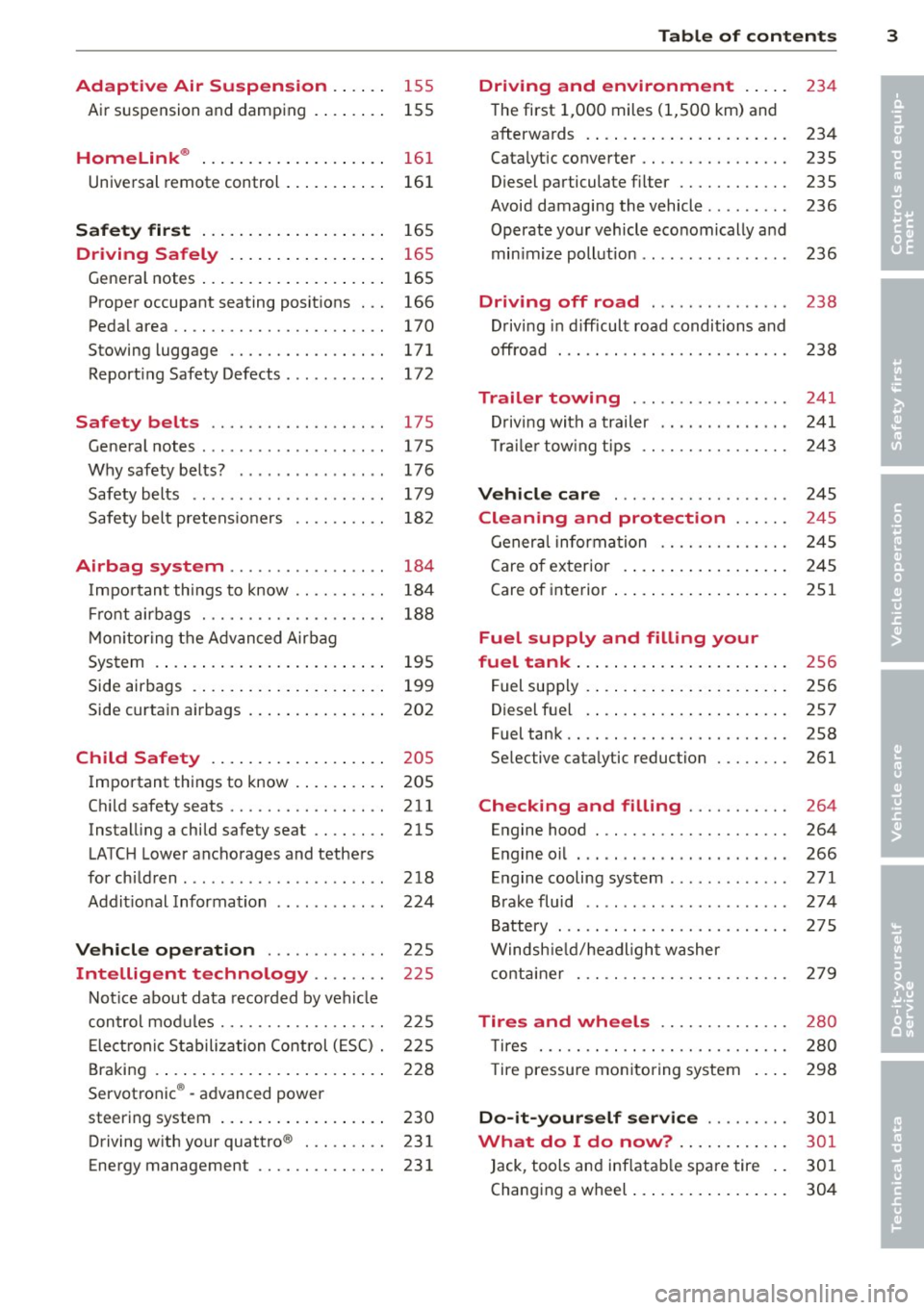
Adaptive Air Suspension .. .. . .
Air suspension and damping
Homelink ® ... .. .... ... .. .. .. . .
Universal remote control ... .. .. .. . .
S afet y fir st ... ...... ... .. .. .. . .
155
155
161
16 1
165
Driving Safely . . . . . . . . . . . . . . . . . 165
Gene ral notes . . . . . . . . . . . . . . . . . . . . 165
Proper occupant seating posit ions . . . 166
Ped al area . . . . . . . . . . . . . . . . . . . . . . . 170
Stowing luggage . . . . . . . . . . . . . . . . . 171
Report ing Safety Defects . . . . . . . . . . . 172
Safety belts . . . . . . . . . . . . . . . . . . . 175
General notes . . . . . . . . . . . . . . . . . . . . 17 5
Why safety belts? . . . . . . . . . . . . . . . . 176
Safety belts . . . . . . . . . . . . . . . . . . . . . 179
Safety bel t pretens ioners . . . . . . . . . . 182
Airbag system .......... ... ... .
Important things to know ......... .
Fr ont airbags ............ .... .. . .
M on itoring the A dvanced Airbag
System .... .. ... .. ..... ... .. .. . .
Side airbags .... ...... ... .. .. .. . .
Side curtain airbags .... ... .. .. .. . .
Child Safety .. .. .... ... .. .. .. . .
Important things to know . ... .. .. . .
Ch ild safety seats ................ .
Instal ling a child safety seat .. .. .. . .
LATC H Lower anchorages and tethers
for chi ldren .... .. .. ..... ... .. .. . .
Addit ional Information
Vehicle operation ....... .. .. . .
Intelligent technology .... ... .
184
184
188
195
199
202
205
205
211
215
218
224
225
225
Not ice about data recorded by vehi cle
con trol mod ules . . . . . . . . . . . . . . . . . . 225
E lect ronic S tabiliz ation Control ( ESC) . 225
Braking . . . . . . . . . . . . . . . . . . . . . . . . . 228
Servotronic ® -advanced power
steering system . . . . . . . . . . . . . . . . . . 230
Driving w ith your quattro ® . . . . . . . . . 231
Energy management . . . . . . . . . . . . . . 231
Table of contents 3
Driving and environment . . . . .
234
The first 1,000 miles (1,500 km) and
afterwa rds . . . . . . . . . . . . . . . . . . . . . . 234
Catalytic co nverter . . . . . . . . . . . . . . . . 235
Diesel particulate filter . . . . . . . . . . . . 235
Avoid damaging the vehicle . . . . . . . . . 236
Operate your vehicle eco nomically and
min imize poll ution . . . . . . . . . . . . . . . . 236
Driving off road . . . . . . . . . . . . . . . 238
Driving in d ifficult road conditions and
offroad . . . . . . . . . . . . . . . . . . . . . . . . . 238
Trailer towing . . . . . . . . . . . . . . . . . 241
D riving with a trailer . . . . . . . . . . . . . . 241
T rai le r tow ing tips . . . . . . . . . . . . . . . . 243
Vehicle care . . . . . . . . . . . . . . . . . . . 245
Cleaning and protection . . . . . . 245
General information . . . . . . . . . . . . . . 245
Care of exterior . ... .. .. .. .... ... .
Care of inte rior ... .. . .. .. ..... ... .
Fuel supply and filling your
fuel tank ... .... .. . .. .. ..... ... .
Fuel supply ...... .. . .. .. ..... ... .
Diesel f uel .. .. .. .. .. ... ..... ... .
Fuel tank ....................... .
Se lective catalytic reduction ....... .
Checking and filling .......... .
Engine hood ... .. ............... .
E n gine oi l ... .... ..... .... ..... . .
Engine cooling system .. .. ..... ... .
B rake fluid ....... .............. .
B attery ... .. .. .. .. . ............ .
Windsh ie ld/headl ight washer
conta iner . .. .. .. .. ............. . 2
4 5
251
256
256
257
258
261
264
264
266
271
274
2 75
2 79
Tires and wheels . . . . . . . . . . . . . . 280
T ires . . . . . . . . . . . . . . . . . . . . . . . . . . . 280
T ire pressure monitoring system 298
Do -it -yourself service . . . . . . . . . 301
What do I do now? ...... ... .. . 301
Jack , tools and inflatable spare tire . . 301
Changing a wheel . . . . . . . . . . . . . . . . . 304
•
•
Page 11 of 348
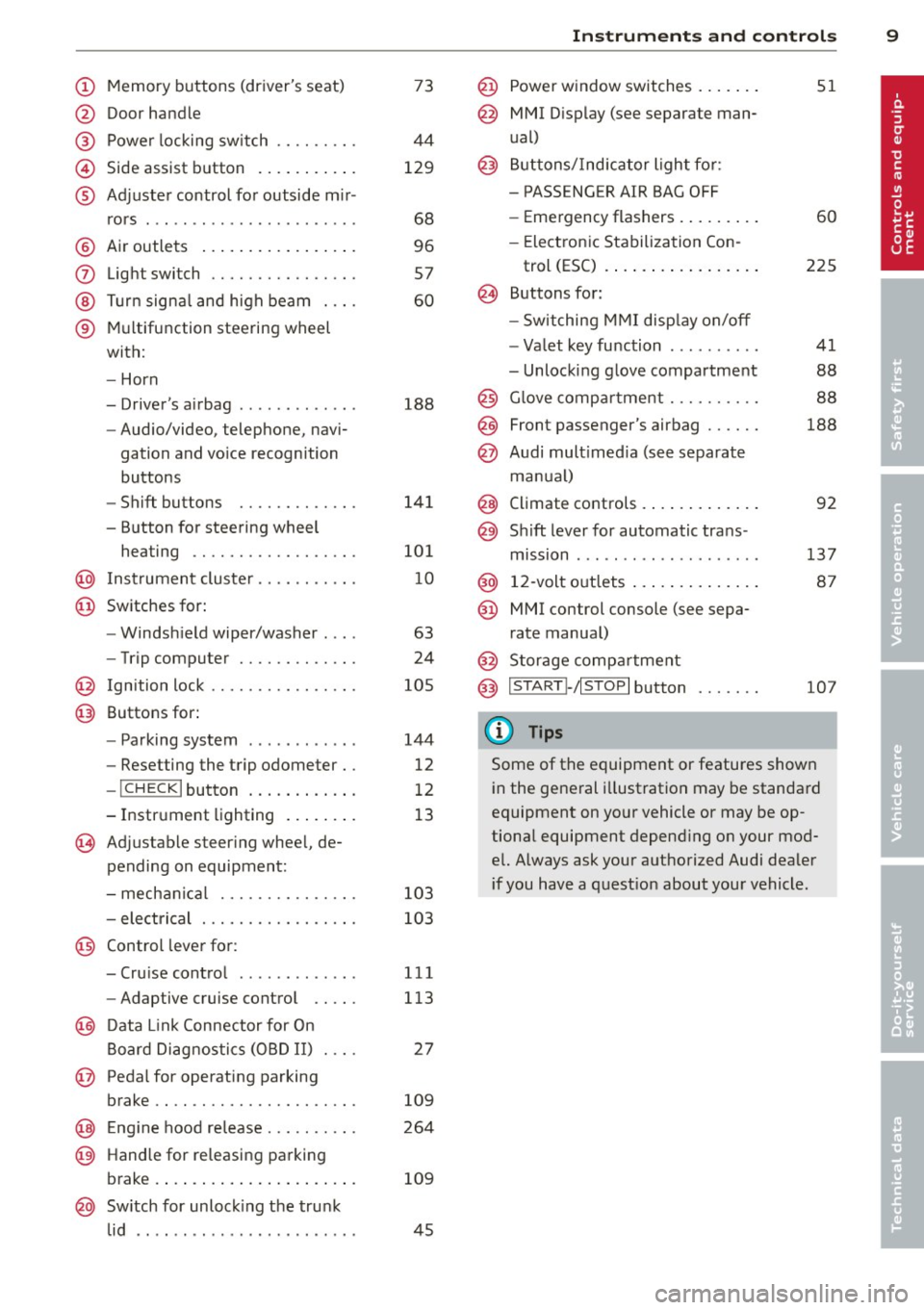
(!) Memory buttons (driver's seat)
@ Door handle
@ Power locking switch .... .. .. .
© Side assist button .......... .
® Adjuster control for outside m ir-
rors .... ... ............... .
@ Air outlets ................ .
(J) Light switch ........... .... .
@ Turn signal and high beam . .. .
® Multifunction steering wheel
with:
- Horn
- Driver's airbag ............ .
- Audio/video, telephone, navi-
gation and vo ice recognition
buttons
- Shift buttons ........ .. .. .
- Button for steering wheel heating ............. .... .
@ Instrument cluster ...... .. .. .
@ Switches for:
- Windshield wiper/washer . .. .
- Trip computer ........ .. .. .
@ Ignition lock ........... .... .
@ Buttons for:
- Parking system
- Resetting the trip odometer ..
- !CHECK lbutton ... ' ... .... .
- Instrument lighting ....... .
'3 Adjustable steer ing wheel, de
pending on equipment:
- mechanical .......... .... .
- electrical ............ .... .
@ Control lever for: 73
44
129
68
96
57
60
188
141
101
10
63
24
105
144
12
12
13
103
103
- Cru ise control . . . . . . . . . . . . . 111
- Adaptive cruise control . . . . . 113
@ Data Link Connector for On
Board Diagnostics (OBD II) . . . . 27
@ Pedal for operating parking
brake . . . . . . . . . . . . . . . . . . . . . . 109
@ Engin e hood release . . . . . . . . . . 264
@ Handle for releasing parking
brake. ..... .... .... ... .. .. . 109
@ Switch for unlock ing the trunk
lid . . . . . . . . . . . . . . . . . . . . . . . . 45
Instruments and controls 9
@ Power window switches ...... .
@ MMI Display (see separate man
ual)
@ Buttons/Indicator light for:
- PASS ENG ER AIR BAG OFF
- Emergency flashers ........ .
- Electronic Stabilization Con-
trol (ESC) ...... . ......... .
@ Buttons for:
- Switching MMI display on/off
- Valet key function ......... .
- Unlocking glove compartment
@ Glove compartment ......... .
@ Front passenger's airbag ..... .
@ Audi multimed ia (see separate
manua l)
@ Climate controls . .. .. .. ..... .
@) Sh ift lever for automatic trans -
mission ....... .. .......... .
@ 12-volt outlets ... . .. .. ..... .
@ MMI control console (see sepa
rate manual)
@ Storage compartment
@ IS TART I- / IS T OPI button
(D Tips
51
60
225
41
88
88
188
92
137
87
107
Some of the equipment or features shown
in the general illustration may be standard
equipment on your vehicle or may be op
tional equipment depend ing on your mod
el. Always ask your authorized Audi dealer
i f you have a question about your vehicle .
Page 13 of 348
Instrument s and warning /indicator lights 11
too high, or the coolant level is too low
¢ page 32.
If the needle is well in the upper area of the
ga uge , the coolant temperature is too high.
Stop the vehicle , switch the eng ine off and
allow the engine to cool.
If the warning light
comes on again after driving a short distance,
contact an authorized dealer.
A WARNING
-Always observe the warning in
¢ page 255, Engine compartment, be
fore opening the hood and checking the
engine coolant level.
- Never open the engine hood if you see or
hear steam, or if you see engine coolant
dripping from the engine compartment.
You could burn yo urself. Let the engine
cool off first un til you can no longer see
or hear steam or coo lant escaping .
(D Note
- Mounting additional lights or accessories
i n front of the air inlets reduces the cool
in g effect of the rad iato r. At high outside
temperatures or high engine load, the
engine could overheat.
- The front spoi ler has been designed to
properly distribute the cooling air when
the vehicle is moving. If the spoiler is
damaged, this cou ld red uce the cooling
effect and the engine could then over
heat. Ask your authorized Aud i dealer for
assistance .
Tachometer (engine rev counter)
The tachometer indicates the engine RPM
(revolutions per minutes) .
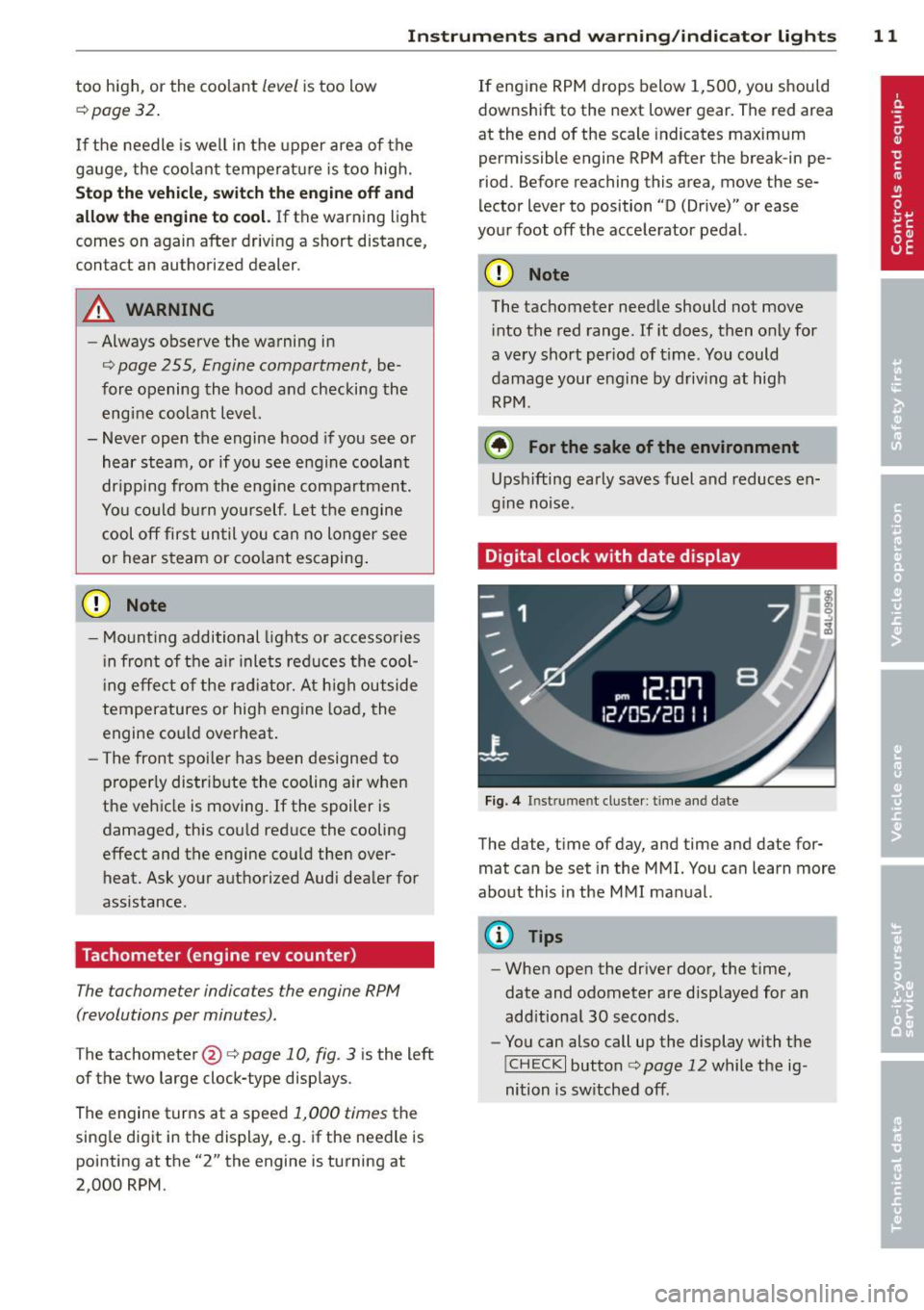
The tachometer @¢ page 10, fig. 3 is the left
of the two large clock-type displays.
The engine turns at a speed
1,000 times the
single digit in the display, e.g . if the needle is
pointing at the "2" the engine is turning at
2,000 RPM. If
eng ine RPM drops below 1,500, you should
downshift to the next lower gear. The red area
at the end of the scale indicates maximum
permissible engine RPM after the break -in pe
riod. Before reaching this area, move these
lector lever to position "D (Drive)" or ease
your foot off the accelerator pedal.
Q) Note
The tachometer needle should not move
i nto the red range. If it does, then only for
a very short per iod of t i me. You could
damage your engine by driving at high
RPM .
@ For the sake of the environment
Upsh ifting early saves fuel and reduces en
gine noise .
Digital clock with date display
Fig. 4 In st rum en t cluster : time and date
The date, time of day, and time and date for
mat can be set in the MMI. You can learn more
about this in the MMI manual.
{!) Tips
- When open the driver door, the time,
date and odometer are displayed for an
add itional 30 seconds.
- You can also call up the display with the
!CHECK I button c:> page 12 while the ig
nition is sw itched off.
Page 17 of 348

Instrument s and warnin g/indic ator ligh ts 15
D
Canada m od els: Anti-lock brake
system (ABS) defective
¢ page 18
USA model s: Parking brake
¢page 19
Canada models : Parking brake
¢page 19
USA model s: Brake malfunction
¢page 19
Canada m odels : Brake malfunc
tion
¢page 19
Ve hicl es with th e adaptive cruise contro l*
have the following additiona l check lamps:
I I II c:=:)
c:=:)
I I I I c:=:)
Open road
¢ page 121
Driving in traffic
¢page 121
Request for driver to as
sume control
¢page 121
_& WARNING
-Failure to heed warning lights and other
important vehicle info rmation may result
in serious persona l injury or vehicle dam
age.
- Whenever sta lled or stopped for repair,
move the vehicle a safe distance off the
road, stop the engine, and turn on the
emergency flasher¢
page 60.
- The engine compartment of any motor
vehicle is a potentially ha zardous area.
Before you check anything in the engine
compartment, stop the engine and let it cool down . Always exercise extreme cau
t ion when working under the hood
¢ page 255, Engine compartment .
Many functions are monitored by the Auto
Check system ¢
page 30. Malfunct ions
or faults will be identified e ither w ith a red symbol (priority 1
-Danger!) or with a ye l
l ow symbo l (priority
2 - Warning).
EPC Electronic power control
Applies to vehicles : with gasoline engine
This warning/indicator light monitors the
electronic power control .
The ~ warning/indicator light ( Electronic
Power Contro l) illuminates when you turn on
the ignit ion as a f unct ion check.
(D Tips
If this warn ing/ indica tor light illum inates
while yo u are d riving, then there is a mal
funct ion in the engine electronics. Have
the malfunct ion corrected as soon as pos
sib le by your authorized A udi dealer or
qualified workshop .
W Glow plug system
Applies to vehicles: with diese l eng ine
The control light illuminat es when the glow
plug system is active.
If the lml indicator light illuminates, the g low
pl ug system is active . You should start the en
gine immediately after the indicator light
switches off. The indicato r light only illum i
nates for approxim ately 1 second if the en
gine is warm or if the outs ide temperature is
above 46 QF (8 QC) .
(D Tips
-If the glow plug indicator light i llum i
nates while dr iving, there is an eng ine
cont rol malfunction . The engine should
be checked immed iate ly .
- If the ind icator light does not illuminate
at all when switch ing the ig nition on,
there may be a malfunction in the glow
plug system. The engine sho uld be
c hecked.
Page 24 of 348
22 Driver in formation d ispl ay
Outside temperature display
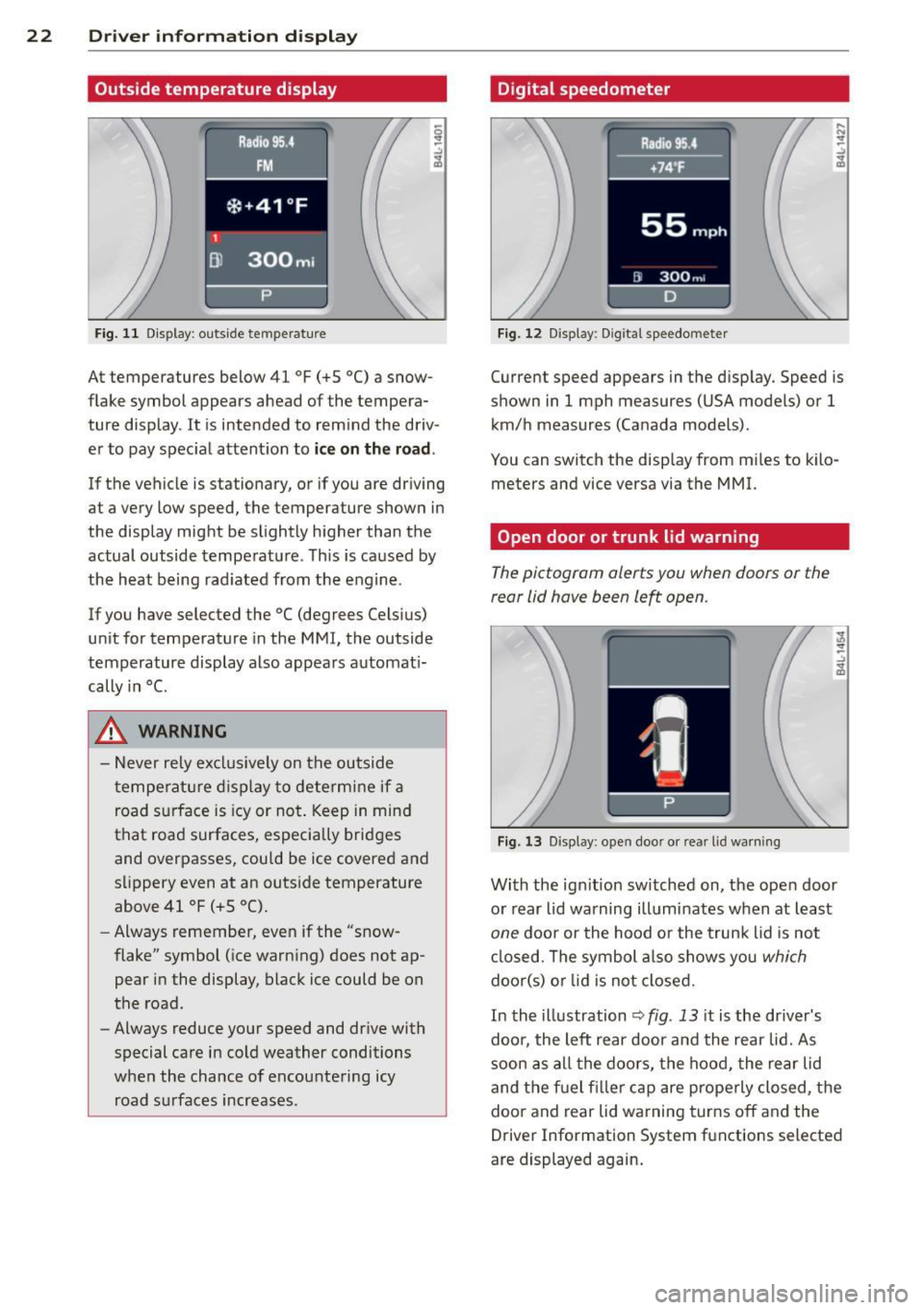
Fig. 11 Display : outside temperature
At temperatures below 41 °F (+S °C) a snow
flake symbol appears ahead of the tempera
ture display . It is intended to remind the driv
er to pay spec ial attent ion to
ic e on the roa d.
If the vehicle is stationary, or if you are driving
at a very low speed, the temperature shown in
the display might be slightly higher than the
actual outside temperature . Th is is caused by
the heat being rad iated from the engine .
If you have selected the °C (degrees Celsius)
unit for temperature in the MMI, the outside
temperature display also appears automat i
cally in
°C.
A WARNING
- Never rely excl usively on the outside
temperatu re d isplay to determine if a
road surface is icy or not . Keep in mind
that road surfaces, especially bridges
and overpasses, could be ice covered and
s li ppery even at an outs ide temperature
above 41 °F (+ S °C).
- Always remember, even if the "snow
flake" symbol (ice warn ing) does not ap
pear in the display, black ice could be on
the road.
- Always reduce your speed and dr ive with
special care in cold weather conditions
when the chance of encountering icy road s urfaces increases .
Digital speedometer
Fig. 12 Display: Digi tal speedometer
Current speed appears in the disp lay. Speed is
shown in 1 mph measures (USA models) or 1
km/h measures (Canada models) .
You can switch the disp lay from m iles to kilo
meters and vice versa via the MMI.
Open door or trunk lid warning
The pictogram alerts you when doors or the
rear lid have been left open .
Fig. 13 Display: open doo r or rea r lid wa rning
With the ign it ion sw itched on, the ope n door
or rear lid warning illuminates when at least
one door or the hood or the trunk lid is not
cl osed . The symbol a lso shows you
which
doo r(s) o r lid is not closed.
In the illustration
~ fig . 13 it is the dr iver's
doo r, the left rear door and the rear lid. As
soon as all the doors, the hood, the rear lid
and the f uel filler cap are prope rly closed, the
door and rear lid warning turns off and the
Driver Information System functions selected
are displayed again.
Page 30 of 348
28 Driver information d isplay
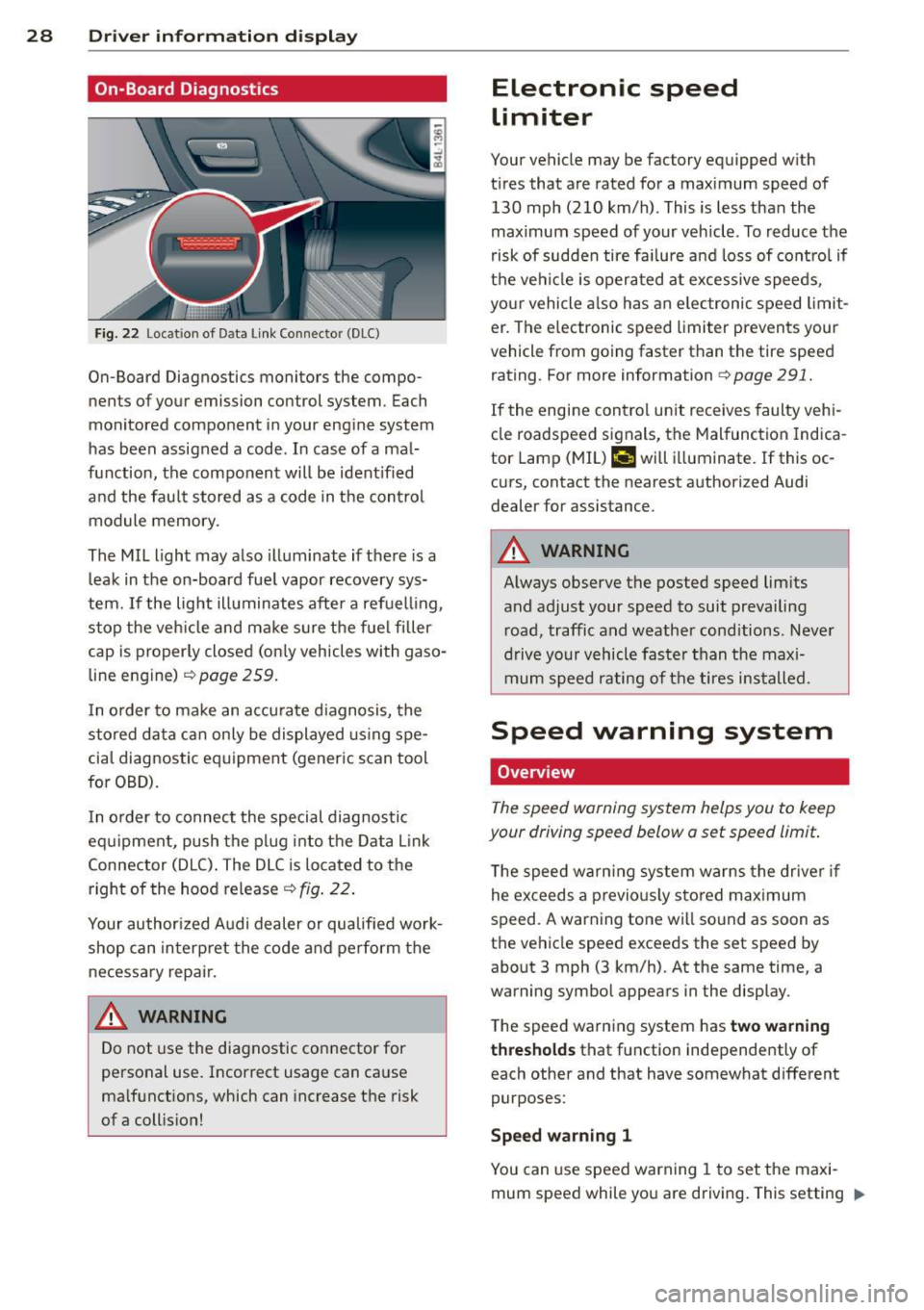
On-Board Diagnostics
Fig. 22 Locat ion of Data Link Connector (DLC)
On-Board Diagnostics monitors the compo
nents of your emission control system. Each
monitored component in your engine system
has been assigned a code . In case of a mal
function, the component will be ident ified
and the fault stored as a code in the control
module memory .
The MIL light may also illuminate if there is a
leak in the on-board fue l vapor recovery sys
tem.
If the light illuminates after a refuelling ,
stop the veh icle and make sure the fuel filler
cap is proper ly closed (on ly vehicles with gaso
line engine)
c::>page 259.
In o rder to make an accurate d iagnosis, the
stored data can only be displayed using spe
cial diagnostic equipment (generic scan tool
for OBD).
I n o rder to connect the special diagnostic
equipment, push the plug into the Data Link
Connector (DLC) . The DLC is located to the
right of the hood release
c::> fig . 22.
Your author ized Audi dealer or qualified work
shop can interpret the code and perform the
necessary repair.
A WARNING
Do not use the diagnostic connector for
personal use. Incorrect usage can cause
ma lfunctions, which can increase the risk
of a collis ion!
Electronic speed
limiter
Your vehicle may be factory equipped w ith
t ir es that are rated for a maximum speed of
130 mph (210 km/h) . This is less than the
maximum speed of your vehicle . To reduce the
risk of sudden tire fa ilure a nd loss of contro l if
the vehicle is operated at excessive speeds,
your vehicle also has an elec tronic speed limit
er . The e lectronic speed limiter prevents your
vehicle from going faster than the tire speed
rating . For more information
c::> page 291.
If the engine control unit receives faulty vehi
cle roadspeed signals, the Malfunction Indica
tor Lamp (MIL)
II will illuminate. If this oc
curs, contact the nearest authorized Audi
dealer for assistance.
A WARNING
-
Always observe the posted speed limits
and adjust your speed to suit prevailing
road, traffic and weather cond itions . Never
drive your vehicle faster than the maxi
mum speed rating of the tires installed.
-
Speed warning system
Overview
The speed warning system helps you to keep
your driving speed below a set speed limit.
T he speed warning system warns the driver if
he exceeds a previo usly stored maximum
speed . A warning tone wi ll so und as soon as
the vehicle speed exceeds the set speed by about 3 mph (3 km/h). At the same time, a
warning symbol appears in the display.
The speed warning system has
two warning
thresholds
that function independently of
each other and that have somewhat different
purposes:
Speed warning 1
You can use speed warning 1 to set the maxi
mum speed while you are driving. This setting "'
Page 34 of 348

32 Driver in formation d isplay
warning goes out after about 5 seconds, but it
can be brought up at any time by pressing the
I CHECK ! button again .
Usually , you can still drive to the next dealer
ship. Turn off all b ut the most necessary elec
trica l cons umers, sinc e these drain the vehi
cle's battery.
(D Note
If the . warning symbol (coolant system
malfunction) also lights up on the instru
ment panel during the trip ¢
page 32,
then you have to stop immediately and
turn off the eng ine . The coolant pump is
not working anymore -danger of damage
to the eng ine!
BRAKE/( ©) Brake system malfunction
A malfunc tion in the brake system mus t be
repaired as soon as possible .
If the warn ing /indicator light~ (USA
models)/ . (Canada mode ls) in the instru
ment cluster flashes, there is a brake system
malfunction . By pressing the
I CH ECK ! button,
you can bring up a dr iver message which ex
p la ins the ma lfu nction in more detail.
Stop vehicle and check brake fluid level
> Pul l off the road .
> Stop the vehicle .
> Turn off the engine.
> Check the brake flu id level ¢ page 274 .
> Contact you r neares t authorized Audi dea le r
o r qualified workshop if necessa ry.
Warning! Fault in brake system. Contact
workshop
> Drive carefully to the neares t authorized
Audi de aler or qua lified workshop and h ave
the mal function cor rected ¢
&_.
If the A BS system malfunctions, the ABS
war ning/ indica to r li ght illum inates toge ther
with the bra ke sys tem mal func tion warning/
indicator light¢&. .
A WARNING
-Always observe the war nings in
¢ page 255, Engine compartment, be
fore open ing the hood and check ing the
b ra ke fluid .
- Driving with low brake f lu id is a safety
hazard . Stop the car a nd get professiona l
assistance .
-USA models: If the ~ warning light
a nd the
m:11 warning light come on to
ge the r, the rea r whee ls cou ld lo ck up
fi rs t un der hard br aking. Rear wheel lock
up can ca use loss of vehicle co ntrol and
an accident . Have your vehicle repaired
immed iate ly by yo ur authorized Au di
dea le r or a qua lified workshop. Drive
slowly and avo id sudden, hard brake ap
plications.
- Canada models: If the brake warning
light . and the ABS warning light
[I]
come on together, the rear wheels could
lock up first unde r hard braking . Rear
wheel lock-up can cause loss of vehicle
cont ro l and a n ac cident . Have yo ur vehi
cle repaired immed iately by yo ur au tho r
i z ed A udi d ealer or a qualified wor ksh op .
D rive s low ly and avoid s udden, hard
brake applications .
-L Engine cooling system malfunction
A malfunction in the engine cooling sys tem
must be repaired as soon as possible.
When the. symbo l in t he d isplay b lin ks ,
then either the e ngine coo lant
temperature is
too high, o r th e coo lan t
level is too low. An
additional drive r message can also be dis
played by p ressing the
I CHECK ! button:
Switch off engine and ch eck coolant level
> Pull off the road.
> Stop the vehicle .
> Tu rn off the engine.
> Check coolant leve l ¢page 272.
> Add coo lant if necessary ¢ page 2 7 3.
> Continue driv ing on ly after t he engine cool-
ant warning/indicator light goes out .
1J>
Page 35 of 348
~ Contact your authorized Audi dea ler fo r as -
sistance if necessary.
If the engine coolant level is co rrect, then the
radiato r fan may be the cause of the malfunc
tion.
If the . warning symbol (alternator ma l
f u nction) a lso l ights up on the instr ument
panel ¢
page 31, then the fan belt may be
damaged .
A WARNING
- If your vehicle should break down for
mechanica l or other reasons, park at a
safe distance from moving traffic, turn off the engine and turn on the hazard
warning lights¢
page 60, Emergency
flasher.
-
- Never open the hood if you see or hear
steam o r coolant escap ing from the en
gine compartment - you risk being scald
ed. Wait until you can no longe r see or
hear steam or coo lant escaping.
- The e ngine compartment of any veh icle
is a da ngerous a rea. Before you perfo rm
any wor k in the engine compar tment,
t ur n o f the eng ine and allow it to cool.
Follow the warning stickers¢
page 255,
Engine compartment .
(D Note
Do not cont in ue d riving if the . symbol
illuminates. There is a ma lf u nct ion in the
engine cooling system -you co uld damage
your eng ine.
9=:7-Engine oil pressure malfunction
The red engine oil pressure warning symbol
requires immediate service or repair. Driving
with a low-oil -pressure indication is likely to
inflict severe damage to the engine.
If the . symbol appears in the display and
b links, the oil press ure is too low . An addition
a l dr iver message can also be disp layed by
press ing the
I CH ECKi button:
Switch off engine! Oil p ressure too low
Dri ver information di spla y 33
Immediate act ions
~ Pull off the road.
~ Stop the vehicle.
~ T ur n off the engine .
~ Check the engine oil level with the dipstick
¢ page
269 .
Dipstick readings check s too low
~ Top off oil to the prope r level ¢ page 2 70 .
~ Make sure that the oil pressure wa rning
symbo l. appears no longer in the d isp lay
before you sta rt driving again.
Dipstick read ing checks OK
~ If the oil p ress ure warning symbol.
s t arts flashing aga in even though the en
gine oil level checks OK on t he dipstick,
do
not continue d riving and do not let the en
gine run in idle .
Instead, contact your au
thorized A udi dealer for assistance.
(D Tips
- The engine oil pressure symbol. is
not an indi cator for a low eng ine o il lev
el. Do not rely on it . Instead, check the
oil level in your engine at regula r inter
vals, preferably each time you refuel,
and always before going on a long trip .
- The yellow oil lev el warn ing indication
II requires oil r efill or work shop serv
i ce without delay . Do not wait until th e
red oil pressure warning. start s to
flash bef ore you re spond to th e low oil
le vel warning
l!I . By then , your engine
ma y already have suffe red serious dam
age.
i Steering malfunction
If there is a malfunction in the electronic
steering column lock, the steering cannot be
unlocked .
If the . symbo l in the display b links, there is
a malfunction in the electro nic steering col
u mn lock. An additional driver message can
also be displayed by pressing the
ICHECK I but-
ton:
~
Page 53 of 348
How is the anti-theft alarm system
switched off?
The anti -theft a la rm system is switched off
on ly when you unlock yo ur vehicle. If yo u do
not open a door w ith in 60 seconds after you
have unlocked with the remote control , the
ve hicle w ill lock itse lf again automat ically .
When will the anti-theft alarm sy stem be
triggered?
W hen the ve hicle is locked, the alarm system
mon itors and protects the following parts of
the vehicle:
- engi ne compartment
- lu ggage compartment
- doo rs
- i gnition
When the system is activated, the alarm will be tr iggered if on e of the doo rs, the eng ine
h ood or t he rear lid a re opened, o r if the ig ni
tion is tur ned on. The anti-t heft alarm sys tem
will also go off when the battery is discon
nected .
You can a lso tr igge r the alarm by p re ssing t he
P ANIC button o n your remote con trol. T his
will alert other peop le in case of emergency.
Press the
PANIC b utton again to t urn off the
a larm.
How is the anti-theft alarm switched off
when triggered?
The a larm system is switc hed off when you
un lock the vehicle o r whe n the ignition is
sw itched on. The alarm will also switch itself
off when it comes to the end of its cycle.
Emergency flasher and horn
The emergency flas her wi ll blink brief ly and
the hor n sounds when the doors, engine hood
and rear lid are proper ly closed .
If th e emergen cy fl ashe rs do no t blink , or the
horn does no t sound, check the doors, engine
h ood an d rear lid to make sure they are p rop
erly closed.
If you close a door, t he hood o r
the rear lid w ith the anti-theft alarm sw itched
on, the emergency flashers will b link and the
Opening and clo sin g 51
horn wi ll sou nd on ly afte r you have closed the
door or li d.
(D Tips
For the anti-theft ala rm sys te m to fu n c
tion properly, make sure all ve hicle doors
and win dows are closed before leavi ng t he
vehicle .
Power windows
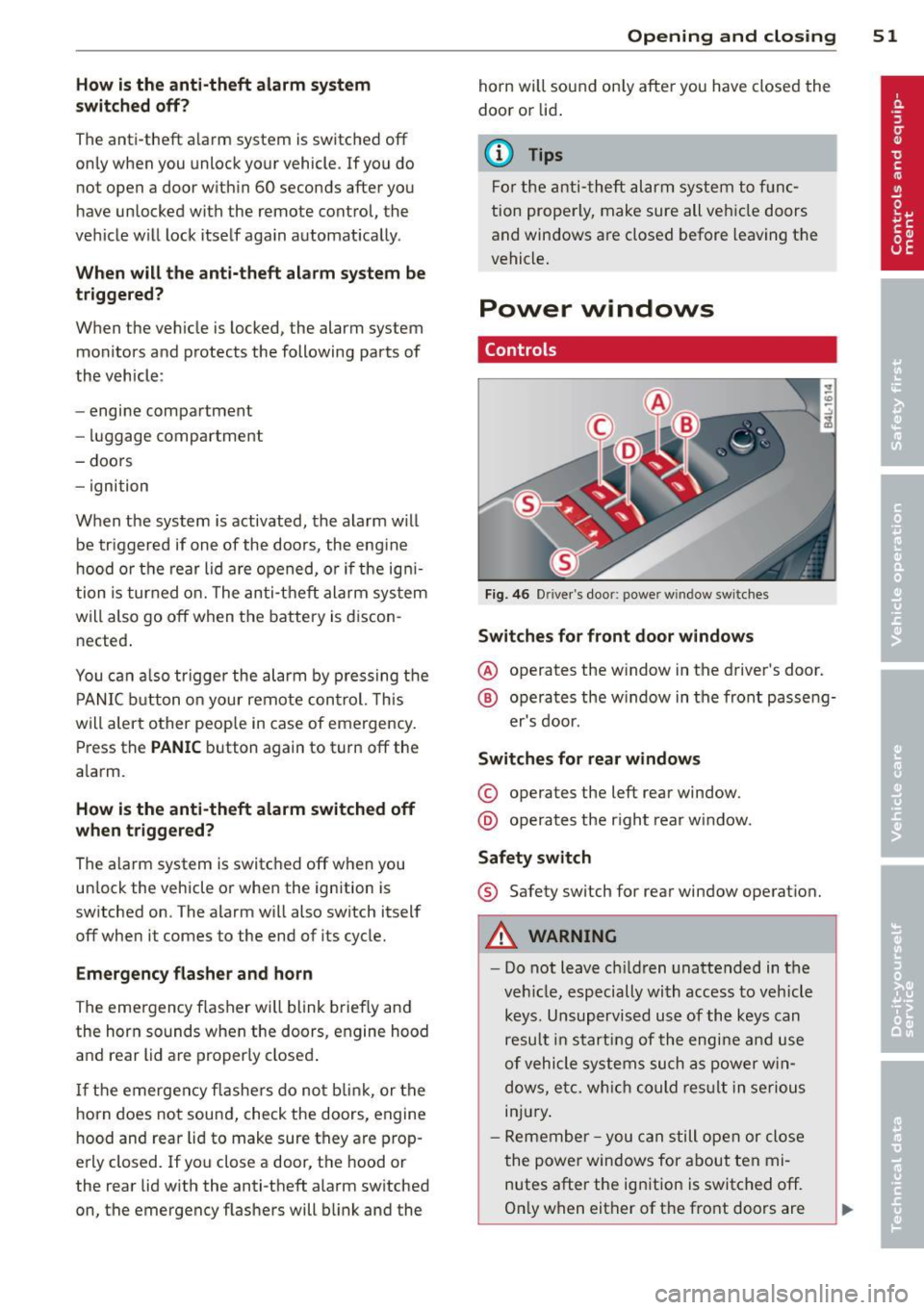
Controls
Fig. 4 6 Drive r's doo r: power w indow sw itches
Switches for front door windows
@ o p erates the w indow in the d river's door.
® opera tes the w indow in the front passe ng-
er's door .
Switches for rear windows
© operates the left rear window.
@ operates the r ight rear wi ndow.
Safety switch
® Safety switch for rear window operat ion.
A WARNING
- Do not lea ve c hildren unattended in t he
ve hicle, especially wi th access to veh icle
keys. Unsupervi sed us e of the keys can
resu lt in start ing of the engi ne and use
o f vehicle system s such as po wer w in
dows, etc. w hich co uld res ult in se riou s
in jur y.
- R eme mber -you can s till ope n or close
the powe r win dows for about ten mi
n utes after the ign ition is switc hed off.
O nl y w hen eit her of t he fro nt doors are
Page 68 of 348
66 Clear vis ion
Headlight washer system
Applies to vehicles: with hea dli ght washer system
The headlight washer system cleans the
headlights.
.. Operate the windsh ield wiper/washer sys
tem
c:> page 63, fig. 65 ® with the head
lights turned on by holding the lever for lon
ger than one second.
The washer jets extend forward out of the
fro nt bumper driven by water pressure to
spray the front headlights with water .
You should inspect the headlights regularly
(for example when refueling) and clean off
any solid dirt or insects from the lenses .
To ensure the system works properly in winter,
keep the washer jets free of snow and remove
any ice using a de- ic ing spray.
Service position
The wiper blades can only be changed in the
service position.
.. If the wiper blades are not frozen to the
windshield, bring the windshield wiper lever
to the basic position@c:>
page 63 , fig. 65 .
.. Select: ICARI function button > Systems *
control button> Windshield w ipers > S erv
i c e posit ion.
Or
.. Se lect:
ICARI funct ion button > Car s ys
tems *
control button > Servicing & check s >
Wiper service po sition .
-On -changing the windsh ie ld w iper blades
can on ly be done if you bring the wiper a rms
to the se rv ice position. You w ill also avoid
paint damage to the hood when wo rking on
the wipers in this pos ition.
- Off -the w indshield wipe rs a re moved to
their initial pos ition aga in.
(D Note
Never maneuve r your vehicle with the
fro nt windshield wipe r arms r aised since
they will a utomat ically be moved back to the
ir basic position above a speed of 3
mph
(6 km/h) and can scratch the hood.
(D Tips
- Yo u ca n also use the se rvice posi tion, for
example, if you want to protect the
w indshield from icing by using
a cover .
- T he service posit ion automatically
switches to
Off when you operate the
w indshield wiper lever, o r speed exceeds
3 mph (6 km/h) .
Replacing windshield wiper blades
Wiper blades in good condition help keep the
windshield clear.
®
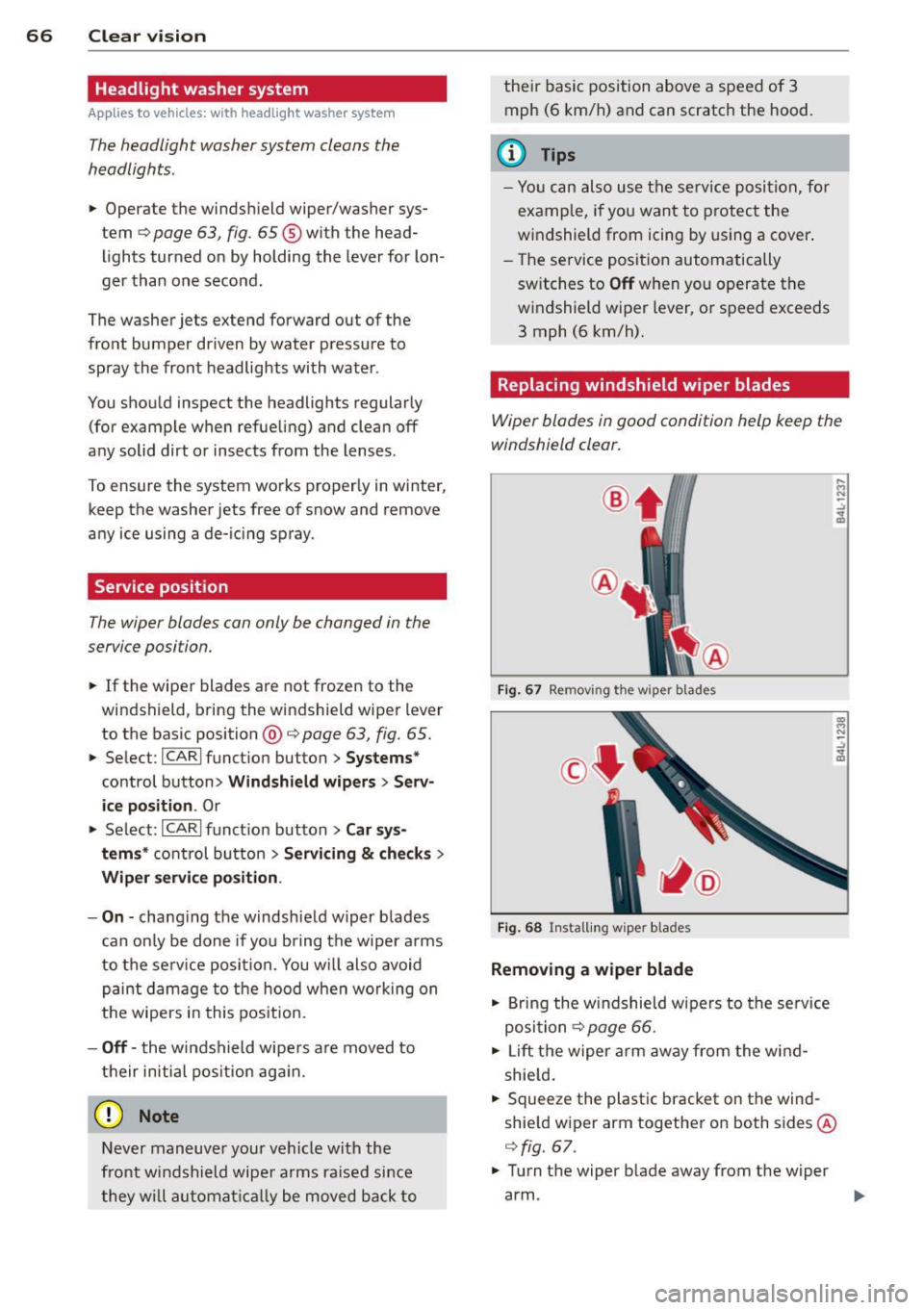
F ig . 67 Removing the wiper blades
F ig . 68 Instal ling wiper b lades
Removing a wiper blade
.. Bring the w indshield wipe rs to the se rvice
posi tion
c:> page 66.
.. Lift the wiper arm away from the wind
shie ld .
.. Squeeze the plast ic bracket on the wind
shie ld wiper arm together on both sides @
c:>
fig. 67 .
.. Turn the wiper blade away from the wiper
arm . ..,.