warning light AUDI Q7 2014 Owner´s Manual
[x] Cancel search | Manufacturer: AUDI, Model Year: 2014, Model line: Q7, Model: AUDI Q7 2014Pages: 340, PDF Size: 85.02 MB
Page 227 of 340
A WARNING 1-=
-ESC, ABS, ASR and EDL cannot overcome
the laws of physics. This is espec ially im
portant on slippery or wet roads. If the
systems begin act ing to stab ilize your ve
hicle, you should immediately change
your speed to match the road and traffic conditions. Do not let the increased sa fe
ty provided by these systems tempt you
to take r isks. Doing so will increase the
risk of a loss of vehicle control, collision
and ser ious persona l injuries.
- Always adapt your speed to road, traffic
and weather conditions. The risk of los
ing control of the vehicle increases when
dr iv ing too fast, especially through
curves and on slippery or wet roads, and
w hen driving too close to vehicles up
ahead. ESC, ABS, the b rake assist sys
tem, ASR and EDL cannot prevent co lli
sions.
Switching on/off --- -
Intellig ent technolog y 225
-Always accelerate with special care on
even, smooth surfaces such as those that
are wet or covered with ice and snow.
The drive wheels can spin even with
these assistance systems that cannot al
ways he lp to reduce the risk of loss of ve
hicle control.
@ Tips
- ABS and ASR only work correctly when
all four wheels are equipped with identi
cal tires. D iffe rent tire sizes can lead to a
reduction in engine powe r.
- Yo u may hear noises when the systems
descr ibed are working.
- If the ind icator light
DJ or ~ (USA
mode ls)/ ii] (Canada models) appears,
there may be a malfunction~
page 16,
¢page 18.
•
•
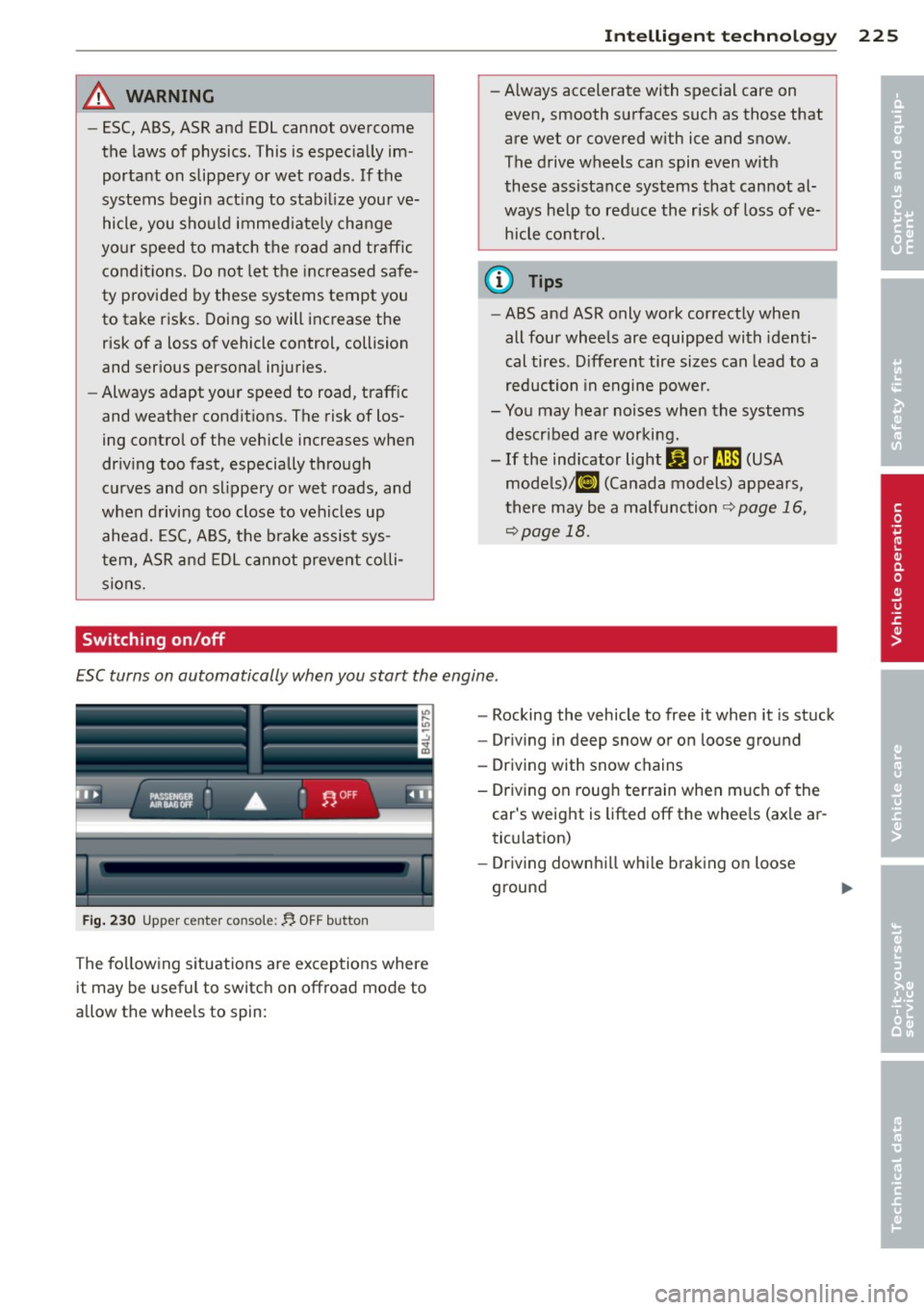
ESC turns on automatically when you start the engine .
. ...---------.,
--------------
Fig. 230 Upper center conso le : ~ O FF button
The fo llow ing situations are exceptions where
it may be useful to switch on offroad mode to
allow the whee ls to spin: -
Rocking the vehicle to free it when it is stuck
- Dr iving in deep snow or on loose ground
- Driving with snow chains
- Dr iving on roug h terrain when much of the
car's weight is lifted off the whee ls (ax le ar
ticu lation)
- Dr iving downhi ll wh ile braking on loose
ground
Page 228 of 340
226 Intelligent technology
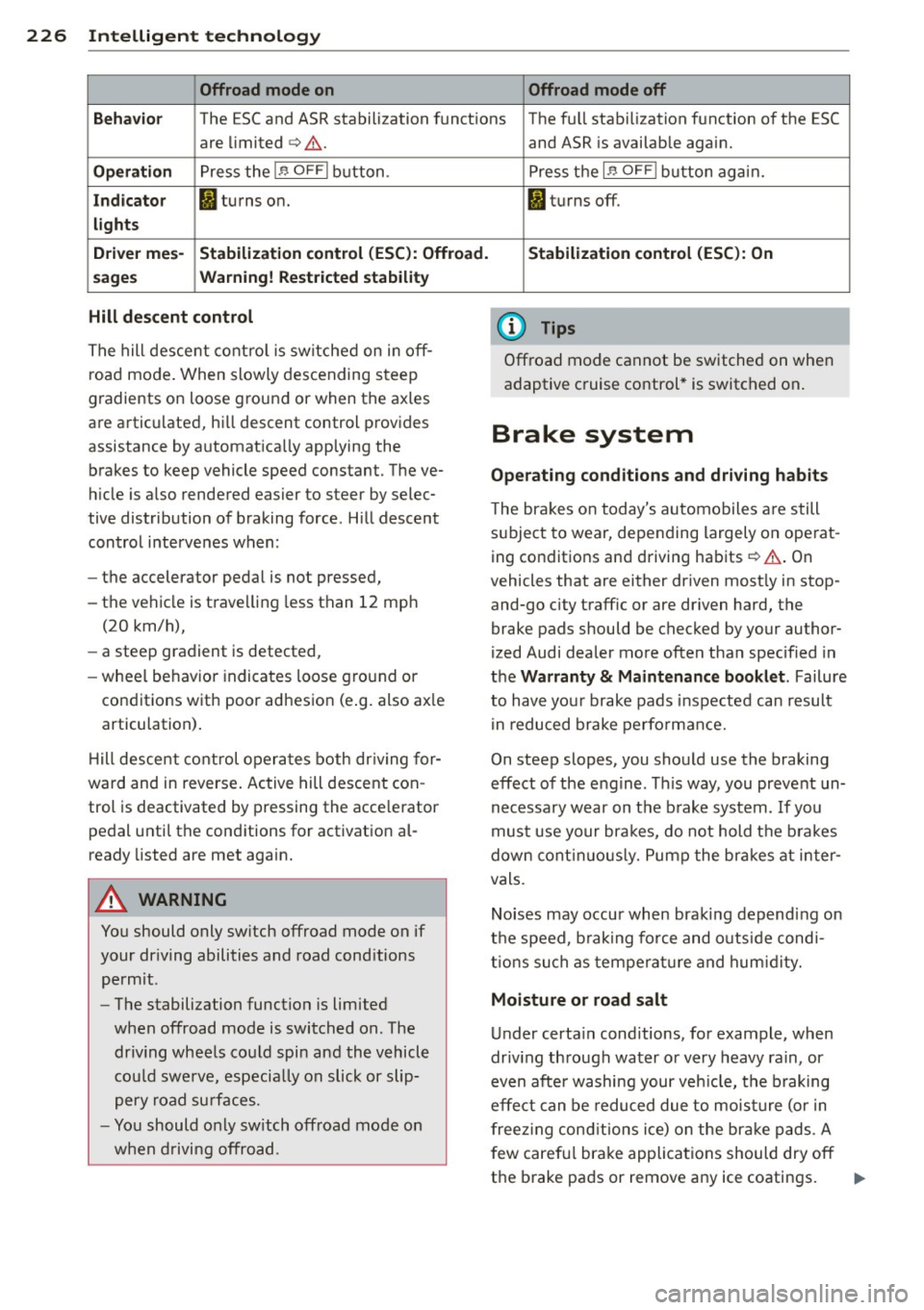
Offroad mode on Offroad mode off
Behavio r
The ESC and ASR stabilization functions The fu ll stabilization function of the ESC
are limited
c> Li::,. .
Operation Press the 1.$ OFFI button.
Indicator fl turns on.
lights
D rive r mes-
Stabilization control (ESC): Offroad.
sages Warning! Rest ricted stability
Hill descent control
The hill descent control is switched on in off
road mode. When slowly descending steep
gradients on loose ground or when the axles
are articulated, h ill descent control provides
assistance by automatically applying the
brakes to keep vehicle speed constant. The ve
h icle is also rendered easier to steer by selec
tive distribution of braking force . Hill descent
control intervenes when:
- the accelerator pedal is not pressed,
- the vehicle is trave lling less than 12 mph
(20 km/h),
- a steep gradient is detected,
-wheel behavio r indicates loose ground or
conditions with poor adhesion (e .g. also ax le
articulation) .
H ill descent control operates both driving for
ward and in reverse . Active hill descent con
trol is deactivated by pressing the accelerator
pedal until the conditions for activation al
ready listed are met again.
A WARNING
You should only switch offroad mode on if
your dr iving abilities and road cond itions
permit.
- The stabilization function is limited
when offroad mode is switched on. The
dr iv ing wheels could spin and the vehicle
cou ld swerve, especially on slick or slip
pery road surfaces.
- You should only sw itch offroad mode on
when driving offroad. and ASR
is available again.
Press the
1 .$ OF FI button again.
fl turns off.
Stabilization control (ESC): On
(D Tips
Offroad mode cannot be switched on when
adaptive cruise control* is switched on .
Brake system
Operating conditions and driving habits
The brakes on today's automobiles are still
subject to wear, depending largely on operat
ing conditions and driving habits
c> Li::,. . On
vehicles that are either driven most ly in stop
and-go city traffic or are dr iven hard, the
brake pads should be checked by your author
ized Audi dealer more often than specified in
the Warranty & Maintenance booklet . Failure
to have your brake pads inspected can result
in reduced brake performance.
On steep slopes, you should use the braking
effect of the engine . This way, you prevent un
necessary wear on the brake system .
If you
must use your brakes, do not hold the brakes
down continuously. Pump the brakes at inter
vals.
Noises may occur when braking depending on
the speed, b raking force and outs ide cond i
tions such as temperature and humidity.
Moisture or road salt
Under certain conditions, for example, when
driv ing through water or very heavy rain, or
even after washing your veh icle, the braking
effect can be reduced due to moisture (or in
freezing conditions ice) on the bra ke pads. A
f ew careful brake applications should dry off
the brake pads or remove any ice coatings.
jll,,
Page 232 of 340
230 Intellig ent technol ogy
What you should know
The highest priority is given to maintaining
starting capability.
The battery is severely taxed in short-distance
driving, in city traffic and during the cold time
of year. Abundant electr ical energy is re
qu ired, but only a little is generated. It is also
cr itical if the e ngine is not running and elect ri
cal components a re turned on. In th is in
stance energy is being consumed but none is being generated .
I t is in precisely these situations that you w ill
notice energy management actively regulat
ing the distrib ution of energy.
Vehicle stand s for an ext ende d period
If you do not drive your vehicle over a period
of several days or weeks, electrical compo
nents are gradually cut back o r switched off .
This reduces energy cons umption and main
tains starting capab ility
over a longer period.
Take into consideration that when you un lock
your ve hicle, some convenience functions,
such as the interior ligh ts or the power seat
ad justmen t, may not be available. The con
venience functions will be available again
when you turn on the ignition and start the
engine.
With the engine turned off
I f you listen to the radio, for example, with
the eng ine turned off or use other MM I func
tions, the battery is being discharged .
I f sta rting capability is jeopa rdized due to en
e rgy consumpt ion, the follow ing warning ap
pears in the MMI disp lay:
Ple ase s tart engin e, otherwi se system will
s wit ch off in 3 minute s.
The warning ind icates that the system will be
turned off automatically after 3 m inutes .
If
you wish to cont inue us ing the functions, you
have to start the engine.
With the eng in e runnin g
Although e lectrical energy is gene rated when
the vehicle is being driven, the battery can be
come discharged. This happens mostly when
little energy is being generated and a great
deal consumed and the battery's state of
charge is not optimal.
To bring the energy balance back into equili brium, consumers which req uire especially
large amounts of energy are temporar ily cut
back or sw itched off. Heat ing systems in par
t icular require a great deal of energy. If you
notice, for example, that the heated seats* or
the heated rear window are not heating, they
have been tempora rily cut back or switched
off . These systems w ill be available again as
soon as t he energy balance has been restored.
You w ill also notice that engine id le speed has
been increased slightly . T h is is normal and not
a cause for con cern. By inc reas ing engine id le
speed the additional energy required is gener
ated and the battery is charged.
Driver notification in the instrument
cluster display
If battery power drops into the range where it
can limit the ability of the engine to start, this
is shown in the instrument cluster display
with the fo llow ing driver message:
(•) low batte ry charge: bat tery w ill be
ch arg ed whil e dri ving
This notificat ion reminds you that the starting
capability of the engine may be lim ited. As
soon as you start dr iv ing again, the battery
will be recharged and the not ificat io n will go
out .
Driver notific ation app ear s a nd goe s out
again
If this driver notification appears after the ig
nition is turned on or wh ile driving and it goes
out again after a while, the battery has been
adequately recharged. .,.
Page 236 of 340
234 Driving and en vironm ent
,8. WARNING
-Do not park your vehicle over flammable
materials such as grass or leaves because
the high temperature of the diesel par
t icu late filter could start a fire .
- Do not apply an underbody protectant in the exhaust system area or a fire could start.
Avoid damaging the vehicle
When you are driving on poor roads, or over
curbs, steep ramps, etc., make certain that
low-lying parts such as spoilers and exhaust
system parts do not bottom out and get dam
aged.
This is especia lly true for vehicles with low
slung chassis (sports chassis)* and fully load
ed vehicles.
Shutting down vehicle
If you would like your vehicle to remain inop
erative for a longer period of time, contact an
Audi or other specialized dealer . They can ad
vise you on necessary precautions e.g . corro
sion prevention, maintenance and storage. Pay attention to additional information con
cerning the battery. Refer to
c::> page 268.
Operate your vehicle
economically and minimize pollution
General
Your personal style of driving will determine
the economy of your vehicle, as well as ex
haust and noise levels .
Fuel economy, environmental impact, and
wear on your engine, brakes and tires largely
depend on three factors:
- your personal driving style
- operating conditions
- technical limitations
If you anticipate what you need to do next and
drive economically, you can easily cut your
fuel consumption by 10-15 percent . This sec
tion will give you some tips on how you can help the environment and your pocketbook.
(D Tips
The consumption estimates as published by ENVIRONMENTAL PROTECTION AGENCY
(EPA) and Transport Canada may not corre
spond to your actual consumption on the road, which will vary depending upon vehi
cle load and speed, road and weather con
dit ions, trip length, etc.
· Drive smoothly and keep a lookout
ahead
Vehicles use the most fuel when they ore ac
celerating.
., Avo id unnecessary accelerating and brak ing.
Vehicles use the most fuel when they are ac
celerating . If you anticipate what is going to
happen next, you will need to brake less and,
thus, acce lerate less. Let the vehicle coast
whenever possible -for examp le when you see
that the next traffic light is red.
Avoid full throttle
Driving at moderate speeds saves fuel and
improves your mileage.
., Try and keep well below your car's maximum
speed.
Accelerating gently reduces fuel consump
tion, engine wear, and does not disturb the environment.
Fuel consumption, exhaust emissions and en
gine noise increase disproportionately at high
speeds. If you drive at approximately three
quarters of top speed, fuel consumption w ill
be reduced by one half. Never drive faster
than the posted speed limit and weather con
ditions permit.
Page 237 of 340
Reducing unnecessary idling
Even when your car is just idling it burns up
fuel.
11-Shut the engine off when you are not driving
the vehicle.
11-Do not warm up the vehicle by letting the
engine run at idle .
It makes sense to shut
off the engine in traffic
jams, when waiting for trains to pass at rail
road cross ings, or at traffic lights that have
long waits on red. Turning the engine
off for
just 30-40 seconds saves more fuel than is
burned starting the engine again.
It takes a long time for the engine to warm up
fully when it is running at idle. However, wear
and noxious emissions are especially high
when the engine is warming up. So you should
drive away as soon as you start the engine and
avoid running at high rpms while the engine is
still warming up .
(D Note
Do not leave engine idling unattended af
ter starting. If warning lights should come
on to indicate improper operation, they
wou ld go unheeded. Extended idling also
produces heat, which cou ld result in over
heating or other damage to the vehicle or
other property .
Regular maintenance
A badly tuned engine unnecessarily wastes a lot of fuel .
11-Have your vehicle serviced at regular inter-
vals.
By having your vehicle regularly serviced by an
authorized Audi dealer helps to ensure that it
runs properly and economically. The condition
of your vehicle not only affects its safe ty and
ab ility to hold its value, it also affects fuel
consumption .
Check your oil each time you fill your tank.
Driving and environment 235
The amount of oil used is re lated to engine
load and speed.
It is normal for the oil consumption of a new
engine to reach its lowest value after a certain
mileage has been driven.
You must drive your vehicle about 3,000 miles
(S,000 kilometers) before you can properly
assess oil consumpt ion.
This also app lies to fue l consumption and en
gine output.
(D Note
- Have your veh icle ma inta ined properly
and in accordance with the service rec
ommendations in your Warranty
& Main
t enance booklet. Lack of prop er mainte
nance as well as improper use of the ve
hicle will impair the function of the
emission cont ro l system and could lead
to damage.
- Do not alter or remove any component of
the Emission Control System unless ap
proved by the manufacturer.
- Do not alter or remove any device, such
as heat shields, switches, ignition wires,
valves, which are designed to protect
your vehicle's Emission Control System and other important vehicle compo
nents.
Fewer short trips
Fuel consumption will always be relatively
high on short trips .
11-Try to avoid driv ing short distances w ith a
cold engine.
T he engine and cata lytic converter have to
reach their optimal operating temperature to
reduce fuel consumpt ion and noxious emis
s ions effectively .
Just after starting, a co ld engine in a mid-size
car on ly achieves a fuel economy of 6-8 mi les
per gallon (30-40 l/l00km). After about a
half a mile, fuel economy climbs to 12 mpg
(20 l/100 km). After about
2 .5 miles (4 km), liJI,
•
•
Page 242 of 340
240 Trailer towing
Trailer towing
Driving with a trailer
General information
Your Audi was designed primarily for passen
ger transportation .
If you plan to tow a trailer, p lease remember
that the additional load will affect durability,
economy and performance .
Trailer towing not on ly places more stress on
the vehicle, it also calls for more concentra
tion from the driver.
For this reason, always fo llow the operating
and driving instructions provided and use
common sense.
@ Note
If you are going to tow a trai ler, you must
activate the trailer operation mode
c:::> page 159, Towing a trailer.
Technical requirements
Trailer hitch
Use a weight-carrying hitch conforming to the
gross trailer weight. The hitch must be suita ble for your vehicle and trailer and must be
mounted securely on the veh icle's chassis at a
technically sound location . Use only a trailer
hitch with a removable ball mount. Always
check with the trailer hitch manufacturer to
make sure that you are using the cor rect
hitch.
Do not use a bumper hitch.
The hitch must be installed in such a way that
it does not interfere with the impact-absorb
ing bumper system. No modifications should
be made to the vehicle exhaust and brake sys
tems. From time to time, check that all hitch
mounting bolts remain securely fastened.
When you are not towing a trailer, remove the
trai ler hitch ball mount. This prevents the
hitch from causing damage should your vehi
cle be struck from behind
c:::> A.
Trailer brakes
If your trailer is equipped with a brakin g sys
tem, check to be sure that it conforms to all
regulations.
T he trailer hydraulic brake system must not be
directly connected to the vehicle's hydraulic
brake system
c:::> A .
Safety chains
Always use safety chains between your veh icle
and the tra iler.
Trailer lights
Trailer lights must meet all regulations. Be
sure to check with your authorized Audi dealer
for correct wiring, sw itches, and relays.
Mirrors
If you are unable to see the traffic behind you
using the regular outside mirrors, then you
must install extended mirrors.
It is important
that you always have clear v is ion to the rear .
A WARNING ,-
- If a trailer has electrical brakes please
note that these brakes are not activated
by the factory-fitted control unit -risk of
accident!
- Afte r removing the trailer hitch, do not
store it in yo ur vehicle. In case of sudden
braking, the hitch could fly forward and
injure you or your passengers.
- Never install a "weight distributing" or
"load equalizing" trailer hitch on your ve
hicle. The vehicle was not designed for
these kinds of trailer hitches. The hitch
attachment can fail, causing the trailer
to tear loose from the vehicle.
- The Gross Vehicle Weight Rating for your
veh icle, found on the safety compliance
label on the driver's side B-pillar, must
never be exceeded under any c ircumstan
ces. Exceeding the Gross Vehicle Weight
Rating of your vehicle is likely to damage
your vehicle, and such damage will not
be covered by your Limited New Vehicle
-
Warranty. Exceeding the Gross Vehicle ~
Page 244 of 340
24 2 Trailer towing
chains, make sure they wi ll not drag on the
road when you are driving .
The cha ins shou ld cross under the tra ile r
tongue to prevent it from dropping in case of
separation from the hitch.
0 Note
If you are going to tow a tra ile r, you must
activa te the trailer operation mode
~ page 159, Towing a trailer.
Driving instructions
Driving with a trailer always requires extra
cor e and consid eration.
To obta in the best poss ible handling of vehicle
and tra ile r, p le ase no te the following:
.. Do not tow a loaded tra iler when your car it
self is not loaded.
.,. Be especia lly careful when pass ing othe r
vehicles .
.. Observe speed limits.
.. Do not driv e at the maximum p ermissible
speed.
.. Always apply brakes early.
.. Monitor the temperature gauge.
Weight di stributio n
Towing a loaded trai ler with an empty ca r re
sults in a high ly unstable distribution of
weight . If this cannot be avoided, drive at very
l ow speeds only to avoid the risk of los ing
steering control.
A "balanced" rig is eas ier to operate and con
trol. This means that the tow vehicle should
be loaded to the extent possible and permiss i
ble, while keeping the trailer as light as possi
b le under the circumstances. Whenever possi
b le, transfer some cargo to the luggage com
pa rtment of the tow veh icle wh ile observing
tongue load requirements and vehicle loading
considerations .
Speed
The higher the speed, the more difficult it be
comes for the driver to control the rig . Do not
drive at the maximum permiss ible speed . Re- duce your speed even more i
f load, weather or
wind conditions are unfavorable - particularly
when going downhill.
Red uce veh icle speed
immediately if the trail
er shows the slightest s ign of sway ing.
Do not
t ry to stop the swa ying by acceleratin g.
Observe speed limits. In some a reas, speeds
f or vehicles tow ing tra ile rs are lower than for
r egular vehicles.
Always apply brakes early. When driving down hill, shift into a lowe r gear to use the en
gine braking effect to s low the vehicle . U se o f
the brakes alone can cause them to overheat
and fail.
Coolant temperature
T he coo lant tempe ratu re gauge ~ page 10
must be observed caref ully. If the need le
moves close to the upper end of the scale, re
duce speed immediately and/or turn off the
air conditioner.
If the coolant temperature warn ing light in
the instr ume nt cluster starts flashing., pull
off the road , stop and let the engine
idle for
about two min utes to prevent heat build -up .
A WARNING "--
Anyone not proper ly restrained in a mov-
ing vehicle is at a much greater risk in an
accident. Never let anyone ride in your car
who is not properly wearing the restraints
p rov ided by A udi .
Trailer towing tips
Important to know
Your vehicle handles d ifferently when towing
-
a trai ler because of the additional weight and
different weight distr ibut ion. Safety, perform
ance and economy will great ly depend on how
ca refully you load your tra iler and operate
yo ur rig .
Before you act ua lly tow your tra iler, practice
turning, stopping and backing up in an area
away from traffic. Keep pract ic ing unt il you
Page 247 of 340

Vehicl e ca re a nd cl eanin g 245
A WARNING
-Only wash the vehicle when the ignition
is off and follow the instructions from
the car wash operator to reduce the risk of accidents .
- To reduce the r isk of cuts, protect your
self from sharp metal components when
wash ing the underbody or the inside of
t he wheel housings.
- After washing the vehicle, the braking ef
fec t may be delayed due to mo isture on
the brake rotors or ice in the winter. The
brakes must be dried first with a few
careful brake applications.
Q) Note
- If you wash t he vehicle in an automatic
car wash, yo u must fold the exterior m ir
rors in to reduce the r is k of damage to
the mirrors. Power folding exterior mir
rors* must only be folded in and out us
ing the power folding function.
- Compare the track of your vehicle with
the distance between the guide rails of
the facility -there is a risk of damage to
the wheels and tires .
- Compare the height and width of your
vehicle with the he ight and width of the
tunnel at the fac ility. -
To prevent paint damage, do not wash
the vehicle in direct sunlight.
- T o reduce the r isk o f damage to the sur
face, do not use insect removing spong
es, kitchen sponges or similar items.
- Matte finish painted vehicle compo nents:
- To reduce the risk of damage to the
surface, do not use polishing agents or
ha rd wax .
- Never use car wash cycles that apply protective wax.
It can destroy the
matte fin ish effect .
- Do not place any stickers or magnet ic
signs on vehicle parts painted w ith
matte fin ish paint. The paint cou ld be
damaged when the stickers o r magnets
a re removed.
@ For the sake of the environment
Only wash the ve hicl e in facilities spec ially
designed for that purpose . This will red uce
the r is k of dirty water contam inated with
oil from entering the sewer system.
Cleaning and care information
When clean ing and caring for individual vehi
cle components, refer to the follow ing tables.
The information contained there is s imply rec
ommendations . For quest ions or for compo- nents that are not listed, refer to an author
ized Audi dealer or a qualified workshop. Also
follow the information found in c> ,& .
Cle aning e xterio r
Component Situation Solution
Wip er blades
Dirty c> page 66, Cleaning windshield wiper blades
Headlights / Dirty Soft sponge with a mild soap so lution a>
t a il lights
S en sor s/
Dirty Sensors: soft cloth w ith a so lvent-free cleaning product
camera len ses Camera lenses: soft cloth with an alcohol-free cleaning
so lution
Snow/ice Hand brush/solvent-free de -icing spray
•
•
Page 249 of 340
Vehicle care and cleaning 247
Component Situation Solution
Te xtile s,
Stains adhering to Vacuum cleaner
Vinyl, the surface
Alcantara Water-based stains Absorbent cloth and mild soap
solutional
such as coffee, tea, blood, etc.
Oil-based stains Apply a mild soap solutiona l, blot away the d issolved oil
such as oil, make- or dye, treat afterward w ith water, if necessary
up, etc.
Special stains such Special stain remover, b lot with absorbent material,
as ballpoint pen, treat afterward with mild soap solutiona l, if necessary
na il polish, latex
pa int, shoe polish,
etc.
Natural leather Fresh stains Cotton cloth with a mild soap solutiona l
Water-based stains Fresh sta ins: absorbent cloth
such as coffee, tea, Dried stains: stain remover suitable for leather
blood , etc .
Oil-based stains Fresh stains: absorbent cloth and stain remover suitable
such as oil, make- for leather
up , etc . dried sta ins: Oil cleaning spray
Special stains such Sta in remover suitable for leather
as ballpo int pen,
nai l polish, latex
paint, shoe polish,
etc.
Care Regularly apply conditioning cream that protects from
light and penetrates
into the material. Use specially-col-
ored conditioning cream, if necessary.
Carbon parts Dirty Clean the same way as plastic parts
al Mil d soap so lution: m axim um two ta bles poo ns neu tral soa p in a lite r of water
& WARNING
The windshie ld may not be treated with
water-repelling windshie ld coating agents .
Unfavorab le conditions such as wetness,
darkness, or low sun can result in in
creased glare. W iper blade chatter is also
possible.
- Headlights/tail lights
- Never clean headlights or tail lights
w ith a dry cloth or sponge. -
Do not use any cleaning product that
contains alcohol, because they could
cause cracks to form.
-Wheels
-Never use any paint polish or other
abrasive mater ials.
- Damage to the protective layer on the
rims such as stone chips or scratches
must be repaired immediately .
-Sensors/camera lenses
- Never use warm or hot water to re-
move snow or ice from the camera
len s. This could cause the lens to crack .
IJII>
•
•
Page 258 of 340
256 Fuel supply and filling your fuel tank
• Press lightly against the bottom of the bot
tle @to empty it. Continue pressing the
bottom of the bottle until it is empty or un
til fluid stops flowing into the tank.
• Turn the bottle to the left without pressing
on the bottom .
Closing the filler tube
• Turn the cap clockwise on the filler tube
with the lug wrench until you hear it tighten
completely.
• Close the tank cover.
After filling
The vehicle must be driven. The system may
take up to two minutes to detect that the
Ad Blue has been filled.
• If there was no Ad Blue left in the tank and a
range of
O mi (0 km) was displayed in the
instrument cluster , switch the ignition on
for about 15 seconds before starting the en
gine.
A WARNING
, -
AdBlue can irritate the skin, eyes and res-
piratory system. If there is contact with
the fluid, flush immediately with plenty of
water. Consult a physician if necessary.
Q) Note
- Only use Ad Blue that conforms to the
standard ISO 22241-1. Do not mix any
additives with the Ad Blue and do not di lute it with water.
-AdBlue is not a diesel additive . Do not
add it to the diesel tank. If Ad Blue is
mixed with diesel fuel, it can lead to
damage to the engine and the Ad Blue
tank system. The Limited New Vehicle
Warranty does not cover such damage.
- Ad Blue attacks surfaces such as painted
vehicle components, plastic and carpet. Remove the fluid as quickly as possible
with a damp cloth and plenty of cold wa
ter. If the Ad Blue has already crystal lized, use warm water and a sponge.
AdBlue residue that is not removed will crystallize and can damage the affected
surface.
- Do not store the refill bottle in the vehi
cle. If it leaks, the escaping Ad Blue could
damage the vehicle interior.
- Do not allow Ad Blue to come into con
tact with clothing. If there is contact
with the fluid, flush immediately with
plenty of water.
(D Tips
- You can obtain refill bottles from any au
thorized Audi dealer or other qualified
workshop .
- Follow the Ad Blue manufacturer's in
structions for usage and storage.