page 27 AUDI Q7 2014 Owner´s Manual
[x] Cancel search | Manufacturer: AUDI, Model Year: 2014, Model line: Q7, Model: AUDI Q7 2014Pages: 340, PDF Size: 85.02 MB
Page 147 of 340
General Information
Applies to vehicles: with Audi parking system plus w ith
rea rview camera
@
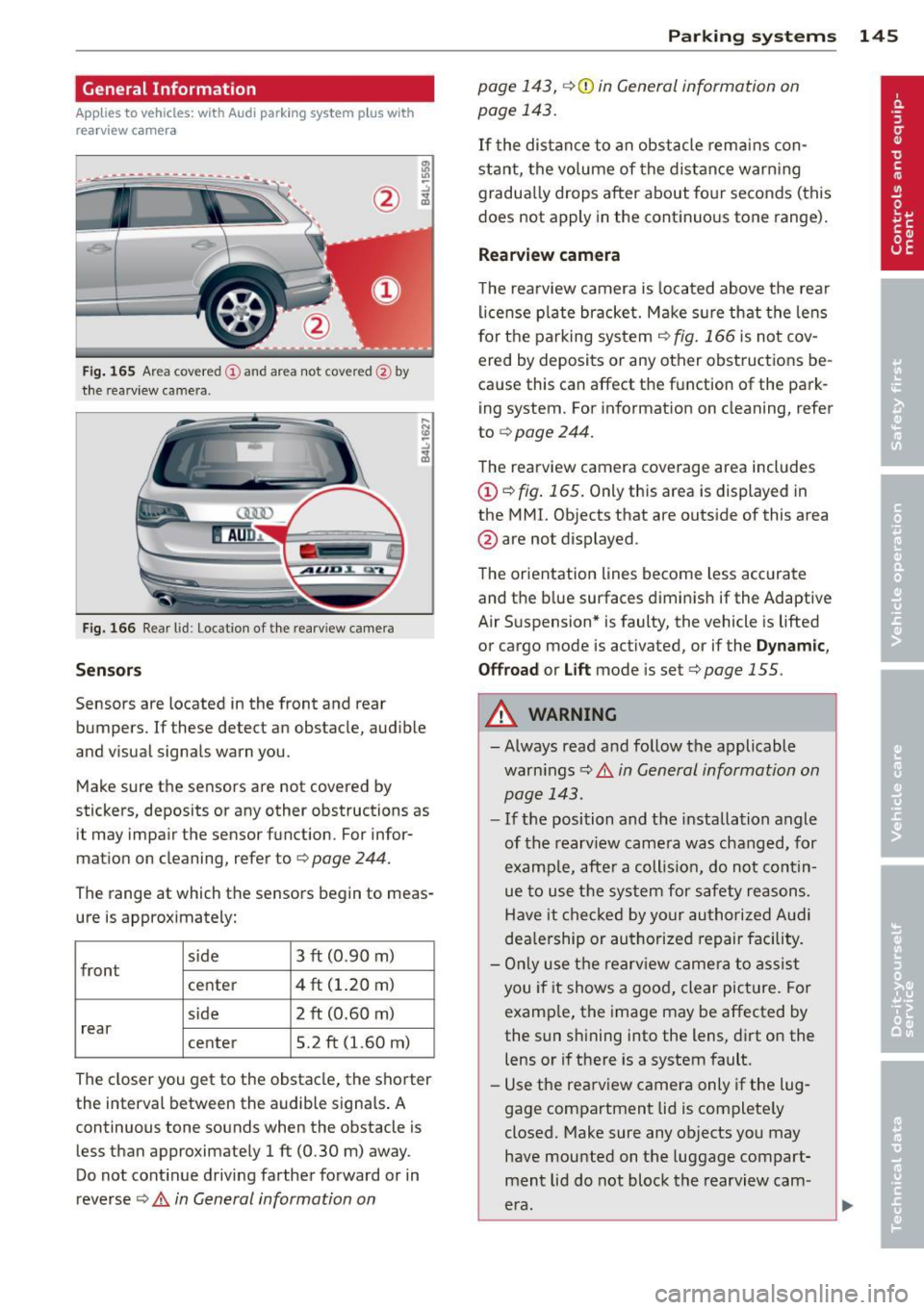
Fig . 165 Area covered (D and area not covered @by
t h e rearv iew camera.
Fig. 166 Rear lid: Location of the rea rv iew came ra
Sen sor s
Sensors are located in the front and rear
bumpers. If these detect an obstacle, aud ible
and visual signals warn you.
Make sure the sensors are not covered by
stickers, deposits or any other obstructions as it may impair the sensor function. For infor
mation on cleaning, refer to ¢
page 244.
The range at which the sensors begin to meas
ure is approximately:
side
front 3 ft (0
.90 m)
center 4 ft (1.20 m)
side 2 ft (0.60 m)
rear center 5.2 ft (1.60 m)
The closer you get to the obstacle, the shorter
the interval between the audib le signa ls . A
continuous tone sounds when the obstacle is less than approximately 1 ft (0.30 m) away .
Do not cont inue driving farther forward or in
reverse
¢ .& in General information on
Parking sys tems 145
page 143, ¢(i) in General information on
page 143.
If t he distance to an obstacle rem ains con
stant, the vo lume of the distance warn ing
gradua lly drops after about fo ur seconds (this
does not apply in the continuo us tone range).
Rearview camera
T he rearview camera is located above t he rear
l ice nse p late bracket. M ake s ure that the lens
for the parking system¢
fig. 166 is not cov
ered by deposits or any other obstructions be
cause this can affect the function of the park
ing system. For informat ion on cleaning, refer
to
¢ page 244.
The rearview camera coverage area includes
(D ¢ fig. 165. Only this area is displayed in
the MMI. Objects that are outside of this area
@ are not displayed.
The orientation lines become less accurate
and the b lue surfaces diminis h if the Adaptive
Air S uspension* is faulty, the vehicle is lifted
or cargo mode is act ivated, or if the
Dynamic ,
Offroa d
or Lift mode is set¢ page 155.
.&_ WARNING
- Always read and follow the applicable
warn ings¢ .&
in General information on
page 143.
- If the position and the installation angle
of the rearview came ra was chang ed, for
examp le, afte r a coll is io n, do not cont in
ue to use the system for safety reasons.
Have it checked by your authori ze d Aud i
dea le rship or authorized repair facility.
- On ly use the rearv iew came ra to assist
you if it shows a good, clear picture. Fo r
examp le, the image may be affected by
the sun shining into the lens, dirt on the
lens or if there is a system fault.
- Use the rearv iew camera only if the lug
gage compartment lid is complete ly
closed. Make sure any objects you may
have mounted on the luggage compart
ment lid do not block the rearview cam
era.
-
Page 148 of 340
146 Parking sy stems
- The came ra lens en larges and distorts
the field of vision. The object appears
both altered and inaccurate on the
screen.
- In certa in s ituations, people or objects in
the display appear closer or further
away:
- objects th at do no t touch the gro und,
such as the bumper o f a parked vehicle,
a trailer hitch o r the rea r of a truck. Do
not use the help lines in this case.
- If driven from a leve l su rface onto an
incline, or a downward slope .
- I f driven toward protr uding objec ts.
- I f the veh icle is ca rrying too much load
in t he rear.
(D Note
-Always read and fo llow the applicab le
warnings
¢ (D in General information on
page 143 .
-The o range colored orientation lines in
t h e M MI disp lay show t he ve hicl e path
depend ing o n the steering wheel angle .
The front of the vehicle fron t swings out
more than the rea r of the vehicle. Main
ta in p lenty of distance so that your o ut
s ide mirror or a corner of your veh icle
does not collide with any obstacles.
Switching on and off
Applies to vehicles: with Audi parking system p lus w ith
rearview camera
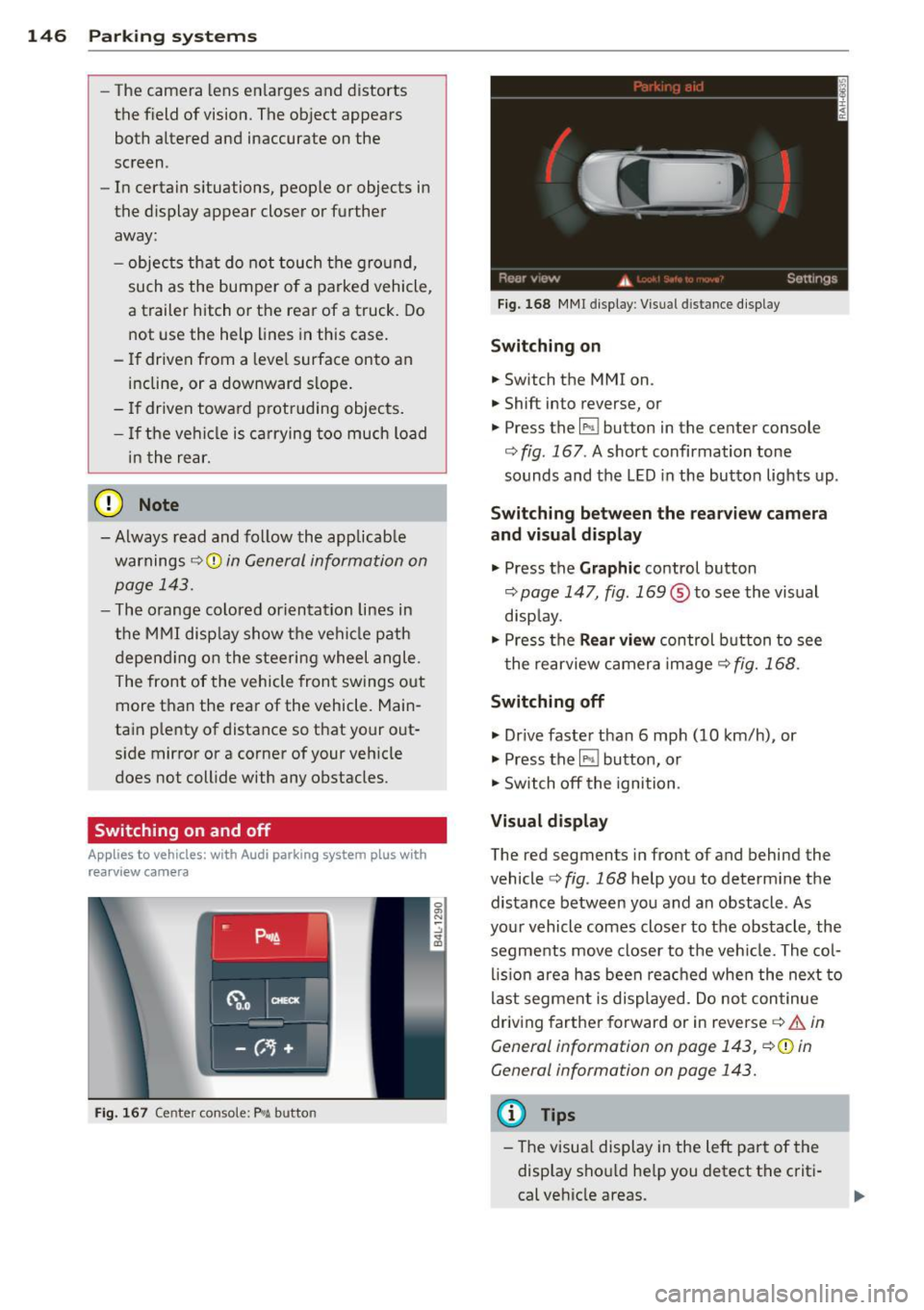
F ig . 167 Center co nsole: P"A button
F ig . 1 68 MMI display: Visual distance display
Switching on
.. Switch the MMI on .
.. Shift into reverse, or
.. Press the
l" •I button in the center console
c:;, fig. 167 . A short confirmation tone
sounds and the LED in the button lights up .
Switching between the rearv iew camera
and visual display
.. Press the Graphic control button
c:;, page 147, fig. 169 ® to see the vis ual
disp lay.
.. Press the
Rear vi ew control b utton to see
t he rearview c amera image
c:;, fig. 168 .
Switching off
.. Dr ive faster than 6 mph (10 km/h) , or
.. Press the~ button, or
.. Switch off the ignition .
Visual displ ay
The red segments in front of and behind the
vehicle
c> fig. 168 help you to determ ine the
distance between you and an obstacle . As
your vehicle comes closer to the obstacle , the
segments move closer to t he veh icle. The col
lis ion are a has been rea ched when the next to
last segment is displayed . Do no t con tinue
driving farther forward or in reverse
c:;, .&. in
General information on page 143, c:;,@ in
General information on page 143.
(D Tips
-The visua l display in the left part of the
disp lay sho uld he lp you detect t he crit i
cal ve hicle areas .
Page 149 of 340
-You can change the volume and pitch of
the signals as well as the display
Qpage 153.
Cross parking
Applies to vehicles: with Audi parking system plus w ith
rearview camera
This view may be used when parking in a ga
rage or in a parking space.
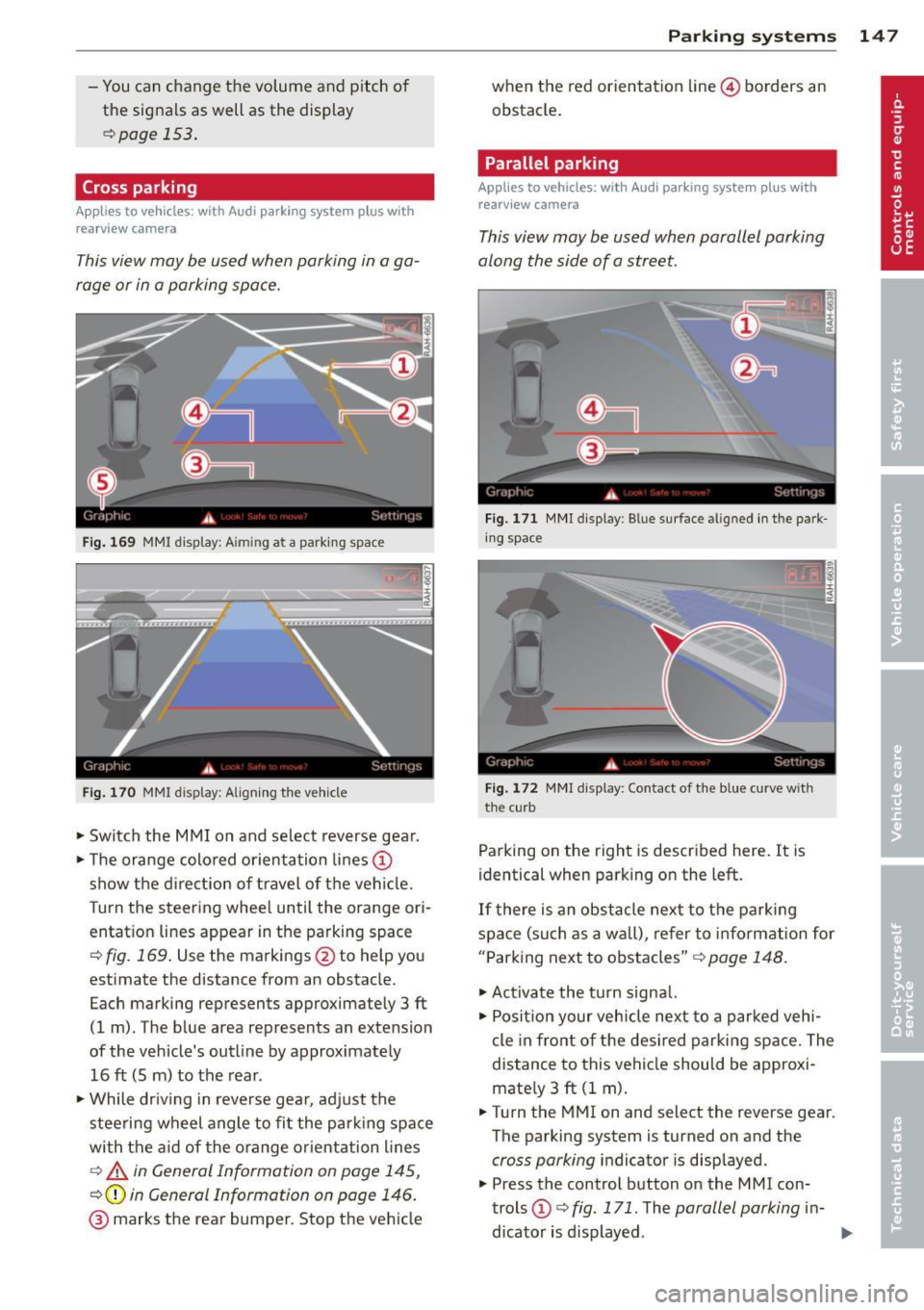
Fig. 169 MMI display: A im ing at a parking space
Fig. 170 MMI display: Aligning the vehicle
"'Switch the MMI on and select reverse gear.
"'Th e orange colored orientation lines@
show the direction of travel of the vehicle.
Turn the steering wheel until the orange ori
entation lines appear in the parking space
Qfig. 169. Use the markings @to help you
estimate the distance from an obstacle.
Each marking represents approximately 3 ft
(1 m) . The blue area represents an extension
of the vehicle's outline by approximately
16 ft (5 m) to the rear .
"'Wh ile driving in reverse gear, adjust the
steering wheel angle to fit the parking space
with the aid of the orange orientation lines
c::> A in General Information on page 145,
Q@in General Information on page 146.
@ marks the rear bumper. Stop the vehicle
Parking systems 147
when the red orientation line© borders an
obstacle.
Parallel parking
Applies to vehicles: with Audi parking system plus with
rearview camera
This view may be used when parallel parking
along the side of a street.
Fig. 171 MMI display: Blue surface aligned in the park
ing space
Fig. 172 MMI display : Contact of the blue curve w ith
the cu rb
Parking on the right is described here. It is
identical when parking on the left.
If there is an obstacle next to the parking
space (such as a wall), refer to information for
"Parking next to obstacles"
c::> page 148.
"'Activate the turn signal.
"' Position your vehicle next to a parked vehi
cle in front of the desired parking space. The
distance to this vehicle should be approxi
mately 3
ft (1 m).
"' Turn the MMI on and select the reverse gear.
The parking system is turned on and the
cross parking indicator is displayed.
"' Press the control button on the MMI con
trols @
c::> fig. 171. The parallel parking in-
dicator is displayed.
II>
Page 150 of 340
148 Parking system s
•Backup and align your vehicle so the bl ue
area @ borders on the rear end of the vehi
cle or on the parking space line
c:> A in Gen
eral Information on page 145,
c:>(D in Gen
eral Information on page 146.
The blue
area represents an extension of the vehicle's
outline by app rox imately 16 ft (5 m) to the
rear. The long side of the b lue a rea shou ld
be o n the curb. The enti re blue area must fit
i n to the par kin g space.
• With the veh icle stopped, turn the s teer ing
wheel to the right as far as it wi ll go .
• Back into the parking space until the blue
curve
c:> fig. 172 touches the curb c:> A in
General Information on page 145,
c:>(D in
General Information on page 146.
Stop the
vehicle.
• With the veh icle stopped, turn the steer ing
wheel to the left as far as it will go .
• Co nti nue to bac k into the pa rking space un
t il the vehicle is parked p aralle l to the c urb
c:> A in General Information on page 145,
c:>(D in General Information on page 146 .
® marks the rear bumper. Stop the vehicle,
at the latest, when the red orientation line
@ borders an obstacle. Keep an eye on the
front of your vehicle wh ile doing this.
Par king ne xt to ob stacle s
When there is an obstacle (s uch as a wall)
next to the parking space, choose a space with
more space on the sides. Pos ition the long
side of the blue area so that there is sufficient
space from the curb. The area must not be on
the curb. You w ill also need to start turning
the steering whee l much earl ie r. T he re shou ld
be a suffi cient amount of space between the
curb and the b lue curve, and the blue curve
c:> fig. 172 mus t not touch the curb.
@ Tips
The left or right orientation lines and sur
faces wi ll be displayed, depending on the
t urn signa l being use d.
Audi parking system
plus with front- and
rearview camera
Introduction '
Applies to vehicles: with Aud i parking system plus with
front- and rearview camera
In addition to an acoustic and visual parking
system, this parking system contains a front
and rearview camera
c:> page 146. You are as
s isted by various views, such as corner v iews
at the front and rear of the vehicle, and views
directly in front of or behind the vehicle.
General information
Appli es to vehicles: with Audi parking system plus with
front- and rearview camera
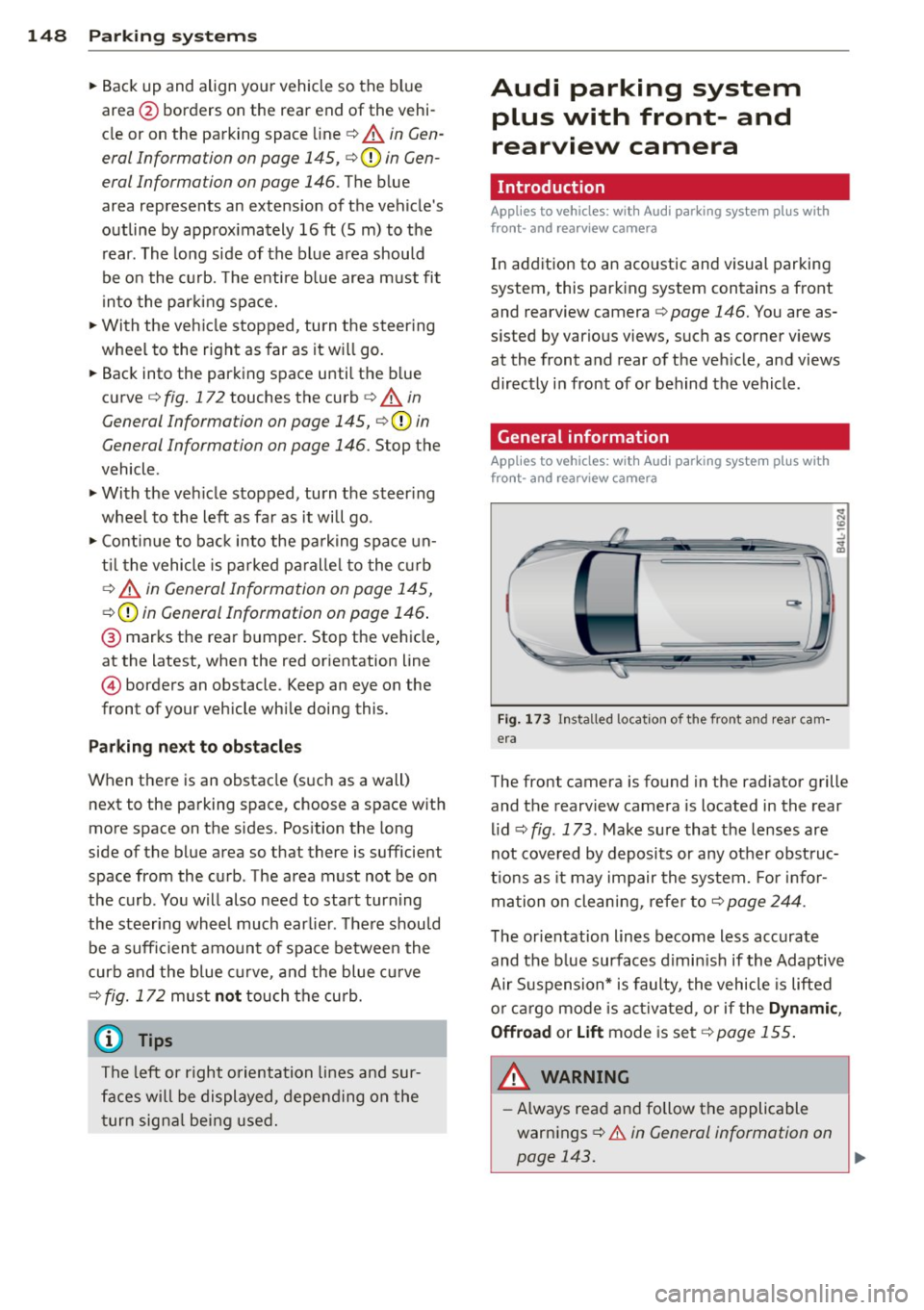
Fig . 1 73 Installed location of the front and rear cam
era
The front camera is found in the radiator grille
and the rearview camera is located in the rear
l id
c:> fig . 173. Make sure that t he lenses are
not cover ed by deposits or any other obst ruc
tio ns as it may impair the system. Fo r in for
mation o n clean ing, re fer to
c:> page 244.
T he orientation lines become less accurate
and the b lue surfaces d imin is h if the Adaptive
Air S uspension* is faulty, the vehicle is lifted
o r car go mode is acti va ted, or if the
Dynami c,
Offroad
or Lift mode is set c:>page 155.
A WARNING
-Always rea d and follow the applicable
warnings
c:> .& in General information on
-
page 143. .,..
Page 151 of 340
-If the position or the installation angle
of a camera was changed, after a colli
sion for example, do not continue to use
the system for safety reasons . Have it
checked by your authorized Audi dealer
ship .
- Use the
Rear mode and the Corner view
(rear)
mode only when the rear lid is
completely closed, otherwise the image
in the display will be inaccurate.
- Objects and obstacles
above the camera
are not displayed.
- Camera lenses enlarge and distort the
field of vision. The objects appear both altered and inaccurate on the screen.
(0 Note
- Always read and follow the applicable
warnings ¢0
in General information on
page 143 .
-The MMI display shows the direction in
which the rear of the vehicle is traveling
based on the steering wheel angle. The
vehicle front swings out more than the
vehicle rear. Maintain plenty of distance
so that your outside mirror or a corner of
your vehicle does not collide with any ob
stacles .
@ Tips
If the rear lid is open, the image in the
rearview camera is displayed without ori
entation lines and without blue surfac es.
Switching on or off
Applies to vehicles: with Audi parking system plus w ith
front- and rearview camera
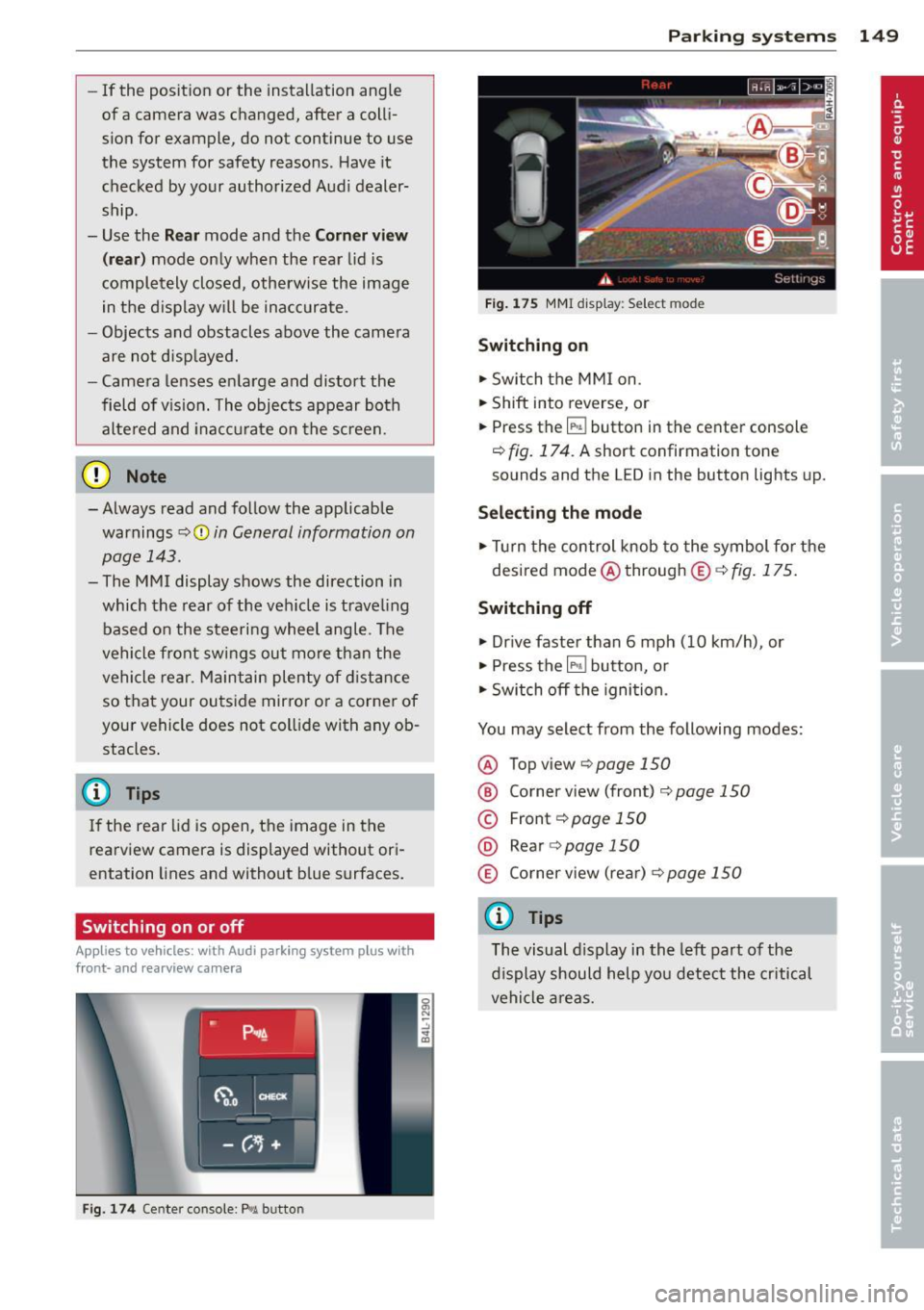
Fig. 174 Center console : P,•A button
Parking systems 149
Fig. 175 MMI display: Select mode
Switching on
.,. Switch the MMI on.
.,. Shift into reverse, or
.,. Press the
IP.1! button in the center console
¢
fig. 174. A short confirmation tone
sounds and the LED in the button lights up.
Selecting the mode
.,. Turn the control knob to the symbol for the
desired mode @through @¢fig.175.
Switching off
.,. Drive faster than 6 mph (10 km/h) , or
.,. Press the
l""'I button, or
.,. Switch off the ignition .
You may select from the following modes:
@ Topview ¢page150
@ Corner view (front) ¢ page 150
© Front¢ page 150
@ Rear o page 150
® Corner view (rear)¢ page 150
(D Tips
The visual display in the left part of the
display should help you detect the critical
vehicle areas.
Page 152 of 340
150 P ark in g s ystems
Top view
App lies to vehicles: with Audi parking system p lus w ith
front- and rearv iew camera
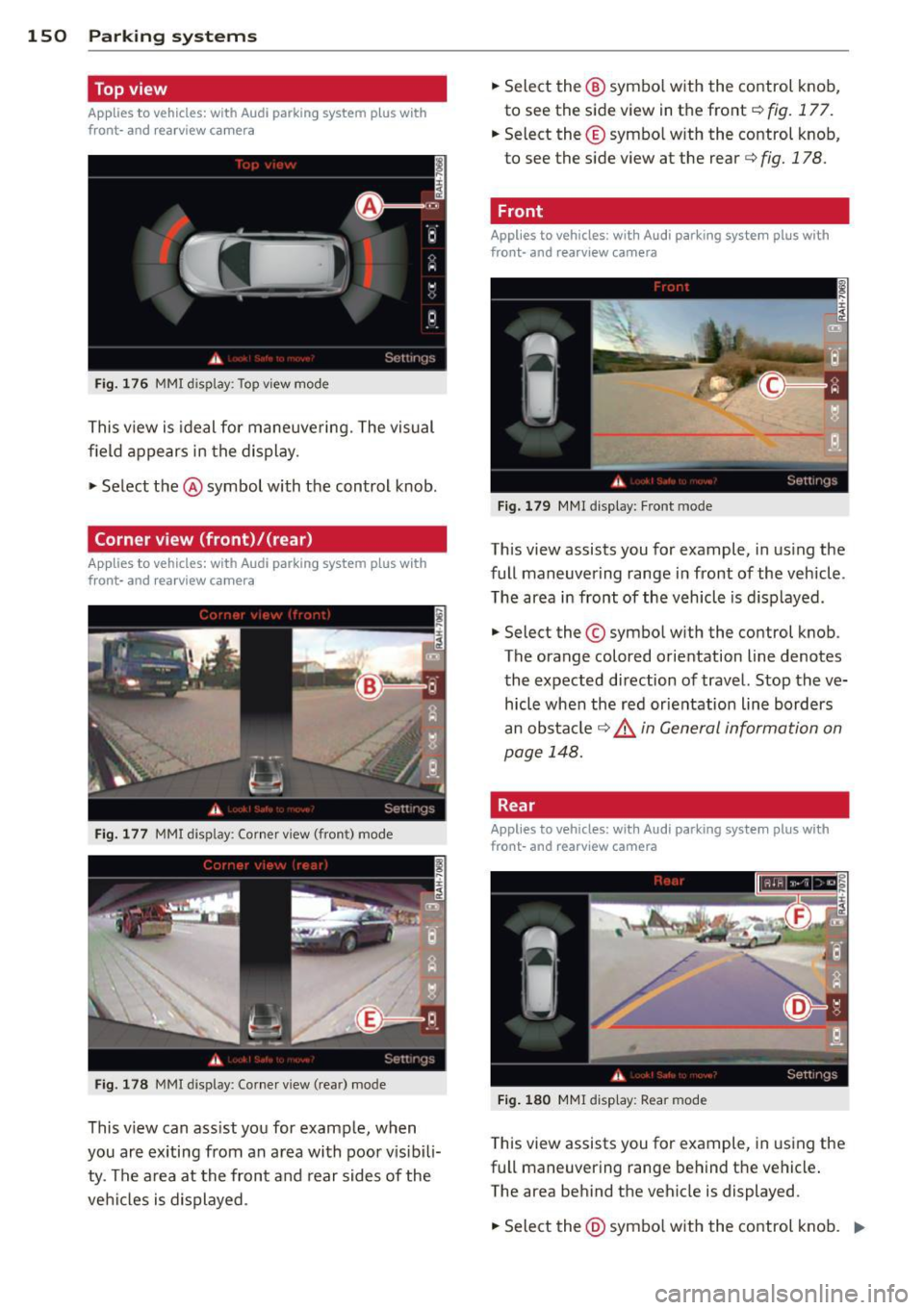
Fi g. 176 MMI display: To p view mode
This view is ideal for maneuvering. The visual
field appears in the display .
.,. Select the @symbol with the control knob.
Corner view (front)/{rear)
Appl ies to vehicles: with Audi parking system plus w ith
front- and rearv iew camera
F ig . 177 MMI display: Corner view (fron t) mode
Fig. 178 MMI display: Corner v iew ( rear) mode
This v iew can ass ist you for example, when
you are ex iting from an a rea with poor v is ibili
ty . The area at the front and rear sides of the
veh icles is displayed . .,.
Select the @ symbo l with the control knob,
to see the side view in the front
c::> fig. 177.
.,. Select the © symbo l w ith the control knob,
to see the side v iew at the rear
c::> fig. 178.
Front
Applies to vehicles: wit h Aud i parking system plus with
front- and rea rview camera
Fig . 1 79 MMI display: Fron t m ode
This view assists you for example, in us ing the
full maneuvering range in front of the vehicle .
T he area in front of the vehicle is d isp layed .
.,. Select the© symbo l w ith the control knob.
The orange colored orientation Line denotes
the expected direction of travel. Stop the ve hicle when the red orientation Line borders
an obstacle
c::> & in General information on
page 148.
Rear
Applies to vehicles: wit h Audi parking syste m plus with
front -and rearview camera
Fi g. 1 80 MMl display: Rear mode
T his view assists you for example, in using the
full maneuvering range behind the vehicle .
The area behind the vehicle is displayed.
.,. Sele ct the @symbo l w ith the co ntrol knob . ..,.
Page 153 of 340
You can choose between three different views
in this mode.
.. To cross park, parallel park, or position the
vehicle in front of a trai ler, press the ® con
trol button on the controls repeatedly until
the symbol for the desired mode is selected .
Cross parking
Applies to vehicles: with Audi parking system p lus w it h
fr ont- an d rearview ca mera
This view may be used when parking in a ga
rage or in a parking space.
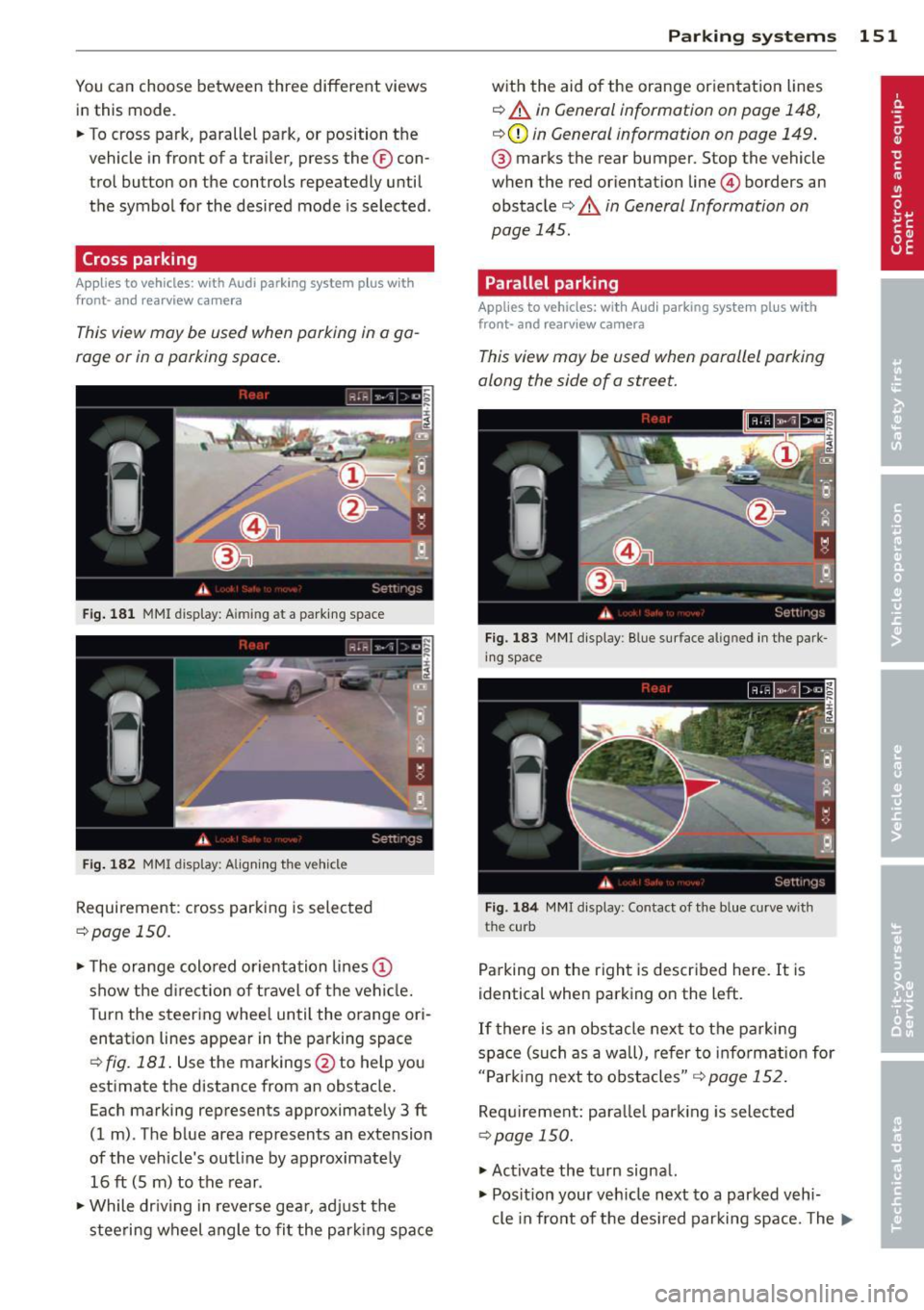
Fig. 181 MMI display: Aiming at a parking space
Fig. 182 MMI display: Align ing the vehicle
Requirement: cross parking is selected
¢page 150 .
.. The orange colored orientation lines@
show the direction of travel of the vehicle.
T urn the steering wheel until the orange ori
entatio n lines appear in the parking space
¢
fig. 181. Use the markings @to help you
estimate the distance from an obstacle.
Each marking represents approximately 3
ft
(1 m). The blue area represents an extension
of the vehicle's outline by approximately
16
ft (5 m) to the rear .
.. While driving in reverse gear, adjust the
steering wheel angle to fit the parking space
Parking systems 151
with the aid of the orange orientation lines
¢ A in General information on page 148,
¢ (Din General information on page 149 .
® marks the rear bumper. Stop the vehicle
when the red orientation line@ borders an
obstacle¢
A in General Information on
page 145.
Parallel parking
Applies to vehicles : wit h Audi parking system pl us with
front- and rearview camera
This view may be used when parallel parking
along the side of a street.
Fig. 183 MMI display: Blue surface aligned in the park
ing space
Fig. 184 MMI display: Contact of the b lue curve with
the curb
Parking on the right is described here. It is
identical when parking on the left.
If there is an obstacle next to the parking
space (such as a wall), refer to information for
"Parking next to obstacles"
r::!:> page 152.
Requirement: parallel parking is selected
¢ page 150.
.. Activate the turn signal.
.. Position your vehicle next to a parked vehi-
cle in front of the desired parking space. The ...
Page 154 of 340

152 Parking systems
distan ce to this vehicle should be approxi
mately 3 ft (1 m).
• Turn the
MMI on and select the reverse gear .
The parking system is turned on and the
parallel parking indicator is d isplayed .
• Press the contro l button on the
MMI con
t ro ls @ ¢
fig. 183 . The cross parking indica
tor is displayed .
• Bac kup and align yo ur vehicle so the blue
area @ borders on the rear end of the vehi
cl e or on t he pa rking space line ¢.&.
in Gen
eral information on page 148, ¢(Din Gen
eral information on page 149 .
The blue area
represents an extension of the veh icle's out
line by approximately
16 ft (5 m) to the rear .
The long side of the blue area should be on
the curb . The entire blue a rea must f it into
the parking space .
• With the veh icle stopped, tu rn the ste ering
wheel to the r ight as far as it w ill go.
• Back in to the par king spa ce u ntil t he bl ue
cu rve ¢
fig. 184 touches the curb¢.&. in
General information on page 148,
~ CD in
General information on page 149 .
Stop the
vehicle.
• With the veh icle stopped, turn the steer ing
wheel to the left as far as i t will go .
• Continue to back into the parking space un
t il the vehicle is parked pa rallel to the curb
¢ .&. in General information on page 148,
¢(Din General information on page 149 .
@ marks the rear bumper. Stop the ve hicle,
at the latest, when the red orientation line
© borders an obstacle. Keep an eye on the
front of your vehicle whi le doing th is .
Parking next to obstacles
When the re is an obstacle (s uch as a wall)
n ex t to the parking s pace , choose a space w it h
mo re space on the sides. Pos ition the long
side of the blue area so that there is sufficient
space from the c urb. The area must not be on
the curb . You wi ll also need to start turn ing
the steering wheel much earlier . The re should
be a sufficient amount of space between the
curb and the blue curve, and the blue c urve
c::> fig. 184 must not touch the curb.
(D Tips
The left or rig ht orientation lines and s ur
faces will be disp layed, depending on t he
turn s ignal being used .
Trailer mode
Applies to vehicles: with Audi parking system plus with
front· and rearview camera a nd tra iler hitch
This view a ssists you in positioning the vehicle
in front of a trailer.
Fi g. 18 S MMI dis p lay : R ea r m od e
Requirement: the t railer mode is se lected
c:> page 150 .
• Now yo u ca n posit ion your ve hicle in fron t of
the trailer
c::> .&. in General information on
page 148,
c::> (D in General information on
page 149 .
The orange colored orientation
line denotes the expected path toward the
trailer h itch. Use the blue lines to help you
estimate the distance to the trailer hitch .
Setting the mode
Applies to vehicles: with Audi parking system plus with
front· and rearview camera
• Select: !CAR I function button> Car systems *
control butto n > Driver assist > Parking aid
> Change to front /rear > Auto or Manual.
Auto -
This view behind the veh icle ( Rear
mode) is displayed automatically when you
shift into reve rse . This view in front of the ve
hicle
( Front mode) is displayed automat ica lly
whe n you shift into the forward gears.
Manual -This view behind the vehicle ( Rear
mode) is always displayed whe n you turn on
the system .
Page 157 of 340

Adaptive Air Suspension
Air suspension and damping
Description
App lies to vehicles: with Adapt ive Air S uspe nsio n
Air suspension and damping con be adjusted
separately.
Adaptive A ir Suspension is an electronically
controlled springing and damping system.
This chassis system makes it easier on the
driver by adapt ing to the particular situation
through imperceptible control processes.
The
Adaptive Air Suspension component reg
ulates ground clearance depending on vehicle
speed and driver input. It functions independ
ently from the load condition . Accelerating to
a speed above a predetermined limit will make the vehicle lower itself. On the other
hand, driving more slowly results in the vehi
cle raising again at specific speeds.
The
damping component provides individual
control of the damping forces . For example,
w ith damping characterist ics set to provide
greater comfort, damping is set somewhat
harder for a br ief per iod only as required, for
example, when go ing aro und a curve or when
braking.
Settings
Adapt ive Air Suspension prov ides the driver
with the opportun ity to set the chassis charac
ter istics also to their individual preference.
W ith the driving modes
Comfort, Automatic
and Dynamic the driver has three chassis set
tings available, ranging from comfort to spor
ty. The
Offrood mode can be selected for driv
ing on poor quality stretches of road. In addi
tion,
Lift provides a fifth mode, which can be
selected when exceptionally high ground
clearance is needed
c::;, page 155, Chassis con
trols .
The modes are set in MMI <::;,page 157.
Adaptive A ir Suspension 155
A WARNING
The height of the parked vehicle can
change due to temperature fluctuations or
changes in load .
@ Note
- Whenever you park your vehicle, a lways
make sure there is adequate clearance
above and below the vehicle. The he ight
of the parked vehicle can change as the
result of temperature fluctuations,
changes in load condition and changes in
the driving mode (ground clearance).
- If the vehicle is being transported (e.g .
by tow truck, train, ship, etc.), mount the
tie-down chains/cables over the running
surface (circumference) o f the tires. Nev
er secure the vehicle by the axle, the sus
pension struts or the front or rear tow
line eye . For technica l reasons, the pres
sure in the suspens ion struts may change
during the transport, which could result
in the vehicle no longer being secured
properly .
- If you are going to tow a trailer with a
trailer hitch that was
not installed ac
cording to factory specif ications, you
must activate the traile r operation mode
man ually
<::;,page 159.
(D Tips
-Before you can raise your vehicle using
the vehicle jack (for example, when
chang ing a flat tire) or a vehicle lift, yo u
must activate the jacking mode
c::;, page 159.
- On some models, the vehicle can reach
its maximum speed only in the
Automat
ic
and Dynamic modes.
Chassis controls
App lies to vehicles : wit h Adaptive A ir Suspensio n
Five different driving modes can be set by the
driver.
T he automatic control processes are speed
and t ime-dependent. For example, it is not
Page 158 of 340
156 Adapti ve Air Susp en sion
possible to raise the suspension to a h igh level
above certain speeds .
When a speed of about 75 mph (120 km/h) is
exceeded for more than 30 seconds, the vehi
cle is automatically lowered to
low level when
in comfort and automatic mode. Ground
clearance is about 0.6 inch (15 mm) less,
compared to the
normal level.
When a speed of about 100 mph (160 km/h)
is exceeded for more than 20 seconds, the ve
h icle is automat ica lly lowered to
highway lev
el
when in automatic and dynamic mode.
Ground clearance is about 1.4 inches (35 mm)
less, compared to the
normal level. Road
hold ing is optimized as a result of the lower
center of gravity, and fuel consumption is re
duced as a result of reduced wind resistance.
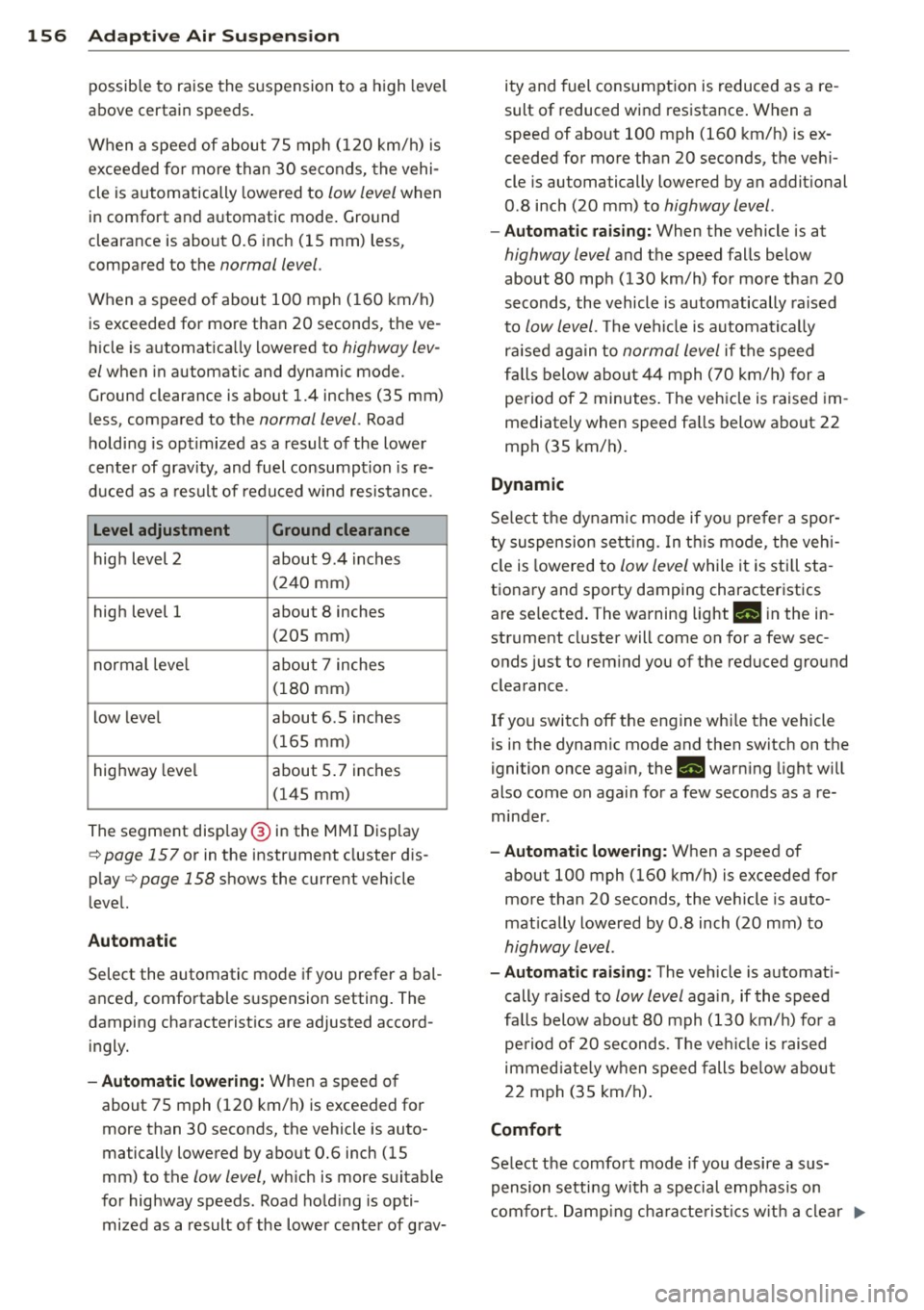
Level adjustment Ground clearance
high level 2 about 9.4 inches
(2 40 mm)
high level 1 about 8 inches
(205 mm)
normal leve l about 7 inches
(180 mm)
low level about 6.5 inches
(165 mm)
highway level about 5 .7 inches
(145 mm)
The segment disp lay @ in the MMI Display
c:::> page 157 or in the instr ument cluster dis
p lay
c:::> page 158 shows the current veh icle
level.
Automatic
Select the automatic mode if you prefer a bal
anced, comfortable suspension setting . The
damping characteristics are adjusted accord ingly.
- Autom atic lowe rin g: When a speed of
about 75 mph (120 km/h) is exceeded for
more than 30 seconds, the vehicle is auto
matically lowered by about 0.6 inch (15
mm) to the
low level, wh ich is more suitable
for highway speeds. Road hold ing is opti
mized as a result of the lower ce nter of grav- ity and fuel consumption is reduced as a re
sult of reduced wind resistance . When a
speed of about 100 mph (160 km/h) is ex
ceeded for more than 20 seconds, the veh i
cle is automatically lowered by an addit ional
0.8 inch (20 mm) to
highway level .
-Automat ic raising: When the vehicle is at
highway level and the speed falls below
about 80 mph (130 km/h) for more than 20
seconds, the vehicle is automatically raised
to
low level. Th e vehicle is automatically
raised aga in to
normal level if the speed
fa lls below about 44 mph (70 km/h) for a
pe riod of 2 minutes . The vehicle is raised im
mediately when speed fa lls below about 22
mph (35 km/h).
Dynamic
Se lect the dynam ic mode if yo u pre fer a spor
ty suspension se tti ng. In t his mode, the veh i
cle is lowered to
low level while it is still sta
t ionary and sporty damping characteristics
are selected . The warning light
Ill in the in
strument cluster will come on for a few sec
onds just to rem ind you of the reduced ground
clearance.
If you switch off the engine whi le the vehicle
is in the dynamic mode and then switch on the
ignition once aga in, the
Ill warn ing light will
also come on again for a few seconds as a re minder .
-Automat ic lowe ring: When a speed of
about 100 mph (160 km/h) is exceeded for
more than 20 seconds, the veh icle is auto
mat ically lowered by 0.8 inch (20 mm) to
highway level .
-Automa tic raising: The vehicle is automati
cally ra ised to
low level again, if the speed
fa lls below about 80 mph (130 km/h) for a
pe riod of 20 seconds. The ve hicle i s raised
immed iate ly when speed falls be low about
22 mph (35 km/h).
Comfort
Select the comfort mode if you desire a s us
pension setti ng w ith a special emp hasis on
comfort. Damp ing cha racte ris tics w ith a clear .,.