window AUDI Q7 2014 Owner´s Manual
[x] Cancel search | Manufacturer: AUDI, Model Year: 2014, Model line: Q7, Model: AUDI Q7 2014Pages: 340, PDF Size: 85.02 MB
Page 65 of 340
Sun shade
Applies to vehicles: with sun shade
The windows in the rear doors and the rear
window ore each equipped with a sun shade .
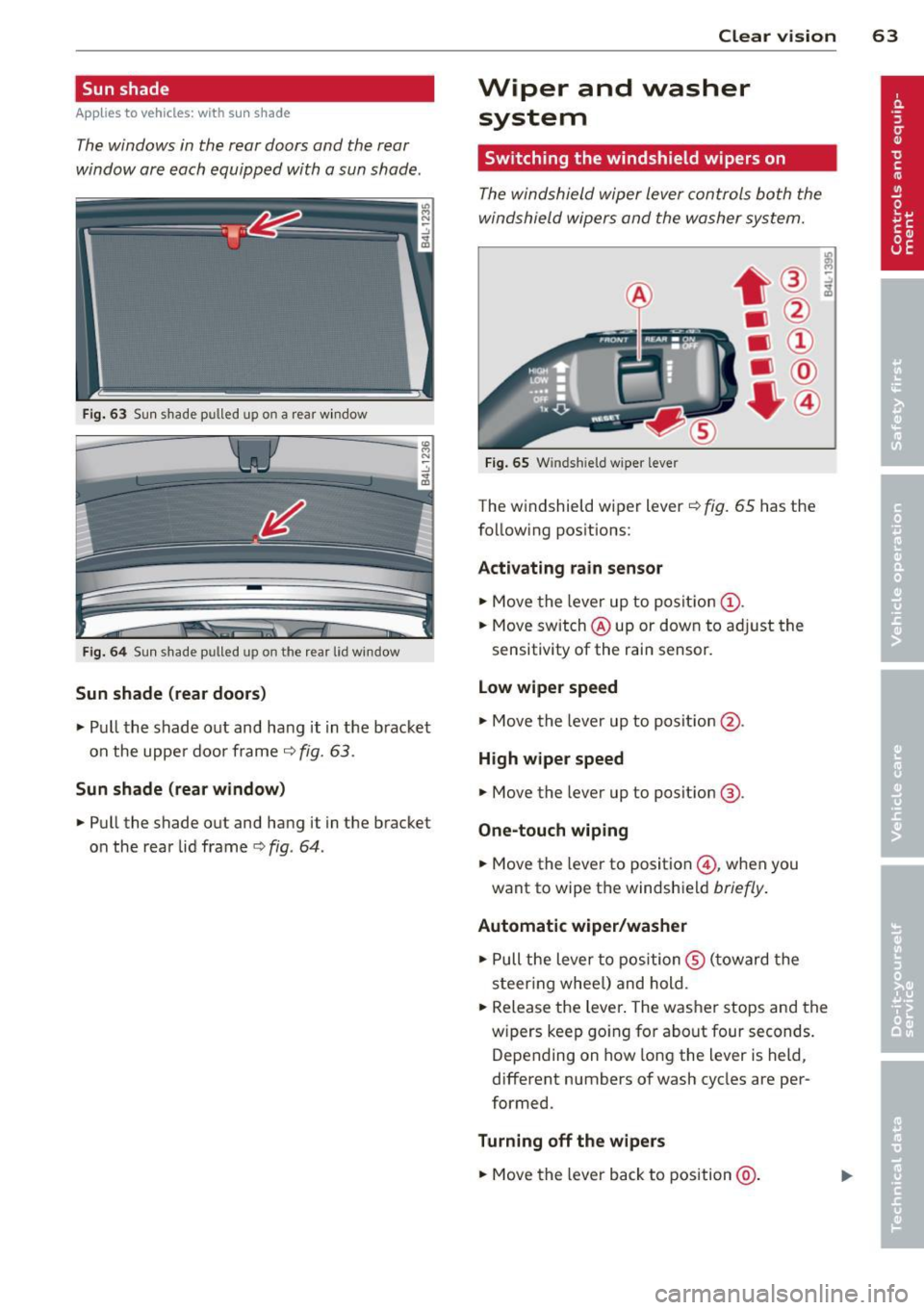
Fig. 63 Sun shade p ulled up on a rea r window
Fig . 6 4 Sun shade p ulled up on th e rear lid w in d ow
Sun shade (rear doors )
~ Pull the shade out and hang it in the b racket
on the upper door frame
r=;-, fig. 63 .
Sun sh ade (rear window )
~ Pull the shade out and hang i t in the bracket
on the rear lid frame
c> fig . 64 .
Clear vision 63
Wiper and washer
system
Switching the windshield wipers on
The windshield wiper lever controls both the
windshield wipers and the washer system.
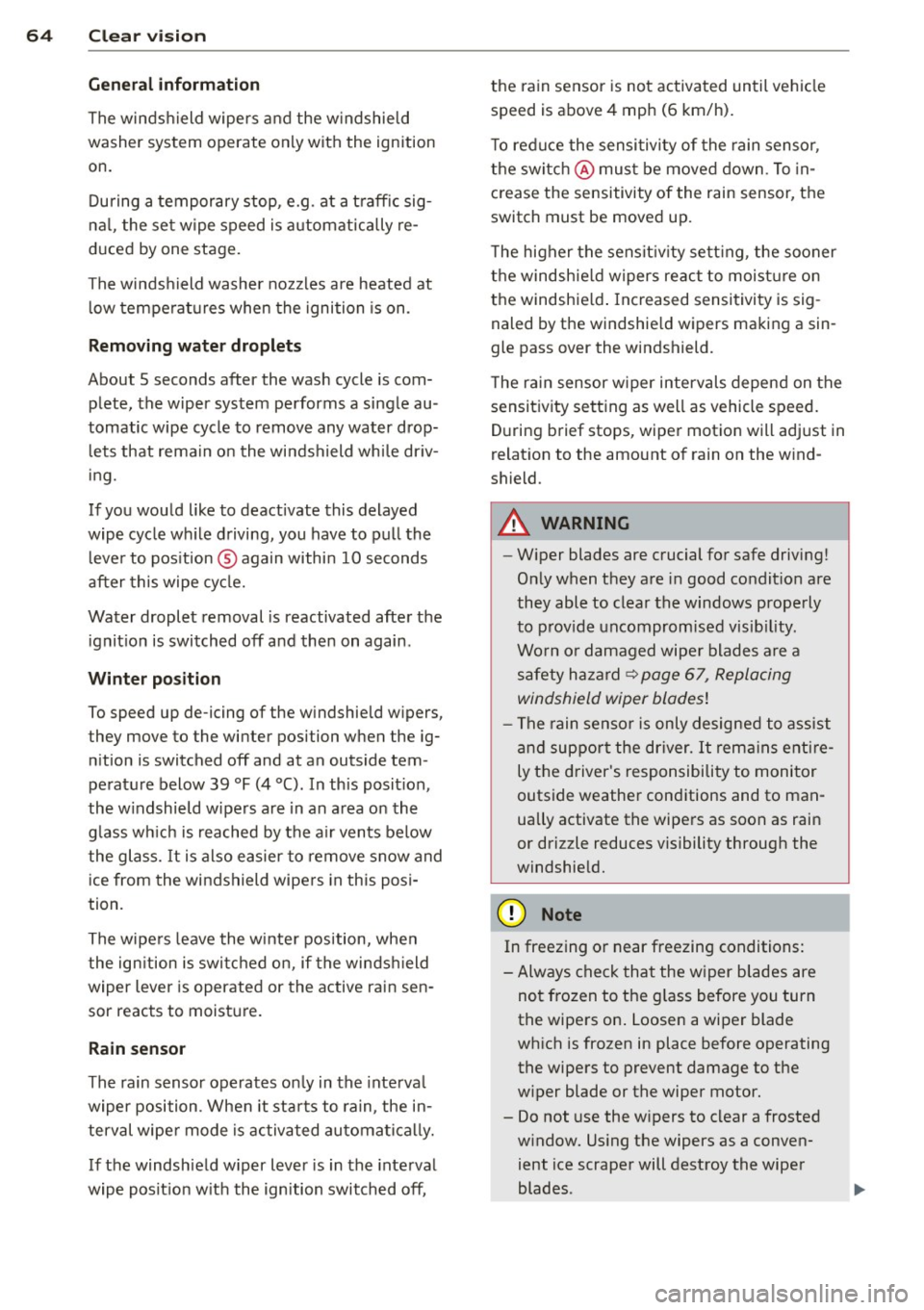
F ig . 65 W inds hield w ipe r leve r
The windshield wiper l ever r=;-, fig. 65 has the
follow ing positions:
Acti vating rain sensor
~ Move the lever up to posit ion (!) .
~ Move switch @up or dow n to ad just the
sensitivity of the rain sensor.
L o w wiper speed
~ Move the lever up to posit ion @.
High w ipe r speed
~ Move the lever up to posit ion @.
One-touch wiping
~ Move the lever to position @ , when you
want to wipe the windshield
briefly .
Automat ic wiper /wa sher
~ Pull the lever to position ® (toward the
s t eer ing whee l) and hold.
~ Release the Lever . The washer stops and the
w ipers keep go ing for about four seconds.
Depending on how long the Lever is held ,
different numbers of wash cycles are per
formed .
Turning off the w ipe rs
~ Move the lever back to position @ .
Page 66 of 340
64 Clear vis ion
General information
The winds hield wipers and the w indshield
washer system operate only with the ignition
on.
During a temporary stop , e.g . at a t raff ic sig
na l, the set wipe speed is automatically re
duced by one stage.
The winds hield washer no zzles a re heated at
l ow temperatures when the ignition is on .
Removing w ate r droplet s
About 5 seconds after the wash cycle is com
plete, the wiper system performs a single au
tomatic wipe cycle to remove any water drop
l ets that remain on the windshield whi le dr iv
ing.
If you would like to deactivate this delayed
wipe cycle wh ile driving, you have to pull the
l eve r to pos ition ® again within 10 seconds
after this wipe cy cle.
Water droplet removal is reactivated after the
ignit ion is switched off and then on again .
Winter position
To speed up de -icing of the w indshield w ipers,
t hey move to the winter posi tion when the ig
n ition is switched off and at an outside tem
perature below 39
°F (4 °(). In this posit ion ,
the w indshield wipers are in an area on the
g lass w hich is reached by the a ir vents below
the glass. It is also easier to remove snow and
ice from the wi ndshield wipers in this posi
tion .
The wipe rs leave the w inte r position, when
the ign ition is swi tc h ed on, if the winds hield
wiper lever is operated or the active rain sen
sor reacts to moistu re.
Rain sensor
The rain senso r operates on ly in the inte rva l
wiper position . When it sta rts to ra in , the in
terval wipe r mode is activated automati ca lly.
If the windshie ld w iper lever is in the inte rval
wipe posit ion w ith the ign ition switched off, the ra
in sensor is not activated until ve hicle
sp eed is above 4 mph (6 km/h).
T o red uce the sensi tivi ty of the rain senso r,
the switch @ mus t be moved down . T o in
crease the sensitivity of the rain sensor, the
switch must be moved up.
T he higher the sensit iv ity se tt ing , the sooner
the windshie ld wipers react to moist ure on
the windshie ld . I nc reased sensitivity is sig
naled by the windshie ld wipers making a sin
gle pass over the windshield.
T he rain sensor w iper intervals depend on the
sensitivity setting as well as vehicle speed.
D uring brief stops, wiper motio n will adj ust in
relat ion to the amount o f rain on the w ind
shield .
A WARNING
-W iper blades are crucial for safe driving!
O nl y when they are i n good co ndit io n are
they able to clear the windows prope rly
to p rov ide uncompromised vis ib ility.
Wo rn o r damaged wipe r blades are a
safety hazard ~
page 67, Replacing
windshield wiper blades!
- T he rain sen so r is only designed to assist
a nd suppor t the driver.
It rem ains enti re
ly the d river 's responsibility to monitor
outside weathe r conditions and to man
ually activate the wipe rs as soon as rain
or driz zle reduces visibility through the
windshie ld.
(D Note
In freezing or near freezing conditions:
- Always check that the w iper b lades are
not frozen to the g lass before you turn
the wipe rs on . Loosen a wiper blade
wh ich is frozen in place before operating
the wipers to prevent damage to the
w iper blade or the wiper motor.
- Do not use the w ipers to clear a frosted
w indow. Us ing the wipers as a conven
ient ice scrape r will destroy the wiper
blades .
Page 67 of 340
-Prior to using a car wash, the windshield
wiper system must be switched
off (lever
in position 0). This helps to prevent unin
tentional switching on and damage to
the windshield wiper system .
@ Tips
-The windshield wipers are switched off
when the ignition is turned off. Activate
the windshield wipers after the ignition is switched back on by moving the wind
shield wiper lever to any position.
- Worn or dirty windshield wiper blades
cause smearing which can affect the op
eration of the rain sensor. Check the con
dition of your windshield wiper blades
regularly.
- The rain sensor is part of the interval
wiping system. Turning
off the ignition
will also deactivate the rain sensor. To re
activate the sensor, switch
off the inter
val wiping function, then switch it back
on again.
- Make sure the washer fluid reservoir in
the engine compartment is topped
off
before going on a long trip. Look up
c:;, page 272 for checking and filling the
washer container.
Rear window wiper
The wiper lever is also used to operate the
rear window wiper and the automatic wiper/
washer function.
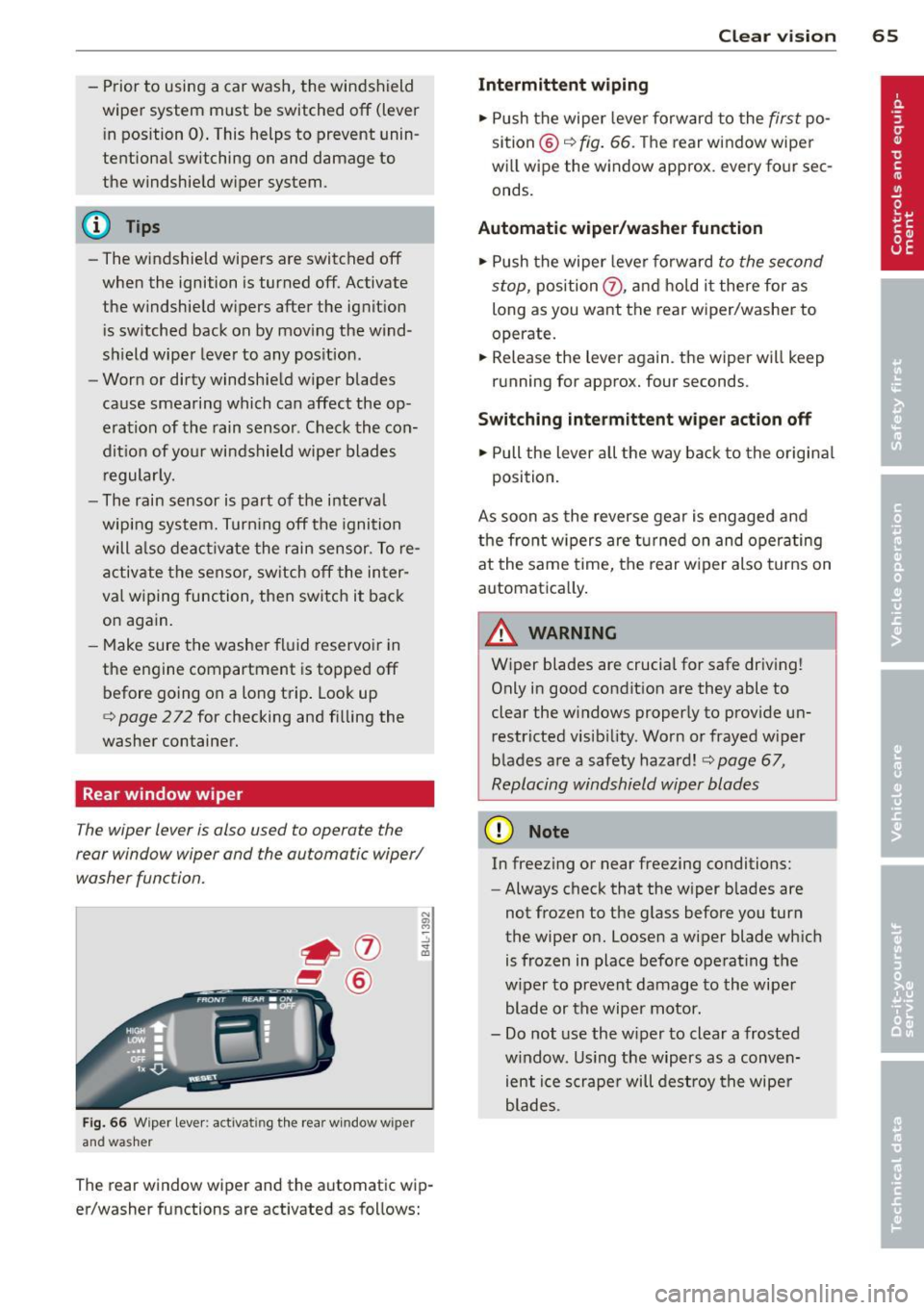
Fig. 66 Wiper lever: activati ng th e rear window w iper
and washer
The rear window wiper and the automatic wip
er/washer functions are activated as follows:
Clear vision 65
Intermittent wiping
.,. Push the wiper lever forward to the first po
sition @
c:;, fig. 66. The rear window wiper
will wipe the window approx. every four sec
onds.
Automatic wiper/washer function
.,. Push the wiper lever forward to the second
stop,
position (J) , and hold it there for as
long as you want the rear wiper/washer to
operate.
.,. Release the lever again . the wiper will keep
running for approx. four seconds.
Switching intermittent wiper action off
.,. Pull the lever all the way back to the original
position.
As soon as the reverse gear is engaged and
the front wipers are turned on and operating
at the same time, the rear wiper also turns on
automatically.
A WARNING
Wiper blades are crucial for safe driving!
Only in good condition are they able to
clear the windows properly to provide un restricted visibility. Worn or frayed wiper
blades are a safety hazard!
c:;, page 67,
Replacing windshield wiper blades
(D Note
In freezing or near freezing conditions:
- Always check that the wiper blades are
not frozen to the glass before you turn
the wiper on. Loosen a wiper blade which
is frozen in place before operating the
wiper to prevent damage to the wiper
blade or the wiper motor.
- Do not use the wiper to clear a frosted
window . Using the wipers as a conven
ient ice scraper will destroy the wiper
blades.
-
Page 72 of 340
70 Clear vision
-If swallowed and person is conscious,
rinse mouth with water for at least 15
minutes. Do not induce vomiting unless
instructed to do so by medical professio
nal. Get medical attention immediately.
d) Note
Liquid electrolyte leaking from broken mir
ror glass will damage any plastic surfaces
it comes in contact with. Clean up spilled
electrolyte immediately with clean water
and a sponge.
@ Tips
- Switching off the dimming function of
the inside rear view mirror also deacti
vates the automatic dimming function of
the exterior mirrors*.
- The automatic dimming mirrors do not
dim when the interior lighting is turned
on or the reverse gear is selected.
-Automatic dimming for the mirror only
operates properly if the sun shade* for
the rear window is not in use or the light
striking the inside mirror is not hindered
by other objects .
Digital compass
Activating or deactivating the compass
Applies to vehicles: with d ig ital compass
The direction is displayed on the interior rear
view mirror.
Fig. 72 I n side rear vi ew mirr or: digital compass acti·
vate d
~ To activate or deactivate, hold the@button
down until the red display appears or disap
pears. The
digital compass only works with the igni
tion turned on. The directions are displayed as
initials:
N (North), NE (Northeast), E (East),
SE (Southeast), S (South), SW (Southwest),
W (West), NW (Northwest).
(0 Tips
To avoid inaccurate directions, do not al
low any remote controls, electrical sys
tems, or metal parts close to the mirror.
Setting the magnetic deflection zone
Applies to vehicles: wit h digital compass
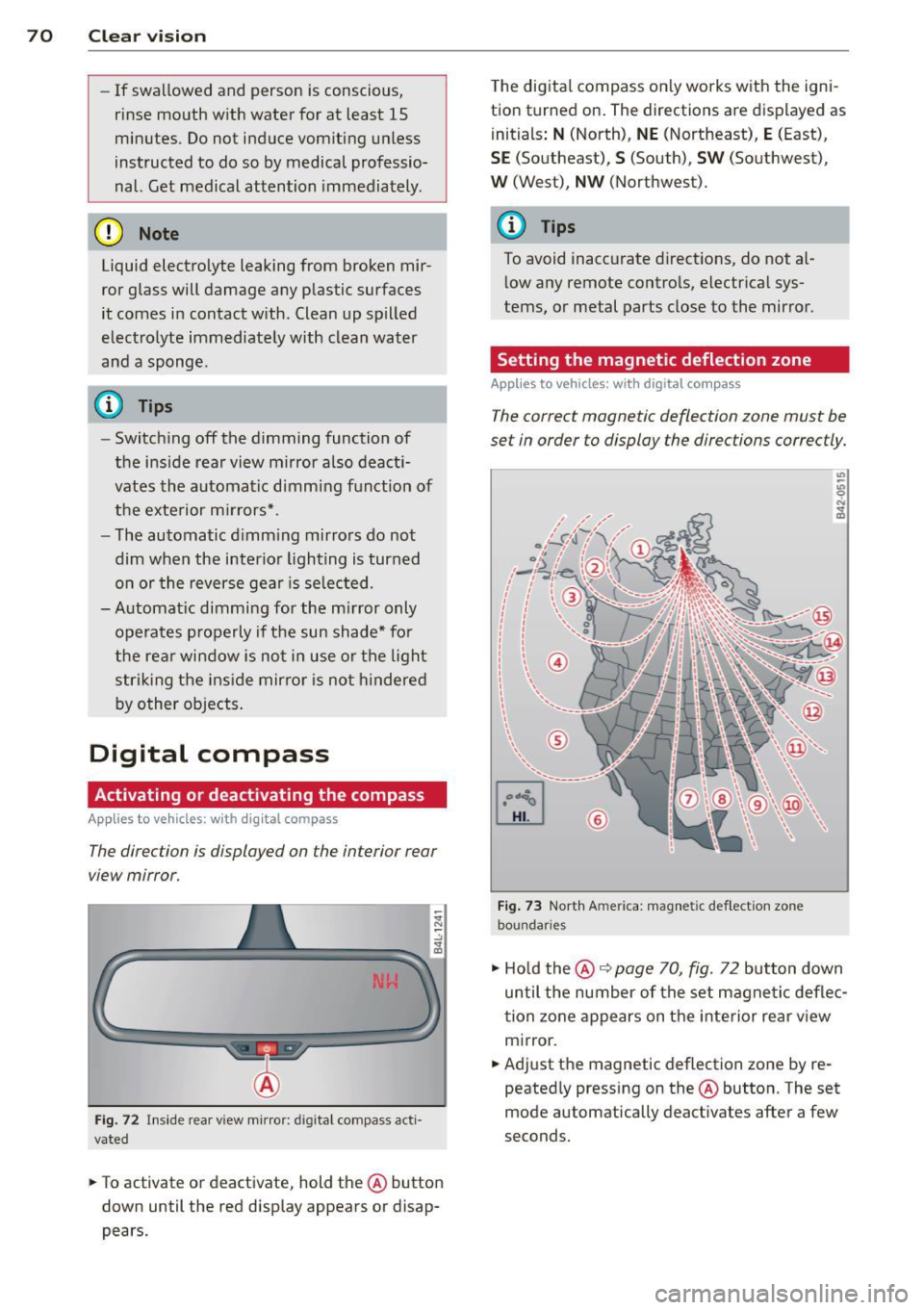
The correct magnetic deflection zone must be
set in order to display the directions correctly.
Fig. 73 North America: magnetic deflection zone
boundar ies
., Hold the@~ page 70, fig. 72 button down
until the number of the set magnetic deflec
tion zone appears on the interior rear view mirror.
., Adjust the magnetic deflection zone by re
peatedly pressing on the @button. The set
mode automatically deactivates after a few
seconds.
Page 74 of 340
72 Seats and stor age
Seats and storage
General recommen
dations
Why is your seat adjustment so
important?
The safety belts and the airbag system can
only provide maximum protection if the front
seats are correctly adjusted.
There are various ways of adjusting the front
seats to provide safe and comfortable support
for the driver and the front passenger. Adjust
you r seat prope rly so that :
- you can easily and quickly reach all the
switches and controls in the instrument
panel
-your body is properly supported thus reduc
ing physical stress and fatigue
- the safety be lts and airbag system can offer
maximum protection
¢ page 183 .
In the following sections, you will see exactly
how you can best adjust your seats .
There are special regulations and instructions
for installing a child safety seat on the front
passenger's seat. Always follow the informa
tion regarding child safety provided in
¢ page 204, Child Safety.
A WARNING
Incorrect seating position of the driver and
all other passengers can result in serious
personal injury.
- Always keep your feet on the floor when
the vehicle is in motion -never put your
feet on top of the instrument panel, out
of the window or on top of the seat cush
ion . This applies especially to the passen
gers .
If your seating position is incorrect,
you increase the risk of injury in the case
of sudden braking or an accident.
If the
airbag inflates and the seating position
is incorrect, this could result in personal
injury or even death.
- It is important for both the driver and
front passenger to keep a distance of at least 10
inches (25 cm) between them
selves and the steering wheel and/or in
strument panel. If you're sitting any
closer than this, the airbag system can not protect you properly . In addition, the
front seats and head restraints must be
adjusted to your body height so that they
can give you maximum protection.
- Always try to keep as much distance as
possible between yourself and the steer
ing wheel or instrument panel.
- Do not adjust the driver's or front pas
senger's seat while the vehicle is moving.
Your seat may move unexpectedly, caus
ing sudden loss of vehicle control and
personal injury. If you adjust your seat
while the vehicle is moving, you are out
of position.
Driver's seat '
The correct seat position is important for safe
and relaxed driving.
We recommend that you adjust the driver's
seat in the following manner :
.,. Adjust the seat in fore and aft direction so
that you can easily push the peda ls to the
floor wh ile keeping your knees slightly bent
i::::> A in Why is your seat adjustment so im
portant? on page 72.
.. Adjust the seatback so that when you sit
with your back against the seatback, you can
still grasp the top of the steering wheel.
.. Adjust the head restraint so the upper edge
is as even as possible with the top of your
head . If that is not poss ible , try to adjust
the head restraint so that it is as close to
this position as possible
c:::> page 77.
A WARNING
Never place any objects in the driver's foot
well. An object could get into the pedal
area and interfere with pedal function. In
case of sudden braking or an accident, you
would not be able to brake or accelerate .
Page 82 of 340
80 Seats and storage
Luggage compartment
Expanding luggage compartment
To expand the luggage compartment, the
seatbacks can be folded forward separately or together .
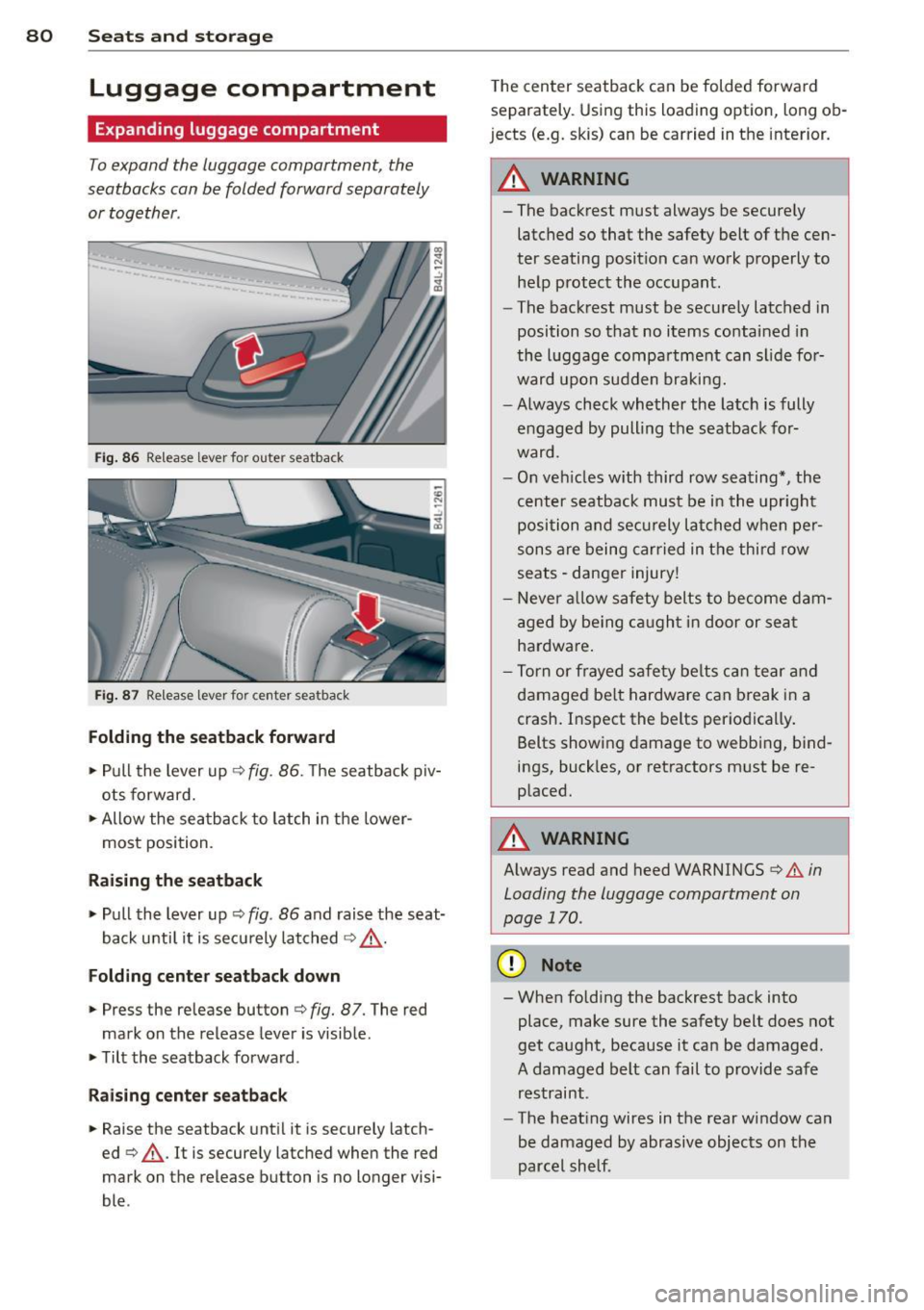
Fig. 86 Release lever fo r outer seatback
Fig. 87 Release leve r for cente r seatback
Folding the s eatback forward
,. Pull the lever up c:> fig . 86. T he seatback piv
ots forward.
,. Allow the sea tback to latch in the lower·
most position.
Raising the seatback
,. Pull the lever up c:> fig. 86 and raise the seat
back u ntil it is securely latched
c:> & -
Folding cente r seatback down
,. Press the release button c:> fig. 87. The red
mark on the release lever is visible.
,. Tilt the seatback forward .
Raising center seatba ck
,. Raise the seatback until it is securely latch ·
ed
c:> & . It is securely latched when the red
mark on the release button is no longer visi·
ble . T
he center seatback can be folded forwa rd
separately . Using this loading option, long ob·
j ects (e.g. skis) can be carried in the interior.
A WARNING
--
- The backrest must always be secure ly
latched so that the safety belt of the cen·
ter seating position can wo rk p roperly to
help protect the occupant.
- The backrest must be securely latched in
position so that no items contained in
the luggage compa rtment can s lide fo r·
ward upon sudden braking.
- Always check whether the latch is fully
engaged by pulling the seatback for
ward.
- On veh icles w ith third row seating*, the
ce nter seatback must be in the upr ight
po sition and secu rely lat ched when per
son s are being carried in t he thir d row
seats -danger injury!
- Never allow safety belts to become dam·
age d by be ing ca ugh t in door or seat
hardwa re .
- Torn or frayed safety be lts ca n tear and
damaged be lt hardware can break in a
crash. Inspect the belts periodica lly .
Belts showing damage to webbing, bind
ings, buck les, or retractors m ust be re·
p laced.
A WARNING
-
A lways read and heed WARNINGS c:> .&. in
Loading the luggage compartment on
page
170 .
(D Note
-When folding the backrest back into
place , make sure the safety belt does not
get caught, because it can be damaged.
A damaged belt can fail to provide safe
restraint .
- The heat ing wires in the rear window can
be damaged by abrasive objects on the
parcel shelf .
Page 94 of 340
92 Warm and cold
Warm and cold Climate control
Description
The air conditioner is fully automatic and is
designed to maintain a comfortable and uni
form climat e inside the vehicle .
We recommend the following sett ings :
.. Set the temperature to 72 °F (+ 22 °C).
.. Press the
!AUTO ! button.
W ith this setting, you attain maxim um com
fort i n the least amount of time. Change this
setting, as desired, to meet yo ur persona l
needs.
The climate controls are a combination o f
heating, venti lation and cooling systems,
which automatica lly reduce humidity and cool
the air inside your vehicle.
The air tempera ture, a ir flow and air distrib u
tion are automatica lly regu lated to achieve
and maintain the desired passenger compart
ment temperature as quick ly as possib le.
The system a utomatically compensates for
changes in outside temperature and for the
intensity of the sunlight entering the ve hicle .
We recommend you use the
Automati c mode
¢ page 95 for year-round comfort.
Please note the following:
Turn on the ai r cond itione r to reduce hum idity
i n the vehicle . Thi s also p revents the w indows
from fogging up .
When the outside temperature is high and the
a ir i s very hum id,
c ondensation from the
evapo rator may drip unde r the ve hicle. This is
norma l and does not indicate a leak.
I f the outside temperatu re is low, the fan nor
mally only switches to a h igher speed once
the eng ine coolan t has warmed up sufficient
l y.
The air conditioner tempora rily switches off
when you d rive off from a s tandstill using full
thro ttle to s ave eng ine power. T
he compressor a lso switches off if the coo l
ant temperature is too high , so that the en
gine can be adequately cooled under extreme
l oads.
Air pollutant s filter
The air pollutan ts f ilter (a comb ined particle
filte r and activated charcoa l filter) reduces o r
prevents outside air po llution (dust, or pollen)
from enter ing the veh icle. The air is a lso fil
tered in a ir recirculation mode .
The air pollutants fi lter m ust be changed at
the interva ls specified in yo ur War ranty
&
Maintenance booklet, so that the a ir cond i
tioner can properly work.
If you drive your vehicle in an area with high
air poll ution, the filter may need to be
changed more frequently than specif ied in
your Audi Warranty
& Maintenance book let. If
in doubt, ask your authorized Audi Service Ad
visor for advice .
Key coded settings
The air conditioner settings selected are auto
matically stored and assigned to the key be ing
used. When the vehicle is started, the air con
ditioner automa tically selects the settings as
s igned to that key . This way every driver will
mainta in his/her own pe rsonal settings and
does not have to reset them manually .
If a different dr iver uses your key and changes
the a ir cond itione r settings, the latest adjust
ments will e rase and replace the sett ings you
have stored.
Energy man agement
To prevent the battery from being discharged
and to restore the ba lance of energy, compo
nents which require large amounts of energy
are temporarily cut back or switched off
¢ page 229. Heating systems in pa rticular re
quire a grea t deal of ene rgy.
If yo u notice , fo r
example, that the seat* or rear window hea t
ing is not heating, they have been temporar ily
cut back or switched off by
energy manage
ment .
These systems are availab le aga in as
soon as the energy balance has been restored . .,.
Page 95 of 340
,&_ WARNING
Reduced visibility is dangerous and can
cause accidents.
-
-For safe driving it is very important that
all windows be free of ice, snow and con
densation.
- Completely familiarize yourself with the proper use and function of the heating
and ventilation system and especially
how to defog and defrost the windows.
- Never use the windshield wiper/washer
system in freezing weather until you
have warmed the windshield first, using
the heating and ventilation system. The
washer solution may freeze on the wind
shield and reduce visibility.
(D Note
- If you suspect that the climate control
system has been damaged, switch the
system off to avoid further damages,
and have it inspected by a qualified deal
ership.
Controls
Warm and cold 93
-Repairs to the Audi air conditioner re
quire special technical knowledge and
special tools. Contact an authorized Audi
dealer for assistance.
@ Tips
- Keep the air intake slots (in front of the
windshield) free from ice, snow and de
bris in order to maintain the proper func
tion of the climate control system.
- Air inside the vehicle escapes through air
vents located in the side trim panels be
neath the rear side windows. Make sure
that the outlet slots are not covered by
clothing, etc.
- Climate control works most effectively if
the windows and the Panoramic sliding
sunroof* are closed. However, if the inte
rior of a parked vehicle is extremely hot
from the sun's rays, briefly opening the
windows can speed up the cooling proc
ess.
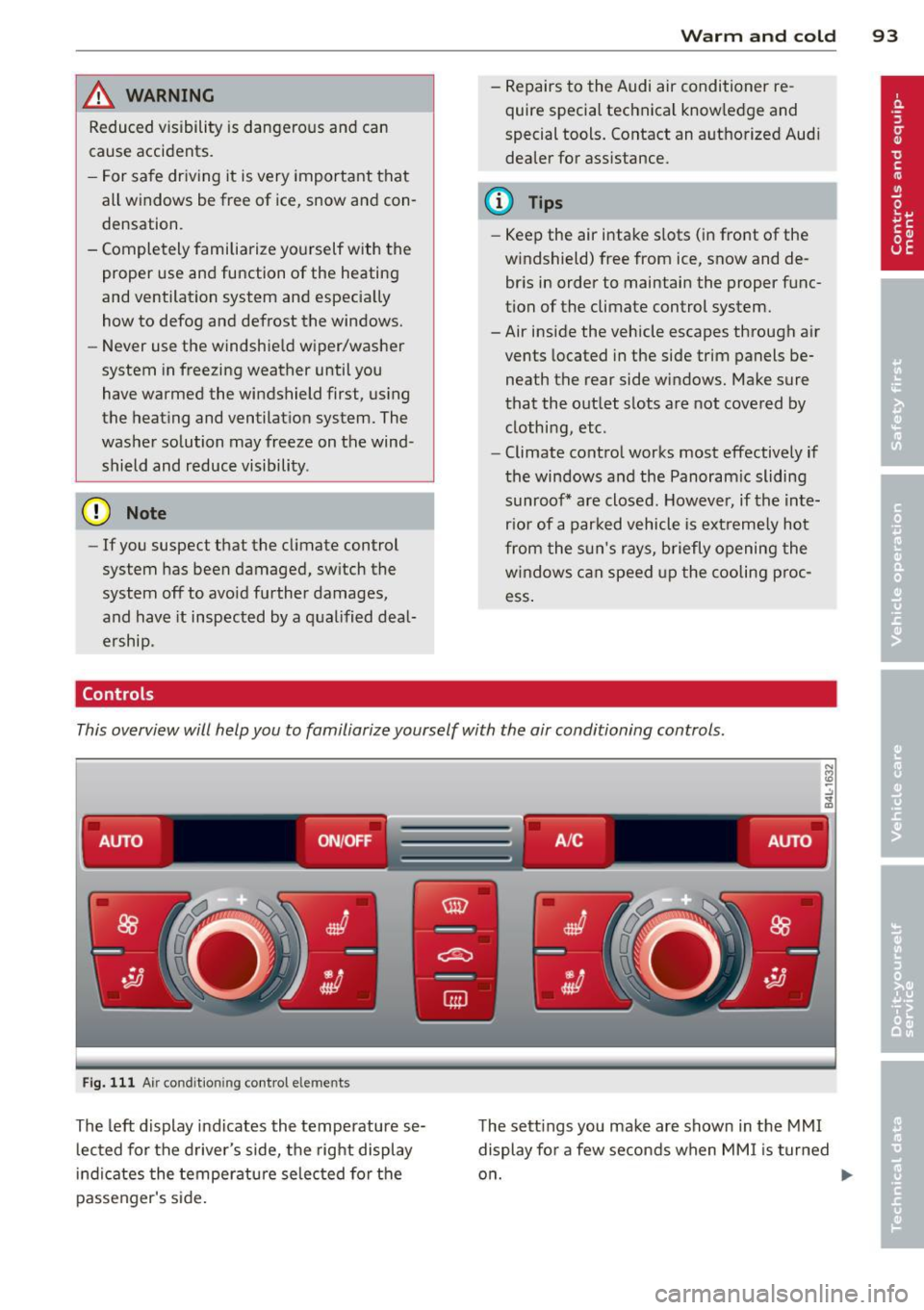
This overview will help you to familiarize yourself with the air conditioning controls.
-------. .- .--. -
AUTO ON/OFF A /C AUTO
;;__,
Fig. 111 Air condit ioning control elements
The left display indicates the temperature se
lected for the driver's side, the right display
indicates the temperature selected for the
passenger's side. The
settings you make are shown in the MMI
display for a few seconds when MMI is turned
on.
Page 96 of 340
94 Warm and cold
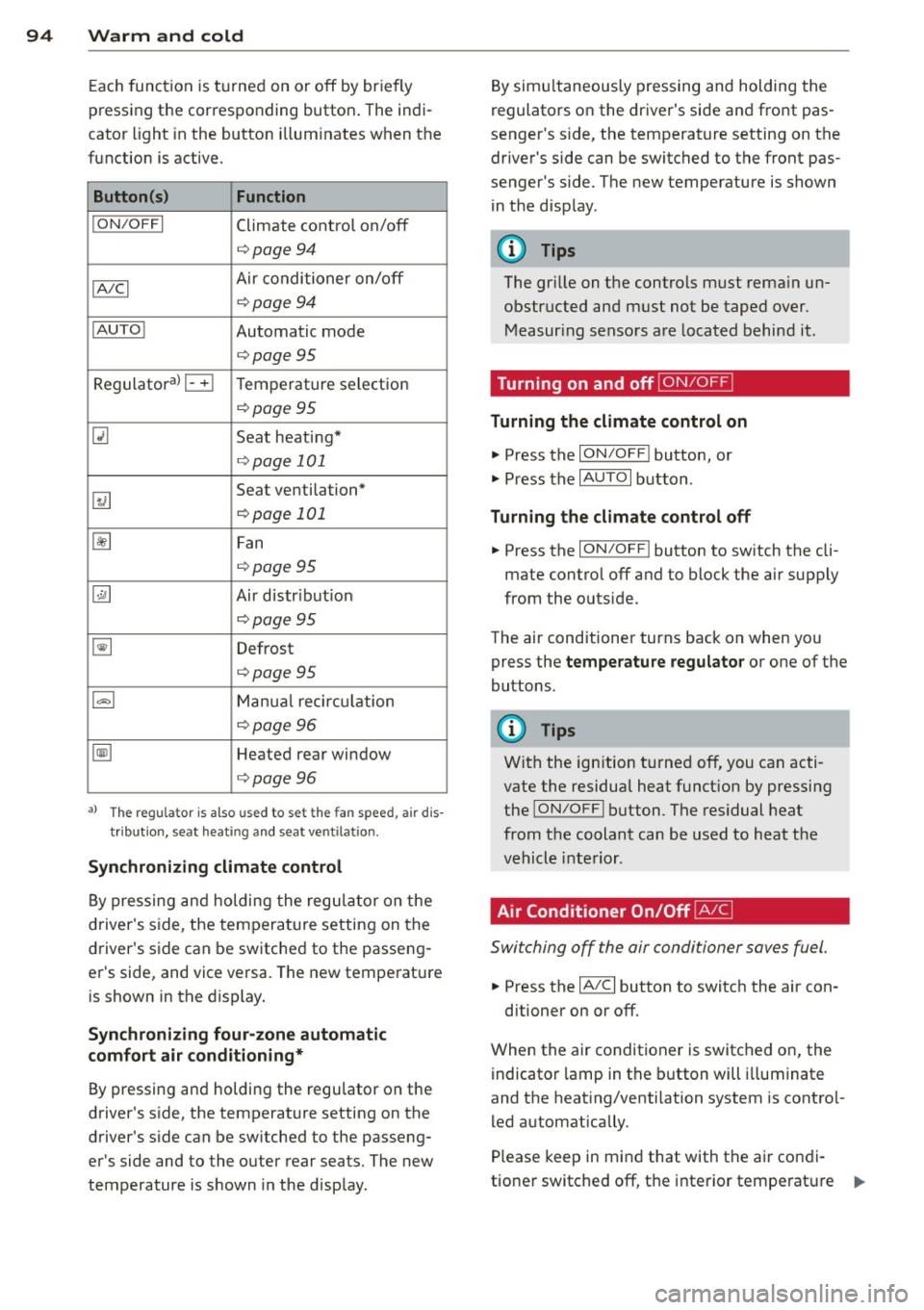
Each function is turned on or off by briefly
pressing the corresponding button . The indi
cator light in the button illum inates when the
function is active.
Button (s ) Function
ION /OFFI Climate control on/off
c> page94
IA/C l Air conditioner on/off
c>page94
IAU TO I Automatic mode
¢page 95
Regulatora) G Temperature selection
c>page95
[tl Seat heating*
¢page 101
~
Seat ventilation*
i=>page 101
~ Fan
¢page 95
Qi] Air distr ibut ion
c> page95
~ Defrost
i=>page 95
~ Manua l recircu lation
c> page96
~ Heated rear window
i=>page 96
al T he regulat or is also used to set t he fa n sp eed, air dis
t ribution, seat heat ing and sea t ve ntila tion .
Synchr oniz ing clim ate control
By pressing and holding the regu lator on the
d river's side , the temperature setting on the
driver's side can be switched to the passeng
er's side, and vice versa. The new temperature is shown in the display.
Synchronizing fou r-zone autom atic
comfort air conditi oning*
By pressing and holding the regu lator on the
driver's side, the temperature setting on the
driver's s ide can be sw itched to the passeng
er's side and to the outer rear seats. The new
temperature is shown in the disp lay . By simu
ltaneously pressing and holding the
regulators on the driver's side and front pas
senger's s ide, the temperature setting on the
driver's side can be switched to the front pas
senger's s ide . The new temperature is shown
in the disp lay .
(D Tips
The gr ille on the controls must rema in un
obstr ucted and must not be taped over.
Measur ing sensors are located behind it .
Turning on and off~
Turning the climate control on
.,. Press the ION/OF F! button, or
.,. Press the
IAUTO I button.
Turning the climate control off
.,. Press the ION/OF Fj button to sw itch the cli
mate contro l off and to block the air supply
from the outs ide.
The air conditioner turns back on when you press the
temperatu re regulator or one of the
buttons.
(D Tips
With the ign ition t urned off, you can acti
vate the residua l heat funct ion by pressing
the
ION/O FF I button . The res idual heat
from the coolant can be used to heat the
vehicle interior .
Air Conditioner On/Off~
Switching off the air conditioner saves fuel .
.,. Press the IAIC I button to switch the air con-
ditioner on or off.
When the air conditioner is switched on, the indicator lamp in the b utton will illum inate
and the heat ing/venti lation system is contro l
led automatically .
P lease keep in mind that with the air condi
tione r switched off, the interior tempe rat ure ..,_
Page 97 of 340
cannot be lower than the outside tempera
ture. The air wi ll not be cooled or
dehumid ified. The windows can fog up.
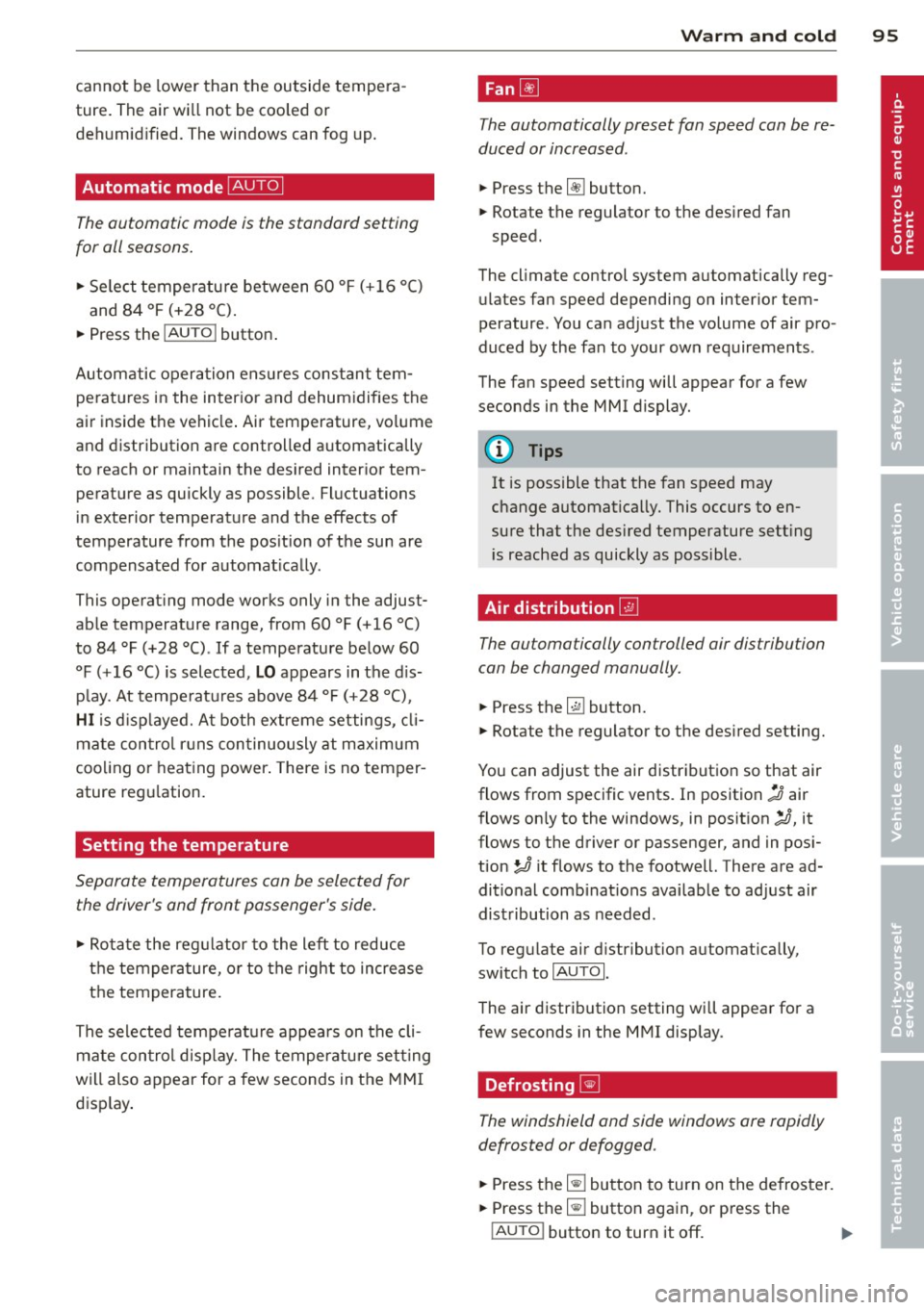
Automat ic mode ~
The automatic mode is the standard setting
for all seasons.
.,. Se lect temperature between 60 °F ( + 16 °()
and 84 °F (+ 28 °C) .
.. Press the !AUTO ! button.
Automatic opera tion ens ures constant tem
peratures in the interior and dehumidifies the
air inside the vehicle . Air temperature, vol ume
and distribution are controlled automatically
to reach or maintain the desired interior tem perature as quickly as possible. Fluctuations
in exterior temperature and the effects of
temperature from the pos ition of the sun are
compensated for automat ically.
This operat ing mode works only in the adjust
ab le temperature range, from 60
°F ( + 16 °C)
to 84 °F (+28 °C) . If a temperature be low 60
°F ( + 16 °C) is selected, L O appears in the d is
p lay. At tempe rat ures above
84 °F (+ 28 °C),
HI is d isp layed. A t both extreme settings, cl i
mate con trol r uns con tinuously at maximum
coo ling or heat ing power . There is no temper
ature reg ulation.
Setting the temperature
Separate temperatures con be selected for
the driver's and front passenger's side.
.,. Ro tate the reg ulator to the left to reduce
the temperature, or to the right to increase
the temperature.
The se lected tempe ratu re appea rs on the cli
mate con trol d isp lay. The tempe ratu re sett ing
will also appear for a few seconds in the MMI
d isp lay .
Warm and c old 95
Fan~
The automatically preset fan speed con be re
duced or increased .
.. Press the [!] button .
.. Rotate the regulator to the des ired fan
speed.
The climate control system automatically reg ulates fan speed depending on inter ior tem
perature. You ca n adjust the volume of air pro
duced by the fan to your own requirements .
The fan speed setting will appear for a few
seconds in the MMI display.
(D Tips
It is possible that the fan speed may
change automatically. This occurs to en
sure that the des ired temperature sett ing
i s reached as quickly as possible .
Air distribution ~
The automatically controlled air distribution
con be changed manually.
.. Press the G!J button.
.. Rotate the regulator to the des ired setting.
You can adjust the air distribut ion so that air
flows from specific vents. In position
:,0 air
flows on ly to the windows, in posit ion
;J, it
flows to the driver or passenger, and in pos i
tion
!J it flows to the footwell. There are ad
ditional comb inat ions availab le to adjust air
dist ribution as needed .
To regulate air d istribution automatically,
switch to
IAUTOI.
The air distribution setting will appear for a
few seconds in the MMI display .
Defrosting~
The windshield and side windows ore rapidly
defrosted or defogged .
.,. Press the~ button to turn on the defroster .
.. Press the~ button again, or press the
!AUTO ! button to turn it off . ..,.