brake light AUDI Q7 2014 Owner´s Manual
[x] Cancel search | Manufacturer: AUDI, Model Year: 2014, Model line: Q7, Model: AUDI Q7 2014Pages: 340, PDF Size: 85.02 MB
Page 122 of 340
120 Adapti ve crui se control
_&. WARNING
-
Following other vehicles too closely in
creases the risk of a crash and serious per
sonal injury .
- Following other vehicles too closely, par
ticu larly at higher speeds increases the
risk of coll is ions and serious personal in
jury.
- Setting short distances to the traffic
ahead reduces the time and distance
available to bring your vehicle to a safe
stop and makes it even more necessary
to pay close attention to traffic .
- Always select a speed and distance to
traffic ahead that is safe and appropriate
under the prevailing traff ic, road, weath
er and lighting conditions.
- Never rely on the distance control fea
ture of ACC a lone to prevent rear-end col
lis ions. Always be prepared to b rake and
take evasive act io n to avoid co llisions
and other ac cident situations.
- Never allow the clos ing speed between
yo u a nd other vehicles to be so h igh that
the adaptive cruise control may not be
able to slow your vehicle safe ly . If clos
ing speed is too high, yo u m ust app ly the
brakes yourself to reduce the risk of a
rear-end crash.
- Always select a greater following dis
tance to the veh icle ahead on wet roads
than on dry roads.
- Always read and heed the information
and WARNINGS
¢ &. in Description on
page 113.
(D Tips
The distance setting is reset to the factory
default
DIS TANCE 3 the next time the ig
nition is turned on.
Driver information
Displays in the instrument cluster
Applies to veh icles: w ith adaptive cruise contro l
Depending on the driving situation, driver in
formation is displayed in the instrument clus
ter .
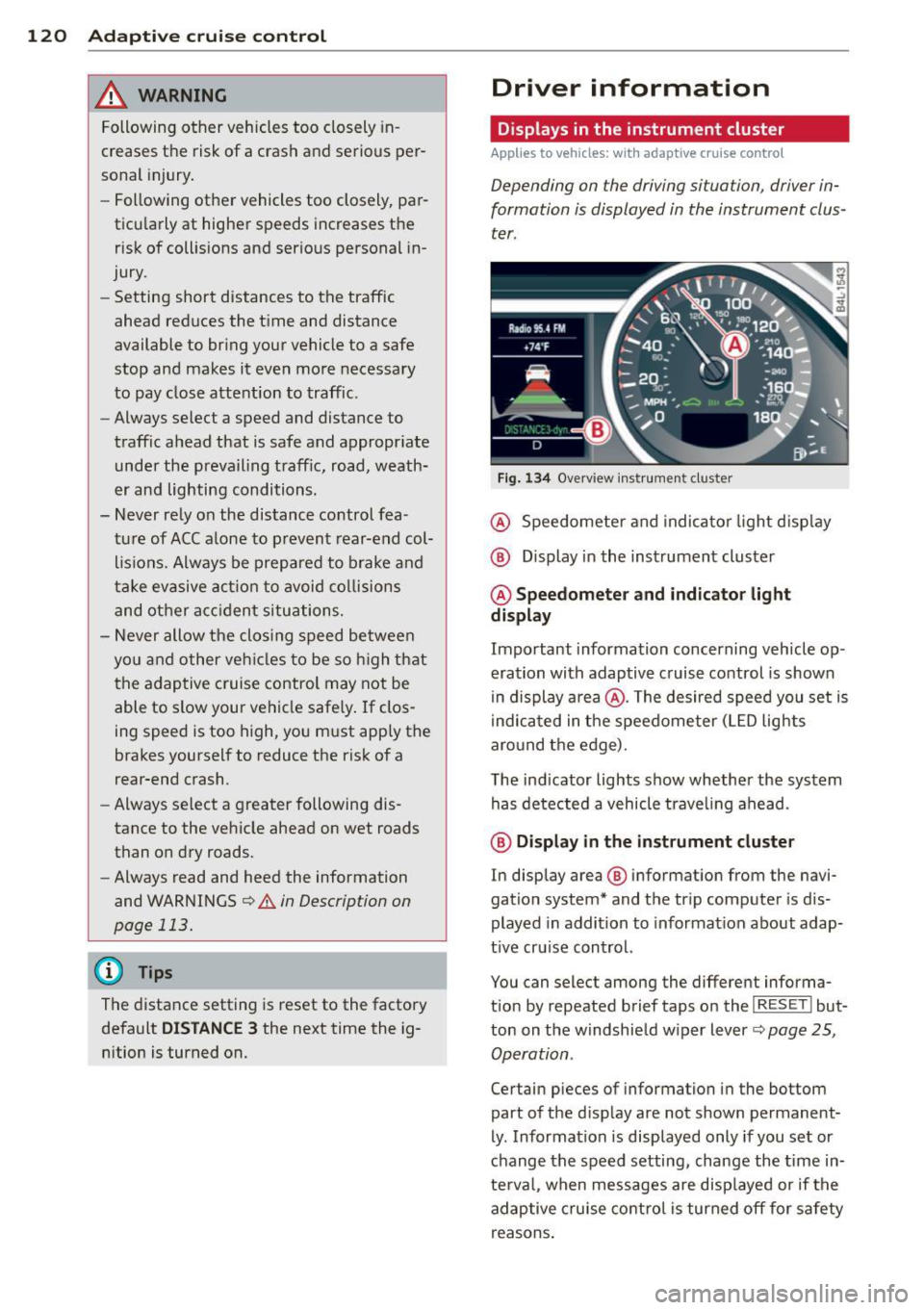
Fig . 1 34 Overview ins tr u me nt cluster
@ Speedometer and indica to r li ght d isp lay
@ Display in the instrument cluster
@ Speedometer and indi cato r light
display
Important information concerning vehicle op
eration with adaptive cruise control is shown
in display a rea @. The desired speed you set is
i ndica ted in the speedometer (L ED lights
aro und the edge).
T he ind icator lights show whether the system
has detected a vehicle trave ling ahead .
@ Display in the in strument cluster
In display area @ information from the navi
gation system* and the tr ip computer is dis
played in addition to informat ion about adap
t ive cru ise control.
You can select among the different informa
t io n by repeated brief taps on the
I RESET I but
ton on the w indshie ld w iper lever
c::> page 25,
Operation .
Certain pieces of information in the bottom
part of the d isplay are not shown permanent
ly . Information is displayed only if you set or
change the speed setting, change the time in
te rva l, when messages are disp layed or if the
adaptive cruise contro l is turned off for safety
reasons .
Page 123 of 340
Display in the speedometer
Applies to vehicles: with adaptive cruise control
Fig. 135 D isplay in the speedomete r
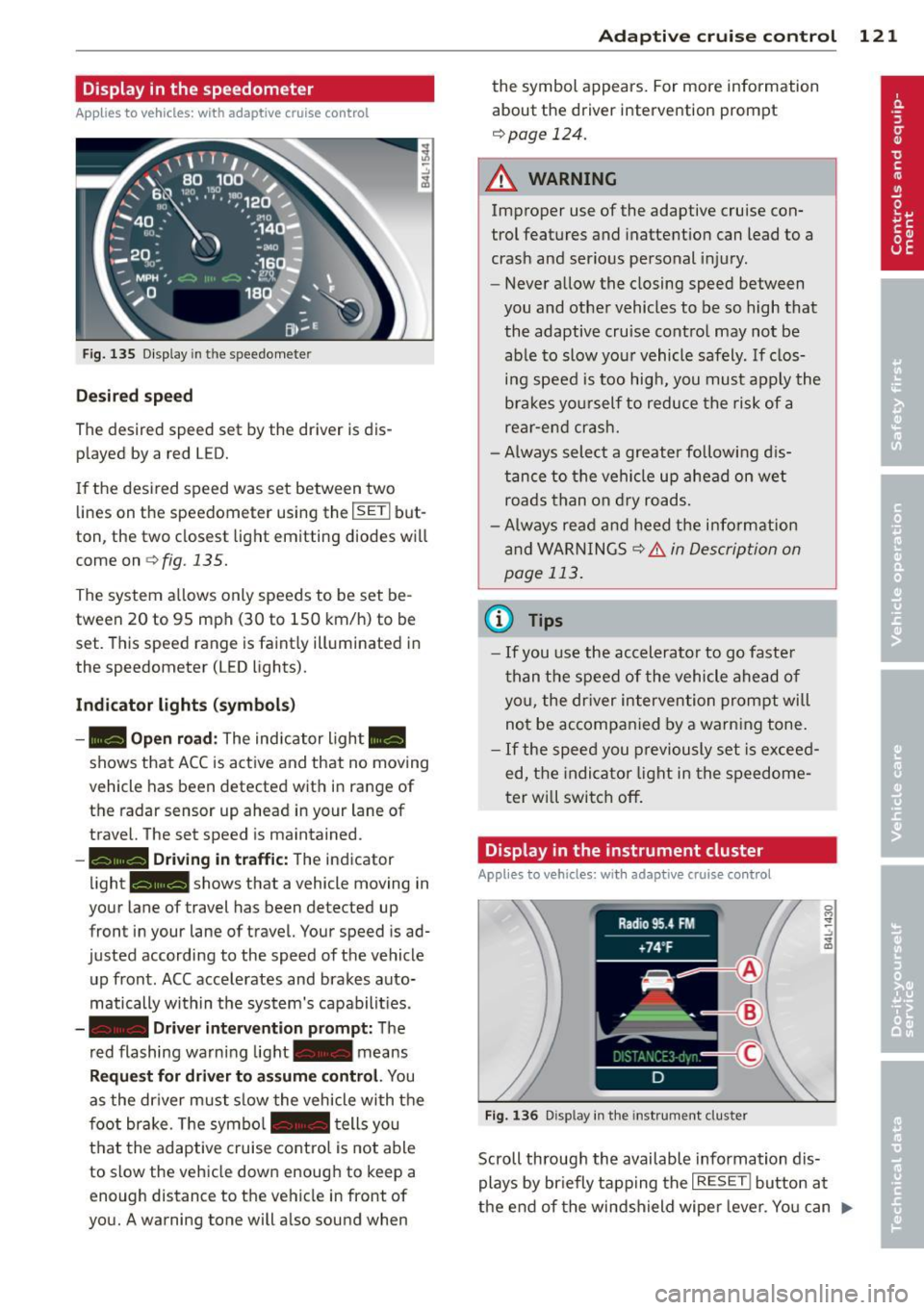
Des ired spe ed
The desired speed set by the driver is dis
p layed by a red LED.
If the desi red speed was set between two
lines on the speedometer using the
I SETI but
ton, the two closest light emitting diodes will
come on <=>
fig. 135.
The system a llows only speeds to be set be
tween 20 to 95 mph (30 to 150 km/h) to be
set. This speed range is faint ly illuminated in
the speedometer (LED lights).
Ind icator light s (symbol s)
-- Open road :
The indicator light _
shows that ACC is active and that no moving
vehicle has been detected with in range of the radar sensor up ahead in your lane of
travel. The set speed is maintained.
- - Driving in tr aff ic: The indicator
light - shows that a vehicle moving in
your lane of travel has been detected up
front in your lane of travel. Your speed is ad
justed according to the speed of the vehicle
up front . ACC accelerates and brakes auto
matically within the system's capabilit ies .
-- Driver int erv ent ion prompt: The
red flashing warning light- means
Reque st for dri ver to assum e co ntr ol. You
as the dr iver must slow the vehicle with the
f oot brake. The symbol - tells you
t h at the adaptive cruise co ntrol is not able
to slow the vehicle down enough to keep a
enough distance to the vehicle in front of
you. A warning tone will also sound when
Ad apti ve crui se control 121
the symbol appears. For more information
about the driver intervention prompt
r::!) page 124.
_& WARNING
Improper use of the adaptive cruise con
trol features and inattention can lead to a
crash and serious personal injury.
- Never allow the closing speed between
you and othe r vehicles to be so high that
the adaptive cruise contro l may not be
able to slow your vehicle safely. If clos
ing speed is too high, you must apply the
brakes yo urself to reduce the risk of a
rear-end crash.
- Always select a greater following d is
tance to the vehicle up ahead on wet
roads than on dry roads.
- Always read and heed the information
and WARNINGS <=>
& in Description on
page 113 .
(D Tips
-If you use the accelerator to go faste r
t han t he speed of the vehicle ahead of
you, the dr iver intervention prompt will
not be accompan ied by a warn ing tone.
- If the speed you previously set is exceed
ed, the indicator light in the speedome
ter will switch off.
Display in the instrument cluster
Appl ies to vehicles: wit h adaptive cruise control
F ig. 136 D isp lay in the instrument cluster
-
Scroll through the available information dis
plays by br iefly tapp ing the
I RESET ! button at
the end of the windshield wipe r lever. You can ..,.
Page 125 of 340
the 20 to 95 mph (30 to 150 km/h) speed
range .
ACC: Unavailable
The text message ACC: Unavailable appears,
for example, if the temperature of the brakes
i s excessive. Adaptive cruise control is tempo
rarily not available. A warning tone sounds as
a reminder .
ACC: Not available
The text message ACC: Not available appears
in the event of a malfuncti on. Adaptive cruise
control is turned
off . A warning tone sounds
as a reminder. Have the system inspected by a
q ua lified dealership.
ACC: Sensor blocked
The text message ACC: Sensor blocked ap
pears when the ACC System can no longer ac
curately detect vehicles moving up ahead in
your lane of travel. Adaptive cruise control is turned
off. A warning tone also sounds as a re
minder.
To decide whether it is necessary to switch
off
the ACC (ACC : Sensor blocked) or if it is only a
temporary condition (ACC functionality limit
ed) the system will take into cons ideration the
outside temperature and/or the windshield
operat ion.
The ACC sensor is dirty or blocked (e.g. leaves,
snow).
The ACC sensor is located behind the area to
the right of the front license plate . If the ACC
sensor is dirty or blocked, clean the area to re
store system operat ion.
ACC off: Manual control!
The text message ACC off: Manual control!
appears after the ve hicle has been brought to
a standstill by the adaptive cruise control. In
this case you must depress the brake peda l to
prevent the veh icle from rolling. A warn ing
tone sounds as a reminder.
Adaptive cruise control 123
Stabilization control (ESC)
The text message Stabilization control (ESC)
appears if the Electronic Stabilization Control
(ESC) has intervened . In this case the adaptive
cruise control is automatically turned
off . This
is accompanied by a warn ing tone.
Speed
T he set speed in mph (Canada km/h) always
appears when saving or changing the speed in
adaptive cruise control
¢ page 116, How is
the speed stored?
and ~ page 117, Changing
stored speed.
ACC functionality limited
T he message ACC functionality limited ap
pears when the ACC System does not detect
any moving vehicles up ahead in yo ur lane of
trave l for a longer period of time. During this
time, the distance to moving vehicles in your
lane of travel up ahead is not being ma in
ta ined . The ACC system is not switched off,
and increased attention to the traffic situation
is absolutely necessary. The following may be
reasons why the message
ACC functionality
limited
appears :
- The ACC sensor is d irty . The ACC system is
not react ing, or is not reacting correctly, to
moving vehicles up ahead in your lane of
t ravel.
- There may be very light traffic on and there
is nothing that marks the side of the road
(for examp le, guard ra ils, traffic signs,
trees). As soon as a moving vehicle up ahead
is detected again, ACC becomes active again
and the message disappears.
T he ACC sensor is located be hind the area to
the right of the front license plate. If the ACC
senso r is dirty or blocked, clean the area to re
store system operation.
Parking brake!
T he text message Parking brake! appears,
when the parking brake is applied. ACC is
turned
off . A warning tone sounds as a re
minder.
Page 126 of 340
124 Adaptive cruise control
Stationary object ahead
The text message Stationary object ahead ap
pears, when you want to activate the system
and there is a stationary vehicle or an object
immediately in front of you .
Gradient too steep
The text message Gradient too steep appears
when the max imum gradient for proper ACC
operation has been exceeded. Adaptive cruise
contro l is turned
off . A warning tone also
sounds as a reminder.
Shift lever position!
The text message Shift lever position! ap
pears when the selector lever is moved to po
sition
N . In this position, adapt ive cruise con
trol is not ava ilab le .
Driver intervention prompt
Applies to vehicles: with adaptive cruise co ntrol
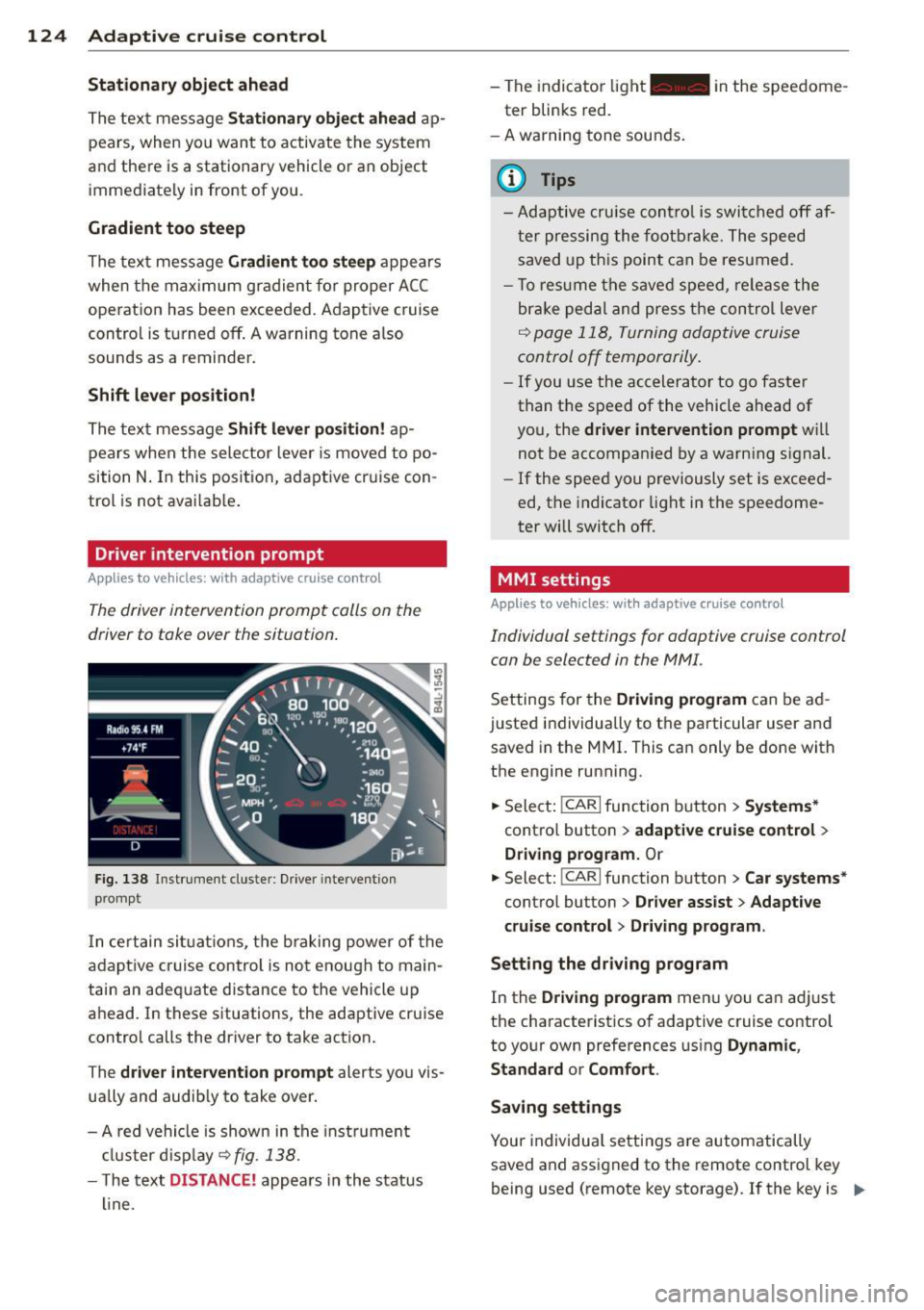
The driver intervention prompt calls on the
driver to toke over the situation.
Fig. 138 I n st rument cluste r: Drive r in terven tion
prompt
I n certain situat ions , the braking power of the
adapt ive cr uise control is not enough to main
tain an adequate distance to the vehicle up
ahead. In these situations, the adaptive cruise
control calls the driver to take action.
The
driver intervention prompt alerts you vis
ually and audib ly to take over.
- A red vehicle is shown in the instrument
cluster display ~
fig. 138.
- T he text DISTANCE! appears in the status
line. -
The indicator light- in the speedome
ter blinks red.
- A warning tone sounds.
0) Tips
-Adaptive cruise control is switched off af
ter pressing the footbrake. The speed
saved up this point can be resumed.
- To res um e the saved speed, release the
brake pedal and press the control lever
~ page 118, Turning adoptive cruise
control off temporarily.
-If you use the accelerator to go faster
than the speed of the vehicle ahead of
you, the
driver intervention prompt wi ll
not be accompanied by a warning s ignal.
- If the speed you previously set is exceed
ed, the indicator light in the speedome
ter will switch
off.
MMI settings
Applies to vehicles : with adaptive cruise contro l
Individual settings for adoptive cruise control
con be selected in the
MMI.
Settings for the Driving program can be ad
justed individually to the particular user and
saved in the MMI. This can only be done with
the engine running .
.,. Select:
!CARI function button> Systems*
cont ro l button > adaptive cruise control >
Driving program. Or
.,. Select: !CAR I function button > Car systems *
control button > Driver assist > Adaptive
cruise control
> Driving program .
Setting the driving program
In the Driving program menu you can adjust
the characteristics of adaptive cruise control
to your own preferences using
Dynamic,
Standard
or Comfort.
Saving settings
Your individual settings are automatically
saved and assigned to the remote control key
being used (remote key storage) . If the key is
Iii>
Page 139 of 340
Automatic
transmission
tiptronic
Introduction
The automatic transmission is controlled elec
tronically. The transmission upshifts or down
shifts automatically depend ing on which drive
program is selected. The power is transferred
by a torque converter .
When a
mode rate d riv in g s ty le is used, the
transmission selects the most econom ica l
driving mode. It w ill then change up early and
delay the downshifts to g ive better fuel econ
omy.
T he transmission switches to a sporty mode
after a k ick-down or when the driver uses a
spo rty driving sty le characterized by quick ac
celerator pedal movements, heavy accelera
tion, frequent changes in speed and traveling
at the maximum speed.
If desired, the driver can a lso select the gears
manually ( tiptronic mode ) c:> page 140.
Selector lever positions
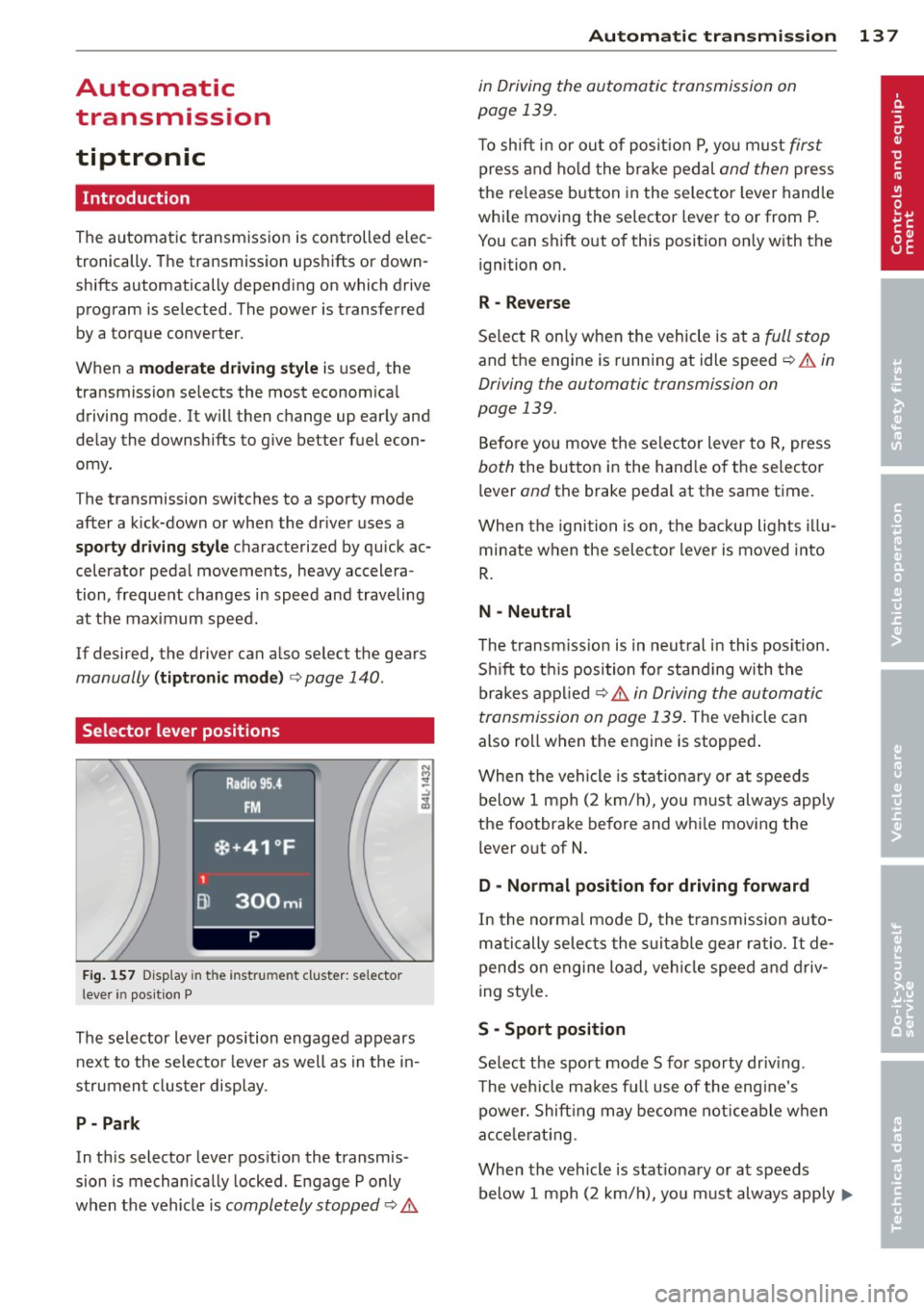
Fig. 157 D isp lay in t he i nst ru m en t cluster: selecto r
l ever in pos it ion P
The selector lever position engaged appears
next to the selecto r lever as well as in the in
strument clus ter disp lay.
P- P ark
In th is selector lever pos ition the transmis
sion is mechan ically locked . Engage P only
when the vehicle is
completely stopped c:> 11::..
Automa tic tran sm iss ion 13 7
in Driving the automatic transmission on
page 139.
T o shift in or out of posit io n P , yo u m ust first
press and ho ld the brake pedal and then press
the re lease button in the selector leve r handle
whi le moving the selector lever to or from P.
You can shift out of th is position only with the
ignition on.
R -Reverse
Se lect R on ly when the vehicle is at a
full stop
and the engine is running at idle speed c:> 11::.. in
Driving the automatic transmission on
page 139.
Before you move the se lector lever to R, press
both the button in the hand le o f the selector
lever
and the brake pedal at the same t ime.
When the ignition is on, the backup lights illu
minate when the selecto r lever is moved into
R .
N -Neutral
T he t ransm iss ion is in neut ral in this pos ition.
S hi ft to t his position fo r standing with the
brakes appl ied
c:> 11::.. in Driving the automatic
transmission on page 139 .
The vehicle can
also roll when the engine is stopped .
When the vehicle is stat iona ry or at speeds
below 1 mph (2 km/h), yo u m ust always apply
the footbrake before and whi le mov ing the
lever o ut of
N .
D - Normal position for driving forward
In the no rma l mode D, the t ransmission auto
matically selects the s uitable gear ratio.
It de
pends on engine load, vehicle speed and driv
i ng sty le.
S -Sport posit ion
Se lect the sport mode S for spo rty dr iv ing .
T he vehicle makes fu ll use of the eng ine's
power. Shift ing may become noticeable when
acce lerat ing.
When the vehicle is stat ionary or at speeds
below 1 mph (2 km/h), you must always app ly ...,
Page 140 of 340
138 Automatic tr an smis sion
the foot brake before and while moving the
lever to Dor S out of N.
.&_ WARNING
Read and follow a ll WARNINGS
c::> & in
Driving the automatic transmission on
page 139.
(D Note
Coasting downhi ll with the transmission in
N and the engine not running wi ll result in
damage to the automatic transmiss ion
and possibly t he catalytic converter.
(D Tips
- If you accidenta lly select N while driv ing,
take your foot off the acce lerator pedal
i mmediately and wait fo r the engine to
s low down to idle before se lecting D.
- If there is a power failure, the selector
l eve r will not move out of t he P position.
The emergency release can be used if
th is happens
c::> page 1 41.
Automatic Shift Lock (ASL)
The Automatic Shift Lock safeguards you
against accidentally shifting into a forward or the reverse gear and causing the vehicl e to
move unintentionally.
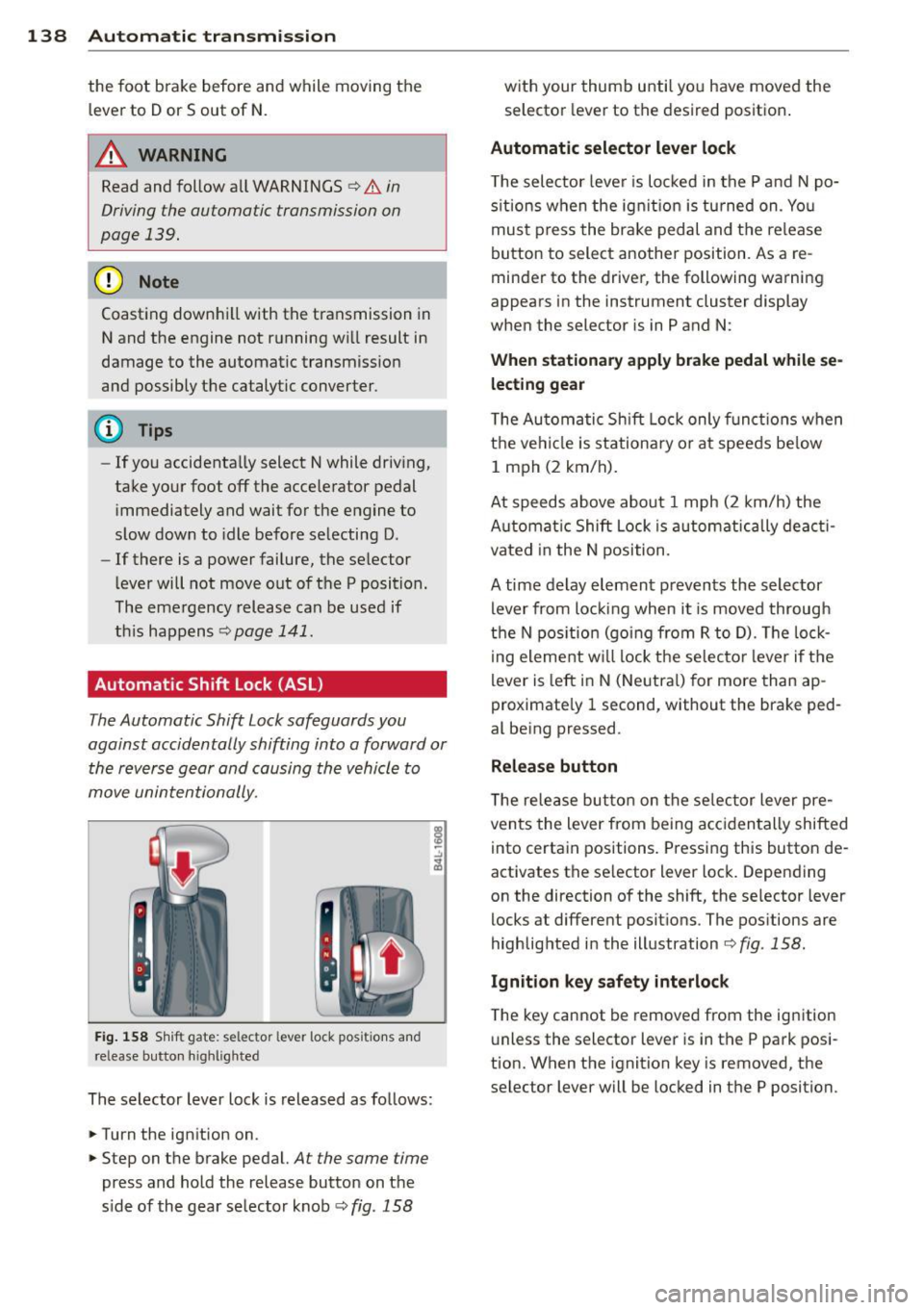
Fi g. 1 58 Sh ift gate: selector lever lock positions and
release button high lighted
The selector lever loc k is released as follows:
.. Turn the ignition on .
.. Step on the brake pedal.
At the same time
press and hold the release button on t he
s ide of the gear se lecto r knob
c::> fig . 158
with your thumb until yo u have moved the
selector lever to the desired position .
Automatic selector lever lock
T he selector leve r is lo cked in the P and N po
s it ions w hen the ig nition is tu rned on . Yo u
mus t press the br ake pedal and t he re lease
button to select another position. As a re
minder to the driver, the following warning
appears in the instrument cluster display
whe n the selector is in P and N:
When stationary apply brake pedal while se
lecting gear
T he Au tomatic Shift Loc k only f unct io ns when
the ve hicl e is stationa ry o r at spee ds be low
1 mph (2 km/h).
At speeds ab ove abo ut 1 mph (2 km/h) the
A ut omat ic Shift Lock is a utomatic ally deac ti
vated in the N position.
A time delay el ement p reven ts the selector
lever from loc king when i t is moved through
the N pos itio n (go ing from R to D). The lo ck
i ng eleme nt w ill lock the selecto r leve r if the
lever is left in N (Neutra l) for more than ap
proximate ly 1 second, without the brake ped
al be ing pressed .
Release button
T he re le ase bu tton on the se lec tor lever pre
ven ts the lever from being acc iden tally shifted
into certa in positions . Press ing this button de
activates the se lector lever loc k. Depending
on the direction of the shift, the se lector lever
locks at differe nt posit ions. The positions are
highlighted in the illustration
<=:> fig . 158.
Ignition key safety interlock
T he key cannot be remove d from the ignition
u nless the selector lever is in t he P park posi
tion. When the ignition key is removed, the
selector lever will be loc ked in the P position.
Page 141 of 340

Driving the automatic transmission
Fig. 159 Shift g ate on the center co nso le: se lector lev
er wi th release butt on
Starting the engine
~ The selector lever must be in P or N .
Starting off
~ Press and hold the brake pedal.
~ Press and hold the release button in these
lector lever handle , select the desired selec
tor lever pos ition such as D and release the
button .
~ Wait briefly until the transmission has shift
ed (you will feel a slight movement).
~ Remove your foot from the brake pedal and
acce lerate .
Stopping temporarily
~ Keep the vehicle stationary us ing the brak
ing pedal, for examp le at traffic lights.
~ Do not press the accelerato r pedal when do -
ing this.
Stopping /parking
If the selector lever is not in the P position
when you open the driver's door, the vehicle
could roll. The message
Transmi ssion : Car
may roll! Shift to park!
appears.
~ Press and hold the brake pedal unt il the ve
hicle has come to a complete stop.
~ Set the parking brake firmly 9 page 110,
Parking.
~ Se lect the P selector lever position 9 &.-
Stopping on an incline
~ Always press the brake pedal to hold the ve
hicle in place and prevent it from "rolling
back"
9 ,& . Do not try to prevent the vehi-
Autom atic transm ission 139
cle from "rolling back" when a gear is en
gaged by increasing the engine speed
c::>(D.
Under certain circumstances, such as driving
in the mountains, it may be usefu l to switch
temporarily to the manual shift program in or
der to adjust the gears to the driving condi
tions by hand
c::> page 140 .
On slopes, activate the parking brake first and
then move the selector lever to the P position.
This prevents too much stress from being
placed on the locking mechanism.
A WARNING
- Unintended vehicle movement can cause
serious injury.
- Never leave your vehicle with the engine
running while in gear.
If you must leave
your veh icle when the engine is running,
apply the park ing brake firmly and move
the selector lever to P.
- Power is still transmitted to the wheels
when the engine is running at idle. To
prevent the vehicle from "c reeping ", you
must keep your foot on the brake when
the engine is running and the selector
lever is in D, Sor R or "tiptronic" mode is
selected.
- Do not press the accelerator pedal when
changing the se lector lever position
while the vehicle is stationary and the engine is running.
- Never shift into R or P while driving.
- Before driving down a steep slope, re-
duce your speed and shift into a lower
gear with "tiptronic".
- Do not ride the brakes or press the bra ke
pedal too often or too long when driving
down a hi ll. Constant braking causes the
brakes to overheat and substantially re
duces braking performance, increases braking distance or causes complete fa il·
ure of the brake system.
- To prevent the vehicle from rolling back
when stopping on inclines, always hold it
in place with the brake pedal or parking
brake . .,..
Page 163 of 340

Homelink
Universal remote
control
Description
Applies to vehicles: with Home link
The HomeLink universal remote control can
be programmed with the remote control for
devices that are already present.
With Home Link, you can control devices such
as the garage door, security systems, house
lights , etc. comfortably from the inside of you
vehicle.
Homelink makes it possible for you to rep lace
three different remote controls from devices
in your home with one universal remote. This
feature works for most garage door and exte
rior door motor signals. Programming the in
dividual remote control for your remote con
trol takes place on the left side of the front bumper. There is a control module attached at
this location .
A one-time programming of the sensor must be performed before you are able to use sys
tems with Homelink. If the system does not activate after performing the one-time pro
gramming, check whether the system uses a rolling code
¢ page 163 .
A WARNING
-Never use the Homelink transmitter
with any garage door opener that does
have not the safety stop and reverse fea
ture as required by federa l safety stand
ards. This includes any garage door open
er model manufactured before April 1,
1982.
- A garage door opener which cannot de
tect an object, signaling the door to stop
and reverse does not meet current feder
al safety standards . Using a garage door
opener without these features increases
risk of serious injury or death.
Homelink 161
- For safety reasons never release the
parking brake or start the engine while
anyone is standing in front of the vehicle .
- A garage door or an estate gate may
sometimes be set in motion when the
Homelink remote control is being pro
grammed. If the device is repeatedly ac
tivated, th is can overstrain motor and
damage its electrical components - an
overheated mo to r i s a fire hazard!
- To avoid possib le injuries or property
damage, please always make abso lutely
certa in that no persons or objects are lo
cated in the range of motion of any
equipment being operated.
(0 Tips
- If you would like more information on
Homelink, where to purchase the Home
Link compat ible products, or would like
to purchase the Home Link Home Light
ing Package, please call toll-free :
1-800-355-3515.
- For Declaration of Compliance to United
States FCC and Industry Canada regula
tions
¢page 319.
-For security reasons, we recommend that
you clear the programmed buttons be
fore selling the vehicle.
Operation
App lies to vehicles : with Homeli nk
111111 111111
-
Fig. 191 Headl iner: controls
Req uirement: The buttons must be program
med
<:!)page 162.
Page 226 of 340
224 Intelligent technology
Intelligent technology
Notice about data
recorded by vehicle
control modules
Your vehicle is not equipped with an Event Da
ta Recorder (EDR), installed by some manu
facturers fo r the express purpose of capturing
data for retrieval after an accident or crash
event . EDRs are sometimes ca lled "crash re
corders".
Some state laws restrict the retr ieval or down
loading of data stored by EDRs that were in
stalled in a vehicle for the express purpose of
retrieving data after an accident or crash
event without the owner's consent.
A lthough your vehicle is not equipped with an
EDR, it is equipped with a number of electron
ic control modules for various vehicle systems
such as, for examp le, engine function, emis
sion control, as well as for the airbags and
safety belts .
These electronic contro l modules also record
vehicle-related data during normal vehicle op
eration for diagnostic and repair purposes.
The recording capacity of the electronic con
trol modules is limited to data (no sound is re
corded) and only a small amount of data is ac
tually recorded over a very limited period of
time and stored when a system fault or other
condition is sensed by a control unit. Some of
the data then stored may relate to vehicle
speed, direction, braking as we ll as restraint
system use and performance in the event of a
crash or other condition. Stored data can only
be read and downloaded with special equip
ment.
Electronic Stabilization
Control (ESC)
Description
The Electronic Stabilization Control (ESC) rein
forces driver safety. It reduces the risk of slip
p ing and improves driving stability. ESC de
tects cr itical s ituations such as the vehicle oversteering and
understeering or the wheels
spinning . The vehicle is stabilized by applying
the brakes or reducing engine torque . Once
the ESC is active, the indicator light
G1 blinks
in the instrument cluster.
ESC includes the anti-lock brake system (ABS),
brake assist system, anti-slip regulation
(ASR), electronic differential lock (EDL) and
hill descent control.
Anti-lock brake system (ABS)
ABS prevents the whee ls from locking up
when braking. The vehicle can still be steered
even during hard braking. App ly steady pres
sure to the brake pedal. Do not pump the ped al. A pulsing in the brake pedal indicates that
the system is helping you to brake the vehicle .
Brake assist system
The brake assist system can decrease braking
distance. It increases braking power when the
driver presses the brake pedal quickly in emer
gency situations. You must press and hold the
brake pedal until the situation is over . In
vehicles with adaptive cruise control*, the
brake assist system is more sensitive if the
distance detected to the vehicle ahead is too
small.
Anti-slip regulation (ASR)
ASR reduces engine power when the drive
wheels begin to spin and adapts the force to
the road conditions. This makes it easier to
sta rt, accelerate and drive up hills.
Electronic differential lock (EDL)
The EDL brakes wheels that are spinning and
transfers the drive power to the other wheels .
This function is available up to about 60 mph
(100 km/h) .
In extreme cases, EDL automatically switches
off to help keep the brake on the braked wheel
from overheat ing. EDL will switch on again au
tomat ically when conditions have returned to
normal.
Page 228 of 340
226 Intelligent technology
Offroad mode on Offroad mode off
Behavio r
The ESC and ASR stabilization functions The fu ll stabilization function of the ESC
are limited
c> Li::,. .
Operation Press the 1.$ OFFI button.
Indicator fl turns on.
lights
D rive r mes-
Stabilization control (ESC): Offroad.
sages Warning! Rest ricted stability
Hill descent control
The hill descent control is switched on in off
road mode. When slowly descending steep
gradients on loose ground or when the axles
are articulated, h ill descent control provides
assistance by automatically applying the
brakes to keep vehicle speed constant. The ve
h icle is also rendered easier to steer by selec
tive distribution of braking force . Hill descent
control intervenes when:
- the accelerator pedal is not pressed,
- the vehicle is trave lling less than 12 mph
(20 km/h),
- a steep gradient is detected,
-wheel behavio r indicates loose ground or
conditions with poor adhesion (e .g. also ax le
articulation) .
H ill descent control operates both driving for
ward and in reverse . Active hill descent con
trol is deactivated by pressing the accelerator
pedal until the conditions for activation al
ready listed are met again.
A WARNING
You should only switch offroad mode on if
your dr iving abilities and road cond itions
permit.
- The stabilization function is limited
when offroad mode is switched on. The
dr iv ing wheels could spin and the vehicle
cou ld swerve, especially on slick or slip
pery road surfaces.
- You should only sw itch offroad mode on
when driving offroad. and ASR
is available again.
Press the
1 .$ OF FI button again.
fl turns off.
Stabilization control (ESC): On
(D Tips
Offroad mode cannot be switched on when
adaptive cruise control* is switched on .
Brake system
Operating conditions and driving habits
The brakes on today's automobiles are still
subject to wear, depending largely on operat
ing conditions and driving habits
c> Li::,. . On
vehicles that are either driven most ly in stop
and-go city traffic or are dr iven hard, the
brake pads should be checked by your author
ized Audi dealer more often than specified in
the Warranty & Maintenance booklet . Failure
to have your brake pads inspected can result
in reduced brake performance.
On steep slopes, you should use the braking
effect of the engine . This way, you prevent un
necessary wear on the brake system .
If you
must use your brakes, do not hold the brakes
down continuously. Pump the brakes at inter
vals.
Noises may occur when braking depending on
the speed, b raking force and outs ide cond i
tions such as temperature and humidity.
Moisture or road salt
Under certain conditions, for example, when
driv ing through water or very heavy rain, or
even after washing your veh icle, the braking
effect can be reduced due to moisture (or in
freezing conditions ice) on the bra ke pads. A
f ew careful brake applications should dry off
the brake pads or remove any ice coatings.
jll,,