engine AUDI Q7 2014 Owner´s Manual
[x] Cancel search | Manufacturer: AUDI, Model Year: 2014, Model line: Q7, Model: AUDI Q7 2014Pages: 340, PDF Size: 85.02 MB
Page 40 of 340

38 Opening and closing
Opening and closing
Keys
Key set
Fig. 27 Key set
@ Master key with remote control
You can centrally lock and unlock your vehicle
and start the engine with the master key with
remote control.
@ Valet key
The valet key only fits the lock in the driver's
door and the ignition lock . If you have to leave
the key with somebody else, you are well-ad
vised to turn over the valet key only
¢ page 41.
© Emergency key
The emergency key is only for temporary use if
the vehicle key should be lost or misplaced
¢ .&. .
Key replacement
If you lose a key, contact your authorized Audi
dealer immediately to have the
lost key disa
b led . Be sure to bring all your keys with you.
Registered keys
You can check to find out how many keys have
been registered to your vehicle. Therefore,
when buying a used vehicle, make sure to get
all of the remote keys be long to it .
Ca lling up the registered keys¢
page 12.
Data in the master key
While you are driving, serv ice and mainte
nance relevant data are being continuously stored on your master key. Your Audi
Service
Advisor can read out these data and tell you
about work that is needed on your vehicle .
This also app lies to vehicles w ith Convenience
key*.
A WARNING
--
- Do not leave your vehicle unattended
with the key in the ignition lock. Entry by
unauthorized persons could endanger
you or result in theft or damage the vehi
cle. A lways lock all doors and take the
key.
- Do not leave children unattended in the
veh icle, especially with access to vehicle
keys . Unguarded access to the keys pro
vides children the opportun ity to start
the engine and/or activate vehicle sys
tems such as the power windows etc. Un
supervised operation of any vehicle sys
tem by children can result in serious in
Jury .
(D Tips
- If you open the driver's door with the key
left in the ignition lock, a chime w ill
sound. T his is your reminder to remove
the key and lock the door.
- For security reasons, replacement keys
are only ava ilable from Audi dealers.
Master key with remote control
The remote control allows you to lock or un
lock the vehicle electronically .
Fig. 28 Fold-up maste r key with remo te control
., To fold the key out and back in place, press
t he release button ¢
fig. 28. .,.
Page 42 of 340
40 Opening and clo sing
@ Tips
Please note that the current state of the
veh icle door locks can only be recalled with
the master key that was last used to lock
the vehicle . It is possible that a different
state is shown for the door locks on the
other master key wh ich is not the same as
that of the vehicle .
Master key battery replacement
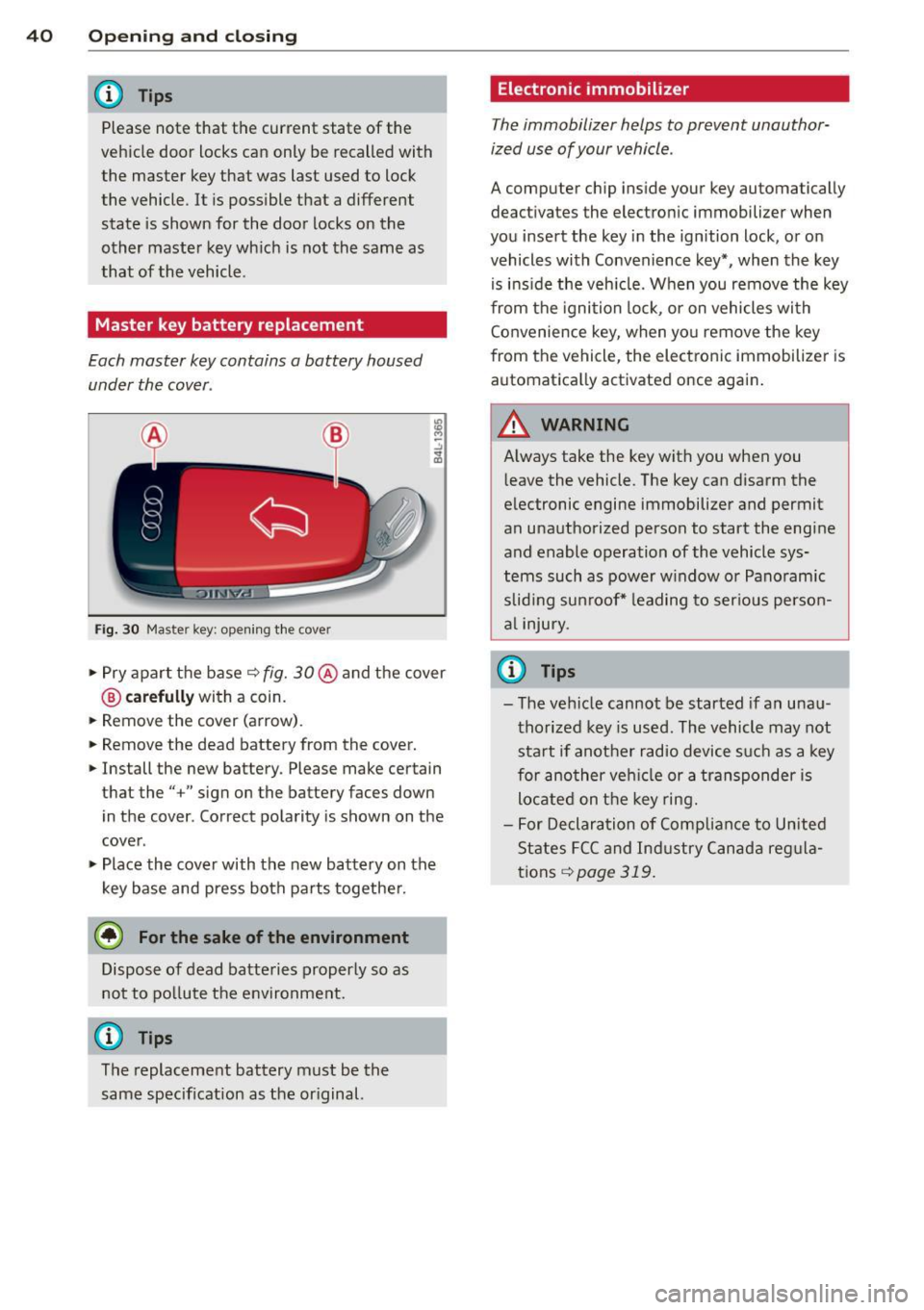
Each master key contains a battery housed
under the cover .
Fig. 30 Master ke y: opening the cove r
.. Pry apart the base q fig. 30@ and the cover
@ carefully with a coin.
.. Remove the cover (arrow) .
.. Remove the dead battery from the cover.
.. Install the new battery. Please make certain
that the" +" sign on the battery faces down
in the cover . Correct polarity is shown on the
cover .
.. Place the cover with the new battery on the
key base and press both parts together.
@ For the sake of the environment
Dispose of dead batteries properly so as
not to po llute the environment.
@ Tips
The replacement battery must be the
same specification as the or iginal.
Electronic immobilizer
T he immobilizer helps to prevent unauthor
ized use of your vehicle .
A computer chip in side your key automatically
deac tivate s the elec tronic immob ilizer when
you insert the key in the ignition lock , or on
vehicles with Convenience key*, when the key
is ins ide the veh icle. When you remove the key
from the ignition lock, or on vehicles with
Convenience key, when you remove the key
from the vehicle, the electronic immobilizer is
automatica lly activated once again.
WARNING
Always take the key with you when you
l eave the vehicle. The key can disarm the
electronic engine immobilizer and permit
an unauthorized person to start the engine
and enable operation of the vehicle sys
tems such as power w indow or Panoramic
slid ing sunroof* leading to serious person
al injury.
u) Tips
-The vehicle cannot be started if an unau
thorized key is used . The vehicle may not
start if another radio device such as a key
for another vehicle or a transponder is
located on the key ring.
- For Declaration of Compliance to United
States FCC and Industry Canada regula
tions
q page 319.
Page 53 of 340
How is the anti-theft alarm system
switched off?
The anti -theft a la rm system is switched off
on ly when you unlock yo ur vehicle. If yo u do
not open a door w ith in 60 seconds after you
have unlocked with the remote control , the
ve hicle w ill lock itse lf again automat ically .
When will the anti-theft alarm sy stem be
triggered?
W hen the ve hicle is locked, the alarm system
mon itors and protects the following parts of
the vehicle:
- engi ne compartment
- lu ggage compartment
- doo rs
- i gnition
When the system is activated, the alarm will be tr iggered if on e of the doo rs, the eng ine
h ood or t he rear lid a re opened, o r if the ig ni
tion is tur ned on. The anti-t heft alarm sys tem
will also go off when the battery is discon
nected .
You can a lso tr igge r the alarm by p re ssing t he
P ANIC button o n your remote con trol. T his
will alert other peop le in case of emergency.
Press the
PANIC b utton again to t urn off the
a larm.
How is the anti-theft alarm switched off
when triggered?
The a larm system is switc hed off when you
un lock the vehicle o r whe n the ignition is
sw itched on. The alarm will also switch itself
off when it comes to the end of its cycle.
Emergency flasher and horn
The emergency flas her wi ll blink brief ly and
the hor n sounds when the doors, engine hood
and rear lid are proper ly closed .
If th e emergen cy fl ashe rs do no t blink , or the
horn does no t sound, check the doors, engine
h ood an d rear lid to make sure they are p rop
erly closed.
If you close a door, t he hood o r
the rear lid w ith the anti-theft alarm sw itched
on, the emergency flashers will b link and the
Opening and clo sin g 51
horn wi ll sou nd on ly afte r you have closed the
door or li d.
(D Tips
For the anti-theft ala rm sys te m to fu n c
tion properly, make sure all ve hicle doors
and win dows are closed before leavi ng t he
vehicle .
Power windows
Controls
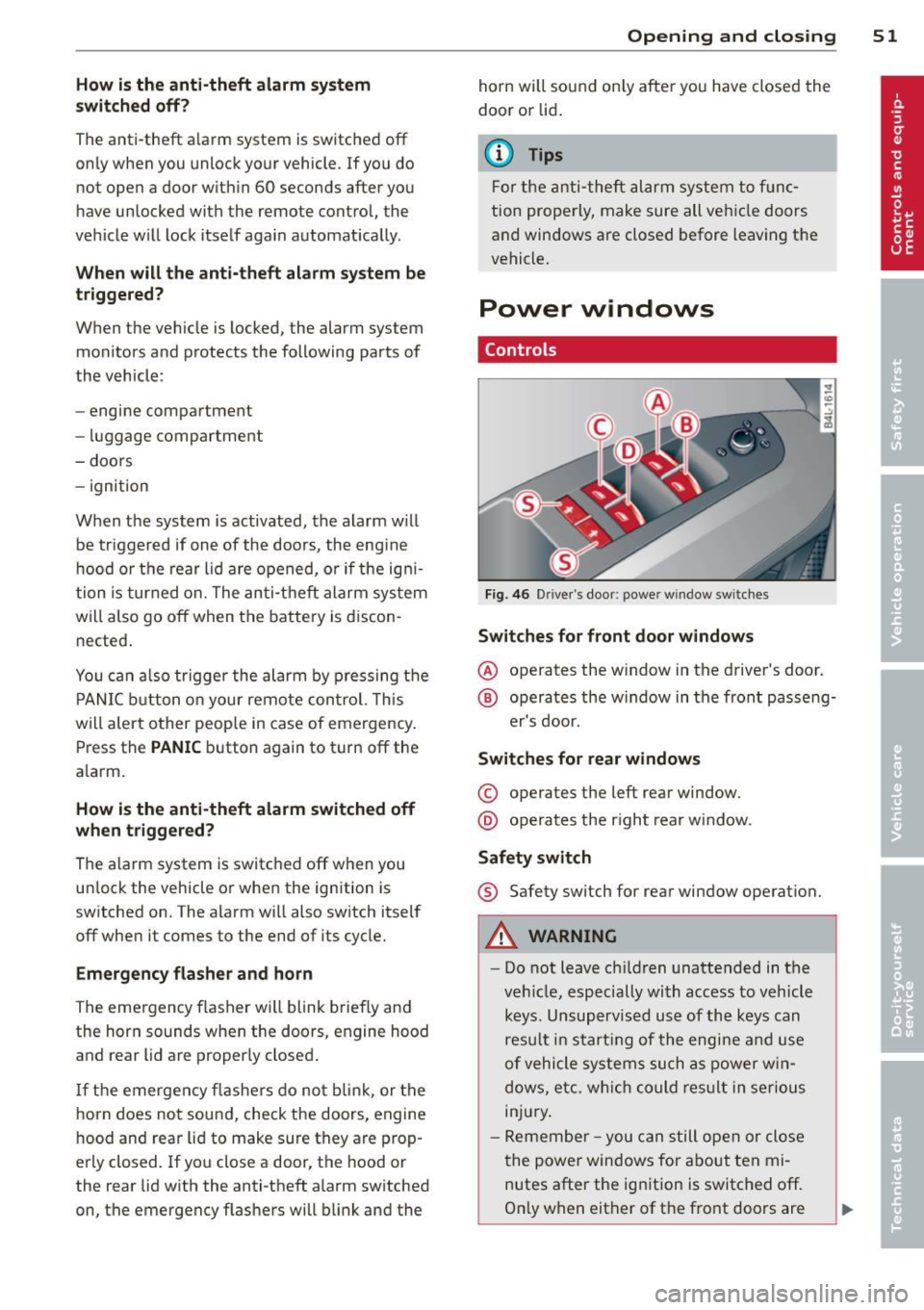
Fig. 4 6 Drive r's doo r: power w indow sw itches
Switches for front door windows
@ o p erates the w indow in the d river's door.
® opera tes the w indow in the front passe ng-
er's door .
Switches for rear windows
© operates the left rear window.
@ operates the r ight rear wi ndow.
Safety switch
® Safety switch for rear window operat ion.
A WARNING
- Do not lea ve c hildren unattended in t he
ve hicle, especially wi th access to veh icle
keys. Unsupervi sed us e of the keys can
resu lt in start ing of the engi ne and use
o f vehicle system s such as po wer w in
dows, etc. w hich co uld res ult in se riou s
in jur y.
- R eme mber -you can s till ope n or close
the powe r win dows for about ten mi
n utes after the ign ition is switc hed off.
O nl y w hen eit her of t he fro nt doors are
Page 57 of 340

Opening front r oof segment to comf ort
se ttin g
"Turn the rotary switch ¢ fig. 49@ to posi
tion ©, you will feel the switch engage . The
roof segment is slid open only to a comfort
position w ith low wind noise. This is the rec
ommended standard sett ing for normal
driv ing cond itions .
Sliding front roof segment full y open
" Rotate and hold the switch @ in position @
unt il the roof segment has reached the de
s ired pos it ion. There may be increased wind
noise in this pos it ion.
(D Tips
- In posit ion @, the switch jumps back to
pos ition © again as soon as the switch is
released .
- When dr iv ing with the Panoramic slid ing
sunroof open, open the front roof seg
ment to the comfort setting to m inim ize
wind noise .
Closing Panoramic sliding sunroof
Applies to vehicles: with Panoram ic sliding sunroof
Clos ing tilted front roof segm ent
" Pull the switch¢ page 54, fig . 49 @ and
ho ld it until the roof segment has reached
the des ired pos ition.
" Pull the switch
brie fly to close the roo f seg
ment automatica lly. By activating the switch
briefly again, the roof segment can be stop
ped in any position ¢
.&_.
Clos ing front r oof s egment wh en slid
o p en
" Rotate switch ¢ page 54, fig. 49@ to posi
t ion @ to close the roof segment
c::> .&_. To
move to an intermediate posit ion, rotate the
switch to the corresponding click-stop .
Clos ing tilt ed r ear roof segm ent
" Tap the rocker switch ¢ page 54, fig. 49 ®
or
c::> page 54, fig. 50 © in the front area Q
br iefl y to close the roof segment completely
c::> .&_.
Opening and clo sin g 55
"To set an intermediate position manually,
press the rocker switch in the front area~
until the roof segment has reached the de
sired tilt posit ion
c::> .&_ .
A WARNING
Improper use of the Panoram ic sliding
sunroof can cause serious personal injury.
- Be careful when closing the Panoramic
-
sliding sunroof . Not paying attention
could cause you or others to be trapped
and injured as the Panoram ic sliding sun
roof closes.
- Always take the key w ith you when you
leave the vehicle to prevent injur ies
caused by the Panoramic slid ing sunroof
clos ing
- Never leave children or persons requiring
assistance alone in the vehicle, especially
when they could access the vehicle keys .
Unsupervised use of the keys can result
in the engine being started or use of ve
hicle systems such as the power win
dows, etc. wh ich could result in serious
injury. The doors could be locked with
the remote key, de laying help in an
emergency.
- The Panoramic slid ing sunroof will con
tinue to operate until the ign ition key
has been removed and one of the front
doors has been opened.
Convenience closing feature
Applies to vehicles: wit h Pa noramic slid ing sunroof
The Panoramic sliding sunroof can be closed
from outside with the key in the driver's door lock .
" Insert the key into the dr iver's door lock.
" Turn and hold the key in the lock pos it ion ®
c::> page 43, fig . 33 until the Panoramic slid
ing sunroof is complete ly closed
c::> A in
Closing Panoramic sliding sunroof on
page 55.
T he power s un blind is a lso closed . .,..
Page 59 of 340
Clear vision Lights
Switching the headlights on and off
In the "AUTO" posit ion, a light sensor auto·
matically switch es t he head · and taillights on
and off in r espons e to light conditions .
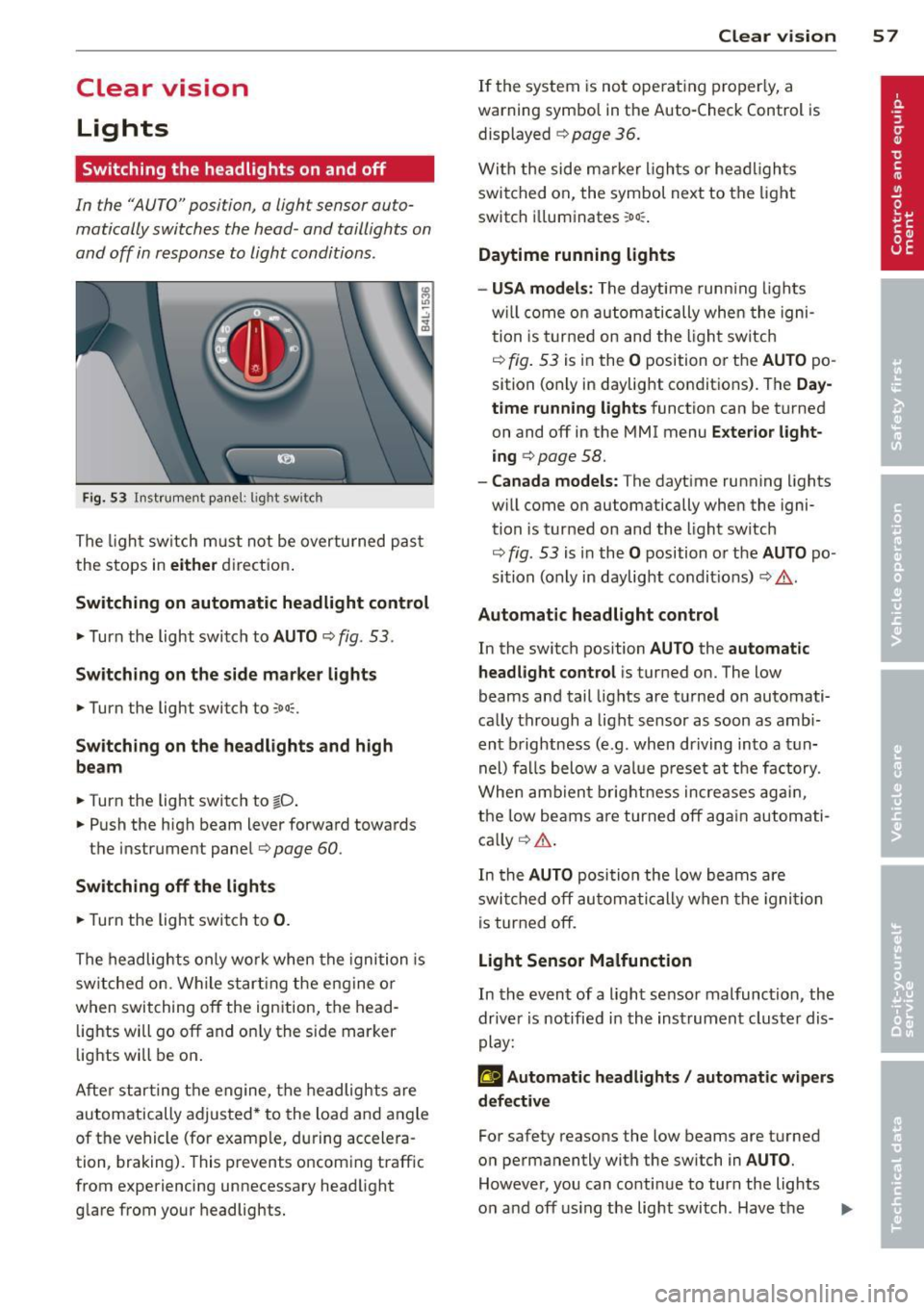
Fig. 53 Instrumen t pane l: lig ht sw it c h
The ligh t sw itch m ust not be overturned pas t
the stops in
eit her direct ion .
Sw itching on automatic headlight control
,.. Turn the light switch to AUTO ¢ fig. 53.
Sw itching on the side m ark e r lights
,.. Turn the light switch to ,oo::.
Sw itching on the headlights and high
be am
,.. Turn the light switch to tD .
,.. Push the high beam lever forward toward s
the instrument panel¢
page 60 .
Swi tching off the light s
,.. Turn the light switch to 0.
The headlights only wo rk when the ignition is
sw itched on . While s tart ing the engine or
when switching
off the ignition, the head ·
lights will go
off and on ly the s ide marker
lights will be on .
Afte r star ting t he engine, the headlights are
automatically adjusted * to the load and angle
of the vehicle (for example, during accelera ·
tion, braking). This prevents oncom ing traffic
from experiencing unnecessary headlight glare from your headlights.
Clear vi sion 5 7
If the system is not ope rat ing properly, a
warning symbol in the Auto-Check Control is displayed ¢
page 36.
With the side m arker ligh ts or he ad ligh ts
switched on, the symbol next to the light
sw itch i lluminates
:o o:: .
Daytime running lights
- USA model s:
The daytime runn ing lights
w ill come on au tomatically whe n the igni
tion is turne d on and the l ight sw itch
¢
fig. 53 is in the O position or the AUTO po
sition (only in daylight conditions) . The
Day
time running lights
function can be turned
on and
off in the MMI menu E xter ior l ight
ing ¢
page 58.
-Canada models: The dayt ime running lights
w ill come on automatically when the igni·
tion is turned on and the light switch
¢
fig . 53 is in the O position o r the AUTO po
sition (only in daylight condit ions) ¢ .&. .
Automatic headlight control
In the switch position AUTO the automatic
headlight control
i s turned on. The low
beams and tail lights are turned on automati
ca lly through a light sensor as soon as amb i
ent b rightness (e.g . when driving into a t un
nel) fa lls below a value p reset a t the factory.
When ambien t brightn ess increases ag ain ,
the low beams are turned
off ag ain autom ati
ca lly ¢ .&. .
In the
AUTO posi tion the low beams a re
swi tched
off au tom ati cally when the igni tion
is tur ned
off .
Light Sensor Malfunction
In the event of a light sensor malfunction , the
dr ive r is notified in the instrument cluster dis
play:
g Automatic headlights / automatic w ipers
defective
For safety reasons the low beams are t urned
o n permanently wi th the switch in
AUTO .
However, you can conti nue to turn the lights
o n and
off using the light switch . Hav e the II>
Page 67 of 340
-Prior to using a car wash, the windshield
wiper system must be switched
off (lever
in position 0). This helps to prevent unin
tentional switching on and damage to
the windshield wiper system .
@ Tips
-The windshield wipers are switched off
when the ignition is turned off. Activate
the windshield wipers after the ignition is switched back on by moving the wind
shield wiper lever to any position.
- Worn or dirty windshield wiper blades
cause smearing which can affect the op
eration of the rain sensor. Check the con
dition of your windshield wiper blades
regularly.
- The rain sensor is part of the interval
wiping system. Turning
off the ignition
will also deactivate the rain sensor. To re
activate the sensor, switch
off the inter
val wiping function, then switch it back
on again.
- Make sure the washer fluid reservoir in
the engine compartment is topped
off
before going on a long trip. Look up
c:;, page 272 for checking and filling the
washer container.
Rear window wiper
The wiper lever is also used to operate the
rear window wiper and the automatic wiper/
washer function.
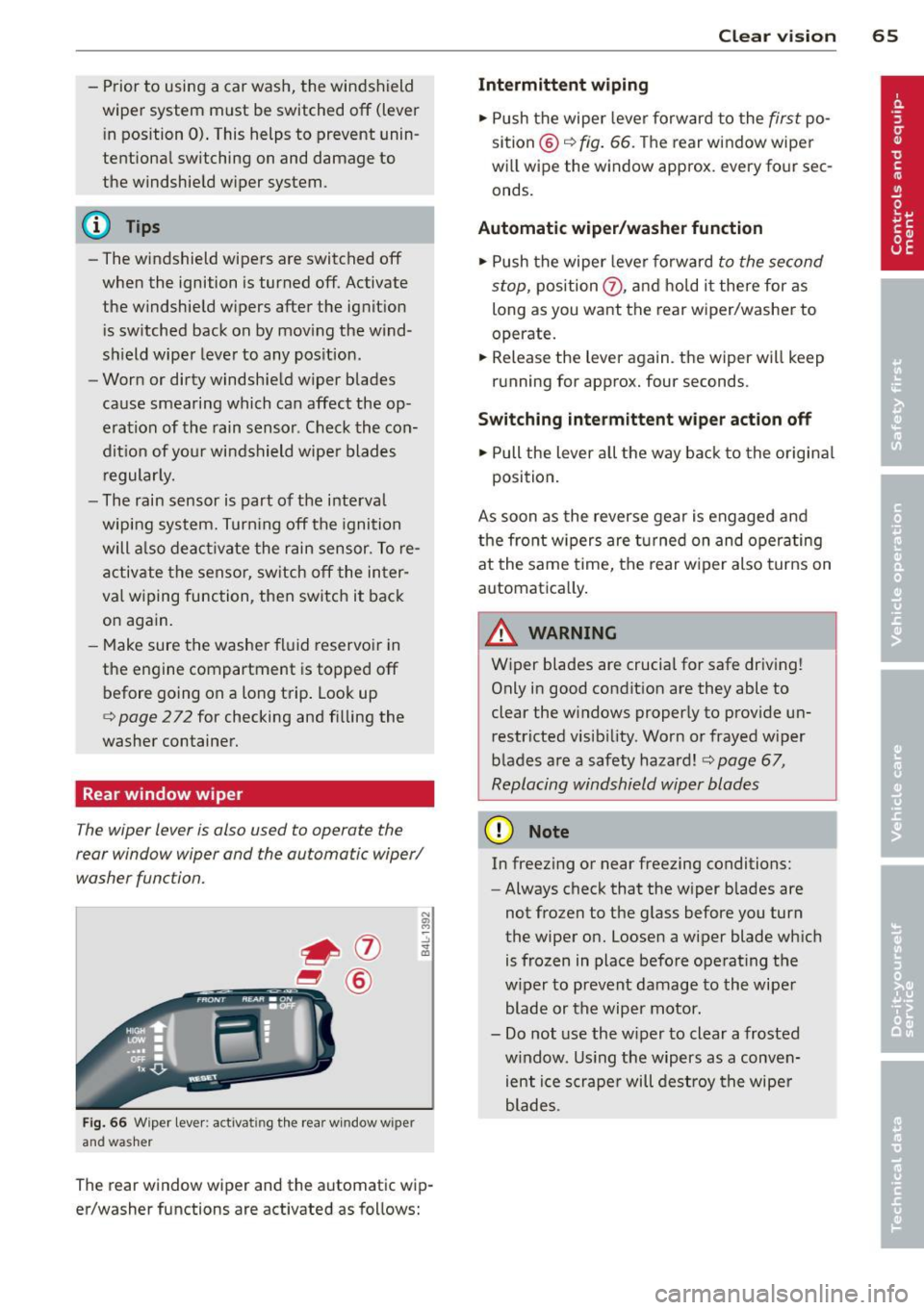
Fig. 66 Wiper lever: activati ng th e rear window w iper
and washer
The rear window wiper and the automatic wip
er/washer functions are activated as follows:
Clear vision 65
Intermittent wiping
.,. Push the wiper lever forward to the first po
sition @
c:;, fig. 66. The rear window wiper
will wipe the window approx. every four sec
onds.
Automatic wiper/washer function
.,. Push the wiper lever forward to the second
stop,
position (J) , and hold it there for as
long as you want the rear wiper/washer to
operate.
.,. Release the lever again . the wiper will keep
running for approx. four seconds.
Switching intermittent wiper action off
.,. Pull the lever all the way back to the original
position.
As soon as the reverse gear is engaged and
the front wipers are turned on and operating
at the same time, the rear wiper also turns on
automatically.
A WARNING
Wiper blades are crucial for safe driving!
Only in good condition are they able to
clear the windows properly to provide un restricted visibility. Worn or frayed wiper
blades are a safety hazard!
c:;, page 67,
Replacing windshield wiper blades
(D Note
In freezing or near freezing conditions:
- Always check that the wiper blades are
not frozen to the glass before you turn
the wiper on. Loosen a wiper blade which
is frozen in place before operating the
wiper to prevent damage to the wiper
blade or the wiper motor.
- Do not use the wiper to clear a frosted
window . Using the wipers as a conven
ient ice scraper will destroy the wiper
blades.
-
Page 90 of 340
88 Seats and storage
Outlet
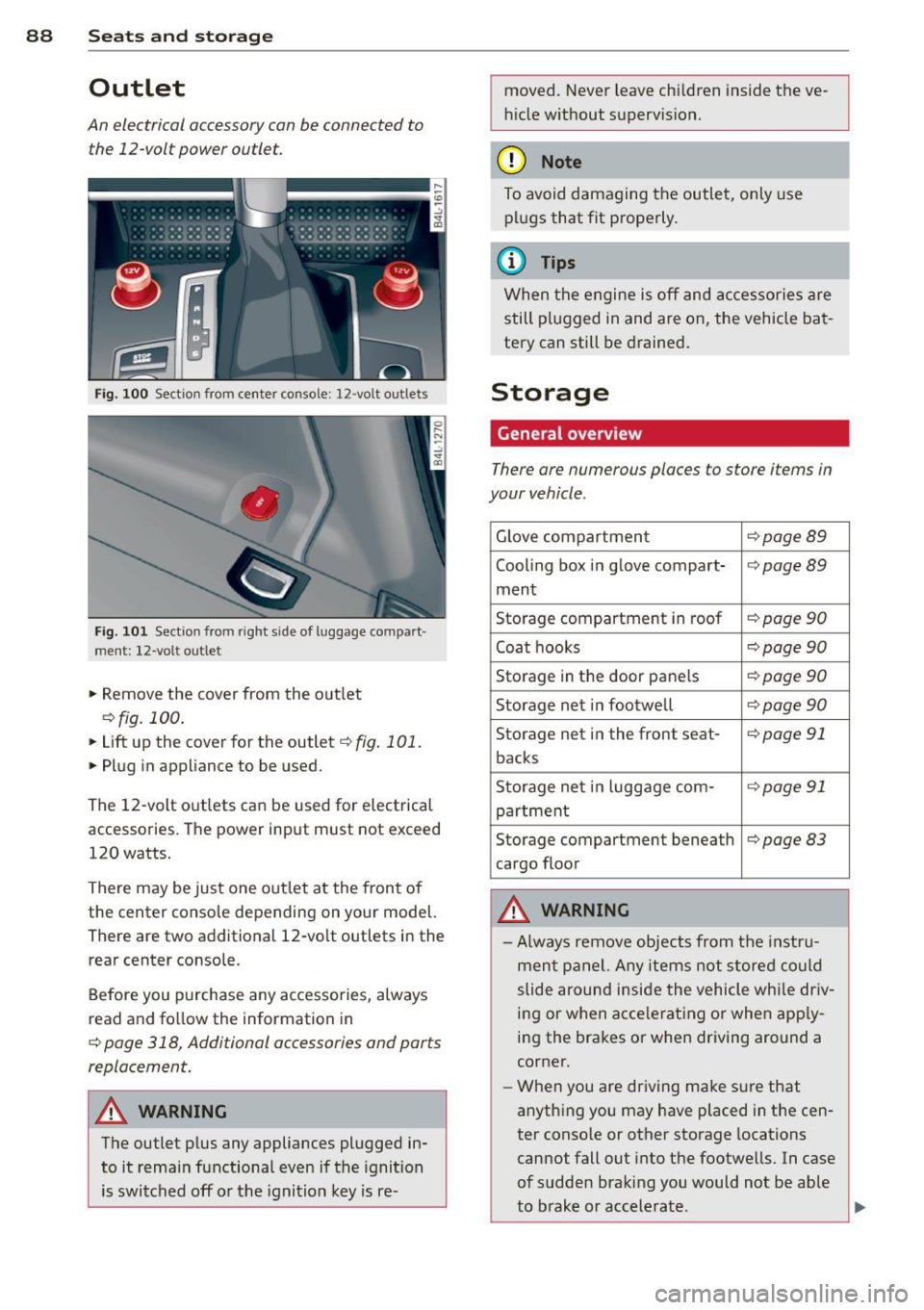
An electrical accessory can be connected to the 12-vol t power outlet.
Fi g. 10 0 Section from center console: 12-volt ou tlets
Fig. 101 Sect ion from righ t sid e of lu ggage compar t
ment: 12-vol t outle t
• Remove the cover from the o utlet
¢ fig. 100.
• Lift up the cover for the outlet ¢ fig . 101.
• Pl ug in appliance to be used.
The 12-volt outlets can be used for electrical
accessories. The power input must not exceed
120 watts.
There may be just one out let at the front of
the center conso le depending on your model.
There are two additional 12-vo lt outlets in the
rear center console.
Before you purchase any accessories, always
read and fo llow the information in
¢ page 318, Additional accessories and parts
replacement.
_&. WARNING
The outlet p lus any appliances plugged in
to it rema in functiona l even if the ignition
is switched off or the ignit ion key is re- moved. Never leave chi
ld ren inside the ve
h icle w ithout supervision.
(D Note
To avoid damaging the outlet, only use
p lu gs that fit properly .
(D Tips
When the engine is off and accessories are
still plugged in and are on, the vehicle ba t
tery can still be d rained .
Storage
General overview
There are numerous places to store items in
your vehicle .
Glove compartmen t ¢page89
Cooling box i n glove compart-¢page89
ment
Sto rage compartment in roof
¢ page 90
Coat hooks ¢page90
Storage in th e door panels ¢ page 90
Storage net in footwell ¢ page 90
Storage net i n the front seat -¢page 91
backs
S to rage net i n luggage com-
¢ page91
pa rtment
Storage compartment beneath
¢page83
cargo floor
A WARNING
-Always remove objects fro m the inst ru
men t pa nel. Any items not stored could
slide around inside the vehicle whi le dr iv
i n g or when acce le rating o r when app ly
i n g the brakes or when driving around a
corner.
- W hen you are driving make sure that
anyth ing you may have placed in the cen
ter conso le or other storage locations
cannot fall out i nto t he footwells. In case
of sudden braki ng you would not be able
-
to b rake or accelerate. liJ,,
Page 98 of 340
96 Warm and cold
The temperature should be set to 72 ° F
(22 °C) o r higher . Temperat ure is contro lled
automatically. The maximum amount of a ir
flows mainly from the vents below the wind
shield.
To defog the rear side windows, the air vents in the doo r pillars sho uld be open and di rect
ed at the windows .
Manual air recirculation ~
Air recirculation prevents exhaust fumes or
other pollution from entering the vehicle.
Turning on air recirculation
> P ress the l= I button ¢ A
Turning off air recirculation
> Press the~ button agai n, or
> press the IAU TO I button, or
> press th e ~ button.
In the a ir recirculation mode, the air in the
passenger compa rtme nt is recirculated and
fil tered to prevent exhaust fumes and other
pollu tion from en teri ng the veh icle . We rec
ommend that you use the manu al air recircu
l ation under the following conditions :
- when d riving through tunne ls
- in a traffic jam .
A WARNING
Do not use the air reci rc u lat io n mode for
e xte nded per io d s of t i me . T he windows
co uld fo g up since no fres h air ca n e nter
t he vehicle.
If the windows fog up, press
t he air recircu lation button aga in imme di-
-
ately to switch off the air recirculation
f u nction or select defrost.
Rear window defogger~
The rear window defogger clears the rear win
dow of condensation .
> Press the OW button to tur n t he rear window
defogger on and off.
T he rea r window defogger wo rks on ly when
t h e engine is runn ing. The light in t he sw itch
will illumina te when the defogger is on.
T he rea r window defogg er w ill sw itch off au
tomat ica lly afte r a short time. The t ime the
r ear w indow de fogger rema ins o n w ill va ry de
pending on the o utside tempera ture.
At very low outs id e temperatures, the rear
window defogger ca n be sw itched on co nti nu
o usly by pushing the
OW button for more t han
2 seconds . This rema ins stored un til the ign i
t ion is switc hed off.
A rear w indow defogge r th at was switched on
also remains s tore d for 15 m inu tes after the
ignition is sw itche d off . If the engine is re
started withi n these 15 m in utes, the rear win
dow defogger is a lso activated, depending on
o utside temperat ure . With a vehicle that is
parked for a short time, the rear window de
fogger does no t need to be manually activat
ed again .
@ For the sake of the environment
Turn the defogger off when the rear win
dow is clear. When you save electric ity, you
save fue l.
Page 100 of 340
98 Warm and cold
@ Tips
If the climate co ntrol syste m is operati ng
in cooling mode, a ir flows primari ly from
the outlets in the center conso le and in the
door pillars. To achieve adequate cooling,
you should never close the outlets com
pletely .
Using climate control economically
Using the climate controls prudently can help
save fuel.
When you use the air cond it ioner , engine pow
er is reduced and fuel consumption increases.
To save fuel, you should use the air condition
e r on ly w hen necessary . Also please note the
following points :
.,. To save fuel, tu rn off coo ling mode by press
ing the
I A/Cl button (indicator lig ht goes
out) .
.,. In add it ion, if you open the w indow o r the
Pano ram ic s liding sunroof* wh ile driving,
t ur n off cooli ng mode by p ress ing the
IA/C l
button (ind icator light goes ou t).
.,. If the vehicle is extremely hot due to the
heat of the s un, briefly open doors and win
dows.
@ For the sake of the environment
By reducing the amount of fue l yo u use,
you also reduce the amount of poll utants
emitted into the air.
Rear Air Conditioning
Rear air conditioning - controls
Applies to veh icles: w ith four -zo ne automatic comfort ai r
condit io ning
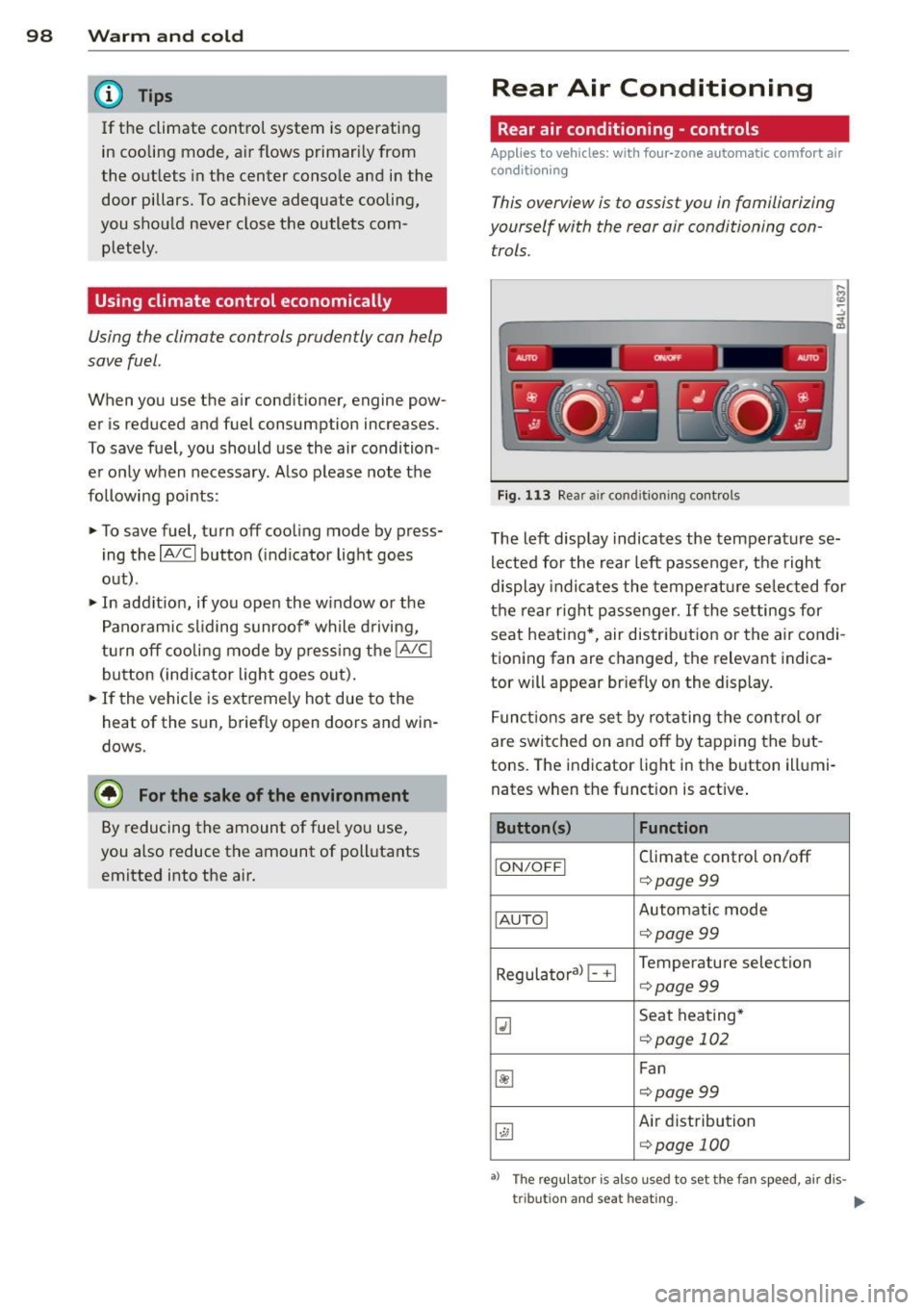
This overview is to assist you in familiarizing
yourself with the rear air conditioning con
trols.
....
"' (0 :;
-------------~ -----~
Fig. 11 3 Rea r air conditioning controls
The left display indicates the temperature se
lected for the rear left passenger, the right
display indicates the tempe ratu re se lected for
the rear r ight passenger . If the settings for
seat heating *, air dis trib ution or the air condi
tioning fan are changed, the relevant indica
tor will appear br iefly on the display .
F unc tions are se t by rota ting the control or
are switched on and off by t apping the b ut
tons. The indicator lig ht in the b utton illumi
nates when the funct ion is active .
Button(s) Function
ION/O FFI Climate control on/off
¢ page99
IAU TOI Automatic mode
¢page99
Regula to ral B Temperature selection
¢page99
~
Seat hea ting*
<=:> page 102
~
Fan
c::> page 99
~
Air distribution
¢page 100
•> The regu lator is also used to set the fan speed , air dis-
tr ibut ion and seat heating.
It,.
Page 103 of 340
Synchronization
Applies to vehicles: with four-zone automatic comfort air
conditioning
One climate control setting for all seats .
With synchroni zation active, the driver's set
tings are adopted for the front passenger and
the rear left and right seats. All the other set
tings that were made are transfer red to the
other seats. This includes a ll the climate con
t rol settings, except for the seat heat ing/ven
tilation* .
If a different setting is se lected at a
"synchroni zed seat", synchron iz at ion is can
celled .
Supplementary heater
Applies to vehicles: with diesel engine
" Select: I CARI funct ion button > AC control
button >
Suppl. heater. Or
" Se lect :
I C ARI funct ion button > Car system s*
control b utton > AC > S uppl. h eater .
The supplementary heater warms the inter ior
of vehicles with dies el engines* mo re quick ly .
The supplementa ry heater is controlled auto
mat ica lly in the
Aut o setting .
Rear operation
Applies to vehicles: with four-zone automatic comfort air
conditioning
The air conditioning in the rear of the vehicle
con be controlled from the cockpit.
" Se lect : ICAR I funct ion button> AC control
button >
Rea r ope ration . Or
" Select:
I CARI funct ion button > C ar sy st e m s*
control button > AC > Rear cabin setting s.
The driver or front passenger can control the
air cond ition ing in the rear of the vehicle us
i ng
his/her own controls .
Warm and c old 101
Heated Seats
Heated front seats Q]
Applies to vehicles: with electrically heated front seats
The seat cushion and the seotbock of the
front seats con be heated electrically.
" Press the Ill button.
" Rotate the regulator to the des ired setting.
In position O the heat ing for the seats is
turned off. The range of adjustment is be
tween 1 and 6.
A WARNING
Indiv iduals with reduced sens itiv ity to pain
or temperature cou ld deve lop burns when
using the seat heat ing funct ion. To reduce
the r isk of injury, these ind ividuals shou ld
not use seat heating.
(D Note
To avoid damage to the heat ing e lements
i n the seats, do not kneel on the seats or
place heavy loads on a small area of the
seat.
Front seat ventilation [i]
Applies to vehicles: with front seat ventilation
The seat cushion and the seotbock on the
front seats con be ventilated.
" Press the~ button .
" Rotate the regulato r to the des ired setting.
When the regulator is in the O position, the
seat ventilation is sw itched off . The ra nge of
adjustment is between 1 and 6 .