sensor AUDI Q7 2014 Owner´s Manual
[x] Cancel search | Manufacturer: AUDI, Model Year: 2014, Model line: Q7, Model: AUDI Q7 2014Pages: 340, PDF Size: 85.02 MB
Page 131 of 340
Audi side assist Lane Change Assistant
Description
App lies to vehicles: with side assist
The side assist helps you when changing
lanes .
AUDl Q7
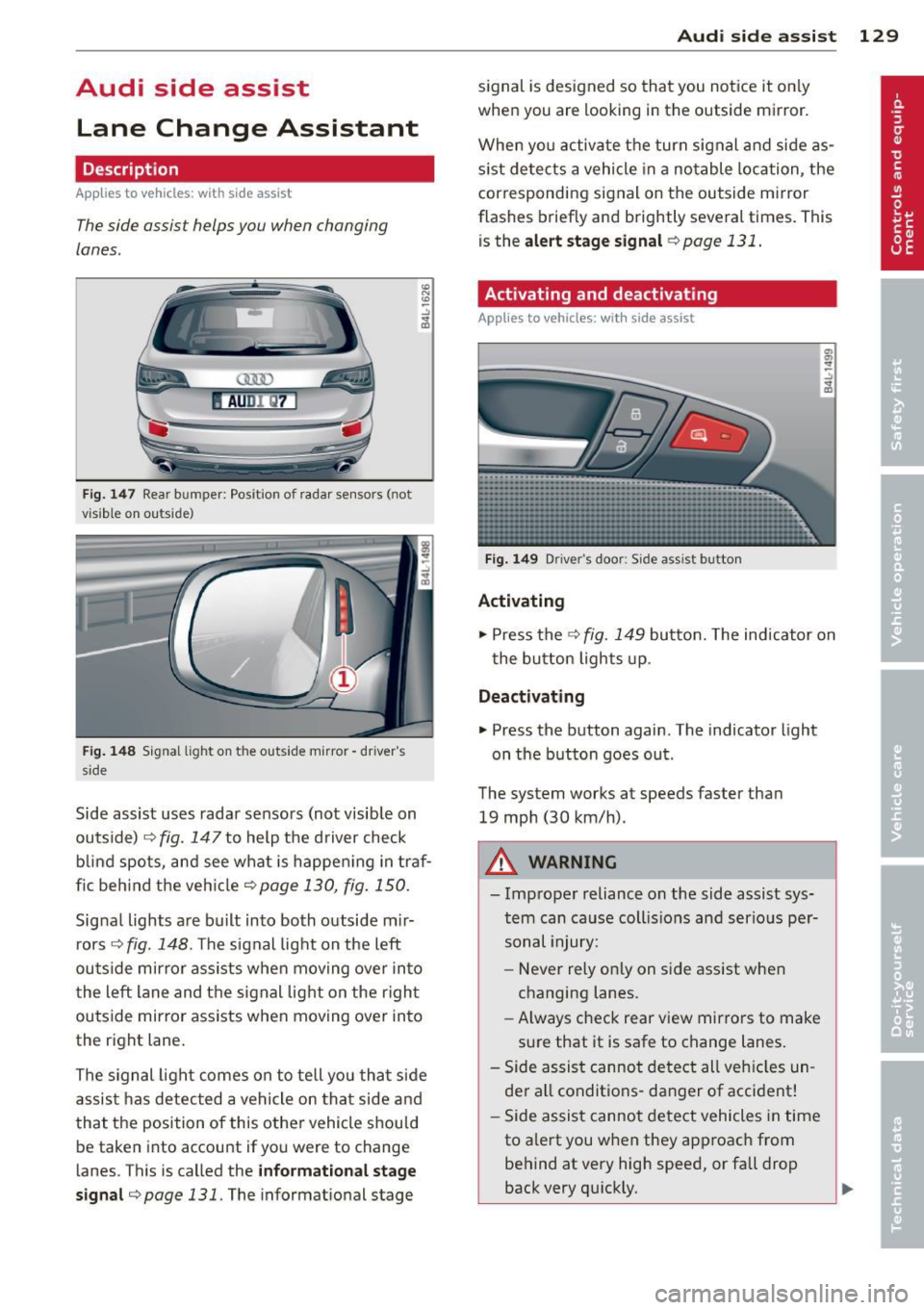
Fig. 147 Rear b umper: Pos it ion of radar sensors (not
v isib le on outside)
Fig . 148 Signal light on the outside mirror -driver 's
s ide
~ -..:, .. (D
Side assist uses radar sensors (not visib le on
outside) ¢
fig. 147 to help the driver check
b lind spots, and see what is happen ing in traf
fic beh ind the veh icle
¢ page 130, fig. 150.
Signal lights are bu ilt into both outside m ir
r ors ¢
fig. 148. The signal light on the left
outside mirror assists when moving over into
the left lane and the signal light on the r igh t
ou tside mirror assists when moving over in to
the right lane .
The s ignal light comes on to tell you that side
assis t has detec ted a vehicle on tha t side and
that t he position of this othe r vehicle should
be taken into account if yo u were to change
lanes . This is called the
informatio nal st age
sign al¢
page 131. The informat ional stage
Aud i side assist 129
signal is designed so that you notice it on ly
when you are looking in the outside mirror.
When yo u activate the turn signal and side as
s ist de tects a vehicle in a no table location, the
corresponding signal on the outside mi rror
flashes briefly and brightly several times. This
is the
a lert stage signal ¢ page 131 .
Activating and deactivating
Applies to vehicles: wit h side assist
Fi g. 14 9 Drive r's doo r: Side assist button
Activating
.,. Press the ¢ fig. 149 button. The indicator on
t he button lights up .
Deactivating
.,. Press the button again. The indicator light
on the button goes out .
The system works at speeds faster than
19 mph (30 km/h) .
A WARNING
-Imp roper reliance on the side assist sys
tem can cause coll is ions and serio us pe r
sonal injury:
- Never rely on ly on side assist when
changing lanes.
- Always check rear view mirrors to make
su re that it is safe to change lanes.
- Side assist canno t detect all veh icles un
de r all conditions- danger of accident!
- Side assist cannot detect vehicles in time
to a lert you w hen they app roac h from
behind at very hig h speed, or fall drop
back very qu ickly.
~
Page 132 of 340

130 Audi side assist
-The radar sensor's vision can be reduced
or entirely blocked by rain, snow, and
heavy spray . This can result in side assist
not adequately detecting vehicles or, in
some cases, not detecting them at all.
Always keep an eye on the direction you
are traveling and the relevant area
around the vehicle.
- Please note that side assist indicates
there are approaching vehicles, or
vehicles in your blind spot, only after
your vehicle has reached a driving speed
of at least 19 mph (30 km/h).
- Side assist signal does not work around
tight corners (turning radius less than
328 feet, or 100 m).
- Side assist is no replacement for the driv
er's full attention. The driver alone is re
sponsible for lane changes and similar
driving maneuvers. Always keep an eye
on the direction you are traveling and the relevant area around the vehicle.
- To ensure that you do not adversely af
fect side assist, do not block the area on
the rear bumper where the radar sensors
are located with foreign objects (such as
stickers or bicycle racks).
- Make sure that the signal light on the
outside mirror is not blocked by stickers
or other items.
(Di Tips
- Side assist automatically deactivates if it
detects that the radar sensors are
blocked ¢
page 135. The indicator light
on the button goes out .
- The area on the bumper where the radar
sensors are located must consistently re
main free of snow, ice, and heavy soiling
so that side assist can function properly.
Follow the additional notes on
¢page 136.
-For vehicles with a factory installed tow
ing hitch* or a trailer hitch* that was in
stalled later according to factory specifi
cations, side assist is automatically deac- tivated
as soon as the electrical connec
tion to the trailer electrical socket is made
¢ page 135.
-For vehicles with a trailer hitch that was
not installed according to factory specifi
cations, switch off the side assist when
towing a trailer .
- Additional tinting on the front side win
dows can make it harder to see and cor
rectly understand the signal light on the
outside mirror.
- For Declaration of Compliance to United
States FCC and Industry Canada regula
tions¢
page 319.
Sensor detection area
Applies to vehicles: with side assist
-----··· .... ·--·--
@ / ,
--
ill b''T -
Fig. 150 Sc hematic illustration: Sensor detectio n area
The detection ¢ fig. 150 of the radar sensor
detection area is made up of:
-
- the approach area (light red area) (D, about
230 feet (70 m) behind the vehicle, and
- the "blind spot" (dark red area) @.
The radar sensors cover the adjacent left and
right lanes. Other lanes are
not covered by the
radar sensors.
(D Tips
Side assist does not measure actual lane
width. The system assumes a fixed lane
width . Detection in the left and right lanes
is based on this assumed lane width.
When driving on narrow roads or when
driving to the left or right of the center of
a travel lane, it is possible that vehicles
will be detected that are
not in the lane
Page 133 of 340
next to the lane you are using
¢page 135.
Operation
Applies to vehicles: with side assist
Side assist compares the distance and differ
ence in speed of detected vehicles with the
speed of your vehicle . Whenever the differ
ence in speed and d istance is registered as no
table if you were to change lanes, a signal l ight appea rs on the respective mirror.
The signal can light up if you are passed by a
vehicle or if you are pass ing another vehicle.
If you pass another vehicle s lowly (difference
in speed less than 9 mph, or 15 km/h), the
signal light will come on as soon as the other
vehicle is in your blind spot and is detected by
side assist . When the difference in speed is
g reater, the signal light will not come on.
Informational and alert stage signals
Applies to vehicles: with side assist
Side assist has two signal stages:
- the informational stage signal, and
- the alert stage signal.
Side assist he lps you by using the appropriate
signal stage, depending on whether or not
you have activated the turn signal, and thus have indicated that you are or are not chang
in g lanes .
Informational stage signal
As long as you have not activated the turn sig
nal, side assist informs you of detected
vehicles that are registered as being in a nota
b le location if you were to change lanes.
Whenever the detected vehicle's difference in speed and distance is registered by side assist
as notable, the signal light on the respective
mirror produces muted illuminat ion.
The br ightness of the informat ional stage sig
nal is designed not to be as intense, so that it
does not interfere with your view of the road
when yo u are driving and have no intention of
changing lanes. When you look i n the outside
Aud i side assist 131
mirror, you can clearly see the informational
stage signal.
Alert stage signal
When you activate the turn signal, and s ide
ass ist has detected a vehicle in a notable loca
t ion on that part icular s ide, the signa l light on
this side mirror flashes brightly. The repeated
brief and bright flashing of the alert stage
signal reminds you to carefully check traffic to
the rear in the outside mirror and over your
shoulder, so that you can safely complete the lane change
¢ A in Safety tips on page 136 .
@ Tips
The brightness of the signal light on the
outside mirrors can be adjusted with the
MMI ¢page 134.
Driving situation: Fast approaching
vehicles
Applies to vehicles: with side assist
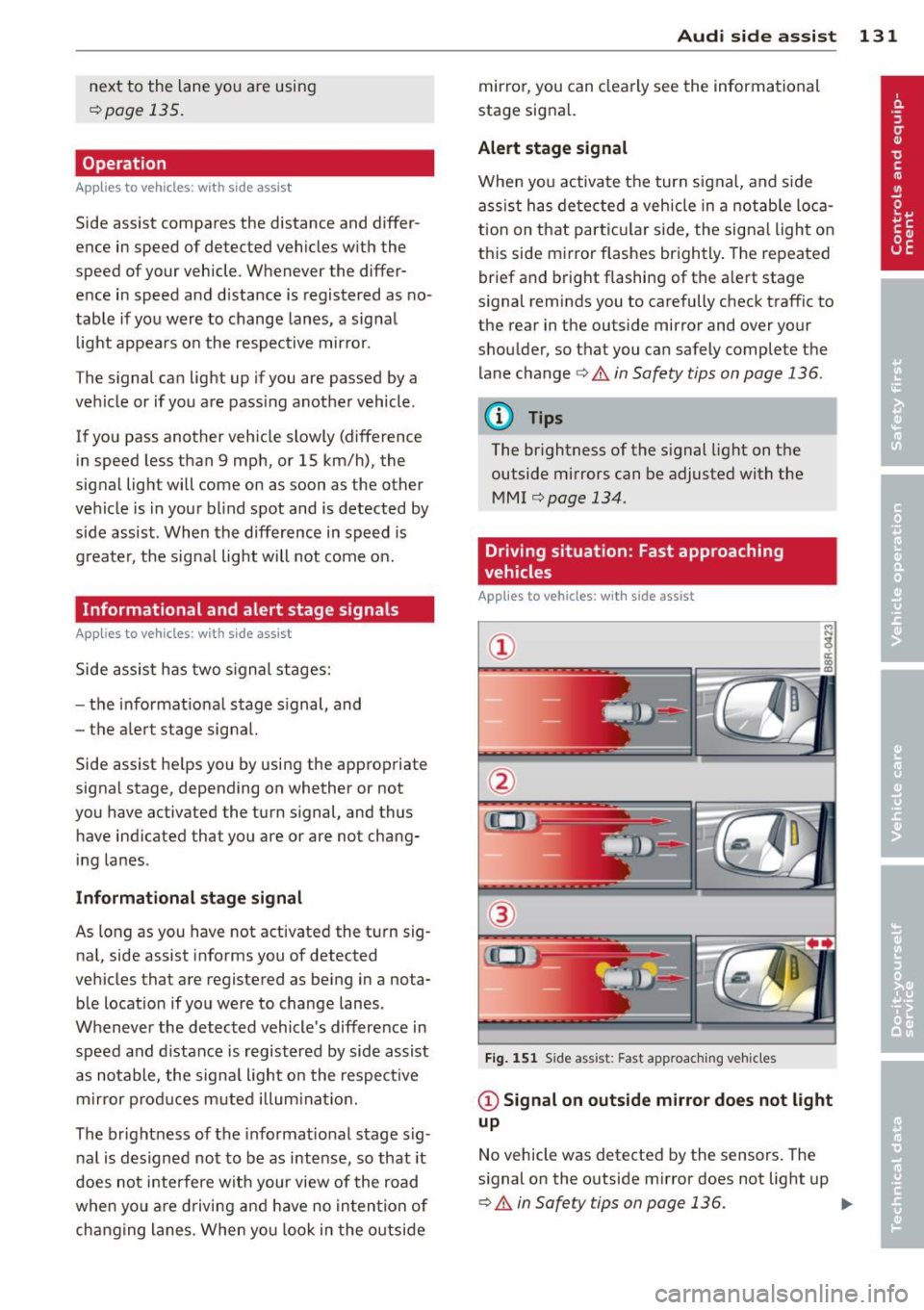
Fig. 151 Side assist : Fast app roaching vehicles
@ Signal on outside mirror does not light
up
No vehicle was detected by the sensors. The
signal on the outside mirror does not light up
¢ A in Safety tips on page 136. IJJ,,
Page 137 of 340

Lane width
Applies to vehicles: with side assist
-· Fig. 155 Lan es o f a norma l wid th a re in detect ion area
Fig . 156 Narrow lanes: Side ass ist may detect vehicles
two la nes away
Side assist's detection area is designed to cov
e r l anes of standard w idth to the left and
r ight of your travel lane, depending on wheth
er you dr ive in the center of your lane or closer
to the edge.
I f you drive in narrow lanes, s ide ass ist's de
tec tion a rea may a lso incl ude other lanes -es
pec ia lly if you tend to drive on the edge of
your lane
c:::> fig. 156 . Under these cond it ions,
ve hicles can also be detected that are two
lanes away, and side assist then could switch
between the informat ional and warn ing stage
signals.
When driving in very wide lanes, vehicles in
the adjacent lane may not be detected be
cause they are not inside the detection area.
Notes
Messages in instrument cluster display
Applies to vehicles: with side assist
If s ide ass ist t urns off automa tically, the ind i
cator l igh t on the button wi ll go ou t and you
Aud i side assist 135
will see a message in the instrument cluster
display:
Audi side assist not available: sensors
bloc ked
The side assist sensors are built into the rear
bumper on the left and r ight (not visible on
the outside)
c:::> page 129, fig . 147. To ensure
that you do not adversely affect the way side
ass ist functions, foreign objects (such as stick
ers or bicycle racks) should not be attached to
the area on the rear bumper where the sen
sors a re located . If side ass ist functions are
adverse ly affec ted, you w ill see th is message
in the instrument cluster disp lay . Remove any
th ing t hat may be blocking the sensors.
If no vehicle is detected for a longer per iod of
t ime wh ile dr iv ing, s ide ass ist w ill also switch
off automatically.
Audi s ide as sist cu rrentl y not available
If there is a temporary problem (such as the
vehicle 's battery charge be ing low), side assist
cannot be act ivated temporar ily .
Audi side assis t: sy stem fault
Have the system checked by an author ized
Audi dealer or qualified workshop.
Audi side assist not availabl e when
towing
The radar sensor's view is limited when tow
ing a tra iler. For vehicles with a factory instal
led tow ing hitch or a trailer hitch that was in
stalled later according to facto ry specifica
tions, s ide ass ist is automatically deact ivated
as soon as the ele ctrical connection to the
trailer's e lectrical socke t is made, and this sta
tus message appears in the instrument clus
ter display. Deactivation cannot be guaran
teed when using a retrofitted towing hitch
that was
not installed according to factory
specifications.
Page 138 of 340

136 Audi side a ssis t
Safety tips
App lies to vehicles: wit h side ass ist
The s ide ass ist detect ion may be lim ited when
d riving around narrow street corners , on hilly
streets, and under poor weathe r cond itions.
It is poss ible that the radar sensors may also
detect other objects , such as high or stag
gered guardra ils .
Side assist does not measure actual lane
width . The system assumes a fixed lane w idth .
Detection in the left and r ight lanes is based
on this assumed lane width . When driving on
na rrow roads or when driving to the left or
right of the center of a travel lane , it is possi
b le that vehicles will be detected that are
not
in the lane next to the lane you are using.
A WARNING
- Improper reliance on the s ide assist sys
tem can cause collisions and serious per
sonal injury :
- Never rely only on side assist when
changing lanes .
- Always check rear view mirrors to make
sure that it is safe to change lanes.
- Side ass ist cannot detect a ll vehicles un
der all cond itions- danger of accident!
- Side ass ist cannot detect vehicles in time
to alert you when they approach from beh ind at very h igh speeds or drop back
very quick ly .
- T he radar sensor's
vision can be reduced
or entirely blocked by rain, snow, and
heavy spray. This can result in side assist
not adequately detecting vehicles or, in
some cases, not detecting them at a ll.
Always keep an eye on the direction you are traveling and the relevant area
around the vehicle .
- Please note that side assist indicates
there are approaching vehicles, or
vehicles in your blind spot, only after
your vehicle has reached a driving speed
of at least 19 mph (30 km/h). -
Side assist signa l does not work around
tight corners (turning radius less than
328 feet, or 100 m).
- Side assist is no replacement for the driv
er 's full attention. The driver alone is re
sponsible for lane changes and sim ilar
driving maneuvers. Always keep an eye
on the d irect ion you are traveling and the
re levant area around the vehicle.
(D Note
To ensure that side assist is not adversely
affected, you should not block the area on
the rear bumper where the radar sensors
are located with foreign objects (such as
with stickers or bi cycle racks).
(D Tips
If the pos itions of the radar sensors have
been changed as a result of a rear end-co l
lision, for instance, have s ide assist
checked by an autho rized Aud i dealer for
safety reasons.
Page 145 of 340
Parking systems
General information
App lies to vehicles: with rea r park assis t/Audi park ing sys
tem plus w ith rearview camera/front -and rearview cam
era
Depending on your vehicle's equipment, vari
ous parking aids will help you when parking
and maneuvering.
The
rear park assist is an acoustic park assist
system that will give you a sound warning to let you know there is something
behind the
veh icle ¢page
144 .
The Audi parking system plus with rearview
camera
audibly and visually tells you there is
something
in front of and behind the vehicle .
A rearview camera also shows you what is be
hind the vehicle ¢ page
144 .
The Audi parking system plus with front- and
rearview camera
audibly and visually tells you
there is something
in front of and behind the
veh icle. A front and rearview camera also
shows you what is in front of and behind the
veh icle¢ page
148 .
& WARNING
-Always look for traffic and check the area
around your vehicle by looking at it di
rect ly as well. The parking system cannot
replace the driver's attention. The driver
is a lways responsible for safety during
park ing and for all other maneuvers.
- Please note that some surfaces, such as clothing, are not detected by the system.
- Sensors and cameras have blind spots in
wh ich people and objects cannot be de
tected. Be especially cautious of children
and animals.
- The sensors can be displaced by impacts
or damage to the radiator grille, bumper,
wheel housing and the underbody . The
park ing systems may become impaired
as a resu lt. Have your authorized Audi
dealer or qualified workshop check their
function.
- Make sure the sensors are not covered by
stickers, deposits or any other obstruc-
Parking systems 143
tions as it may impair the sensor func
tion. For informat ion on cleaning, refer
to
¢ page 244.
([) Note
-Some objects are not detected by the
system under certain circumstances:
- Objects such as barrier chains, trailer
draw bars, vertical poles or fences
- Objects above the sensors such as wall
extensions
- Objects w ith specific surfaces or struc
tures such as chain link fences or pow
der snow.
- If you continue driving closer to a low-ly
ing object, it may disappear from the
sensor range. Note that you w ill no lon
ger be warned about this obstacle.
@ Tips
-The system may provide a warning even
though there are no obstacles in the cov
erage area in some situations, such as:
- certain road surfaces or for long grass.
- externa l ultrasonic sources e .g . from
cleaning vehicles.
- heavy rain, snow or thick vehicle ex
haust.
- We recommend tha t you practice park
ing in a traff ic-free location or parking
lot to become familiar with the system.
When doing this, there should be good
light and weather cond itions.
- You can change the vo lume and pitch of
the s ignals as well as the disp lay
¢page
153.
- Please refer to the instructions for tow
ing a trailer ¢page
153.
-What appears in the MMI display is
somewhat time-delayed.
Page 146 of 340
144 Parking systems
Rear park assist
Description
Applies to vehicles: with rear park assist
The rear park assist is an audible system.
Sensors are located in the rear bumpers. If
these detect an obstacle, audible signals warn
you .
Make sure the sensors are not covered by
stickers, deposits or any other obstructions as
it may impair the sensor function. For infor
mation on cleaning, refer to ¢ page 244.
The range at which the sensors begin to meas
ure is approximately :
s ide 2 ft (0.60 m)
rear
center 5.2 ft (1.60 m)
The closer you get to the obstacle, the sho rter
the interval between the audible signa ls. A
continuous tone sounds when the obstacle is
less than approximate ly 1 ft (0.30 m) away .
Do not continue driving farther¢
..1. in Gener
al information on page 143,
¢ (I) in General
information on page 143!
If the d istance to an obstacle remains con
stant, the volume of the distance warning
gradually drops after about four seconds (this
does not apply in the continuous tone range).
The park assist is activated automatically
when reverse gear is engaged. A short confir
mat ion tone sounds.
Audi parking system
plus with rearview
camera
Introduction
Applies to vehicles: wit h Audi parking syste m plus with
rearv iew camera
-
u
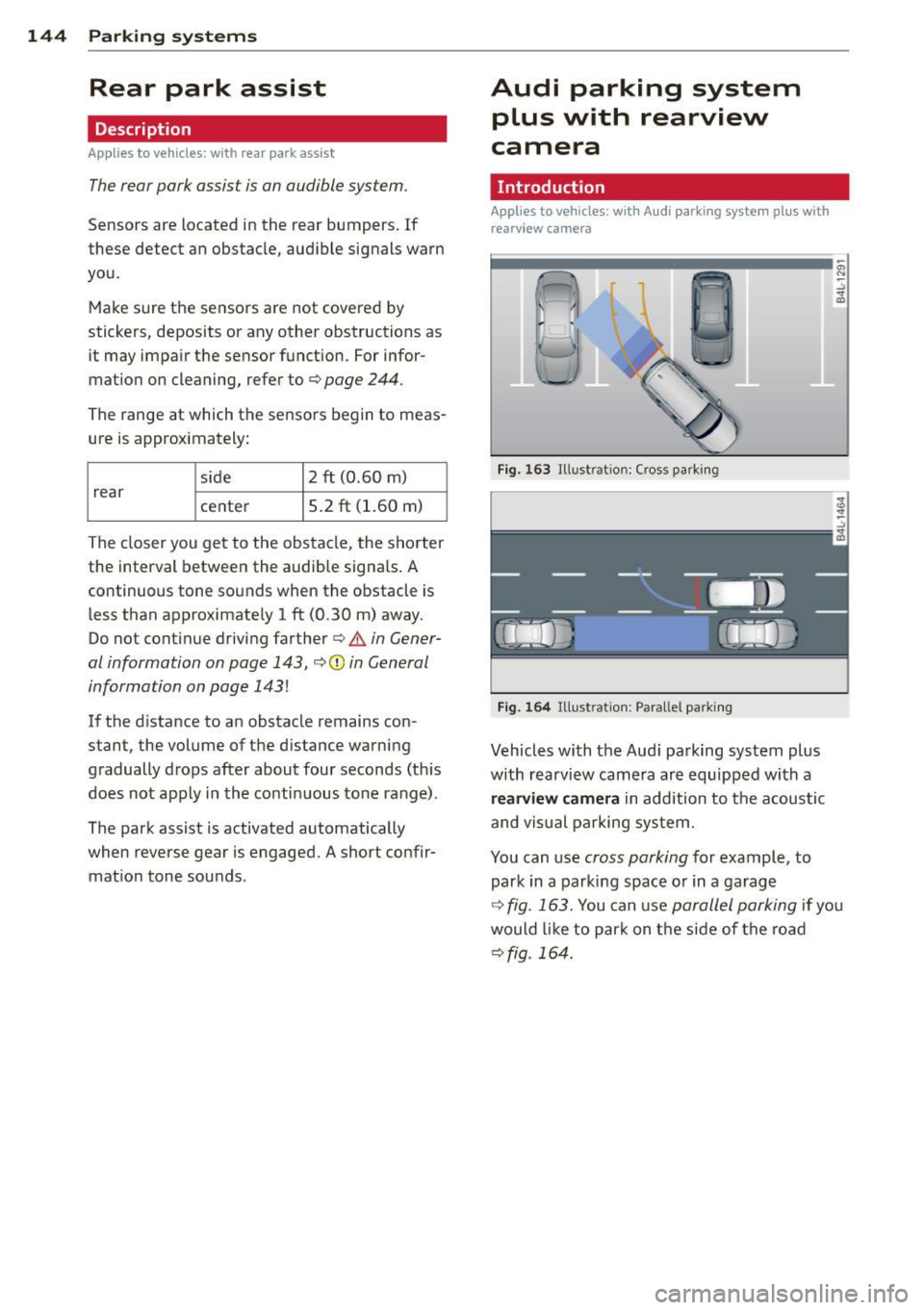
Fig. 163 Illustrat ion: Cross parking
F ig. 164 Illustrat ion: Parallel parki ng
Vehicles with the Aud i pa rking system plus
with rearview camera are equipped with a
r e arvi ew camera in addition to the acoustic
and visual pa rking system .
You can use cross parking for example, to
park in a parking space or in a garage
a,
"' :; .. ID
¢ fig . 163. You can use parallel parking if you
would like to park on the side of the road
¢fig. 164.
Page 147 of 340
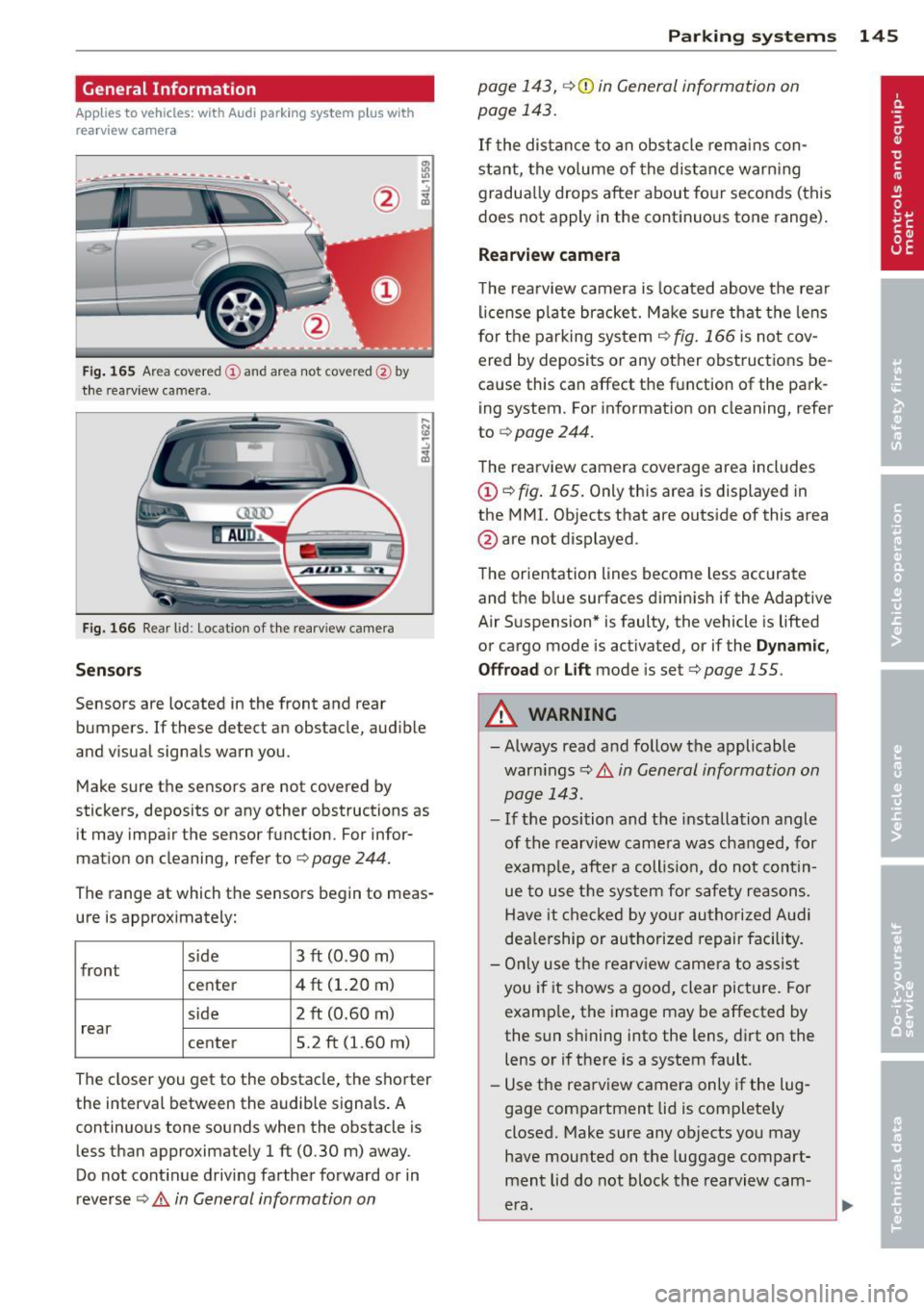
General Information
Applies to vehicles: with Audi parking system plus w ith
rea rview camera
@
Fig . 165 Area covered (D and area not covered @by
t h e rearv iew camera.
Fig. 166 Rear lid: Location of the rea rv iew came ra
Sen sor s
Sensors are located in the front and rear
bumpers. If these detect an obstacle, aud ible
and visual signals warn you.
Make sure the sensors are not covered by
stickers, deposits or any other obstructions as it may impair the sensor function. For infor
mation on cleaning, refer to ¢
page 244.
The range at which the sensors begin to meas
ure is approximately:
side
front 3 ft (0
.90 m)
center 4 ft (1.20 m)
side 2 ft (0.60 m)
rear center 5.2 ft (1.60 m)
The closer you get to the obstacle, the shorter
the interval between the audib le signa ls . A
continuous tone sounds when the obstacle is less than approximately 1 ft (0.30 m) away .
Do not cont inue driving farther forward or in
reverse
¢ .& in General information on
Parking sys tems 145
page 143, ¢(i) in General information on
page 143.
If t he distance to an obstacle rem ains con
stant, the vo lume of the distance warn ing
gradua lly drops after about fo ur seconds (this
does not apply in the continuo us tone range).
Rearview camera
T he rearview camera is located above t he rear
l ice nse p late bracket. M ake s ure that the lens
for the parking system¢
fig. 166 is not cov
ered by deposits or any other obstructions be
cause this can affect the function of the park
ing system. For informat ion on cleaning, refer
to
¢ page 244.
The rearview camera coverage area includes
(D ¢ fig. 165. Only this area is displayed in
the MMI. Objects that are outside of this area
@ are not displayed.
The orientation lines become less accurate
and the b lue surfaces diminis h if the Adaptive
Air S uspension* is faulty, the vehicle is lifted
or cargo mode is act ivated, or if the
Dynamic ,
Offroa d
or Lift mode is set¢ page 155.
.&_ WARNING
- Always read and follow the applicable
warn ings¢ .&
in General information on
page 143.
- If the position and the installation angle
of the rearview came ra was chang ed, for
examp le, afte r a coll is io n, do not cont in
ue to use the system for safety reasons.
Have it checked by your authori ze d Aud i
dea le rship or authorized repair facility.
- On ly use the rearv iew came ra to assist
you if it shows a good, clear picture. Fo r
examp le, the image may be affected by
the sun shining into the lens, dirt on the
lens or if there is a system fault.
- Use the rearv iew camera only if the lug
gage compartment lid is complete ly
closed. Make sure any objects you may
have mounted on the luggage compart
ment lid do not block the rearview cam
era.
-
Page 155 of 340
Adjusting the display and warning tones
Applies to vehicles: with rear park assist/Audi parking sys
tem plus with rearview camera/front- and rearview cam
era
The display* and warning tones can be ad
justed in the MMI.
~ Select: ICARI function button> Systems*
control button > Parking system. Or
~ Select: ICARI function button> Car systems*
control button > Driver assist> Parking aid.
Display*
- Off -when the parking system is switched
off, only audible signals are given.
-On -when the parking system is switched
on, either the visua l display or the picture
from the rearview camera is disp layed.
Warning tones
- Front volume* -front sensor volume
- Front frequency* -front sensor frequency
- Rear volume -rear sensor volume
- Rear frequency -rear sensor frequency
- In-car entertainment fader/Music volume
while parking -when the parking system is
switched on, the volume of the active audio
source is lowered.
The new ly adjusted value is briefly heard from
the signal generator .
(D Tips
- The warning tones can also be adjusted
direct ly by the visual disp lay* or the pic
ture from the camera*. Simply press the
Settings* control button.
- Changed settings are activated when
parking system is switched on again.
- The settings are automatically stored
and assigned to the remote control key
being used. Parking
systems 153
Error messages
Applies to vehicles: with
rear park assist/Audi parking sys
tem plus with rearview camera/front- and rearview cam
era
There is an error in the system if the LED in
the~ button* is blinking and you hear a con
tinuous alarm for a few seconds after switch ing on the park ing system or when the park
ing system is already activated .
If the error is
not corrected before you switch off the igni
tion, when you switch on the parking system
again, the LED in the ~ button* will blink. If
you activate the parking system with the but
ton in this case, the continuous warning tone
will continue to sound.
Parking system plus with front and
rearview camera*
There is another system error if:
- the~·· symbol appears in the display and
the corresponding display area is shown in
blue. The camera is not working in this area.
- all segments around the vehicles are red or
if no segments are displayed.
Drive to your authorized Audi dealer or au
thorized repa ir facility immediately to have
the malfunction corrected .
Trailer hitch
Applies to vehicles: with rear park assist/Audi parking sys
tem plus with rearview camera/front- and rearview cam
era and trailer hitch
For vehicles using the trailer socket, the park
ing system rear sensors do not turn on when
you shift into reverse gear or when you press
the~ button*. This results in the follow ing
restrictions:
Rear park assist*
There is no warning for distances to the rear.
Audi parking system plus with rearview
camera/front and rearview camera*
There is no distance warning for the rear. The
front sensors remain activated. The visual dis play switches to the trailer towing mode. The
rearview camera image will not show the ori-
entat ion lines and the blue surfaces . ..,.
Page 163 of 340

Homelink
Universal remote
control
Description
Applies to vehicles: with Home link
The HomeLink universal remote control can
be programmed with the remote control for
devices that are already present.
With Home Link, you can control devices such
as the garage door, security systems, house
lights , etc. comfortably from the inside of you
vehicle.
Homelink makes it possible for you to rep lace
three different remote controls from devices
in your home with one universal remote. This
feature works for most garage door and exte
rior door motor signals. Programming the in
dividual remote control for your remote con
trol takes place on the left side of the front bumper. There is a control module attached at
this location .
A one-time programming of the sensor must be performed before you are able to use sys
tems with Homelink. If the system does not activate after performing the one-time pro
gramming, check whether the system uses a rolling code
¢ page 163 .
A WARNING
-Never use the Homelink transmitter
with any garage door opener that does
have not the safety stop and reverse fea
ture as required by federa l safety stand
ards. This includes any garage door open
er model manufactured before April 1,
1982.
- A garage door opener which cannot de
tect an object, signaling the door to stop
and reverse does not meet current feder
al safety standards . Using a garage door
opener without these features increases
risk of serious injury or death.
Homelink 161
- For safety reasons never release the
parking brake or start the engine while
anyone is standing in front of the vehicle .
- A garage door or an estate gate may
sometimes be set in motion when the
Homelink remote control is being pro
grammed. If the device is repeatedly ac
tivated, th is can overstrain motor and
damage its electrical components - an
overheated mo to r i s a fire hazard!
- To avoid possib le injuries or property
damage, please always make abso lutely
certa in that no persons or objects are lo
cated in the range of motion of any
equipment being operated.
(0 Tips
- If you would like more information on
Homelink, where to purchase the Home
Link compat ible products, or would like
to purchase the Home Link Home Light
ing Package, please call toll-free :
1-800-355-3515.
- For Declaration of Compliance to United
States FCC and Industry Canada regula
tions
¢page 319.
-For security reasons, we recommend that
you clear the programmed buttons be
fore selling the vehicle.
Operation
App lies to vehicles : with Homeli nk
111111 111111
-
Fig. 191 Headl iner: controls
Req uirement: The buttons must be program
med
<:!)page 162.