sensor AUDI Q7 2014 Owner´s Manual
[x] Cancel search | Manufacturer: AUDI, Model Year: 2014, Model line: Q7, Model: AUDI Q7 2014Pages: 340, PDF Size: 85.02 MB
Page 96 of 340
94 Warm and cold
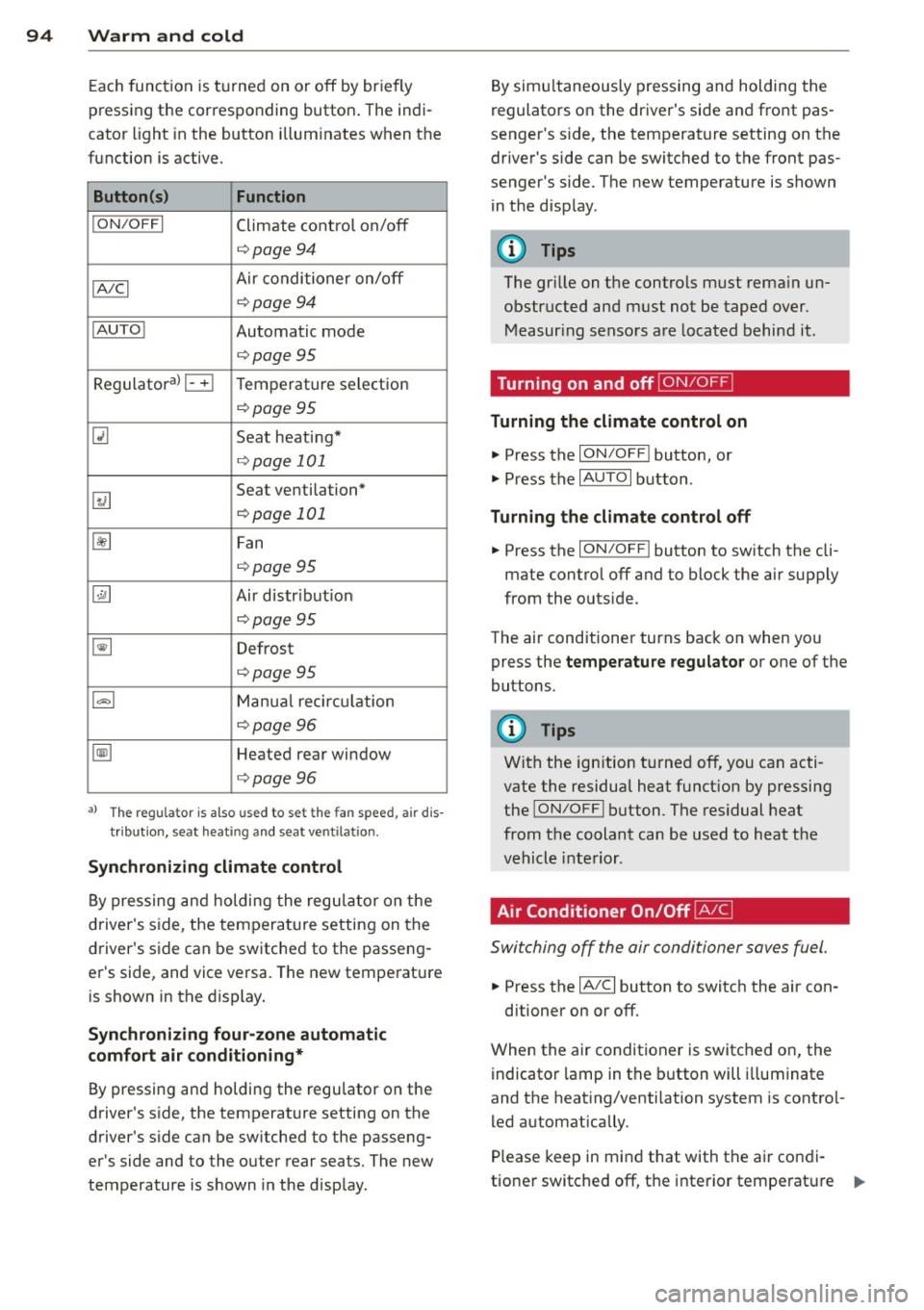
Each function is turned on or off by briefly
pressing the corresponding button . The indi
cator light in the button illum inates when the
function is active.
Button (s ) Function
ION /OFFI Climate control on/off
c> page94
IA/C l Air conditioner on/off
c>page94
IAU TO I Automatic mode
¢page 95
Regulatora) G Temperature selection
c>page95
[tl Seat heating*
¢page 101
~
Seat ventilation*
i=>page 101
~ Fan
¢page 95
Qi] Air distr ibut ion
c> page95
~ Defrost
i=>page 95
~ Manua l recircu lation
c> page96
~ Heated rear window
i=>page 96
al T he regulat or is also used to set t he fa n sp eed, air dis
t ribution, seat heat ing and sea t ve ntila tion .
Synchr oniz ing clim ate control
By pressing and holding the regu lator on the
d river's side , the temperature setting on the
driver's side can be switched to the passeng
er's side, and vice versa. The new temperature is shown in the display.
Synchronizing fou r-zone autom atic
comfort air conditi oning*
By pressing and holding the regu lator on the
driver's side, the temperature setting on the
driver's s ide can be sw itched to the passeng
er's side and to the outer rear seats. The new
temperature is shown in the disp lay . By simu
ltaneously pressing and holding the
regulators on the driver's side and front pas
senger's s ide, the temperature setting on the
driver's side can be switched to the front pas
senger's s ide . The new temperature is shown
in the disp lay .
(D Tips
The gr ille on the controls must rema in un
obstr ucted and must not be taped over.
Measur ing sensors are located behind it .
Turning on and off~
Turning the climate control on
.,. Press the ION/OF F! button, or
.,. Press the
IAUTO I button.
Turning the climate control off
.,. Press the ION/OF Fj button to sw itch the cli
mate contro l off and to block the air supply
from the outs ide.
The air conditioner turns back on when you press the
temperatu re regulator or one of the
buttons.
(D Tips
With the ign ition t urned off, you can acti
vate the residua l heat funct ion by pressing
the
ION/O FF I button . The res idual heat
from the coolant can be used to heat the
vehicle interior .
Air Conditioner On/Off~
Switching off the air conditioner saves fuel .
.,. Press the IAIC I button to switch the air con-
ditioner on or off.
When the air conditioner is switched on, the indicator lamp in the b utton will illum inate
and the heat ing/venti lation system is contro l
led automatically .
P lease keep in mind that with the air condi
tione r switched off, the interior tempe rat ure ..,_
Page 102 of 340
100 Warm and cold
Rear air distribution ~
Applies to vehicles: wit h fou r-zone a utomat ic comfort a ir
co ndit io ning
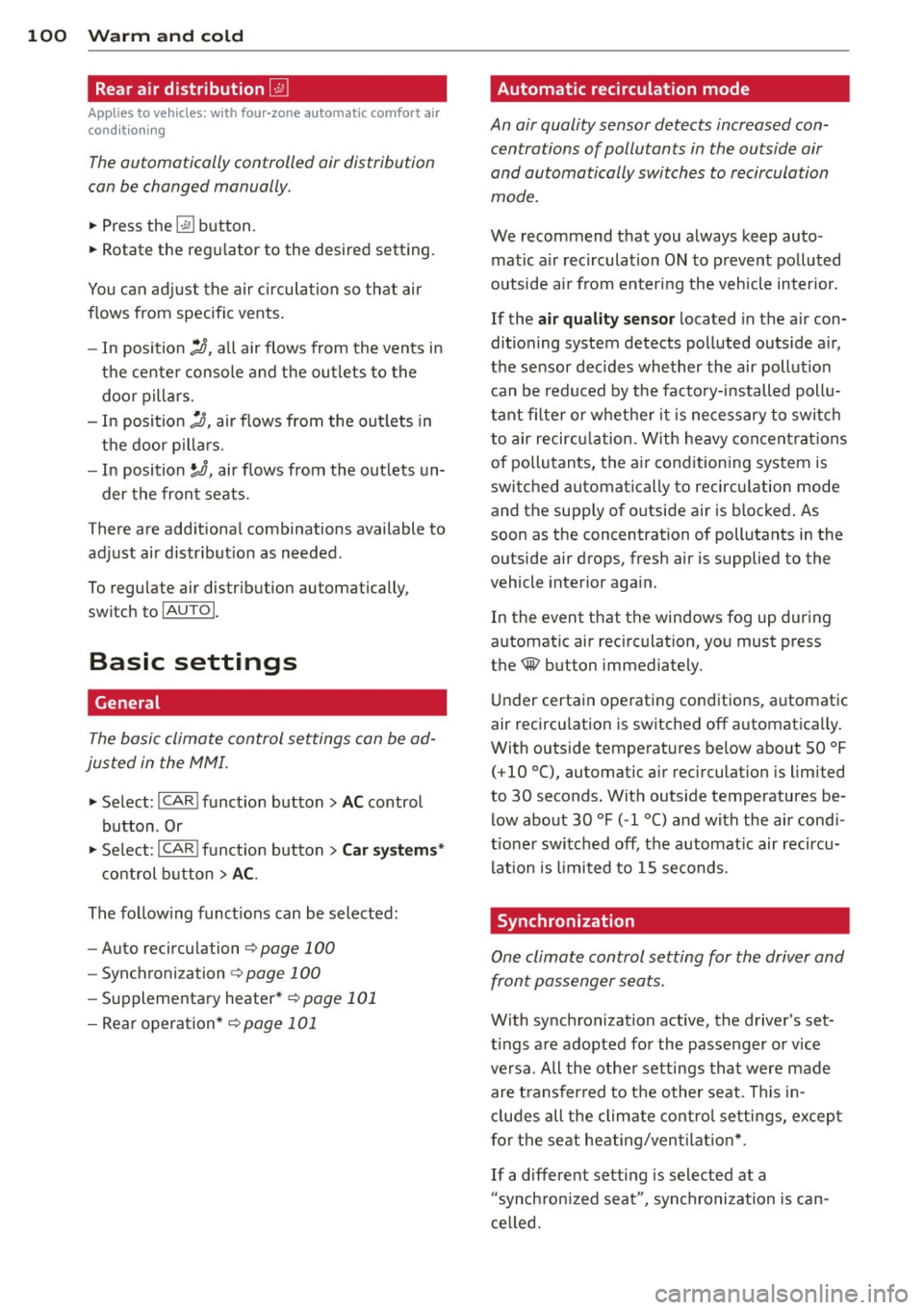
The automatically controlled air distribution
con be changed manually.
., Press the [a button.
., Rotate the regulator to the desired setting.
You can adjust the air circulation so that air
flows from specific vents.
- In position
:J, all air flows from the vents in
the center console and the outlets to the
door pillars.
- In position
:0, air flows from the outlets in
the door pillars.
- In position~, air flows from the outlets un-
der the front seats.
There are additional combinations available to
adjust air distribution as needed.
To regulate air distribution automatically,
switch to IAUTOI.
Basic settings
General
The basic climate control settings con be ad
justed in the MMI.
., Select : I CAR ! function button > AC control
button . Or
., Select : ICAR !function button>
Car systems*
control button > AC.
The following functions can be selected:
- Auto recirculation
r::;, page 100
-Synchronization r::;, page 100
- Supplementary heater* c;,poge 101
- Rear operation* c;,poge 101
Automatic recirculation mode '
An air quality sensor detects increased con
centrations of pollutants in the outside air
and automatically switches to recirculation
mode .
We recommend that you always keep auto
matic air recirculation ON to prevent polluted
outside air from entering the vehicle interior.
If the
air quality sensor located in the air con
ditioning system detects polluted outside air,
the sensor decides whether the air pollution
can be reduced by the factory-installed pollu
tant filter or whether it is necessary to switch
to air recirculation. With heavy concentrations
of pollutants, the air conditioning system is
switched automatically to recirculation mode
and the supply of outside air is blocked. As
soon as the concentration of pollutants in the
outside air drops, fresh air is supplied to the
vehicle interior again.
In the event that the windows fog up during
automatic air recirculation, you must press
the® button immediately .
Under certain operating conditions, automatic
air recirculation is switched off automatically.
With outside temperatures below about SO °F
(+10 °(), automatic air recirculation is limited
to 30 seconds. With outside temperatures be low about 30 °F
( - 1 °() and with the air condi
tioner switched off, the automatic air recircu lation is limited to 15 seconds.
Synchronization
One climate control setting for the driver and
front passenger seats .
With synchronization active, the driver's set
tings are adopted for the passenger or vice
versa. All the other settings that were made
are transferred to the other seat . This in
cludes all the climate control settings, except
for the seat heating/ventilation* .
If a different setting is selected at a
"synchronized seat ", synchronization is can
celled.
Page 116 of 340
114 Adapti ve crui se co ntrol
brake and take evasive action to avoid
collisions and other accident situations.
- Never allow the closing speed between
you and other vehicles to be so high that
the adaptive cruise control may not be
able to slow your vehicle safely. If clos
ing speed is too high, you must apply the
brakes yourself to reduce the risk of a
rear-end crash .
- Never rest your foot on the accelerator peda l, especia lly when the adaptive
cruise control is be ing used. Pressu re on
the accelerator w ill override the ACC
braking function and prevent the brakes
from being applied when ACC detects a situation when the brakes must be ap
plied.
- Never use adaptive cruise contro l when
you cannot drive safe ly at a steady
speed, including on city streets, on wind
ing roads or when road conditions are
poor (for example, on ice, gravel, in fog,
heavy rain or on wet roads that increase
the risk of hydroplaning) .
- The radar sensor 's
vision can be reduced
by rain, snow and heavy road spray .
T hese and sim ilar condit ions can prevent
vehicles up a head from being accurately
detected and in some cases they may not
be detected at al l. Do not use ACC when
the radar sensors cannot accurately de
tect vehicles moving ahead of yo u in traf
fic .
- Always turn off adaptive cruise contro l
when entering turn lanes , exit lanes and
construction zones or in similar situa
t ions because the vehicle will automati
cally accelerate to the stored speed when
the road ahead is clear.
- To prevent unintended operation, always
switch ACC off when it is not be ing used .
(D Tips
-For safety reasons, the stored speed is
deleted when the ignition is turned off .
- The E lectronic Stab ilizat ion Control (ESC)
i s automatically turned on when the
adaptive cruise control is turned on. You cannot switch the ESC into offroad mode
w hile the adaptive cruise contro l is
t u rned on
<=> page 225.
-Damage caused by accidents and some
mino r collisions can affect the radar sen
sor settings and cause the system to
malf unction or switch off completely.
- The radar sensor cover is heated. In win
ter conditions, you should st ill check be
fore dr iv ing to make sure it is free of ice
and snow. If necessary, clean the area
near the radar sensor carefully
<=> fig . 126 .
-To ensure that the radar sensor is not
blocked, foreign objects (e.g . stickers,
larger license plate mounts, add-on
parts) mus t not cove r the area near the
rada r senso r<=>
fig. 126. The are a near
the radar sensor m ust not be pa inted, e i
ther.
- For Declaration of Comp lia nce to United
States FC C and Ind ustry Canada reg ula
tions
<=> page 319.
How does adaptive cruise control work?
Applies to vehicles: wi th adap tive c ruise contro l
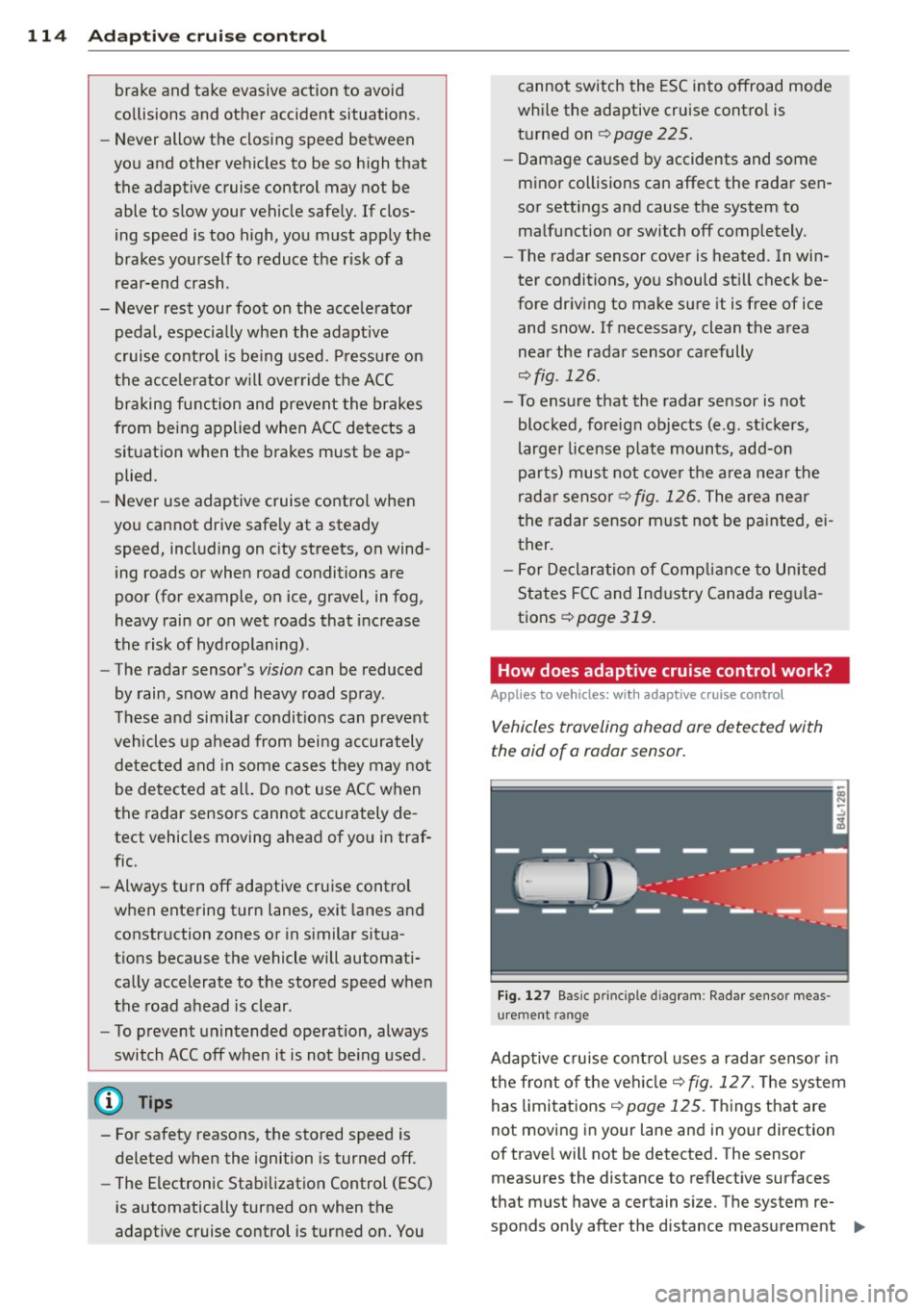
Vehicles traveling ahead are detected with
the aid of a radar sensor.
F ig. 127 Basic p rin ci pl e diag ram: Rada r se nso r me as
urement ra n ge
Adaptive cruise cont ro l uses a radar senso r in
the front o f the vehicle<=>
fig. 12 7. The sys tem
has limitations <=>
page 125 . Things that are
not moving in your lane and in your direction
of t rave l will not be detected. The sensor
measures the distance to reflect ive surfaces
tha t must have a ce rt a in s ize. The system re
spond s on ly after the distance measurement ..,.
Page 117 of 340
has been made. If a measurement is not pos
sib le, the system cannot respond and wi ll not
react to a vehicle or someth ing else up ahead .
Open road
When the road is clear , the adaptive cru ise
control wo rks like cruise control.
It maintains
a constant target speed specified by the driv
er.
Driving in traff ic
If a slower vehicle d riving ahead is detected,
the adaptive cru ise contro l decelerates (wi thin
the limits of the system) ¢
page 124, Driver
intervention prompt
and ¢ page 125, System
limitations
to its speed and after adjusting,
tr ies to maintain the set distance from the ve
h icle ahead. The vehicle may temporarily drive
slower than the set speed while adjusting
¢ .&. in Description on page 113 .
If the vehicle in front accelerates, adaptive
cru ise control also accelerates up to the speed
t ha t you have set.
I f the vehicle ahead slows to a stop , ACC will
slow yo ur vehicle down and to a complete
s top if this is possible w ith in the system's lim
its and capabilities. ACC will not make an
emergency stop . The text message
ACC off:
manual control! appears in the instrument
cluster display. Once the veh icle stops, you
must dep ress the brake pedal to prevent the
veh icle from mov ing forward or "creeping" .
Depressing the brake pedal turns
off ACC.
When the vehicle ahead accelerates yo u can
reactivate ACC
¢ page 118, as soon as your
vehicle has reached a speed of 1 mph (2 km/
h) .
Situat ion s requiring dri ver int ervention
In some situations you wi ll have to use the
footbrake to s low the vehicle down in order to
k eep a safe distance from vehicle in front of
you or to avo id a rear -end coll is ion. In this sit
uation, a symbol appears and a warning tone
sounds ¢
page 124 .
Adapti ve crui se control 115
Passing another vehicle
If you move into the passing lane and no ve hi
cle is detected ahead , the adapt ive cr uise con
trol acce le rates to the speed you have set and
maintains it.
Overr iding ACC
You can in cr ease yo ur speed at a ny time by
stepping on the accelera tor ped al. A fter you
release the accelerator peda l, the system ad
justs back down to the speed you prev ious ly
set .
Reducing stopp ing distance
If the radar sensor detects that the d istance
to the vehicle a head is less than de fined m ini
mum distance, the brakes are automatically
prepared fo r emergency braking by the d river .
The brake pads are moved very close to the brake d iscs without actually braking the vehi
cle. This brake assistant feature reacts more
quick ly to the dr ive r's brak ing, and also works
when adapt ive cruise control is
off . The stop
ping distance is reduced as a result of th is ad
vance brake p reparation . Th is fun ction does
not perform any emergency b rak ing mane u
vers by itse lf; the dr iver mus t always apply the
brakes.
A WARNING
If ACC initiates a braking maneuver, the brake pedal w ill be retracted. Inter ference
with the brake peda l can prevent ACC from
slowing the veh icle down and cause a
crash and serious personal injury.
- Never put anything in the driver's foot
well or let anyth ing fall into it. An object
in the driver's footwe ll can inte rfe re with
the peda ls and prevent the acce le rator
from being used to override ACC or pre
vent ACC from being switched
off when
the brake pedal is depressed and also
prevent the vehicle from being slowed
down or stopped .
- Onl y use floor mats that keep the area
aroun d the peda ls free and that can be
securely fastened to the footwell .
-
Page 123 of 340
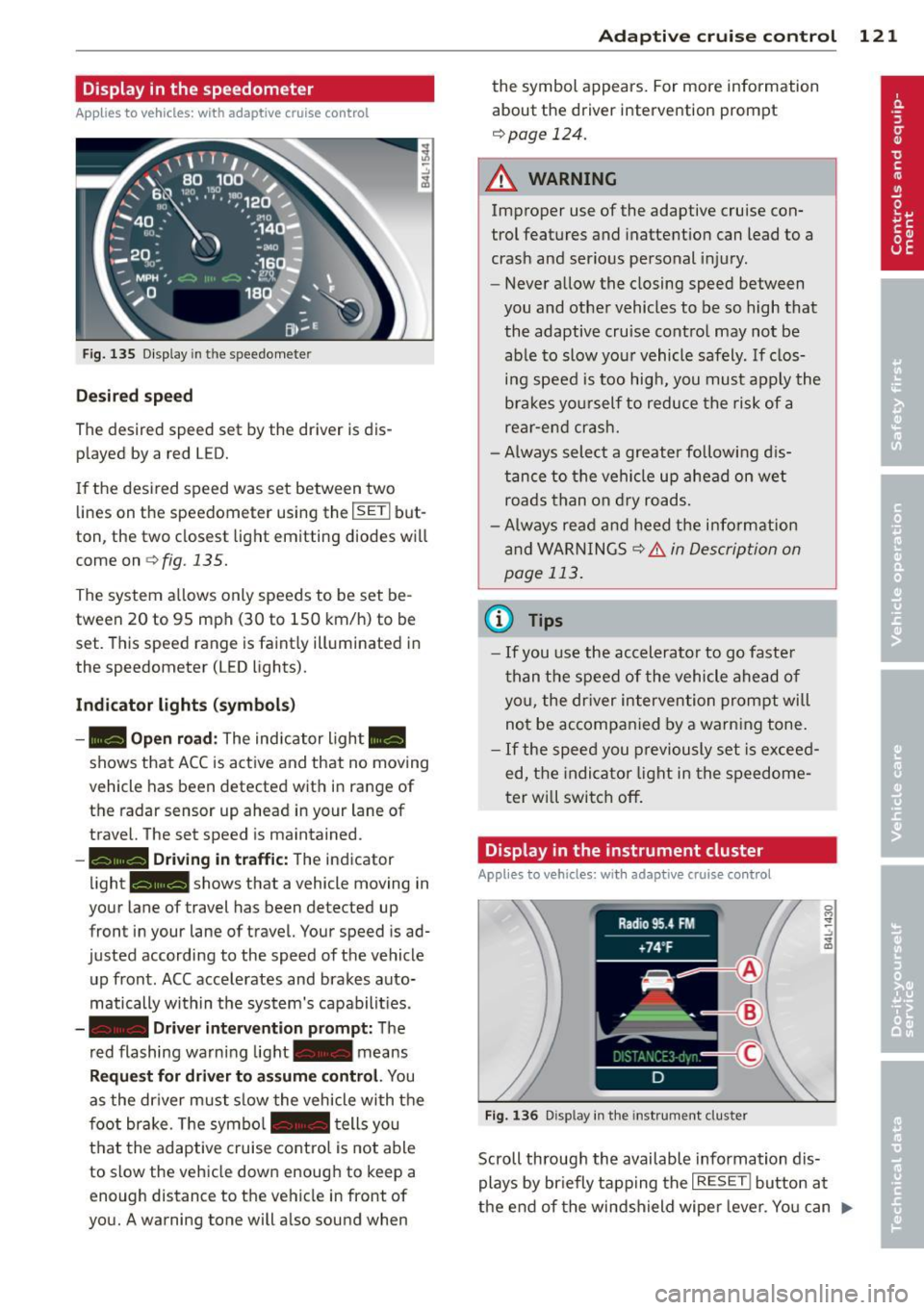
Display in the speedometer
Applies to vehicles: with adaptive cruise control
Fig. 135 D isplay in the speedomete r
Des ired spe ed
The desired speed set by the driver is dis
p layed by a red LED.
If the desi red speed was set between two
lines on the speedometer using the
I SETI but
ton, the two closest light emitting diodes will
come on <=>
fig. 135.
The system a llows only speeds to be set be
tween 20 to 95 mph (30 to 150 km/h) to be
set. This speed range is faint ly illuminated in
the speedometer (LED lights).
Ind icator light s (symbol s)
-- Open road :
The indicator light _
shows that ACC is active and that no moving
vehicle has been detected with in range of the radar sensor up ahead in your lane of
travel. The set speed is maintained.
- - Driving in tr aff ic: The indicator
light - shows that a vehicle moving in
your lane of travel has been detected up
front in your lane of travel. Your speed is ad
justed according to the speed of the vehicle
up front . ACC accelerates and brakes auto
matically within the system's capabilit ies .
-- Driver int erv ent ion prompt: The
red flashing warning light- means
Reque st for dri ver to assum e co ntr ol. You
as the dr iver must slow the vehicle with the
f oot brake. The symbol - tells you
t h at the adaptive cruise co ntrol is not able
to slow the vehicle down enough to keep a
enough distance to the vehicle in front of
you. A warning tone will also sound when
Ad apti ve crui se control 121
the symbol appears. For more information
about the driver intervention prompt
r::!) page 124.
_& WARNING
Improper use of the adaptive cruise con
trol features and inattention can lead to a
crash and serious personal injury.
- Never allow the closing speed between
you and othe r vehicles to be so high that
the adaptive cruise contro l may not be
able to slow your vehicle safely. If clos
ing speed is too high, you must apply the
brakes yo urself to reduce the risk of a
rear-end crash.
- Always select a greater following d is
tance to the vehicle up ahead on wet
roads than on dry roads.
- Always read and heed the information
and WARNINGS <=>
& in Description on
page 113 .
(D Tips
-If you use the accelerator to go faste r
t han t he speed of the vehicle ahead of
you, the dr iver intervention prompt will
not be accompan ied by a warn ing tone.
- If the speed you previously set is exceed
ed, the indicator light in the speedome
ter will switch off.
Display in the instrument cluster
Appl ies to vehicles: wit h adaptive cruise control
F ig. 136 D isp lay in the instrument cluster
-
Scroll through the available information dis
plays by br iefly tapp ing the
I RESET ! button at
the end of the windshield wipe r lever. You can ..,.
Page 125 of 340
the 20 to 95 mph (30 to 150 km/h) speed
range .
ACC: Unavailable
The text message ACC: Unavailable appears,
for example, if the temperature of the brakes
i s excessive. Adaptive cruise control is tempo
rarily not available. A warning tone sounds as
a reminder .
ACC: Not available
The text message ACC: Not available appears
in the event of a malfuncti on. Adaptive cruise
control is turned
off . A warning tone sounds
as a reminder. Have the system inspected by a
q ua lified dealership.
ACC: Sensor blocked
The text message ACC: Sensor blocked ap
pears when the ACC System can no longer ac
curately detect vehicles moving up ahead in
your lane of travel. Adaptive cruise control is turned
off. A warning tone also sounds as a re
minder.
To decide whether it is necessary to switch
off
the ACC (ACC : Sensor blocked) or if it is only a
temporary condition (ACC functionality limit
ed) the system will take into cons ideration the
outside temperature and/or the windshield
operat ion.
The ACC sensor is dirty or blocked (e.g. leaves,
snow).
The ACC sensor is located behind the area to
the right of the front license plate . If the ACC
sensor is dirty or blocked, clean the area to re
store system operat ion.
ACC off: Manual control!
The text message ACC off: Manual control!
appears after the ve hicle has been brought to
a standstill by the adaptive cruise control. In
this case you must depress the brake peda l to
prevent the veh icle from rolling. A warn ing
tone sounds as a reminder.
Adaptive cruise control 123
Stabilization control (ESC)
The text message Stabilization control (ESC)
appears if the Electronic Stabilization Control
(ESC) has intervened . In this case the adaptive
cruise control is automatically turned
off . This
is accompanied by a warn ing tone.
Speed
T he set speed in mph (Canada km/h) always
appears when saving or changing the speed in
adaptive cruise control
¢ page 116, How is
the speed stored?
and ~ page 117, Changing
stored speed.
ACC functionality limited
T he message ACC functionality limited ap
pears when the ACC System does not detect
any moving vehicles up ahead in yo ur lane of
trave l for a longer period of time. During this
time, the distance to moving vehicles in your
lane of travel up ahead is not being ma in
ta ined . The ACC system is not switched off,
and increased attention to the traffic situation
is absolutely necessary. The following may be
reasons why the message
ACC functionality
limited
appears :
- The ACC sensor is d irty . The ACC system is
not react ing, or is not reacting correctly, to
moving vehicles up ahead in your lane of
t ravel.
- There may be very light traffic on and there
is nothing that marks the side of the road
(for examp le, guard ra ils, traffic signs,
trees). As soon as a moving vehicle up ahead
is detected again, ACC becomes active again
and the message disappears.
T he ACC sensor is located be hind the area to
the right of the front license plate. If the ACC
senso r is dirty or blocked, clean the area to re
store system operation.
Parking brake!
T he text message Parking brake! appears,
when the parking brake is applied. ACC is
turned
off . A warning tone sounds as a re
minder.
Page 127 of 340
given to another person, the saved settings remain as they are .
System limitations
General information
Applies to vehicles: with adaptive cruise co ntrol
The radar sensor has limits that the driver
must know to be able to use ACC properly .
The adaptive cruise control works within lim its that are also related to radar sensor range
and sight distance . In some situations ACC
may react unusually or late from the driver's
point of v iew. Therefore, always be attent ive
to what is happening around you and always
be ready to intervene, if necessary:
-when driving around curves ¢page 125
- when vehicles up front are not in line with
your vehicle ¢ page 126
- when other veh icles are changing lanes
i=> page 126
- when other vehicles are difficult to detect i=>page 126
- when vehicles up ahead are not moving or obstacles are in your travel lane i=>page 126
A WARNING
The radar sensor's function and range can
be reduced by rain, snow and heavy spray.
Moving veh icles up ahead may not be
prompt ly detec ted or may not be detected
a t all.
- Always pay careful att ention to the traf
fic s ituation and be ready to intervene
and be re ady to take comp lete cont rol
whenever necessary.
Ad apti ve crui se control 125
When driving around curves
App lies to vehicles: wit h adaptive cruise control
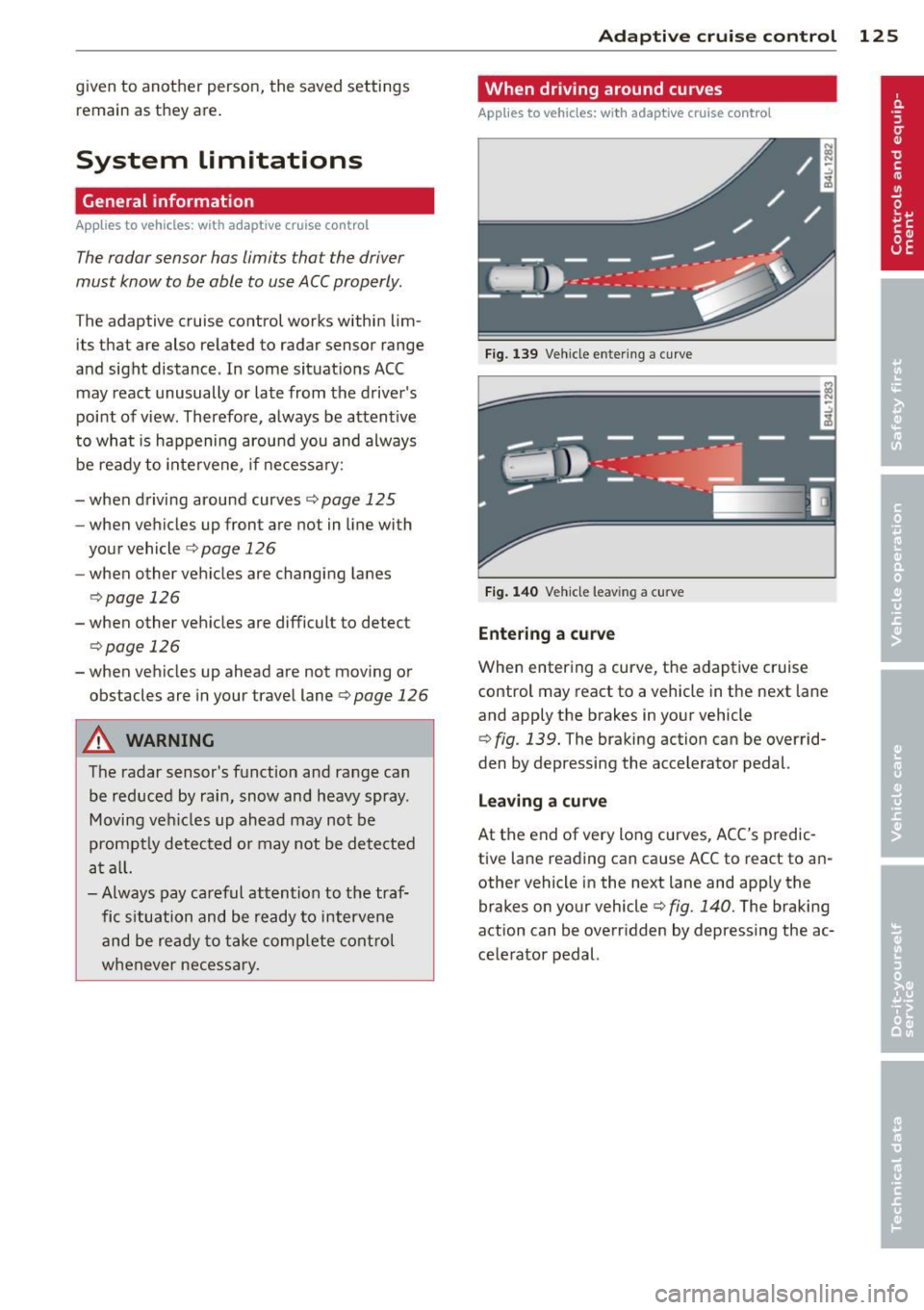
Fig. 139 Ve hicle e nter ing a curve
Fi g. 140 Ve hicle leav ing a curve
Entering a curv e
When entering a curve, the adaptive cruise
control may react to a vehicle in the next lane
and apply the brakes in your vehicle
¢ fig . 139. The braking action can be overrid·
den by depressing the accelerator pedal.
L e aving a curv e
At the end of very long curves, ACC's predic
tive lane reading can cause ACC to react to an
other vehicle in the next lane and app ly the
brakes on your vehicle¢ fig . 140. The braking
action can be overr idden by depress ing the ac
ce lerator pedal.
Page 128 of 340
126 Adaptive cruise control
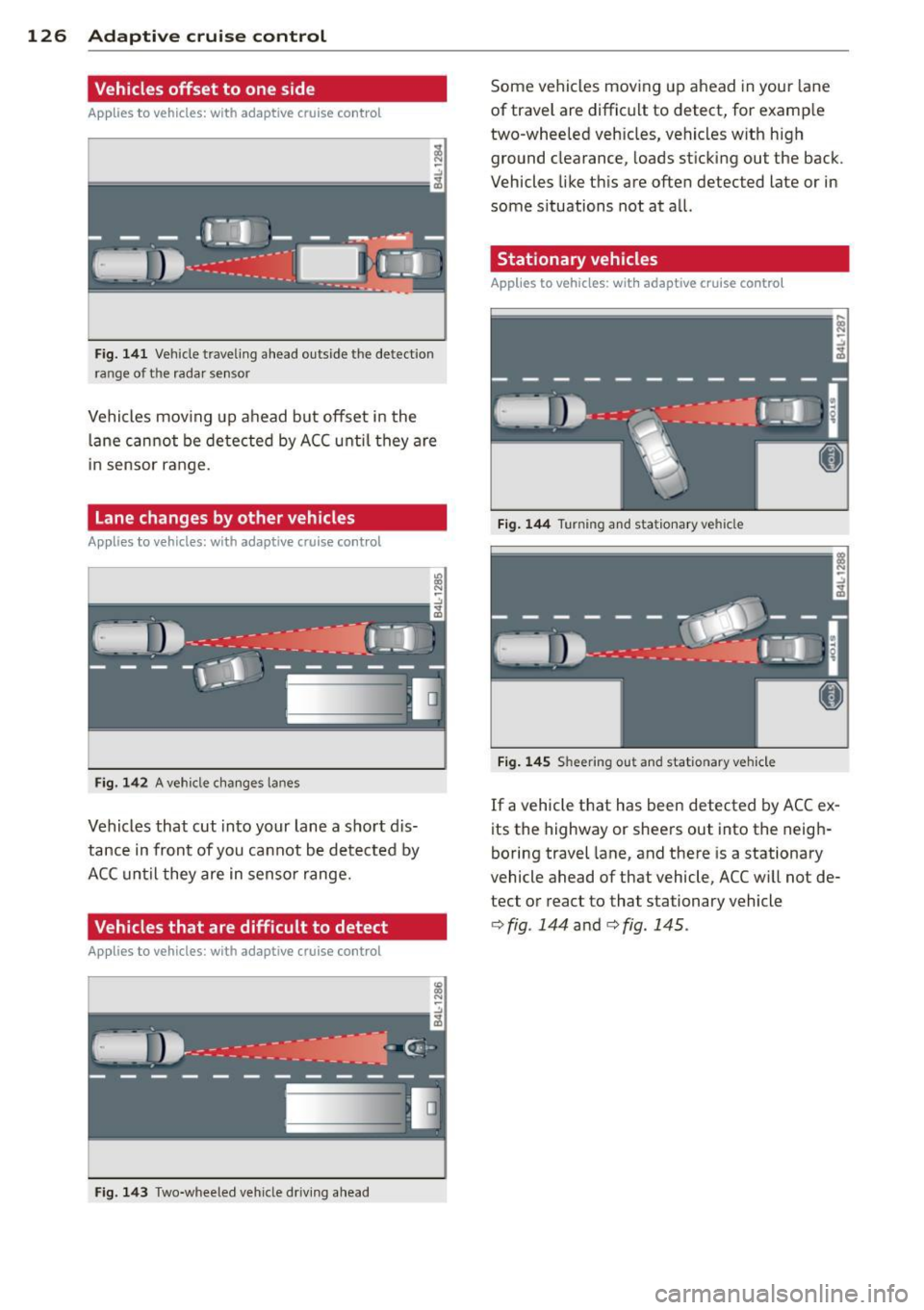
Vehicles offset to one side
Applies to vehicles: with adaptive cruise control
Fig. 141 Vehicle traveling a head o utside the detect ion
range of t he rada r se nsor
Vehicles mov ing up ahead but offset i n the
la ne cannot be detected by ACC until they are
in sensor range.
Lane changes by other vehicles
Applies to vehicles: with adaptive cruise control
Fig. 142 A vehicle changes lanes
Vehicles that cut into your lane a sho rt dis
tance in front of you cannot be detected by
ACC until they are in senso r range.
Vehicles that are difficult to detect
Applies to vehicles: with adaptive cruis e contro l
Fig. 143 Two -wheeled vehicle driving ahead
Some vehicles moving up ahead in your lane
of trave l are difficult to detect, for examp le
two -wheeled veh icles, vehicles w ith high
ground clearance, loads sticking out the back .
Vehicles like this are often detected late or in
some situations not at all.
Stationary vehicles
Applies to vehicles: with adaptive cruise contro l
Fig. 144 Turning and stationary ve hicle
Fig. 145 Sheering out and stat ionary veh icle
If a vehicle that has been detected by ACC ex
its the highway or sheers out into the neigh
boring travel lane, and there is a stationary
vehicle ahead of that vehicle, ACC will not de·
tect or react to that stationary vehicle
<=> fig. 144 and c> fig. 145 .
Page 129 of 340
Audi braking guard
Description
Applies to vehicles: with a daptive cruise co ntrol
Audi braking guard warns you of a possible
collision with a moving vehicle up ahead .
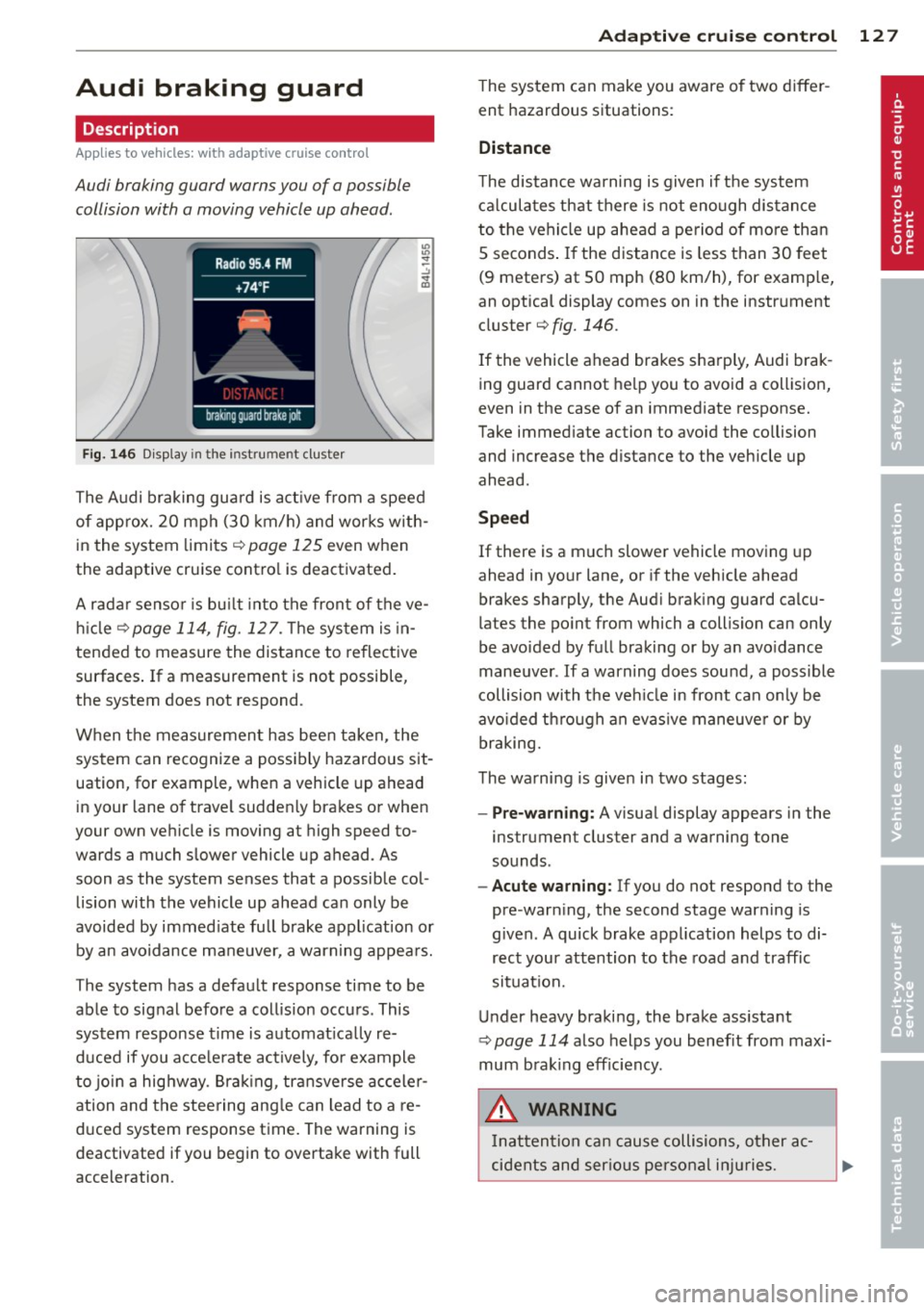
Fig. 146 Display in the instrument cluster
The Audi braking guard is active from a speed
of approx. 20 mph (30 km/h) and works with
in the system limits¢
page 125 even when
the adaptive cruise contro l is deactivated.
A radar sensor is bu ilt into the front of the ve
hicle
¢page 114, fig. 127. The system is in
tended to measure the distance to reflective
surfaces .
If a measurement is not possible,
the system does not respond.
When the measurement has been taken, the
system can recognize a possibly hazardous sit
uation, for example, whe n a vehicle up ahead
in your lane of trave l sudden ly brakes or when
your own vehicle is moving at high speed to
wards a much slower vehicle up ahead . As
soon as the system senses that a possible col
lision with the vehicle up ahead can only be
avoided by immed iate full brake application or
by an avoidance maneuver, a warning appears.
The system has a defau lt response time to be
able to signal before a collision occurs. This
system response time is automat ica lly re
duced if you acce lerate actively, fo r example
to join a highway. Braking, transverse acceler
ation and the steering angle can lead to a re
duced system response time. The warning is
deactivated if you begin to overtake with full
acceleration .
Adaptive cruise control 127
The system can make you aware o f two differ
ent hazardous situations:
Distance
The distance warning is given if the system
calculates that there is not enough distance
to the vehicle up ahead a period of more than
S seconds . If the distance is less than 30 feet
(9 meters) at SO mph (80 km/h), for examp le,
an optical display comes on in the instrument
cluster¢
fig. 146.
If the vehicle ahead brakes sharp ly, Audi brak
ing guard cannot help you to avoid a collision,
even in the case of an immediate response.
Take immed iate action to avoid the co llision
and increase the distance to the vehicle up
ahead.
Speed
If there is a much slower vehicle moving up
ahead in your lane, or if the vehicle ahead
brakes sharply, the Aud i brak ing guard calcu
lates the po int from which a collision can only
be avoided by full braking or by an avoidance
maneuver. If a warning does sound, a poss ible
collision with the ve hicle in front can on ly be
avo ided through an evasive maneuver or by
braking.
The warning is given in two stages :
-Pre-warning: A visual display appears in the
instrument cluster and a warning tone
sounds.
- Acute warning: If you do not respond to the
pre-warn ing, the second stage warning is
given. A quick brake application helps to di
rect your attention to the road and traffic
situation.
Under heavy braking, the brake ass istant
¢
page 114 also helps you benef it from maxi
mum brak ing efficiency.
A WARNING
Inatt ention can cause collisions, other ac
cidents and serious personal injuries.
Page 130 of 340
128 Adapti ve crui se co ntrol
-Always pay close attenti on to t he traffic,
even w hen the Aud i brak ing guard is
switched on. The Aud i b rak ing guard pro
vides a warning but does no t brake the
car for you . You m ust apply t he brakes
yours elf!
- Always ke ep the sa fe and legal distance
betwe en your vehicle and veh icles up
ahead.
-Audi braking guard works within limits and w ill not respond outs ide the system
limits, for examp le when approaching a
stopped vehicle or s tationary obstacle
(end of a traff ic jam or veh icle that has
broken down in traffic).
- Always remember th at the radar sensor
f or the A udi braking guard wo rks within
defined detection and range limits that
may prevent the proper detection of oth
er veh icles.
- The radar sensor's function and range
can be reduced by rain, snow and heavy
spray. Moving vehicles up ahead may not
be promptly detected or may not be de
tected at al l.
- Always pay careful attention to the traf
fic s ituation and be ready to intervene
and be ready to take comp lete control
whenever necessary.
- Reflective surfaces includ ing crash barri
ers or tunnel entrances may impair the
function of th e radar sensor .
Settings in the MMI
Applies to vehicles: with a daptive cruise co ntrol
The settings of the Audi braking guard are
performed in the MMI.
.. Se lect : I CAR I funct ion button > Systems *
control button > Audi braking guard . Or
" Se lect :
I CAR I funct io n button > Car systems *
control button > Driver assist > Audi brak
ing guard .
- System -
the Audi braking guard system can
be switched
On and Off .
-Early warning -the acoustic warning and
the messages can be switched
On and Off .
(D Tips
When handing ove r the keys to another
person, the p revious settings are adopted
i f the Audi braking g uard is activated
¢ page 43.
Driver's information in the instrument
cluster display
App lies to vehicles : wit h adaptive cruise contro l
Braking guard activated
Th is message appears when the Aud i b ra ki ng
guard applies the brakes du ring a second
st age (a cute) war ning .
Braking guard off
This message appears when the system has
been deac tivated via the MMI. This message
also appea rs br iefly at each beginn ing of a t rip
i f t he sys tem is swi tched off .
The message a lso appears if the system is not
ava ilable due to a malfunc tion or if the ESC is
not sw itched on¢
page 225 . If th is is the
case, the system will not provide wa rni ngs
abo ut a po ssible coll ision.