lock AUDI Q7 2014 Owner´s Manual
[x] Cancel search | Manufacturer: AUDI, Model Year: 2014, Model line: Q7, Model: AUDI Q7 2014Pages: 340, PDF Size: 85.02 MB
Page 60 of 340
58 Clear vis ion
lig ht sensor checked as soo n as poss ible at an
author ized Audi dealer or qua lified wor kshop .
.&_ WARNING
-Daytime ru nning lights and automatic
headlights are only intended to assist
the driver. They do not relieve the driver
of his respons ib ility to check the head
lights and to turn them on manually ac
co rding to the current light and v is ibi lity
condit ions. For example, fog cannot be
dete cted by the light sensors*. So alw ays
switch on the headlights
io u nder these
weather conditions and when driving in
the dark.
- Crashes can happen when yo u cannot see
the road ahead and when you cannot be seen by other motorists. Always turn on
the headlights so that you can see ahead
and so that others can see yo ur car from
the back.
- Please obey a ll laws when using the
lighting systems described here.
@ Tips
- With the switch in AUTO front fog lights
and rear fog lights cannot be turned on in addition.
- The light senso r for headlight contro l is
l ocated in the rear view m irror mount.
You should therefore not app ly any st ick
ers to the windsh ield in this area in o rder
to preve nt ma lfunctions o r failures.
- Some exterior lighting functions can be
adjusted
c:> page 58.
-When you remove your key from the igni
tion while the vehicle's lights are turned
on, a buzzer sou nds as long as the driv
er's door is open .
- In coo l o r damp weather, t he ins ide of
t h e headlights, turn signa ls and tail
li ghts can fog ove r du e to t he tempera
tu re diffe re n ce between the inside and
outside. They will cle ar sho rtly after
swi tching them on. This does not affect
t h e service li fe of the lighting . -
In the event o f a light sensor malfunc
tion, the driver is notified in the instru
ment cl uster display
c:> page 35 .
Adjusting exterior lighting
The functions are set in the MMI.
• Sele ct: I CAR I function butt on > System s*
control but to n > Exterior lighting . Or
.. Select:
I CAR I function button > Car systems *
contro l butto n > Vehicle settings > Exterior
lighting .
Coming home (Lights when leaving car ),
Leaving home (Lights when unlock ing car )
The coming home f unction ill uminates the
area o utside the vehicle when you tu rn the ig
nition off and open t he driver's door. Depend
ing on vehicle equ ipment, the f unction can be
switched on and off or the length of t i me the
lights remain on* can be adjusted .
The leaving home illum inates the area outside
t h e ve hicle when yo u unlock the vehicle . This
funct ion can be switched on and off .
The Coming home and Leaving home func
tions only operate when it is dark and the light switch is in the
AUTO pos ition.
Daytime running lights
USA model s: The daytime r unning lights can
be turned on or off using th is function.
Canada model s: Th e fu nction cannot be
turned off .
It is activated automatically each
time the ignition is t urned on. This menu item
is shown "greyed out" .
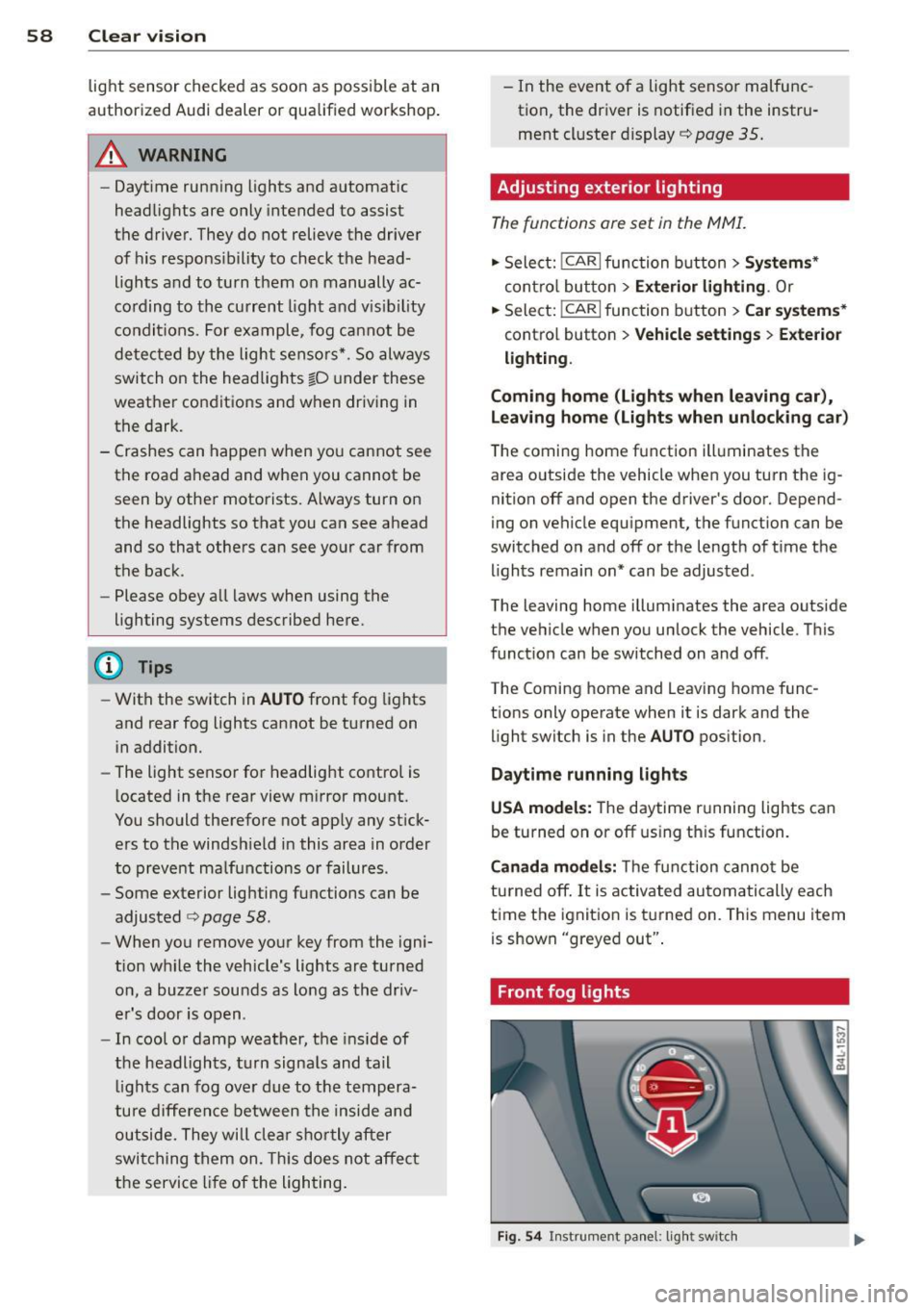
Front fog lights
Fig. 54 Instrument pa nel: light switch
Page 61 of 340
The light switch must not be overturned past
the stops in
either d irectio n.
Switching on the front fog lights }0
~ Turn the light swit ch to ;oo:; or to §D.
~ P ull the ligh t switch to the first stop (!).
When the front fog lights are on, the symbol
}O n ext to the lig ht switch will illum inate.
@ Tips
W ith the switch in AUTO front fog lights
and rear fog lights cannot be turned o n in
add it io n.
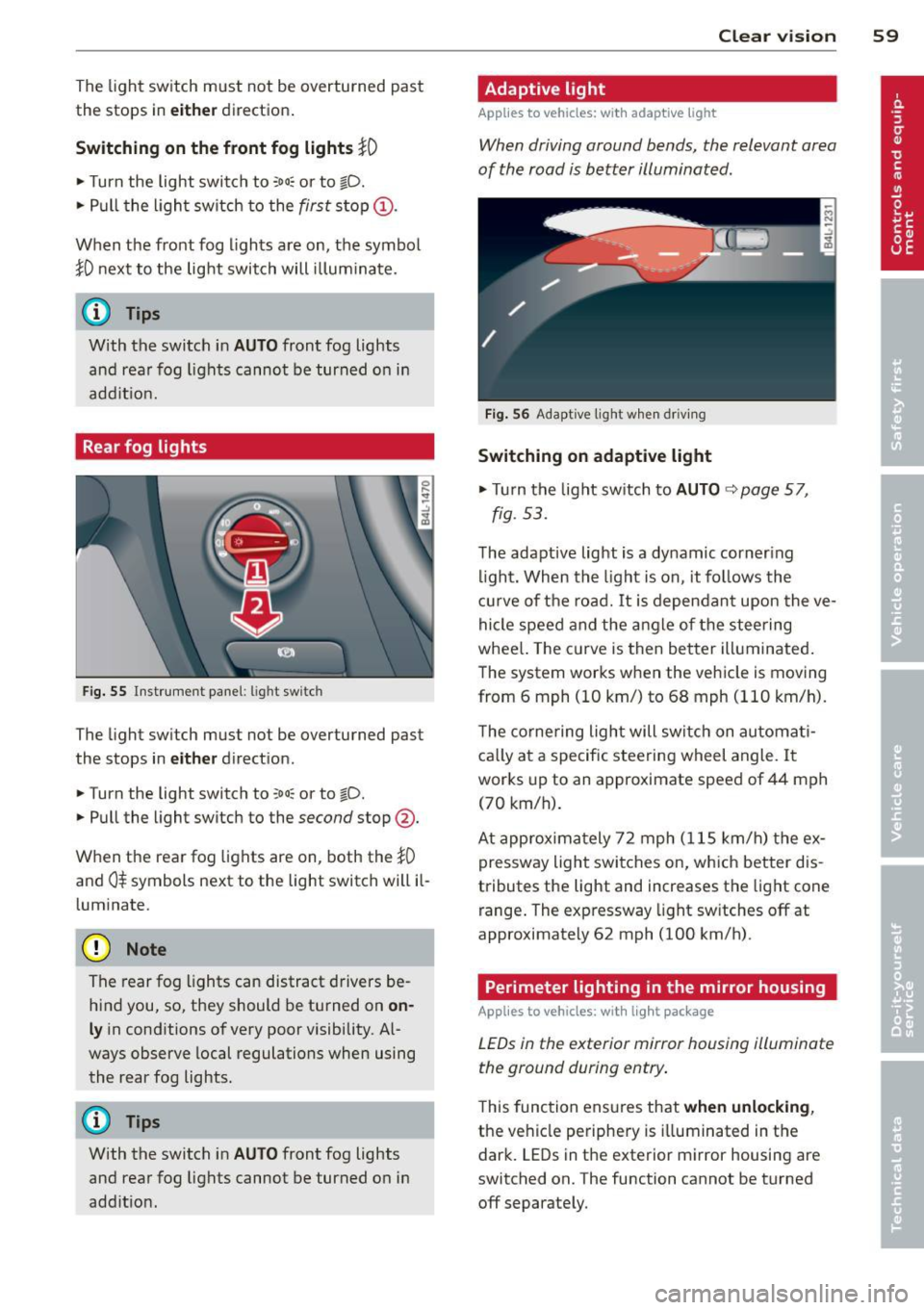
Rear fog lights
Fig. 55 Inst rument pa ne l: lig ht sw itc h
The light sw itch must not be overturned past
the stops in
either d irect ion.
~ Turn the light switch to ;oo:; or to §D.
~ Pull the light switch to the second stop @.
When the rear fog lights are on, both the
}0
and 0$ symbols next to the light switch will il
l um inate.
(D Note
The rear fog lights can distract d rivers be
h ind you, so, they should be turned on
on
ly in cond itions of very poor visibility. Al
ways observe local regulations when using
the rear fog lights.
{D) Tips
With the switch in AUTO front fog lights
and rea r fog lights cannot be turned on in
add it io n.
Clear vi sion 59
Adaptive light
Applies to vehicles: wit h adaptive light
When driving around bends, the relevant area
of the road is better illuminated .
Fig. 56 Adapt ive light w hen driv ing
Switching on adaptive light
~ Tu rn the lig ht sw itch to AUTO ~ page 57,
fig . 5 3.
The adaptive lig ht is a dy namic corner ing
li ght. Wh en th e light is on, it fo llows th e
cur ve of t he road. It is depen dan t upon the ve
hi cle spee d and the a ngle of the stee ring
whee l. The c urve is then bette r illuminated .
The system wor ks when the vehicle is moving
from 6 mph (10 km/) to 68 mph (110 km/h).
T he co rne ring ligh t will swi tch on automa ti
ca lly a t a specif ic steering wheel angle. I t
wor ks up to an a pproximate speed of 44 mph
(70 km/h).
At approx im at ely 72 mph ( 115 km/h) t he ex
p ressway light swi tches on, which better dis
tributes the light and increases the light cone
range . The exp ressway light sw itches
off at
approximate ly 62 mph (100 km/h) .
Perimeter lighting in the mirror housing
Applies to vehicles: wit h lig ht pac kage
LEDs in the exterior mirror housing illuminate
the ground during entry .
This func tion ens ures that when unlocking ,
the vehicle pe riphe ry is illuminated in t he
dar k. LEDs in t he e xterior m irror housing are
switched on. The function cannot be turned
off separate ly.
Page 63 of 340
Notes o n these featur es
- The turn signals only work with t he ignition
turned on . T he indicator light s
II or Ill in
the instrument cluster
¢ page 14 also b link.
- After you have turned a corner , the tur n sig-
nal switches off automatica lly.
- The
high beam works only when the head
lights are on. The indicator light
II in t he
instrument cluster i lluminates when the
high beams a re on.
- The
headlight flasher wo rks only as long as
you hold the lever -even if there are no
lights turned on . The indicator light
II in
the ins trument cluster illuminate s when you
u se the headlight flasher .
A WARNING
-
Do not use the high beam or headlight
flasher if you know that thes e cou ld blind
oncoming traffic.
Interior lights
Front interior lights
The interior lights include reading lights for
both the driver and the front passenger .
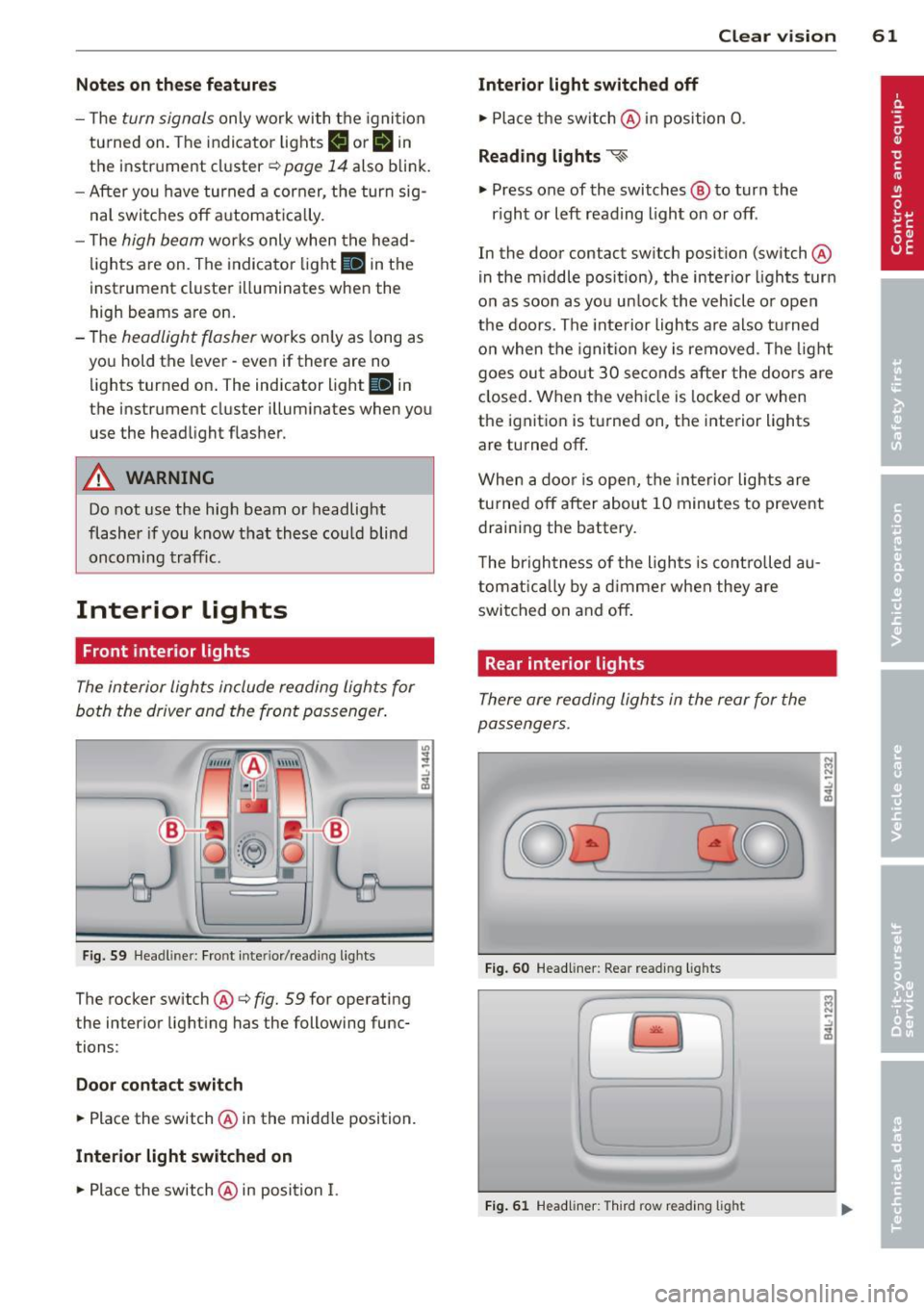
Fig. 59 Headlin er: Fro nt in te rior /re adi ng light s
The rocker switch @¢ fig. 59 for ope rating
the in ter ior lighting has the follow ing func
tions :
Door cont act switch
.,. Place the switch @ in the midd le position.
Interior light switched on
.,. Pla ce the switch @ in posi tion I.
.,,
:! .:,
1A
Clear vision 61
Interior light switched off
.,. Place the sw itch @ in position 0 .
Reading lights ~
.,. Press one of the switches @ to turn the
r ight or left reading light on or off .
In the door contact swi tch position (switch @
in the m iddle position), the interior l ights tur n
o n as soon as you unlock the vehicle o r open
the doors . The inte rior lights are also turned
o n when the igni tion key is removed . The light
goes ou t about 30 seconds after the doo rs are
closed. When the veh icle is locked or when
the igni tion is turned on, the i nterior lights
are turned off .
When a door is open, the interior lights are
tu rned off after about 10 minutes to prevent
draining the battery.
T he brigh tness of the lights is cont rolled au
tomat ic all y by a d imme r when they are
switched on and off.
Rear interior lights
There are reading ligh ts in the rear for the
passengers .
0
...
Fig . 60 Headli ner: Rear read ing light s
>l!i:.
r -
' \.
Fig. 61 Headlin er: Third row r eading light
N .., N
.:,
1A
:::i N
-.:,
1A
Page 64 of 340
62 Clear vision
• Press one of the switches «-~ to turn the
right or left reading light on or off~
fig. 60.
For vehicles with third row seating*, the lug
gage compartment light can be switched on
and off with the button'*' and used as a read
ing light
~fig. 61. The rear lid has to be
closed.
The lights in the luggage compartment and in
the rear lid switch on and off automatically
when the lid is opened and closed.
@ Tips
If the rear lid remains open longer than 10
minutes, the luggage compartment lights
turn off automatically to prevent the vehi cle battery from discharging.
Ambience lighting
App lies to vehicles: with amb ience light ing
The ambience lighting con be adjusted in the
MMI.
• Select : I CARI function button> Systems*
control button > Ambience lighting. Or
• Select :
I CARI function button > Car systems*
control button > Vehicle settings > Interior
lighting .
When the vehicle is unlock ed, the standard
lighting turns on automatically and dims after
approx. 2 minutes, and when the ignition is
turned on it switches off immediately .
The following interior lighting is
controlled:
- Front footwell
- Rear footwell
- Front door panel
- Rear door panel
Vision
Sun visors
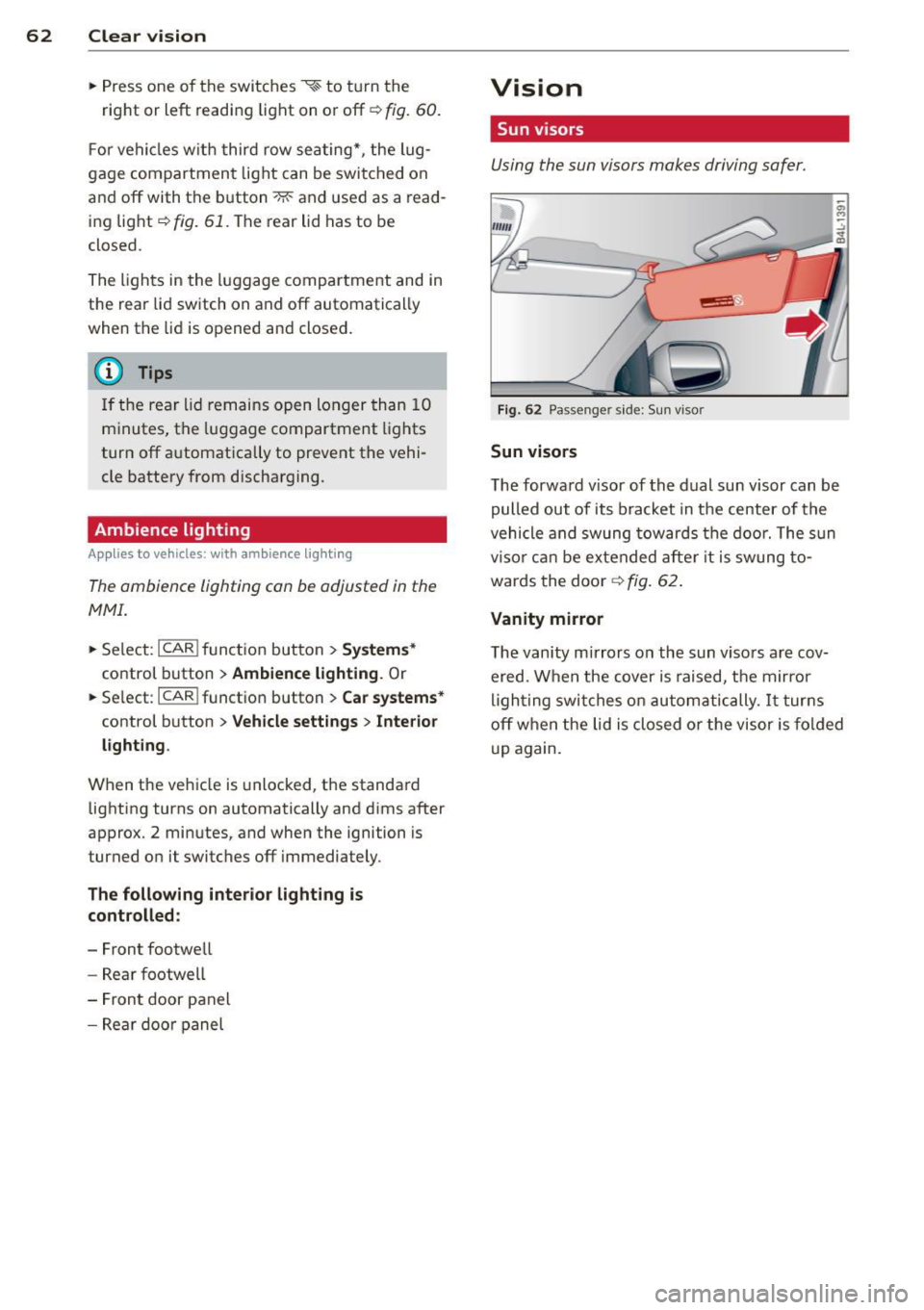
Using the sun visors makes driving safer.
Fig. 62 Passenger sid e: Sun visor
Sun visors
The forward visor of the dual sun visor can be
pulled out of its bracket in the center of the
vehicle and swung towards the door. The sun
visor can be extended after it is swung to
wards the door
~ fig. 62.
Vanity mirror
The vanity mirrors on the sun visors are cov ered. When the cover is raised, the mirror
lighting switches on automatically.
It turns
off when the lid is closed or the visor is folded
up again.
Page 76 of 340
7 4 Seats and storage
unattended in the vehicle -they could be
injured!
- Exercise caution when adjusting the seat
height. Unsupervised or careless seat ad
justment can pinch fingers or hands causing injuries.
- While the vehicle is moving, the seat
backs of the front seats must not be in
clined too far to the rear because the ef
fectiveness of the safety belts and the
airbag system is severely compromised -
there is a risk of injury.
- To reduce the risk of injury in the case of
sudden braking or accident, front pas
sengers must never ride in a moving ve
hicle with the seatback reclined . Safety
belts and the airbag system only offer
maximum protection when the seatback
is upright and the safety belts are prop
erly positioned on the body. The more
the seatback is reclined, the greater the
risk of personal injury from an incorrect
seating position and improperly posi
tioned safety belts .
Seat memory
Driver's seat memory
Applies to vehicles: with seat memory
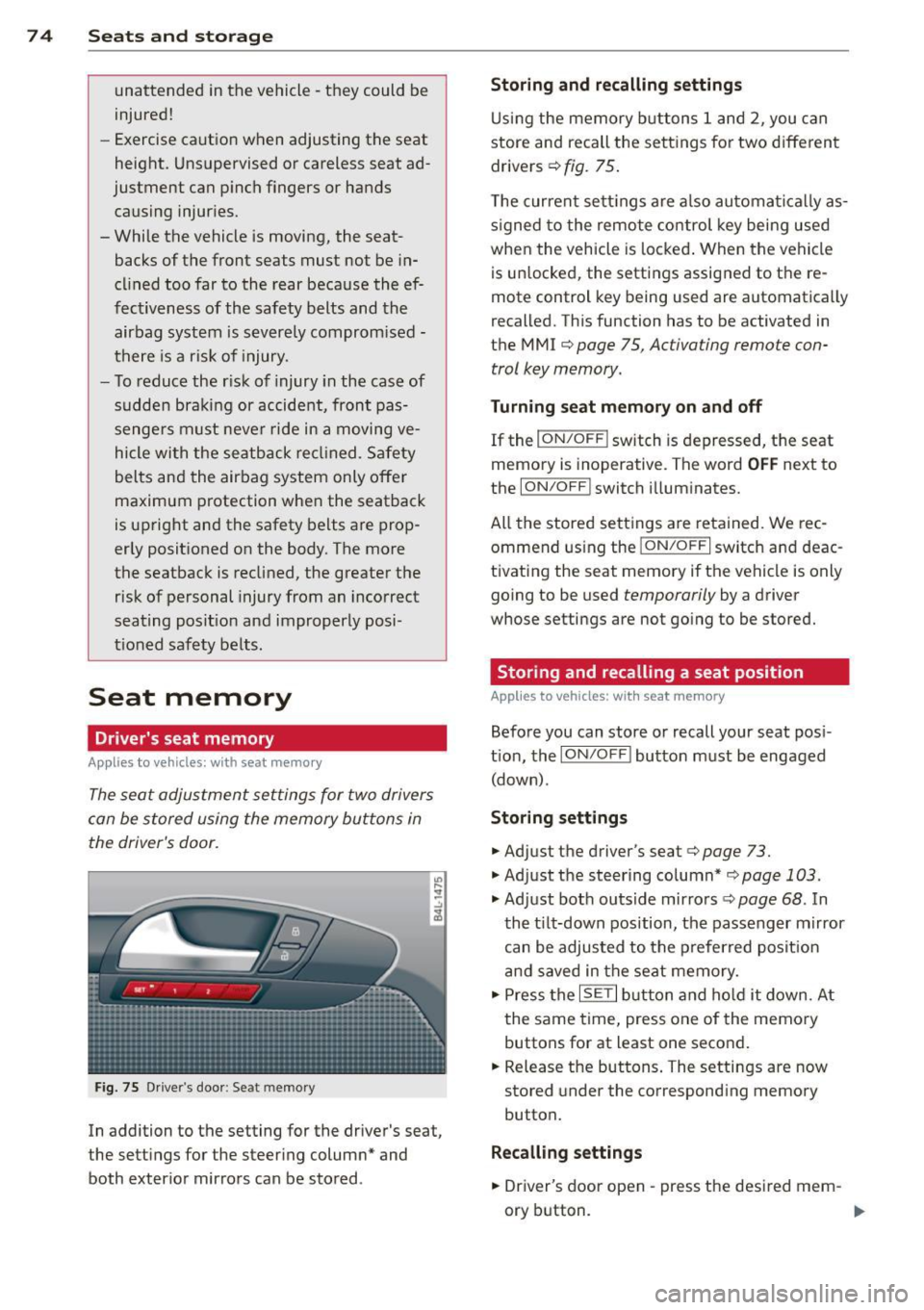
The seat adjustment settings for two drivers
can be stored using the memory buttons in
the driver's door.
Fig. 75 Drive r's door : Se at me mory
In addition to the setting for the driver 's seat,
the settings for the steering column* and both exterior mirrors can be stored .
Storing and recalling settings
Using the memory buttons 1 and 2, you can
store and recall the settings for two different
drivers ¢
fig. 75.
The current settings are also automatically as
s igned to the remote control key being used
when the vehicle is locked. When the vehicle
is unlocked, the settings assigned to the re
mote control k ey b eing used are automatically
recalled. This function has to be activated in
the MMI ¢
page 75 , Ac tiva ting remo te con
trol key memory.
Turning seat m emory on and off
If the I ON/OFF I switch is depressed, the seat
memory is inoperative. The word
OFF next to
the
ION/O FF! switch illuminates.
All the stored settings are retained. We rec
ommend using the
I ON/O FF I switch and deac
tivating the seat memory if the vehicle is only
going to be used
temporarily by a driver
whose se tting s are not going to be stored.
Storing and recalling a seat position
Applies to vehicles: with seat memory
Before you can store or recall your seat posi
tion, the
ION/OFF I button must be engaged
(down) .
Storing settings
.,. Adjust the driver 's seat ¢ page 73 .
.,. Adjust the steering column*¢ page 103 .
.,. Adjust both outside mirrors¢ page 68. In
the tilt-down position, the passenger mirror
can be adjusted to the preferred position
and saved in the seat memory .
.,. Press the
ISETI button and hold it down. At
the same time, press one of the memory
buttons for at least one second .
.,. Release the buttons. The settings are now
stored under the corresponding memory
button.
Recalling settings
.,. Driver's door open -press the desired mem-
ory button . _..
Page 77 of 340
~ Driver's door closed -press the correspond
ing memory button until the stored position
is reached.
Successful storage is conf irmed audibly and
by the light in the
!SE T! button illuminating.
When the vehicle is
locked, the current set
tings are stored and ass igned to the remote
control key. But the settings stored on memo
ry buttons
1 and 2 are not deleted. They can
be recalled at any time. When the vehicle is
unlocked, the settings assigned to the remote
control key are restored.
I f your vehicle is driven by other persons using
your remote control key , you should save your
individual seat position on one of the memory
buttons. You can recall your settings again
simply and conven iently by pressing the corre
spond ing memory button . When the vehicle is
locked, these settings are automatically re-as
signed to the remote control key and stored.
A WARNING
-For safety reasons, the seat setting can
only be recalled when the vehicle is sta
tionary -othe rwise you risk having an ac
cident.
- In an emergency, the recall operation
can be stopped by pressing the
!ON/O FF I
button or by briefly pressing any given
memory button.
Activating remote control key memory
Applies to vehicles: with seat memo ry
To assign the driver's seat settings to the re
mote control key when locking the vehicle, the
function must be activated in the MMI.
~ Select: I CARI function button > Systems*
control button > Seat adjustment > Driver 's
seat> Key mem. profile
> On. Or
~ Select : I CARI function button > Car systems*
control button > Vehicle settings > Seats >
Driver's seat> Remote control key> On.
Seats and storage 75
(D Tips
If you do not want another driver's set
tings to be assigned to the remote control key, switch off the memory function using
the MMI or the
I ON/OF F! button
¢ page 74.
Rear seats
General information
Safe transportation of passengers on the rear
seats requires proper safety precautions .
All passengers on the rear seats must be seat
ed in compliance with the safety guide lines
exp lain ed in
¢page 174 and ¢page 183.
The correct seating position is criti ca l for the
sa fety of front
and rear seat passengers alike
¢page 167.
A WARNING
-Occupants in the front and rear seats
must always be properly restrained.
- Do not let anyone ride in the vehicle
without the head restraints provided.
Head restraints help to reduce injuries.
- Loose items inside the passenger com
partment, can fly forward in a crash or
sudden maneuver and injure occupants.
Always store articles in the luggage com
partment and use the fastening eyes, es
pecially when the rear seatbacks have
been fo lded down .
- Read and heed all WARNINGS
¢ page 167, Proper seating positions
for passengers in rear seats .
Page 79 of 340
Folding seatback up and down (third
row seating)
Applies to vehicles: with third row seatin g
The third row seating is suitable for persons
up to 1.6 meters (5 ft 3 in) in height .
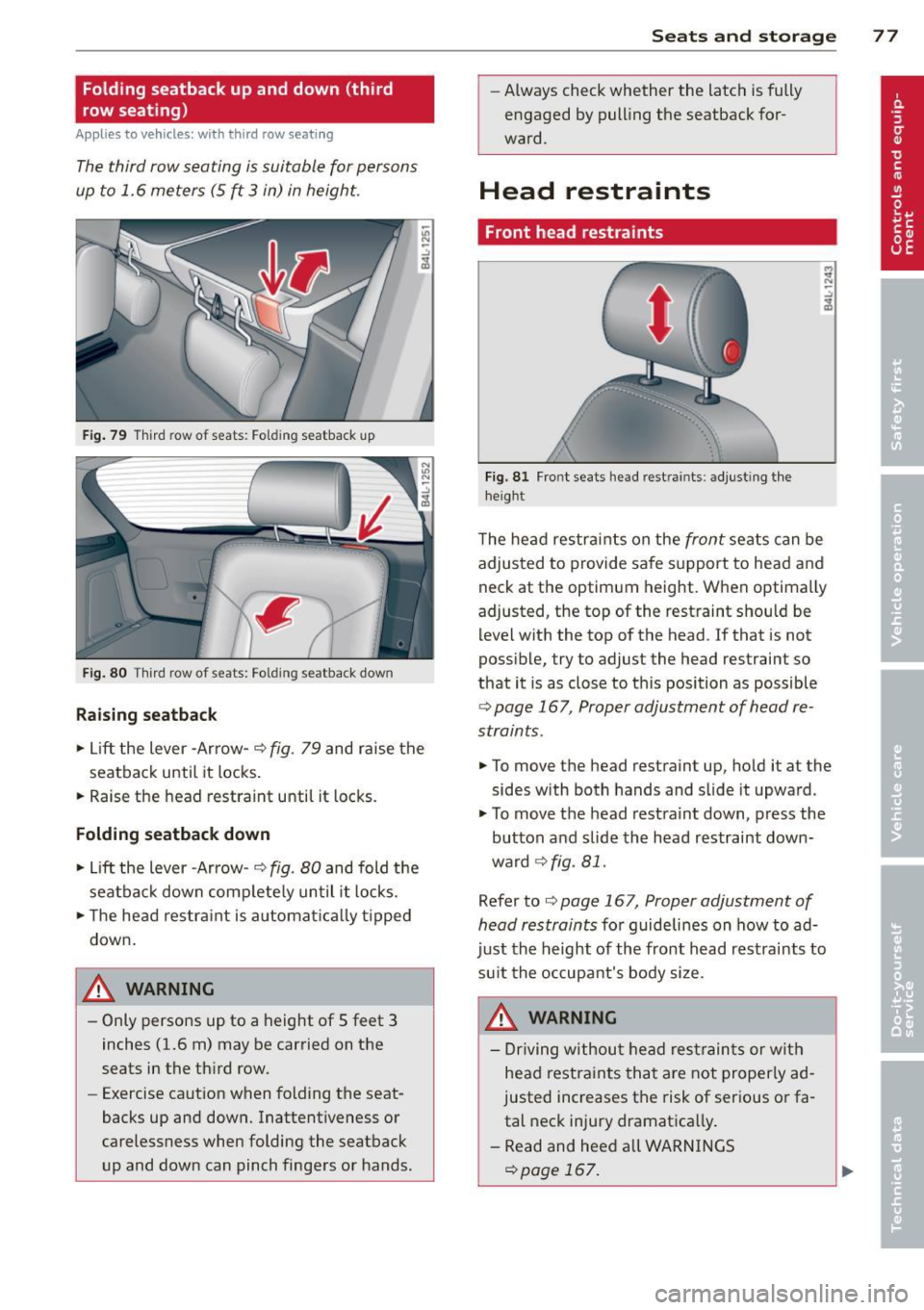
Fig. 79 Third row o f seats : Fo ld ing seatback up
Fig. 80 Third row o f seats: Fo ld in g seatback dow n
Raising seatback
~ Lift the lever -Arrow- ¢ fig. 79 and raise the
seatback until it locks.
~ Raise the head restraint until it locks.
Folding seatback down
~ Lift the lever -Arrow- ¢ fig. 80 and fold the
seatback down complete ly until it locks.
~ The head restraint is automat ically t ipped
down.
A WARNING
- Only persons up to a height of 5 feet 3
inches (1.6 m) may be carried on the
seats in the third row.
- Exercise caution when folding the seat
backs up and down. Inattentiveness or
carelessness when folding the seatback
up and down can pinch fingers or hands.
-
Seats and storage 77
-Always check whether the latch is fully
engaged by pull ing the seatback for
ward.
Head restraints
Front head restraints
Fig. 81 Fro nt seats head rest ra in ts: adjust ing the
height
The head restraints on the front seats can be
adjusted to provide safe support to head and
neck at the optimum height. When optimally
adjusted, the top of the restraint should be level with the top of the head . If that is not
possible, try to adjust the head restraint so
that it is as close to this position as possible
¢ page 167 , Proper adjustment of head re
straints .
~ To move the head restraint up, hold it at the
sides with both hands and slide it upward.
~ To move the head restraint down, press the
button and slide the head restraint down
ward ¢
fig. 81.
Refer to¢ page 167, Proper adjustment of
head restraints
for guidelines on how to ad
just the height of the front head restraints to
su it the occupant's body size.
A WARNING
- Driving without head restraints or with
head restraints that are not properly ad
justed increases the risk of serious or fa
tal neck injury dramatica lly.
- Read and heed all WARNINGS
c::>page 167.
Page 84 of 340
82 Seats and st o rage
Retractable luggage compartment cover
The luggage compartment cover keeps lug
gage or other objects out of view .
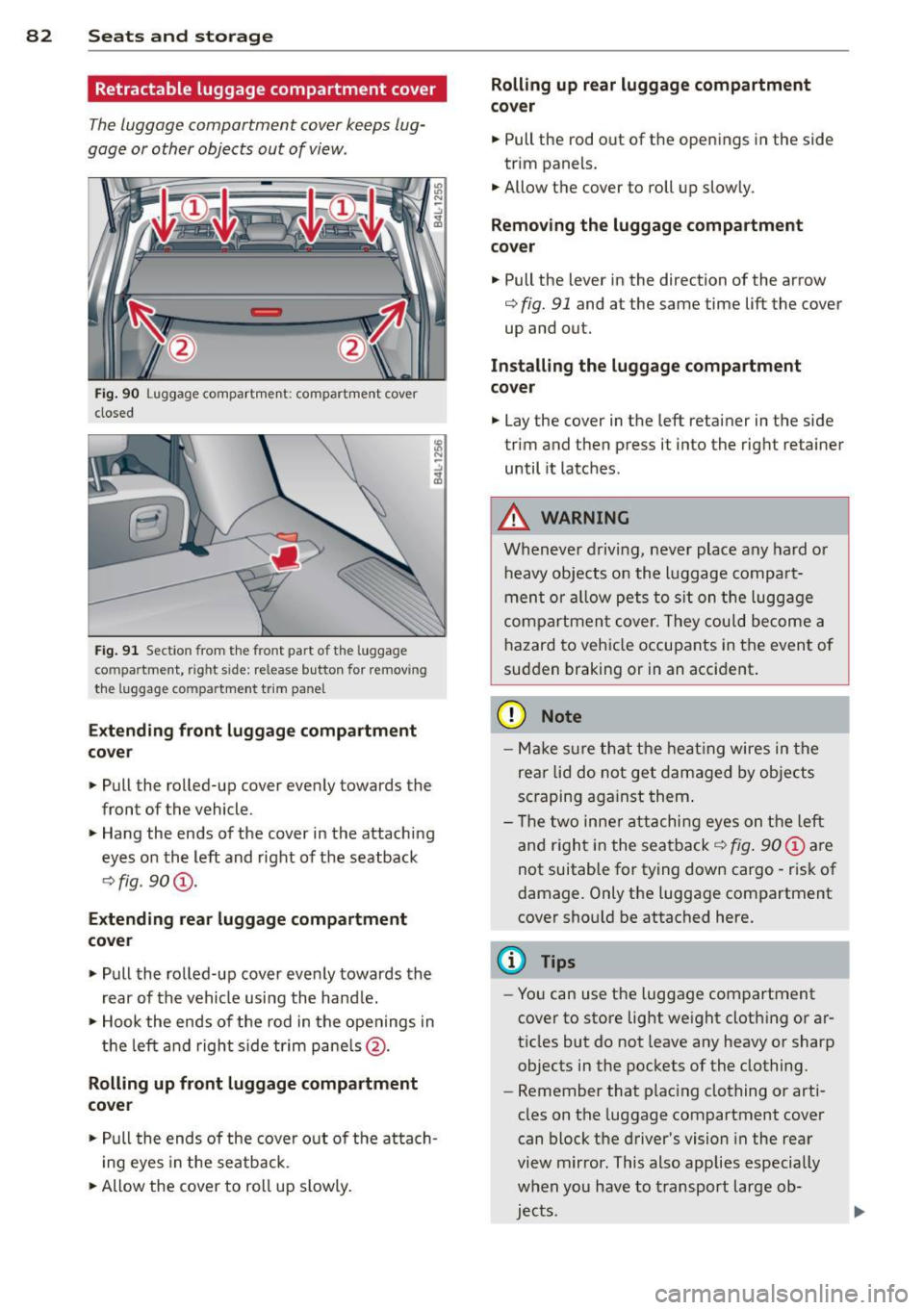
Fig. 90 Luggage compartment: compartment cover
closed
Fig . 91 Section from the front part of t he luggage
compartment, right side: release button for removing
the lu ggage compartme nt trim panel
Exte nding f ront luggag e co mpa rtment
c o v er
.. Pull the rolled-up cover evenly towards the
front of the vehicle.
.. Hang the ends of the cover in the attaching
eyes on the left and right of the seatback
q fig. 90@.
Extendi ng re ar luggage compartment
cove r
.. Pull the rolled-up cover evenly towards the
rear of the vehicle using the hand le.
.. Hook the ends of the rod in the openings in
t h e left and right s ide tr im pane ls @ .
Rolling up f ront luggage compa rtment
co ver
.. Pull the ends of the cover o ut of the atta ch
i ng eyes in the seatback.
.. Allow the cover to roll up slowly.
Rolling up r ear luggag e compartm ent
co ve r
.. Pull the rod out of the openings in the side
trim panels .
.. Allow the cover to roll up slowly.
Remov ing the lug gag e compartment
co ve r
.. Pull the lever in the direction of the arrow
q fig. 91 and at the same time lift the cover
up and out.
In stalling the luggag e comp artm ent
co ver
.. Lay the cover in the left retainer in the side
trim and then press it into the right retainer
until it latches .
A WARNING
Whenever driving, never place any hard or
heavy objects on the luggage compart
ment or a llow pets to s it on the luggage
compartmen t cover. They could become a
hazard to vehicle occupants in the event of
sudden braking or in an accident .
(D Note
-Make s ure that the heat ing wires in the
rea r lid do not get damaged by objects
sc raping aga inst them .
- T he two inne r attachi ng eyes on the left
and r ight in the seatback
q fig . 90 @ are
not suitable for tying down cargo -risk of
damage. Only the luggage compartment
cover should be attached here.
(D Tips
- You can use the luggage compartment
cover to store light weight clothing or ar
ticles but do not leave any heavy or sharp
objects in the pockets of the clothing.
- Remember that plac ing clothing or arti
cles on the luggage compartment cover
can block t he driver's vision in the rear
view m irror . This also applies especially
when you have to transport large ob
jec ts.
Page 91 of 340
-Any articles of cloth ing that you have
hung up must not interfere with the driv
er's view. The coat hooks are designed
only for lightweight clothing. Never hang
any clothing with hard, pointed or heavy
objects in the pockets on the coat hooks.
During sudden braking or in an accident -
especially if the airbag is deployed -
these objects could injure any passen
gers inside the vehicle.
Glove compartment
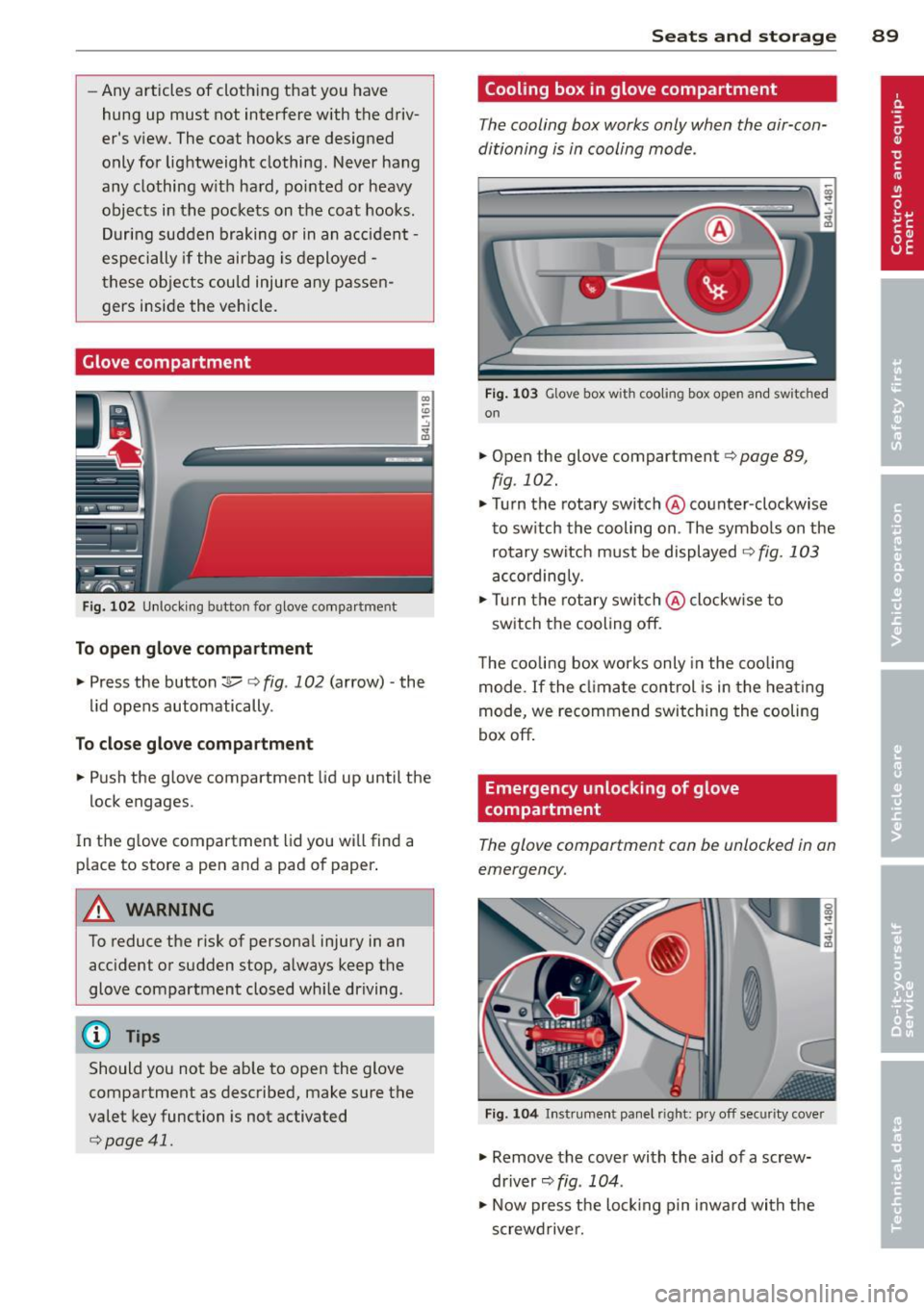
Fig. 102 Unlocking button for glove compa rtment
To open glove compartment
.. Press the button:]...--r=> fig . 102 (arrow) -the
lid opens automatically .
To close glove compartment
.. Push the glove compartment lid up until the
lock engages.
In the g love compartment lid you will find a
p lace to store a pen and a pad of paper .
A WARNING
To reduce the risk of persona l injury in an
accident or sudden stop, always keep the
glove compartment closed whi le driving.
(D Tips
Should you not be able to open the glove
compartment as described, make sure the
valet key function is not activated
r=>poge 41.
Seats and storage 89
Cooling box in glove compartment
The cooling box works only when the air-con
ditioning is in cooling mode .
Fig . 1 03 Glove box with cooling box open an d switched
on
.. Open the glove compartment r=> page 89,
fig.
102 .
.. Turn the rotary switch @counter -clockwise
to switch the cooling on . The symbols on the
rotary switch must be displayed
9 fig . 103
accordingly .
.. Turn the rotary switch@clockw ise to
switch the cooling off.
The cooling box works only in the cooling
mode .
If the climate control is in the heating
mode, we recommend switching the cooling
box off.
Emergency unlocking of glove
compartment
The glove comportment con be unlocked in on
emergency.
Fig. 104 In strument panel right: pry off sec urity cover
.. Remove the cover with the aid of a screw
driver ~
fig. 104 .
.. Now press the locking p in inward with the
screwdrive r.
Page 96 of 340
94 Warm and cold
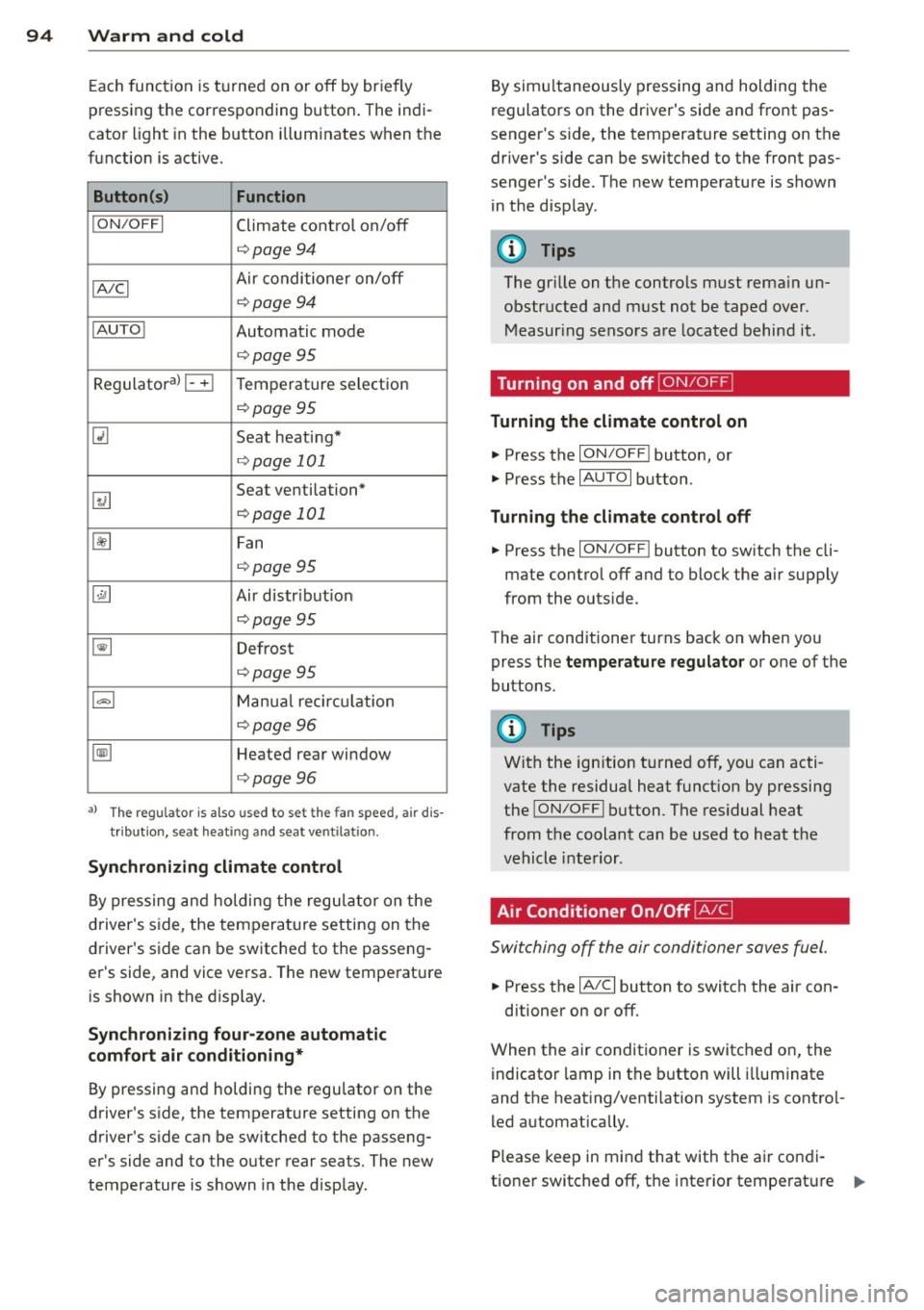
Each function is turned on or off by briefly
pressing the corresponding button . The indi
cator light in the button illum inates when the
function is active.
Button (s ) Function
ION /OFFI Climate control on/off
c> page94
IA/C l Air conditioner on/off
c>page94
IAU TO I Automatic mode
¢page 95
Regulatora) G Temperature selection
c>page95
[tl Seat heating*
¢page 101
~
Seat ventilation*
i=>page 101
~ Fan
¢page 95
Qi] Air distr ibut ion
c> page95
~ Defrost
i=>page 95
~ Manua l recircu lation
c> page96
~ Heated rear window
i=>page 96
al T he regulat or is also used to set t he fa n sp eed, air dis
t ribution, seat heat ing and sea t ve ntila tion .
Synchr oniz ing clim ate control
By pressing and holding the regu lator on the
d river's side , the temperature setting on the
driver's side can be switched to the passeng
er's side, and vice versa. The new temperature is shown in the display.
Synchronizing fou r-zone autom atic
comfort air conditi oning*
By pressing and holding the regu lator on the
driver's side, the temperature setting on the
driver's s ide can be sw itched to the passeng
er's side and to the outer rear seats. The new
temperature is shown in the disp lay . By simu
ltaneously pressing and holding the
regulators on the driver's side and front pas
senger's s ide, the temperature setting on the
driver's side can be switched to the front pas
senger's s ide . The new temperature is shown
in the disp lay .
(D Tips
The gr ille on the controls must rema in un
obstr ucted and must not be taped over.
Measur ing sensors are located behind it .
Turning on and off~
Turning the climate control on
.,. Press the ION/OF F! button, or
.,. Press the
IAUTO I button.
Turning the climate control off
.,. Press the ION/OF Fj button to sw itch the cli
mate contro l off and to block the air supply
from the outs ide.
The air conditioner turns back on when you press the
temperatu re regulator or one of the
buttons.
(D Tips
With the ign ition t urned off, you can acti
vate the residua l heat funct ion by pressing
the
ION/O FF I button . The res idual heat
from the coolant can be used to heat the
vehicle interior .
Air Conditioner On/Off~
Switching off the air conditioner saves fuel .
.,. Press the IAIC I button to switch the air con-
ditioner on or off.
When the air conditioner is switched on, the indicator lamp in the b utton will illum inate
and the heat ing/venti lation system is contro l
led automatically .
P lease keep in mind that with the air condi
tione r switched off, the interior tempe rat ure ..,_