cruise control AUDI Q7 2014 Owner´s Manual
[x] Cancel search | Manufacturer: AUDI, Model Year: 2014, Model line: Q7, Model: AUDI Q7 2014Pages: 340, PDF Size: 85.02 MB
Page 4 of 340
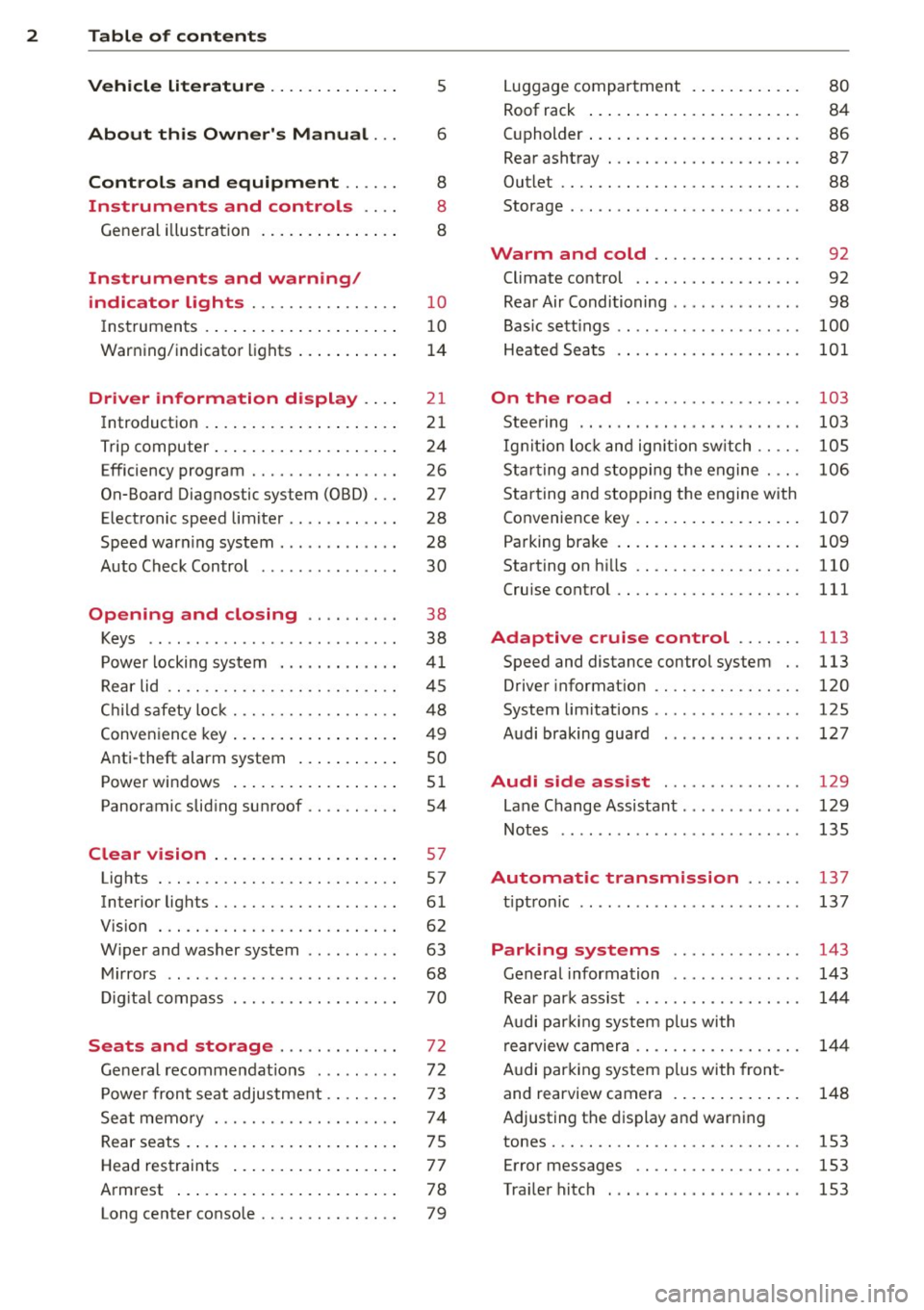
2 Table of contents Vehicle literature .. .. .. .. .. ... .
About this Owner's Manual ...
Controls and equipment .. ... .
Ins truments and controls .. . .
General illus tration .... ... .. .. ... .
Instruments and warning /
indicator lights ........ .. .. .. . .
Ins truments . .. .. ..... ... .. .. ... .
War ning/ indi cator lights ... .. ... .. .
Driver information d isplay .. . .
Introduct ion . .. .. ..... ... .. .. ... .
Trip computer .. .. ..... ... .. .. ... .
Efficiency program ........ .. .. ... .
On-Board Diagnostic system (OBD) . . .
Elect ronic speed limiter .. .. .. .. .. . .
Speed war ning system ...... ..... . .
Auto Check Control ........ ... .. . .
Opening and closing .. .. .. .. . .
Keys .. .. .. ................ ... . .
P owe r locking system . .. .. .. .. .. . .
R ear lid .. .. .. . .......... .. .. .. . .
C hild sa fety lo ck .......... .. .. .. . .
Conven ien ce key .. ..... ... .. .. ... .
Anti-theft alarm system ... .. ... .. .
Power win dows .. ..... ... .. .. ... .
Panoramic slid ing sun roof .. .. .. ... .
Clear vision .. .. ..... ... .. .. ... .
Lights . .. .. .. . .......... .. .. ... .
Inter ior lights ............. ... ... .
V 1s 1on . ...... ........... .... ... .
W iper and washer system . ... .. .. . .
M ir rors .. .. ................ ... . .
D ig ita l compass . ...... ... .. .. .. . .
Seats and storage ......... .. . .
G en eral recomme ndat ions ... .. .. . .
P owe r fron t seat adjus tment .. .. .. . .
Se at mem ory ............ .. .. ... .
Rear seats . ... . .. ..... ..... .. ... .
Head res traints .. ..... ... .. .. ... .
A rmrest .... .. .. ..... ... .. .. ... .
5
6
8
8
8
10
10
1 4
21
21
24
26
27
28
28
30
38
38
41
4 5
48
49
so
5 1
54
57
57
61
62
63
68 70
72
72 7 3
74
7 5
7 7
78
Long center conso le . . . . . . . . . . . . . . . 79
Lugga ge compartment . ..... .... . .
Roof rack ..... .. .. ... ..... ... .. .
( upholder ... .. .. .. ... .. .. .. .. .. .
Rear asht ray ..... ............. .. .
Out let .... .... .. ............. .. .
Storage ...... ... .. ............. . 80
84
86
87
88
88
Warm and cold . . . . . . . . . . . . . . . . 92
Climate control . . . . . . . . . . . . . . . . . . 92
Rea r Air Conditioning . . . . . . . . . . . . . . 98
Bas ic sett ings . . . . . . . . . . . . . . . . . . . .
100
Heated Sea ts . . . . . . . . . . . . . . . . . . . . 101
On the road . . . . . . . . . . . . . . . . . . . 103
Stee ring .. .. ... . .. ... .. ... ... .. . 103
Ig nition lo ck and ig nition sw itch . . . . . 105
St arti ng and sto pp ing t he engine . . . . 10 6
S tar ting and stopping the engine with
Co nvenience key . . . . . . . . . . . . . . . . . .
107
Pa rking bra ke . . . . . . . . . . . . . . . . . . . . 109
Starting on h ills . . . . . . . . . . . . . . . . . . 110
Cru ise contro l . . . . . . . . . . . . . . . . . . . . 111
Adaptive cruise control . . . . . . . 113
Speed and distance control system . . 113
Driver informat io n . . . . . . . . . . . . . . . . 120
System limitations . . . . . . . . . . . . . . . . 125
Audi braking gua rd . . . . . . . . . . . . . . . 127
Audi side assist . . . . . . . . . . . . . . . 129
Lane Change Assistant. . . . . . . . . . . . . 129
Not es . . . . . . . . . . . . . . . . . . . . . . . . . . 135
Automatic transmission ... .. .
tip tron ic ... ... .. .. ........ ... .. .
Parking systems
General information
Rea r park assist .. ... ... .... ... .. .
Audi par king syste m plus with
re arview c amer a .. ............... .
A udi par kin g sys tem p lus with fron t-
and rearview camera . .. ..... ... .. .
137
137
143
143
144
14 4
148
Adjusting the display and warn ing
tones..... .... .. .. ........... ...
153
Err or messages . . . . . . . . . . . . . . . . . . 153
Traile r hitc h . . . . . . . . . . . . . . . . . . . . . 153
Page 11 of 340
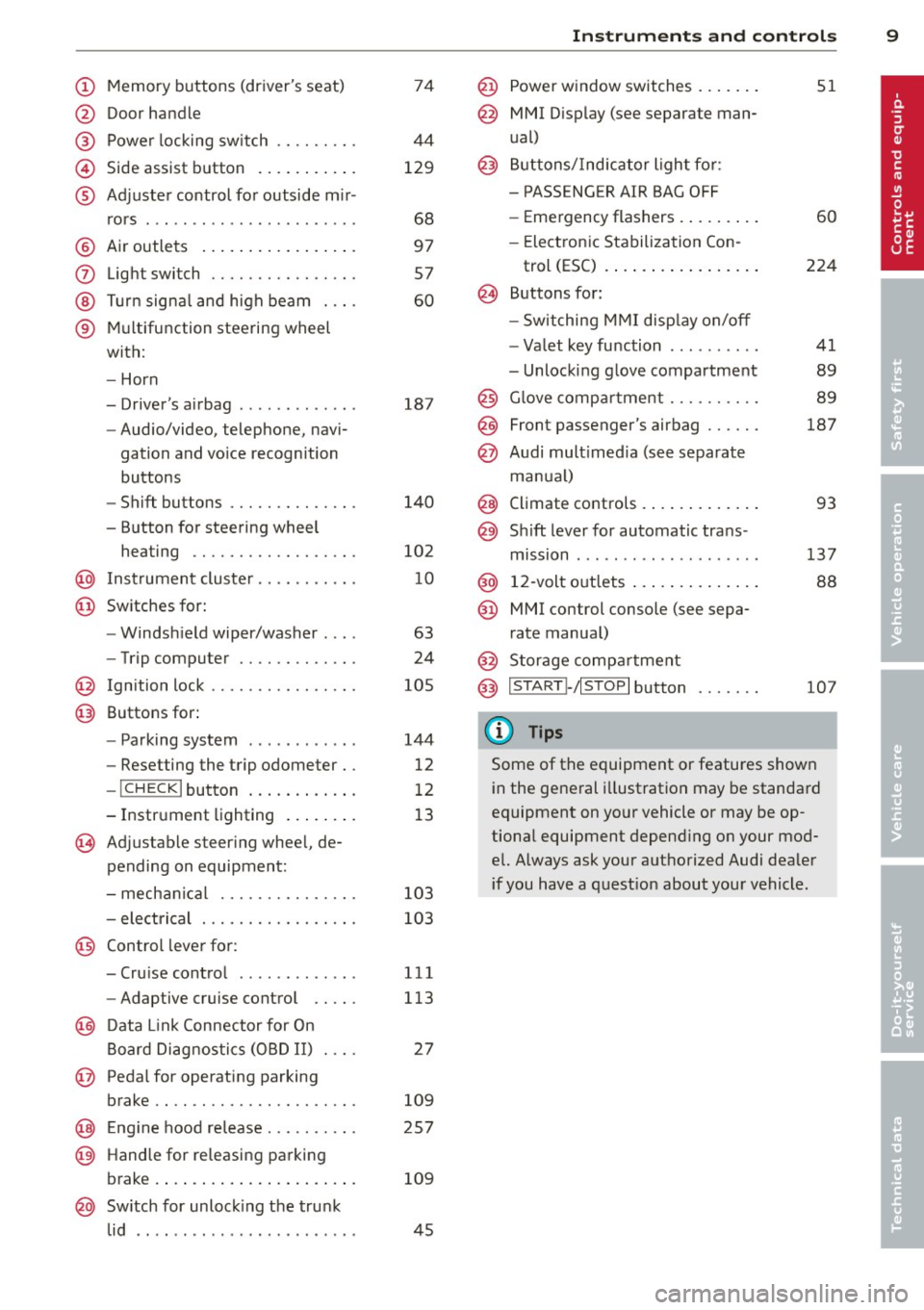
(!) Memory buttons (driver's seat)
@ Door handle
@ Power locking switch .... .. .. .
© Side assist button .......... .
® Adjuster control for outside m ir-
rors .... ... ............... .
@ Air outlets ................ .
(J) Light switch ........... .... .
@ Turn signal and high beam . .. .
® Multifunction steering wheel
with:
- Horn
- Driver's airbag ............ .
- Audio/video, telephone, navi-
gation and vo ice recognition
buttons
- Shift buttons ......... .. .. .
- Button for steering wheel heating ............. .... .
@ Instrument cluster ...... .. .. .
@ Switches for:
- Windshield wiper/washer . .. .
- Trip computer ........ .. .. .
@ Ignition lock ........... .... .
@ Buttons for:
- Parking system
- Resetting the trip odometer ..
- !CHECK lbutton ... ' ... .... .
- Instrument lighting ....... .
'3 Adjustable steer ing wheel, de
pending on equipment:
- mechanical .......... .... .
- electrical ............ .... .
@ Control lever for:
74
44
129
68
97 57
60
187
140
102 10
63
24
105
144
12
12
13
103
103
- Cru ise control . . . . . . . . . . . . . 111
- Adaptive cruise control . . . . . 113
@ Data Link Connector for On
Board Diagnostics (OBD II) . . . . 27
@ Pedal for operating parking
brake . . . . . . . . . . . . . . . . . . . . . . 109
@ Engin e hood release . . . . . . . . . . 257
@ Handle for releasing parking
brake. ..... .... .... ... .. .. . 109
@ Switch for unlock ing the trunk
lid . . . . . . . . . . . . . . . . . . . . . . . . 45
Instruments and controls 9
@ Power window switches ...... .
@ MMI Display (see separate man
ual)
@ Buttons/Indicator light for:
- PASS ENG ER AIR BAG OFF
- Emergency flashers ........ .
- Electronic Stabilization Con-
trol (ESC) ...... . ......... .
@ Buttons for:
- Switching MMI display on/off
- Valet key function ......... .
- Unlocking glove compartment
@ Glove compartment ......... .
@ Front passenger's airbag ..... .
@ Audi multimed ia (see separate
manua l)
@ Climate controls . .. .. .. ..... .
@) Sh ift lever for automatic trans -
mission ....... .. .......... .
@ 12-volt outlets ... . .. .. ..... .
@ MMI control console (see sepa
rate manual)
@ Storage compartment
@ IS TART I- / IS T OPI button
(D Tips
51
60
224
41
89
89
187
93
137
88
107
Some of the equipment or features shown
in the general illustration may be standard
equipment on your vehicle or may be op
tional equipment depend ing on your mod
el. Always ask your authorized Audi dealer
i f you have a question about your vehicle .
Page 16 of 340
14 Instruments and warning/indicator lights
Warning/indicator lights
Overview
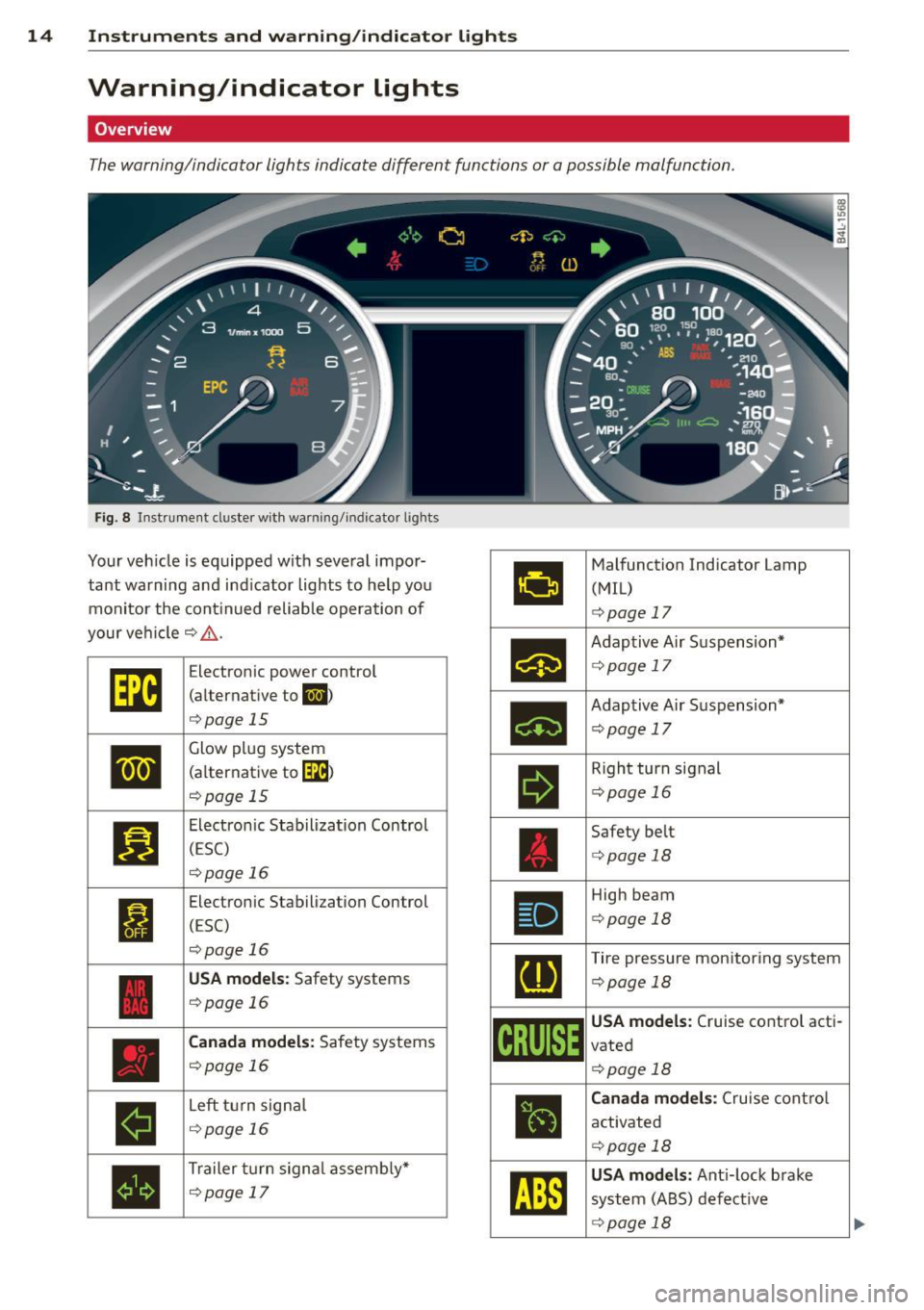
The warning/indicator lights indicate different functions or a possible malfunction.
Fig . 8 Instrument duster w ith warning/indicator ligh ts
Your veh icle is equipped with several impor·
tant warning and indicator lights to help you
monitor the continued reliable operation of
your vehicle¢ _&.
•
II
•
Electron ic power control
(alternative to
II)
¢page 15
Glow plug system
(a lternative to
[3B)
¢page 15
Electronic Stabilization Control
(ESC)
¢page 16
Electronic Stabilization Control
(ESC)
¢page 16
USA models: Safety systems
¢page 16
Canada models: Safety systems
¢page 16
Left turn signa l
¢page 16
Trailer turn signa l assembly*
¢page 17
•
Malfunction Indicator Lamp
(MIL)
¢ page 17
•
Adaptive Air Suspension*
c:>page 17
•
Adaptive A ir Suspension*
¢pag e 17
II
Right turn signal
¢page 16
Safety belt
c:>page 18
Ill
High beam
c:>page 18
[I]
Tire pressure monitoring system
c:>page 18
~i[~~1~
USA models: Cruise control acti·
vated
c:>page 18
•
Canada models: Cruise contro l
activated
c:>page 18
rm
USA models: Anti-lock brake
system (ABS) defective
¢ page 18
Page 17 of 340
Instrument s and warnin g/indic ator ligh ts 15
Canada m od els: Anti-lock brake
system (ABS) defective
¢ page 18
USA mode ls: Parking brake
¢page 19
Canada models : Parking brake
¢page 19
USA models: Brake malfunction
¢page 19
Canada m odels : Brake malfunc
tion
¢page 19
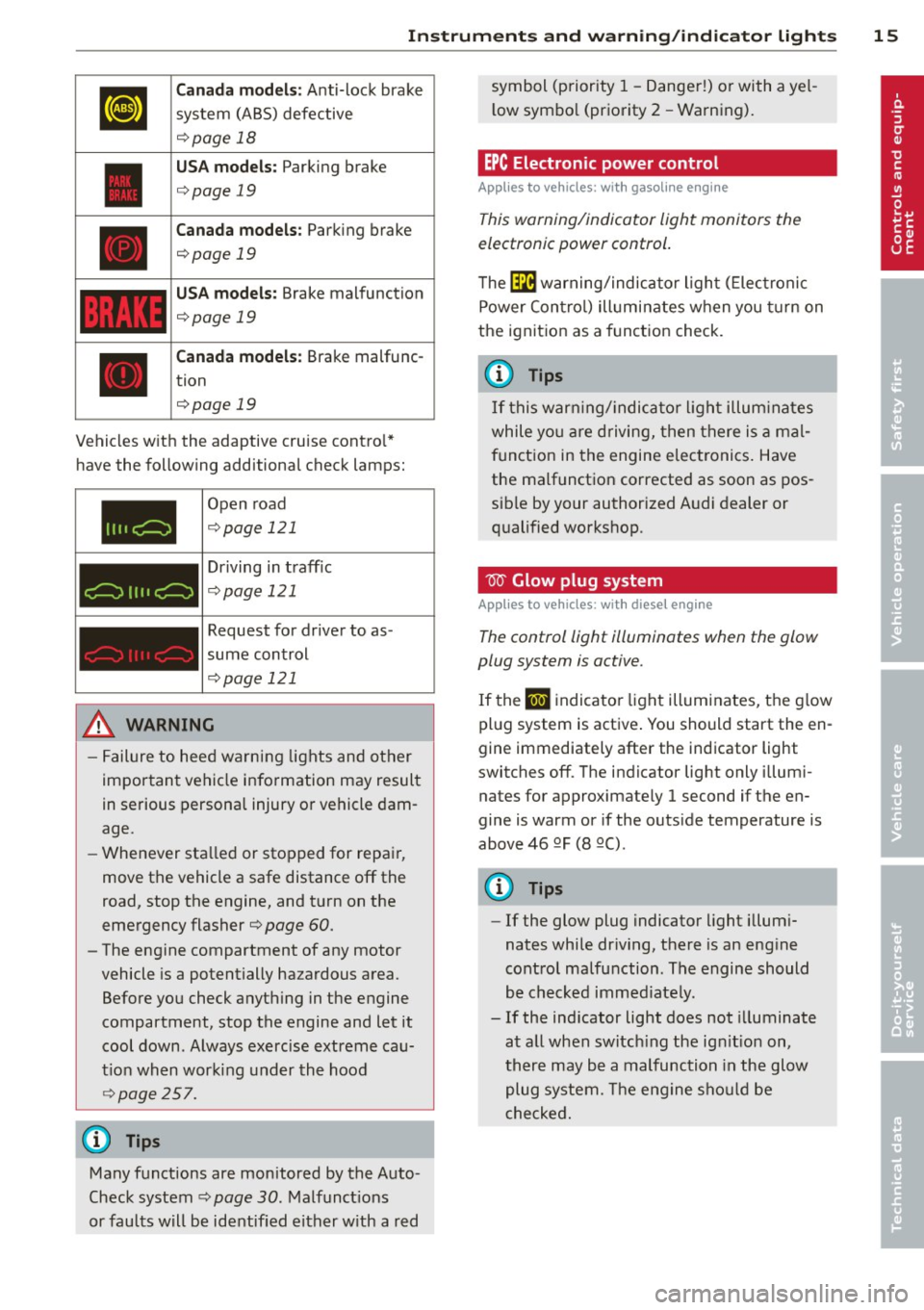
Vehicles w ith the adaptive cruise contro l*
have the following additiona l check lamps:
I I II c:=:)
c:=:)
I I I I c:=:)
Open road
¢ page 121
Driving in traff ic
¢ page 121
Request for driver to as
sume control
¢page 121
_& WARNING
- Failure to heed warning lights and other
important vehicle info rmation may result
in serious persona l injury or vehicle dam
age.
- Whenever sta lled or stopped for repair,
move the vehicle a safe distance off the
road, stop the engine, and turn on the
emergency flasher¢
page 60.
- The engine compartment of any motor
vehicle is a potentially hazardous area.
Before you check anything in the engine
compartment, stop the engine and let it cool down . Always exercise extreme cau
t ion when working under the hood
~ page 257.
Many functions are monitored by the Auto
Check system ¢
page 30. Malfunct ions
or faults will be identified e ither w ith a red symbol (priority 1
-Danger!) or with a ye l
l ow symbo l (priority
2 - Warning).
EPC Electronic power control
Applies to vehicles : with gasoline e ngine
This warning/indicator light monitors the
electronic power control .
The ~ warning/indicator light ( Electronic
Power Contro l) illuminates when you turn on
the ignition as a function check.
(D Tips
If this warn ing/ indica tor light illum inates
while yo u are d riving, then there is a mal
funct ion in the engine electronics. Have
the malfunct ion corrected as soon as pos
sib le by your authorized A udi dealer or
qualified workshop .
W Glow plug system
Applies to vehicles: wit h diese l eng ine
The control light illuminates when the glow
plug system is active.
If the lml indicator light illuminates, the g low
pl ug system is active . You should start the en
gine immediately after the indicator light
switches off. The indicator light only illum i
nates for approximately 1 second if the en
gine is warm or if the outs ide temperature is
above 46 QF (8 QC) .
(D Tips
-If the glow plug indicator light i llum i
nates while dr iving, there is an eng ine
cont rol malfunction . The engine should
be checked immed iate ly .
- If the ind icator light does not illuminate
at all when switch ing the ig nition on,
there may be a malfunction in the glow
plug system. The engine sho uld be
c hecked.
Page 20 of 340
18 Instruments and warning/indicator lights
the dynamic mode is activated and if the ig
nition is switched on¢
page 155, Chassis
controls .
-If the warning/indicator light flashes in con
junction with the
IIJ warning/indicator
li ght, you shou ld not drive the vehicle imme
diately in order to prevent damage to the
underbody . The two warning/indicator
lights flashing together points to an ex
treme Low level. A very
pronounced lower
ing
of the veh icle (ext reme Low level) can re
sult, for example, from a heavy load. As
soon as the level has ret ur ned to normal
I
the warning/indicator lights stop flashing,
and yo u can drive away.
{[) Note
If the warn ing/ ind icator light flashes in
conjunction with the
IIJ warning/indica
tor light, you should not drive the vehicle
because low-lying vehicle parts can bot
tom out as you drive over uneven ground
and be damaged as a result.
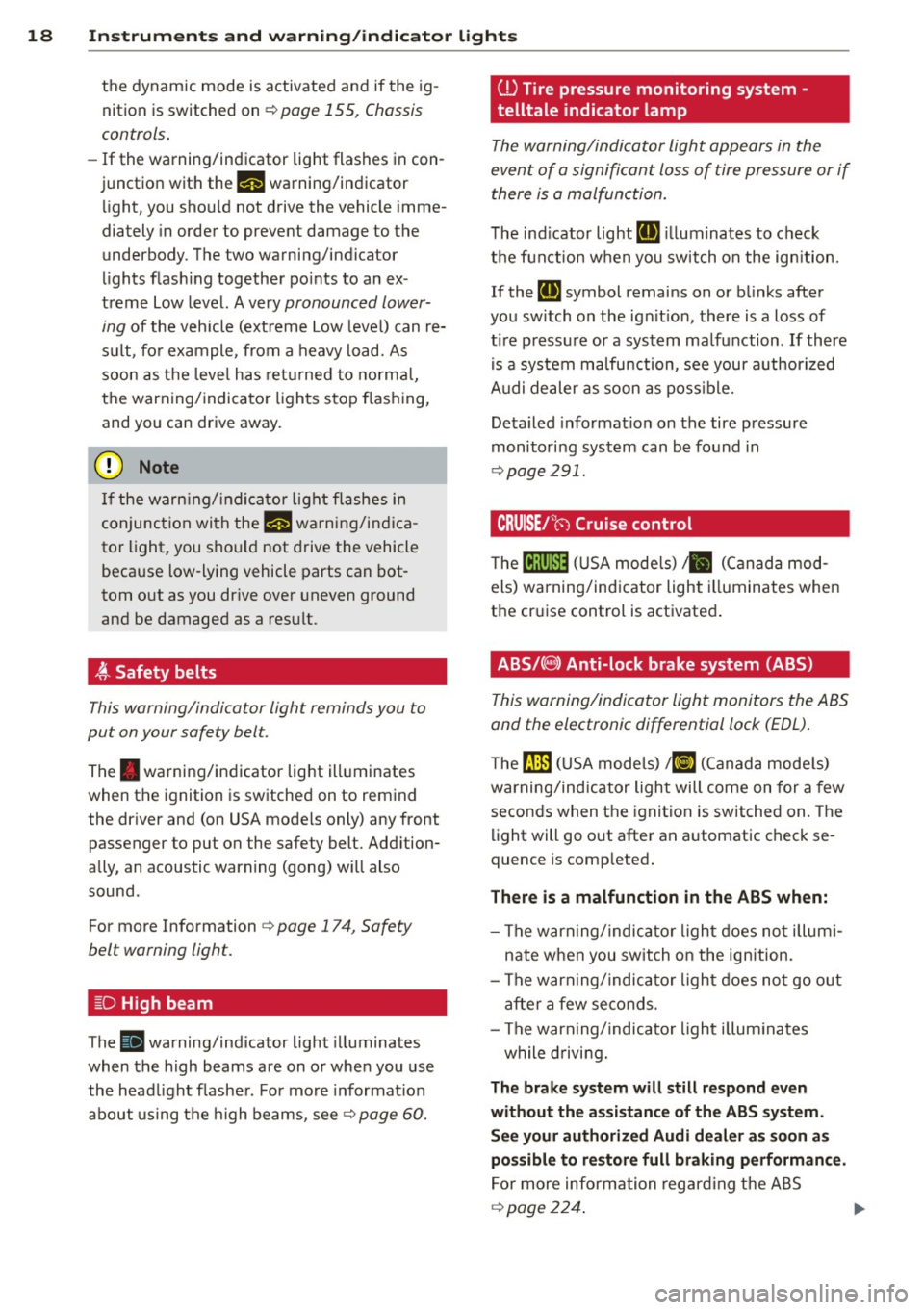
~ Safety belts
This warning/indicator light reminds you to
put on your safety belt.
The . warning/indicator light illuminates
when the ignition is switched on to remind
the driver and (on USA models only) any front passenger to put on the safety belt. Add ition
ally, an acoustic warning (gong) w ill also
sound.
For more Information
¢ page 17 4, Safety
belt warning light.
~D High beam
The II warning/indicator light illuminates
when the high beams are on or whe n you use
the head light flasher . For more informat ion
about using the high beams, see¢
page 60.
ill Tire pressure monitoring system -
telltale indicator lamp
The warning/indicator light appears in the
event of a significant loss of tire pressure or if
there is a malfunction.
The indicator light [D] ill uminates to check
the function when you switch on the ignition.
If the
[D] symbol remains on or blinks after
you sw itch on the ign it ion, there is a loss of
t ir e p ressure or a system malfunction . If there
is a system malfunction, see your authorized
Audi dealer as soon as possible.
Detailed informat ion on the tire pressure
monitoring system can be found in
¢page 291.
. CRUISE /''(") Cruise control
The lij;(l )~i~ (USA mode ls) ,11 (Canada mod
els) warning/indicator light illuminates when
t h e cruise control is activated .
ABS/(8) Anti-lock brake system (ABS)
This warning/indicator light monitors the ABS
and the electronic differential lock (EDL) .
The ~ (USA models) 1(1] (Canada models)
warning/indicator light will come on for a few
seconds when the ignition is switched on. The
lig ht will go out after an automatic check se
quence is comp leted .
There is a malfunction in the ABS when:
-The warning/indicator light does not illumi
nate when you switch o n the ignition.
- The warning/indicator light does not go out
after a few seconds.
- The warning/indicator light illum inates
while driving.
The brake system will still respond even
without the assistance of the ABS system.
See your authorized Audi dealer as soon as
possible to restore full braking performance.
For more information regarding the ABS
¢page 224. II>-
Page 23 of 340

Driver information
display
Introduction
General notes
The driver information display inside the in
strument cluster provides you, the driver ,
with much useful information .
Fig. 9 In st ru men t cl uster: ce nte r dis p lay
Info rmation from the Drive r Information Sys
tem is shown in the display in the center of
t he instrument cl uster .
When you turn on the ignition and while you
are driving, some functions and vehicle com ponents are scanned fo r their operating sta
t us. Malfunc tions or required service proce
dures are signal led aud ibly and shown by red
and yellow lighted symbols and rem inders to
the dr iver in the display.
T he driver i s also shown information abou t ra
d io and CD operation and directions for the
nav igation system . You can f ind additional in
formation on these subjects in the MMI man
ua l.
The Driver Information System prov ides the
following functions:
Sound system disp lay ¢
page 21
Outside air temperature ¢page 22
Digital speedometer ¢
page 22
Door open indicator ¢page 22
D efective light b ulb ¢
poge23
Serv ice i nte rval display ¢page 23
Auto Check system ¢
page 30
Driver information ¢
page 30
Driver inform ation di spl ay 21
Speed warning system ¢page28
T rip computer ¢
page24
Cruise con trol ¢page 111
Adapt ive cruise control* ¢
page 113
Selector lever pos ition ¢page 137
Adapt ive Air Suspension * i=>
page 158
Tire pressure monitoring ¢page 291
(D Tips
In the event of a malfunction either a red
or yellow icon appears in the display . Red
symbols indicate
Dang er ¢ page 31 . Yel
l ow symbo ls indicate a
Warning
¢ page 34.
Sound system display
Fig. 10 D isp lay: so un d syste m
If priority 1 or pr iority 2 faults are not shown
by the Auto Check Control, the name of the ra
dio station you are tuned to or t he frequency
and the recept ion range are shown in the up
per area of the d isplay.
When the CD is in use, the tit le of the track
being played is shown . T he number of the CD
(CDI to CD6) cur rently be ing played is also
shown.
Page 41 of 340
The transmitter and battery a re located in the
head of the remote control. The receiver is lo
cated inside the vehicle. The maxim um effec
tive range depends on several things. Remem
ber, if the battery is weak, the effective range
decrease s.
If you need to replace the remote contro l, or if
you need to have it repaired, you must see
your author ized Audi dealer. Only then can
you use the key again .
Personalizing the ma ster key
When t he ignit ion is t urned off or when the
veh icle is locked, vari ous conven ience settings
are stored automatically and assigned to the
key that was used . The settings that are as
signed to the maste r key are recalled auto
ma ticall y when the veh icle is unlocked, when
the door is opened o r when th e ignition is
sw itched on .
Sett ings are saved for the following systems :
- Climate control
- Central lock ing
-W indows
- Am bien ce light ing*
- Seat memory*
- Steering w heel heat ing*
- Adaptive cruise control*
- Audi side ass ist*
- Pa rking system*
The
Remote control key f unc tion mus t be ac
t iv at ed in t he MMI ¢
page 75, so that the
set tings for the driver 's seat (i ncluding the
settings for the steering co lumn and exter ior
mirrors) are saved on the master key through
the seat memory when the vehicle is locked,
and a re set automatically when the ve hicle is
u nl ocked.
(D Tips
- If
the ignition is sw itched on, t he remote
contr ol system is deact ivated.
- The remote control system can be affec t
ed by other systems operating in the
same frequency range close to the vehi-
Opening and clo sin g 39
cle, such as mo bile telep hones, televi
sion broadcast ing stations, etc .
- F or Declara tion of Com pliance to United
States FCC and In du stry Canada re gula
ti ons¢
page 319.
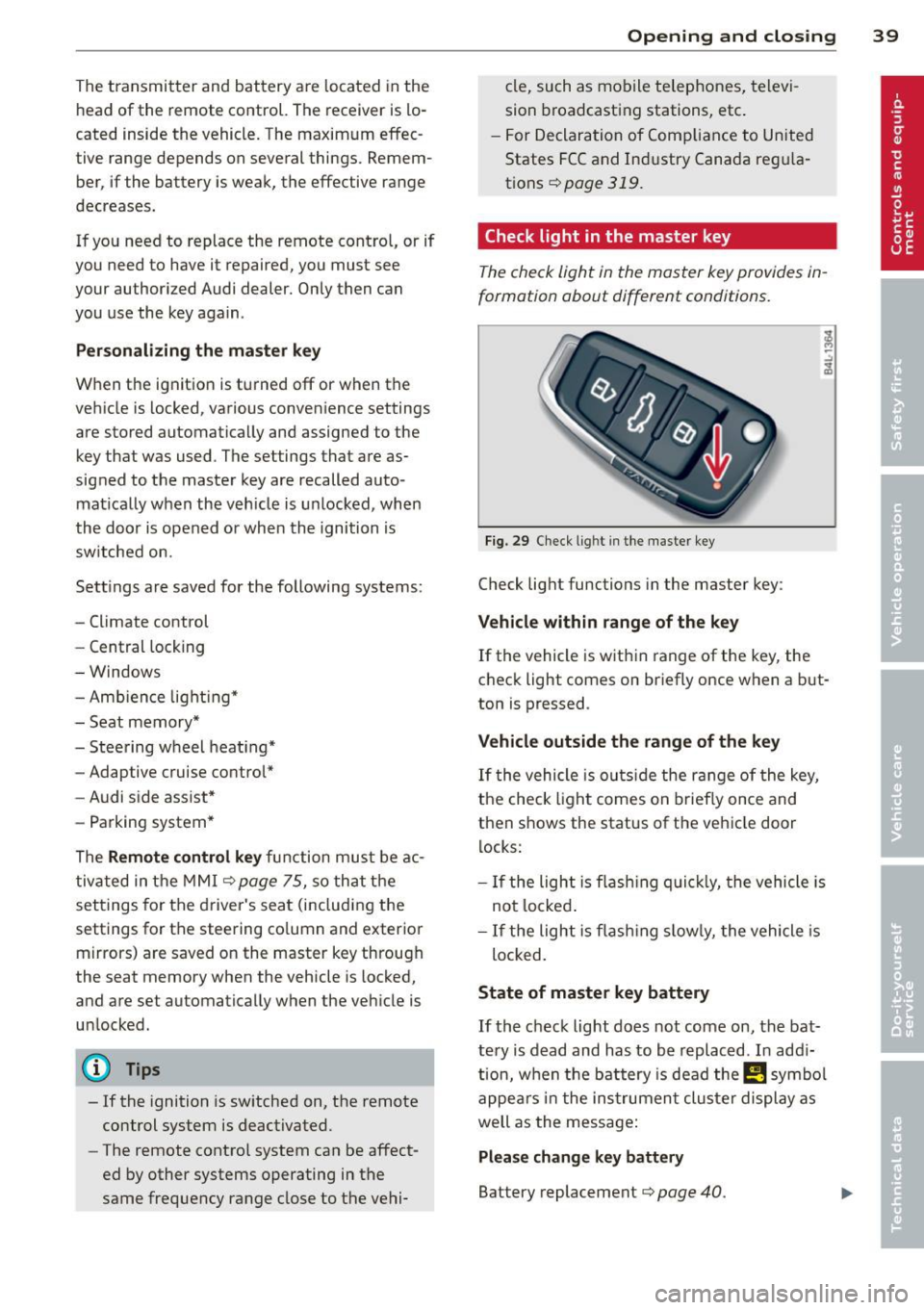
Check light in the master key
The che ck light in the m aster key provides in
formation about different conditions .
Fig. 29 Ch eck l ig ht in t he m aster key
Check lig ht functions in the master key :
Vehicle within range of the key
If
the vehicle is w it hi n range of the key, the
c heck light comes on br iefly once when a b ut
ton is pressed .
Vehicle outside the range of the key
If
t he vehicle is ou ts id e the r ange of the key,
the check light comes on brie fly once and
then shows the status of the vehicle door l ocks:
- If the ligh t is fla shin g qu ickl y, the vehicle is
no t locke d.
- If the ligh t is f lash ing slow ly, the vehicle is
loc ked .
State of master key battery
If
t h e ch ec k light does not come on, the bat
te ry is d ead and has to b e re pla ced . In ad di
tio n, w hen the b attery is dea d
the m symbo l
appe ars in t he instrumen t clu ster displ ay a s
well as the mess age:
Please change key battery
Battery replacement ¢ page 40.
Page 113 of 340

brake pedal immediately or engage the
parking brake.
- Should the engine stall, depress the
brake pedal immediately or engage the
parking brake.
- In order to prevent the vehicle from roll
ing back unintentionally when starting in
stop-and-go traffic, keep the brake pedal
depressed for a few seconds before driv
ing off .
- When you leave the vehicle - even if only
briefly -, sw itch off the ignition and
make sure to remove the ignition key . Al
so engage the
park ing br ake to prevent
your vehicle from rolling u nintentionally.
Th is parti cularly applies if chi ldren are
left in the vehicle - danger of accident!
Cruise control
Switching the system on
Th e cruise control syst em makes it possible to
drive at a constant speed starting at
20 mph
(30kmlh).
Fig. 124 Contro l leve r wi th s et button
Fig. 125 D is play: Selected speed
.,. Pull the lever to position (D ~ fig . 124 to
switch the system on .
.,. Drive at the speed you wish to set.
On th e road 111
.,. Press button @to set that speed.
The sto red speed and the indicator light
ltj;\l)~iJ (US mode l) fill (Canadian model) ap
pear in the instrument cluster display
~ fig. 125 . The display may vary depending on
the type of display in your vehicle.
A WARNING
- Always pay attention to traffic even when
the cruise control is switched on. You are
always responsible for your speed and
the distance between your veh icle and
other veh icles .
- For safety reasons, the cruise control
should not be used in the city, in stop
and-go traffic, on twisting roads and
when road conditions are poor (such as
ice, fog , gravel, heavy rain and hydro
p laning) - risk of accident.
- Turn off the cruise control temporarily
when en ter ing turn lanes, highway exit
lanes or in construction zones .
- Please note that inadvertently "resting"
your foot on the accelerator pedal causes
the cruise control not to brake. This is because the cruise control is overridden
by the driver's acceleration.
- Never use the cruise control when driving
off-road o r on unpaved roads. The cruise
control is intended for use only when the
vehicle is being operated on paved roads,
and is not suitable for use off-road or on
unpaved roads .
(D Tips
The cruise control cannot maintain a con
stant speed when driving downhill. The ve
hicle will accelerate under its own weight .
Downshift to a lower gear or use the
brakes to slow down.
Changing speed
.,. To increase/decrease the speed in incre
ments, tap the lever in the
0 10 direction
~ page 111, fig . 124 . Ill>-
Page 115 of 340
Adaptive cruise control Speed and distance
control system
Description
Applies to vehicles: with adaptive cruise cont rol
The adaptive cruise control driver assistance
program is a combined speed and distance
control system .
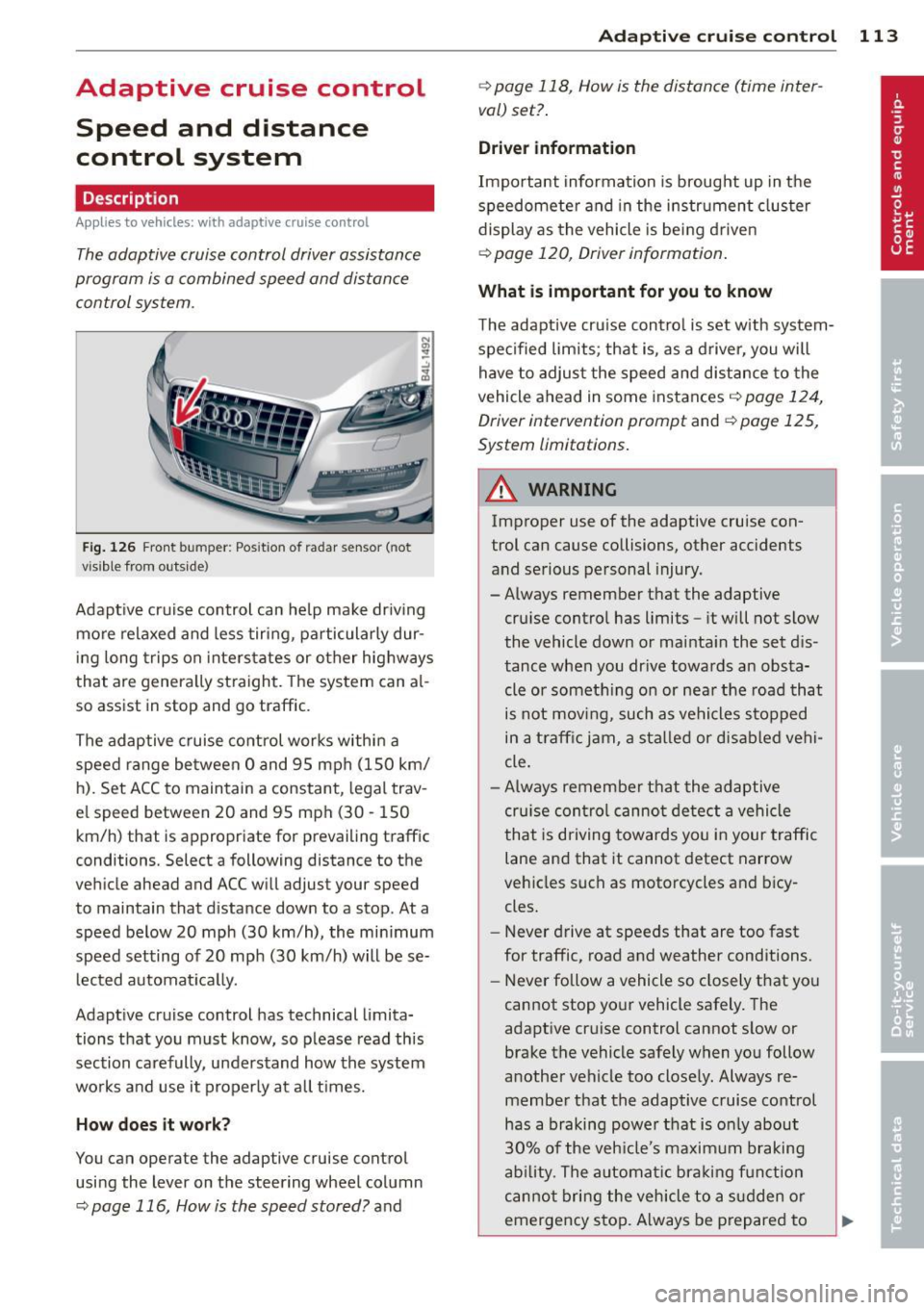
Fig . 126 Front bu mper: Pos itio n of r adar sen sor (not
vi sibl e from out side)
Adapt ive cruise control can he lp ma ke driv ing
more relaxed and less tiring , particularly dur
i n g long trips on interstates or other hig hways
that are genera lly st raight. The system can al
so ass ist in stop and go traffic .
The adaptive cruise co ntrol works within a
speed range be tween 0 and 95 mph (150 km/
h). Set ACC to maintain a constant , legal trav
el speed between 20 and 95 mph (30 -150
km/h) that is appropriate for prevailing traffic
conditions. Select a following distance to the
veh icle ahead and ACC will adjust your speed
to maintain that d istance down to a stop . At a
speed below 20 mph (30 km/h), the min imum
speed setting of 20 mph (30 km/h) will be se l ected automati ca lly.
Adaptive cruise control has technical limita
tions that you must know, so p lease read th is
section carefully , understand how the system
wo rks and use it properly at a ll times.
How does it work?
You can operate the adaptive cruise control
using the lever on the steering wheel column
c::> page 116, How is the speed stored? and
Ad apti ve crui se control 11 3
c::> page 118, How is the distance (time inter
val) set? .
Driver information
Important information is brought up in the
speedomete r and in the instr ument clus ter
display as the vehicle is being driven
c::> page 120, Driver informat ion .
What is important for you to know
The adaptive cru ise contro l is set w ith system
spe cified lim its; that is, as a driver, you will
have to adjus t the speed and distance to the
vehicle ahead in some instances
c:> page 124,
Driver intervention prompt
and c::> page 125,
System limitations.
A WARNING
Imp roper use of the adaptive cruise con
trol can cause collisions, other accidents
and serious personal injury.
- Always remember that the adaptive cru ise contro l has limits -it will not slow
the vehicle down or ma inta in the set d is
tance when you dr ive towards an obsta
cle or someth ing o n or nea r the road that
is not movi ng, such as ve hicles stopped
in a tra ffic jam, a sta lled or d is ab led vehi
cle.
- Always remembe r that the adaptive
cru ise con tro l canno t detect a vehi cle
that is driving towards yo u in your traffic
lane and that it cannot detect narrow
vehicles s uch as motorcycles and bicy
cles.
- Never drive at speeds that are too fast
for traffic, road and weather conditions.
- Never follow a vehicle so closely that yo u
cannot stop your vehicle safely. The
adaptive cruise control cannot s low or
brake the vehicle safely when you follow
another vehicle too close ly. Always re
membe r that the adaptive cruise control
has a braking powe r th at is o nly about
30% of the veh icle 's maxim um braking
ab ility. The a uto mat ic bra kin g f unction
canno t bring the veh icle to a s udden or
emergency stop . Always be p repared to
-
Page 116 of 340
114 Adapti ve crui se co ntrol
brake and take evasive action to avoid
collisions and other accident situations.
- Never allow the closing speed between
you and other vehicles to be so high that
the adaptive cruise control may not be
able to slow your vehicle safely. If clos
ing speed is too high, you must apply the
brakes yourself to reduce the risk of a
rear-end crash .
- Never rest your foot on the accelerator peda l, especia lly when the adaptive
cruise control is be ing used. Pressu re on
the accelerator w ill override the ACC
braking function and prevent the brakes
from being applied when ACC detects a situation when the brakes must be ap
plied.
- Never use adaptive cruise contro l when
you cannot drive safe ly at a steady
speed, including on city streets, on wind
ing roads or when road conditions are
poor (for example, on ice, gravel, in fog,
heavy rain or on wet roads that increase
the risk of hydroplaning) .
- The radar sensor 's
vision can be reduced
by rain, snow and heavy road spray .
T hese and sim ilar condit ions can prevent
vehicles up a head from being accurately
detected and in some cases they may not
be detected at al l. Do not use ACC when
the radar sensors cannot accurately de
tect vehicles moving ahead of yo u in traf
fic .
- Always turn off adaptive cruise contro l
when entering turn lanes , exit lanes and
construction zones or in similar situa
t ions because the vehicle will automati
cally accelerate to the stored speed when
the road ahead is clear.
- To prevent unintended operation, always
switch ACC off when it is not be ing used .
(D Tips
-For safety reasons, the stored speed is
deleted when the ignition is turned off .
- The E lectronic Stab ilizat ion Control (ESC)
i s automatically turned on when the
adaptive cruise control is turned on. You cannot switch the ESC into offroad mode
w hile the adaptive cruise contro l is
t u rned on
<=> page 225.
-Damage caused by accidents and some
mino r collisions can affect the radar sen
sor settings and cause the system to
malf unction or switch off completely.
- The radar sensor cover is heated. In win
ter conditions, you should st ill check be
fore dr iv ing to make sure it is free of ice
and snow. If necessary, clean the area
near the radar sensor carefully
<=> fig . 126 .
-To ensure that the radar sensor is not
blocked, foreign objects (e.g . stickers,
larger license plate mounts, add-on
parts) mus t not cove r the area near the
rada r senso r<=>
fig. 126. The are a near
the radar sensor m ust not be pa inted, e i
ther.
- For Declaration of Comp lia nce to United
States FC C and Ind ustry Canada reg ula
tions
<=> page 319.
How does adaptive cruise control work?
Applies to vehicles: wi th adap tive c ruise contro l
Vehicles traveling ahead are detected with
the aid of a radar sensor.
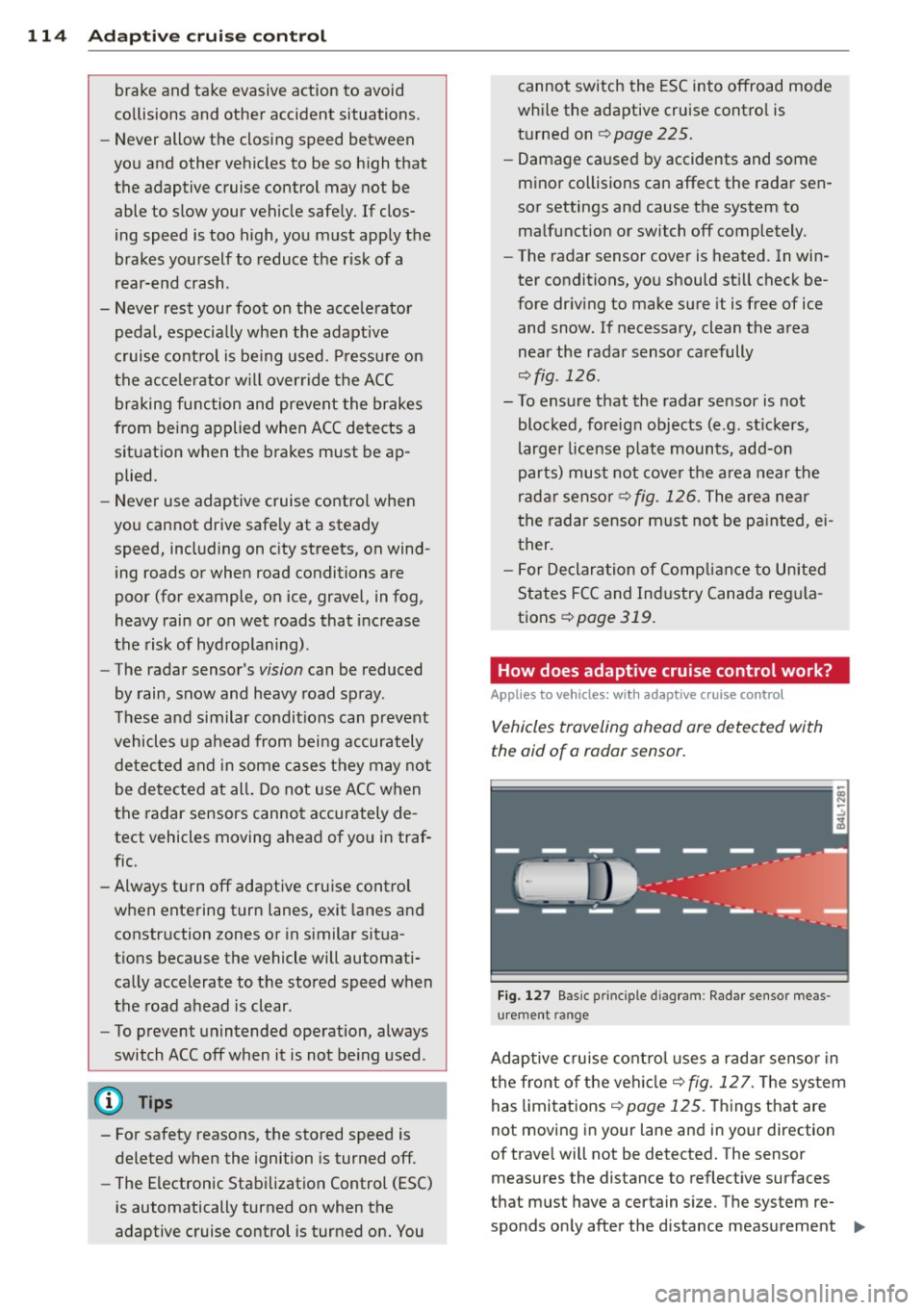
F ig. 127 Basic p rin ci pl e diag ram: Rada r se nso r me as
urement ra n ge
Adaptive cruise cont ro l uses a radar senso r in
the front o f the vehicle<=>
fig. 12 7. The sys tem
has limitations <=>
page 125 . Things that are
not moving in your lane and in your direction
of t rave l will not be detected. The sensor
measures the distance to reflect ive surfaces
tha t must have a ce rt a in s ize. The system re
spond s on ly after the distance measurement ..,.