cruise control AUDI Q7 2014 Owner´s Manual
[x] Cancel search | Manufacturer: AUDI, Model Year: 2014, Model line: Q7, Model: AUDI Q7 2014Pages: 340, PDF Size: 85.02 MB
Page 127 of 340
given to another person, the saved settings remain as they are .
System limitations
General information
Applies to vehicles: with adaptive cruise co ntrol
The radar sensor has limits that the driver
must know to be able to use ACC properly .
The adaptive cruise control works within lim its that are also related to radar sensor range
and sight distance . In some situations ACC
may react unusually or late from the driver's
point of v iew. Therefore, always be attent ive
to what is happening around you and always
be ready to intervene, if necessary:
-when driving around curves ¢page 125
- when vehicles up front are not in line with
your vehicle ¢ page 126
- when other veh icles are changing lanes
i=> page 126
- when other vehicles are difficult to detect i=>page 126
- when vehicles up ahead are not moving or obstacles are in your travel lane i=>page 126
A WARNING
The radar sensor's function and range can
be reduced by rain, snow and heavy spray.
Moving veh icles up ahead may not be
prompt ly detec ted or may not be detected
a t all.
- Always pay careful att ention to the traf
fic s ituation and be ready to intervene
and be re ady to take comp lete cont rol
whenever necessary.
Ad apti ve crui se control 125
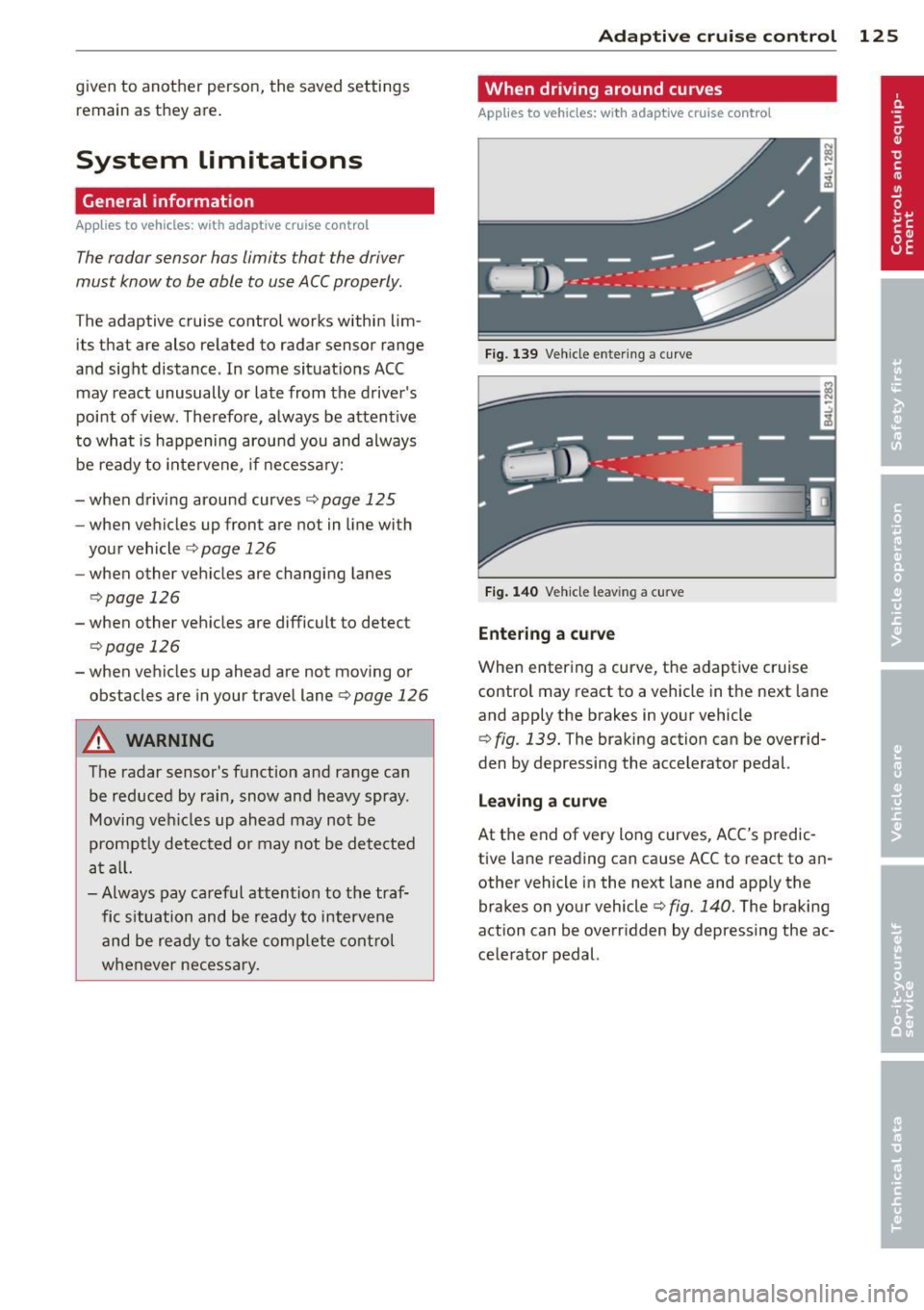
When driving around curves
App lies to vehicles: wit h adaptive cruise control
Fig. 139 Ve hicle e nter ing a curve
Fi g. 140 Ve hicle leav ing a curve
Entering a curv e
When entering a curve, the adaptive cruise
control may react to a vehicle in the next lane
and apply the brakes in your vehicle
¢ fig . 139. The braking action can be overrid·
den by depressing the accelerator pedal.
L e aving a curv e
At the end of very long curves, ACC's predic
tive lane reading can cause ACC to react to an
other vehicle in the next lane and app ly the
brakes on your vehicle¢ fig . 140. The braking
action can be overr idden by depress ing the ac
ce lerator pedal.
Page 128 of 340
126 Adaptive cruise control
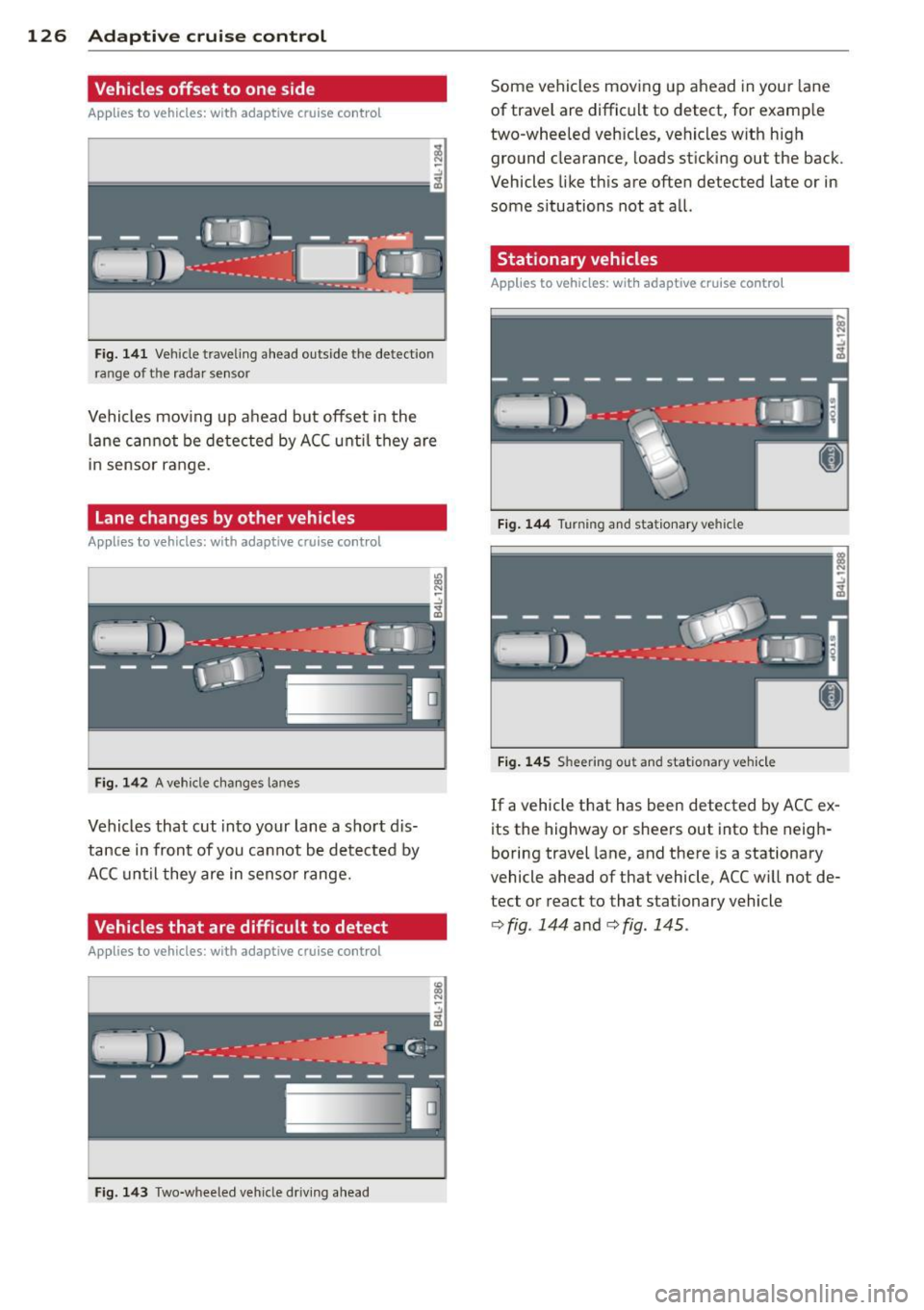
Vehicles offset to one side
Applies to vehicles: with adaptive cruise control
Fig. 141 Vehicle traveling a head o utside the detect ion
range of t he rada r se nsor
Vehicles mov ing up ahead but offset i n the
la ne cannot be detected by ACC until they are
in sensor range.
Lane changes by other vehicles
Applies to vehicles: with adaptive cruise control
Fig. 142 A vehicle changes lanes
Vehicles that cut into your lane a sho rt dis
tance in front of you cannot be detected by
ACC until they are in senso r range.
Vehicles that are difficult to detect
Applies to vehicles: with adaptive cruis e contro l
Fig. 143 Two -wheeled vehicle driving ahead
Some vehicles moving up ahead in your lane
of trave l are difficult to detect, for examp le
two -wheeled veh icles, vehicles w ith high
ground clearance, loads sticking out the back .
Vehicles like this are often detected late or in
some situations not at all.
Stationary vehicles
Applies to vehicles: with adaptive cruise contro l
Fig. 144 Turning and stationary ve hicle
Fig. 145 Sheering out and stat ionary veh icle
If a vehicle that has been detected by ACC ex
its the highway or sheers out into the neigh
boring travel lane, and there is a stationary
vehicle ahead of that vehicle, ACC will not de·
tect or react to that stationary vehicle
<=> fig. 144 and c> fig. 145 .
Page 129 of 340
Audi braking guard
Description
Applies to vehicles: with a daptive cruise co ntrol
Audi braking guard warns you of a possible
collision with a moving vehicle up ahead .
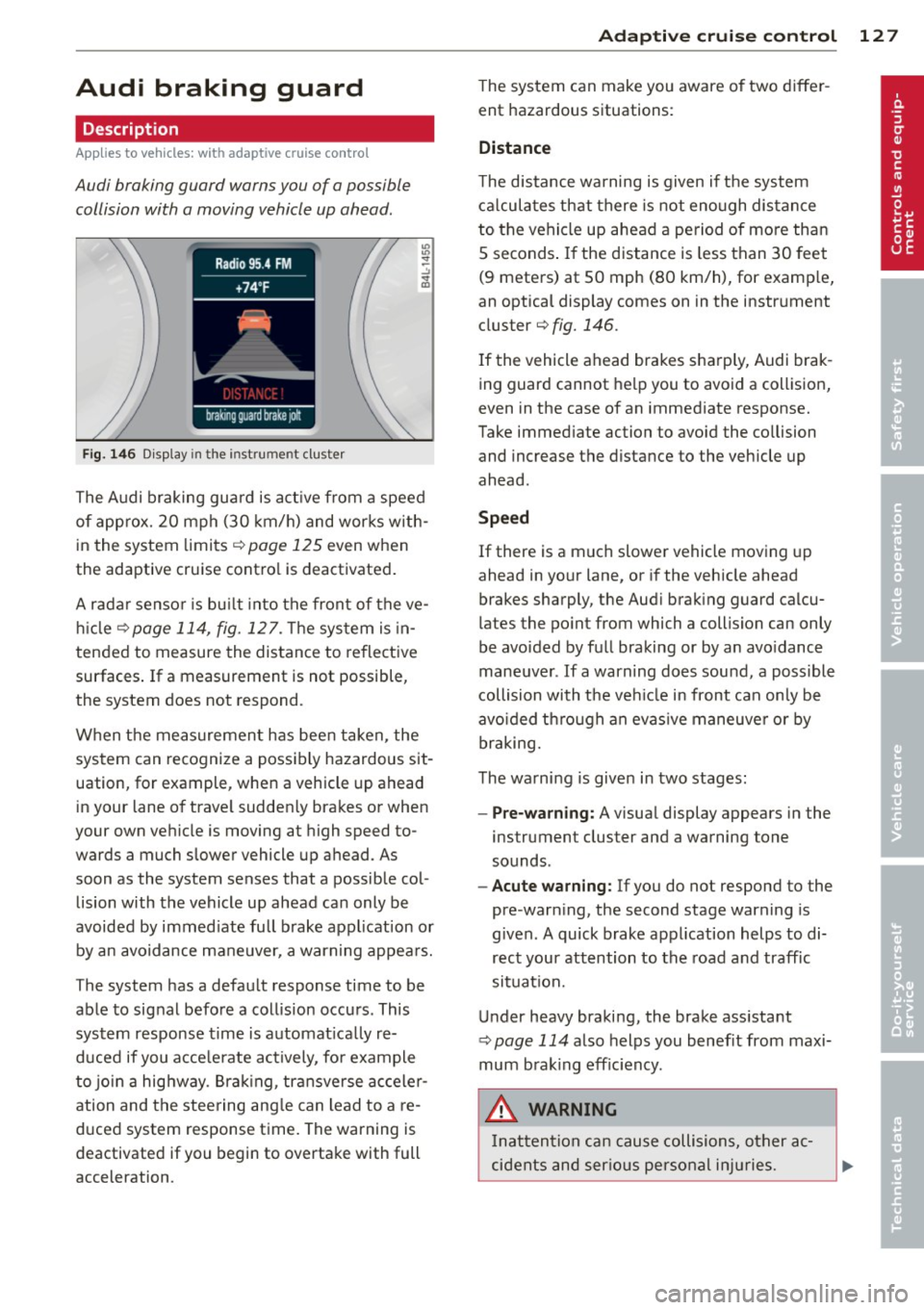
Fig. 146 Display in the instrument cluster
The Audi braking guard is active from a speed
of approx. 20 mph (30 km/h) and works with
in the system limits¢
page 125 even when
the adaptive cruise contro l is deactivated.
A radar sensor is bu ilt into the front of the ve
hicle
¢page 114, fig. 127. The system is in
tended to measure the distance to reflective
surfaces .
If a measurement is not possible,
the system does not respond.
When the measurement has been taken, the
system can recognize a possibly hazardous sit
uation, for example, whe n a vehicle up ahead
in your lane of trave l sudden ly brakes or when
your own vehicle is moving at high speed to
wards a much slower vehicle up ahead . As
soon as the system senses that a possible col
lision with the vehicle up ahead can only be
avoided by immed iate full brake application or
by an avoidance maneuver, a warning appears.
The system has a defau lt response time to be
able to signal before a collision occurs. This
system response time is automat ica lly re
duced if you acce lerate actively, fo r example
to join a highway. Braking, transverse acceler
ation and the steering angle can lead to a re
duced system response time. The warning is
deactivated if you begin to overtake with full
acceleration .
Adaptive cruise control 127
The system can make you aware o f two differ
ent hazardous situations:
Distance
The distance warning is given if the system
calculates that there is not enough distance
to the vehicle up ahead a period of more than
S seconds . If the distance is less than 30 feet
(9 meters) at SO mph (80 km/h), for examp le,
an optical display comes on in the instrument
cluster¢
fig. 146.
If the vehicle ahead brakes sharp ly, Audi brak
ing guard cannot help you to avoid a collision,
even in the case of an immediate response.
Take immed iate action to avoid the co llision
and increase the distance to the vehicle up
ahead.
Speed
If there is a much slower vehicle moving up
ahead in your lane, or if the vehicle ahead
brakes sharply, the Aud i brak ing guard calcu
lates the po int from which a collision can only
be avoided by full braking or by an avoidance
maneuver. If a warning does sound, a poss ible
collision with the ve hicle in front can on ly be
avo ided through an evasive maneuver or by
braking.
The warning is given in two stages :
-Pre-warning: A visual display appears in the
instrument cluster and a warning tone
sounds.
- Acute warning: If you do not respond to the
pre-warn ing, the second stage warning is
given. A quick brake application helps to di
rect your attention to the road and traffic
situation.
Under heavy braking, the brake ass istant
¢
page 114 also helps you benef it from maxi
mum brak ing efficiency.
A WARNING
Inatt ention can cause collisions, other ac
cidents and serious personal injuries.
Page 130 of 340
128 Adapti ve crui se co ntrol
-Always pay close attenti on to t he traffic,
even w hen the Aud i brak ing guard is
switched on. The Aud i b rak ing guard pro
vides a warning but does no t brake the
car for you . You m ust apply t he brakes
yours elf!
- Always ke ep the sa fe and legal distance
betwe en your vehicle and veh icles up
ahead.
-Audi braking guard works within limits and w ill not respond outs ide the system
limits, for examp le when approaching a
stopped vehicle or s tationary obstacle
(end of a traff ic jam or veh icle that has
broken down in traffic).
- Always remember th at the radar sensor
f or the A udi braking guard wo rks within
defined detection and range limits that
may prevent the proper detection of oth
er veh icles.
- The radar sensor's function and range
can be reduced by rain, snow and heavy
spray. Moving vehicles up ahead may not
be promptly detected or may not be de
tected at al l.
- Always pay careful attention to the traf
fic s ituation and be ready to intervene
and be ready to take comp lete control
whenever necessary.
- Reflective surfaces includ ing crash barri
ers or tunnel entrances may impair the
function of th e radar sensor .
Settings in the MMI
Applies to vehicles: with a daptive cruise co ntrol
The settings of the Audi braking guard are
performed in the MMI.
.. Se lect : I CAR I funct ion button > Systems *
control button > Audi braking guard . Or
" Se lect :
I CAR I funct io n button > Car systems *
control button > Driver assist > Audi brak
ing guard .
- System -
the Audi braking guard system can
be switched
On and Off .
-Early warning -the acoustic warning and
the messages can be switched
On and Off .
(D Tips
When handing ove r the keys to another
person, the p revious settings are adopted
i f the Audi braking g uard is activated
¢ page 43.
Driver's information in the instrument
cluster display
App lies to vehicles : wit h adaptive cruise contro l
Braking guard activated
Th is message appears when the Aud i b ra ki ng
guard applies the brakes du ring a second
st age (a cute) war ning .
Braking guard off
This message appears when the system has
been deac tivated via the MMI. This message
also appea rs br iefly at each beginn ing of a t rip
i f t he sys tem is swi tched off .
The message a lso appears if the system is not
ava ilable due to a malfunc tion or if the ESC is
not sw itched on¢
page 225 . If th is is the
case, the system will not provide wa rni ngs
abo ut a po ssible coll ision.
Page 142 of 340
140 Automatic transmission
-Never hold the vehicle on an incline with
a slipping clutch. The clutch opens auto
matically when it becomes too hot from
the overload. An indicator lamp
[O] illu
minates and a driver message appears
c!;> page 141 when the clutch is overload
ed.
- If the engine must remain running, never
have any driving position engaged when
checking under the hood. Make sure the
selector lever has securely engaged and
is locked in P with the parking brake
firmly set¢
page 257. Otherwise, any
increase in engine speed may set the ve
hicle in motion, even with the parking
brake applied.
(D Note
- When stopping on an incline, do not try
to hold the vehicle in place by pressing
the accelerator peda l while a driving gear
is selected. This can cause the transmis
sion to overheat and can damage it. Acti
vate the park ing brake or press the brake
pedal to prevent the vehicle from rolling.
- Allowing the vehicle to roll when the en
gine is stopped and the selector lever is
in
N will damage the transmiss ion be
cause it is not lubricated under those cir
cumstances.
Hill descent control
The hill descent control system assists the
driver when driving down declines.
H ill descent control is activated when these
lector lever is in D/S and you press the brake
pedal. The transmission automatically selects
a gear that is suitab le for the incline. Hill de
scent control tries to maintain the speed ach
ieved at the time of braking, within physical
and technical limitations . It may st ill be nec
essary to adjust the speed with the brakes.
Hill descent control switches off once the de
cline levels out or you press the accelerator pedal. When the speed
is set in the cruise control
system
c!;>page 111, hill descent control is al
so activated.
A WARNING
--
Hill descent control cannot overcome
physical limitations, so it may not be able
to maintain a constant speed under all
conditions. Always be ready to apply the brakes.
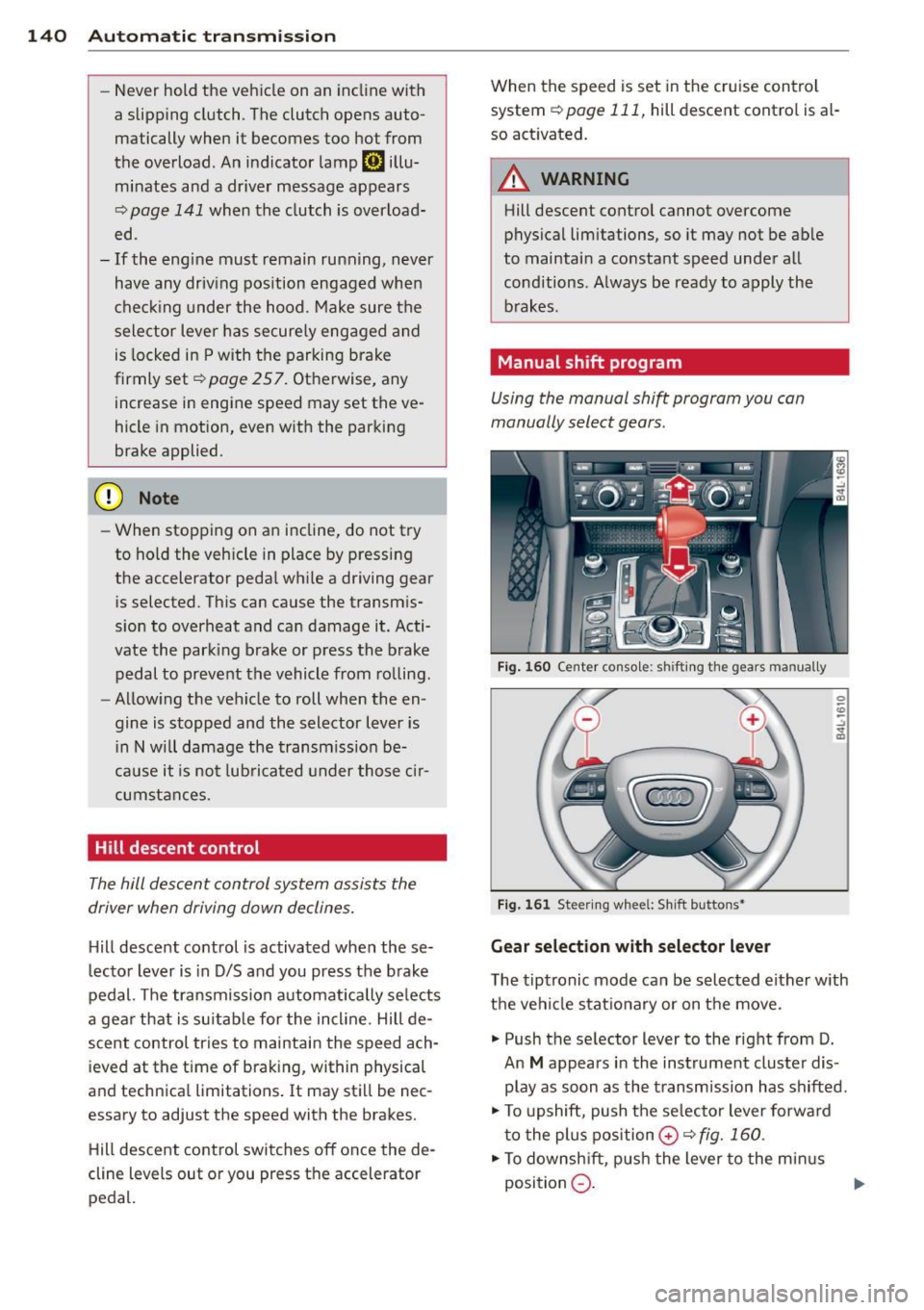
· Manual shift program
Using the manual shift program you can
manually select gears.
Fig. 160 Center console: shift ing the gears manually
Fig. 161 Steering wheel: Sh ift buttons•
Gear selection with selector lever
The tiptronic mode can be selected either with
the vehicle stationary or on the move.
.,. Push the selector lever to the right from D.
An
M appears in the instrument cluster dis
play as soon as the transmission has shifted .
.,. To upshift, push the se lecto r lever forward
to the plus position
0 c!;> fig. 160 .
.,. To downshift, push the lever to the minus
position
Q . 1J>-
Page 226 of 340
224 Intelligent technology
Intelligent technology
Notice about data
recorded by vehicle
control modules
Your vehicle is not equipped with an Event Da
ta Recorder (EDR), installed by some manu
facturers fo r the express purpose of capturing
data for retrieval after an accident or crash
event . EDRs are sometimes ca lled "crash re
corders".
Some state laws restrict the retr ieval or down
loading of data stored by EDRs that were in
stalled in a vehicle for the express purpose of
retrieving data after an accident or crash
event without the owner's consent.
A lthough your vehicle is not equipped with an
EDR, it is equipped with a number of electron
ic control modules for various vehicle systems
such as, for examp le, engine function, emis
sion control, as well as for the airbags and
safety belts .
These electronic contro l modules also record
vehicle-related data during normal vehicle op
eration for diagnostic and repair purposes.
The recording capacity of the electronic con
trol modules is limited to data (no sound is re
corded) and only a small amount of data is ac
tually recorded over a very limited period of
time and stored when a system fault or other
condition is sensed by a control unit. Some of
the data then stored may relate to vehicle
speed, direction, braking as we ll as restraint
system use and performance in the event of a
crash or other condition. Stored data can only
be read and downloaded with special equip
ment.
Electronic Stabilization
Control (ESC)
Description
The Electronic Stabilization Control (ESC) rein
forces driver safety. It reduces the risk of slip
p ing and improves driving stability. ESC de
tects cr itical s ituations such as the vehicle oversteering and
understeering or the wheels
spinning . The vehicle is stabilized by applying
the brakes or reducing engine torque . Once
the ESC is active, the indicator light
G1 blinks
in the instrument cluster.
ESC includes the anti-lock brake system (ABS),
brake assist system, anti-slip regulation
(ASR), electronic differential lock (EDL) and
hill descent control.
Anti-lock brake system (ABS)
ABS prevents the whee ls from locking up
when braking. The vehicle can still be steered
even during hard braking. App ly steady pres
sure to the brake pedal. Do not pump the ped al. A pulsing in the brake pedal indicates that
the system is helping you to brake the vehicle .
Brake assist system
The brake assist system can decrease braking
distance. It increases braking power when the
driver presses the brake pedal quickly in emer
gency situations. You must press and hold the
brake pedal until the situation is over . In
vehicles with adaptive cruise control*, the
brake assist system is more sensitive if the
distance detected to the vehicle ahead is too
small.
Anti-slip regulation (ASR)
ASR reduces engine power when the drive
wheels begin to spin and adapts the force to
the road conditions. This makes it easier to
sta rt, accelerate and drive up hills.
Electronic differential lock (EDL)
The EDL brakes wheels that are spinning and
transfers the drive power to the other wheels .
This function is available up to about 60 mph
(100 km/h) .
In extreme cases, EDL automatically switches
off to help keep the brake on the braked wheel
from overheat ing. EDL will switch on again au
tomat ically when conditions have returned to
normal.
Page 228 of 340
226 Intelligent technology
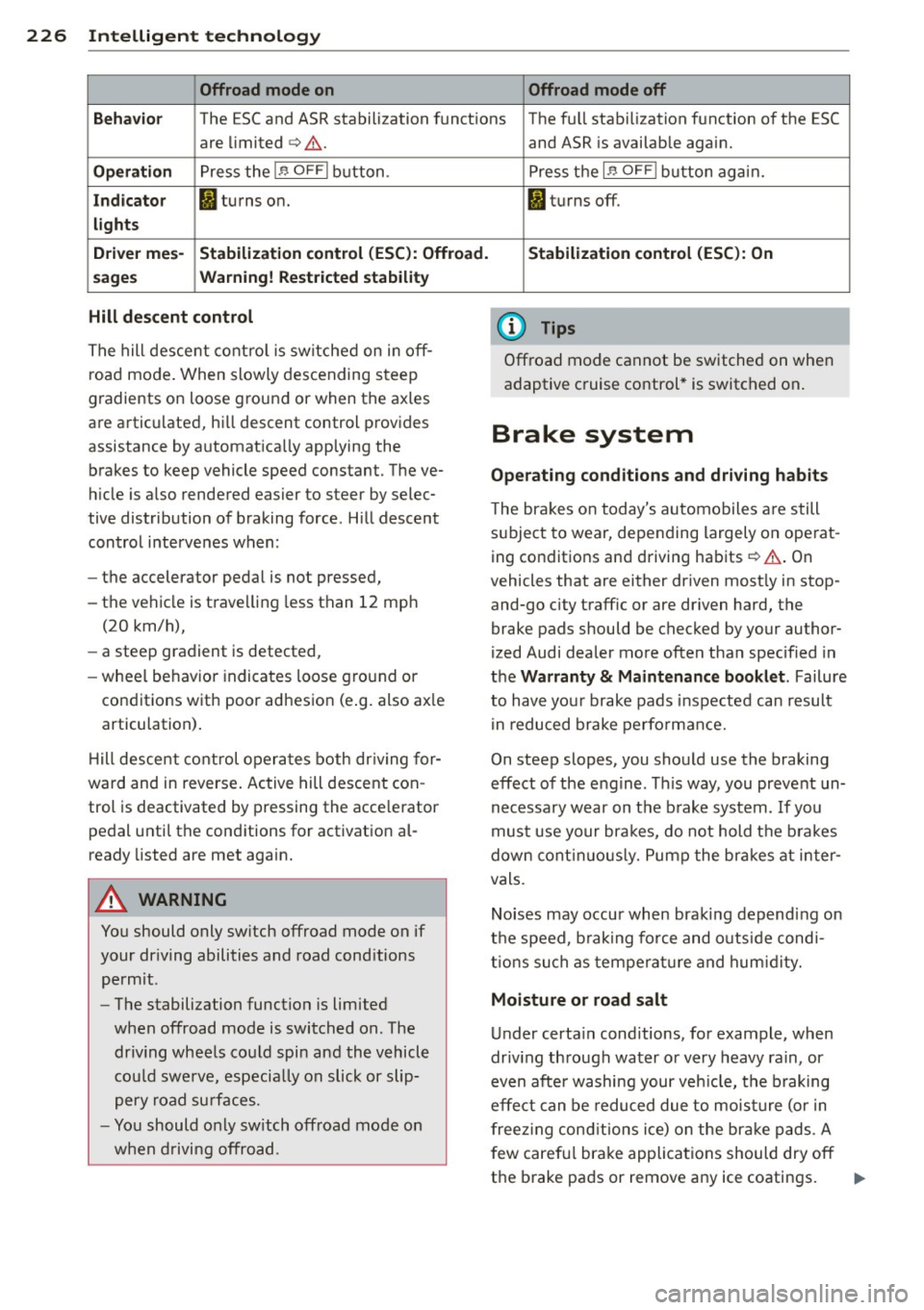
Offroad mode on Offroad mode off
Behavio r
The ESC and ASR stabilization functions The fu ll stabilization function of the ESC
are limited
c> Li::,. .
Operation Press the 1.$ OFFI button.
Indicator fl turns on.
lights
D rive r mes-
Stabilization control (ESC): Offroad.
sages Warning! Rest ricted stability
Hill descent control
The hill descent control is switched on in off
road mode. When slowly descending steep
gradients on loose ground or when the axles
are articulated, h ill descent control provides
assistance by automatically applying the
brakes to keep vehicle speed constant. The ve
h icle is also rendered easier to steer by selec
tive distribution of braking force . Hill descent
control intervenes when:
- the accelerator pedal is not pressed,
- the vehicle is trave lling less than 12 mph
(20 km/h),
- a steep gradient is detected,
-wheel behavio r indicates loose ground or
conditions with poor adhesion (e .g. also ax le
articulation) .
H ill descent control operates both driving for
ward and in reverse . Active hill descent con
trol is deactivated by pressing the accelerator
pedal until the conditions for activation al
ready listed are met again.
A WARNING
You should only switch offroad mode on if
your dr iving abilities and road cond itions
permit.
- The stabilization function is limited
when offroad mode is switched on. The
dr iv ing wheels could spin and the vehicle
cou ld swerve, especially on slick or slip
pery road surfaces.
- You should only sw itch offroad mode on
when driving offroad. and ASR
is available again.
Press the
1 .$ OF FI button again.
fl turns off.
Stabilization control (ESC): On
(D Tips
Offroad mode cannot be switched on when
adaptive cruise control* is switched on .
Brake system
Operating conditions and driving habits
The brakes on today's automobiles are still
subject to wear, depending largely on operat
ing conditions and driving habits
c> Li::,. . On
vehicles that are either driven most ly in stop
and-go city traffic or are dr iven hard, the
brake pads should be checked by your author
ized Audi dealer more often than specified in
the Warranty & Maintenance booklet . Failure
to have your brake pads inspected can result
in reduced brake performance.
On steep slopes, you should use the braking
effect of the engine . This way, you prevent un
necessary wear on the brake system .
If you
must use your brakes, do not hold the brakes
down continuously. Pump the brakes at inter
vals.
Noises may occur when braking depending on
the speed, b raking force and outs ide cond i
tions such as temperature and humidity.
Moisture or road salt
Under certain conditions, for example, when
driv ing through water or very heavy rain, or
even after washing your veh icle, the braking
effect can be reduced due to moisture (or in
freezing conditions ice) on the bra ke pads. A
f ew careful brake applications should dry off
the brake pads or remove any ice coatings.
jll,,
Page 305 of 340
Fuses and bulbs 303
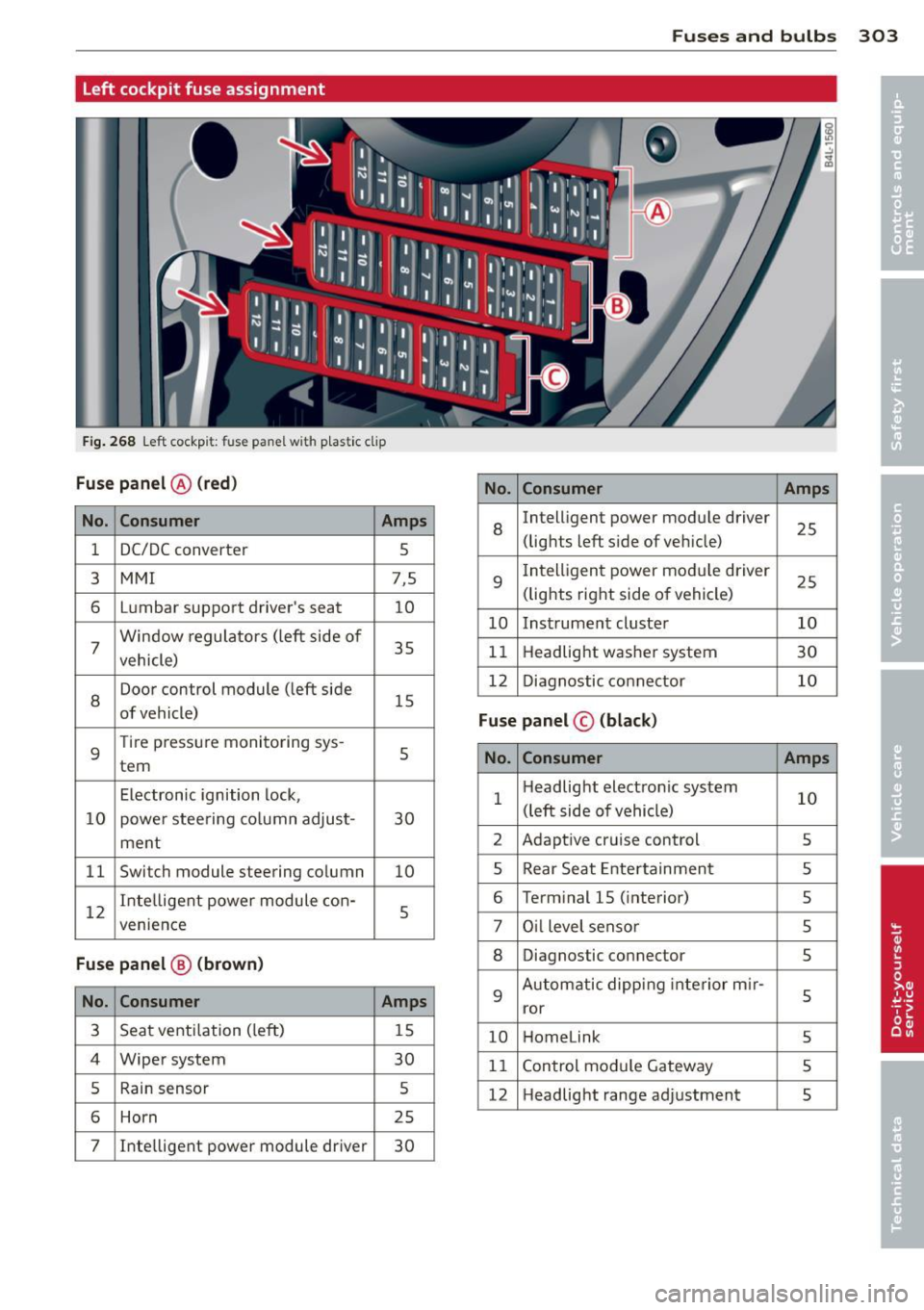
Left cockpit fuse assignment
F ig . 268 Left cockpit: fuse panel with p lastic clip
Fuse panel @ (red)
No. Consumer Amps
No. Consumer Amps
1 DC/DC converter
5
8
Intelligent power module driver
25
(lights left side of veh icle)
3
MMI 7,5
6 L umbar support driver's seat
10
7 Window
regulators (left side of
35
vehicle)
9
I ntelligent power module driver
25
(lights right side of vehicle)
10 Instrument cluster 10
11 Headlight washer system
30
8
Door control module (left side
15
of vehicle) 12
Diagnostic connector 10
Fuse panel © (black)
9
Tire pressure monitoring sys -
tern 5
No. Consumer
Amps
Electronic ignition lock,
10 power steering co lumn adjust- 30 1
Headlight
electronic system
10
(left side of vehicle)
ment 2
Adaptive cruise control
5
11 Switch module steering column
10 5 Rear
Seat Entertainment
5
12 Intelligent
power module con-
5
venience
6 Term inal 15 ( interior)
5
7 Oil level sensor
5
Fuse panel @ (brown) 8 Diagnostic connector
5
No.
Consumer Amps 9
Automatic dipping interior m ir-
5
ror
3 Seat ventilation (left)
15
10 Homelink
5
4 Wiper system
30
11 Control module Gateway 5
5 Rain sensor 5
12 Headlight
range adjustment
5
6 Horn 25
7 Inte
lligent power module driver
30
Page 323 of 340
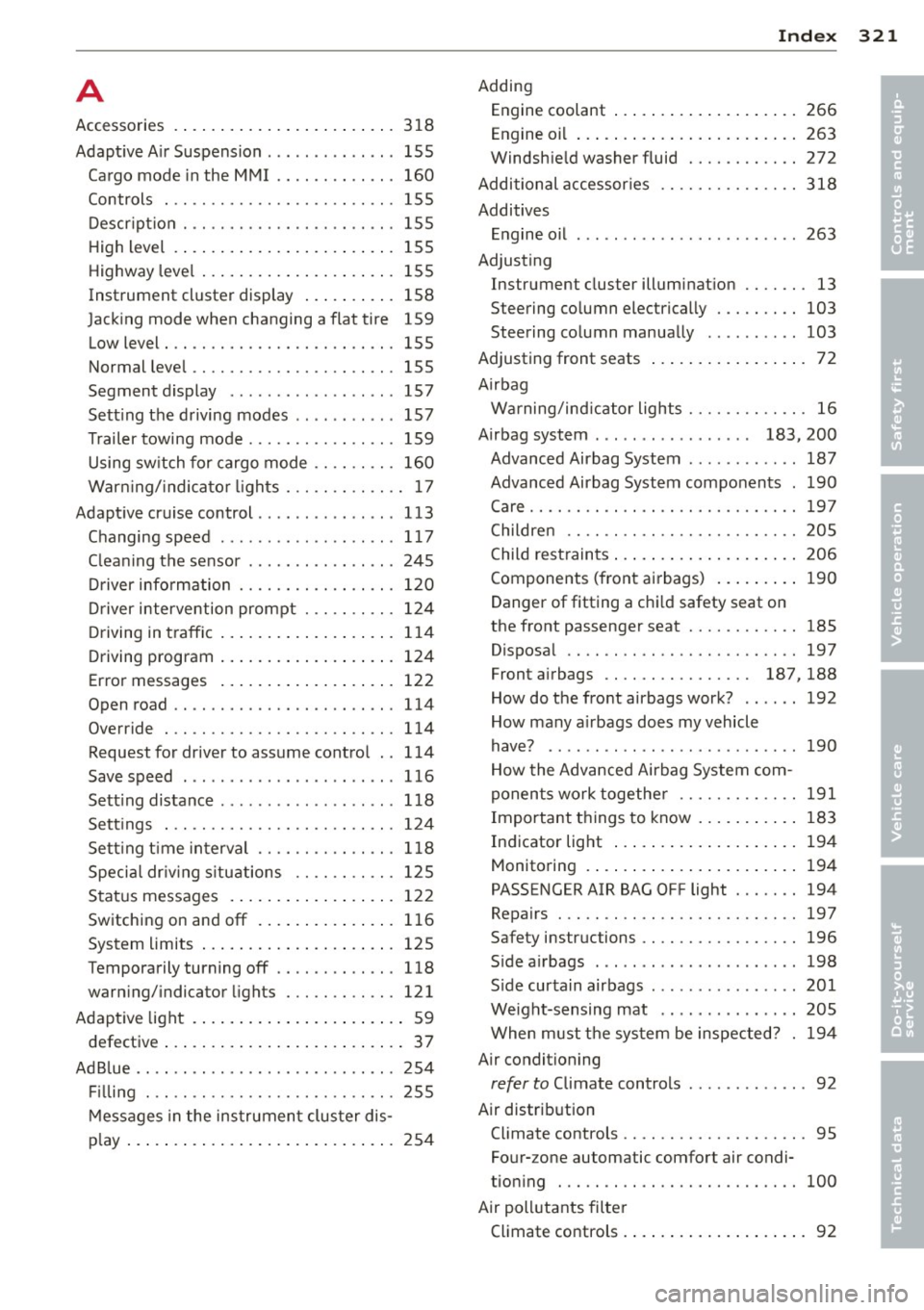
A
Accessories
Adaptive A ir Suspension . .. .. .. .. .. .. .
Cargo mode in the MMI .. .. .. .. .. .. . 318
155
160
Controls ... ............. .. .. .. .. . 155
Description .............. .... .. ... 155
H igh level . ................. ... ... 155
Highway level ..................... 155
Instrument cluster display . . . . . . . . . . 158
Jacking mode when changing a flat tire 159
Low level . . . . . . . . . . . . . . . . . . . . . . . . . 155
Normal level ............. .... .. ... 155
Segment display .............. .... 157
Sett ing the driving modes .. .. .. .. .. . 157
Trailer towing mode . . . . . . . . . . . . . . . . 159
Using switch for cargo mode .. .. .. .. . 160
Warning/indicator lights . .. .. .. .. .. .. 17
Adaptive cruise control ............. .. 113
Changing speed ..... ..... .. .. .. .. . 117
C leaning the sensor ....... .. .. .. .. . 245
Driver information ........ .. .. .. .. . 120
Driver intervention prompt . .. .. .. .. .
Driving in traffic ................ .. .
Driving program ................ .. .
Error messages .................. .
Open road .. ............. .... .. .. .
Override 124
114
124
122 114
114
Request for driver to assume control . . 114
Save speed . . . . . . . . . . . . . . . . . . . . . . . 116
Sett ing distance ..... ..... .. .. .. .. . 118
Settings . .. ............. .... .. .. . 124
Sett ing t ime interval ...... .. .. .. .. . 118
Specia l dr iv ing s ituations .. .. .. .. .. . 125
Status messages ................. . 122
Switching on and
off ......... ... .. . 116
System limits ................ .... . 125
Temporarily turning
off .... .. .. .. .. . 118
warning/indicator lights ... .. .. .. .. . 121
Adaptive light ................ ... .... 59
defective . . . . . . . . . . . . . . . . . . . . . . . . . . 3 7
AdBlue .. .. .. ................. .. ... 254
Filling 255
Messages in the instrument cluster dis-
p lay ... .. .. .. ................ .... 254
Index 321
Adding
E . l ngine coo ant ..... ............... 266
Engine oil ..... .. .. ............... 263
Windshie ld washer fluid .......... .. 272
Additional accessor ies
Additives Engine oil
Adjusting 318
263
Instrument cluster illumination .. .. .. . 13
Steering column electrically ..... .. .. 103
Steering column manually .......... 103
Adjusting front seats . . . . . . . . . . . . . . . . . 72
Airbag Warning/ind icator lights ........ .. .. . 16
Airbag system . . . . . . . . . . . . . . . . . 183, 200
Advanced Airbag System .. ... ... .. .. 187
Advanced Airbag System components . 190
Care ........ .. .. ................. 197
Children .. .. .. .. .... ........... .. 205
Child restraints ... .. ............... 206
Components (front airbags) ......... 190
Danger of fitting a chi ld safety seat on
the front passenger seat ........ .. .. 185
Disposal .. .. .. .. .... ........... .. 197
Front airbags .. .. ............ 187,188
How do the front airbags work? ...... 192
How many airbags does my vehicle
have? ....... ... .. ............... 190
How the Advanced Airbag System com-
ponents work together ......... .... 191
Important things to know .......... . 183
Indicator light ..... ............... 194
Monitor ing . ..... ................. 194
PASS ENGER AIR BAG OFF light ... .. .. 194
Repairs ... .. .. .. .... ........... .. 197
Safety instructions ................. 196
Side airbags ..... .. ..... .......... 198
Side curtain airbags .. .. .. ... ... .... 201
Weight-sensing mat .. ... ... ... .. .. 205
When must the system be inspected? . 194
Air conditioning
refer to Climate controls . . . . . . . . . . . . . 92
Air distribution Climate controls .. ................. . 95
Four- zone automatic comfort air condi-
tioning . .. .. .. .. .. ............... 100
Air pollutants filter Climate controls .... .............. .. 92
•
•
Page 326 of 340
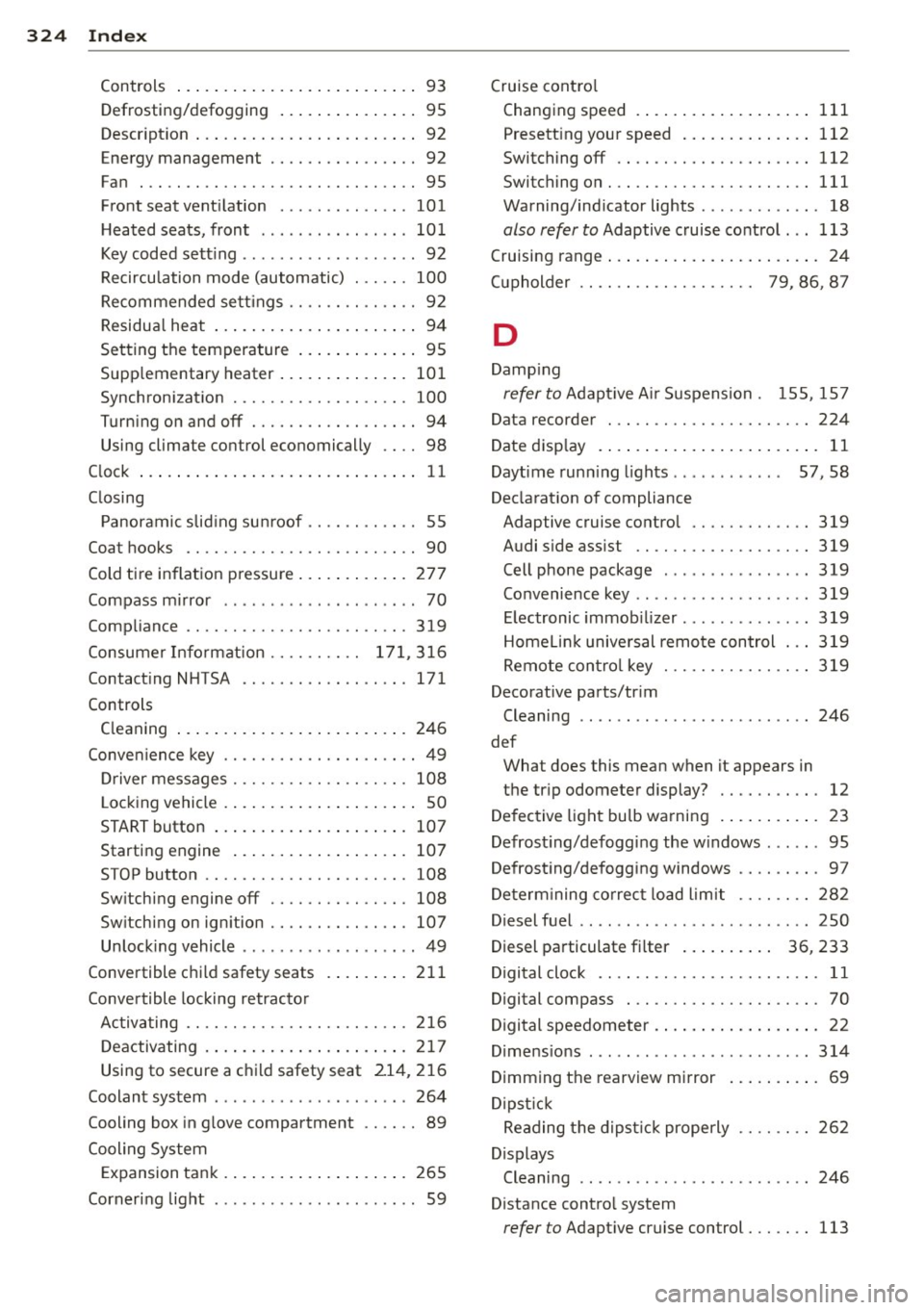
324 Index
Controls .... .. .. ..... ... .. .. .... .. 93
Defrosting/defogging . . . . . . . . . . . . . . . 95
Descr ipt ion .. .. ... .... ... .. .. .... .. 92
Energy management . . . . . . . . . . . . . . . . 92
Fan . .. .. .... ........... ........ .. 95
Front seat ventilation ...... ... .. ... 101
H eated seats, front ....... .. .. .. .. . 10 1
Key coded sett ing .............. ..... 92
Recircu lation mode (automatic) ... ... 100
Recommended se ttings .............. 92
Residua l heat ... ...... ... .. .. .... .. 94
Setting the temperature ... .. .. .... . . 95
Supp lementary heater ... .. .. ... ... . 101
Synchron izat ion ............ .. .... . 100
Turn ing on and off ........ .. .. .... .. 94
Using climate control economically . . . . 98
C lock ... .... ... . ...... ... .. .. .... .. 11
C losing
P anoramic slid ing su nroof .. .. .. .. .. . . 55
Coat hooks . . . . . . . . . . . . . . . . . . . . . . . . . 90
Cold ti re inflat ion p ressure ... .. .. .... . 27 7
Compass m irror ..... ...... .. .. .. .. .. 70
Comp liance .. ............. .. .. .. ... 319
Consumer Info rmation . . . . . . . . . . 1 71, 3 16
Contact ing NHTSA ...... .... ... .... . 171
Controls Cleaning ... ... .. ..... ... .. .. .... . 246
Conve nience key ..................... 49
Dr iver messages ........ .. .. .. .. .. . 108
L ock ing vehicle ... ..... ... .. .. .... .. 50
START button .. .. ..... ... .. .. .... . 10 7
Starting engine ....... ... .. .. .... . 107
STOP button ...................... 108
Sw itching engine off ............... 108
Sw itching on ignition .. ..... ..... .. . 107
Unlock ing vehicle .......... ... .. .... 49
Convertible c hil d safety seats . ... .. .. . 211
Conve rtible locking retracto r
Activating ........................ 216
Deactivating . . . . . . . . . . . . . . . . . . . . . . 217
Using to secure a chi ld safety seat 21 4, 2 16
Coolant system ................. .... 264
Cooling box in g love compartment .. .... 89
Cooling System Expansion tank . .. ..... ... .. .. .... . 265
Corner ing light .. .... ...... .. .. .. .. .. 59 Cruise cont
ro l
Changing speed .. .. ... ..... ... .. .. 111
Presett ing your speed .. ..... ... .. .. 112
Switching off ..................... 112
Switching on ..... ............. .... 111
Warning/ind icator lights ........... .. 18
also refer to Adaptive cruise control ... 113
Cruising range . . . . . . . . . . . . . . . . . . . . . . . 24
(upholder . . . . . . . . . . . . . . . . . . . 79 , 86, 8 7
D
Damp ing
refer to Adapt ive A ir Suspension . 155, 15 7
Data recorder ... .. ............. .. .. 224
Date d is p lay . . . . . . . . . . . . . . . . . . . . . . . . 11
Daytime run ning l ights... ....... .. 57, 58
Declarat ion of compliance
Adaptive cruise control ............. 319
Audi side ass ist ................... 319
Cell phone package . . . . . . . . . . . . . . . . 319
Convenience key .. .. ... ....... ... .. 319
E lectronic i mmob i Lizer . . . . . . . . . . . . . . 319
Homel in k universal remo te control ... 319
Remote contro l key ............ .... 319
Decorative parts/tr im
Cleaning ...... .................. . 246
def What does this mean when it appears in
the tr ip odometer display? ........... 12
De fective light bu lb warning . ... .. .. .. . 23
Defrost ing/defogg ing the w indows ... .. . 95
Defrost ing/defogging windows ......... 97
De term ining co rrect load limit ........ 282
Diesel fuel .. .. .. .. .. ... ....... ... .. 250
Diesel pa rticulate f ilter . . . . . . . . . . 36, 233
Digital cloc k . . . . . . . . . . . . . . . . . . . . . . . . 11
Digital compass . . . . . . . . . . . . . . . . . . . . . 70
Digital speedometer . . . . . . . . . . . . . . . . . . 22
Dime nsio ns .. ... ................... 314
Dimming the rearview mirror ... .. .. .. . 69
D ipst ick
Reading the d ipst ic k properly ........ 262
Displays Cleaning . . . . . . . . . . . . . . . . . . . . . . . . . 246
Distance control system
refer to Adapt ive cruise control ..... .. 113