ECO mode AUDI Q7 2015 Owner´s Manual
[x] Cancel search | Manufacturer: AUDI, Model Year: 2015, Model line: Q7, Model: AUDI Q7 2015Pages: 350, PDF Size: 86 MB
Page 68 of 350
66 Clear vis ion
Wiper and washer
system
Switching the windshield wipers on
The windshield wiper lever controls both the
windshield wipers and the washer system .
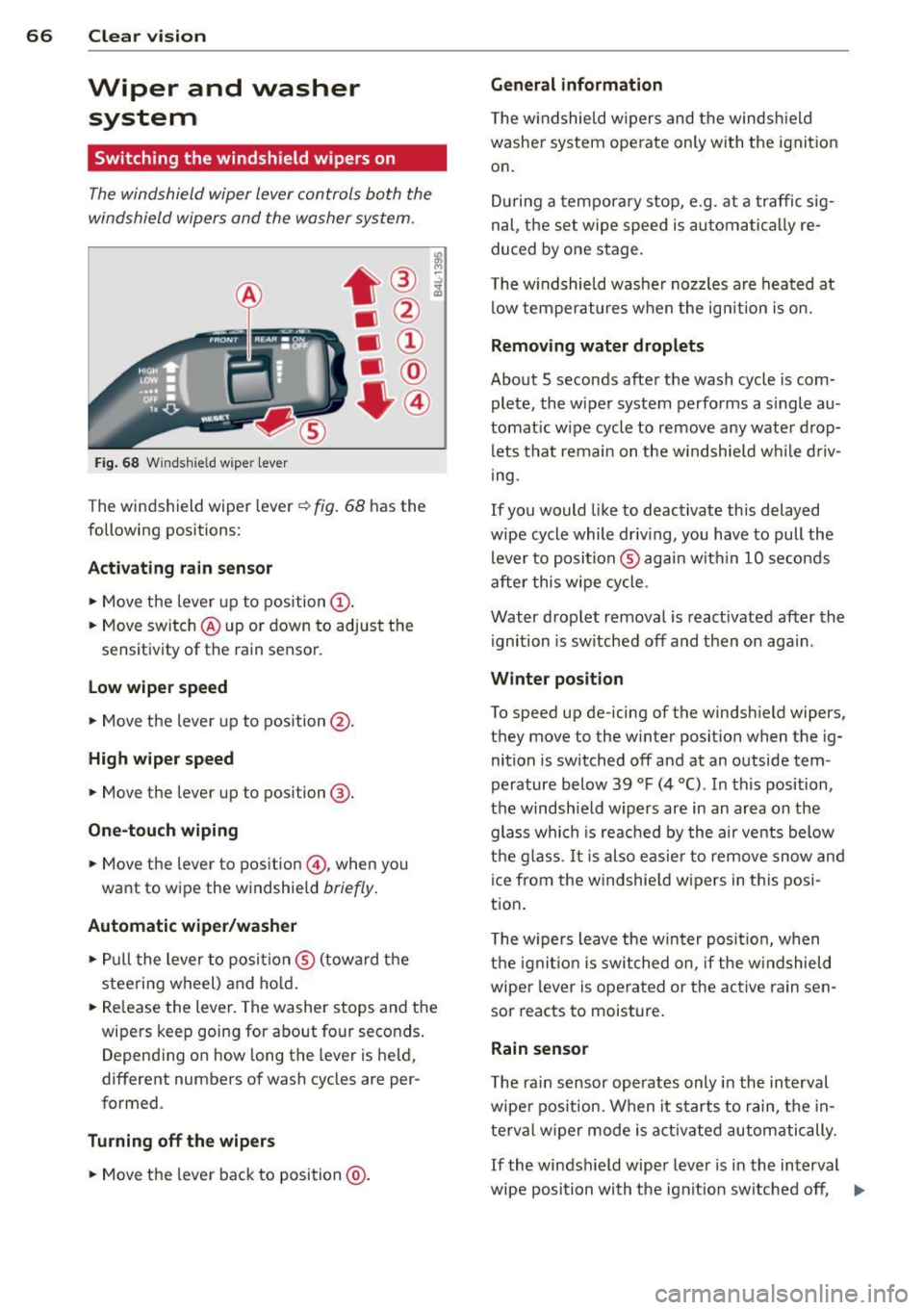
Fig. 68 Windshie ld w ipe r lever
T he windshield wiper lever ¢ fig. 68 has th e
following posit ions :
Act ivating r ain sen sor
.. Move the lever up to position (D .
.. Move switch @up or down to adjust the
sensitivity of th e rain sensor.
low wiper sp eed
.. Move the leve r up to position @.
High wiper speed
.. Move the lever up to posi tion @.
One-touch wiping
.. Move the lever to pos ition @, when you
want to w ipe the w indshield
br iefly .
Automatic wip er/ washer
.. Pull the lever to posi tion ® (toward the
steering wheel) and ho ld.
.. Re lease the lever. The washer stops and the
wipers keep going for abou t four seconds .
D epend ing on how long th e lever is held,
different numbers of wash cycles are pe r
formed .
Turning off the wip ers
.. Move the lever back to position @.
General information
The w indshie ld wipers and the windsh ield
washer system operate only with the ignit ion
on .
D uring a tempora ry stop, e.g. at a traffic sig
nal, the set wipe speed is automati cally re
duced by one stage.
T he w indshie ld washe r nozzles are heated at
low temperatures when the ign ition is o n.
Removing water drop lets
About 5 seconds after the wash cycle is com
plete, the wiper system performs a s ingle au
tomat ic w ipe cycle to remove any wate r d rop
lets that remain on the w indshie ld w hile d riv
ing .
If you would like to deactivate this delayed
wipe cycle while driv ing , you have to pull the
lever to position ® agai n w ith in 10 seconds
after this wipe cycle .
Water drop let remova l is reactivated after the
ignition is sw itched off and then on aga in .
Winter posit ion
To speed up de-icing of the windsh ield wipe rs,
they move to the w inter po sition when the ig
nition is switched off and at an outside tem
perature below 39
°F (4 °() . In this position,
the windshie ld wipers are in an area on the
glass whi ch is reac hed by the air vents below
the g lass . It i s also easie r to remove snow and
ice from the w indshie ld w ipers in t his posi
tion.
T he w ipers leave the win ter posi tion, when
the igni tion is switched on, if the w indshield
wiper lever is ope rated or the active rain sen
sor reacts to moisture.
Rain sensor
T he rain sensor operates only in the interval
wiper pos ition. When it starts to rain, the in
te rv al wiper mode is activ ated automatically.
If the windshield wipe r lever is in the interval
wipe position with the ignit ion sw itched off , ..,.
Page 75 of 350
M
"' 0 ..J
'
"' rl
Setting the magnetic deflection zone
Applies to vehicles: with dig ital compass
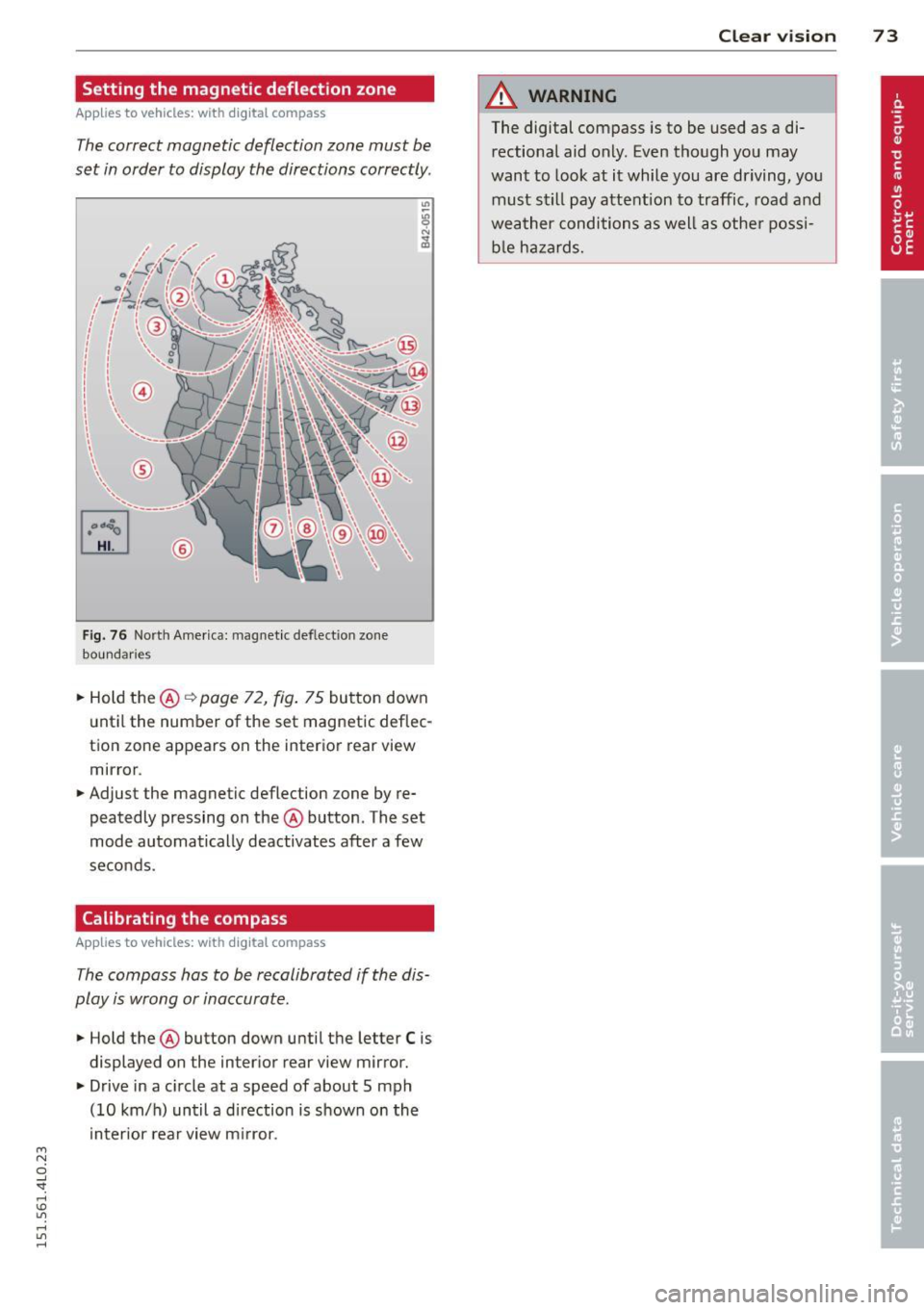
The correct magnetic deflection zone must be
set in order to display the directions correctly .
Fig. 76 North America: magnet ic def lect ion zone
boundari es
.. Hold the @ Q page 72, fig. 75 button down
until the number of the set magnetic deflec
tion zone appears on the interior rear view
mirror .
.. Adjust the magnetic deflection zone by re
peatedly pressing on the @ button . The set
mode automatically deactivates after a few
seconds .
Calibrating the compass
Applies to vehicles: with dig ital compass
The compass hos to be recalibrated if the dis
play is wrong or inaccurate .
.. Hold the @ button down until the letter C is
displayed on the interior rear view mirror .
.. Drive in a circle at a speed of about 5 mph
(10 km/h) until a direction is shown on the
interior rear view mirror.
Clear vision 7 3
A WARNING
The digital compass is to be used as a di
rectional aid only. Even though you may
want to look at it while you are driving, you
must still pay attention to traffic, road and
weather conditions as well as other possi
ble hazards.
Page 88 of 350
86 Seats and stor age
Loading
.. Fold the center seatback fo rward r::!> page 82 .
.. Remove the sack from the luggage compart-
ment and unfold it .
.. Place the empty sack over the lowered seat
back so that the end with the zip fastener is
in the luggage compartment.
.. Load objects from the luggage compart
ment into the sk i sack
r::!> & -
Securing
.. Insert the ski sack strap @.!> fig. 97 into the
center seat be lt buck le
@ .
.. Pull the securing strap t ight by the free end
of the belt ©-
.. Veh icles with 6 seats*: The ski sack has two
straps with hooks on the unders ide . Hang
the hooks into the luggage compar tment by
the rear fas tening eyes and pull the secur ing
strap tig ht by the free end ©-
Storage
.. Re lease the securing strap for the sack .
.. Pull the sack to the rear over the fold ed
down sea tback.
.. Raise the se atb ack unt il it is securely latch
ed .
.. Fold up the empty sac k.
.. Stow the ski sack in the l uggage compart
ment so that it cannot slide around.
A WARNING
-
- The ski sack is intended only for the
transportation of skis, snowboards and
other light objects. To red uce the risk of
serious persona l injury never transpo rt
heavy o r po inted object s in the ski sa ck.
- When brak ing rapidly o r duri ng a n acci
dent the load cou ld be displaced and
c a us e inj ury to occ upants.
- Sharp edges on the load must b e cove red
for pro te ct ion. Always fas ten the belt
ti gh tly ar ou nd the sa ck and its content s
.!>fig. 97.
(D Tips
Never stow the ski sack away if it's wet or
damp (for examp le, snow me lting from
skis). Let it dry complete ly before you stow
i t away.
Roof rack
First things first
A roof rack can be fitted to carry additional
luggage on the roof.
.. Always read and follow the instructions pro
vided by the roof rack man ufactu rer when
installing the roof rack system .
If you are transporting luggage or other ob
jects on the roof, p lease note the follow ing :
- Your vehicle has spec ially designed aerody-
namic roof rails. O nly install a roof rack spe
cifically designed for your model. Contact
the nearest autho rized Aud i deale r fo r infor
mat ion on approved modu la r r oof racks fo r
your veh icle.
- These approved roof racks are the basis for a
complete roof rac k system. Addi tional at
t achments for the b asi c r oof r ack are neces
sary to sa fely transport luggage, bi cy cl es,
surf boa rds, skis or sma ll boats. All necessa
ry hardware for these systems is available at
your author ized A udi dealer.
- We recommend that you keep t he i nstalla
tion instructions for your roof rack system
together w ith your Owner's literature in the
veh icle.
When should the roof rack be removed?
- Before going through an automa tic car wash
(it is best to ask the car wash operator for
adv ice) .
- When not in use, to reduce fue l consump
tion, wind noise and to guar d against theft .
A WARNING
-
-Use of an unapproved roof rack o r inco r-
rect mounting of an approved roof rac k
Page 93 of 350
M
"' 0 _,
"". rl I.O
"' rl
"' rl
-Any articles of cloth ing that you have
hung up must not interfere with the driv
er's view. The coat hooks are designed
only for lightweight clothing. Never hang
any clothing with hard, pointed or heavy
objects in the pockets on the coat hooks.
During sudden braking or in an accident -
especially if the airbag is deployed -
these objects could injure any passen
gers inside the vehicle.
Glove compartment
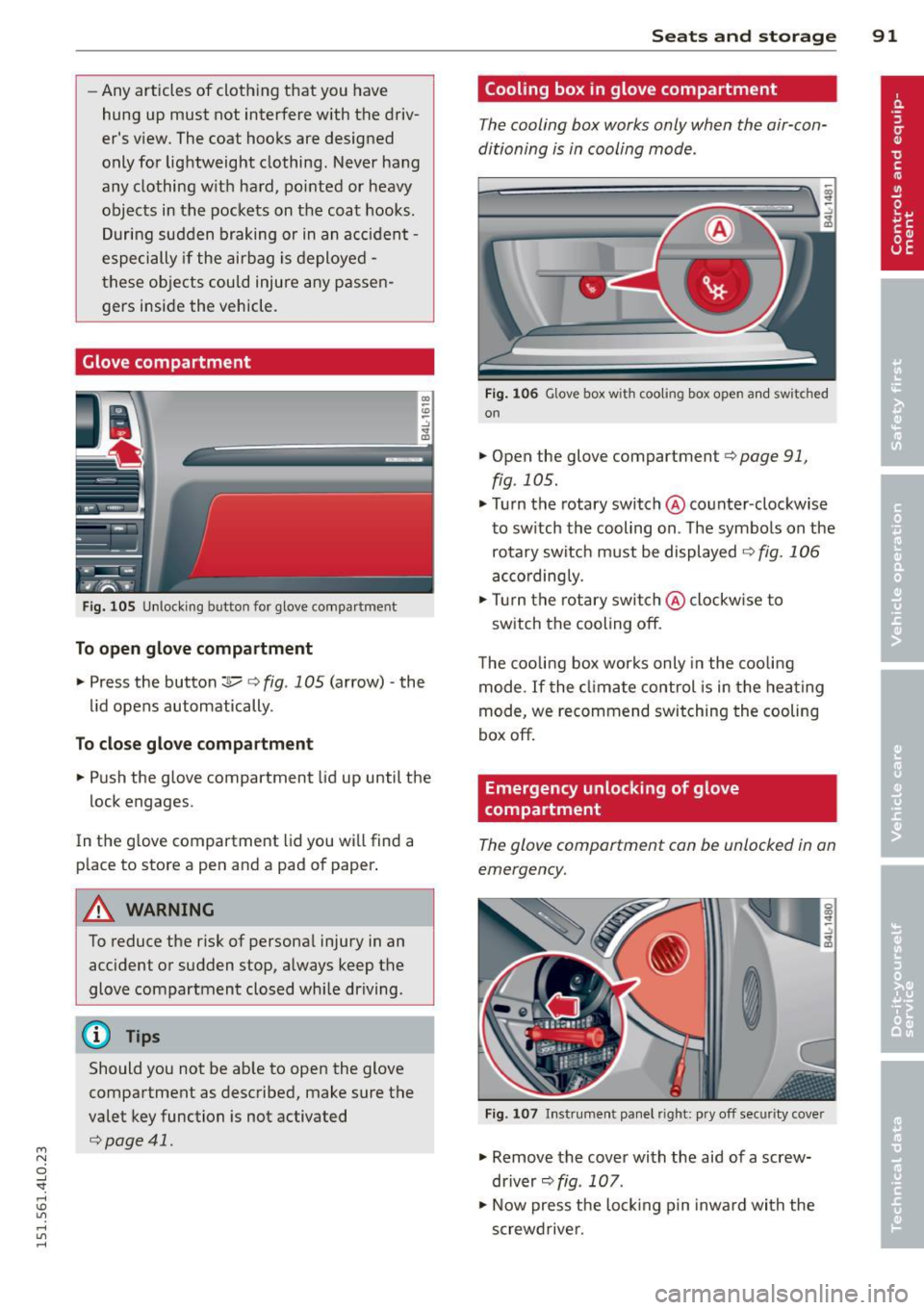
Fig. 105 Unlocking button for glove compa rtment
To open glove compartment
.. Press the button:]...--r=> fig . 105 (a rrow) -the
lid opens automatically.
To close glove compartment
.. Push the glove compartment lid up until the
lock engages.
In the g love compartment lid you will find a
p lace to store a pen and a pad of paper .
A WARNING
To reduce the risk of persona l injury in an
accident or sudden stop, always keep the
glove compartment closed whi le driving.
(D Tips
Should you not be able to open the glove
compartment as described, make sure the
valet key function is not activated
r=>poge 41.
Seats and storage 91
Cooling box in glove compartment
The cooling box works only when the air-con
ditioning is in cooling mode.
F ig . 106 Glove box with cooling box open an d switched
on
.. Open the glove compartment r=> page 91,
fig. 105 .
.. Turn the rotary switch @counter-clockwise
to switch the cooling on . The symbols on the
rotary switch must be displayed
9 fig. 106
accordingly .
.. Turn the rotary switch@clockw ise to
switch the cooling off.
The cooling box works only in the cooling
mode.
If the climate control is in the heating
mode, we recommend switching the cooling
box off.
Emergency unlocking of glove
compartment
The glove comportment con be unlocked in on
emergency.
Fig. 107 In strument panel right: pry off security cover
.. Remove the cover with the aid of a screw
driver~
fig. 107 .
.. Now press the locking p in inward with the
screwdrive r.
Page 96 of 350
94 Warm and cold
Warm and cold Climate control
Description
The air conditioner is fully automatic and is
designed to maintain a comfortable and uni
form climate inside the vehicle .
We recommend the following settings :
.. Set the temperature to 72 °F (+22 °C).
.. Press the
!AUTO ! button.
With this setting, you attain maximum com
fort in the least amount of time. Change this
setting, as desired, to meet your personal
needs.
The climate controls are a combination of
heating, ventilation and cooling systems,
which automatica lly reduce humidity and cool
the air inside your vehicle.
The air temperature, air flow and air distribu
tion are automatica lly regu lated to achieve
and maintain the desired passenger compart
ment temperature as quick ly as possib le.
The system automatically compensates for
changes in outside temperature and for the
intensity of the sunlight entering the vehicle.
We recommend you use the
Automatic mode
¢ page 97 for year-round comfort.
Please note the following:
Turn on the air conditioner to reduce humidity
in the vehicle . Thi s also prevents the windows
from fogging up.
When the outside temperature is high and the
a ir i s very humid,
condensation from the
evaporator may drip under the vehicle. This is
norma l and does not indicate a leak.
If the outside temperature is low, the fan nor
mally only switches to a h igher speed once
the eng ine coolant has warmed up sufficient
l y.
The air conditioner temporarily switches off
when you drive off from a standstill using full
thrott le to save eng ine power. The
compressor a lso switches off if the coo l
ant temperature is too high , so that the en
gine can be adequately cooled under extreme
loads.
Air pollutants filter
The air pollutants filt er (a comb ined particle
filter and activated charcoa l filter) reduces or
prevents outside air pollution (dust, or pollen)
from enter ing the vehicle. The air is also fil
tered in air recirculation mode .
The air pollutants filt er must be changed at
the interva ls specified in your Warranty
&
Maintenance booklet, so that the a ir condi
tioner can properly work.
If you drive your vehicle in an area with high
air pollution, the filter may need to be
changed more frequently than specified in
your Audi Warranty
& Maintenance booklet. If
in doubt, ask your authorized Audi Service Ad
visor for advice .
Key coded settings
The air conditioner settings selected are auto
matically stored and assigned to the key be ing
used. When the vehicle is started, the air con
ditioner automa tically selects the settings as
s igned to that key. This way every driver will
maintain h is/her own personal settings and
does not have to reset them manually .
If a different dr iver uses your key and changes
the a ir cond itioner settings, the latest adjust
ments will e rase and replace the settings you
have stored.
Energy management
To prevent the battery from being discharged
and to restore the balance of energy, compo
nents which require large amounts of energy
are temporarily cut back or switched off
¢ page 228. Heating systems in pa rticular re
quire a great deal of energy.
If yo u notice , fo r
example, that the seat* or rear window heat
ing is not heating, they have been temporarily
cut back or switched off by
energy manage
ment.
These systems are availab le aga in as
soon as the energy balance has been restored . .,.
Page 99 of 350
M N
0 ...J
'SI: ...... \!) 1.1'1
...... 1.1'1 ......
cannot be lower than the outside tempera
ture. The air wi ll not be cooled or
dehumid ified. The windows can fog up.
Automat ic mode ~
The automatic mode is the standard setting
for all seasons.
.,. Se lect temperature between 60 °F ( + 16 °()
and 84 °F (+ 28 °C) .
.. Press the !AUTO ! button.
Automatic opera tion ens ures constant tem
peratures in the interior and dehumidifies the
air inside the vehicle . Air temperature, vol ume
and distribution are controlled automatically
to reach or maintain the desired interior tem perature as quickly as possible. Fluctuations
in exterior temperature and the effects of
temperature from the pos ition of the sun are
compensated for automat ically.
This operat ing mode works only in the adjust
ab le temperature range, from 60
°F ( + 16 °C)
to 84 °F (+28 °C) . If a temperature be low 60
°F ( + 16 °C) is selected, L O appears in the d is
p lay. At tempe rat ures above
84 °F (+ 28 °C),
HI is d isplayed. At both extreme settings, cl i
mate con trol r uns con tinuously at maximum
coo ling or heat ing power . There is no temper
ature reg ulation.
Setting the temperature
Separate temperatures con be selected for
the driver's and front passenger's side.
.,. Rotate the reg ulator to the left to reduce
the temperature, or to the right to increase
the temperature.
The se lected temperatu re appea rs on the cli
mate con trol d isp lay. The tempe rature sett ing
will also appear for a few seconds in the MMI
d isp lay .
Warm and c old 97
Fan~
The automatically preset fan speed con be re
duced or increased .
.. Press the [!] button .
.. Rotate the regulator to the des ired fan
speed.
The climate control system automatically reg ulates fan speed depending on inter ior tem
perature. You ca n adjust the volume of air pro
duced by the fan to your own requirements .
The fan speed setting will appear for a few
seconds in the MMI display.
(D Tips
It is possible that the fan speed may
change automatically. This occurs to en
sure that the des ired temperature sett ing
i s reached as quickly as possible .
Air distribution ~
The automatically controlled air distribution
con be changed manually.
.. Press the G!J button.
.. Rotate the regulator to the des ired setting.
You can adjust the air distribut ion so that air
flows from specific vents. In position
:,0 air
flows on ly to the windows, in posit ion
;J, it
flows to the driver or passenger, and in pos i
tion
!J it flows to the footwell. There are ad
ditional comb inat ions availab le to adjust air
distribution as needed .
To regulate air d istribution automatically,
switch to
IAUTOI.
The air distribution setting will appear for a
few seconds in the MMI display.
Defrosting ~
The windshield and side windows ore rapidly
defrosted or defogged.
.,. Press the~ button to turn on the defroster .
.. Press the~ button again, or press the
!AUTO ! button to turn it off . ..,.
Page 100 of 350
98 Warm and cold
The temperature should be set to 72 ° F
(22 °C) o r higher . Temperat ure is contro lled
automatically. The maximum amount of a ir
flows mainly from the vents below the wind
shield.
To defog the rear side windows, the air vents in the doo r pillars sho uld be open and di rect
ed at the windows .
Manual air recirculation ~
Air recirculation prevents exhaust fumes or
other pollution from entering the vehicle.
Turning on air recirculation
> P ress the l= I button ¢ A
Turning off air recirculation
> Press the~ button agai n, or
> press the IAU TO I button, or
> press th e ~ button.
In the a ir recirculation mode, the air in the
passenger compa rtme nt is recirculated and
fil tered to prevent exhaust fumes and other
pollu tion from en teri ng the veh icle . We rec
ommend that you use the manu al air recircu
l ation under the following conditions :
- when d riving through tunne ls
- in a traffic jam .
A WARNING
Do not use the air reci rc u lat io n mode for
e xte nded per io d s of t i me . T he windows
co uld fo g up since no fres h air ca n e nter
t he vehicle.
If the windows fog up, press
t he air recircu lation button aga in imme di-
-
ately to switch off the air recirculation
f u nction or select defrost.
Rear window defogger~
The rear window defogger clears the rear win
dow of condensation .
> Press the OW button to tur n t he rear window
defogger on and off.
T he rea r window defogger wo rks on ly when
t h e engine is runn ing. The light in t he sw itch
will illumina te when the defogger is on.
T he rea r window defogg er w ill sw itch off au
tomat ica lly afte r a short time. The t ime the
r ear w indow de fogger rema ins o n w ill va ry de
pending on the o utside tempera ture.
At very low outs id e temperatures, the rear
window defogger ca n be sw itched on co nti nu
o usly by pushing the
OW button for more t han
2 seconds . This rema ins stored un til the ign i
t ion is switc hed off.
A rear w indow defogge r th at was switched on
also remains s tore d for 15 m inu tes after the
ignition is sw itche d off . If the engine is re
started withi n these 15 m in utes, the rear win
dow defogger is a lso activated, depending on
o utside temperat ure . With a vehicle that is
parked for a short time, the rear window de
fogger does no t need to be manually activat
ed again .
@ For the sake of the environment
Turn the defogger off when the rear win
dow is clear. When you save electric ity, you
save fue l.
Page 102 of 350
100 Warm and cold
@ Tips
If the climate control system is ope rating
in cooling mode, a ir flows primari ly from
the outlets in the center conso le and in the
door pillars. To achieve adequate cooling,
you should never close the outlets com
pletely .
Using climate control economically
Using the climate controls prudently can help
save fuel.
When you use the air cond it ioner , engine pow
er is reduced and fuel consumption increases.
To save fuel, you should use the air condition
er only when necessary . Also please note the
following points :
.,. To save fuel, turn off cooling mode by press
ing the
I A/Cl button (indicator light goes
out) .
.,. In add it ion, if you open the w indow or the
Panoramic sliding sunroof* wh ile driving,
tu rn off cooling mode by press ing the
IA/C l
button (indicator light goes out).
.,. If the vehicle is extremely hot due to the
heat of the sun, briefly open doors and win
dows.
@ For the sake of the environment
By reducing the amount of fue l you use,
you also reduce the amount of pollutants emitted into the air.
Rear Air Conditioning
Rear air conditioning - controls
Applies to veh icles: w ith four -zo ne automatic comfort ai r
condit io ning
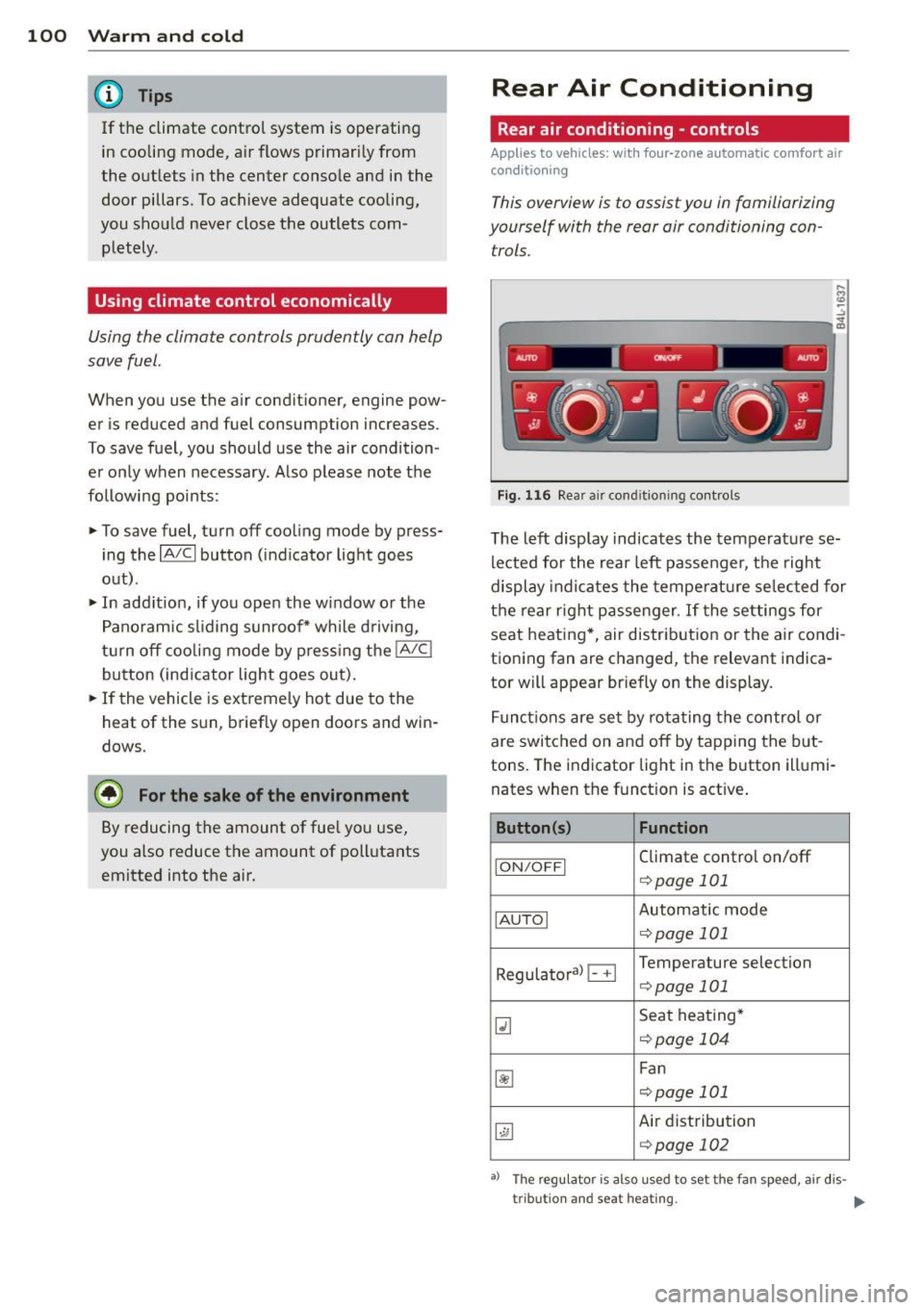
This overview is to assist you in familiarizing
yourself with the rear air conditioning con
trols.
....
"' (0 :;
-------------~ -----~
Fig. 116 Rea r air conditioning controls
The left display indicates the temperature se
lected for the rear left passenger, the right
display indicates the temperature selected for
the rear right passenger . If the settings for
seat heating *, air distr ib ution or the air cond i
tioning fan are changed, the relevant indica
tor will appear briefly on the display .
Functions are set by rotating the control or
are switched on and off by tapping the but
tons. The indicator light in the button illumi
nates when the funct ion is active .
Button(s) Function
ION/OFFI Climate control on/off
¢ page 101
IAUTOI Automatic mode
¢page 101
Regulatoral B Temperature selection
¢page 101
Q] Seat heating*
<=:>page 104
~
Fan
c::> page 101
~
Air distribution
¢page 102
•> The regu lator is also used to set the fan speed , air dis-
tr ibut ion and seat heating.
II-
Page 104 of 350
102 Warm and cold
Rear air distribution ~
Applies to vehicles: wit h fou r-zone a utomat ic comfort a ir
co ndit io ning
The automatically controlled air distribution
con be changed manually.
., Press the [a button.
., Rotate the regulator to the desired setting.
You can adjust the air circulation so that air
flows from specific vents.
- In position
:J, all air flows from the vents in
the center console and the outlets to the
door pillars.
- In position
:0, air flows from the outlets in
the door pillars.
- In position~, air flows from the outlets un-
der the front seats.
There are additional combinations available to
adjust air distribution as needed.
To regulate air distribution automatically,
switch to IAUTOI.
Basic settings
General
The basic climate control settings con be ad
justed in the MMI.
., Select : I CAR ! function button > AC control
button . Or
., Select : ICAR !function button>
Car systems*
control button > AC.
The following functions can be selected:
- Auto recirculation
r::;, page 102
-Synchronization r::;, page 102
- Supplementary heater* c;,poge 103
- Rear operation* r::;, page 103
Automatic recirculation mode '
An air quality sensor detects increased con
centrations of pollutants in the outside air
and automatically switches to recirculation
mode .
We recommend that you always keep auto
matic air recirculation ON to prevent polluted
outside air from entering the vehicle interior.
If the
air quality sensor located in the air con
ditioning system detects polluted outside air,
the sensor decides whether the air pollution
can be reduced by the factory-installed pollu
tant filter or whether it is necessary to switch
to air recirculation. With heavy concentrations
of pollutants, the air conditioning system is
switched automatically to recirculation mode
and the supply of outside air is blocked. As
soon as the concentration of pollutants in the
outside air drops, fresh air is supplied to the
vehicle interior again.
In the event that the windows fog up during
automatic air recirculation, you must press
the® button immediately .
Under certain operating conditions, automatic
air recirculation is switched off automatically.
With outside temperatures below about SO °F
(+10 °(), automatic air recirculation is limited
to 30 seconds. With outside temperatures be low about 30 °F
( - 1 °() and with the air condi
tioner switched off, the automatic air recircu lation is limited to 15 seconds.
Synchronization
One climate control setting for the driver and
front passenger seats .
With synchronization active, the driver's set
tings are adopted for the passenger or vice
versa. All the other settings that were made
are transferred to the other seat . This in
cludes all the climate control settings, except
for the seat heating/ventilation* .
If a different setting is selected at a
"synchronized seat ", synchronization is can
celled.
Page 110 of 350
108 On the road
Starting and stopping
the engine
Starting the engine
The engine can only be started with your orig
inal Audi key.
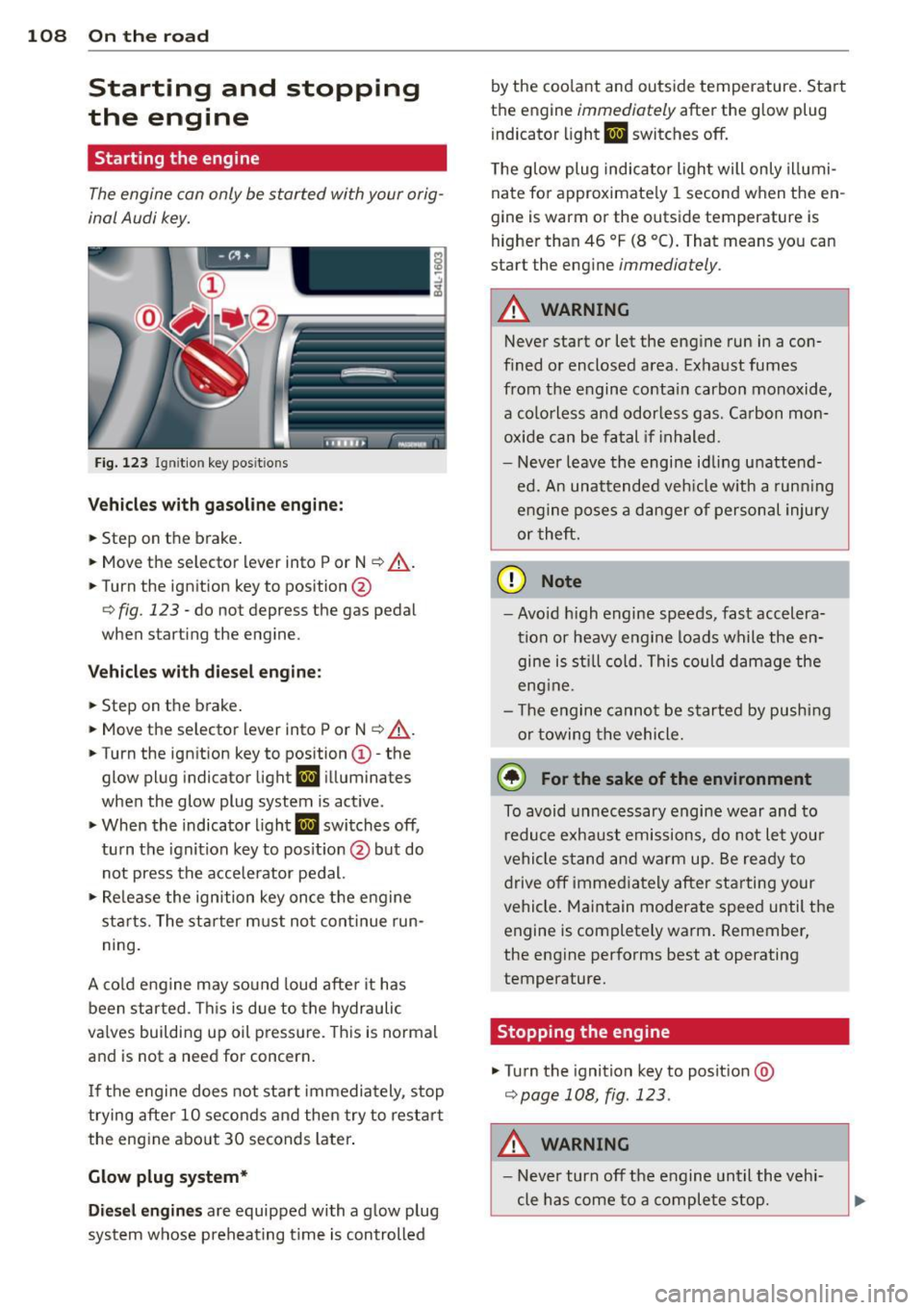
Fig. 123 I gni tion key positio ns
Vehicles with gasoline engine:
.. Step on the brake .
.. Move the selector lever into P or N
~ ,&. .
.. Tu rn the ignition key to position @
~ fig. 123 -do not depress the gas pedal
when starting the engine.
Vehicles with diesel engine:
.. Step on the brake .
.. Move the selector lever into P or N
~ ,&..
.. Turn the ign ition key to position ©- the
glow plug indicator light
II illuminates
when the glow plug system is act ive .
.. When the indicator l ight
II switches off,
turn the ignition key to pos it ion @ but do
not press the accelerator pedal.
.,. Re lease the ignition key once the engine
sta rts. The starter must not continue run
ning.
A cold engine may sound loud after it has
been started . This is due to the hydraulic
va lves building up oil pressure. This is normal
and is not a need for concern.
If the engine does not start immediately, stop
trying after 10 seconds and then try to restart
the engine abo ut 30 seconds later.
Glow plug system*
Diesel engines are equipped with a glow plug
system whose preheating t ime is controlled by the coo
lant and outs ide temperature . Start
the engine
immediately after the glow plug
indicator light
II switches off.
The glow plug indicator light will only illumi
nate for approximate ly 1 second when the en
gine is warm or the outside temperature is
higher than 46 °F (8 °C). That means you can
start the engine
immediately .
A WARNING
-Never start or let the engine run in a con-
fined or enclosed area. Exhaust fumes
from the engine contain carbon monoxide,
a colorless and odorless gas . Carbon mon
oxide can be fatal if in haled.
- Never leave the engine idling unattend
ed. An unattended veh icle w ith a runn ing
engine poses a danger of personal injury
or theft .
(D Note
- Avo id high engine speeds, fast accelera
tion or heavy engine loads while the en gine is still cold. This could damage the
eng ine .
- Th e engine cannot be started by pushing
or towing the vehicle .
@ For the sake of the environment
To avoid unnecessary engine wear and to
reduce exhaust emissions, do not let your
vehicle stand and warm up. Be ready to
drive off immediately after starting your
vehicle. Maintain moderate speed until the
engine is completely warm . Remember,
the engine performs best at operating
temperature.
· Stopping the engine
.,. Turn the ignition key to posit ion @
~page 108, fig . 123.
A WARNING
-
- Never turn off the engine until the vehi-
cle has come to a complete stop.