ECO mode AUDI Q7 2015 Owner´s Manual
[x] Cancel search | Manufacturer: AUDI, Model Year: 2015, Model line: Q7, Model: AUDI Q7 2015Pages: 350, PDF Size: 86 MB
Page 115 of 350
M
"'
brake pedal immediately or engage the
parking brake.
- Should the engine stall, depress the
brake pedal immediately or engage the
parking brake.
- In order to prevent the vehicle from roll
ing back unintentionally when starting in
stop-and-go traffic, keep the brake pedal
depressed for a few seconds before driv
ing off .
- When you leave the vehicle - even if only
briefly -, sw itch off the ignition and
make sure to remove the ignition key . Al
so engage the
park ing br ake to prevent
your vehicle from rolling u nintentionally.
Th is parti cularly applies if chi ldren are
left in the vehicle - danger of accident!
Cruise control
Switching the system on
Th e cruise control syst em makes it possible to
drive at a constant speed starting at
20 mph
(30kmlh).
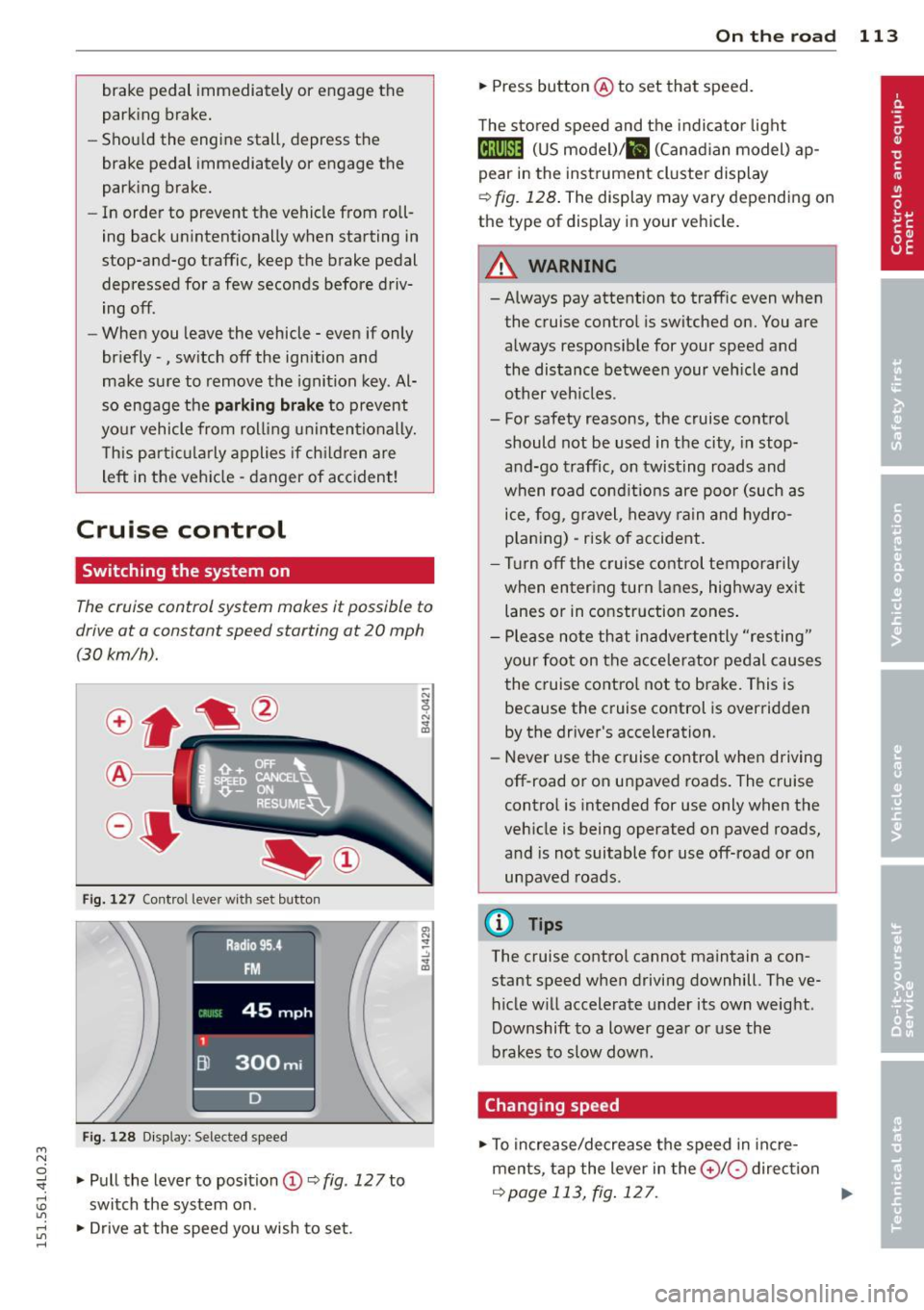
Fig. 127 Contro l leve r wi th s et button
Fig. 128 D is play: Selected speed
:3 .,. Pull the lever to position (D ~ fig. 127 to "". rl I.O
"' ,....,
"' rl
switch the system on .
.,. Drive at the speed you wish to set.
On th e road 113
.,. Press button @to set that speed.
The sto red speed and the indicator light
Ctj;\1)~14 (US model) ;&I (Canad ian model) ap
pear in the instrument cluster display
~ fig. 128 . The display may vary depending on
the type of display in your vehicle.
A WARNING
- Always pay attention to traffic even when
the cruise control is switched on. You are
always responsible for your speed and
the distance between your veh icle and
other veh icles .
- For safety reasons, the cruise control
should not be used in the city, in stop
and-go traffic, on twisting roads and
when road conditions are poor (such as
ice, fog , gravel, heavy rain and hydro
p laning) - risk of accident.
- Turn off the cruise control temporarily
when en ter ing turn lanes, highway exit
lanes or in construction zones .
- Please note that inadvertently "resting"
your foot on the accelerator pedal causes
the cruise control not to brake. This is because the cruise control is overridden
by the driver's acceleration.
- Never use the cruise control when driving
off-road o r on unpaved roads. The cruise
control is intended for use only when the
vehicle is being operated on paved roads,
and is not suitable for use off-road or on
unpaved roads .
(D Tips
The cruise control cannot maintain a con
stant speed when driving downhill. The ve
hicle will accelerate under its own weight .
Downshift to a lower gear or use the
brakes to slow down.
Changing speed
.,. To increase/decrease the speed in incre
ments, tap the lever in the
0 10 direction
~ page 113, fig . 127 . Ill>-
Page 141 of 350
Automatic
transmission
tiptronic
Introduction
The automatic transmission is controlled elec
tronically. The transmission upshifts or down
shifts automatically depending on which drive
program is selected. The power is transferred
by a torque converter .
When a
mode rate d riv in g s ty le is used, the
transmission selects the most econom ica l
driving mode. It w ill then change up early and
delay the downshifts to g ive better fuel econ
omy.
T he transmission switches to a sporty mode
after a k ick-down or when the driver uses a
spo rty driving sty le characterized by quick ac
celerator pedal movements, heavy accelera
tion, frequent changes in speed and traveling
at the maximum speed.
If desired, the driver can a lso select the gears
manually ( tiptronic mode ) ¢ page 142.
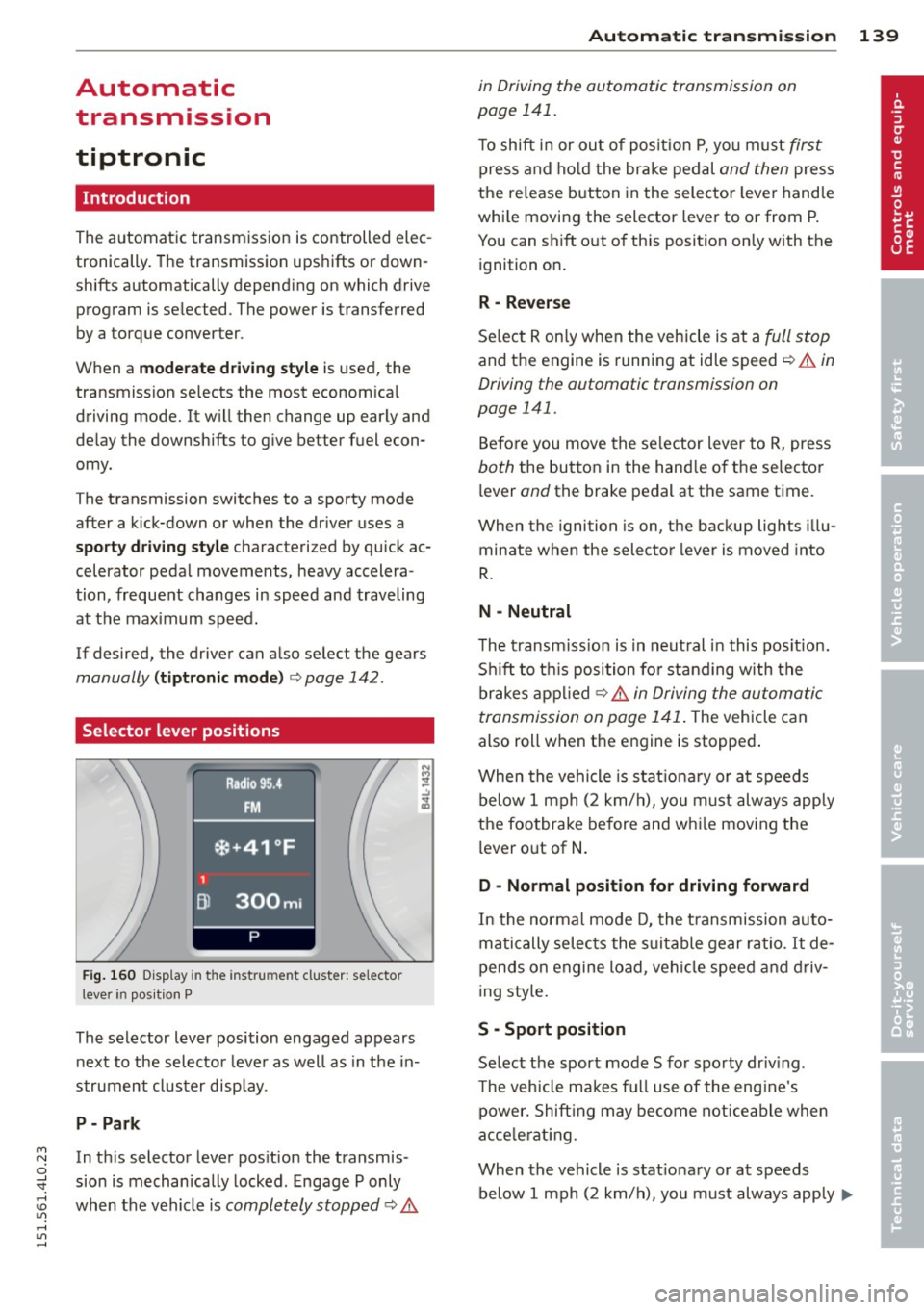
Selector lever positions
Fig. 160 D isp lay in t he i nst ru m en t cluster: selecto r
l ever in pos it ion P
The selector lever position engaged appears
next to the selecto r lever as well as in the in
strument clus ter disp lay.
P- P ark
M N In th is selector lever pos ition the transmis-o
;;f_ sion is mechan ically locked . Engage P only
~ when the vehicle is completely stopped ¢ 11::.. 1.1'1 ,...., 1.1'1 ,....,
Automatic tran sm iss ion 139
in Driving the automatic transmission on
page 141.
T o shift in or out of posit io n P , yo u m ust first
press and ho ld the brake pedal and then press
the re lease button in the selector leve r handle
whi le moving the selector lever to or from P.
You can shift out of th is position only with the
ignition on.
R -Reverse
Se lect R on ly when the vehicle is at a full stop
and the engine is running at idle speed ¢ 11::.. in
Driving the automatic transmission on
page 141.
Before you move the se lector lever to R, press
both the button in the hand le o f the selector
lever
and the brake pedal at the same t ime.
When the ignition is on, the backup lights illu
minate when the selecto r lever is moved into
R .
N -Neutral
The t ransm iss ion is in neut ral in this pos ition.
S hi ft to t his position fo r standing with the
brakes appl ied ¢
11::.. in Driving the automatic
transmission on page 141 .
The vehicle can
also roll when the engine is stopped .
When the vehicle is stat iona ry or at speeds
below 1 mph (2 km/h), yo u m ust always apply
the footbrake before and whi le mov ing the
lever o ut of
N .
D - Normal position for driving forward
In the no rma l mode D, the t ransmission auto
matically selects the s uitable gear ratio.
It de
pends on engine load, vehicle speed and driv
i ng sty le.
S -Sport posit ion
Se lect the sport mode S for spo rty dr iv ing .
T he vehicle makes fu ll use of the eng ine's
power. Shift ing may become noticeable when
acce lerat ing.
When the vehicle is stat ionary or at speeds
below 1 mph (2 km/h), you must always app ly ...,
Page 144 of 350
142 Automatic tr an smis sion
- Never hold the veh icle on an incl ine with
a slipp ing clutch . The clutch opens auto
matically when it becomes too hot from
the overload. An indicator lamp@] illu
minates and a dr iver message appears
c!;> page 143 when the clutch is overload
ed.
- If the engine must remain running, never
hav e any driving pos ition engaged when
che cking under the hood. Make sure the
selector lever has secure ly engaged and
is locked in P with the parking bra ke
firmly set¢
page 256. Otherwise, any
increase in engine speed may set the ve
hicle in motion, even with the parking
brake applied.
(D Note
- When stopping on an incline, do not try
to hold the vehicle in place by pressing
the accelerator peda l while a driving gear
is selected. Th is can cause the transm is
s io n to overheat and can damage it. Acti
vate the park ing brake or p ress the brake
pedal to prevent the vehicle from ro lling .
- Allow ing the vehicle to roll when the en
gine is stopped and the selector lever is i n
N w ill damage the transmiss ion be
cause it is no t lub rica ted under those c ir
cumst ances.
Hill descent control
The hill d escent control system assists the
driver when driving down declines.
H ill desce nt co ntrol is activated when these
lecto r lever is in D/S a nd you press the b rake
pedal. The tra nsmission a utomatically se lects
a gea r that is suitab le for the incline. Hill de
scent control tries to maintain the speed ach
i eved at the t ime of brak ing, within physical
a nd techn ica l limitations . It may st ill be nec
essary to adjust the speed with the brakes.
H ill descent co ntrol sw it ches off once the de
cline levels out or you press t he accelerator
pedal. When the speed is set in the cruise con
trol
system
c!;> page 113, hill descent contro l is al
so act ivated.
A WARNING
--
Hill descent control cannot overcome
physical lim itations, so it may not be ab le
to maintai n a co nstant speed under all
conditions . A lways be ready to apply the
b rakes .
· Manual shift program
Using the manual shift program you can
manually select gears.
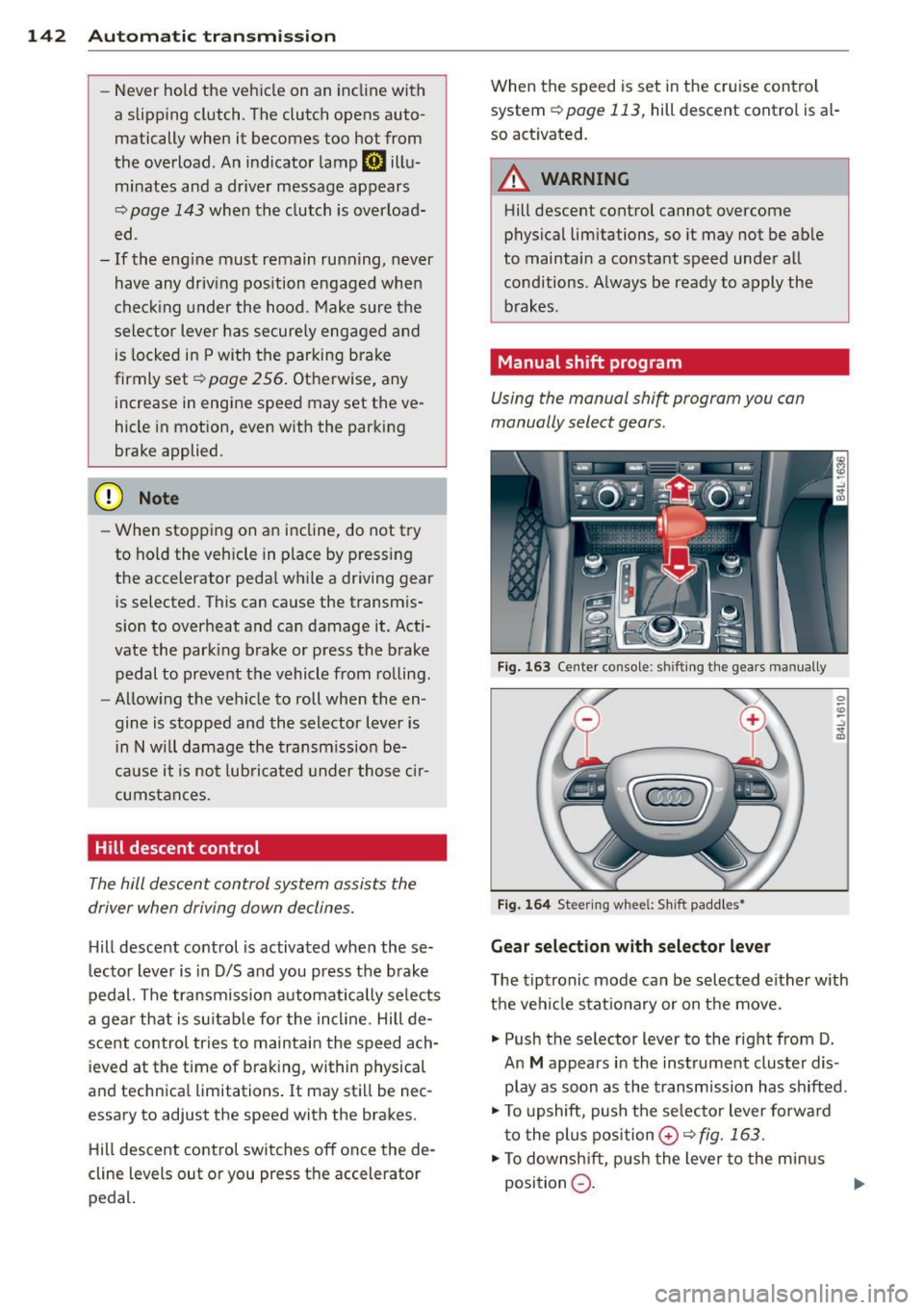
Fig. 1 63 Center conso le: sh ift in g the gears m an ually
Fig . 1 64 St ee rin g whee l: S h ift paddle s•
Gear selection with selector lever
The tiptronic mode can be sel ected either w ith
the vehicle stat io na ry or on t he move.
.,. Push the se lector lever to the right from D.
An
M appears in the instrument cluster dis
play as soon as the transmission has shifted .
.,. To upshift, push the se lecto r lever forwa rd
t o the plu s position
0 c!;> fig. 163 .
.,. To downsh ift, pus h the lever to the min us
position
Q . 1J>-
Page 149 of 350

M
"' 0 ..J
"". rl I.O
"' rl
"' rl
General Information
Applies to vehicles: with Audi parking system plus w ith
rea rview camera
@
Fig . 168 Ar ea cov ere d (D and are a not cove red @ by
t h e rea rv iew c amera.
Fig. 169 Rea r lid: Locat ion of the rea rv iew came ra
Sen sor s
Senso rs are located in the front and rear
bumpe rs. If these detect an obstacle, aud ible
and visual signals warn you.
Make sure the sensors are not covered by
stickers, deposits o r any othe r obstructions as
it may impair the sensor function . For infor
mation on cleaning, refer to ¢
page 242.
The range at wh ich the sensors begin to meas
ure is approximately:
side
front 3 ft (0
.90 m)
center 4 ft (1.20 m)
side 2 ft (0.60 m)
rear center 5.2 ft (1.60 m)
The closer you get to the obstacle, the shorter
the interval between the audib le signa ls . A
continuous tone sounds when the obstacle is less than approximately 1 ft (0.30 m) away .
Do not cont inue driving farther forward or in
reverse
¢ .& in General information on
Parking sys tems 147
page 145, ¢(i) in General information on
page 145.
If t he distance to an obstacle rem ains con
stant, the vo lume of the distance warn ing
gradua lly drops after about fo ur seconds (this
does not apply in the continuo us tone range).
Rearview camera
T he rearview camera is located above t he rear
l ice nse p late bracket. M ake s ure that the lens
for the parking system¢
fig. 169 is not cov
ered by deposits or any other obstructions be
cause this can affect the function of the park
ing system. For informat ion on cleaning, refer
to
¢ page 242.
The rearview camera coverage area includes
(D ¢ fig . 168. Only this area is displayed in
the MMI. Objects that a re outside of this area
@ are not displayed .
The orientation lines become less accurate
and the b lue surfaces diminis h if the Adaptive
Air S uspension* is faulty, the vehicle is lifted
or cargo mode is act ivated, or if the
Dynamic ,
Offroa d
or Lift mode is set ¢ page 157 .
.&_ WARNING
-Always read and follow the applicable
warn ings ¢.&
in General information on
page 145.
- If the position and the installation angle
of the rearview came ra was chang ed, for
examp le, afte r a coll is io n, do not cont in
ue to use the system for safety reasons.
Have it che cked by your authori ze d Aud i
dea le rship or authorized repair facility .
- On ly use the rearv iew came ra to assist
you if it shows a good, clear picture . Fo r
examp le, the image may be affected by
the sun shining into the lens, dirt on the
lens or if there is a system fault.
- Use the rearv iew camera only if the lug
gage compartment lid is complete ly
closed. Make sure any objects you may
have mounted on the luggage compart
ment lid do not block the rearview cam
era .
-
Page 152 of 350
150 Parking system s
•Backup and align yo ur vehicle so the blue
area @ borders on the rear end of the vehi
cle or on the parking space line
c:> A in Gen
eral Informa tion on page 147,
c:> (D in Gen
eral Informa tion on page 148 .
The blue
area represents an extension of the vehicle's
outline by app rox imately 16 ft (5 m) to the
rear . The long side of the b lue a rea shou ld
be o n the curb. The enti re blue area must fit
i n to the par kin g space.
• With the veh icle stopped, turn the s teer ing
wheel to the right as far as it wi ll go .
• Back into the parking space until the b lue
curve
c:> fig. 175 touches the curb c:> A in
General Information on page 147,
c:> (D in
General Informa tion on page 148.
Stop the
vehicle .
• With the veh icle stopped, turn the steer ing
wheel to the left as far as it will go .
• Co nti nue to bac k into the pa rking space un
t il the vehicle is parked p aralle l to the c urb
c:> A in G eneral Information on pag e 147,
c:> (D in General Information on page 148 .
® marks the rear bumper. Stop the vehicle,
at the latest, when the red orientation line
@ borders an obstacle . Keep an eye on the
front of your vehicle wh ile doing this.
P ar king ne xt to ob stacle s
When there is an obstacle (s uch as a wall)
next to the parking space, choose a space with
more space on the sides. Pos ition the long
side of the blue area so that there is sufficient
space from the curb . The area must not be on
the curb . You w ill also need to start turning
the steering whee l much earl ie r. T he re shou ld
be a suffic ient amount of space between the
curb and the b lue curve, and the blue curve
c:> fig. 175 mus t not touch the curb.
@ Tips
The left or right orientation lines and sur
faces wi ll be displayed, depending on the
t urn signa l being use d.
Audi parking system
plus with front- and
rearview camera
Introduction '
Applies to vehicles: with Aud i parking system plus with
front- and rearview camera
In addition to an acoustic and visual parking
system, this parking system contains a front
and rearview camera
c:> page 148. You are as
s isted by various views, such as corner v iews
at the front and rear of the ve hicle, and views
directly in front of or behind the vehicle.
General information
Appli es to vehicles: with Audi parking system plus with
front- and rearview camera
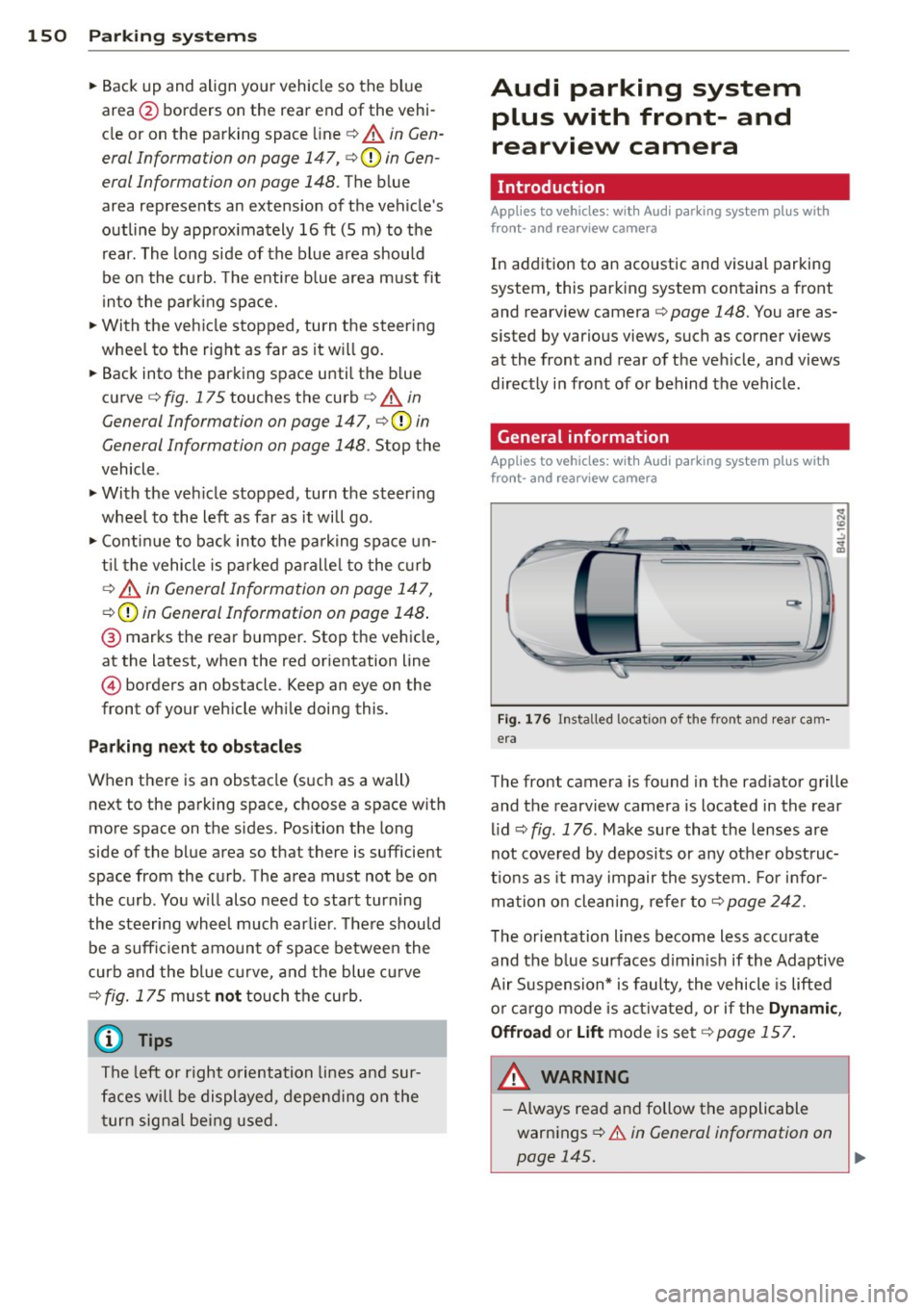
Fig . 1 76 In stalled lo cat ion o f th e fro nt and rea r cam
era
The front camera is found in the radiator grille and the rearview camera is located in the rear
l id
c:> fig . 176 . Make sure that t he lenses are
not cover ed by deposits or any other obst ruc
tio ns as it may impair the system. Fo r in for
mation o n clean ing , re fer to
c:> page 242 .
The orientation lines become less accurate
and the b lue surfaces d imin is h if the Adaptive
Air S uspension* is faulty, the vehicle is lifted
o r car go mode is acti va ted , or if the
Dynami c,
0ffroad
or Lift mode is set c:> page 157.
A WARNING
-Always read and follow the applicable
warnings
c:> .& in General information on
-
page 145. .,..
Page 157 of 350

M N
0 ...J
'SI: ,...., \!) ..,.,
,...., ..,., ,....,
Adjusting the display and warning tones
Applies to vehicles: with rear park assist/Audi parking sys
tem plus with rearview camera/front- and rearview cam
era
The display* and warning tones can be ad
justed in the MMI.
~ Select: ICARI function button> Systems*
control button > Parking system. Or
~ Select: ICARI function button> Car systems*
control button > Driver assist> Parking aid.
Display*
- Off -when the parking system is switched
on, only audible signals are given.
-On -when the parking system is switched
on, either the visua l display or the picture
from the rearview camera is disp layed.
Warning tones
- Front volume* -front sensor volume
- Front frequency* -front sensor frequency
- Rear volume -rear sensor volume
- Rear frequency -rear sensor frequency
- In-car entertainment fader/Music volume
while parking -when the parking system is
switched on, the volume of the active audio
source is lowered.
The new ly adjusted value is briefly heard from
the signal generator .
(D Tips
- The warning tones can also be adjusted
direct ly by the visual disp lay* or the pic
ture from the camera*. Simply press the
Settings* control button.
- Changed settings are activated when
parking system is switched on again.
- The settings are automatically stored
and assigned to the remote control key
being used. Parking
systems 155
Error messages
Applies to vehicles: with
rear park assist/Audi parking sys
tem plus with rearview camera/front- and rearview cam
era
There is an error in the system if the LED in
the~ button* is blinking and you hear a con
tinuous alarm for a few seconds after switch ing on the park ing system or when the park
ing system is already activated .
If the error is
not corrected before you switch off the igni
tion, when you switch on the parking system
again, the LED in the ~ button* will blink. If
you activate the parking system with the but
ton in this case, the continuous warning tone
will continue to sound.
Parking system plus with front and
rearview camera*
There is another system error if:
- the~·· symbol appears in the display and
the corresponding display area is shown in
blue. The camera is not working in this area.
- all segments around the vehicles are red or
if no segments are displayed.
Drive to your authorized Audi dealer or au
thorized repa ir facility immediately to have
the malfunction corrected .
Trailer hitch
Applies to vehicles: with rear park assist/Audi parking sys
tem plus with rearview camera/front- and rearview cam
era and trailer hitch
For vehicles using the trailer socket, the park
ing system rear sensors do not turn on when
you shift into reverse gear or when you press
the~ button*. This results in the follow ing
restrictions:
Rear park assist*
There is no warning for distances to the rear.
Audi parking system plus with rearview
camera/front and rearview camera*
There is no distance warning for the rear. The
front sensors remain activated. The visual dis play switches to the trailer towing mode. The
rearview camera image will not show the ori-
entat ion lines and the blue surfaces . ..,.
Page 160 of 350
158 Adapti ve Air Susp en sion
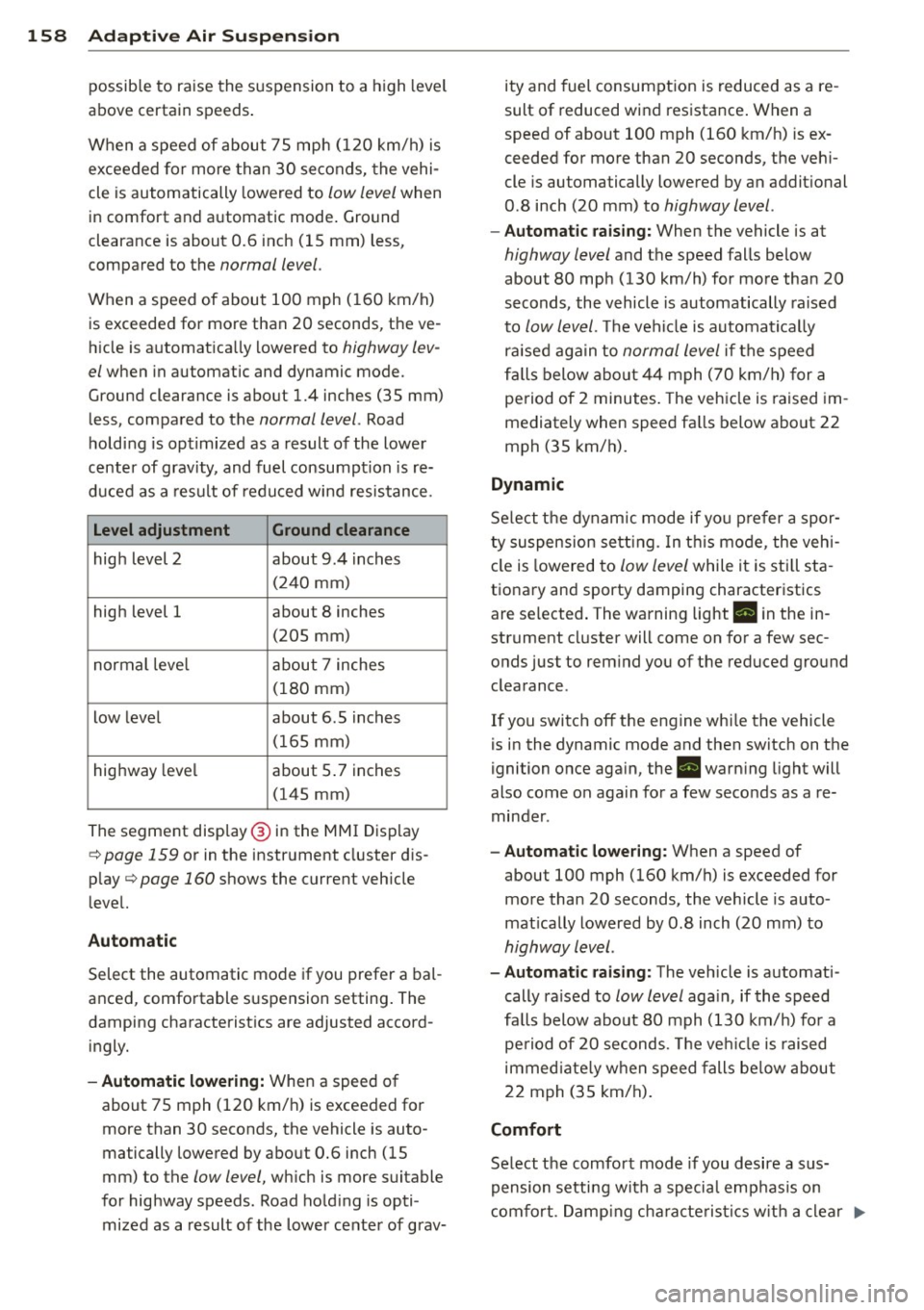
possible to raise the suspension to a h igh level
above certain speeds .
When a speed of about 75 mph (120 km/h) is
exceeded for more than 30 seconds, the vehi
cle is automatically lowered to
low level when
in comfort and automatic mode. Ground
clearance is about 0.6 inch (15 mm) less,
compared to the
normal level.
When a speed of about 100 mph (160 km/h)
is exceeded for more than 20 seconds, the ve
h icle is automat ica lly lowered to
highway lev
el
when in automatic and dynamic mode.
Ground clearance is about 1.4 inches (35 mm)
less, compared to the
normal level. Road
hold ing is optimized as a result of the lower
center of gravity, and fuel consumption is re
duced as a result of reduced wind resistance.
Level adjustment Ground clearance
high level 2 about 9.4 inches
(2 40 mm)
high level 1 about 8 inches
(205 mm)
normal leve l about 7 inches
(180 mm)
low level about 6.5 inches
(165 mm)
highway level about 5 .7 inches
(145 mm)
The segment disp lay @ in the MMI Display
c:::> page 159 or in the instr ument cluster dis
p lay
c:::> page 160 shows the current veh icle
level.
Automatic
Select the automatic mode if you prefer a bal
anced, comfortable suspension setting . The
damping characteristics are adjusted accord ingly.
- Autom atic lowe rin g: When a speed of
about 75 mph (120 km/h) is exceeded for
more than 30 seconds, the vehicle is auto
matically lowered by about 0.6 inch (15
mm) to the
low level, wh ich is more suitable
for highway speeds. Road hold ing is opti
mized as a result of the lower ce nter of grav- ity and fuel consumption is reduced as a re
sult of reduced wind resistance . When a
speed of about 100 mph (160 km/h) is ex
ceeded for more than 20 seconds, the veh i
cle is automatically lowered by an addit ional
0.8 inch (20 mm) to
highway level .
-Automat ic raising: When the vehicle is at
highway level and the speed falls below
about 80 mph (130 km/h) for more than 20
seconds, the vehicle is automatically raised
to
low level. Th e vehicle is automatically
raised aga in to
normal level if the speed
fa lls below about 44 mph (70 km/h) for a
pe riod of 2 minutes . The vehicle is raised im
mediately when speed fa lls below about 22
mph (35 km/h).
Dynamic
Se lect the dynam ic mode if yo u pre fer a spor
ty suspension se tti ng. In t his mode, the veh i
cle is lowered to
low level while it is still sta
t ionary and sporty damping characteristics
are selected . The warning light. in the in
strument cluster will come on for a few sec
onds just to rem ind you of the reduced ground
clearance .
If you switch off the engine whi le the vehicle
is in the dynamic mode and then switch on the
ignition once aga in, the . warn ing light will
also come on again for a few seconds as a re minder .
-Automat ic lowe ring: When a speed of
about 100 mph (160 km/h) is exceeded for
more than 20 seconds, the veh icle is auto
mat ically lowered by 0.8 inch (20 mm) to
highway level .
-Automa tic raising: The vehicle is automati
cally ra ised to
low level aga in, if the speed
fa lls below about 80 mph (130 km/h) for a
pe riod of 20 seconds. The ve hicle is raised
immed iate ly w hen speed falls be low about
22 mph (35 km/h).
Comfort
Select the comfort mode if you desire a sus
pension setti ng with a specia l emp hasis on
comfort. Damp ing cha racteris tics w ith a clear .,.
Page 161 of 350
M
"' 0 ..J
"". rl I.O
"' rl
"' rl
emphasis on comfort are selected in this
mode.
- Automatic lowering: When a speed of
about 75 mph (120 km/h) is exceeded for
more than 30 seconds, the vehicle is auto
matically lowered by 0.6 inch (15 mm) to
low level .
-Automatic raising: The vehicle is automati
ca lly raised to
normal level again, if the
speed falls below about 44 mph (70 km/h)
for a period of 2 minutes . The vehicle is
raised immediately when speed falls below
about 22 mph (35 km/h) .
Offroad
Select the offroad mode when you have to
travel over poor quality sections of road (e .g.
trails). In th is mode, the vehicle is raised to
high level 1, and damp ing characteristics for
poor road stretches are selected . When
sw itch ing to offroad mode , the Adaptive Air
Suspension indicato r appears automat ically in
the instrument cluster display¢
page 160.
The offroad mode can only be activated at
speeds below 37 mph (60 km/h) . Offroad
mode ends automatically and the automatic
mode is activated when a speed of approxi
mately 50 mph (80 km/h) is exceeded.
Lift
Select the lift mode when except ionally high
ground clearance is needed at a reduced
speed. In this mode, the vehicle is raised to
high level 2. When switching to lift mode , the
Adaptive A ir Suspension indicator appears au
tomatically in the instrument cluster display
¢ page 160.
The lift mode can be activated only at speeds
below 12 mph (20 km/h). When a speed of
about 25 mph (40 km/h) is exceeded, the sys
tem automatically leaves lift mode and the
offroad mode is activated. The instrument
cluster display automat ically switches the dis
play to Adaptive Air Suspens ion to indicate re
duced ground clearance .
Adaptive Air Suspension 159
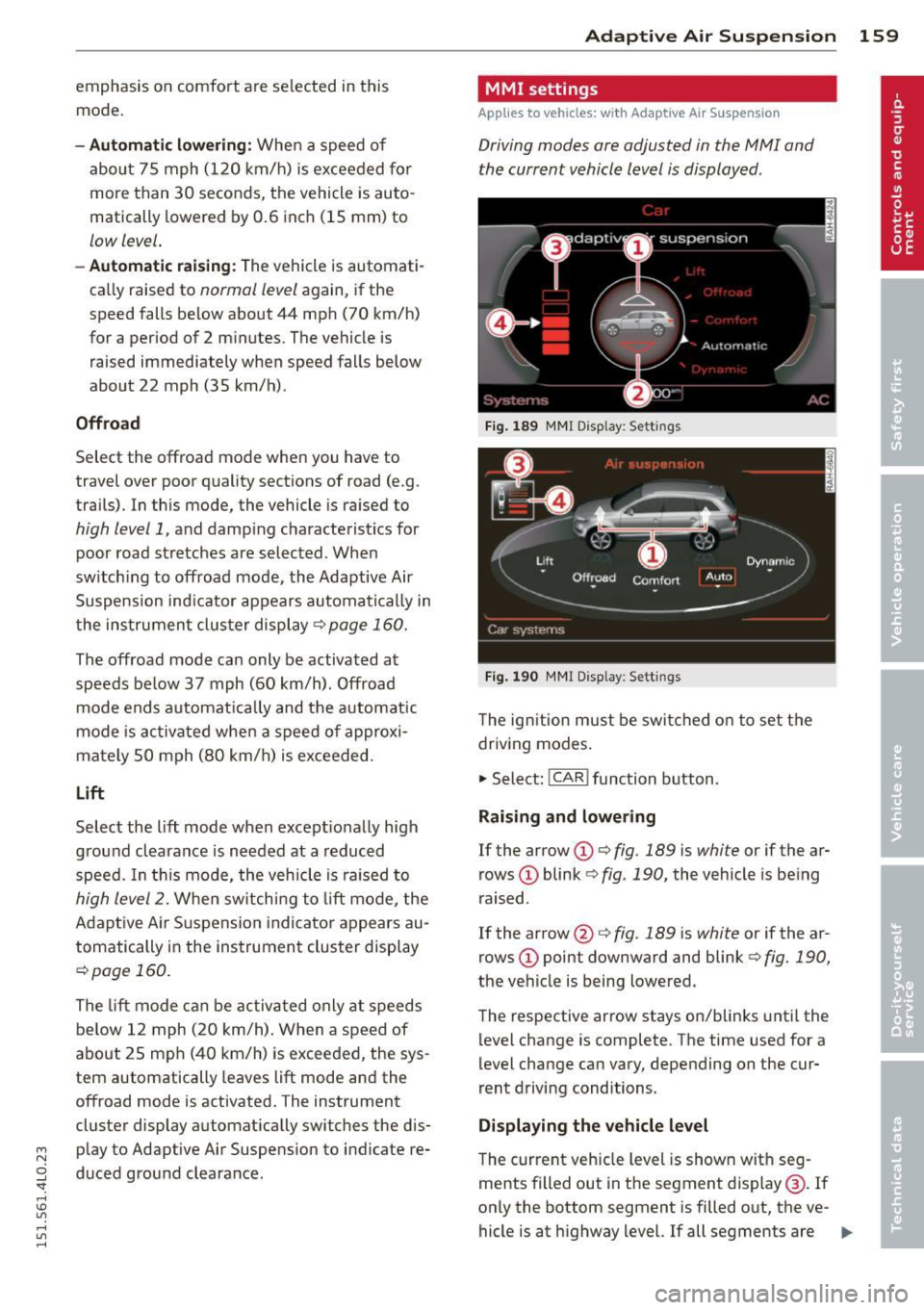
MMI settings
Applies to vehicles: wit h Adaptive A ir Suspension
Driving modes are adjusted in the MMI and
the current vehicle level is displayed .
Fig. 189 MMI Display: Sett ings
Fig. 190 MMI Display: Sett ings
Th e ign ition must be switched on to set the
driving modes.
1-Select: !CAR ! function button .
Raising and lowering
If the arrow (D ¢ fig. 189 is white or if the ar
rows
(D blink ¢ fig. 190, the vehicle is being
raised .
If the arrow @i=>
fig. 189 is white or if the ar
rows
(D point downward and blink ¢ fig. 190,
the vehicle is being lowered .
The respective arrow stays on/blinks until the
level change is complete . The time used for a
level change can vary, depending on the cur
rent driving conditions .
Displaying the vehicle level
The c urrent vehicle level is shown with seg
ments filled out in the segment display@. If
only the bottom segment is filled o ut, the ve-
hicle is at highway level. If all segments are
IJJ>-
Page 164 of 350
162 Adapti ve Air Su spen sion
this mode. If the suspension is switched from
this mode to another mode, dynamic mode
cannot be re-selected .
(D Tips
-For vehicles with a factory installed tow
ing hitch or a trailer hitch that was in
stalled later accord ing to factory specifi
cations, the system recognizes "Trailer
tow ing mode" and activates this specia l
mode automatically, as soon as the elec
trical connection on the trailer socket is
connected. The mode ceases a utomat i
ca lly when the elect rical connection to
t h e trai ler socket is d isconnected.
- If the tra iler towing mode has been acti
vated, the vehicle will not drop to the
l ow or highway level.
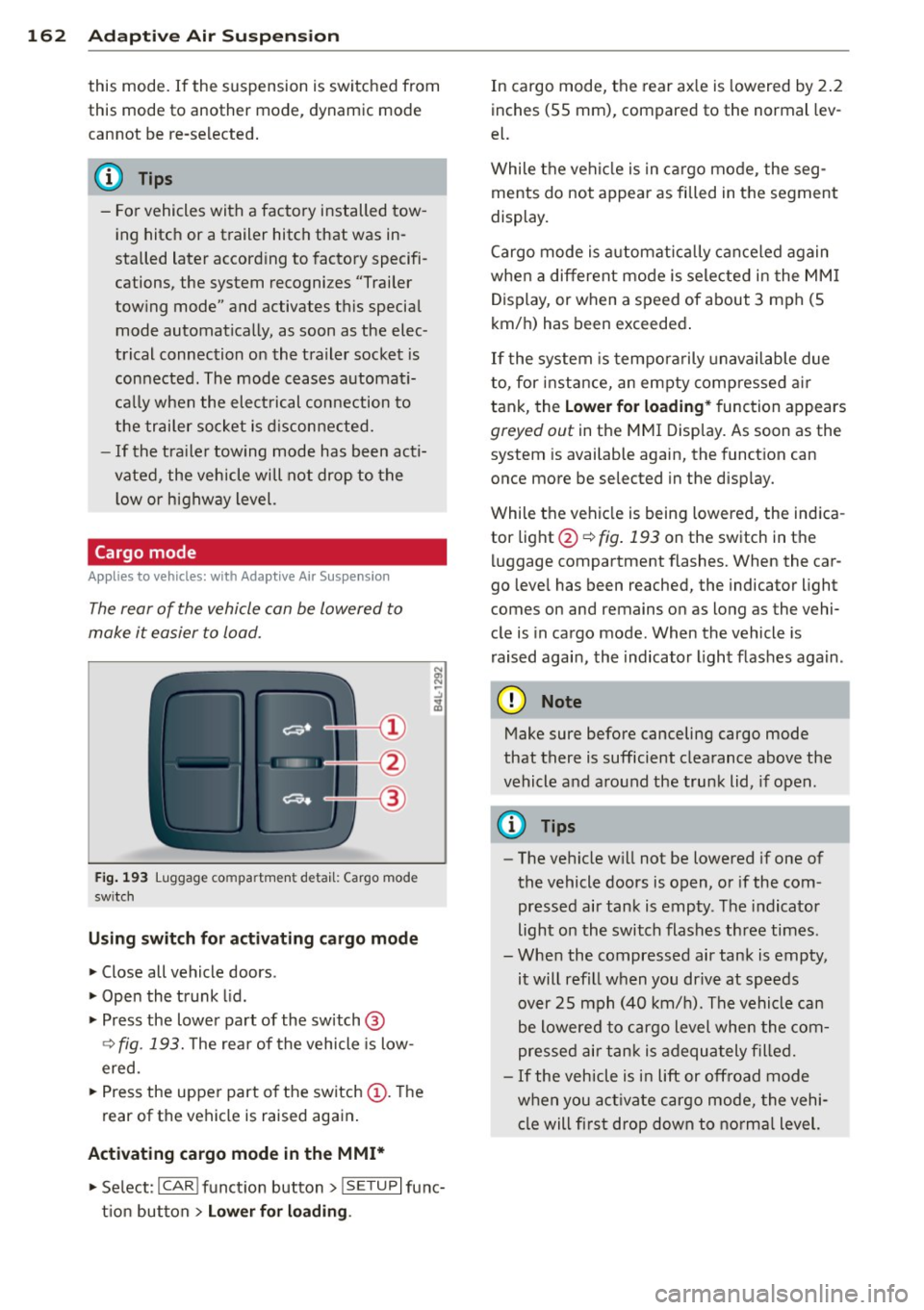
Cargo mode
Applies to vehicles: with Adapt ive Air Suspe nsio n
The rear of the vehicle can be lowered to
make it easier to load.
Fig. 193 Luggage compa rtment detail: Cargo mode
sw itch
Using switch for activating c argo mode
.. Close all vehicle doors .
.. Open the trunk lid .
.,. Press the lower pa rt of the switch @
~ fig. 193. The rea r of the vehicle is low
ered.
.,. Press the uppe r part o f the switch @. T he
rear of the vehicle is raised again.
Activating cargo mode in the MMI*
.. Select: ICAR I funct io n button> !SETUP I func
t ion button >
Lower for loading .
In cargo mode, the rear ax le is lowered by 2 .2
inches (S5 mm), compared to the normal lev
el.
While the veh icle is in ca rgo mode, the seg
ments do not appear as filled in the segment
display.
Cargo mode i s automatic ally c an ce le d again
when a different mode is selected in the MM I
Display, or when a speed of about 3 mph (5
km/ h) has been exceeded.
If the system is tempora rily unavailable due
to, for instance, an empty compressed air
tank, the
Lower for loading * function appears
greyed out in the MMI Display. As soon as the
system is available again, the funct ion can
once more be selected in the disp lay.
While the vehicle is being lowered, the indica
tor light @~
fig. 193 on the switch in the
l uggage compartment flashes. When the car
go leve l has been reached, the indicator light
comes on and remains on as long as the vehi
cle is in cargo mode. When the vehicle is
r aised agai n, the indicator light flashes again.
(D Note
M ake sure before canceling cargo mode
that there is sufficient clearance above the
vehicle and around the trunk lid, if open.
(D Tips
- The vehicle w ill not be lowered if one of
the vehicle doors is open, or if the com
pressed air tank is empty. The indicator
light on the switch flashes three times.
- Whe n the compressed air tank is empty,
it will refill when you drive at speeds
over 25 mph (40 km/ h). The vehicle can
be lowered to cargo level whe n the com
pres sed air tan k is adequately filled.
- If the vehicle is i n lift or off road mode
when you act ivate cargo mode, the vehi
cle will fi rst drop down to no rma l level.
Page 165 of 350
M N
0 ...J
'SI: ,...., \!) 1.1'1 ,...., 1.1'1 ,....,
Driving Safely
General notes
Safe driving habits
Please remember -safety first!
This chapter contains important information,
tips, instructions and warnings that you need
to read and observe for your own safety, the
safety of your passengers and others . We have
summarized here what you need to know
about safety belts, airbags, ch ild restra ints as
well as child safety. You r safety is for us
priori
ty number 1.
Always observe t he information
a nd warn ings in th is se ct ion - for yo ur own
safety as well as that of your passengers .
The information in this se ction applies to all
model ve rsion s of your veh icle . Some of the
feat ures descr ibed in th is sec tions may be
standa rd equipment on some models, or may
be optional equipment on others . If you are
not sure, ask yo ur authorized Aud i dea ler.
A WARNING
- Always make sure that you follow the in
st ruct ions and heed the WARNINGS i n
this manual. It is in your interest and in
the inte rest of you r passengers.
- Always keep all of the Owner's Literature
man uals in your Audi when you lend o r
sell your vehicle so that this im po rtant
information will a lways be availab le to
the driver and passengers.
- Always keep the Owner's Literature han
dy so that you can find it easily if yo u
have ques tion s.
Safety equipment
The safety features are part of the occupant
restraint syst em and work togeth er to help
redu ce the risk of injury in a wide variety of
accident situations .
Your safety and the safety of your passenge rs
should not be left to chance. Advances in
t echnology have made a var iety o f fea tures
avai lable to he lp red uce the risk of i njury in an
Dr iving Safel y 163
accident . The following is a list of just a few of
the safety features in yo ur Audi :
- sophis ticated s afety be lts fo r drive r and a ll
passenger sea ting posit ions,
- be lt tens ione rs fo r the fro nt seats and the
outer sea ting pos it ions in the second row
seating,
- be lt h eight adjustment fo r th e front seats
a nd the o ute r seat ing positions in the sec
ond row sea ting,
- he ad restra ints for e ach sea ting pos it ion,
- front airbags,
- side airbags in the fro nt seats a nd the outer
seating posit ions i n the second row seat
ing*,
- side curta in airbags,
- special LATCH anchorages for child re-
straints,
- adjustab le steeri ng column.
T hese individual safety features, can work to
gether as a system to he lp protect you and
your passengers in a wide range of accide nts.
These features cannot work as a system if
they are not always correctly adjusted and cor
rect ly used .
Safety is everybody's responsibil ity!
Important things to do before driving
Safety is everybody 's job! Vehicle and occu
pant safety always depends on the informed
and careful driver.
Fo r yo ur safety and the safety of your passen
gers,
before driving always:
.. Ma ke s ure that all lights and signa ls are op
erating correctly .
.. Ma ke s ure that the tire pressure is co rrect .
.. Make s ure that all windows are clean and a f
ford good vis ibility to the outs ide.
.. Secure all luggage and o ther items carefu lly
¢ page 90.
.. Make s ure that nothing can interfere with
the peda ls.
.. Adj ust fron t se at, head res traint and m irrors
c orrectly fo r you r heigh t. .,..
•
•