check engine AUDI Q7 2015 Owner´s Manual
[x] Cancel search | Manufacturer: AUDI, Model Year: 2015, Model line: Q7, Model: AUDI Q7 2015Pages: 350, PDF Size: 86 MB
Page 34 of 350
32 Driver in formation d isplay
turn off the eng ine. The coolant pump is
not working anymore -danger of damage
to the eng ine !
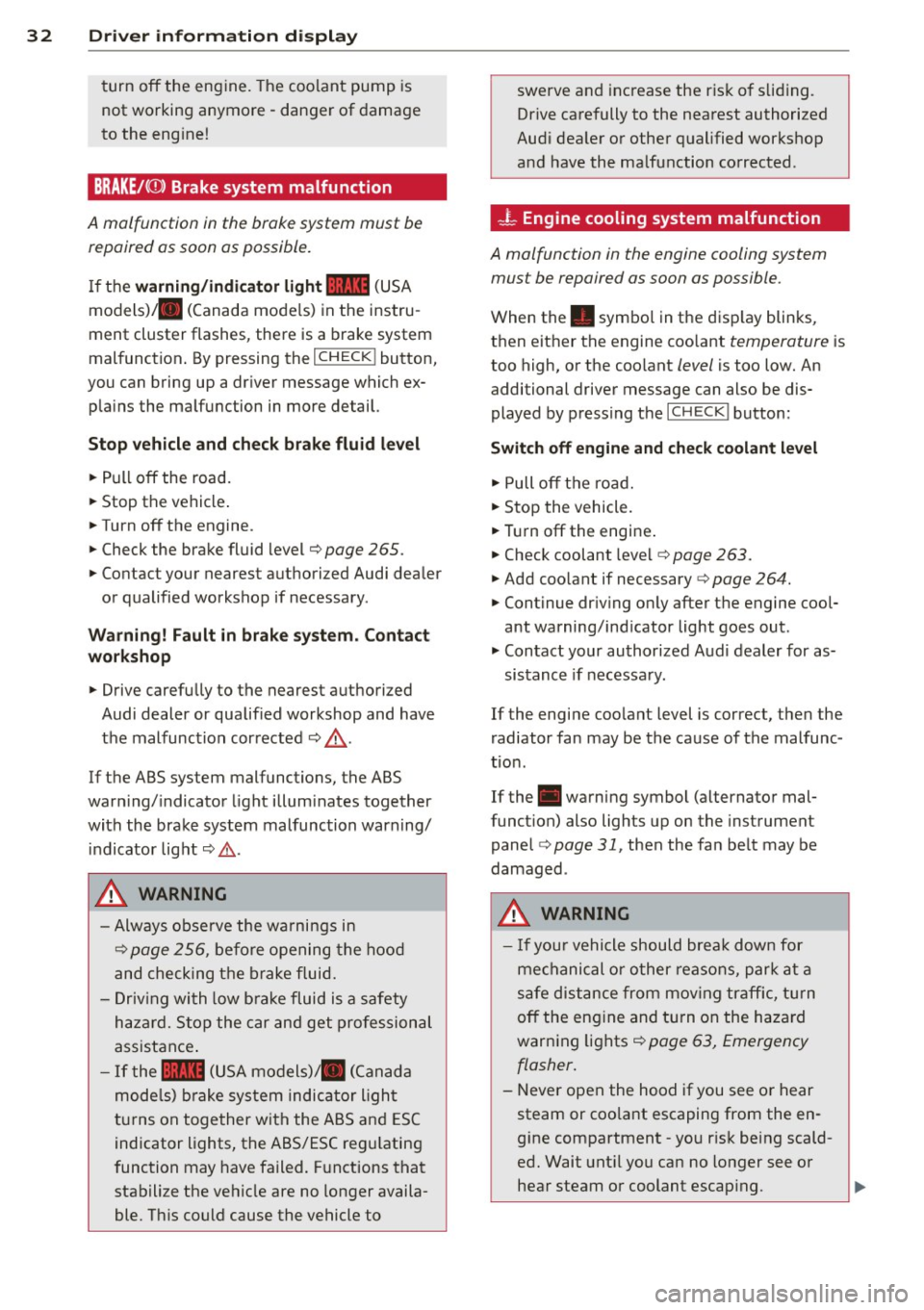
BRAKE/(©) Brake system malfunction
A malfunction in the brake system must be
repaired as soon as possible.
I f the warning/indicator light 1111 (USA
models) ;II (Canada mode ls) in the instru
ment cluster flashes, there is a brake system
mal function . By pressing the
I CHECK ! button,
you can bring up a dr iver message which ex
p la ins the ma lfu nction in more detail.
Stop veh icle and check brake fluid level
• Pull off the road.
• Stop the vehicle .
• Turnoff the engine.
• Check the brake fluid level¢
page 265.
• Co ntact your nearest a uthorized Audi dealer
or qualified workshop if necessary .
Warning! Fault in brake system. Contact
workshop
• Drive carefu lly to the nearest a uthorized
Audi dealer or qualified workshop and have
the malfunction corrected ¢
&.
If t he ABS system malfunctions, the ABS
warn ing/ indicato r light illum inates together
wi th the brake system malfunction warning/
i ndicato r light ¢& .
A WARNING
-Always obse rve the wa rni ngs in
¢
page 2 56, be fo re opening the hoo d
a nd chec king t he b rake fluid.
- D riving with low b ra ke fluid is a safety
ha zar d. S top the car and get pro fession al
assistance .
-If the 1111 (U SA m odels)/ . (C anad a
mode ls) brake sy stem indica tor ligh t
t ur ns on together with the AB S and E SC
indicator lights, the ABS/ES C reg ulating
f unction may have failed . Fu nctions that
stabilize the ve hicle are no longer availa
ble. Th is could cause the vehicle to swerve and
inc rease the r is k of slidi ng.
Drive ca re fully to the nea rest authorized
Aud i dealer or other q ualified works hop
a nd have the ma lfu nction co rrected .
-L Engine cooling system malfunction
A malfunction in the engine cooling system
must be repaired as soon as possible.
When the. symbo l in the disp lay blinks,
then either the engine coo lant
temperature is
too high, o r the coolant
level is too low. An
additional driver message can also be dis
played by p ressing the
ICHECK I button:
Switch off engine and check coolant level
• Pull off t he ro ad.
• Stop the vehicle.
• Tur noff the engi ne .
• Chec k coolant leve l¢
page 263.
• Add coo lant if necessary ¢ page 264.
• Continue dr iv ing on ly after t he engine cool
ant warning/ind icat or light goes out.
• Contact your authorized Aud i dealer for as-
sis tance if necessa ry.
If the engi ne coo lant level is correct, then the
r adiator fan may be the cause of the malfunc
t ion.
If the . warning symbol (alternator mal
funct ion) also lights up on the inst rument
panel
¢ page 31, then the fa n be lt may be
damaged .
A WARNING
- If you r vehicle should bre ak down for
me chanical or other reasons, par k at a
s af e dis tance from mov ing tra ffic, turn
o ff the en gine and tu rn on the haza rd
war ning lights¢
page 63, Emergency
flasher .
-
-Never open the hood if you see o r hear
steam or coo la nt escaping from the en
g ine compartment -you r is k being scald
ed . Wait unt il you can no longer see o r
hear steam o r co olant escap ing.
Page 35 of 350
M N
0 ...J
'SI: ,...., \!) 1.1"1 ,...., 1.1"1 ,....,
-The e ngine com partment of any ve hicle
is a dangerous area. Before you perform
any work in the engine compartment,
turn of the eng ine and allow it to cool.
Follow the wa rning stickers~
page 256.
(D Note
Do not contin ue driving if the. symbo l
illuminates. There is a ma lfunct ion in the
eng ine cooling system -you cou ld damage
your engine.
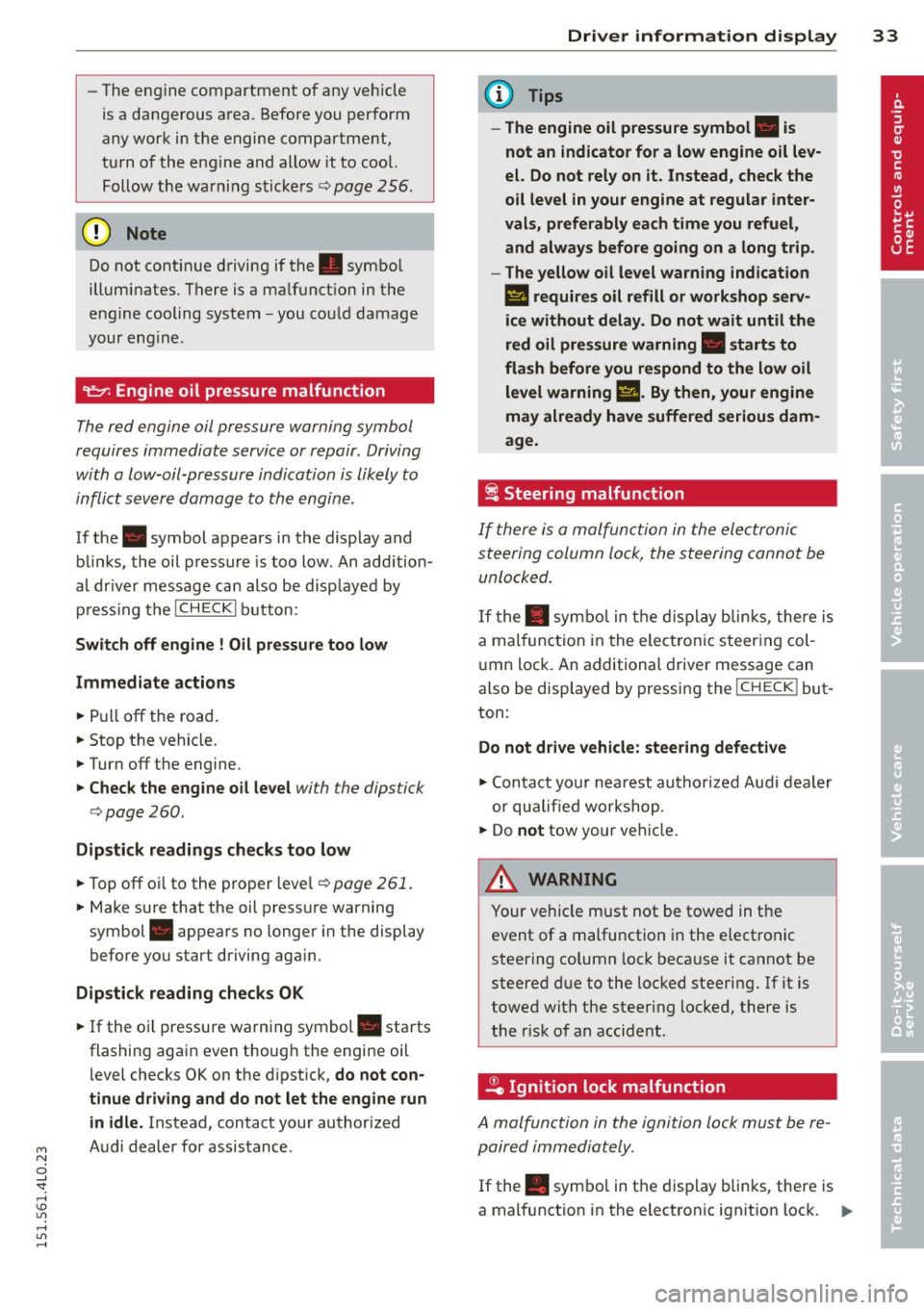
9=:7-: Engine oil pressure malfunction
The red engine oil pressure warning symbol
requires immediate service or repair. Driving
with a low-oil-pressure indication is likely to
inflict severe damage to the engin e.
If the . symbol appears in the display and
b links, the oil pressure is too low. An addition
a l dr ive r message can also be d isp layed by
p ress ing t he
I CH ECKi b utton:
Switch off engine I Oil pressur e too low
Immediate a ction s
~ Pull off the road.
~ Stop the vehicle.
~ Turnoff the engine.
~ Check the engine oil le vel with the dipstick
i=> page
260.
Dipstick reading s checks too low
~ Top off oi l to the proper level~ page 261.
~ Make sure that the oil pressure warning
symbol . appears no longer in the display
before you start driving aga in.
Dipstick reading checks OK
~ If the o il pressure warning symbol. starts
flashing again even though the engi ne oil
l evel checks OK on the d ipst ick,
do not con
tinue driving and do not let the engine run in idle.
Instead , contact your authorized
A udi dealer for assistance.
Dri ver information di spla y 33
(D Tips
- The engine oil pressure symbol. is
not an indicator for a low engine oil lev
el. Do not rely on it . Instead, check the
o il level in your engine at regular inter
vals, preferably each time you refuel, and always before going on a long trip .
- The yellow oil level warn ing indication
l!I requires oil refill or workshop serv
ice without delay . Do not wait until the
red oil pressure warning. start s to
flash before you respond to the low oil
level warning
m. By then, your engine
may already have suffered serious dam
age.
i Steering malfunction
If there is a malfunction in the ele ctronic
steering column lock, the steering cannot be
unlocked .
If the . sym bo l in t he d isplay b links, there is
a mal func tion in the ele ct ronic s teer ing col
u mn lock. An additional drive r message can
also be displayed by pressing the
I CHECK ! but
ton:
Do not d rive vehicle: steering defective
~ Contact your nea rest autho riz ed Aud i dea le r
or qualifie d wo rkshop.
~ Do not tow your ve hicle.
A WARNING
= -
Your ve hicle must not be towed in t he
event of a malfunction in the electro nic
steering column lock beca use it cannot be
steered d ue to the loc ked steering. If it is
t o wed with the steer ing locked, there is
the r isk of an accident .
~ Ignition lock malfunction
A malfunction in the ignition lock must be re
paired immedia tely.
If the . symbol in t he display blinks, there is
a mal function in the electronic ign it ion lock. ..,_
Page 36 of 350
34 Driver in formation d isplay
An additional driver message can also be dis
p layed by pressing the
! CHECK I button:
Ignit ion lo ck d efec tive. C ontact w ork sh op !
.. Do
not turn the eng ine off .
.. Drive immed iate ly to an authorized Audi
dealer to have the ma lfunction co rrected .
If there is a malfunction in the electronic igni
tion lock, the ign ition cannot be turned off .
Drive immediately to an authorized Audi dea l
e r to have the cause of the ma lfunction co r
rected.
On vehicles w ith Convenience key*, the engine
should not be sw itched off using the
! STOP !
button because the eng ine cannot be started
aga in after the ignition is switched off.
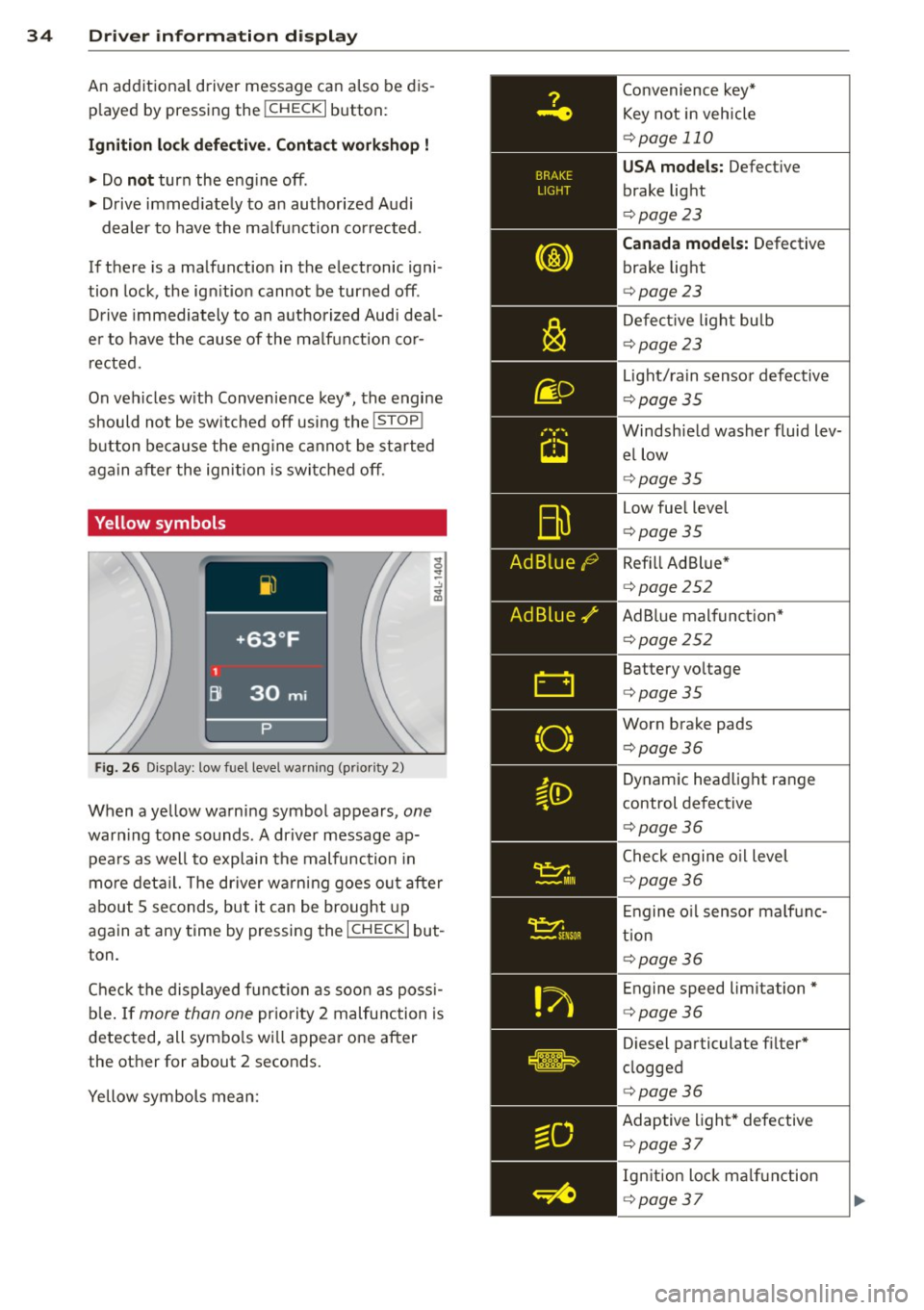
Yellow symbols
Fig. 26 Disp lay: low fuel level warning (p riority 2)
When a yel low warning symbol appears, one
warn ing tone sounds . A dr iver message ap
pea rs as well to explain the malfunc tion in
mo re deta il. The driver warning goes o ut after
about 5 seconds, but it can be brought up
again at any time by pressing the
I CHECK I but
ton .
Chec k the displayed funct ion as soon as poss i
b le . If
more than one pr iority 2 malfunction is
detected, all symbo ls wi ll appea r one after
the other for about 2 seconds.
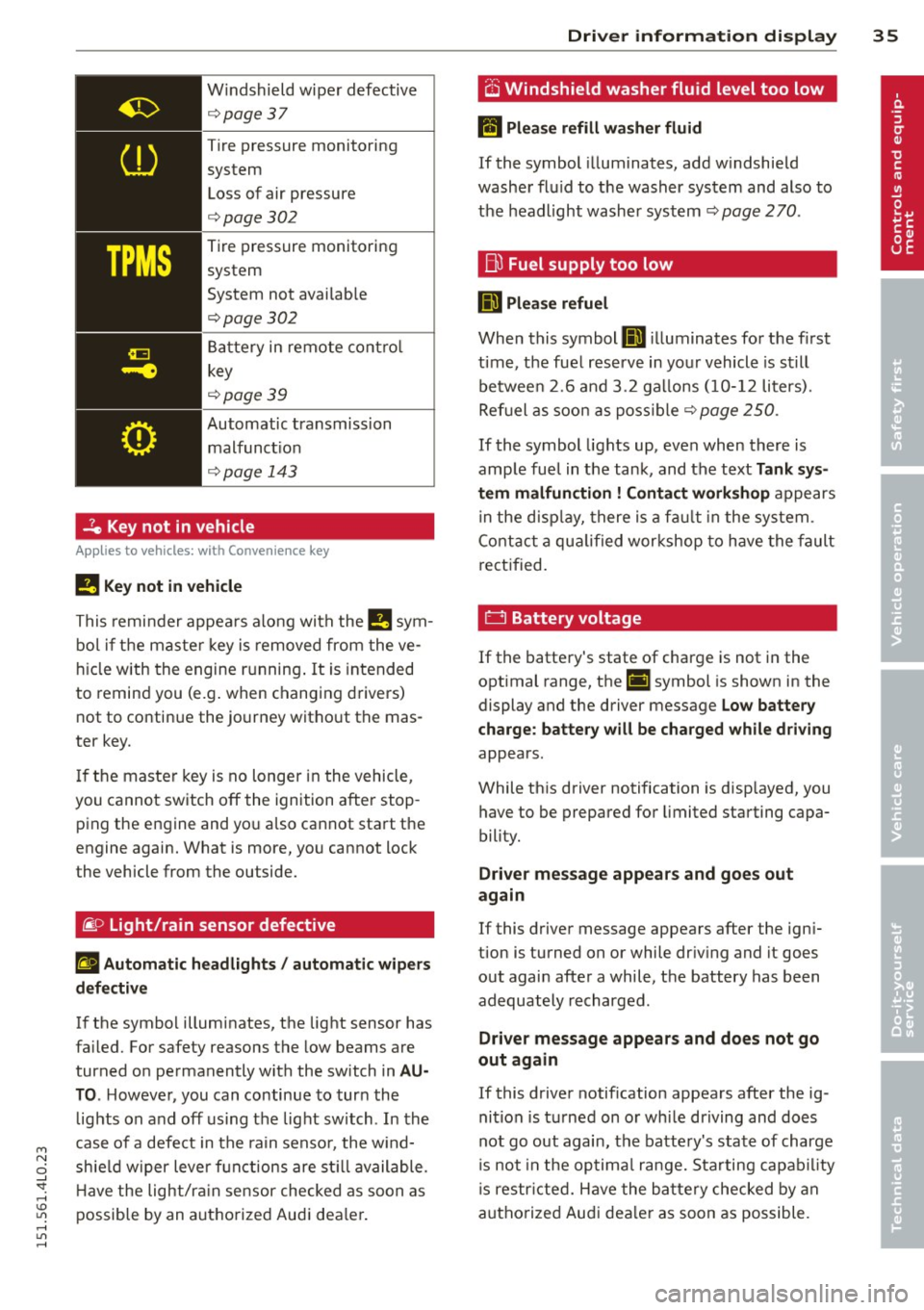
Yellow symbols mean: Convenience key*
Key not in vehicle
¢
page 110
USA models: Defect ive
brake light
¢ page 23
Canada model s: Defective
brake light
¢ page 23
Defect ive light bulb
¢ page 23
Light/ra in sensor defective
¢ page35
Windsh ield washer fluid lev
el low
¢ page35
Low fue l level
¢page 35
Refill Ad Blue *
¢page 252
AdBlue malfunct ion*
¢ page252
Battery vo ltage
¢ page35
Worn brake pads
¢page36
Dynamic headlight range
control defective
¢ page36
Check engine o il level
¢ page 36
Engine o il sensor malf unc
tion
¢ page 36
Engine speed limitation*
¢page36
Diesel particulate f ilter*
clogged
¢ page36
Adaptive light * defective
¢ poge37
Ign ition lock ma lfunction
¢ page 37
Page 37 of 350
M N
0 ...J
'SI: ,...., \!) 1.1'1 ,...., 1.1'1 ,....,
Windshield wiper defective
¢ page37
Tire pressure monitoring
system
Loss of air pressure
¢ page302
Tire pressure monitoring
system
System not avai lab le
¢page302
Battery in remote contro l
key
¢ page39
Automatic transmission
malfunct io n
¢ page 143
-7e Key not in vehicle
Applies to vehicles: with Convenie nce key
!I Key not in vehicle
This remi nder appea rs along with the !!I sym
bo l if the maste r key is removed from the ve
hi cle with the engine running . It is intended
to remind you (e.g . when changing drivers)
not to continue the journey without the mas
ter key .
I f the master key is no longer in the vehicle,
you cannot switch off the ignition after stop p ing the engine and yo u also cannot start the
engine again. What is more, you cannot lock
the vehicle from the outside.
~ o Light/rain sensor defective
II Automatic headlights / autom atic w ipers
d efect iv e
If the symbo l illuminates, the light sensor has
fa iled. For safety reasons the low beams are
turned o n permanently with the switch in
AU
TO . Howeve~youcancontinuetoturnthe
lights on and off us ing the light switch . In the
case of a defe ct in the ra in senso r, the w ind
sh ie ld w iper lever f unctions are st ill available .
H ave the light/ra in sensor checked as soon as
possible by an autho rized Audi dea le r.
Dri ver information di spla y 35
O Windshield washer fluid level too low
lffl Please refill w asher fluid
If the symbol illuminates, add w indshie ld
washe r flu id to the washer system and also to
the headlight washer system¢
page 270.
Bu Fuel supply too low
D Please refuel
When this symbol llD illuminates for t he first
time, the fuel reserve in your vehicle is still
betwee n
2.6 and 3 .2 ga llons (1 0- 12 liters).
Ref uel as soo n as poss ib le
¢ page 250.
If the symbol lights up, even when there is
amp le fue l in the tank, and the text
Tank sys
tem malfun ction
! Contact work shop appears
in the disp lay, there is a fa ult in the system .
C ont act a qua lified wor kshop to have the fault
re ct ified.
0 Battery voltage
If the batte ry's state of charge is not in the
optimal range, the(•) symbol is shown in the
display and the driver message
Low battery
charge: battery will be charged while driving
appears .
While th is driver notification is disp layed, you
have to be prepared for limited starting capa
bility.
Driver message appear s and goes out
ag ain
If this driver message appears after the ign i
tion is turned on or while dr iv ing and it goes
out again after a while, the battery has been
adequately recharged .
Driver message appears and d oes not go
out again
If this driver notification appears after the ig
nition is t urned on o r whi le dr iving and does
not go out again, the batte ry's state of charge
is not in the op tima l range. S tarting capab il ity
is restr icted. Have the ba ttery checked by an
authorized Aud i dea ler as soon as possible.
Page 38 of 350
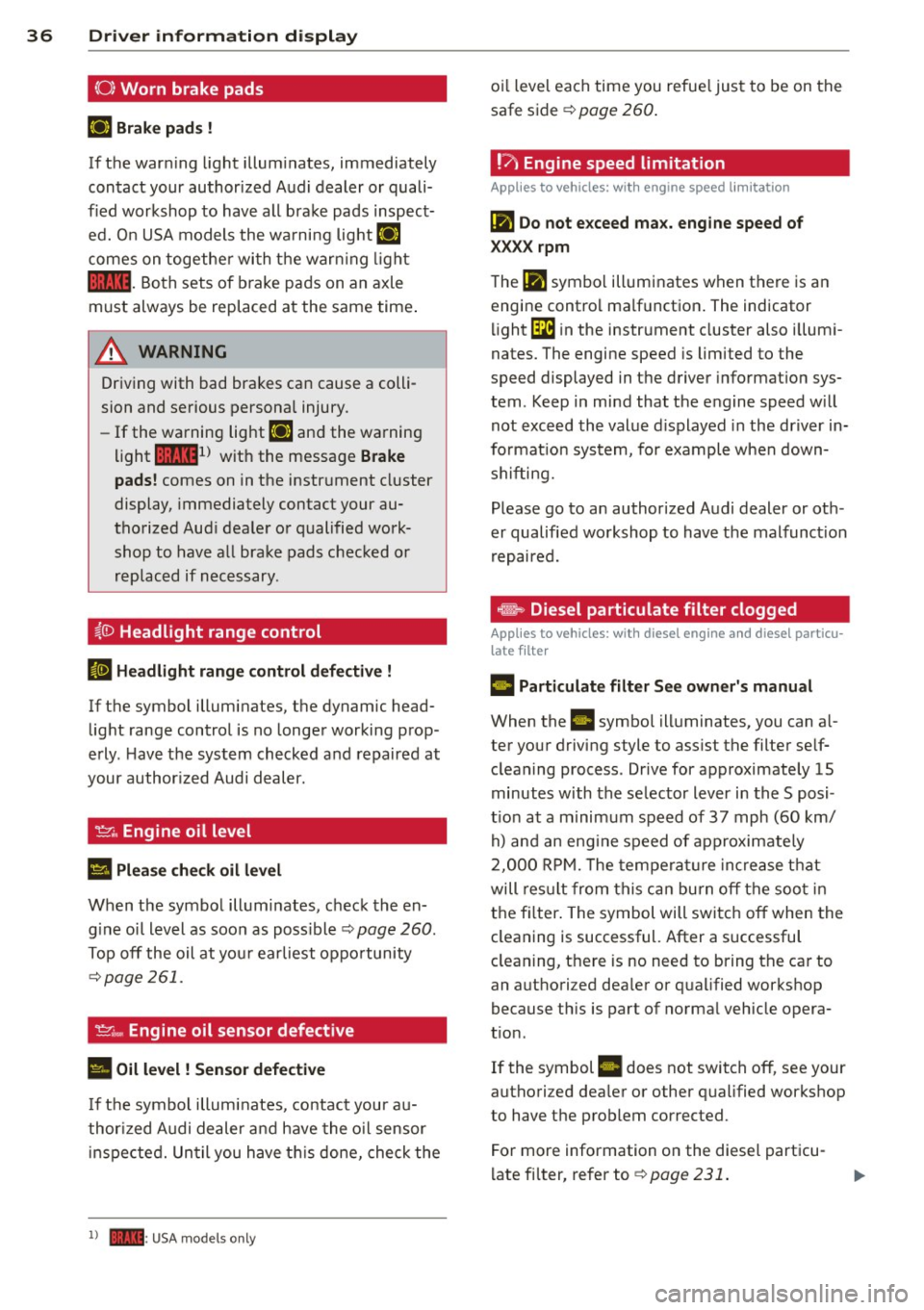
36 Driver in formation d isplay
(0 ) Worn brake pads
rlJ Br ake pa ds !
If the warn ing light illum inates, immediately
contact your authorized Audi dealer or quali
fied workshop to have all brake pads inspect
ed. On USA models the wa rning light
rlJ
comes on together wi th the warn ing ligh t
1111 -Both sets of b rake pads on an axle
must always be replaced at the same time .
A WARNING
Driving with bad brakes can cause a colli
sion and serious personal injury .
- If the warning light
rlJ and the warning
light
11111 ) with the message B rake
pads !
comes on in the instr ument cluster
display, immediately contact your au
thorized Aud i dealer or qualified work
shop to have all brake pads checked or
replaced if necessary .
~(]) Headlight range control
El Head light rang e control d efe ctiv e !
-
If the symbol illuminates, the dynamic head
light range control is no longer working prop
erly . Have the system checked and repaired at
your author ized Audi dealer.
'I=?; , Engine oil level
Ill Pleas e che ck oil l evel
When the symbol illuminates, check the en
gine o il level as soon as poss ible
¢ page 260 .
Top off the oil at you r earliest oppo rtunity
~ page 261.
't'.:r .., Engine oil sensor defective
• Oil l evel ! Sensor d efe ctive
If the symbol illuminates, contact your au
thor ized A udi dealer and have the o il sensor
i nspected. Un til you have th is done, check the
l ) - : USA mod els onl y
oil level each time you refue l just to be on the
safe side ¢
page 260.
!?' Engine speed limitation
Applies to vehicles: wit h engine speed li mitatio n
(Pl Do not e xceed ma x. engine speed of
XXXX rpm
The (Pl symbol illuminates when there is an
engine contro l malfunction. The indicator
li ght
GB in the instrument cluster also illumi
nates. The engine speed is limited to the
speed displayed in the driver informa tion sys
tem . Keep in mind that the engine speed w ill
not exceed the value d isplayed in the dr iver in
format ion system, for example when down
shifting.
Please go to an author ized Audi dealer or oth
er qualified workshop to have the malfunct ion
repaired.
~ Diesel particulate filter clogged
Applies to vehicles: wi th diese l eng ine a nd diese l par ticu
late filter
II Particulate filt er See o wner' s manua l
When the II symbol illuminates, you can a l
ter your driving style to ass ist the filter sel f
cleaning process . Drive for approximately 15
minutes with the selector lever in the S posi
t ion at a m inimum speed of 37 mph (60 km/
h) and an eng ine speed of approximately
2,000 RP M. T he temperat ure increase that
will res ult from this can burn off the soo t in
the fi lter . The symbol will switch off when the
cleaning is successful. After a successful
cleaning, there is no need to bring the car to
an authori zed dea ler or qualified workshop
because th is is part of normal vehicle opera
t ion .
If the symbol
II does not switch off, see your
authori zed dea ler or other qualified workshop
to have the problem corrected.
For more information on the diesel particu
l ate fi lter, refer to ¢
page 231.
Page 40 of 350

38 Opening and closing
Opening and closing
Keys
Key set
Fig. 27 Key set
@ Master key with remote control
You can centrally lock and unlock your vehicle
and start the engine with the master key with
remote control.
@ Valet key
The valet key only fits the lock in the driver's
door and the ignition lock . If you have to leave
the key with somebody else, you are well-ad
vised to turn over the valet key only
¢ page 41.
© Emergency key
The emergency key is only for temporary use if
the vehicle key should be lost or misplaced
¢ .&. .
Key replacement
If you lose a key, contact your authorized Audi
dealer immediately to have the
lost key disa
b led . Be sure to bring all your keys with you.
Registered keys
You can check to find out how many keys have
been registered to your vehicle. Therefore,
when buying a used vehicle, make sure to get
all of the remote keys be long to it .
Ca lling up the registered keys¢
page 12.
Data in the master key
While you are driving, serv ice and mainte
nance relevant data are being continuously stored on your master key. Your Audi
Service
Advisor can read out these data and tell you
about work that is needed on your vehicle .
This also app lies to vehicles w ith Convenience
key*.
A WARNING
--
- Do not leave your vehicle unattended
with the key in the ignition lock. Entry by
unauthorized persons could endanger
you or result in theft or damage the vehi
cle. A lways lock all doors and take the
key.
- Do not leave children unattended in the
veh icle, especially with access to vehicle
keys . Unguarded access to the keys pro
vides children the opportun ity to start
the engine and/or activate vehicle sys
tems such as the power windows etc. Un
supervised operation of any vehicle sys
tem by children can result in serious in
Jury .
(D Tips
- If you open the driver's door with the key
left in the ignition lock, a chime w ill
sound. T his is your reminder to remove
the key and lock the door.
- For security reasons, replacement keys
are only ava ilable from Audi dealers.
Master key with remote control
The remote control allows you to lock or un
lock the vehicle electronically .
Fig. 28 Fold-up maste r key with remo te control
., To fold the key out and back in place, press
t he release button ¢
fig. 28. .,.
Page 53 of 350
M
"' 0 ..J
"". rl I.O
"' rl
"' rl
How is the anti-theft alarm system
switched off?
The anti -theft a la rm system is switched off
on ly when you unlock yo ur vehicle. If yo u do
not open a door w ith in 60 seconds after you
have unlocked with the remote control , the
ve hicle w ill lock itse lf again a utomat ically .
When will the anti-theft alarm sy stem be
triggered?
W hen the ve hicle is locked , the alarm system
mon itors and p rotects the following parts of
the vehicle:
- engi ne compartment
- lu ggage compartment
- doo rs
- i gnition
When the system is activated, the alarm will
be tr iggered if on e of the doo rs, the eng ine
h ood or t he rear lid a re opened, o r if the ig ni
tion is turned on. The an ti-t heft alarm sys tem
will also go off when t he battery is discon
nected .
You can a lso tr igge r the alarm by p re ssing t he
P ANIC button o n your remote con trol. T his
will alert o ther peop le in case of emergency.
Press the
PANIC b utton again to t urn off the
a larm .
How is the anti-theft alarm switched off
when triggered?
The a larm system is switc hed off when you
u nl ock the vehicle o r whe n the ignition is
sw itched on. The alarm will also switch itself
off when it comes to the end of its cycle.
Emergency flasher and horn
The emergency flas her wi ll blink brief ly and
the hor n sounds when the doors, engine hood
a nd rear lid are proper ly closed .
If th e emergen cy fl ashe rs do no t blink , or the
horn does no t soun d, check the doors, engine
h ood an d rear lid to make sure they are prop
erly closed.
If you close a door, t he hood o r
the rear lid w ith the anti-theft alarm sw itched
on, the emergency flashers will b link and the
Opening and clo sin g 51
horn wi ll sou nd on ly afte r you have closed the
door or li d.
(D Tips
For the anti-the ft a la rm sys te m to fu n c
tion properly, make sure all ve hicle doors
and win dows are closed before leavi ng t he
v ehicle .
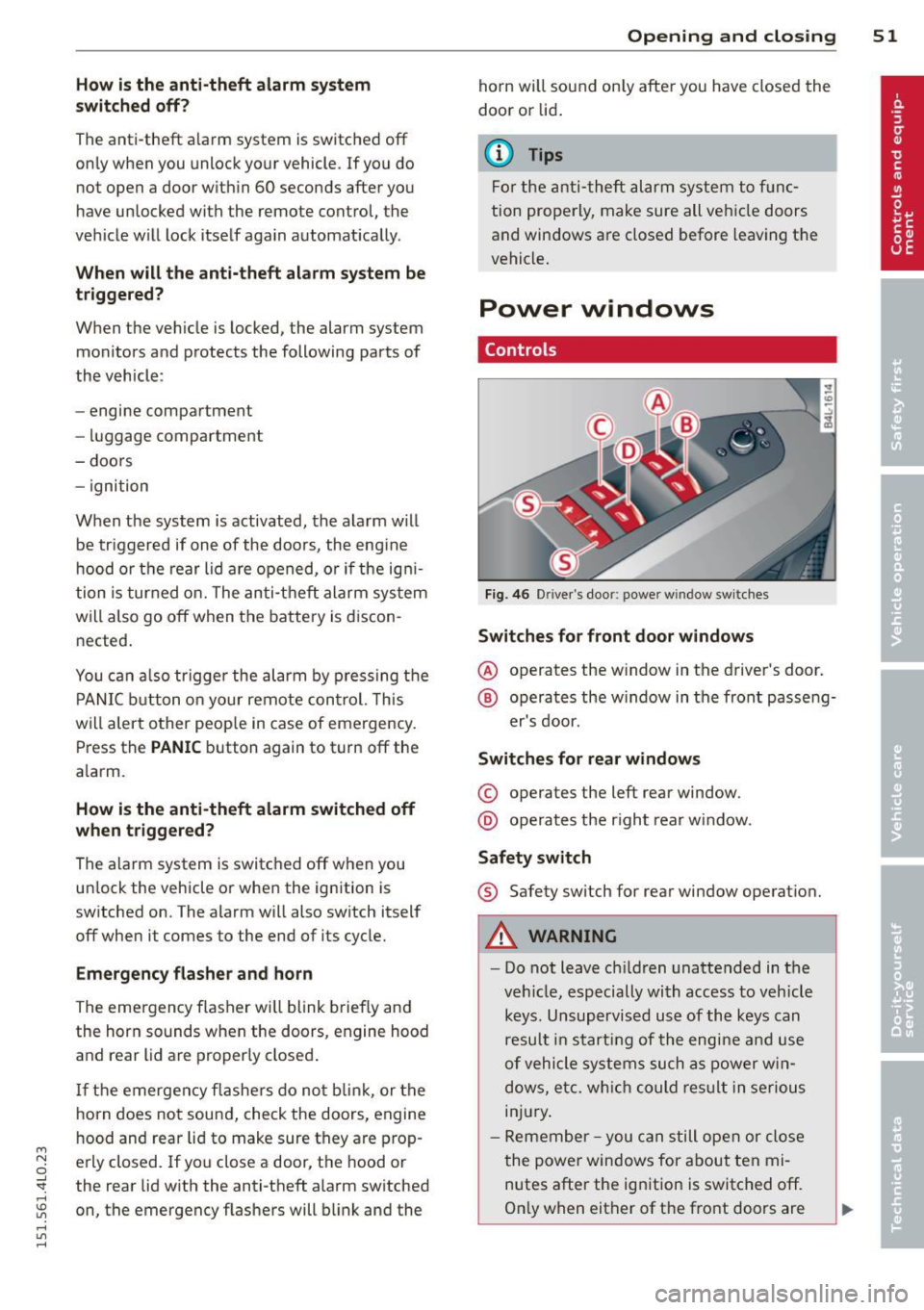
Power windows
Controls
Fig. 4 6 Drive r's doo r: power w indow sw itches
Switches for front door windows
@ o p erates the w indow in the d river's door.
® opera tes the w indow in the front passe ng-
er's door .
Switches for rear windows
© operates the left rear window.
@ operates the r ight rea r wi ndow.
Safety switch
® Safety switch for rear window operat ion.
A WARNING
- Do not lea ve c hildren unattended in t he
ve hicle, especially wi th access to veh icle
keys. Unsupervi sed us e of the keys can
resu lt in start ing of the engi ne and use
o f vehicle system s such as po wer w in
dows, etc. w hich co uld res ult in se riou s
in jur y.
- R eme mber -you can s till ope n or close
the powe r win dows for about ten mi
n utes after the ign ition is switc hed off .
O nl y w hen eit her of t he fro nt doors are
Page 62 of 350
60 Clear vision
Clear vision
Lights
Switching the headlights on and off
In the "AUTO" position, a light sensor auto
matically switches the head -and taillights on
and off in response to light conditions .
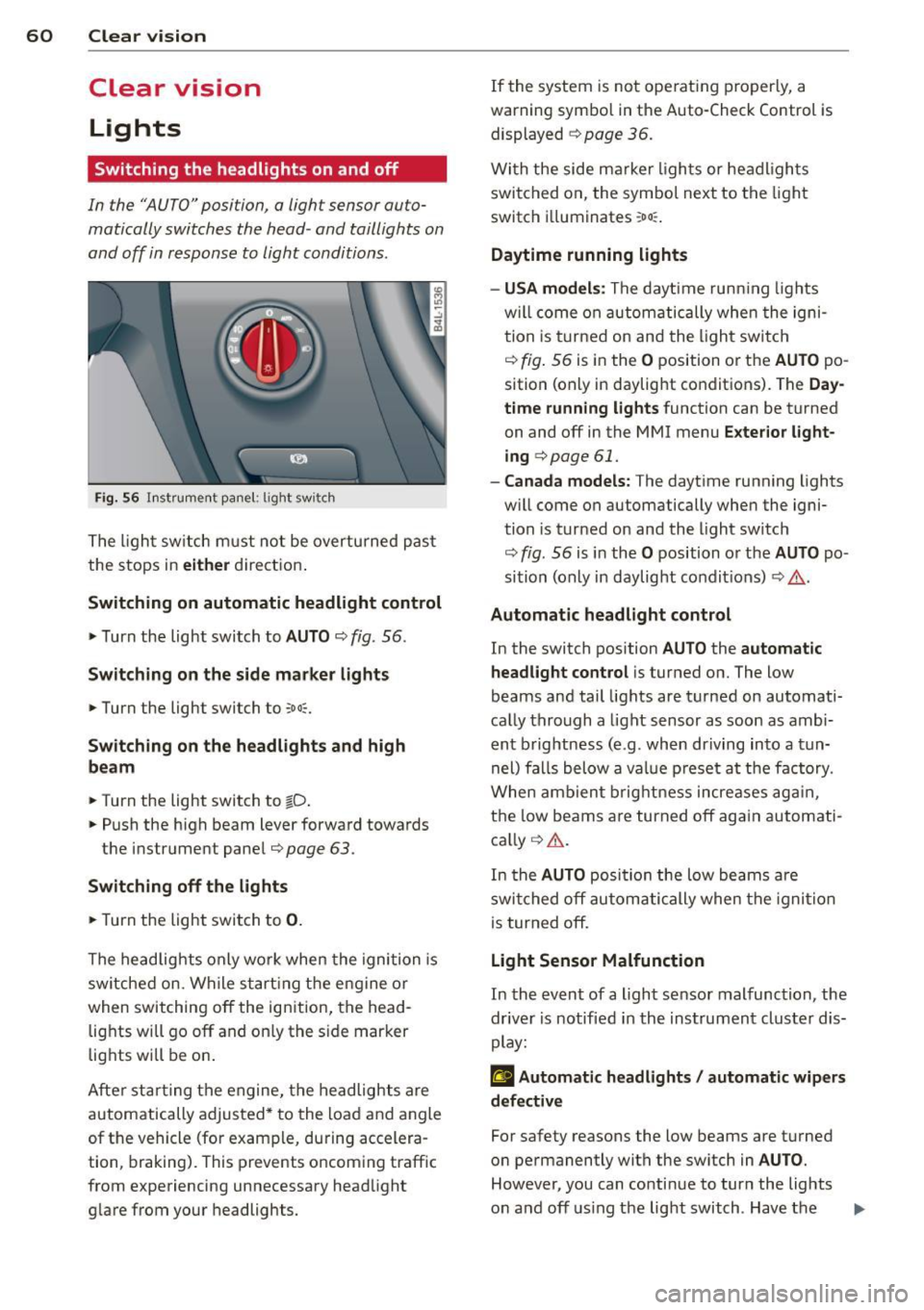
Fig. 56 Instrument pane l: lig ht sw it ch
The light switch must not be overturned past
the stops in
either direction.
Switching on automatic headlight control
.,. Turn the light switch to AUTO ¢ fig. 56.
Switching on the side marker lights
... Turn the light switch to :o o:.
Switching on the headlights and high
beam
... Turn the light switch to tD .
... Push the high beam lever forward towards
the instrument panel¢
page 63 .
Switching off the lights
... Turn the light switch to 0.
The headlights only work when the ignition is
switched on. While starting the engine or
when switching off the ignition, the head
lights will go off and on ly the side marker
lights will be on.
After starting the engine, the headlights are
automatically adjusted* to the load and angle
of the vehicle (for example, during accelera
tion, braking). This prevents oncoming traff ic
from experiencing unnecessary headlight
glare from your headlights. If the
system is not ope rating properly, a
warn ing symbol in the Auto-Check Control is
displayed
¢ page 36.
With the side marker lights or headlights
switched on, the symbol next to the light
switch i lluminates
:oo :.
Daytime running lights
- USA models :
The daytime running lights
w ill come on automatically when the igni
tion is turned on and the light switch
¢ fig. 56 is in the O position or the AUTO po
sition (only in daylight conditions). The
Day
time running lights
function can be turned
on and off in the MMI menu
Exterior light
ing
c> page 61.
- Canada models: The daytime running lights
w ill come on automatically when the igni
tion is turned on and the light switch
¢ fig. 56 is in the O position or the AUTO po
sition (only in daylight condit ions) ¢
.&..
Automatic headlight control
In the switch position AUTO the automatic
headlight control
is turned on. The low
beams and tail lights are turned on automati
cally through
a light sensor as soon as ambi
ent brightness (e .g . when driving into
a tun
nel) falls below
a value preset at the factory .
When ambient brightness increases again,
the low beams are turned off again automati
cally ¢
A.
In the AUTO position the low beams are
switched off automatically when the ignition
is turned off.
Light Sensor Malfunction
In the event of a light sensor malfunction , the
driver is notified in the instrument cluster dis
play:
£I Automatic headlights / automatic wipers
defective
For safety reasons the low beams are turned
on permanently with the sw itch in
AUTO.
However, you can conti nue to turn the lights
on and off using the light switch . Have the ..,.
Page 69 of 350

M
"' 0 ..J
"". rl I.O
"' rl
"' rl
the rain sensor is not activated until vehicle
speed is above 4 mph (6 km/h).
To reduce the sensitivity of the rain sensor,
the switch@ must be moved down. To in
crease the sensitivity of the rain sensor, the
switch must be moved up.
The higher the sensitivity setting, the sooner
the windshield wipers react to moisture on
the windshield . Increased sensitivity is sig
naled by the windshield w ipers making a sin
gle pass over the windshield.
The rain sensor wiper intervals depend on the
sensitivity setting as well as vehicle speed .
During brief stops, wiper motion will adjust in
relation to the amount of rain on the wind
shield.
A WARNING
- Wiper blades are crucial for safe driving!
Only when they are in good condition are
they able to clear the windows properly
to provide uncompromised visibility .
Worn or damaged wiper blades are a
safety hazard
i:::> page 69, Replacing
windshield wiper blades!
- The rain sensor is only designed to assist
and support the driver.
It remains entire
ly the driver's responsibility to monitor
outside weather conditions and to man
ually activate the wipers as soon as rain
or drizzle reduces visibility through the
windshield .
(D Note
In freezing or near freezing conditions:
- Always check that the wiper blades are
not frozen to the glass before you turn
the wipers on. Loosen a wiper blade
which is frozen in place before operating
the wipers to prevent damage to the
wiper blade or the wiper motor .
- Do not use the wipers to clear a frosted
window . Using the wipers as a conven
ient ice scraper will destroy the wiper
blades .
Clear vision 67
-Prior to using a car wash, the w indshield
wiper system must be switched off (lever
in position 0). This helps to prevent unin
tentional switching on and damage to
the windshield wiper system.
(1} Tips
- The windshield wipers are switched off
when the ignition is turned off. Activate
the windshield wipers after the ignition
is switched back on by moving the wind
shield wiper lever to any position .
- Worn or dirty windshield wiper blades
cause smearing which can affect the op
eration of the rain sensor . Check the con
dition of your windshield w iper blades
regularly.
- The rain sensor is part of the interval
wiping system. Turning off the ignition
will also deactivate the rain sensor. To re activate the sensor, switch off the inter
val wiping function, then switch it back
on again.
- Make sure the washer fluid reservoir in
the engine compartment is topped off
before going on a long trip. Look up
i:::> page 2 70 for checking and filling the
washer container.
Rear window wiper
T he wip er lever is also used to operate the
rear window wiper and the automa tic wiper/
washer func tion.
Fig. 69 Wipe r leve r: activat ing the re ar w indow wiper
and was her
The rear w indow wiper and the automatic wip
er/washer functions a re activated as follows : ..,.
Page 227 of 350
M N
0 ...J
'SI: ,...., \!) 1.1'1 ,...., 1.1'1 ,....,
Hill descent c ontrol
The hill descent control is sw itched on in off
road mode. When slowly descending steep
gradients on loose ground or when the axles
are articulated, hi ll descent control provides
assistance by automatically applying the
brakes to keep vehicle speed constant. The ve
h icle is also rendered easier to steer by selec
tive distribution of braking force . Hill descent
control intervenes when:
- the accelerator pedal is not pressed,
- the vehicle is travelling less than 12 mph
(20 km/h),
- a steep gradient is detected,
- wheel behavior indicates loose ground or
conditions with poor adhesion (e .g. also ax le
articulation) .
H ill descent control operates both dr iv ing for
ward and in reverse. Active hill descent con
trol is deactivated by pressing the acce lerator
pedal until the conditions for act ivation al
ready listed are met again.
A WARNING
You should only switch offroad mode on if
your dr iving abilities and road conditions
permit .
- The stabilization function is limited
when offroad mode is switched on. The
dr iv ing wheels could spin and the vehicle
cou ld swe rve, especia lly on slick or slip
pery road surfaces.
- You should on ly sw itch offroad mode on
when d riving offroad .
(D Tips
Offroad mode cannot be switched on when
adaptive cru ise control* is sw itched on.
Brake system
Operating condit ions and d riving hab it s
The brakes on today's automob iles are st ill
subject to wear, depending largely on operat
i ng conditions and dr iv ing habits ~& . On
vehicles that are e ither driven mostly in stop-
Int ellig ent technolog y 225
and-go city t raff ic or are driven hard, the
brake pads should be checked by your author
ized Audi dea ler more often than specif ied in
the
Warranty & Mainten ance boo klet . Failure
to have your brake pads inspected can result
in reduced brake performance.
On steep slopes, you sho uld use the braking
effect of the engine . This way, you prevent un
necessary wear on the brake system. If you
must use your brakes, do not hold the brakes
down cont inuously . Pump the brakes at inter
vals.
Noises may occur when braking depending on
the speed, braking force and outside condi
t ions such as temperature and humid ity .
Mo is ture or ro ad s alt
Under certa in conditions, for example, when
driv ing through water or very heavy ra in, or
even after washing your veh icle, the braking
effect can be reduced due to moisture (or in
freez ing cond itions ice) on the brake pads . A
few carefu l brake applications should dry off
the b rake pads or remove any ice coatings.
When you are drivi ng at higher speeds with
the windshield w ipers on, the brake pads wi ll
briefly touch the brake discs in regu la r i nter
vals so as to improve react ion time when brak
ing on wet sur faces. You, the drive r, wi ll no t
notice anything .
T he effect iveness of the brakes can be reduced
whe n the vehicle is d riven on a sa lt-cove red
road and the b ra kes are not used. He re too,
you should clean off accumulated sa lt coa ting
from brake discs and pads with a few caref ul
applications of the brake~& .
Corrosion
The re may be a tendency for di rt to b uild up
o n the br ake pads and corros io n to fo rm on
the d iscs i f the car is not driven regularly or
o nly for short trips with litt le use of the
brakes.
If t he brakes a re not used frequently, o r if cor
ros ion has formed on the discs, it is adv isable
to clean off the pads and d iscs by braking .,.
•
•