wheel AUDI Q7 2015 Owner´s Manual
[x] Cancel search | Manufacturer: AUDI, Model Year: 2015, Model line: Q7, Model: AUDI Q7 2015Pages: 350, PDF Size: 86 MB
Page 153 of 350
M
"' 0 ..J
""'. rl I.O
"' rl
"' rl
-If the position or the installation angle
of a camera was changed, after a colli
sion for example, do not continue to use
the system for safety reasons . Have it
checked by your authorized Audi dealer
ship .
- Use the
Rear mode and the Corner view
(rear)
mode only when the rear lid is
completely closed, otherwise the image
in the display will be inaccurate.
- Objects and obstacles
above the camera
are not displayed.
- Camera lenses enlarge and distort the
field of vision. The objects appear both altered and inaccurate on the screen.
(0 Note
- Always read and follow the applicable
warnings ¢0
in General information on
page 145 .
-The MMI display shows the direction in
which the rear of the vehicle is traveling
based on the steering wheel angle. The
vehicle front swings out more than the
vehicle rear. Maintain plenty of distance
so that your outside mirror or a corner of
your vehicle does not collide with any ob
stacles.
@ Tips
If the rear lid is open, the image in the
rearview camera is displayed without ori
entation lines and without blue surfac es.
Switching on or off
Applies to vehicles: with Audi parking system plus w ith
front- and rearview camera
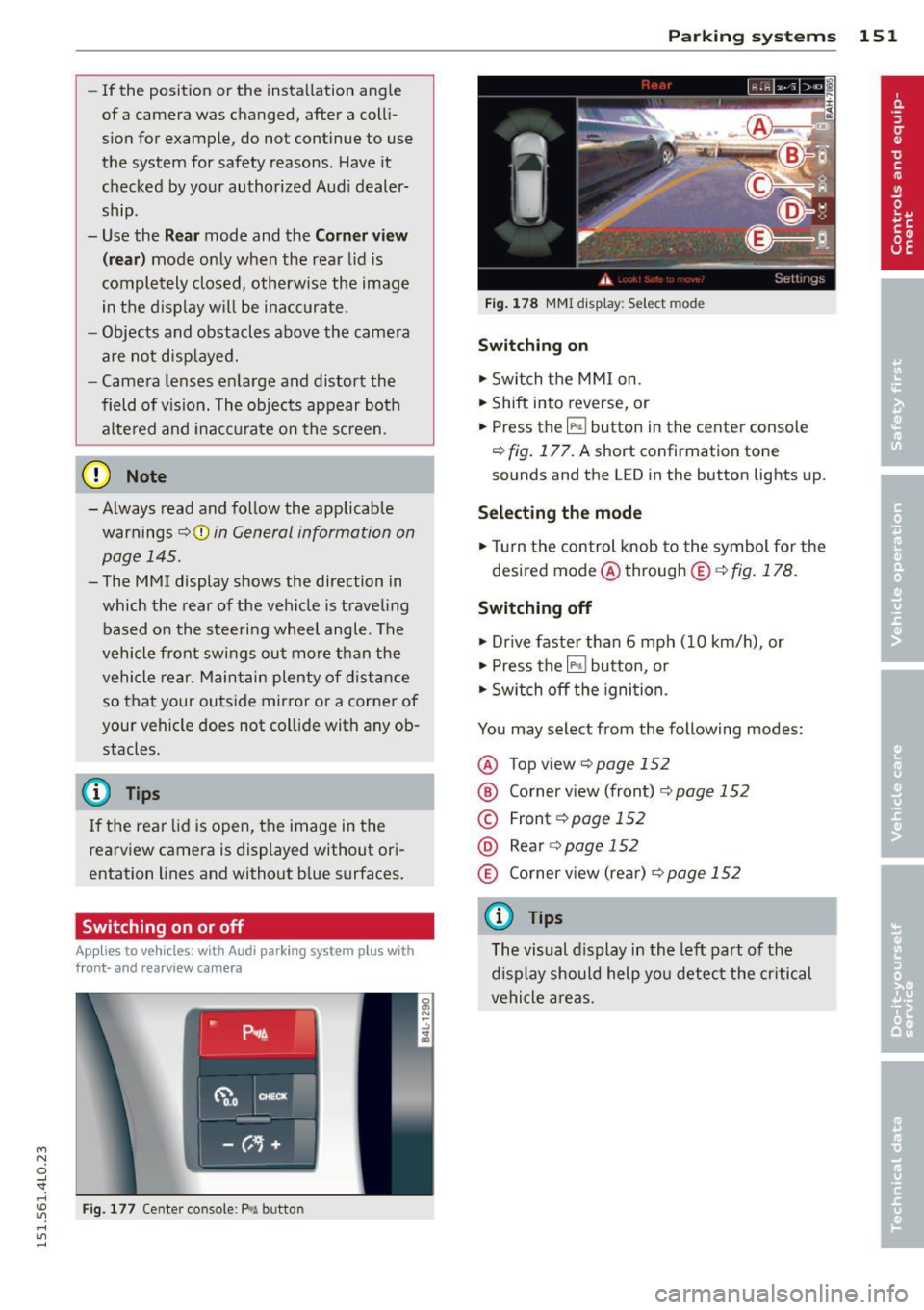
Fig. 177 Center console : P,•A but ton
Parking systems 151
Fig. 178 MMI display: Select mode
Switching on
.,. Switch the MMI on.
.,. Shift into reverse, or
.,. Press the
IP.1! button in the center console
¢
fig. 177. A short confirmation tone
sounds and the L ED in the button lights up.
Selecting the mode
.,. Turn the control knob to the symbol for the
desired mode @through @¢fig.178.
Switching off
.,. Drive faster than 6 mph (10 km/h) , or
.,. Press the
l""'I button, or
.,. Switch off the ignition .
You may select from the following modes:
@ Topview ¢page152
@ Corner view (front) ¢ page 152
© Front¢ page 152
@ Rear o page 152
® Corner view (rear)¢ page 152
(D Tips
The visual display in the left part of the
display should help you detect the critical
vehicle areas.
Page 155 of 350
M
"' 0 ..J
"". rl I.O
"' rl
"' rl
You can choose between three different views in this mode.
.. To cross park, parallel park, or position the
vehicle in front of a trailer, press the ® con
trol button on the controls repeatedly until
the symbol for the desired mode is selected .
Cross parking
Applies to vehicles: with Audi parking system p lus w it h
fr ont- an d rearview ca mera
This view may be used when parking in a ga
rage or in a parking space.
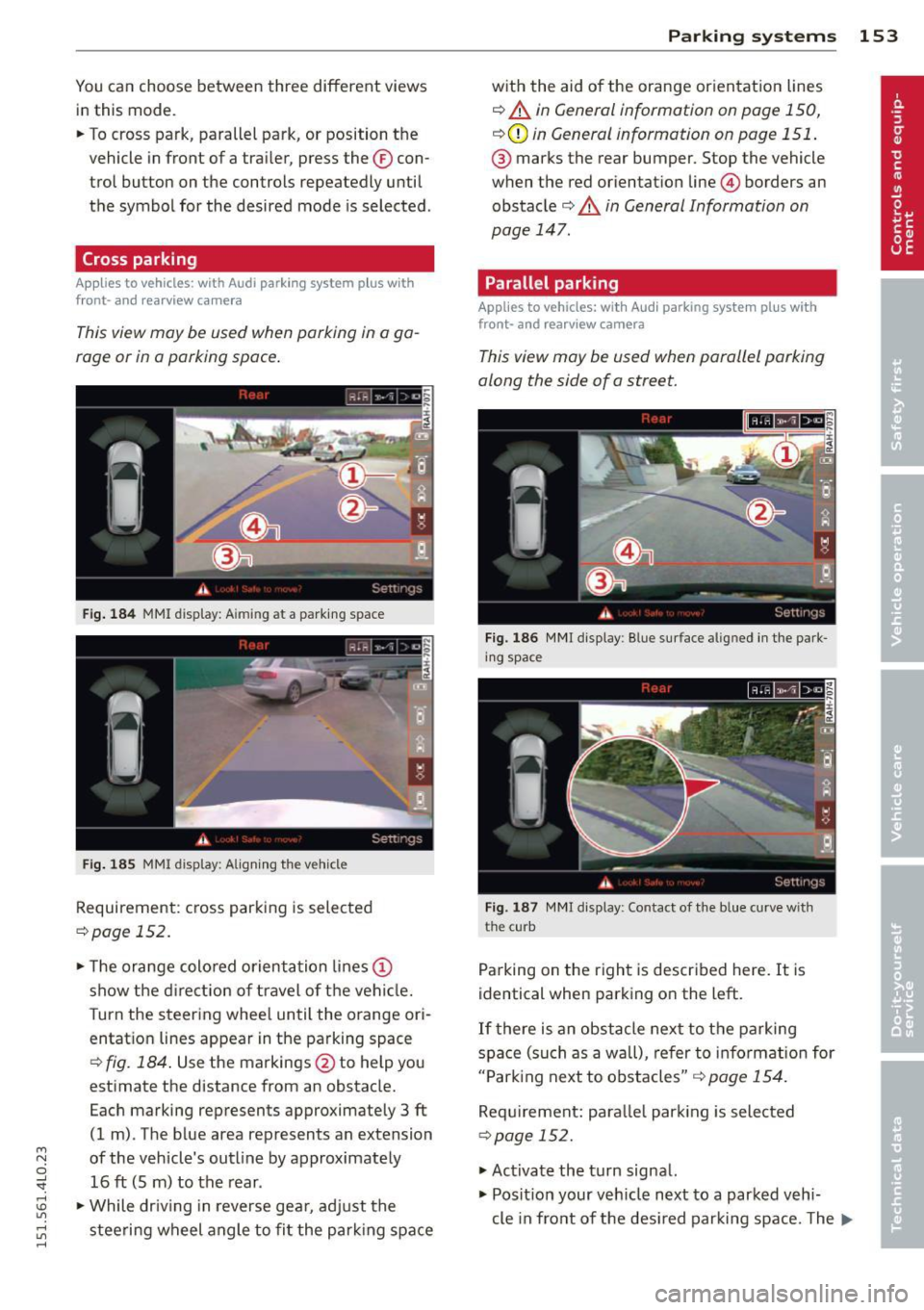
Fig. 184 MMI display: A iming at a parkin g space
Fig. 185 MMI display: Aligning the vehicl e
Requirement : cross parking is selected
¢page 152 .
.. The orange colored orientation lines@
show the direction of travel of the vehicle.
Turn the steering wheel until the orange ori
entation lines appear in the parking space
¢
fig. 184. Use the markings @to help you
estimate the distance from an obstacle.
Each marking represents approximately 3
ft
(1 m) . The blue area represents an extension
of the vehicle's outline by approximately 16
ft (5 m) to the rear .
.. While driving in reverse gear, adjust the
steering wheel angle to fit the parking space
Parking systems 153
with the aid of the orange orientation lines
¢ A in General information on page 150,
¢ CD in General information on page 151 .
® marks the rear bumper. Stop the vehicle
when the red orientation line@ borders an
obstacle¢
A in General Information on
page 147.
Parallel parking
Applies to vehicles : wit h Audi parking system pl us with
front- and rearview camera
This view may be used when parallel parking
along the side of a street.
Fig. 186 MMI display: Blue surface aligned in the park
ing space
Fig. 187 MMI display: Contact of the blue curve w ith
the curb
Parking on the right is described here. It is
identical when parking on the left.
If there is an obstacle next to the parking
space (such as a wall), refer to information for
"Parking next to obstacles"
r::!:>page 154.
Requirement: parallel parking is selected
¢page 152.
.. Activate the turn signal.
.. Position your vehicle next to a parked vehi-
cle in front of the desired parking space. The ...
Page 156 of 350
154 Parking systems
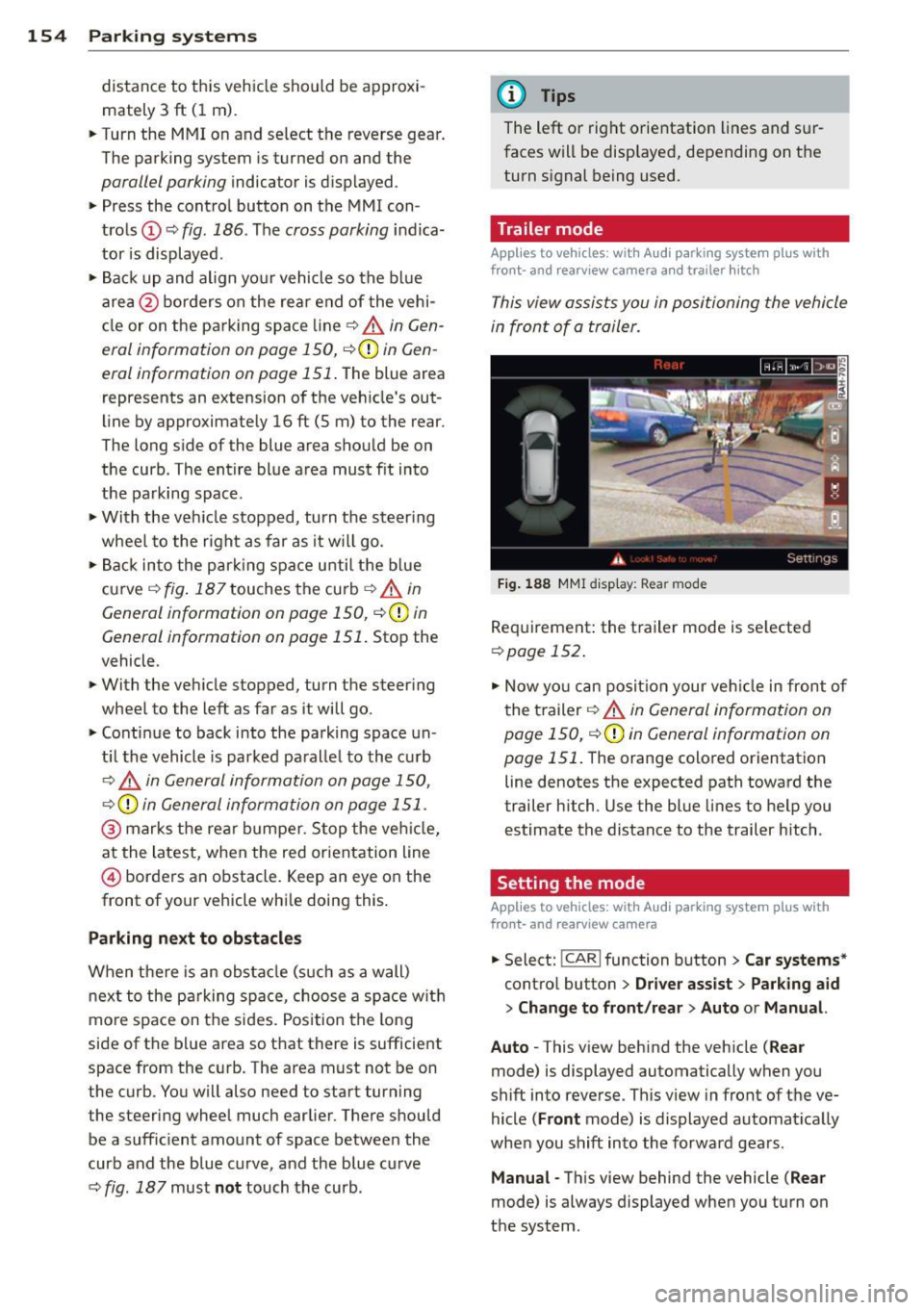
distance to this vehicle should be approxi
mately 3 ft (1 m).
• Turn the
MMI on and select the reverse gear.
The parking system is turned on and the
parallel parking indicator is displayed .
• Press the contro l button on the
MMI con
trols
(D ¢ fig . 186 . The cross parking indica
tor is displayed .
•Backup and align yo ur vehicle so the blue
area @ borders on the rear end of the vehi
cle or on the pa rking space line¢ .&.
in Gen
eral information on page 150, ¢(Din Gen
eral information on page 151 .
The blue area
represents an extension of the veh icle's out
line by approximately
16 ft (5 m) to the rear .
The long side of the blue area should be on
the curb . The entire blue area must fit into
the parking space .
• With the vehicle stopped, turn the steer ing
wheel to the right as far as it will go.
• Back into the parking space until the blue
curve ¢
fig. 187 touches the curb¢.&. in
General information on page 150,
~ CD in
General information on page 151.
Stop the
vehicle.
• With the veh icle stopped, turn the steer ing
wheel to the left as far as i t will go .
• Continue to back into the parking space un
t il the vehicle is parked pa rallel to the curb
¢.&. in General information on page 150,
¢(Din General information on page 151.
@ marks the rear bumper. Stop the vehicle,
at the latest, when the red orientation line
© borders an obstacle. Keep an eye on the
front of your vehicle while doing th is .
Parking next to obstacles
When there is an obstacle (such as a wall)
next to the parking space, choose a space w ith
mo re space on the sides. Position the long
side of the blue area so that there is sufficient
space from the curb. The area must not be on
the curb . You wi ll also need to start turning
the steering wheel much earlier . There should
be a sufficient amount of space between the
curb and the blue curve, and the blue curve
c::> fig. 187 must not touch the curb.
(D Tips
The left or right orientation lines and sur
faces will be displayed, depending on the
turn signal being used.
Trailer mode
Applies to vehicles: with Audi parking system plus with
front· and rearview camera a nd tra iler h itch
This view assists you in positioning the vehicle
in front of a trailer.
Fig. 188 MMI dis p lay : R ea r m od e
Requirement: the trailer mode is se lected
c:> page 152 .
• Now you can position your veh icle in front of
the trailer
c::> .&. in General information on
page 150,
c::>(D in General information on
page 151 .
The orange colored orientation
line denotes the expected path toward the
trailer h itch. Use the blue lines to help you
estimate the distance to the trailer hitch .
Setting the mode
Applies to vehicles: with Audi parking system plus with
front· and rearview camera
• Select: !CAR I function button> Car systems *
control button > Driver assist > Parking aid
> Change to front /rear > Auto or Manual.
Auto -
This v iew behind the vehicle ( Rear
mode) is displayed automatically when you
shift into reverse . This view in front of the ve
hicle
( Front mode) is displayed automat ically
whe n you shift into the forward gears.
Manual -This view behind the vehicle ( Rear
mode) is always displayed when you turn on
the system .
Page 163 of 350

M N
0 ...J
'SI: ,...., \!) ..,.,
,...., ..,., ,....,
Displaying the vehicle level
The current vehicle leve l is shown with seg
ments fi lled out in the segment disp lay @. If
on ly the bottom segment is filled out, the ve
hicle is at highway leve l. If all segments are
fi lled out, the vehicle is at high level 2 and has
the greatest amount of ground clearance pos
sible.
While the vehicle is being raised or lowered,
the target level is indicated by an arrow @
¢
fig. 191 or a white border @¢ fig. 192. The
arrow/border disappears aga in when the vehi
cle is at the target level.
Jacking mode when changing a flat tire
Applies to vehicles: with Adaptive Air Suspension
This mode must be activated in the MMI be
fore raising the vehicle with a jack or on a ve
hicle lift.
.,. Select: ICARI funct ion button> ! SETUP I func
t ion button >
Jacking mode. Or
.,. Select:
I CARI funct ion button > Car systems*
control button > Servicing & checks > Air
susp.: tire change .
The vehicle jack mode must be activated be
fore changing a wheel so that the automatic
control processes fo r the a ir suspension do
not make lift ing with the vehicle jack more dif
ficult.
The check lamp
II i n the instrument cluster
d isp lay illuminates in vehicle jack mode.
0) Tips
The vehicle jack mode is switched off auto
mat ically at speeds above 9 mph (15 km/
h).
Towing a trailer
Appl ies to vehicles: with towing hitch and Adaptive Air
Suspension
Automatic lowering is not desirable when
towing a trailer.
.,. Se lect: ICAR I function button> !SETUP I func
tion button >
Towing mode . Or
Adaptive A ir Suspension 161
.,. Select: !CAR I function button > Car systems*
contro l button > Vehicle settings > Air
susp.: towing .
As long as towing mode is activated, a vehicle
with a trai ler appears in the
adaptive air sus
pension
main menu.
Level Adjustment when towing a trailer
- Before hitching up the trailer and before ad
jus ting the tongue weight at the trailer, the
automatic or comfort mode
must be select
ed so that the ve hicle can be at normal level
¢ page 159, MMI settings.
-If driving in dynamic mode is desired, this
mode
must be selected before hitching up
the trailer and before adjusting the tongue
weight. However, note that your vehicle is lowered and ground clearance is reduced.
- If you have to dr ive under difficult road con
ditions, you can select offroad or lift mode,
after hitch ing up the trailer or after adjust
ing the tongue weight.
- If the veh icle is at
normal level, and you se
lect offroad mode wh ile traveling at speeds
higher than 22 mph (35 km/h), the veh icle
w ill not be ra ised. Offroad mode will appear
as the active mode in the MMI Display.
- If the veh icle is in offroad mode at
high level
1 ,
it automatically lowers to normal level
when the ve hicl e is t ravel ing at speeds ex
ceeding approximately 31 mph (SO km/h).
The vehicle is automatically raised to
high
level 1
again when the traveling speed falls
be low approximately 25 mph (40 km/h).
Restrictions when operating with a trailer
When operating w ith a tra iler, the lift mode
can only be selected up to about 12 mph (20
km/h). Lift mode is automatically cance led
again when a speed of about 25 mph (40 km/
h) is exceeded.
If the vehicle is in automatic, comfort, offroad
or lift mode before the trai ler towing mode is
activated, the dynamic mode cannot be acti
vated.
If the vehicle is in dynamic mode before tow-
ing operation is activated, it can be driven in
IJI,-
Page 166 of 350
164 Driving Safel y
• Instr uct passenge rs to adjust the head re
straints according to their height.
• Make sure to use the right child restraint
correct ly to protect children<=>
page 203,
Child Safety .
• Sit properly i n your seat and make sure that
you r passenge rs do the same
<=> page 74,
General recomm endations .
• Fasten your safe ty be lt and wear it properly.
Also ins truc t you r passengers to f aste n t heir
sa fety belts properly <=>
page 173.
What impairs driving safety?
Safe driving i s directly rela ted to the condi
t ion of the vehicle , the driver as well as the
driver 's abili ty to concentrate on the road
without being distracted .
The driver is responsib le fo r the s afety o f the
ve hicl e an d all of i ts occupants . If you r ab ility
to d rive is impai red, safety r is k s for everybody
i n the vehicle increase and yo u also become a
hazard to everyone else on the road <=>
&_.
Therefore:
• Do not let yo ursel f be distracte d by passe n
gers or by using a cellular telephone.
• NEVER dr ive when your dr iv ing ability is im
paired (by medicat ions, alcohol , drugs, etc.).
• Observe all traffic laws, rules of the road
and speed limits and plain common sense .
• ALWAYS ad just yo ur speed to road, t raff ic
and weathe r con dit ions .
• Take frequent breaks o n long t rips. Do no t
dr ive for more than two hours a t a str etch .
• Do NOT drive when you are t ired, under
pressure or when you are st ressed .
A WARNING
Impai red driving safety increases the risk
of serious persona l injury and death when
ever a veh icle is being used.
Proper occupant
seating positions
Proper seating position for the driver
The proper driver sea ting posi tion is imp or
t ant for safe, relaxed driving.
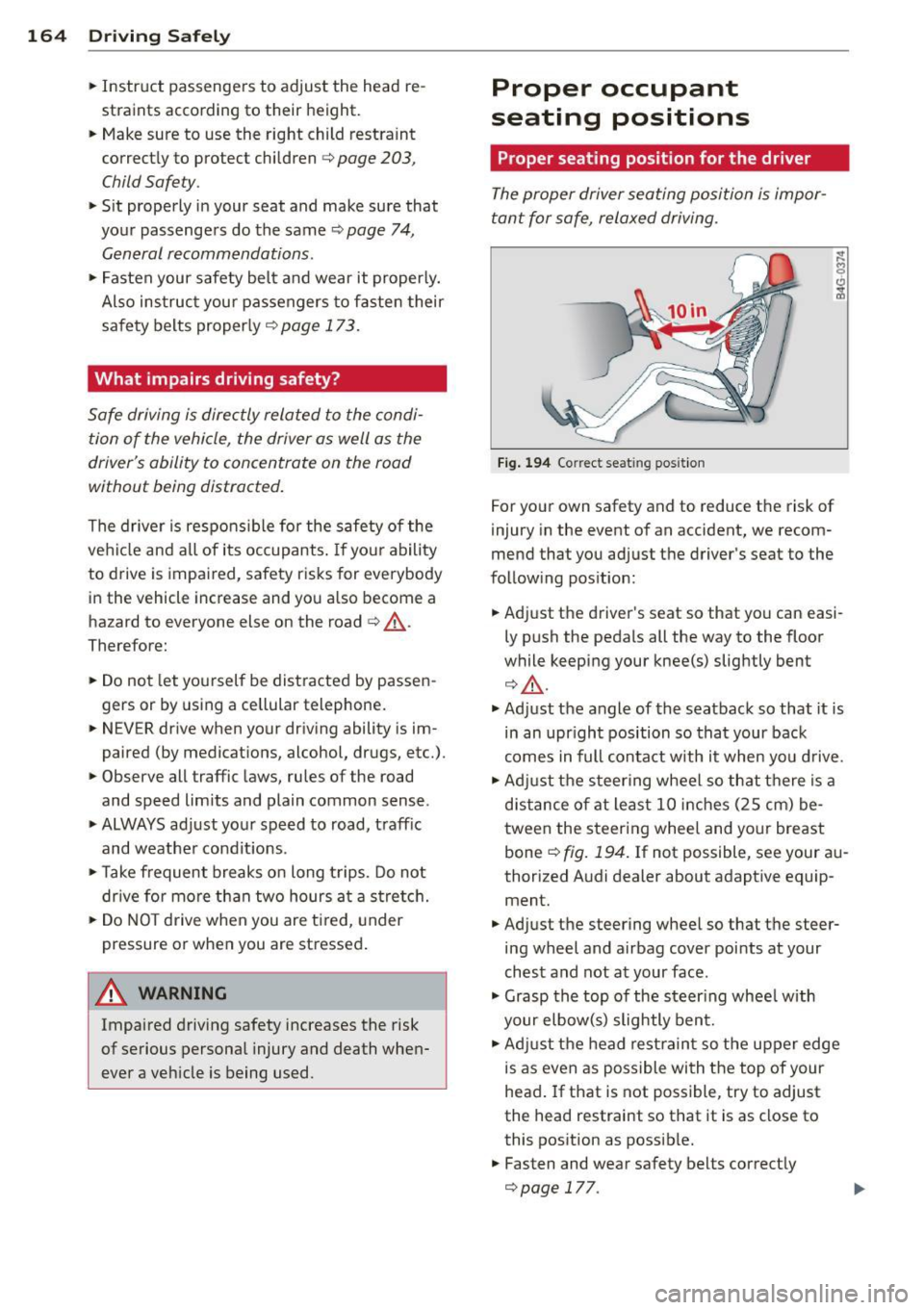
Fi g. 1 94 Correct seat ing posit ion
For yo ur own safety and to reduce the risk of
injury in the event of an accident, we recom
mend that you adjust t he driver's seat to the
fo llow ing pos ition:
• Adj ust t he d river's seat so that you can easi
ly push the pedals all the way to the floor
while keepi ng your knee(s) slightly bent
¢ &_ .
• Ad just t he angle of the seatbac k so that it is
in an upr ight position so that your back
comes in full conta ct w ith it when you d rive.
• Adj ust t he steering wheel so t hat there is a
d is tance of at least 1 0 inches (2 5 cm) be
t ween the steer ing whee l and yo ur breast
bone ~
fig. 194. If not possible, see your a u
thorized A udi dealer about adaptive equip
ment.
• Adjust t he steering wheel so that the steer
ing wheel and airbag cover poi nts at your
ch est and not at your face .
• Grasp the top of the ste ering whee l w ith
your elb ow(s) slightly ben t.
• Adj ust t he head re st ra in t so the upper edge
is as even as possible wi th th e top of y our
head . If that is not poss ible, try to adjust
the head restraint so that it is as close to
this pos ition as possib le .
.,. Fasten and wear safety belts correct ly
<=>page 177.
Page 167 of 350
M N
0 ...J
'SI: ,...., \!) 1.1'1 ,...., 1.1'1 ,....,
~ Always keep both feet in the footwell so
that you are in control of the vehicle at all
times.
For detailed information on how to adjust the
driver's seat, see
¢ page 75.
A WARNING
Drivers who are unbelted, out of position
or too close to the airbag can be seriously
injured by an airbag as it unfolds. To help
reduce the risk of serious personal injury:
- Always adjust the driver's seat and the
steering wheel so that there are at least
10 inches (25 cm) between your breast
bone and the steering wheel.
- Always hold the steering wheel on the
outside of the steering wheel rim with
your hands at the 9 o'clock and 3 o'clock positions to help reduce the risk of per
sonal injury if the driver's airbag inflates.
- Never hold the steering wheel at the
12 o'clock position or with your hands at
other positions inside the steering wheel
rim or on the steering wheel hub. Hold
ing the steering wheel the wrong way
can cause serious injuries to the hands,
arms and head if the driver's airbag de
ploys.
- Pointing the steering wheel toward your
face decreases the ability of the supple
mental driver's airbag to protect you in a
collision .
- Always sit in an upright position and nev
er lean against or place any part of your
body too close to the area where the air
bags are located.
- Before driving, always adjust the front
seats and head restraints properly and
make sure that all passengers are prop
erly restrained.
- Never adjust the seats while the vehicle
is moving . Your seat may move unexpect
edly and you could lose control of the ve
hicle.
- Never drive with the backrest reclined or
tilted far back! The farther the backrests
are tilted back, the greater the risk of in-
Driving Safely 165
jury due to incorrect positioning of the
safety belt and improper seating posi
tion .
- Children must always ride in child safety
seats ¢
page 203. Special precautions
apply when installing a child safety seat
on the front passenger seat¢
page 182.
Proper seating position for the front
passenger
The proper front passenger seating position
is important for safe, relaxed driving .
For your own safety and to reduce the risk of
injury in the event of an accident, we recom
mend that you adjust the seat for the front
passenger to the following position :
~ Adjust the angle of the seatback so that it is
in an upright position and your back comes
in full contact with it whenever the vehicle is
moving .
~ Adjust the head restraint so the upper edge
is as even as possible with the top of your
head. If that is not possible , try to adjust
the head restraint so that it is as close to
this position as possible¢
page 166.
~ Keep both feet flat on the floor in front of
the front passenger seat .
~ Fasten and wear safety belts correct
ly ¢
page 177 .
For detailed information on how to adjust the
front passenger 's seat, see ¢
page 7 4.
A WARNING ,_
Front seat passengers who are unbelted,
out of position or too close to the airbag
can be seriously injured or killed by the air
bag as it unfolds. To help reduce the risk of
serious personal injury:
- Passengers must always sit in an upright
position and never lean against or place
any part of their body too close to the
area where the airbags are located.
- Passengers who are unbelted, out of po
sition or too close to the airbag can be
seriously injured by an airbag as it
•
•
Page 177 of 350
M
"' 0 ..J
"". rl I.O
"' rl
"' rl
What happens to occupants not wearing
safety belts?
In crashes unbelted occupants cannot stop themselves from flying forward and being in
jured or killed. Always wear your safety belts!
Fig. 200 A driver not wearing a safety belt is violently
thrown forward
Fig. 201 A r ear p assen ger n ot wearin g a safety belt
will fly forwar d an d st rike the driver
Unbelted occupants are not able to resist the
tremendous forces of impact by holding tight
or brac ing themselves. W ithout the benefit of
safety restraint systems, the unrestrained oc
cupant will slam vio lent ly into the steering
wheel, instrument panel, windshield , or what
ever else is in the way ¢
fig. 200. This impact
with the vehicle interior has all the energy
they had just before the crash.
Never rely on airbags alone for protection.
Even when they deploy, airbags provide only
additional protection. Airbags are not sup posed to deploy in all kinds of accidents. Al
though your Audi is equipped with airbags, all
vehicle occupants, including the driver , must
wear safety belts correctly in order to mini
mize the risk of severe injury or death in a
crash .
Remember too, that airbags will deploy only
once and that your safety belts are always
Safety belts 175
there to offer protection in those accidents in
which airbags are not supposed to deploy or
when they have already deployed. Unbelted
occupants can a lso be thrown out of the vehi
cle where even more severe or fatal injuries
can occur .
It is also important for the rear passengers to
wear safety belts correctly . Unbelted passen
gers in the rear seats endanger not only them
selves but also the driver and other passen
gers ¢
fig. 201. In a frontal collision they will
be thrown forward violently, where they can
hit and injure the driver and/or front seat pas
senger.
Safety belts protect
People think it's possible to use the hands to
brace the body in a minor collision. It's simply
not true!
Fig. 202 D river is correctly rest ra in ed in a sud den brak
ing maneuver
Safety belts used properly can make a big dif
ference. Safety belts help to keep passengers
in their seats, gradua lly reduce energy levels
applied to the body in an accident, and help
prevent the uncontrolled movement that can
cause serious injuries. In addition, safety belts
reduce the danger of being thrown out of the
vehicle.
Safety belts attach passengers to the car and
give them the benefit of being slowed down
more gently or "softly" through the "give" in
the safety belts, crush zones and other safety
features engineered into today's vehicles. By
"absorbing" the kinetic energy over a longer
period of time, the safety belts make the
liJl,
Page 184 of 350
182 Airbag sys tem
Airbag system
Important things to know
Importance of wearing safety belts and
sitting properly
Airbags are only supplemental restraints. For
airbags to do their job , occupants must al
ways properly wear their safety belts and be
in a proper seating position.
F or your safety and the safety of your passen
gers, before driving off, a lways:
• Adjust the driver's seat and steering wheel
properly ¢
page 164,
• Adjust the front passenger's seat properly
r=; page 75,
• Wear safety be lts properly ¢ page 176,
• Always properly use the proper child re-
straint to protect children¢
page 203.
In a collision, airbags must inflate within the
blink of an eye and with considerable force .
The supplemental airbags can cause injuries if
the dr iver or the front seat passenger is not
seated properly . Therefore in order to he lp the
a irbag to do its job, it is important, both as a
d river and as a passenger to sit prope rly at all
times.
By keeping room between your body and the
steering wheel and the front of the passenger
compartment, the airbag can inflate fully and
comp letely and provide supp lemental protec
tion in ce rtain frontal collisions¢
page 164,
Proper occupant seating positions.
F or detai ls
on the operation of the seat adjustment con
t rols ¢
page 75.
It's especially important that children are
properly restrained ¢
page 203.
There is a lot that the driver and the passen
gers can and must do to help the individua l
safety features installed in your A udi work to
gether as a system.
Proper seat ing pos ition is important so that
the front airbag on the driver s ide can do its
job. If yo u have a physical impa irment or con- dition that prevents you from sitting properly
on the driver seat with the safety belt properly
fastened and reaching the pedals , or if you
have concerns with regard to the function or
operation of the Advanced Airbag System ,
please contact your author ized Audi dealer or
qualified workshop, or call Audi Customer Re
lations at 1-800-822-2834 fo r poss ible modi
ficat ions to your veh icle.
When the airbag system deploys, a gas gener
ator will f ill the a irbags, break open t he pad
ded cove rs, and inflate between the steering
whee l and the dr iver and between the instru
ment pane l and the fron t passenger. The a ir
bags will deflate immediately after dep loy
ment so that the front occupants can see
t h rough the windshie ld again witho ut inter
ruption .
All of th is takes p lace in the b link of an eye, so
fast that many peop le don't even realize tha t
the airbags have deployed. The airbags a lso
inflate with a great dea l of force and nothing
shou ld be in their w ay when they deploy.
Front airbags in combination with properly
worn safety belts slow down and lim it the oc
cupant's forward movement . T ogether they
help to prevent the drive r and front seat pas
senger from hitting pa rts of the inside of the
vehicle while reducing the forces acting on the
occupant during the crash . In this way they
help to reduce the risk of injury to the head
and upper body in the crash. A irbags do not
protect the arms or the lower parts of the
body.
Both front airbags wi ll not inflate in all fronta l
collisions . The triggering of the airbag system
depends on the vehicle dece lerat ion rate
caused by the co llision and registered by the
electron ic control unit. If th is rate is below
the reference value programmed into the con
t rol unit , the airbags will not be trigge red,
even though the car may be badly damaged as
a res ult of the co llision . Ve hicl e damage, re
pair costs or even the lack of ve hicle damage
is not necessari ly an indication of whether an
airbag shou ld inflate or not .
IJll-
Page 185 of 350
M N
0 ...J
'SI: ,...., \!) 1.1"1 ,...., 1.1"1 ,....,
Since the circums tances will vary considerab ly
between one collision and another , it is not
possible to define a range of veh icle speeds
that will cover every possible k ind and angle
of impact t hat w ill always t rig ger the a irbags .
Important factors include, for example, the
nature (hard or so ft) of the object which the
car h its, the ang le of impact, vehicle speed ,
etc. The front airbags will a lso not inflate in
side or rear collisions, or in ro ll-overs .
Alw ays rememb er: Airbags will deploy only
once, and only in certa in kinds of co llisions.
Your safety belts are always there to offe r pro
tect ion in those s ituations in which airbags
are not supposed to deploy , or when they have
a lready deployed ; for example , when your ve
hicle strikes or is struck by another vehicle af
ter the first co llision .
This is just one of the reasons why an a irbag is
a supp lementary restraint and is not a s ubsti
tute for a safety belt . The airbag system
works most effectively when used with the
safety belts. Therefore, always properly wear
your safety belts ¢
page 173.
A WARNING
Sitting too close to the steer ing whee l or
instrument panel will dec rease the effec
tiveness of the airbags and will inc rease
the risk of pe rsonal injury in a co llision .
- Never sit closer than 10 inches (2S cm)
to the stee ring wheel or instr ument pan
el.
- If you cannot sit more than 10 inches
( 2 5 cm) from the steer ing whee l, investi
ga te whethe r adaptive equipment may
be available to help you reach the pedals
and increase your seating distance from
the steering wheel.
- If you are unrestrained, lean ing forward,
sitting sideways or out of position in any
way, yo ur risk of inj ury is much higher.
- You w ill also receive serio us injuries and
cou ld even be killed if you are up against
the a irbag or too close to it when it in
flates -even with an Advanced Airbag.
A irbag system 183
-To reduce the risk of injury when an air
bag inflates, always wear safety belts
properly ¢
page 177, Safety belts.
-Always make certain that ch ild ren age 12
or younger a lways ride in the rear seat. If
children are not properly restrained, they may be severe ly inju red or killed when an
airbag inf lates .
- Never let ch ildren ride unrestra ined or
improperly restrained in the vehicle. Ad
just the front seats prope rly .
- Never ride with the back rest reclined .
- Always sit as far as possible from the
steer ing whee l or the instrument pane l
¢page 164.
-Always sit upright with your back against
the backrest of your seat .
- Never p lace your feet on the instrument
panel or on the seat. Always keep both
feet on the f loor in front of the seat to
he lp preven t serio us in ju ries to the legs
and h ips if the airbag infla tes.
- Never recline the front passenger 's seat
to transport objects . Items can a lso
move into the area of the s ide a irbag or
the front a irbag du ring bra king or in a
sud den maneuve r. Obje cts near the air
bags can become projectiles and cause
in jur y when an airbag inflates.
A WARNING
Airbags that have de ployed in a crash must
be replaced.
- Use on ly orig inal equipment airbags ap
proved by Aud i an d installed by a trained
technician who has the necessary too ls
and d iagnost ic equipment to properly re
place any airbag in your vehicle and as
sure system effectiveness in a crash .
- Never perm it salvaged or recycled air
bags to be installed in your vehicle . •
•
Page 188 of 350
186 Airbag system
prevent them from providing any
protection.
- An improperly installed child restraint
can interfere with the airbag as it de
ploys and serious ly injure or even kill the
child -even with an Advanced Airbag
System .
- Always carefully follow the manufactur
er's instructions provided with the child
safety seat or carrier.
- Never place additional items on the seat
that can increase the total weight regis
tered by the weight-se nsing mat and can
cause injury in a crash.
Front airbags
Description of front airbags
The airbag system can provide supplemental
protection to properly restrained front seat
occupants.
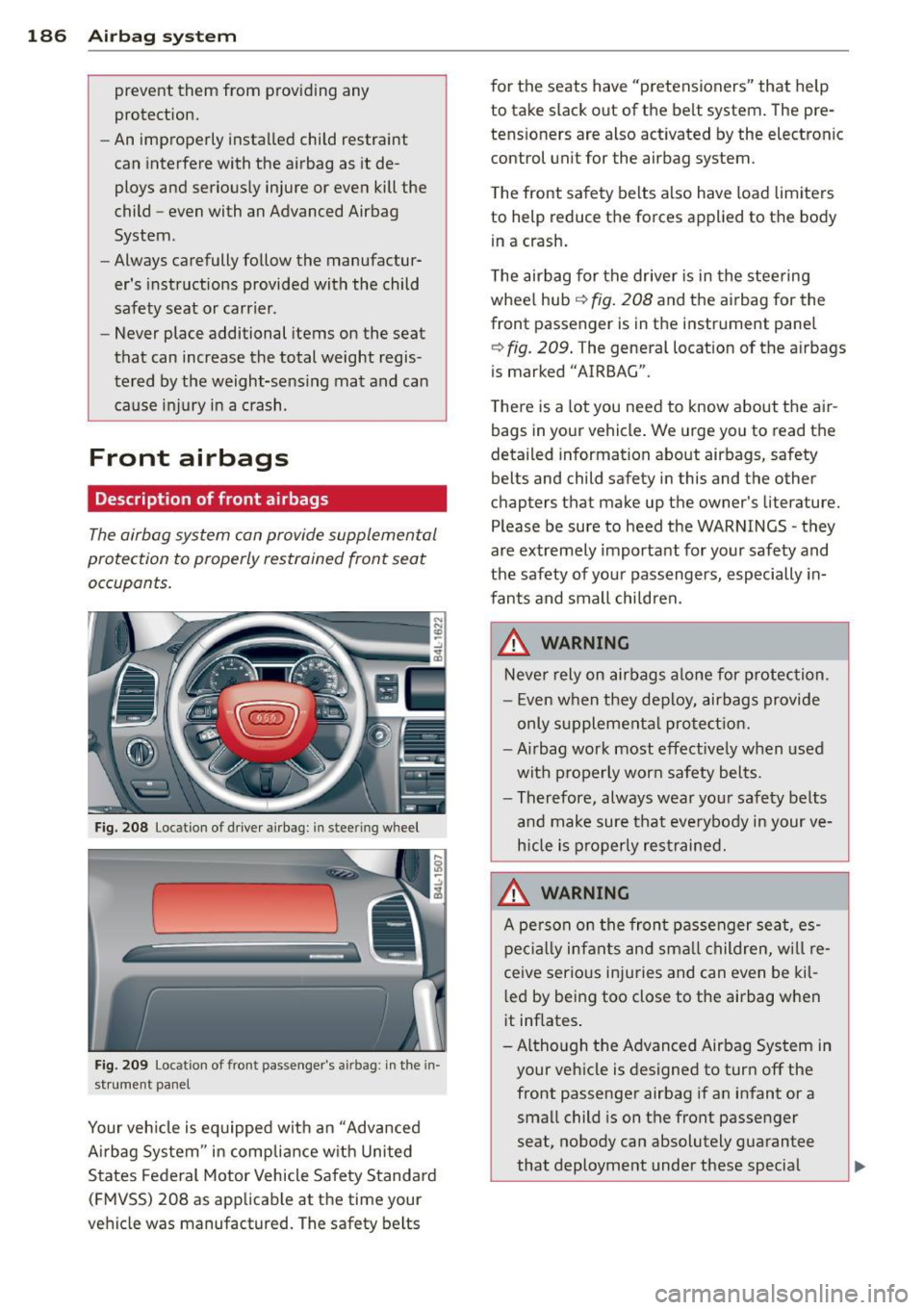
Fig. 2 08 Locat ion of dr ive r air bag : in stee ring wheel
Fig. 2 09 Locat ion of front passenger's a irbag: in the in
st rument panel
Your veh icle is equipped with an "Advanced
A irbag System" in complia nce w ith United
States Federal Motor Vehicle Safety Standard
( FM VSS) 208 as app licab le at the time your
veh icle was manufactured. The safety belts f
or the seats have "pretensioners" that help
to take slack out of t he belt system . The pre
tens ioners are also act ivated by the electronic
control unit for the airbag system.
T he front safety be lts also have load limiters
to help reduce the forces applied to the body
i n a crash .
T he airbag for the drive r is in the stee ring
whee l hub ¢
fig. 208 and the airbag for the
front passenger is in the instr ument panel
~ fig. 209 . The general locat ion of the a irbags
is marked "AIRBAG".
T here is a lot you nee d to know about the ai r
bags in your vehicle . We urge you to read the
detailed information about airbags, safety
belts and child safety in this and the other
chapters that make up the owner's literature.
P lease be sure to heed the WARNINGS -they
are extremely importa nt for your safety and
the safety of you r passengers, especially in
fants and small chi ldren.
_&. WARNING
Neve r rely on airbags alo ne for p rotection.
- E ven w hen they deploy, airbags provide
only supplement al pro tectio n.
- Airbag work most effect ive ly when used
with p roperly wor n safety bel ts.
- Therefore, always wea r you r safety belts
a nd make sure tha t eve rybody in your ve
h icle is properly res trained.
_&. WARNING
A pe rso n on the fron t passenger seat, es
pe cial ly infa nts and sm all ch ildren, w ill re
ceive serio us inju ries and can even be kil-
l ed by being too close to the airbag when
it inflates .
- A lthough t he Advanced Airbag System in
your veh icle is des igned to tur n off the
front passenge r airbag if an infant or a
small child is on the front passenger
seat, nobody can absolutely guarantee
-
that deployme nt under these special ..,