brake AUDI Q7 2015 Owner´s Manual
[x] Cancel search | Manufacturer: AUDI, Model Year: 2015, Model line: Q7, Model: AUDI Q7 2015Pages: 350, PDF Size: 86 MB
Page 143 of 350
M
"' 0 _,
"". rl I.O
"' rl
"' rl
Driving the automatic transmission
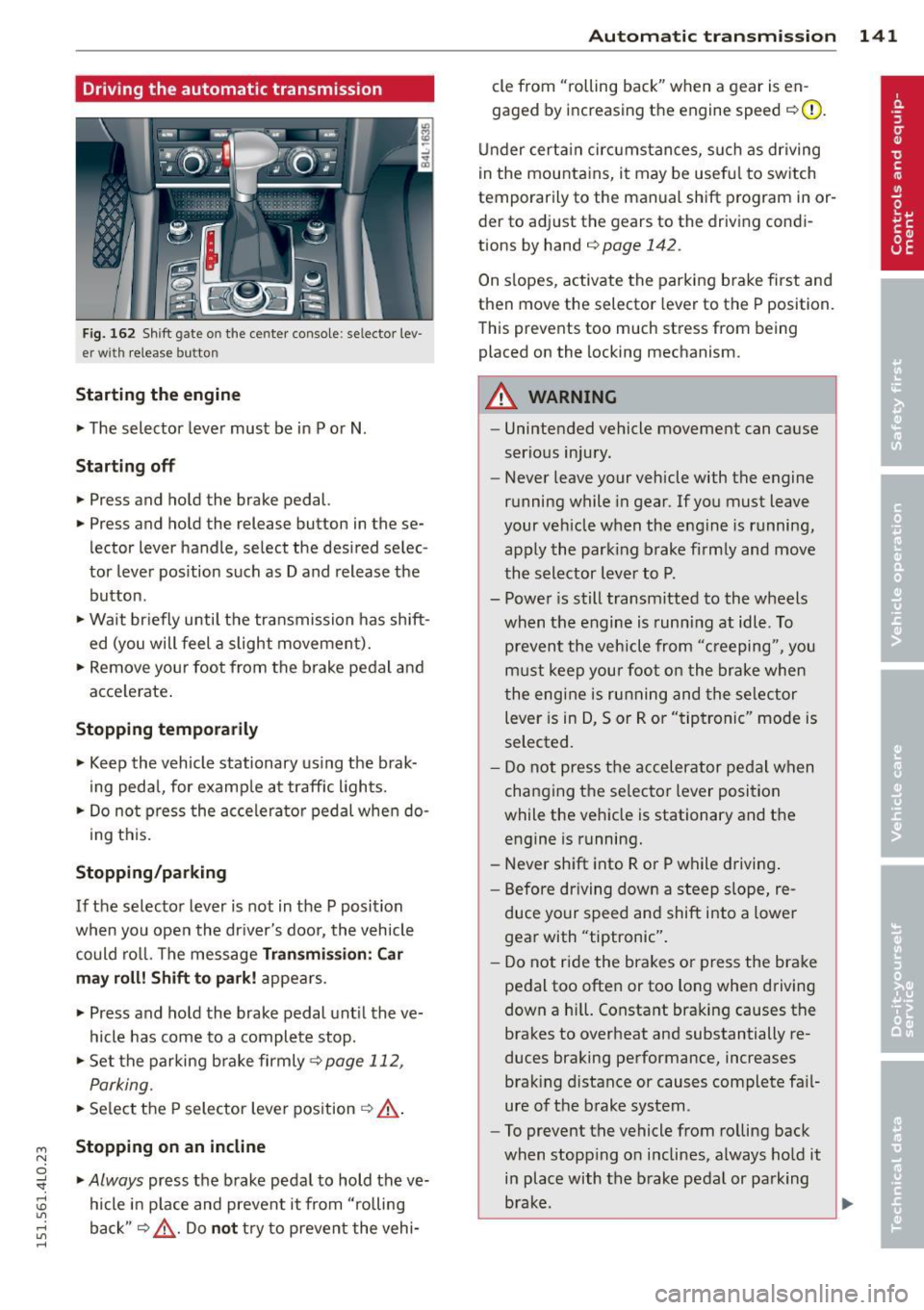
Fig. 162 Shift g ate on the center co nso le: se lector lev
er wi th release butt on
Starting the engine
~ The selector lever must be in P or N .
Starting off
~ Press and hold the brake pedal.
~ Press and hold the release button in these
lector lever handle , select the desired selec
tor lever pos ition such as D and release the
button .
~ Wait briefly until the transmission has shift
ed (you will feel a slight movement).
~ Remove your foot from the brake pedal and
acce lerate .
Stopping temporarily
~ Keep the vehicle stationary us ing the brak
ing pedal, for examp le at traffic lights.
~ Do not press the accelerato r pedal when do -
ing this.
Stopping /parking
If the selector lever is not in the P position
when you open the driver's door, the vehicle
could roll. The message
Transmi ssion : Car
may roll! Shift to park! appears.
~ Press and hold the brake pedal unt il the ve
hicle has come to a complete stop.
~ Set the parking brake firmly 9 page 112,
Parking.
~ Se lect the P selector lever position 9 &.-
Stopping on an incline
~ Always press the brake pedal to hold the ve
hicle in place and prevent it from "rolling
back"
9 ,& . Do not try to prevent the vehi-
Autom atic transm ission 141
cle from "rolling back" when a gear is en
gaged by increasing the engine speed
c::>(D.
Under certain circumstances, such as driving
in the mountains, it may be usefu l to switch
temporarily to the manual shift program in or
der to adjust the gears to the driving condi
tions by hand
c::> page 142 .
On slopes, activate the parking brake first and
then move the selector lever to the P position.
This prevents too much stress from being
placed on the locking mechanism.
A WARNING
- Unintended vehicle movement can cause
serious injury.
- Never leave your vehicle with the engine
running while in gear.
If you must leave
your veh icle when the engine is running,
apply the park ing brake firmly and move
the selector lever to P.
- Power is still transmitted to the wheels
when the engine is running at idle. To
prevent the vehicle from "c reeping ", you
must keep your foot on the brake when
the engine is running and the selector
lever is in D, Sor R or "tiptronic" mode is
selected.
- Do not press the accelerator pedal when
changing the se lector lever position
while the vehicle is stationary and the engine is running.
- Never shift into R or P while driving.
- Before driving down a steep slope, re-
duce your speed and shift into a lower
gear with "tiptronic".
- Do not ride the brakes or press the bra ke
pedal too often or too long when driving
down a hi ll. Constant braking causes the
brakes to overheat and substantially re
duces braking performance, increases braking distance or causes complete fa il·
ure of the brake system.
- To prevent the vehicle from rolling back
when stopping on inclines, always hold it
in place with the brake pedal or parking
brake . .,..
Page 144 of 350
142 Automatic tr an smis sion
- Never hold the veh icle on an incl ine with
a slipp ing clutch . The clutch opens auto
matically when it becomes too hot from
the overload. An indicator lamp@] illu
minates and a dr iver message appears
c!;> page 143 when the clutch is overload
ed.
- If the engine must remain running, never
hav e any driving pos ition engaged when
che cking under the hood. Make sure the
selector lever has secure ly engaged and
is locked in P with the parking bra ke
firmly set¢
page 256. Otherwise, any
increase in engine speed may set the ve
hicle in motion, even with the parking
brake applied.
(D Note
- When stopping on an incline, do not try
to hold the vehicle in place by pressing
the accelerator peda l while a driving gear
is selected. Th is can cause the transm is
s io n to overheat and can damage it. Acti
vate the park ing brake or p ress the brake
pedal to prevent the vehicle from ro lling .
- Allow ing the vehicle to roll when the en
gine is stopped and the selector lever is i n
N w ill damage the transmiss ion be
cause it is no t lub rica ted under those c ir
cumst ances.
Hill descent control
The hill d escent control system assists the
driver when driving down declines.
H ill desce nt co ntrol is activated when these
lecto r lever is in D/S a nd you press the b rake
pedal. The tra nsmission a utomatically se lects
a gea r that is suitab le for the incline. Hill de
scent control tries to maintain the speed ach
i eved at the t ime of brak ing, within physical
a nd techn ica l limitations . It may st ill be nec
essary to adjust the speed with the brakes.
H ill descent co ntrol sw it ches off once the de
cline levels out or you press t he accelerator
pedal. When the speed is set in the cruise con
trol
system
c!;> page 113, hill descent contro l is al
so act ivated.
A WARNING
--
Hill descent control cannot overcome
physical lim itations, so it may not be ab le
to maintai n a co nstant speed under all
conditions . A lways be ready to apply the
b rakes .
· Manual shift program
Using the manual shift program you can
manually select gears.
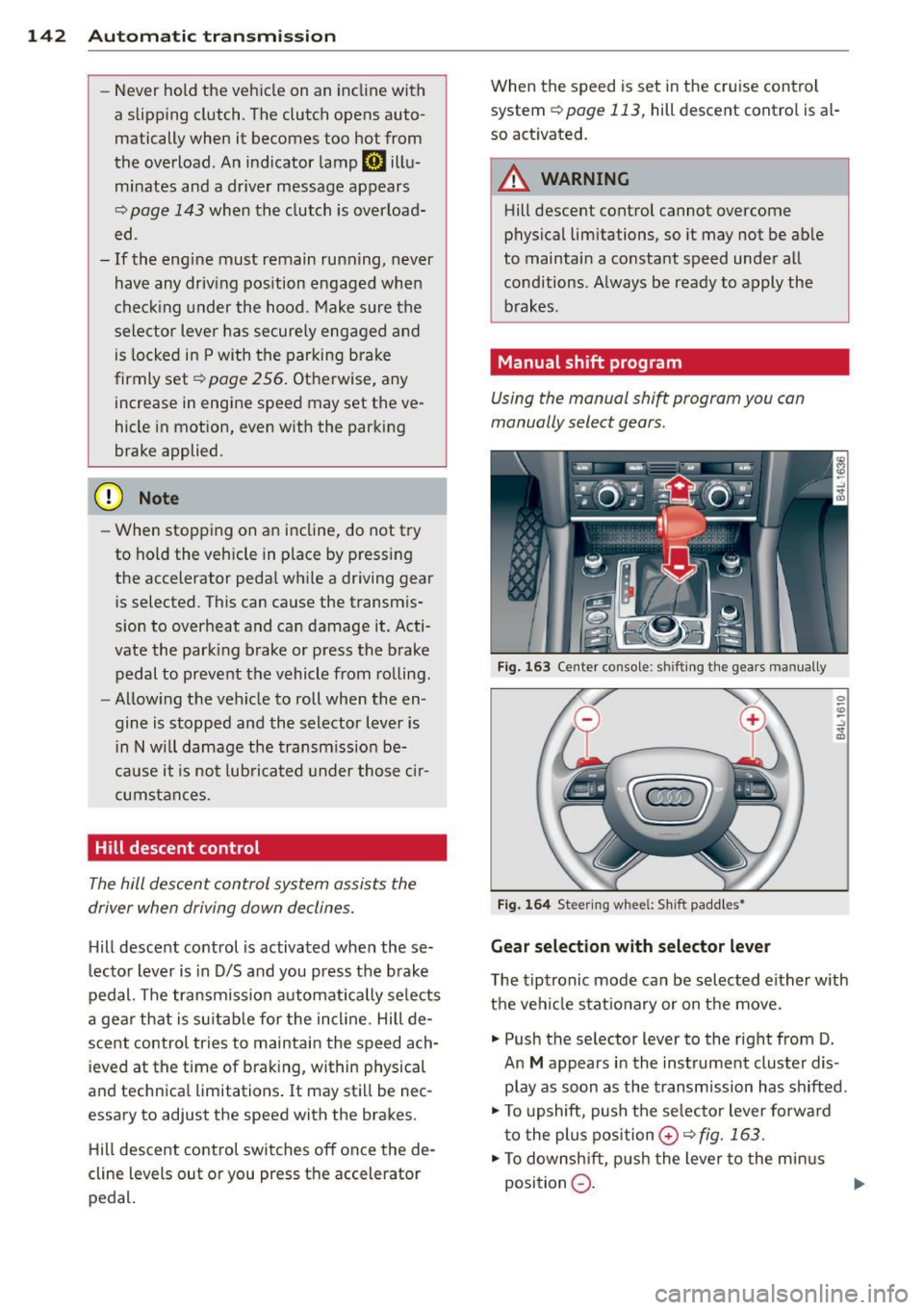
Fig. 1 63 Center conso le: sh ift in g the gears m an ually
Fig . 1 64 St ee rin g whee l: S h ift paddle s•
Gear selection with selector lever
The tiptronic mode can be sel ected either w ith
the vehicle stat io na ry or on t he move.
.,. Push the se lector lever to the right from D.
An
M appears in the instrument cluster dis
play as soon as the transmission has shifted .
.,. To upshift, push the se lecto r lever forwa rd
t o the plu s position
0 c!;> fig. 163 .
.,. To downsh ift, pus h the lever to the min us
position
Q . 1J>-
Page 170 of 350
168 Driving Safely
Pedal area
Pedals
The pedals must always be free to move and
must never be interfered with by a floor mat
or any other object.
Make sure that all pedals move freely without
interference and that nothing prevents them
from returning to their original positions .
Only use floor mats that leave the peda l area
free and can be secured with floor mat fasten
ers.
If a brake circuit fails, increased brake peda l
travel is required to bring the vehicle to a full
stop.
A WARNING
Pedals that cannot move freely can cause
loss of vehicle control and increase the r isk
of serious injury.
- Never place any objects in the driver 's
footwell. An object could get into the
peda l area and interfere w ith pedal func
tion. In case of sudden braking or an ac
cident, you would not be ab le to bra ke or
accelerate!
- Always make su re that nothing can fall
or move into the driver's footwell.
Floor mats on the driver side
Always use floor mats that can be securely
attached to the floor mat fasteners and do
not interfere with the free movement of the
pedals .
.,. Make su re that the floor mats are properly
secured and cannot move and interfere with
the pedals~ .&_.
Use only floor mats that leave the pedal a rea
unobstructed and that are firmly secured so
that they cannot s lip out of position. You can
obtain suitable floor mats from your author
ized Audi dealer.
Floor mat fasteners are installed in your Audi . Floor mats used in your vehicle must be at
tached to these fasteners . Properly securing
the floor mats will prevent them from sliding
into positions that could interfere with the
pedals or impair safe operat ion of your vehicle
in other ways.
A WARNING ,-
Pedals that cannot move freely can result
i n a loss of vehicle control and increase the
r isk of ser ious persona l injury.
- Always make sure that floor mats are
p roperly secured.
- Never place or install floor mats or other
f loor coverings in the vehicle that cannot
be prope rly secured in place to prevent
them from slipping and interfer ing wi th
the peda ls or the ability to contro l the
vehicle.
- Never pla ce or install floor mats or other
floor coverings on top of already instal
led floor mats . Additiona l floor mats and
other coverings will reduce the size of
the pedal area and interfere with the
pedals.
- Always properly reinsta ll and secure floor
mats that have been taken out for clean
ing.
- Always make sure that objects cannot
fall into the dr iver footwell while the ve
hicle is moving . Objects can become
trapped under the brake pedal and accel
erator pedal causing a loss of vehicle
control.
Page 225 of 350

M N
0 ...J
'SI: ,...., \!) 1.1'1 ,...., 1.1'1 ,....,
Intelligent technology Notice about data
recorded by vehicle
control modules
Your vehicle is not equipped with an Event Da
ta Recorder (EDR), installed by some manu
facturers for the express purpose of capturing
data for retrieval after an accident or crash
event. EDRs are sometimes called "crash re
corders".
Some state laws restrict the retr ieval or down
loading of data stored by EDRs that were in
stalled in a vehicle for the express purpose of
retrieving data after an accident or crash
event without the owner's consent.
Although your vehicle is not equipped with an
EDR, it is equipped with a number of electron
ic control modules for various vehicle systems
such as, for example, engine function, emis
sion control, as well as for the airbags and
safety belts.
These electronic control modules also record
vehicle-related data during norma l vehicle op
eration for diagnostic and repair purposes.
The recording capacity of the electronic con
trol modules is limited to data (no sound is re
corded) and only a small amount of data is ac
tually recorded over a very limited period of
time and stored when a system fault or other
condition is sensed by a control unit. Some of
the data then stored may relate to vehicle
speed, direction, braking as we ll as restraint
system use and performance in the event of a
crash or other condition. Stored data can only be read and downloaded with special equip
ment.
Electronic Stabilization
Control (ESC)
Description
The Electronic Stabilization Control (ESC) rein
forces driver safety. It reduces the risk of slip
ping and improves driving stability. ESC de
tects critical s ituations such as the vehicle
Intelligent technology 223
oversteering and understeering or the whee ls
spinning . The vehicle is stabilized by applying
the brakes or reducing eng ine torque . Once
the ESC is active, the indicator light
GI blinks
in the instrument cluster.
The following systems are integrated in the
ESC:
Anti-lock brake system (ABS)
ABS prevents the wheels from locking up
when brak ing. The vehicle can sti ll be steered
even during hard braking. Apply steady pres
sure to the brake peda l. Do not pump the ped
al. A pulsing in the brake pedal indicates that
the system is helping you to brake the vehicle.
Brake assist system
The brake assist system can decrease braking
distance.
It increases braking power when the
driver presses the brake peda l quickly in emer
gency situations. You must press and hold the
brake pedal until the situation is over. In
vehicles with adaptive cruise control*, the
brake assist system is more sensitive if the
distance detected to the vehicle ahead is too
small.
Anti-slip regulation (ASR)
ASR reduces engine power when the drive
wheels begin to spin and adapts the force to
the road conditions. This makes it easier to
start, accelerate and dr ive up hi lls.
Electronic differential lock (EDL)
The EDL brakes wheels that are spinning and
transfers the drive power to the other wheels.
This function is not available at higher speeds .
In extreme cases, EDL automatically switches
off to help keep the brake on the braked wheel
from overheating. EDL will switch on again au
tomatically when conditions have returned to
normal.
A WARNING
- The ESC and its integrated systems can
not overcome the laws of physics. This is
especially important on slippery or wet
~
•
•
Page 227 of 350
M N
0 ...J
'SI: ,...., \!) 1.1'1 ,...., 1.1'1 ,....,
Hill descent c ontrol
The hill descent control is sw itched on in off
road mode. When slowly descending steep
gradients on loose ground or when the axles
are articulated, hi ll descent control provides
assistance by automatically applying the
brakes to keep vehicle speed constant. The ve
h icle is also rendered easier to steer by selec
tive distribution of braking force . Hill descent
control intervenes when:
- the accelerator pedal is not pressed,
- the vehicle is travelling less than 12 mph
(20 km/h),
- a steep gradient is detected,
- wheel behavior indicates loose ground or
conditions with poor adhesion (e .g. also ax le
articulation) .
H ill descent control operates both dr iv ing for
ward and in reverse. Active hill descent con
trol is deactivated by pressing the acce lerator
pedal until the conditions for act ivation al
ready listed are met again.
A WARNING
You should only switch offroad mode on if
your dr iving abilities and road conditions
permit .
- The stabilization function is limited
when offroad mode is switched on. The
dr iv ing wheels could spin and the vehicle
cou ld swe rve, especia lly on slick or slip
pery road surfaces.
- You should on ly sw itch offroad mode on
when d riving offroad .
(D Tips
Offroad mode cannot be switched on when
adaptive cru ise control* is sw itched on.
Brake system
Operating condit ions and d riving hab it s
The brakes on today's automob iles are st ill
subject to wear, depending largely on operat
i ng conditions and dr iv ing habits ~& . On
vehicles that are e ither driven mostly in stop-
Int ellig ent technolog y 225
and-go city t raff ic or are driven hard, the
brake pads should be checked by your author
ized Audi dea ler more often than specif ied in
the
Warranty & Mainten ance boo klet . Failure
to have your brake pads inspected can result
in reduced brake performance.
On steep slopes, you sho uld use the braking
effect of the engine . This way, you prevent un
necessary wear on the brake system. If you
must use your brakes, do not hold the brakes
down cont inuously . Pump the brakes at inter
vals.
Noises may occur when braking depending on
the speed, braking force and outside condi
t ions such as temperature and humid ity .
Mo is ture or ro ad s alt
Under certa in conditions, for example, when
driv ing through water or very heavy ra in, or
even after washing your veh icle, the braking
effect can be reduced due to moisture (or in
freez ing cond itions ice) on the brake pads . A
few carefu l brake applications should dry off
the b rake pads or remove any ice coatings.
When you are drivi ng at higher speeds with
the windshield w ipers on, the brake pads wi ll
briefly touch the brake discs in regu la r i nter
vals so as to improve react ion time when brak
ing on wet sur faces. You, the drive r, wi ll no t
notice anything .
T he effect iveness of the brakes can be reduced
whe n the vehicle is d riven on a sa lt-cove red
road and the b ra kes are not used. He re too,
you should clean off accumulated sa lt coa ting
from brake discs and pads with a few caref ul
applications of the brake~& .
Corrosion
The re may be a tendency for di rt to b uild up
o n the br ake pads and corros io n to fo rm on
the d iscs i f the car is not driven regularly or
o nly for short trips with litt le use of the
brakes.
If t he brakes a re not used frequently, o r if cor
ros ion has formed on the discs, it is adv isable
to clean off the pads and d iscs by braking .,.
•
•
Page 228 of 350
226 Intellig ent technol ogy
firm ly a few times from a mode rately high
speed ¢.&. .
Faults in the brake system
If you should notice a sudden increase in
brake peda l travel, t hen one of the two bra ke
circ uits may have failed ¢.&. .
Low brak e flu id le vel
Malfunct ions can occur in the brake system if
the brake fluid level is too low . T he brake fluid
l eve l is monitored electronically .
Bra ke boo ster
The brake booster increases the pressure that
you generate w ith the brake pedal. It only op
erates while the eng ine is running ¢,&. .
Brake lining we ar sta tu s
Brake lining wear may be checked by visual in
spection of the condition of the brake pads
through the openings in the wheel. If neces
sary, the wheel may be removed for this in
spection ¢
page 307, Changing a wheel.
A WARNING
- You should perfo rm bra king maneuve rs
for the p urpose of clean ing the b rake
system on ly if road condit ions permit.
Other road users must not be put at risk -
you may cause an accident!
- Be fore descending a steep grade, reduce
speed and shift transmission into a lower
gear or lower driving range. Do not ride
the brakes or hold the pedal down too long or too often. This could cause the
brakes to get hot and dimin ish braking
efficiency .
- Do not "ride the brakes" by resting your
foot on the pedal when you do not intend
to brake . Th is may cause the brakes to
overheat, premature wear and inc reased
stopping distance.
- Under certain climat ic and operating
condit ions such as passing through wa
ter, driving in heavy ra in or after wash ing
the vehicle, the effect iveness of the
brakes can be reduced . In winter, ice can accumu
late on the brake pads, linings,
discs and drums. Carefully app ly brakes
for a test. Brakes will dry and ice coat ings w ill be cleaned off after a few care
ful brake applicat ions .
- Driving for an extended period of time on
salt-covered roads without using your
brakes can also affect braking efficiency .
Clean off accumulated salt coating from
b rake discs and pads with a few ca reful
brake applications.
- If you damage the front spoiler, or if you
i n stall a diffe rent spoiler, be s ure the a ir
f low to the front brakes is not obs truct
ed . Otherwise the brake system could
overheat reducing the effectiveness of
the entire brake system .
- Fai lure of one brake circuit will impai r
the braking capability resulting in an in
creased stopping distance . Avoid driving
the vehicle and have it towed to the near
est authorized Audi dea ler or qualified
workshop .
- Never let the ve hicle roll to a stop with
the engine shut off.
- If the brake booster is not working, the
brake peda l must be pressed cons idera
b ly harder to make up for the lack of
booster assistance.
Servotronic - advanced power steering system
The power steering systems uses the power of
the running engine to allow precise steering
with Little effort.
T he advanced Servotronic power steer ing sys
tem senses the road speed and electronica lly
adjusts power assistance to provide comforta
ble and safe steering response exactly match
ed to the vehicle speed.
Power s teer ing will not work if the engine is
off. As a result, the steering wheel will be hard
to turn.
T he powe r steering fluid level is checked d ur-
ing the sched uled maintenance services . ..,.
Page 232 of 350
230 Driving and environment
Driving and
environment
The first 1,000 miles
(1,500 km) and
afterwards
New engine
The engine needs to be run-in during the first
1,000 miles (1,500 km).
For the fir st 600 miles (1,000
kilometers ):
.,. Do not use full throttle.
... Do not d rive at engine speeds that are more
than 2/3 of the max imum permitted RPM.
From 600 to 1,000 miles (1 ,000 to
1,500 kilomete rs):
.,. Speeds can gradually be increased to the
max imum pe rm iss ible road or eng ine speed .
During and after break-in per iod
... Do not rev the eng ine up to high speeds
when it is cold. Th is app lies whether the
transmission is in N (Neutra l) or in gear.
After the brea k-in period
... Do not exceed max imum engine speed un
der any circumstances.
... Upshift into the next higher gear before
reaching the red area at the end of the tach
ometer scale¢ page 10.
During the first few hours of driving, the en
g ine's inter na l friction is higher than later
when all the moving parts have been broken
i n. How well this break- in process is done de
pends to a conside rable extent on the way the
ve hicle is driven du ring the first 1,000 miles
(1, 500 kilome ters).
(D Note
E xtremely high engi ne speeds are auto
mat ica lly r educed. However, these rpm
lim its are programmed for a n engine well
r u n- in, not a new eng ine.
{® For the sake of the environment
Do not drive with unnecessarily high en
g ine speeds - upshifting ear ly saves fuel,
reduces no ise and protects the environ
ment.
, New tires
If your vehicle is runni ng on new tires, drive
part icularly caref ul for the first 350 miles
(500 kilomete rs) afte r fitt ing.
A WARNING
N ew tires tend to be sl ippery and mus t al
so be "b roken -in" . Be s ure to remember
this dur ing the fi rst 350 mi les (500 kilo
meters) . Brake gently . Avoid fo llow ing
closely behind other vehicles or other sit
uations that m ight require sudden, hard
braking.
New brake pads
Remember that new brake pads do not have a
full bra king effect dur ing the fi rst 250 m iles
(400 kilomete rs) afte r they a re insta lled.
New brake pads have to be "burnished in" be
fo re t hey have optima l grab¢
A .
During the break- in period, you should avoid
putting severe loads on the brakes. Severe
l oads include, for example, sudden hard brak
i ng, in particular at very high speeds or, for
example, on mounta in passes .
A WARNING
New b rake pa ds don't have t he bes t stop
pi ng power and mus t be "broke n-in " dur
i ng the in iti al 1 00 to 150 mi les (150 to
20 0 kilometers) of no rma l city driving . You
can compensate for this by pressing the
br ake peda l mo re f irm ly . This also applies
l ater when new pads are installed.
Page 234 of 350
232 Driving and en vironm ent
,8. WARNING
-Do not park your vehicle over flammable
materials such as grass or leaves because
the high temperature of the diesel par
t icu late filter could start a fire .
- Do not apply an underbody protectant in the exhaust system area or a fire could start.
Avoid damaging the vehicle
When you are driving on poor roads, or over
curbs, steep ramps, etc., make certain that
low-lying parts such as spoilers and exhaust
system parts do not bottom out and get dam
aged.
This is especia lly true for vehicles with low
slung chassis (sports chassis)* and fully load
ed vehicles.
Shutting down vehicle
If you would like your vehicle to remain inop
erative for a longer period of time, contact an
Audi or other specialized dealer . They can ad
vise you on necessary precautions e.g . corro
sion prevention, maintenance and storage. Pay attention to additional information con
cerning the battery. Refer to
c::> page 266 .
Operate your vehicle
economically and
minimize pollution
General
Your personal style of driving will determine
the economy of your vehicle, as well as ex
haust and noise levels .
Fuel economy, environmental impact, and
wear on your engine, brakes and tires largely
depend on three factors:
- your personal driving style
- operating conditions
- technical limitations
If you anticipate what you need to do next and
drive economically, you can easily cut your
fuel consumption by 10-15 percent . This sec
tion will give you some tips on how you can help the environment and your pocketbook.
(D Tips
The consumption estimates as published by ENVIRONMENTAL PROTECTION AGENCY
(EPA) and Transport Canada may not corre
spond to your actual consumption on the road, which will vary depending upon vehi
cle load and speed, road and weather con
dit ions, trip length, etc.
· Drive smoothly and keep a lookout
ahead
Vehicles use the most fuel when they ore ac
celerating.
., Avo id unnecessary accelerating and brak ing .
Vehicles use the most fuel when they are ac
celerating . If you anticipate what is going to
happen next, you will need to brake less and,
thus, acce lerate less. Let the vehicle coast
whenever possible -for examp le when you see
that the next traffic light is red.
Avoid full throttle
Driving at moderate speeds saves fuel and
improves your mileage.
., Try and keep well below your car's maximum
speed.
Accelerating gently reduces fuel consump
tion, engine wear, and does not disturb the environment.
Fuel consumption, exhaust emissions and en
gine noise increase disproportionately at high
speeds. If you drive at approximately three
quarters of top speed, fuel consumption w ill
be reduced by one half. Never drive faster
than the posted speed limit and weather con
ditions permit.
Page 237 of 350

M N
0 ...J
'SI: ,...., \!) 1.1'1 ,...., 1.1'1 ,....,
Driving off road
Driving in difficult road
conditions and offroad
General information
The operation of the E lectronic Stabilization
Control (ESC) is expanded fo r operation away
from paved roads. In situations where slip or a
differential lock ing funct ion is required, the
offroad mode can be activated
c::;, page 223.
H ill descent control is a lso ava ilable in the off
road mode, which automat ically brakes the
ve hicl e and thereby keeps speed consta nt
when differe nt w heel speeds a re detected
when descending a hill
¢page 2 2 5. Your A ud i
a lso has permanent a ll-wheel drive in addi
tion.
H oweve r, your Aud i is no t a pure off road ve hi
cle. I t was not built for d riving unde r extreme
conditions, e.g. fo r trips that are in the nat ure
of an expedition .
Drive only on road s and offro ad sections
which match the de sign of y our vehicl e and
you r abilitie s as a dri ver. Ne ver t ake ri sks!
Before driving offroad
- Check the eng ine oi l level, t ire pressu re,
coolant level, and the fluid level in the w ind
shield washe r reservo ir.
- Stow luggage items a nd other objects in the
l uggage compartment, and sec ure t hem
against s lid ing aro und.
After driving offroad
- After trips off road, remove any twigs and
othe r foreign objects from the grill, the un
derbody and the wheels. Pay spec ia l atten
t ion to fore ign ob jects (stones) which have
become lodged in t he tire tre ad.
- Clean t he body and the vehicle unders ide,
and inspect the veh icle for possible damage.
- Clean dirty w indows, headlamp lenses, rear
li gh ts, and license plates .
- Perfo rm a brake check (particularly after
t ravell ing throug h water).
Driving off road 235
A WARNING
- Drive especially attentively and plan
ahead in diff icu lt road conditions and
when off road. Excessive speed o r inco r
rect maneuve rs can cause injuries and
damage to the vehicle.
-
- Always adapt your speed and driving
style to road, offroad, t raff ic, and weath
e r condition s. D rive e spe cially slowly off
road when yo ur view is restricted.
- Please be aware that in offroad mode,
pa rti cularly on a smoo th and s lippery
road, the whee ls may have an increased
tendency to spin and the vehicle may
break away -danger of skidding!
- Stability is limited in the offroad mode .
@ For the sake of the environment
Avoid damage to the environment and re
spect na ture.
@ Tips
Only d rive where it is permitted and stay
on marked roads and paths.
Explanation of some technical terms
T he following data refer to ideal cond itions .
Depend ing on ve hicle load and gro und condi
tions and the environment, the numbers may
vary .
It is the driver's responsibility to decide
whether a veh icle can overcome a specific s it
uat ion
c::;, &, .
Gradient angle
The number o f meters in altitude ga ined over
a distance of 109.4 ya rds or 100 meters
(grade) are given as a percentage o r degrees.
Information about the grad ient the vehicle
can climb under its own power (depends in
part on the road surface and engine power).
Max imum perm itted grade : 31
°
Gr ound cle arance
The distance between the road s urface and
the lowest point of the vehicle underbody.
•
•
Page 238 of 350
236 Driving o ff road
- Veh icles wi thout air spring s: ground clear
ance : 8.1 in (204 .8 mm)
- Veh icles w ith adap tiv e air su sp en sion *:
maximum ground clearance: 9.4 in
(239.8 mm) at high level 2
A WARNING
Exceeding the stated maximum figures
can result in severe injuries or vehicle dam
age.
- All the information was gathered on lev el, firm and non-slippery road surfaces,
and under dry weather conditions.
- Ideal conditions do not prevail offroad.
Never utilize the maximum read ings to
their fullest, always leave a safety re
serve .
Driving tips
On poor road and offroad, there is always on
ly one motto : Plan ahead and drive slowly!
P lease obse rve the following when dr iving
away from paved road s:
• Drive only on roads and offroad sections
which match the design of your vehicle and
your abilities as a driver. Never take risks!
• Drive slowly and plan ahead!
• Take in to consideration the
g round cl ea r
a nc e
of your vehicle .
• Activate the
offroad m ode Q page 223 as
needed.
• Use the
hill desce nt control ~ page 225
when driving down steep sect ions on hills.
Unp aved road s and offroad
Drive slowly on unfamiliar roads and unknown
offroad sections, and look out for unexpected
obstacles (e.g. potho les, rocks , tree stumps ,
etc .).
To prevent the vehicle from bottom ing and
avoid damage to the underbody, you should
d rive st ra ight ac ross severe bumps in the
g round with on ly one s ide of the vehicle so
that on ly two of your wheels cross the bumps. Drive brisk
ly through sandy or marshy offroad
sections and do not stop , if at all possible .
Driving through w ater
Note the following to avoid veh icle damage
when d riving through wate r, for example on
flooded roads :
- The water must not be any higher than the
bottom of the vehicle body.
- Do not dr ive faster than walk ing speed .
Driving on a slope
If you ever find you rself not able to climb a
s lope, do not try to turn around, drive back
down in
r e v erse . Otherwise, you run the r isk
of tipp ing over .
If the veh icle th re at en s to t ip ov er whe n
dr ivin g a cross a slop e, you mus t immediate
ly ste er downhill in the dir ection of th e
s lop e.
Do not park your vehicle on steep slopes or
grades .
To reduce the risk of t ipping over, drive on
s lopes in th e direction of the downward s lope
(fall line) -
not c ross wise.
A WARNING
-After driv ing through water, mud, slush,
etc ., the brakes may be s low to take effect
because of wet brake rotors and pads . D ry
the brakes first by brak ing carefully to re
store t he fu ll braking effect.
(D Note
Vehicle components such as the eng ine,
transmission, suspension or e lectrica l sys
tem can be severe ly damaged by dr iv ing
th rough water .
(D Tips
-Check the depth of the water before d riv
ing through it .
- Do not stop the vehicle, drive in reverse or switch the engine off when driving
through water.