display AUDI Q7 2015 Owner´s Manual
[x] Cancel search | Manufacturer: AUDI, Model Year: 2015, Model line: Q7, Model: AUDI Q7 2015Pages: 350, PDF Size: 86 MB
Page 160 of 350
158 Adapti ve Air Susp en sion
possible to raise the suspension to a h igh level
above certain speeds .
When a speed of about 75 mph (120 km/h) is
exceeded for more than 30 seconds, the vehi
cle is automatically lowered to
low level when
in comfort and automatic mode. Ground
clearance is about 0.6 inch (15 mm) less,
compared to the
normal level.
When a speed of about 100 mph (160 km/h)
is exceeded for more than 20 seconds, the ve
h icle is automat ica lly lowered to
highway lev
el
when in automatic and dynamic mode.
Ground clearance is about 1.4 inches (35 mm)
less, compared to the
normal level. Road
hold ing is optimized as a result of the lower
center of gravity, and fuel consumption is re
duced as a result of reduced wind resistance.
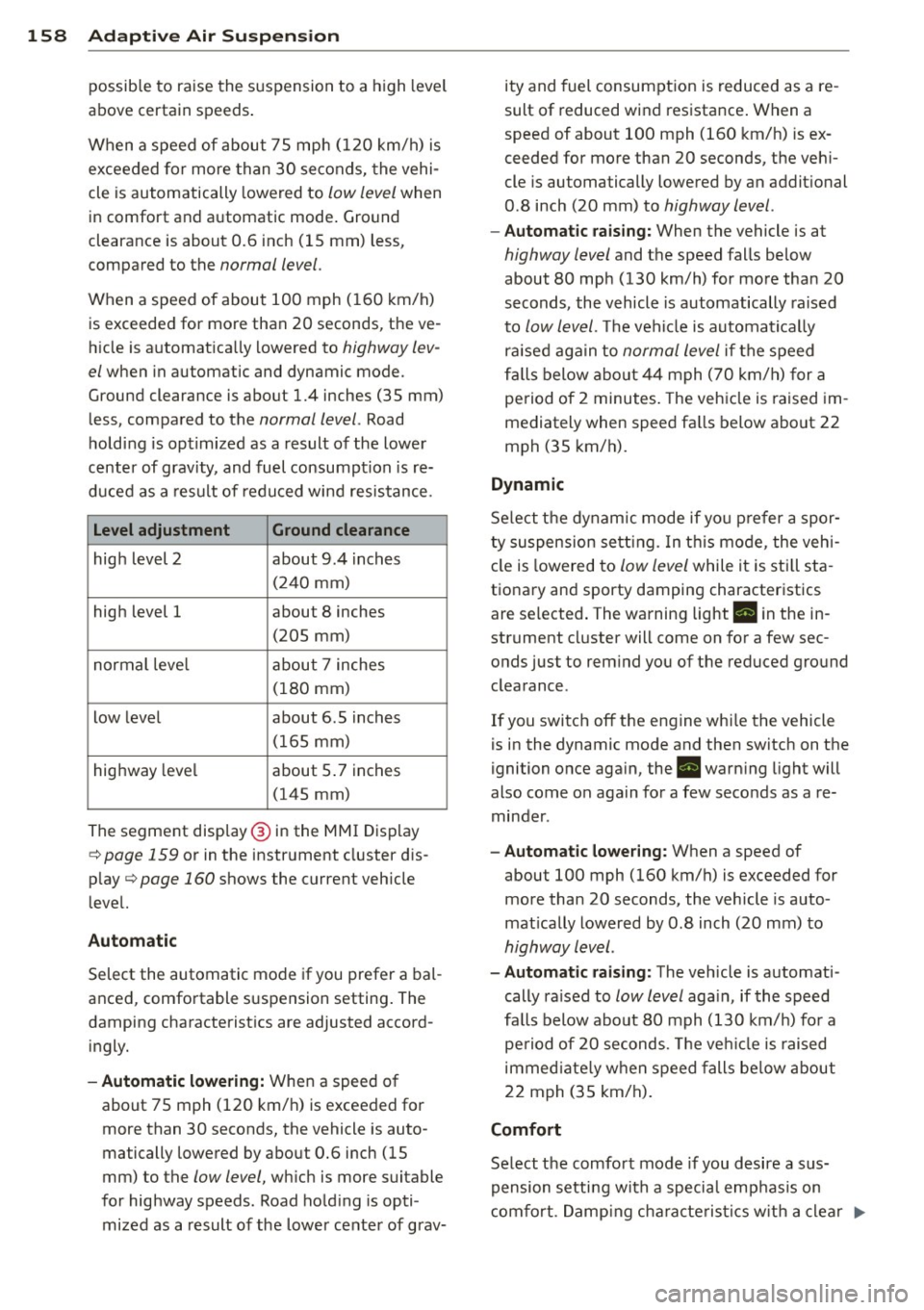
Level adjustment Ground clearance
high level 2 about 9.4 inches
(2 40 mm)
high level 1 about 8 inches
(205 mm)
normal leve l about 7 inches
(180 mm)
low level about 6.5 inches
(165 mm)
highway level about 5 .7 inches
(145 mm)
The segment disp lay @ in the MMI Display
c:::> page 159 or in the instr ument cluster dis
p lay
c:::> page 160 shows the current veh icle
level.
Automatic
Select the automatic mode if you prefer a bal
anced, comfortable suspension setting . The
damping characteristics are adjusted accord ingly.
- Autom atic lowe rin g: When a speed of
about 75 mph (120 km/h) is exceeded for
more than 30 seconds, the vehicle is auto
matically lowered by about 0.6 inch (15
mm) to the
low level, wh ich is more suitable
for highway speeds. Road hold ing is opti
mized as a result of the lower ce nter of grav- ity and fuel consumption is reduced as a re
sult of reduced wind resistance . When a
speed of about 100 mph (160 km/h) is ex
ceeded for more than 20 seconds, the veh i
cle is automatically lowered by an addit ional
0.8 inch (20 mm) to
highway level .
-Automat ic raising: When the vehicle is at
highway level and the speed falls below
about 80 mph (130 km/h) for more than 20
seconds, the vehicle is automatically raised
to
low level. Th e vehicle is automatically
raised aga in to
normal level if the speed
fa lls below about 44 mph (70 km/h) for a
pe riod of 2 minutes . The vehicle is raised im
mediately when speed fa lls below about 22
mph (35 km/h).
Dynamic
Se lect the dynam ic mode if yo u pre fer a spor
ty suspension se tti ng. In t his mode, the veh i
cle is lowered to
low level while it is still sta
t ionary and sporty damping characteristics
are selected . The warning light. in the in
strument cluster will come on for a few sec
onds just to rem ind you of the reduced ground
clearance .
If you switch off the engine whi le the vehicle
is in the dynamic mode and then switch on the
ignition once aga in, the . warn ing light will
also come on again for a few seconds as a re minder .
-Automat ic lowe ring: When a speed of
about 100 mph (160 km/h) is exceeded for
more than 20 seconds, the veh icle is auto
mat ically lowered by 0.8 inch (20 mm) to
highway level .
-Automa tic raising: The vehicle is automati
cally ra ised to
low level aga in, if the speed
fa lls below about 80 mph (130 km/h) for a
pe riod of 20 seconds. The ve hicle is raised
immed iate ly w hen speed falls be low about
22 mph (35 km/h).
Comfort
Select the comfort mode if you desire a sus
pension setti ng with a specia l emp hasis on
comfort. Damp ing cha racteris tics w ith a clear .,.
Page 161 of 350
M
"' 0 ..J
"". rl I.O
"' rl
"' rl
emphasis on comfort are selected in this
mode.
- Automatic lowering: When a speed of
about 75 mph (120 km/h) is exceeded for
more than 30 seconds, the vehicle is auto
matically lowered by 0.6 inch (15 mm) to
low level .
-Automatic raising: The vehicle is automati
ca lly raised to
normal level again, if the
speed falls below about 44 mph (70 km/h)
for a period of 2 minutes . The vehicle is
raised immediately when speed falls below
about 22 mph (35 km/h) .
Offroad
Select the offroad mode when you have to
travel over poor quality sections of road (e .g.
trails). In th is mode, the vehicle is raised to
high level 1, and damp ing characteristics for
poor road stretches are selected . When
sw itch ing to offroad mode , the Adaptive Air
Suspension indicato r appears automat ically in
the instrument cluster display¢
page 160.
The offroad mode can only be activated at
speeds below 37 mph (60 km/h) . Offroad
mode ends automatically and the automatic
mode is activated when a speed of approxi
mately 50 mph (80 km/h) is exceeded.
Lift
Select the lift mode when except ionally high
ground clearance is needed at a reduced
speed. In this mode, the vehicle is raised to
high level 2. When switching to lift mode , the
Adaptive A ir Suspension indicator appears au
tomatically in the instrument cluster display
¢ page 160.
The lift mode can be activated only at speeds
below 12 mph (20 km/h). When a speed of
about 25 mph (40 km/h) is exceeded, the sys
tem automatically leaves lift mode and the
offroad mode is activated. The instrument
cluster display automat ically switches the dis
play to Adaptive Air Suspens ion to indicate re
duced ground clearance .
Adaptive Air Suspension 159
MMI settings
Applies to vehicles: wit h Adaptive A ir Suspension
Driving modes are adjusted in the MMI and
the current vehicle level is displayed .
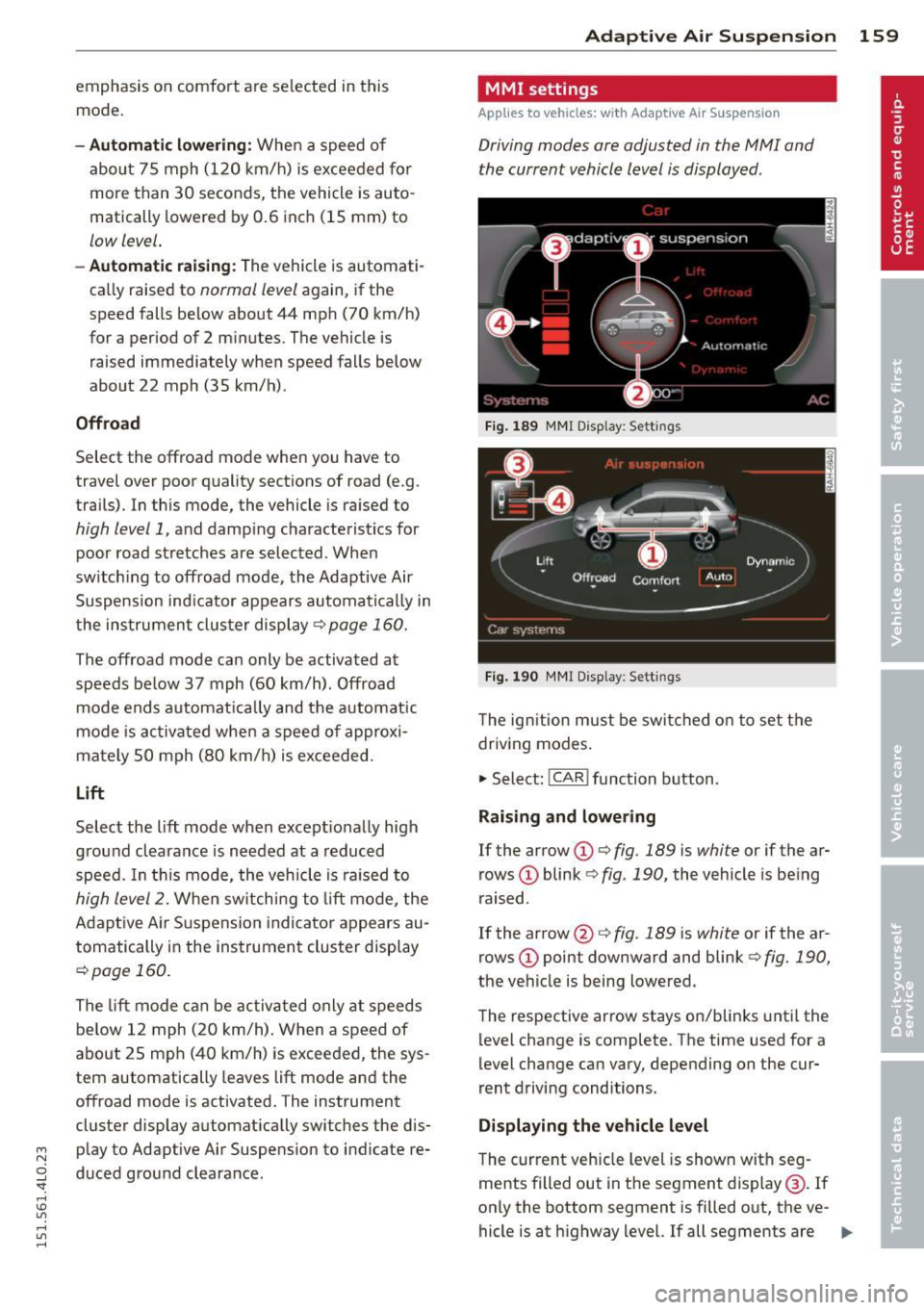
Fig. 189 MMI Display: Sett ings
Fig. 190 MMI Display: Sett ings
Th e ign ition must be switched on to set the
driving modes.
1-Select: !CAR ! function button .
Raising and lowering
If the arrow (D ¢ fig. 189 is white or if the ar
rows
(D blink ¢ fig. 190, the vehicle is being
raised .
If the arrow @i=>
fig. 189 is white or if the ar
rows
(D point downward and blink ¢ fig. 190,
the vehicle is being lowered .
The respective arrow stays on/blinks until the
level change is complete . The time used for a
level change can vary, depending on the cur
rent driving conditions .
Displaying the vehicle level
The c urrent vehicle level is shown with seg
ments filled out in the segment display@. If
only the bottom segment is filled o ut, the ve-
hicle is at highway level. If all segments are
IJJ>-
Page 162 of 350
160 Adapti ve Air Su spen sion
filled out, the vehicle is at high level 2 and has
the greatest amount of ground clearance pos
sib le.
While the vehicle is being raised or lowered,
the target level is indicated by an arrow@
c::> fig. 189 or a white border @ c::> fig. 190 . The
arrow/border disappears aga in when the vehi
cle is at the target level.
Limitations to MMI setting s
Please note that not eve ry dr iving mode can
be selected in every driving situation . For ex
ample, it is not possible to switch to "lift"
mode at speeds above 12 mph (20 km/h) .
This mode is then shown
greyed out in the
MMI Display .
The vehicle can only be lowered when
a ll of
the vehicle's doors are closed. If one door is
open, all driving modes whose level sett ing is
belo w the current vehicle level appear
greyed
out
i n the MMI Display . If a door is opened
while the vehicle is being lowered, the lower ing process is interrupted until all doors are
closed again .
If the system is temporar ily unava ilable due
to, for instance, an empty compressed air
tank, the driving modes that cannot be set ap pear
greyed out in the MM I Disp lay. As soon
as the system is available again, the driv ing
modes can once more be selected in the dis
p lay .
(D} Tips
- Fo r addition al in format ion on the driv ing
modes
c::> page 157, Chassis controls.
- When the compressed air tank is empty,
the compressor can be switched on by
starting the engine . The Adaptive Air
Suspension is once again available, after
waiting a few minutes.
- To prevent over load, the system switches
off tempera rily if several adj ustments
are made in a row. The Adaptive Air Sus
pension is once again available, after
waiting a few minutes. Appearance in the instrument cluster
display
Applies to veh
icles: w ith Adapt ive A ir Suspens ion
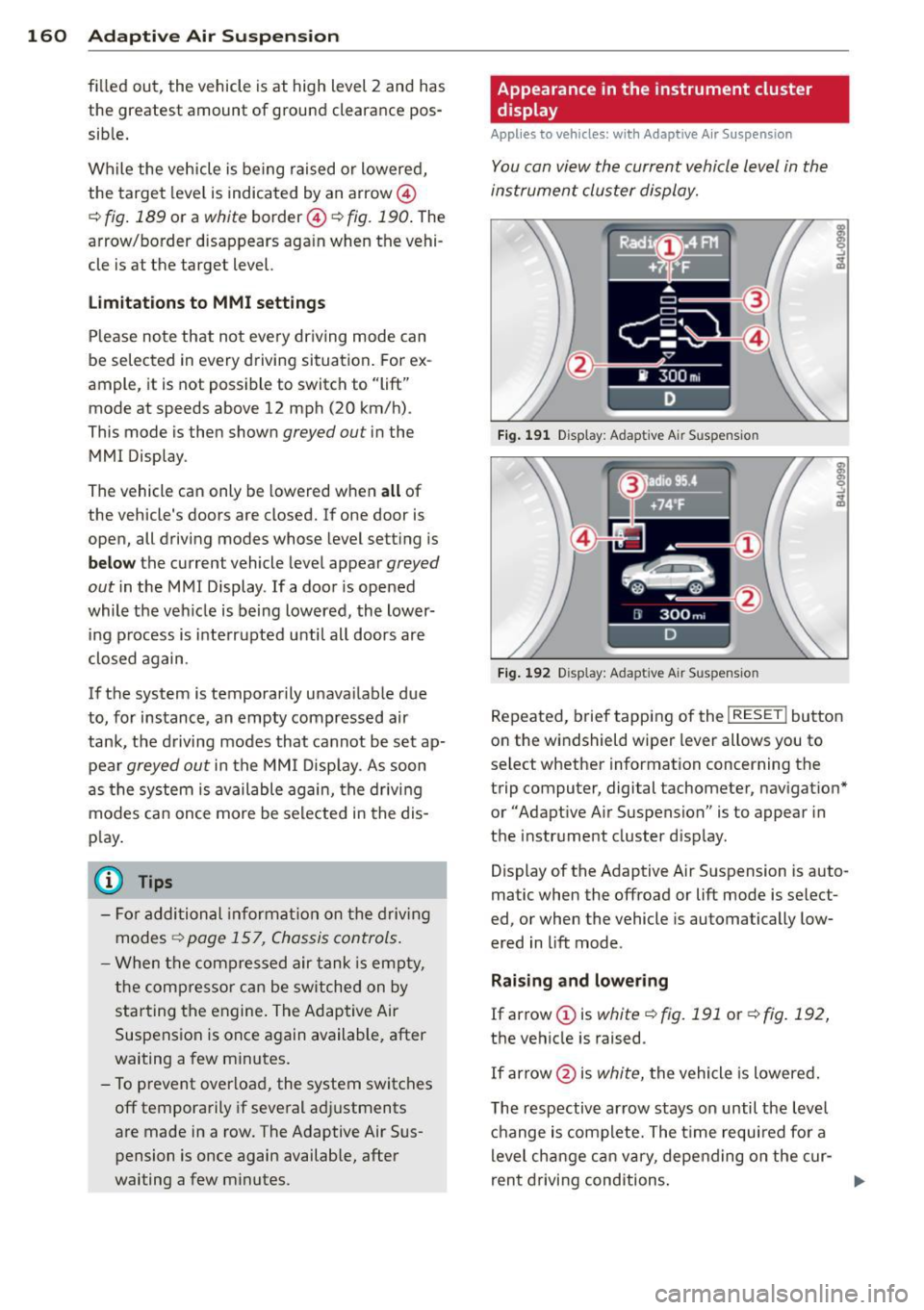
You can view th e current vehicle l evel in the
instrument cluster display.
Fi g. 1 91 Display: Adapt ive Air Suspensio n
Fig . 1 92 Disp lay: Adapt ive A ir Susp ensio n
Repeated, brief tapping of the I RESET ! button
on the windshield wiper lever allows you to
se lect whether information concerning the
trip computer, digital tachometer, nav igat ion*
or "Adapt ive Air Suspension" is to appear in
the instrument cluster d isp lay .
Display of the Adaptive Air Suspension is auto
matic when the offroad or lift mode is select
ed, or when the vehicle is automatically low
ered in lift mode .
Rai sing and lowe ring
If arrow
(J) is white c::> fig. 191 or c::> fig . 192,
the vehicle is raised.
If arrow @is
white, the vehicle is lowered .
The respective arrow stays on until the level c hange is complete. The time requ ired for a
level change can vary, depending on the cur-
ren t drivi ng conditions . ..,_
Page 163 of 350

M N
0 ...J
'SI: ,...., \!) ..,.,
,...., ..,., ,....,
Displaying the vehicle level
The current vehicle leve l is shown with seg
ments fi lled out in the segment disp lay @. If
on ly the bottom segment is filled out, the ve
hicle is at highway leve l. If all segments are
fi lled out, the vehicle is at high level 2 and has
the greatest amount of ground clearance pos
sible.
While the vehicle is being raised or lowered,
the target level is indicated by an arrow @
¢
fig. 191 or a white border @¢ fig. 192. The
arrow/border disappears aga in when the vehi
cle is at the target level.
Jacking mode when changing a flat tire
Applies to vehicles: with Adaptive Air Suspension
This mode must be activated in the MMI be
fore raising the vehicle with a jack or on a ve
hicle lift.
.,. Select: ICARI funct ion button> ! SETUP I func
t ion button >
Jacking mode. Or
.,. Select:
I CARI funct ion button > Car systems*
control button > Servicing & checks > Air
susp.: tire change .
The vehicle jack mode must be activated be
fore changing a wheel so that the automatic
control processes fo r the a ir suspension do
not make lift ing with the vehicle jack more dif
ficult.
The check lamp
II i n the instrument cluster
d isp lay illuminates in vehicle jack mode.
0) Tips
The vehicle jack mode is switched off auto
mat ically at speeds above 9 mph (15 km/
h).
Towing a trailer
Appl ies to vehicles: with towing hitch and Adaptive Air
Suspension
Automatic lowering is not desirable when
towing a trailer.
.,. Se lect: ICAR I function button> !SETUP I func
tion button >
Towing mode . Or
Adaptive A ir Suspension 161
.,. Select: !CAR I function button > Car systems*
contro l button > Vehicle settings > Air
susp.: towing .
As long as towing mode is activated, a vehicle
with a trai ler appears in the
adaptive air sus
pension
main menu.
Level Adjustment when towing a trailer
- Before hitching up the trailer and before ad
jus ting the tongue weight at the trailer, the
automatic or comfort mode
must be select
ed so that the ve hicle can be at normal level
¢ page 159, MMI settings.
-If driving in dynamic mode is desired, this
mode
must be selected before hitching up
the trailer and before adjusting the tongue
weight. However, note that your vehicle is lowered and ground clearance is reduced.
- If you have to dr ive under difficult road con
ditions, you can select offroad or lift mode,
after hitch ing up the trailer or after adjust
ing the tongue weight.
- If the veh icle is at
normal level, and you se
lect offroad mode wh ile traveling at speeds
higher than 22 mph (35 km/h), the veh icle
w ill not be ra ised. Offroad mode will appear
as the active mode in the MMI Display.
- If the veh icle is in offroad mode at
high level
1 ,
it automatically lowers to normal level
when the ve hicl e is t ravel ing at speeds ex
ceeding approximately 31 mph (SO km/h).
The vehicle is automatically raised to
high
level 1
again when the traveling speed falls
be low approximately 25 mph (40 km/h).
Restrictions when operating with a trailer
When operating w ith a tra iler, the lift mode
can only be selected up to about 12 mph (20
km/h). Lift mode is automatically cance led
again when a speed of about 25 mph (40 km/
h) is exceeded.
If the vehicle is in automatic, comfort, offroad
or lift mode before the trai ler towing mode is
activated, the dynamic mode cannot be acti
vated.
If the vehicle is in dynamic mode before tow-
ing operation is activated, it can be driven in
IJI,-
Page 164 of 350
162 Adapti ve Air Su spen sion
this mode. If the suspension is switched from
this mode to another mode, dynamic mode
cannot be re-selected .
(D Tips
-For vehicles with a factory installed tow
ing hitch or a trailer hitch that was in
stalled later accord ing to factory specifi
cations, the system recognizes "Trailer
tow ing mode" and activates this specia l
mode automatically, as soon as the elec
trical connection on the trailer socket is
connected. The mode ceases a utomat i
ca lly when the elect rical connection to
t h e trai ler socket is d isconnected.
- If the tra iler towing mode has been acti
vated, the vehicle will not drop to the
l ow or highway level.
Cargo mode
Applies to vehicles: with Adapt ive Air Suspe nsio n
The rear of the vehicle can be lowered to
make it easier to load.
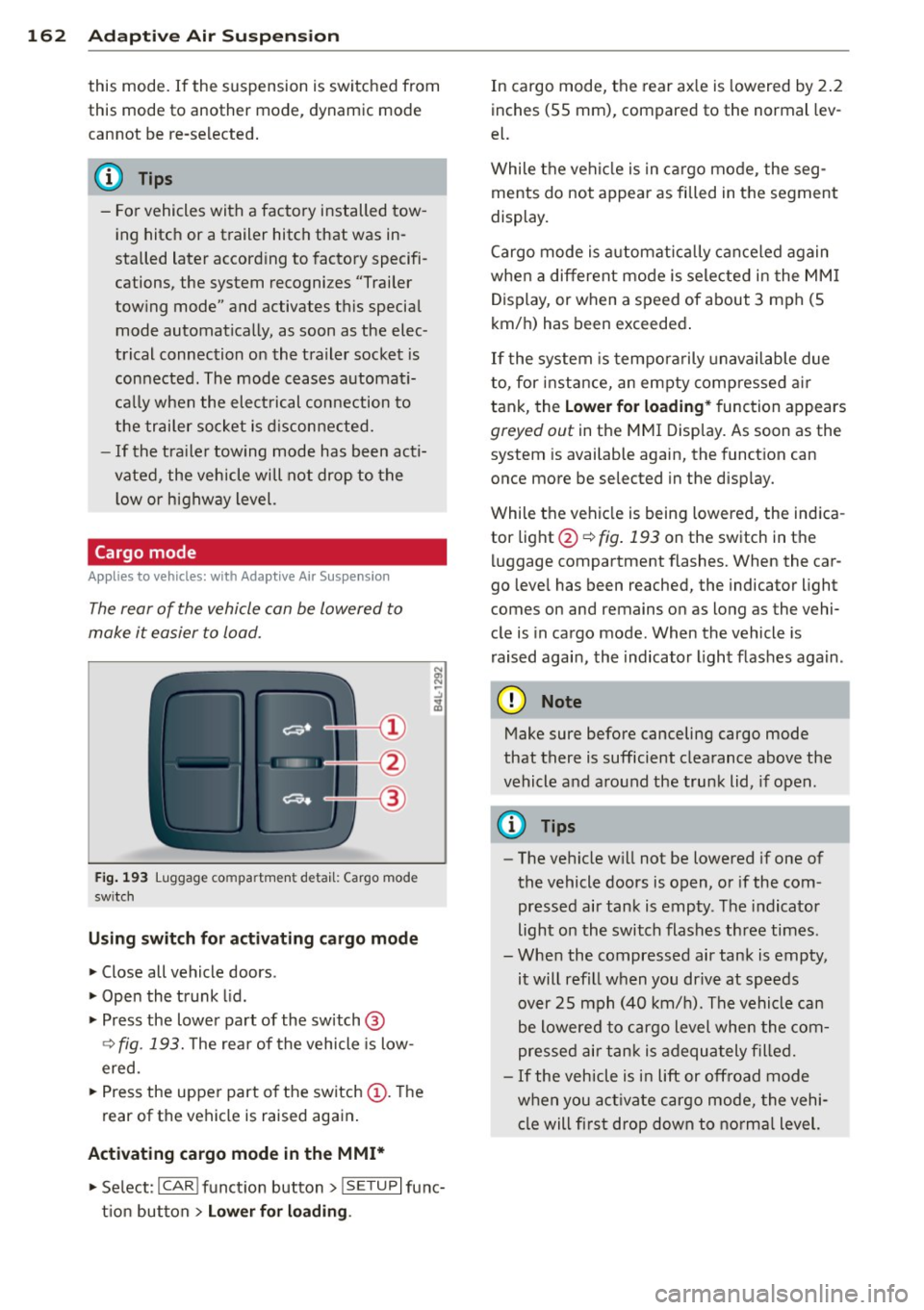
Fig. 193 Luggage compa rtment detail: Cargo mode
sw itch
Using switch for activating c argo mode
.. Close all vehicle doors .
.. Open the trunk lid .
.,. Press the lower pa rt of the switch @
~ fig. 193. The rea r of the vehicle is low
ered.
.,. Press the uppe r part o f the switch @. T he
rear of the vehicle is raised again.
Activating cargo mode in the MMI*
.. Select: ICAR I funct io n button> !SETUP I func
t ion button >
Lower for loading .
In cargo mode, the rear ax le is lowered by 2 .2
inches (S5 mm), compared to the normal lev
el.
While the veh icle is in ca rgo mode, the seg
ments do not appear as filled in the segment
display.
Cargo mode i s automatic ally c an ce le d again
when a different mode is selected in the MM I
Display, or when a speed of about 3 mph (5
km/ h) has been exceeded.
If the system is tempora rily unavailable due
to, for instance, an empty compressed air
tank, the
Lower for loading * function appears
greyed out in the MMI Display. As soon as the
system is available again, the funct ion can
once more be selected in the disp lay.
While the vehicle is being lowered, the indica
tor light @~
fig. 193 on the switch in the
l uggage compartment flashes. When the car
go leve l has been reached, the indicator light
comes on and remains on as long as the vehi
cle is in cargo mode. When the vehicle is
r aised agai n, the indicator light flashes again.
(D Note
M ake sure before canceling cargo mode
that there is sufficient clearance above the
vehicle and around the trunk lid, if open.
(D Tips
- The vehicle w ill not be lowered if one of
the vehicle doors is open, or if the com
pressed air tank is empty. The indicator
light on the switch flashes three times.
- Whe n the compressed air tank is empty,
it will refill when you drive at speeds
over 25 mph (40 km/ h). The vehicle can
be lowered to cargo level whe n the com
pres sed air tan k is adequately filled.
- If the vehicle is i n lift or off road mode
when you act ivate cargo mode, the vehi
cle will fi rst drop down to no rma l level.
Page 187 of 350
M N
0 ...J
'SI: ,...., \!) 1.1'1 ,...., 1.1'1 ,....,
as defined in the electronic control unit
¢ page 193, PASSENGER AIR BAG OFF light .
Always remember, a chi ld safety seat or infant
carrier installed on the front seat may be
struck and knocked out of position by the rap
id ly inflating passenger's airbag in a frontal
coll is ion . The airbag cou ld greatly reduce the
effectiveness of the child restraint and even
seriously injure the child during inflat ion.
F or this reason, and because the back seat is
the safest p lace for children -when properly
restra ined accord ing to their age and si ze - we
strongly recommend that children always sit in the back seat¢
page 203, Child Safety.
A WARNING
A child in a rearward-facing child safety
seat insta lled on the front passenger seat
w ill be seriously injured and can be k illed if
t he fron t airbag inf lates - even with an Ad
vanced Airbag System .
- The inflating a irbag w ill hit the child
sa fety seat or infant carrier w it h great
f orce and w ill smash the ch ild safety seat
and child against the backrest, center
armrest, door or roof.
- Always install rear -facing child sa fety
seats on the rear seat.
- If you mus t install a rearward facing
child safety seat on the front passenger
seat because of exceptional circ umstan
ces and the
PASSENGER AIR BAG O FF
light does not come on and stay on, im
med iately install the rear-facing child
safety seat in a rear seating posit ion and
have the a irbag system inspected by you r
authori zed Aud i dealer.
- Forward-fac ing ch ild safety seats instal
led on the front passenger's seat may in
terfere with the deployment of the air
b ag and cause serious person al injury to
the ch ild .
WARNING
If, in exceptional c ir c umstances, you mus t
install a forwa rd -facing child restra int on
the front passenger's seat:
A irbag system 185
-Always ma ke sure the forward-facing
seat has been designed and certified by its manufacturer for use on a front seat
wit h a passenger front and s ide a irbag.
- Never put the forward-facing child re
straint up against or very near the instru ment panel.
- Always move the passenger seat into its
rearmost position in t he seat's fore and
aft adj ustment range, as fa r away from
the airbag as possible before installing
the forward-fa cing ch ild restra int. The
backrest mu st be a dju ste d to an upright
posi tion.
- Ma ke sure that the
PASSENGER AIR BAG
OFF
li ght comes on and stays on all the
time wheneve r the ignit ion is swi tched
on.
A WARNING
To reduce the risk of serious injury, make
sure that the
PASSENGER AIR BAG OFF
light wi ll be displayed whenever a child re
straint is installed on the front passenger
seat and the ignition is sw itched on.
- If the
PASSENGER AIR BAG OFF light
does not stay on, perform the checks de
scribed ¢
page 193, Monitoring the Ad
vanced Airbag System .
-Take t he chi ld restraint off the front pas
senger seat and install it properly at one
of the rear seat positions if the
PASSEN
GER AIR BAG OFF
li g ht does not stay on.
- Have the airbag system inspected by
your author ized Audi dealer immed iate
ly.
- Always carefully follow instr uctions from
child r estraint manufa cture rs when in
s tall ing c hild restra ints.
A WARNING
If, in exce ptiona l circumstan ces, you must
ins tall a forward or rearw ard-facing c hild
restra int on the front passenger's seat:
- Imp roper ins tal lation o f ch ild restraints
can reduce t heir effec tiveness or even
•
•
Page 197 of 350
M N
0 ...J
'SI: ,...., \!) ..,.,
,...., ..,., ,....,
-accessory seat covers or cushions or other
things that may cause an incorrect reading
or impression on the weight-sens ing mat
under the upholstery of the seat have been
removed from the front passenger seat,
- a safety belt extender has not been left in
the safety belt latch for the front passenger
seat.
In addition to the
PASSENGER AIR BAG OFF
light in the center of the instrument panel,
the message
PASS ENGER AIR BA G OFF or
PAS SENGER AIR B AG ON will briefly appear
in the instrument cluster display . Th is is to in
form the driver of the current front passenger
a ir bag status .
Important safety instructions on
monitoring the Advanced Airbag System
A WARNING
An airbag system that is not funct ioning
properly cannot provide supplemental pro
tection in a frontal crash .
- If the airbag indicator l ight
c> page 16
comes when the vehicle is be ing used,
have the system inspected immediately
by you r autho rized Aud i dea ler. It is pos
sible that the a irbag will inflate when it
is not supposed to, or w ill not inflate
when it sho uld .
A WARNING
If the front airbag inflates , a ch ild without
a child restraint, or in a rearward-facing
child safety seat, or in a forward-facing
child restraint that has not been properly
installed will be serious ly inju red and can
be killed.
- Even though your veh icle is equipped
with an Advanced Airbag System, make certain that al l children, especially 12
years and younge r, a lways rid e on the
back seat properly restr ained fo r their
age and size.
- Always install forward or rea r-facing
c hild safety seats on the rear se at - even
with an Advanced Airbag System.
A irbag sys tem 195
-If you must install a rearward-facing
child safety seat on the front passenger
seat because of exceptional circumstan
ces and the
PASS ENG ER AIR BAG OFF
light does not appear and stay on, imme
diate ly install the rear-facing child safety
seat in a rea r seat ing pos ition and have
the airbag system inspe cted by your au
thorized A udi dealer.
- A t ight tether or other strap on a rea r
ward- facing child rest raint attached to
the front passenger seat can p ut too
m uch pressure on the weight-sensing
mat in the seat and registe r more weight
than is actually on the seat. The heavier
weight registered can make the system
work as though an adult were on the seat
and deploy the Advanced Airbag when it
must be suppressed causing ser ious or
even fata l injury to the ch ild.
- If, in exceptiona l circumstances, you
must install a forward-fac ing ch ild re
straint on the front passenger seat, al
ways move the sea t into its rearmost po
sition in the seat's fore and aft adjust
ment range, as far away from the airbag
as possible . The backrest must be adjust
ed to an upright pos ition. Make sure that
the
PASSENGER AIR BAG OFF light
comes on and stays on all the time when
ever the ignit ion is switched on.
A WARNING
...---
- If the PASSENGER AIR BAG OFF light
does not go out when an adult is sitting
on the front passenger sea t after taking
the steps described above, make su re the
adu lt is prope rly seated and restr ained at
one o f the rear seat ing pos itions.
- Have the airbag system inspe cted by
your author ized Audi dealer befo re trans
porting anyone on the front passenger
seat.
(D Tips
If the weight-sensing mat in the front pas
senger seat detects an empty sea t, the
front airbag on the passenger side wi ll be ..,.
•
•
Page 230 of 350

228 Intelligent technology
will have no warning from a sudden in
crease in engine speed as with a front
wheel drive vehicle. Always drive at speeds wh ich are suited to the road con
ditions -risk of crash.
Energy management
Starting ability is optimized
Energy management controls the distribution
of electrical energy and thus optimizes the
availability of electrical energy for starting
the engine.
I f a vehicle with a conventional energy system
is not driven for a long period of time, the bat
tery is discharged by idling current consumers
(e.g. immobilizer) . In certain circumstances it
can result in there being insufficient energy
available to start the engine.
I ntelligent energy management in your vehi
cle handles the distribution of electrical ener
gy . Starting ability is markedly improved and
the life of the battery is extended.
Basically , energy management consists o f
battery diagnosis, idling current manage
ment
and dynamic energy management.
Battery diagnosis
Battery diagnosis continuously determines
the state of the battery. Sensors determine
battery vo ltage, battery current and battery
temperature. This determines the current
state of charge and the power of the battery.
Idling current management
I dling current management reduces energy
consumption while the vehicle is standing.
With the ignition switched off, it contro ls the
energy supply to the various e lectrica l compo
nents. Data from battery diagnosis is consid
ered.
Depending on the battery's state of charge,
individual consumers are gradually turned off
to prevent excessive discharge of the battery
and thus ma intain starting capability.
Dynamic energy management
While the vehicle is being driven, dynamic en
ergy management distributes the energy gen
erated according to the needs of the individu
al components.
It regulates consumption, so
that more electrical energy is not being used
than is being generated and ensures an opti
mal state of charge for the battery.
(!) Tips
- But even energy management cannot
negate the limits of physics. Consider
that the power and life of a battery are
limited.
- If start ing ability is threatened, you are
informed by a warning
¢ page 229,
Driver notification in the instrument
cluster display.
What you should know
The highest priority is given to maintaining
starting capability.
The battery is severely taxed in short-distance
driv ing, in city traffic and during the cold time
of year. Abundant electrical energy is re
quired, but only a little is generated . It is also
critical if the engine is not running and electri
cal components are turned on. In this in
stance energy is being consumed but none is
being generated.
It i s in precise ly these s ituations that you will
notice energy management actively regu lat
ing the distribution of energy.
Vehicle stands for an extended period
If you do not drive your vehicle over a period
of several days or weeks, e lectr ica l compo
nents are gradually cut back or sw itched off.
T his reduces energy consumption and ma in
ta ins starting capability over a longer period.
T ake into consideration that when you unlock
your vehicle, some convenience functions,
such as the interior lights or the power seat
adjustment, may not be availab le. The con
venience functions will be availab le again
Page 231 of 350
M N
0 ..J
'SI: ,...., \!) 1.1'1 ,...., 1.1'1 ,....,
when you turn on the ignition and start the
engine.
With the engine turned off
If you listen to the radio, for example, with
the engine turned off or use other MMI func
tions, the battery is being d ischa rged.
I f starting capability is jeopardized due to en
e rgy consumpt ion, the following warning ap
pears in the MMI display:
Please start engine, otherwise system will
switch off in 3 minutes.
The warning ind icates that the system will be
turned off automatically after 3 minutes. If
you wish to cont inue using the functions, you
have to start the engine.
With the engine running
Although electrical energy is generated when
the vehicle is be ing driven, the battery can be
come discharged . Th is happens mostly when
little energy is be ing generated and a great
deal consumed and the battery's state of
charge is not optimal.
To br ing the energy balance back into equili
brium, consumers which require especially
l arge amounts of energy are temporarily cut
back or swit ched off. Heating systems in par
t icular requ ire a great deal of energy.
If you
notice, for example, that the heated seats* or
the heated rear window are not heating, they
have been temporari ly cut back or switched
off. These systems will be avai lab le again as
soon as the energy balance has been restored.
You will a lso notice that engine idle speed has
been increased slightly . This is norma l and not
a cause for concern . By increasing engine idle
speed the add itiona l energy required is gener
ated and the battery is charged.
Driver notification in the instrument
cluster display
If battery power drops into the range where it
can limit the ability of the engine to start, this
Intelligent technology 229
is shown in the instrument cluster display
with the following driver message:
(•) I.ow battery charge: battery will be
charged while driving
T h is not ificat ion reminds you that the start ing
capability of the engine may be limited. As
soon as you start driv in g again, the battery
will be recharged and the not ific at ion w ill go
out.
Driver notification appears and goes out
again
If t his driver notification appears after the ig
nition is tu rned on or whi le driving and it goes
out again after a while, the battery has been
adequately recharged.
Driver notification appears and does not
go out again
If this driver notification appears after the ig
nition is turned on or whi le driving and does
not go out again, the battery's state of charge
is not in the optimal range. Starting ab ility is
restricted . Have the battery checked as soon
as possible by an authorized Aud i dealer or
qualified workshop.
•
•
Page 248 of 350
24 6 Vehicle care and cleaning
- Never use any paint polish or other
abrasive materia ls.
- Damage to the protective layer on the
rims such as stone chips or scratches
must be repaired immediately .
-Sen sors /cam era l ense s
- Never use warm or hot water to re-
move snow or ice from the camera
lens. This could cause the lens to crack.
- Never use abrasive cleaning materials
or alcohol to clean the camera lens.
Th is could cause scratches and cracks .
-Windows
- Remove snow and ice on w indows and
exte rior mirrors with a plastic scraper .
To avoid scratches, move the sc raper
only in one direction and not back and
forth.
- Never remove snow or ice from win
dows and m irrors using wa rm or hot
water because this cou ld cause cracks
to form.
- To avoid damage to the rear window
defogger, do not apply any sticke rs on
the heating wires on the ins ide of the
w indow.
- Decorati ve parts /trim
- Never use chrome care o r cleaning
products.
- Paint
- To reduce the risk of scratches, the ve-
hicle must be free of dirt and d ust be
fore polishing or waxing.
- To prevent paint damage, do not polish
or wax the veh icle in direct sun light .
- To reduce the risk of paint dama ge, do
not polish away rust film.
- Remove cosmet ics and sunblock imme
diately. Otherwise, the paint could be
damaged .
-Di splays
- To avoid scratches, do not use dry
cleaning methods on displays.
- Controls
- Ma ke s ure that no f lu ids ente r the con-
t rols, because th is co uld cause dam
age .
-Safety belts
- Do not remove the safety belts to clean
them.
- Never clean safety belts or their com
ponents chemically or with co rrosive
f lu ids or solvents and never allow
sha rp objects to come into contact
with the safety belts. This could cause
d amage to the bel t webbing.
- If there is damage to the webbing, the
connection s, the re tracto rs or the buck
les, have them repla ced by an author
ized A udi dealer or a qualified work
shop.
- Textile s/Viny l/Alcantara
- Never treat V inyl/Alcantara w ith leath-
er care products, solvents, floor polish,
shoe polish, stain remover or similar
p roducts.
- To avo id damage, have stubborn stains
removed by an autho rized Aud i dea le r
or a qualified workshop .
- Never use steam cleaners, brushes,
hard sponges, etc . w hen cleaning .
-Do not turn on t he seat heating* to dry
the seat.
- Objects w ith sharp edges s uch as zip
pers, rivets on clothing or be lts can
cause damage to the surface.
- Open hook and loop fasteners, for ex
ample on cloth ing, can damage seat
covers . Make sure hook and loop fas
tene rs are closed .
-Natural leather
- N eve r trea t le at her wit h solven ts, floo r
polish, shoe polish, stain remover or
similar products.
- Objects with sharp edges s uch as zip
pers, rivets on clothing or be lts can
cause damage to the su rface.
- Neve r use s team cleaners, br ushes,
hard sponges, etc . when cleaning .
- D o not turn on the seat heating * to dry
the seat.
- To help preve nt the leat her from f ad
ing, do no t leave the vehicle in d irect
sunlight for long per iods of t ime. If