light AUDI Q7 2015 Owner´s Manual
[x] Cancel search | Manufacturer: AUDI, Model Year: 2015, Model line: Q7, Model: AUDI Q7 2015Pages: 350, PDF Size: 86 MB
Page 115 of 350
M
"'
brake pedal immediately or engage the
parking brake.
- Should the engine stall, depress the
brake pedal immediately or engage the
parking brake.
- In order to prevent the vehicle from roll
ing back unintentionally when starting in
stop-and-go traffic, keep the brake pedal
depressed for a few seconds before driv
ing off .
- When you leave the vehicle - even if only
briefly -, sw itch off the ignition and
make sure to remove the ignition key . Al
so engage the
park ing br ake to prevent
your vehicle from rolling u nintentionally.
Th is parti cularly applies if chi ldren are
left in the vehicle - danger of accident!
Cruise control
Switching the system on
Th e cruise control syst em makes it possible to
drive at a constant speed starting at
20 mph
(30kmlh).
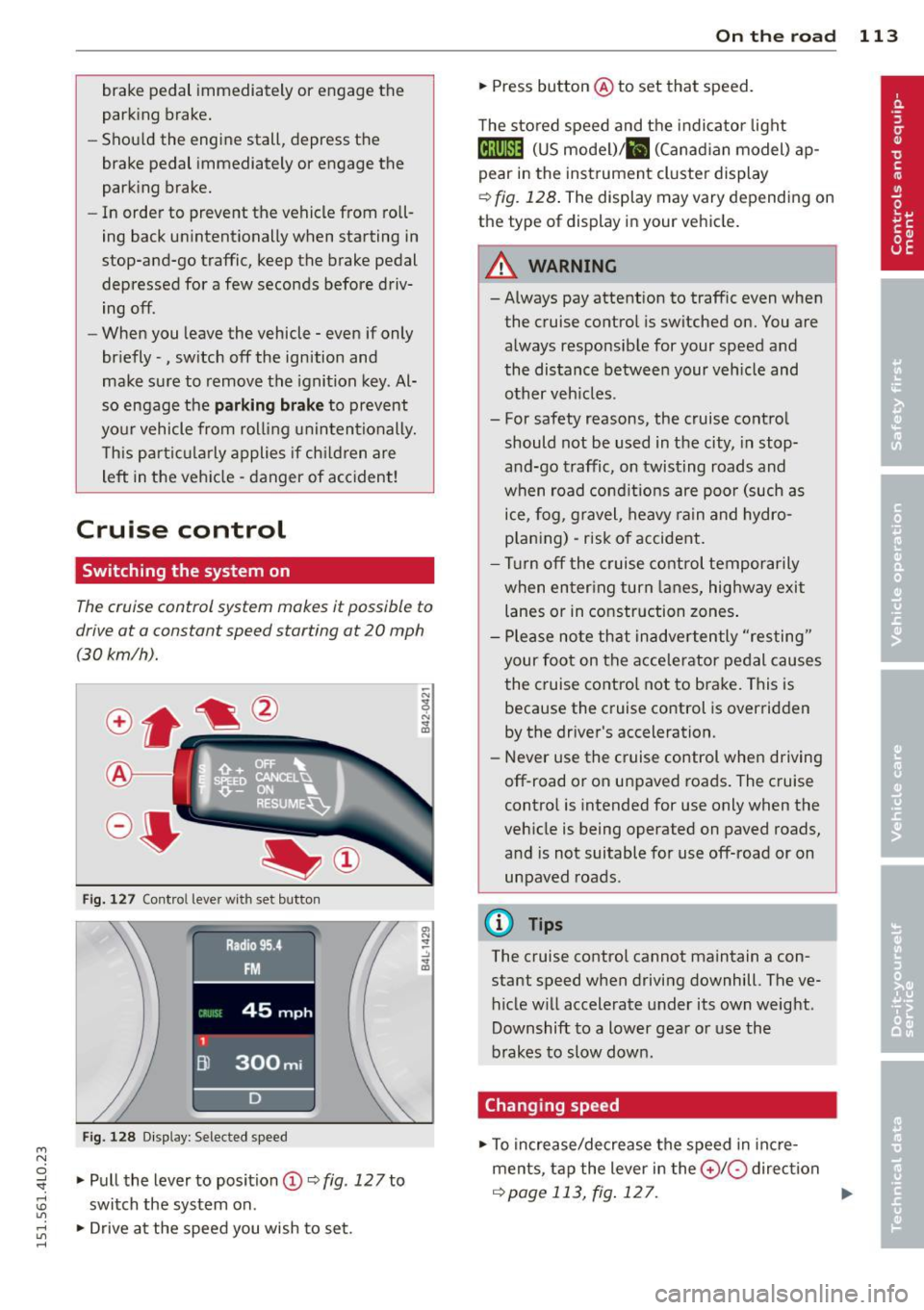
Fig. 127 Contro l leve r wi th s et button
Fig. 128 D is play: Selected speed
:3 .,. Pull the lever to position (D ~ fig. 127 to "". rl I.O
"' ,....,
"' rl
switch the system on .
.,. Drive at the speed you wish to set.
On th e road 113
.,. Press button @to set that speed.
The sto red speed and the indicator light
Ctj;\1)~14 (US model) ;&I (Canad ian model) ap
pear in the instrument cluster display
~ fig. 128 . The display may vary depending on
the type of display in your vehicle.
A WARNING
- Always pay attention to traffic even when
the cruise control is switched on. You are
always responsible for your speed and
the distance between your veh icle and
other veh icles .
- For safety reasons, the cruise control
should not be used in the city, in stop
and-go traffic, on twisting roads and
when road conditions are poor (such as
ice, fog , gravel, heavy rain and hydro
p laning) - risk of accident.
- Turn off the cruise control temporarily
when en ter ing turn lanes, highway exit
lanes or in construction zones .
- Please note that inadvertently "resting"
your foot on the accelerator pedal causes
the cruise control not to brake. This is because the cruise control is overridden
by the driver's acceleration.
- Never use the cruise control when driving
off-road o r on unpaved roads. The cruise
control is intended for use only when the
vehicle is being operated on paved roads,
and is not suitable for use off-road or on
unpaved roads .
(D Tips
The cruise control cannot maintain a con
stant speed when driving downhill. The ve
hicle will accelerate under its own weight .
Downshift to a lower gear or use the
brakes to slow down.
Changing speed
.,. To increase/decrease the speed in incre
ments, tap the lever in the
0 10 direction
~ page 113, fig . 127 . Ill>-
Page 120 of 350
118 Adapti ve crui se control
-Never drive with you r foot underneath
t h e brake pedal.
- Always read and heed the information
and WARNINGS
¢ .&. in Description on
page 115.
A WARNING
- Never rely on the distance control fea
ture of ACC alone to prevent rear-end col
lisions . Always be prepared to brake and
take evasive action to avoid collisions and other acc ident situations.
- Never allow the clos ing speed between
yo u and other vehicles to be so h igh that
the adaptive c ruise control may not be
able to slow your vehi cle safe ly. If clos
ing speed is too high, you m ust app ly the
brakes yourself to reduce the risk of a
rear-end crash.
(D Tips
Please note that t he amo un t of a ccelera
tion the adapt ive cr uise control uses de
pends on the Distance setting selected .
DISTANCE 1 g ives you acce lerat ion that is
dynamic and sporty. DISTANCE 4, on the
other hand, gives more moderate acce lera
tion. For more information about the time
intervals ¢
page 120 , How is the distance
(time interval) set? .
-Please note that if the adaptive cruise
control has begun braking the vehicle
and the d river chooses to brake the vehi
cle add itiona lly, t he b rakes may fee l
"h ard". This is simply due to the pressure
b uild- up of the initial b raking.
- Adaptive cruise control is sw itched off af
te r pressing the footbrake. The speed
saved u p this poin t can be resumed. To
res ume the saved speed, release the
b rake pedal and p ull th e control leve r to
ward you
¢ page 120 , Turning adaptive
cruise control off temporarily .
Switching the system on and off
Applies to vehicles: with adaptive cruise contro l
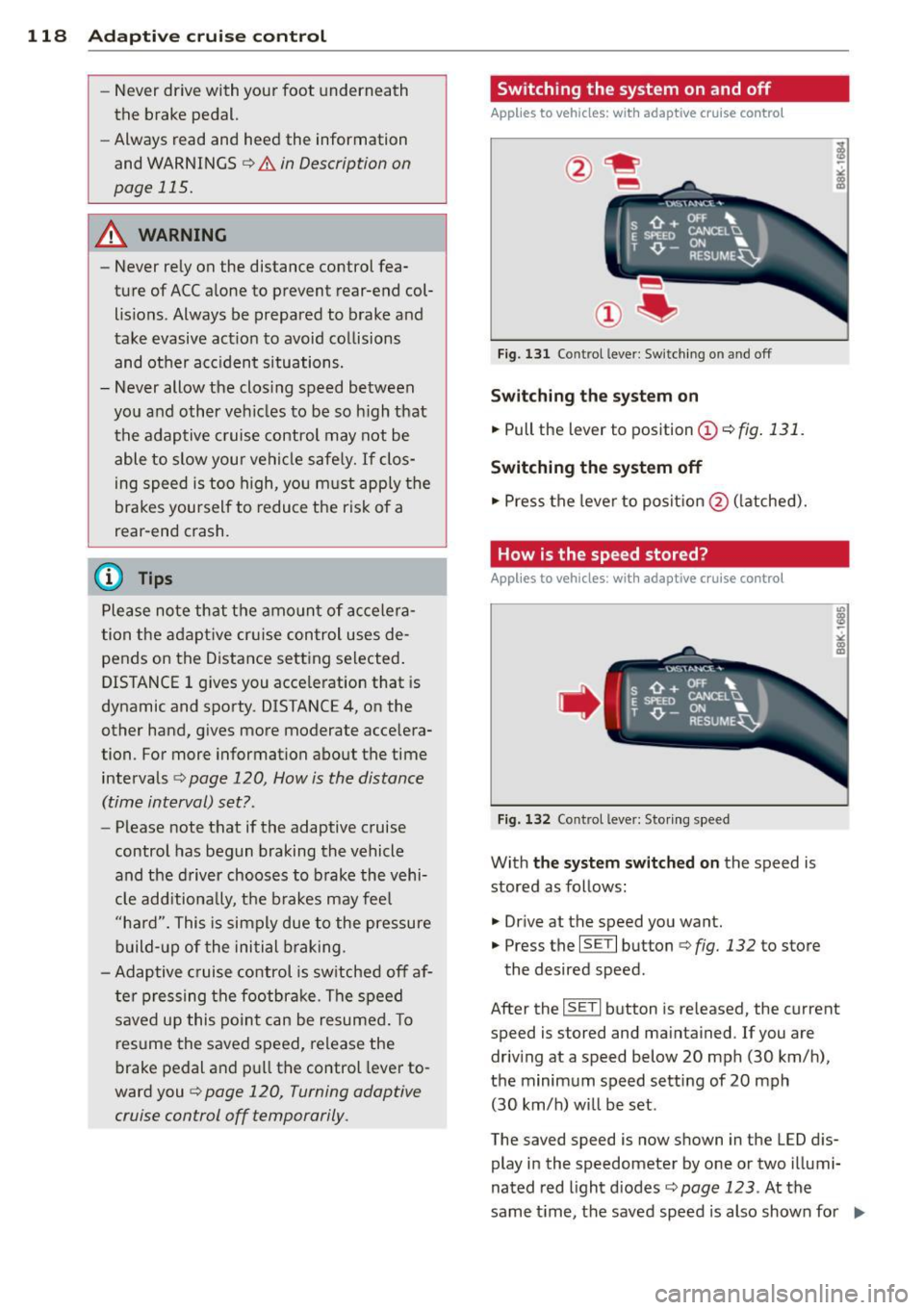
Fig. 131 Control lever: Sw itching on and off
S w itching the sy stem on
.,. Pull the lever to position © r::!) fig. 131 .
Switching the system off
.,. Pres s the lever to posit ion @ (latched).
How is the speed stored?
Applies to vehicles: wit h adaptive cruise contro l
,' ts ~:_" ';;;", ' , E Sl'EEO CANCELU
. T ,0. -ON ... . RESUME~
Fig. 1 32 Co ntrol lever: Storing s peed
With the sy stem switched on the speed is
stored as follows:
• Dr ive at the speed you want .
.,. Press the
ISE TI button ¢ fig. 132 to store
the desired speed.
After the
ISE TI button is re leased, the current
speed is stored and maintained . If you are
driv ing at a speed below 20 mph (30 km/ h),
the minimum speed setting of 20 mph
(30 km/h) will be set .
The saved speed is now shown in the LED d is
play in the speedometer by one or two illumi
nated red light d iodes
c::> page 123. At the
same time, the saved speed is also shown for ..,.
Page 122 of 350
120 Adaptive cruise control
Turning adaptive cruise control off
temporarily
Applies to vehicles: with adaptive cruise co ntrol
In some situations it makes sense to turn
adaptive cruise control off temporarily.
®
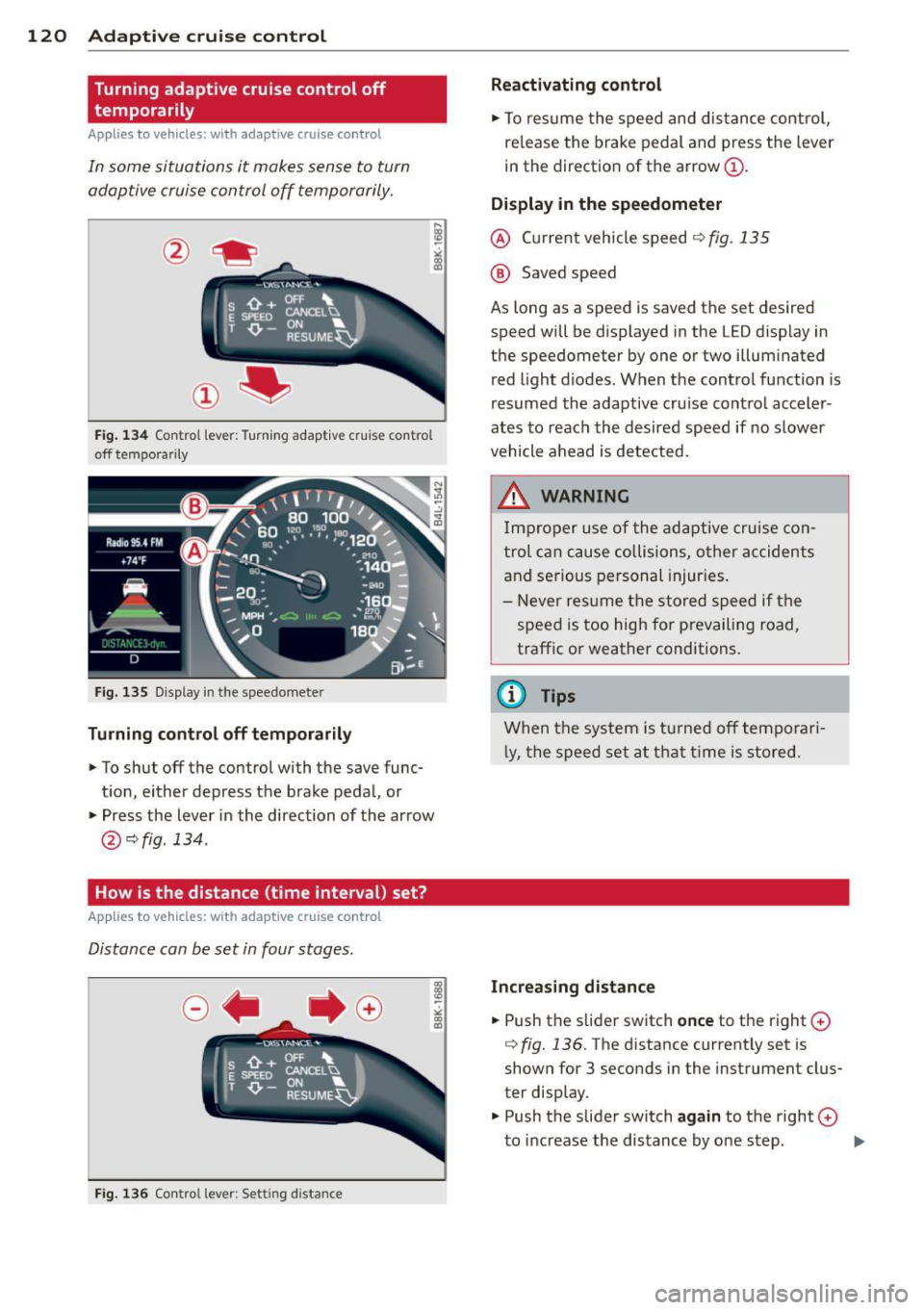
Fig. 134 Con tro l lever : Turning adaptive cruise co ntro l
off tempo rarily
Fig. 135 D isplay in the speedomete r
Turning control off temporarily
"To shut off the control with the save func
tion, either depress the brake pedal, or
" Press the lever in the direction of the arrow
@ qfig .134.
How is the distance (time interval) set?
Ap plies to vehicles: with adaptive cruise co ntrol
Distance can be set in four stages.
Fig. 136 Contro l lever: Setting d istance
Reactivating control
"To resume the speed and distance control,
release the brake pedal and press the lever
in the direction of the arrow@.
Display in the speedometer
@ Current vehicle speed~ fig. 135
@ Saved speed
As long as a speed is saved the set desired
speed will be displayed in the LED display in
the speedometer by one or two illuminated
red light diodes . When the control function is
resumed the adaptive cruise control acceler
ates to reach the desired speed if no slower
vehicle ahead is detected.
&_ WARNING
Improper use of the adaptive cruise con
trol can cause collisions, oth er accidents
and serious personal injuries.
- Never resume the stored speed if the
speed is too high for prevailing road,
traffic or weather conditions .
(0 Tips
When the system is turned off temporari
l y, the speed set at that time is stored.
Increasing distance
-
" Push the slider switch once to the right 0
q fig. 136 . The distance current ly set is
shown for 3 seconds in the instrument clus
ter display.
" Push the slider switch
again to the right 0
to increase the distance by one step. ..,.
Page 124 of 350
122 Adapti ve crui se control
A WARNING
Following ot her vehicles too closely in
creases the risk of a crash and serious per
sonal injury .
- Following other vehicles too closely, par
t icularly at higher speeds increases the
risk of collis ions and serious pe rsonal in
Jury.
- Setting short distances to the traffic
ahead reduces the time and distance
available to br ing you r vehicle to a safe
stop and makes i t even mo re ne cessary
to pay close attention to traffic.
- Always select a speed and distance to
traffic ahead that is safe and appropr iate
under the prevailing traff ic, road, weath
er and Lighting conditions .
- Never re ly on the dis tance control fea
ture of ACC a lone to p reven t rear -end col
lisions. Always be prepared to brake and
take evasive act ion to avoid co llisions
and other acc ident situations.
- Never allow the closing speed between
you and other vehicles to be so h igh that
the adaptive cruise control may not be
able to slow your vehicle safe ly. If clos
ing speed is too high, you must apply the
brakes yourself to reduce the risk of a
rear-end c rash.
- Always select a g reater following dis
tance to the veh icle ahead on wet roads
than o n dry roads.
- Always read and heed the information
and WARNI NGS
9 .&. in Description on
page 115.
(0 Tips
The distance setting is reset to the factory
default
DISTANCE 3 the next time the ig
nition is turned on.
Driver information
Displays in the instrument cluster
Applies to veh icles: w ith adaptive cruise contro l
Depending on the driving situation, driver in
formation is displayed in the instrument clus
ter .
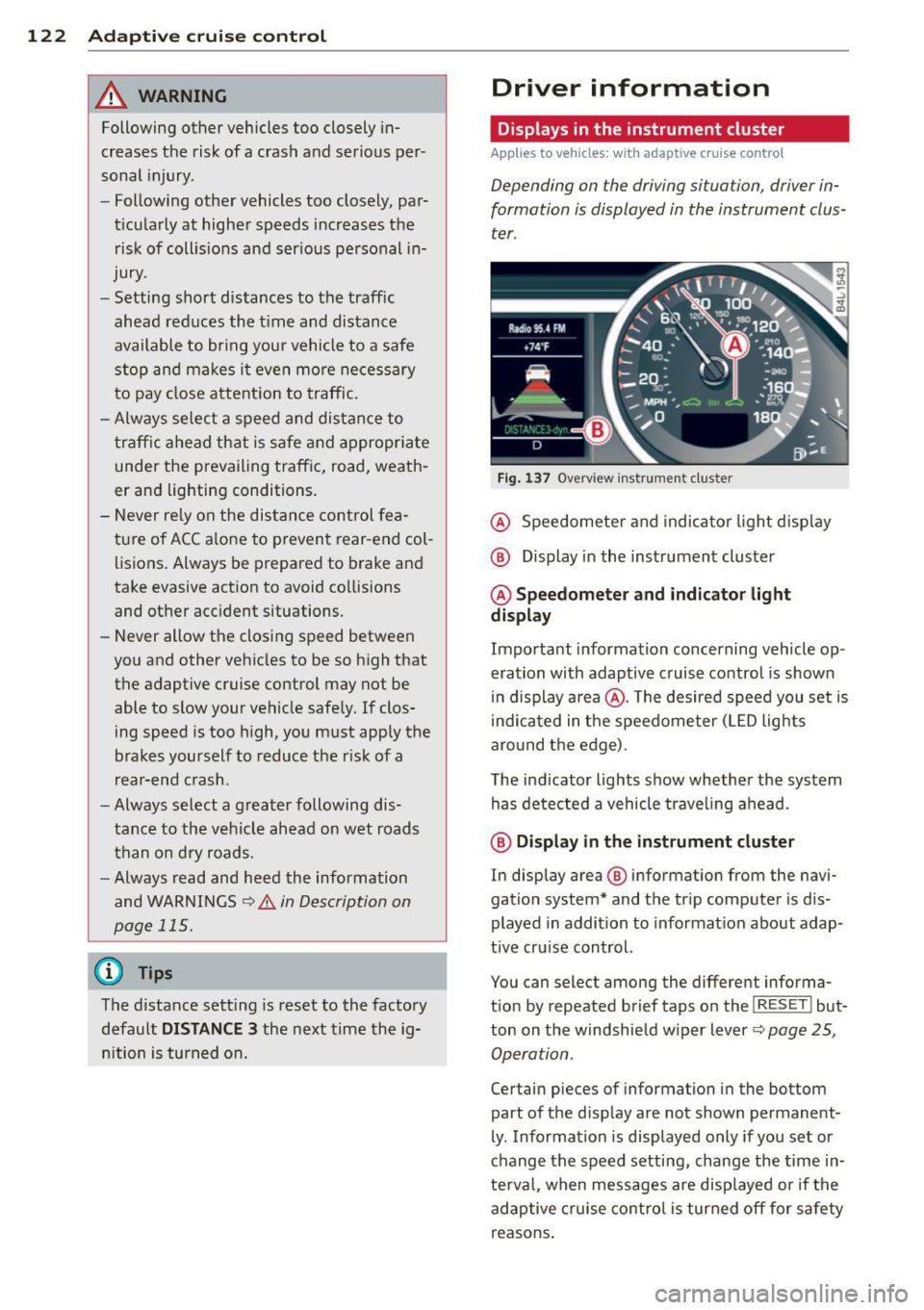
Fig . 1 37 Overv iew ins tr u me nt cluster
@ Speedometer and indica to r Li ght d isp lay
@ Display in the instrument cluster
@ Speedometer and indicato r light
display
Important information concerning vehicle op
eration with adaptive cruise control is shown
i n display a rea @. The desired speed you set is
i ndica ted in the speedome ter (LED lights
aro und t he ed ge).
T he ind icator Lights show whether the system
has detected a vehicle trave ling ahead .
@ Display in the in strument cluster
In display area@ information from the navi
gation system* and th e tr ip computer is dis
played in addition to informat ion about adap
t ive cru ise control.
You can select among the different informa
t io n by repeated brief taps o n the
I RESET I but
ton on the w indshie ld w iper Lever
9 page 25,
Operation .
Certain pieces of information in the bottom
part of the display are not shown permanent
ly . Information is displayed only if you set or
c h ange the speed setting, change the time in
te rva l, when messages are disp layed or if the
adaptive cruise co ntro l is turned
off for safety
r easons .
Page 125 of 350

M
"' 0 ..J
"". rl I.O
"' rl
"' rl
Display in the speedometer
Applies to vehicles: with adaptive cruise control
Fig. 138 D isplay in the speedomete r
Des ired spe ed
The desired speed set by the driver is dis
p layed by a red LED.
If the desi red speed was set between two
lines on the speedometer using the
I SETI but
ton, the two closest light emitting diodes will
come on <=>
fig. 138.
The system a llows only speeds to be set be
tween 20 to 95 mph (30 to 150 km/h) to be
set. This speed range is faint ly illuminated in
the speedometer (LED lights).
Ind icator lights (symbols )
-- Open road :
The indicator light_
shows that ACC is act ive and that no moving
vehicle has been detected with in range of the radar sensor up ahead in your lane of
travel. The set speed is maintained.
- - Driving in traff ic: The ind icator
light - shows that a vehicle moving in
your lane of travel has been detected up
front in your lane of travel. Your speed is ad
justed according to the speed of the vehicle
up front . ACC accelerates and brakes auto
matically within the sys tem's capabilit ies .
-- Driver int ervention prompt: The
red flashing warning light- means
Request for driver to a ssume control. You
as the dr iver must s low the vehicle with the
f oot brake. The symbo l-t ells you
t h at the adaptive c ruise co ntrol is not able
to slow the vehicle down enough to keep a
enough distance to the ve hicle in front of
you. A warning tone will a lso sound when
Ad apti ve crui se control 12 3
the symbol appears. For more information
about the driver intervention prompt
r::!) page 126.
_& WARNING
Improper use of the adaptive cruise con
trol feat ures and inattent ion can lead to a
crash and ser ious pe rsonal inju ry.
- Never a llow the closing speed between
you and othe r vehicles to be so high that
the adaptive cruise cont ro l may not be
ab le to slow yo ur vehicle safely. If clos
ing speed is too high, you must apply the
brakes yo urself to reduce t he ris k of a
rear-e nd crash.
- Always sele ct a greate r followi ng d is
tance to the vehicle up ahead on wet
roads t han on d ry roads.
- Always rea d and h eed t he i nfo rmation
an d WAR NINGS <=>
& in Desc rip tio n on
page 115 .
(D Tips
- If you use t he accelerator to go faste r
t han t he speed of the vehicle ahead o f
yo u, the dr iver in tervention prompt will
not be accompa nied by a warn ing tone.
- I f the speed you previ ously set is exceed
ed, the indic ator light in the s peedome
ter wi ll swi tch off.
Display in the instrument cluster
Appl ies to vehicles: wit h adaptive cruise control
Fig. 139 Disp lay in the inst rument cluster
-
Scroll through the availabl e information dis
p lays by br iefly tapp ing the
I RESET ! button at
the en d of the windshield wipe r leve r. Yo u can ..,.
Page 127 of 350
the 20 to 95 mph (30 to 150 km/h) speed
range .
ACC: Unavailable
The text message ACC: Unavailable appears,
for example, if the temperature of the brakes
i s excessive. Adaptive cruise control is tempo
rarily not available. A warning tone sounds as
a reminder .
ACC: Not available
The text message ACC: Not available appears
in the event of a malfuncti on. Adaptive cruise
control is turned
off . A warning tone sounds
as a reminder. Have the system inspected by a
q ua lified dealership.
ACC: Sensor blocked
The text message ACC: Sensor blocked ap
pears when the ACC System can no longer ac
curately detect vehicles moving up ahead in
your lane of travel. Adaptive cruise control is turned
off. A warning tone also sounds as a re
minder.
To decide whether it is necessary to switch
off
the ACC (ACC : Sensor blocked) or if it is only a
temporary condition (ACC functionality limit
ed) the system will take into cons ideration the
outside temperature and/or the windshield
operat ion.
The ACC sensor is dirty or blocked (e.g. leaves,
snow).
The ACC sensor is located behind the area to
the right of the front license plate . If the ACC
sensor is dirty or blocked, clean the area to re
store system operat ion.
ACC off: Manual control!
The text message ACC off: Manual control!
appears after the ve hicle has been brought to
a standstill by the adaptive cruise control. In
this case you must depress the brake peda l to
prevent the veh icle from rolling. A warn ing
"" tone sounds as a reminder.
N
0 ...J
'SI: ,...., \!) ..,.,
,...., ..,., ,....,
Adaptive cruise control 125
Stabilization control (ESC)
The text message Stabilization control (ESC)
appears if the Electronic Stabilization Control
(ESC) has intervened . In this case the adaptive
cruise control is automatically turned
off . This
is accompanied by a warn ing tone.
Speed
T he set speed in mph (Canada km/h) always
appears when saving or changing the speed in
adaptive cruise control
¢ page 118, How is
the speed stored?
and r::!) page 119, Changing
stored speed.
ACC functionality limited
T he message ACC functionality limited ap
pears when the ACC System does not detect
any moving vehicles up ahead in yo ur lane of
trave l for a longer period of time. During this
time, the distance to moving vehicles in your
lane of travel up ahead is not being ma in
ta ined . The ACC system is not switched off,
and increased attention to the traffic situation
is absolutely necessary. The following may be
reasons why the message
ACC functionality
limited
appears :
- The ACC sensor is d irty . The ACC system is
not react ing, or is not reacting correctly, to
moving vehicles up ahead in your lane of
t ravel.
- There may be very light traffic on and there
is nothing that marks the side of the road
(for examp le, guard ra ils, traffic signs,
trees). As soon as a moving vehicle up ahead
is detected again, ACC becomes active again
and the message disappears.
T he ACC sensor is located be hind the area to
the right of the front license plate. If the ACC
senso r is dirty or blocked, clean the area to re
store system operation.
Parking brake!
T he text message Parking brake! appears,
when the parking brake is applied. ACC is
turned
off . A warning tone sounds as a re
minder.
Page 128 of 350
126 Adaptive cruise control
Stationary object ahead
The text message Stationary object ahead ap
pears, when you want to activate the system
and there is a stationary vehicle or an object
immediately in front of you .
Gradient too steep
The text message Gradient too steep appears
when the max imum gradient for proper ACC
operation has been exceeded. Adaptive cru ise
contro l is turned
off . A warning tone also
sounds as a reminder.
Shift lever position!
The text message Shift lever position! ap
pears when the selector lever is moved to po
sition
N . In this position, adapt ive cruise con
trol is not ava ilab le .
Driver intervention prompt
Applies to vehicles: with adaptive cruise co ntrol
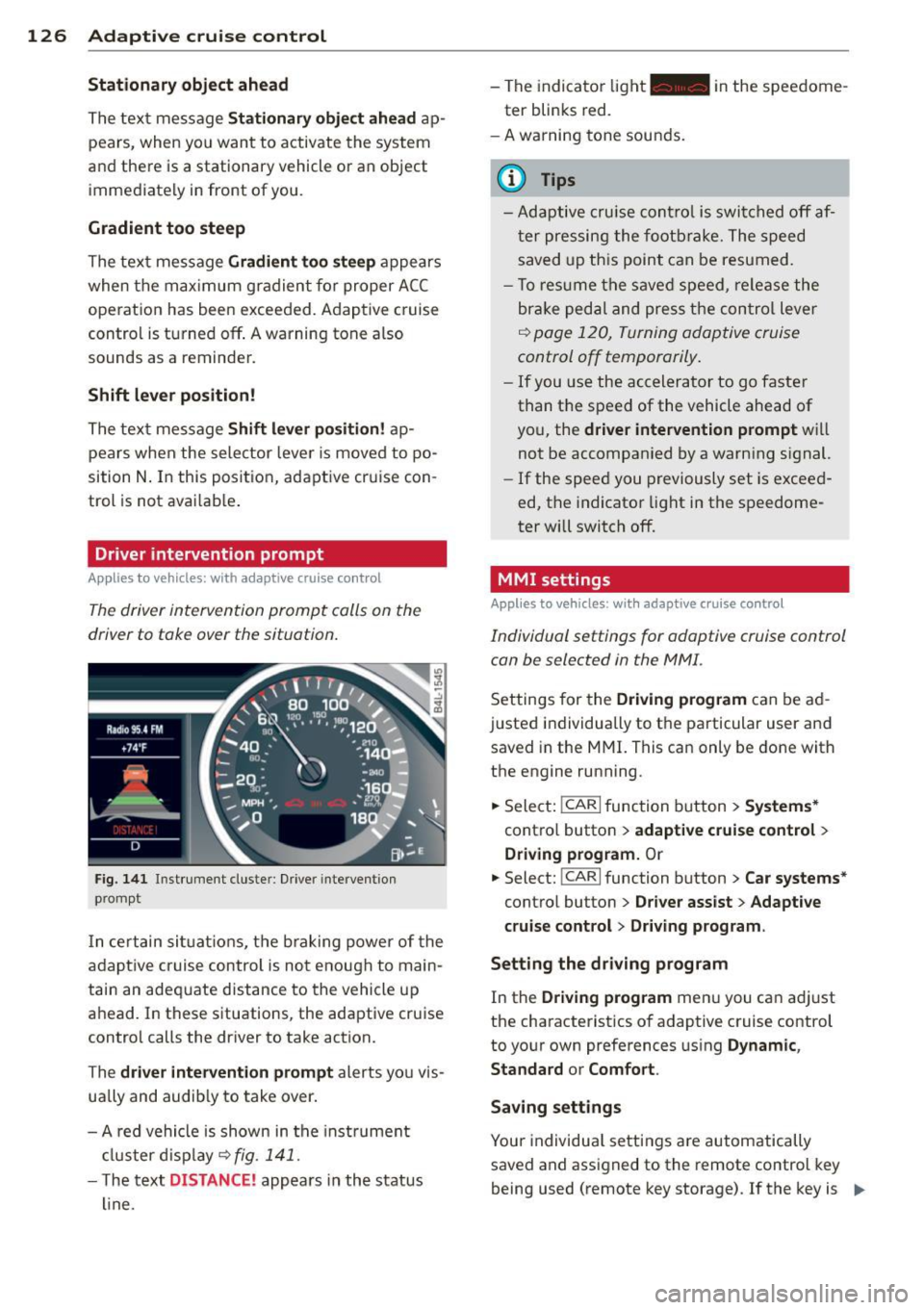
The driver intervention prompt calls on the
driver to toke over the situation.
Fig. 141 I n st rument clus te r: Drive r in terven tion
p romp t
In certain situations, the braking power of the
adapt ive cr uise control is not enough to main
tain an adequate distance to the vehicle up
ahead. In these situations, the adaptive cruise
control calls the driver to take action.
The
driver intervention prompt alerts you vis
ually and audib ly to take over.
- A red vehicle is shown in the instrument
cluster display ~
fig. 141 .
- The text DIS TANCE! appears in the status
line. -
The indicator light- in the speedome
ter blinks red.
- A warning tone sounds.
0) Tips
-Adaptive cruise control is switched off af
ter pressing the footbrake. The speed
saved up this point can be resumed.
- To res um e the saved speed , release the
brake pedal and press the control lever
~ page 120, Turning adoptive cruise
control off temporarily .
-If you use the accelerator to go faster
than the speed of the vehicle ahead of
you, the
driver intervention prompt will
not be accompanied by a warn ing s ignal.
- If the speed you previously set is exceed
ed, the indicator light in the speedome
ter will switch
off.
MMI settings
Applies to vehicles : with adaptive cruise contro l
Individual settings for adoptive cruise control
con be selected in the MMI.
Settings for the Driving program can be ad
justed individually to the particular user and
saved in the MMI. This can only be done with
the engine running .
.,. Select:
!CAR I function button> Systems*
cont ro l button > adaptive cruise control >
Driving program. Or
.,. Select: !CAR I function button > Car systems *
control button > Driver assist > Adaptive
cruise control
> Driving program .
Setting the driving program
In the Driving program menu you can ad just
the characteristics of adaptive cruise control
to your own preferences using
Dynamic,
Standard
or Comfort .
Saving settings
Your individual settings are automatically
saved and assigned to the remote control key
being used (remote key storage) . If the key is ..,_
Page 133 of 350
M
"' 0 _,
"". rl I.O
"' rl
"' rl
Audi side assist Lane Change Assistant
Description
App lies to vehicles: with side assist
The side assist helps you when changing
lanes .
AUDl Q7
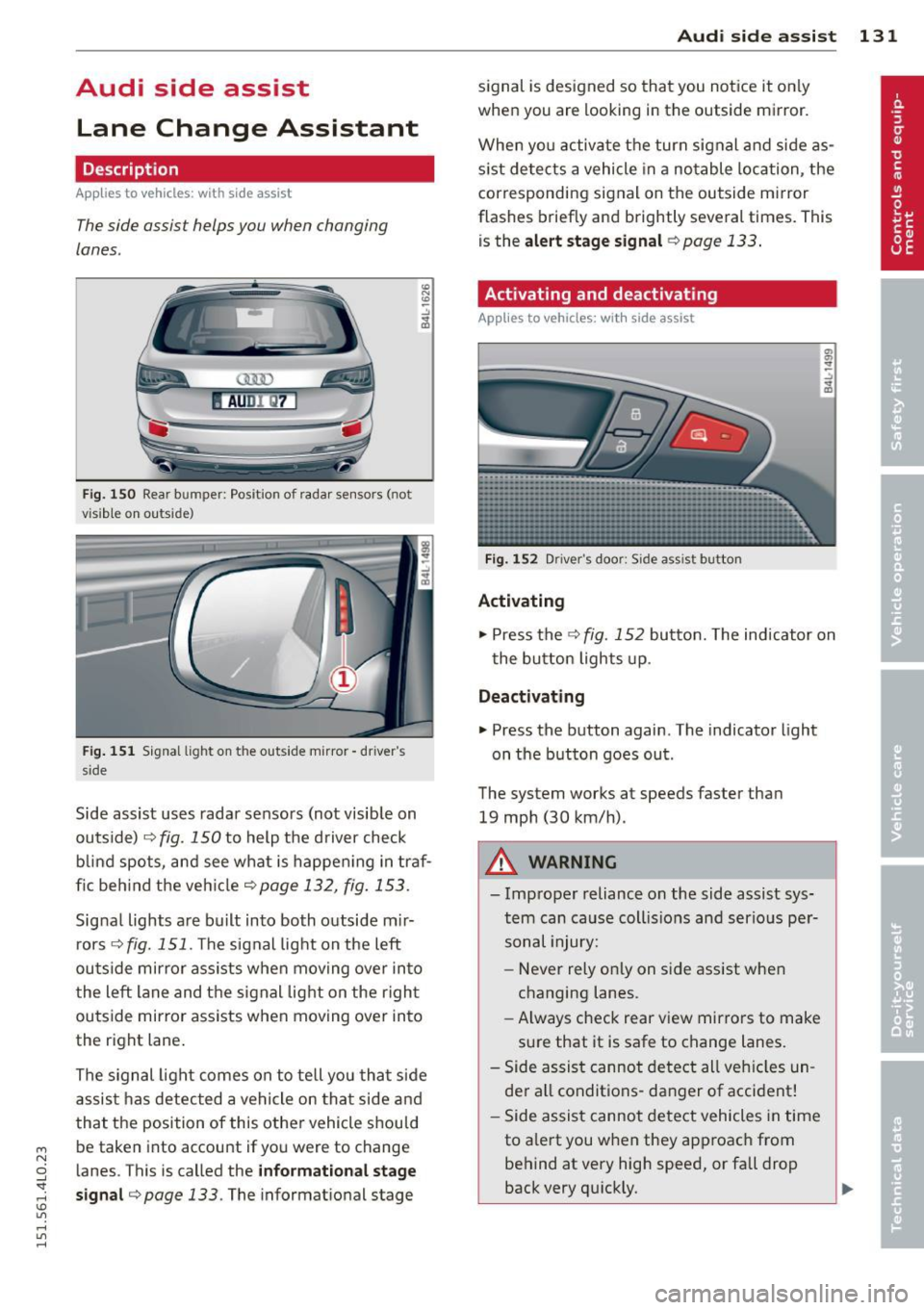
Fig. 150 Rear b umper: Pos it ion of radar sensors (not
v is ib le on outside)
F ig .
15 1 Signal light on the outside mirror -driver 's
s ide
~ -..:, .. (D
Side assist uses radar sensors (not visib le on
outside) ¢
fig. 150 to help the d river check
b lind spots, and see what is happen ing in traf
fic beh ind the veh icle
¢ page 132, fig. 153.
Signa l lights are bu ilt into both outside m ir
r ors ¢
fig. 151 . The signal light on the left
ou tside mirror assists when moving over into
the left lane and the signal light on the r igh t
ou tside mirror assists when moving over in to
the right lane .
The s ignal lig ht comes on to tell yo u that side
assis t has detec ted a vehicle on tha t side and
that t he position of this othe r vehicle shou ld
be taken into account if yo u were to change
l anes. This is called the
informationa l stage
sign al¢ page 133.
The informat ional stage
Aud i side assist 131
signal is designed so that you notice it on ly
when you are looking in the outside mirror.
When yo u activate the turn signal and side as
s ist de tects a vehicle in a no table location, the
corresponding signal on the outside mi rror
flashes briefly and brightly several times. Th is
is the
alert stage signal ¢page 133.
Activating and deactivating
Applies to vehicles: wit h side assist
Fi g.
1 52 D river 's doo r: Side assist button
Activating
.,. Press the
¢ fig. 152 button. The indicator on
t he button lights up .
Deactivating
.,. Press the button again. The indicator light
on the button goes ou t.
The system works at speeds faster than
19 mph (30 km/h) .
A WARNING
-Imp roper reliance on the side assist sys
tem can cause coll is ions and serio us pe r
sonal injury:
- Never rely on ly on side assist when
changing lanes.
- Always check rear view mirrors to make
su re that it is safe to change lanes.
- Side assist canno t detect all veh icles un
de r all conditions- danger of accident!
- Side assist canno t detect vehicles in time
to a lert you w hen they app roac h from
behind at very hig h speed, or fall drop
back very qu ickly.
~
Page 134 of 350
132 Audi side assist
-The radar sensor's vision can be reduced
or entirely blocked by rain, snow, and
heavy spray . This can result in side assist
not adequately detecting vehicles or, in
some cases, not detecting them at all.
Always keep an eye on the direction you
are traveling and the relevant area
around the vehicle.
- Please note that side assist indicates
there are approaching vehicles, or
vehicles in your blind spot, only after
your vehicle has reached a driving speed
of at least 19 mph (30 km/h).
- Side assist signal does not work around
tight corners (turning radius less than
328 feet, or 100 m).
- Side assist is no replacement for the driv
er's full attention. The driver alone is re
sponsible for lane changes and similar
driving maneuvers. Always keep an eye
on the direction you are traveling and the relevant area around the vehicle.
- To ensure that you do not adversely af
fect side assist, do not block the area on
the rear bumper where the radar sensors
are located with foreign objects (such as
stickers or bicycle racks).
- Make sure that the signal light on the
outside mirror is not blocked by stickers
or other items.
(Di Tips
- Side assist automatically deactivates if it
detects that the radar sensors are
blocked ¢
page 13 7. The indicator light
on the button goes out .
- The area on the bumper where the radar
sensors are located must consistently re
main free of snow, ice, and heavy soiling
so that side assist can function properly.
Follow the additional notes on
¢page 138.
-For vehicles with a factory installed tow
ing hitch* or a trailer hitch* that was in
stalled later according to factory specifi
cations, side assist is automatically deac- tivated
as soon as the electrical connec
tion to the trailer electrical socket is made
¢ page 137.
-For vehicles with a trailer hitch that was
not installed according to factory specifi
cations, switch off the side assist when
towing a trailer .
- Additional tinting on the front side win
dows can make it harder to see and cor
rectly understand the signal light on the
outside mirror.
- For Declaration of Compliance to United
States FCC and Industry Canada regula
tions¢
page 329.
Sensor detection area
Applies to vehicles: with side assist
-----··· .... ·--·--
@ / ,
--
ill b''T -
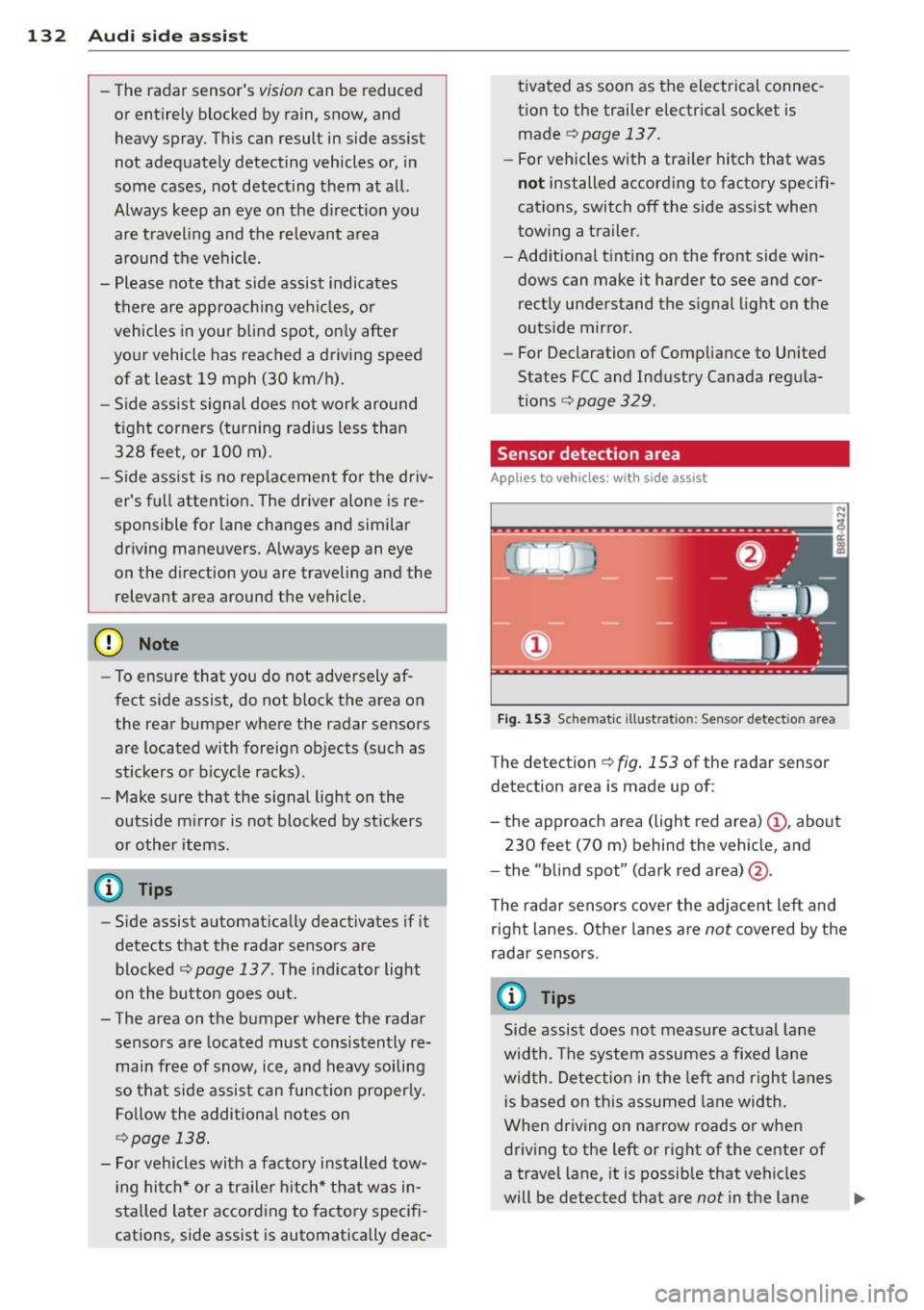
Fig. 153 Sc hematic illustration: Sensor detectio n area
The detection ¢ fig. 153 of the radar sensor
detection area is made up of:
-
- the approach area (light red area) (D, about
230 feet (70 m) behind the vehicle, and
- the "blind spot" (dark red area) @.
The radar sensors cover the adjacent left and
right lanes. Other lanes are
not covered by the
radar sensors.
(D Tips
Side assist does not measure actual lane
width. The system assumes a fixed lane
width . Detection in the left and right lanes
is based on this assumed lane width.
When driving on narrow roads or when
driving to the left or right of the center of
a travel lane, it is possible that vehicles
will be detected that are
not in the lane
Page 135 of 350
M
"' 0 ..J
"". rl I.O
"' rl
"' rl
next to the lane you are using
¢ page 137.
Operation
Applies to vehicles: with side assist
Side ass ist compares the distance and diffe r
ence in speed of detected vehicles with the
speed of your vehicle . Whenever the differ
ence in speed and d istance is registered as no
table if yo u were to change lanes, a signal
l ight appea rs o n the respective mirror.
T he s ignal ca n ligh t up if you are passed by a
ve hicle or if you are pass ing another vehicle .
If you pass another veh icle s lowly (difference
in speed less than 9 mph, or 15 km/h), the
signal light will come on as soon as the other
ve hicle is in your blind spot and is detected by
side assist . When the difference in speed is
g reater, the sig na l light will not come on.
Informational and alert stage signals
Applies to vehicles: with side assist
Side assist has two s ignal stages:
- th e inf ormat io na l stage s ignal, and
- the a lert stage signa l.
Side assist he lps you by usi ng the app ropriate
signal stage, depending on whether or not
you have activated the turn signal , and thus
have indicated that you are or are not chang
i ng lanes .
Informational sta ge signal
As long as you have not activated the t urn sig
na l, side assist informs you of detected
ve hicles that are registered as be ing in a nota
b le location if you were to change lanes .
Whenever the detected vehicle 's differe nce in
speed and dist ance is registered by side assist
as notable, the signa l light o n the respec tive
mirror prod uces m ute d illum inat io n.
The br ightness of the informat io nal stage sig
nal is designed not to be as inte nse, so that it
does not i nterfere wit h your view of the road
when yo u are driving and have no in ten tion of
changing lanes. When y ou look i n the o utsi de
Aud i side assist 13 3
mirror, you can clearly see the informational
stage sig nal.
Alert stage signal
W hen yo u activate the turn signal, and s ide
ass ist h as detecte d a vehicle in a not ab le lo ca
t ion on that pa rticul ar side , the signa l light o n
this s ide mi rror flashes brightly . The repeated
brief and bright flashing of the a le rt stage
s ignal reminds you to carefully check traffic to
the rear in the outside mirror and over your
sho ulder , so that you can sa fe ly comp lete t he
lane change
¢ A in Safety tips on page 138 .
@ Tips
The brightness of the s ignal light on the
outside m irrors can be adjusted with the
M MI ¢ page 136.
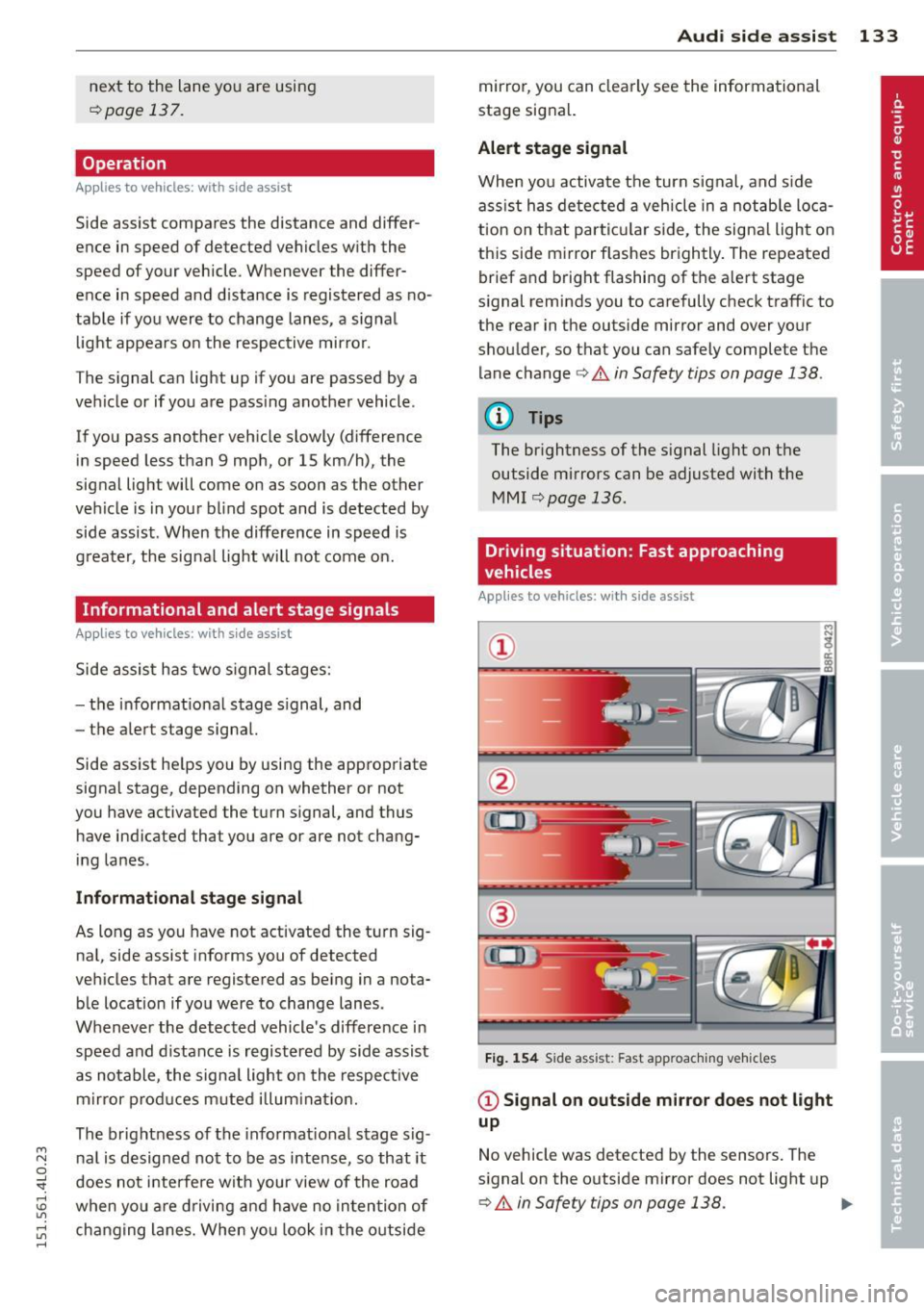
Driving situation: Fast approaching
vehicles
Applies to vehicles: wit h side assist
Fig. 1 54 Side ass ist: Fast app roac hing vehi cles
@ Signal on outside mirror does not light
up
No vehicle was detected by the sensors . The
s ignal on the o utside mirror does not light up
¢ A in Safety tips on page 138 . IJJ,,